4G Android One - Smartphone General Mobile - Free user manual and instructions
Find the device manual for free 4G Android One General Mobile in PDF.


User questions about 4G Android One General Mobile
0 question about this device. Answer the ones you know or ask your own.
Ask a new question about this device
Download the instructions for your Smartphone in PDF format for free! Find your manual 4G Android One - General Mobile and take your electronic device back in hand. On this page are published all the documents necessary for the use of your device. 4G Android One by General Mobile.
USER MANUAL 4G Android One General Mobile
natural_image
Smartphone displaying the Google home screen with app icons on its screen (no readable text or symbols beyond UI elements)
natural_image
Black foldable smartphone with 'GENERAL ROSELE' branding on front panel (no additional text or symbols visible)For user manuel please visit www.generalmobile.com/download

natural_image
Color palette bar with grayscale gradient and a black crosshair symbol (no text or labels)


natural_image
Color palette bar with grayscale gradient and a black crosshair symbol (no text or labels)

natural_image
Color palette bar with grayscale shades and a central crosshair symbol (no text or labels)
PARAZIT
natural_image
Line drawing of a smartphone showing internal components and a screen (no text or symbols)Türkçe

natural_image
Color palette bar with grayscale shades and a central crosshair symbol (no text or labels)natural_image
Two views of a smartphone showing internal components and wiring (no text or symbols)natural_image
Two technical line drawings of a smartphone showing internal components and casing (no text or symbols)
text_image
Q'W'ER'T'Y'U'I'O'P' A S D F G H J K L Z X C V B N M 7123 Boşluk tuşu Sil

Metin girmek
natural_image
Color palette bar with grayscale shades and a central crosshair symbol (no text or labels)5. İletişim
5. 1 Arama yapma
natural_image
Color palette bar with grayscale gradient and a central crosshair symbol (no text or labels)6.1.1 Resim çekme
text_image
General MobileTürkçe


General Mobile Inc., 363 7th Avenue 4th Floor
New York, USA
info@generalmobile.com
İthalatçı Firma
Your General Mobile 4G is an Android One phone. It runs Android Marshmallow and, unlike other phones, gets updated to the new version of Android soon after it is released*. That means you get new features, the most apps, beautiful design, and built-in security on a phone that's fast and responsive. Android One phones also have the best Google apps built in, with access to over a million more apps, games, and books on the Google Play Store.
*Receives updates for up to 2 years.
Dear Customer;
Thank you for choosing General Mobile 4G mobile phone. The purpose of this manual is to introduce the functions of the device and to describe the points required to be known. Please read this manual carefully to use your device efficiently and enjoyably.
- For your safety
Read these simple instructions. Any failure to follow the instructions may be dangerous or illegal.
SWITCH OFF AT HOSPITALS
Follow any restrictions. Switch the device off near medical equipment. Do not use the device where blasting is in progress.
Please keep this cell phone away from children, as they could mistake it for a toy, and hurt themselves with it. Don't try to modify the phone except by the professional.
English


Warning!
Only use the authorized spare parts, otherwise it may damage the phone and the warranty will be void. And it may be dangerous.
SWITCH OFF WHILE REFUELING
Don't use the phone at a refueling point. Don't use near fuel or chemicals.
SIM CARD IS PORTABLE
Keep your phone, phone parts and accessories out of children's reach.
Notice: The T-Flash Card can be used as a Memory Disk, the USB cable is necessary.

BATTERY
Please do not destroy or damage the battery, it can be dangerous and cause fire.
Please do not throw battery in fire to avoid danger. When battery cannot be used, please dispose in an environmental safe method.
If the battery or the charger is broken or old, please stop using them. And replace with certified genuine battery.
USE QUALITY EQUIPMENT
Use our authorized equipment to avoid danger.
ROAD SAFETY COMES FIRST
Give full attention while driving; pull off the road or park before using your phone. Please follow traffic rules of local city/town.
English

natural_image
Color palette bar with grayscale shades and a central crosshair symbol (no text or labels)INTERFERENCE
All wireless devices may be susceptible to cause interference, which could affect performance.
SWITCH OFF IN AIRCRAFT
Wireless devices can cause interference in aircraft. It's not only dangerous but also illegal to use mobile phone in an aircraft.
2. Learn about the phone
| Button | Press | Press & hold |
| Power key(Right side) | Turns on/off the screen. | Opens a menu with options for Power off the phone. |
| Volume Up/Down(Right side) | When a call is in progress, Increases or decrease the call volume. When the phone is ringing, silences the ringer. On the Home screen when no calls in progress, Increase or decreases the ringtone volume, or sets the phone to be silent instead of ringing. In other applications, controls the volume of music, spoken directions, and other audio. | Quickly increasing the ringtone volume to maximum or minimum. |


3. Before using
Insert SIM card
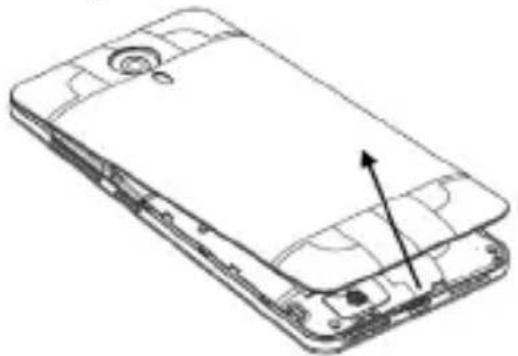
To insert Micro SIM card:
- Switch off the mobile phone and remove the rear cover and battery.
natural_image
Line drawing of an open smartphone showing internal components and a directional arrow (no text or symbols)English


natural_image
Color palette bar with grayscale shades and a central crosshair symbol (no text or labels)- Insert the SIM card correctly and memory card in the card slot(s).

natural_image
Two views of a smartphone showing internal components and wiring (no text or symbols)- Finally insert the battery and replace the rear cover of the mobile phone.

natural_image
Two technical line drawings of a smartphone showing internal components and casing (no text or symbols)Note: The SIM card is a small object; please keep the card out of the reach of children to avoid swallowing the card by accident. Do not touch the metal surface of the SIM card and keep it away from electromagnetism to avoid loss and damage of the data. You will not be able to connect to the network if the SIM card is damaged.
Charger
- Connect the charger to the charger jack, which is located at the bottom of the phone.
- Next, connect the charger to a power socket, the charging starts, with the charging icon in an
English

natural_image
Color palette bar with grayscale shades and a central crosshair symbol (no text or labels)animated state.
- When the charging icon becomes static, it indicates that the battery is full.
- Disconnect the charger from the power socket and the phone.
Note: Slight heating during charging is normal. It indicates that the battery is full, when the charging icon becomes static.
Android, Google, Google Play and other marks are trademarks of Google Inc.
Android™ Marshmallow (and gets the next version soon after it's released!)

| TR | HU | NG | DZ | ZA | KG |
| RU | RO | EG | KE | MD | YM |
| UA | BY | AM | GH | GE | UZ |
| PL | GR | SA | SN | KZ | TJ |
| CZ | UAE | MA | PK | AZ |

English

natural_image
Color palette bar with grayscale gradient and a central crosshair symbol (no text or labels)


GENERAL
M O B | L E
Uygunluk Bildirimi (R&TTE)

Declaration of Conformity (R&TTE)
| We declare that product | |
| Product name: | LTE-FDD/HSDPA/UMTS/GPRS/GSM/EDGE Mobile Phone with Bluetooth and WiFi |
| Model: | 4G (Brand: General Mobile) |
| is in conformance to below mentioned Regulations. | |
| (R &TTE Regulations): We hereby declare that the above named product is in confirmance to all the essential requirements of the Directive 1995/5/EC and permission of the trademark Telefication BV CE0560. To which this declaration relates, is in conformity with the following standards and/or other normative documents: | |
| Standards: | EN 62311:2008/EN62209-2 :2010EN 50360:2001 + A1: 2012/EN 62209-1:2006EN 62479:2010/EN 50566:2013/AC:2014EN 60950-1:2006+A11:2009+A1:2010+A12:2011+A2:2013EN 50332-1:2000EN 50332-2:2003EN 301 489-1 V1.9.2/-3 V1.6.1/-7 V1.3.1/-17 V2.2.1/-24 V1.5.1EN 300 328 V1.8.1EN 301 511 V9.0.2EN 301 908-1V6.2.1/EN 301 908-2V6.2.1/EN 301 908-13V6.2.1EN 300440-1 V1.6.1/EN 300440-2 V1.4.1 |
| Manufacturer: | GENERAL MOBILE INC.363 7th Avenue 4th Floor New York NY 10001 New York - USA |
| We declare that tests and reports were prepared and completed by Telefication BV in conformity.TELEFICATION BV,Edisonstraat 12A, 6902 PK Zevenaar, The NetherlandsEU Identification Number: 0560 | |
| For Further Information please contact (info@telefication.com) | |

30.04.2015
Muzaffer Gölcü
General Manager

text_image
GENERAL MOBILE INC. NEW YORK USA GENERAL MOBILE 01/10/001 Floor New York

natural_image
Color palette bar with grayscale gradient and a black crosshair symbol (no text or labels)


natural_image
Color palette bar with grayscale gradient and a central crosshair symbol (no text or labels)


natural_image
Color palette bar with grayscale shades and a central crosshair symbol (no text or labels)
GENERAL MOBILE
www.generalmobile.com

ETSI TS 123.038 V8.0.0 ve ETSI TS 123.040 V8 1.0