
DIRC300BSS - Hot plate DANBY - Free user manual and instructions
Find the device manual for free DIRC300BSS DANBY in PDF.


| Product Type | Electric Range (Cooktop + Oven) |
| Brand | Danby |
| Model | DIRC300BSS |
| Dimensions (with backsplash) | 96.3-94.3 cm (37.9-37.12 in) height, 70 cm (27.6 in) depth, 76 cm (29.9 in) width |
| Weight | Not specified (approx. 70-90 kg) |
| Power Supply | 240V / 40-50A, requires dedicated 4-prong outlet |
| Cooktop Burners | 4 (Left Front 2100W, Left Rear 1500W, Right Front 1500W, Right Rear 3700W) |
| Oven Functions | Bake, Broil, Warm, Proof, Convection Bake, Convection Broil, Convection Roast, Air Fry, Self-Clean, Preset Modes |
| Oven Capacity | Not specified (approx. 5.0-6.0 cu ft) |
| Temperature Range (Oven) | 170-550°F (77-288°C) for most modes, Self-Clean up to 806°F (430°C) |
| Control Type | Electronic touch controls with LED display, knob for cooktop |
| Safety Features | Anti-tip bracket, child lock, hot surface indicator lights, automatic oven shut-off (Cook Time) |
| Cleaning | Self-clean cycle, ceramic glass cooktop cleaner recommended, stainless steel cleaner |
| Warranty | 24 months parts and labor (in-home service limited to 100 km from service center) |
| Included Accessories | Backsplash, air fry basket, 3 oven racks, anti-tip bracket, grease tray, meat probe |
| Repairability | User-replaceable oven light (25W G-type), professional service required for electrical components |
Frequently Asked Questions - DIRC300BSS DANBY
User questions about DIRC300BSS DANBY
0 question about this device. Answer the ones you know or ask your own.
Ask a new question about this device
Download the instructions for your Hot plate in PDF format for free! Find your manual DIRC300BSS - DANBY and take your electronic device back in hand. On this page are published all the documents necessary for the use of your device. DIRC300BSS by DANBY.
USER MANUAL DIRC300BSS DANBY
Owner's Manual....1 - 37
Danby Products Limited, Guelph, Ontario, Canada N1H 6Z9
Danby Products Inc. Findlay, Ohio, U.S.A. 45840
www.danby.com

Printed in China | Imprimé en Chine | Impreso en China
2024.07.25
Welcome to the Danby family.
We are proud of our quality products and we believe in dependable service. We suggest that you read this owner's manual before plugging in your new appliance as it contains important operation information, safety information, troubleshooting, and maintenance tips to ensure the reliability and longevity of your appliance.
You are entitled to the warranty coverage as described in the owner's manual provided with your new appliance.
- Please write down your appliance information below. You must keep the original proof of purchase receipt to validate and receive warranty services.
- Register your product online and receive a FREE 2 MONTH WARRANTY EXTENSION after filling out a product survey, at www.danby.com/support/product-registration/
Model Number:
Serial Number:
Date of Purchase:
Need Help?
- Read your Owner's Manual for installation help, troubleshooting, and maintenance assistance.
- Visit www.Danby.com to access self-service tools, FAQs and much more by searching your model number in the search bar.
- For the Quickest Customer Service, please fill out the web form at www.danby.com/support. Your submission will go directly to an expert on your particular appliance. Our average response times are between 20 minutes and 2 hours, during EST business hours.
- Call 1-800-263-2629 - please note that during peak hours, hold times can exceed one hour.

Important Safety Information
READ AND FOLLOW ALL SAFETY INSTRUCTIONS
WARNING - TIP OVER HAZARD
- A child or adult can tip the appliance and be killed.
- Verify the anti-tip bracket has been properly installed to the floor or wall.
- Ensure the anti-tip bracket is re-engaged when the range is moved.
- Do not operate the range without the anti-tip bracket in place and engaged.
- Failure to follow these instructions can result in death or serious burns to children or adults.
ANTI-TIP DEVICE
To reduce the risk of the range tipping by abnormal usage or improper door loading, the range must be secured by installing an anti-tip device.
Note: If the range is ever relocated the anti-tip bracket must be removed and installed at the new location.
WARNING
SUFFOCATION AND RISK OF CHILD ENTRAPMENT
To avoid the possibility of child entrapment please take the following precautions before throwing out the appliance:
- Remove the oven door completely
- Never allow children to operate, play with or crawl inside the electric range
NOTICE - BEFORE FIRST TIME USE
Before use of this range for the first time, the heating elements have a protective coating, which must be burned off before use. To do this:
- Remove all packaging from the inside of the oven
- Ensure door is closed
- Press the bake function on the control panel. The display screen will light up with the default temperature and cooking timer.
- Set the temperature at 500^ F ( 260^ C) by pressing the number keypad on the control panel. If the temperature is exceeded, the unit will beep when the Start Button is pressed.
- Click "Start" to begin the operation.
- Let the oven operate for 30 minutes with the door closed and the inside empty.
- Turn the oven off and open the door to allow it to cool.
NOTE
When the actual temperature inside the oven is less than 170^ F ( 77^ C), the digital display will show "LO". The display will show the actual temperature inside the oven until the set temperature is reached and will then continue to display the set temperature.
NOTE
Any odor that may be detected during the initial set up is due to the evaporation of substances used to protect the oven during storage.
SAVE THESE INSTRUCTIONS!

Important Safety Information
READ AND FOLLOW ALL SAFETY INSTRUCTIONS
AREAS NEAR THEM
Heating elements on the surface or in the interior of the appliance may be hot even though they are dark in colour. Areas near the heating elements may become hot enough to cause burns. During and after use do not touch or let clothing or other flammable materials contact the heating elements or areas near them until they have had sufficient time to cool. Surfaces of the appliance may become hot enough to cause burns, among them are the cook top, oven vent openings and surfaces near these openings, oven doors and oven windows.
DANGER - GREASE FIRES
In the event of a fire, never pick up a flaming pot or pan. Turn the element off if it is safe to do so. Extinguish the fire with a dry chemical or foam-type extinguisher.
Do not use water on grease fires. Water will spread the grease and will not extinguish the fire. Smother the fire with a tight fitting pot lid, cookie sheet or flat tray or use dry chemical or foam-type extinguisher.
If there is a fire in the oven while in use, smother the fire by closing the oven door and turning the oven off or use dry chemical or foam-type extinguisher.
DANGER - FIRE RISKDO NOT TO
- It is recommended that this appliance be connected to a separate circuit that is not shared with any other appliance.
- Never clean appliance parts with flammable fluids. These fumes can create a fire hazard or explosion. Never use or store gasoline or other flammable vapors or liquids inside or in the proximity of this appliance, failing to do so may result in a fire hazard or explosion.
- Before cleaning or servicing this appliance, unplug the appliance completely from the electrical outlet or disconnect the range power supply at the household distribution panel by removing the fuse or switching off the circuit breaker. Failure to do so can result in electrical shock or death.
- Do not attempt to repair or replace any part of your appliance unless it is specifically recommended in this manual. All other servicing should be referred to a qualified service technician.
- For your safety, this appliance should never be used as a source of heat or as a space heater. The cooktop elements should not be operated without proper cookware.
- All openings in the wall behind the appliance and the floor under the appliance shall be sealed.
- Keep the area around the appliance clear and free from combustible materials, gasoline and other flammable vapors. Always keep combustible wall coverings, curtains or drapes a safe distance from the range.
- Do not obstruct the flow of air around the appliance.
- Storage in or on the appliance: flammable materials should not be stored in an oven or near cooktop elements.
- Do not cover any slots, holes or passages in the oven bottom or cover an entire rack with materials such as aluminum foil.
SAVE THESE INSTRUCTIONS!

Important Safety Information READ AND FOLLOW ALL SAFETY INSTRUCTIONS
GENERAL SAFETY REQUIREMENTS
Ensure the appliance is properly installed and grounded by a qualified technician.
Children should not be left alone or unattended in the area where the appliance is in use. Children should never be allowed to sit or stand on any part of the appliance.
Do not store items of interest to children in cabinets above a range or on the back guard of a range. Children climbing on the range to reach items could be seriously injured.
To eliminate the risk of burns or fire by reaching over heated surface units, cabinet storage space located above the surface units should be avoided. If cabinet storage is to be provided, the risk can be reduced by installing a range hood that projects horizontally a minimum of 5 inches (12.7 cm) beyond the bottom of the cabinets.
Loose fitting or hanging garments should never be worn while using the appliance.
Use only dry pot holders. Moist or damp pot holders on hot surfaces may result in burns from steam. Do not let the pot holder touch hot heating elements. Do not use a towel or other bulky cloth.
If power is lost to an electric cooktop while a surface element is ON, the surface element will turn back on as soon as power is restored. In the event of power loss, failure to turn all surface element knobs to the OFF position may result in ignition of items on or near the cooktop, leading to serious injury or death.
This range is designed and manufactured solely for the cooking of domestic (household) food and is not suitable for any non domestic application and therefore should not be used in a commercial environment. The range warranty will be void if the range is used within a non domestic environment.
WARNING
To reduce the risk of burns, do not move this appliance while it is hot. To reduce the risk of injury due to tipping of the appliance, verify the re-installation of this appliance into the anti-tipping device provided after returning the appliance to the original installed position.
WARNING
The manufacturer declines all liability for injury to persons or damage to property cause by incorrect or improper use of the range.
SAVE THESE INSTRUCTIONS!

Important Safety Information READ AND FOLLOW ALL SAFETY INSTRUCTIONS
COOKTOP SAFETY REQUIREMENTS
- Use the proper pan size. This appliance is equipped with four burners of different sizes. Select utensils that have flat bottoms large enough to cover the surface of the heating element. The use of undersized utensils will expose a portion of the heating element to direct contact and may result in ignition of clothing. Proper relationship of utensil to burner will also improve efficiency.
- Never leave the appliance unattended while in use. Boil over causes smoking and greasy spills can ignite.
- Never leave oil unattended while frying. If allowed to heat beyond its smoking point, oil may ignite resulting in fire that may spread to surrounding cabinets. Use a deep fat thermometer whenever possible to monitor oil temperature.
- To avoid oil spillover and fire, use a minimum amount of oil when shallow pan-frying and avoid cooking frozen foods with excessive amounts of ice.
- Only certain types of glass, ceramic, earthenware or other glazed utensils are suitable for range top service without breaking due to sudden change in temperature.
- To reduce risk of burns, ignition of flammable materials and spillage due to unintentional contact, the handle of a utensil should be positioned so that it is turned inward and does not extend over adjacent burners.
- Do not cook on broken cooktop. If the cooktop should break, cleaning solutions and spill overs may penetrate the broken cooktop and create a risk of electric shock. Contact a qualified technician immediately.
- Do not use a griddle or long pan on more than one burner at once.
- Clean Cook-Top With Caution - If a wet sponge or cloth is used to wipe spills on a hot cooking are, be careful to avoid steam burn. Some cleaners can produce noxious fumes if applied to a hot surface.
- Do not place metallic objects such as knives, forks, spoons and lids on the cooktop surfaces since they can get hot.
OVEN SAFETY REQUIREMENTS
Use care when opening the door. Allow hot air or steam to escape before removing or replacing food.
Do not heat unopened food containers. Build up of pressure may cause the container to burst and result in injury.
Keep oven vents unobstructed.
Always place oven racks in the desired location while the oven is cool. If the rack must be moved while the oven is hot, do not let the pot holder contact the hot heating element in the oven.
Do not use the oven if a heating element develops a glowing spot during use or shows other signs of damage. A glowing spot indicates the heating element may fail and present a potential burn, fire, or shock hazard. Turn the oven off immediately and have the heating element replaced by a qualified service technician.
Do not line the oven walls or racks with aluminum foil.
Do not place shelves, pans, baking trays, broil trays or other cooking utensils in the bottom of the oven chamber. Always place on an oven shelf.
Never clean the oven with any high pressure steam cleaning devices.
Do not leave anything on the top of the oven vent. Never cover the oven vent opening with aluminum foil or any other material.
SAVE THESE INSTRUCTIONS!

Important Safety Information READ AND FOLLOW ALL SAFETY INSTRUCTIONS
This equipment has been tested and found to comply with the limits for Consumer ISM equipment, pursuant to part 18 of the FCC Rules. These limits are designed to provide reasonable protection against harmful interference in a residential installation.
This device complies with part 18 and 15 of the FCC Rules.
Operation is subject to the following 2 conditions:
1) This device may not cause harmful interference, and
2) This device must accept any interference received, including interference that may cause undesired operation.
This equipment generates, uses and can radiate radio frequency energy and if not installed and used in accordance with the instructions, may cause harmful interference to radio communications. However, there is no guarantee that interference will not occur in a particular installation. If this equipment does cause harmful interference to radio or television reception, which can be determined by turning the equipment off and on, the user is encouraged to try to correct the interference by one or more of the following measures:
- Reorient or relocate the receiving antenna.
- Increase the separation between the equipment and the receiver.
- Connect the equipment to an outlet on a different circuit from that to which the receiver is connected.
- Consult the dealer or an experienced radio or TV technician for help.
Changes or modifications not approved by the party responsible for FCC and Industry Canada compliance could void the user's authority to operate the equipment.
This device complies with Canadian CAN ICES-001 / NMB-001.
This device complies with Canadian CAN ICES-003(B) / NMB-003(B).
SUPPLIER'S DECLARATION OF CONFORMITY
47 CFR § 2.1077 Compliance Information
SAVE THESE INSTRUCTIONS!

Important Safety Information READ AND FOLLOW ALL SAFETY INSTRUCTIONS
GROUNDING INSTRUCTIONS
This appliance must be grounded. Grounding reduces the risk of electrical shock by providing an escape wire for the electrical current.
When this appliance is fitted with a power cord that has a grounding wire with a 4-prong plug. The power cord must be plugged into an outlet that is properly grounded. If the outlet is not a 4-prong plug, it must be replaced with a properly grounded 4-prong wall outlet. The rating plate indicates the voltage and frequency the appliance is designed for.
WARNING - Improper use of the grounding plug can result in a risk of electric shock. Consult a qualified electrician if the grounding instructions are not completely understood, or if doubt exists as to whether the appliance is properly grounded.
Do not connect the appliance to extension cords, adapters or together with another appliance in the same wall outlet.
Do not splice the power cord. Do not under any circumstances cut or remove the ground prong from the power cord.
If the power supply cord is damaged, it must be replaced by the manufacturer, its service agent or similar qualified person in order to avoid hazard.
Note: Turning the appliance off does not disconnect the appliance from the power supply.
It is recommended that the power cord and the plug be placed parallel with the floor so that the cord runs parallel with the floor.
INSTALLATION INSTRUCTIONS
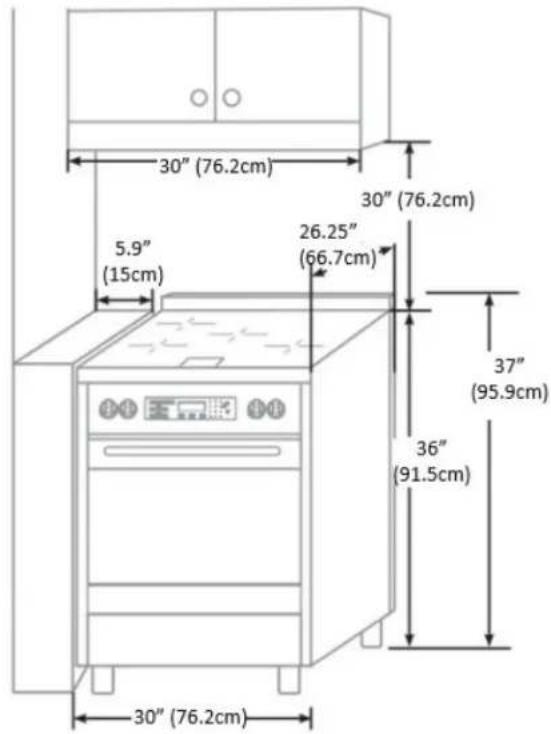
Installation Measurements
NOTE: Range can be raised approximately 1 inch (2.5 cm) by adjusting the leveling legs. The front of door and drawer may extend farther forward depending on styling.
natural_image
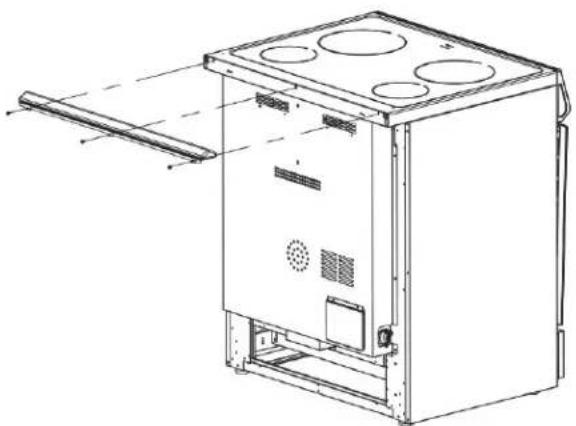
Technical line drawing of a multi-level industrial oven or control unit with mounting holes and ventilation ducts (no text or symbols)BACKSPLASH INSTALLATION:
Install the backsplash to rear of the range with the screws provided.
Power Supply

A: Access Panel to Electrical Supply Cord
B: Power Cord Opening
C: Recessed Area

NOTE: To connect to an outlet in the wall, the electrical outlet must be recessed. If the electrical outlet is on the floor, it must be either recessed or surface mounted.
INSTALLATION INSTRUCTIONS
IMPORTANT
Disconnect power before servicing. Improper connection of aluminum house wiring and copper appliance leads can result in an electrical hazard or fire. If the home has aluminum wiring, only use connections designed and UL listed for joining copper to aluminum and precisely follow the manufacturer's recommend procedure. Aluminum-to-Copper connections must conform with local codes. Use 8-gauge copper or 6-gauge aluminum wire. Electrically ground range.
CONNECTION TO HOUSE ELECTRICAL SUPPLY
Be sure your appliance is properly installed and grounded by a qualified technician.
- A circuit breaker is recommended.
- The range can be connected directly to the circuit breaker box (or fused disconnect) through flexible or nonmetallic sheathed, copper or aluminum cable.
- Allow at least 6 ft (1.8M) of slack in the line so that the range can be moved if servicing is every necessary.
- A UL listed conduit connector must be provided at each end of the power supply cable (at the range and at the junction box).
The wiring diagram is included with the range. This appliance is manufactured with the chassis connected to a neutral by a green ground jumper wire. After making sure that the power has been turned off, connect the flexible conduit from the range to the junction box using a UL listed conduit connector. The Grounded Neutral and Ungrounded Neutral Graphics on the following pages and the instruction provided, present the most common way of connecting the range. Your local codes and ordinances take precedence over these instruction. Complete electrical connections according to local codes and ordinances.
PARTS NEEDED:
If using a power supply cord:
- UL listed power supply cord kit marked for use with ranges. The cord should be rated at 250V minimum, 40 amps or 50 amps that is marked for use with nominal 1 3/8" (3.5 cm) diameter connection opening and must end in ring terminals or open-end spade terminals with upturned ends.
- UL listed strain relief.
If direct wiring:
• Flexible Metal Conduit
• UL Listed Conduit Connector
- 4-wire or 3-wire Electrical Cable (where local codes permit a 3-wire connection)
- UL Listed Wire Connectors
NOTES:
- Check local codes.
- Check existing electrical supply.
INSTALLATION INSTRUCTIONS
IMPORTANT
Only for models sold in the United States. This model does not include a pre-installed power cord. Use the following wiring instructions before using the range. The power cord is not provided. Follow all local and national wiring codes and standards.
3-WIRE POWER CABLE INSTALLATION
WARNING: Use this method only if local codes permit connecting chassis ground conductor to neutral wire of power supply cord.
- Feed the electric cable wires through the flexible metal conduit.
NOTE: Allow enough slack to easily attach the wires to the terminal block.
- Remove the access panel located on the bottom righ-hand side of the back panel to uncover the electrical terminal block.
- Install a UL listed strain relief to the flexible metal conduit opening in the support bracket and fully tighten the strain relief nut.
- Feed the flexible metal conduit through the strain relief
NOTE: Allow enough slack to easily attach the wiring to the terminal block.
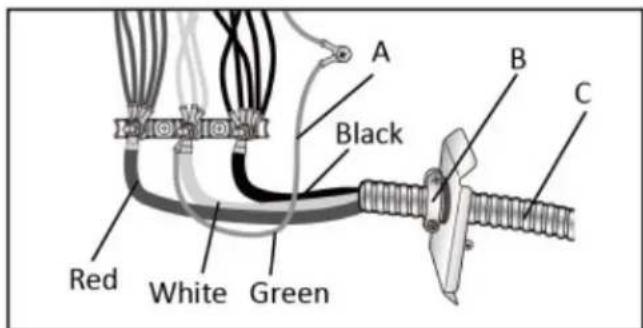
A: Jumper Wire (not provided)
B: UL Listed Strain Relief
C: Conduit
- Using a 5/16" nut driver and one of the 10-32 hex nuts, connect the ground (green or bare) wire from the flexible metal conduit to the center terminal block post along with the green jumper wire from the range.
- Using 10-32 hex nuts, connect the red and black wires from the power cord to the outer posts of the terminal block with the corresponding red and black wires from the range.
- Tighten the hex nuts completely and then verify the connection.
- Position the lower part of the strain relief under the flexible metal conduit and tighten the strain relief screws.
NOTE: Before tightening, make sure the strain relief is positioned over the flexible metal conduit and NOT the wires.
- Replace the electrical access panel.
- Tuck excess conduit into the recessed are of the back panel.
INSTALLATION INSTRUCTIONS
IMPORTANT
Grounding through the neutral conductor is prohibited for new branch-circuit installations (1996 NEC); mobile homes; and recreational vehicles, or in an area where local codes prohibit grounding through the neutral conductor. For installations where grounding through the neutral conductor is prohibited, see the Ungrounded Neutral graphic. Use grounding terminal or lead to ground unit. Connect neutral terminal or lead to branch circuit neutral in usual manner.
3-WIRE POWER CABLE CONNECTION TO HOUSE ELECTRICAL SUPPLY
NOTE: Use the 3-wire cable from home power supply where local codes permit a 3-wire connection.
- Disconnect power.

A: Junction Box
B: Black Wires
C: Neutral (white) Wire
D: Ground (green or bare) Wire
E: Cable from range
F: UL Listed Conduit Connector
G: Red Wires
H: UL Listed Wire Connectors
I: House Electrical Supply
- Connect the 2 black wires together using a UL listed wire connector.
- Connect the neutral (white) wire and the ground (green or bare) wire (of the range cable) using a UL listed wire connector.
- Connect the 2 red wires together using a UL listed wire connector.
- Install junction box cover.
INSTALLATION INSTRUCTIONS
IMPORTANT
Only for models sold in the United States. This model does not include a pre-installed power cord. Use the following wiring instructions before using the range. The power cord is not provided. Follow all local and national wiring codes and standards.
4-WIRE POWER CABLE INSTALLATION
NOTE: Use this method for new branch-circuit-installations (1996 nec), mobile homes, recreational vehicles, or in an area where local codes prohibit grounding through the neutral wire.
- Feed the electric cable wires through the flexible metal conduit.
NOTE: Allow enough slack to easily attach the wires to the terminal block.
- Remove the access panel located on the bottom right-hand side of the back panel to expose the electrical terminal block.
- Install a UL listed strain relief to the flexible metal conduit opening in the support brack and fully tighten the strain relief nut.
- Feed the flexible metal conduit through the strain relief. Allow enough slack to easily attach the wiring to the terminal block.
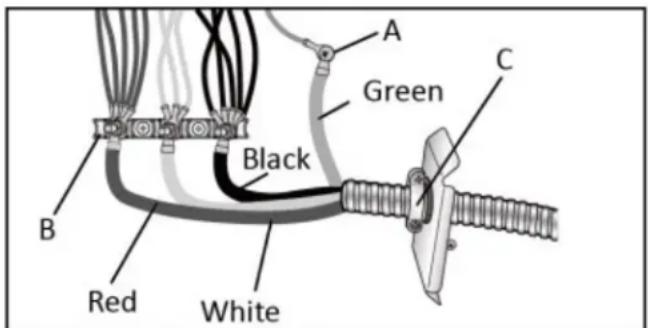
A: Ground Screw
B: Terminal Block
C: UL Listed Strain Relief
- Remove the green jumper wire from under the ground screw and replace with the green wire from the power cord, tighten ground screw. from the flexible metal conduit and tighten ground screw.
- Loop the green jumper wire removed from the ground screw back onto its end that is fastened to the center post on the terminal block.
- Use a 5/15" nut driver to connect the neutral (white) wire to the center terminal block post with one of the 10-32 hex nuts.
- Using 10-32 hex nuts, connect the red and black wires from the power cord to the outer posts of the terminal block with the corresponding red and black wires from the range.
- Tighten the hex nuts completely and then verify the connection
- Position the lower part of the strain relief under the flexible metal conduit and tighten the strain relief screws.
NOTE: Before tightening, make sure the strain relief is positioned over the flexible metal conduit and NOT the wires.
- Replace the electrical access panel.
- Tuck excess conduit into the recessed area of the back panel.
INSTALLATION INSTRUCTIONS
IMPORTANT
Use the 4-wire cable from home power supply where local codes do not allow grounding through neutral, new branch circuit installation (1996 NEC), mobile homes and recreational vehicles, new construction6
4-WIRE POWER CABLE CONNECTION TO HOUSE ELECTRICAL SUPPLY
Ungrounded Neutral
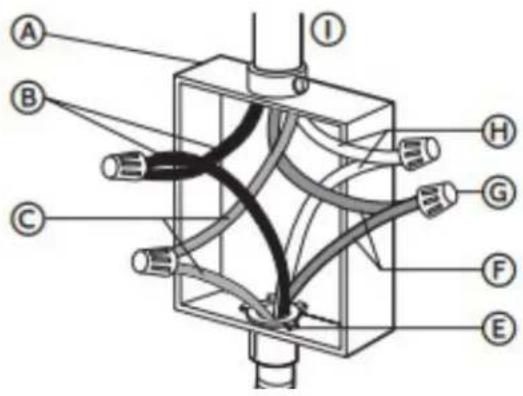
A: Junction Box
B: Black Wires
C: Ground (green or bare) Wires
D: Cable from range
E: UL Listed Conduit Connector
F: Red Wires
G: UL Listed Wire Connectors
H: Neutral (white) Wires
I: House Electrical Supply
INSTALLATION INSTRUCTIONS
Gather the required tools and parts before starting installation.
REQUIRED TOOLS
- Tape Measure
- Flat Blade Screwdriver
- Phillips Screwdriver
- Level
- Cordless Electric Drill
- Hammer
- Wrench or Pliers
- Metal Saw
- Metal Snips or Large Wire Cutters
- 15/N6" Combination Wrench
- 3/8" Nut Driver
- 1/4" Nut Driver
- 1/8" (3.2mm) Drill Bit (for wood floors)
- Marker or Pencil
- Masking Tape
LOCATION REQUIREMENT
Ventilation
It is the installer's responsibility to comply with installation clearances, if specified, on the model/serial rating plate. The model/serial rating plate is located on the rear side of the oven frame. See label on the back panel of the range for additional element and oven power ratings.
NOTE: Observe all governing codes and ordinances.
Temperature
- The range should be located for convenient use in the kitchen.
- Recessed installations must provide complete enclosure of the sides and rear of the range.
- To eliminate the risk of burns or fire by reaching over heated surface units, cabinet storage space located above the surface units should be avoided. If cabinet storage is to be provided, the risk can be reduced by installing a range hood or microwave hood combination that projects horizontally a minimum of 5 inches (12.7 cm) beyond the bottom of the cabinets.
- All openings in the wall or floor were the range is to be installed must be sealed.
- Do not seal the range to the side cabinets.
- Ground electric supply is required. See "Electrical Requirements" section.
NOTE: Some cabinet and building materials are not designed to withstand the heat produced by the oven for baking and self-cleaning. Check with your builder or cabinet supplier to make sure that the material used will not discolour, delaminate or sustain other damage.
- Contact a qualified floor covering installer to check that the floor covering can withstand at least 200°F (93°C).
- Use an insulated pad or 1/4 inch (0.64cm) plywood under range if installing range over carpeting.
INSTALLATION INSTRUCTIONS
ANTI-TIP BRACKET
An anti-tip bracket kit is provided with the range.
WARNING: Tip Over Hazard
- A child or adult can tip the range and be seriously injured.
- Connect the anti-tip bracket to the rear foot of the range.
- Reconnect the anti-tip bracket if the range is moved.
NOTE: DO NOT completely remove the rear leveling leg. The anti-tip bracket uses either the right-hand or left-hand rear leveling leg to secure the range to the floor or wall.
Bracket Location
Determine the final location of the range before attempting to install the bracket.
Place the bracket on the floor with the back edge against the rear wall. If the range does not reach the rear wall, align the back edge of the bracket with the rear panel of the range in its final location.
NOTE: If the bracket does not touch the rear wall, you MUST screw the bracket to the FLOOR.
Position the site of the bracket against either the left or right cabinet. If there is no adjacent cabinet, align the edge of the bracket with the side panel of the range in its final location. If the countertop overhangs the cabinet, offset the bracket from the cabinet by the amount of overhang.
Mark the location for the pair of holes to be used (see illustration below).
NOTE: For FLOOR installation use either Loc A or B. For REAR WALL installation use Loc C.

INSTALLATION INSTRUCTIONS
Securing Bracket
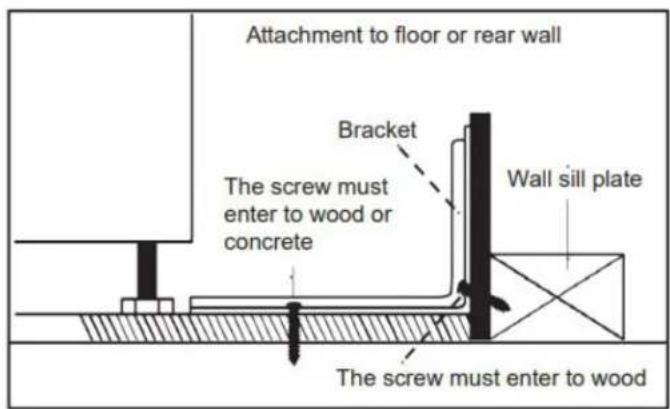
The bracket must be screwed to either the FLOOR or REAR WALL.
Floor Installation
- Wood Floor: use the screws provided to secure the bracket using the pair of marked holes (either Loc A or B).
- Concrete floor: Using a concrete drill bit, drill a 5/32 inch (0.4 cm) pilot hole 2 inches (5 cm) deep into the concrete at the center of each of the marked holes (either Loc A or B). Use the screws provided to secure the bracket into the floor.
Rear Wall Installation
Use the 2 screws provided to secure the bracket using the pair of marked holes at Loc C. The screws MUST enter a wood sill plate. If the wall contains any metal studs or similar materials, then the floor must be used.
Checking Bracket
After installing the bracket, slide the range into its final location. The rear leveling leg must be fully inserted into the ANTI-TIP bracket as shown below. To check if the bracket is installed and engaged properly, look underneath the range to see that the leveling leg is engaged in the bracket. On some models, the storage drawer or kick plate can be removed for easier inspection. If visual inspection is not possible, slide the range forward, confirm the anti-tip bracket is securely attached to the floor or wall, and slide the range back so the leveling leg is under the anti-tip bracket. If the range is pull from the wall for any reason, always repeat this procedure to verify the range is properly secured by the anti-tip bracket.
NOTE: The anti-tip bracket must be PROPERLY INSTALLED, and the rear leveling leg must be FULLY ENGAGED into the bracket to prevent the range from tipping. NEVER remove the leveling legs as this will prevent the range from being secured to the ANTI-TIP bracket properly.

INSTALLATION INSTRUCTIONS
INSTALLING RANGE
NOTE: If the range is moved to adjust the leveling legs, ensure that when the range is moved back into the final location that the anti-tip bracket is engaged by repeating steps 1 through 9.
- Slide range into final location, making sure rear leveling leg slides into ant-tip bracket. Leave a 1 inch (2.5cm) gap between the back of the range and the back wall.
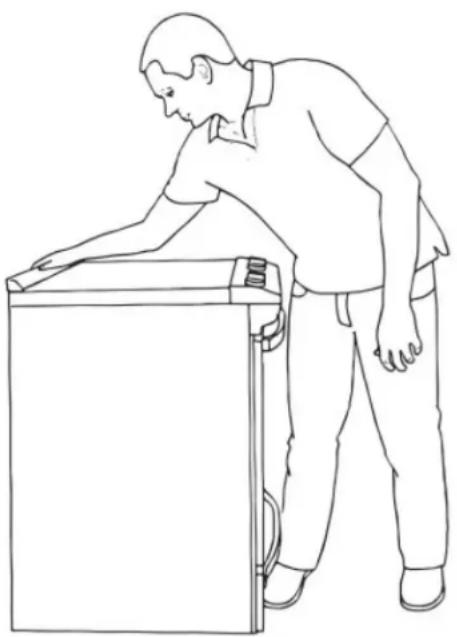
- Place the outside of your foot against the bottom front to keep the range from moving and then grasp the back of the range, as shown.
- Slowly attempt to tilt the range forward. If you encounter immediate resistance, the range foot is engaged in the anti-tip bracket. Go to Step 8.
- If the rear of the range lifts more than 1/2 inch (1.3cm) off the floor without resistance, stop tilting the range and lower it gently back to the floor. The range foot is not engaged in the anti-tip bracket.
NOTE: If there is a snapping or popping sound when lifting the range, the range may not be fully engaged in the bracket. Check to see if there are obstructions keeping the range from sliding to the wall or keeping the range foot from sliding into the bracket. Verify that the bracket is held securely in place by the mounting screws.
natural_image
Line drawing of a person leaning against the side of a refrigerator (no text or symbols)- Slide the range forward and verify that the anti-tip bracket is securely attached to the floor or wall.
- Slide the range back so the rear range foot is inserted into the slot of the anti-tip bracket.
- Repeat steps 1 through 3 to ensure that the range foot is engaged in the anti-tip bracket. If the rear of the range lifts more than 1/2 inch (1.3cm) off the floor without resistance, the anti-tip bracket may not be installed correctly. Do not operate the range without anti-tip bracket installed and engaged.
- Move the range into its final location. Check that the range is level by placing a level on the oven bottom.
NOTE: The range must be level for optimum cooking and baking performance.
- If needed, use a wrench to adjust the height of the leveling legs until the range is level from side to side and back to back.
OPERATING INSTRUCTIONS
ACCESSORIES
- Backsplash
- M4*8 Screw for backsplash installation x5
- Air Fry Basket
- Racks x3
- Anti-Tip Bracket
- M5*45 Screw for anti-tip bracket x2
- Tray used to collect the grease in the oven
- Meat thermometer (probe)

OPERATING INSTRUCTIONS
DIMENSIONS
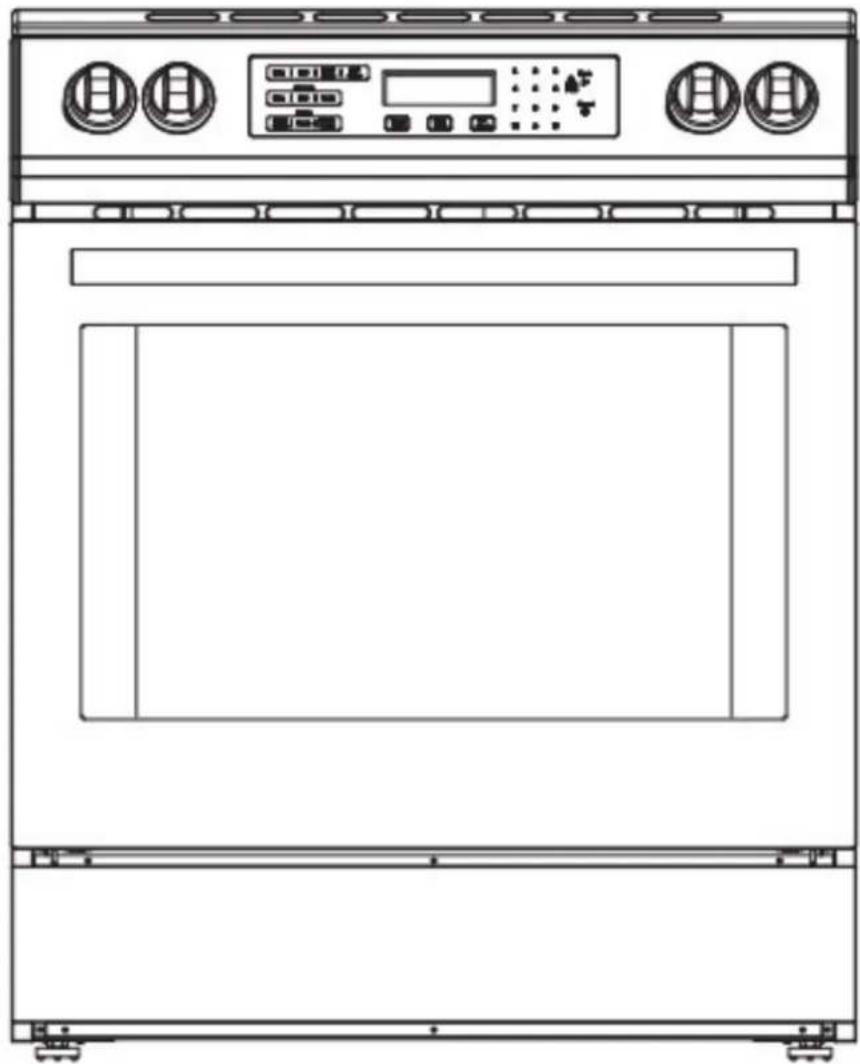
The dimensions of this appliance are:
A. 37.9 \~ 37.12 inches (96.3 \~ 94.3 cm) from the floor to the top of the cooktop (with the backsplash installed).
B. 27.6 inches (70 cm) deep
C. 29.9 inches (76 cm) wide
It is the installer's responsibility to comply with installation clearances specified in the manual. The minimum cabinet opening dimensions and clearances must be used. The minimum spacings must be maintained between the appliance cooking surface and the horizontal surface above the cooktop.
30 inches (65 cm) is the minimum clearance between the top of the cooking surface and the bottom of an unprotected wood or metal cabinet.
natural_image
Line drawing of a standard oven with control panel and door (no text or symbols)LEVELING INSTRUCTIONS
The appliance must be level to operate safely and properly. There are four leveling legs located at the corners of the bottom of the appliance. Adjust the leveling legs until the appliance is level. Use a carpenter's level to confirm.

natural_image
Technical line drawing of a mechanical assembly with gear and housing components (no text or symbols)OPERATING INSTRUCTIONS
EXTERIOR PARTS INTERIOR PARTS


| 1 | Left Rear Burner (1500W) |
| 2 | Left Front Burner (2100W) |
| 3 | Control Panel |
| 4 | Anti-Tip Bracket |
| 5 | Drawer |
| 6 | Right Rear Burner (3700W) |
| 7 | Right Front Burner (1500W) |
| 8 | Hot Surface Indicator Lights |
| 9 | Oven Door Window |
| 10 | Oven Vent |
| 11 | Broil Element |
| 12 | Door Gasket |
| 13 | Bottom Element (not visible) |
| 14 | Oven Light |
| 15 | Convection Fan |
OPERATING INSTRUCTIONS
CONTROL PANEL

flowchart
graph TD
    A["Menu"] --> B["A"]
    A --> C["B"]
    B --> D["Menu"]
    C --> D
    D --> E["F"]
    D --> F["G"]
    G["Menu"] --> H["C"]
    H --> I["D"]
    I --> J["Menu 1: 2 3"]
    I --> K["Menu 4: 5 6"]
    I --> L["Menu 7: 8 9"]
    I --> M["Menu 0: 0"]
    I --> N["Menu X"]
    I --> O["Menu L"]
    I --> P["Menu K"]
    I --> Q["Menu J"]
    I --> R["Menu I"]
    I --> S["Menu H"]
A. Front Left Burner
B. Rear Left Burner
C. Oven modes
D. LED display screen
E. Start / Control lock (hold for 3 seconds)
F. Rear Right Burner
G. Front Right Burner
H. Cancel
I. Light
J. Timer
K. Settings
L. Delay Start
M. Cook Time
N. Preset Modes
Operation of Oven
- Ensure that the shelves are inserted at the correct height.
- Select the desired oven mode.
- Set the oven to the desired preheat temperature.
- Set the timer to activate and preheat the oven (time as necessary).
- Place bakeware with food on one or both of the shelves provided with the oven.
- Close the door.
NOTES:
- The timer affects the operation of the oven, if the timer is OFF, the oven will not work.
• The oven cannot be set with the door open. - Do not place anything, including dishes, foil, and oven trays on the bottom of the oven when it is in operation to avoid damaging the enamel finish.
- If there is a power outage/failure, the unit will retain the last setting with the exception of the time. The time will have to be reset.
OPERATING INSTRUCTIONS
This oven combines the functions of traditional oven modes with the functions of modern, fan-assisted convection modes in a single oven. Use the Cooking Mode control, located on the control panel, to select the oven mode.
NOTE: During any cycle, the heating elements will turn off when the door is opened, and will remain off until the door is closed. To maintain oven temperature, limit door openings during cooking.
| Oven | |||||
| Default Temperature | Quick Preheat phase | ||||
| Operating Mode | (°F) | Adjustable range (°F) | Preheat phase | ||
| Bake | 350°F(177°C) | 170-550°F(77-288°C) | Yes | Yes | |
| Broil | Hi 550°F(288°C) | Hi-Lo 450-550°F(233-288°C) | No | No | |
| Proof(Press for 3 seconds in Warm Mode temp) | 100°F (38°C) | 80 - 120°F (27 - 49°C) | No | No | |
| Warm | 140°F(60°C) | 140-210°F(60-99°C) | No | No | |
| Convection Mode | Conv. Bake | 325°F(163°C) | 170-550°F(77-288°C) | Yes | Yes |
| Conv. Broil | 450°F(233°C) | 170-550°F(77-288°C) | No | Yes | |
| Conv. Roast | 325°F(163°C) | 170-550°F(77-288°C) | Yes | Yes | |
| Preset | 1. Meats | 350°F (177°C) | 170 - 550°F (77 - 288°C) | Yes | |
| 2. Baked Goods | |||||
| 3. Others | |||||
| Air Fry | 420°F(216°C) | 300-450°F(77-233°C) | Yes | Yes | |
| Self Clean | N/A | Core up to 806°F (430°C) | No | No | |
QUICK PREHEAT INSTRUCTIONS:
The Quick Preheat function rapidly increases the oven temperature and is available for the modes of Bake, Convect Bake, Convect Broil, Convect Roast, Baked Goods, Meats, Others, and Air Fry when the oven temperature setting is above 230^ F ( 110^ C).
If the temperature setting is lower, pressing Quick Preheat will produce an invalid tone.
To use Quick Preheat, select an oven mode, press Start, and then press Quick Preheat. The Quick Preheat icon will illuminate, indicating the oven is preheating. Once the set temperature is reached, the system will emit a long tone, and the oven will switch to the selected mode. The Quick Preheat icon will then turn off.
NOTE: The preheating stage indicates whether real-time display of temperature is required.
- There is a preheating stage: when the actual oven core temperature is less than 170^ F ( 77^ C), the interface displays LO.
- When the actual core temperature of the oven is greater than or equal to 170^ F ( 77^ C), the interface displays the temperature in real time.
- When the actual oven core temperature reaches the set temperature, the interface always displays the the set temperature value along with a long tone.
- Non-preheating stage: the set temperature value is always displayed on the heating interface of the oven from the beginning.
OPERATING INSTRUCTIONS
Kitchen Timer
The kitchen timer can be activated independently of oven operation.
Set up as just a kitchen timer:
Press the "TIMER" button on the control panel, (--:--) will appear on the display screen. Press the numbers on the keypad to the time you wish to use, then press TIMER button again to activate.
NOTE: The time can be set to a maximum of 12 hours.

Set up as kitchen timer while Cook Time is active:
- The timer can be set before or after the preheat. If the timer is set after the preheat and food is inside, press the "TIMER" button. (--:--) will appear on the display screen. Press the numbers on the keypad to the time you wish to use, then press TIMER button again. "Timer" will display on the screen.
NOTE: The timer will not automatically "shut off" when it has reached the end of the time, it must be manually shut off by pressing "Timer".
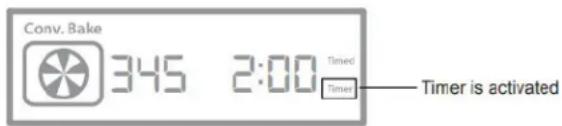
Cook Time
Cook Time has a similar functionality as a timer however, the oven will automatically "Shut Off" the unit. The Cook Time function is for the oven only.
The default cook time is set for 2 hours (2:00) which can be re-set during or after preheating. If Cook Time is set during the preheat, it will activate once the temperature has reached the set value.
- Press the Cook Time button.
- Set the time by using the number keypad.
- Press "Start" to begin.
NOTE: Once activated, the word "Timed" will appear on the display screen.
NOTE: If the requested temperature exceeds the allowed setting range, the next operation is not allowed and the system makes two invalid beeps.
NOTE: If the timer has been set in the process of preheating, the timer will be active once the temperature has reached the set value.

Delay Start
Delay Start function only works when the oven is being used. This function is not available for the Cooktop
- Select the desired baking function.
- Press the "Delay Start" button, the current time will be displayed.
- To start in 10 minutes, add 10 minutes to the current time
- Press Start to activate the delay The display will show the countdown from 10 minutes and it will begin to preheat.
Example:
If the time is 2:15pm, press 2:25pm. 00:10 will appear on the display.

OPERATING INSTRUCTIONS
Settings
Press the "Setting" button on the control panel. To go through the selections, press the "Setting" button repeatedly. The table below will provide the list of the 7 "Settings", their functions and and how to configure.
| List of settings | Function | Display | Configuration | Default |
| Clock | To set the clock time | ---:--- Timed | Press the Number keypad and then "Start" | 12:00 PM |
| Temp. Unit | Switch from °C - °F | F UN IE | Press #1 to switch | OF |
| Sound | On or Off | ON SRd | Press #1 to switch | ON |
| Calibration | To adjust the oven temperature for more accurate settings. | 00° E:AJ | Press #1: Change mode Press #3: To increase Press #6 :To decrease | 00 °F (-30°F - 30°F) |
| Demo Mode | For demonstration purpose | OFF dENO | Press #1 to switch | OFF |
| 12 / 24H | Change hour time | 12H | Press #1 to switch | 12H |
| Sabbath | Sabbath Mode | OFF SABB | Press #1 to switch | OFF |
Child Lock Function
When the oven is on standby, press the "Start" button and hold for 3 seconds. The control panel is now locked. If other buttons are touched, the Child Lock icon on the screen blinks and an invalid tone is heard at the same time.
The Child Lock can be disabled by pressing the "Start" button and holding it for 3 seconds. The control panel is now unlocked.
OPERATING INSTRUCTIONS
PREHEATING
When beginning a Bake, Convection Bake or Convection Roast cycle, the oven will begin preheating after Start is pressed. The oven will take approximately 12 to 15 minutes to reach 350^ F ( 177^ C) with all of the oven racks provided with the oven inside the oven cavity. Higher temperatures will take longer to preheat. The preheat cycle rapidly increases the oven temperature which is used to offset the heat lost when the oven door is opened to place the food on the rack. This ensures that cooking will begin at the proper temperature.
NOTE: Do not open the door when in the preheat mode.
NOTE: When the oven has heated to the set temperature, a short tone will sound. The door can now be opened and the food placed in the oven.
BAKE
Baking is cooking with heated air. Both upper and lower elements in the oven are used. Follow the recipe or food direction for baking temperature, time, and rack position.
- Use one rack when selecting the bake mode.
- Occasionally check the oven to see if the food is cooked.
- Use metal bakeware (with or without non-stick finish), heatproof glass, glass ceramic, potter, or other utensils suitable for the oven
- Leave at least 1-1.5 inches (2.5-4cm) of space between the bakeware and oven walls.
- Do not use aluminum foil or disposable aluminum trays to line any part of the ove as it will alter the cooking performance and can damage the finish of the oven.
- If required a baking tray can be lined with foil and used on the bottom shelf.
- Avoid using the opened door as a shelf to place pans.
BROIL
Broiling uses direct radiant heat to cook food. The lower the temperature, the slower the cooking. The temperature can be set from LO 450°F (232°C) to HI 550°F (288°C). It is recommended to use a 2 piece broiling tray (not provided) as any liquids from the broiling process will gather in the bottom section of the tray and not spill into the oven.
- Place rack in required position before turning on the oven.
- Select LO or HI for broiling temperature.
- Pull out oven rack to stop position before turning or removing food.
- Do not preheat the oven.
- Turn meats once halfway through the cooking time.
NOTE: The oven door remains closed during broil. When inspecting the food, open the oven door no more than two inches.
NOTE: If Cook Time or Delay Start is used to set a cook time, the oven will turn off automatically.
OPERATING INSTRUCTIONS
WARM
The warm mode keeps hot, cooked foods at serving temperature. The temperature for "warm" can be set from 140°F (60°C) to 210°F (99°C). The temperature for "proof" can be set from 80°F (27°C) to 120°F (49°C).
- Press "WARM/PROOF" on the control panel. "WARM" will be displayed on the screen
- Press "START" if you wish to warm food at 170^ (78°C) or enter the desired temperature by pressing the number keypad and then press "START". The temperature can be set from 140^ (60°C) to 210^ (99°C).
- Press CANCEL when finished and remove the food from the oven.
NOTE: The option to set a Cook Time is available.
PROOF
Proofing is a term used in baking to describe the process of allowing yeast dough to rise before baking. The "Proof" setting provides a warm temperature specifically designed to create an ideal environment for yeast to rise during the proofing process.
Before proofing, place the dough in a slightly greased bowl and cover loosely with wax paper that has been coated with shortening. Place on second rack from the bottom and close the oven door.
- Press "WARM/PROOF" and hold for 3 seconds until "WARM" on the display screen switches to "PROOF".
- Press START if you wish to proof dough at 100^ F ( 38^ C) of enter the desired temperature by pressing the number keypad and then press "START". The temperature can be set from 80^ F ( 27^ C) to 120^ F ( 49^ C).
- Let the dough rise until nearly double in size, checking after 20-25 minutes. Proofing may vary depending on dough type and quantity.
- Press CANCEL when finished.
- Before second proofing, shape the dough, place it on baking sheets or pans and cover loosely with plastic wrap coated with cooking spray. Follow steps 1 - 4.
- Before baking, remove the plastic wrap.
NOTE: The option to set a Cook Time is available.
OPERATING INSTRUCTIONS
CONVECTION SETTINGS
During convection cooking, the fan provides hot air circulation throughout the oven. The movement of heated air round the food can help to speed up cooking by penetrating the cooler outer surfaces. Food cooks more evenly, browning and crisping outer surfaces while sealing moisture inside. When the oven is set to the Convection function, the ring element, bake and broil elements, and the fan operate to heat the oven cavity. If the oven door is opened during convection cooking or preheating, the fan turns off immediately and the element(s) will turn off after 30 seconds. Once the door is closed, the element(s) will automatically turn on.
Convection Fan
The convection fan operates during any convection mode. When the oven is operating in convection mode, the fan will turn off automatically when the door is opened. The convection fan may run in non-convection modes during the preheat time.
Convection Bake
Convection Bake adds the use of convection fan(s) to circulate heated air. Both the temperature and cooking times may be slightly reduced.
- Use for single or multiple rack baking. Reduce standard recipe baking temperature by 25^ (15°C).
- Heatproof glass or ceramic can be used. Reduce temperature by another 25^ F ( 15^ C) when using heatproof glass dishes for a total reduction of 50^ F ( 30^ C).
- Dark metal pans may be used however, food may brown faster when using dark metal bakeware.
NOTE: Do not try to convert recipes such as custard, quiches, pumpkin pie or cheesecakes as they do not benefit from the convection-heating process. Use the regular Bake mode for these foods.
Convection Broil
Convection Broil adds the use of convection fan(s) to circulate heated air. Bring the rack to the middle of the oven cavity to provide even cooking. It is recommended to use a 2 piece broiling tray as any liquids from the broiling process will gather in the bottom section of the tray and not spill into the oven.
- Place rack in required position before turning on the oven.
- Use convection Broil mode with the oven door closed.
- Enter your normal broiling temperature.
- Do not preheat the oven.
- Turn meat once halfway through the cooking time.
OPERATING INSTRUCTIONS
Convection Roast
When convection roasting set the temperature to you normal roasting temperature. The roasting time should be 15-30% less than in conventional cooking. It is not necessary to preheat the oven for Convection Roast.
- Roast in a low-sided, uncovered pan.
- Use a 2-piece broil pan for roasting uncovered.
- It is recommend to use a probe or meat thermometer to determine the internal doneness of the meat.
- Large poultry may need to be covered with foil during a portion of the roasting time to prevent over browning.
CONVECTION CONVERSION
When using a Convection Recipe, enter your normal cooking temperature and time. The Convection Conversion mode will adjust the temperature and time for perfect cooking results.
- The oven door must be closed before selecting a Convection Conversion oven mode.
- Setting Cook Time is required for a Convection Conversion oven mode. If Cook Time was not set, the control will prompt you to Set Cook Time.
NOTE: At the end of the set Cook Time, the oven will turn off automatically, the end of cycle tone will sound and "End" will appear on the display.
BAKED GOODS
- Press BAKED GOODS among the Convection Conversion controls.
- Set the oven temperature. The temperature can be set from 170°F (77°C) to 500°F (260°C).
- Press START. "Set cooking time" will appear in the display.
- Press the number keypad to enter the desired cook time. "Press START" will appear in the display.
NOTE: If a delayed start time is desired, press START TIME, and then press the number keypad to enter the desired start time. "Press START" will appear on the display. Set Cook Time is mandatory for the Convection Conversion oven mode. If Cook Time was not set, the control will prompt you to "Set Cook Time".
- Press START. The oven will begin to preheat. Once the set temperature has been reached a tone will sound.
NOTE: If the recipe requires the food to be cooked in a preheated oven, add 15 minutes to Cook Time to allow time for the oven to preheat. Once the oven is heated to the set temperature and the tone sounds, place food in the oven.
- At the end of the set Cook Time the oven will turn off automatically, the end of cycle tone will sound and "End" will appear in the display.
OPERATING INSTRUCTIONS
MEATS
It is not necessary to preheat the oven for convection conversion MEAT option.
- Press MEATS among the Convection Conversion controls.
- Set the oven temperature. The temperature can be set from 170°F (77°C) to 550°F (288°C).
- Press START. "Set cooking time" will appear in the display.
- Press the number keypad to enter the desired cook time. "Press START" will appear in the display.
NOTE: Set Cooking Time is mandatory for the Convection Conversion oven mode.
- At the end of the set Cook Time the oven will turn off automatically, the end of cycle tone will sound and "End" will appear in the display.
OTHER FOODS
- Press OTHER FOODS among the Convection Conversion controls.
- Set the oven temperature. The temperature can be set from 170°F (77°C) to 550°F (288°C).
- Press START. "Set cooking time" will appear in the display.
- Press the number keypad to enter the desired cook time. "Press START" will appear in the display.
NOTE: If a delayed start time is desired, press START TIME, and then press the number keypad to enter the time-of-day you want the oven to turn on. "Press START" will appear on the display. Set Cook Time is mandatory for the Convection Conversion oven mode. If Cook Time was not set, the control will prompt you to "Set Cook Time".
- Press START. The oven will begin to preheat. Once the set temperature has been reached a tone will sound.
NOTE: If the recipe requires the food to be cooked in a preheated oven, add 15 minutes to Cook Time to allow time for the oven to preheat. Once the oven is heated to the set temperature and the tone sounds, place food in the oven.
- At the end of the set Cook Time the oven will turn off automatically, the end of cycle tone will sound and "End" will appear in the display.
AIR FRY
The preset operating temperature is 420^ F ( 216^ C) for a duration of 22 minutes. The time and temperature settings can be manually adjusted before starting. Once the desired temperature has been set, the "Timer" function will begin counting down as soon as the temperature reaches the set value.
Note: Adding a drip pan or tray under the fry basket when air frying is to catch any excess oil or drippings that may occur during the cooking process is recommended. This can help prevent any mess or smoke caused by the drippings and make the cleaning process easier.
OPERATING INSTRUCTIONS
TEMPERATURE PROBE
The oven has a temperature probe that can be inserted into the foods to ensure the internal temperature reaches a desired value.
CAUTION: The probe and probe port will become hot during the cooking process. Use insulated oven mitts or gloves when unplugging the probe from the oven receiver and when removing from the cooked food.
- Insert the thin end of the probe into the food to be cooked.
- Place the food onto the rack inside the oven.
- Insert the probe plug into the oven receptical located under a spring cover on the front left hand side of the oven cavity near the door.
- Once inserted the probe icon will appear on the lower right of the display.
- Select the oven temperature.
NOTE: The cook time can not be set when using the temperature probe.
- Press the Cook Time button to set the desired internal temperature of the food.
NOTE: The oven will turn off when the desired internal temperature has been reached.
The current temperature of the oven will be displayed in orange on the left side of the display and the internal temperature of the food will be displayed in white on the right hand side of the display.
Removing Food from Oven
Open then door completely.
Using insulated oven mitts or gloves, unplug the probe from the receptacle.
Remove the cookware from the oven.
Remove the probe from the food and place it on a heat-proof surface to cool.
NOTE: The temperature probe cord length may not allow for removing the food from the oven if left connected to the receptacle. Please ensure to remove the probe from the receptacle before removing the food and cookware from the oven to prevent spillage.
OPERATING INSTRUCTIONS
COOKTOP
Suitable Cookware
Induction cooktops are not suitable for all pots and pans. Place a magnet on the outside bottom of the pan to see if it sticks. If the magnet does not stick to the pan then the pan is not suitable for the induction cooktop.
NOTE: If a pan is not suitable for an induction cooktop, it will not work on the induction cooktop.
Heating Zone
Select the heating zone to be used. Ensure the bottom of the pan or pot and the surface of the cooking zone are clean and dry.
Turn the control knob clockwise to set the desired power level. The power levels range from 1 (low) to 9 (high) and include a Boost (P) setting. The power level can be adjusted at any time.
The relevant indicator on the cooktop will show the power level selected in the small square in the mid-lower section of the cooktop.
![OFF P 1 9 3 8 4 7 6 5 [ ] [-] 2 []](/content/2026/06/1229719/images/469420fe2d407c1e2c076253138a3953baa4e0b5264ffad94bcef1f04a4f035a.jpg)
Boost Function
Turn the control knob clockwise at the way to "P". The "P" will be activated and will display on the indicator. The boost function will remain on for 5 minutes, after 5 minutes the zone will automatically set to level 9.
To cancel the boost function, turn the knob anticlockwise to 9.
NOTE: Two boost functions can be activated at the same time, except for the Right Rear Burner (3700W).
| Icons & Symbols: | Function |
| H | “H” is the cooking zone is too hot to touch. It will disappear when the surface has cooled down to a safe temperature. |
| U | The burner is activated but not in use |
| P | Boost is activated |
CARE & MAINTENANCE
CLEANING
Before cleaning, make sure all controls are turned off, and the oven and cooktop are cool. Always follow label instruction on cleaning products. It is recommended that soap, water and a soft cloth or sponge is used first unless otherwise noted. Do not use abrasive cleaning products.
Exterior Porcelain Enamel Surfaces
Food spills containing acids, such as vinegar and tomato, should be cleaned as soon as the entire appliance is cool. These spills may affect the finish.
Use glass cleaner, mild liquid cleaner or nonabrasive scrubbing pad. Gently clean around the model and serial number plate as scrubbing may remove numbers.
Exterior Stainless Steel
Use liquid detergent or all-purpose cleaner. Rinse well with clean water and dry soft, lint-free cloth. Stainless Steel Cleaner and Polish Vinegar can be used for hard water spots.
NOTE: Do not use soap-filled scouring pads, abrasive cleaners, cooktop polishing cream, steel-wool pads, gritty washcloths or some paper towels. Damage may occur even with one-time or limited use. Rub in direction of grain to avoid damaging.
Oven Door Exterior
Use glass cleaner and paper towels or nonabrasive plastic scrubbing pad. Apply glass cleaner to soft cloth or sponge, not directly on panel.
Smudges from Aluminum Bottom Pans
Use a cloth dampened in vinegar.
Control Panel
Use glass cleaner and a soft cloth or sponge. Apply class cleaner to soft cloth or sponge, not directly on the panel. Do not use abrasive cleaners, steel-wool pads, gritty washcloths or some paper towels as damage may occur.
Ceramic Glass Cooktop
To avoid damaging the cooktop, do not use steel wool, abrasive powder cleansers, chlorine bleach, rust remover or ammonia. Ceramic cooktop cleaning materials include cooktop cleaner, cooktop scraper and cooktop cleaning pads available at most grocery stores.
-
Remove food/residue with a cooktop scraper.
-
For best results, use the cooktop scraper while the cooktop is still warm but not hot to the touch.
- It is recommended to wear an oven mitt while scraping the warm cooktop.
- Hold the cooktop scraper at approximately a 45^ angle against the glass surface and scrape the residue. It will be necessary to apply pressure in order to remove the residue.
-
Allow the cooktop to cool down completely before proceeding to Step 2.
-
Apply a few dime-sized drops of cooktop cleaner to the affected areas.
-
Rub cooktop cleaner onto the cooktop surface with a nylon or similar cooktop cleaning pad. Some pressure is needed to remove stubborn stains.
-
Allow the cleaner to dry to a white haze before proceeding to Step 3.
-
Polish with a clean, dry cloth or a clean, dry paper towel.
Cooktop Control Knobs
Use soap and water or dishwasher detergent.
- Pull knobs straight out from the control panel to remove.
- When replacing knobs, make sure knobs are turned to the Off position.
NOTE: Do not use steel-wool, abrasive cleansers or oven cleaner. Do not soak knobs.
CARE & MAINTENANCE
Oven Cavity
Food spills should be cleaned when oven cools. At high temperatures, foods react with porcelain so staining, etching, pitting or faint white spots can result.
Use mild detergent and warm water.
NOTE: Do not use oven cleaners.
Oven Racks
Use a steel-wool pad.
Self Cleaning Cycle
The Self Cleaning cycle uses very high temperatures burning soil to a powdery ash.
- Self clean the oven before it becomes heavily soiled. Heavy soil results in longer cleaning and more smoke.
- Keep the kitchen well ventilated during the Self Cleaning cycle to help get rid of heat, odours and smoke.
- Do not clean, rub, damage or move the oven gasket. The door gasket is essential for a good seal.
- Allow the oven to cool to room temperature before using the Self Clean feature. If your oven cavity is above 170°F (77°C), "Oven Cooling" will appear on the display and the Self Clean cycle will not activate until it cools down.
- The oven light will not work during the Self Cleaning cycle. On some models, the surface elements will not work during the Self Cleaning cycle.
- When "Lock" shows on the display, the oven door cannot be opened. To avoid damage to the door, do not force it open when "Lock" is displayed.
NOTE: Do not touch the oven during the Self Cleaning cycle. Keep children away from the oven during the Self Cleaning cycle. Failure to do so can result in burns.
Self Clean Preparing Oven
- Remove the broiler pan, cookware and bakeware.
- Remove remove temperature prove from oven if available on your model.
- Remove oven racks to keep them shiny and easy to slide.
- Remove any foil from the oven as it may burn or melt, damaging the oven.
- Hand clean inside door edge and 1.5 inch (3.8cm) area around the inside oven cavity frame, being certain not to move or bend the gasket. This area does not get hot enough during Self Cleaning to remove soil. Do not let water, cleaner, etc. to enter slots on door frame. Use a damp cloth to clean this area.
- Wipe out any loose soil to reduce smoke and avoid damage. At high temperatures, foods react with porcelain. Staining, etching, pitting of faint white spots can result. This will not affect cooking performance.
Setting Self Clean
The Cleaning time can be adjusted. Suggested cleaning times are:
2 Hours - Light soil
3 Hours - Average soil
3.5 Hours - Heavy soil
- Close the oven door.
NOTE: If the oven door is left open, this function will not work.
- Repeatedly touch the "Self Clean" icon to toggle between self clean time duration options.
NOTE: The door will lock. "SELF CLEAN" will appear on the display panel until the clean cycle is finished.
NOTE: The Self Clean feature can be cancelled by pressing the Cancel button however, if the door has locked it will remain locked until the oven has cooled sufficiently.
CARE & MAINTENANCE
- "End" appears on the display and the oven door unlocks.
- Open the oven door. Once the oven has completely cooled, remove ash with a damp cloth.
NOTE: To avoid breaking the glass, do not apply a cool, damp cloth to the inner door glass before it has cooled completely.
Oven Door Removal
For normal oven use, there is no need to remove the oven door. However, should it become necessary, please follow the instructions below.
NOTE:
• Make sure the oven is cool and power to the oven has been turned off before removing the door.
- The oven door is heavy and fragile as well as the door front is glass. To avoid oven door glass breakage, use both hands and grasp on the sides of the oven door to remove.
- Be sure both levers are securely in place before removing the door.
Door removal
- Open the oven door completely.
- Lift up the hinge latch on each side.

natural_image
Diagram of a car door handle mechanism with no visible text or symbolsLeft hinge

natural_image
Mechanical diagram showing a cable being inserted into a bracket (no text or symbols visible)Right hinge
- Close the oven door as far as it will shut.
- While grasping both outside edges of the door, lift up on the door.
- Continue to push the top of the door closed while pulling the bottom of the door out of the hinge receivers in the door frame.

natural_image
Illustration of hands using a tablet to adjust or install a component, with a downward arrow indicating compression (no text or symbols present)CARE & MAINTENANCE
Door Reinstallation
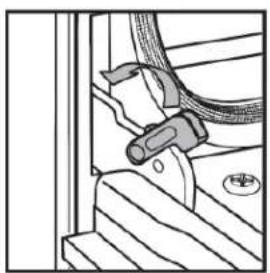
- Insert both hanger arms into the hinge receivers in the door frame.
- Slowly open the oven door and you will feel the door set into place.
- Move the hinge latches back into the locked position.
natural_image
Technical line drawing of a mechanical assembly with no visible text or symbolsLeft hinge

natural_image
Technical line drawing of a mechanical assembly with no visible text or symbolsRight hinge
- Check that the door opens and closes freely. If it does not, repeat door removal and reinstallation.
Replacing Oven Light
The oven light is a standard 25-watt (G) appliance bulb.
NOTE:
• Make sure the oven and lights are cool and power to the oven has been turned off.
- The lenses must be in place when using the oven. The lenses serve to protect the light bulb from breaking.
- The lenses are made of glass. Handle carefully to avoid breakage.
- Failure to do so could result in death, electrical shock, cuts or burns.
- Disconnect the power.
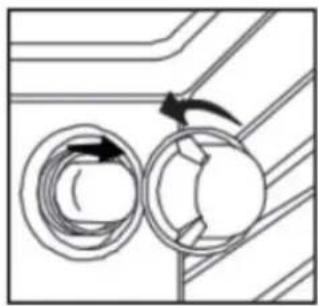
- Remove the bulb by turning it anti-clockwise.
natural_image
Diagram of a mechanical or electrical component with two circular components and directional arrows indicating rotation (no text or symbols)- Remove the burned-out bulb from the socket.
NOTE: To avoid damage or decreasing the life of the new bulb, do not touch the bulb with bare fingers. Wear gloves or use a tissue when replacing the light bulb.
- Replace the bulb and then replace the bulb cover.
- Reconnect the power.
TROUBLESHOOTING
No power
- A fuse may be blown or the circuit breaker tripped
- Plug not fully inserted into the wall outlet
Cooktop elements not working properly
- Improper cookware is being used
- No power
- Heating elements cycle off even when turned to highest setting: temperature limiters are temporarily shutting off the elements due to exceeding the maximum allowable temperature
- Glass ceramic surface is see through or appears to be red in colour: Under direct or bright lighting it may be possible to see through the glass and it may have a red tint. This is normal
Oven mode and temperature controls cannot be set
- Oven door is open
Cooling fan continues to run after oven is turned off
• Electronic components have not yet cooled sufficiently
Oven light
- Not working properly: Bulb is loose or burned out
• Stays on: door is not closing completely - Cannot remove lens cover: Soil build-up around the lens cover
Error Alarm Message
Abnormal Temperature Sensor: Err1 In any state, if the temperature sensor is open or short, the oven will give an alarm and display Err1. In this case, cancel can be performed.
Abnormal Food Probe Sensor:Err2 If the pin port is shorted, the oven function will alarm and display Err2. At this time, you can return to the standby state by clicking the cancel key.
Abnormal Crystal Oscillator:Err7 If the display board crystal oscillator is short-circuited or damaged, causing the clock and timing function to fail, then the oven will alarm and display Err7, and you can return to standby status by using the cancel key.
Warning Cooktop Overheat: Hot
When the cooktop plate overheat indicator light is on, at this time, if you start the self-cleaning mode or in the self-cleaning mode, the oven will be cooktop plate overheat warning and display "Hot", the electric heaters will stop working, at this time, you can return to standby mode through the "Cancel" button.
LIMITED "IN HOME" WARRANTY
This quality product is warranted to be free from manufacturer's defects in material and workmanship, provided that the unit is used under the normal operating conditions intended by the manufacturer.
This warranty is available only to the person to whom the unit was originally sold by Danby Products Limited (Canada) or Danby Products Inc. (U.S.A.) (hereafter "Danby") or by an authorized distributor of Danby, and is non-transferable.
TERMS OF WARRANTY
Plastic parts are warranted for thirty (30) days from the date of purchase, with no extensions provided.
First 24 months During the first twenty four (24) months, any functional parts of this product found to be defective, will be repaired or replaced, at warrantor's option, at no charge to the original purchaser.
To obtain service Contact the dealer where the unit was purchased, or contact the nearest authorized Danby service depot, where service must be performed by a qualified service technician. If service is performed on the unit by anyone other than an authorized service depot, all obligations of Danby under this warranty shall be void.
Boundaries of in-home service Danby reserves the right to limit the boundaries of "In Home Service" to the proximity of an authorized service depot. Any appliance requiring service outside the limited boundaries of "In Home Service", will be the consumer's responsibility to transport at their own expense to the original point of purchase or a service depot for repair. If the appliance is installed in a location that is 100 kilometers (62 miles) or more from the nearest service center, it must be delivered to the nearest authorized Danby Service Depot by the purchaser.
Transportation charges to and from the service location are not protected by this warranty and are the responsibility of the purchaser.
Nothing within this warranty shall imply that Danby will be responsible or liable for any spoilage or damage to food or other contents of this appliance, whether due to any defect of the appliance, or its use, whether proper or improper.
EXCLUSIONS
Save as herein provided, by Danby, there are no other warranties, conditions, representations or guarantees, express or implied, made or intended by Danby or its authorized distributors and all other warranties, conditions, representations or guarantees, including any warranties, conditions, representations or guarantees under any Sale of Goods Act or like legislation or statute is hereby expressly excluded. Save as herein provided, Danby shall not be responsible for any damages to persons or property, including the unit itself, howsoever caused or any consequential damages arising from the malfunction of the unit and by the purchase of the unit, the purchaser does hereby agree to indemnify and hold harmless Danby from any claim for damages to persons or property caused by the unit.
GENERAL PROVISIONS
No warranty or insurance herein contained or set out shall apply when damage or repair is caused by any of the following:
1) Power failure.
2) Damage in transit or when moving the appliance.
3) Improper power supply such as low voltage, defective house wiring or inadequate fuses.
4) Accident, alteration, abuse or misuse of the appliance such as inadequate air circulation in the room or abnormal operating conditions (i.e. extremely high or low room temperature).
5) Use for commercial or industrial purposes (i.e. If the appliance is not installed in a domestic residence).
6) Fire, water damage, theft, war, riot, hostility, acts of God such as hurricanes, floods etc.
7) Service calls resulting in customer education.
8) Improper Installation (i.e. Building-in of a free standing appliance or using an appliance outdoors that is not approved for outdoor application, including but not limited to: garages, patios, porches or anywhere that is not properly insulated or climate controlled).
Proof of purchase date will be required for warranty claims; retain bills of sale. In the event that warranty service is required, present the proof of purchase to our authorized service depot.
Warranty Service
In Home
Danby Products Limited
PO Box 1778, Guelph, Ontario, Canada NIH 629
Telephone: (519) 837-0920 FAX: (519) 837-0449
1-800-263-2629
04/17
Danby Products Inc
PO Box 669, Findlay, Ohio, U.S.A. 45840
Telephone: (419) 425-8627 FAX: (419) 425-8629
natural_image
Line drawing of a person leaning against the side of a refrigerator (no text or symbols)natural_image
Line drawing of a standard oven with control panel and door (no text or symbols)natural_image
Technical line drawing of a mechanical assembly with gear and housing (no text or symbols)
Removing Food from Oven
Función Boost
natural_image
Mechanical component diagram showing a clamping mechanism with no visible text or symbolsBisagra izquierda

natural_image
Mechanical assembly diagram showing a clamping mechanism with no visible text or symbolsBisagra derecha
natural_image
Diagram of hands using a tool to adjust or install a component, with a downward arrow indicating motion (no text or symbols present)natural_image
Technical line drawing of a mechanical assembly with no visible text or symbolsBisagra izquierda

natural_image
Technical line drawing of a mechanical assembly with no visible text or symbolsBisagra derecha
natural_image
Diagram of two circular components with directional arrows, no text or symbols present- Retire la bombilla fundida del casquillo.
NOTA:
Danby Products Limited
PO Box 1778, Guelph, Ontario, Canada N1H 6Z9
Telephone: (519) 837-0920 FAX: (519) 837-0449
1-800-263-2629
04/17
Danby Products Inc.
PO Box 669, Findlay, Ohio, U.S.A. 45840
Telephone: (419) 425-8627 FAX: (419) 425-8629


- Welcome to the Danby family.
- Need Help?
- Important Safety Information
- READ AND FOLLOW ALL SAFETY INSTRUCTIONS
- WARNING - TIP OVER HAZARD
- ANTI-TIP DEVICE
- WARNING
- SUFFOCATION AND RISK OF CHILD ENTRAPMENT
- NOTICE - BEFORE FIRST TIME USE
- NOTE
- SAVE THESE INSTRUCTIONS!
- AREAS NEAR THEM
- DANGER - GREASE FIRES
- DANGER - FIRE RISKDO NOT TO
- Important Safety Information READ AND FOLLOW ALL SAFETY INSTRUCTIONS
- GENERAL SAFETY REQUIREMENTS
- COOKTOP SAFETY REQUIREMENTS
- OVEN SAFETY REQUIREMENTS
- SUPPLIER'S DECLARATION OF CONFORMITY
- GROUNDING INSTRUCTIONS
- INSTALLATION INSTRUCTIONS
- Installation Measurements
- BACKSPLASH INSTALLATION:
- Power Supply
- IMPORTANT
- CONNECTION TO HOUSE ELECTRICAL SUPPLY
- PARTS NEEDED:
- If using a power supply cord:
- If direct wiring:
- NOTES:
- 3-WIRE POWER CABLE INSTALLATION
- 3-WIRE POWER CABLE CONNECTION TO HOUSE ELECTRICAL SUPPLY
- 4-WIRE POWER CABLE INSTALLATION
- 4-WIRE POWER CABLE CONNECTION TO HOUSE ELECTRICAL SUPPLY
- REQUIRED TOOLS
- LOCATION REQUIREMENT
- Ventilation
- Temperature
- ANTI-TIP BRACKET
- Bracket Location
- Securing Bracket
- Floor Installation
- Rear Wall Installation
- Checking Bracket
- INSTALLING RANGE
- OPERATING INSTRUCTIONS
- ACCESSORIES
- DIMENSIONS
- LEVELING INSTRUCTIONS
- CONTROL PANEL
- Operation of Oven
- QUICK PREHEAT INSTRUCTIONS:
- Kitchen Timer
- Cook Time
- Delay Start
- Example:
- Settings
- Child Lock Function
- PREHEATING
- BAKE
- BROIL
- WARM
- PROOF
- CONVECTION SETTINGS
- Convection Fan
- Convection Bake
- Convection Broil
- Convection Roast
- CONVECTION CONVERSION
- BAKED GOODS
- MEATS
- OTHER FOODS
- AIR FRY
- TEMPERATURE PROBE
- Removing Food from Oven
- COOKTOP
- Suitable Cookware
- Heating Zone
- Boost Function
- CARE & MAINTENANCE
- CLEANING
- Exterior Porcelain Enamel Surfaces
- Exterior Stainless Steel
- Oven Door Exterior
- Smudges from Aluminum Bottom Pans
- Ceramic Glass Cooktop
- Cooktop Control Knobs
- Oven Cavity
- Oven Racks
- Self Cleaning Cycle
- Self Clean Preparing Oven
- Setting Self Clean
- Oven Door Removal
- NOTE:
- Door removal
- Door Reinstallation
- Replacing Oven Light
- TROUBLESHOOTING
- No power
- Cooktop elements not working properly
- Oven mode and temperature controls cannot be set
- Cooling fan continues to run after oven is turned off
- Oven light
- Error Alarm Message
- Warning Cooktop Overheat: Hot
- LIMITED "IN HOME" WARRANTY
- TERMS OF WARRANTY
- EXCLUSIONS
- GENERAL PROVISIONS
- Warranty Service
- In Home
- Función Boost
- NOTA:
- 1-800-263-2629
Brand : DANBY
Model : DIRC300BSS
Category : Hot plate