WM-1S - Unspecified PHONIC - Free user manual and instructions
Find the device manual for free WM-1S PHONIC in PDF.


User questions about WM-1S PHONIC
0 question about this device. Answer the ones you know or ask your own.
Ask a new question about this device
Download the instructions for your Unspecified in PDF format for free! Find your manual WM-1S - PHONIC and take your electronic device back in hand. On this page are published all the documents necessary for the use of your device. WM-1S by PHONIC.
USER MANUAL WM-1S PHONIC
Wireless Microphone Systems
Installing the WR-1 Safari Wireless Receiver Module 1
Operating Safari's Wireless System 1
Transmitter Components 2
Specifications 3
Phonic preserves the right to improve or alter any information within this document without prior notice.
IMPORTANT SAFETY INSTRUCTIONS
The apparatus shall not be exposed to dripping or splashing and that no objects with liquids, such as vases, shall be placed on the apparatus. The MAINS plug is used as the disconnect device, the disconnect device shall remain readily operable.
Warning: the user shall not place this apparatus in the confined area during the operation so that the mains switch can be easily accessible.
- Read these instructions before operating this apparatus.
- Keep these instructions for future reference.
- Heed all warnings to ensure safe operation.
- Follow all instructions provided in this document.
- Do not use this apparatus near water or in locations where condensation may occur.
- Clean only with dry cloth. Do not use aerosol or liquid cleaners. Unplug this apparatus before cleaning.
- Do not block any of the ventilation openings. Install in accordance with the manufacturer's instructions.
- Do not install near any heat sources such as radiators, heat registers, stoves, or other apparatus (including amplifiers) that produce heat.
- Do not defeat the safety purpose of the polarized or grounding-type plug. A polarized plug has two blades with one wider than the other. A grounding type plug has two blades and a third grounding prong. The wide blade or the third prong is provided for your safety. If the provided plug does not into your outlet, consult an electrician for replacement of the obsolete outlet.
- Protect the power cord from being walked on or pinched particularly at plug, convenience receptacles, and the point where they exit from the apparatus.
- Only use attachments/accessories specified by the manufacturer.
- Use only with a cart, stand, tripod, bracket, or table specified by the manufacturer, or sold with the apparatus. When a cart is used, use caution
when moving the cart/apparatus combination to avoid injury from tip-over. - Unplug this apparatus during lighting storms or when unused for long periods of time.
- Refer all servicing to qualified service personnel. Servicing is required when the apparatus has been damaged in any way, such as power-supply cord or plug is damaged, liquid has been spilled or objects have fallen into the apparatus, the apparatus has been exposed to rain or moisture, does not operate normally, or has been dropped.

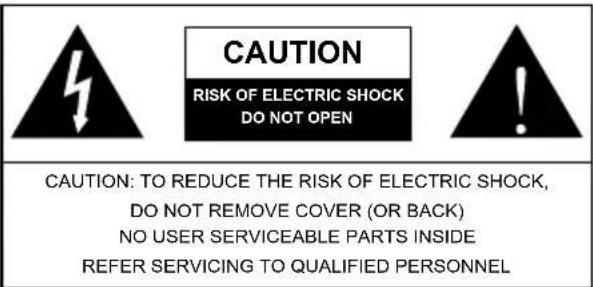
text_image
CAUTION RISK OF ELECTRIC SHOCK DO NOT OPEN CAUTION: TO REDUCE THE RISK OF ELECTRIC SHOCK, DO NOT REMOVE COVER (OR BACK) NO USER SERVICEABLE PARTS INSIDE REFER SERVICING TO QUALIFIED PERSONNEL
The lightning flash with arrowhead symbol, within an equilateral triangle, is intended to alert the user to the presence of uninsulated "dangerous voltage" within the product's enclosure that may be of sufficient magnitude to constitute a risk of electric shock to persons.

The exclamation point within an equilateral triangle is intended to alert the user to the presence of important operating and maintenance (servicing) instructions in the literature accompanying the appliance.
WARNING: To reduce the risk of fire or electric shock, do not expose this apparatus to rain or moisture.
CAUTION: Use of controls or adjustments or performance of procedures other than those specified may result in hazardous radiation exposure.
Introduction
Congratulations on your purchase of Phonic's wireless microphone system. The WM-1S, WL-1S, and WH-1S are designed exclusively for Phonic's Safari all-in-one mobile solutions. Phonic's new wireless system has state-of-the-art technology including One-Touch Frequency Autoscan and hardware/software noise elimination. With these and many other advanced features, it is easier than ever to setup your wireless system for excellent sound. Please read through this brief manual for installation and operating instructions.
Components
WM-1S wireless handheld microphone system: WB-1 Beltpack
• WR-1 Wireless Receiver
• WM-1 Wireless Handheld Microphone
- User's Manual
WL-1S wireless Lavalier microphone system:
• WR-1 Wireless Receiver
- WL-1 Wireless Lavalier Microphone
- User's Manual
WH-1S wireless headset microphone system:
• WR-1 Wireless Receiver
• WH-1 Wireless Headset Microphone
- WB-1 Beltpack
- User's Manual
Installing the WR-1 Safari Wireless Receiver Module
We recommend that an authorized Phonic repair facility or dealer/distributor carries out the steps below:
- Remove all power cables and turn the Safari 3000 off.
- Unscrew the protective faceplate on the wireless receiver slot and remove it.
- Place the WR-1 into an available wireless slot and push the WR-1 into the slot until the WR-1 faceplate is flush with the back panel.
- Screw the WR-1 into place.
Operating Safari's Wireless System
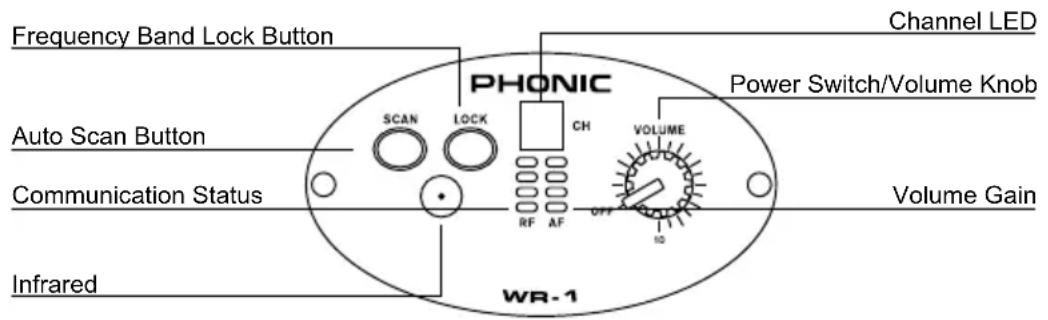
text_image
Frequency Band Lock Button PHONIC Channel LED Auto Scan Button Communication Status Infrared WR-1 Power Switch/Volume Knob CH VOLUME OFF RF AF IO Volume GainOne-Touch Auto Scan
- Power-on the Safari wireless receiver (WR-1) by turning the volume knob clockwise. You should hear a click sound from the knob.
- Power-on your handheld microphone (WM-1) or beltpack unit (WB-1)
-
Hold the WM-1 / WB-1 close to the WR-1 receiver and push the Scan button on the WR-1 for 4 to 5 seconds until the numeric channel LED digits start to automatically change. This indicates that the autoscan is finding the best wireless channel.
-
The autoscan process is finished when the LED display stops at the optimal channel. At this point, the RF LEDs will activate. If the RF LEDs on the WR-1 do not light on, the connection has not been established successfully. To reinforce the connection, click the Lock button while holding the WM-1 or WB-1 close to the receiver.
- Upon a successful connection, the AF LEDs on the WR-1 will activate as you speak into the microphone.
Manual Scan
- Power-on the Safari wireless receiver (WR-1) and the microphone transmitter (WM-1 or WB-1).
- Push the Scan button on the WR-1 for 2 seconds. The numeric LEDs on the WR-1 will begin to blink. To manually select frequency, continue to click the Scan button until you reach the desired channel.
Transmitter Components
Beltpack Handheld Microphone
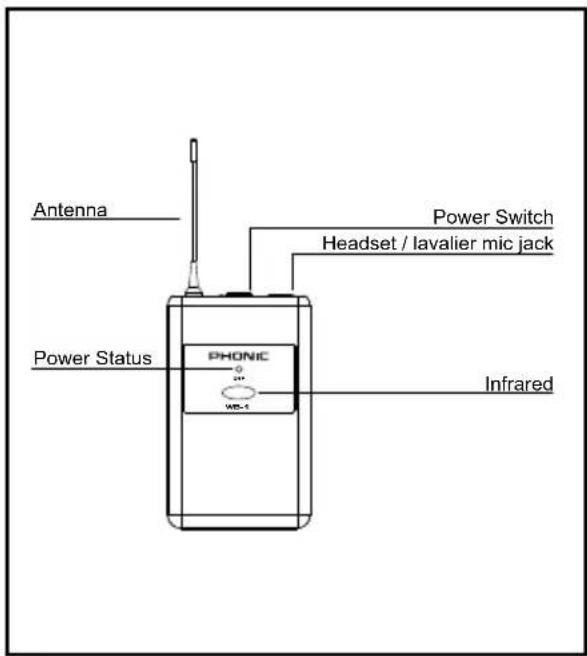
text_image
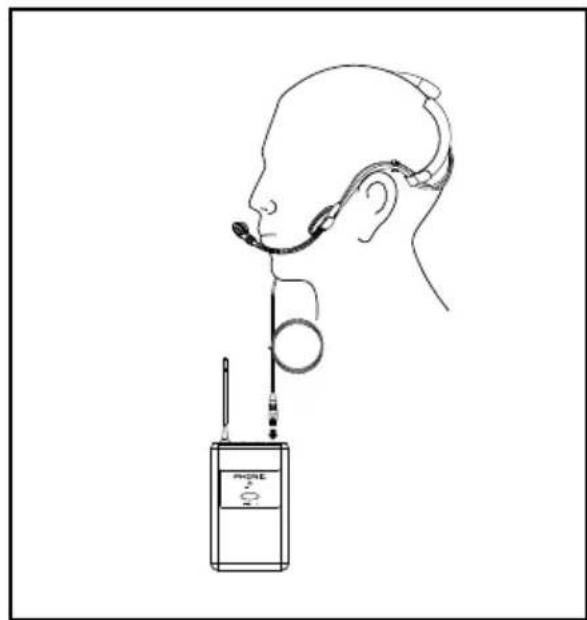
Antenna Power Switch Headset / lavalier mic jack Power Status PHONIC WP-1 Infrared- Hold the WM-1 / WB-1 close against the receiver and push the Lock button to confirm the channel and establish the link between the microphone transmitter and receiver. At this point, the RF LEDs will activate and the AF LEDs will respond to the microphone signal. If the connection is not established, reattempt the manual or autoscan process.
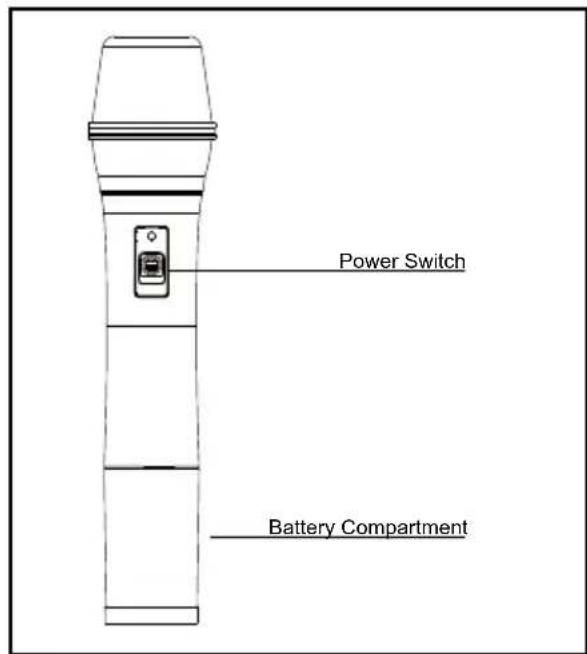
text_image
Power Switch Battery Compartment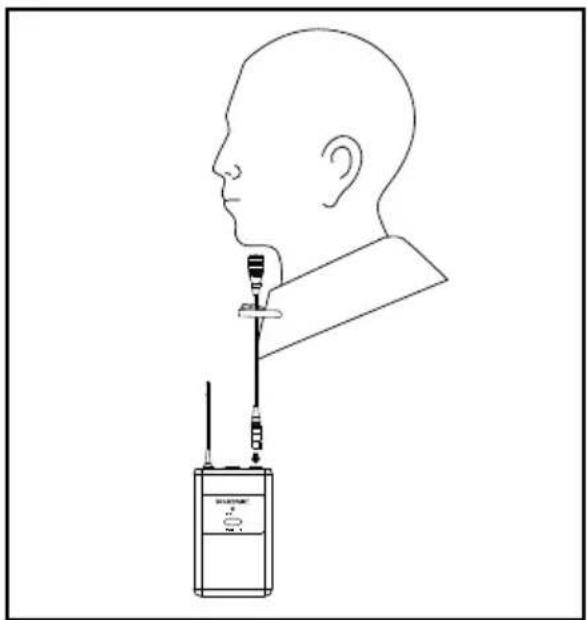
natural_image
Side-view line drawing of a human head profile with a medical device attached to the neck (no text or symbols)HeadsetLavalier
natural_image
Line drawing of a human head with earphones connected to a handheld device labeled 'PHONE 2' (no text or symbols on the device itself)Specifications
Transmitter
| WM-1 (Handheld Transmitter) WB-1 (Beltpack Transmitter) | |
| Frequency Range(Selectable) | 500-875MHz (Selectable) 500-875MHz (Selectable) |
| Housing Material ABS ABS | |
| Bandwidth 25MHz 25MHz | |
| Spurious Emissions <-55dBc <-55dBc | |
| Max. Deviation Range ±68KHz ±68KHz | |
| Maximum Input Level 148dB SPL 148dB SPL | |
| Battery AA×2 Alkaline, >12hr battery life AA×2 Alkaline, >12hr battery life | |
| Notes | Please work with your sales representative to select the optimal frequency for your region |
Receiver
| WR-1 (Wireless Receiver) | |
| Frequency Range (Selectable) | 500-875MHz (Selectable) |
| Oscillation Mode | PLL synthesized |
| Bandwidth | 25MHz |
| Preset Channels | 16 Non-interference channels |
| Receiving Mode | CPU-controlled diversity technology |
| Squelch Control | Optimized automatic squelch control |
| Display | Channel display LED, 4 LED RF display, 4 LED AF display |
| Sensitivity | 6dBμV, at S/N>80dB |
| Max. Deviation Range | ±60KHz |
| Spurious Emissions | <80dB |
| Frequency Response | 50Hz~16KHz |
| S/N Ratio | >100dBA |
| T.H.D. | <0.5% @ 1KHz (Dev.=40KHz) |
| AF Output | 300mV rms |
| Power Supply | DC 12~15V |
| Current Consumption | <190 mA |
| Working Temperature | -10~60°C |
| Notes | Please work with your sales representative to select the optimal frequency for your region |
SERVICE AND REPAIR
For replacement parts, service and repairs please contact the Phonic distributor in your country. Phonic does not release service manuals to consumers, and advice users to not attempt any self repairs, as doing so voids all warranties. You can locate a dealer near you at http://www.phonic.com/where/.
WARRANTY INFORMATION
Phonic stands behind every product we make with a no-hassles warranty. Warranty coverage may be extended, depending on your region. Phonic Corporation warrants this product for a minimum of one year from the original date of purchase against defects in material and workmanship under use as instructed by the user's manual. Phonic, at its option, shall repair or replace the defective unit covered by this warranty. Please retain the dated sales receipt as evidence of the date of purchase. You will need it for any warranty service. No returns or repairs will be accepted without a proper RMA number (return merchandise authorization). In order to keep this warranty in effect, the product must have been handled and used as prescribed in the instructions accompanying this warranty. Any tampering of the product or attempts of self repair voids all warranty. This warranty does not cover any damage due to accident, misuse, abuse, or negligence. This warranty is valid only if the product was purchased new from an authorized Phonic dealer/distributor. For complete warranty policy information, please visit http://www.phonic.com/warranty/.
CUSTOMER SERVICE AND TECHNICAL SUPPORT
We encourage you to visit our online help at http://www.phonic.com/support/. There you can find answers to frequently asked questions, tech tips, driver downloads, returns instruction and other helpful information. We make every effort to answer your questions within one business day.
FCC Caution: To assure continued compliance, any changes or modifications not expressly approved by the party responsible for compliance could void the user's authority to operate this equipment. (Example - use only shielded interface cables when connecting to computer or peripheral devices).
THIS DEVICE COMPLIES WITH PART 74 OF THE FCC RULES. This equipment complies with FCC RF radiation exposure limits set forth for an uncontrolled environment.


support@phonic.com
http://www.phonic.com
PHONIC
MANUAL DEL USUARIO
CONTENIDO
Introducción 1
Componentes 1
natural_image
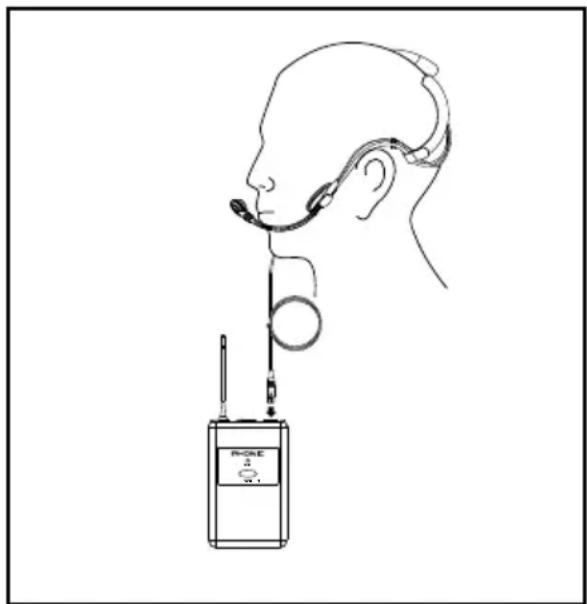
Line drawing of a human head profile with a device connected to a wall-mounted device (no text or symbols)Headset-AuricularLavalier
natural_image
Line drawing of a human head with earphones connected to a device labeled 'RONE' (no text or symbols on the device itself)Especificaciones
Transmisor
FCC Caution: To assure continued compliance, any changes or modifications not expressly approved by the party responsible for compliance could void the user's authority to operate this equipment. (Example - use only shielded interface cables when connecting to computer or peripheral devices).
THIS DEVICE COMPLIES WITH PART 74 OF THE FCC RULES. This equipment complies with FCC RF radiation exposure limits set forth for an uncontrolled environment.


support@phonic.com
http://www.phonic.com
PHONIC
使用说明书
目录
前言 1
内含产品 1
安装WR-1 Safari无线接收器模块 1
操作Safari无线系统 1
发射器组件 2
规格 3
natural_image
Side-view line drawing of a human head profile with a medical device attached to the neck (no text or symbols)头戴式麦克风领夹式麦克风

natural_image
Line drawing of a person wearing a headset and holding a device labeled 'PARK' (no text or symbols on the device itself)规格
无线发射器规格
FCC Caution: To assure continued compliance, any changes or modifications not expressly approved by the party responsible for compliance could void the user's authority to operate this equipment. (Example - use only shielded interface cables when connecting to computer or peripheral devices).
THIS DEVICE COMPLIES WITH PART 74 OF THE FCC RULES. This equipment complies with FCC RF radiation exposure limits set forth for an uncontrolled environment.


support@phonic.com http://www.phonic.com
PHONIC