
IDK-1115P-50XGA1E - Tracking Advantech - Free user manual and instructions
Find the device manual for free IDK-1115P-50XGA1E Advantech in PDF.


| Product Type | 15" XGA Industrial Display Kit with Projected Capacitive Touch Solution |
| Brand | Advantech |
| Model | IDK-1115P-50XGA1E |
| Display Size | 15" diagonal, 4:3 aspect ratio |
| Resolution | 1024 x 768 (XGA) |
| Brightness | 500 cd/m² |
| Contrast Ratio | 2500:1 |
| Viewing Angle (H/V) | 88°/88°/88°/88° (CR≥10) |
| Response Time | 23 ms (typical) |
| Colors | 16.7M (8-bit) or 262K (6-bit) |
| Touch Type | Projected Capacitive (PCAP) |
| Touch Interface | USB (Full-speed, 12 Mbps) |
| Touch Points | 5 simultaneous touches (Windows 7/8/10) |
| Light Transmission | 89 ± 3% |
| Signal Interface | 1 channel LVDS |
| Nominal Input Voltage (LCD) | 3.3 V |
| Power Consumption (LCD) | 12.8 W (typical) |
| Backlight Power Consumption | 7.8 W (typical at 100% duty) |
| Backlight Type | LED, life 50,000-70,000 hours |
| External Dimensions (W x H x D) | 326.5 x 253.5 x 9.1 mm |
| Weight | 960 g |
| Operating Temperature | -20°C to 70°C |
| Storage Temperature | -30°C to 80°C |
| Warranty | 2 years (from date of purchase) |
| Touch Driver Support | Windows 2000/XP/2003 (single touch), Windows Vista (single touch), Windows 7/8/10 (5 touch), Linux (Ubuntu, Android, others) |
Frequently Asked Questions - IDK-1115P-50XGA1E Advantech
User questions about IDK-1115P-50XGA1E Advantech
0 question about this device. Answer the ones you know or ask your own.
Ask a new question about this device
Download the instructions for your Tracking in PDF format for free! Find your manual IDK-1115P-50XGA1E - Advantech and take your electronic device back in hand. On this page are published all the documents necessary for the use of your device. IDK-1115P-50XGA1E by Advantech.
USER MANUAL IDK-1115P-50XGA1E Advantech
natural_image
Illustration of four electronic circuit boards with white outlines on a purple background (no text or symbols)IDK-1115P Series
15" XGA Industrial Display Kit with Projected Capacitive Touch Solution
Copyright
The documentation and the software included with this product are copyrighted 2018 by Advantech Co., Ltd. All rights are reserved. Advantech Co., Ltd. reserves the right to make improvements in the products described in this manual at any time without notice. No part of this manual may be reproduced, copied, translated or transmitted in any form or by any means without the prior written permission of Advantech Co., Ltd. Information provided in this manual is intended to be accurate and reliable. However, Advantech Co., Ltd. assumes no responsibility for its use, nor for any infringements of the rights of third parties, which may result from its use.
Acknowledgements
AMI is a trademark of American Megatrends Inc.
IBM and PC are trademarks of International Business Machines Corporation.
Intel® Core 2 Quad, Pentium Dual Core and Celeron are trademarks of Intel Corporation.
WinBond is a trademark of Winbond Corporation.
All other product names or trademarks are properties of their respective owners.
Part No. 2006111512 Edition 3
Printed in China May 2018
A Message to the Customer
Advantech Customer Services
Each and every Advantech product is built to the most exacting specifications to ensure reliable performance in the harsh and demanding conditions typical of industrial environments. Whether your new Advantech equipment is destined for the laboratory or the factory floor, you can be assured that your product will provide the reliability and ease of operation for which the name Advantech has come to be known.
Your satisfaction is our primary concern. Here is a guide to Advantech's customer services. To ensure you get the full benefit of our services, please follow the instructions below carefully.
Technical Support
We want you to get the maximum performance from your products. So if you run into technical difficulties, we are here to help. For the most frequently asked questions, you can easily find answers in your product documentation. These answers are normally a lot more detailed than the ones we can give over the phone.
So please consult this manual first. If you still cannot find the answer, gather all the information or questions that apply to your problem, and with the product close at hand, call your dealer. Our dealers are well trained and ready to give you the support you need to get the most from your Advantech products. In fact, most problems reported are minor and are able to be easily solved over the phone.
In addition, free technical support is available from Advantech engineers every business day. We are always ready to give advice on application requirements or specific information on the installation and operation of any of our products.
Product Warranty (2 years)
Advantech warrants to you, the original purchaser, that each of its products will be free from defects in materials and workmanship for two years from the date of purchase.
This warranty does not apply to any products which have been repaired or altered by persons other than repair personnel authorized by Advantech, or which have been subject to misuse, abuse, accident or improper installation. Advantech assumes no liability under the terms of this warranty as a consequence of such events.
Because of Advantech's high quality-control standards and rigorous testing, most of our customers never need to use our repair service. If an Advantech product is defective, it will be repaired or replaced at no charge during the warranty period. For out-of-warranty repairs, you will be billed according to the cost of replacement materials, service time and freight. Please consult your dealer for more details.
If you think you have a defective product, follow these steps:
- Collect all the information about the problem encountered. (For example, CPU speed, Advantech products used, other hardware and software used, etc.) Note anything abnormal and list any onscreen messages you get when the problem occurs.
- Call your dealer and describe the problem. Please have your manual, product, and any helpful information readily available.
- If your product is diagnosed as defective, obtain an RMA (return merchandise authorization) number from your dealer. This allows us to process your return more quickly.
- Carefully pack the defective product, a fully-completed Repair and Replacement Order Card and a photocopy proof of purchase date (such as your sales receipt) in a shippable container. A product returned without proof of the purchase date is not eligible for warranty service.
- Write the RMA number visibly on the outside of the package and ship it prepaid to your dealer.
Contents
Chapter 1 Overview......1
1.1 General Description 2
1.2 Specifications 2
1.2.1 LCD Panel.... 2
1.2.2 Touch Screen.... 2
1.2.3 Environment.... 2
1.3 LCD Functional Block Diagram 3
Figure 1.1 Function block diagram ...... 3
1.4 Mechanical Characteristics ...... 3
1.4.1 LCD with projected capacitive touch screen 3
1.4.2 Touch Controller 4
1.5 Touch Screen driver.... 4
1.6 Absolute Maximum Ratings 5
1.6.1 TFT LCD Module 5
1.6.2 BACKLIGHT UNIT 5
Chapter 2 Electrical Characteristics......7
2.1 TFT LCD Module....8
2.1.1 Power Specification 8
Table 2.1: Power specification....8
2.2 Backlight Unit 9
Table 2.2: Backlight driving conditions ...... 9
Chapter 3 Signal Characteristics......11
3.1 Pixel Format Image 12
3.2 Input Signal Timing Specifications 12
3.3 Pin Description 15
Table 3.1: Pin Description ...... 15
3.4 Power ON/OFF Sequence 16
3.5 Scanning Direction 17
Figure 3.1 Normal scan (pin 4, LR/UD = High or NC).... 17
Figure 3.2 Reverse scan (pin 4, LR/UD = Low).... 17
Chapter 4 Connector & Pin Assignment......19
4.1 TFT LCD Module.... 20
4.1.1 Connector 20
Table 4.1: Connector 20
4.1.2 Interface Pin Assignment 20
Table 4.2: Pin Assignment.... 20
4.1.3 Backlight Unit Pin Assignment 20
Chapter 5 Touchscreen & Touch Controller.....23
5.1 Touchscreen 24
5.1.1 Touch Characteristics 24
5.1.2 Optical Characteristics 24
5.1.3 Mechanical Characteristics 24
5.2 Touch Controller.... 24
5.2.1 Touch Controller Characteristics 24
5.2.2 Pin Assignment and Description.... 25
Figure 5.1 Interface Pin Definition ...... 25
Appendix A Optical Characteristics...... 27
A.1 LCD Module Optical Characteristics 28
Table A.1: Optical Characteristics ...... 28
Appendix B Handling Precautions 31
B.1 Handling Precautions.... 32
Chapter 1
Overview
1.1 General Description
The Advantech IDK-1115P series comes with a 15" industrial grade LCD Projected Capacitive Touch display with low power consumption. IDK-1115P series is ideal for embedded applications where customers want to have maximum flexibility in mechanical design.
1.2 Specifications
1.2.1 LCD Panel
■ Display Size: 15", 4:3 panel
■ Resolution: 1024 x 768
Viewing Angle (Horizontal / Vertical): 88°/88°/88°/88°
■ Brightness: 500 cd/m ^2
■ Contrast Ratio: 2500:1
■ Response Time (ms): 23
■ Colors: 6 Bit (262 K) / 8 Bit (16.7 M)
■ Nominal Input Voltage: 3.3 V
■ Power Consumption: 12.8 W
■ Signal Interface: 1 channel LVDS
Weight: 960 g
■ Dimensions (W x H x D): 326.5 x 253.5 x 9.1 mm
1.2.2 Touch Screen
■ Touch Screen: Projected Capacitive
■ Light Transmission: 89 ± 3%
Interface: USB
■ Surface Treatment: Clear
Black Print: Yes
1.2.3 Environment
■ Operating Temperature: -20 \~ 70°C
■ Storage Temperature: -30 \~ 80°C
1.3 LCD Functional Block Diagram
The following diagram shows the functional block of the 15 inches Color TFT-LCD Module:

flowchart
graph TD
    A["INPUT CONNECTOR"] --> B["LVDS RECEIVER"]
    A --> C["DC/DC CONVERTER & REFERENCE VOLTAGE"]
    A --> D["CONVERTER CONNECTOR"]
    B --> E["SCAN DRIVER IC"]
    C --> E
    D --> F["Converter"]
    E --> G["TFT LCD PANEL (1024x3x768)"]
    F --> H["LED BACKLIGHT UNIT"]
    I["VCC"] --> A
    J["GND"] --> A
    K["SEL68"] --> A
    L["LR/UD"] --> A
    M["RX0(+/-)"] --> A
    N["RX1(+/-)"] --> A
    O["RX2(+/-)"] --> A
    P["RX3(+/-)"] --> A
    Q["RXCLK(+/-)"] --> A
    R["VI"] --> S["CONVERTER CONNECTOR"]
    S --> T["Converter"]
    T --> U["LED BACKLIGHT UNIT"]
    V["DATA DRIVER IC"] --> E
Figure 1.1 Function block diagram
1.4 Mechanical Characteristics
1.4.1 LCD with projected capacitive touch screen
Front View
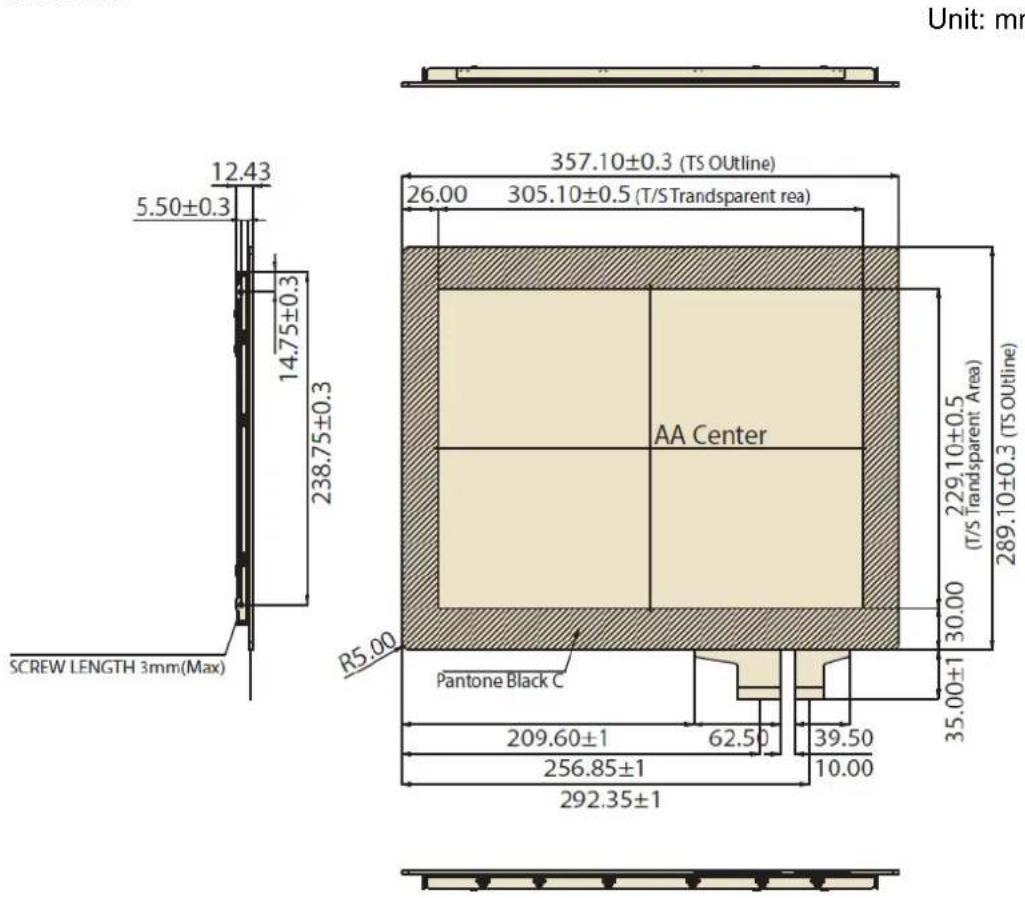
Rear View
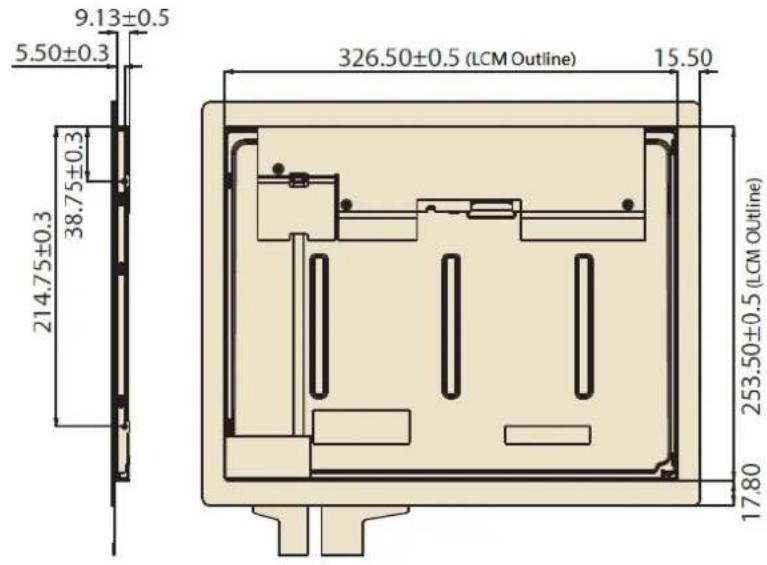
Note: Tolerances unless marked are ±0.5mm
1.4.2 Touch Controller

1.5 Touch Screen driver
■ Windows 2000, XP, 2003: single touch, mouse driver
■ Windows Vista: single touch, inbox driver
■ Windows 7, 8, 10: five touch, inbox driver
■ Linux: Ubuntu, Android, other versions of Linux support, please refer to Advantech website
1.6 Absolute Maximum Ratings
1.6.1 TFT LCD Module
Item Symbol Min. Max. Unit Conditions
Logic/LCD Drive Voltage Vcc -0.3 4 [Volt] Note 1
1.6.2 BACKLIGHT UNIT
| Item Symbol | Value | Unit | Note | ||
| Min. | Max. | ||||
| Converter Voltage | Vi | -0.3 | 18 | [V] | 1, 2 |
| Enable Voltage | EN | --- | 5.5 | [V] | |
| Backlight Adjust | Dimming --- | 5.5 | [V] | ||
Note 1: Permanent damage to the device may occur if maximum values are exceeded. Function operation should be restricted to the conditions described under Normal Operating Conditions.
Note 2: Specified values are for lamp (Refer to 2.2 for further information).
Chapter 2
Electrical
Characteristics
2.1 TFT LCD Module
2.1.1 Power Specification
Input power specifications are as follows:
Table 2.1: Power specification
| Parameter | Symbol | Value | Unit | Note | |||
| Min. | Typ. | Max. | |||||
| Power Supply Voltage V | CC | 3.0 3.3 3.6 [V] - | |||||
| Ripple Voltage V | RP | -- 100 [mVp-p] | |||||
| Rush Current I | RUSH | - | - | 2 | . | 0 | |
| Power Supply Current | White | I_CC | -800 960 [mA] | 3a | |||
| Black | -670 | 800 [mA] | 3b | ||||
| LVDS differential input voltage | Vid 200 - 600 [mV] | ||||||
| LVDS common input voltage | Vic | 1.0 1.2 1.4 [V] | |||||
| Differential Input Voltage for LVDS Receiver Threshold | “H” Level | V_IH | -- 100 [mV] | - | |||
| “L” Level | V_IL | -100 | -- [mV] | - | |||
| Terminating Resistor | R_T | - | 1 | 0 | 0 | - | |
A
O
Note 1: The module should be always operated within above ranges.
Note 2: Measurement conditions:
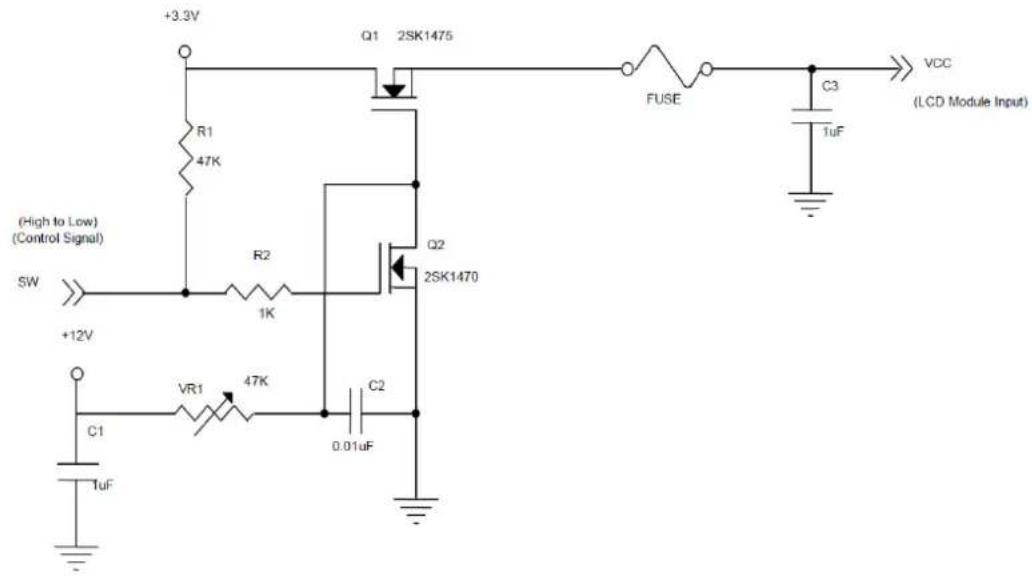

Note 3: The specified power supply current is under the conditions at V_DD = 3.3V , Ta = 25 ± 2°C, DC Current and f_v = 60Hz , whereas a power dissipation check pattern below is displayed.
a. White Pattern

natural_image
Empty white rectangle with black border (no text or symbols)b. Black Pattern

natural_image
Completely black image with no visible content, text, or symbols.2.2 Backlight Unit
Following characteristics are measured under stable condition at 25°C:
Table 2.2: Backlight driving conditions
| Parameter Symbol | Values | Unit | |||||
| Min. | Typ. | Max. | |||||
| Converter Power Supply Voltage V | i | 10.8 | 12.0 | 13.2 [V] | |||
| Converter Power Supply Current I | i | 0.5 | 0.65 | 0.8 [A] @ Vi = 12V | |||
| (Duty 100%) | |||||||
| Backlight Power Consumption P | BL | - | 7.8 | 9.6 [W] | @ Vi = 12V | ||
| (Duty 100%) | |||||||
| EN Control Level | Backlight on | - | 2.0 | 3.3 | 5.0 | ||
| Backlight off | 0 | --- | 0.8 | ||||
| PWM Dimming Control Level | High | - | 2.0 | 3.3 | 5.0 [V] | ||
| Low Hight | - | 0 | - | 0.15 | [V] | ||
| PWM Dimming Control Duty Ratio | - | 1 | - | 100 | [%] | @200Hz | |
| PWM Dimming Control Frequency | f_PWM | 190 | 200 | 20k | [Hz] | 2 | |
| LED Life Time | L_L | 50,000 | 70,000 | - | [Hrs] | 3 | |
Note 1: LED current is measured by utilizing a high frequency current meter as shown below:
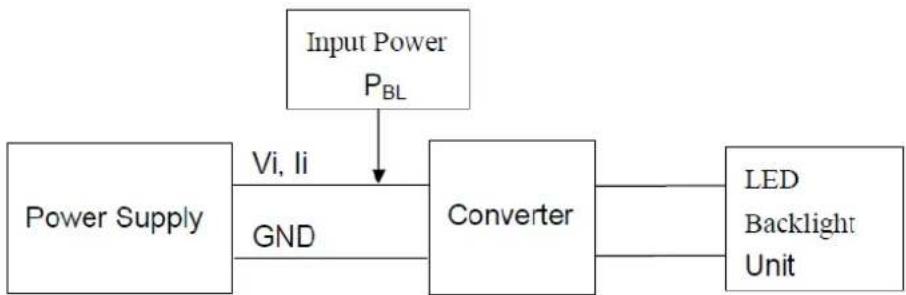
flowchart
graph TD
    A["Input Power P_BL"] --> B["Converter"]
    C["Power Supply"] --> D["GND"]
    D --> B
    B --> E["LED Backlight Unit"]
Note 2: At 20k Hz PWM control frequency, duty ratio range is restricted from 20% to 100%.
Note 3: The lifetime of LED is estimated data and defined as the time when it continues to operate under the conditions at Ta = 25 ±2°C and Duty 100% until the brightness becomes ≤ 50% of its original value. Operating LED under high temperature environment will reduce life time and lead to color shift.
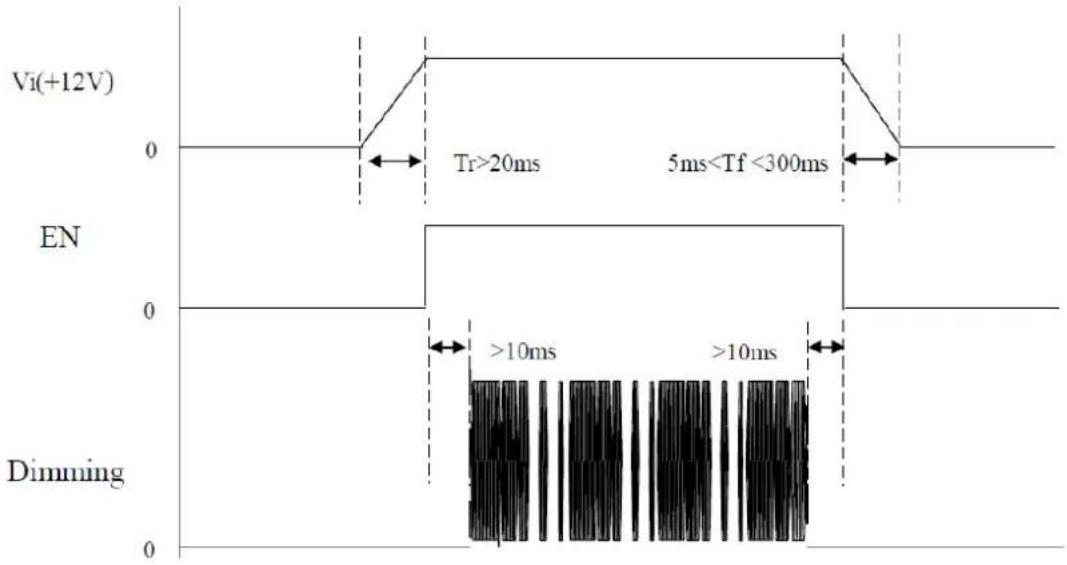
Power sequence and control signal timing are shown in the following figure.
other
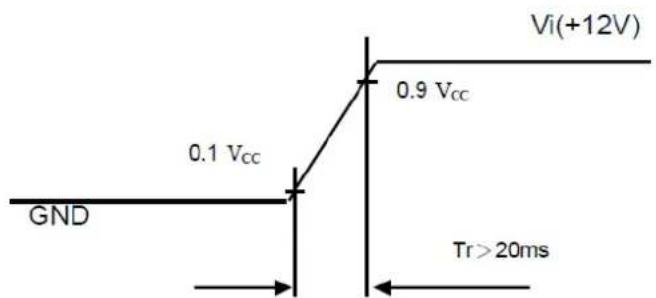
| Time Interval | Event Description | | ------------------- | ------------------------- | | Tr >20ms | High voltage (Vi(+12V)) | | 5ms < Tf < 300ms | Low voltage (Vi(+12V)) | | >10ms | High voltage (Dimming) | | >10ms | Low voltage (Dimming) |Note! While system is turned ON or OFF, the power sequences must follow as below descriptions.

Turn ON sequence: Vi(+12V) EN Dimming
Turn OFF sequence: Dimming → EN → Vi(+12V)
Note 4: The lifetime of LED is estimated data and defined as the time when it continues to operate under the conditions at Ta = 25 ±2°C and Duty 100% until the brightness becomes ≤ 50% of its original value. Operating LED under high temperature environment will reduce life time and lead to color shift.
Chapter 3
Signal Characteristics
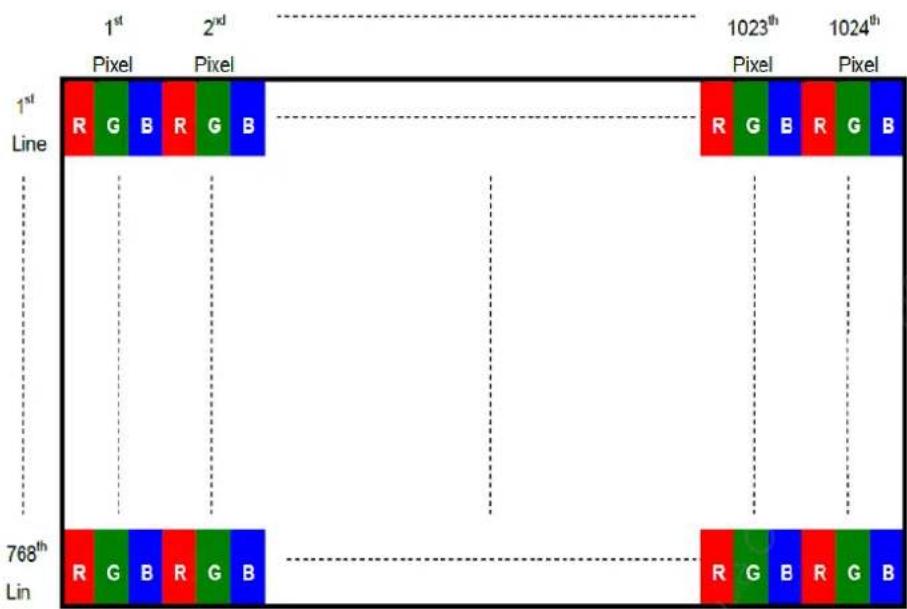
3.1 Pixel Format Image
The following figure shows the relationship between the input signal and the LCD pixel format.
3.2 Input Signal Timing Specifications
The input signal timing specifications are shown as the following table and timing diagram.
| Signal Item Symbol Min. Typ. Max. Unit Note | |||||||
| LVDS Clock | Frequency F | _c | 53.35 65 80 [MHz] - | ||||
| Period | T_c | 12.5 | 15.38 | 18.75 [ns] | |||
| Input cycle to cycle jitter | T_rcl | --- | --- 200 | [ns] | (a) | ||
| Input Clock to data skew | TLVCCS | -0.02*Tc | - | 0.02*Tc | [ps] | (b) | |
| Spread spectrum modulation range | F_clkin\_mod | - | - | 1.02*Fc [MHz] (c) | |||
| Spread spectrum modulation frequency | F_SSM | - | - | 200 | [KHz] | ||
| Vertical Display Term | Frame Rate | Fr | 55 | 60 | 70 | [Hz] | Tv=Tvd+Tvb |
| Total | Tv | 780 | 806 | 840 | [Th] | - | |
| Active Display | Tvd | 768 | 768 | 768 | [Th] | - | |
| Blank | Tvb | Tv-Tvd | 38 | Tv-Tvd | [Th] | - | |
| Horizontal Display Term | Total | Th | 1240 | 1344 | 1360 | [Tc] | Th=Thd+Thb |
| Active Display | Thd 1024 | 1024 | 1024 | [Tc] | |||
| Blank | Thb | Th-Thd | 320 | Th-Thd | [Tc] | ||
Note 1: Because this module is operated by DE only mode, Hsync and Vsync input signals should be set to low logic level or ground. Otherwise, this module would operate abnormally.
Note 2: The Tv (Tvd+Tvb) value must be an integer, otherwise, the module will operate abnormally.
INPUT SIGNAL TIMING DIAGRAM

TIMING DIAGRAM of LVDS

flowchart
graph TD
    A["TxCLK OUT"] --> B["RxCK IN"]
    B --> C["RxIN3"]
    C --> D["RxOUT23"]
    D --> E["RxOUT17"]
    E --> F["RxOUT16"]
    F --> G["RxOUT11"]
    G --> H["RxOUT10"]
    H --> I["RxOUT5"]
    I --> J["RxOUT27"]
    J --> K["RxIN2"]
    K --> L["RxOUT26"]
    L --> M["RxOUT25"]
    M --> N["RxOUT24"]
    N --> O["RxOUT22"]
    O --> P["RxOUT21"]
    P --> Q["RxOUT20"]
    Q --> R["RxOUT19"]
    R --> S["RxIN1"]
    S --> T["DE"]
    T --> U["GND"]
    U --> V["GND"]
    V --> W["B05"]
    W --> X["B04"]
    X --> Y["B03"]
    Y --> Z["B02"]
    Z --> AA["B01"]
    AA --> AB["B00"]
    AB --> AC["G05"]
    AC --> AD["G04"]
    AD --> AE["G03"]
    AE --> AF["G02"]
    AF --> AG["G01"]
    AG --> AH["B01"]
    AH --> AI["B00"]
    AI --> AJ["G05"]
    AJ --> AK["G04"]
    AK --> AL["G03"]
    AL --> AM["G02"]
    AM --> AN["G01"]
    AN --> AO["B01"]
    AO --> AP["B00"]
    AP --> AQ["G05"]
    AQ --> AR["G04"]
    AR --> AS["G03"]
    AS --> AT["G02"]
    AT --> AU["B01"]
    AU --> AV["B00"]
Note (a) The input clock cycle-to-cycle jitter is defined as below figures. Trcl = I T1 - TI


flowchart
graph TD
    A["TLVCCS"] --> B["LVDS_DATA_3"]
    A --> C["LVDS_DATA_2"]
    A --> D["LVDS_DATA_1"]
    A --> E["LVDS_DATA_0"]
    A --> F["LVDS_CLOCK"]
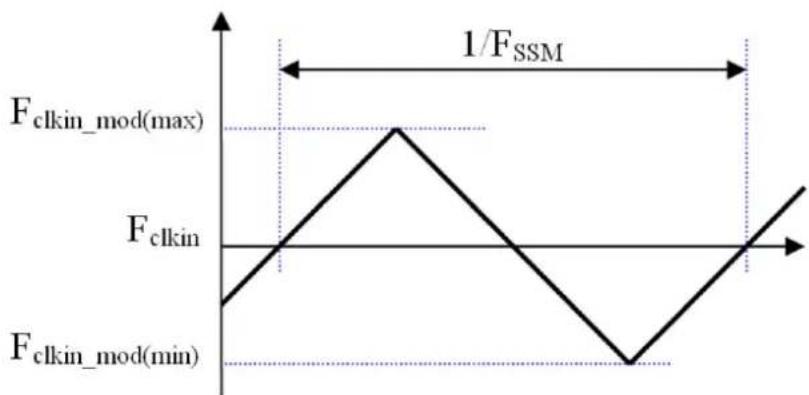
Note (b) The SSCG (Spread spectrum clock generator) is defined as below figures.
line
| Frequency/Time | Value | | -------------- | ----- | | F_clkin_mod(max) | 1/F_SSM | | F_clkin | F_clkin | | F_clkin_mod(min) | F_clkin_mod(min) |3.3 Pin Description
The module uses "Cvilux CID520D1HR0-NH" connectors or equivalent. We also suggest "Hirose DF14-20S-1.25C" connectors or equivalent.
Table 3.1: Pin Description
| Pin No. Symbol Function Polarity Note | |||
| 1 VCC Power Supply +3.3V(typical) | |||
| 2 VCC Power Supply +3.3V(typical) | |||
| 3 NC No Connection Note2 | |||
| 4 LR/UD Reverse Scan Control | Note1 | ||
| H or NC = Normal Mode. | |||
| L = Horizontal / Vertical Reverse Scan. | |||
| 5 RX0- LVDS Differential Data Input Negative | |||
| 6 | RX0+ | LVDS Differential Data Input | Positive |
| 7 GND | Ground | ||
| 8 RX1- LVDS Differential Data Input Negative | |||
| 9 | RX1+ | LVDS Differential Data Input | Positive |
| 10 | NC No Connection Note2 | ||
| 11 | RX2- | LVDS Differential Data Input | Negative |
| 12 | RX2+ | LVDS Differential Data Input | Positive |
| 13 | GND | Ground | |
| 14 | RXCLK- | LVDS Differential Data Input | Negative |
| 15 | RXCLK+ | LVDS Differential Data Input | Positive |
| 16 | GND | Ground | |
| 17 | RX3- | LVDS Differential Data Input | Negative |
| 18 | RX3+ | LVDS Differential Data Input | Positive |
| 19 | NC No Connection | Note2 | |
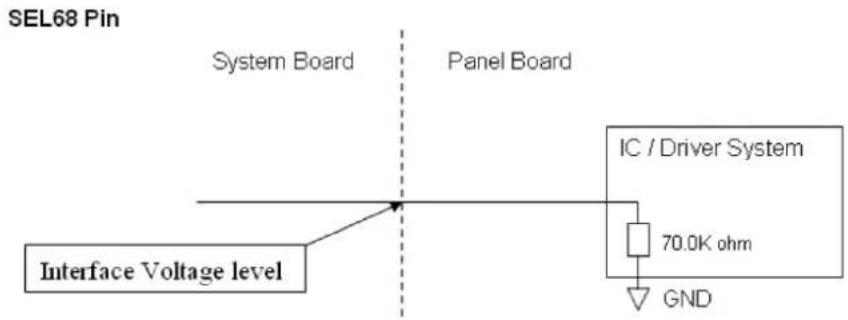
| 20 | SEL68 LVDS 6/8 bit select function control, High -> 6bit Input Mode Low or NC -> 8bit Input Mode | Note1 | |
Note 1: "Low" stands for 0V. "High" stands for 3.3V. "NC" stands for "No Connection". Note 2: Pin3, Pin10, Pin19 input signals should be set to no connection or ground for this module to operate normally.

3.4 Power ON/OFF Sequence
To prevent a latch-up or DC operation of LCD assembly, the power on/off sequence should be as in the diagram below.

Note 1: Please avoid a floating state of interface signal at an invalid period.
Note 2: When the interface signal is invalid, be sure to pull down the power supply of LCD VCC to 0 V.
Note 3: The backlight converter power must be turned on after the power supply for the logic and the interface signal to be valid. The backlight converter power must be turned off before the power supply for the logic and the interface signal to be invalid.
Power Sequence Timing
| Parameter | Value | Unit | |
| Min. Typ. Max. | |||
| T1 0.5 - 10 [ms] | |||
| T2 0 - 50 [ms] | |||
| T3 0 - 50 [ms] | |||
| T4 500 -- [ms] | |||
| T5 200 -- [ms] | |||
| T6 200 -- [ms] | |||
| T7 5 - 300 [ms] | |||
| T8 10 -- [ms] | |||
| T9 10 -- [ms] | |||
| T10 | 20 - 50 [ms] | ||
3.5 Scanning Direction
The following figures show the screen seen from the front view. The arrow indicates the direction of scan.

natural_image
Empty rectangular frame with two dashed arrows pointing inward (no text or symbols)Figure 3.1 Normal scan (pin 4, LR/UD = High or NC)
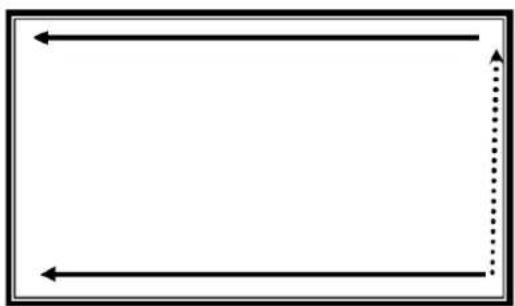
natural_image
Empty rectangular frame with two left-pointing arrows and a dotted arrow on the right side (no text or symbols)Figure 3.2 Reverse scan (pin 4, LR/UD = Low)
Chapter 4
Connector & Pin Assignment
4.1 TFT LCD Module
Below, the physical interface is described for the connector on module. These connectors are capable of accommodating the following signals and components.
4.1.1 Connector
| Table 4.1: Connector | |
| Connector Name LCM ConnectorPart Number | User’s ConnectorPart Number |
| Interface connector Cvilux CID520D1HR0-NH or equivalent | Hirose DF14-20S-1.25C or equivalent |
| Back light connector Cvilux CI4205M2HRP-NH or equivalent | Cvilux CI4205SL000 or equivalent |
4.1.2 Interface Pin Assignment
| Table 4.2: Pin Assignment | ||||||
| Pin No. Symbol | Pin No. Symbol | |||||
| 1 | V | C | C | 1 | ||
| 2 | V | C | C | 1 | ||
| 3 | N | C | 1 | 3 | G | |
| 4 | LR/UD | 14 | RXCLK- | |||
| 5 | RX0- | 15 | RXCLK+ | |||
| 6 | R | X | 0 | + | 1 | |
| 7 | GND | 17 | RX3- | |||
| 8 | RX1- | 18 | RX3+ | |||
| 9 | R | X | 1 | + | 1 | |
| 10 | NC | 20 | SEL68 | |||
4.1.3 Backlight Unit Pin Assignment
| Pin | Symbol | Description | Remark |
| 1 | Vi | Converter input voltage 12V | |
| 2 | VGND | Converter ground | Ground |
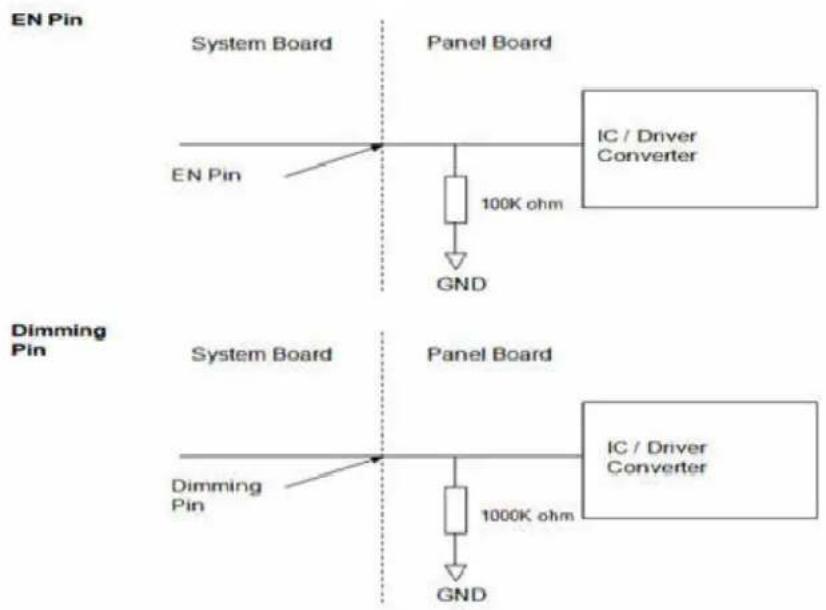
| 3 | EN | Enable pin | 3.3V |
| 4 | Dimming | Backlight adjust | PWM dimming(Hi: 3.3VDC, Lo: 0VDC) |
| 5 | NC | Not Connect |
Chapter 5
Touchscreen & Touch Controller
5.1 Touchscreen
5.1.1 Touch Characteristics
IDK-1115P series products use projected capacitive touchscreens.
5.1.2 Optical Characteristics
Item Specifications
Transparency 89 ± 3%
Haze < 3%
5.1.3 Mechanical Characteristics
| Item | Specifications |
| Surface | Hardness |
| Cover lens thickness 1.80mm | |
| Overall thickness 2.2±0.20mm | |
| Static force requires breaking the glass >23kgf | |
| Controller and tail type COB (Chip on Control Board) | |
| FPC tail bending radius R 1.0mm | |
| Holding force for tail | Peeling upward 90deg with 500gw without impact to electric performance |
| Top surface finish type | Clear |
Mohs
5.2 Touch Controller
5.2.1 Touch Controller Characteristics
| Parameter | Feature | |
| Number of sensing line | 38 | |
| Number of driving line | 57 | |
| Interface | USB, Full-speed, 12Mbps | |
| ADC resolution | 10bits (Typical) | |
| Firmware resolution | 2048 x 2048 (Typical) | |
| Response time | Average < 30ms | |
| Sampling rate | 1 finger touch | 150 Hz (Typical) |
| 5 fingers touch | 100 Hz (Typical) | |
| Operating voltage | +5Vdc, ±5% | |
| Power consumption | Working mode | 84.2mA @ 5Vdc |
| Idle mode | 65.3mA @ 5Vdc | |
| Sleep mode | 1.42mA @ 5Vdc | |
5.2.2 Pin Assignment and Description
5.2.2.1 Connector Location
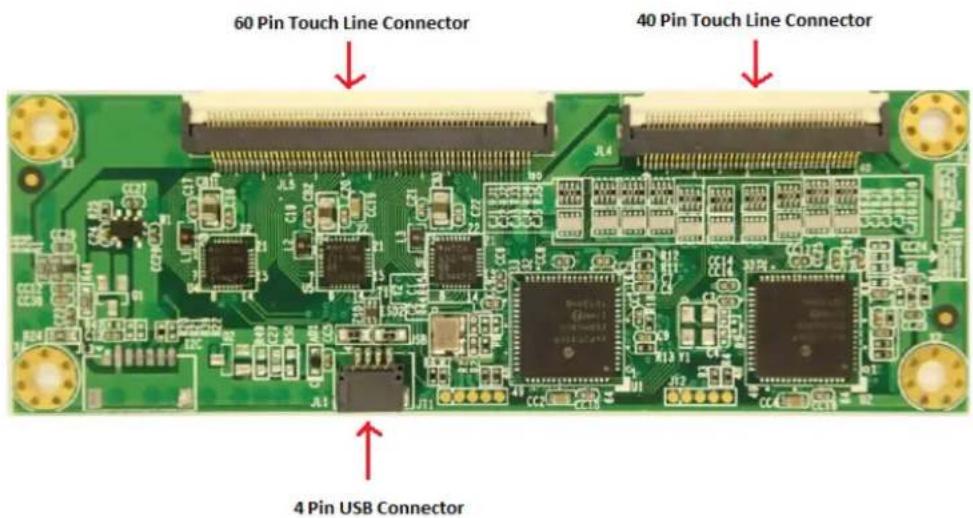
5.2.2.2 Interface Pin Definition
Pin No. Signal Name Signal Function
| 1 VCC Positive power supply |
| 2 D- D- pin of internal USB transceiver |
| 3 D+ D+ pin of internal USB transceiver |
| 4 GND Ground |
Note: Connector ACES 50224-00401-001

Figure 5.1 Interface Pin Definition
Appendix A
Optical Characteristics
A.1 LCD Module Optical Characteristics
The optical characteristics are measured under stable conditions at 25^ C (Room Temperature):
Table A.1: Optical Characteristics
| Item Conditions Min. Typ. Max. Unit Note | ||||
| Viewing Angle | HorizontalCR = 10 | 160 176 - | [degree] 1 | |
| VerticalCR = 10 | 160 176 - | |||
| LuminanceUniformity | 9 Points 75 80 | - [%] | 2, 3 | |
| Color coordinates(CIE 1931) | White x | 0.263 0.313 | 0.363 | -4 |
| White y | 0.279 0.329 | 0.379 | ||
| Response Time | Rising | - 16 | 21 | [ms]4,5 |
| Falling | - 7 | 14 | ||
| Color Temperature | - 6500 | [K] | ||
| White Luminance | 380 500 | - [cd/m2] 4 | ||
| Contrast Ratio | 1800 2500 - | 4 | ||
Note1 Definition of viewing angle
Viewing angle is the measurement of contrast ratio ≥10 , at the screen center, over a 180^ horizontal and 180^ vertical range (off-normal viewing angles). The 180^ viewing angle range is broken down as: 90^() horizontal left and right, and 90^() vertical high (up) and low (down). The measurement direction is typically perpendicular to the display surface with the screen rotated to its center to develop the desired measurement viewing angle.

Note2 9 points position
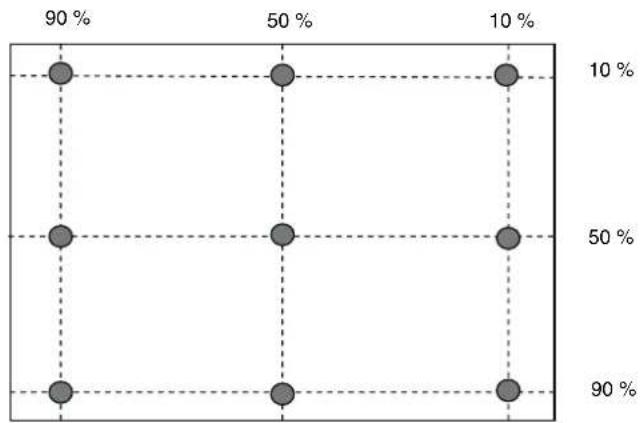
scatter
| Position | Percentage (%) | |---|---| | Top Left | 90 | | Top Right | 50 | | Bottom Left | 90 | | Bottom Right | 50 | | Bottom Center | 90 | | Top Center | 10 | | Top Right | 10 | | Bottom Center | 50 | | Bottom Right | 50 | | Bottom Right | 90 |Note3 9-point luminance uniformity is defined by dividing the maximum luminance values by the minimum test point luminance
$$ \delta_ {w 9} = \frac {\text { Minimum Brightness of nine points }}{\text { Maximum g Btness of nine points }} $$
Note4 Measurement method
The LCD module should be stabilized at given temperature for 20 minutes to avoid abrupt temperature change during measuring. In order to stabilize the luminance, the measurement should be executed after lighting Backlight for 20 minutes in a windless room.
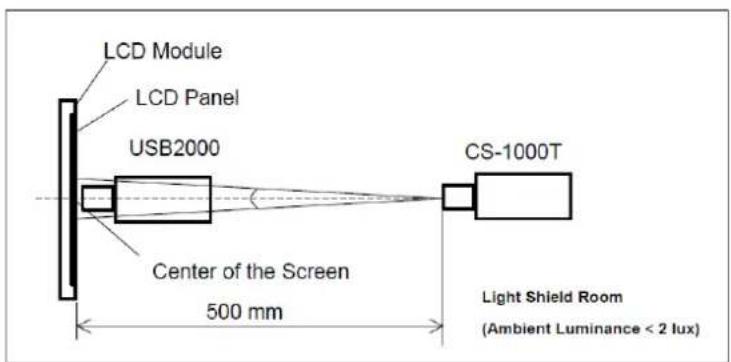
Note5 Definition of Response Time (T_R, T_F) :
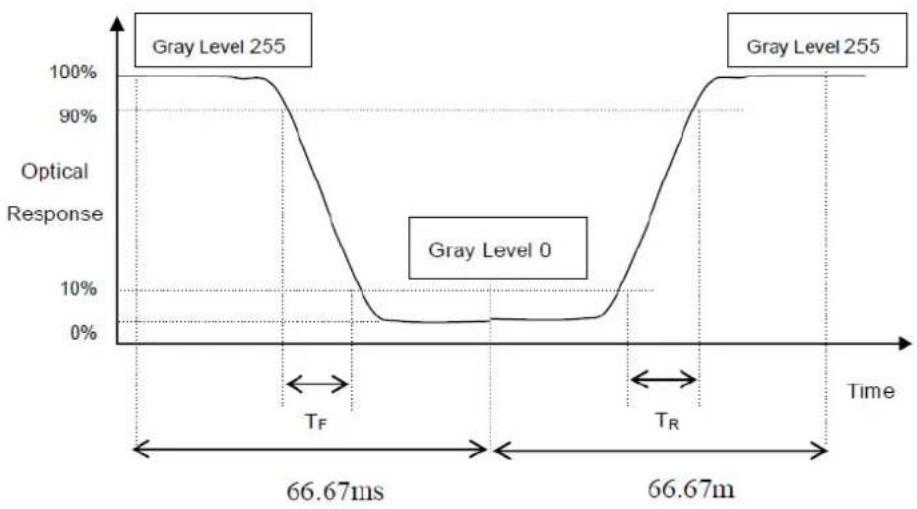
line
| Time Segment | Optical Response | | ---------------- | ----------------- | | Gray Level 255 | 100% | | Gray Level 0 | 0% | | Gray Level 255 | 100% |Note 6 Definition of Contrast Ratio (CR):
The contrast ratio can be calculated by the following expression.
Contrast Ratio (CR) = L255 / L0
L255: Luminance of gray level 255
L0: Luminance of gray level 0
$$ \mathrm{CR} = \mathrm{CR} (5) $$
CR (X) is corresponding to the Contrast Ratio of the point X at Figure in Note 2.
Appendix B
Handling Precautions
B.1 Handling Precautions
The optical characteristics are measured under stable conditions at 25^ C (Room Temperature)
- Since the front polarizer is easily damaged, be very careful not to scratch it.
- Be sure to turn off the power supply when inserting or disconnecting from the input connector.
-
Wipe off water drops immediately. Long contact with water may cause discoloration or spots.
-
When the panel surface is soiled, wipe it with absorbent cotton or another soft cloth.
-
Since the panel is made of glass, it may break or crack if dropped or bumped on a hard surface.
-
Since the CMOS LSI is used in this module, be careful of static electricity and ensure you ground yourself first before handling.
-
Do not open or modify the Module Assembly.
-
Do not press the reflector sheet at the back of the module in any direction.
-
In case a Module has to be put back into the packing container slot after it has been taken, please touch the far ends of the LED light bar reflector edge softly, otherwise the TFT Module may get damaged.
-
At the insertion or removal of the signal interface connector, be sure not to rotate nor tilt the Interface Connector on the TFT Module.
-
After installation of the TFT Module into an enclosure, do not twist nor bend the TFT Module even momentary. During integration of the enclosure, it should be taken into consideration that no bending/twisting forces are applied to the TFT Module from outside. Otherwise the TFT Module may get damaged.
-
A small amount of materials having no flammability grade are used in the LCD module. The LCD module should be supplied by power compliant with the requirements of Limited Power Source (IEC60950 or UL1950), or be applied exempt thereof.
www.advantech.com
Please verify specifications before quoting. This guide is intended for reference purposes only.
All product specifications are subject to change without notice.
No part of this publication may be reproduced in any form or by any means, electronic, photocopying, recording or otherwise, without prior written permission of the publisher.
All brand and product names are trademarks or registered trademarks of their respective companies.
© Advantech Co., Ltd. 2018



- IDK-1115P Series
- Copyright
- Acknowledgements
- A Message to the Customer
- Advantech Customer Services
- Technical Support
- Product Warranty (2 years)
- Contents
- Chapter 1 Overview......1
- Chapter 2 Electrical Characteristics......7
- Chapter 3 Signal Characteristics......11
- Chapter 4 Connector & Pin Assignment......19
- Chapter 5 Touchscreen & Touch Controller.....23
- Appendix A Optical Characteristics...... 27
- Appendix B Handling Precautions 31
- Chapter 1
- General Description
- Specifications
- LCD Panel
- Touch Screen
- Environment
- LCD Functional Block Diagram
- Mechanical Characteristics
- LCD with projected capacitive touch screen
- Touch Controller
- Touch Screen driver
- Absolute Maximum Ratings
- TFT LCD Module
- BACKLIGHT UNIT
- Chapter 2
- TFT LCD Module
- Power Specification
- Backlight Unit
- Chapter 3
- Pixel Format Image
- Input Signal Timing Specifications
- Pin Description
- Power ON/OFF Sequence
- Scanning Direction
- Chapter 4
- TFT LCD Module
- Connector
- Interface Pin Assignment
- Backlight Unit Pin Assignment
- Chapter 5
- Touchscreen
- Touch Characteristics
- Optical Characteristics
- Mechanical Characteristics
- Touch Controller
- Touch Controller Characteristics
- Pin Assignment and Description
- Connector Location
- Interface Pin Definition
- Appendix A
- A.1 LCD Module Optical Characteristics
- Note1 Definition of viewing angle
- Note4 Measurement method
- Note 6 Definition of Contrast Ratio (CR):
- Appendix B
- B.1 Handling Precautions
- www.advantech.com
Brand : Advantech
Model : IDK-1115P-50XGA1E
Category : Tracking