
HS-6 - Headphones NOKIA - Free user manual and instructions
Find the device manual for free HS-6 NOKIA in PDF.


| Product type | Audio headset with display (Display Headset) |
| Brand | NOKIA |
| Model | HS-6 |
| Connectivity | Pop-Port™ |
| Main functions | Call management, FM radio, MP3 player, time display, and SMS/MMS notifications |
| Display | LCD screen to display radio channels, music titles, caller ID, icons |
| Buttons | Call, end/stop, play, fast forward, rewind, volume +/-, music |
| Lock | Key lock switch (prevents accidental presses) |
| Compatibility | Nokia phones with Pop-Port connector |
| Power supply | Via the phone (no internal battery) |
| Care | Keep dry, avoid dust and extreme temperatures. Clean with a soft dry cloth. Do not use chemicals. |
| Safety | Do not attempt to open the device. Use only approved accessories. Follow radio regulations. |
| Storage temperature | Avoid very hot or very cold places to preserve components. |
| Weight | Approximately 80 g (estimate) |
| Box contents | HS-6 headset, user guide |
| Warranty | CE compliance (Directive 1999/5/EC). Subject to Nokia's conditions. |
Frequently Asked Questions - HS-6 NOKIA
User questions about HS-6 NOKIA
0 question about this device. Answer the ones you know or ask your own.
Ask a new question about this device
Download the instructions for your Headphones in PDF format for free! Find your manual HS-6 - NOKIA and take your electronic device back in hand. On this page are published all the documents necessary for the use of your device. HS-6 by NOKIA.
USER MANUAL HS-6 NOKIA
Nokia Display Headset HS-6 user guide

9232425
Issue 1
DECLARATION OF CONFORMITY
We, NOKIA CORPORATION declare under our sole responsibility that the product HS-6 is in conformity with the provisions of the following Council Directive: 1999/5/EC. A copy of the Declaration of Conformity can be found from http://www.nokia.com/phones/declaration_of_conformity/.

Copyright© 2005 Nokia. All rights reserved.
Reproduction, transfer, distribution or storage of part or all of the contents in this document in any form without the prior written permission of Nokia is prohibited.
Nokia, Nokia Connecting People and Pop-Port are registered trademarks of Nokia Corporation. Other product and company names mentioned herein may be trademarks or tradenames of their respective owners.
Nokia operates a policy of continuous development. Nokia reserves the right to make changes and improvements to any of the products described in this document without prior notice.
Under no circumstances shall Nokia be responsible for any loss of data or income or any special, incidental, consequential or indirect damages howsoever caused.
The contents of this document are provided "as is". Except as required by applicable law, no warranties of any kind, either express or implied, including, but not limited to, the implied warranties of merchantability and fitness for a particular purpose, are made in relation to the accuracy, reliability or contents of this document. Nokia reserves the right to revise this document or withdraw it at any time without prior notice.
This device may contain commodities, technology or software subject to export laws and regulations from the USA and other countries. Diversion contrary to law is prohibited.
The availability of particular products may vary by region. Please check with the Nokia dealer nearest to you.
Contents
- Introduction 5
- Headset parts 6
- Basic and call functions 8
Lock keys 8
Adjust earpiece volume 8
See received messages. 8
Display time 9
Make calls. 9
9
Answer and end calls. 9
Handle multiple calls. 10
Reject calls 10
Voice dialling 10
- Radio and music functions 11
Turn the radio or music player on and off 11
FM radio functions 11
MP3 music player functions. 12
Care and maintenance 13
1. Introduction
The Nokia Display Headset HS-6 allows you to handle basic phone calls, listen to FM radio and music tracks, as well as view the current time and notifications of received text messages (SMS) and multimedia messages (MMS). Some features of the headset are network-dependent.
The headset connects to compatible Nokia phones with a Pop-Port™ connector. To check the compatibility of your Nokia phone, contact your dealer or Nokia Customer Care.
Read this user guide carefully before using the headset. Do not use this user guide in place of the user guide for your phone.
2. Headset parts
The Nokia Display Headset has the following parts:
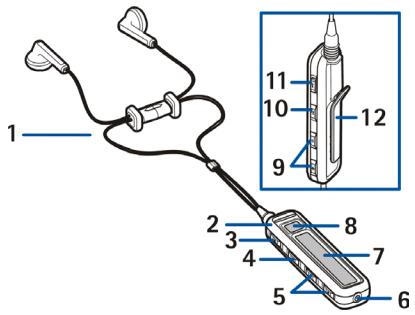
- Earpieces (1)
- Clip, which goes at the back of your neck (2)
- End/stop button to end and reject calls and to stop playing music on the MP3 music player (3).
- Play button to play music on the MP3 music player (4).
- Fast backward button to move between music tracks or stored radio channels or to scan for new radio channels (5).
-
Fast forward button to move between music tracks or stored radio channels or to scan for new radio channels (6).
-
Pop-Port™ connector to connect the headset to the phone (7).
- Display to show radio channels, music tracks, caller IDs or numbers and icons (8).
- Call button to radial, answer or swap between calls, or to display the time (9).
Volume up and volume down buttons to increase or decrease the volume (10). - Music button to activate and deactivate the FM radio or MP3 music player, or switch between the two (11).
Keylock switch to lock the headset buttons (12). - Clip to attach the headset for carrying (13).
3. Basic and call functions
Lock keys
Slide the keylock switch to lock and unlock the headset buttons.
When locked, all button presses are ignored and → 0 appears on the display. Press the call or end/stop button to answer or reject incoming calls even if the buttons are locked.
Adjust earpiece volume
Press the volume up and volume down buttons to adjust the earpiece volume. If you press and hold either button, the volume continues to increase or decrease until you release the button.
The current volume level appears on the display.
See received messages
When you receive SMS or MMS messages, the following icons appear near the call button:
indicates you have at least one unread SMS message that you can view on the phone.
indicates you have at least one unread MMS message that you can view on the phone.
Display time
Briefly press the call button to display the current time for 5 seconds, unless you are listening to the radio or music, or are in the middle of a call.
Make calls
When the Nokia Display Headset is connected to your phone, make calls by using your phone normally.
Redial
Press the call button twice to redial the last number you called.
Answer and end calls
When you receive a call, the ringing tone selected on your phone sounds, and the caller ID and flash on the display. If the caller ID is unknown, the number of the caller, a note, or nothing flashes on the display. If you are listening to FM radio or music, the headset automatically stops the radio or music when you answer a call and starts it again when you end the call.
To answer calls, press the call button.
To end currently active calls, press the end/stop button.
You can always answer and end calls with your phone.
■ Handle multiple calls
If you receive a new call before you end a current call, the new caller ID flashes on the display. Press the call button once to put the current call on hold, and answer the new call. Press the call button again to swap between the two calls.
Reject calls
If you do not want to answer a call, press the end/stop button. You can also reject calls by using your phone.
Voice dialling
Depending on your phone model, you may be able to make a call with the headset by voice dialling. When no call is in progress, press and hold the call button until appears on the display. Say the voice tag. The phone dials the related phone number.
4. Radio and music functions
Turn the radio or music player on and off
Press the music button to activate the FM radio or MP3 music player. If your phone has both an FM radio and a MP3 music player, the FM radio starts playing. Briefly press the music button to switch between the radio and music.
Press and hold the music button to deactivate the FM radio or the MP3 music player.
You can also activate and deactivate the FM radio and the MP3 music player by using your phone.
FM radio functions
You must activate the FM radio with the music button or your phone before you can use it. If you have no radio channels preset in your phone, the currently used radio frequency and appear on the display.
If there are radio channels preset in your phone, the name of the current channel and appear on the display.
- To skip to the next or previous stored radio channel, press the fast forward or fast backward button.
If there is only one channel preset in your phone, the same channel continues to play.
- To automatically search for new channels, press and hold the fast forward or fast backward button.
The found channel appears on the display. You can store the channel using your phone.
MP3 music player functions
You must activate the MP3 music player with the music button or your phone before you can use it. If you have no music tracks stored in your phone, √3 ?
If you have at least one music track stored in your phone, the current MP3 music track title and √3 appear on the display.
- To stop the music, press the end/stop button. To restart it, press the play button.
- To skip to the next or previous music track, press the fast forward or fast backward button.
If there is only one music track stored in your phone, you skip to the beginning of the same track.
- To move forward or backward within the current music track, press and hold the fast forward or fast backward button.
Your device is a product of superior design and craftsmanship and should be treated with care. The suggestions below will help you protect your warranty coverage.
- Keep the device dry. Precipitation, humidity and all types of liquids or moisture can contain minerals that will corrode electronic circuits.
- Do not use or store the device in dusty, dirty areas. Its moving parts and electronic components can be damaged.
- Do not store the device in hot areas. High temperatures can shorten the life of electronic devices and warp or melt certain plastics.
- Do not store the device in cold areas. When the device returns to its normal temperature, moisture can form inside the device and damage electronic circuit boards.
- Do not attempt to open the device other than as instructed in this guide.
- Do not drop, knock, or shake the device. Rough handling can break internal circuit boards and fine mechanics.
- Do not use harsh chemicals, cleaning solvents, or strong detergents to clean the device.
- Do not paint the device. Paint can clog the moving parts and prevent proper operation.
- Use only the supplied or an approved replacement antenna. Unauthorized antennas, modifications, or attachments could damage the device and may violate regulations governing radio devices.
If your device is not working properly, take it to the nearest authorized service facility for service.


- NOKIA DISPLAY HEADSET HS-6 USER GUIDE
- DECLARATION OF CONFORMITY
- CONTENTS
- INTRODUCTION
- HEADSET PARTS
- BASIC AND CALL FUNCTIONS
- LOCK KEYS
- ADJUST EARPIECE VOLUME
- SEE RECEIVED MESSAGES
- DISPLAY TIME
- MAKE CALLS
- REDIAL
- ANSWER AND END CALLS
- HANDLE MULTIPLE CALLS
- REJECT CALLS
- VOICE DIALLING
- RADIO AND MUSIC FUNCTIONS
- TURN THE RADIO OR MUSIC PLAYER ON AND OFF
- FM RADIO FUNCTIONS
- MP3 MUSIC PLAYER FUNCTIONS
Brand : NOKIA
Model : HS-6
Category : Headphones