
BT8710 - Video Conferencing System B-Tech - Free user manual and instructions
Find the device manual for free BT8710 B-Tech in PDF.


| Product Type | Floor Stand for Video Conferencing System |
| Brand | B-Tech |
| Model | BT8710 |
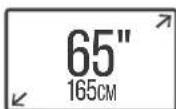
| Recommended Screen Size | 46" - 65" (117 - 165 cm) |
| Maximum Load per Screen | 70 kg (154 lbs) |
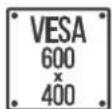
| VESA Compatibility | Up to 600 x 400 mm |
| Overall Dimensions (H x W x D) | 1969 x 2005 x 165 mm |
| Number of Screens Supported | Up to 2 (per screen specifications) |
| Integrated Cable Management | Yes |
| Included Accessories | Columns, wall plates, floor plates, mounting rails, screen interface arms, VC shelf, adaptor arms, hardware kit |
| VC Shelf | Included, adjustable height and position |
| Installation Type | Floor-mounted with wall support |
| Material | Steel (estimated) |
| Color | Black (estimated from typical B-Tech products) |
| Safety Features | Safety screws, anti-tip design, weight limit warnings |
| Maintenance | Periodic inspection every 6 months recommended |
| Warranty | Refer to manufacturer |
Frequently Asked Questions - BT8710 B-Tech
User questions about BT8710 B-Tech
0 question about this device. Answer the ones you know or ask your own.
Ask a new question about this device
Download the instructions for your Video Conferencing System in PDF format for free! Find your manual BT8710 - B-Tech and take your electronic device back in hand. On this page are published all the documents necessary for the use of your device. BT8710 by B-Tech.
USER MANUAL BT8710 B-Tech
natural_image
Technical line drawing of a structural support frame with vertical columns and mounting brackets (no text or symbols)SPECIFICATIONS
- Recommended for screens: 46" - 65" (117 - 165cm)
• Max load: 70kg (154lbs) per screen - Suitable for displays with fixings up to 600 x 400mm
- Stand dimensions: H.1969 x W.2005 x D.165mm
- Integrated cable management

PER SCREEN

CONTENTS
Installation Safety Notes....2
Parts List....4
Installation Instructions....6
Product Dimensions....18
B-Tech Contact Details....20
INSTALLATION SAFETY INSTRUCTIONS

CAUTION: This stand is intended for use only with the maximum weights indicated. Use with screens heavier than the maximum indicated may result in instability causing possible injury.
Do not attempt to install this product until all instructions and warnings have been read and properly understood.
Please keep these instructions for future reference.
Please check carefully to make sure there are no missing or defective parts - defective parts must never be used.
B-Tech AV Mounts, its distributors and dealers are not liable or responsible for damage or injury caused by improper installation, improper use or failure to observe these safety instructions. In such cases, all guarantees will expire.
General
B-Tech AV Mounts recommends that a professional AV installer or other suitably qualified person install this product. Great care must always be taken during installation as most AV equipment is of a fragile nature, possibly heavy and easily damaged if dropped.
If you do not fully understand the instructions or are not sure how to install this product safely, then please consult a professional for advice and/or to install this product for you. Failure to mount this product correctly may cause serious injury or death both during installation and at any time thereafter.
Do not mount any AV equipment that exceeds the specific weight limit of the product you are installing.
This weight limit will be clearly stated on each product and its packaging and will vary from product to product.
Product location
Please pay careful attention to where this product is located. Check load capacity of floor prior to installation as some surfaces are not suitable for installation. Designed for indoor use, this mount is suitable for public or home installation. If located in a public or frequently populated area ensure that the product is out of the immediate reach of people. If any AV equipment is to be suspended over the likely path or location of people then great care should be taken to secure all parts of the installation from falling.
When drilling holes it is essential to avoid contact with electrical cables and water or gas pipes contained within.
Use of a good quality live wire detector and hidden object locator is therefore recommended.
Only drill into structures when you are sure it is safe to do so.
Fixing hardware
It is highly recommended that all fixing screws be used where supplied and that the purpose of all other fixing hardware is fully understood. In some cases more AV equipment fixing hardware will be supplied to accommodate different models of equipment and set up configurations. The installer must be satisfied that any supplied fixing hardware is suitable for each specific installation. If any fixing screws or included hardware are deemed not sufficient for a safe installation then please consult a professional or your local hardware store.
Hazard limitation
When routing cables take advantage of any built in cable management features that the product might provide and ensure that all cables are tidy and secure. Check to see that any moving aspect of the product can do so unhindered by any cabling. Some products have moving parts and the potential to cause injury through the crushing or trapping of fingers or other body parts. Particular attention to the nature of moving parts is required especially when assembling installing and adjusting during set up. Immediately after installation double-check that the work done is safe and secure. Double-check all necessary fixings are present and are of ample tightness.
It is recommended that periodic inspections of the product and its fixing points are made as frequently as possible (no more than 6 months apart) to ensure that safety is maintained.
If in doubt consult a professional AV installer or other suitably qualified person.
INSTALLATION TOOLS REQUIRED
Drill
Drill bit
Pencil 10mro Mason Screwdriver


Spanner

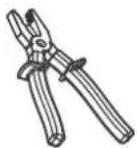
Pliers/Cutter
| ITEM | PART | REF | ||
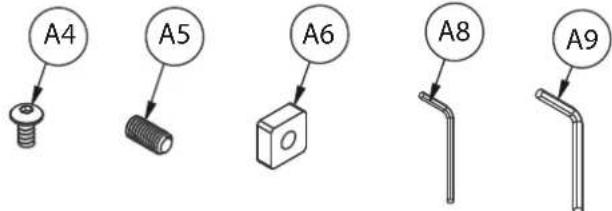 | COLUMNFLOOR TO | A1 | 1.9M COLUMN | 2 |
| A2 | END CAP | 2 | ||
| A3 | COLUMN REAR COVER | 2 | ||
| A4 | M6 x 12mm HEX SCREW | 4 | ||
| A5 | M6 x 12mm GRUB SCREW (OPTIONAL) | 8 | ||
| A6 | SQUARE NUT (OPTIONAL) | 8 | ||
| A7 | COVER STRIP | 8 | ||
| A8 | 3AF HEX KEY | 2 | ||
| A9 | 4AF HEX KEY | 2 | ||
 | B1 | WALL PLATE | 2 | |
| B2 | BASE PLATE | 2 | ||
| B3 | M6 x 12mm SCREW | 4 | ||
| B4 | M8 x 50mm COACH SCREW | 8 | ||
| B5 | N°.10 x 50mm WALL PLUG | 8 | ||
| B6 | M8 T1.5mm METAL WASHER | 8 | ||
| B7 | 4AF HEX KEY | 2 | ||
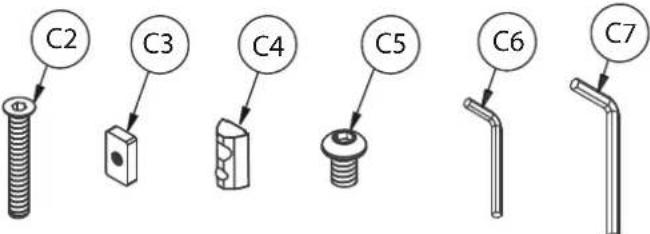 | FIXING KITVC SHELF | C1 | RAIL-TO-COLUMN MOUNTING BRACKET | 2 |
| C2 | M6 x 40mm CSK HEX SCREW | 8 | ||
| C3 | RECTANGLE NUT | 8 | ||
| C4 | M8 SLIDING INSERT | 8 | ||
| C5 | M8 x 12mm SCREW | 8 | ||
| C6 | 4AF HEX KEY | 2 | ||
| C7 | 5AF HEX KEY | 2 | ||
| ARMSSCREEN | D1 | MOUNTING RAIL | 1 | |
| D2 | END CAP | 2 | ||
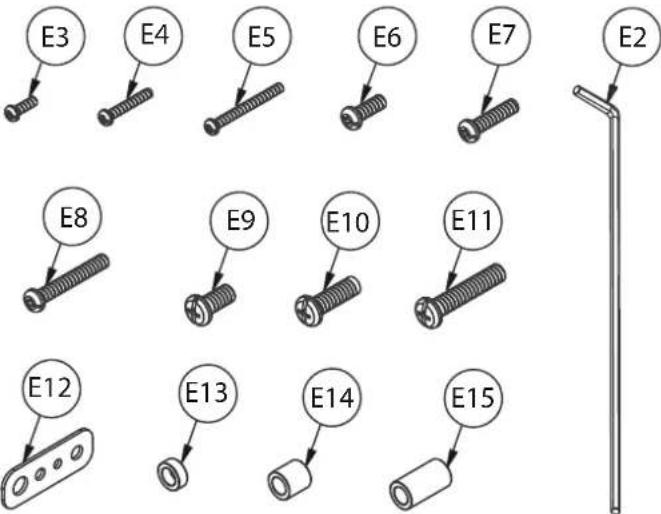 | E1 | SCREEN INTERFACE ARM | 4 | |
| E2 | 5AF LONG HEX KEY | 2 | ||
| E3 | M4 x 12mm SCREW | 8 | ||
| E4 | M4 x 25mm SCREW | 8 | ||
| E5 | M4 x 40mm SCREW | 8 | ||
| E6 | M6 x 16mm SCREW | 8 | ||
| E7 | M6 x 25mm SCREW | 8 | ||
| E8 | M6 x 40mm SCREW | 8 | ||
| E9 | M8 x 16mm SCREW | 8 | ||
| E10 | M8 x 25mm SCREW | 8 | ||
| E11 | M8 x 40mm SCREW | 8 | ||
| E12 | MULTIWASHER | 8 | ||
| E13 | 5mm SPACER | 8 | ||
| E14 | 13mm SPACER | 8 | ||
| E15 | 24mm SPACER | 8 | ||
 | ADAP-TORS | F1 | 600mm ADAPTOR ARM | 4 |
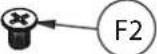
| F2 | M8 x 12mm SCREW | 8 | ||
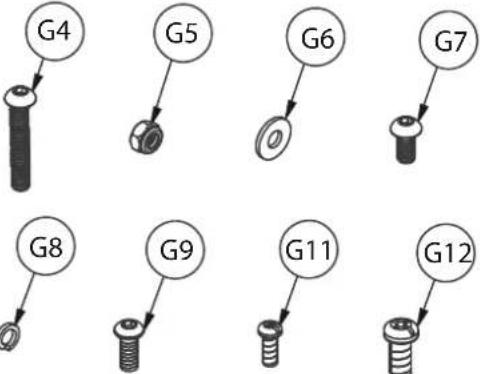 | G1 | HOOK ARM | 1 | |
| G2 | SLIDING BRACKET | 1 | ||
| G3 | EXTENSION BRACKET | 1 | ||
| G4 | M8 x 55mm HEX SCREW | 2 | ||
| G5 | M8 NUT | 4 | ||
| G6 | WASHER | 4 | ||
| G7 | M8 x 16mm HEX SCREW | 4 | ||
| G8 | M8 SPRING WASHER | 4 | ||
| G9 | M8 x 20mm HEX SCREW | 2 | ||
| G10 | SHELF | 1 | ||
| G11 | M4 x 10mm SCREW | 4 | ||
| G12 | UNC 1/4" x 1/2" SCREW | 1 |
INSTALLATION INSTRUCTIONS
1. ATTACH MOUNTING BRACKETS TO COLUMNS
i. Insert 4 x item C2 into item C1 and attach item C3.
Screw two full turns to leave item C3 at the end of item C2.


ii. Slide item C1 down the front slots of item A1 to the correct height and tighten item C2. Repeat for both columns.


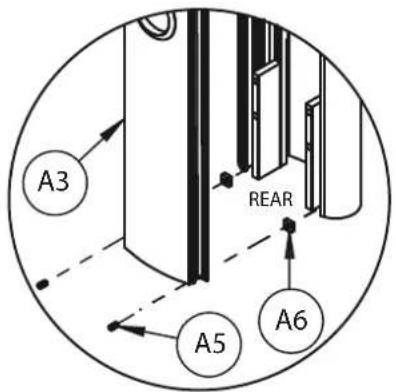
OPTIONAL - FIX REAR COVER TO COLUMNS
Place item A3 into the back of item A1.
Use items A5 & A6 at the top and bottom of the column slot to secure rear cover.


2. ATTACH WALL PLATES TO COLUMNS
Fix item B1 to the top of item A1 using item B3.

M6 x 12mm
HEX SCREW


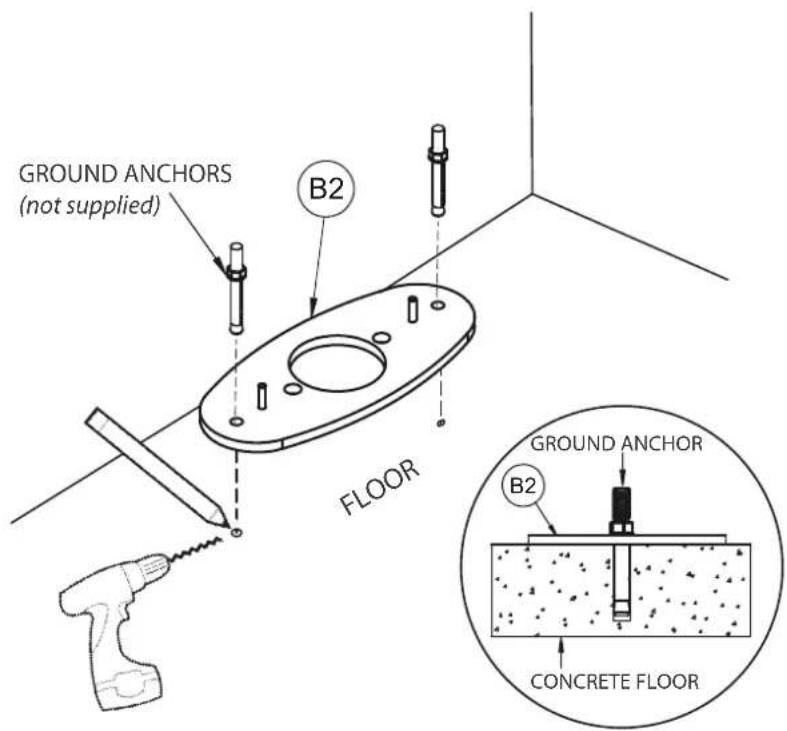
3. FIX FLOOR PLATES TO FLOOR
Fix item B2 to floor (fixings not included).
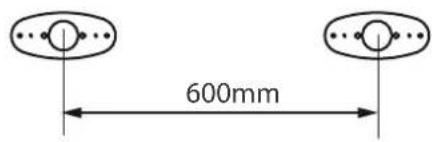
Note: Fixing points are 60mm away from the wall and the floor plates should be set 600mm apart.
TOP VIEW

WALL
4. MARK WALL FIXING HOLES
Using the guide pins, place item A1 onto item B2.
Mark the 4 fixing holes from item B1 onto the wall for each column.


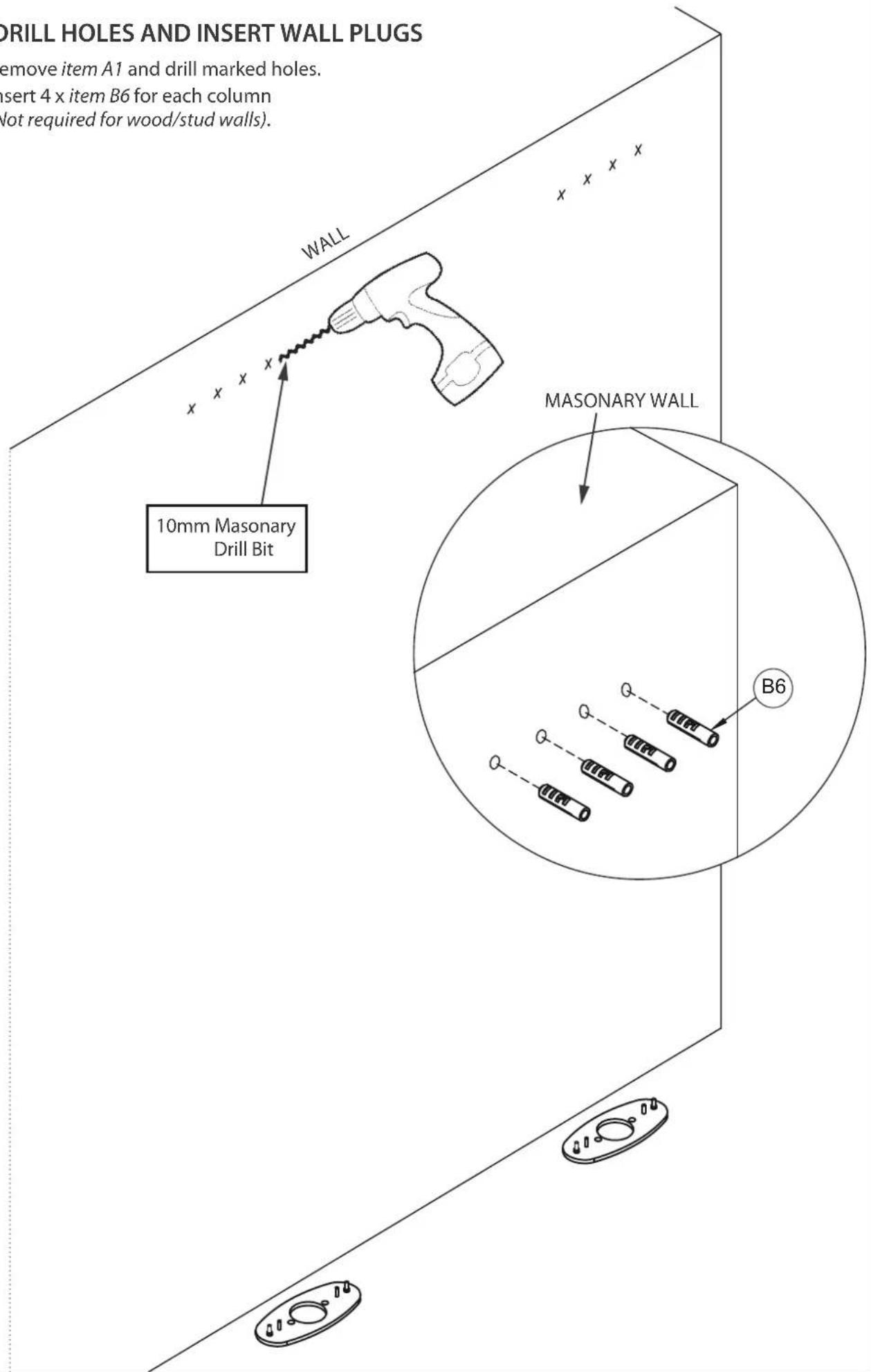
5. DRILL HOLES AND INSERT WALL PLUGS
Remove item A1 and drill marked holes.
Insert 4 x item B6 for each column
(Not required for wood/stud walls).
6. HOOK RAIL ONTO MOUNTING BRACKETS
i. Insert 4 x item C4 into item D1 (2 in the top channel, 2 in the bottom channel) on each side of the rail.
ii. Screw 2 x item C5 into item C4 in the top channel - allow at least a 6mm gap so the rail can be hooked on to item C1.
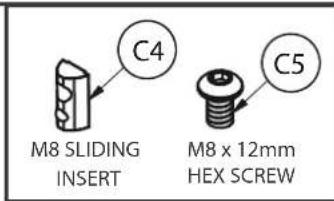

iii. Hook item D1 onto items C1 and fix with in place with item C5.

7. FIX COLUMN TO WALL
i. Place item A1 onto item B2.


8.
ASSEMBLE VC SHELF
i. Attach item G2 to item G1 using items G5 & G6. ii. Attach item G10 to item G2. using items G7 & G8.
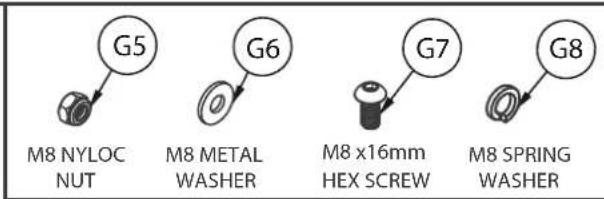

Note: The shelf adaptor can mount the shelf above or below the screens. Assembly shows shelf mounted below the rail / screens.
Optional
Add extension bar
For an extended reach attach item G3 onto item G2 using items G7 & G8.

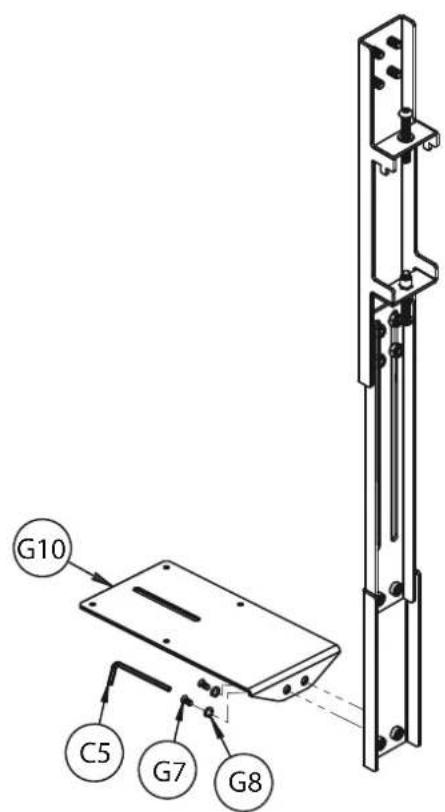
9. HOOK SHELF ONTO MOUNTING RAIL i. Hook item G1 onto item D1.
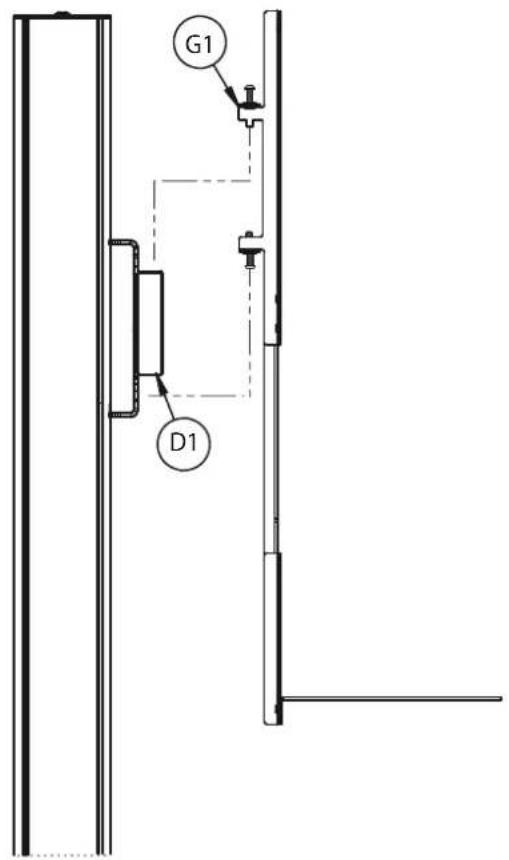
ii. Secure shelf to rail. Use item G4 on the bottom of item G1 to secure the shelf to item D1. Optional: Level the shelf bracket by adjusting item G4 on top of item G1.

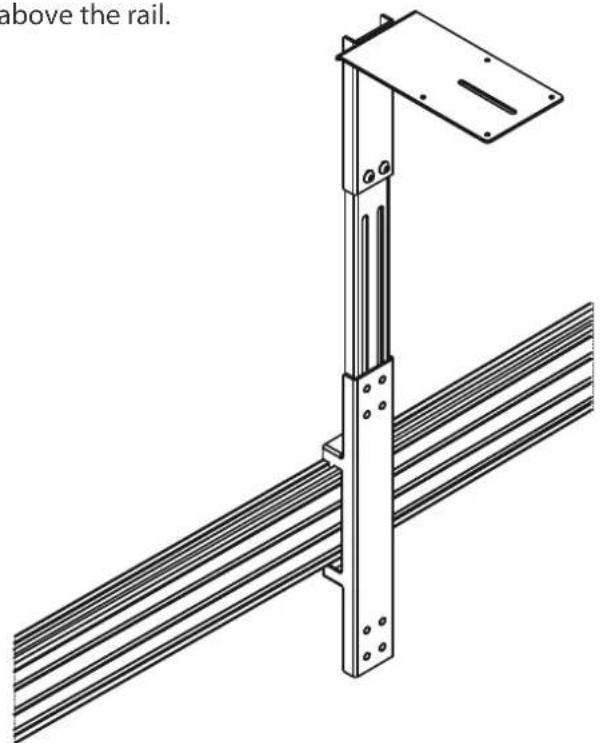
ALTERNATIVE SHELF MOUNTING OPTIONS
Shelf shown mounted above the rail.
natural_image
Technical line drawing of a metal frame structure with ribbed base and support bracket (no text or symbols)REVERSE MOUNTINGABOVE THE SCREENMOUNT
To reverse mount the shelf, use item G9 to mount item G10 onto the back of item G3.


10. ATTACH INTERFACE ARMS TO SCREENS
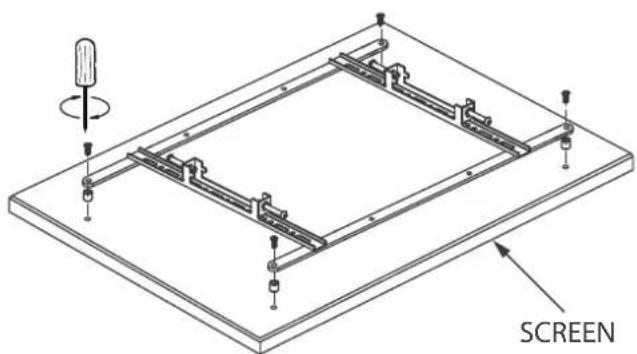
Fix item E1 to the rear of the screens using items E3 - E15.
Note: Ensure the arms are facing the correct way round and the same holes are used on all arms.

Note: 13mm spacers are not required if the VC shelf is not being installed or if reverse mounting the shelf.

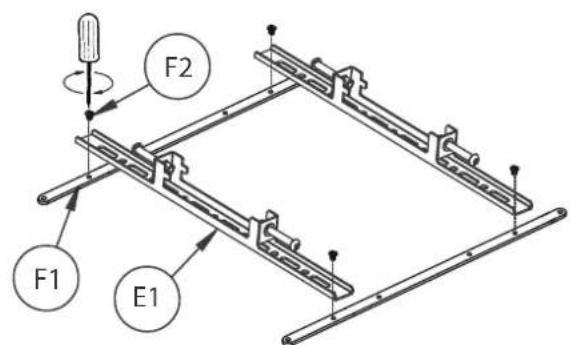
600mm ADAPTOR ARMS
Note: Use (if required) for 65" screens
with VESA 600 x 400mm fixings
i. Attach item F1 to item E1 using item F2.
ii. Fix item F1 to rear of screen using the interface kit (items E3-E14).
11. HOOK SCREENS ONTO RAIL
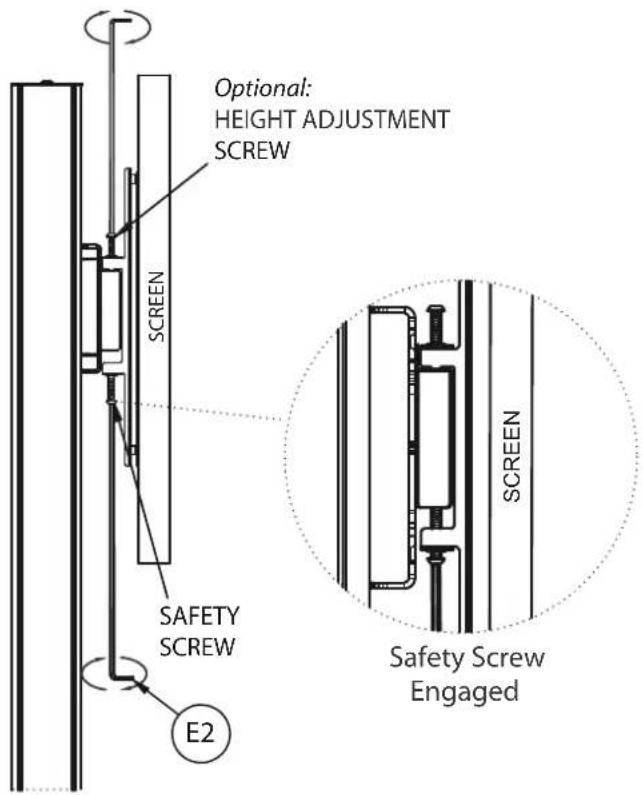
Use items E1 to hook the screens onto item D1.


12. LOCK SCREENS TO RAIL
Tighten the safety screws on the bottom of item E1 securing the screens to item D1.
Note: If necessary, adjust the height adjustment screws on top of item E1 to level the screen.
12. ATTACH CAMERA TO SHELF
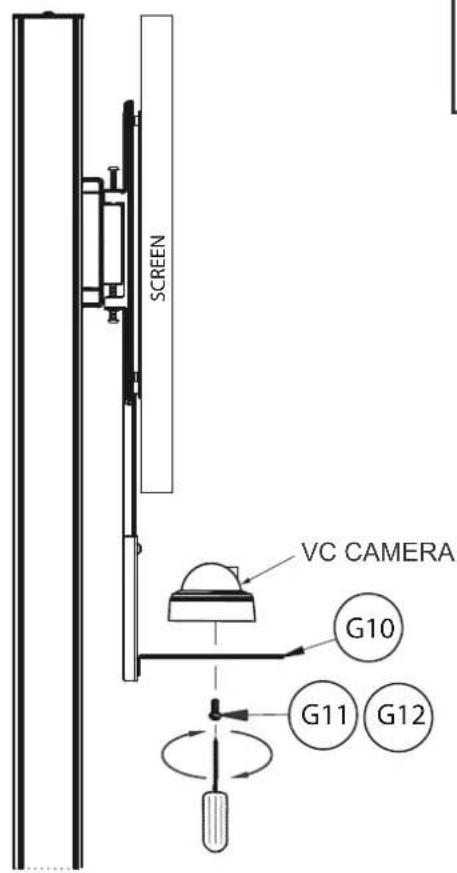
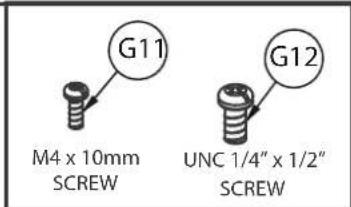
Fix camera to item G10 using either item G11 or item G12.
13. ATTACH STRIPS
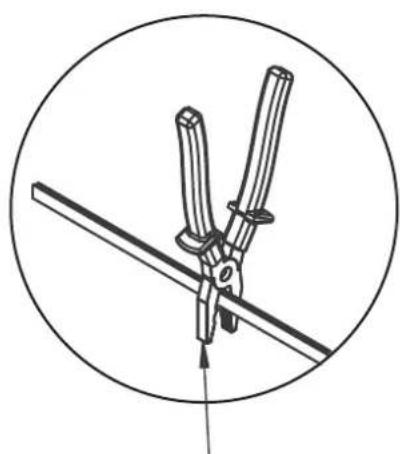
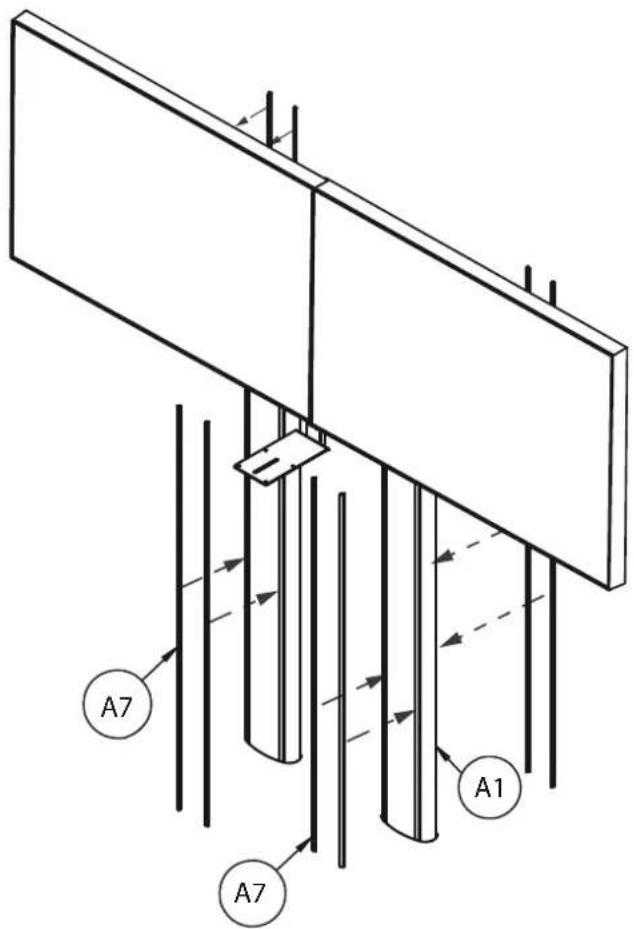
Insert item A7 to the front and back of item A1. Note: Item A7 may have to be cut down to size to be able to fit into the front of item A1.
natural_image
Technical line drawing of a mechanical clamp or tool with a circular background (no text or symbols)Use pliers to cut item A7 to correct size
BT8710 DIMENSIONS
PLEASE KEEP THIS FOR FUTURE REFERENCE
FRONT VIEW
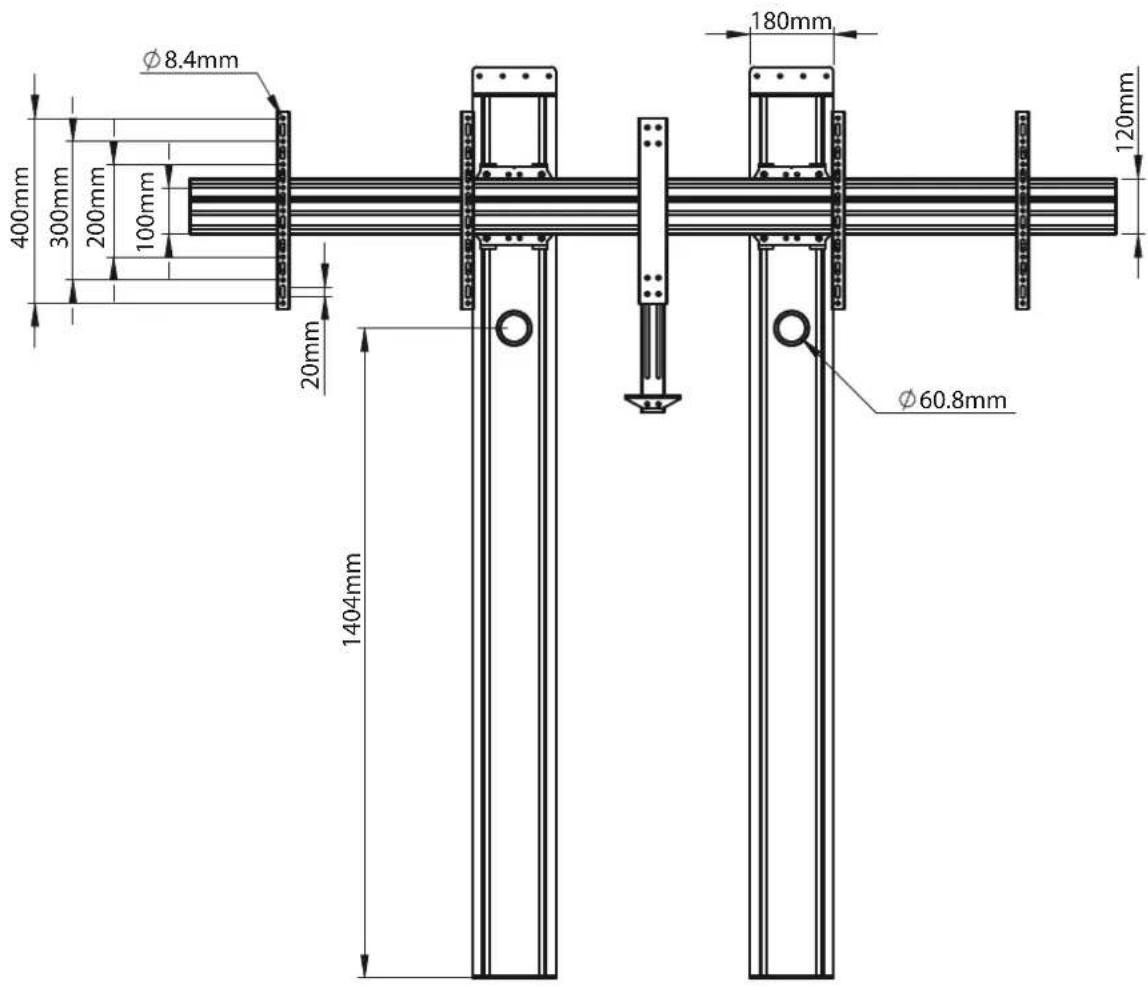
BOTTOM VIEW

These instructions are intended as a guide only and B-Tech accepts no liability for the accuracy of the information contained in this document.
BT8710 DIMENSIONS
PLEASE KEEP THIS FOR FUTURE REFERENCE


These instructions are intended as a guide only and B-Tech accepts no liability for the accuracy of the information contained in this document.

CONTACT:
info@btechavmounts.com
©2020 B-Tech AV Mounts. All rights reserved.
B-Tech AV Mounts is a division of B-Tech International Design and Manufacturing Ltd.
B-Tech AV Mounts and the B-Tech logo are registered trade marks.
All other brands and product names are trademarks of their respective owners.
Photographs are for illustrative purposes only. E&OE.
AMA-BT8710-V1-1020-104 MADE IN VIETNAM


- SPECIFICATIONS
- CONTENTS
- INSTALLATION SAFETY INSTRUCTIONS
- General
- Product location
- Fixing hardware
- Hazard limitation
- INSTALLATION TOOLS REQUIRED
- INSTALLATION INSTRUCTIONS
- ATTACH MOUNTING BRACKETS TO COLUMNS
- OPTIONAL - FIX REAR COVER TO COLUMNS
- ATTACH WALL PLATES TO COLUMNS
- FIX FLOOR PLATES TO FLOOR
- MARK WALL FIXING HOLES
- DRILL HOLES AND INSERT WALL PLUGS
- HOOK RAIL ONTO MOUNTING BRACKETS
- FIX COLUMN TO WALL
- 8.
- ASSEMBLE VC SHELF
- Optional
- Add extension bar
- HOOK SHELF ONTO MOUNTING RAIL i. Hook item G1 onto item D1.
- ALTERNATIVE SHELF MOUNTING OPTIONS
- REVERSE MOUNTINGABOVE THE SCREENMOUNT
- ATTACH INTERFACE ARMS TO SCREENS
- 600mm ADAPTOR ARMS
- HOOK SCREENS ONTO RAIL
- LOCK SCREENS TO RAIL
- ATTACH CAMERA TO SHELF
- ATTACH STRIPS
- BT8710 DIMENSIONS
Brand : B-Tech
Model : BT8710
Category : Video Conferencing System