AXSSO-CH3 - Car Interface AXESS - Free user manual and instructions
Find the device manual for free AXSSO-CH3 AXESS in PDF.


User questions about AXSSO-CH3 AXESS
0 question about this device. Answer the ones you know or ask your own.
Ask a new question about this device
Download the instructions for your Car Interface in PDF format for free! Find your manual AXSSO-CH3 - AXESS and take your electronic device back in hand. On this page are published all the documents necessary for the use of your device. AXSSO-CH3 by AXESS.
USER MANUAL AXSSO-CH3 AXESS
natural_image
Close-up of a black automotive electronic device with multiple connected ports and connectors (no visible text or symbols)Dodge/Jeep Stop/Start Override Interface 2020-2021
Visit Axxessinterfaces.com for current application list
INTERFACE FEATURES
- Allows the override of the STOP/START engine feature
• The factory STOP/START button can resume the STOP/START feature - Can be used with either a factory or aftermarket radio
- Vehicle type configured through the Axxess Updater software program
- Simple plug n' play installation, no wiring required
INTRODUCTION
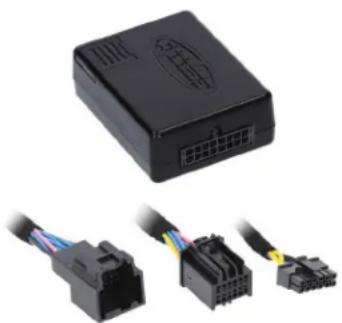
The AXSSO-CH3 is designed to disengage the STOP/START feature of the vehicle, and keep that feature disengaged even after the key has been cycled. The AXSSO-CH3 will work with either an aftermarket radio, or a factory radio. A simple plug n' play installation is all that is required to install the device in the vehicle, and programming through a Windows 10 computer via the Axxess Updater software program.
APPLICATIONS
Dodge
Durango....2020-2021
Jeep
Cherokee....2020-2021
Grand Cherokee 2020-2021
Product Info

TABLE OF CONTENTS
Programming......2
Connections....3
Operation....3
INTERFACE COMPONENTS
- AXSSO-CH3 interface
- AXSSO-CH3 harness
Visit MetraOnline.com for more detailed information about the product and up-to-date vehicle specific applications.
TOOLS & INSTALLATION ACCESSORIES REQUIRED
- Zip ties • Cutters (for zip-ties)
- Micro-B USB Cable
(Axxess part number AXUSB-MCBL)
ATTENTION: With the key out of the ignition, disconnect the negative battery terminal before installing this product. Ensure that all installation connections, especially the air bag indicator lights, are plugged in before reconnecting the battery or cycling the ignition to test this product. NOTE: Refer also to the instructions included with the aftermarket accessory before installing this device.
PROGRAMMING
text_image
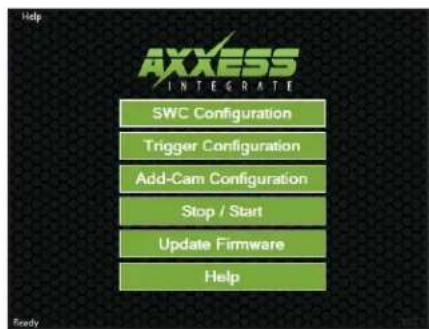
Help AXXESS INTEGRATE SWC Configuration Trigger Configuration Add-Cam Configuration Stop / Start Update Firmware Help(Figure A) (Figure B) (Figure C)

text_image
Help Select Vehicle True Make Model Program Interface Main Menu Body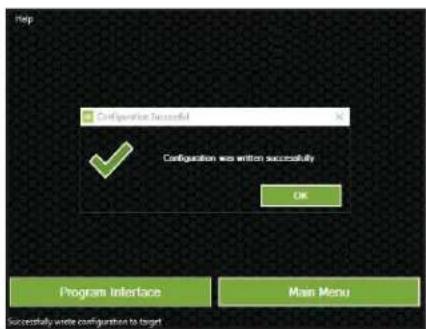
text_image
Help Configuration Successful ✓ Configuration was written successfully OK Program Interface Main Menu Successfully write configuration to target1.
Download and install the Axxess Updater software program from: axxessinterfaces.com/resources/updater-software
3.
On the next screen that opens, select the year, make, and model of the vehicle, then press Program Interface. (Figure B)
2.

Connect the micro-B USB cable (sold separately) to the computer and AXSSO-CH3 interface. Open the Axxess Updater software program and wait until the word Ready is shown in the bottom left of the screen. Select Stop / Start. (Figure A)
4.

When the Configuration Successful box pops up, the programming process is complete. (Figure C)
Continue to Installation
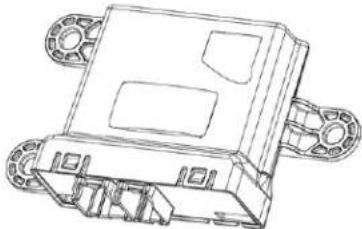
• Security Gateway Module, left side under trim panel on passenger side.
Jeep
Cherokee 2020-2021
• Disassembly instructions: metraonline.com/part/99-6518
Security Gateway module is on the back wall of radio cavity.
Grand Cherokee 2020-2021
• Security Gateway Module, left side under trim panel on passenger side.
From the Security Gateway:
- Unplug the connector from the Security Gateway module.
- Plug the AXSSO-CH3 harness at Security Gateway module.
- Plug the AXSSO-CH3 harness into the AXSSO-CH3 interface.

text_image
To Security Gateway Factory connector unplugged from Security Gateway AXESSRe-engaging the STOP/START feature
1.

Press the factory STOP/START button to re-engage the STOP/START feature.
Security Gateway Module: See INSTALLATION notes at left, for locations in select vehicles.
natural_image
Technical line drawing of a mechanical component with mounting flanges (no text or symbols)Having difficulties? We're here to help.
Contact our Tech Support line at: 386-257-1187
Or via email at: techsupport@metra-autosound.com
Tech Support Hours (Eastern Standard Time)
Monday - Friday: 9:00 AM - 7:00 PM
Saturday: 10:00 AM - 5:00 PM
Sunday: 10:00 AM - 4:00 PM

KNOWLEDGE IS POWER
Enhance your installation and fabrication skills by enrolling in the most recognized and respected mobile electronics school in our industry. Log onto www.installerinstitute.edu or call 386-672-5771 for more information and take steps toward a better tomorrow.

Metra recommends MECP certified technicians
natural_image
Close-up of a black plastic electronic device with multiple connected ports (no visible text or symbols)Cherokee....2020-2021
Grand Cherokee 2020-2021
Product Info

ÍNDICE
Programación 2
Conexiones....3
Operación 3
COMPONENTES DE LA INTERFAZ
• Interfaz AXSSO-CH3
• Arnés AXSSO-CH3
text_image
Help AXXESS INTEGRATE SWC Configuration Trigger Configuration Add-Cam Configuration Stop / Start Update Firmware Help(Figura A) (Figura B) (Figura C)

text_image
Help Select Vehicle True Make Model Program Interface Main Menu Body
text_image
Help Configuration Successful ✓ Configuration was written successfully OK Program Interface Main Menu Successfully write configuration to target1.

natural_image
Technical line drawing of a mechanical component with mounting flanges (no text or symbols)
AXSSO-CH3
Móvil (Mobile Electronics
Certification Program, MECP).