99-3307G - Car Radio AXESS - Free user manual and instructions
Find the device manual for free 99-3307G AXESS in PDF.


User questions about 99-3307G AXESS
0 question about this device. Answer the ones you know or ask your own.
Ask a new question about this device
Download the instructions for your Car Radio in PDF format for free! Find your manual 99-3307G - AXESS and take your electronic device back in hand. On this page are published all the documents necessary for the use of your device. 99-3307G by AXESS.
USER MANUAL 99-3307G AXESS
INSTALLATION INSTRUCTIONS FOR PART 99-33076
Chevy Equinox 2010-2015 / GMC Terrain 2010-2014
(with monochrome display)
99-33076
KIT FEATURES
• ISO DIN radio provision with pocket
• ISO DDIN radio provision
- Painted gray to match factory finish

natural_image
Interior view of a car showing the dashboard and seat area (no visible text or symbols)KIT COMPONENTS
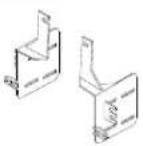
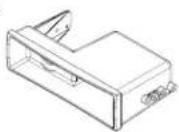
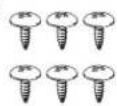
• A) Radio trim panel • B) Radio brackets • C) Pocket • D) (6) #8 x 3/8" Phillips screws
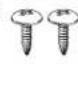
• E) (2) #10 x 3/4" Phillips screws • F) (2) #10 panel clips • G) Axxess interface and wiring harness (not shown)

B
C
D
E
F

WIRING & ANTENNA CONNECTIONS (sold separately)
Wiring Harness: • Axxess interface and harness included
Antenna Adapter: • 40-EU55
Table of Contents
Dash Disassembly 2
Kit Preparation....3
Kit Assembly
- ISO DIN radio provision with pocket....4
- ISO DDIN radio provision 4
Axxess Interface Installation ....5-7
TOOLS REQUIRED
• Panel removal tool • Phillips screwdriver
- 9/32" socket wrench
CAUTION! All accessories, switches, climate controls panels, and especially air bag indicator lights must be connected before cycling the ignition. Also, do not remove the factory radio with the key in the on position, or while the vehicle is running.

99-33076
Dash Disassembly
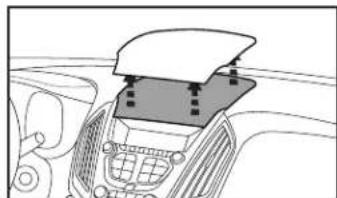
- With pocket above factory radio controls - Remove (2) 9/32" screws from inside the pocket, then unclip and remove the pocket.
- Without pocket, just unsnap and remove the panel. (Figure A)
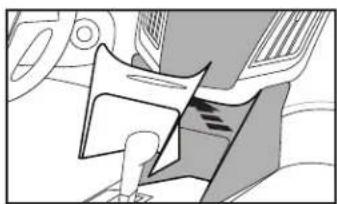
- Unsnap, unplug, and remove the radio/ climate control panel. (Figure B)
- Unclip and remove the (2) side panels from the left and right side of the pocket/CD slot panel. (Figure C)
natural_image
Top-down view of a car dashboard with a flat panel and control panel (no text or symbols visible)(Figure A) (Figure D)

natural_image
Interior view of a car dashboard with steering wheel and seatbelt (no text or symbols visible)(Figure B) (Figure E)

natural_image
Diagram of a car interior showing directional arrows and structural components (no text or labels)(Figure C) (Figure F)
- Remove (4) 9/32" screws to remove the pocket/CD slot panel. Remove the power outlet and attach it to the included pocket if installing single DIN. If you are mounting a DDIN the power outlet will not be retained with this kit. Remove the rubber bottom from the factory pocket and save it for final assembly. (Figure D)
- Remove (2) 9/32" screws from each a/c vent then unclip and remove the vents. Remove the screws inside and under the vent cavities and two from below the vent locations. (this will allow flex in the dash to fit the aftermarket in later). (Figure E)
- Remove (4) 9/32" screws securing the radio chassis and remove. (Figure F)
Continue to Kit Preparation
natural_image
Mechanical assembly diagram showing a piston and crank mechanism (no text or labels)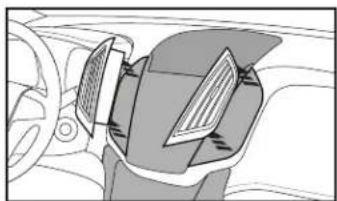
natural_image
Interior view of a car showing steering wheel, dashboard, and steering wheel (no text or symbols visible)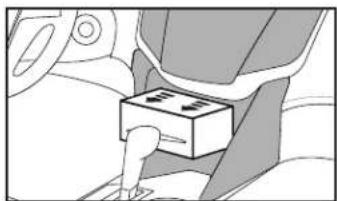
natural_image
Interior view of a car seatbelt with a box inserted, showing no text or symbols
99-33076
Kit Preparation
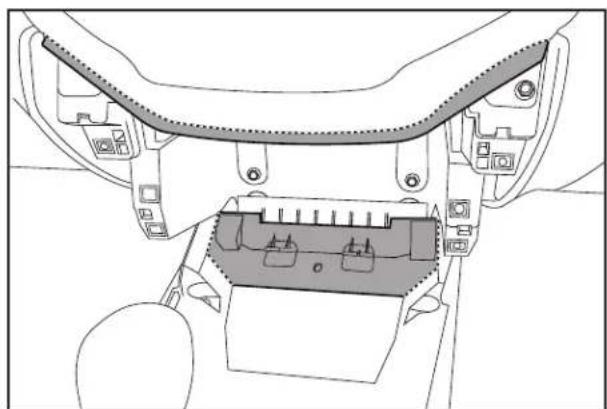
- A small section of the sub-dash must be cut with a cutting tool to allow the radio to fit:
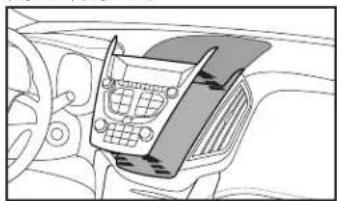
a. Remove the lip from the section of dash just above the original CD slot location by cutting along the dotted line. (Upper shading in figure A)
b. It is also recommended that a portion of the sub dash in front side of the console be removed. (Lower shading in figure A)
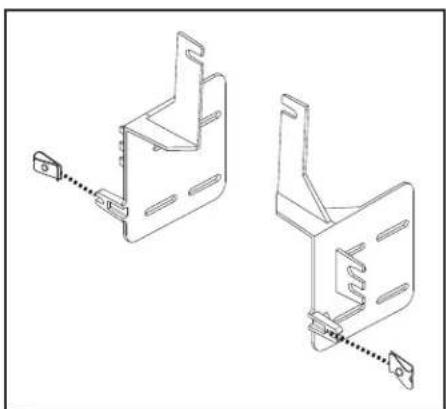
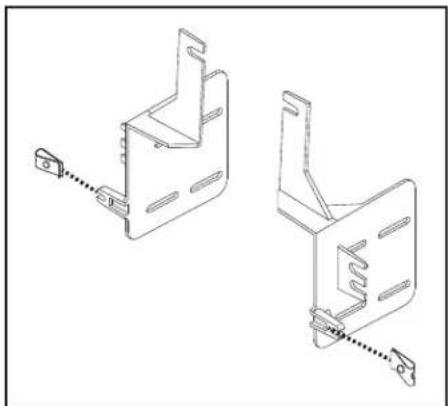
- Attach the (2) #10 panel clips included with the kit onto the front legs of the radio brackets. (Figure B)
natural_image
Technical line drawing of a mechanical component with no visible text or symbols(Figure A)
natural_image
Technical line drawing of two mechanical bracket components with mounting holes and a dashed alignment line (no text or symbols)(Figure B)
Continue to Kit Assembly

99-33076
Kit Assembly
ISO DIN radio provision with pocket
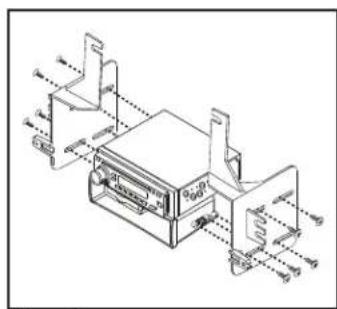
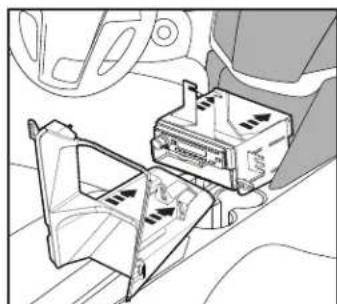
- Attach the pocket to the radio brackets using the (4) #8 x 3/8" Phillips screws provided. (Figure A)
- Remove the metal DIN sleeve and trim ring from the aftermarket radio.
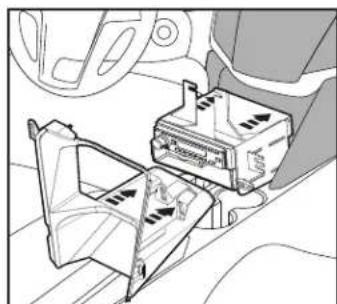
- Slide the radio into the bracket/pocket assembly and then secure it using the screws supplied with the radio. (Figure B)
Continue to Axxess Interface Installation
text_image
Technical diagram of a device with labeled components and assembly lines, including ports A1, A2, A3, B1, B2, B3, B4, and C0.(Figure A)
ISO DDIN radio provision
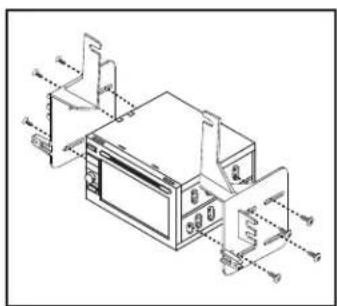
- Attach the radio brackets to the radio using the screws supplied with the radio. (Figure A)
Continue to Axxess Interface Installation
text_image
Technical diagram of a microwave oven with labeled components and internal wiring connections(Figure A)
natural_image
Diagram of a car interior showing a vehicle's seatbelt and dashboard with directional arrows (no text or labels)(Figure B)
Axxess Interface Installation
INTERFACE FEATURES
- Provides accessory power (12-volt 10-amp)
- Retains R.A.P. (retained accessory power)
- Can be used in amplified or non-amplified models
- Provides NAV outputs (mute, parking brake, reverse, and V.S.S)
- Pre-wired ASWC-1 harness included (ASWC-1 sold separately)
• Retains balance and fade - Micro "B" USB updatable
INTERFACE COMPONENTS
- Axxess Interface
• 3307 harness
TOOLS REQUIRED
- Wire cutter • Crimp tool • Solder gun • Tape • Small flat-blade screwdriver
- Connectors (example: butt-connectors, bell caps, etc.)
Connections to be made
From the 3307 harness to the aftermarket radio:
- Connect the Black wire with a ring terminal to the chassis of the aftermarket radio. Attention: The interface will not function properly unless this step is performed exactly as stated.
- Connect the Black wire to the ground wire.
- Connect the Yellow wire to the battery wire.
- Connect the Red wire to the accessory wire.
- If the vehicle is factory amplified, connect the Blue/White wire to the amp turn on wire. This wire must be connected to hear sound from the factory amplifier.
- If the aftermarket radio has an illumination wire, connect the Orange/White wire to it.
- If the aftermarket radio has a mute wire, connect the Brown wire to it. If the mute wire is not connected, the radio will turn off when OnStar is activated.
- Connect the Gray wire to the right front positive speaker output.
- Connect the Gray/Black wire to the right front negative speaker output.
- Connect the White wire to the left front positive speaker output.
- Connect the White/Black wire to the left front negative speaker output.
- Connect the Green wire to the left rear positive speaker output.
- Connect the Green/Black wire to the left rear negative speaker output.
- Connect the Purple wire to the right rear positive speaker output.
- Connect the Purple/Black wire to the right rear negative speaker output. Continued on the next page
Connections to be made (cont.) Final Assembly
The following (3) wires are only for multimedia/navigation radios that require these wires.
- Connect the Blue/Pink wire to the VSS/speed sense wire.
- Connect the Green/Purple wire to the reverse wire.
- Connect the Light Green wire to the parking brake wire.
- The Black/Yellow wire is used for OnStar level adjustment for models that do not come equipped with steering wheel controls. See the OnStar Level Adjustment section for further instructions.
- Tape off and disregard the Green/Orange wire, it will not be used in this application
- If retaining the factory AUX-IN jack, connect the Red & White RCA jacks to the AUX input.
12-pin pre-wired ASWC-1 harness:
- This harness is to be used along with the optional ASWC-1 (not included) to retain steering wheel audio controls. If the ASWC-1 is not being used, disregard this harness. If it will be used, please refer to the ASWC-1 instructions for radio connections and programming.
Note: Disregard the harness that comes with the ASWC-1.
- Connect the Red wire to the accessory wire.
Note: The relay attached to the 3307 harness is only for audible turn signal clicks. No extra steps are required to retain this, so leave it as-is.
Continue to Final Assembly
With the key in the off position:
- Connect the 3307 harness into the interface, and then to the vehicle.
- Locate the factory antenna connector in the dash and complete all necessary connections to the radio. Metra recommends using the proper mating adapter from Metra.
- Before using the kit it must be initialized.
Attention! If the interface loses power for any reason, the following steps will need to be performed again. Also, if installing an ASWC-1 connect it after you initialize and test the interface/radio, with the key in the off position.
a. Turn the key (or push-to-start button) to the ignition position and wait until the radio comes on.
Note: If the radio does not come on within 60 seconds, turn the key to the off position, disconnect the interface, check all connections, reconnect the interface, and then try again.
b. Turn the key to the off position, and then to the accessory position. Test all functions of the installation for proper operation, before reassembling the dash.
- Test the radio and climate controls for proper operation.
Continued on the next page

99-33076
Final Assembly (cont.)
- Chime level adjustment:
a. With the vehicle on, turn it off and leave the keys in the ignition. Open the driver's door; chimes will be heard.
b. Wait 10 seconds, and then with a small flat-blade screwdriver, turn the potentiometer clockwise to raise the chime level; counterclockwise to lower the chime level.
c. When the chime is at a desired level, remove the keys from the ignition. This will lock the chime volume at its current level.
- OnStar level adjustment:
a. Press the OnStar button to activate it.
b. While OnStar is speaking, press the VOLUME UP or VOLUME DOWN buttons on the steering wheel to raise or lower the OnStar level.
c. If the vehicle does not come equipped with steering wheel controls, find the Black/Yellow wire on the 3307 harness.
d. While OnStar is speaking, tap the Black/Yellow wire to ground. Once the OnStar level is set, it will stay at that level until the Black/Yellow wire is tapped to ground again.
- Attach the radio trim panel over the completed assembly, and then reassemble the dash in reverse order of disassembly.

INSTALLATION INSTRUCTIONS FOR PART 99-33076

IMPORTANT
If you are having difficulties with the installation of this product, please call our Tech Support line at 1-800-253-TECH. Before doing so, look over the instructions a second time, and make sure the installation was performed exactly as the instructions are stated. Please have the vehicle apart and ready to perform troubleshooting steps before calling.

KNOWLEDGE IS POWER
Enhance your installation and fabrication skills by enrolling in the most recognized and respected mobile electronics school in our industry. Log onto www.installerinstitute.com or call 800-354-6782 for more information and take steps toward a better tomorrow.

Metra recommends MECP certified technicians
Metra
natural_image
Interior view of a car showing dashboard and seat area (no visible text or symbols)COMPONENTES DEL KIT
natural_image
Top-down view of a car dashboard with a flat-screen cover and control panel (no text or symbols visible)(Figura A) (Figura D)
natural_image
Interior view of a car dashboard with steering wheel and rear-mounted device (no text or symbols visible)(Figura B) (Figura E)

natural_image
Diagram of a car interior showing gear shift and wheel alignment (no text or labels)(Figura C) (Figura F)
natural_image
Mechanical component diagram showing a gear and shaft assembly (no text or labels)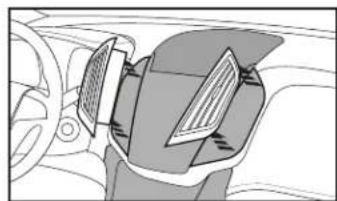
natural_image
Diagram of a car interior showing steering wheel, dashboard, and seatbelt mechanism (no text or labels)
natural_image
Diagram of a car seatbelt with a box and arrow indicating direction (no text or symbols)
99-33076
Preparación del Kit
natural_image
Technical line drawing of a mechanical component with no visible text or symbols(Figura A)
natural_image
Technical line drawing of two mechanical bracket components with mounting holes and a pull rod (no text or symbols)(Figura B)

99-33076
Ensamble del kit
text_image
Technical diagram of a device with labeled components and assembly lines, including ports A, B, C, D and part numbers 1 to 8.(Figura A)
text_image
Technical diagram of a microwave oven with labeled components and internal wiring connections(Figura A)
natural_image
Interior view of a car dashboard with air vent and control panel (no text or symbols visible)(Figura B)