99-5842B - Kit d'installation auto AXESS - Free user manual and instructions
Find the device manual for free 99-5842B AXESS in PDF.


User questions about 99-5842B AXESS
0 question about this device. Answer the ones you know or ask your own.
Ask a new question about this device
Download the instructions for your Kit d'installation auto in PDF format for free! Find your manual 99-5842B - AXESS and take your electronic device back in hand. On this page are published all the documents necessary for the use of your device. 99-5842B by AXESS.
USER MANUAL 99-5842B AXESS
natural_image
Interior view of a car dashboard with air filters and display screens (no visible text or symbols)Ford Flex (without NAV) 2010-2012
Visit MetraOnline.com for more detailed information about the product and up-to-date vehicle specific applications
KIT FEATURES
• ISO DIN radio provision with pocket
- ISO DDIN radio provision
- Touchscreen display for climate and personalization features
- Center panel painted silver with tan or black trim
- Included interface for audio, climate and steering wheel functions
• INST99-5842B - Painted matte black
- INST99-5842T - Painted tan
KIT COMPONENTS
- A) Radio trim panel with touchscreen display • B) Radio brackets • C) Left and Right bottom trim panels • D) Upper vent panel • E) Pocket
• F) Thermister housing • G) (6) #8 x 3/8" Phillips pan-head screws • H) (14) #8 x 1/2" Phillips pan-head screws • I) (7) Panel clips • J) Harness (not shown)
AB
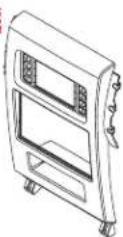
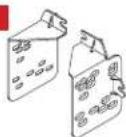
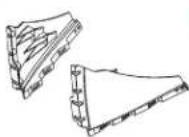
DE


[Non-Text]
G

H

1

TABLE OF CONTENTS
Dash Disassembly 2-3
Kit Preparation 4
Kit Assembly
-ISO DIN radio provision with pocket ....5
-ISO DDIN radio provision ....5
Axxess interface installation 6-14
Final assembly 9
WIRING & ANTENNA CONNECTIONS
Wiring Harness: Axxess interface and wiring harness included
Antenna Adapter: Included with kit
TOOLS REQUIRED
- Panel removal tool • Phillips screwdriver
- 9/32" socket wrench
Attention! With the key out of the ignition, disconnect the negative battery terminal before installing this product. Ensure that all installation connections are secure before cycling the ignition to test this product.
DASH DISASSEMBLY
- Unclip and remove the trim panel extending across the dash at the top of the factory radio panel to the passenger air vent. (Figure A)
- Remove (2) 9/32" screws from the top of the factory radio trim panel. (Figure B)

natural_image
Line drawing of a car interior showing dashboard, air intake, and control panel (no text or symbols)(Figure A) (Figure C)
- Unclip and remove the chrome trim around the shifter on the top of the center console (Figure C).
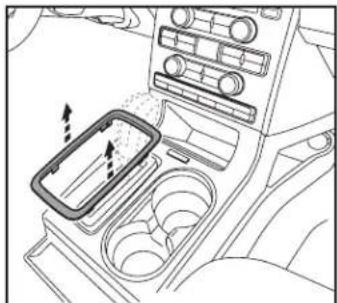
- Unclip and remove the top of the center console including the cup holders then remove (2) 9/32" screws from the bottom of the factory radio trim panel. (Figure D)
Continued on the next page
natural_image
Interior view of a car dashboard with airbags and control panels (no text or symbols)
natural_image
Interior view of a car dashboard with air vent and steering wheel (no text or symbols visible)(Figure D)

natural_image
Line drawing of a car air intake console with vent, dials, and control panel (no text or symbols)(Figure B)
DASH DISASSEMBLY (CONT.)
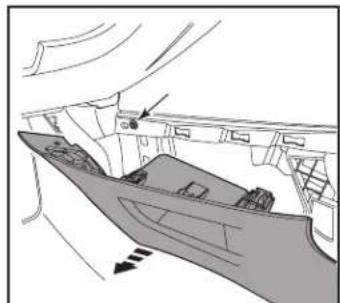
- Unclip each side of the center console to reveal (1) 9/32 screw (per side) securing the factory radio trim panel, and remove the screw. (Figures E, F)
Note: You do not need to remove the panels completely, you can unclip them half way back to gain access to the screw.
natural_image
Line drawing of a ship's deck with visible structural elements and an arrow indicating direction (no text or symbols)
natural_image
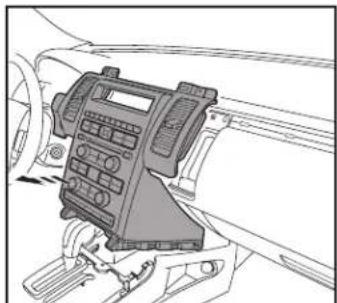
Technical diagram of a mechanical component with arrows indicating motion or force direction (no text or symbols)- Unclip and remove the radio trim panel including the a/c vents and the factory radio/climate controls. (Figure G)
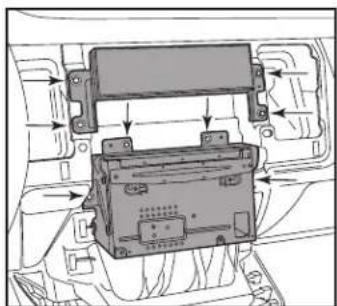
6a. Unclip and move to the side the thermistor (if equipped) attached to the radio trim panel. - Remove (4) 9/32" screws securing the factory display. (Figure H)
- Remove (4) 9/32" screws securing the factory radio chassis. (Figure H)
Continue to Kit Preparation
natural_image
Line drawing of a car interior showing the dashboard and steering wheel (no text or symbols)(Figure G)(Figure E)
natural_image
Diagram of an automotive electronic device showing internal components and wiring (no text or labels)(Figure H)(Figure F)
KIT PREPARATION
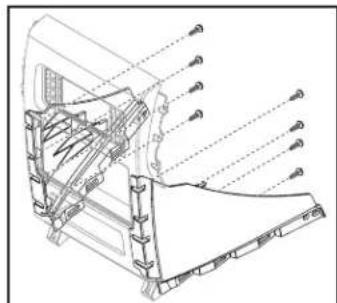
- Attach the left and right lower trim panels to the radio trim panel with touchscreen using (8) #8 x 1/2" Phillips screws provided. (Figure A)
- Attach the upper vent panel to the radio trim panel with touchscreen using (6) #8 x 1/2" Phillips screws provided. (Figure B)
natural_image
Technical line drawing of a mechanical assembly with no visible text or symbols(Figure A) (Figure C)
- Attach the a/c vents to the upper vent panel. (Figure C)
- Attach the thermistor housing to the upper vent panel with (2) #8 x 3/8" Philips screws provided. (Figure D)
- Attach the (7) supplied panel clips to the completed assembly.
Continue to Kit Assembly

natural_image
Technical line drawing of a vehicle dashboard with three car seats and directional arrows indicating assembly or movement (no text or symbols)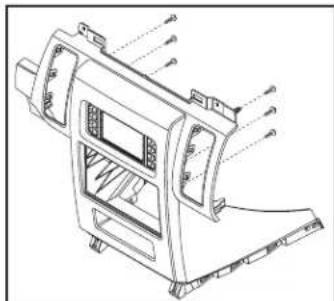
natural_image
Technical line drawing of a mechanical housing component with no visible text or symbols(Figure B) (Figure D)

natural_image
Technical line drawing of a vehicle headgear housing (no text or symbols)KIT ASSEMBLY
ISO DIN radio provision with pocket
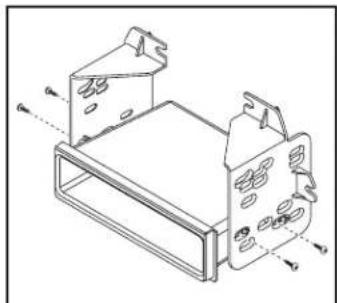
- Attach the pocket to the radio brackets using the (4) #8 x 3/8" Phillips screws provided. (Figure A)
- Remove the metal DIN sleeve and trim ring from the aftermarket radio.
- Slide the radio into the bracket/pocket assembly, and then secure it using the screws supplied with the radio. (Figure B)
Continue to Axxess interface installation
natural_image
Technical line drawing of a mechanical housing or enclosure with mounting brackets and internal components (no text or symbols)
natural_image
Technical line drawing of a mechanical device with labeled components (no text or symbols)(Figure B)
ISO DDIN radio provision
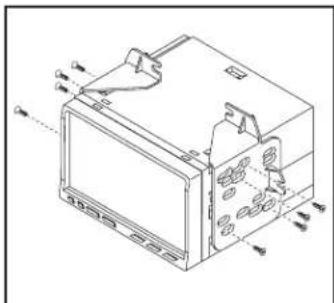
- Attach the radio brackets to the radio using the screws supplied with the radio. (Figure A)
Continue to Axxess interface installation
natural_image
Technical line drawing of an electronic device with labeled ports and components (no readable text or symbols)(Figure A)(Figure A)
AXXESS INTERFACE INSTALLATION
INTERFACE FEATURES
- Provides accessory power (12-volt 10-amp)
• Retains R.A.P. (retained accessory power) - Provides NAV outputs (parking brake, reverse, speed sense)
- Retains SYNC
- Retains the factory AUX-IN jack
- Provides an aftermarket backup camera input
- Can be used in both amplified and non-amplified models
- Retains audio controls on the steering wheel
- Retains balance and fade
- Micro "B" USB updatable
INTERFACE COMPONENTS
- Axxess Interface (built into the touchscreen display)
• 5842 harness
• 16-pin harness with stripped leads
• 4-pin harness with yellow RCA jacks
• Female 3.5mm connector with stripped leads
TABLE OF CONTENTS
Connections....7-8
Installation 8
Programming....9
Final assembly 9
Extra features....9
Touchscreen display operation....10-11
Steering wheel control settings 12-13
Troubleshooting....14
TOOLS REQUIRED
- Crimping tool and connectors, or solder gun, solder, and heat shrink
- Tape • Wire cutter • Zip ties
CONNECTIONS
From the 16-pin harness with stripped leads to the aftermarket radio:
- Connect the Red wire to the accessory wire.
- If the vehicle is equipped with a Sony sound system, connect the Blue/White wire to the amp turn on wire. This wire must be connected to hear sound from the factory amplifier.
- If the aftermarket radio has an illumination wire, connect the Orange/White wire to it.
- If the aftermarket radio has a mute wire and the vehicle is equipped with SYNC, connect the Brown wire to it. If the mute wire is not connected, the radio will turn off when SYNC is activated.
- Connect the Gray wire to the right front positive speaker output.
- Connect the Gray/Black wire to the right front negative speaker output.
- Connect the White wire to the left front positive speaker output.
- Connect the White/Black wire to the left front negative speaker output.
The following (3) wires are only for multimedia/navigation radios that require these wires.
- Connect the Blue/Pink wire to the VSS/speed sense wire.
- Connect the Green/Purple wire to the reverse wire.
- Connect the Light Green wire to the parking brake wire
- Tape off and disregard the following (4) wires, they will not be used in this application: Green, Green/Black, Purple, Purple/Black.
From the 5842 harness to the aftermarket radio:
- Connect the Black wire to the ground wire.
-
Connect the Yellow wire to the battery wire.
-
Connect the Blue wire to the power antenna wire.
- If the vehicle is equipped with NAV, connect the Blue/White wire with a red connector to the amp turn on wire. This wire must be connected to hear sound from the factory amplifier.
- Connect the Green wire to the left rear positive speaker output.
- Connect the Green/Black wire to the left rear negative speaker output.
- Connect the Purple wire to the right rear positive speaker output.
- Connect the Purple/Black wire to the right rear negative output.
- If the vehicle is equipped with SYNC, connect the Red and White RCA jacks labeled "RSE/SYNC/SAT", to the audio AUX-IN jacks.
- Disregard the RCA jacks labeled "FROM 3.5", they will not be used in this application.
• The DIN jack is not used in this application. - Connect the White RCA jack labeled "SUBWOOFER", to the subwoofer out jack.
- Disregard the Red RCA jack labeled "CENTER CHANNEL", it will not be used in this application.
4-pin harness with yellow RCA jacks
This harness is to be used to add an aftermarket backup camera to the touchscreen display, if so desired.
- Connect the Yellow RCA jack labeled "Rearview camera", to the RCA jack on the aftermarket backup camera.
- Disregard the Yellow RCA jack labeled "AUX video", it will not be used in this application.
Continue to 3.5mm jack steering wheel control retention
CONNECTIONS (CONT.)
3.5mm jack steering wheel control retention:
- The 3.5mm jack is to be used to retain audio controls on the steering wheel.
- For the radios listed below, connect the included female 3.5mm connector with stripped leads, to the male 3.5mm SWC jack from the Interface. Any remaining wires tape off and disregard.
- Eclipse: Connect the steering wheel control wire, normally Brown, to the Brown/White wire of the connector. Then connect the remaining steering wheel control wire, normally Brown/White, to the Brown wire of the connector.
• Metra OE: Connect the steering wheel control Key 1 wire(Gray) to the Brown wire.
Kenwood or select JVC with a steering wheel control wire: Connect the Blue/Yellow wire to the Brown wire.
Note: If your Kenwood radio auto detects as a JVC, manually set the radio type to Kenwood. See the instructions under changing radio type.
• XITE: Connect the steering wheel control SWC-2 wire from the radio to the Brown wire.
- Parrot Asteroid Smart or Tablet: Connect the 3.5mm jack into the AX-SWC-PARROT (sold separately), and then connect the 4-pin connector from the AX-SWC-PARROT into the radio
Note: The radio must be updated to rev. 2.1.4 or higher software.
- Universal "2 or 3 wire" radio: Connect the steering wheel control wire, referred to as Key-A or SWC-1, to the Brown wire of the connector. Then connect the remaining steering wheel control wire, referred to as Key-B or SWC-2, to the Brown/White wire of the connector. If the radio comes with a third wire for ground, disregard this wire
Note: After the interface has been programmed to the vehicle, refer to the manual provided with the radio for assigning the SWC buttons. Contact the radio manufacturer for more information.
- For all other radios: Connect the 3.5mm jack from the Interface into the jack on the aftermarket radio designated for an external steering wheel control interface. Please refer to the aftermarket radios manual if in doubt as to where the 3.5mm jack goes to.
I N STAL L ATIO N
It is highly advisable to read the following steps beforehand, to ensure a clear understanding of what is to be expected. The following steps must be done in the order that they are numbered.
With the vehicle completely off:
Touchscreen display
- Connect the 16-pin harness with stripped leads into port "B" in the touchscreen display.
- Connect the 5842 harness to the wiring harnesses in the vehicle. These harnesses are the ones removed in dash disassembly. Then insert the 5842 harness into port "A" in the touchscreen display. But do not install this harness until exactly before step 1 of "Programming". This is a timed process
- Connect the 4-pin harness with yellow RCA jacks into port "C" in the touchscreen display.
- Disregard ports "D" and "E", they will not be used in this application.
- Port "F" is an update port for future firmware upgrades.
- Locate the factory antenna connector in the dash and complete all necessary connections to the radio. Use the antenna adapter provided to adapt the factory antenna connector to the aftermarket radio.

text_image
A F D C B ENote: DO NOT CONNECT!
PROGRAMMING
Attention! If the interface loses power for any reason, the following steps will need to be performed again.
- Refer to step 2 from the "Installation" section.
- Program the kit:
a. Place the vehicle into the start/run position.
b. Once the touchscreen display loads up, select the vehicle type.
c. Wait until the radio comes on, and the touchscreen display shows "SWC Configured". This process may take up to 3 minutes.
Note: If the touchscreen display does not load up, or the radio doesn't come on within 3 minutes, and/or the touchscreen display does not show "SWC Configured", turn the vehicle off and disconnect the 5842 harnesses from port "A" in the touchscreen display. Check all the connections, reconnect the harness into the touchscreen display, and then try again.
- Cycle the key off, then back on. If the driver's door is closed, open and close the door.
- Test all functions of the installation for proper operation, before reassembling the dash.
FINAL ASSEMBLY
- Secure the radio assembly into the dash using the factory hardware removed in dash disassembly.
- Snap the radio trim panel with touchscreen display over the completed assembly, and then reassemble the dash in reverse order of disassembly.
EXTRA FEATURES
SYNC (4.2-inch display screen models only):
If the vehicle is equipped with SYNC and a 4.2" display screen, the 99-5842 can retain the SYNC feature.
- Change the source of the radio to AUX-IN.
- Press the "Info" button on the touchscreen display to enter the SYNC menu.
- Press the "HVAC" button to get back to the main menu.
text_image
5 A/C MAX RECIRC FRONT REAR Info Outside 78°FManual climate controls

text_image
75°F A/C MAX RECIRC FRONT REAR 75°F Outside 80°F SYNC AUTOAutomatic climate controls
- This is the HVAC control screen which will be displayed on the touchscreen display. This is considered the main screen.
- The upper left tab with (3) arrows will take you to the Heated/Cooled Seats screen, if applicable.
Note: This screen will also include Heated Steering if applicable.
• The upper right tab with the gear icon will take you to the Configuration Settings screen.
- Auto climate models: The climate controls will function in the same manner that they did with the factory climate controls.
- Manual climate models: The climate controls will function in the same manner that they did with the factory climate controls, yet via touchscreen buttons instead. The temperature control will display a numerical scale, with "LO" being the coldest, and "HI" being the hottest: L0 / 1-9 / HI
Note: The "Info" button will only be shown if SYNC is to be retained.
Continued on the next page
Configuration Settings screen

text_image
Configuration Settings Backlight Backup Camera Steering Wheel Controls System Config- Backlight
- Four slide bars control the color of the buttons and the back-light intensity: Red / Green / Blue / Backlight
- Backup Camera
- Enable – Enables the backup camera image to the touchscreen display
- Disable – Disables the backup camera image to the touchscreen display (default)
- Steering Wheel Controls
- Remap Buttons – For remapping the steering wheel control buttons
- Dual Assign – For dual assigning the steering wheel control buttons (long button press)
- Select Radio – For auto detecting the radio, or changing the radio type
- System Configuration
- About - Information regarding the software in the kit
• Temperature Unit - To change between Celsius and Fahrenheit
• Digital Amp Gain - For adjusting the output gain to the amplifier - Reset Vehicle Type - To reset the kit to default settings
STEERING WHEEL CONTROL SETTINGS
Remap Button screen Dual Assign screen

text_image
Select Button For Remap Seek Up Seek Down Source/Mode Mute- The interface has the ability to change the button assignment for the steering wheel control audio buttons, except Volume-Up and Volume-Down. Follow the prompts on the touchscreen display to remap the steering wheel control audio button(s) to your liking.
Note: The aftermarket radio may not have all of these commands. Please refer to the manual provided with the radio, or contact the radio manufacturer, for specific commands recognized by that particular radio.

text_image
Select Button for Dual Assign Seek Up Seek Down Source/Mode Mute- The interface has the capability to assign two functions to a single button, except Volume-Up and Volume-Down. Follow the prompts on the touchscreen display to program the button(s) to your liking.
Note: Seek-Up and Seek-Down come programmed as Preset-Up and Preset-Down for a long button press.
Continued on the next page
STEERING WHEEL CONTROL SETTINGS (CONT.)
Select Radio screen

text_image
Select Radio Autodetect Eclipse Kenwood Clarion- To show which brand radio is "auto detected" to the interface, press the "Autodetect" button. The radio detected will have a filled in circle. If the incorrect radio is shown, select the proper radio.
- Following is a list of radio manufacturers that the interface presently acknowledges. Others may be added at a later date. Universal "2 or 3 wire" radios can show up as any of these radio manufacturers.
| Eclipse (Type 1) † | JVC | Clarion (Type 2) † | Parrot ** |
| Kenwood ‡ | Pioneer/Jensen | Metra OE | XITE |
| Clarion (Type 1) † | Alpine * | Eclipse (Type 2) † | Philips |
| Sony / Dual | Visteon | LG | JBL |
| Valor |
* Note: If the interface shows an Alpine radio, and you do not have an Alpine radio, that means the interface does not detect a radio connected it, i.e., an open connection. Verify that the 3.5mm jack is connected to the correct steering wheel jack/wire in the radio.
** Note: The AX-SWC-PARROT is required (sold separately). Also, the Parrot radio must be updated to rev. 2.1.4 or higher through www.parrot.com.
^ Note: If you have a Clarion radio and the steering wheel controls do not work, change the radio type to the other Clarion radio type; same for Eclipse.
† Note: If you have a Kenwood radio and the touchscreen display shows a JVC radio, change the radio type to Kenwood.
TROUBLESHOOTING
Resetting the interface
Option #1
- With everything connected and the car running.
- Hold the bottom (2) buttons for 3 seconds, then release. (Figure A) (The screen will turn black and then put you in the vehicle selection screen)
- Select your vehicle and wait till the "SWC Configured" appears on the screen.
- Turn ignition off and start vehicle, then test your interface.
Option #2
- With the vehicle running, press the Reset Vehicle Type button mentioned in System Configuration.
- Refer to Programming, step 3, from this point.

natural_image
Close-up of a control panel with two green circular buttons on the left side (no visible text or symbols)(Figure A)
Having difficulties? We're here to help.

our Tech Support line at:
386-257-1187

mail at:
techsupport@metra-autosound.com
Tech Support Hours (Eastern Standard Time)
Monday - Friday: 9:00 AM - 7:00 PM
Saturday: 10:00 AM - 7:00 PM
Sunday: 10:00 AM - 4:00 PM

KNOWLEDGE IS POWER
Enhance your installation and fabrication skills by enrolling in the most recognized and respected mobile electronics school in our industry.
Log onto www.installerinstitute.edu or call 386-672-5771 for more information and take steps toward a better tomorrow.

Metra recommends MECP certified technicians