
KACGSTDMGSA - Mobile Device Charger Kogan - Free user manual and instructions
Find the device manual for free KACGSTDMGSA Kogan in PDF.


| Product Type | 3-in-1 Magnetic Wireless Charging Stand |
| Brand | Kogan |
| Model | KACGSTDMGSA |
| Dimensions | 100 mm (width) x 141 mm (height) |
| Weight | 194 g |
| Input Power | 5V/2A or 9V/3A |
| Phone Output Power | Up to 15W |
| Watch Output Power | 2W |
| Earbud Output Power | 5W |
| Charging Standard | Qi wireless charging |
| Magnetic Alignment | Yes (MagSafe compatible) |
| Compatible Phone Models | iPhone 12-15 series, Samsung Galaxy S8+ and later, Note5 and later, Z Flip/Fold series |
| Compatible Watch Models | Apple Watch Series 1-9, Ultra; Samsung Galaxy Watch 3-6, Active series |
| Compatible Earbud Models | Apple AirPods Pro (1st/2nd), Samsung Galaxy Buds series, other Qi-enabled cases |
| Foreign Object Detection | Yes (FOD) |
| Indicator Light | Blue LED: solid 2s on power-on, 10s during charging, 5s full charge (except iPhones), flash white for FOD |
| Included Accessories | Charging stand, USB-A to USB-C cable, user guide |
| Power Adapter | Not included (requires QC/PD adapter) |
| Safety Features | Over-temperature, over-current, over-voltage, short-circuit protection |
| Operating Temperature | 0°C to 45°C |
| Cleaning | Disconnect from power; wipe with dry cloth |
| Material | PC/ABS |
| Color | Black |
| Placement | Desktop stand |
Frequently Asked Questions - KACGSTDMGSA Kogan
User questions about KACGSTDMGSA Kogan
0 question about this device. Answer the ones you know or ask your own.
Ask a new question about this device
Download the instructions for your Mobile Device Charger in PDF format for free! Find your manual KACGSTDMGSA - Kogan and take your electronic device back in hand. On this page are published all the documents necessary for the use of your device. KACGSTDMGSA by Kogan.
USER MANUAL KACGSTDMGSA Kogan
natural_image
Black adjustable desk lamp with circular screen and stand (no text or symbols visible)3-IN-1 MAGNETIC WIRELESS CHARGING STAND
KACGSTDMGSA
SAFETY & WARNINGS
- Do not squeeze or use excessive force against the charging stand.
- Do not disassemble the charging stand.
- Do not throw the charging stand into fire or water.
- Do not use the charging stand in extremely hot, humid, or corrosive environments.
- Do not place the charging stand near magnetic strips or chips (i.e. ID cards, bank cards) to avoid magnetic failure.
- Ensure the charging stand is at least 20cm away from implantable medical devices (i.e. pacemakers, implantable cochlear implants) to avoid potential interference with the medical device.
- Do not allow children to play with the charging stand.
- Keep the charging stand away from water and other liquids.
- Disconnect the charging stand from the electrical outlet before cleaning.
- Only use the charging stand in temperatures of 0^ to -45^ .
COMPONENTS
- Charging stand.
• USB-A to USB-C charging cable. - User guide.
Note:
A power adapter is not provided. Purchase a QC/PD adapter separately or use the power adapter provided with your mobile phone.
OVERVIEW

Note:
The illustrations in this user guide are for reference only and are subject to change.
OPERATION
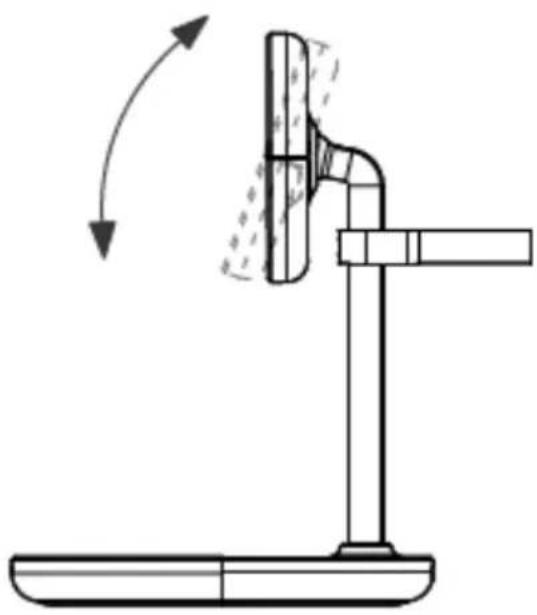
Place a compatible phone on the magnetic charging pad and adjust.
natural_image
Diagram of a mechanical device with a lever and base, showing motion direction (no text or symbols)Connect to Power
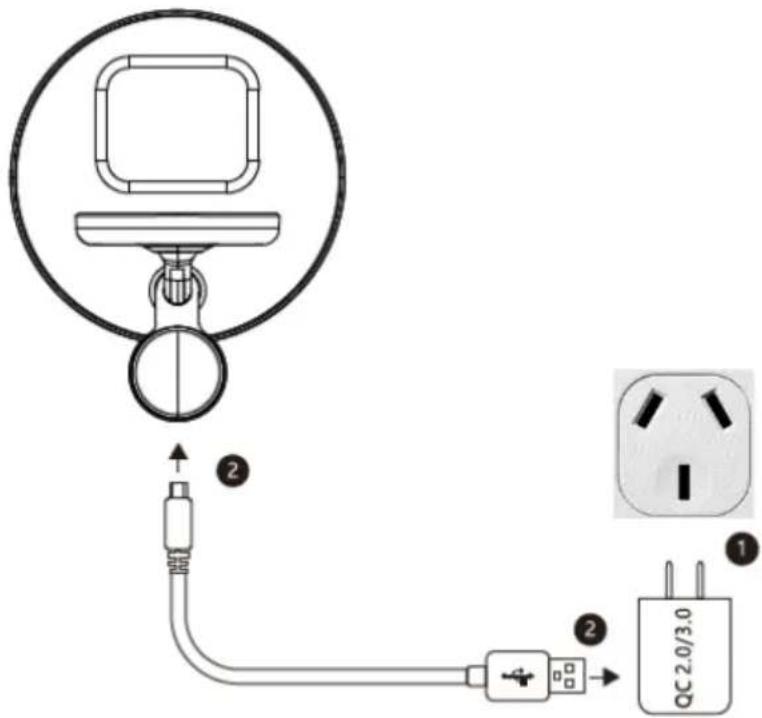
- Connect the power adapter (not provided) to an electrical outlet.
- Connect the USB-A end of the provided charging cable to the power adapter, and the USB-C end to the USB-C port on the charging stand.

natural_image
Simple line drawing of a desk lamp with a circular head and square base (no text or symbols)| Status | Indicator |
| Power on. | Illuminates solid blue for 2 seconds, then turns off. |
| Charging. | Illuminates solid blue for 10 seconds, then turns off. |
| Foreign object detection (FOD). | Flashes white once per second. |
| Fully charged. | Illuminates solid blue for 5 seconds, then turns off (does not occur for iPhones). |
Compatible Devices
| Phone | iPhone 12, 12 Mini, 12 Pro, 12 Pro Max.iPhone 13, 13 Mini, 13 Pro, 13 Pro Max.iPhone 14, 14 Plus, 14 Pro, 14 Pro Max.iPhone 15, 15 Pro, 15 Pro Max.Samsung Galaxy S23, S22.Samsung Galaxy S21 Ultra, S20 Ultra.Samsung Galaxy S10, S10e, S10+, S9, S9+, S8, S8+ (Ultra, FE, Plus).Samsung Galaxy Z Flip 5, 4, 3, 2, 1.Samsung Galaxy Z Fold 5, 4, 3, 2, 1.Samsung Galaxy Note 20, 10, 10+, 9, 8, 7, 5. |
| Smart Watch | Apple watch (all series).Samsung Galaxy Watch 6, 5 Pro, 5.Samsung Galaxy Watch 4, 3.Samsung Galaxy Watch Active, Active 2. |
| Earbuds | Apple AirPod Pros and other Qi-enabled earbud cases.Samsung Galaxy Buds, Pro, Live. |
Note:
All devices must be Qi-enabled.
SPECIFICATIONS
| Size | 100mm + H 141mm |
| Weight | 194g |
| Input | 5V=2A, 9V=3A |
| Watch Output | 2W |
| Earbud Output | 5W |
| Phone Output | 15W (max.) |
Need more information?
We hope that this user guide has given you the assistance needed for a simple set-up.
For the most up-to-date guide for your product, as well as any additional assistance you may require, head online to help.kogan.com
kogan.com


Brand : Kogan
Model : KACGSTDMGSA
Category : Mobile Device Charger