iTeach - Charger MooreCo - Free user manual and instructions
Find the device manual for free iTeach MooreCo in PDF.


User questions about iTeach MooreCo
0 question about this device. Answer the ones you know or ask your own.
Ask a new question about this device
Download the instructions for your Charger in PDF format for free! Find your manual iTeach - MooreCo and take your electronic device back in hand. On this page are published all the documents necessary for the use of your device. iTeach by MooreCo.
USER MANUAL iTeach MooreCo
iTeach ^® Desktop Charger
Owner's Manual

natural_image
Row of black electronic devices with white cable connectors, no visible text or symbols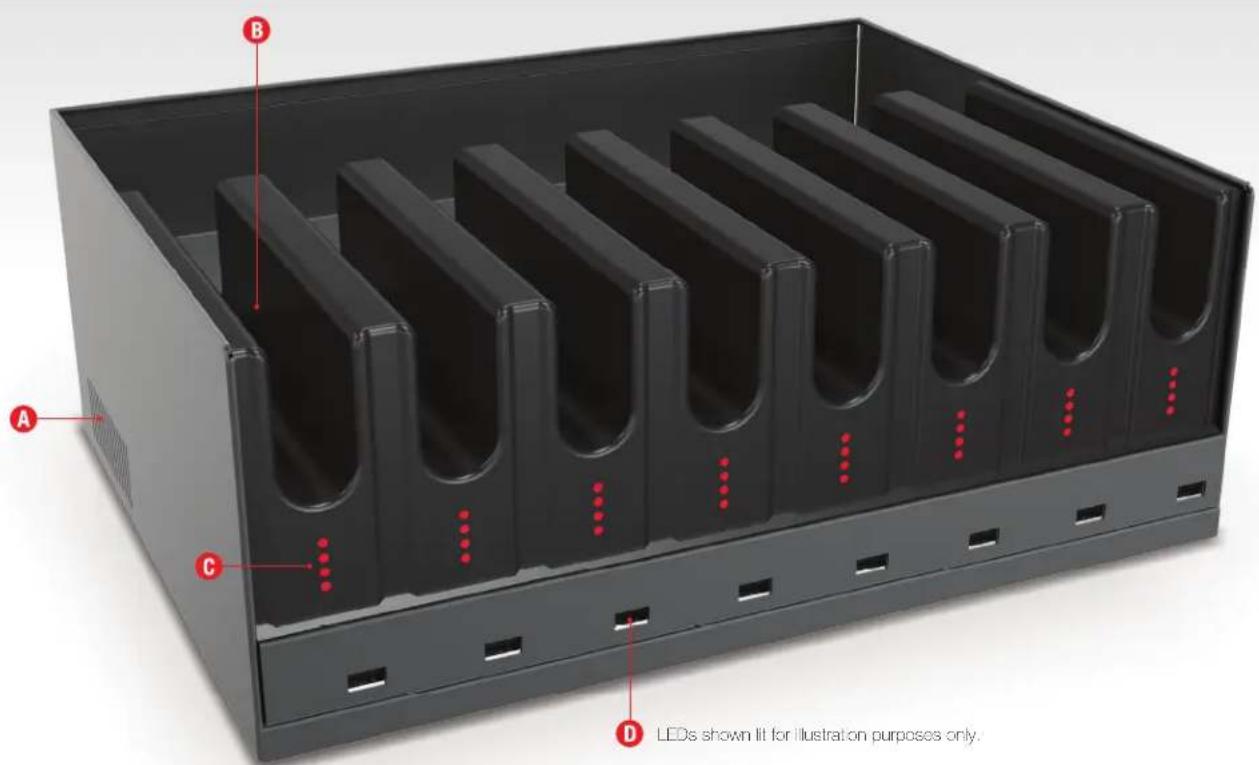
text_image
A B C D LEDs shown lit for illustration purposes only.
text_image
E A F PhysicalPhysical Features
A Ventilation slots on either side of unit
B 8 easy load slots
C LED charge indicators
D USB port for device cable
E Power on/off switch
F Power cord
Getting Started
Electrical Testing
- Before using your new iTeach® Desktop Charger, have a qualified electrician verify the current draw does not exceed the rating of the unit when all the devices are installed.
- Test the branch circuit for ground integrity and branch circuit protection.
- Do not plug in the unit if the power cord has been damaged, or if the ground prong is missing from the AC plug. If repairs are ever needed, they should be performed by a qualified electrician.
Safety First!
- This unit must always be used by adults or with adult supervision.
- Liquids should not be in, on, or around the iTeach Desktop Charger.
- Do not use outdoors.
- Do not use the unit if the cord appears to be damaged or if the ground prong is missing.
- Do not use an extension cord with this unit.
First Steps
- Remove packing materials and loose components, including the power cord and printed unit documentation.
- Always use a qualified electrical circuit to be sure you are powering the unit properly and in accordance to the unit's specifications and requirements.
- Read owner's manual and understand safe use guidelines before operating to ensure personal safety.
- Plug AC power cord into wall outlet. Unit will power ON.
- Red LED indicators should be lit to indicate power to the unit.
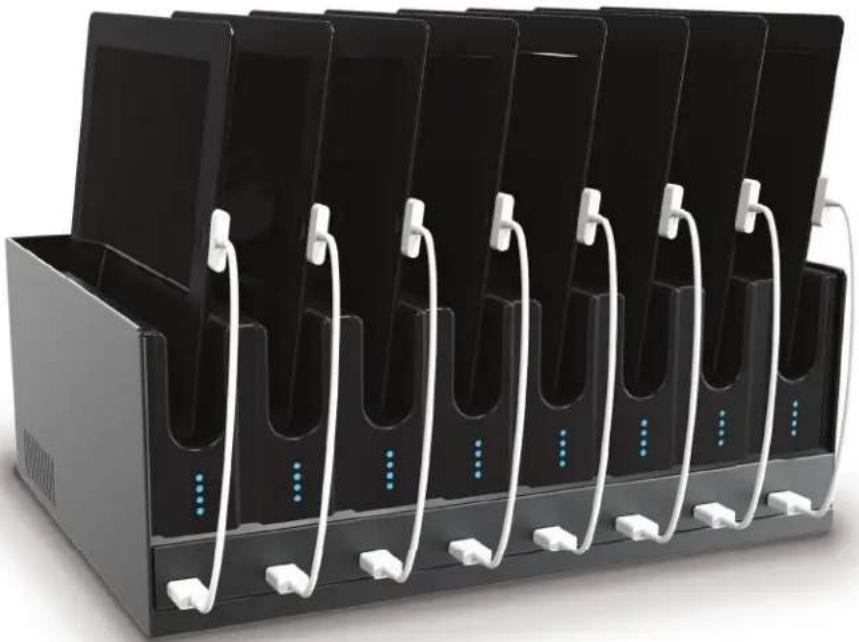
- Plug desired device cords into exposed USB ports.
- Slide up to 8 devices into slots and plug corresponding cord into device.
- LED indicators will change color based on charge time of device. See technical specs on page 5 for LED charging indication.
natural_image
Black electronic charging station with multiple black devices and white cables, no visible text or symbolsUnit Operation
The iTeach® Desktop Charger is designed to charge Apple iPad devices, Apple iPod Touch devices, Samsung Galaxy tablets, Amazon Kindle, Barnes and Noble Nock, and other devices that support charging via USB. Multiple brands can be mixed within the iTeach Desktop Charger. Please contact MooreCo at 1-800-749-2258 for additional compatibility information.
Before using the iTeach Desktop Charger, it must be plugged into an AC outlet (100-120 VAC, 60Hz) with a minimum of 15 Amp rating. The iTeach Desktop Charger uses a maximum of 10.0 Amps, but should be powered by an outlet with extra capacity.
Each charging port consists of a row of four LEDs and a charging cable ending with a female USB Type A connector. In order to charge a particular type of device, the corresponding style cable must be plugged into the charging cable. For example, an Apple iPad cable is required for charging an iPad.
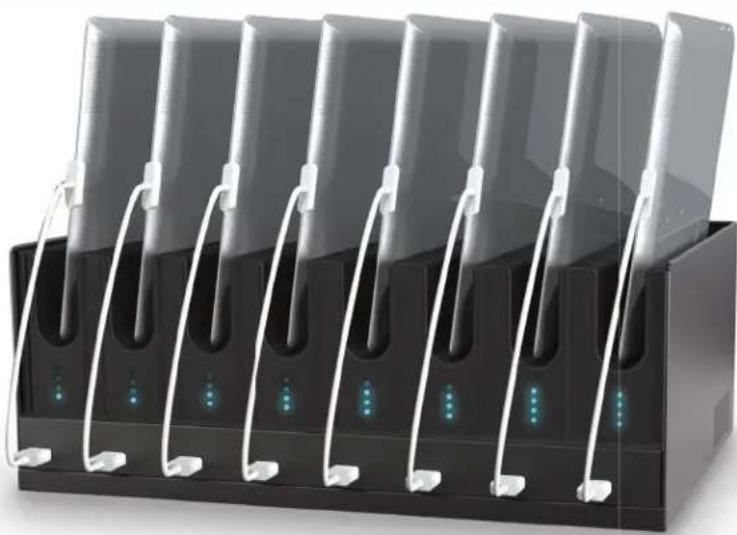
As a tablet is charged, additional blue LEDs will appear to indicate charging time. One blue LED is visible for the initial 90 minutes (1.5 hours) of charging. After 90 minutes, a second blue LED appears. Once an additional 90 minutes has passed, a third blue LED lights up. The fourth blue LED becomes visible after the tablet has been charged 4.5 hours.
The following list summarizes the meaning of each LED status indication:
1 red LED: Nothing connected
1 blue LED: tablet connected, less than 1.5 hours charge time
2 blue LEDs: tablet connected, charge time between 1.5 and 3 hours
3 blue LEDs: tablet connected, charge time between 3 and 4.5 hours
4 blue LEDs: tablet connected, charge time more than 4.5 hours
Any time the iTeach Desktop Charger has power, each port should display one of the LED indications above.
In the event that the iTeach Desktop Charger is plugged into an AC outlet without lighting any LEDs, the unit is not receiving power. This can be caused by a blown fuse located inside the iTeach Desktop Charger, or by a problem with the AC outlet (such as a blown breaker). In such circumstances, a properly trained technician should be contacted to address the situation.
Technical Specifications
| Item Specifi cation | |
| Body Powder-coated steel | |
| Tablet Compartments Five stage LED | light indicators in cushioned tablet slots. LED attached/detached indicator. Slots measure 12.26"H x 8.2"W x .96"D. Hold tablet and case up to .875" thick. |
| Capacity 8 devices | |
| Recommended Devices Versions of the | Apple iPad, Apple iPad Mini, Kindle Fire, Barnes & Noble Nook, HP TouchPad, Dell Streak, Samsung Galaxy. Call for assistance with specific device compatibility. |
| Input 100-120 VAC 50-60Hz, 10 Amps | |
| Output 8 x 5 VDC at 2.1A | |
| Profi le Automatic charger emulation profi le cycling for USB-IF BC1.2DCP (Android), YD/T-1591 (Apple iPad and iPhone), and RIM (Blackberry) devices. Firmware is upgradable for future devices. Contact MooreCo for firmware update options. | |
| Dimensions 5.5"H x 14.5"W x 11"D | |
| Weight | 15 lbs |
| Cord | 9 ft power cord |
| Warranty 10 year unit and 2 year electrical | |
| Shipping Ships fully assembled | |
| LED Indicator Details | 1 red LED: No device charging |
| 1 blue LED: Device charging for less than 1.5 hours | |
| 2 blue LEDs: Device charging between 1.5 and 3 hours | |
| 3 blue LEDs: Device charging between 3 and 4.5 hours | |
| 4 blue LEDs: Device charging more than 4.5 hours | |
Safety

Unit Use
- MooreCo, Inc. does not accept liability for damage to unit if misused, inadequately repaired, or modified. Any of the above will void warranty.
- Use of unit is intended for adults only. Do not allow use by children or students unless fully supervised by a responsible adult.
- Unit is designed for indoor use only.
- Be sure all external power cords are unplugged and correctly stored before moving unit.
- Do not run cords in high traffic areas or through doorways, hallways, holes in ceilings, walls, or floors.
Electrical Safety

WARNING: Failure to follow electrical guidelines may result in fire, injury, or electrical shock.
- Be sure not to exceed electrical rating of 10 amps.
- Do not plug in or use unit if any power plug or electrical cord has been damaged.
- Contact MooreCo or qualified electrician before attempting to perform any sort of maintenance or modification to unit electronics.
- Do not plug unit into extension cord or movable power strip.
- Do not remove or modify any prongs or pins of power cord in any way.
- Keep all liquids away from unit. Do not use unit if wet.
- Do not operate near flammable materials.
- Do not block ventilation of unit. Proper airflow is required to avoid overheating or damage to unit.
Trouble Shooting
Technical changes are not intended to be performed by anyone other than a qualified professional. Please contact MooreCo, Inc. or seek a qualified professional for assistance.
Warranty
MooreCo, Inc. offers ten (10) years of limited coverage for non-electrical components, and two (2) years on all electrical components. Additional details can be found at www.mocrecoinc.com/core/warranties/iTeach_Products_Warranty.pdf
Notes

mooreco


Best-Rite
Balt® & Best Rite® are brand
divisions of MooreCo Inc.
2885 Lorraine Ave
Temple, TX 76501
p: 800.749.2258
:800,697,6258
www.moorecoco.com
natural_image
Black rectangular electronic device with multiple vertical connectors and illuminated ports, no visible text or symbols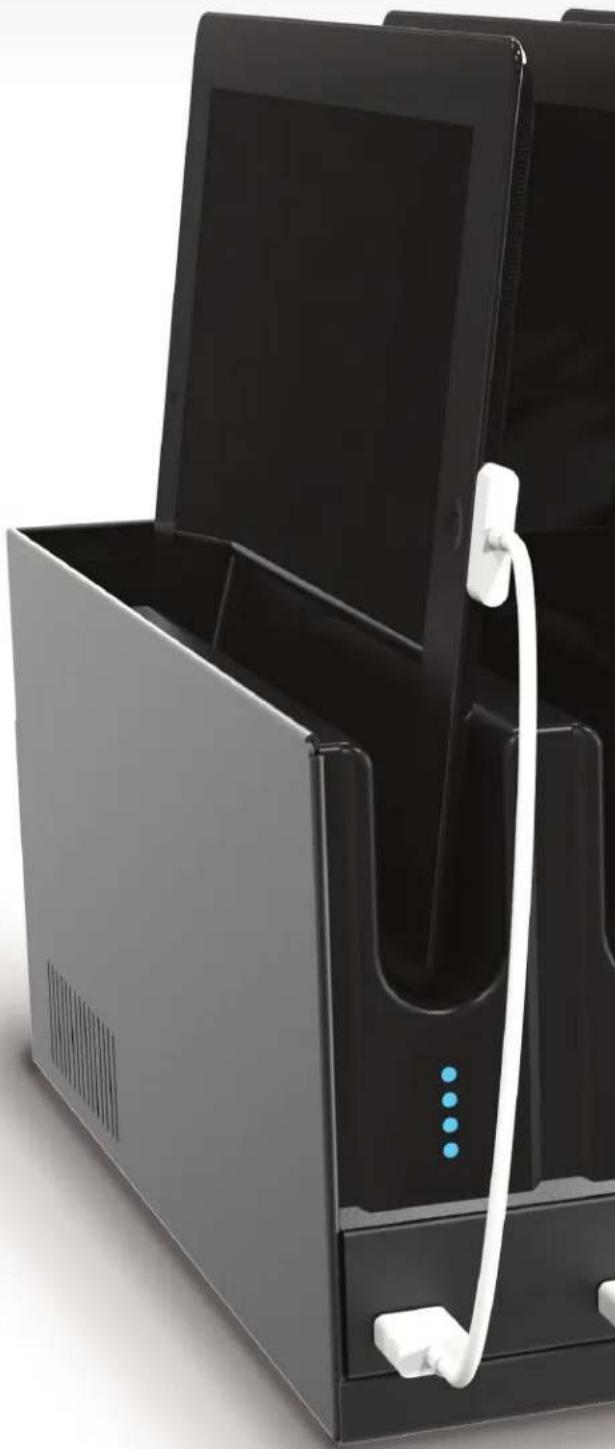
natural_image
Black electronic device with open lid and white cable, showing ports and buttons (no visible text or symbols)Rev 12/09/14 RMC