DV-MFSW-21CEC - Switch FSR - Free user manual and instructions
Find the device manual for free DV-MFSW-21CEC FSR in PDF.


User questions about DV-MFSW-21CEC FSR
0 question about this device. Answer the ones you know or ask your own.
Ask a new question about this device
Download the instructions for your Switch in PDF format for free! Find your manual DV-MFSW-21CEC - FSR and take your electronic device back in hand. On this page are published all the documents necessary for the use of your device. DV-MFSW-21CEC by FSR.
USER MANUAL DV-MFSW-21CEC FSR
Based on firmware 02.07
DV-MFSW-21CEC
HDMI / VGA 2x1 Switcher
Based on firmware 02.07
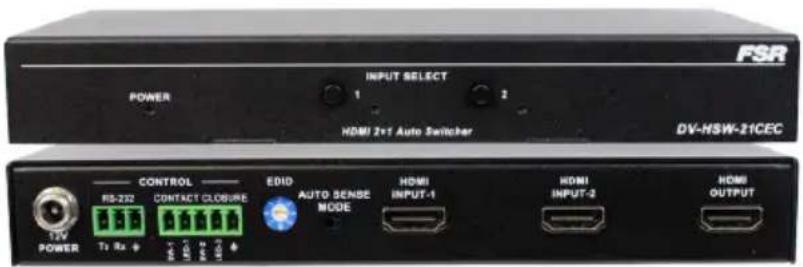
text_image
FSR POWER INPUT SELECT 1 2 HDMI 2x1 Auto Switcher DV-NSW-21CEC 12V POWER CONTROL RS-232 Contact CLOSURE EDIO AUTO SENSE MODE HDMI INPUT-1 HDMI INPUT-2 HDMI OUTPUT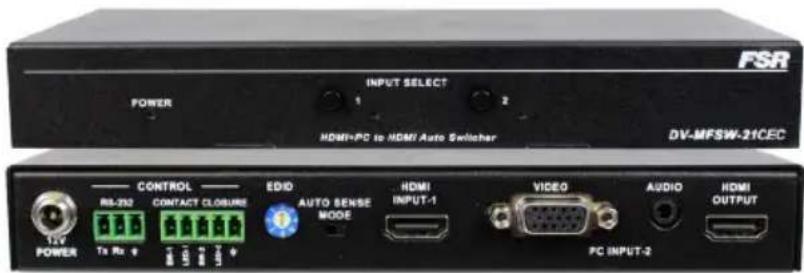
text_image
FSR POWER INPUT SELECT 1 2 HDMI-PC to HDMI Auto Switcher DV-MFSW-21CEC CONTROL RB-230 CONTACT CLOSURE EDIO AUTO SENSE MODE HDMI INPUT-1 VIDEO AUDIO HDMI OUTPUT 12V POWER Tx Rx 4 12V 12V 12V 12V 12V 12V 12V 12V 12V 12V 12V 12V 12V 12V 12V 12V 12V 12V 12V 12V 12V 12V 12V 12V 12V 12A 12A 12A 12A 12A 12A 12A 12A 12A 12A 12A 12A 12A 12A 12A 12AIMPORTANT SAFETY INSTRUCTIONS
Contents are subject to change without notice
Warnings
To reduce the risk of fire, electric shock or product damage:
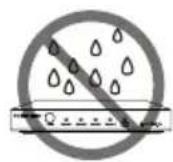
- Do not expose this device to rain, moisture, dripping or splashing and that no objects filled with liquids, such as vases, shall be placed on the unit.

- Clean this device only with dry cloth

- Do not install or place this unit in a bookcase, built-in cabinet or in another confined space. Ensure the unit is well ventilated.

- Unplug this device during lightning storms or when unused for long periods of time.

- To prevent risk of electric shock or fire hazard due to overheating, do not obstruct the unit's ventilation openings with newspapers, tablecloths, curtains, and similar items.
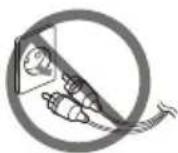
- Protect cables and cords from being walked on or pinched particularly at plugs.
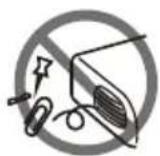
- Do not install near any heat sources such as radiators, heat registers, stoves, or other device (including amplifiers) that produce heat.
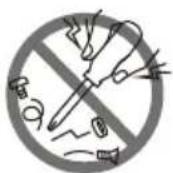
- Only use attachments/accessories specified by FSR.

- Do not place sources of open flames, such as lighted candles, on the unit.

- Refer all servicing to qualified service personnel.
Table of Contents
Important Safety Instructions....2
Overview....4
Features......4
Package Contents......6
Typical Application 6
Front Panel....7
Rear Panel....8
Hardware Installation ....10
EDID Management....11
RS-232 Operation....12
RS-232 Serial Protocol 12
Request/Response Format.... 12
Field Separators 13
Command Request Syntax:.... 13
Acknowledging Receipt of Commands.... 13
Error Response 14
REQUEST LIST QUICK REFERENCE 14
Connection Request....15
Disconnect Request 16
HDCP Request....16
Model Request 17
Reconnect Request.... 18
Status Request....18
Version Request....19
Auto-Switching Mode Configuration 20
Auto-Switching Mode Request 20
Auto-Switching Mode Reset 21
Specifications 22
Limited Warranty....23
OVERVIEW
The DV-HSW-21CEC is a 2x1 HDMI switcher supporting up to 4K x 2K @ 30Hz. The DV-MFSW-21CEC is a unique switcher and a must have for installations spanning new and legacy technology. This switcher has 1 HDMI input supporting resolutions up to 4K x 2K @ 30Hz and 1 VGA (HD-15) input supporting resolutions up to 1920 x 1200 @ 60Hz. The HD-15 input is paired with a stereo audio input on a 3.5mm mini stereo connector. When selected, the analog video is converted to HDMI and the audio is embedded greatly simplifying connections and operations downstream. Both of the 2x1 switcher models feature 4-way control via simple front panel push buttons, screw terminal contact closures with LED feed-back, RS-232 serial control, and auto sense switching technology. In auto sense mode, the switcher will switch when the current video source being displayed is turned off either via keyboard function buttons or from signal loss. These options help in making these a perfect solution for any system.
FEATURES
DV-HSW-21CEC:
• 2x1 HDMI Switcher Supporting up to 4K x 2K @ 30 Hz
• HDMI 1.4 and HDCP Compliant
- Embedded Audio Support
- CEC Support
DV-MFSW-21CEC:
• 2x1 Switcher with 1 HDMI and 1 VGA (HD-15) Input and HDMI Output
• HDMI Supports Resolutions up to 4K x 2K @ 30Hz
• VGA (HD-15) Supports Resolutions up to 1920 x 1200 @ 60Hz
• Analog Video converted to HDMI with Audio Embedded
- CEC Support
BOTH MODELS:
• HDMI 1.4 and HDCP Compliant
• Control Functions (Both Models)
• Auto sense Automatic Switching Technology
- Front Panel Push Button Local Control
- Contact Closure Control with +12-volt Lamp/LED output (@100 mA when active)
- Serial (RS-232) Remote Control
- Configurable Auto-switch mode allows selection between fifo and lifo switching
CEC SUPPORT
The DV-HSW-21CEC and DV-MFSW-21CEC can automatically power-up displays that have CEC capability when a source is connected. They can also power the display off after the input signal is removed for 2 minutes. Most brands of displays need to have the CEC control enabled in the menu to allow this function to work, and of course not all displays support CEC.
Using this new CEC feature along with the auto-sense feature allows users to simply connect an input cable to a laptop or other source, and the unit will then switch to that input and turn the display on. Disconnecting the input will turn off the display after a 2-minute delay.
PACKAGE CONTENTS
• 1 x DV-MFSW-21A or DV-HSW-21A Switcher.
• 1 x 12VDC Power Supply
• 2 x Surface Mount Brackets
• 1 x 3.81mm Phoenix Connector (3 Pin)
• 1 x 3.81mm Phoenix Connector (5 Pin)
TYPICAL APPLICATION
DV-MFSW-21CEC model shown. DV-HSW-21A has two HDMI (no VGA) input connectors and no audio input connector

flowchart
graph TD
    A["PC"] -->|VGA| B["Video"]
    B -->|Audio (DV-MFSW-21 ONLY)| C["Output"]
    C -->|HDMI| D["TV"]
    E["HDVI"] --> F["PC INPUT-2"]
    G["HDVI connector on DV-HSW-21CEC model"] --> H["Video"]
    I["Panel Control"] --> J["Control"]
    K["Source Selection Status Feedback"] --> L["LED-3"]
    M["12V POWER"] --> N["RS-232 Tx Rx"]
    O["LED-4"] --> P["CONTACT CLOSURE"]
    Q["EDID AUTO SENSE MODE"] --> R["INPUT-1"]
    S["12V POWER"] --> T["Tx Rx"]
    U["HDVI"] --> V["HDMI"]
    W["TV"] --> X["HDMI"]
FRONT PANEL
DV-HSW4K-21CEC / DV-MFSW-21CEC
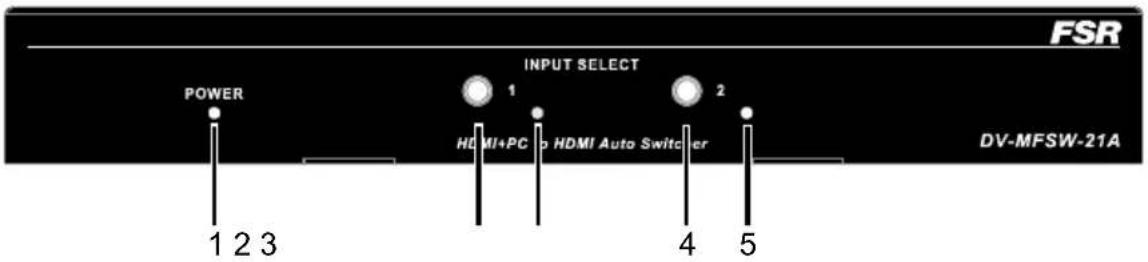
text_image
FSR POWER 1 2 3 INPUT SELECT 1 HDMI+PC > HDMI Auto Switcher 2 4 5 DV-MFSW-21A| ID | Name | Description |
| 1 Power | LED Lit when power is on | |
| 2 | Select Button | Press to select HDMI IN as input source |
| 3 | Indicator | Lit when Source is selected |
| 4 | Select Button | Press to select VGA or HDMI on DV-HSW-21A as input source |
| 5 | Indicator | Lit when VGA is selected |
REAR PANEL
DV-MFSW-21CEC model shown. DV-HSW-21CEC has two HDMI (no VGA) input connectors and no audio input connector

text_image
12V POWER RS-232 CONTROL CONTACT CLOSURE EDID AUTO SENSE MODE HDMI INPUT-1 VIDEO AUDIO HDMI OUTPUT Tx Rx SW-1 SW-2 PC INPUT-2 7 8| ID | Name | Description |
| 1 Power 12VDC power input | ||
| 2 RS232 | RS232 control. | |
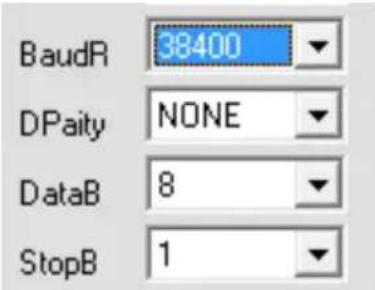 | ||
| For the API commands, please refer to DV-MFSW-21CEC or DV-HSW-21CEC RS-232 Serial Protocol | ||
| 3 | CONTACT CLOSURE | Connects to a control device such as keypad for switching between HDMI IN 1 and PC IN 2. Pin SW-1 and GND are used for selecting HDMI IN as the input source. If the input source is HDMI IN, the LED-1 indicator on the keypad will be on. Pin SW-2 and GND are used for selecting VGA as the input source. If the input source is VGA, the LED-2 indicator on the keypad will be on. |
| 4 | EDID DIP Switch | Adjust EDID settings |
| 5 | Auto Sense Mode Switch | Auto sense mode ON:The auto switcher will select the newest active input (LIFO mode) or maintain the first connected active input (FIFO mode) depending upon the selected configuration.Factory default setting is LIFO modeThe input select switch, the contact closure or the serial command can override the currently selected input. The unit will not allow selection of an input unless there is a valid signal present.Auto sense mode OFF:The input is manually selected by the input select switch, contact closure or serial command. Switching occurs regardless of input signal state. |
| 6 | HDMI INPUT | Connects to an HDMI source (Two HDMI inputs on DV-HSW-21CEC model) |
| 7 | VGA + Audio INPUT(DV-MFSW-21A only) | Audio binding VGA channel, embedded in HDMI signal output |
| 8 | HDMI OUTPUT | Connects to an HDMI display |
HARDWARE INSTALLATION
DV-MFSW-21CEC model shown. DV-HSW-21CEC has two HDMI (no VGA) input connectors and no audio input connector
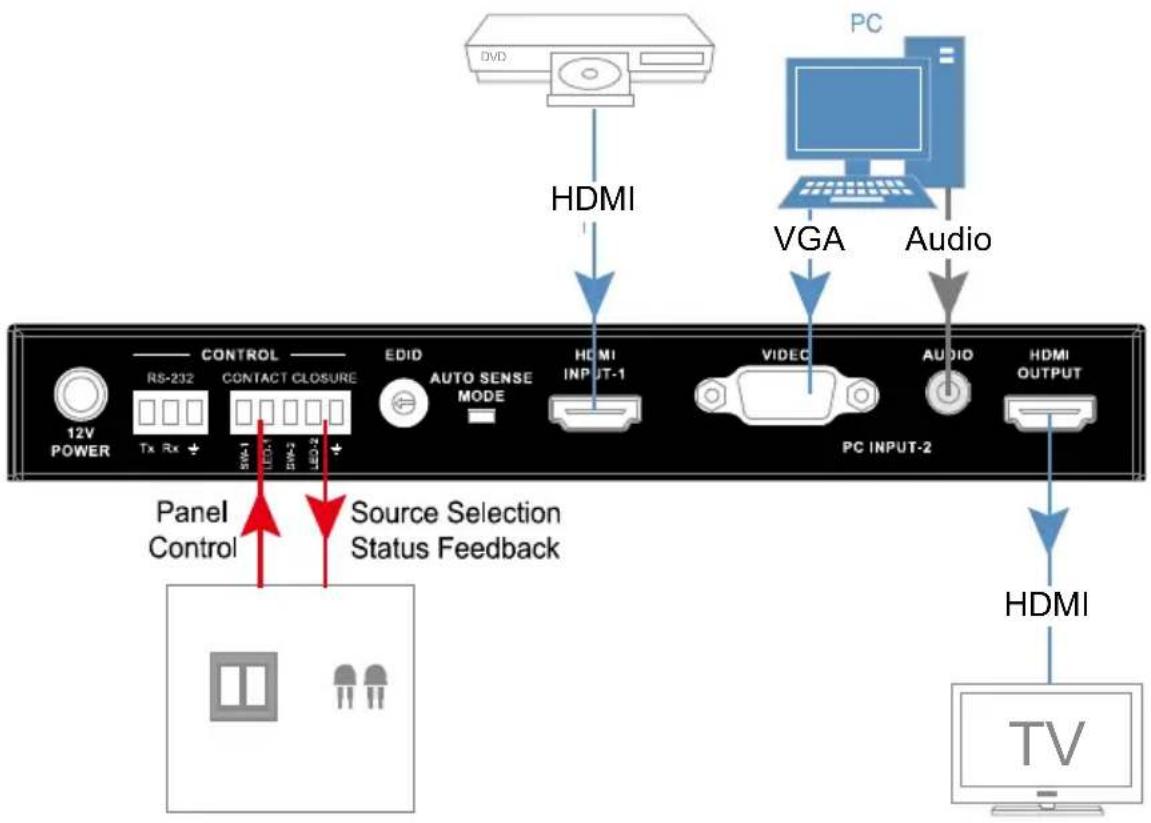
- Connect the HDMI or VGA input source (such as DVD Player, Apple TV, and STB) to the unit.
- Connect the HDMI display device (such as HD-LCD) to the HDMI output port of the switcher.
- Connect the power supply to the HDMI switcher and power on all the devices.
- To operate the unit, use the front panel select button, remote or contact closure
Note: The contact closure can be used with control device such as a keypad.
flowchart
graph TD
    A["PC"] -->|HDMI| B["TV"]
    C["Video"] -->|VGA| D["PC INPUT-2"]
    E["Audio"] -->|Audio| F["PC INPUT-2"]
    G["HDMI"] -->|HDMI| H["TV"]
    I["Panel Control"] --> J["Control"]
    K["Source Selection Status Feedback"] --> L["LED-I"]
    M["12V POWER"] --> N["RS-232 Tx Rx"]
    O["EDID AUTO SENSE MODE"] --> P["HO MI INPUT-1"]
    Q["VIDEO"] --> R["HO MI INPUT-2"]
EDID MANAGEMENT
text_image
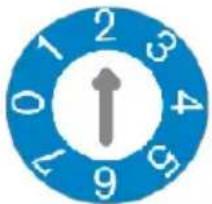
0 1 2 3 4 5 6 7 8 9Note: The change doesn't take effect until you restart the
Switcher. DV-MFSW-21CEC EDID for VGA only, HDMI pass
| Position | Functions |
| 0 1280x800 60Hz | |
| 1 1920x1200 60Hz | |
| 2 1920x1080 60Hz (default) | |
| 3 1280x720 60Hz | |
| 4 1024x768 60Hz | |
| 5 800x600 60Hz | |
| 6 Reserved | |
| 7 Reserved | |
DV-HSW-21CEC EDID for both inputs.
| Position Functions | |
| 0 | Automatically copy HDMI display's EDID to all HDMI Inputs, if failed, the EDID of all HDMI inputs won't change. |
| 1 4K2K 30Hz | 2CH (default) |
| 2 1280 x 800 | 60Hz 2CH |
| 3 1920 x 1080 | 60Hz 2CH |
| 4 1920 x 1200 | 60Hz 2CH |
| 5 | 1280 x 720 60Hz 2CH |
| 6 1024 x768 | 60Hz 2CH |
| 7 800x600 | 60Hz 2CH |
RS-232 OPERATION
The switchers may be configured or queried via the RS232 serial connection.
Baud Rate: 38,400bps
Data bits: 8
Stop bits: 1
Parity: None
Flow control: None
| Computer (DTE) | DV-HSW-21CEC / DV-MFSW-21CEC | |
| Pin 2 Rx □ Tx | ||
| Pin 3 Tx | □ | Rx |
| Pin 5 Ground | — | Ground |
RS-232 SERIAL PROTOCOL
The DV-MFSW-21CEC and the DV-HSW-21CEC switcher may be configured or queried via the RS-232 serial connection.
Request/Response Format
All requests and responses will be entirely in ASCII. The requests can be in either upper or lower case.
All requests will have three characters command field followed by the data required for that specific request. All requests are terminated with a carriage return (0Dh), which will be referred to in this document as
Field Separators
Fields are separated by white space, that is any number of spaces or tabs as long as the entire command is less than 80 characters. A
| CON | num |
So the actual message would look like this:
CON 2<cr>
Command Request Syntax:
This document uses the following notation when describing the syntax of a command request:
BOLD – identifies the command
lower case – identifies data to be entered which is described in the text following the syntax description
" " - entry defined within double quotes is to be entered exactly as shown
< > - entry defined within these brackets is required
[ ] - entry defined within these brackets is optional
{} - entry defined within curly brackets must be entered at least once | - a vertical bar denotes a logical choice of entry
* - an asterisk following either [ ] brackets or curly brackets {} above denotes that data within either brackets or curly brackets may be entered multiple times.
Acknowledging Receipt of Commands
Each request sent to the switcher will have by default two possible responses, an acknowledgement of a correct request or an error response. The acknowledge response will be:
Ok<cr><lf>
Error Response
It is inevitable that errors occur in the requests sent to the switcher. If an invalid command is sent to the switcher, the switcher will respond with the message "ERR: unknown command". If an invalid parameter is sent to the switcher, the switcher will respond with the message "ERR:" followed by the valid syntax for the errored entry.
Example:
A connect request with an incorrect input number:
CON 3
The error response would be:
ERR: CON 3
REQUEST LIST QUICK REFERENCE
| REQUEST DESCRIPTION | |
| CON Connection Request | |
| DIS Disconnect Request | |
| HDCP | High Definition Contention Protection Status Request |
| MOD Model Request | |
| REC Reconnect Request | |
| STA Status Request | |
| VER Request Version Number | |
| SET AUTOMODE | Configure Auto-switching Mode |
| GET AUTOMODE | Query Auto-switching Mode |
| RESET | Reset Auto-switching mode to Factory Default |
Connection Request
The connection request is used to connect one of the two available inputs to the output.
A connection may be disconnected by using the DIS command (see later in document).
| CON | input | "?" |
Syntax: CON
Where:
CON Connection request header
input Input number in the range 1-2
"?" Request to return the currently selected input
(the front panel LEDs reflect the currently selected input)
(Note: A CON input command will override the disconnected output, ie via the DIS command. See below for description of DIS command.)
Examples:
To connect input 2 to output, the connection request would look like this:
CON 2<cr>
To request the currently connected input, the connection request would look like this:
CON ?<cr>
The response from the switcher would be:
CON 2<cr><lf>
If a previously connected input were subsequently disconnected via the DIS command, then the CON ? command will return the currently selected input.
Disconnect Request
The disconnect request is used to disconnect (disable) the output of the switcher.
| DIS |
Syntax: DIS
Where:
DIS Disconnect request header
Example:
To disconnect (disable) the output of the switcher, the user would send the following message:
DIS<cr>
HDCP Request
The High-bandwidth Digital Content Protection status request allows identification of the presence of HDCP on the input(s). The format for the HDCP request is as follows:
| HDCP |
Syntax: HDCP
Where:
HDCP High Definition Content Protection request header
Response from DV-MFSW-21CEC: HDCP x
Response from DV-HSW-21CEC: HDCP xx
Where:
x is either 0 or 1, with 0 representing that HDCP is not present and 1 representing that HDCP is present.
Example:
To query the HDCP status of the unit the user would send the following message:
HDCP<cr>
The response for the DV-MFSW-21CEC switcher could be:
HDCP 1<cr><lf>
That is, HDCP is present on input 1.
The response for the DV-HSW-21CEC switcher could be:
HDCP 01<cr><lf>
That is, HDCP is not present on input 1 and HDCP is present on input 2.
Model Request
The MOD Model request allows identification of the model number of the switcher.
The unit will return the current model identification, ie DV-MFSW-21CEC. The format for the model request is as follows:
| MOD |
Syntax: MOD
Where:
MOD Model request header
Example:
To query the model number of the unit the user would send the following message:
MOD<cr>
The response for the DV-MFSW-21CEC switcher would be:
MOD DV-MFSW-21A<cr><lf>
Reconnect Request
The REC request allows the user to reconnect the disconnected output to the currently selected input. Note that the input to be reconnected is as indicated by the input LED on the front panel. The command has no effect if an input is already connected to the output.
| REC |
Syntax: REC
Where:
REC Reconnect request header
Example:
To reconnect the previously connected input 2 to output, the user would send the following message:
REC
Status Request
The STA request returns the presence of signal on the respective inputs, 1 = signal present, 0 = no signal present.
| STA |
Syntax: STA
Where:
STA Status request header
Example:
To query for the presence of signal on inputs 1 and 2, the user would send the following message:
STA
If signal were present on input 1 but not on input 2, the response from the switcher would be:
STA 10
If signal were not present on input 1 and present on input 2, the response from the switcher would be:
STA 01
Version Request
In order to be able to identify the current firmware version populated in the unit, the user may request using the VER request. The format for the request will be as follows:
| VER |
Syntax: VER
Where:
VER Version Request header
Response form DV-MFSW-21CEC: VER DV-MFSW-21A
Response form DV-HSW-21CEC: VER DV-HSW-21A
Where:
XX.xx XX = Major version number, xx = Minor version number
Example:
VER
To which the DV-MFSW-21CEC switcher will respond:
VER DV-MFSW-21A 02.05
Auto-Switching Mode Configuration
The user may configure the Auto-Switching mode to either FIFO (First Signal Connected) or LIFO (Newest Signal Connected), using the Set Automode command. The format is as follows:
| Set Automode | “LIFO”|”FIFO” |
Syntax: SET AUTOMODE <"LIFO"| "FIFO">
Where:
SET AUTOMODE Automode Request header
"LIFO"|"FIFO" LIFO = Switch to newly connected valid source, FIFO = Maintain original source
Response from DV-MFSW-21A: Automode "fifo" | "lifo"
Example:
SET AUTOMODE LIFO
To which the DV-MFSW-21CEC switcher will respond:
AUTOMODE lifo
Auto-Switching Mode Request
The user may query the current Auto-Switching mode setting to determine if the unit is in FIFO (First Signal Connected) or LIFO (Newest Signal Connected) modes, using the Get Automode command. The format is as follows:
| Get Automode |
Syntax: GET AUTOMODE
Where:
GET AUTOMODE Automode Request header
Response from DV-MFSW-21CEC: Automode "fifo" | "lifo"
Example:
GET AUTOMODE
To which the DV-MFSW-21CEC switcher will respond:
AUTOMODE "lifo" | "fifo" < cr>
Auto-Switching Mode Reset
The user may reset the Auto-Switching mode setting to the initial default setting (lifo), using the Reset command. The format is as follows:
| Reset |
Syntax: RESET
Where:
RESET Reset Request header
Response from DV-MFSW-21CEC: reset
Example:
RESET
To which the DV-MFSW-21CEC switcher will respond:
reset
SPECIFICATIONS
| DV-HSW-21CEC / DV-MFSW-21CEC | |
| Video Input | 2 x HDMI Type A 19-pin, female (DV-HSW-21)1 VGA and 1 HDMI (DV-MFSW-21 only) |
| Audio Input | 3.5mm Stereo (DV-MFSW-21 only) |
| Video Output | 1 x HDMI Type A 19-pin, female |
| RS-232 | 3 Pin Pluggable Screw Terminal |
| Contact Closure | 5 Pin Pluggable Screw Terminal |
| AC Power | External 12VDC Power Supply with Locking Connector Operational |
| Power Input 110-240 VAC | |
| Power Consumption | 12VDC 0.25A |
| Dimensions 7 1/2" (190.2mm) W x 3 1/4" (82.7mm) D x 1"(26.2mm) H | |
| Weight | Weight1 lbs (0.45 kg) |
| Supported Formats | HDMI: 3840x2160 @30Hz (4K x 2K @30Hz)VGA: 1920 x 1200 @ 60Hz |
LIMITED WARRANTY
The DV-HSW-21CEC / DV-MFSW-21CEC Switchers are warranted against failures due to defective parts or faulty workmanship for a period of three years after delivery to the original owner. During this period, FSR will make any necessary repairs or replace the Unit without charge for parts or labor. Shipping charges to the factory or repair station must be prepaid by the owner, return-shipping charges (via UPS Ground) will be paid by FSR.
This warranty applies only to the original owner and is not transferable. In addition, it does not apply to repairs done by other than the FSR factory or Authorized Repair Stations.
This warranty shall be cancelable by FSR at its sole discretion if the Unit has been subjected to physical abuse or has been modified in any way without written authorization from FSR. FSR's liability under this warranty is limited to repair or replacement of the defective unit.
FSR will not be responsible for incidental or consequential damages resulting from the use or misuse of its products. Some states do not allow the exclusion of incidental or consequential damages, so the above limitations may not apply to you. This warranty gives you specific legal rights, and you may also have other rights which vary from state to state.
Warranty claims should be accompanied by a copy of the original purchase invoice showing the purchase date (if a Warranty Registration Card was mailed in at the time of purchase, this is not necessary). Before returning any equipment for repair, please read the important information on service below.
SERVICE
Before returning any equipment for repair, please be sure that it is adequately packed and cushioned against damage in shipment, and that it is insured. We suggest that you save the original packaging and use it to ship the product for servicing. Also, please enclose a note giving your name, address, phone number and a description of the problem.
NOTE: all equipment being returned for repair must have a Return authorization (RMA) Number. To get a RMA Number, please call the FSR Service Department (1-800-332-FSR1).
Please display your RMA Number prominently on the front of all packages.
CONTACT INFORMATION:
FSR INC.
244 Bergen Blvd.
Woodland Park, NJ 07424
Phone: (973) 785-4347
Order Desk Fax: (973) 785-4207
Web Site: http://www.fsrinc.com