Solar FL-550 - Lighting Showtec - Free user manual and instructions
Find the device manual for free Solar FL-550 Showtec in PDF.


User questions about Solar FL-550 Showtec
0 question about this device. Answer the ones you know or ask your own.
Ask a new question about this device
Download the instructions for your Lighting in PDF format for free! Find your manual Solar FL-550 - Showtec and take your electronic device back in hand. On this page are published all the documents necessary for the use of your device. Solar FL-550 by Showtec.
USER MANUAL Solar FL-550 Showtec
natural_image
Technical line drawing of a mechanical device with circular components and mounting brackets (no text or symbols)ENGLISH
Solar FL-550
V1
Product code: 46250
Preface
Thank you for purchasing this Showtec product.
The purpose of this user manual is to provide instructions for the correct and safe use of this product.
Keep the user manual for future reference as it is an integral part of the product. The user manual shall be stored at an easily accessible location.
This user manual contains information concerning:
- Safety instructions
- Intended and non-intended use of the device
• Installation and operation of the device - Maintenance procedures
- Troubleshooting
- Transport, storage and disposal of the device
Non-observance of the instructions in this user manual may result in serious injuries and damage of property.
©2020 Showtec. All rights reserved.
No part of this document may be copied, published or otherwise reproduced without the prior written consent of Highlite International.
Design and product specifications are subject to change without prior notice.
For the latest version of this document, please visit our website www.highlite.com or contact us at service@highlite.com.
Highlite International and its authorized service providers are not liable for any injury, damage, direct or indirect loss, consequential or economic loss or any other loss arising from the use of, or inability to use or reliance on the information contained in this document.
Table of contents
1. Introduction......4
1.1. Before Using the Product ....4
1.2. Intended Use 4
1.3. Product Lifespan....4
1.4. LEDs Lifespan 4
1.5. Text Conventions 4
1.6. Symbols and Signal Words....5
1.7. Symbols on the Information Label ....5
2. Safety....6
2.1. Warnings and Safety Instructions ....6
2.2. Requirements for the User....8
3. Description of the Device....9
3.1. Front View 9
3.2. Back View....9
3.3. Product Specifications 10
3.4. Dimensions....11
4. Installation....12
4.1. Safety Instructions for Installation 12
4.2. Personal Protective Equipment 12
4.3. Installation Site Requirements 12
4.4. Rigging 12
4.4.1. Angle Adjustment....13
4.5. Connecting to Power Supply 14
4.6. Power Linking of Multiple Devices....14
5. Setup....15
5.1. Warnings and Precautions 15
5.2. Stand-alone Setup 15
5.3. DMX Connection....15
5.3.1. DMX-512 Protocol....15
5.3.2. DMX Cables 16
5.3.3. DMX Linking....17
5.3.4. DMX Addressing....17
6. Operation....18
6.1. Safety Instructions for Operation....18
6.2. Control Modes 18
6.3. Control Panel 19
6.4. Start-up....19
6.5. Menu Overview ......20
6.6. Main Menu Options 21
6.6.1. DMX Address 21
6.6.2. DMX Mode 21
6.6.3. Manual Mode 21
6.6.4. Menu Settings....22
6.6.4.1. Fan Mode 22
6.6.4.2. Dimmer Curve....22
6.6.4.3. Factory Reset 23
6.6.4.4. DMX Fail....23
6.6.5. Info....24
6.7. DMX Channels 24
7. Troubleshooting 25
8. Maintenance ....26
8.1. Safety Instructions for Maintenance....26
Solar FL-550
8.2. Preventive Maintenance....26
8.2.1. Basic Cleaning Instructions ....27
8.3. Corrective Maintenance....27
- Deinstallation, Transportation and Storage 28
9.1. Instructions for Deinstallation....28
9.2. Instructions for Transportation 28
9.3. Storage 28
-
Disposal 28
-
Approval....28
1. Introduction
1.1. Before Using the Product

Important Read and follow the instructions in this user manual before installing, operating or servicing this product.
The manufacturer will not accept liability for any resulting damages caused by the non-observance of this manual.
After unpacking, check the contents of the box. If any parts are missing or damaged, contact your Highlite International dealer.
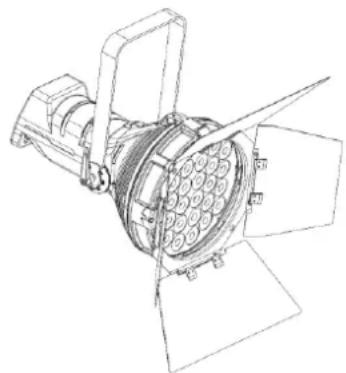
Your shipment includes:
• Showtec Solar FL-550, barndoor not included
• Schuko to Powercon power cable (1,5 m)
- User manual
natural_image
Technical line drawing of a mechanical device with multiple blades and central hub (no text or symbols)Fig. 01
1.2. Intended Use
This device is intended for professional use as a light effect. It is suitable only for indoor installation. This device is not suitable for households and for general lighting.
Any other use, not mentioned under intended use, is regarded as non-intended and incorrect use.
1.3. Product Lifespan
This device is not designed for permanent operation. Disconnect the device from the electrical power supply when the device is not in operation. This will reduce the wear and will improve the device's lifespan.
1.4. LEDs Lifespan
The light output of the LEDs gradually decreases over time (lumen depreciation). High operating temperatures contribute to this process. You can extend the lifespan of the LEDs by providing adequate ventilation and operating the LEDs at the lowest possible brightness.
1.5. Text Conventions
Throughout the user manual the following text conventions are used:
- Buttons: All buttons are in bold lettering, for example "Press the UP/DOWN buttons"
• References: References to chapters and parts of the device are in bold lettering, for example:
"Refer to 2. Safety", "turn the adjustment handle (05)"
• 0–255: Defines a range of values
• Notes: Note: (in bold lettering) is followed by useful information or tips
1.6. Symbols and Signal Words
Safety notes and warnings are indicated throughout the user manual by safety signs.
Always follow the instructions provided in this user manual.

text_image
Warning symbols and warning icons including warning signs, warning circles, lightning bolt, and waste bin| DANGER | Indicates an imminently hazardous situation which, if not avoided, will result in death or serious injury. |
| WARNING | Indicates a potentially hazardous situation which, if not avoided, could result in death or serious injury. |
| CAUTION | Indicates a potentially hazardous situation, which, if not avoided, may result in minor or moderate injury. |
| Attention | Indicates important information for the correct operation and use of the product. |
Important Read and observe the instructions in this document.
Electrical hazard
Hot surface
Eye damage hazard
Provides important information about the disposal of this product.
1.7. Symbols on the Information Label
This product is provided with an information label. The information label is located at the backside of the device.
The information label contains the following symbols:

text_image
Electrical circuit symbols and labels including house, battery, capacitor, diode, and ground symbolThis device is designed for indoor use.
This device shall not be treated as household waste.
This device falls under IEC protection class I.
Minimum distance from lighted objects.
Minimum distance from other objects.
2. Safety

Important Read and follow the instructions in this user manual before installing, operating or servicing this product.
The manufacturer will not accept liability for any resulting damages caused by the non-observance of this manual.
2.1. Warnings and Safety Instructions

DANGER Danger for children
For adult use only. The device must be installed beyond the reach of children.
- Do not leave various parts of the packaging (plastic bags, polystyrene foam, nails, etc.) within children's reach. Packaging material is a potential source of danger for children.
DANGER Electric shock caused by dangerous voltage inside
There are areas within the device where dangerous touch voltage may be present.
- Do not open the device or remove any covers.
- Do not operate the device if the covers or the housing are open. Before operation, check if the housing is firmly closed and all screws are tightly fastened.
- Disconnect the device from electrical power supply before service and maintenance, and when the device is not in use.
DANGER Electric shock caused by short-circuit
This device falls under IEC protection class I.
- Make sure that the device is electrically connected to ground (earth). Connect the device only to a socket-outlet with ground (earth) connection.
- Do not cover the ground (earth) connection.
- Do not bypass the thermostatic switch or fuses.
- For replacement use fuses of the same type and rating only.
- Do not let the power cable come into contact with other cables. Handle the power cable and all connections with the mains with caution.
- Do not modify, bend, mechanically strain, put pressure on, pull or heat up the power cable.
- Make sure that the power cable is not crimped or damaged. Examine the power cable periodically for any defects.
- Do not immerse the device in water or other liquids. Do not install the device in a location where flooding may occur.
- Do not use the device during thunderstorms. Disconnect the device from the electrical power supply immediately.

WARNING
Risk of burns due to hot surface
The surface and the inner parts of the device can become very hot during operation.
- Do not touch the device during operation.
- Allow the device to cool down for at least 15 minutes before handling.

WARNING
Risk of epileptic shock
Strobe lighting can trigger seizures in photosensitive epilepsy. Sensitive persons should avoid looking at strobe lights.

WARNING
Possible eye damage caused by high light intensity
Possibly hazardous optical radiation emitted from this device.
- Do not look at the operating light source. May be harmful to the eye.
- Do not look at the light source with optical instruments that may concentrate the light output.
- Make sure that persons are not looking directly into the light source when the device lights up suddenly. This can happen when the device is powered or when it receives DMX signal, or when certain menu items are selected.
- Disconnect power supply before servicing.
- Wear protective goggles if looking into light source during service or maintenance.

Attention
Power supply
- Before connecting the device to the power supply, make sure that the current, voltage and frequency match the input voltage, current and frequency specified on the information label on the device.
- Make sure that the cross-sectional area of the extension cords and power cables is sufficient for the required power consumption of the device.

Attention
General safety
- Do not insert objects into the air vents.
- Do not connect the device to a dimmer pack.
- Do not switch the device on and off in short intervals. This decreases the device's life.
- Do not shake the device. Avoid brute force when installing or operating the device.
- Change the lens or the LEDs if they are visibly damaged to such an extent that their effectiveness is impaired, for example by cracks or deep scratches. Contact your Highlite International dealer for more information, as servicing can be performed only by instructed or skilled persons.
- If the device is dropped or struck, disconnect the device from the electrical power supply immediately.
Solar FL-550
- If the device is exposed to extreme temperature variations (e.g. after transportation), do not switch it on immediately. Let the device reach room temperature before switching it on, otherwise it may be damaged by the formed condensation.
- If the device fails to work properly, discontinue the use immediately.

Attention
For professional use only
This device shall be used only for the purposes it is designed for.
This device is designed to be used as a professional stage light effect. Any incorrect use may lead to hazardous situations and result in injuries and material damage.
• This device is not suitable for households and for general lighting.
- This device is not designed for permanent operation.
- This device does not contain user-serviceable parts. Unauthorized modifications to the device will render the warranty void. Such modifications may result in injuries and material damage.

Attention
Before each use, examine the device visually for any defects.
Make sure that:
- All screws used for installing the device or parts of the device are tightly fastened and are not corroded.
- The safety devices are not damaged.
• There are no deformations on housings, fixations and installation points. - The lens is not cracked or damaged.
- The power cables are not damaged and do not show any material fatigue.

Attention
Do not expose the device to conditions that exceed the rated IP class conditions.
This device is IP20 rated. IP (Ingress Protection) 20 class provides protection against solid objects greater than 12 mm, such as fingers, and no protection against harmful ingress of water.
2.2. Requirements for the User
This product may be used by ordinary persons. Maintenance may be carried by ordinary persons. Installation and service shall be carried out only by instructed or skilled persons. Contact your Highlite International dealer for more information.
Instructed persons have been instructed and trained by a skilled person, or are supervised by a skilled person, for specific tasks and work activities associated with the installation, service and maintenance of this product, so that they can identify risks and take precautions to avoid them.
Skilled persons have training or experience, which enables them to recognize risks and to avoid hazards associated with the installation, service and maintenance of this product.
Ordinary persons are all persons other than instructed persons and skilled persons. Ordinary persons include not only users of the product but also any other persons that may have access to the device or who may be in the vicinity of the device.
3. Description of the Device
The Solar FL-550 is a LED fixture with an impressive light output in a compact but sturdy housing.
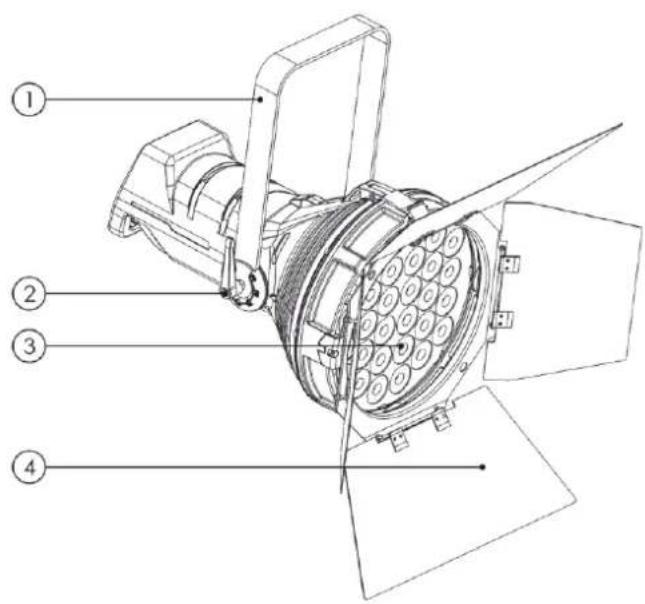
3.1. Front View
text_image
Technical diagram of a satellite or spacecraft with numbered parts labeled 1 to 401) Mounting bracket
02) Adjustment screw
04) Barndoor not included
Fig. 02
3.2. Back View
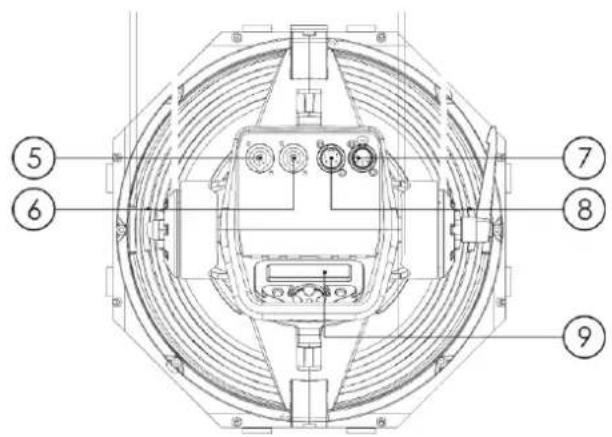
text_image
⑤ ⑥ ⑦ ⑧ ⑨05) 100-240V Neutrik power connector IN (Blue)
06) 100-240V Neutrik power connector OUT (Gray)
07) 5-pin DMX signal connector IN
08) 5-pin DMX signal connector OUT
09) LCD display + control buttons
Fig. 03
3.3. Product Specifications
| Model: | Solar FL-550 |
| Electrical: | |
| Input voltage: | 100–240 V AC, 50/60 Hz |
| Power consumption: | 550 W |
| Physical: | |
| Dimensions: | 562 x 331 x 320 mm (L x W x H) |
| Weight: | 11,8 kg |
| Optics: | |
| Light source: | 24x 20W White CREE LED |
| Color temperature: | 7400 K |
| Lux @2m | 160182 Lux |
| Lumen | 38900 lm |
| Dimmer: | 0–100 % |
| Strobe: | 0–20 Hz |
| Beam angle: | 13,4° |
| Field Angle | 21,4° |
| Power Factor: | 0.98 |
| CRI: | 92 |
| Operation and control: | |
| Control: | Stand-alone (manual)DMX-512 |
| DMX channels: | 1, 2 and 4 channels |
| Control panel: | LED display and buttons |
| Connections: | |
| Power connections: | Neutrik power connector IN (Blue)Neutrik power connector OUT (Gray) |
| Data connections: | 5-pin DMX connectors IN/OUT |
| Signal pinouts: | pin 1 (ground), pin 2 (-), pin 3 (+), pin 4 (NC), pin 5 (NC). |
| Construction: | |
| Housing: | Die-cast aluminum |
| Color: | Black |
| IP rating: | IP20 |
| Cooling: | Fan, Temperature controlled |
| Thermal: | |
| Maximum ambient temperature t_a : | 40 °C |
| Maximum housing temperature t_c : | 70 °C |
| Minimum distance: | |
| Minimum distance from flammable surfaces: | 0,5 m |
| Minimum distance to lighted object: | 0,5 m |
3.4. Dimensions
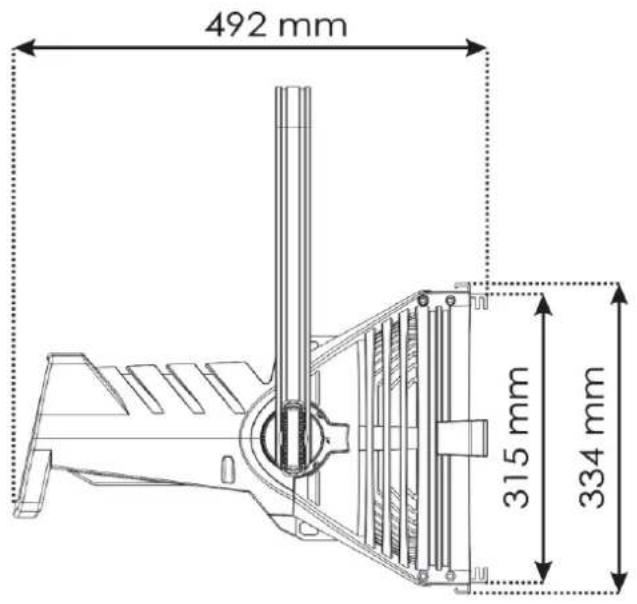
text_image
492 mm 315 mm 334 mm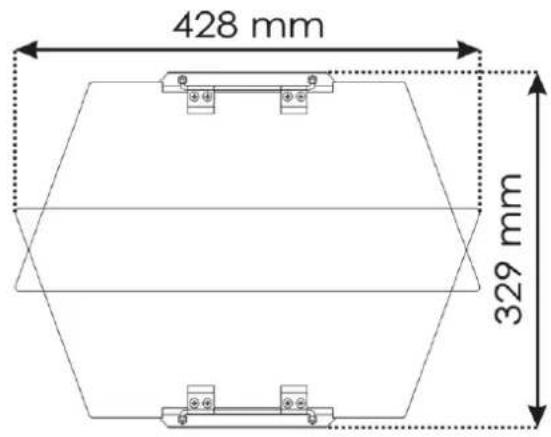
text_image
428 mm 329 mm
text_image
230 mm 320 mm 355 mm 518 mm 331 mm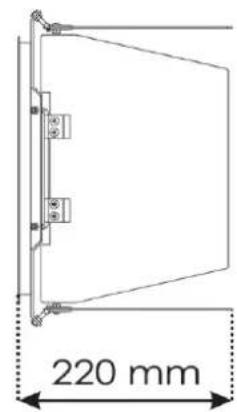
text_image
220 mm
natural_image
Technical line drawing of a mechanical device with a 562 mm dimension label (no text or symbols on the diagram itself)Fig. 04
Fig. 05
4. Installation
4.1. Safety Instructions for Installation

WARNING
Incorrect installation can cause serious injuries and damage of property.
If trussing systems are used, installation must be carried out only by instructed or skilled persons.
Follow all applicable European, national and local safety regulations concerning rigging and trussing.
4.2. Personal Protective Equipment
During installation and rigging wear personal protective equipment in compliance with the national and site-specific regulations.
4.3. Installation Site Requirements
- The device can be used only indoors.
- The device can be mounted to a truss or other rigging structure.
• The minimum distance to other objects must be bigger than 0,5 m. - The minimum distance between the light output and the illuminated surface must be bigger than 0.5 m.
- The maximum ambient temperature t_ = 40^ must never be exceeded.
• The relative humidity must not exceed 50 % with an ambient temperature of 40 °C.
4.4. Rigging
The device can be positioned on a flat surface or mounted to a truss or other rigging structure. Make sure that all loads are within the pre-determined limits of the supporting structure.

CAUTION
Restrict the access under the work area during rigging and/or derigging.
To mount the device, follow the steps below:
01) Use a clamp to attach the device to the supporting structure, as shown in Fig. 06. Make sure that the device cannot move freely.
02) Secure the device with a secondary suspension, for example a safety cable. Make sure that the secondary suspension can hold 10 times the weight of the device. If possible, the secondary suspension should be attached to a supporting structure independent of the primary suspension. Put the safety cable around the mounting bracket (00), as shown in Fig. 06.

text_image
Safety cable ClampFig. 06
4.4.1. Angle Adjustment
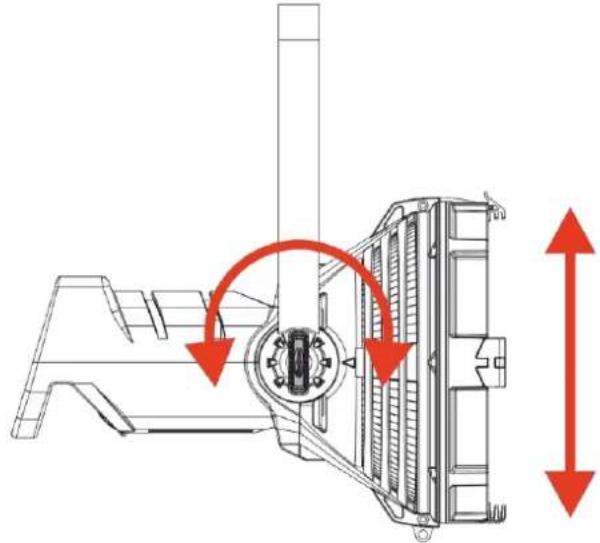
You can adjust the angle of the device with the 2 adjustment screws (03).
01) Turn the adjustment screws (03) counterclockwise to release them.
02) Tilt the device at the desired angle (see Fig. 07).
03) Turn the adjustment screws (03) clockwise to tighten them. Make sure that the device cannot move freely after the adjustment screws (03) are tightened.
natural_image
Technical line drawing of a mechanical component with red arrows indicating motion direction (no text or symbols)Fig. 07
4.5. Connecting to Power Supply
DANGER
Electric shock caused by short-circuit
The device accepts AC mains power at 100–240 V and 50/60 Hz. Do not supply power at any other voltage or frequency to the device.
This device falls under IEC protection class I. Make sure that the device is always electrically connected to the ground (earth).
Before connecting the device to the socket-outlet:
- Make sure that the power supply matches the input voltage specified on the information label on the device.
- Make sure that the socket-outlet has ground (earth) connection.
Connect the device to the socket-outlet with the power plug. Do not connect the device to a dimmer circuit, as this may damage the device.
4.6. Power Linking of Multiple Devices
This device supports power linking. Power can be relayed to another device via the power OUT connector. Note that the input and the output connectors have different designs: one type cannot be connected to the other.
Power linking of multiple devices must be carried out only by instructed or skilled persons.

WARNING
Incorrect power linking may lead to overload of the electrical circuit and result in serious injuries and damage of property.
To prevent overload of the electrical circuit, when power linking multiple devices:
- Use cables with sufficient current-carrying capacity. The power cable supplied with the device is not suitable for power linking of multiple devices.
- Make sure that the total current draw of the device and all connected devices does not exceed the rated capacity of the power cables and the circuit breaker.
- Do not link more devices on one power link than the maximum recommended number.
Maximum recommended number of devices:
• at 100–120 V: 3 devices Solar FL-550
• at 200–240 V: 6 devices Solar FL-550
- at 100–120 V: 3 devices Solar FL-550 - at 200–240 V: 6 devices Solar FL-550
5. Setup
5.1. Warnings and Precautions

Attention
Connect all data cables before supplying power.
Disconnect power supply before connecting or disconnecting data cables.
5.2. Stand-alone Setup
When the Solar FL-550 is not connected to a controller or to other devices, it functions as a stand-alone device. It can be operated manually, in auto mode or in sound-controlled mode.
For more information about the control modes, refer to 6.2. Control Modes on page 18.
5.3. DMX Connection
5.3.1. DMX-512 Protocol
You need a DMX serial data link to run light shows of one or more devices using a DMX-512 controller or to run synchronized shows of two or more devices set in a master/slave operating mode.
The Solar FL-550 has 5-pin DMX signal IN and OUT connectors.
The pin assignment is as follows: pin 1 (ground), pin 2 (-), pin 3 (+), pin 4 (NC), pin 5 (NC).
Devices on a serial data link must be daisy-chained in a single line. The number of devices that you can control on one data link is limited by the combined number of the DMX channels of the connected devices and the 512 channels available in one DMX universe.
To comply with the TIA-485 standard, no more than 32 devices should be connected on one data link. In order to connect more than 32 devices on one data link, you must use a DMX optically isolated splitter/booster, otherwise this may result in deterioration of the DMX signal.
Note:
• Maximum recommended DMX data link distance: 300 m
• Maximum recommended number of devices on a DMX data link: 32 devices
5.3.2. DMX Cables
Shielded twisted-pair cables with 5-pin XLR connectors must be used for reliable DMX connection. You can purchase DMX cables directly from your Highlite International dealer or make your own cables.
If you use XLR audio cables for DMX data transmission, this may lead to signal degradation and unreliable operation of the DMX network.
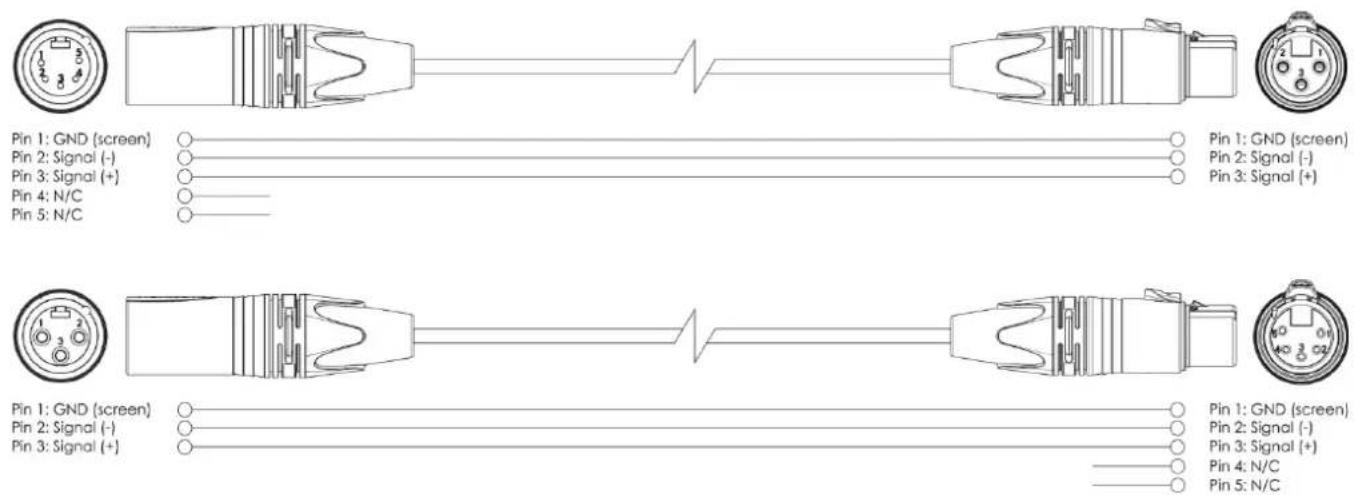
When you make your own DMX cables, make sure that you connect the pins and wires correctly as shown in Fig. 09.
text_image
Pin 1: GND (screen) Pin 2: Signal (-) Pin 3: Signal (+) Pin 4: N/C Pin 5: N/C Pin 1: GND (screen) Pin 2: Signal (-) Pin 3: Signal (+) Pin 4: N/C Pin 5: N/C Pin 1: GND (screen) Pin 2: Signal (-) Pin 3: Signal (+) Pin 4: N/C Pin 5: N/CFig. 09
5.3.3. DMX Linking
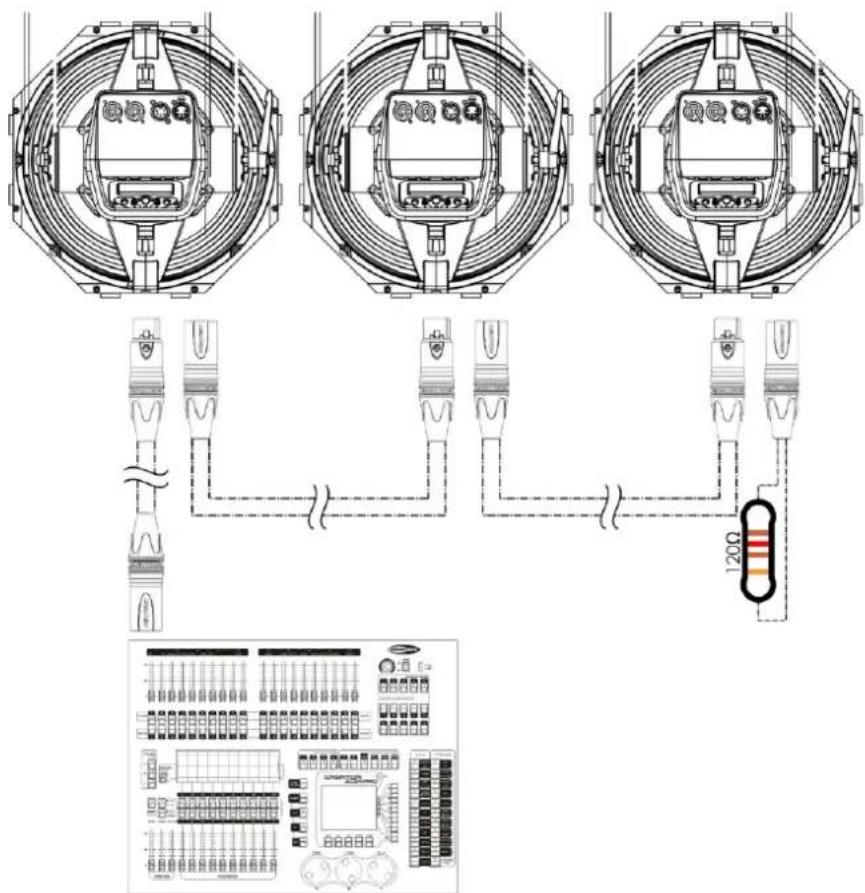
To connect multiple devices on one DMX data link, follow the steps below:
01) Use a 3-pin DMX cable to connect the DMX OUT connector of the lighting controller to the DMX IN connector of the first device.
02) Connect the first device's DMX OUT connector to the second device's DMX IN connector with a 3-pin DMX cable.
03) Repeat step 2 to connect all devices in a daisy-chain as shown in Fig. 11.
04) Connect a DMX terminator (120 Ω resistor) to the DMX OUT connector of the last device on the data link.
text_image
Technical diagram showing three circular electrical enclosures connected to a 120Ω resistor, with an accompanying schematic of the circuit board layout.Fig. 11
5.3.4. DMX Addressing
In a setup with multiple devices, make sure that you set the DMX starting address of each device correctly. The Solar FL-550 has 3 personalities: 1, 2 and 4 channels.
If you want to connect multiple devices on one data link and use them in 10-channel mode, for example, follow the steps below:
01) Set the starting address of the 1^st device on the data link to 1 (001).
02) Set the starting address of the 2^nd device on the data link to 5 (005), as 1 + 4 = 5 .
03) Set the starting address of the 3^rd device on the data link to 9 (009) as 5 + 4 = 9 .
04) Continue assigning the starting addresses of the remaining devices by adding each time 10 to the previous number.
Make sure that you do not have any overlapping channels in order to control each Solar FL-550 correctly. If two or more devices are addressed similarly, they will work similarly.
6. Operation
6.1. Safety Instructions for Operation

Attention
This device must be used only for the purposes it is designed for.
This device is intended for professional use as a light effect. It is suitable only for indoor installation. This device is not suitable for households and for general lighting.
Any other use, not mentioned under intended use, is regarded as non-intended and incorrect use.

Attention
Power supply
Before connecting the device to the power supply, make sure that the current, voltage and frequency match the input voltage, current and frequency specified on the information label on the device.
6.2. Control Modes
The Solar FL-550 can be operated with a DMX controller, or without a DMX controller as a stand-alone device.
The Solar FL-550 supports the following control modes:
- Stand-alone: Manual operation mode
• DMX-512: 1, 2 and 4 channels
6.3. Control Panel

text_image
Control board MENU DMX ADDRESS B C D- Use the MENU button to exit the current submenu, to return to the main menu and to return to the start screen.
- Use the UP/DOWN buttons to navigate through the menus or to increase/decrease numeric values.
- Use the ENTER button to open the desired menu, to confirm your choice or to set the currently selected value.
6.4. Start-up
Upon start-up the display will show the following screen:
SOLAR-FL-550 V1.0
Immediately afterwards the display will show the start screen. The start screen provides information about the current control mode of the device:
DMX 001 4CH-B
DMX control mode with DMX starting address 001 4 Channel mode is active
Note:
If no button is pressed, after 20 seconds of inactivity the display will return to the start screen and after 10 more seconds it will turn off. Press any button to turn the display on.
6.5. Menu Overview
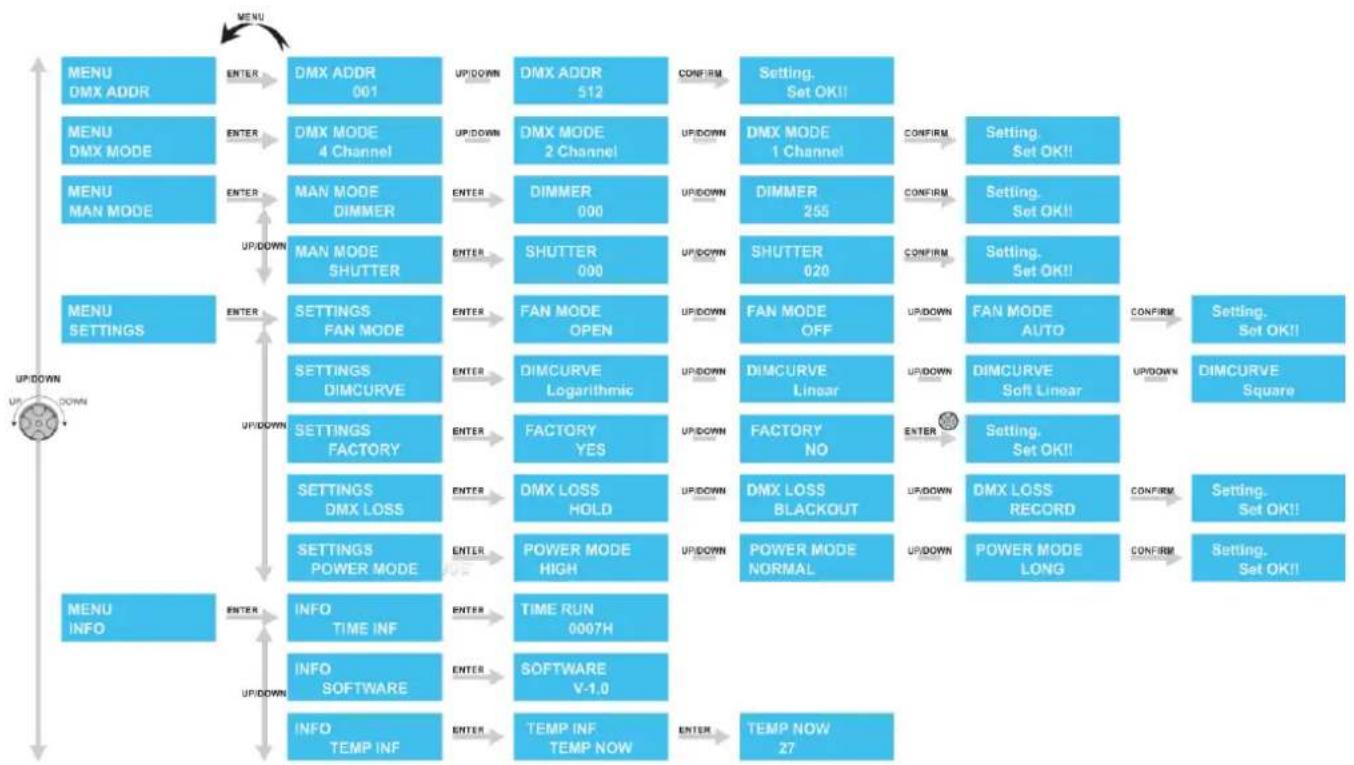
flowchart
System status flowchart for DMX and DIMCURVE control modules, showing menu navigation, mode selection, and status transitions from INPUT to OUTPUT.6.6. Main Menu Options
The main menu has the following options:
| MENUDMX ADDR | DMX address |
| MENUDMX MODE | DMX channel mode |
| MENUMAN MODE | Manual control |
| MENU SETTINGS | Settings |
| MENUINFO | Info |
01) Press the UP/DOWN buttons to navigate through the main menu.
02) Press the ENTER button to open the submenus.
03) Press the MENU button to return to the previous screen.
6.6.1. DMX Address
In this menu you can set the DMX starting address of the device.
01) Press the UP/DOWN buttons to select the DMX starting address. The selection range is 001–512.
02) Press the ENTER button to confirm the selection.
6.6.2. DMX Mode
With this menu you can manually control the DMX Mode.
01) While in the main menu, press the UP/DOWN buttons to choose DMX MODE.
02) Press the ENTER button to open the menu.
03) Press the UP/DOWN buttons to select the desired DMX channel mode. There are 3 options available:
DMX MODE 4 Channel 4 channels
DMX MODE 2 Channel 2 channels
DMX MODE 1 Channel 1 channel
04) Press the SETUP button to confirm your choice.
6.6.3. Manual Mode
With this menu you can manually control the dimmer and/or shutter.
01) While in the main menu, press the UP/DOWN buttons to one of 2 options:
MAN MODE DIMMER Dimmer
MAN MODE SHUTTER Shutter
02) Press the ENTER button to confirm your selection and to enable the adjustment of the values.
03) Press the UP/DOWN buttons to adjust the values.
04) The adjustment range of the dimmer is 000–255 and the shutter 0-20.
6.6.4. Menu Settings
With this menu you can change the device's settings.
01) While in the main menu, press the UP/DOWN buttons to choose SETTING.
02) Press the ENTER button to open the menu.
03) Press the UP/DOWN buttons to choose one of the 4 submenus:
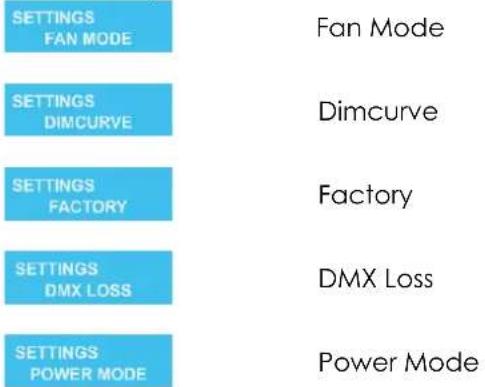
text_image
SETTINGS FAN MODE SETTINGS DIMCURVE SETTINGS FACTORY SETTINGS DMX LOSS SETTINGS POWER MODE Fan Mode Dimcurve Factory DMX Loss Power Mode6.6.4.1. Fan Mode
In this menu you can set the specific fan mode.
01) Press the ENTER button to open menu Fan Mode.
02) Press the UP/DOWN buttons to choose one of 3 Fan options:

text_image
FAN MODE OPEN Fan Open FAN MODE OFF Fan Off FAN MODE AUTO Fan Auto6.6.4.2. Dimmer Curve
In this menu you can set the specific dimmer curve.
01) Press the ENTER button to open menu Dimcurve.
02) Press the UP/DOWN buttons to choose between the 4 available options:

line
| DMX Value | Lumen Output | | --------- | ------------ | | 0 | 0 | | >0 | >1.5 |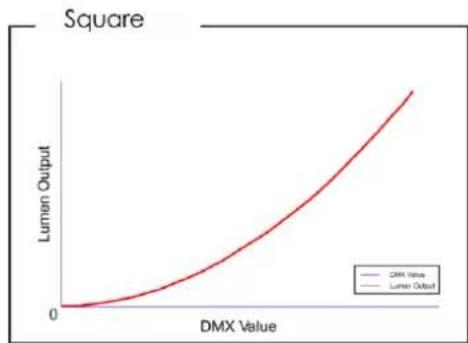
line
| DMX Value | Lumen Output | | --------- | ------------ | | 0 | 0 | | >0 | >0 |
line
| DMX Value | Lumen Output | | --------- | ------------ | | 0 | 0 | | 1.5 | 1.5 |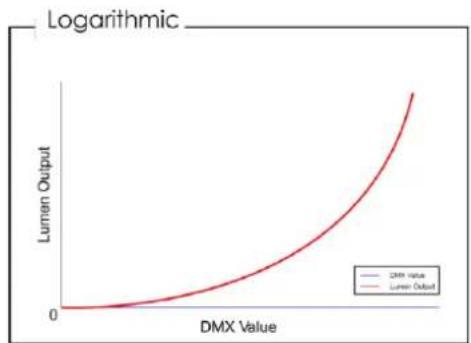
line
| DMX Value | Lumen Output | | --------- | ------------ | | 0 | 0 | | >0 | >0 |6.6.4.3. Factory Reset
In this menu you can restore the default factory settings.
01) Press the ENTER button to open menu Factory.
02) Press the UP/DOWN buttons to select Yes or No.
03) If you choose Yes and confirm it with the ENTER button, the device will be reset to its factory default settings.
6.6.4.4. DMX Fail
In this menu you can set the device's behavior in case of a DMX signal failure.
01) Press the UP/DOWN buttons until the display shows No DMX.
02) Press the ENTER button to open the menu.
03) Press the UP/DOWN buttons to choose one of 3 options:
DMX LOSS HOLD
Hold
DMX LOSS BLACKOUT
Blackout
DMX LOSS RECORD
Record
• HOLD: the device will use last properly received DMX signal, ensuring undisrupted performance
• OFF: the device will immediately black out the light output, after losing the DMX signal.
- RECORD: When the lamp is in 4-channel mode, the channel 4 is set to 201-230 for 5 seconds, the lamp will flash once to record the Dimmer value of the desired scene at this time. After the lamp is set to the RECORD mode, the DMX signal is disconnected, and the lamp will automatically keep the recorded Dimmer value of the desired scene.
04) Press the SETUP button to confirm your choice.
6.6.5. Info
With this menu you can view information about your device
01) While in the main menu, press the UP/DOWN buttons to choose INFO.
02) Press the ENTER button to open the menu.
03) Press the UP/DOWN buttons to choose one of the 3 submenus:

Time Info

Software

Temp Info
04) Press the ENTER button to open menu Time Info, you will now see the operation time of the device.
05) Press the ENTER button to open menu Software Info, you will now see the current software version.
06) Press the ENTER button to open menu Temp Info, you will now see the current operating temperature of the device.
6.7. DMX Channels
| 1 CH | 2 CH | 4 CH | Function | Value | Setting |
| 1 | 1 | 1 | Master Dimmer | 000–255 | From low to high intensity (0–100 %)° |
| 2 | Dimmer Fine | 000–255 | From low to high intensity (0–100 %)° | ||
| 2 | 3 | Linear Strobe | 0-10 | Dimmer on | |
| 11-230 | From low to high frequency (0–20 Hz)° | ||||
| 231-255 | Dimmer on full | ||||
| 4 | Control | 0-50 | No Function | ||
| 51-55 | No DMX Hold | ||||
| 56-100 | No Function | ||||
| 101-105 | No DMX Blackout | ||||
| 106-150 | No Function | ||||
| 151-155 | No DMX Record | ||||
| 156-200 | No Function | ||||
| 201-230 | Record after 5 seconds | ||||
| 231-255 | No Function |
7. Troubleshooting
This troubleshooting guide contains solutions to problems which can be carried out by an ordinary person. The device does not contain user-serviceable parts.
Unauthorized modifications to the device will render the warranty void. Such modifications may result in injuries and material damage.
Refer servicing to instructed or skilled persons. Contact your Highlite International dealer in case the solution is not described in the table.
| Problem | Probable cause(s) | Solution |
| The device does not function at all | No power to the device | Check if power is switched on and cables are plugged in |
| Internal fuse is blown | Disconnect the device and contact your Highlite International dealer | |
| The device does not respond to DMX control | The controller is not connected | Connect the controller |
| The signal is reversed. The 3-pin DMX OUT of the controller does not match the DMX IN of the device | Install a phase-reversing cable between the controller and the device | |
| The controller is defective | Try using another controller | |
| The device responds erratically to DMX control | Bad data link connection | Examine connections and cables.Correct poor connections. Repair or replace damaged cables |
| The data link is not terminated with a 120 Ω termination plug | Insert a termination plug in the DMX OUT connector of the last device on the link | |
| Incorrect addressing | Check address settings and correct, if necessary | |
| In case of a setup with multiple devices, one of the devices is defective and disturbs data transmission on the link | To find out which device is defective, bypass one device at a time until normal operation is restored | |
| No light or LEDs cut out intermittently | LEDs are damaged | Disconnect the device and contact your Highlite International dealer |
| The power supply settings do not match local AC voltage and frequency | Disconnect the device. Check the settings and correct, if necessary |
8. Maintenance
8.1. Safety Instructions for Maintenance
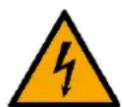
DANGER
Electric shock caused by dangerous voltage inside
Disconnect power supply before servicing or cleaning.
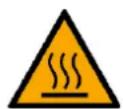
WARNING
Risk of burns due to hot surface
Allow the device to cool down for at least 15 minutes before servicing or cleaning.
8.2. Preventive Maintenance

Attention
Before each use, examine the device visually for any defects.
Make sure that:
- All screws used for installing the device or parts of the device are tightly fastened and are not corroded.
- The safety devices are not damaged.
- There are no deformations on housings, fixations and installation points.
- The lens is not cracked or damaged.
- The power cables are not damaged and do not show any material fatigue.
8.2.1. Basic Cleaning Instructions
The external lens of the device must be cleaned periodically in order to optimize the light output. The cleaning schedule depends on the conditions at the site where the device is installed. When smoke or fog machines are used at the site, the device will need more frequent cleaning. On the other hand, if the device is installed in well-ventilated area, it will need less frequent cleaning. To establish a cleaning schedule, examine the device at regular intervals during the first 100 hours of operation.
To clean the device, follow the steps below:
01) Disconnect the device from the electrical power supply.
02) Allow the device to cool down for at least 15 minutes.
03) Remove the dust collected on the external surface with dry compressed air and a soft brush.
04) Clean the lens with a damp cloth. Use a mild detergent solution.
05) Dry the lens carefully with a lint-free cloth.
06) Clean the DMX and other connections with a damp cloth.

Attention
- Do not immerse the device in liquid.
- Do not use alcohol or solvents.
- Make sure that the connections are fully dry before connecting the device to the power supply and to other devices.
8.3. Corrective Maintenance
The device does not contain user-serviceable parts. Do not open the device and do not modify the device.
Refer repairs and servicing to instructed or skilled persons. Contact your Highlite International dealer for more information.
9. Deinstallation, Transportation and Storage
9.1. Instructions for Deinstallation

WARNING
Incorrect deinstallation can cause serious injuries and damage of property.
- Let the device cool down before dismounting.
- Disconnect power supply before deinstallation.
- Always observe the national and site-specific regulations during deinstallation and derigging of the device.
- Wear personal protective equipment in compliance with the national and site-specific regulations.
9.2. Instructions for Transportation
- Use the original packaging to transport the device, if possible.
- Always observe the handling instructions printed on the outer carton box, for example: "Handle with care", "This side up", "Fragile".
9.3. Storage
- Clean the device before storing. Follow the cleaning instructions in chapter 8.2.1. Basic Cleaning Instructions on page 27.
- Store the device in the original packaging, if possible.
10. Disposal

Correct disposal of this product
Waste Electrical and Electronic Equipment
This symbol on the product, its packaging or documents indicates that the product shall not be treated as household waste. Dispose of this product by handing it to the respective collection point for recycling of electrical and electronic equipment. This is to avoid environmental damage or personal injury due to uncontrolled waste disposal. For more detailed information about recycling of this product contact the local authorities or the authorized dealer.
11. Approval
CE
Check the respective product page on the website of Highlite International (www.highlite.com) for an available declaration of conformity.