XFT-400 - Fitness Equipment True - Free user manual and instructions
Find the device manual for free XFT-400 True in PDF.


User questions about XFT-400 True
0 question about this device. Answer the ones you know or ask your own.
Ask a new question about this device
Download the instructions for your Fitness Equipment in PDF format for free! Find your manual XFT-400 - True and take your electronic device back in hand. On this page are published all the documents necessary for the use of your device. XFT-400 by True.
USER MANUAL XFT-400 True
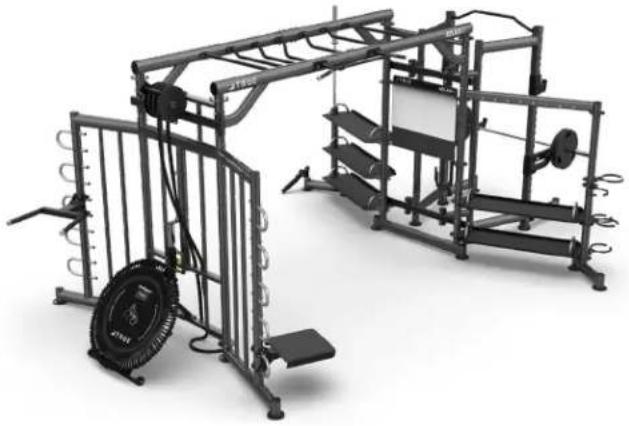
Group Training System
natural_image
3D rendering of a gym with overhead equipment and a tire, no visible text or symbols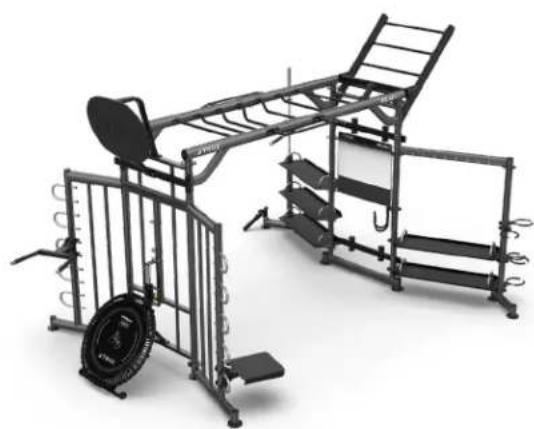
natural_image
Exterior view of a modern office building (no signage)
natural_image
3D rendering of a gym with metal frame structure and equipment (no visible text or symbols)Model # XFT-400
Revision: 041221
OWNER'S
MANUAL
IMPORTANT:
All products shown are prototype. Actual product delivered may vary.
Product specifications, features & software are subject to change without notice.
For the most up-to-date owner's manual please visit www.truefitness.com.
For documents in additional languages please visit www.truefitness.com/resources/document-library/
IMPORTANTE:
A MESSAGE TO OUR CUSTOMERS
Frank Trulaske began TRUE Fitness® over thirty-five year ago with the simple philosophy of delivering superior fitness products, service, and support. Today, TRUE is the global leader in premium fitness equipment for the commercial and residential markets. Our goal is to be the leader in technology, innovation, performance, safety and style. TRUE has received many awards for its product over the years and remains the benchmark for the industry. Fitness facilities and consumers invest in TRUE products for their durable commercial platforms used in all its products, both commercial and residential alike.
The proud manufacturing tradition of quality and the culture of innovation at TRUE have given rise to a full line of extraordinary cardio and strength equipment. As a result, people all over the world are benefiting from the TRUE experience. Innovation across the full product line has made TRUE successful and is a trademark of the TRUE heritage. TRUE's patented Heart Rate Control technology is just one of the remarkable ways we deliver simple and superior performance every user can enjoy, and most importantly, use to achieve personal health and fitness goals.
At the heart of our success is the relentless and systematic life testing of both our products and their components. We have dedicated employees who understand our philosophy is to deliver the best products in the world.
Our goal is to deliver the world's best premium equipment for our customers' health and fitness solutions.
Table of Contents
CHAPTER 1: SAFETY INSTRUCTIONS ....5
• ANCHORING: 9
• COMMERICAL MAINTENANCE SCHEDULE: 10
CHAPTER 2: ASSEMBLY GUIDE ....11
• MACHINE SPECIFICATIONS:....11
• COMPLIANCES: 11
• REQUIRED TOOLS: 12
LABELS: 12
PRE-ASSEMBLY CHECKLIST:....14
• XFT-400 ASSEMBLY OVERVIEW: 28
ASSEMBLY STEPS: 29
CHAPTER 3: CARE & MAINTENANCE....73
• CARE & MAINTENANCE: 73
• DAILY INSPECTION & MAINTENANCE: 73
• WEEKLY INSPECTION & MAINTENANCE: 73
• OTHER SCHEDULED PREVENTIVE MAINTENANCE: 74
• CLEANING THE EQUIPMENT: 74
• CABLE INSPECTION & MAINTENANCE: 75
CHAPTER 4: CUSTOMER SERVICE....77
• CONTACTING SERVICE:....77
• CONTACTING SALES: 77
• REPORTING FREIGHT OR PARTS DAMAGE:....78
CHAPTER 5: WARRANTY INFORMATION:....79
CHAPTER 1: SAFETY INSTRUCTIONS

FACILITY AND USER SAFETY PRECAUTIONS
- Review and understand all of the warning labels affixed to this machine and on the facility safety sign.
- Be certain that the machine operation is understood before it is used. Refer to the instructional procedure label affixed to the machine.
-
Make sure all users are properly trained on how to use this equipment. If this machine is being used in a commercial setting, end users may not have access to this owners manual. It is the responsibility of the facility to instruct users as to the proper usage of the equipment as well as making them aware of potential hazards. Maximum user weight is 300 lbs (136 kg) unless otherwise stated in the manual.
-
Use each machine only for the intended exercise. Do not allow anyone to invent exercises not included on the instructional procedure label or the intended use Label.
-
Do not modify the machine.
-
This equipment meets industry safety standards for stability when used for the intended exercise. Do not allow straps, resistance bands or other means to be attached to the framework of this machine to perform stretching or body weight exercises. This can result in machine instability and lead to serious crushing injuries.
-
Keep children away from this equipment. Adults should closely supervise use by teenagers.
-
It is recommended that users receive a thorough medical exam before commencing an exercise program. All medical issues should be reviewed to ensure that weight training will not aggravate pre-existing medical conditions.
-
If the machine appears damaged or inoperable, contact a facility staff member to place an "OUT OF ORDER, DO NOT USE" sign on the machine until it is repaired. Only use TRUE supplied replacement components to service this machine.
-
Instruct users not to wear loose or dangling clothes or have headphone wires hanging when using this equipment.
-
Do not attempt to free any jammed assemblies by yourself as this may cause injury.
-
On Plate Loaded and Free Weight machines:
12a. Use of spotter(s). Instruct users to seek the advice of the facility staff as to the appropriate use of spotters when lifting. More than one spotter may be required depending upon the amount of weight being lifted.
12b. Instruct users to load weight plates evenly and carefully to avoid tipping equipment and crushing injuries.
12c. If the machine is equipped with safety stops or catches, inspect them and verify their proper operation before use and make sure they are securely in place before using or exiting the machine. Be certain members are instructed on how to operate and adjust
CHAPTER 1: SAFETY INSTRUCTIONS
12d. This equipment is designed for standard olympic size weight plates with a 50mm bore (1.9").
12e. Do not exceed the maximum weight capacity of the machine. Maximum plate size is 45 lbs. (25 kg.).
- On Selectorized and Cable equipped machines:
13a. Do not allow users to perform any exercise by holding the end of the cable and/or the cable end fitting. Use only appropriate handles or attachments properly connected to the cable end.
13b. Do not high-pin or double-pin the weight stack. Do not allow the machine to be used if the top plate or weight stack is pinned in a raised position. Use an assistant and carefully return the machine to the proper position with the cap plate resting on the top weight. Inspect the entire length of the cable to ensure that it is properly seated in all of the pulley grooves.
13c. Do not allow the use of weight plates or dumbbells to be used as a means to add additional weight to the weight stacks. Use only the TRUE adder weight system specifically designed for the machine.

INSTALLATION SAFETY PRECAUTIONS
- Read this installation manual entirely before assembling this equipment.
- Verify that there is adequate space surrounding this piece of equipment for safe access and operation. Installation must meet ADA requirements for accessibility.
- Install this piece of equipment on a solid level surface that does not deviate more than 1/8" over a 10' distance (or as defined and required by local building and architectural codes.)
-
TRUE strongly recommends that all equipment be anchored to the floor to prevent movement and increase stability.
-
Due to the wide variation of flooring on which the unit can be installed, contact a qualified contractor to determine an appropriate fastening system for your floor.
- Use 3/8" diameter hardware (10 mm) to anchor the machine. Anchors should have a minimum pull out force of 220 lb (110 kg) for each position.
- When attaching the machine to the floor, if there is a gap between the machine foot and the floor, do not use the anchor to remove the gap as this can cause the machine frame to deform. Instead, place a shim between the bottom of the foot and the floor, then tighten the anchor.
-
Anchoring holes are provided on the feet of the frame. All anchoring locations must be used when anchoring the equipment to the floor.
-
DO NOT install any fitness equipment near a pool, hot tub or other damp locations. Corrosion caused by installation in these locations can lead to premature failure of components.
- Be sure all hardware is tight before using this machine.
- Some assembly materials may come preassembled in the carton. Refer to Chapter 2: Assembly Guide for instructions on disassembling assembly materials where appropriate before beginning assembly.
CHAPTER 1: SAFETY INSTRUCTIONS

MAINTENANCE SAFETY PRECAUTIONS
- Refer to the maintenance schedule table in this manual for when to perform maintenance.
-
Check the function of your machine DAILY by verifying the following:
-
If equipped with cables, inspect cables and end fittings for any signs of wear. Replace if worn, frayed, or damaged with TRUE replacement components.
- Verify that all adjustments are possible and carried out with ease. Make sure that each adjustment pin inserts completely into each position without binding.
- Verify that safety catches and stops are in proper working order and engaged.
- Verify that the exercise is performed smoothly, free of noise, and/or binding.
-
If equipped with a weight stack, verify that the proper weight selector pin is in place.
-
Check the function of your machine WEEKLY by verifying the following:
-
Nuts, Bolts, and Fasteners: check tightness weekly. If any hardware has become loose, retighten it, use Loctite™ Threadlocker 242, or both.
-
Frames and Lifting Arms: Inspect weekly for integrity and function. Replace any component at first signs of wear. Use only TRUE supplied components.
-
Replace any warning label at the first sign of wear. Labels and the facility safety sign may be obtained from TRUE.
BOLT LENGTH MEASURING GUIDE

text_image
FLAT HEAD SCREW BUTTON HEAD SCREW HEX HEAD SCREW SOCKET HEAD SCREWPage # 7 of 81
CHAPTER 1: SAFETY INSTRUCTIONS

IMPORTANT
Preventative maintenance is crucial to maintaining the function and safety of this equipment. Your facility must establish written guidelines for preventative maintenance and keep written or online records of the maintenance performed on these products. As a minimum, the items presented in the SAFETY section of this document and the items that follow here, should be included in your maintenance program.
- Cables (If equipped): inspect end fittings daily for wear. Inspect the entire length of the cable weekly. Replace cables at the first sign of wear and on an annual basis. If the cable tension has been adjusted, be certain that the cable nut is tight.
- Nuts, Bolts, and Fasteners: check tightness weekly. If any hardware has become loose, retighten and/or use Loctite™ brand Threadlocker 242. Be sure all hardware is tight before using the machine.
- Safety Catches: inspect catches, stop rods and their associated fasteners weekly. Tighten any loose hardware and replace any components at first signs of wear.
- Frames: sweat, disinfecting sprays and spills can lead to corrosion which may lead to premature failure of components. Wipe all machines down with a damp cloth and dry completely each day. This includes painted parts, chrome parts and upholstered pads.
- Painted and chrome plated parts: use Simple Green with a dilusion of 32:1 or similar cleaner for light dirt and grime. Use Turtle Wax Polishing Compound or a good car polish to remove heavier dirt and grease as well as for polishing. DO NOT use solvents, lacquer thinner, acetone or finger nail polish remover. For scuffs and marks that are not removed by the above methods use a soft scrub cleanser. Make sure all parts are dry upon completion.
- Weight stack enclosures (shrouds)(If Equipped): wipe down with a damp cloth as needed.
- Exercise instruction labels: clean with soap and water as needed.
- Guide rods (If equipped): wipe all dirt and dust from the guide rods before applying a light application of Tri-Flow ^TM or other teflon spray lubricant. Spray the Tri-Flow ^TM on a rag and then wipe the guide rods with the rag. DO NOT use oil lubricants such as WD-40. Caution: Tri-Flow ^TM will stain carpet and clothing.
- Bronze bushings: check monthly for signs of wear and replace as needed.
- Linear Bearing Shafts: wipe any accumulation of dust or other contaminants from the shafts on a weekly basis. Apply a thin layer of a Teflon® (PTFE) grease on a weekly basis. TRUE recommends Magnalube® brand.
- When replacing any component, use only TRUE supplied parts.
- Be sure all hardware is tight before using the machine.
Retain these instructions for future reference.
If you have any questions, do not hesitate to contact your TRUE dealer or TRUE Fitness Technology at (800)883-8783 or service@truefitness.com.
CHAPTER 1: SAFETY INSTRUCTIONS
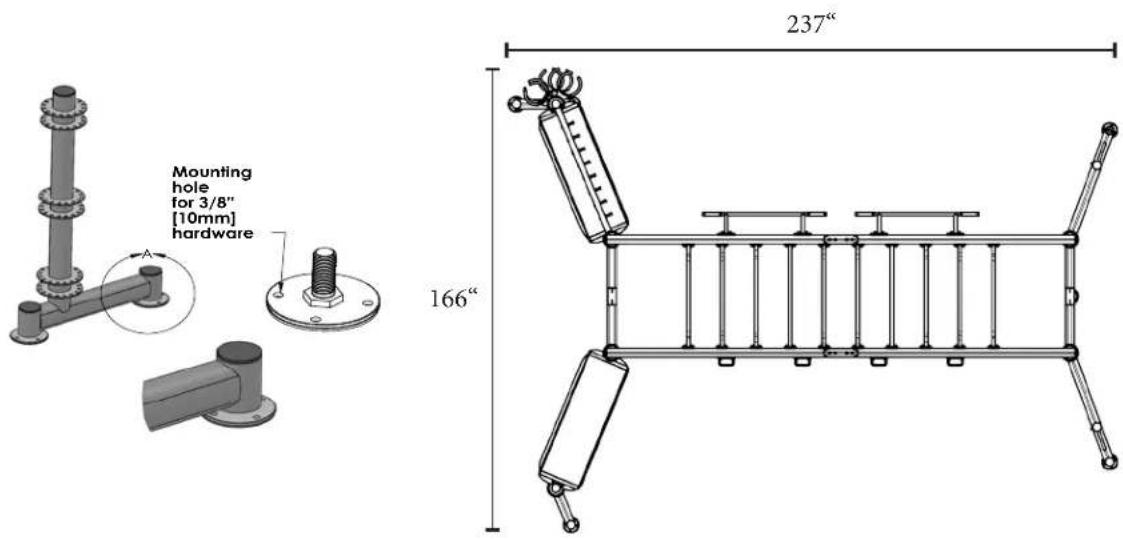
ANCHORING
text_image
Mounting hole for 3/8" [10mm] hardware 237" 166"-
Install this piece of equipment on a solid level surface that does not deviate more than 1/8" [3 mm] over a 10' [305 cm] distance (or as defined and required by local building and architectural codes.
-
Paramount strongly recommends that all equipment be anchored to the floor to prevent movement and increase stability.
-
Paramount is not responsible for the actual anchoring of equipment. Due to the wide variation of flooring on which the unit may be installed, contact a qualified contractor that is familiar with the building to determine an appropriate fastening system for your floor.
-
Use 3/8" (10 mm) diameter hardware to anchor the machine. Anchors should have a minimum tensile force of 500 pounds [227 kg] and a minimum pull out force of 220 lbs (100 kgs) for each position.
-
When attaching the machine to the floor, if there is a gap between the machine foot and the floor, do not use the anchor to remove the gap as this can cause the machine frame to deform. Instead, adjust the foot down to the floor, then anchor.
-
Four anchoring holes are provided on the leveling feet as shown above. A minimum of one anchor should be used at each foot on the column assemblies as illustrated above. Install the anchors after the Paramount Zone ^™ has been installed and positioned in the room.
-
DO NOT allow the machine to be used if it is not sitting solidly on the floor at all leveling feet locations.
CHAPTER 1: SAFETY INSTRUCTIONS
| COMMERCIAL MAINTENANCE SCHEDULE | |||||
| DAILY | WEEKLY M | MONTHLY 6 M | MONTHS ANNUALLY | ||
| INSPECT: Cables for wear, tension, and proper connection if equipped. | X | ||||
| INSPECT: All nuts and bolts and tighten if needed. | X | ||||
| INSPECT: All anti-slip surfaces and replace as needed. | X | ||||
| INSPECT: All adjustment pins, weight stack pins, set screws, gas shocks, snap links, and pulleys if equipped. | X | ||||
| INSPECT: All accessory bars and handles. X | |||||
| INSPECT: All safety and instructional decals. | X | ||||
| INSPECT: All weight stack shields if equipped. | X | ||||
| CLEAN: Guide rods and lubricate with a teflon lubricant if equipped. | X | ||||
| CLEAN: Upholstery X | |||||
| LUBRICATE: Pivot bearings and linear bearings. | X | ||||
| REPLACE: Cables if equipped. X | |||||
CHAPTER 2: ASSEMBLY GUIDE
MACHINE SPECIFICATIONS:
Features
• Maximum user weight is 400 lb. (182 kg.)
Note: The following dimensions do not include the optional functional trainer (XFT-100, FS-100, XFT-900, FT-900, or Half Rack) attached to the Center Main Frame or optional attachments listed in this manual. Also, shown below is the XFT-MKY10 (10 monkey bar rungs) configuration, which is larger than the XFT-MKY7 (7 monkey bar rungs) configuration.

COMPLIANCES:
This equipment complies with all fitness product standards. For a complete list of compliances, please visit www.TrueFitness.com.
CHAPTER 2: ASSEMBLY GUIDE
REQUIRED TOOLS:
 | Ratchet Handle | |
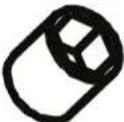 | Socket Head9/16”1/2” | |
 | Hex Bit Socket5/16”1/4” | |
 | 9/16” wrench and 1/2 wrench” OR Open Ended wrench | |
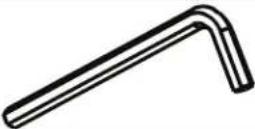 | Allen wrench (supplied):5/16”1/4” | |
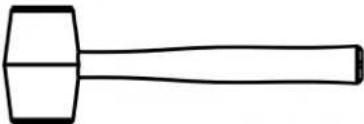 | Rubber Mallet | |
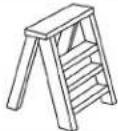 | Step Ladder | |
LABELS:
| TRUE |
| TRUE FITNESS TECHNOLOGY, INC865 HOFF RD, ST LOUIS MISSOURI 83366 USA |
| MODEL NO: XFT400 |
| SERIAL NO: 18-XFT40001A |
| ! | WARNING |
| STEP CAREFULLY.DO NOT JUMP! | |
| ASTM F1749 | LBL-WRN-SPL1 |
| WARNING | |
| MAXIMUM USER WEIGHT IS350 LB (159 KG) | |
| ASTM F1749 | LBL-WRN-DIP1 |

TRUE
ATLASHD
CHAPTER 2: ASSEMBLY GUIDE
LABELS:
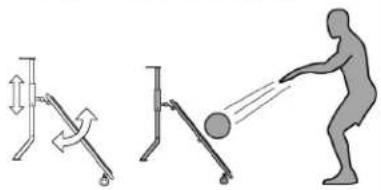
USER INSTRUCTIONS
- Adjust angle of rebounder. Never use rebounder in its stored vertical position.
- Position user 6 feet (1.8m) away directly facing rebounder.
- GENTLY throw ball at center of rebounder. The ball will return quickly. Be prepared to catch it.
- When done return rebounder to its stored vertical position.
natural_image
Illustration showing three different physical exercises: standing exercise, roller support, and person throwing motion (no text or symbols)LBL-PR-RBR1
USER INSTRUCTIONS
- Ensure that rope is hanging straight down from Ropeflex rope pulling drum.
- Grab one rope with hands only.
- Gently pull down with one hand followed by the other.
- The harder you pull the harder the resistance.

natural_image
Illustration of a person using a pulley system to lift a vertical tube, with no text or symbols present.LBL-PR-RPP1
WARNING
TO MINIMIZE RISK OF SERIOUS INJURY
- Survey surroundings to ensure area is clear of obstructions.
- Confirm bar is fully inserted into housing before use.
- Control bar at all times. DO NOT drop or throw.
- Use only 2 inch bore weight plates. DO NOT use other means to alter resistance.
- Seek assistance from staff for issues and questions.
ASTM F1749
LBL-WRN-CRT1
WARNING
SERIOUS INJURY CAN OCCUR ON THIS EQUIPMENT. FOLLOW THESE PRECAUTIONS TO HELP AVOID INJURY.
- BEFORE USING: Read all warnings and get instruction on the exercise to be performed. Use only for the intended exercises. DO NOT modify the machine.
- Get a medical exam before beginning any exercise program.
- KEEP CHILDREN AWAY from this machine. Supervise the use by teenagers.
- Inspect the machine or station before use. DO NOT use if the machine appears damaged or if there are loose components, fittings and/or hardware. DO NOT attempt to fix. Notify staff immediately.
- The manufacturer recommends that this machine be anchored to the floor. DO NOT use if the machine is not stable. DO NOT exceed weight capacity for this equipment.
- This machine may have multiple users at one time. Be aware of your surroundings and allow ample space when working out. DO NOT perform exercises or movements that may injure other users. Keep floor free of unused accessories and other gear.
-
Ensure area surrounding monkey bars is free from obstructions before performing any monkey bar exercises.
-
When doing suspension exercises, insure that your equipment is secure and inspect it according to manufacturer instructions prior to use. DO NOT use straps, bands, or connectors that are worn or frayed.
- To avoid injury from falling, perform all balance exercises away from the framework of the machine.
- When not in use, store Battle Rope out of the training zone to minimize tripping hazard.
- Store Core Trainer Olympic bar in its storage holder when not in use to minimize tripping hazard.
- If equipped with Heavy Bag station, DO NOT use if bag appears damaged. DO NOT attach accessories or additional weights to bag. DO NOT hang on bag or frame.
- If equipped with Ropeflex rope pulling drum station, DO NOT grab rope in manner that keeps drum from rotating. DO NOT attach accessories to rope. DO NOT hang on rope or frame.
- If equipped with Rebounder station, BE PREPARED to catch ball. Ball returns at high velocity. Maximum ball size for use with the rebounder is 12 lb (5.5kg). Minimum ball diameter is 8 in (20cm).
- If equipped with Overhead Ball Target station, use only wall balls designed for this application. DO NOT use weighted medicine balls. BE PREPARED for ball return.
- When adjusting any component make sure it is fully engaged prior to use to prevent unintended movement or disengagement.
ASTM F1749
LBL-WRN-3417
WARNING
SERIOUS INJURY CAN OCCUR ON THIS EQUIPMENT. FOLLOW THESE PRECAUTIONS TO MINIMIZE RISK OF INJURY.
- Ensure that the area surrounding user is free of obstructions.
- DO NOT use heavy bag if bag appears damaged. Notify staff.
- DO NOT attach accessories or additional weights to bag.
- DO NOT hang on bag or frame.
-
When using Overhead Ball Target, use only soft-shell wall balls designed for this application. DO NOT use weighted medicine balls.
-
BE PREPARED for ball to return.
-
When using Monkey Bar Ladder, be sure to understand your physical capabilities prior to beginning movement.
-
Initiate movement only from lowest rung. BE PREPARED to return to starting position before releasing from rung.
-
When using Ropeflex, DO NOT grab rope in manner that keeps drum from rotating.
-
DO NOT attach accessories to rope or hang on rope or frame.
-
When using Rebounder, BE PREPARED TO CATCH BALL. Ball returns at high velocity.
-
Maximum ball size for use with the rebounder is 12 lb (5.5kg).
-
Minimum ball diameter is 8 in (20cm).
-
DO NOT remove this label. Replace if worn or damaged.
-
Seek assistance from staff if you have questions or require instruction.
ASTM F1749
LBL-WRN-0418
CHAPTER 2: ASSEMBLY GUIDE
PRE-ASSEMBLY CHECKLIST:
XFT-MKY7 Carton Contents
Note: Hardware item numbers on the tooling card may not match the hardware item numbers shown in the owner's manual.
| Item Part Number Description | on Quantity | ||
| 1 XF | T-MKY7-100X Long | Monkey Bar SideWeldment | 2 |
| 2 XF | T-MKY7-200X Short | Monkey Bar SideWeldment | 2 |
| 3 XF | T-MKY-BRK Monkey | Bar JoiningWeldment | 4 |
| 4 XF | T-MKY-006 6” Offset | Monkey Bar 2 | |
| 5 XF | T-MKY-004 4” Offset | Monkey Bar 2 | |
| 6 XF | T-MKY-002 2” Offset | Monkey Bar 2 | |
| 7 XF | T-MKY-000 Flat | Monkey Bar Weldment | 1 |

text_image
Technical diagram showing exploded and assembled views of a mechanical component with numbered parts labeled 1 through 7.CHAPTER 2: ASSEMBLY GUIDE
PRE-ASSEMBLY CHECKLIST:
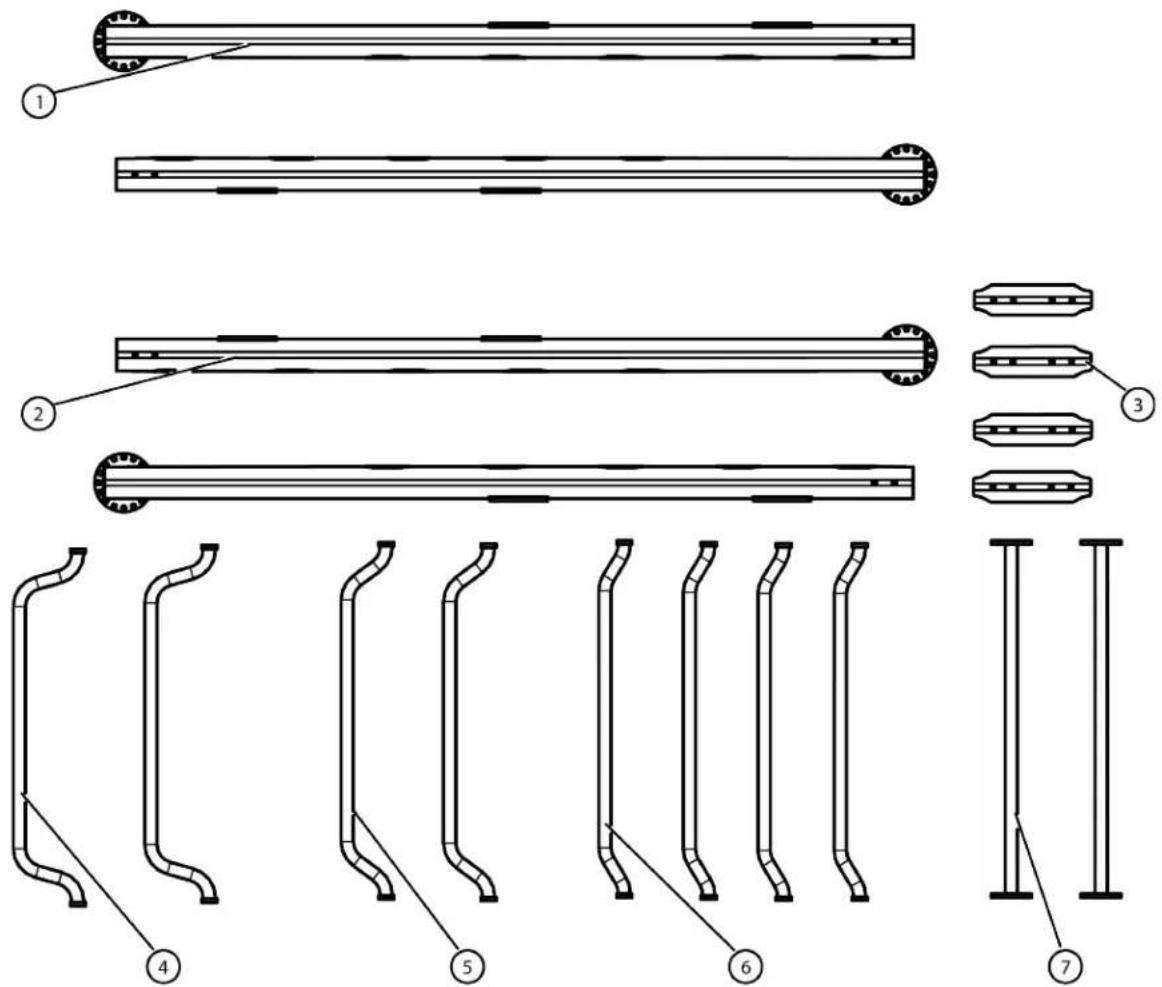
XFT-MKY10 Carton Contents
Note: Hardware item numbers on the tooling card may not match the hardware item numbers shown in the owner's manual.
| Item Part Number Description | on Quantity | ||
| 1 XF | T-MKY10-001X 10 Bar Monkey Bar Left Assembly | 2 | |
| 2 XF | T-MKY10-002X 10 Bar Monkey Bar Right Assembly | 2 | |
| 3 XF | T-MKY-BRK Monkey Bar Joining Weldment | 4 | |
| 4 XF | T-MKY-006 6” Offset Monkey Bar 2 | ||
| 5 XF | T-MKY-004 4” Offset Monkey Bar 2 | ||
| 6 XF | T-MKY-002 2” Offset Monkey Bar 4 | ||
| 7 XF | T-MKY-000 Flat Monkey Bar Weldment | 2 | |
text_image
Technical diagram showing exploded and assembled views of a mechanical component with numbered parts labeled 1 through 7.CHAPTER 2: ASSEMBLY GUIDE
PRE-ASSEMBLY CHECKLIST:
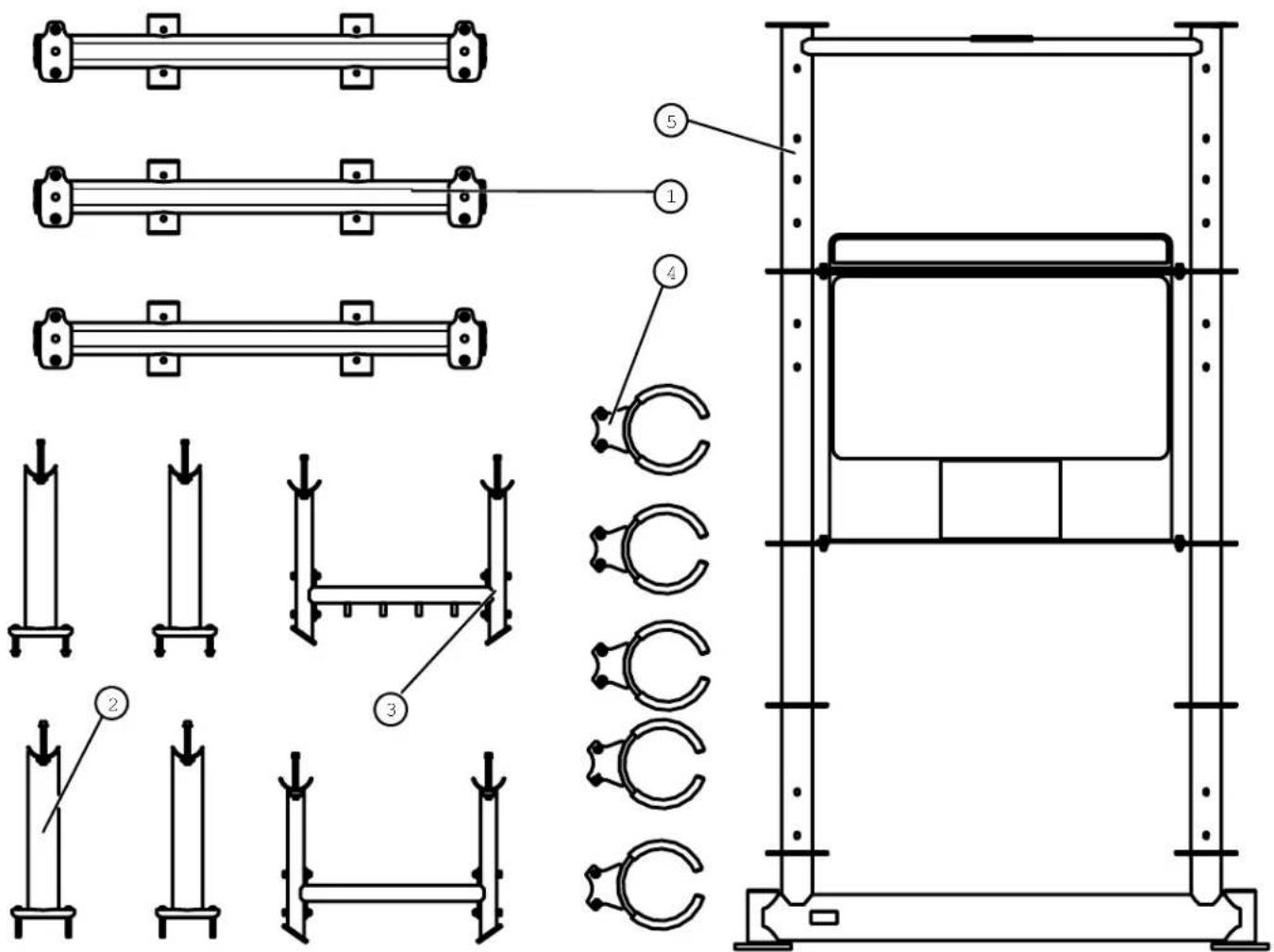
XFT-4MF Carton Contents
Note: Hardware item numbers on the tooling card may not match the hardware item numbers shown in the owner's manual.
| Item Part Number Description | on Quantity | ||
| 1 XF | T400-ATT000X Conversion Attachment Bracket Assembly | 3 | |
| 2 XF | T000-ATT900X XFT-900, FT-900, XFT-HRK Attachment Kit | 1 | |
| 3 XF | T000-ATT100X XFT-100, FT-100 Attachment Kit | 1 | |
| 4 XF | T-MDR Medicine Ball Ring Assembly 5 | ||
| 5 XF | T-4MF-001X | Center Main Frame | 1 |
text_image
Technical diagram showing structural components and assembly with numbered labels for each part.CHAPTER 2: ASSEMBLY GUIDE
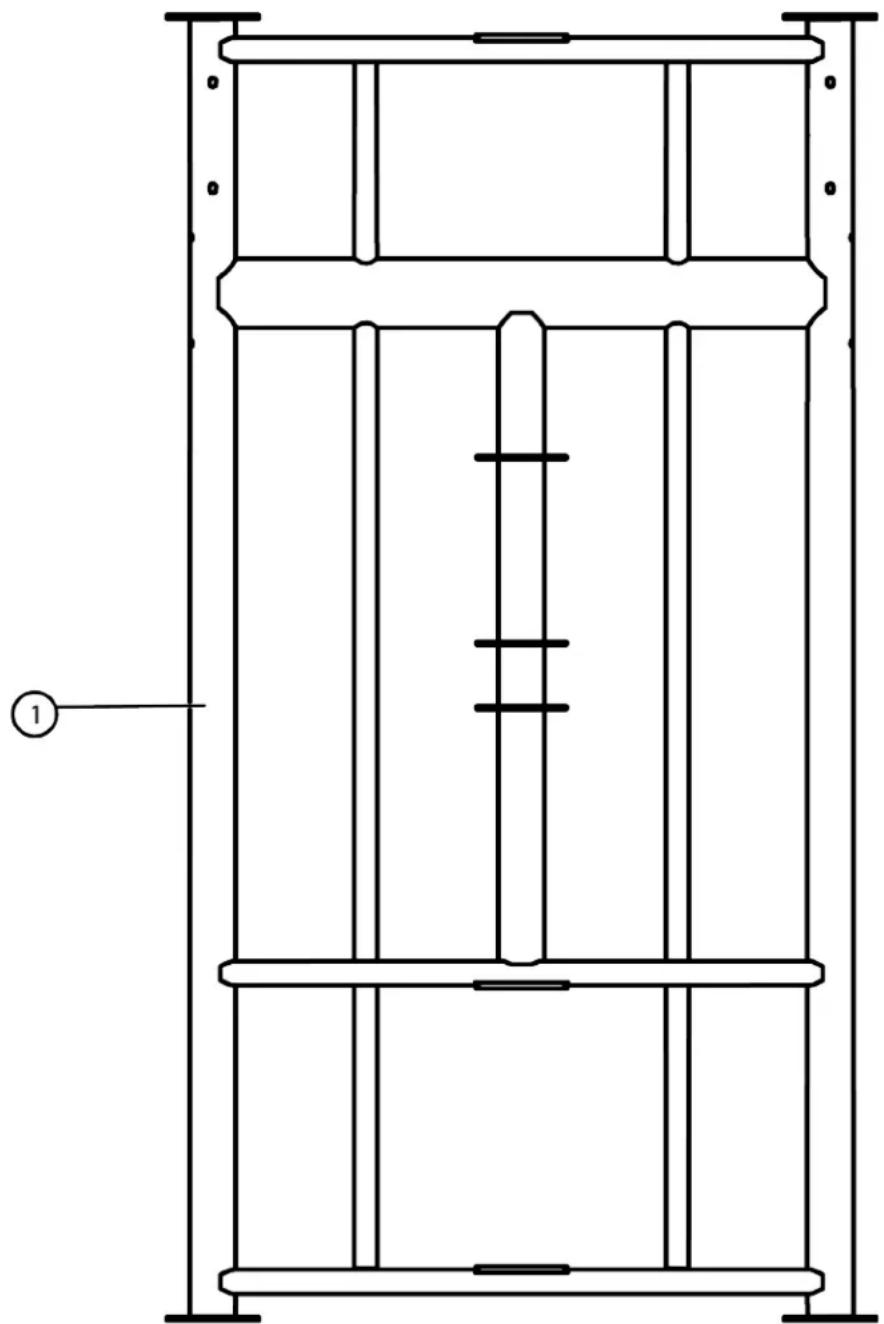
PRE-ASSEMBLY CHECKLIST:
XFT-4RS-CTN1 Carton Contents
Note: Hardware item numbers on the tooling card may not match the hardware item numbers shown in the owner's manual.
| Item Part Number Description | Quantity | |
| 1 XFT-4RS=CTN1 Center | Cage Weldment 1 |
natural_image
Technical line drawing of a vertical structural frame with horizontal supports and internal channels (no text or symbols)CHAPTER 2: ASSEMBLY GUIDE
PRE-ASSEMBLY CHECKLIST:
XFT-4RS-CTN2 Carton Contents
Note: Hardware item numbers on the tooling card may not match the hardware item numbers shown in the owner's manual.
| Item Part Number Description | on Quantity | |
| 1 XF T-4RS-100X Left Side Rack Station 1 | ||
| 2 XF T-4RS-200X Right Side Rack Station 1 | ||
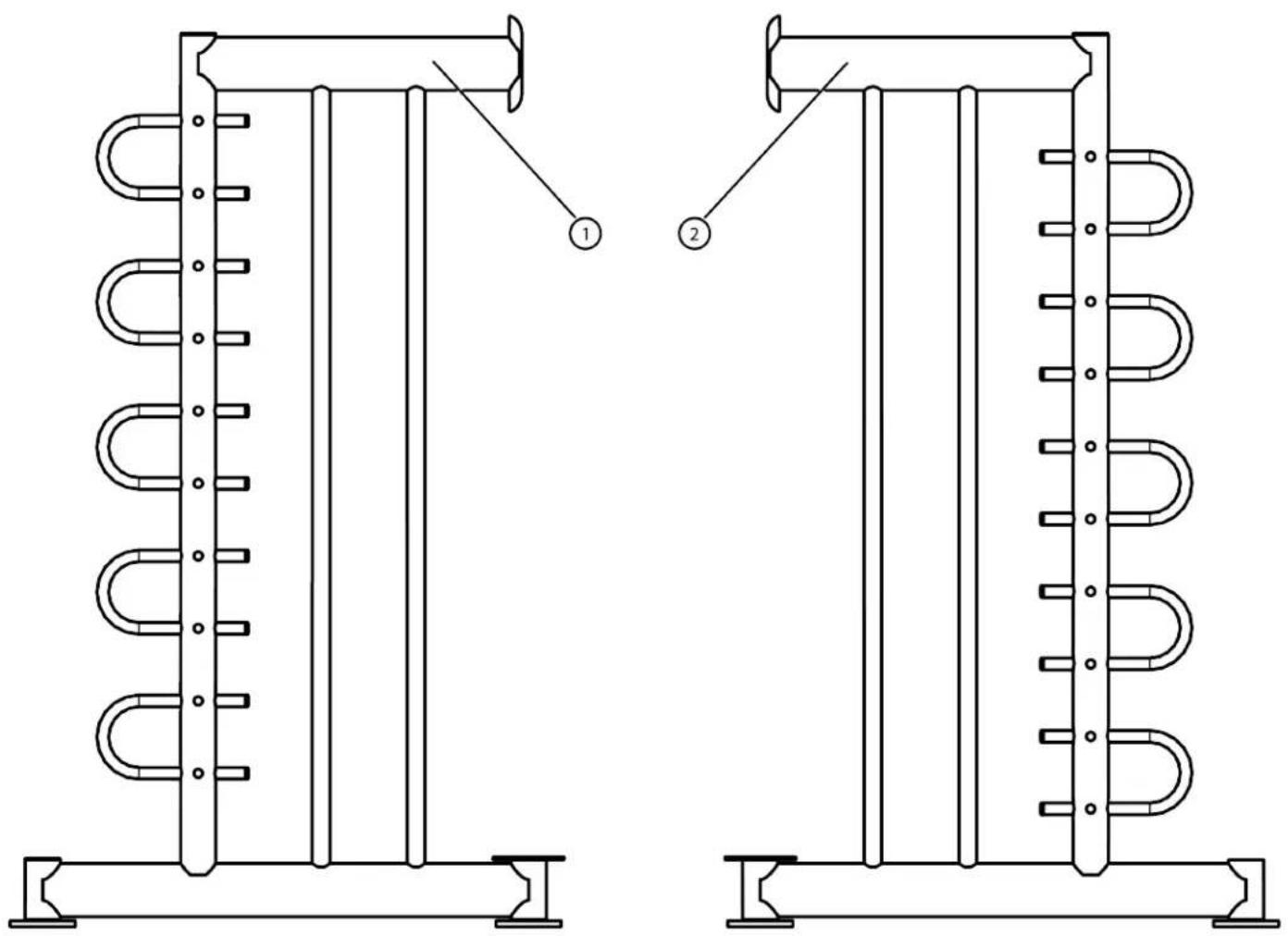
text_image
Technical diagram of a heat exchanger or cooling unit with labeled components 1 and 2CHAPTER 2: ASSEMBLY GUIDE
PRE-ASSEMBLY CHECKLIST:
XFT-RBRA Carton Contents
Note: Hardware item numbers on the tooling card may not match the hardware item numbers shown in the owner's manual.
| Item Part Number Description | on Quantity | |
| 1 XFT-RBRA | Rebounder Attachment Assembly | 1 |
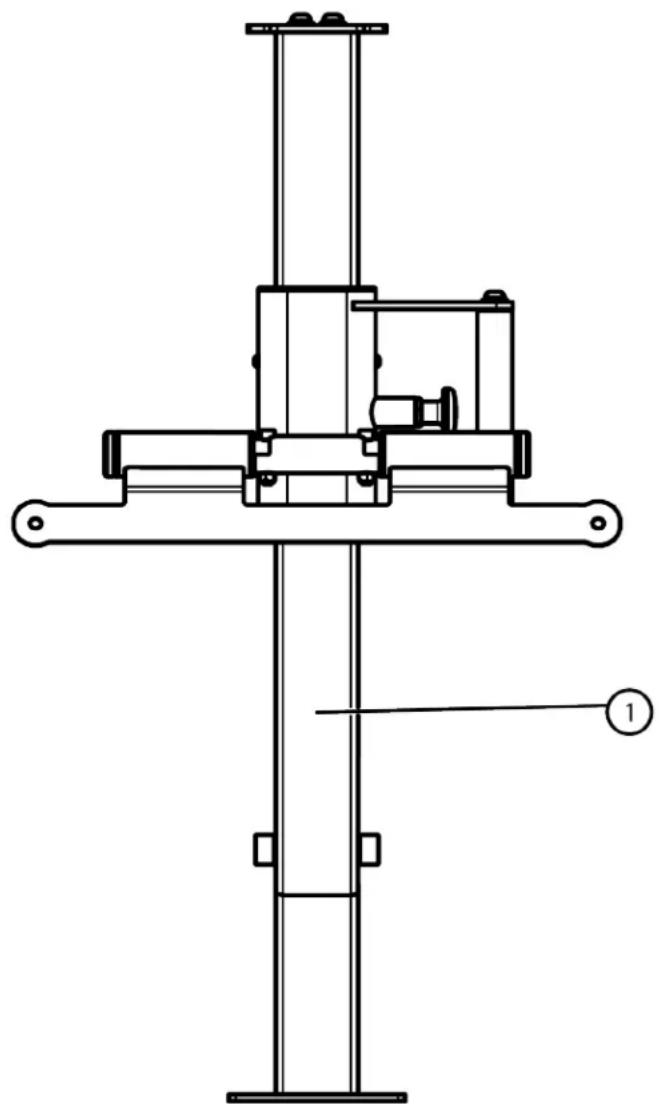
natural_image
Technical line drawing of a mechanical assembly with no visible text or symbols
natural_image
Pure mechanical diagram of a horizontal beam with two supports at both ends (no text or symbols)CHAPTER 2: ASSEMBLY GUIDE
PRE-ASSEMBLY CHECKLIST:
XFT-TEC Carton Contents
Note: Hardware item numbers on the tooling card may not match the hardware item numbers shown in the owner's manual.
| Item Part Number Description | Quantity | |
| 1 XFT000-CBR000X Strap Rack 1 | ||
| 2 XFT-TRA-100X XFT-400 Tray 2 | ||
| 3 XFT000-CLM130X Tall End Column | 1 |

text_image
Technical diagram showing three labeled components of a structural frame assembly with numbered annotations.Page # 20 of 81
CHAPTER 2: ASSEMBLY GUIDE
PRE-ASSEMBLY CHECKLIST:
XFT-SEC Carton Contents
Note: Hardware item numbers on the tooling card may not match the hardware item numbers shown in the owner's manual.
| Item Part Number Description Quantity | |
| 1 XFT-TRA-100X XFT-400 Tray 3 | |
| 2 XFT000-CLM120X Short End Column 1 |

text_image
Technical diagram showing three rectangular components with numbered annotations and a vertical structural element.CHAPTER 2: ASSEMBLY GUIDE
PRE-ASSEMBLY CHECKLIST:
XFT-RLR Carton Contents
Note: Hardware item numbers on the tooling card may not match the hardware item numbers shown in the owner's manual.
| Item Part Number Description Quantity | |||
| 1 | XFT-RLR-200X Center Leg Bosu/Foam Roller Assembly 1 | ||
| 2 | XFT-RLR-300 Bosu/Foam Roller Cross Bar 1 | ||
| 3 | XFT-RLR-400X Top Bosu Bar Assembly 1 | ||
| 4 | XFT-RLR-100 End Brackets Bosu/Foam Roller Weldment 2 | ||
| 5 | XFT-RLR-500 | Foam Roller Bar | 4 |
| 6 | XFT-RLR-700 | Bosu Ball Bottom Bracket with Holes | 1 |
| 7 | XFT-RLR-600 | Bosu Ball Bottom Bracket without Holes | 1 |
| 8 | XFT000-CLM120X | Short End Column Assembly | 1 |
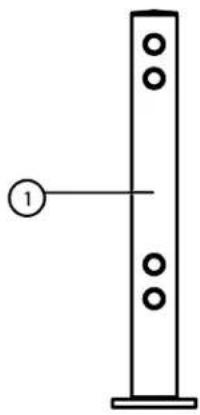
natural_image
Simple line drawing of a vertical structure with circular holes and a numbered label (no text or symbols beyond the number)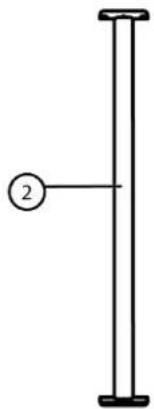
natural_image
Simple line drawing of a vertical pole with a circular label marked '2' on the left side (no text or symbols beyond the label)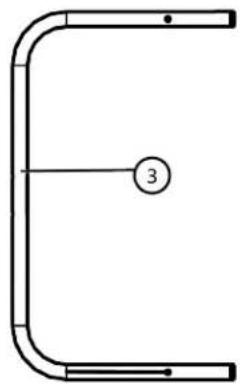
natural_image
Pure mechanical part diagram with curved ends and a numbered circle (no text or symbols)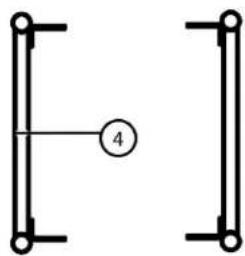
natural_image
Pure electrical circuit lines without any symbols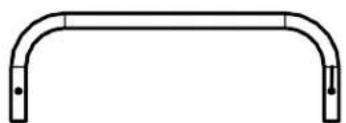
natural_image
Simple line drawing of a curved metal beam or support structure (no text or symbols)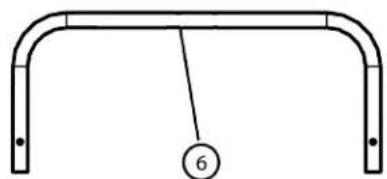
natural_image
Simple line drawing of a curved metal frame with a numbered circle at the bottom (no text or symbols)
natural_image
Technical line drawing of two curved metal supports with a numbered label (5) pointing to one end, no text or symbols present.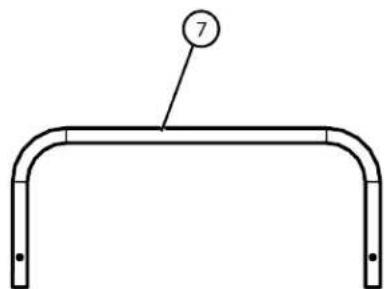
natural_image
Simple line drawing of a curved metal frame with a numbered label (7) pointing to the top edge (no text or symbols on the frame itself)
natural_image
Simple line drawing of a vertical structure with a numbered label (8) pointing to it, no text or symbols present.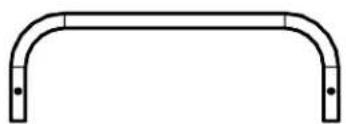
natural_image
Simple line drawing of a curved metal frame with two end points (no text or symbols)Page # 22 of 81
CHAPTER 2: ASSEMBLY GUIDE
PRE-ASSEMBLY CHECKLIST:
XFT-HVY4 & XFT-MBL Carton Contents
Note: Hardware item numbers on the tooling card may not match the hardware item numbers shown in the owner's manual.
| Item | Part Number | Description | Quantity | Box |
| 1 | XFT-HVY4 Heavy Bag 1 1 | |||
| 2 | XFT000-ATT010 | Upper Attachment Bracket Weldment | 1 | 1 |
| 3 | XFT-MBL-100 Monkey Bar Ladder Weldment 1 2 | |||

text_image
Technical diagram of a mechanical frame assembly with labeled components and exploded viewCHAPTER 2: ASSEMBLY GUIDE
PRE-ASSEMBLY CHECKLIST:
XFT-TRG & XFT-RPP4 Carton Contents
Note: Hardware item numbers on the tooling card may not match the hardware item numbers shown in the owner's manual.
| Item | Part Number | Description | Quantity | Box |
| 1 XFT | T-TRG-001X Ball | Target Attachment Bracket | 1 | 1 |
| 2 XFT | T-TRG-002X Ball | Target Assembly 1 1 | ||
| 3 XFT | T-RPP4 Rope Flex | Attachment Bracket | 1 | 2 |

text_image
TRUE ① ②
natural_image
Technical line drawing of a mechanical assembly with two plates and a central shaft (no text or symbols)CHAPTER 2: ASSEMBLY GUIDE
PRE-ASSEMBLY CHECKLIST:
XFW83-CHBB01ASSY & XFT-SUS Carton Contents
Note: Hardware item numbers on the tooling card may not match the hardware item numbers shown in the owner's manual.
| Item | Part Number | Description | Quantity | Box |
| 1 XF | W83-CHBB01ASSY | Pull-Up Bar 2 1 | ||
| 2 | XFT-SUS Suspension Bracket 4 2 | |||

natural_image
Technical line drawing of a mechanical support structure with two vertical supports and a central rod (no text or symbols)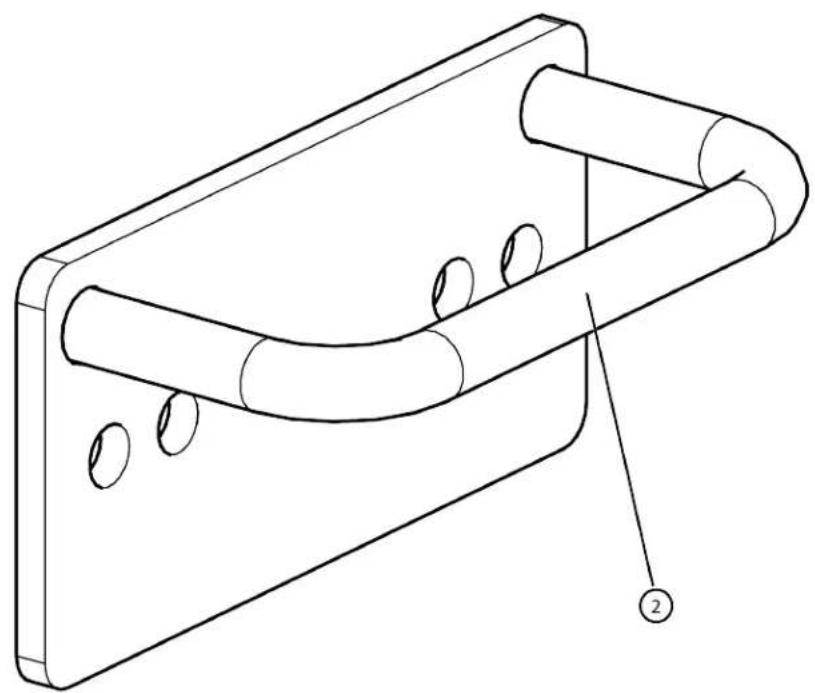
natural_image
Technical line drawing of a mechanical component with cylindrical features and a labeled part (no text or symbols present)CHAPTER 2: ASSEMBLY GUIDE
PRE-ASSEMBLY CHECKLIST:
XFT-CRT Carton Contents
Note: Hardware item numbers on the tooling card may not match the hardware item numbers shown in the owner's manual.
| Item | Part Number | Description | Quantity | Box |
| 1 | XFT-LMN015 Olympic | Bar Storage 1 1 | ||
| 2 | XFT-CRT-100X Core Trainer Assembly 1 2 | |||

text_image
Technical diagram showing two mechanical components with labeled parts 1 and 2CHAPTER 2: ASSEMBLY GUIDE
PRE-ASSEMBLY CHECKLIST:
XFT-DIP, XFT-RRC, & XFT-SPL Carton Contents
Note: Hardware item numbers on the tooling card may not match the hardware item numbers shown in the owner's manual.
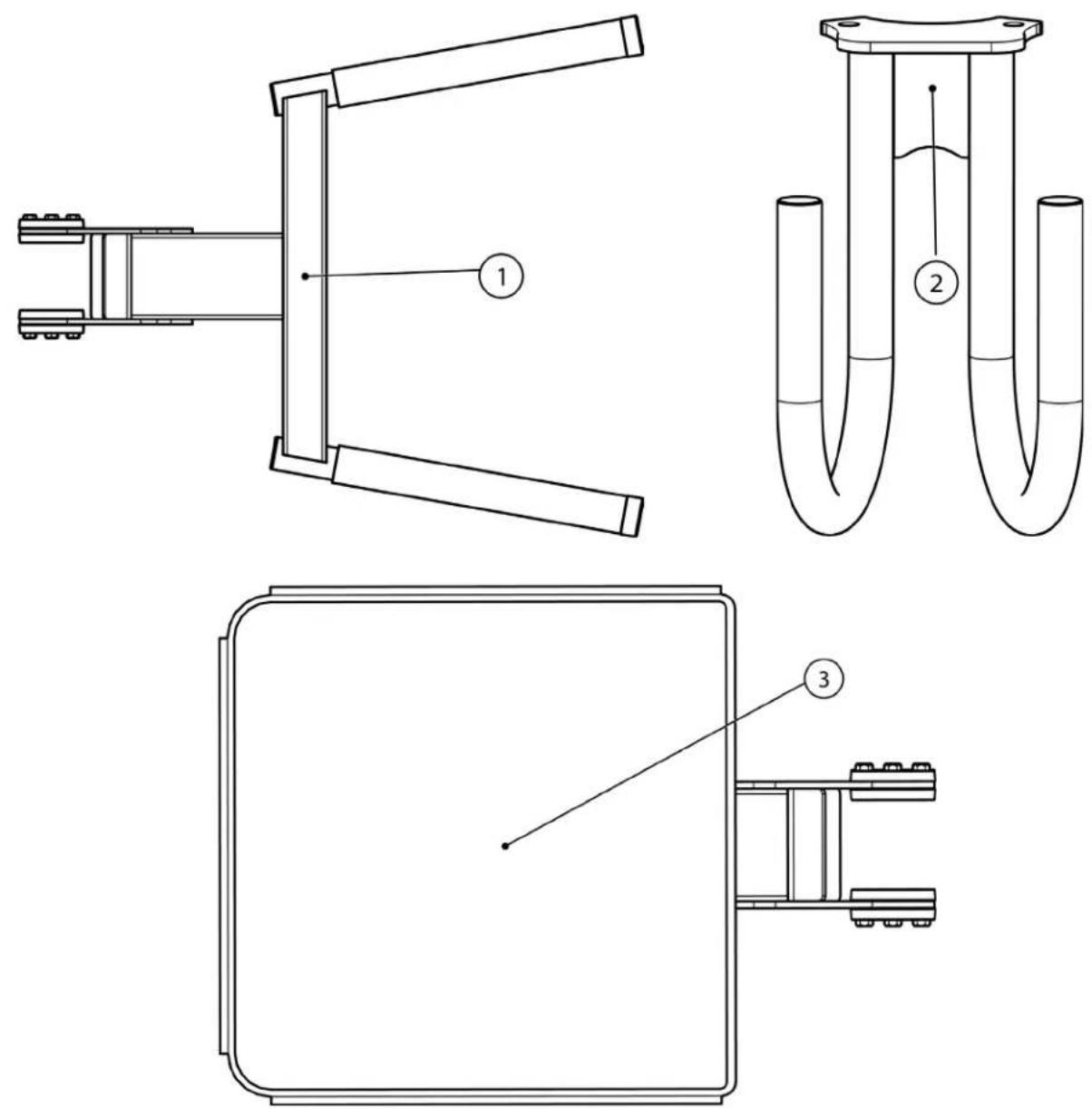
| Item | Part Number | Description | Quantity | Box |
| 1 XFT-DIP Dip Station 1 1 | ||||
| 2 XFT-RRC Battle Rope Hanger Assembly 1 2 | ||||
| 3 | XFT-SPL | Step Platform | 1 3 | |
CHAPTER 2: ASSEMBLY GUIDE
XFT-400 Assembly Overview
| XFT-400 Base Configuration (Required) Functional Trainer & Mounting Bracket (Optional) | ||
| Illustration | 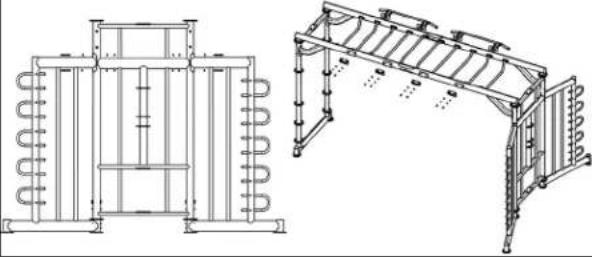 | 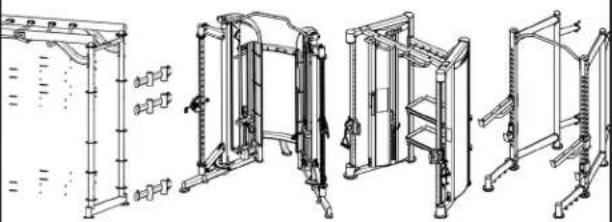 |
| Instruction | Assemble the Center Cage Weldment to the Rack Stations and then the Monkey Bar Assembly to both ends to create the base XFT-400 configuration. | Secure the Conversion Attachment Bracket to the Center Main Frame. Assemble the optional functional trainer to the base XFT-400 configuration. |
| Page # 29-36 37-49 | ||
| End Column Configuration (Required) Attachments (Optional) | |||
| Illustration | 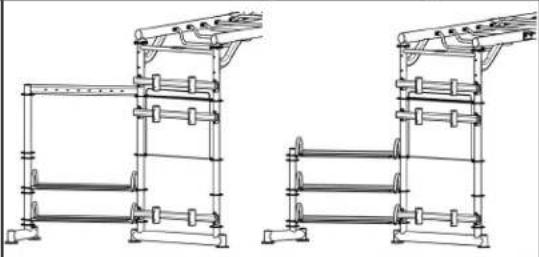 | 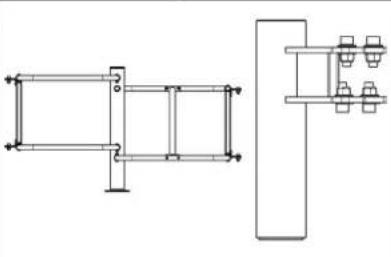 | 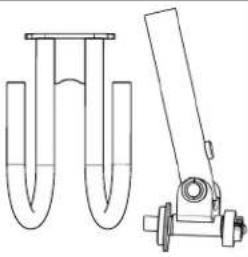 |
| Instruction | Tall or Short End Column Configuration | Bosu Ball/Roller Rack and Olympic Bar Storage | Core Trainer and Battle Rope Hanger |
| Page # 50- | 52 53-56 57-58 | ||
| Attachments (Optional) | |||
| Illustration | 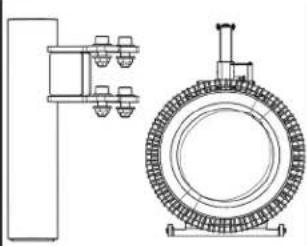 |  | 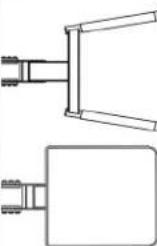 |
| Instruction | Weight Plate Storage Bar and Rebounder | Monkey Bar Ladder Weldment, Ball Target, Rope Flex, Heavy Bag, & Suspension Bracket | Dip Station & Step Platform |
| Page # | 59-61 | 62-70 (Select one or two if no functional trainer attached.) | 71-72 |
CHAPTER 2: ASSEMBLY GUIDE
REQUIRED ASSEMBLY STEPS:
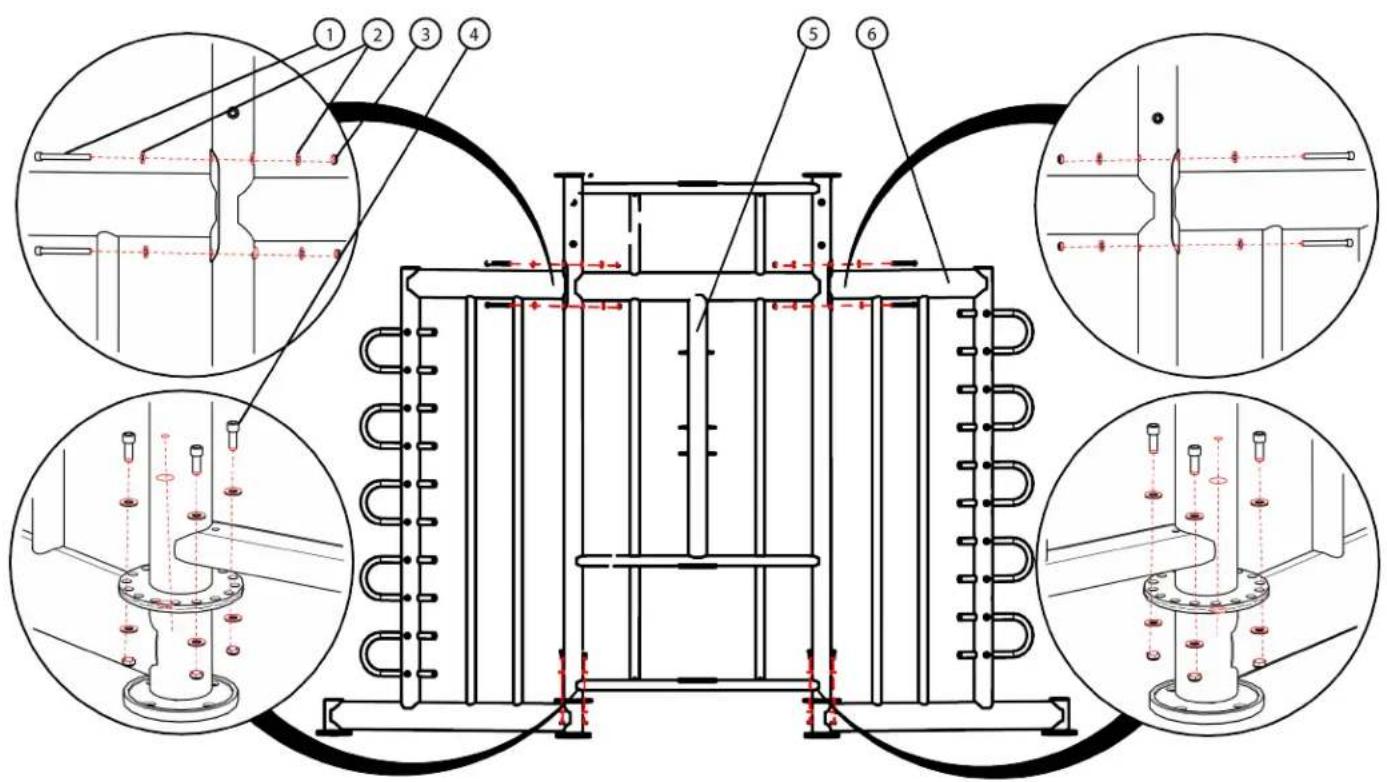
Step 1 (Center Cage Weldment):
Assemble the Center Cage Weldment to the Rack Stations using the identified hardware.
| Item Part Number Description | tion Quantity | _ | |
| 1 C1 | 136 SHCS, 3/8”-16, | 3-3/4” 4 | |
| 2 C | 754C Washer, Flat, 3 | /8” 12 | |
| 3 C | 766A Lock Nut, 3/8” | -16 12 | |
| 4 C1 | 023 SHCS, 3/8”-16, | 1” 8 | |
| 5 XFT-4RS-CTN1 Center Cage Weldment 1 | |||
| 6 XFT-4RS-CTN2 | Rack Station | 1 | |
text_image
Technical diagram of a mechanical assembly with numbered components and cross-sectional views showing internal features and alignment.CHAPTER 2: ASSEMBLY GUIDE
REQUIRED ASSEMBLY STEPS:
Step 2 (Monkey Bar Assembly):
Secure the monkey bar sub-assemblies together using the identified hardware.
Note: XFT-MKY7 (seven monkey bar rungs) shown if being assembled instead of XFT-MKY10 (ten monkey bar rungs).
| Item Part Number Description Quantity | ____ | ||
| 1 C | 400 BHCS, 3/8” | -16, 5-1/4” 8 | |
| 2 C | 749 Washer, Lock, 3/8” 8 | ||
| 3 C | 754C Washer, Flat, 3/8” 16 | ||
| 4 C | 1144 Acorn Nut, 3/8”-16 8 | ||
| 5 XFT-MKY10 Monkey Bars (10 rungs) | 1 | ||
| 6 | XFT-MKY7 | Monkey Bars (7 rungs) 1 | |

text_image
Technical diagram showing structural assembly with labeled components and a magnified inset of detail viewCHAPTER 2: ASSEMBLY GUIDE
REQUIRED ASSEMBLY STEPS:
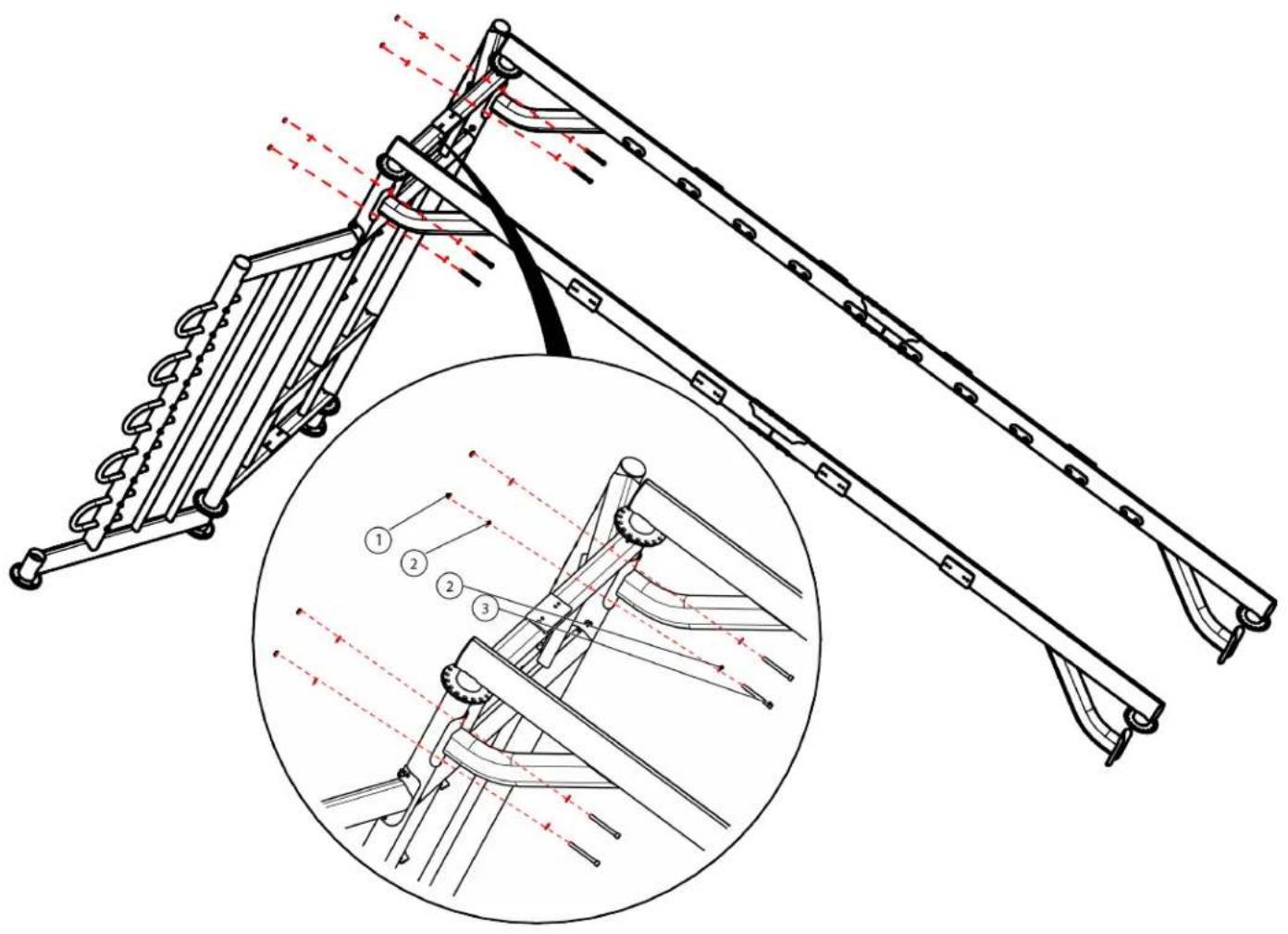
Step 3A (Monkey Bar Assembly):
Assemble the Monkey Bar Assembly to the Center Cage Weldment using the identified hardware.
| Item Part Number Description Quantity | _ | ||
| 1 C | 766A Lock Nut, | 3/8”-16 4 | |
| 2 C | 754C Washer, | Flat, 3/8” 8 | |
| 3 C | 136 SHCS, 3/8” | -16, 3-3/4” 4 | |
Note: Place a piece of cardboard packing under the opposite ends of the Monkey Bar Assembly for protection until Step 4A (Monkey Bar Assembly).
text_image
Technical diagram of a mechanical linkage system with numbered components and a magnified inset showing detailed assembly details.CHAPTER 2: ASSEMBLY GUIDE
REQUIRED ASSEMBLY STEPS:
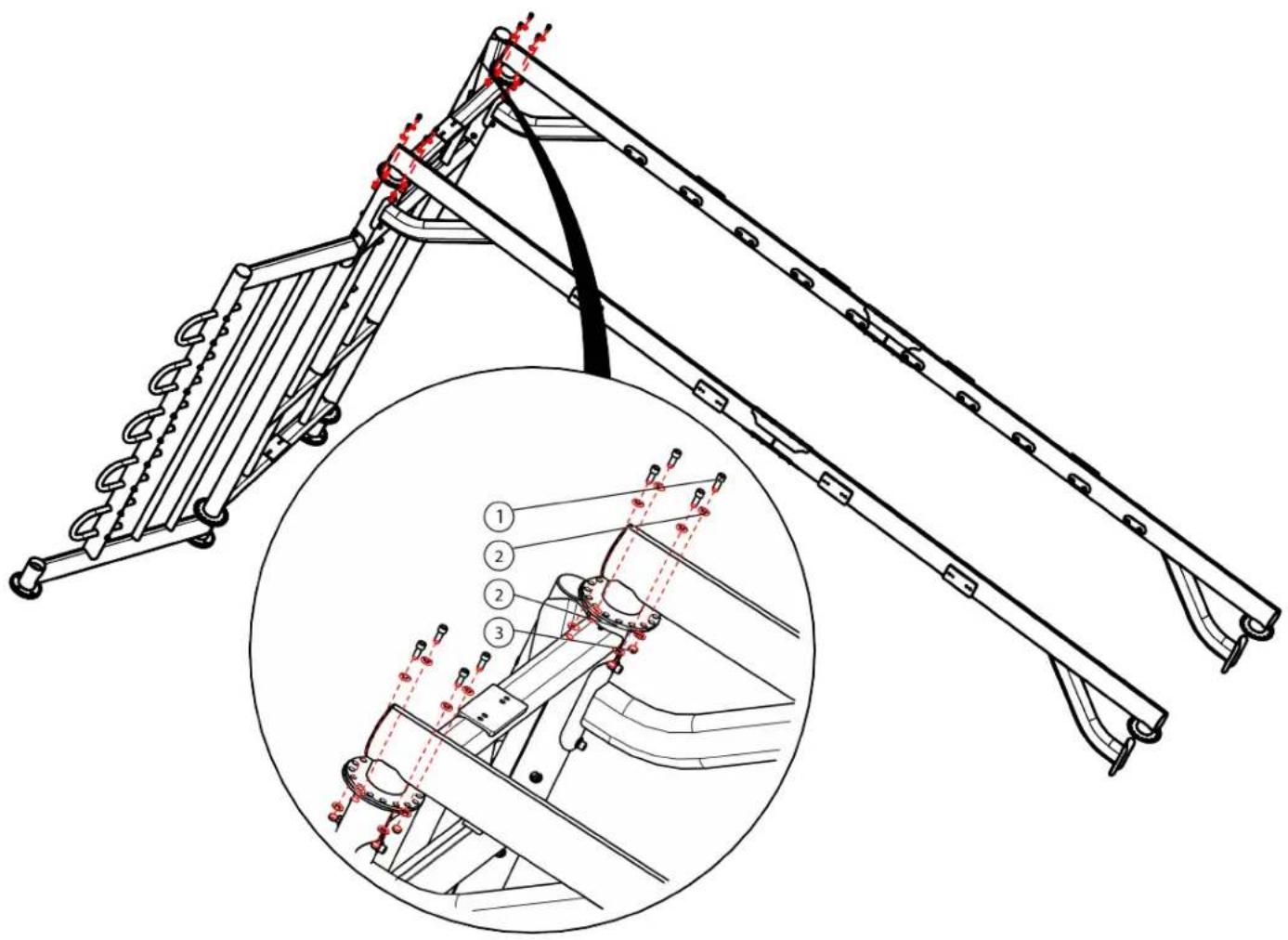
Step 3B (Monkey Bar Assembly):
Assemble the Monkey Bar Assembly to the Center Cage Weldment using the identified hardware.
| Item Part Number Description Quantity | _ | ||
| 1 C | 023 SHCS, 3/8” | -16, 1” 8 | |
| 2 C | 754C Washer, Flat, 3/8” 16 | ||
| 3 C | 766A Lock Nut, 3/8” | -16 8 | |
text_image
Technical diagram of a mechanical linkage system with numbered components and a magnified inset showing internal assembly details.CHAPTER 2: ASSEMBLY GUIDE
REQUIRED ASSEMBLY STEPS:
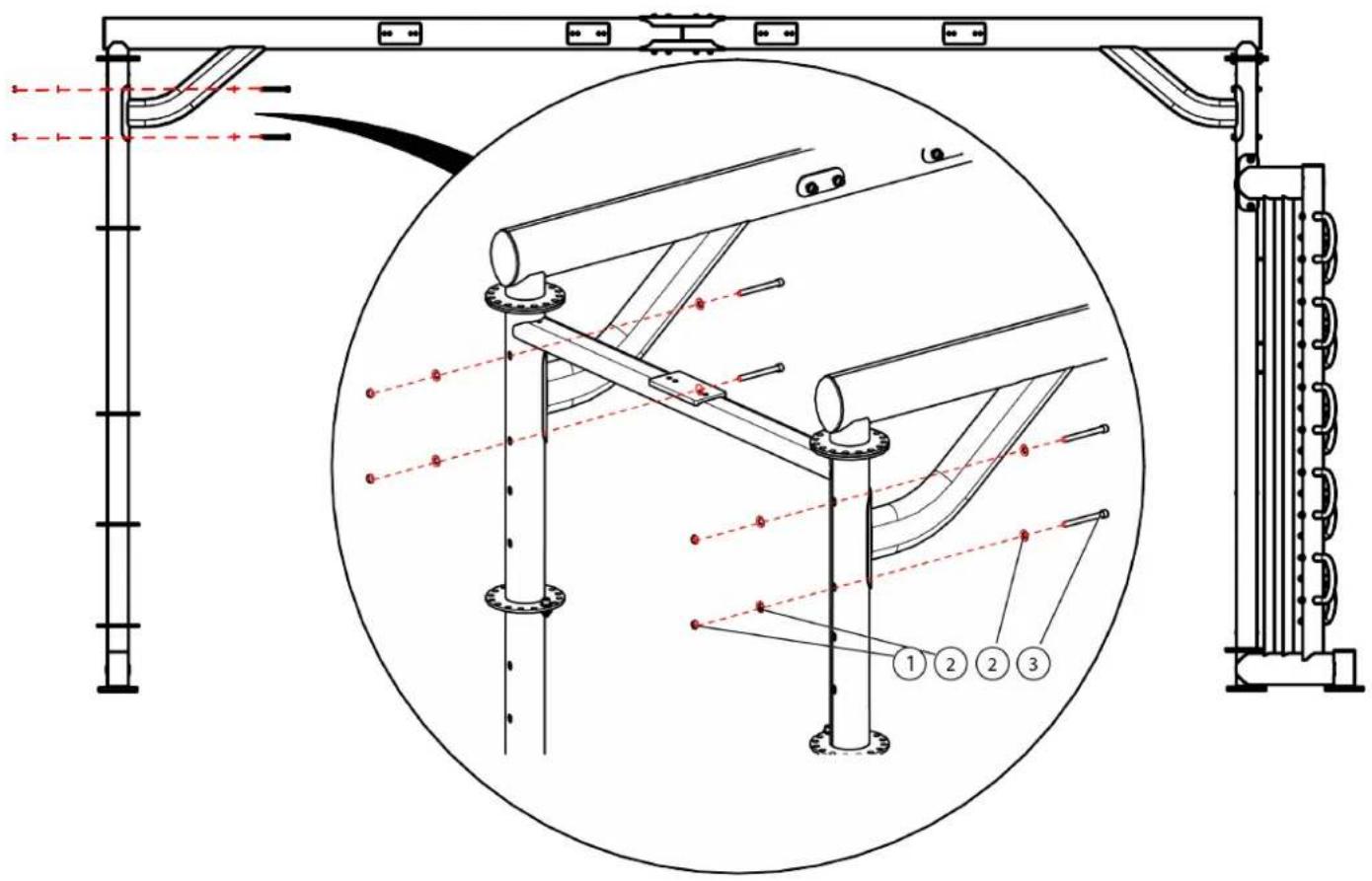
Step 4A (Monkey Bar Assembly):
Assemble the Monkey Bar Assembly to the Center Main Frame using the identified hardware.
| Item Part Number Description Quantity | _ | ||
| 1 C | 766A Lock Nut, | 3/8”-16 4 | |
| 2 C | 754C Washer, | Flat, 3/8” 8 | |
| 3 C | 136 SHCS, 3/8” | -16, 3-3/4” 4 | |
text_image
Technical diagram of a mechanical or electrical assembly with labeled components and structural connectionsCHAPTER 2: ASSEMBLY GUIDE
REQUIRED ASSEMBLY STEPS:
Step 4B (Monkey Bar Assembly):
Assemble the Monkey Bar Assembly to the Center Main Frame using the identified hardware.
| Item Part Number Description Quantity | _ | ||
| 1 C | 023 SHCS, 3/8” | -16, 1” 8 | |
| 2 C | 754C Washer, Flat, 3/8” 16 | ||
| 3 C | 766A Lock Nut, 3/8” | -16 8 | |

text_image
Technical diagram of a mechanical assembly with numbered components and red dashed lines indicating measurement or inspection points.CHAPTER 2: ASSEMBLY GUIDE
REQUIRED ASSEMBLY STEPS:
Step 5 (Monkey Bars):
Secure the monkey bars to the Monkey Bar Assembly using the identified hardware.
Note: XFT-MKY10 (ten monkey bar rungs) shown, but the same assembly step applies to XFT-MKY7 (seven monkey bar rungs).
| Item Part Number Description Quantity | ____ |
| 1 XFT-MKY Monkey Bar Rung 10 | |
| 2 C1023 SHCS, 3/8”-16, 1”40 | |
| 3 C749 Washer, Lock, 3/8”40 | |
| 4 C754C Washer, Flat, 3/8”40 |
Note: After completing this assembly step, fully tighten all hardware from Steps 1-5.

text_image
Technical diagram of a conveyor belt system with labeled components and motion indicators, including a magnified inset showing internal structure.CHAPTER 2: ASSEMBLY GUIDE
REQUIRED ASSEMBLY STEPS:
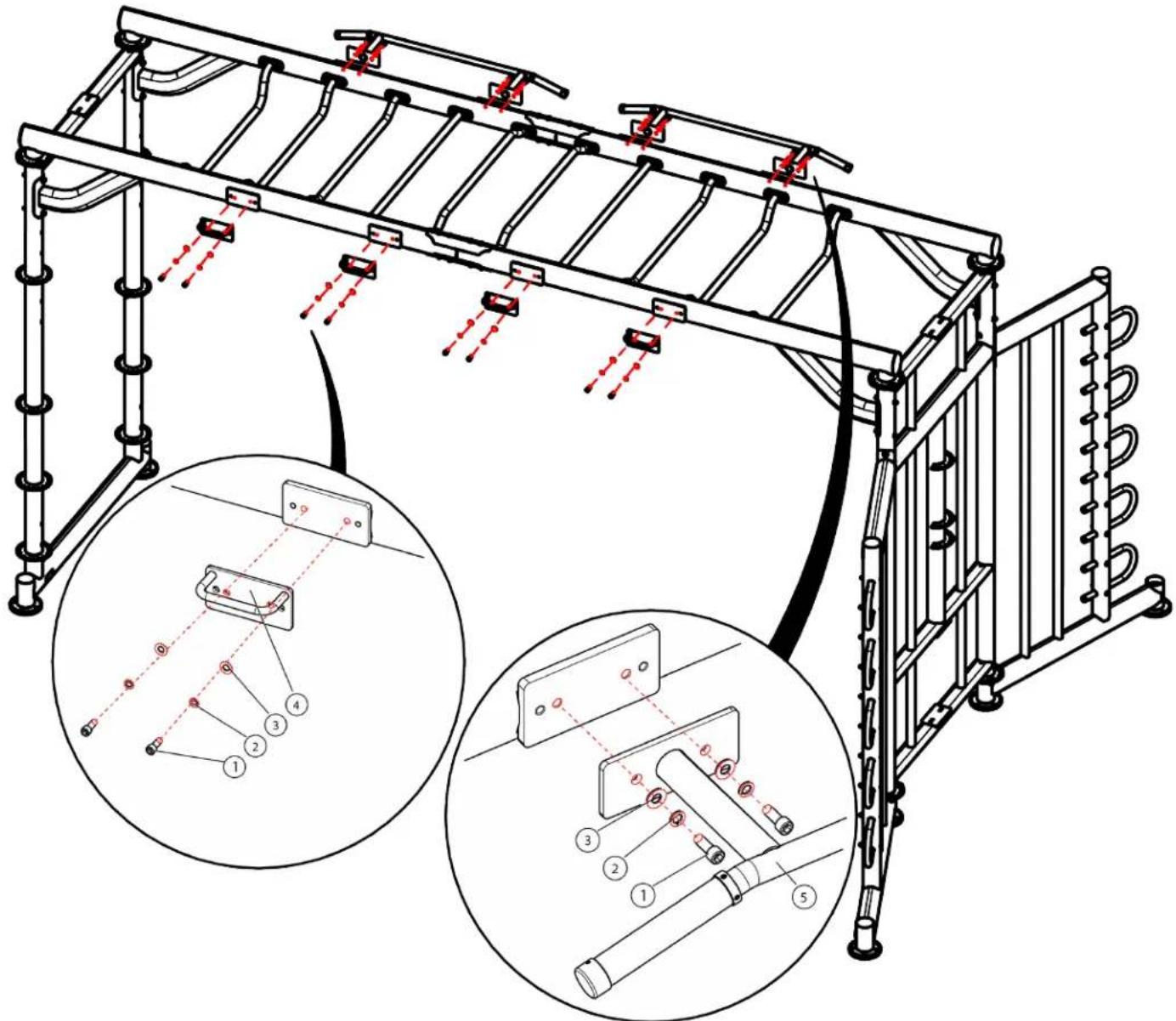
Step 6 (Pull-Up Bars and Suspension Brackets):
Secure the Pull-Up Bars and Suspension Brackets to the Monkey Bar Assembly using the identified hardware.
Note: If using XFT-MK7 (seven monkey bar rungs), only one Pull-Up Bar and two Suspension Brackets will be used.
| Item Part Number Description Quantity | ____ | ||
| 1 C1 | 023 SHCS, 3/8” | -16, 1” 16 | |
| 2 C | 749 Washer, Lock, 3/8” 16 | ||
| 3 C | 754C Washer, Flat, 3/8” 16 | ||
| 4 XFT | T2001500 | Suspension Bracket | 4 |
| 5 | XFW83-CHBB01ASSY | Pull-Up Bar | 2 |
text_image
Technical diagram of a mechanical assembly with labeled components and two circular insets showing detailed views of the component layout.CHAPTER 2: ASSEMBLY GUIDE
OPTIONAL ASSEMBLY STEPS:
Step 7 (Conversion Attachment Bracket Assembly):
Secure the Conversion Attachment Bracket Assembly to the Center Main Frame using the identified hardware.
Note: For the XFT-100 and FT-100, only the middle and bottom brackets will be used.
| Item Part Number Description Quantity | ____ | ||
| 1 C1 | 137 SHCS, 3/8” | -16, 3-15/16” 12 | |
| 2 C | 749 Washer, Lock, 3/8” 12 | ||
| 3 C | 754C Washer, Flat, 3/8” 12 | ||
| 4 XFT400-ATT000X | Conversion Attachment Bracket Assembly | 3 | |
Note: For the XFT-900, FT-900, and Half Rack, only the top and bottom brackets will be used.

text_image
XFT-900, FT-900, and Half Rack XFT-100 and FT-100CHAPTER 2: ASSEMBLY GUIDE
OPTIONAL ASSEMBLY STEPS:
Step 8 (XFT-100 & FS-100 Configurations):
Assemble each attachment bracket to the connecting braces using the identified hardware.
Note: Refer to the XFT-100 owner's manual for assembly of the XFT-100 and FS-100 owner's manual for assembly of the FS-100.
Note: The XFT-100 is shown in Steps 1-2C, but the same assembly steps apply for securing the FS-100 to the XFT-400.
| Item Part Number Description Quantity | ____ | ||
| 1 C | 628 SHCS Screw, 3/8”-16,2-3/4” | 8 | |
| 2 C | 754C Washer, Flat, 3/8” 8 | ||
| 3 C | 766A Lock Nut, 3/8”-16 8 | ||
| 4 XFT000-CBR105 Left, | Lower XFT-100/FS-100 Attachment Bracket | 1 | |
| 5 XFT000-CBR110 Upper | XFT-100/FS-100Attachment Bracket | 2 | |
| 6 XFT000-CBR120 Lower | XFT-100/FS-100Cross Brace | 1 | |
| 7 XFT000-CBR115 Upper | XFT-100/FS-100Cross Brace | 1 | |
| 8 XFT000-CBR125 Right, | Lower XFT-100/FS-100 Attachment Bracket | 1 | |
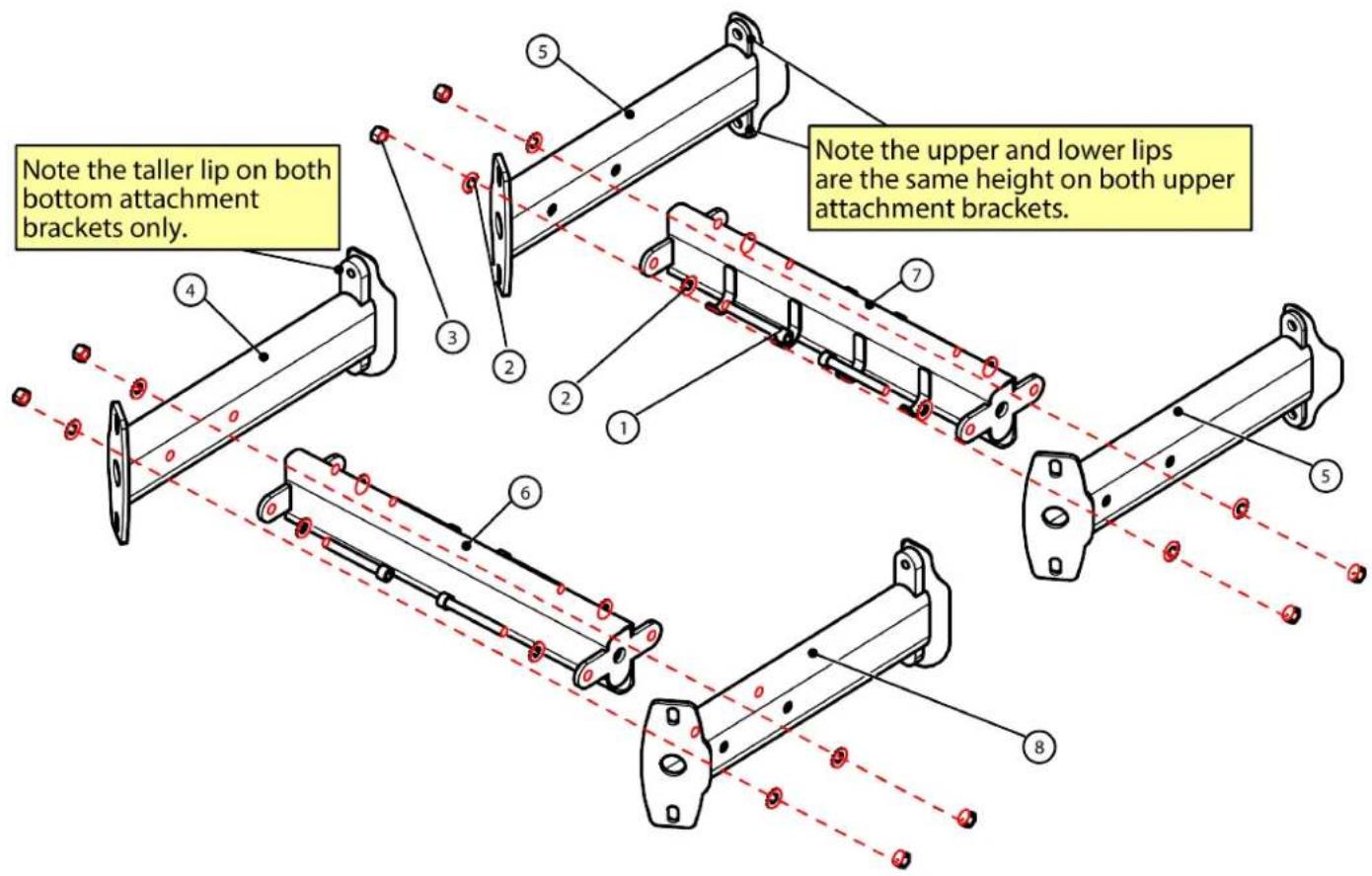
text_image
Note the taller lip on both bottom attachment brackets only. Note the upper and lower lips are the same height on both upper attachment brackets.CHAPTER 2: ASSEMBLY GUIDE
OPTIONAL ASSEMBLY STEPS:
Step 9A (XFT-100 & FS-100 Configurations):
First, remove the XFT-100/FS-100 Lower Cross Brace Assembly as shown below.
Next, attach the Lower XFT-100/FS-100 Attachment Bracket to the XFT-100/FS-100 Assembly in the same location using the identified hardware.
Note: Do not remove the XFT-100/FS-100 Upper Cross Brace Assembly until Step 2B.
| Item Part Number Description Quantity | _ | ||
| 1 XFT100-CBR000X XFT-100/FS-100 Lower Cross Brace Assembly | 1 | ||
| 2 XFT-100A XFT-100 Assembly 1 | |||
| 3 C1023 SHCS, 3/8”-16, 1” 4 | |||
| 4 C 749 Washer, Lock, 3/8” 4 | |||
| 5 C 754C Washer, Flat, 3/8” 4 | |||
| 6 XFT000-ATT100X Lower XFT-100/FS-100 Attachment Bracket | 1 | ||
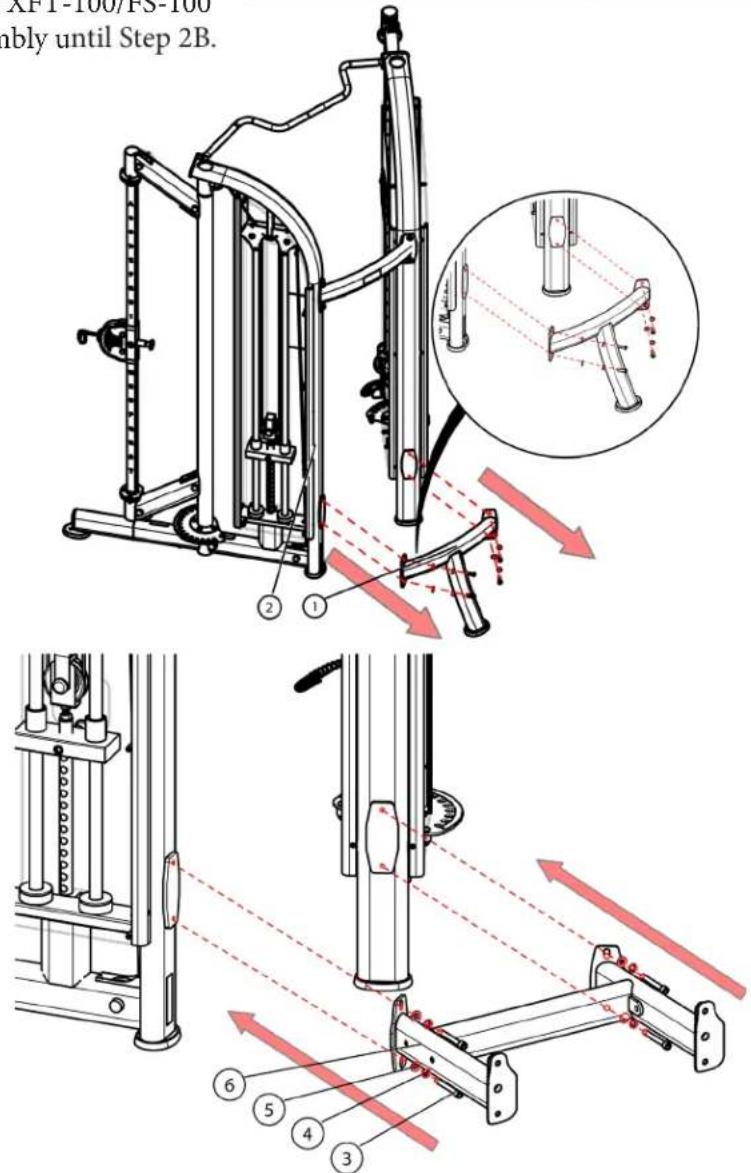
text_image
AFT-100/PS-100 nably until Step 2B.CHAPTER 2: ASSEMBLY GUIDE
OPTIONAL ASSEMBLY STEPS:
Step 9B (XFT-100 & FS-100 Configurations):
First, remove the XFT-100/FS-100 Upper Cross Brace Assembly as shown below.
Next, attach the Upper XFT-100/FS-100 Attachment Bracket to the XFT-100/FS-100 Assembly in the same location using the identified hardware.
| Item Part Number Description Quantity | ____ | ||
| 1 XFT-100A XFT-100 Assembly 1 | |||
| 2 FS 100-CBR100X XFT-100/FS-100 Upper Cross Brace Assembly | 1 | ||
| 3 C1023 SHCS, 3/8”-16, 1” 4 | |||
| 4 C 749 Washer, Lock, 3/8” 4 | |||
| 5 C 754C Washer, Flat, 3/8” 4 | |||
| 6 | XFT000-ATT100X | Upper XFT-100/FS-100 Attachment Bracket | 1 |

text_image
Technical diagram of a mechanical device with numbered components and red directional arrows indicating motion or force directions.CHAPTER 2: ASSEMBLY GUIDE
OPTIONAL ASSEMBLY STEPS:
Step 9C (XFT-100 & FS 100 Configurations):
Attach the XFT-100/FS-100 Assembly to the Center Main Frame using the identified hardware.
Secure all hardware from Steps 9-10C.
| Item Part Number Description Quantity | |||||
| 1 C | 634 | SHCS Screw, 3/8” | -16, 4” | 8 | |
| 2 C | 754C | Washer, Flat, 3/8” | 8 | ||
| 3 C | 766A | Lock Nut, 3/8” | -16 | 8 | |
| 4 XFT-100A | XFT-100 Assembly | 1 | |||
Confirm the XFT-100/FS-100 Assembly is level using the leveling feet located throughout the machine.

text_image
Technical diagram of a mechanical assembly with numbered components and cross-sectional viewsCHAPTER 2: ASSEMBLY GUIDE
OPTIONAL ASSEMBLY STEPS:
Step 10 (XFT-900 & FT-900 Configurations):
If the two optional shelves shown below are assembled to the XFT-900/FT-900, then remove the bottom shelf. The top shelf can remain in place as its removal is not needed for assembly to the XFT-400.
| Item Part Number Description Quantity | ____ | ||
| 1 XFT900-TRY000X | XFT-900 Tray 2 | ||
| 2 XFT900 XFT-900 Assembly 1 | |||
Note: Refer to the XFT-900 owner's manual for assembly of the XFT-900 and FT-900 owner's manual for assembly of the FT-900.

text_image
Technical diagram showing a mechanical assembly with labeled components and directional arrows indicating motion or force.CHAPTER 2: ASSEMBLY GUIDE
OPTIONAL ASSEMBLY STEPS:
Step 11A (XFT-900 & FT-900 Configurations):
Assemble the XFT-900 assembly to the XFT-900 Attachment Brackets using the identified hardware.
| Item Part Number Description Quantity | ____ | ||
| 1 C | 629 SHCS Screw, 3/8”-16,2-1/2” | 4 | |
| 2 C | 754C Washer, Flat, 3/8” 12 | ||
| 3 C | 631 SHCS Screw, 3/8”-16,2-3/4” | 4 | |
| 4 C | 766A Lock Nut, 3/8”-16 4 | ||
| 7 XFT000-ATT900X | XFT-900/FT-900Attachment Bracket | 1 | |
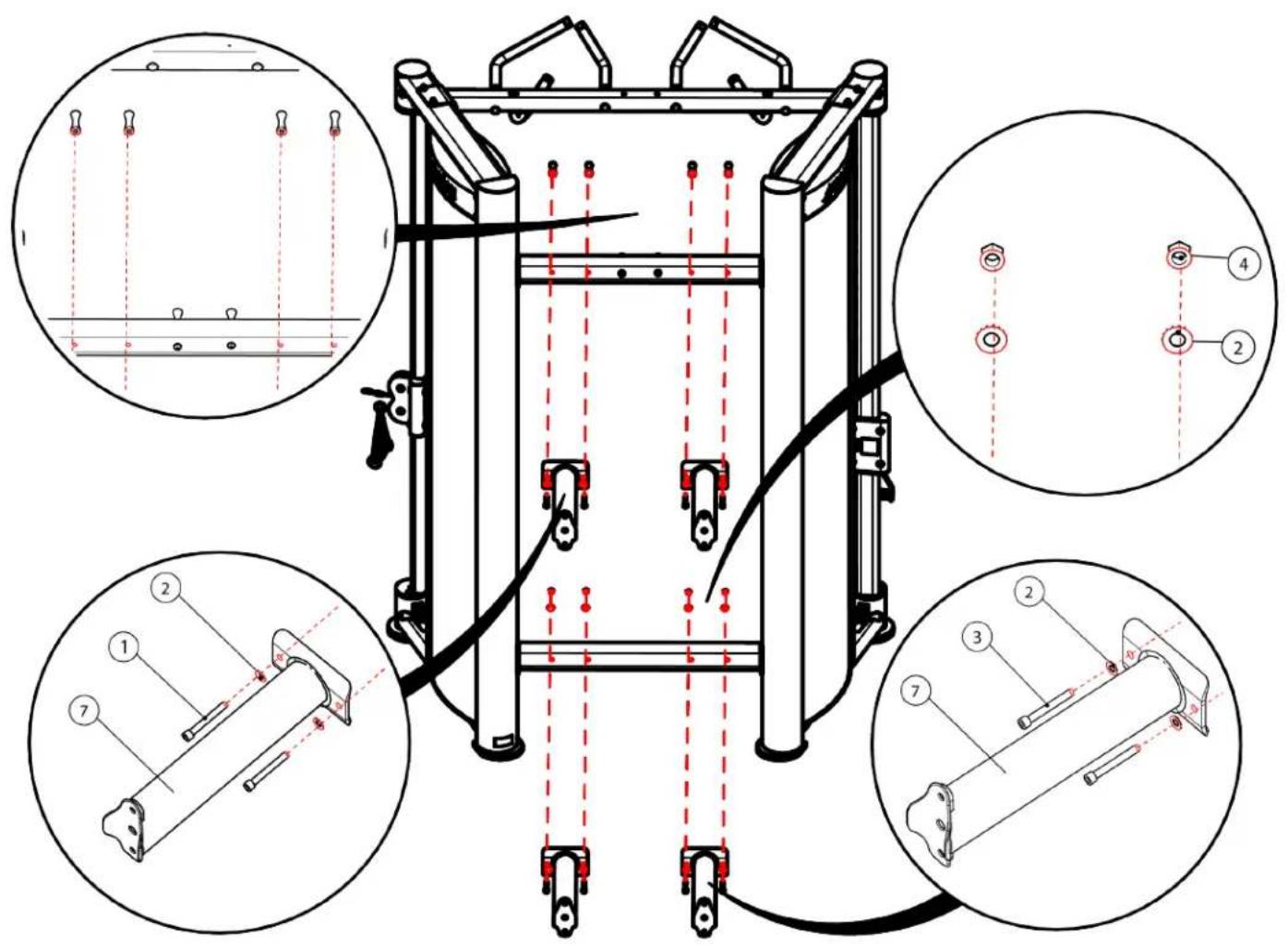
text_image
Technical diagram of a mechanical device with seven labeled components and red dashed alignment lines indicating alignment or positioning.CHAPTER 2: ASSEMBLY GUIDE
OPTIONAL ASSEMBLY STEPS:
Step 11B (XFT-900 & FT-900 Configurations):
Assemble the XFT-900 assembly to the center main frame using the identified hardware.
Secure all hardware from Steps 11-12B.
Confirm the XFT-900/FT-900 assembly is level using the leveling feet located throughout the machine.
| Item Part Number Description Quantity | ____ | |||
| 1 C1 | 137 SHCS, 3/8” | -16, 3-15/16” | 8 | |
| 2 C | 754C Washer, Flat, 3/8” | 16 | ||
| 3 C | 766A Lock Nut, 3/8” | -16 | 8 | |
| 4 XFT900 XFT-900 Assembly 1 | ||||

text_image
Technical diagram of a mechanical device with labeled components and cross-sectional views showing internal structure and assembly.CHAPTER 2: ASSEMBLY GUIDE
OPTIONAL ASSEMBLY STEPS:
Step 12A (XFT-HRK Configurations):
Assemble the Center Main Frame to the Half Rack Assembly Connectors using the identified hardware.
| Item Part Number Description Quantity | ____ | ||
| 1 C1 | 136 SHCS Screw, 3/8”-16,3-3/4” | 4 | |
| 2 C | 754C Washer, Flat, 3/8” 16 | ||
| 3 C | 634 SHCS Screw, 3/8”-16, 4” 4 | ||
| 4 C | 766A Lock Nut, 3/8”-16 | 8 | |
| 5 | XFT-HRK-CTN1B07ASSY-1 | Half Rack AssemblyConnectors | 2 |

text_image
Technical diagram of a mechanical assembly with numbered components and cross-sectional viewsCHAPTER 2: ASSEMBLY GUIDE
OPTIONAL ASSEMBLY STEPS:
Step 12B (XFT-HRK Configurations):
Assemble the Half Rack sub-assemblies using the identified hardware.
Note: For Steps 13B-14, the XFT-200/201 Center Column Assembly is shown, but the same assembly steps apply to the XFT-400.
| Item Part Number Description Quantity | ____ | ||
| 1 C | 634 SHCS, 3/8” | -16, 4” 16 | |
| 2 C | 749 Washer, Lock, 3/8” 8 | ||
| 3 C | 754C Washer, Flat, 3/8” 24 | ||
| 4 C | 766A Lock Nut, 3/8”-16 8 | ||
| 5 XFT-HRK-CTN2B0600 | Right XFT-HRK Connecting Brace | 2 | |
| 6 XFT-HRK-CTN1B0600 | Left XFT-HRK Connecting Brace | 2 | |
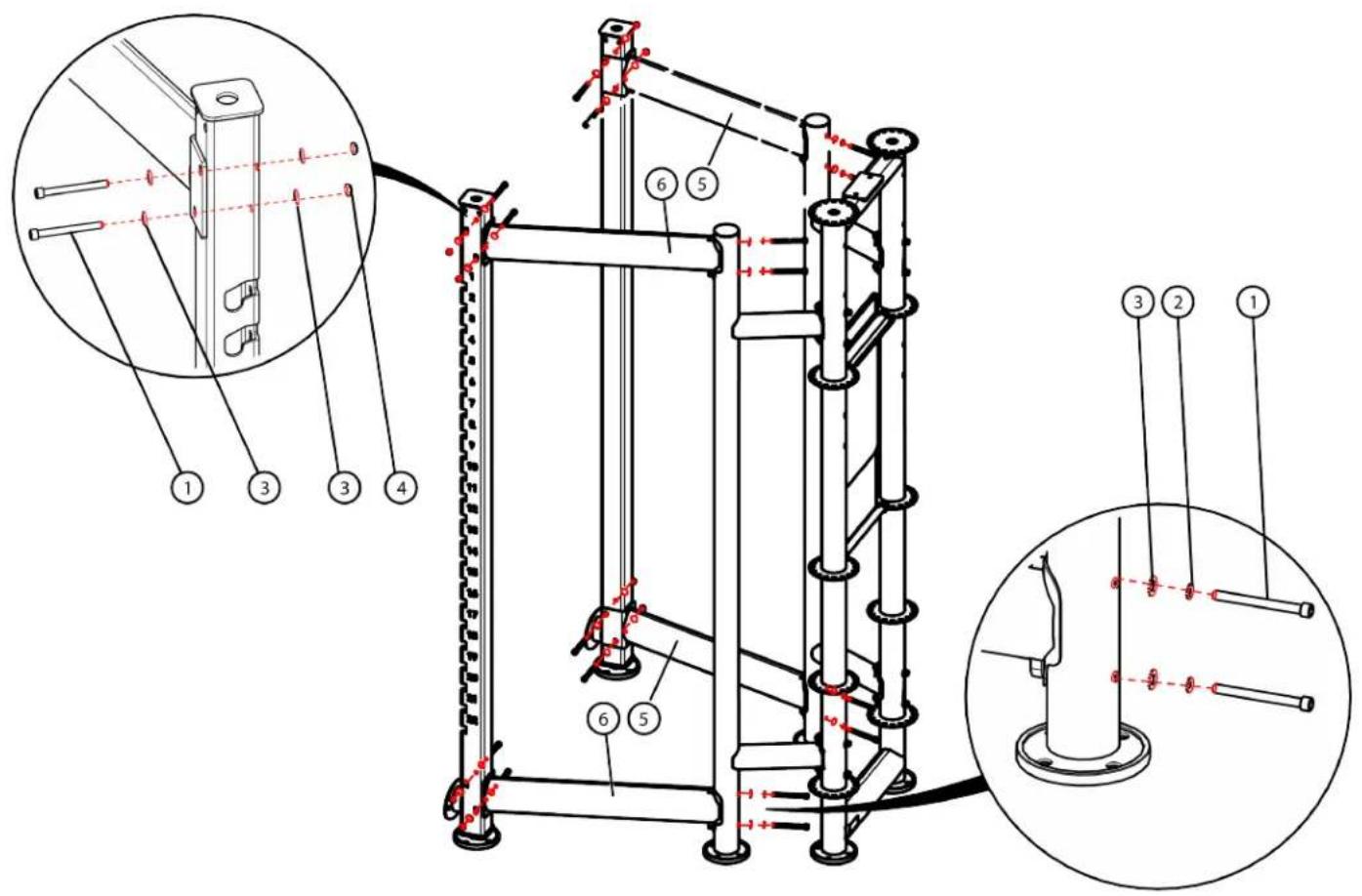
text_image
Technical diagram of a mechanical device with numbered components and close-up insets showing assembly details.CHAPTER 2: ASSEMBLY GUIDE
OPTIONAL ASSEMBLY STEPS:
Step 12C (XFT-HRK Configurations):
Assemble the Chin-Up Bar to the Half Rack using the identified hardware.
| Item Part Number Description Quantity | _ | ||
| 1 C | -634 SHCS, 3/8” | -16, 4” 4 | |
| 2 C | 754C Washer, Flat, 3/8” 8 | ||
| 3 C | 766A Lock Nut, 3/8”-16 4 | ||

text_image
Technical diagram of a mechanical linkage system with numbered components and dashed red lines indicating alignment or reference points.CHAPTER 2: ASSEMBLY GUIDE
OPTIONAL ASSEMBLY STEPS:
Step 12D (XFT-HRK Configurations):
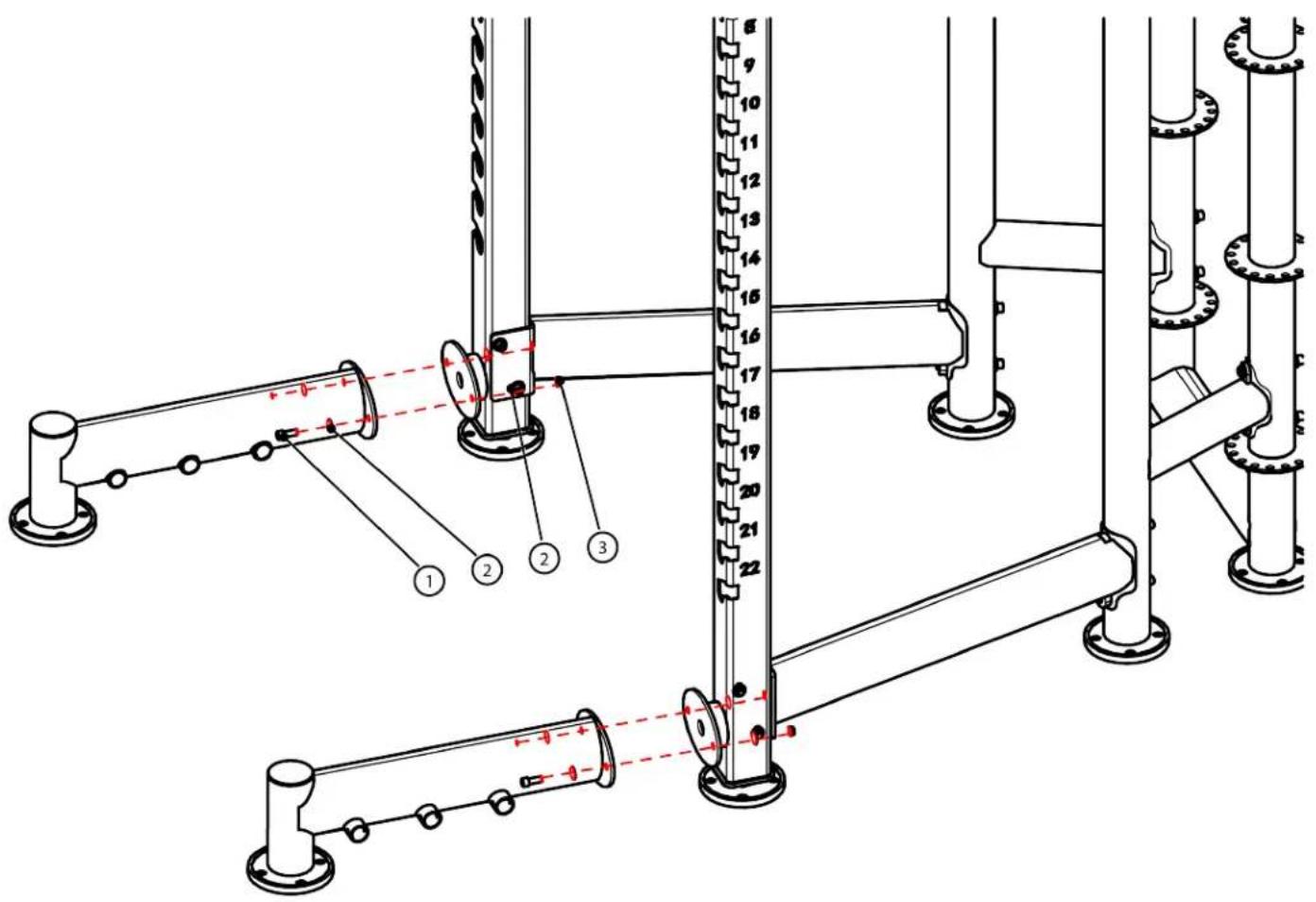
Assemble the Half Rack sub-assemblies using the identified hardware.
Fully tighten all hardware from Steps 13A-13D.
| Item Part Number Description Quantity | _ | ||
| 1 C | 023 SHCS, 3/8” | -16, 1” 4 | |
| 2 C | 754C Washer, Flat, 3/8” 8 | ||
| 3 C | 766A Lock Nut, 3/8” | -16 4 | |
text_image
Technical diagram of a mechanical assembly with numbered components and alignment indicatorsCHAPTER 2: ASSEMBLY GUIDE
OPTIONAL ASSEMBLY STEPS:
Step 13 (XFT-HRK Configuration):
Assemble the optional Band Peg kit to the Half Rack using the identified hardware.
| Item Part Number Description Quantity | _ | |||
| 1 C | 623 SHCS, 5/8”-18, 1-1/4”4 | |||
| 2 PSXFW83-BPG Band Peg Kit 4 | ||||
Note: The band peg kit option is used only when the Half Rack option is used.

text_image
Technical diagram of a mechanical assembly with numbered components and alignment indicatorsCHAPTER 2: ASSEMBLY GUIDE
REQUIRED ASSEMBLY STEPS:
Step 14A (XFT-400 Tall and Short End Column Configurations):
In order of Bottom Tray, Top Tray, and Strap Rack, assemble all three to the Center Column assembly and Tall End Column using the identified hardware.
Confirm the Tall End Column configuration is level using the leveling feet.
| Item Part Number Description Quantity | |||
| 1 C | 023 SHCS, 3/8”-16, | 1” 12 | |
| 2 C | 754C Washer, Flat, 3/8” 24 | ||
| 3 C | 766A Lock Nut, 3/8” | -16 12 | |
| 4 | XFT000-CBR000X | Strap Rack | 1 |
| 5 | XFT000-CLM130X | Tall End Column | 1 |
| 6 | XFT000-KBR010X | XFT-400 Tray | 2 |
Note: XFT-100/FS-100/XFT-900/FT-900/Half Rack removed for clarity in this step.
Note: Step 15A shows the XFT-200/201, but it applies to the XFT-400 as well.

text_image
Technical diagram of a mechanical assembly with numbered components and magnified detail viewsCHAPTER 2: ASSEMBLY GUIDE
REQUIRED ASSEMBLY STEPS:
Step 14B (Tall and Short End Column Configurations):
Secure the Tray Guards to the trays using the identified hardware.
Note: If installing the Short End Column configuration, then three tray guards and the corresponding hardware quantity will be used.
| Item Part Number Description Quantity | _ | ||
| 1 XFT-TRA-005X Tray Guard 4 | |||
| 2 C 754C Washer, Flat, 3/8” 8 | |||
| 3 C 749 Washer, Lock, 3/8” 8 | |||
| 4 | C1023 | SHCS, 3/8”-16, 1” 8 | |

text_image
Technical diagram of a mechanical assembly with numbered components and an inset magnified view showing internal structure.CHAPTER 2: ASSEMBLY GUIDE
OPTIONAL ASSEMBLY STEPS:
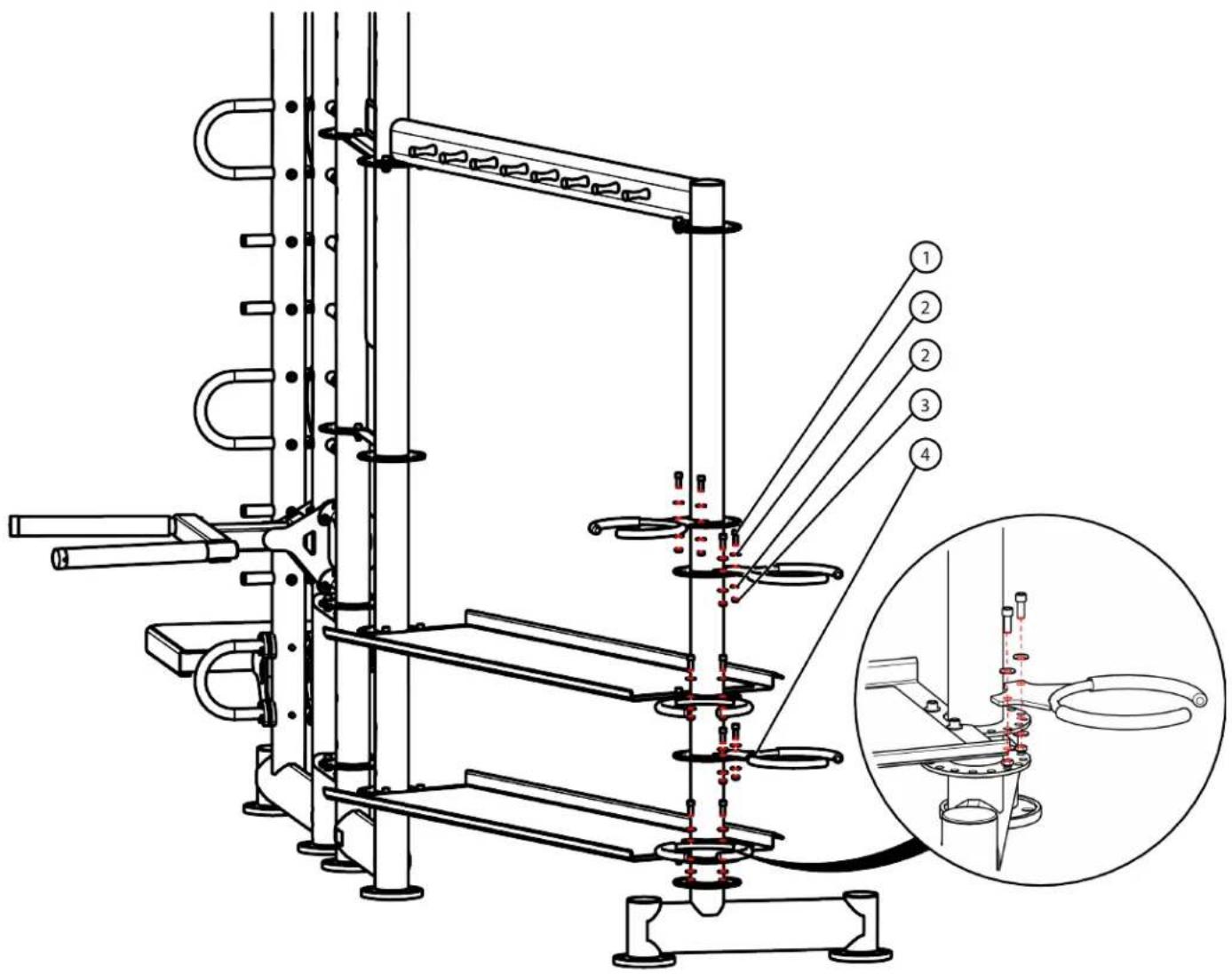
Step 15 (XFT-400 Tall and Short End Column Configuration):
Secure the Medicine Ball Rings (maximum of five allowed) to the Tall or Short End Column using the identified hardware.
| Item Part Number Description Quantity | _ | ||
| 1 C1 | 023 SHCS, 3/8”-16, 1” 10 | ||
| 2 C | 754C Washer, Flat, 3/8” 20 | ||
| 3 C | 766A Lock Nut, 3/8”-16 10 | ||
| 4 | XFT-MDR | Medicine Ball Ring 5 | |
Note: Step 16 shows the XFT-200/201, but it applies to the XFT-400 as well.
text_image
Technical diagram of a laboratory apparatus with numbered components and an inset close-up showing internal components.CHAPTER 2: ASSEMBLY GUIDE
OPTIONAL ASSEMBLY STEPS:
Step 16A (Bosu Ball and Roller Rack):
Secure the Bosu Ball and Roller Rack sub-assemblies as shown below using the identified hardware.
| Item Part Number Description Quantity | _ |
| 1 C 611 SHCS, 1/4”-20, 1-1/2” 14 | |
| 2 C 740 Lock Nut, 1/4”-20 14 |

text_image
Technical diagram of a mechanical assembly with numbered components and red dashed lines indicating alignment or positioning.CHAPTER 2: ASSEMBLY GUIDE
OPTIONAL ASSEMBLY STEPS:
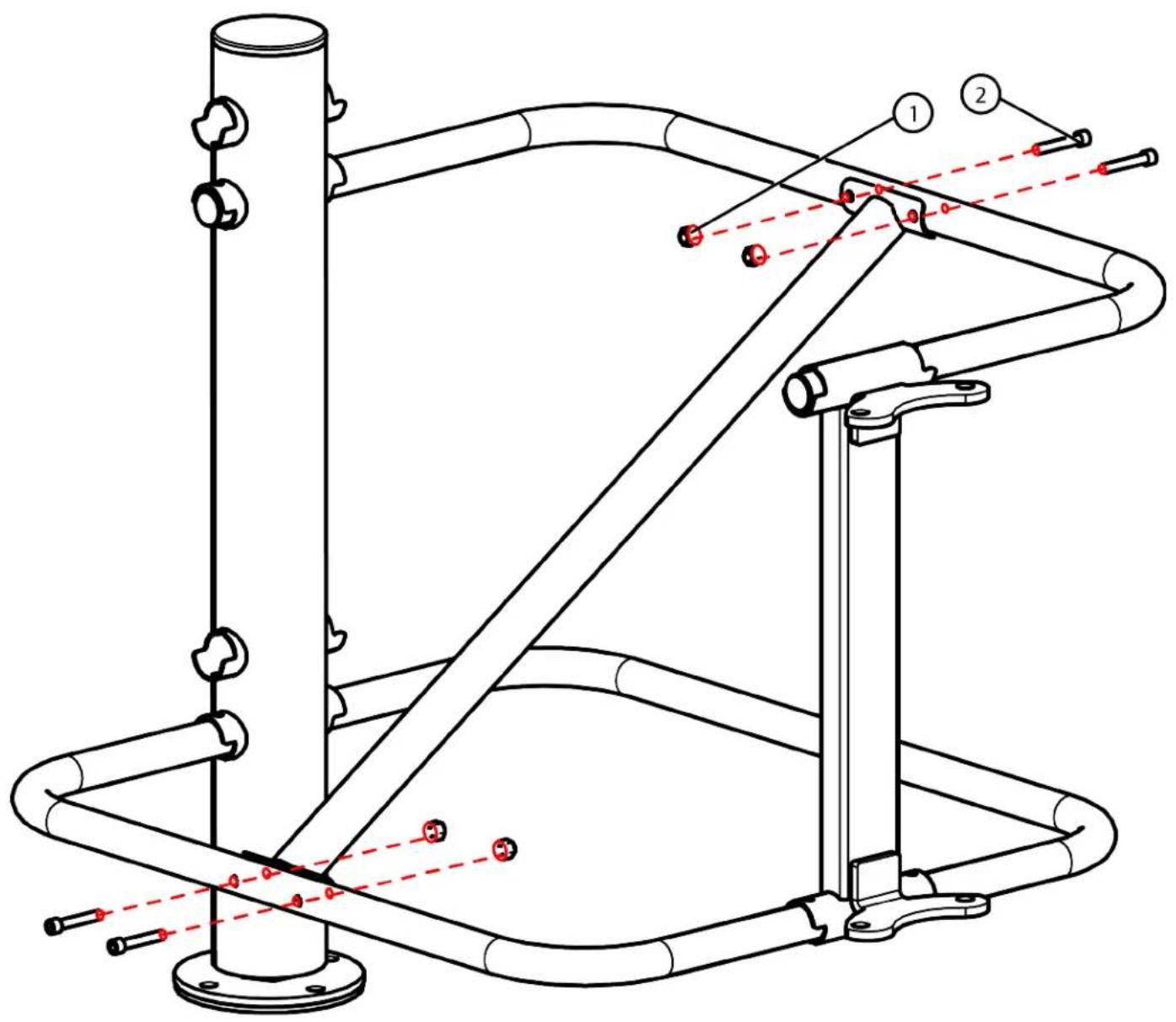
Step 16B (Bosu Ball and Roller Rack):
Secure the Bosu Ball and Roller Rack sub-assemblies as shown below using the identified hardware.
| Item Part Number Description Quantity | _ |
| 1 C 611 SHCS, 1/4”-20, 1-1/2” 4 | |
| 2 C 740 Lock Nut, 1/4”-20 4 |
text_image
Technical diagram of a mechanical assembly with labeled components and red dashed lines indicating alignment or connection points.CHAPTER 2: ASSEMBLY GUIDE
OPTIONAL ASSEMBLY STEPS:
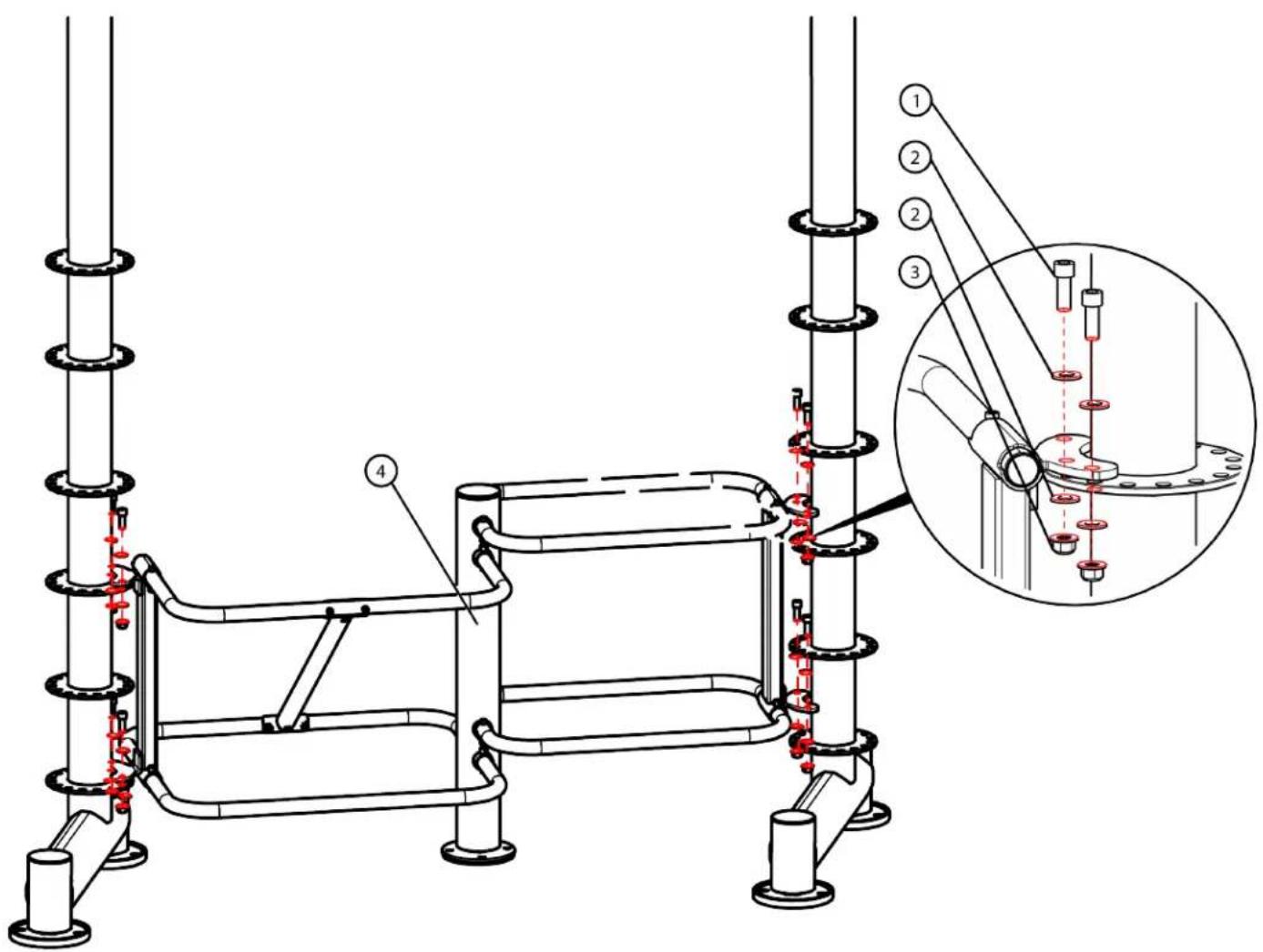
Step 16C (Bosu Ball and Roller Rack):
Secure the Bosu Ball/Roller Rack to the Tall or Short End Column and the Tall or Short End Column provided with the Bosu Ball and Roller Rack assembly using the identified hardware.
| Item Part Number Description Quantity | _ | |
| 1 C 623 SHCS, 5/8”-18, 1-1/4” 8 | ||
| 2 C 754C Washer, Flat, 3/8” 16 | ||
| 3 C 766A Lock Nut, 3/8”-16 8 | ||
| 4 XFT000-RLR500X Bosu Ball/Roller Rack 1 | ||
text_image
Technical diagram of a mechanical assembly with numbered components and a magnified inset showing internal components.CHAPTER 2: ASSEMBLY GUIDE
OPTIONAL ASSEMBLY STEPS:
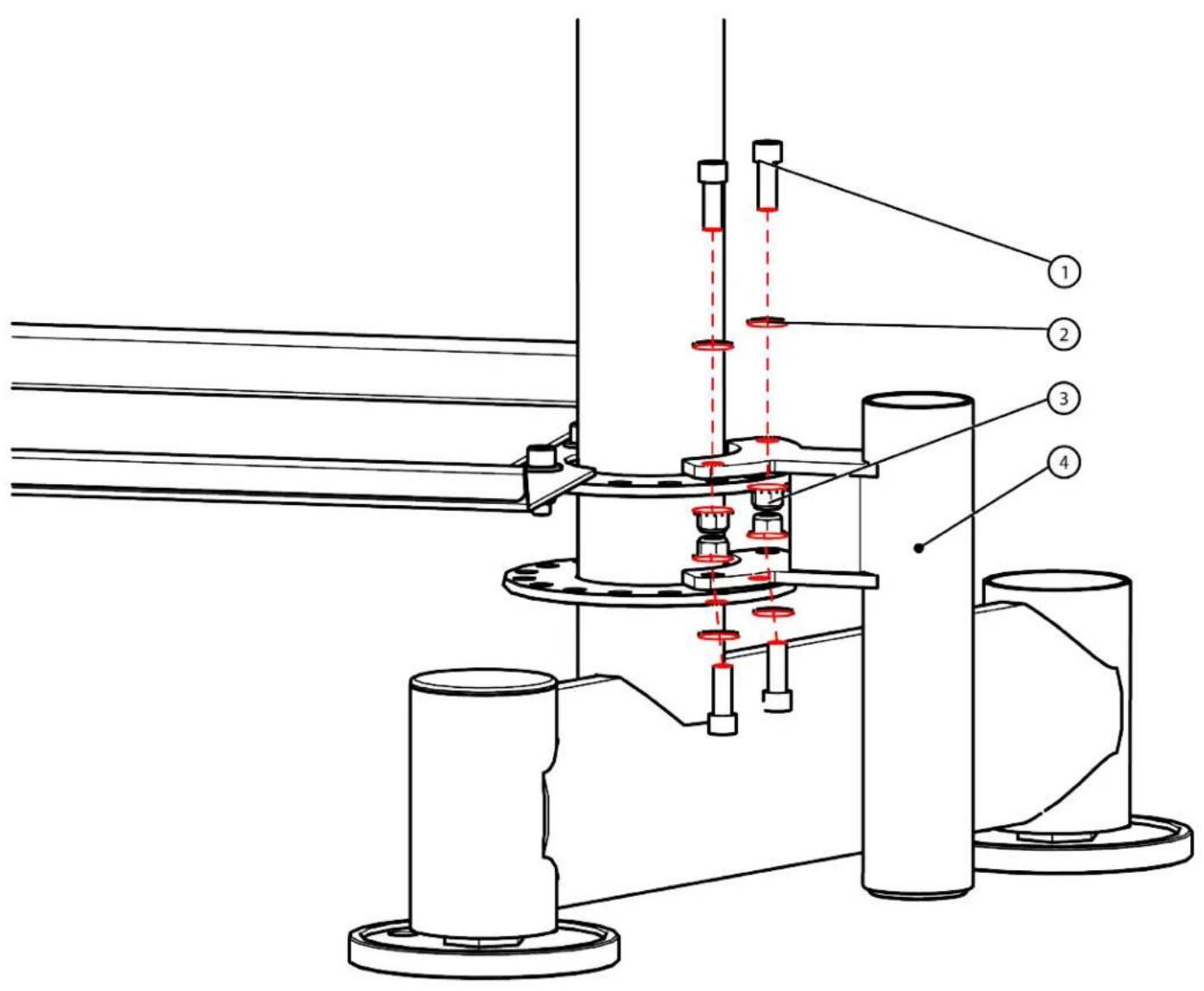
Step 17 (Olympic Bar Storage):
Secure the Olympic Bar Storage to the end column using the identified hardware.
| Item Part Number Description Quantity | _ |
| 1 C 623 SHCS, 3/8”-16, 1-1/4” 4 | |
| 2 C 754C Washer, Flat, 3/8” 8 | |
| 3 C 766A Lock Nut, 3/8”-16 4 | |
| 4 XFT-OBS Olympic Bar Storage 1 |
text_image
Technical diagram of a mechanical assembly with numbered components and red dashed lines indicating alignment or measurement points.CHAPTER 2: ASSEMBLY GUIDE
OPTIONAL ASSEMBLY STEPS:
Step 18 (Core Trainer):
Secure the Core Trainer to the end column using the identified hardware.
| Item Part Number Description Quantity | _ | |||
| 1 C1012 SHCS, 3/8”-16, 2-1/4” 2 | ||||
| 2 C754C Washer, Flat, 3/8” 2 | ||||
| 3 XFT-CRTA Core Trainer Assembly | 1 | |||

text_image
Technical diagram of a mechanical assembly with numbered components and red dashed lines indicating alignment or measurement points.CHAPTER 2: ASSEMBLY GUIDE
OPTIONAL ASSEMBLY STEPS:
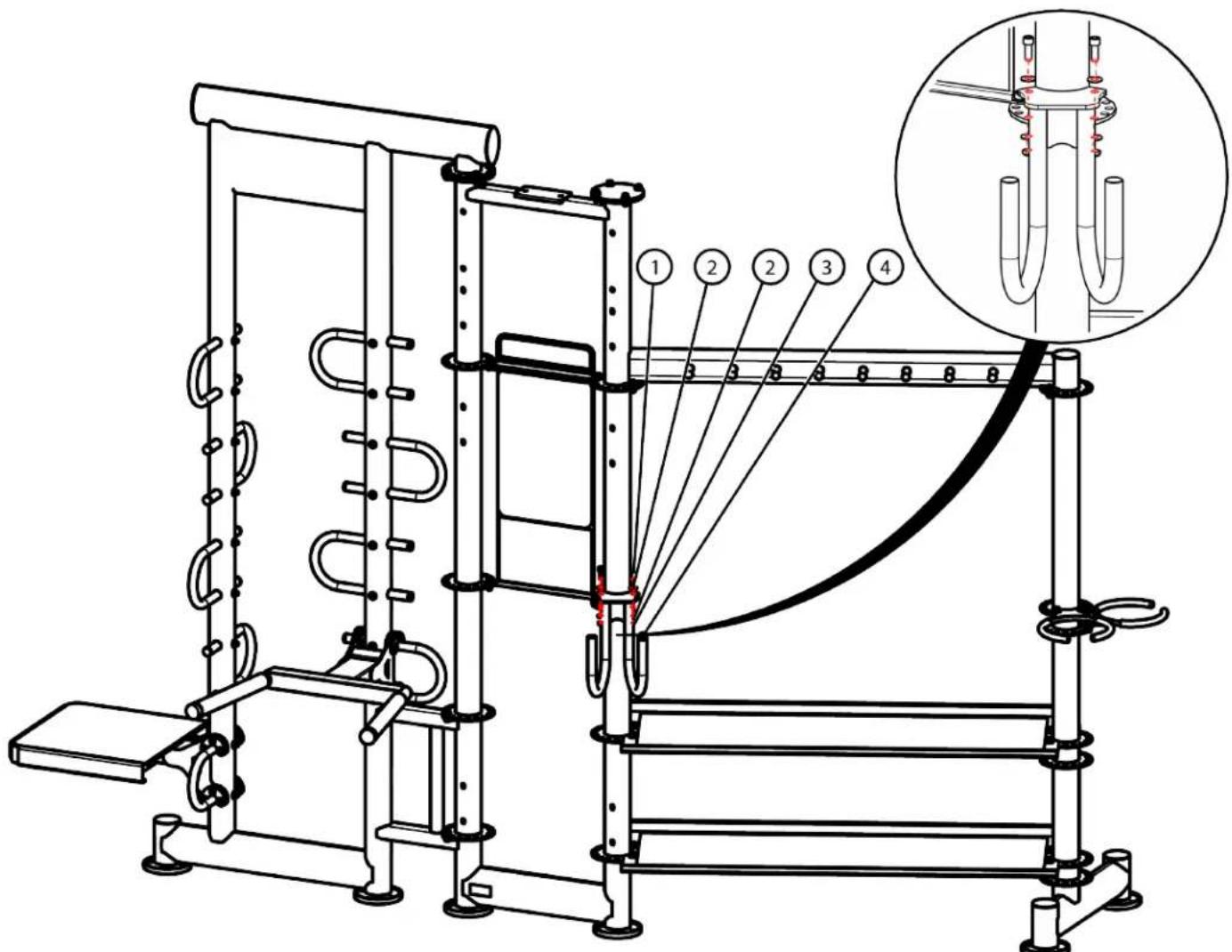
Step 20 (Battle Rope Hanger):
Secure the Battle Rope Hanger to the end column using the identified hardware.
Note: The Battle Rope Hanger can be secured in other column mounting locations dependent on your overall XFT-400 configuration.
| Item Part Number Description | Quantity | ||
| 1 C1 | 023 SHCS, 3/8”-16, | 1” 2 | |
| 2 C | 754C Washer, Flat, 3/8” 4 | ||
| 3 C | 766A Lock Nut, 3/8”-16 2 | ||
| 4 XFT | 000-RCK040X Battle Rope Hanger Assembly | 1 | |
Note: Step 20 shows the XFT-200/201, but it applies to the XFT-400 as well.
text_image
Technical diagram of a mechanical device with numbered components and an inset magnified view showing internal structure.CHAPTER 2: ASSEMBLY GUIDE
OPTIONAL ASSEMBLY STEPS:
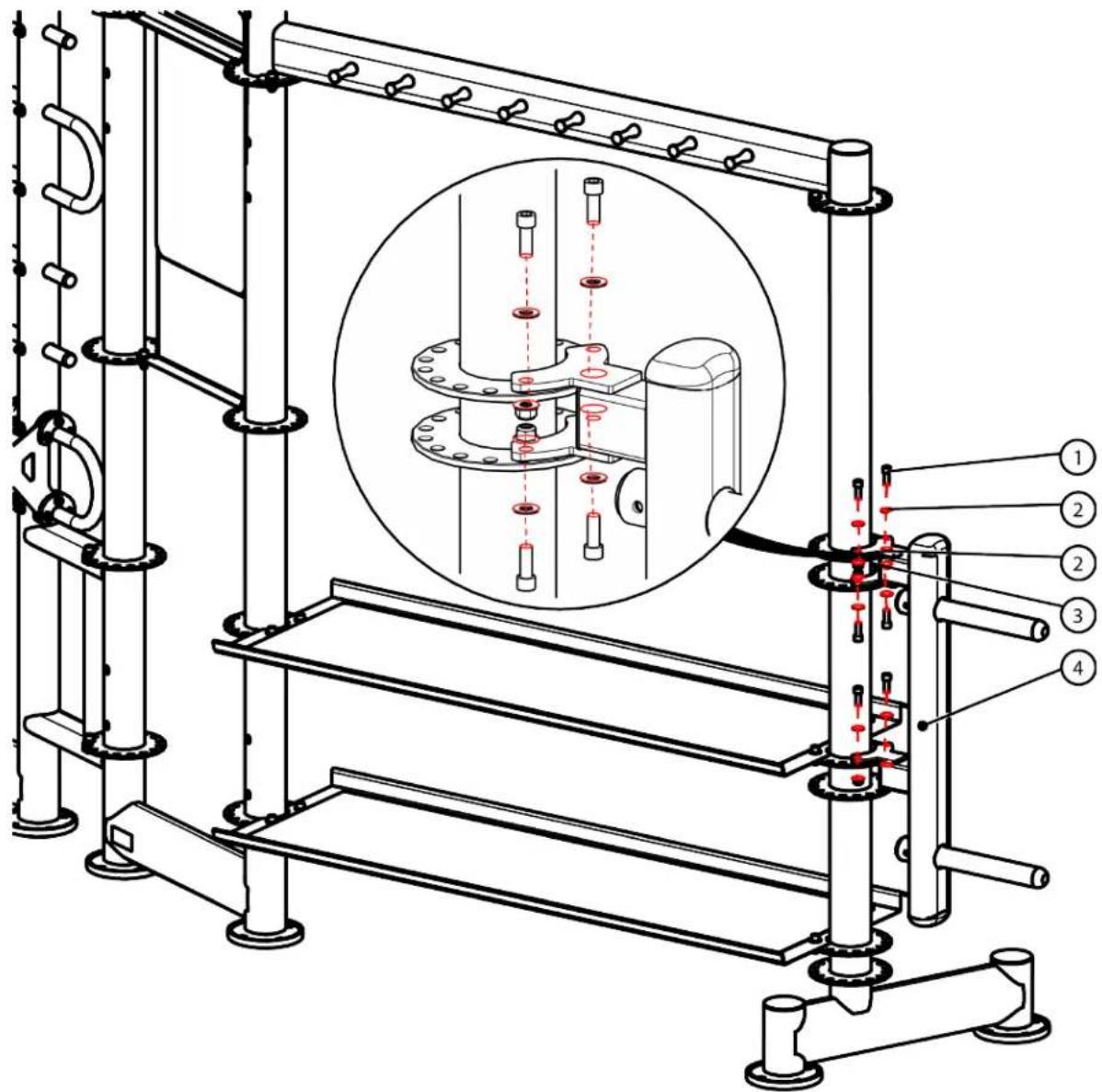
Step 21 (Weight Plate Storage Bar):
Secure the Weight Plate Storage Bar to the Tall End Column using the identified hardware.
Note: The Short End Column can also be used.
| Item Part Number Description Quantity | _ |
| 1 C-623 SHCS, 5/8”-16, 1-1/4” 6 | |
| 2 C 754C Washer, Flat, 3/8” 12 | |
| 3 C 766A Lock Nut, 3/8”-16 6 | |
| 4 XFT-WPS Weight Plate Storage 1 |
Note: Step 21 shows the XFT-200/201, but it applies to the XFT-400 as well.
text_image
Technical diagram of a mechanical assembly with numbered components and a magnified inset showing internal components.CHAPTER 2: ASSEMBLY GUIDE
OPTIONAL ASSEMBLY STEPS:
Step 22A (Rebounder):
Secure the Rebounder sub-assemblies using the identified hardware.
| Item Part Number Description Quantity | ____ | ||
| 1 C1 | 023 SHCS, 3/8” | -16, 1” 4 | |
| 2 C | 749 Washer, Lock, 3/8” 4 | ||
| 3 C | 754C Washer, Flat, 3/8” 4 | ||
| 4 XFT-RBR-200X | Rebounder Adjustable Column | 1 | |
| 5 XFT-RBR-100X | Rebounder Bracket with Wheels | 1 | |
| 6 | XFT-RBRT | Rebounder | 1 |

text_image
Technical diagram of a bicycle suspension system with numbered components and alignment linesCHAPTER 2: ASSEMBLY GUIDE
OPTIONAL ASSEMBLY STEPS:
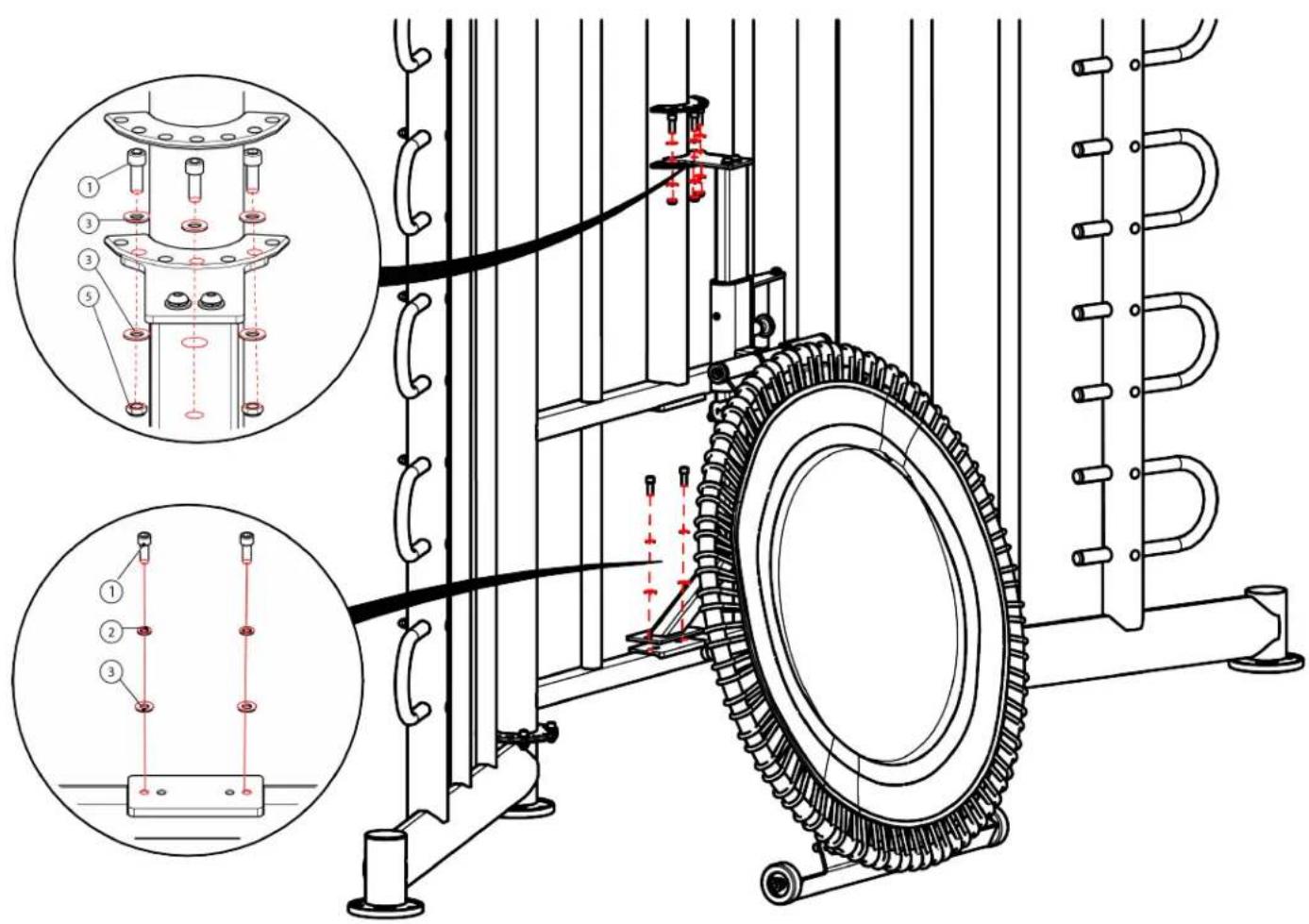
Step 22B (Rebounder):
Secure the Rebounder to the Center Main Frame using the identified hardware.
| Item Part Number Description Quantity | ____ | ||
| 1 C1023 SHCS, 3/8”-16, 1”5 | |||
| 2 C749 Washer, Lock, 3/8”5 | |||
| 3 C754C Washer, Flat, 3/8”5 | |||
| 4 XFT-RBR | Rebounder | 1 | |
text_image
Technical diagram of a mechanical assembly with labeled components and cross-sectional views showing assembly details.CHAPTER 2: ASSEMBLY GUIDE
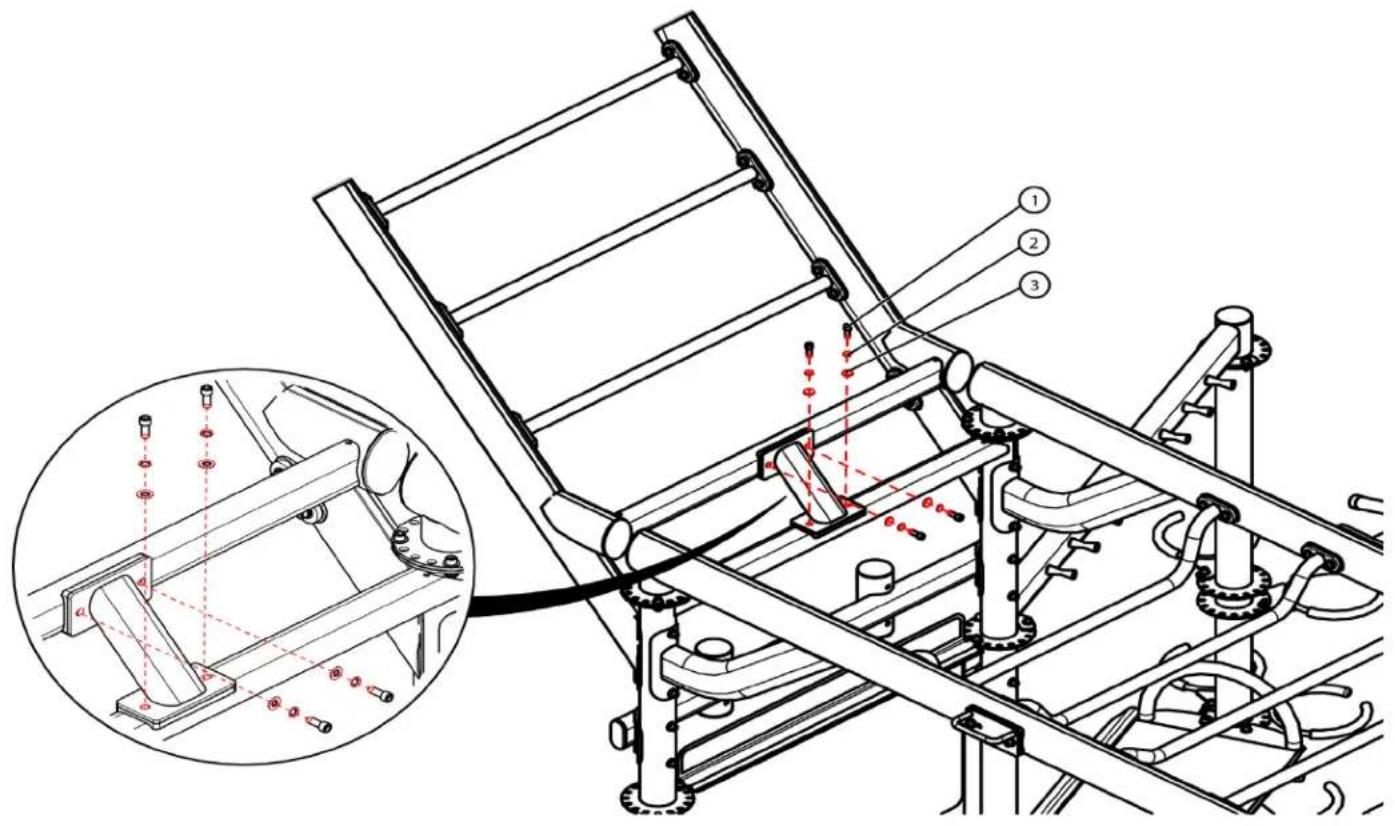
OPTIONAL ASSEMBLY STEPS:
Step 23A (Monkey Bar Ladder Weldment):
Secure the Monkey Bar Ladder Weldment to the Center Main Frame using the identified hardware.
Note: Disregard Steps 24A-27 if the Monkey Bar Ladder Weldment is installed in the same mounting location as the mounting locations are shared.
| Item Part Number Description Quantity | ____ | ||
| 1 | 4 | ||
| 2 C | 749 Washer, Lock, 3/8” 4 | ||
| 3 C | 754C Washer, Flat, 3/8” 4 | ||
| 4 XFT-MBL Monkey Bar LadderWeldment | 1 | ||

text_image
Technical diagram of a mechanical assembly with numbered components and red dashed lines indicating alignment or measurement points.CHAPTER 2: ASSEMBLY GUIDE
OPTIONAL ASSEMBLY STEPS:
Step 23B (Monkey Bar Ladder Weldment):
Secure the Monkey Bar Ladder Weldment to the Center Main Frame using the identified hardware.
| Item Part Number Description Quantity | ____ |
| 1 C1023 SHCS, 3/8”-16, 1”4 | |
| 2 C749 Washer, Lock, 3/8”4 | |
| 3 C754C Washer, Flat, 3/8”4 |
text_image
Technical diagram of a mechanical assembly with numbered components and a magnified inset showing internal components with red alignment markers.CHAPTER 2: ASSEMBLY GUIDE
OPTIONAL ASSEMBLY STEPS:
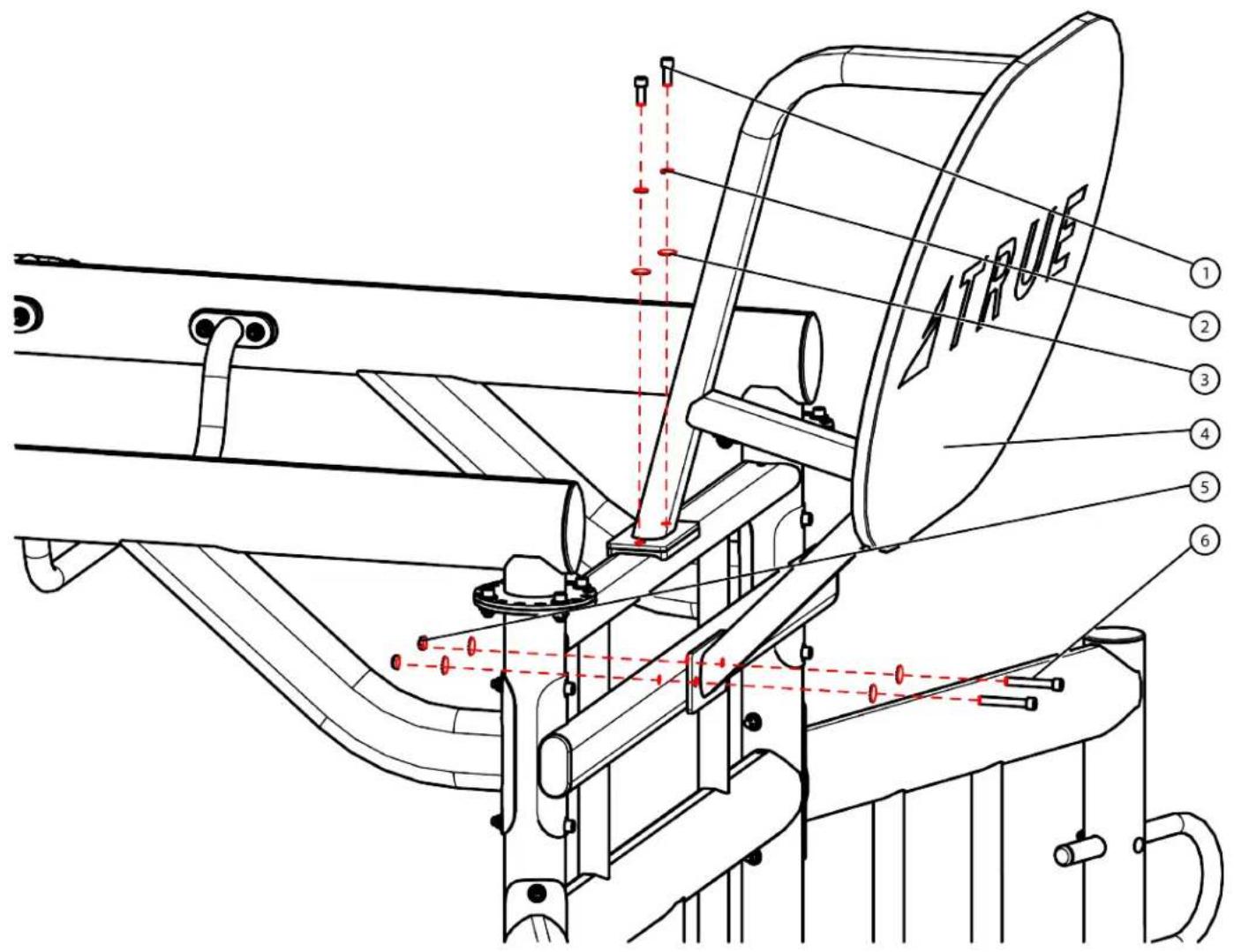
Step 24A (Ball Target):
Secure the Ball Target Attachment Bracket to the Center Main Frame using the identified hardware.
Note: Disregard Steps 23A-23B and Steps 25A-27 if the Ball Target is installed in the same mounting location as the mounting locations are shared.
| Item Part Number Description Quantity | ____ | ||
| 1 C | 766A Lock Nut, | 3/8”-16 4 | |
| 2 XFT-TRG-001X | Ball Target Attachment Bracket | 1 | |
| 3 C | 754C Washer, Flat, 3/8” 8 | ||
| 4 C1 | 137 SHCS, 3/8”-16, 3-15/16” 4 | ||

text_image
Technical diagram of a mechanical assembly with numbered components and red dashed alignment linesCHAPTER 2: ASSEMBLY GUIDE
OPTIONAL ASSEMBLY STEPS:
Step 24B (Ball Target):
Secure the Ball Target to the Ball Target Attachment Bracket using the identified hardware.
| Item Part Number Description Quantity | ____ | ||
| 1 C1 | 023 SHCS, 3/8”-16, 1”2 | ||
| 2 C | 749 Washer, Lock, 3/8”2 | ||
| 3 C | 754C Washer, Flat, 3/8”6 | ||
| 4 | XFT-TRG-002X | Ball Target | 1 |
| 5 C | 766A Lock Nut, 3/8”-16 | 2 | |
| 6 C1 | 145 SHCS, 3/8”-16, 2-1/2” | 2 | |
text_image
ATRUE ① ② ③ ④ ⑤ ⑥CHAPTER 2: ASSEMBLY GUIDE
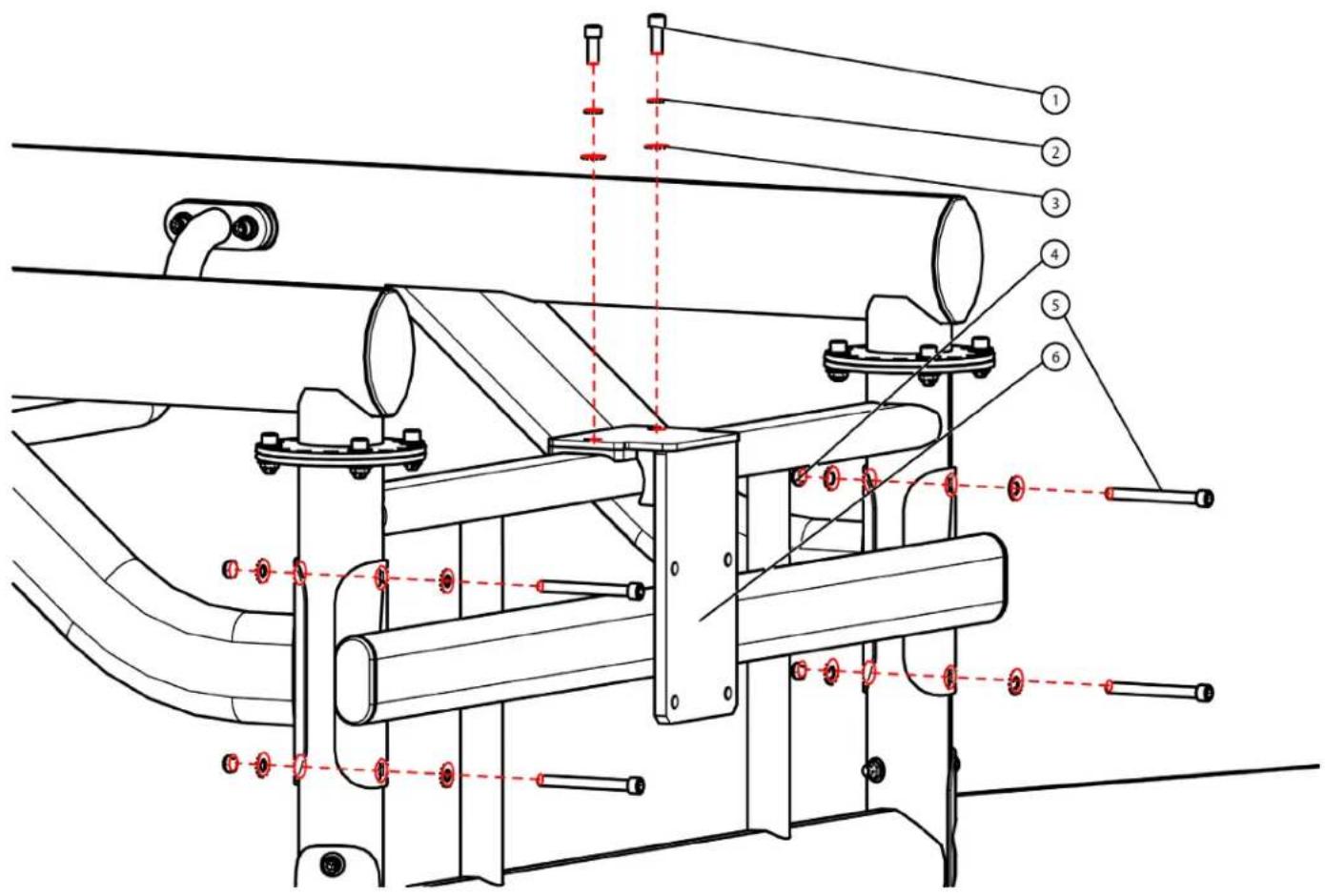
OPTIONAL ASSEMBLY STEPS:
Step 25A (Rope Flex):
Secure the Rope Flex Attachment Bracket to the Center Main Frame using the identified hardware.
Note: Disregard Steps 23A-24B and Steps 26A-27if the Rope Flex is installed in the same mounting location as the mounting locations are shared.
| Item Part Number Description Quantity | ____ | ||
| 1 C1 | 023 SHCS, 3/8”-16, 1” 2 | ||
| 2 C | 749 Washer, Lock, 3/8” 2 | ||
| 3 C | 754C Washer, Flat, 3/8” 10 | ||
| 4 C | 766A Lock Nut, 3/8”-16 4 | ||
| 5 C1 | 137 SHCS, 3/8”-16, 3-15/16” 4 | ||
| 6 | XFT-RPP4B-US | Rope Flex Attachment Bracket | 1 |
text_image
Technical diagram of a mechanical assembly with numbered components and red dashed alignment lines indicating alignment or positioning.CHAPTER 2: ASSEMBLY GUIDE
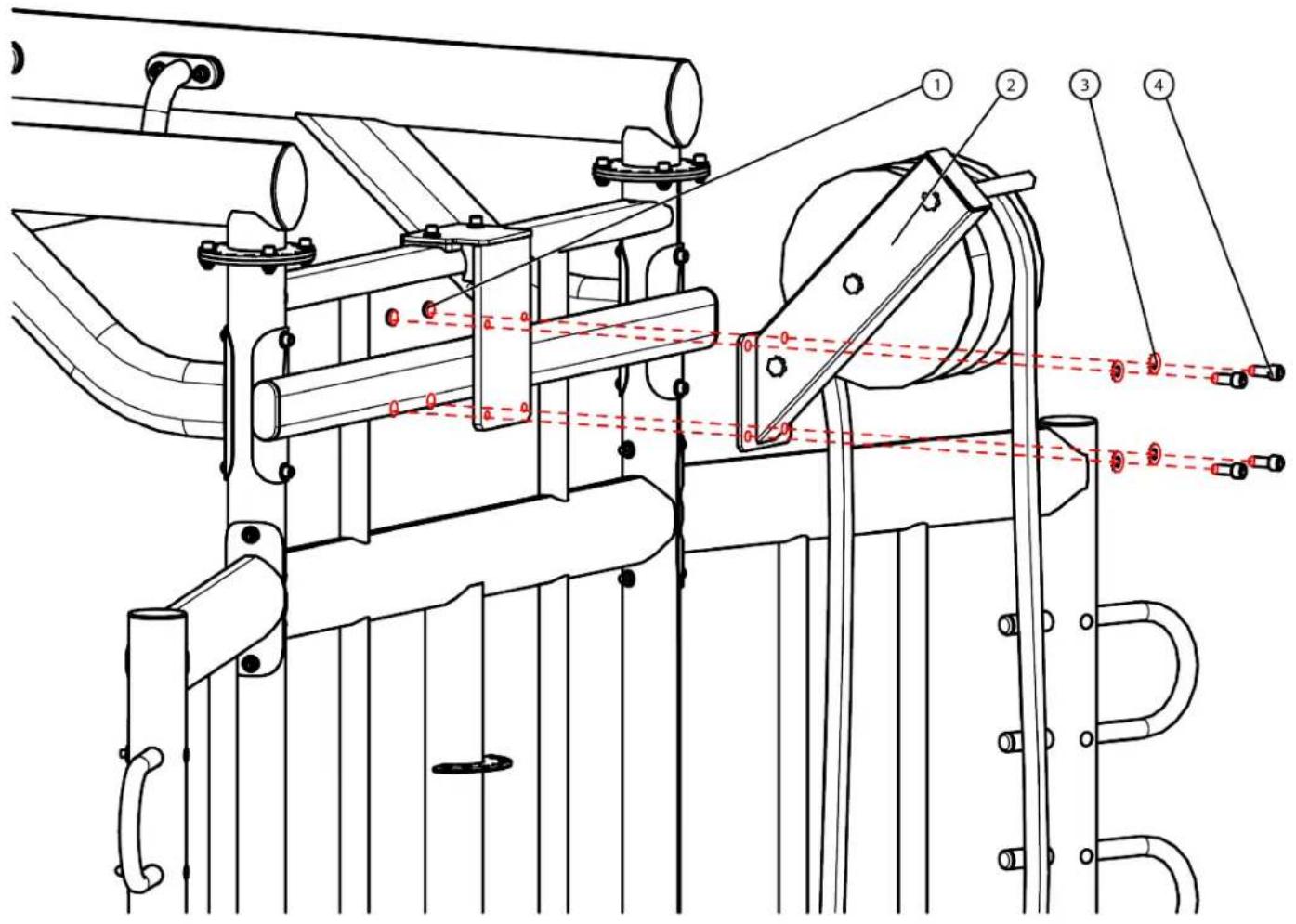
OPTIONAL ASSEMBLY STEPS:
Step 25B (Rope Flex):
Secure the Rope Flex to the Rope Flex Attachment Bracket using the identified hardware.
| Item Part Number Description Quantity | ____ | ||
| 1 W0220 Lock Nut, 1/2”-13 4 | |||
| 2 XFT000-RPL520X | Rope Flex 1 | ||
| 3 C1066 Washer, Flat, 1/2” 4 | |||
| 4 C1068 SHCS, 1/2”-13, 1-1/4” 4 | |||
text_image
Technical diagram of a mechanical device with numbered components and red dashed lines indicating alignment or measurement points.CHAPTER 2: ASSEMBLY GUIDE
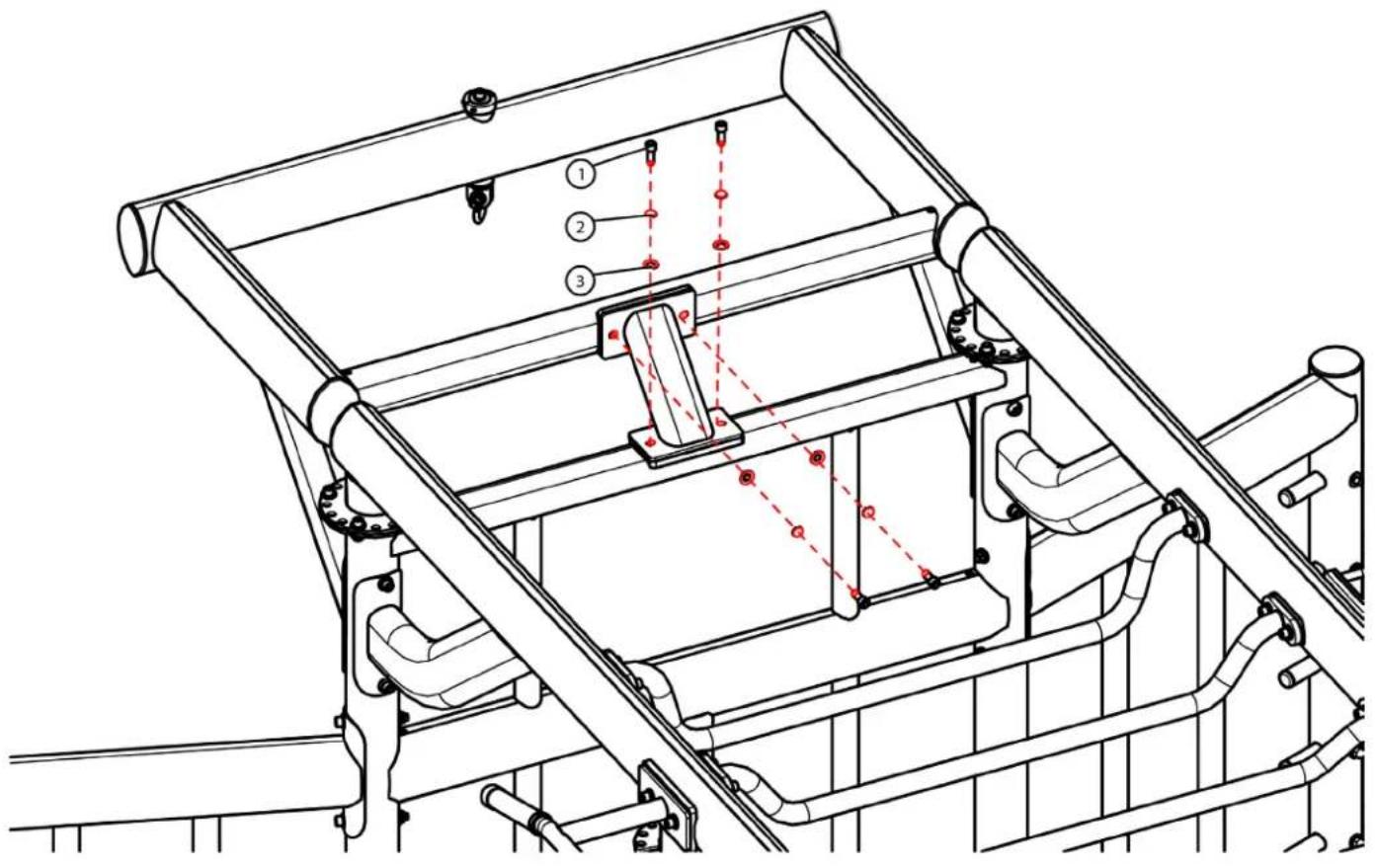
OPTIONAL ASSEMBLY STEPS:
Step 26A (Heavy Bag):
Secure the Heavy Bag Attachment Bracket to the Center Main Frame using the identified hardware.
Note: Disregard Steps 23A-25B and Step 27 if the Heavy Bag is installed in the same mounting location as the mounting locations are shared.
| Item Part Number Description Quantity | ____ | ||
| 1 C | 766A Lock Nut, | 3/8”-16 4 | |
| 2 C | 754C Washer, Flat, | 3/8” 8 | |
| 3 XFT-HVY4B-US | Heavy Bag Attachment Bracket | 1 | |
| 4 C1 | 137 SHCS, 3/8” | -16, 3-15/16” 4 | |

text_image
Technical diagram of a mechanical assembly with numbered components and red dashed alignment linesCHAPTER 2: ASSEMBLY GUIDE
OPTIONAL ASSEMBLY STEPS:
Step 26B (Heavy Bag):
Secure the Heavy Bag Attachment Bracket to the Center Main Frame using the identified hardware.
| Item Part Number Description Quantity | ____ |
| 1 C1023 SHCS, 3/8”-16, 1”4 | |
| 2 C749 Washer, Lock, 3/8”4 | |
| 3 C754C Washer, Flat, 3/8”4 |
text_image
Technical diagram of a mechanical assembly with numbered components and red dashed alignment lines indicating alignment or positioning.CHAPTER 2: ASSEMBLY GUIDE
OPTIONAL ASSEMBLY STEPS:
Step 27 (Suspension Bracket):
Secure the Suspension Bracket to either end of the XFT-400 using the identified hardware.
Note: Disregard Steps 23A-26B if the Suspension Bracket is installed in the same mounting location as the mounting locations are shared.
| Item Part Number Description Quantity | ____ |
| 1 C-622 SHCS, 5/8”-18, 3/4” 2 | |
| 2 C-749 Washer, Lock, 3/8” 2 | |
| 3 C-754C Washer, Flat, 3/8” 2 | |
| 4 XFT-SUS Suspension Bracket 1 |
Note: Step 27 shows the XFT-200/201, but it applies to the XFT-400 as well.

text_image
Technical diagram of a mechanical assembly with numbered components and red dashed lines indicating alignment or measurement points.CHAPTER 2: ASSEMBLY GUIDE
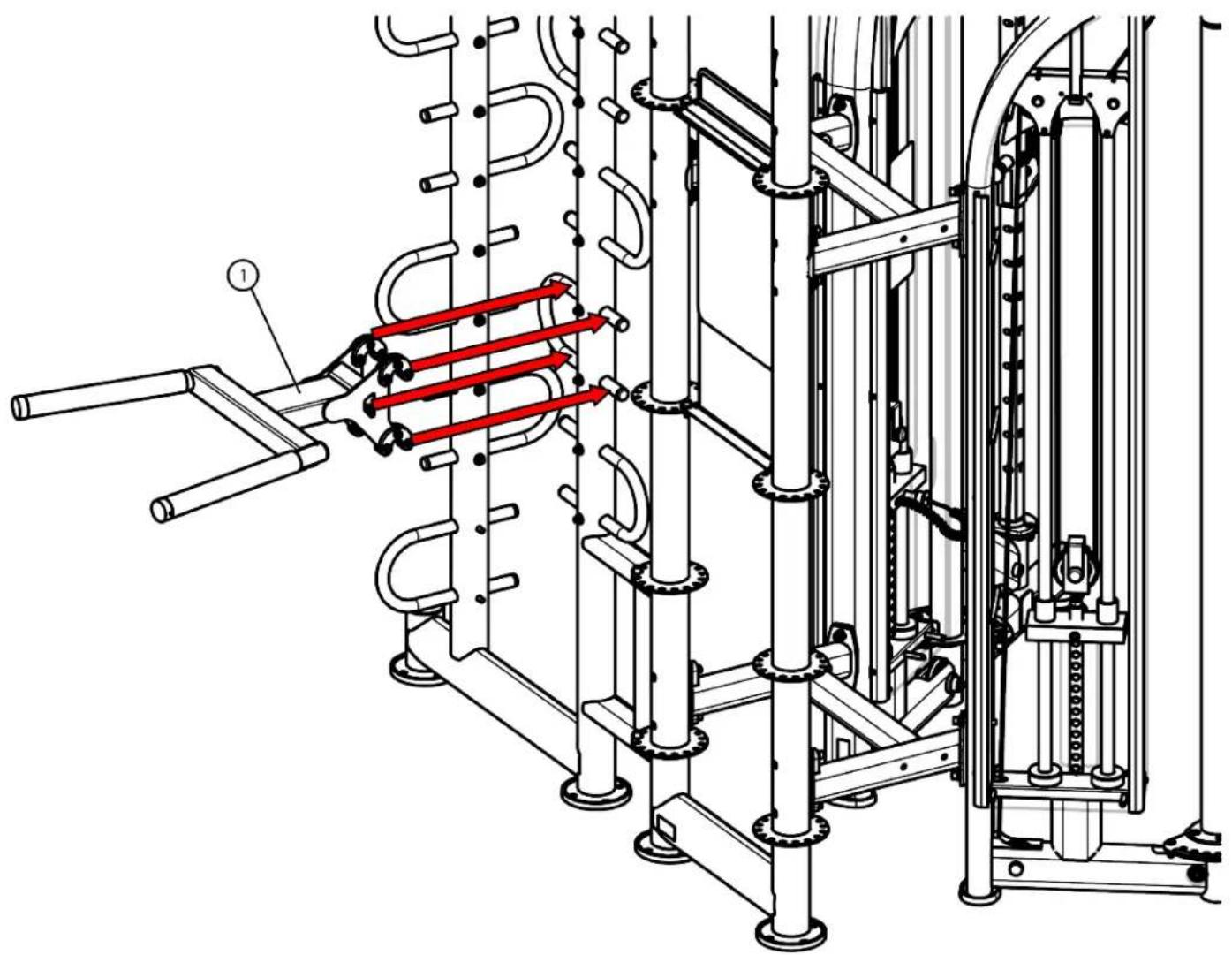
OPTIONAL ASSEMBLY STEPS:
Step 28 (Dip Station):
Assemble the dip station to the rack station.
Note: Step 28 shows the XFT-200/201, but it applies to the XFT-400 as well.
| Item Part Number Description Quantity | _ |
| 1 XFT-DIP Dip Station 1 |
natural_image
Technical line drawing of a mechanical assembly with pipes and gears, no visible text or symbolsCHAPTER 2: ASSEMBLY GUIDE
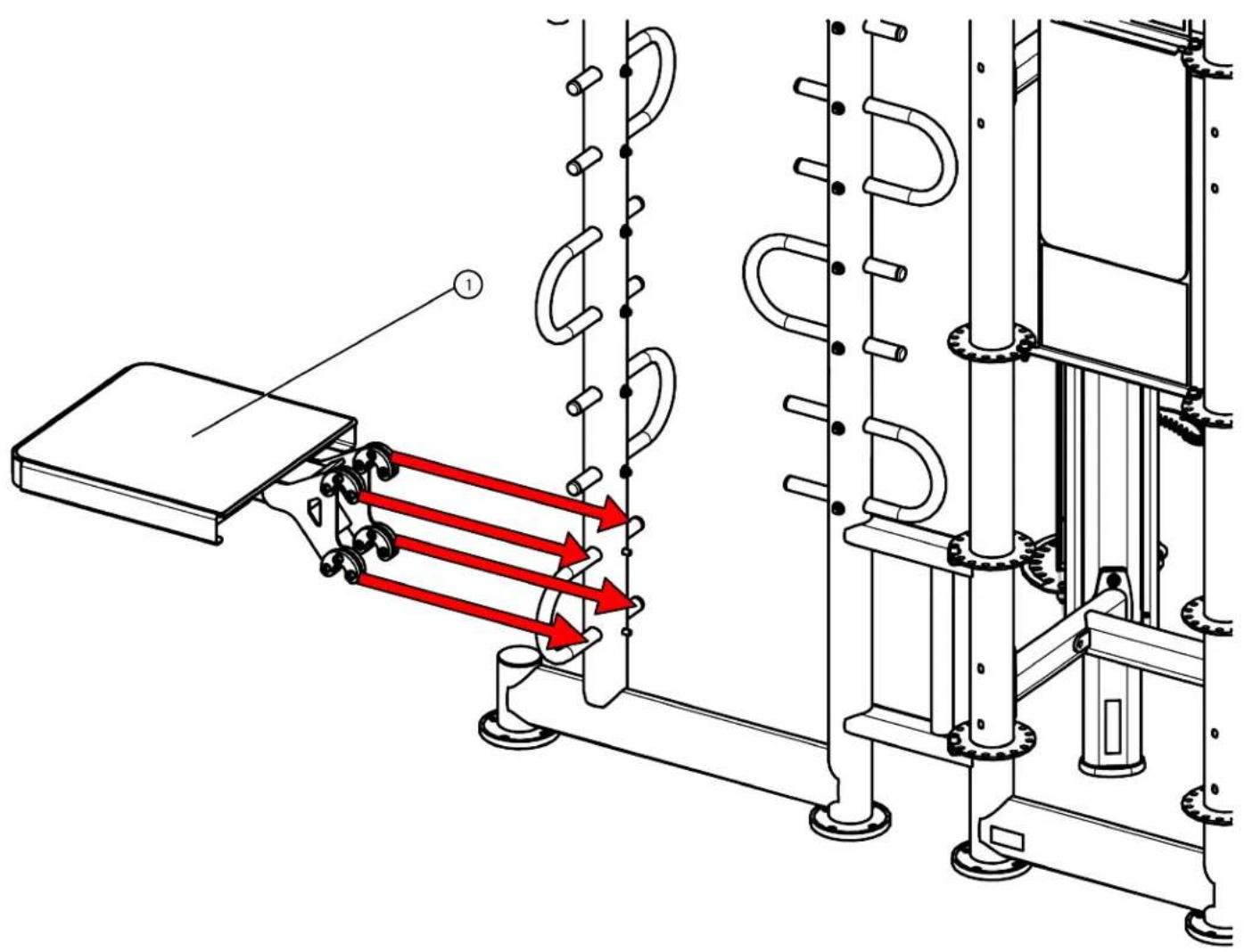
OPTIONAL ASSEMBLY STEPS:
Step 29 (Step Platform):
Assemble the step platform to the rack station.
| Item Part Number Description Quantity | _ |
| 1 XFT-SPL Step Platform 1 |
Note: Step 29 shows the XFT-200/201, but it applies to the XFT-400 as well.
text_image
Technical diagram showing mechanical assembly with red arrows indicating motion or force directions, labeled with number 1.CHAPTER 3: CARE & MAINTENANCE
CARE & MAINTENANCE:
Preventative maintenance is crucial to maintaining the function and safety of this equipment. Your facility must establish written guidelines for preventative maintenance and keep written or online records of the maintenance performed on these products. As a minimum, the items presented in the Safety Instructions section of this document and the items that follow here, should be included in your maintenance program.
IMPORTANT: Always purchase replacement parts from TRUE Fitness. Many parts are tested and manufactured specifically for TRUE Fitness equipment. Use of unapproved parts may cause serious injury and/or void the limited warranty.
DAILY INSPECTION&MAINT'EMANCE:
The following items are critical to the safety of users and maintenance staff as well as ensuring the optimum performance of the machines. These inspections should be performed each day before the equipment is subject to use. TRUE Fitness is not responsible for performing or scheduling regular maintenance or inspections.
- Inspect cables for wear, tension, and proper connection (as described in the cable inspection section below) if equipped.
- Inspect all adjustment pins, weight stack pins, set screws, gas shocks, snap links, and pulleys if equipped.
- Inspect all safety and instructional decals.
- Inspect all weight stack shields if equipped.
- Verify that rubber hand grips are intact and secure.
- Verify that anti-skid foot grips are intact and secure
- Verify that the weight stack selector pin is attached with the coiled lanyard to the top plate if equipped.
WEEKLY INSPECTION&MAINTENANCE:
The following items are critical to the safety of users and maintenance staff as well as ensuring the optimum performance of the machines. These inspections should be performed each week. TRUE Fitness is not responsible for performing or scheduling regular maintenance or inspections.
- Check entire length of cable & end fittings for any signs of wear if equipped. Replace immediately as required. (Refer to Daily Maintenance Section).
- Verify that a minimum of 1/2 inch (12.7mm) of the threaded portion of the cable bolt is threaded into the top plate and that the nut is tight if equipped with a cable. (See Cable Inspection & Maintenance Section).
- Perform a function test by placing the selector pin in the top plate and cycling the machine through the intended motion if equipped with a cable. Verify that the machine operates smoothly without binding. Select a moderate weight and repeat.
- Verify that each pulley rotates freely when performing the exercise if equipped with pulleys. A pulley that does not rotate will cause extreme cable wear and could lead to cable failure. Determine cause and remedy immediately.
- Verify that the adjustment pop pins retract easily and fully engage (when released) into each adjustment disc hole/slot. The pop pins are spring loaded so they should return to the engaged position when you release the knob.
- Verify that the adjustment pin disengages and engages freely when actuating the adjustment mechanism. Be sure that the adjustment pin inserts fully into the adjustment disc.
- Verify that all hardware is tight and that associated frame members are secure. Apply a few small drops of a thread locking compound such as Loctite on any loose bolts.
- Inspect frame for integrity and function. Replace any components at the first sign of wear with only TRUE supplied parts.
CHAPTER 3: CARE & MAINTENANCE
OTHER SCHEDULED PREVENTIVE MAINTENANCE:
TRUE recommends that scheduled maintenance be performed by a qualified service technician. Please contact your dealer or visit www.truefitness.com to contact a local TRUE authorized service technician.
Monthly:
Clean guide rods and lubricate with a Teflon grease if equipped with guide rods.
Every 6 months:
Lubricate pivot bearing and linear bearings with lithium grease.
CLEANING THE EQUIPMENT:
Daily Cleaning:
Wipe all machines with a water dampened cloth and dry completely. This includes painted parts, chrome plated parts (except guide rods), plastic parts, and upholstered pads. It is important not to leave parts damp. This will increase the potential for corrosion to occur.
CAUTION:
Certain anti-bacterial cleaners and other harsh cleaning agents can induce corrosion on the machine components. These solutions can also dry out and cause cracking and splitting on the upholstery.
Heavy Duty Cleaning:
Guide Rods (If Equipped): Clean and lubricate with a Teflon Spray. Be sure to coat the entire guide rod. Spraying lubricant into the cap plate bushings is also recommended.
Chromed Adjustment Tubes: Wipe away dust and dirt before applying a Teflon spray lubricant. TRUE Fitness recommends using TriFlow or a similar brand.
Linear Bearings: Clean the linear shaft and lubricate (as required) with Teflon based grease. Keeping linear bearings clean and lubricated is critical to long life and good performance.
Painted Frames: If you have scuff marks, grease or a heavy dirt buildup on frame components, start with a mild soap solution or a diluted solution of a product such as Simple Green with a dilusion of 32:1. If you cannot remove the marks using those methods, use a car polish/cleaner. DO NOT use solvents such as lacquer thinner, mineral spirits or acetone. For deeper scuff marks, use an automobile finish rubbing compound.
Upholstery: For heavy duty cleaning, use a mild soap solution. This method should be sufficient in the majority of instances. In severe stain cases, you can use a solution of 5-10% household bleach diluted with water. Be sure to test an inconspicuous area first. DO NOT use chemical cleaners on the vinyl upholstery. You can also use a lanolin based hand cleaner to clean your upholstery. Wipe off after cleaning with a damp cloth and thoroughly dry. Plastic Parts: use a mild soap solution to clean dirt and grease marks. Labels: use a mild soap solution to clean dirt and grease marks. Shrouds: use a mild soap solution to clean dirt and grease marks.
CAUTION:
Do not use any acidic cleaners. Doing so will weaken the paint or powder coatings and may void the TRUE Fitness Warranty. Never pour or spray liquids on any part of the equipment. Allow the equipment to dry completely before using.
CHAPTER 3: CARE & MAINTENANCE
CAUTION:
If you determine that the equipment needs service, make sure that the equipment cannot be used inadvertently and ensure other users know that the machine needs service.
*To order parts or to contact a TRUE Authorized Service representative, please visit www.truefitness.com
CABLE INSPECTION & MAINTENANCE:
One of the most critical areas that require frequent inspection on any weight machine is the cable or belt system that lifts the weight stack if the machine is equipped with those items. Sudden failure of a worn cable can, in some instances, result in injury to the user. It is the responsibility of the facility to inspect the cables frequently.
Cables are components that wear over time. This means that the more often a piece of equipment is used, the greater the likelihood that cable wear will occur. This holds true for equipment made by any manufacturer and applies to urethane belts as well as wire rope cables. Listed below are the areas of the cable that require inspection.
*TRUE Fitness recommends that all cables be replaced on an annual basis to maintain the safety of all users.
Cable Wear:
Inspect all cables for any signs of wear. Pay close attention to the cable in the area of the end fittings and attachment points. Inspect the areas around the pulleys and/or cams. Shown below are examples of cables that exhibit signs of potential failure. If any of these conditions are apparent, the machine should immediately be taken out of service and repaired. Be sure to use only cables supplied by TRUE Fitness. DO NOT use cables that have fittings attached with hand-crimp tools.
| Twisted Cable (Zig-Zag pattern): | Break in the Cable Cover: |
| Break/Bend in Cable: | Tear in the Cable Cover: |
| Stretched Cable Covering: | Crimp Connector Dislodged: Bad Good |
CHAPTER 3: CARE & MAINTENANCE
Cable Tension:
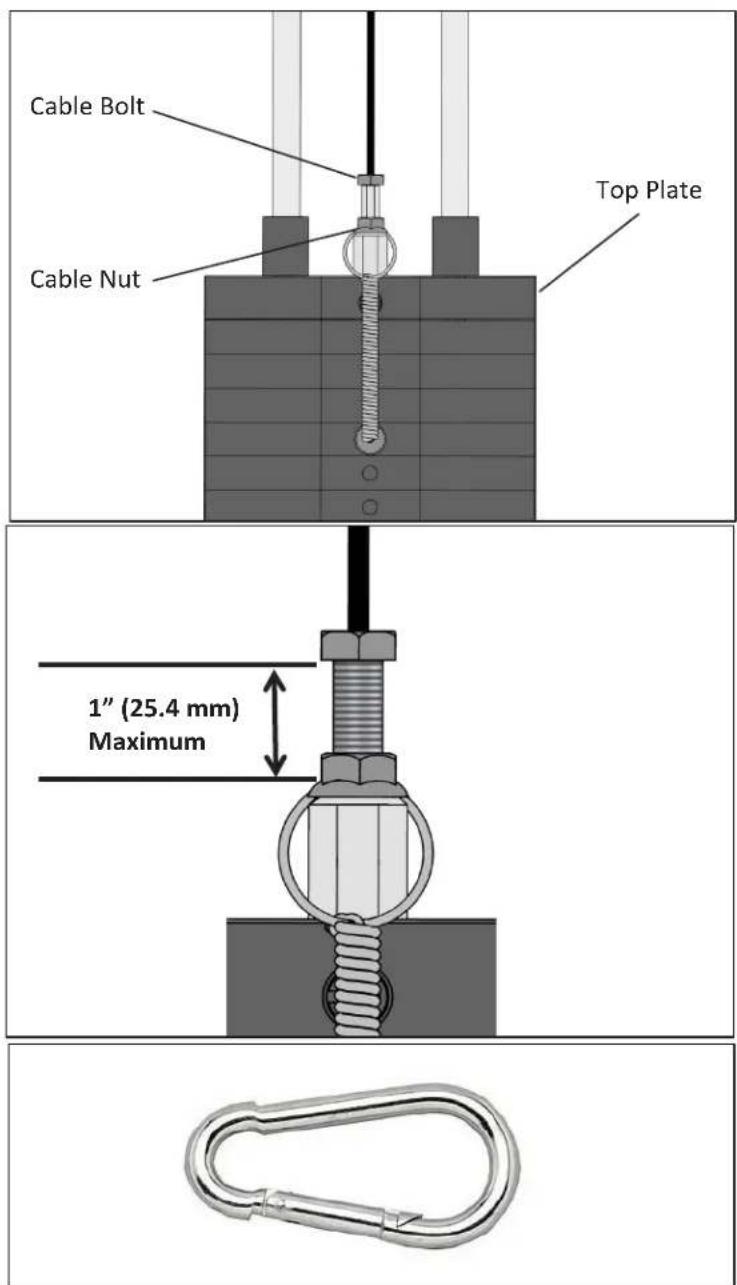
Ensure that the cables are adjusted to remove any slack using the threaded end fittings. These are normally located at the weight stack connection. Depending upon the machine, there may be multiple threaded fitting on multiple cables. You can determine if there is too much slack by performing the exercise. As you start to move a load arm or handle, the weight stack should lift immediately. If not, the cable tension needs to be adjusted.
To adjust the cable tension, loosen the cable nut that is located on the cable bolt connected to the top plate. Tighten the cable bolt until the top plate is barely lifted off of the first weight plate and then re-tighten the cable nut.
CAUTION:
A minimum of 1/2 inch (12.7mm) of the threaded portion of the cable bolt must be threaded into the top plate.
*No more than 1 inch (25.4 mm) of the threaded portion of the cable bolt should be visible.
Handle Fittings (if applicable):
Inspect the cable fittings where any handles are attached to the end of the cable. The fittings supplied with this machine are load rated snap-links. Ensure that the snap-link opens and closes easily and is fully engaged when closed. Replace the snap-link as needed.
text_image
Cable Bolt Top Plate Cable Nut 1" (25.4 mm) MaximumCHAPTER 4: CUSTOMER SERVICE
CONTACTING SERVICE:
TRUE Fitness recommends that you gather the serial number, model number, and a brief description of the reason for the request. After information has been gathered you may choose to contact your selling dealer or local service company to set an appointment. (If you are not familiar with who is in your area, you may visit our website at www.truefitness.com and use our dealer locator to obtain the contact information for the closest dealer).
You may also contact TRUE Fitness' customer support team by calling 800-883-8783 or emailing us at service@truefitness.com Monday — Friday during normal hours of operation.
TRUE FITNESS SERVICE DEPARTMENT
865 HOFF ROAD
ST. LOUIS, MO 63366
1.800.883.8783
HOURS OF OPERATION: 8:30 A.M. - 5:00 P.M. CST
E-MAIL: service@truefitness.com
CONTACTING SALES:
Interested in TRUE products? Please contact us with any sales or product inquires so that we may direct you to the appropriate sales representative to answer your questions.
E-MAIL: sales@truefitness.com
CHAPTER 4: CUSTOMER SERVICE
REPORTING FREIGHT OR PARTS DAMAGE:
Unfortunately, sometimes materials can be damaged during shipment. If materials are damaged during shipment, please follow the guidelines below to determine the appropriate process for you to follow in case of damages.
Severe Damage:
Obvious damage to external packaging / internal product. Please refuse the shipment and it will be returned to TRUE Fitness by the carrier. Contact the TRUE Fitness customer support team by calling 800.883.8783 or sales support team by calling 800.426.6570 Monday-Friday during normal hours of operation to notify us that the shipment has been refused. Once we have received the damaged shipment, a replacement shipment will be sent to you. Only refuse the damaged piece if the shipment is multiple boxes.
Slight Damage:
The box may have minimal damages and you are not sure if the actual product is damaged or not. You must sign the bill of lading as damaged when accepting the shipment. Once you have opened the box and you have determined something is indeed damaged please gather the serial number, model number, description and photos of damages. Please make sure the photos include the damaged product as well as the damaged box the product arrived in. Contact the TRUE Fitness customer support team by calling 800.883.8783 or sales support team by calling 800.426.6570 Monday-Friday during normal hours of operation.
Concealed Damage:
You may receive a shipment that looks intact and discover once the box has been opened that there are hidden damages. Please notify the carrier immediately. We will not be able to file a claim if the carrier is not notified in a timely manner. Once you have called the carrier you will need to gather the serial number, model number, description and photos of damages. Contact the TRUE Fitness customer support team by calling 800.883.8783 or sales support team by calling 800.426.6570 Monday-Friday during normal hours of operation.
CHAPTER 5: WARRANTY INFORMATION
Save Time and Register Online!
Activate Multiple Warranties at truefitness.com
All TRUE® Fitness products are distributed by TRUE and are warranted to the original registered product purchaser and the parts of the TRUE product (the "Product") listed below, under normal use and service, shall be free of manufacturing defects in workmanship and materials only for the period of time beginning from the original date of purchase set forth below:
| Frame* 10 Years | |
| PartsFrame (excluding coatings) & Ropeflex structural components (excluding coatings)Ropeflex Bearings & PulleysAttachment Kits & all other components and accessories not mentioned elsewhereRopeflex RopeCosmetics, Coatings, Grips, Surfaces, Heavy Bag, and Rebounder | 10 Years3 Years1 Year6 months3 months |
| LaborFrame (excluding coatings), Ropeflex, Attachment Kits & all other components and accessories not mentioned elsewhereCosmetics, Coatings, Grips, Surfaces, Heavy Bag, and Rebounder | 1 Year3 Months |
NOTE: Warranty valid for USA and Canada only.
NOTE: Failure to register this product will result in no servicing or authorization of parts to be shipped.
NOTE: Buying after-market products from a 3rd party will result in voided warranty.
NOTE: This product is intended for Commercial use. If this product will not be used in this particular setting, please contact TRUE as is warranty is void.
Frame: The frame is warranted for defects in material and workmanship for a 10 years. The frame is warranted for labor and freight (for parts shipped from TRUE) for one year from date of purchase. * This limited warranty on structural frame does not include paint or coatings.
Parts: The Atlas' Ropeflex structural components (excluding coatings) are warranted for defects in material and workmanship for ten years with one year labor warranty. Ropeflex Bearings and Pulleys are warranted for defects in material and workmanship for three years with one year labor warranty. Attachment Kits and all other components and accessories not mentioned elsewhere are warranted for defects in material and workmanship for one year with one year labor warranty. Ropeflex Rope is warranted for defects in material and workmanship for six months with one year labor warranty. This limited warranty does not cover damage or equipment failure resulting from or caused by improper assembly/installation, failure to follow instructions and warnings in owner's manual, accident, misuse, abuse, unauthorized modification, or failure to provide reasonable and necessary maintenance.
Cosmetics: The Atlas HD's cosmetic parts, coatings, grips and upholstery are warranted for defects in material and workmanship for three months with labor warranty to match the parts warranty period. This limited warranty does not cover damage or equipment failure resulting from or caused by improper assembly/installation, failure to follow instructions and warnings in owner's manual, accident, misuse, abuse, unauthorized modification, or failure to provide reasonable and necessary maintenance. This limited warranty will apply to, but may not be limited to, plastic covers, shrouds, caps, badges, overlays, paint, coatings, soft step inserts, and grips.
Labor: Labor is covered for a period of one year from the date of purchase unless otherwise expressed within this limited warranty as long as a TRUE authorized service provider performs the service. Service that requires over 50 miles of travel may be subject to additional charges. Reasonable and necessary maintenance guidelines can be found in the owner's manual.
Claims Procedure: TRUE Limited Warranty service may be obtained by contacting the authorized TRUE dealer from whom the Product was purchased. If the dealer from whom the Product was purchased is no longer an authorized TRUE dealer, then TRUE Limited Warranty service may be obtained by contacting TRUE directly using the following contact information:
TRUE Fitness, Service Department
865 Hoff Road, St. Louis, MO 63366
1.800.883.8783
Hours of operation 8:30am - 5:00 pm CST
CHAPTER 5: WARRANTY INFORMATION
Save Time and Register Online!
Activate Multiple Warranties at truefitness.com
The above Limited Warranty is subject to and will be in accordance with the conditions set forth below:
-
THIS LIMITED WARRANTY GIVES YOU SPECIAL LEGAL RIGHTS AND YOU MAY ALSO HAVE OTHER RIGHTS, WHICH VARY FROM STATE TO STATE.
-
This Limited Warranty can be processed only if the Warranty Registration Form is completed online, or if the attached form is filled in, signed by the original purchaser, and mailed to TRUE within 30 days of purchaser's receipt of this Product. The serial number must be intact on the Product for this Limited Warranty to be valid.
-
This Limited Warranty applies to the product only while the Product remains in the possession of the original purchaser and is not transferable
-
This Limited Warranty becomes VALID ONLY if the Product is initially assembled/installed by a TRUE authorized dealer/ technician (if anyone other than a TRUE authorized dealer/ technician initially assembles and installs the Product, this Limited Warranty will be void unless the written authorization of TRUE is first obtained).
-
This Limited Warranty does not cover damage or equipment failure resulting from or caused by improper assembly/installation, failure to follow instructions and warnings in owner's manual, accident, misuse, abuse, unauthorized modification, or failure to provide reasonable and necessary maintenance (as referenced in thw owner's manual.)
-
This Limited Warranty applies only to the cost of repair or replacement of parts and does not include labor (beyond the above warranty period), transportation, service, return and freight charges associated therewith except as expressly specified herein.
-
This Limited Warranty shall not apply to: Service calls to correct installation of the equipment or instruction to owners on how to use the equipment; or any labor costs incurred beyond the applicable labor warranty period.
-
This Limited Warranty, which is given expressly and in lieu of all other express warranties, constitutes the only warranty made by TRUE.
-
ANY IMPLIED WARRANTY, INCLUDING WITHOUT LIMITATION THE WARRANTIES OF MERCHANTABILITY AND FITNESS FOR A PARTICULAR PURPOSE, IS LIMITED IN DURATION AND REMEDY TO THE TIME PERIOD COVERED BY THE LIMITED WARRANTY. SOME STATES DO NOT ALLOW LIMITATIONS ON HOW LONG AN IMPLIED WARRANTY LASTS, SO THE ABOVE LIMITATION MAY NOT APPLY TO YOU.
-
THE REMEDIES DESCRIBED ABOVE ARE YOUR SOLE AND EXCLUSIVE REMEDIES AND TRUE'S ENTIRE LIABILITY
FOR ANY BREACH OF THIS LIMITED WARRANTY. TRUE'S LIABILITY SHALL UNDER NO CIRCUMSTANCES EXCEED THE ACTUAL AMOUNT PAID BY YOU FOR THE PRODUCT, NOR SHALL TRUE UNDER ANY CIRC UMSTANCES BE LIABLE FOR ANY CONSEQUENTIAL, INCIDENTAL, SPECIAL, OR PUNITIVE DAMAGES OR LOSSES, WHETHER DIRECT OR INDIRECT. SOME STATES DO NOT ALLOW THE EXCLUSION OR LIMITATION OF INCIDNETIAL OR CONSEQUENTIAL DAMAGES, SO THE ABOVE LIMITATION OR EXCLUSION MAY NOT APPLY TO YOU.
NOTE TO AUTHORIZED WARRANTY LABOR PROVIDERS:
Warranty labor reimbursement or warranty parts rights may not be transferred to, reassigned to, a third party without the express written consent of TRUE. Even jobbing out warranty labor requires TRUE's written approval.
ATLAS HD SERIAL NUMBER:
The Atlas HD comes with one serial number on the base of the machine. Please write down your serial number below and keep for your records.
SERIAL NUMBER:
SAMPLE SERIAL NUMBER STICKER:
TRUE
TRUE FITNESS TECHNOLOGY, INC
865 HOFF RD, ST LOUIS MISSOURI 63366 USA
MODEL NO: XFT400
SERIAL NO: 18-XFT40001A
Keep this page for your records
Page # 80 of 81
CHAPTER 5: WARRANTY INFORMATION
Thank you for purchasing a TRUE product. To validate the TRUE product warranty the fast and easy way, please go on-line now to truefitness.com/support and register your product. The information you provide will never be distributed to any other individuals or agencies for any purpose. If you prefer to mail your warranty card, have the owner of the product complete the information below and return it to TRUE Fitness within 30 days from the date of equipment installation.
To mail your warranty information, please fill in the information below and mail to: Service Dept., TRUE Fitness, 865 Hoff Road, St. Louis, MO 63366 (or save postage and register online at truefitness.com)
Commercial Warranty Registration
PLEASE PROVIDE YOUR SERIAL NUMBER BELOW. REQUIRED FOR WARRANTY REGISTRATION:
SERIAL NUMBER:
Model Type ____
Date of Purchase
Your Company Name ____
Contact First Name
Contact Last Name
Address
City ____ State ____ ZIP ____
Email Address____ Website ____
Phone____Fax____
- Where did you first learn about TRUE?
a. Dealer b. Website
____ c. Advertisement ____ d. Referral
____ e. Current Customer ____ f. Other ____
- Why did you purchase a TRUE product?
a. Design/Appearance b. Dealer Suggestion
____ c. Price/Value ____ d. Quality Construction
e. Performance f. TRUE Reputation
g. Other
- Please indicate your type of facility:
a. Apartment/Condo b. Corporate Fitness Center
____ c. Municipality ____ d. Health Club/Gym/Spa
____ e. Hotel/Resort ____ f. Military Base
____ g. Student Rec Center ____ h. Other
- What other types of equipment does your company ly own?
a. Treadmill Brand
b. Bike Brand
c. Elliptical Brand
d. Free Weights/Gym Brand
- How many people use your facility on a daily basis?
a. <25 b. 25-75
____ c. 76-150 ____ d. 150+
- Do you plan to purchase more fitness equipment in the next 6-12 months?
____ Yes ____ No
- If you answered "yes" to question 6, what type do you plan to purchase?
a. Treadmill b. Elliptical
____ c. Stationary Bike ____ d. Free Weights
____ e. Gym ____ f. Other ____
- Would you recommend TRUE to other club owners?
____ Yes ____ No
- You are a valued TRUE customer and your suggestions allow us to continually improve your experience. Is there anything else you would like us to know? Please explain: