PAC15L - Air-conditioner Climachill - Free user manual and instructions
Find the device manual for free PAC15L Climachill in PDF.


User questions about PAC15L Climachill
0 question about this device. Answer the ones you know or ask your own.
Ask a new question about this device
Download the instructions for your Air-conditioner in PDF format for free! Find your manual PAC15L - Climachill and take your electronic device back in hand. On this page are published all the documents necessary for the use of your device. PAC15L by Climachill.
USER MANUAL PAC15L Climachill
Portable Air Conditioner and Heater With Heat Pump Technology

natural_image
Line drawing of a large rectangular electronic device with wheels and a lid (no text or symbols)PAC15L
15,000btu Cool & Heat Portable Air Conditioner
Please read this manual carefully prior to operating the product.
Please keep ALL packaging for duration of Warranty Period
TABLE OF CONTENTS
IMPORTANT SAFEGUARDS 2
INTRODUCTION / WARRANTY 4
PRODUCT DIAGRAM 5-7
INSTALLATION 8-9
OPERATION 10
WATER DRAINAGE 11
WIFI CONTROL SETUP 12-24
MAINTENANCE 25
TROUBLESHOOTING 25
TECHNICAL SUPPORT / CUSTOMER SERVICE CONTACT 26
IMPORTANT SAFEGUARDS
Before installing and using your portable air conditioner and heater, it is important that you read this owner's manual carefully. Store this manual in a safe place for future reference.
This instruction manual is used for guidance and does not form part of a contract. It reserves the right to make technical changes without prior notice.
- Always place the unit on a level surface.
- The appliance shall be installed in accordance with national wiring regulation.
- The unit must be connected to a correctly grounded power supply. For your safety, this unit is grounded through the power cord plug when connected to a grounded wall outlet. Do not use an adapter plug or extension cord.
- Do not install the unit in an area where gas leakage may occur and/or in an explosive atmosphere.
- Do not apply an insecticide or any type of flammable spray on the unit.
- Confirm drainage piping is connected properly.
- Do not start or stop the unit by inserting or pulling out the power plug.
- Do not operate with wet hands.
- Close supervision is necessary when the unit is used near children. The unit in not intended for use by children.
- Do not insert anything into the air outlet. Do not obstruct air inlet or outlet grills.
- Do not expose skin or eyes directly to cool air for a long period of time.
- If an abnormal odour or smoke comes out of the unit, disconnect the unit immediately and contact a qualified service technician.
- When opening the filter cover, do not touch the metal parts in the unit's interior.
- Do not immerse the unit in water or any type of liquid. Do not use the unit in the immediate surroundings of a bath, shower, or swimming pool, or in any other steamy, wet areas.
- When cleaning the unit, always turn the unit off and unplug the power cord.
- Always inspect the power cord for signs of damage before use. If the power cord is damaged, it must be replaced by the manufacturer or a qualified service technician.
- Do not place a plant or allow a pet in the direct path of the airflow to avoid injury.
- Do not put a stove, etc, where it would be exposed to the direct airflow. It may affect combustion.
- Do not sit on the unit or place anything on it.
- Before storing, the water must be drained from the unit and the filters cleaned.
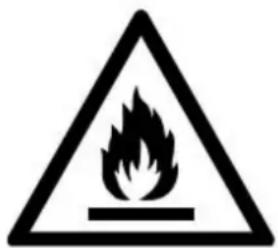
- The appliance must be placed in an area without any continuously sources of ignition (for example: open flames, gas or electrical appliances in operation).
- Do not puncture and do not burn.
- This appliance contains Y g (see rating label back of unit) of R290 refrigerant gas.
-
R290 is a refrigerant gas that complies with the European directives on the environment. Do not puncture any part of the refrigerant circuit.
-
If the appliance is installed, operated or stored in a nonventilated area, the room must be designed to prevent to the accumulation of refrigerant leaks resulting in a risk of fire or explosion due to ignition of the refrigerant caused by electric heaters, stoves, or other sources of ignition.
- The appliance must be stored in such a way as to prevent mechanical failure.
- Contact authorized service technician for repair or maintenance of this unit.
- Unplug the unit if strange sounds, smell, or smoke comes from it
- Do not use any exhaust hose other than provided by Climachill
- Do not use a smaller diameter exhaust hose than 152mm provided by Climachill
- Do not use a longer exhaust hose than 3m as provided by Climachill
- Do not use this machine in a room of less than 15m2
text_image
Warning sign depicting a flame symbol in a triangular shape, indicating hazard or caution.
natural_image
Simple line drawing of an open book with no text or symbols visibleGeneral Information
Recycling
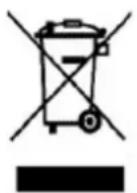
This marking indicates that this product should not be disposed with other household wastes throughout the EU. To prevent possible harm to the environment or human health from uncontrolled waste disposal, recycle it responsibly to promote the sustainable reuse of material resources. To return your used device, please use the return and collection systems or contact the retailer where the product was purchased. They can take this product for environmental safe recycling.
Warning
The unit creates water which is collected in an internal water tank which has a rubber drain plug, it is very unlikely but if this tank becomes damaged during transport or the rubber bung comes out then it is possible that the unit will leak water when it is operated. Prior to use make sure the drain plug is in place & then during first use periodically check the unit to make sure it isn't leaking water (look at bottom / under the unit) – during first use do not turn the unit on and leave it unattended for a long period of time without checking.
INTRODUCTION
Thank you for purchasing this Portable Air Conditioner and Heater. This unit is designed to improve indoor living and working comfort by providing cooling, dehumidifying, and heating with minimal installation.
Please complete the following information for future reference. Retain this owner's manual with your sales receipt as a permanent record of your purchase.
Date of Purchase: ____
Place of Purchase: ____
Invoice Number: ____
WARRANTY
This product comes with a 12month warranty from date of purchase (as indicated on original sales receipt).
Please note that it is a warranty condition that ALL of the original packaging is kept for the duration of the warranty period, (the main box can be folded flat for storage).
If you need to make a warranty claim and the unit requires returning to us then we are only able to organise collection of the unit if it is in its original packaging (this is an insurance requirement of our courier). Failure to keep the original packaging means we are unable to organise collection of the product from you

text_image
Rear cover Side view Operation panel Front view Castor Power line Air inlot lot Rear viewACCESSORIES
| ITEM DESCRIPTION QTY | — | |
 | EXHAUST HOSE 1 | |
 | HOSE WINDOW KIT ATTACHMENT 1 | |
 | HOSE CONNECTOR TO UNIT 1 | |
 | SLIDING WINDOW KIT 1 | |
 | MANUAL 1 | |
 | REMOTE CONTROL 1 | |
| WATER DRAIN PIPE 1 | ||
 | DOWL 2 | |
 | BATTERY 1 | |
After unpacking, please ensure the above listed accessories are included.
CONTROL PANEL AND DISPLAY
Cooling & Heating model & WIFI

text_image
H 1 2 3 4 SLEEP O O O HEAT FAN DEHUM COOL WIFI 6 O °C 7 8 9 HIGH MEDIUM LOW FULL SWING TIMER MODE DOWN UP SPEED POWER G F E C C B A| A Power on/off 1 | Cooling | |
| B Fan speed 2 | Dehumidifying | |
| C Temperature up 3 | Fan | |
| D Temperature down 4 Heating | ||
| E Operation mode 5 WIFI function | ||
| F Timer on/off 6 | Centigrade temperature | |
| G Auto swing | 7 | High fan speed |
| H Sleep mode 8 | Medium fan speed | |
| 9 | Low fan speed | |
| 10 | Water full | |
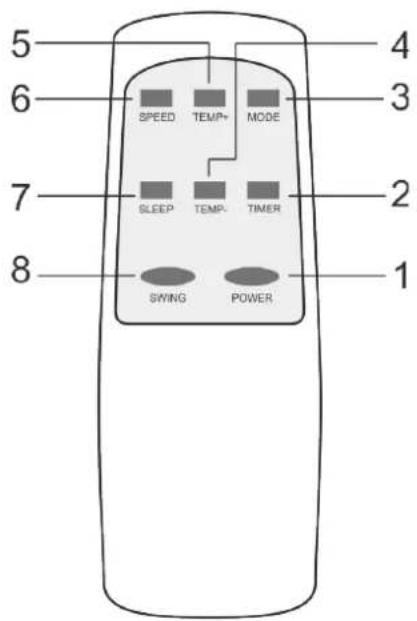
text_image
5 6 SPEED TEMP+ MODE 3 7 SLEEP TEMP. TIMER 2 8 SWING POWER 1 4| 1 | Power on/off |
| 2 | Timer on/off |
| 3 | Operation MODE |
| 4 | Temperature down |
| 5 | Temperature up |
| 6 | Fan speed |
| 7 | Sleep mode |
| 8 | Auto swing |
Notes:
- Do not drop the remote control.
- Do not place the remote control in a location exposed to direct sunlight.
INSTALLATION
Exhausting the Air
It is necessary to use the exhaust hose when using the machine. When in Cooling Mode hot air will be expelled out of the exhaust hose When in Heating Mode cold air will be expelled out of the exhaust hose
Setting Up the Exhaust Hose & Connecting to Machine
Take the 3x components, extend the exhaust hose and then twist the accessories onto each end of the hose

flowchart
graph LR
    A[" "] --> B[" "]
    B --> C[" "]
    C --> D[" "]
    D --> E[" "]
    style A fill:#f9f,stroke:#333
    style B fill:#ccf,stroke:#333
    style C fill:#cfc,stroke:#333
    style D fill:#fcc,stroke:#333
    style E fill:#cff,stroke:#333

text_image
(Aligning the bayonet ) (Insert down )
natural_image
Line drawing of an air conditioner unit connected to a door via tubing (no text or symbols)Venting the Exhaust Air
The exhaust hose should be kept as short and straight as possible so as to not restrict airflow of the exhausted air.
There are 3 x options with venting the exhaust air,
1) You can make a hole in the wall and pass the exhaust hose through the hole in the wall (this option doesn't require a window to be slightly open)
2) You can pass the end of the exhaust hose out of a slightly open window (you can pass the funnel attachment out of the window and then close the window onto the attachment to hold it in place
3) You can use the sliding window kit if you have an up/down or a side opening window
Window Kit Installation
The window kit is designed to fit into most standard vertical and horizontal windows. However, it may be necessary to modify some aspects of the installation process for certain window types.
- Open the window or sliding door and adjust the length of the window kit to fit the opening. Mark and cut down a single panel of the window kit if necessary.
- Place the window kit between the window and the window frame as shown in the images to the right. Close the window onto the window kit to form a tight seal.
- Attach the exhaust duct adapter to the window kit. Tabs located on the adapter will lock into place securing the adapter to the window kit.
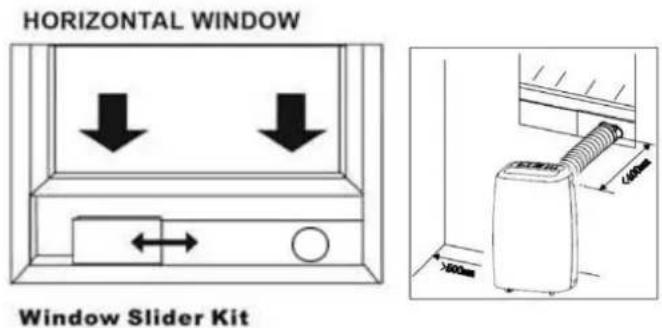
text_image
HORIZONTAL WINDOW Window Slider Kit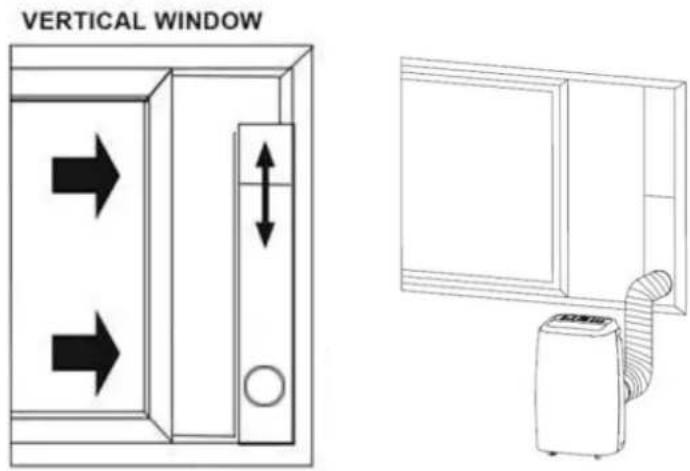
text_image
VERTICAL WINDOW ↑ ↓ ↑ ↑ ↑ ↑ ↑ ↑ ↑ ↑ ↑ ↑ ↑ ↑ ↑ ↑ ↑ ↑ ↑ ↑ ↑ ↑ ↑ ↑ ↑ ↑ ↑ ↑ ↑ ↑ ↑ ↑ ↑ ↑ ↑ ↑ ↑ ↑ ↑ ↑ ↑ ↑ ↑ ↑ ↑ ↑ ↑ ↑ ↑ ↑ ↑ ↑ ↓If you have a Hinged Window the above kit will not work with it, you can place the end of the exhaust out of the hinged window and the machine will vent this way, if you wish to seal the gap around the hose so to seal the window there are fabric kits that can be purchases online from the likes of Amazon (we don't sell them Im afraid)
OPERATION
Before Use
- Check that the Exhaust Hose has been mounted properly (see 'Installation' section). If the exhaust Hose is not correctly used, hot air will blow back into the room you are trying cool
- Check that the drain plug at the bottom rear of the unit is securely plugged in, to prevent water leaks (see page 9 – Water Drainage)
- Check that the local mains power matches that shown on the rating label of the unit
- Check that the location of the unit is suitable (flat, stable surface; away from sources water / heat)
- If the unit has recently been transported, let it stand for 6 hours to allow the compress contents to settle
Cooling Mode
Press the "Mode" button till the "Cool Mode" icon appears.
Press the “▲” or “▼” button to select a desired room temperature. (16°C - 31°C)
Press the "Fan Speed" button to select wind speed.
NOTE: During hot days, the unit will cool off the room most efficiently by setting the temperature at the lowest and the fan speed at the highest. Reducing the length of the exhaust hoses, insulating the exhaust hoses, and keeping direct sunlight to a minimum will also improve the cooling efficiency.
Heating Mode
Press the "Mode" button till the "Heat Mode" icon appears.
Press the “▲” or “▼” button to select a desired room temperature. (16°C - 31°C)
Press the "Fan Speed" button to select wind speed.
Dry (De-humidifying) Mode
Press the "Mode" button till the "Dry Mode" icon blinks
Automatically set the selected temperature to current room temperature minus 2°C.
Automatically set the fan motor to LOW wind speed.
Timer Mode
Timer ON setting
When the air-conditioner is OFF, press the "Timer" button
Use ‘Temperature Up/Down’ button to select how many hours you want to pass before the machine comes on Press “Timer” button to store
ON time can be regulated at any time in 0-24 hours.
Timer OFF setting
When the air-conditioner ON, press "Timer"
Use ‘Temperature Up/Down’ button to select how many hours you want to pass before the machine turns off Press “Timer” button to store
OFF time can be regulated at any time in 0-24 hours.
Swing (air flow)
After machine turns on, press this key, the louver will swing continuously left and right; by pressing this button again the
movement will stop and the louver remain in that position.
Sleep Control Function
While in cooling mode, press the SLEEP button to set the temperature. It increases 1 °C after an hour and at most increases 2 °C after 2 hours.
While in heating mode, press the SLEEP button to set the temperature. It decreases 1 °C after an hour and at most decreases 2 °C after 2 hours.
Press the SLEEP key again can cancel the setting.
WATER DRAINAGE
When the unit is in cooling mode, unwanted water is extracted from the air. Most of this water is re-used to cool the unit and make it run more efficiently. When the unit is used in extremely humid environments, water will collect in a water container at the bottom of the unit. When the water container is full, the compressor will stop but the fan will continue to run.
When the water container is full, the unit will display 'FULL' by means of the Water Indicator Full lamp being illuminated on the control panel until the tank is emptied. To resume operation, empty the water container according to the following steps:
- Turn the unit off. Try not move the unit when the water container is full (can cause spillage)
- Place a drain pan under the drainage port at the back of the unit (perhaps use a shallow tray)
- Remove the rubber plug from the drain hole & drain water
- Once the water container has been emptied, replace the rubber plug into the drain hole firmly
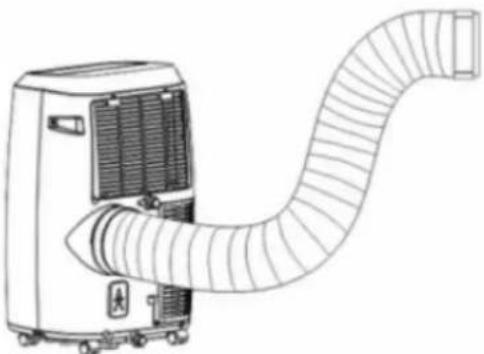
natural_image
Line drawing of a portable air conditioner unit with coiled duct (no text or symbols)NOTE: In heating mode, the unit will also create water which needs emptying from the machine.
Continuous Drainage
You can of course set the unit up for continuous drainage thus negating the need to empty water from the machine. To do this remove the rubber bung from the unit and attach the drain hose to the unit, then drain the water into a container (be careful that it doesn't overspill from the container)

How to use two drainage tubes
- To Drain the machine in Cooling & Dehumidifying Mode please remove the drain plug in the middle back of the machine and attach the drain hose to have a gravity drain, this way the water full lamp will not appear. (see Fig.A)
-
To Drain the machine in Heating / Cooling & Dehumidifying Mode please remove the drain plug in the bottom back of the machine and attach the drain hose to have a gravity drain, this way the water full lamp will not appear. (see Fig.B)
-
Download and Install APP
Use your phone to scan the QR code below or search in application market to download and install the App

text_image
QR code with a blue home icon in the center, likely linking to a digital service or app.- Register/Login/Forgot password
Register
If you don't have an App account, register an account or sign in with verification code by SMS.
This page describes the registration process.
- Tap to enter registration page
- The system automatically recognises your country / area. You can also select your country code. Enter the mobile number/E-mail and tap "Next", as shown in the picture 2
-
If you enter the mobile number, then enter the verification code in the message, as shown in the picture 2, and enter the password, tap"Confirm" to finish your registration.
-
If you enter the E-mail, enter the password as shown in the picture 4, and, tap"Confirm" to finish your registration.
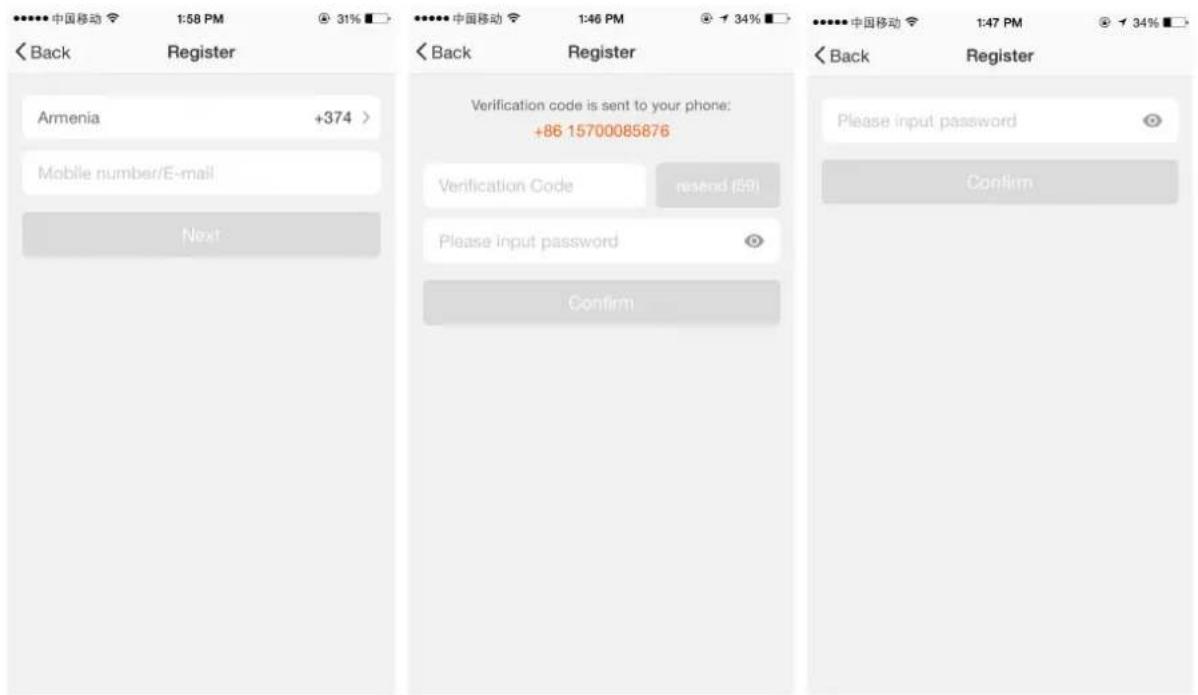
text_image
中国移动 1:58 PM @ 31% Back Register Armenia +374 > Mobile number/E-mail Next Verification code is sent to your phone: +86 15700085876 Verification Code reset (59) Please input password Confirm Please input password Confirm 中国移动 1:47 PM @ 34% Back Register Please input password ConfirmPicture 1
Picture 2
Picture 3

text_image
中国移动 1:53 PM Login Register Country / Region Armenia +374 > Mobile number/E-mail Password Login Sign in with SMS verification Forgot password Sign in with social media account facebook twitterSign in with username and password
- The system automatically recognises your country / area. You can also select your country code. Enter the mobile number/E-mail and tap "Next
- Enter your registered mobile number or Email, and password to login.
Sign in with social media account
If you have installed Facebook or Twitter in your smartphone, tap the corresponding icons and then sign in the App after social network authentication

text_image
中国移动 1:53 PM Login Register Country / Region Armenia +374 > Mobile number/E-mail Password Sign in with SMS verification Forgot password. Sign in with social media account facebook twitter Cancel SMS verify and sign in Country / Region Armenia +374 > Phone Number Verification Code Get LoginSign in with verification code via SMS
- Tap "Sign in with SMS verification", to new page
- The system automatically recognises your country / area.
You can also select your country code by yourself.
3.Enter the mobile number and tap "Get" to get a message
4.Enter the verification code in the message and tap "Login" to login the App
Forgot password
To find your password back, please follow the procedures:
- Tap "Forgot password", as shown in the picture 1
- The system automatically recognises your country / area. You can also select your country code by yourself. Enter the mobile number/E-mail and tap "Next", as shown in the picture 2
3.Enter the verification code in the message/E-mail, as shown in the picture 3, and enter the new password, tap"Confirm" to finish.

text_image
中国移动 1:53 PM Login Register Country / Region Armenia +374 > Mobile number/E-mail Password Login Sign in with SMS verification Forgot password Sign in with social media account facebook twitterPicture 1
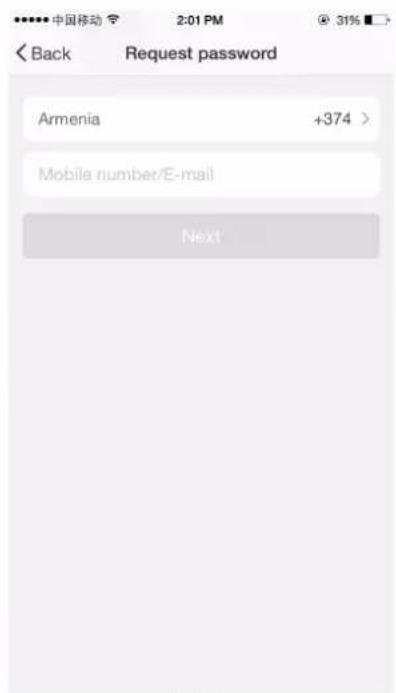
text_image
中国移动 2:01 PM 31% < Back Request password Armenia +374 > Mobile number/E-mail NextPicture 2
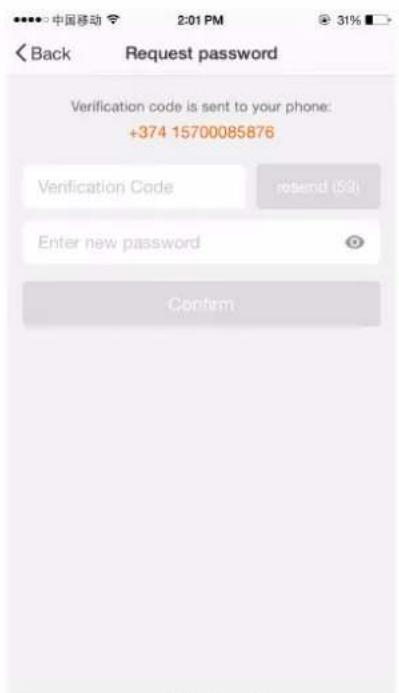
text_image
Back Request password Verification code is sent to your phone: +374 15700085876 Verification Code send (59) Enter new password ConfirmPicture 3
3.Add device-Normal mode
text_image
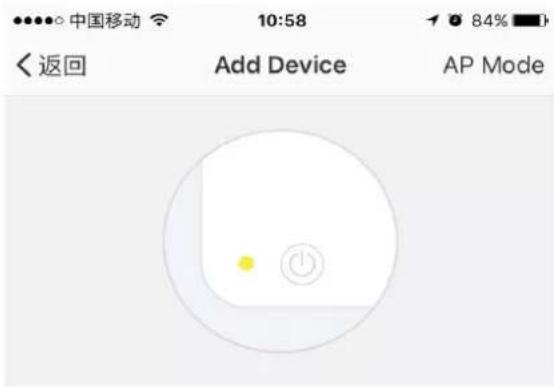
中国移动 10:58 84% < 返回 Add Device AP ModePower on and confirm indicator light is rapidly flashing
- For AP mode, please make sure the device's indicator light slowly flashes (1 time every 3 seconds), tap to go on to the next step
- If indicator light is slowly flashing, tap "how to set indicator light as slow flashes" to view operation processes.
How to set up light as rapid flash
Confirm light is rapidly flashing
4.Add device-AP mode
Notes: How to set indicator light as rapid flashing

text_image
Step 1 Power on device. Power off after 10s and then power on
text_image
Step 2 Hold the reset button for 5s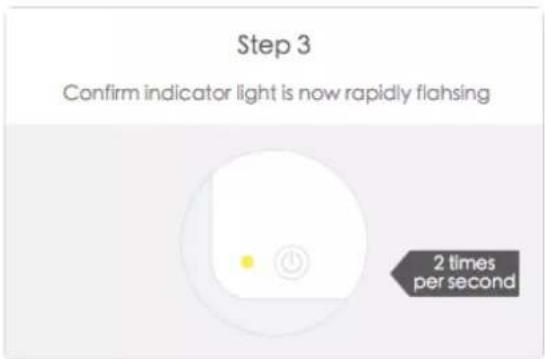
text_image
Step 3 Confirm indicator light is now rapidly flashing 2 times per second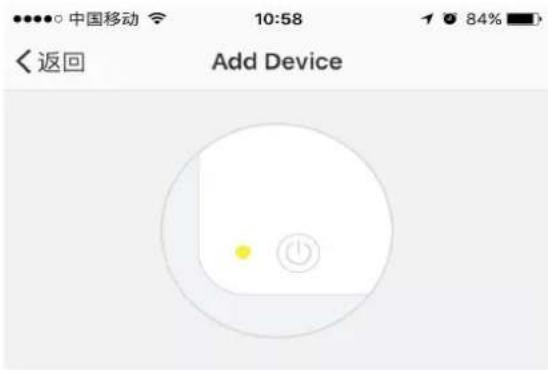
Power on and confirm indicator light is slowly flashing
- Enter the App, tap“+”in the upper right of the page to enter network connection page, as shown in the picture
2.There are two network connection methods(Normal mode and AP mode). Normal mode is default. Users could tap the upper right corner to switch the connection method to AP mode. - For normal mode, please make sure the device's indicator light rapidly flashes (2 times per second), tap to go on to the next step
- If indicator light is not rapidly flashing, tap "how to set indicator light as rapid flashes" to view operation processes.
How to set light as slow flash
Confirm light is slowly flashing
Notes: How to set indicator light as slow flashing

text_image
Step 1 Power on device. Power off after 10s and then power on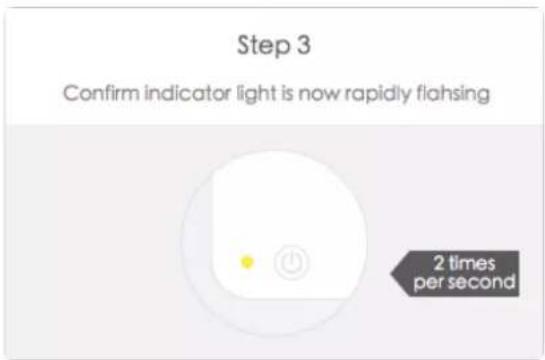
text_image
Step 3 Confirm indicator light is now rapidly flashing 2 times per second
text_image
Step 2 Hold the reset button for 5s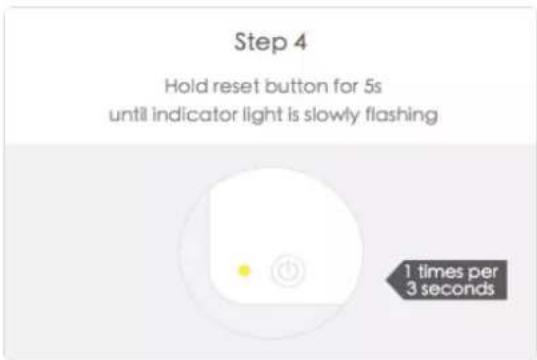
text_image
Step 4 Hold reset button for 5s until indicator light is slowly flashing 1 times per 3 seconds5.Add device-Enter Wi-Fi password
text_image
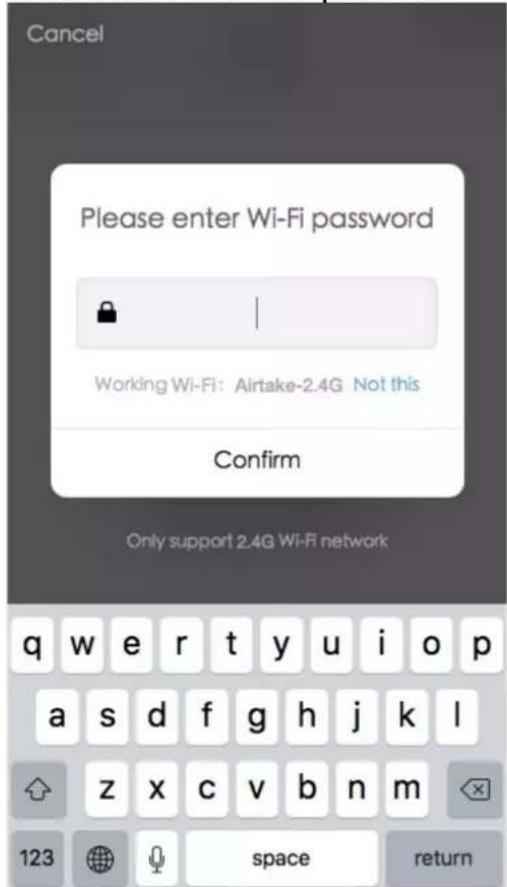
Cancel Please enter Wi-Fi password Working Wi-Fi: Airtake-2.4G Not this Confirm Only support 2.4G Wi-Fi network q w e r t y u i o p a s d f g h j k l z x c v b n m 123 space returnSelect the Wi-Fi under which device is working, enter password and tap "Confirm" to enter network connection process, as shown in the picture below
6.Add device-Network connection process
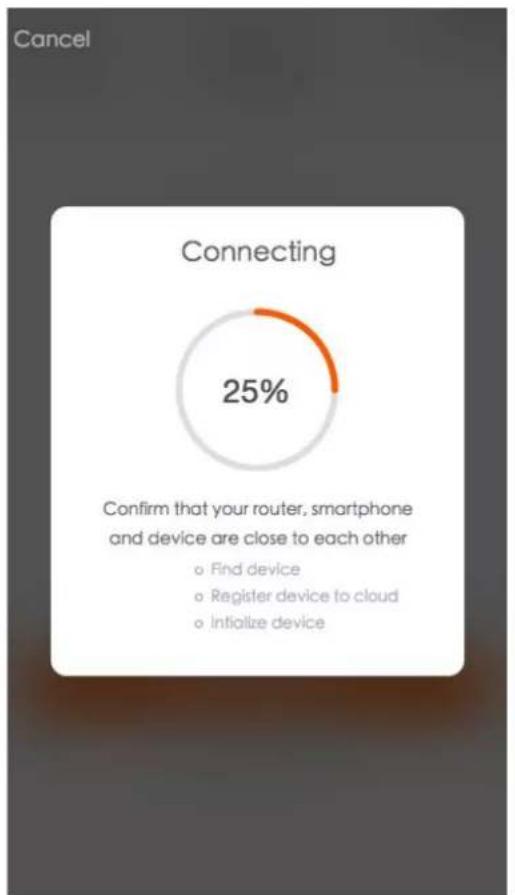
If you select normal mode to connect device to the network, the App goes through the processes as shown in the picture 1. After the network connection is successfully, the App page will be shown in the picture 2
pie
Connecting | Category | Value (%) | |---|---| | Confirm that your router, smartphone and device are close to each other - Find device - Register device to cloud - Initialize devicePicture 1

text_image
Back Add device Successfully add device HJB smart wifi plug-d6c2 Modify device name Share device with family StartPicture 2
text_image
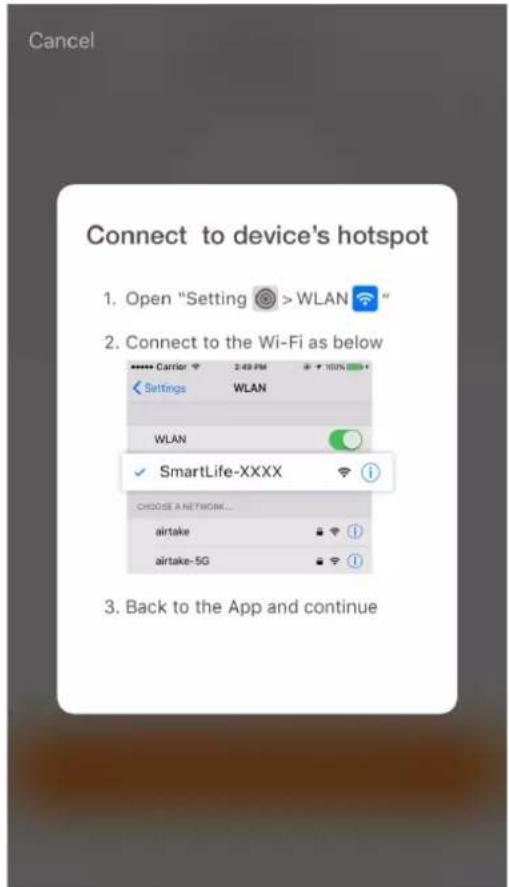
Cancel Connect to device's hotspot 1. Open "Setting > WLAN" 2. Connect to the Wi-Fi as below WLAN WLAN ✓ SmartLife-XXXX CHOOSE A NETWORK... airtake airtake-5G 3. Back to the App and continueFor AP mode, connect to the Wi-Fi hotspot named "SmartLife", as shown in the picture Notes: Some devices might have different hotspot names.
After connecting with the hotspot, back to the network connection page to enter network connection process. The App goes through as shown in the picture 1. Picture 2 shows the App page when the network connection is successful.
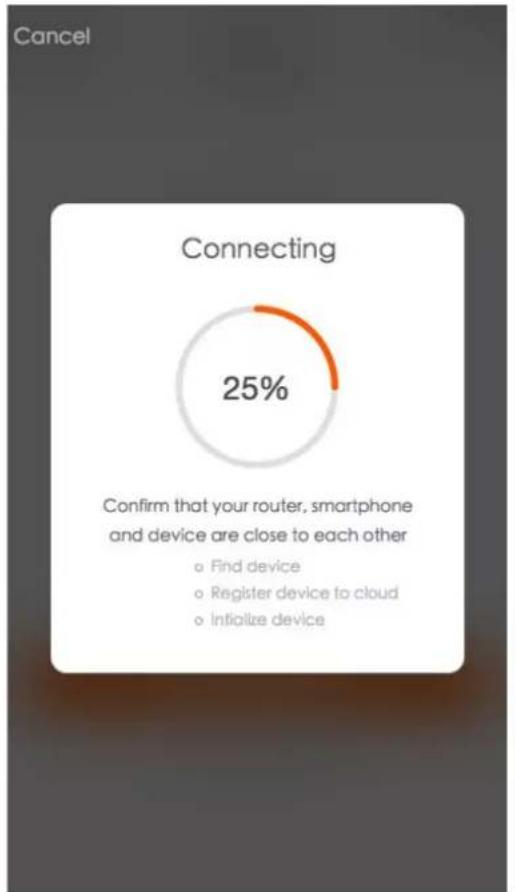
pie
Connecting | Category | Value (%) | |---|---| | Confirm that your router, smartphone and device are close to each other | o Find device o Register device to cloud o Initialize device | 25% |Picture 1
7.Add device-Adding failed
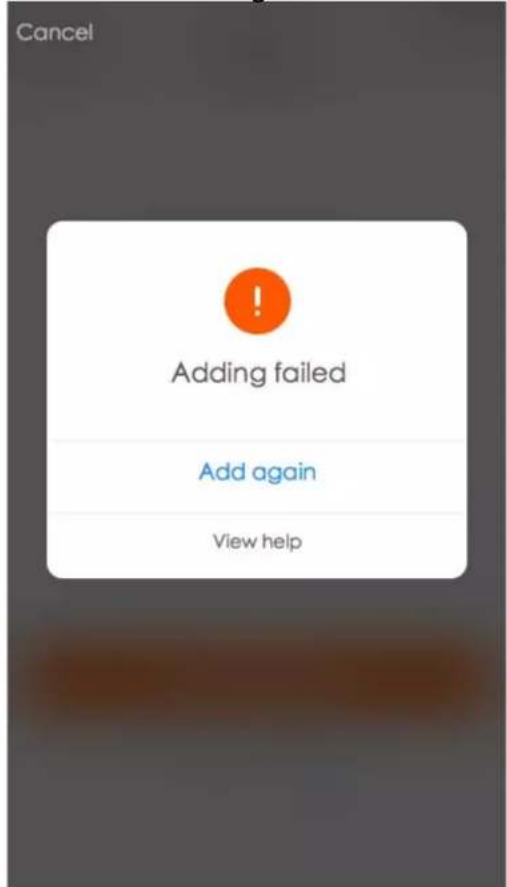
text_image
Cancel Adding failed Add again View help- Control device

text_image
Back Add device Successfully add device -d6c2 Modify device name Share device with family StartPicture 2
If your App interface is shown as in the picture, it means that the network connection failed. You could try by connecting again or view help.

text_image
Beans 9:41 AM tuya + Light > Turned on Common functions Air Condition > Offline Common functions Air Condition > Turned on Hidden common functions TEMP 25°C WIND high MODE cold LOCK off Device Scenes Profile- Smart life scenario

text_image
中国移动 10:38 82% Scenes +
回家
Some devices offline


text_image
10.ProfileAfter successfully configuring the devices, the smart device will be shown on the home page. Tap to enter its control page Note:
- When device is online, it support short-cut operations
- When device is offline, it displays "Offline" and can be controlled.
Smart life scenario supports that devices perform corresponding actions under various conditions. The main conditions include:
- Temperature
2.Humidity
3.Weather
4.PM2.5 - Air quality
- Sunrise & sunset time
7.Device's actions (such as turn on/ff)
Tap to set your name 86-18767142588
Scenes
Device Sharing
Message Center
Use Echo
Experience Center
Scan QR Code
⑦ FAQ
Feedback
About
ReactNative Debug

text_image
中国移动 2:40 PM Back Profile Picture Nickname Tap to set your name > Phone Number 86-15700085876 Change login password > Pattern unlock Change pattern password > Logout"Profile" page is where users could manage personal information. The key information is as follows:
- Personal information
- Smart life scenario
- Device Sharing: display the information of shared devices
4.Message center - F.A.Q
- Entry to submit feedback
- About
"Profile" page is for displaying personal account information. You can change login password, binding mobile number, set pattern unlock on this page.
Tap "Pattern unlock" to set your pattern. After setup, you have to enter your pattern to use the App
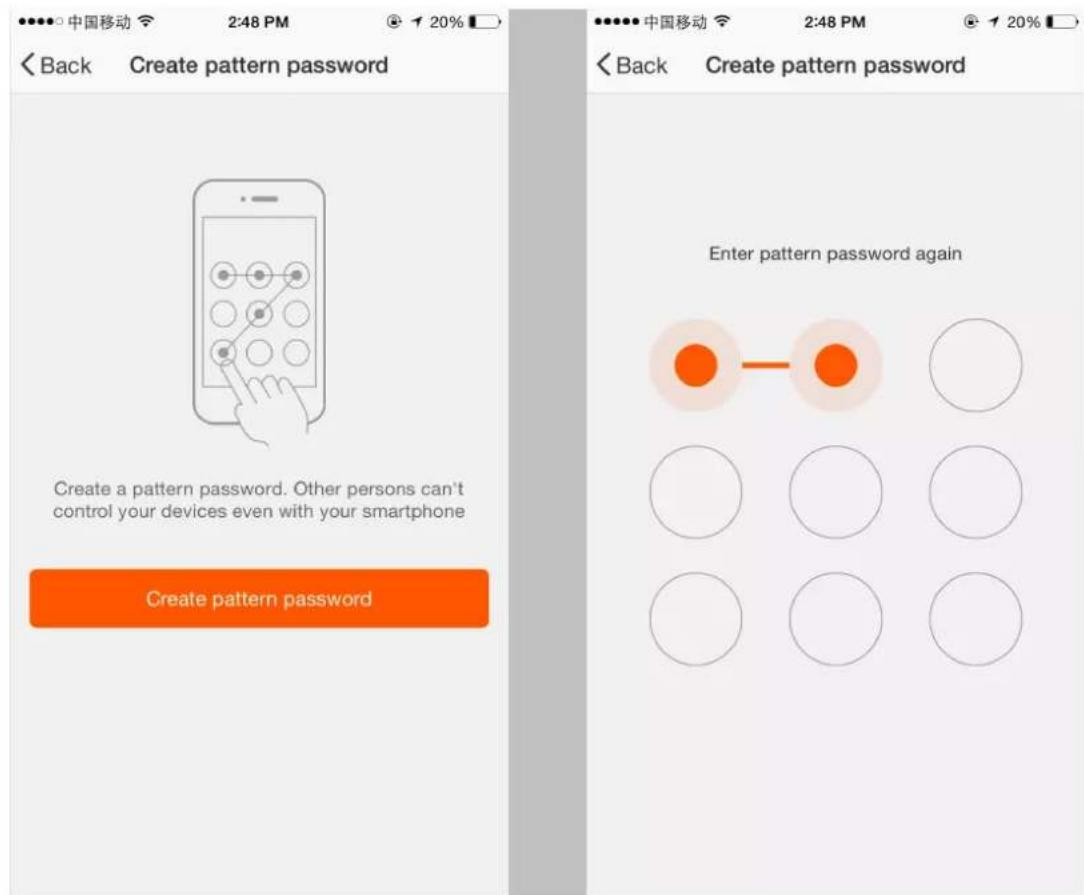
text_image
Back Create pattern password Create a pattern password. Other persons can't control your devices even with your smartphone Create pattern password Back Create pattern password Enter pattern password again11.Profile-Pattern Unlock
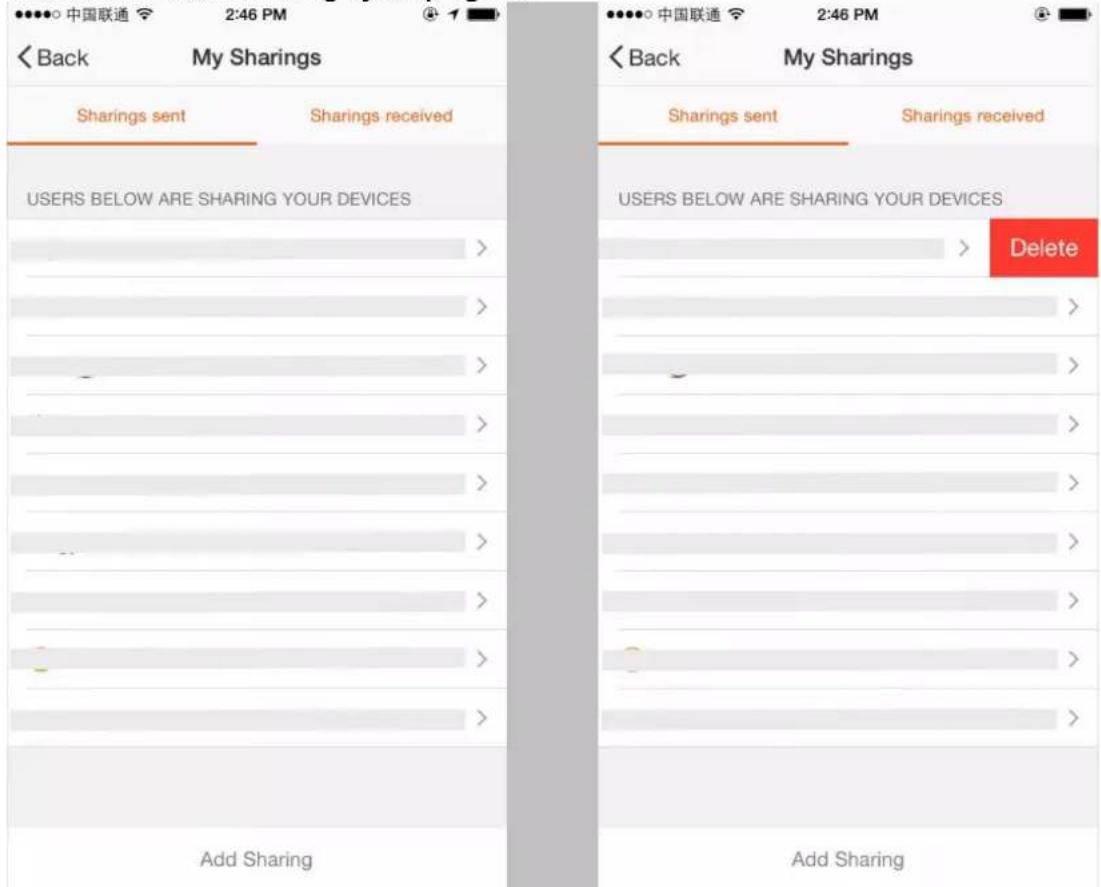
Send sharing: The list shows all members who are added by your account.
You can delete the member and delete the sharing by swiping left.
Receive sharing: The list shows all devices that your account has received.
You can delete the sharing by swiping left.
text_image
< Back My Sharings Sharings sent Sharings received USERS BELOW ARE SHARING YOUR DEVICES > > > > > > > > > > > > > > > > > > > > > > > > > > > > > > > > > > > > > > > > > > > > > > > > > > > > > > > > > > > > > > > > > > > > > > > > > > > > > > > > > > > > > > > > > > > > > > > > > > > > > / Add Sharing < Back My Sharings Sharings sent Sharings received USERS BELOW ARE SHARING YOUR DEVICES > Delete > > > > > > > > > > > > > > > > > > > > > > > > > > > > > > > > > > > > > > > > > > > > > > > > > > > > > > > > > > > > > > > > > > > > > > > > > > > > > > > > > > > > > > > > > > > > > > > > > > + Add Sharing12.Profile-Device Sharing

text_image
中国移动 2:44 PM @ 21% Cancel Add Sharing Add new member to use smart device China +86 Enter mobile number/E-mail Confirm 13.Profile-Message center 中国移动 2:59 PM 18% < Back Message Center No new messageProfile
Add sharing: As shown in the picture, users could input a new member's mobile number and share the device with him. The new member could then control the shared device.
Message centre: Including notifications of new device and new sharing

text_image
中国移动 2:54 PM 19% Back Feedbacks Empty Feedback List New Feedback
text_image
中国移动 4G 11:18 ↑ 78% About < Back About Rate us > Current version 1.0.0Feedback: Entry where users could submit their feedback
App's other related information include:
-
Tap on "rate us", App will be redirected to a corresponding App market, where you could rate us
-
Show App version number
MAINTENANCE & CLEANING
1) Before cleaning, be sure to disconnect the unit from any electric supply outlet;
2) Do not use gasoline or other chemicals to clean the unit;
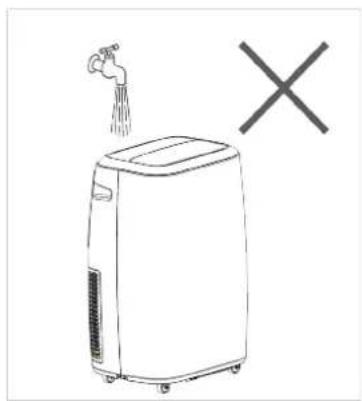
3) Do not wash the unit directly;
4) If the conditioner is damaged, please contact the dealer or repair shop.
natural_image
Simple line drawing of a portable air purifier with a faucet and a cross symbol (no text or labels)
natural_image
Illustration of a portable air purifier with a hand holding the lid, next to a checkmark (no text or symbols present)
flowchart
graph TD
    A["Air/Condenser"] --> B["Solar Panel Array"]
    B --> C["Water Droplet Collection"]
    C --> D["Recirculation of Solar Panel"]
Cleaning Air Filter
If the air filter becomes clogged with dust/dirt the unit will not function properly, the air filter should be cleaned once every two weeks.
- Open the air inlet grille and take off air filter.
- Clean the air filter with a brush (brush the dust/dirt off the filter)
- If very dirty use a neutral detergent in lukewarm water and dry in the shade.
- Put air filter back into unit & close the air inlet grille.
Clean the Air-conditioner Surface
First clean the surface with a neutral detergent and wet cloth, and then wipe it with a dry cloth.
END OF SEASON STORAGE
Before storing the machine be sure to drain all of the water from the machine (see water drainage section)
TROUBLESHOOTING
| PROBLEM POSSIBLE CAUSE REMEDY | ||
| Unit does not operate or only runs in fan mode. | Is the unit plugged in? | Securely plug the power cord into the wall outlet. |
| Is the main power supply on? Re-establish the main power supply. | ||
| Is the water container full indicator light on? | Empty the water container. | |
| Is the timer set? Change timer settings. | ||
| Cooling efficiency is not satisfactory. | Is the air inlet or outlet blocked? Clear the blocking. | |
| Is there any other heat source in the room? | Move the heat source. | |
| Are the air filters dirty? Clean the air filters. | ||
| Is the temperature setting suitable? | Change the temperature setting. | |
| Is the fan speed set at low? Increase the fan speed. | ||
| Auto power off in Heating Mode | Heating Protection, when the temperature at the air outlet exceeds 70C, the unit will power off automatically | Restart the unit at lower room temperature |
| Unit is noisy or vibrates. | Is the machine positioned unevenly on a level surface? | Place the unit on a level surface. |
| The unit starts and stops frequently. | Is the voltage from the power source correct? | Use a proper power source. |
| Is the exhaust hose positioned incorrectly? | Position the exhaust hose correctly and keep the exhaust hose straight as possible. | |
ERROR CODES
Diagnostic system indicators appear if any of the following interrupts operation of the unit. The unit may require simple maintenance or repair by a qualified service technician.
| E0 Code Room temperature sensor failed | Replace room temperature sensor (the unit can also work without replacement.) |
| E1 Code Condenser temperature sensor failed Replace condenser temperature sensor | |
| E2 Code Water tray full when cooling Take off rubber stopper and empty the water. | |
| E3 Code Evaporator temperature sensor failed Replace evaporator temperature sensor | |
| E4 Code Water tray full when heating Please empty the water tray. |
If any other error codes are displayed please contact the following via email sales@climachill.co.uk
TECHNICAL SUPPORT / CUSTOMER SERVICE CONTACT
If you require Technical Support or Customer Service please contact us in the following way: -
Email: sales@climachill.co.uk