PD9814 - Portable CD player Emerson - Free user manual and instructions
Find the device manual for free PD9814 Emerson in PDF.


| Product Type | Portable CD Player with AM/FM Radio and Cassette Recorder |
| Model Number | PD9814 |
| Brand | Emerson |
| Disc Compatibility | CD, CD-R, CD-RW |
| Radio Bands | AM, FM, FM Stereo |
| Cassette Functions | Playback and Recording |
| Power Sources | AC 120V 60Hz or 8 UM-2 (C) batteries (not included) |
| Battery Type | UM-2 (C size) |
| Headphone Jack | 3.5mm stereo (disconnects speakers) |
| Audio Features | Bass Boost, Volume Control |
| CD Playback Modes | Normal, Repeat (1 track/All), Random, Program (20 tracks) |
| Display | Multifunction LCD with FM ST indicator |
| Antenna | FM telescopic, AM internal bar |
| Speakers | Built-in stereo |
| Recording Level Control | Automatic Level Control (ALC) |
| Warranty | 90 days limited (labor and parts) |
| Safety Certification | Class 1 Laser Product, FCC Part 15 |
| Manual Pages | 26 pages (English) |
Frequently Asked Questions - PD9814 Emerson
User questions about PD9814 Emerson
0 question about this device. Answer the ones you know or ask your own.
Ask a new question about this device
Download the instructions for your Portable CD player in PDF format for free! Find your manual PD9814 - Emerson and take your electronic device back in hand. On this page are published all the documents necessary for the use of your device. PD9814 by Emerson.
USER MANUAL PD9814 Emerson
Portable CD-R/RW Player with AM/FM Stereo Radio and Cassette Recorder
OWNER'S MANUAL
PD9814
Visit our web site at www.emersonradio.com
CAUTION
TO PREVENT FIRE OR SHOCK HAZARD, DO NOT USE THIS PLUG WITH AN EXTENSION CORD, RECEPTACLE OR OTHER OUTLET UNLESS THE BLADES CAN BE FULLY INSERTED TO PREVENT BLADE EXPOSURE. TO PREVENT FIRE OR SHOCK HAZARD, DO NOT EXPOSE THIS APPLIANCE TO RAIN OR MOISTURE.

The lightning flash with arrowhead symbol, within an equilateral triangle is intended to alert the user to the presence of uninsulated 'dangerous voltage' within the product's enclosure that may be of sufficient magnitude to constitute a risk of electric shock to persons.
CAUTION
RISK OF ELECTRIC SHOCK DO NOT OPEN
WARNING: TO REDUCE THE RISK OF ELECTRIC SHOCK DO NOT REMOVE COVER (OR BACK), NO USER SERVICEABLE PARTS INSIDE REFER SERVICING TO QUALIFIED SERVICE PERSONNEL.

The exclamation point within an equilateral triangle is intended to alert the user to the presence of important operating and maintenance (servicing) instructions in the literature accompanying the appliance.
IMPORTANT SAFETY INSTRUCTIONS
1.) Read these instructions.
2.) Keep these instructions.
3.) Heed all warnings.
4.) Follow all instructions.
5.) Do not use this apparatus near water.
6.) Clean only with dry cloth.
7.) Do not block any ventilation openings. Install in accordance with the manufacturer's instructions.
8.) Do not install near any heat sources such as radiators, heat registers, stoves, or other apparatus (including amplifiers) that produce heat.
9.) Do not defeat the safety purpose of the polarized or grounding-type plug. A polarized plug has two blades with one wider than the other. A grounding type plug has two blades and a third grounding prong. The wide blade or the third prong is provided for your safety. If the provided plug does not fit into your outlet, consult an electrician for replacement of the obsolete outlet.
10.) Protect the power cord from being walked on or pinched particularly at plugs, convenience receptacles, and the point where they exit from the apparatus.
11.) Only use attachments / accessories specified by the manufacturer.
12.) Unplug this apparatus during lightning storms or when unused for long periods of time.
13.) Refer all servicing to qualified service personnel. Servicing is required when the apparatus has been damaged in any way, such as power-supply cord or plug is damaged, liquid has been spilled or objects have fallen into the apparatus, the apparatus has been exposed to rain or moisture, does not operate normally, or has been dropped.
14.) This appliance shall not be exposed to dripping or splashing water and no object filled with liquids such as vases shall be placed on the apparatus.
15.) Do not overload wall outlet. Use only power source as indicated.
16.) Use replacement parts as specified by the manufacturer.
17.) The product may be mounted to a wall only if recommended by the manufacturer.
18.) Upon completion of any service or repairs to this product, ask the service technician to perform safety checks.
BEFORE WE BEGIN
Thank you for purchasing this Emerson audio product. The Emerson brand is your assurance of quality, performance and value.
Our engineers have included many useful and convenient features in this product. Please be sure to read this Owner's Manual completely to make sure you are getting the maximum benefit from each feature.
This product was manufactured using the highest quality components and standards of workmanship. It was tested by Emerson inspectors and found to be in perfect working order before it left our factory. However, there is always the chance that some problem may occur because of rough handling during shipment to the retail store or to the final consumer.
If, after reading this Manual, you experience any problems with the operation of this product, please refer to the instructions for obtaining service at the end of this Manual. Emerson and Emerson retailers are committed to your satisfaction.
Once again, thanks for purchasing this Emerson audio product.
IMPORTANT NOTES
- Avoid installing this unit in places exposed to direct sunlight or close to heat radiating appliances such as electric heaters, on top of other stereo equipment that radiates too much heat, places lacking ventilation or dusty areas, places subject to constant vibration and/or humid or moist areas.
-
Do not attempt to clean this unit with chemical solvents as this might damage the finish. Use a clean dry cloth.
-
Operate controls and switches as described in the manual.
- Before turning 'On' the power, make certain that power cord is properly installed.
- Store your CDs, cassettes in a cool area to avoid damage from heat.
- When moving the set, be sure to first disconnect the power cord.
CLASS 1 LASER PRODUCT
CLASS 1 LASER PRODUCT APPAREIL À LASER DE CLASSE 1 PRODUCTO LASER DE CLASE 1
CAUTION INVISIBLE LASER RADIATION WHEN OPEN AND INTERLOCKS DEFEATED. AVOID EXPOSURE TO BEAM

This product contains a low power Laser Device.
FCC Information
This equipment has been tested and found to comply with the limits for a Class B digital device, pursuant to Part 15 of the FCC Rules. These limits are designed to provide reasonable protection against harmful interference in a residential installation. This equipment generates, uses, and can radiate radio frequency energy and, if not installed and used in accordance with the instructions, may cause harmful interference to radio communications. However, there is no guarantee that interference will not occur in a particular installation. If this equipment does cause harmful interference to radio or television reception, which can be determined by turning the equipment off and on, the user is encouraged to try to correct the interference by one or more of the following measures:
- Reorient or relocate the receiving antenna.
- Increase the separation between the equipment and receiver.
- Connect the equipment into an outlet on a circuit different from that to which the receiver is connected.
- Consult the dealer or an experienced radio/TV technician for help.
This device complies with Part 15 of the FCC Rules. Operation is subject to the following two conditions:
(1) This device may not cause harmful interference, and
(2) This device must accept any interference received, including interference that may cause undesired operation.
PREPARATION FOR USE
Unpacking and Set Up
- Carefully remove the unit from the carton and remove all packing materials from the unit.
- Carefully remove any small strips of tape which may have been used to keep the CD and Cassette doors closed during shipment.
- Open the CD compartment by lifting up the OPEN/CLOSE tab on top panel. Inside the CD compartment you will see a "dummy" CD protection card which is used to prevent the laser pick-up from moving during shipment. Carefully remove this card and close the CD compartment door.
- Please save the carton and packing materials in the event that your unit ever needs to be returned for service. The original carton and packing materials are the only way to protect the unit from damage during shipment.
Power Sources
This unit is designed to operate on 8 UM-2 "C" batteries, not included, or on normal 120V 60Hz AC house current. Operating this unit from any other power source may cause damage to the unit, and such damage is not covered by your warranty.
AC Operation
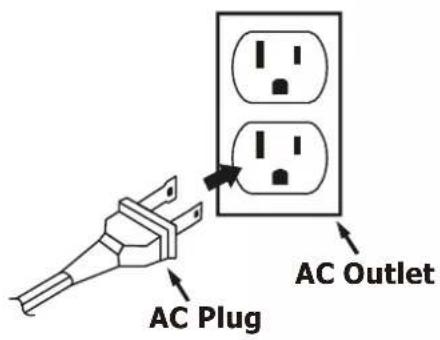
Connect the small end of the AC Power Cord to the AC socket on the back cabinet, then insert the plug in any convenient household 120V 60Hz AC outlet.

natural_image
Technical line drawing of a device housing with electrical connections (no text or symbols)Note:
This unit has a polarized AC plug with one wide blade and one narrow blade. This plug will only fit into a matching polarized AC outlet. This is a safety feature to reduce the possibility of electric shock. If this plug will not fit in your AC outlet, you probably have an outdated non-polarized outlet. You should have your outdated outlet changed by a qualified, licensed electrician. Do not file the wide blade on the plug, or use an adapter to make the plug fit into your outlet. This defeats the safety feature and could expose you to electric shock.
Battery Operation
1.) Remove the battery compartment door on the bottom of the cabinet by pressing down on the two "OPEN" marks and slide it to open.

natural_image
Technical line drawing of a vehicle rear panel with no visible text or symbols2.) Insert 8 UM-2 "C" size batteries into the battery compartment according to the polarity diagram engraved inside the compartment. If the batteries are inserted incorrectly the unit will not work.

natural_image
Technical line drawing of a mechanical device with internal components and mounting holes (no text or symbols)3.) Replace the battery compartment door.
Note: In order to operate the unit on battery power the AC cord must be disconnected from the AC socket on the back cabinet.
BATTERY PRECAUTIONS
Follow these precautions when using batteries in this device:
- Use only the size and type of batteries specified.
- Be sure to follow the correct polarity when installing the batteries as indicated in the battery compartment. Reversed batteries may cause damage to the device.
- Do not mix different types of batteries together (e.g. Alkaline and Carbon-Zinc) or old batteries with fresh ones.
- If the device is not to be used for a long period of time, remove the batteries to prevent damage or injury from possible battery leakage.
- Do not try to recharge batteries not intended to be recharged; they can overheat and rupture. (Follow battery manufacturer's directions.)
Protect Your Furniture
This model is equipped with non-skid rubber 'feet' to prevent the product from moving when you operate the controls. These 'feet' are made from non-migrating rubber material specially formulated to avoid leaving any marks or stains on your furniture. However certain types of oil based furniture polishes, wood preservatives, or cleaning sprays may cause the rubber 'feet' to soften, and leave marks or a rubber residue on the furniture. To prevent any damage to your furniture we strongly recommend that you purchase small self-adhesive felt pads, available at hardware stores and home improvement centers everywhere, and apply these pads to the bottom of the rubber 'feet' before you place the product on fine wooden furniture.
LOCATION OF CONTROLS AND INDICATORS
Top Panel

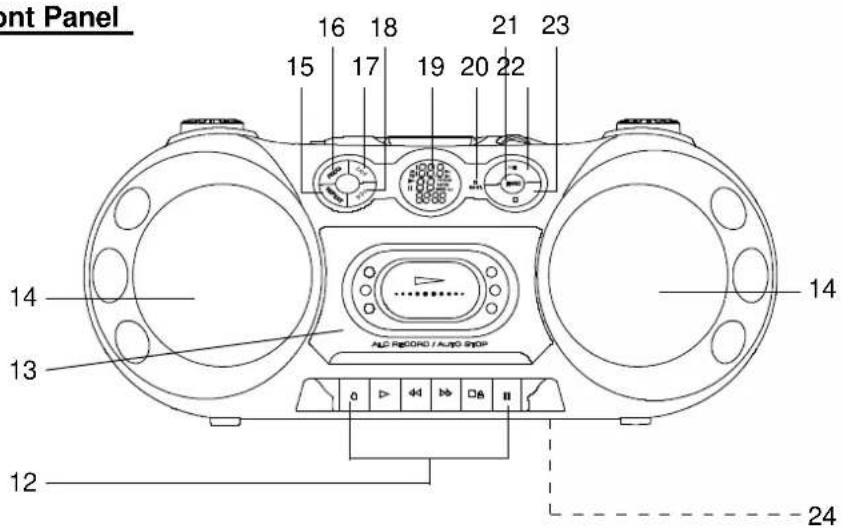
Front Panel

natural_image
Color palette bar with grayscale shades and a small crosshair symbol (no text or symbols)1.) BASS BOOST Button.
2.) CD Door.
3.) VOLUME Control.
4.) FUNCTION (CD / TAPE-OFF / RADIO) Selector Switch.
5.) Phones (Stereo Headphone) Jack.
6.) AC Cord Socket (Back Cabinet).
7.) FM Telescopic Antenna.
8.) Carrying Handle.
9.) BAND (FM ST / FM / AM) Selector Switch.
10.) TUNING Control.
11.) CD Door OPEN CLOSE Tab.
12.) Cassette Control Keys.
(● Record / ▶ Play / ◀ Rewind / ▶ F. Fwd / ■ △ Stop-Eject / || Pause)
13.) Cassette Door.
14.) Speakers.
15.) CD REPEAT Button.
16.) CD PROG (Program) Button.
17.) CD Fwd. Skip Search ▶▶Button.
18.) CD Rev. Skip Search ◀◀ Button.
19.) Multifunction LCD Display.
20.) FM ST Indicator.
21.) RAND (Random) Button.
22.) CD Play/Pause ▶■ Button.
24.) Battery Compartment (Bottom Cabinet).


OPERATING INSTRUCTIONS
Listening To The Radio
Tuner Information
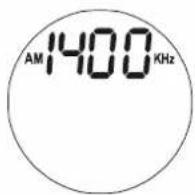
This system features a normal AM/FM analog tuning system. Unlike a digital tuner it does not automatically lock in on the exact frequency of a station. However instead of a dial scale and a moving dial pointer we have included a digital frequency display to help you tune more accurately.
Do not be concerned if you cannot easily tune the display to the exact frequency of your favorite stations, especially on the AM band. Slowly rotate the TUNING control until the display approaches the frequency of the desired station and stop when get the strongest, noise free reception - even if the display is not indicating the exact frequency of desired station.
1.) Slide the FUNCTION (CD/TAPE-OFF/RADIO) Selector to RADIO position. The LCD display light comes 'On'.
Select the desired band - AM, FM, or FM ST - by sliding the BAND selector.
2.) Rotate the TUNING control until the exact frequency of the desired station appears on the display, or until you are receiving the strongest, clearest signal.
If you have set the BAND selector to FM ST and you tune to a FM Stereo station the FM ST LED Indicator will light.
Note: If you are listening to a weak FM Stereo station you can usually improve the reception by moving the BAND selector from the FM ST position to the FM position, however the sound will now be mono.

3.) Adjust the VOLUME control to your listening preference.
4.) If you prefer more bass, press the BASS BOOST button to 'On' position.
5.) To turn off the radio, slide the CD/TAPE-OFF/RADIO switch to TAPE-OFF position to shut power 'Off'. The LCD display light goes 'Off'.
Antenna Information
AM
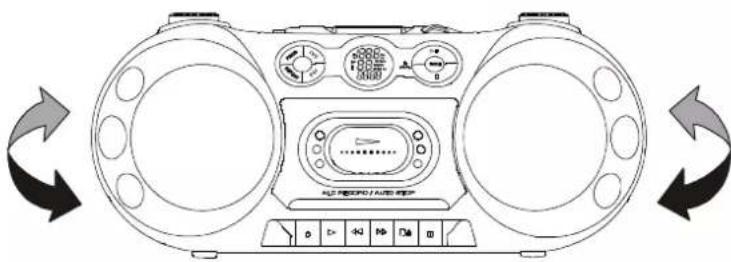
The AM antenna is inside the cabinet. If AM reception is unsatisfactory try rotating the entire unit until you find the position that provides the best reception.
natural_image
Line drawing of a portable electronic device with two front fans and a central control panel, shown in clockwise rotation (no text or symbols)FM
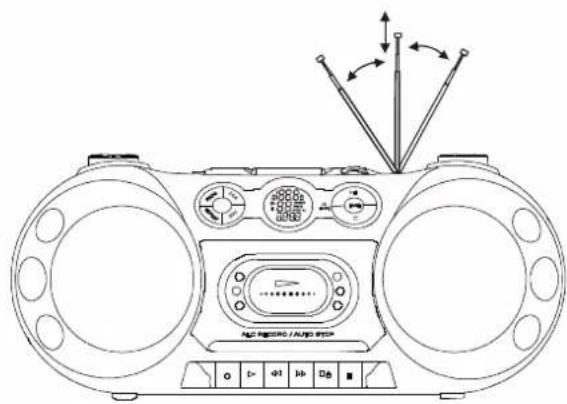
Extend and vary the direction of the FM antenna to find the position that provides the best reception.
Playing Compact Discs
Note: Although this portable CD player can read CD-R and CD-RW discs, in addition to normal CDs, the playability of CD-R/RW discs may be affected by the type of software that was used to create the discs, as well as the quality and condition of the blank media you are using. 100% playability cannot be guaranteed. This is not an indication of a problem with the player.
Normal Playback
1.) Move the FUNCTION selector to the CD position. The LCD display light comes 'On'.
2.) Open the CD door by lifting the OPEN/CLOSE tab on the top panel. If you have not already removed the 'dummy' transit card from the CD player, please remove it now.
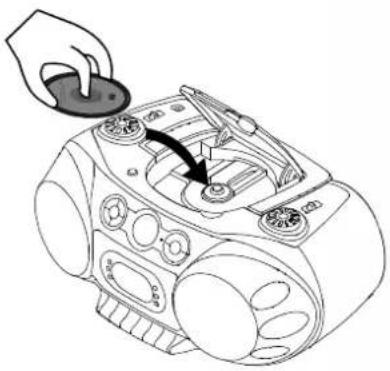
3.) Place your CD on the center spindle with the printed label side facing up. Press downward on the disc near the center hole until the disc is fully seated on the spindle. Close the CD door.
natural_image
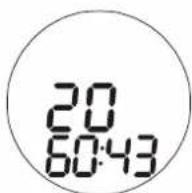
Line drawing of a hand inserting a button into a portable radio device (no text or symbols)The player will read the Table of Contents and the display will show the total number of tracks and playing time on the disc.
If the disc is damaged or up side down, display shows "no disc"

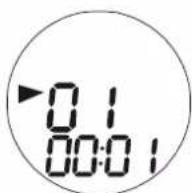
4.) Press the ▶II button to begin playback on Track 01.
The ▶Indicator appears in the display.
- To skip to higher or lower numbered tracks during playback press the ▶ button repeatedly until the desired track number appears in the display. Playback will begin on the
- To search rapidly forward or backward during playback to locate a specific portion of a track, depress and hold the ▶▶ or ◀◀ button. The player will search rapidly forward or backward as long as the buttons are depressed. Normal speed playback will resume when the buttons are released.
- To Pause momentarily during playback press the ▶II button again. The sound stops and the time display flashes. The "II" indicator appears. However the disc continues to spin.
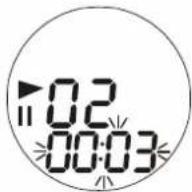
To cancel Pause and resume normal playback press the button once more. Normal playback resumes and the time display stops flashing. The "||" indicator disappears.
5.) Adjust the VOLUME and BASS BOOST controls as desired.
6.) To Stop playback at any time press the ■ (Stop) button. The disc stops and the display again shows the total number of tracks on the disc. After the last track has played the disc stops automatically and the display again shows the total number of tracks on the disc.
7.) Open the CD door, remove your disc, and close the CD door again.
8.) Move the FUNCTION selector to the TAPE-OFF position to shut the power 'Off'. The LCD display light goes 'Off'.
To Start Playback From A Specific Track
Insert your disc in the player, close the door, and wait until the display shows the total tracks and playing time. Press either the ▶▶ or ◀◀ button until the desired track number appears in the display, then press the ▶▶ button to begin playback on that track.
Repeat Playback
You can program the player to repeat either a single track or all tracks on the disc continuously. The Repeat function can only be activated while a disc is playing.
One Track Repeat
1.) Select the track you wish to repeat with the ▶▶ or ◀◀ buttons and then press the ▶▶ button to begin playback.
2.) Press the REPEAT button once. The REPEAT Indicator appears. The selected track will be repeated continuously.
To cancel One Track Repeat press the ■ (Stop) button.
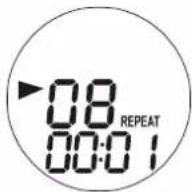
All Tracks Repeat
1.) Press the ▶II button to begin playback.
2.) Press the REPEAT button twice.
The ALL REPEAT Indicator appears.
The entire disc will be repeated continuously.
To cancel All Tracks Repeat press the ■ (Stop) button.
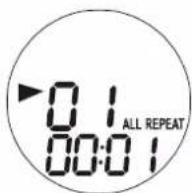
Random Playback
To listen to the tracks on a disc in random order:
1.) Press the RAND button once.
The RANDOM indicator appears.
2.) The player will select a track at random and playback begins on that track. After each track has played once the player stops automatically.
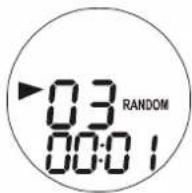
To cancel random playback at any time, press the RAND button until RANDOM indicator disappears.
Programmed Playback
You can program up to 20 tracks on a disc to playback in any desired order. You may also program a specific track to play several times within the same program.
Note: The player cannot be programmed while a disc is playing. If a disc is playing press the ■ (Stop) button to stop playback before you begin the programming steps below.
1.) Move the FUNCTION selector to CD position, insert your disc in the player, close the door, and wait until the total track number, playing time appear in the display.
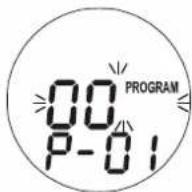
2.) Press the PROG button once. The PROGRAM indicator and program memory "00" begin flashing and "P-01" appears in the display.
3.) Use the ▶ or ◀ buttons to select the first track to be programmed. (Example: Track 07).
4.) When track number "07" flashes in the display, press the PROG button once again to enter the track "07" in program memory number "01".
Track number "07" disappears and "00" flashes again in the display, "P-02" appears indicating that you may now select a track to be entered in program memory number "02".


5.) Use the ▶ or ◀ buttons to select the next track to be programmed. When the desired track number appears in the display press the PROG button again to enter that track in the program memory.
6.) Repeat Step 5 until you have entered up to 20 tracks in the program memory.
7.) To begin programmed playback press the ▶II button. The LCD display will show the first programmed track and playback will begin on that track. The PROGRAM indicator appears.
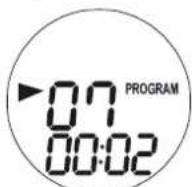
After the last programmed track has played the player stops and the programmed tracks are deleted from the memory automatically.



Program Repeat Playback
You can use the Program and Repeat features together to continuously repeat a programmed sequence of tracks.
First, program the desired tracks according to Steps 1 through 7 on page 15.
When Programmed Playback begins press the REPEAT button twice to activate the All Tracks Repeat feature.
The ALL REPEAT Indicator appears in LCD display and all the tracks in your programmed sequence will be repeated continuously.
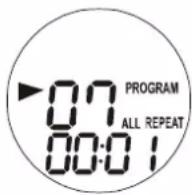
To cancel Programmed Repeat Playback press the ■ (Stop) button until both the PROGRAM and ALL REPEAT indicators go 'Off'.
Playing Cassette Tapes
1.) Open the cassette door by pressing the ■▲Stop/Eject key.
2.) Place a pre-recorded cassette tape with the exposed tape facing down and the full reel on the left side.

natural_image
Technical line drawing of a mechanical device with no visible text or symbols3.) Move the FUNCTION selector to the TAPE-OFF position.
4.) Press the cassette ▶Play key to begin playback.
5.) Set the VOLUME and BASS BOOST controls as desired.
6.) To advance the tape rapidly press the ▶▶F.Fwd key. To stop the tape before it ends press the ■▲Stop/Eject key.
7.) To rewind the tape rapidly press the ◀◀Rewind key. To stop the tape before it ends press the ■▲Stop/Eject key.
8.) When the tape ends the Automatic Stop System releases the ▶Play key and shuts off the tape motor. You may then open the cassette door, remove your tape, turn it over and play the other side if desired.
9.) When you are finished listening stop the tape, open the door, remove the tape and close the door.
If you are playing a tape and then switch to the RADIO or CD function be sure to press the ▪Stop/Eject key to disengage the tape mechanism. This prevents excess wear and tear on the mechanism.
IMPORTANT:
Always press the ▪Stop/Eject key to shut off the tape motor before opening the cassette door to remove your tape. The Automatic Stop System does not function in the ▶F.Fwd and ◀Rewind modes. When the tape ends in the ▶F.Fwd and ◀Rewind modes the motor continues to run. You must press the ▪Stop/Eject key to shut off the motor before opening the door to remove your tape.
Making A Tape Recording
This model allows you to make tape recordings directly from the CD player, or the radio.
- Refer to "Playing Compact Discs" if necessary to operate the CD player.
- Refer to "Listening To The Radio" if necessary to tune in the station you wish to record from radio.
1.) Press the ■△Stop/Eject key to open the cassette door.
2.) Insert a good quality blank cassette tape into the slots on the cassette door with the open end facing down and the full reel on the left. Use normal tape only. Do not use tape identified as "CrO₂" (Chrome) or "Metal" tape formulations. For best results use tapes of 60 minutes (C-60) or less. Do not use 90 minute or 120 minute tapes as these thinner tapes are more likely to jam in the mechanism.
3.) Close the cassette door.
4.) When you are ready to start recording press the ●Record key. The ▶Play key will also engage. The CD you are playing, or radio program you selected will be recorded directly on to the tape.
5.) Press the ☐Pause key during recording to stop the tape temporarily and avoid recording unwanted material such as radio commercials.
6.) When you have finished recording press the ■▲Stop/Eject key to stop and remove the tape.
Automatic Recording Volume Level Control
This unit has an Automatic Level Control (ALC) circuit which controls the recording volume level and prevents overloaded and distorted recordings. The VOLUME control has no effect on recording volume level. You may change the VOLUME control setting during the recording or even reduce the volume level to "Minimum". This will not effect the level of the recording.
Stereo Headphone Jack
Connect a set of stereo headphones (not included) with a 3.5mm mini plug to the Phones jack (located on left top cabinet) for private listening without disturbing others.
Before putting on the headphones reduce the VOLUME control to a low level, then put the headphones on and gradually increase the VOLUME control to a comfortable listening level.
The built in speakers are automatically disconnected when headphones are connected to the 📞 jack.
CARE AND MAINTENANCE
About Cassette Tapes
Whenever you record on a cassette any previously recorded material is erased as the new material is recorded. To prevent you from accidentally erasing material which you wish to save, blank cassettes are equipped with erase prevention tabs for each side of the tape. If the erase prevention tab for side A is removed, you cannot accidentally record on side A. The record key cannot be depressed if the erase prevention tab on the cassette has been removed.
To prevent accidental erasing on side A of a cassette use a small screw driver or similar tool to break off the erase prevention tab for side A. This prevents the record key from locking.

natural_image
Line drawing of a cassette tape with two buttons and a label (no text or symbols)TAB FOR SIDE A BREAK OUT TO PREVENT RECORDING
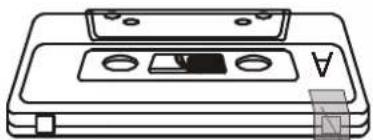
If later you do wish to record on side A of the cassette, cover the tab opening with a piece of cellophane tape. This will allow the record key to function again.
natural_image
Line drawing of a cassette tape with two buttons and a label (no text or symbols)COVER OPENING WITH TAPE IN ORDER TO RECORD AGAIN.
Cassette Care
Two common causes of trouble experienced when using cassettes are:
1.) Tape jamming – Leading to uneven speed in playback, and
2.) Tape tangling – Where the tape wraps itself around vital parts of themechanism.
To reduce the likelihood of these problems occurring, the following precautions should be observed:
- Check that there are no loose layers of tape visible through the cassette center window (see Fig. 1). Take up any loose layers, using a pencil or hexagonal barrelled ballpoint pen, before inserting the cassette into the machine (see Fig. 2).
- If the cassette feels "tight" while performing operation shown (see Fig. 2), the tape may be jamming due to "ridges" formed in the winding of the tape (visible through the center window). These may be removed, in most cases, by fast winding of the cassette from one end to the other and back again.
• Use only well-known brands of tape. Avoid use of C-120 cassettes.

natural_image
Diagram of a cassette tape device with an arrow indicating motion, labeled Fig. 1 (no text or symbols on the diagram itself)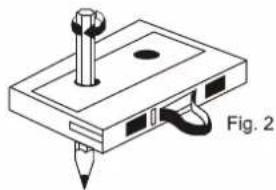
natural_image
Isometric diagram of a mechanical component with a screw and pin, labeled Fig. 2 (no text or symbols on the diagram itself)Furthermore, do not expose cassettes to direct sunlight, dust or oil, and do not touch the tape surfaces.
Head Cleaning
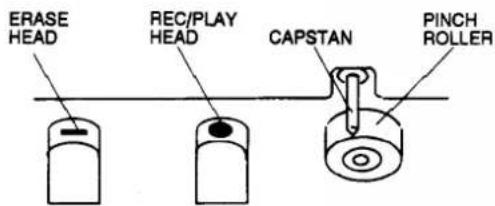
The tape heads, pinch roller and capstan require periodic cleaning. This removes particles of the metal oxide coating that wear off the tape and accumulate on these parts and impair performance.
Disconnect the AC power cord, press the ■▲Stop/Eject key to open the cassette door, and press the ▶Play key. Clean the tape heads, pinch roller and capstan with a soft cloth or cotton pad dampened in isopropyl alcohol or special tape head cleaner.
21

Compact Disc Care
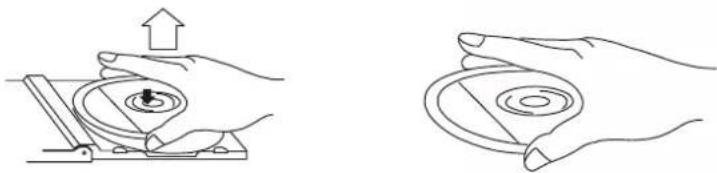
- To remove a disc from its storage case, press down on the center of the case and lift the disc out, holding it carefully by the edges.
natural_image
Two line drawings showing hands operating a circular device with an upward arrow, no text or symbols present.- Fingerprints and dust should be carefully wiped off the disc's recorded surface with a soft cloth. Unlike conventional records, compact discs have no grooves to collect dust and microscopic debris, so gently wiping with a soft cloth should remove most particles. Wipe in a straight line from the inside to the outside of the disc. Small dust particles and light stains will have absolutely no effect on reproduction quality.
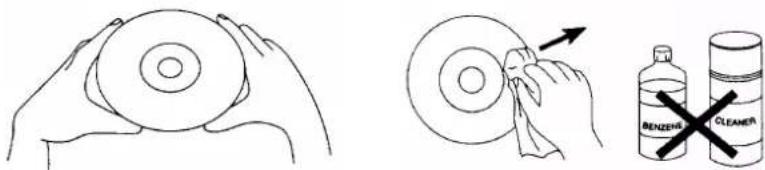
- Clean the disc periodically with a soft, lint-free, dry cloth. Never use detergents or abrasive cleaners to clean the disc. If necessary, use a CD cleaning kit.
- Never write on or affix labels to the surface of compact discs.
Care Of The Cabinet
If the cabinet becomes dusty wipe it with a soft dry dust cloth. Do not use any wax, polish sprays, or abrasive cleaners on the cabinet.
Caution
Never allow any water or other liquids to get inside the unit while cleaning.
TROUBLESHOOTING GUIDE
Should this unit exhibit a problem, check the following before seeking service.
| Symptom | Possible Cause | Solution |
| Radio | ||
| Noise or sound distorted on AM or FM broadcasts. | Station not tuned properly for AM or FM. | Retune the AM or FM broadcast station. |
| FM: Telescopic antenna is not extended. | Extend FM Telescopic antenna. | |
| AM: The bar antenna is not positioned correctly. | Reposition the unit until best reception is obtained. | |
| FM ST indicator does not light. | The BAND selector is switched to FM position. | Switch the BAND selector to FM ST position. |
| AM or FM, no sound. | FUNCTION switch is not set to RADIO. | Set FUNCTION switch to RADIO. |
| Volume at minimum. | Increase Volume. | |
| Compact Disc Player | ||
| CD Player will not play. | FUNCTION switch is not set to CD. | Set FUNCTION switch to CD. |
| CD is not installed or installed incorrectly. | Insert CD with label side up. | |
| CD skips while playing. | Disc is dirty or scratched. | Wipe disc with cloth or use another disc. |

Emerson®
SERVICE
TO FIND THE LOCATION AND PHONE NUMBER OF YOUR NEAREST SERVICE CENTER PERMITTED TO PERFORM WARRANTY...
CALL TOLL FREE: 1-800-695-0098
FOR ADDITIONAL SET-UP OR OPERATING ASSISTANCE
PLEASE CALL:
1-800-898-9020
FOR CUSTOMER SERVICE, PLEASE WRITE TO:
Emerson Radio Corp.,
Consumer Affairs Dept.,
5101 Statesman Drive,
Irving, TX 75063.
LIMITED WARRANTY
Emerson Radio Corp. warrants manufacturing defects in original material, including original parts and workmanship, under normal use and conditions, for a period of ninety (90) days from the date of original purchase in the U.S. With your dated proof of purchase, we will provide repair service at no charge for labor and parts at an authorized Depot Repair Facility, or replace the product in our discretion. For repair or replacement, pack your unit in a padded box, enclose your check or money order payable to Emerson Radio Corp. in the amount of \$9.00 (not required by California residents) to cover shipping and handling costs, and enclose a copy of your proof of purchase. Send your unit to:
Emerson Radio Corp.
5101 Statesman Drive,
Irving, TX 75063.
This warranty does not cover damage from negligence, misuse, abuse, accident, failure to follow operating instructions, commercial use, rental, repairs by an unauthorized facility, or products purchased, used, serviced or damaged outside of the United States.
THIS WARRANTY GIVES YOU SPECIFIC LEGAL RIGHTS, AND YOU MAY ALSO HAVE OTHER RIGHTS WHICH VARY FROM STATE TO STATE.
AU898M
The serial number of your unit is located on a label on the back panel. Please take a moment now to locate the serial number and write the number in the space provided below. You may be asked to provide this number when calling for product service.
Model Number: PD9814
Serial Number:

natural_image
Color palette bar with grayscale gradient and a crosshair for selection (no text or symbols)Emerson®


EMERSON
Part No. 16-2997
505-01
Printed in China
PD9814_053105.p65 31/5/2005, 10:3125

- Portable CD-R/RW Player with AM/FM Stereo Radio and Cassette Recorder
- CAUTION
- IMPORTANT SAFETY INSTRUCTIONS
- BEFORE WE BEGIN
- IMPORTANT NOTES
- CLASS 1 LASER PRODUCT
- FCC Information
- PREPARATION FOR USE
- Unpacking and Set Up
- Power Sources
- AC Operation
- Note:
- Battery Operation
- BATTERY PRECAUTIONS
- Protect Your Furniture
- LOCATION OF CONTROLS AND INDICATORS
- OPERATING INSTRUCTIONS
- Listening To The Radio
- Tuner Information
- Antenna Information
- AM
- FM
- Playing Compact Discs
- Normal Playback
- To Start Playback From A Specific Track
- Repeat Playback
- One Track Repeat
- All Tracks Repeat
- Random Playback
- Programmed Playback
- Program Repeat Playback
- Playing Cassette Tapes
- IMPORTANT:
- Making A Tape Recording
- Automatic Recording Volume Level Control
- Stereo Headphone Jack
- CARE AND MAINTENANCE
- About Cassette Tapes
- Cassette Care
- Head Cleaning
- Compact Disc Care
- Care Of The Cabinet
- TROUBLESHOOTING GUIDE
- Emerson®
- LIMITED WARRANTY
Brand : Emerson
Model : PD9814
Category : Portable CD player