
GXLD2QM - Loudspeaker CAD Audio - Free user manual and instructions
Find the device manual for free GXLD2QM CAD Audio in PDF.


| Type | Digital Frequency Agile Dual Channel Wireless Microphone System |
| Brand | CAD Audio |
| Model | GXLD2QM |
| Frequency Band | 500 MHz - 599 MHz |
| Modulation | High Definition Digital QPSK |
| Transmitting Power | 10 mW |
| Sensitivity | -43 dBV (6.8 mV) @ 1 Pa |
| Frequency Response | 20 Hz - 20 kHz |
| Battery Life (Transmitter) | >10 hours with 2 x AA batteries |
| Receiver Power | Built-in rechargeable battery, DC 5V charging port |
| Transmitter Capsules | CADLive Style Neodymium |
| Indicators | Low battery (TX and RX), RF indicator (Red Ch A, Green Ch B), Charge (Red charging, Green charged) |
| Controls | ON/OFF switches, Frequency Selection Button, Frequency Display |
| Connections | QuickMic 1/4" jack with USB and 3.5mm TRS adapters |
| Compliance | FCC Part 15 |
| Warranty | 2-Year Limited Warranty |
| Safety | Low output (<50 mW); caution for pacemaker users |
| Maintenance | Clean with dry cloth; remove batteries for long storage |
| Included Accessories | 2 handheld transmitters, receiver, USB adapter, 3.5mm TRS adapter |
Frequently Asked Questions - GXLD2QM CAD Audio
User questions about GXLD2QM CAD Audio
0 question about this device. Answer the ones you know or ask your own.
Ask a new question about this device
Download the instructions for your Loudspeaker in PDF format for free! Find your manual GXLD2QM - CAD Audio and take your electronic device back in hand. On this page are published all the documents necessary for the use of your device. GXLD2QM by CAD Audio.
USER MANUAL GXLD2QM CAD Audio
Digital Frequency Agile Dual Channel Wireless Microphone System
The GXLD2QM™ Digital frequency agile wireless system includes the following features:
• Digital High Definition Audio
• Frequency Agile Design
• Dual Handheld System
- QuickMic™ connection to your mixing board via integrated 1/4" jack
- QuickMic™ is supplied with USB and TRS 3.5mm adapters for added flexibility
- Handheld transmitters feature the CADLive Style Neodymium capsules
• Handheld transmitters and receiver feature low battery indicators
- Handheld transmitters utilize AA Batteries with >8 Hrs of operation
• 2 Year Warranty
Receiver

- ON/OFF Switch
- Antenna
- Charge indicator, Red charging, Green charged
- DC 5V charging port
- Low battery indicator, Blue on, Red needs charged
- RF indicator, Red Ch A, Green Ch B

- ON/OFF switch
- Frequency Selection Button
- Frequency Display
- Battery Compartment
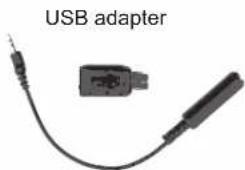
Adapters
natural_image
USB adapter with two connected components (no text or symbols visible)3.5mm TRS adapter
GXLD2QWireless Specifications:
Frequency Response 20Hz–20kHz
Modulation High Definition Digital QPSK
Transmitting Power 10mW
Sensitivity - 43 dBV(6.8mV) @ 1Pa
Battery Life >10Hrs
Frequency Band 500Mhz - 599Mhz
How to use the GXLD2QM system:
- Turn the receiver ON/OFF switch to ON, the LED indicator will illuminate, insert the 1/4" (6.3mm) input jack into the audio input jack of your audio mixer.
- Insert (2) AA batteries into the battery compartment of the transmitter, make sure the polarity is correct.
- Turn the transmitter on, the frequency display will illuminate, you can now use this system.
- When the receiver battery gets low, please use the rechargeable cable to recharge the built in battery.
Please note:
- If there is any noise, distortion or audio dropouts when using the system it may be caused by a low battery, please replace the transmitter batteries or charge the receiver battery.
- Remember to turn the switches to the OFF position when not in use.
- If you won't be using the system for a long time, please take the batteries out of the transmitter.
Frequency Matching:
If there are multiple sets of units in the same environment, crosstalk may occur (same frequency and ID) it can be resolved by the matching procedure below:
- Turn both transmitters and receiver OFF
- First Transmitter: Press and hold the ON/OFF switch and the frequency select buttons for about 4 seconds, the display will flash.
- Receiver: Turn the power switch ON, the RF indicator will flash 4 times.
- Second Transmitter: Press and hold the ON/OFF switch and the frequency select buttons for about 4 seconds, the display will flash.
- A short press on the frequency select button on each transmitter will complete the setup.

- ON/OFF Switch
- Antenna
- Charge indicator, Red charging, Green charged
- DC 5V charging port
- Low battery indicator, Blue on, Red needs charged
- RF indicator, Red Ch A, Green Ch B

- ON/OFF switch
- Frequency Selection Button
- Frequency Display
- Battery Compartment
Individuals with cardiac pacemakers and other similar medical devices should consult with their physician before using any RF devices. Though the output level of this wireless system is below 50 milliwatts, the proximity of the transmitter to the implant device could pose a threat.
As with any wireless product, environmental conditions can reduce or in some cases prohibit a successful connection between the transmitter and the receiver.
This device complies with Part 15 of the FCC Rules. Most users of CAD Audio wireless products in the United States do not need a license for operation. However, the rules for unlicensed operation state that this device must not operate in excess of 50 milliwatts and it must not cause harmful interference to other wireless devices, and must accept interference received from other devices. Wireless products meeting CAD factory standards adhere to these rules. The FCC reserves the right to change these rules at any time. For more information contact the FCC at 1-888-CALL-FCC (TTY: 1-888-TELL-FCC) or visit the FCC's wireless microphone website at:
www.fcc.gov/cgb/wirelessmicrophones
Two-Year Limited Warranty
CAD Audio hereby warrants that this product will be free of defects in material and workmanship for a period of two years from the date of purchase. In the unlikely event that a defect occurs CAD Audio will, at its option, either repair or replace with a new unit of equal or greater value. Retain proof of purchase to validate the purchase date and return it with any warranty claim.
This warranty excludes exterior finish or appearance, damage from abuse, misuse of the product, use contrary to CAD Audio's instructions or unauthorized repair. All implied warranties, merchantability, or fitness for a particular purpose is hereby disclaimed and CAD Audio hereby disclaims liability for incidental, special or consequential damages resulting from the use or unavailability of this product. This warranty gives you specific legal rights and you may have other rights that vary from state to state. Some states do not allow the exclusion or limitation of incidental or consequential damages or limitations on how long an implied warranty lasts, so the above exclusions and limitations may not apply to you.
Note: No other warranty, written or oral is authorized by CAD Audio.

CAD Audio Corporate Offices
6573 Cochran Rd., Bldg. I Solon, OH 44139 U.S.A.
Tel: (440) 349-4900 Fax: (440) 248-4904
www.cadaudio.com
Distributed Worldwide by American Music and Sound
925 Broadbeck Drive, Suite 220
Newbury Park, CA 91320 U.S.A.
Tel: (800) 431-2609 Fax: (800) 431-3129
Brand : CAD Audio
Model : GXLD2QM
Category : Loudspeaker