The Maverick - Musical instrument NATIVE INSTRUMENTS - Free user manual and instructions
Find the device manual for free The Maverick NATIVE INSTRUMENTS in PDF.


User questions about The Maverick NATIVE INSTRUMENTS
0 question about this device. Answer the ones you know or ask your own.
Ask a new question about this device
Download the instructions for your Musical instrument in PDF format for free! Find your manual The Maverick - NATIVE INSTRUMENTS and take your electronic device back in hand. On this page are published all the documents necessary for the use of your device. The Maverick by NATIVE INSTRUMENTS.
USER MANUAL The Maverick NATIVE INSTRUMENTS
text_image
THE MAVERICKManual

The information in this document is subject to change without notice and does not represent a commitment on the part of Native Instruments GmbH. The software described by this document is subject to a License Agreement and may not be copied to other media. No part of this publication may be copied, reproduced or otherwise transmitted or recorded, for any purpose, without prior written permission by Native Instruments GmbH, hereinafter referred to as Native Instruments.
“Native Instruments”, “NI” and associated logos are (registered) trademarks of Native Instruments GmbH.
Mac, Mac OS, GarageBand, Logic, iTunes and iPod are registered trademarks of Apple Inc., registered in the U.S. and other countries.
Windows, Windows Vista and DirectSound are registered trademarks of Microsoft Corporation in the United States and/or other countries.
All other trade marks are the property of their respective owners and use of them does not imply any affiliation with or endorsement by them.
Document authored by: Adam Hanley, Uli Baronowsky
Software version: 1.0 (07/2014)
Document version: 1.0 (07/2014)
Special thanks to the Beta Test Team, who were invaluable not just in tracking down bugs, but in making this a better product.
NATIVE INSTRUMENTS GmbH
© NATIVE INSTRUMENTS GmbH, 2014. All rights reserved.
Table of Contents
1 Welcome to THE MAVERICK 5
2 User Interface 6
2.1 Tone 7
2.2 Anatomy 9
2.3 Space 13
3 Credits....15
1 Welcome to THE MAVERICK
Thank you for purchasing THE MAVERICK, a virtual instrument that replicates a vintage Bechstein Model A Grand Piano. Built in 1905 for his Majesty Prince Friedrich Carl von Preussen, this fine grand piano finally was gifted to the Royal Princess of Great Britain. Despite its size of only 1.80m it features a wide range of tone colors from deep and big to bright and clear. As its name reveals, THE MAVERICK features an unconventional sound full of character, with each key having its own individual color. It's not perfectly balanced, but imperfectly expressive.
Sampled with 18 velocity zones, nine release samples per key and separate resonance and noise samples it features more than 2500 samples with a size of 14GB.
- Based on a vintage Bechstein Model A Grand Piano built in 1905
- Over 2500 samples
- 18 velocity zones for an extraordinary dynamic range
- 9 release samples for each key
- Special resonance samples
- Halfpedal and Repedal
- Color control for easy variation of the timbre
- Real overtone samples
- Controllable piano noises like pedal, damper, string or hammer noises
- Lid Control simulating a virtual lid in three positions
- Compressor and Tape Saturation for pop piano sounds
- Depth Control for an enhanced resonant character
- Transients Control for adding attack or sustain
- Based on the Galaxy Pianos engine
- 14GB sample content (6.5GB compressed)
2 User Interface
After loading THE MAVERICK you will see the instrument you are playing and the main controls:

text_image
The Maverick € Output: st. 1 Midi Ch: [R] 2 Tune 0.00 Voice: 0 Max: 120 Purge Memory: 327.08 MB THE MAVERICK TONE SOFT HARD COLOR LID ANATOMY DYNAMIC RANGE RESONANCES PEDAL SPACE AMOUNT SIZE DISTANCE Concert Hall 1THE MAVERICK's user interface.
The following sections will describe the user interface of THE MAVERICK.
2.1 Tone
The TONE section gives you control over the tonal character of THE MAVERICK. The TONE section has two main controls, as well as extra advanced controls on the Tone Edit Page, which is accessed by clicking on the arrow to the top right of the Tone window.
Tone Main Controls

text_image
TONE I SOFT HARD COLOR LIDThe main TONE controls.
The two main TONE controls are:
- COLOR: Changes the tone color or timbre from soft to hard by readjusting the sample mapping. It's a dynamic way of mapping, while balancing the volume differences between softer and harder samples. Turning the COLOR knob to the right will make the instrument sound harder, crisper, and with more attack; turning it to the left will make the instrument sound warmer, softer and with less attack.
- LID: You can alter the sound of THE MAVERICK by selecting a different lid position. Click the button to toggle through the three options: By default the lid is open; this position provides the most brilliant sound. Setting the lid position to half-open will slightly dampen the sound, while in the closed position the sound of THE MAVERICK will contain an even smaller share of high frequencies, and its low end will be softer.
Tone Edit Page Controls
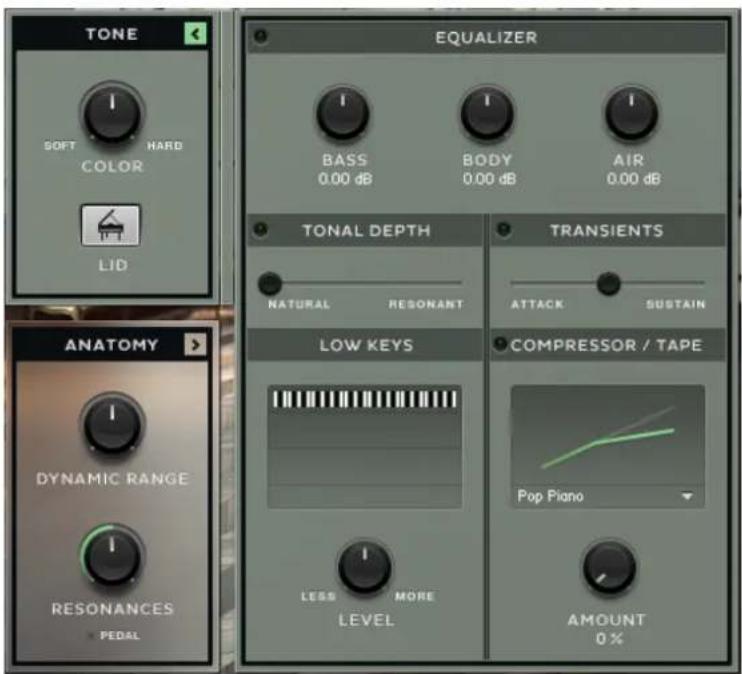
▶ To open the Edit Page, click the small arrow button to the top right of the window.
text_image
TONE SOFT HARD COLOR LID EQUALIZER BASS 0.00 dB BODY 0.00 dB AIR 0.00 dB TONAL DEPTH NATURAL RESONANT TRANSIENTS ATTACK SUSTAIN LOW KEYS COMPRESSOR / TAPE POP PIANO LESS MORE LEVEL AMOUNT 0 %The TONE controls with the edit page open.
- EQUALIZER: Three controls for BASS, BODY and AIR, which control the levels of the low, middle and high frequency bands respectively.
- TONAL DEPTH: Adjusts the amount of resonances added to the dry piano sound. These resonances will add depth to the sound of THE MAVERICK.
- TRANSIENTS: Adjusts the amount of extra size generated by the TRANSIENT MASTER effect.
- LOW KEYS: Changes the volume of the keys below middle C. The volume of the lower keys will be increased or decreased depending if the LEVEL knob is set towards MORE or LESS. The lower the key, the stronger the effect.
- COMPRESSOR / TAPE: Here you can control the AMOUNT of compression, as well as select different compressor characters from the drop-down menu. A compressor, besides controlling the dynamic range, changes a sound's envelope and thus the sound itself. THE MAVERICK's compressor is more of a sound tool than a dynamic tool, which especially serves well in pop, rock and film-score music contexts.
2.2 Anatomy
Talking about THE MAVERICK's anatomy means talking about its design regarding playability and structure. Here you will find control over dynamics, tuning, noises, overtones and the stereo image.
Like the TONE Section, the ANATOMY section also has an Edit Page with extended controls.
▶ To open the Edit Page, click the small arrow button to the top right of the window.
Anatomy Main Controls
text_image
ANATOMY I DYNAMIC RANGE I RESONANCES ▼ PEDALThe ANATOMY controls.
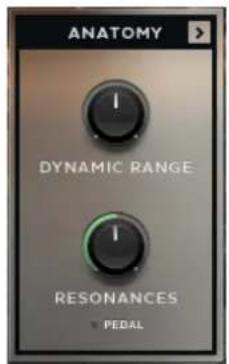
- DYNAMIC RANGE: Controls the piano's dynamic range by adjusting the volume while still using all velocity samples. Turn left to compress, or turn right to expand the dynamic range of THE MAVERICK.
- RESONANCES: Pressing the sustain pedal on a piano raises all the dampers at once, enabling all strings to resonate sympathetically. This adds a much fuller and deeper sound to the note. The RESONANCES knob adjusts the volume of these string resonances, when the sustain pedal is down.
- The PEDAL indicator light shows when the sustain pedal is down and thus when the resonance samples are in use.
Anatomy Edit Page Controls
text_image
TONE SOFT HARD COLOR LID ANATOMY DYNAMIC RANGE RESONANCES PEDAL OVERTONES LEVEL STEREO IMAGE I SWAP WIDTH KEYS Linear Velocity SILENT KEY PEDAL REPEDALING HALFPEDAL RELEASE SAMPLES REL. VOLUME -9.0 dB NOISES HAMMER -20.0 dB DAMPER -20.0 dB PEDAL -20.0 dB STRING -20.0 dB TUNING BASIC PITCH 440 Hz STRETCHED EQUALThe ANATOMY controls with the edit page open.
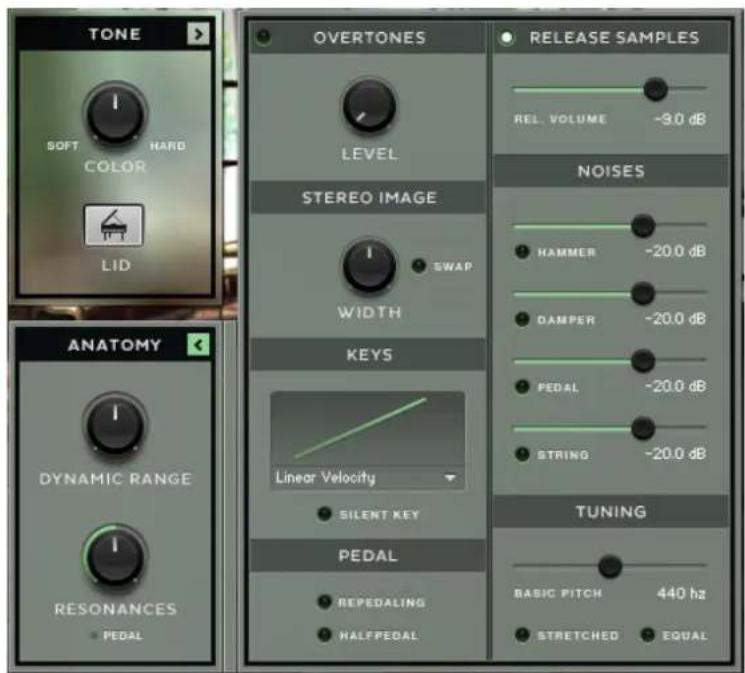
- OVERTONES: Loads and enables overtone samples. After hitting a key, the corresponding strings may resonate at their fundamental or overtone frequencies when other strings are triggered. These overtones add liveliness to the sound. This is also known as Sympathetic String Resonance. The volume of the overtone samples can be set with the LEVEL knob.
- STEREO IMAGE: Use the WIDTH knob to widen or narrow the stereo field. The mid position corresponds to the stereo width of the original recording; turning the knob to the left position makes the sound mono, while turning it to the right artificially enhances the stereo width. The samples in THE MAVERICK are panned with the low notes on the left and the high notes on the right, which corresponds to the listening position of the player. Clicking the SWAP button swaps the left and right channels, changing the listening position to that of the audience.
- KEYS: the drop-down menu gives you access to key velocity presets for customizing the velocity response to your keyboard and your way of playing. Clicking SILENT KEY enables the silent key function: very low key velocities result in no sound.
- PEDAL: Clicking REPEDALING enables repedaling — if the sustain pedal is depressed during note release, the remaining sound sustains. HALFPEDAL: Enables the use of a continuous sustain pedal for half-pedaling. On a piano you can decide how far the dampers are lifted from the strings by controlling how far down you press the pedal. This affects the release time and the amount of resonance. When the HALFPEDAL button is unchecked, a continuous sustain pedal is transformed into an on/off switch. (For half-pedalling you need a special continuous sustain pedal, which outputs midi values from 1-127 instead of an on/off command.)
Release Samples
When hitting a key, the damper leaves the string. When releasing the key, the damper comes down to the string again. The energy generated by a loudly vibrating piano string, especially by the longer more powerful bass strings, can't be stopped by the small felt damper right away, so the sound gradually dies away, which can take some time, especially in the low strings. This is represented by the release samples.
- When REL. SAMPLE is switched on, this loads and uses the recorded release sounds of THE MAVERICK.
- The volume of the release samples can be set with the correspondent VOLUME fader.
- As the release samples of THE MAVERICK are very long (up to 20 seconds) they are switchable between Short and Long by using the DECAY switch. The Long setting will use the full original samples, whereas the Short setting will make the instrument more playable.
- If REL. SAMPLE is switched off, with the DECAY switch will change to a fader that controls the release time of amplitude envelope of the dry samples.
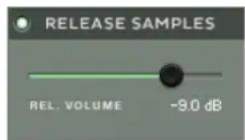
The REL. VOLUME slider controls the volume of the release samples.
Noises
In this section you can load or unload four different mechanical noises that occur when playing a piano. The volume of each noise can be set using the corresponding fader.
- HAMMER: Loads and enables hammer noise samples. When releasing a key, the hammer returns to its resting position, creating mechanical hammer noise hat playz with the release samples.
- DAMPER: Loads and enables damper noise samples. The damper pedal raises all dampers from the strings at once when pressed and drops them back on the strings when released. Both result in a short damper noise. This feature is dynamically playable with a continuous sustain pedal.
- PEDAL: Loads and enables pedal noise samples. Because the pedals in a grand piano are such strong mechanisms, they transfer a lot of energy to the whole piano body and the soundboard, resulting in some low frequency resonance. When using a continuous sustain pedal, the volume of the pedal, damper and string noises depends on the speed in which the pedal is pressed.
- STRING: Loads and enables string noise samples. When the dampers leave the strings after pressing the damper pedal, each damper pulls its corresponding string a little bit, resulting in vibration of each string with its resonance frequency.
TUNING
The BASIC PITCH knob lets you select the basic pitch, also often called Concert Pitch, from 436Hz to 444 Hz.
The tuning (or temperament) of the piano can be adjusted by using the switch. It can be set to either Stretched or Equal. The default tuning is stretched, which is the way the piano was tuned for sampling. Stretched tuning accommodates the natural ‘inharmonicity’ of metal strings. This ‘inharmonicity’ stretches harmonics beyond their ideal frequencies. Solving this dilemma involves some stretching of the higher notes upward and the lower notes downward from their ideal frequencies. The amount of stretching depends on the length of the string, and thus the size of the piano.
2.3 Space
The SPACE section refers to THE MAVERICK's Convolution Reverb, which uses impulse responses of real acoustic spaces to simulate the acoustics of those rooms. These impulse responses (IR's) are a bit like the room's acoustic fingerprint, or like recording a sample of a space. Convolution reverb is unbeatable in quality and realism when it comes to simulating real acoustic spaces like concert halls, churches or studio rooms.
Controls
The Space controls are always located to the right of the instrument's interface.

text_image
SPACE AMOUNT I SIZE DISTANCE Concert Hall 1The SPACE controls.
▶ To switch the effect on or off, click the button to the top left of this section.
- AMOUNT: Controls the amount of signal sent to the reverb unit, and so also the volume of the reverb signal.
- SIZE: Increases or decreases the virtual size of the chosen room type.
- DISTANCE: Controls the amount of pre-delay before the reverb starts.
- The Impulse Response file is selected from the drop-down menu and arrows at the bottom of this section.
3 Credits
Produced by Uli Baronowsky for GALAXY INSTRUMENTS and NATIVE INSTRUMENTS
Co-Produced by Stephan Lembke
Recorded by Uli Baronowsky and Stephan Lembke
Production Assistance: Ingo Hermes
Product Design: Frank Elting
KSP Programming: Klaus Baetz
User Interface Design: Simon Martin, Efflam Le Bivic
Editing: Ingo Hermes, Marc Bohn, Dominik Honnef, Max Kahlhöfer, Alexander Klatt, Roy Recklies, Boris Smolorz, Stephan Lembke, Uli Baronowsky
Finalization and KSP Support: Thanos Kazakos
Piano Tuner: André Wedel, Hagen Wittenbrock
Artwork: Yvonne Hartmann
Piano Consulting: Mark Joggerst, Sebastian Müller-Schrobsdorff
Reference Keyboard: Kawai VPC1
Website: www.galaxy-instruments.com
Special Thanks: Brigitte Angerhausen, Monika and Lillianna Dömer, Frank Elting, Benno Glüsenkamp (Fattoria Musica), Tilman Hahn, Dominik Hartmann and Lennart Damann, Michael Kunz (Kawai Germany), Tobias Menguser, Christian Wachsmuth, Robert Linke and everybody at NI, Sebastian Müller-Schrobsdorff, Markus Riegler, Christian Schoke & Alexander Fiedeler (Schoke Pianos), Christian Stader, Markus Born and Dennis Kopacz (Samplepark Studios), Annika van der Linden, André Wedel, Hagen Wittenbrock