Damage - Musical instrument NATIVE INSTRUMENTS - Free user manual and instructions
Find the device manual for free Damage NATIVE INSTRUMENTS in PDF.


User questions about Damage NATIVE INSTRUMENTS
0 question about this device. Answer the ones you know or ask your own.
Ask a new question about this device
Download the instructions for your Musical instrument in PDF format for free! Find your manual Damage - NATIVE INSTRUMENTS and take your electronic device back in hand. On this page are published all the documents necessary for the use of your device. Damage by NATIVE INSTRUMENTS.
USER MANUAL Damage NATIVE INSTRUMENTS
natural_image
Top-down view of a metallic bowl containing orange liquid, with a small protrusion on the rim (no text or symbols visible)Manual

The information in this document is subject to change without notice and does not represent a commitment on the part of Native Instruments GmbH. The software described by this document is subject to a License Agreement and may not be copied to other media.
No part of this publication may be copied, reproduced or otherwise transmitted or recorded, for any purpose, without prior written permission by Native Instruments GmbH, herein-after referred to as Native Instruments.
“Native Instruments”, “NI” and associated logos are (registered) trademarks of Native Instruments GmbH.
Mac, Mac OS, GarageBand, Logic, iTunes and iPod are registered trademarks of Apple Inc., registered in the U.S. and other countries.
Windows, Windows Vista and DirectSound are registered trademarks of Microsoft Corporation in the United States and/or other countries.
All other trade marks are the property of their respective owners and use of them does not imply any affiliation with or endorsement by them.
Document authored by: Heavyocity Media, Inc.
Document version: 1.0 (08/2011)
Special thanks to the Beta Test Team, who were invaluable not just in tracking down bugs, but in making this a better product.
Germany
Native Instruments GmbH
Native Instruments North America, Inc.
6725 Sunset Boulevard
5th Floor
Los Angeles, CA 90028
USA
www.native-instruments.com

NATIVE INSTRUMENTS
© Native Instruments GmbH, 2011. All rights reserved.
Table of Contents
1 Introduction ......6
2 Quick Start 7
2.1 Overview of the Library 7
2.1.1 Rhythmic Suites 7
2.1.2 Percussive Kits 8
2.2 Rhythmic Suites User Interface 8
2.2.1 Loop Menus – Main Page 9
2.2.2 Loop Menus – Trigger FX (T-FX) Page 10
2.2.3 Loop Menus – EQ/Filter Page 11
2.2.4 Single Loops – Main Page 12
2.2.5 Single Loops – Loop Modifier Page 13
2.2.6 Single Loops – EQ/Filter Page 13
2.3 Percussive Kits User Interface 14
2.3.1 Round Robin Kits w/ Mixer – Main Page 14
2.3.2 Round Robin Kits w/ Mixer – Stage Page 15
2.3.3 Round Robin Kits w/ Mixer – EQ/Filter Page 16
2.3.4 Damage Kits – Main Page 17
2.3.5 Damage Kits – Trigger FX Page 17
2.3.6 Damage Kits – EQ/Filter Page 18
2.3.7 Damage Hits 18
3 Using the Instruments 20
3.1 Common Controls 20
3.1.1 Tabs & Basic Navigation 20
3.1.2 Master Effects 20
3.1.3 Volume Envelope 23
3.1.4 EQ & Filter Page 25
3.2 The Amp Sequencer 27
3.3 The Trigger FX 28
3.4 Rhythmic Suites – Loop Menus 29
3.4.1 Mapping 29
3.4.2 Main Page 30
3.5 Rhythmic Suites – Single Loops 31
3.5.1 Mapping 31
3.5.2 Main Page 31
3.5.3 Using The Loop Modifier Page 33
3.6 Single Percussion Instruments 34
3.6.1 Mapping 34
3.6.2 Using the Mixer 35
3.6.3 Using the Stage (Drum Position) 36
3.6.4 Damage Hits & Damage Kits 37
4.1 Rhythmic Suites – Loop Menus 39
4.2 Percussive Kits 42
4.2.1 Epic Organic Drums 42
4.2.2 Ethnic Drums 45
4.2.3 Metals 47
4.2.4 Hybrid FX Hits 50
4.2.5 Damage Kits 52
5 Credits....56
1 Introduction
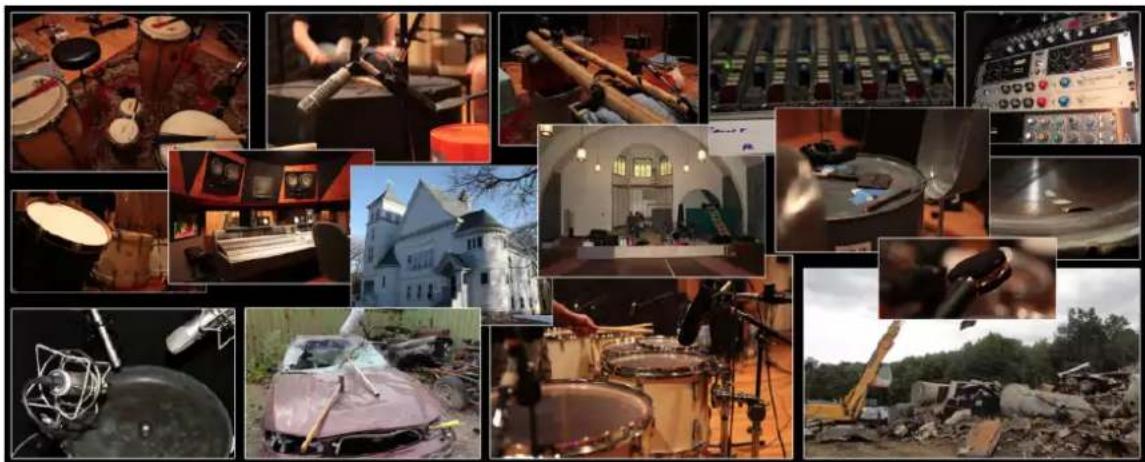
Thank you for choosing DAMAGE: the ultimate virtual instrument for epic, hard-hitting percussion, stylized with a gritty, hybrid sound. Building on the success of the critically acclaimed Evolve and Evolve Mutations series, the team at Heavyocity has taken almost 2 years to capture hundreds of unique drum and percussion sources. The resulting collection combines organic drums with eccentric percussion and found sounds (eg. exploding cars and broken pianos) fused into tempo-synced rhythmic loop suites and menu style percussive hits and kits.
Ranging in character from deeply organic to heavily processed, the sound of DAMAGE is diverse. Its intuitive user interfaces are designed to provide unprecedented control. Its features include a 3 mic position mixer and stage for more than 200 deeply multi-sampled drum and percussion sources; an expanded Trigger FX section to mangle and tweak loops and single shot drum kits on the fly; a radical new Loop Modifier which enables users to remix loops like never before; a midi drag to host for altering and remapping loops in a DAW; and DAMAGE's signature PUNISH knob, a unique combination of saturation, compression, and distortion that adds impact, punch, and explosive energy to the instrument. Go forth and DAMAGE!
natural_image
Collage of various industrial and laboratory scenes including drums, control panels, instruments, a historical building, a damaged car, and rubble (no visible text or symbols)Images from the recording sessions for DAMAGE.
2 Quick Start
This chapter contains a short description of the features and functionality of DAMAGE for a quick start. Chapter 3 , Using the Instruments contains a more in-depth description of all of the functions.
DAMAGE provides you with five different instrument types. Each instrument type contains three edit windows with various functions. These are accessed by simply clicking on the tabs on the top right of the program window. When you load any instrument preset, the main edit window will be displayed.
2.1 Overview of the Library
DAMAGE is arranged in two main percussion categories, Rhythmic Suites and Percussive Kits. These 2 categories form the top-level preset groups in the KONTAKT Instrument browser. Within the Rhythmic Suites category, there are two sub-folders, Loop Menus and Single Loops. Within the Percussive Kits Category, you will find five sub-folders organized by genre: Epic Organic Drums, Ethnic Drums, Metals, Hybrid Hits, and Damage Kits.
2.1.1 Rhythmic Suites
With over 700 beat-sliced loops, this category is arranged into 2 sub-folders, providing loops in 4 main genres: Epic Organic, Epic Tech, Industrial, and Mangled Pop.
- Loop Menus: The Loop Menus category is suitable for quickly creating tempo-synced grooves, providing menu style presets of tempo-synced/beat-sliced loops. These menus are arranged in four styles: Epic Organic, Epic Tech, Industrial, and Mangled Pop. All of the suites are geared to work well with one another, allowing you to mix and match different styles to create unique rhythmic layers. The four presets labeled “Full” provide menus of stacked, or layered, loops on each key. The twelve presets labeled “Elements” provide individual loops on each key.
- Single Loops: The Single Loops category contains over 900 presets of single loops. This category is suitable for rearranging and tweaking individual loops, allowing you to truly make them unique. These presets allow you to quickly modify and remix a loop, including a drag MIDI to HOST option. Each of these presets has a loop playback key, as well as each slice mapped to individual keys.
2.1.2 Percussive Kits
Containing well over 200 deeply sampled percussion sources, and over 500 individual single shot elements, these presets provide playable kits, single shot hits, and tweaked drum-like kits in a wide range of styles. These kits are particularly useful for creating unique percussion for your compositions. This category is comprised of four different types of presets.
- Round Robin Kits with Mixer: These presets are comprised of deeply sampled percussion sources, and are suitable for intricate performance based beats. You can quickly place your percussion in the stereo field and mix the three microphone positions using the included program windows.
- Single Shot Kits with Mixer: These presets are comprised of single-shot hits and impacts. These are suitable for emphasizing beats, adding extra impact, and heightening emotion at specific points in a composition. You can quickly place the hit in the stereo field, mix the three microphone positions, and equalize and affect the sound using the three included program windows.
- Single Shot Damage Kits: These presets are comprised of single-shot effected drums, arranged in the style of a drum kit. These are suitable for performance-based drum-beats with glitchy, effected, tweaked, sounds. You can stutter, further effect, equalize and filter the sounds using the included program windows.
- Hybrid FX Hits: These presets are comprised of single-shot hits, impacts, and tails. This category also contains the signature “Damage Hits” preset. This preset contains one-shot Impacts and Tails that can be controlled independently via the modwheel. These hybrid hits are suitable for trailer-like stings and transitions, or emphasis on specific points in a composition.
2.2 Rhythmic Suites User Interface
This section will provide a brief overview of the included user interfaces and their functionalities. Chapter 3 , Using the Instruments provides further descriptions and more in depth explanations of the functions available on the user interfaces.
2.2.1 Loop Menus – Main Page
text_image
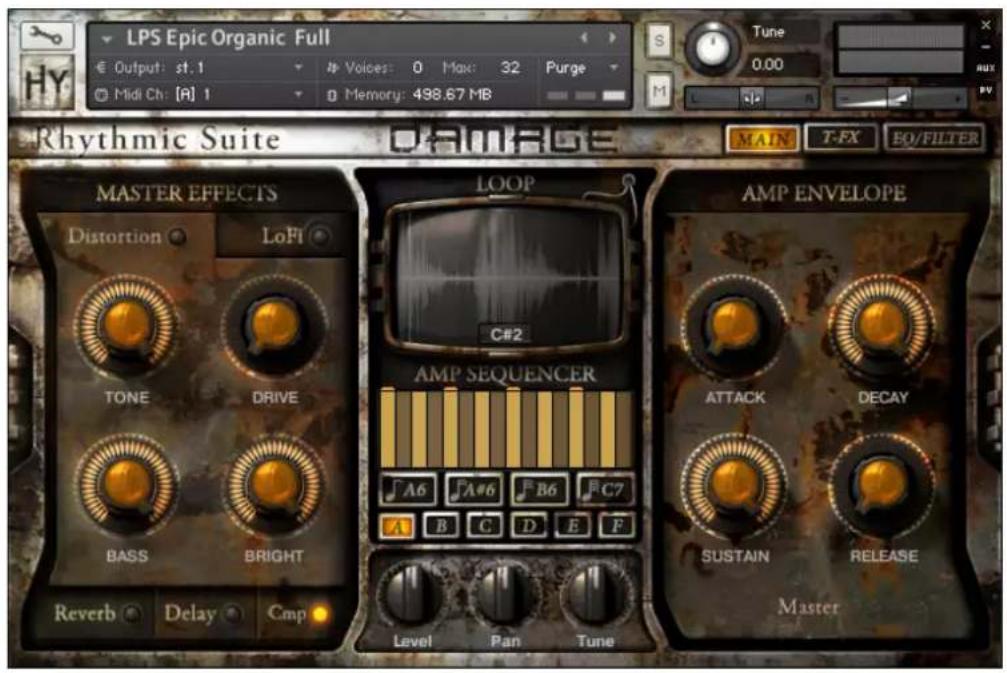
LPS Epic Organic Full Output: st.1 Midi Ch: [A] 1 Voices: 0 Max: 32 Purge Memory: 498.67 MB Tune 0.00 Rhythmic Suite MASTER EFFECTS Distortion LoFi TONE DRIVE BASS BRIGHT Reverb Delay Cmp LOOP C#2 AMP SEQUENCER Level Pan Tune AMP ENVELOPE ATTACK DECAY SUSTAIN RELEASE MasterMain page of the Rhythmic Suite's Loop Menus.
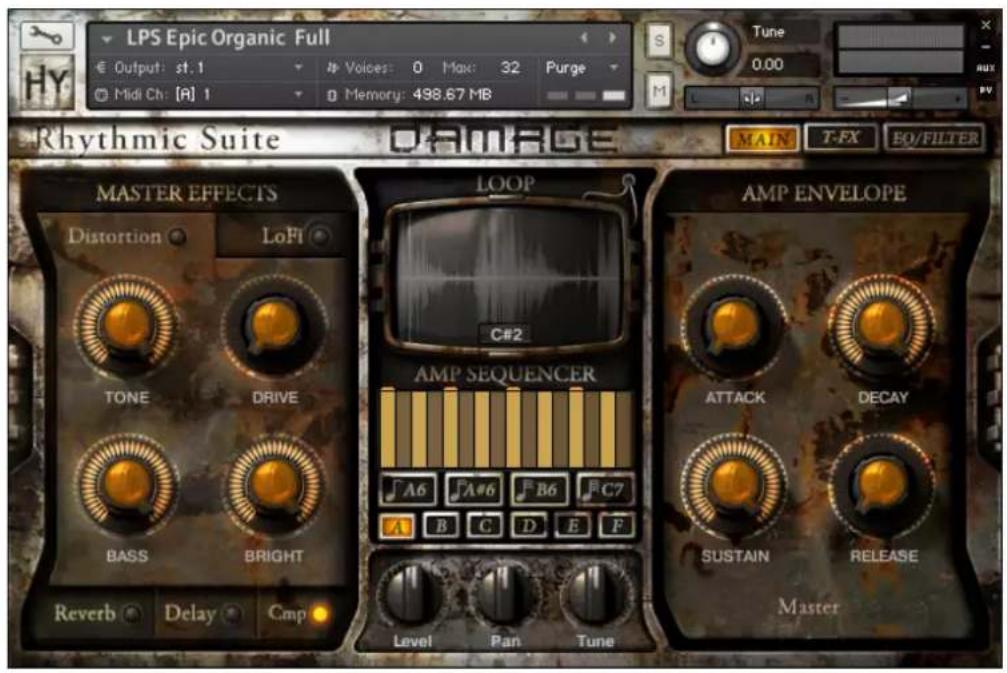
The Loop Menus' Main page provides controls over important global parameters.
- Master Effects: Distortion, LoFi, Compression (Cmp), Reverb, and Delay
- Amp Envelope: Provides global ATTACK, DECAY, SUSTAIN, and RELEASE Control
- Amp Sequencer: Midi-key triggered patterns for gating the sound via performance. Mapped to midi keys A6 through C7
- Loop Controls: Level, Pan, Tuning (Tune), and waveform view for each loop.
2.2.2 Loop Menus – Trigger FX (T-FX) Page

text_image
LPS Epic Organic Full Output: st.1 Midi Ch: [A] 1 Rhythmic Suite DainBlue Tune 0.00 MAIN T-FX BO/FILTER C6 C#6 D6 D#6 E6 F6 F#6 G6 Bright Speed Balance Reduce Pan Amount Center Time Squish Depth Intensity Range Depth Speed Range Feedback Smack Feedback Speed Pattern Pattern Pattern Resonance Width Punch Phaser Rotator Lo-Fi Glitcher Pitch Env. Filter Env. DelayT-FX page of the Rhythmic Suite's Loop Menus.
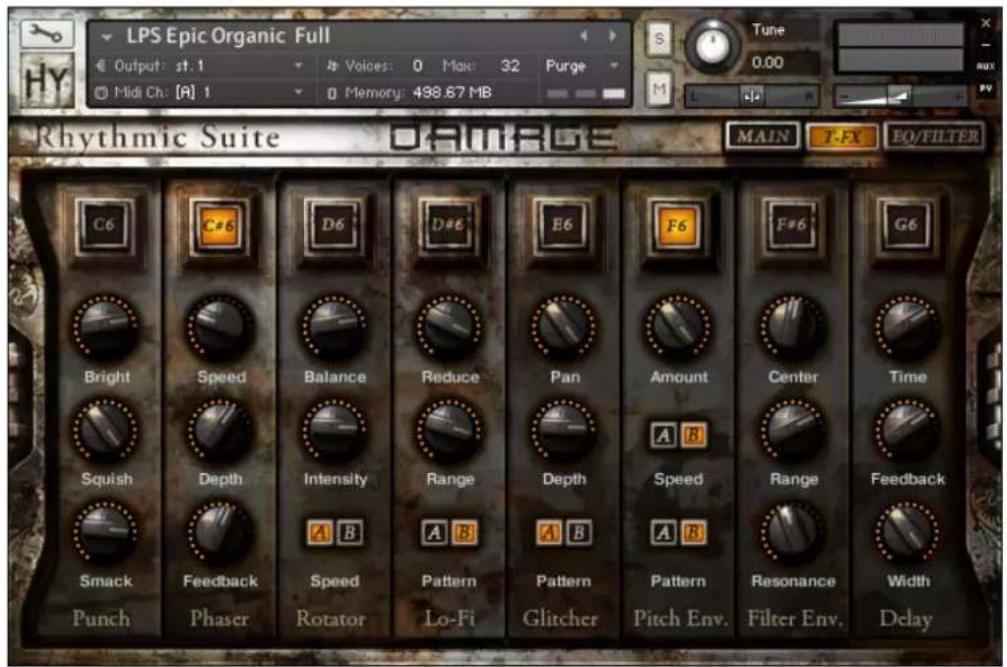
The Trigger FX (T-FX) provide performance based effects mapped to keys C6 through G6. Further control of the effects is provided via the knobs and pattern switchers. These effects include:
- Punch (C6)
- Phaser (C#6)
- Rotator (D6)
- LoFi (D#6)
- Glitcher (E6)
- Pitch Env. (F6)
- Filter Env. (F#6)
- Delay (G6)
For all of the presets that contain the Trigger FX, the controls provided are identical.
2.2.3 Loop Menus – EQ/Filter Page

text_image
LPS Epic Organic Elements 01 Output: st. 1 Midi Ch: [A] 1 Rhythmic Suite EQUALIZER Level Low Mid High 0 1.6 dB 0.00 dB 0.00 dB Freq 46.6Hz 2.2kHz 6.1kHz Width 0.58 cc 0.76 cc 3.0 cc On PUNISH HEAVOCITY FILTERS High Pass FREQ RESO Low Pass FREQ RESO OnEQ/Filter page of the Rhythmic Suite's Loop Menus.
The EQ/Filter page provides control of 3 key parameters: Equalization, High Pass and Low Pass filters, and the signature PUNISH Knob. The PUNISH knob creates unique sonic compression and distortion, greatly altering the sound as you increase the value on the knob.
2.2.4 Single Loops – Main Page
text_image
35 LP Mang Pop F4 Fat n Loud Output: st.1 Midi Ch: [A] 1Voices: 0 Max: 32 Purge
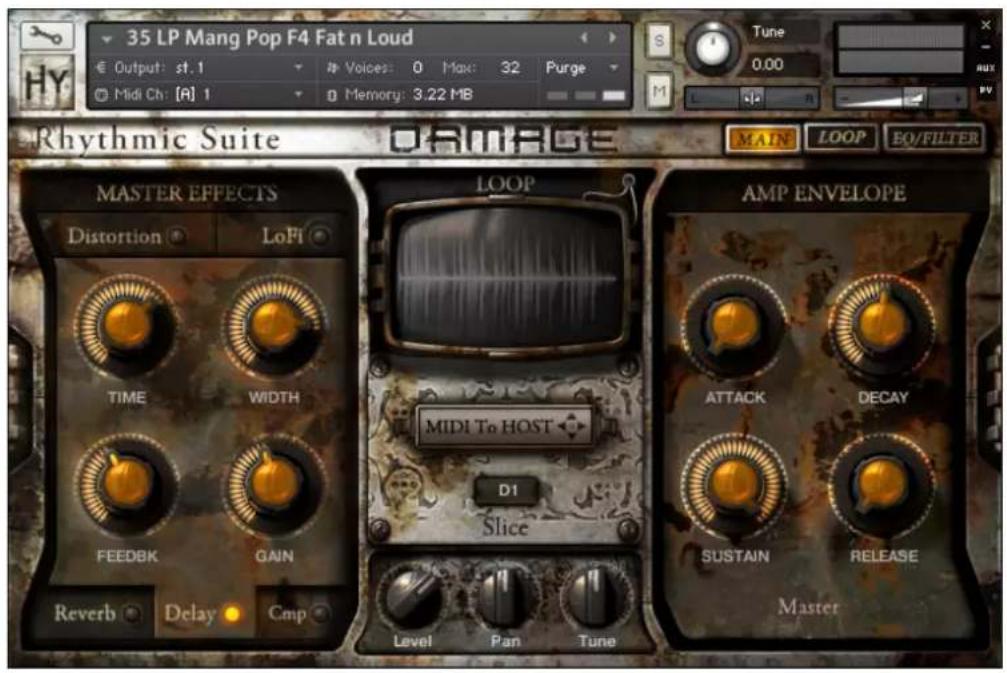
0 Memory: 3.22 MB S Tune 0.00 Rhythmic Suite DAMFAGE MAIN LOOP BO/FILTER MASTER EFFECTS Distortion LoFi TIME WIDTH FEEDBK GAIN Reverb Delay Cmp LOOP MIDI To HOST D1 Slice AMP ENVELOPE ATTACK DECAY SUSTAIN RELEASE Master Level Pan TuneMain page of the Rhythmic Suite's Single Loops.
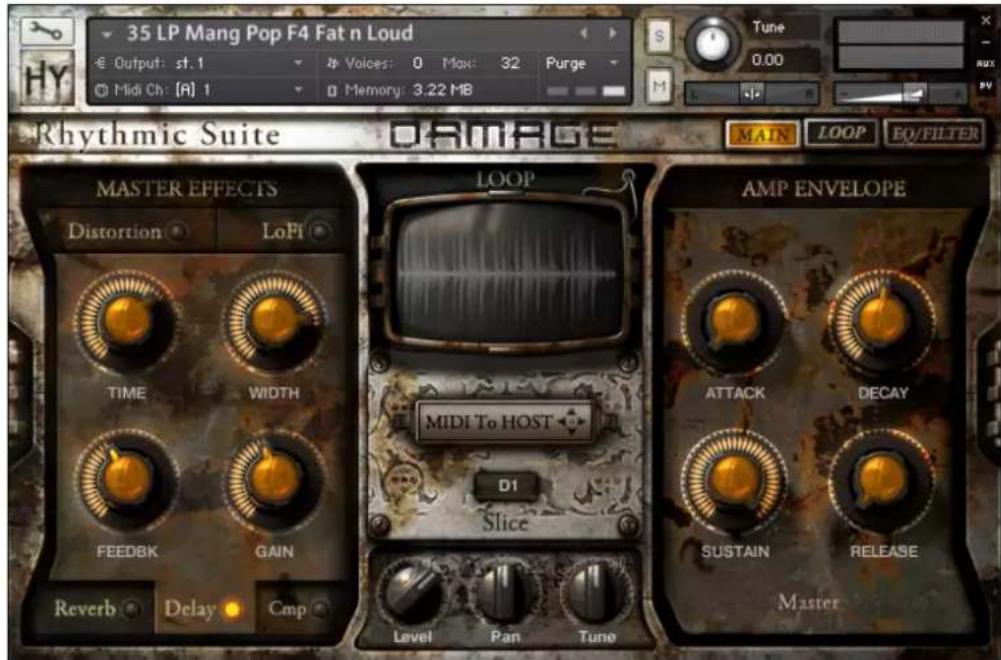
The Main page of the Single Loop presets provides control over important global parameters.
- Master Effects: Distortion, LoFi, Compression (Cmp), Reverb, and Delay
- Amp Envelope: Provides global ATTACK, DECAY, SUSTAIN, and RELEASE Control
- Individual Slice Controls: Level, Pan, Tuning (Tune), of each slice (per key)
- Drag Midi To Host: Click and drag to map the midi notes of the loop to your host
2.2.5 Single Loops – Loop Modifier Page
text_image
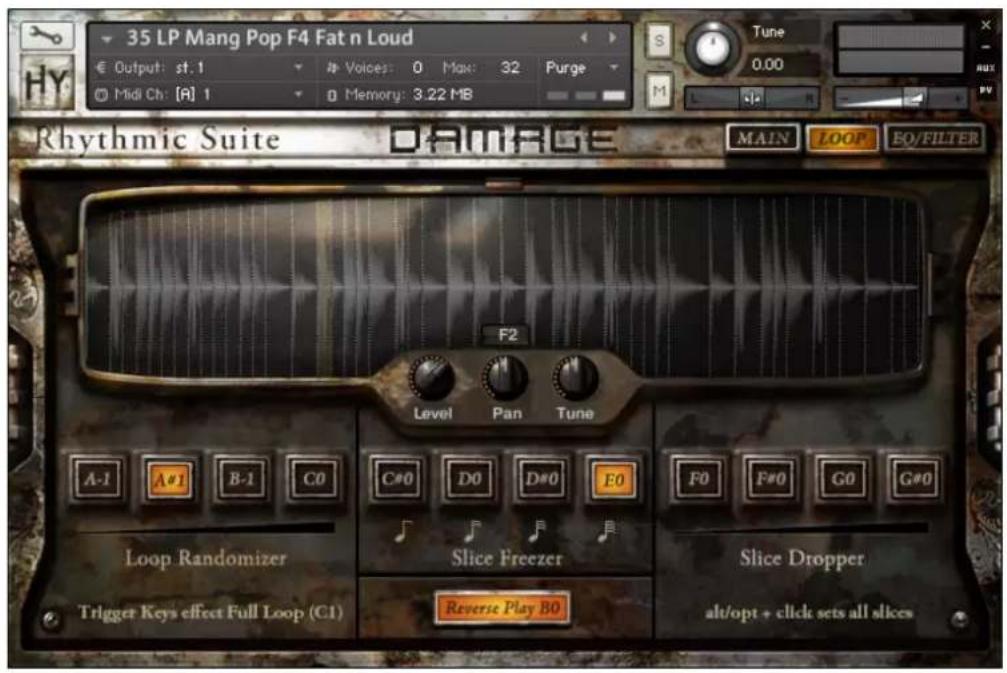
35 LP Mang Pop F4 Fat n Loud Output: st.1 Midi Ch: [A] 1 Voices: 0 Max: 32 Purge Memory: 3.22 MB Rhythmic Suite DAMSLICE MAIN LOOP BO/FILTER F2 Level Pan Tune A-I A#1 B-1 C0 C#0 D0 D#0 E0 Loop Randomizer Slice Freezer Slice Dropper Trigger Keys effect Full Loop (C1) Reverse Play BO alt/opt + click sets all slicesLoop page of the Rhythmic Suites' Single Loops.
The Loop Modifier page provides deep control over the beat-sliced loop. The additional controls provided on this page allow you to remix and alter the loop on the fly. Holding down C1 will provide the loop playback, while the trigger keys seen on this page affect the loop as it is played.
- Loop Randomizer (A-1 to CO)
- Slice Freezer (C#O to EO)
- Slice Dropper (FO to G#O)
- Reverse Play (BO)
2.2.6 Single Loops – EQ/Filter Page
The controls on this page are identical to those described in chapter ↑2.2.3, Loop Menus – EQ/Filter Page.
2.3 Percussive Kits User Interface
This section will provide a brief overview of the user interface pages for the Round Robin percussive kits with a mixer. The single shot percussive kits with the mixer have identical pages to these.
2.3.1 Round Robin Kits w/ Mixer – Main Page

text_image
PERC Studio Armageddon Ens Output: st.1 Midi Ch: [A] 1 Voice: 0 Max: 128 Purge Memory: 304.54 MB Tune 0.00 Percussive Kit DURATION MASTER EFFECTS Distortion LoFi TONE DRIVE BASS BRIGHT Reverb Delay Cmp MASTER MIXER S M S M S M Purge Purge Purge Close Room Hall AMP ENVELOPE All Close ATTACK DECAY SUSTAIN RELEASE Room HallMain page of the Percussive Kit's Round Robin Kits w/ Mixer.
The Main page provides controls over important global parameters.
- Master Effects: Distortion, LoFi, Compression (Cmp), Reverb, and Delay
- Amp Envelope: Provides ATTACK, DECAY, SUSTAIN, and RELEASE control for the Close, Room, and Hall microphone positions
-
Mixer: Control the volume, solo, mute, and purge the samples of the Close, Room, and Hall microphone positions
-
Individual Drum Tuning: Control the Tuning of each drum
- Velocity Sensitivity: Global control for the velocity sensitivity (Key Sens) of the preset
2.3.2 Round Robin Kits w/ Mixer – Stage Page
text_image
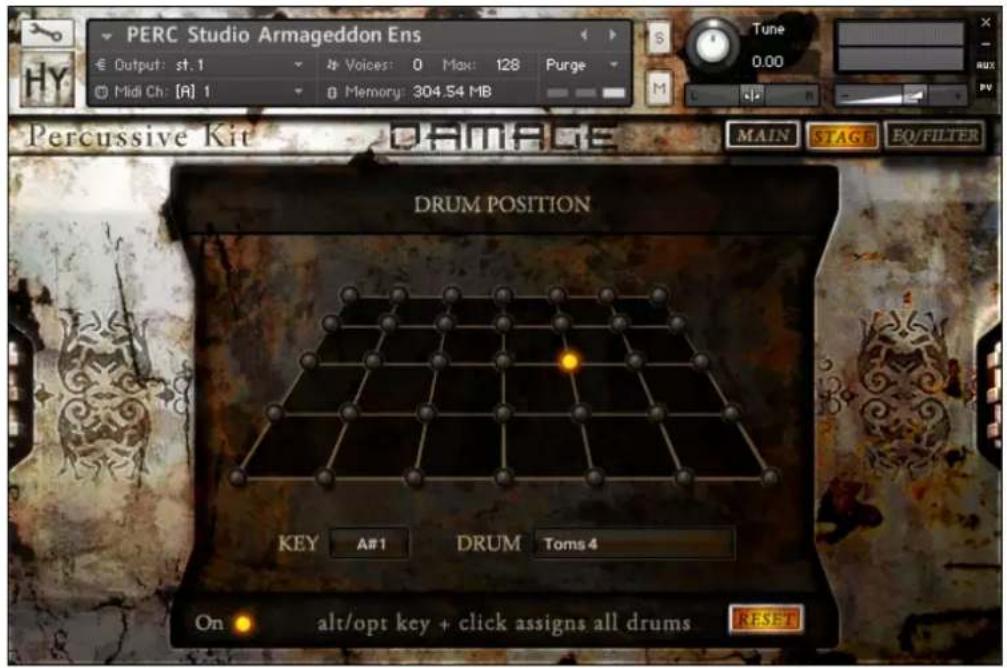
PERC Studio Armageddon Ens Output: st.1 Midi Ch: [A] 1 Voice: 0 Max: 128 Purge Memory: 304.54 MB Purge Tune 0.00 Percussive Kit DRUM POSITION MAIN STAG EQ/FILTER KEY A#1 DRUM Toms 4 On alt/opt key + click assigns all drums RESETStage page of the Percussive Kit's Round Robin Kits w/ Mixer.
The Stage provides unique control over the position of a drum in the stereo field. You can place each drum as if it were located in a specific place on an orchestral stage. Additionally, by option clicking, you can place all the drums in the same location, or click RESET to bring all of the positions back to default (center). There is an on/off switch to allow toggling between using the stage and not.
2.3.3 Round Robin Kits w/ Mixer – EQ/Filter Page

text_image
PERC Studio Armageddon Ens Output: st.1 Midi Ch: [A] 6 Purge 0.00 Memory: 304.54 MB Tune 0.00 Percussive Kit EQUALIZER PUNISH FILTERS Low Mid High Level 2.5 dB 0.25 dB 1.6 dB Freq 70.3Hz 1.8kHz 6.7kHz Width 0.57 cc 2.2 cc 3.0 cc Master Drum Mnstr FREQ Low Pass FREQ RESO Global Drum Mnstr On HEAVYOCITYEQ/Filter page of the Percussive Kit's Round Robin Kits w/ Mixer.
Similar to the Rhythmic Suite presets, the EQ/Filter page provides control of 3 key parameters: Equalization, High Pass and Low Pass filters, and the signature PUNISH knob. The PUNISH knob creates unique sonic compression and distortion, greatly altering the sound as you increase the value on the knob. One key difference is that you are provided with control of EQ and Filter for each specific drum in the preset, in addition to global EQ and filters.
2.3.4 Damage Kits – Main Page

text_image
PERC Epik Elektro Kit Output: st.1 Midi Ch: [R] 1 Voices: 0 Max: 32 Purge Memory: 8.94 MB Tune 0.00 Percussive Kit DAMAGE MASTER EFFECTS Distortion LoFi COMPRESS RATIO ATTACK RELEASE Reverb Delay Cmp WAVEFORM A#1 AMP SEQUENCER A6 A#6 B6 C7 A B C D F Level Pan Tune AMP ENVELOPE ATTACK DECAY SUSTAIN RELEASE MasterMain page of the Percussive Kit's Damage Kits.
The Damage Kits Main page provides controls over important global parameters.
- Master Effects: Distortion, LoFi, Compression (Cmp), Reverb, and Delay
- Amp Envelope: Provides global ATTACK, DECAY, SUSTAIN, and RELEASE Control
- Amp Sequencer: Midi-key triggered patterns for gating the sound via performance.
Mapped to midi keys A6 through C7 - Loop Controls: Level, Pan, Tuning (Tune), and waveform view for each key.
2.3.5 Damage Kits – Trigger FX Page
The T-FX page for the Damage Kits provides the same effects and controls as the T-FX page in the Loop Menus presets. For more information please see chapter ↑2.2.2, Loop Menus – Trigger FX (T-FX) Page.
2.3.6 Damage Kits – EQ/Filter Page
The EQ/Filter page for the Damage Kits provides equalization and filter control over each drum, similar to the round robin percussive kits. For more information please see chapter ↑2.3.3, Round Robin Kits w/ Mixer – EQ/Filter Page.
2.3.7 Damage Hits
text_image
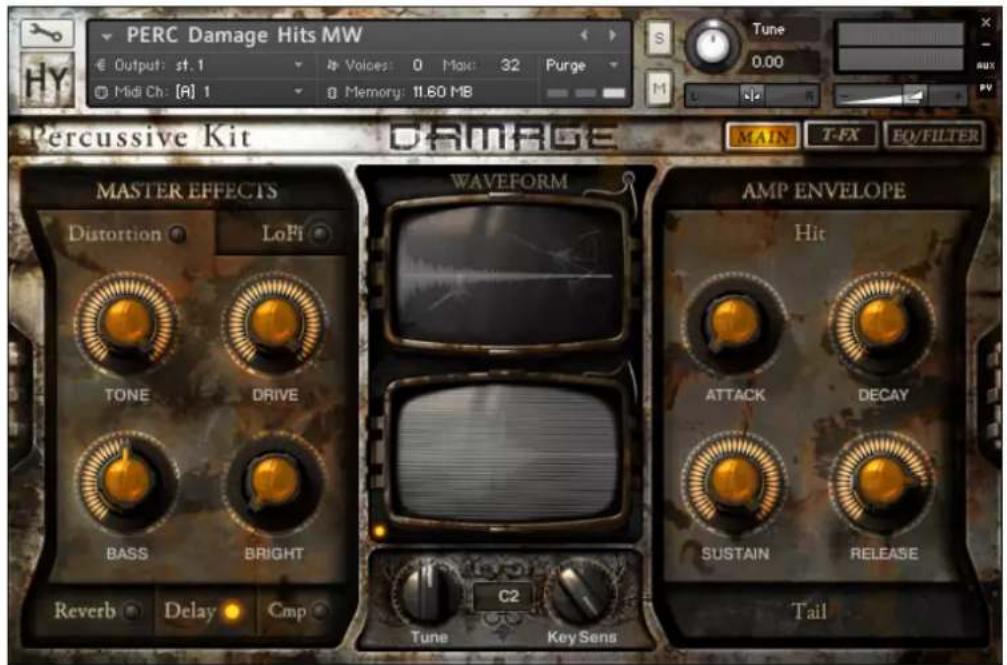
PERC Damage Hits MW Output: st.1 Midi Ch: [A] 1 Roo: 0 Max: 32 Purge Memory: 11.60 MB Percussive Kit DAMAGE MASTER EFFECTS Distortion LoFi TONE DRIVE BASS BRIGHT Reverb Delay Cmp WAVEFORM AMP ENVELOPE Hit ATTACK DECAY SUSTAIN RELEASE C2 Tune Key Sens TailMain page of the Percussive Kit's Damage Hits.
The signature Damage Hits instrument provides a unique view of the waves for the user, displaying two screens with which you can monitor the waveforms. Similar to the Damage Kits category, this preset contains the Trigger FX (T-FX) and EQ/Filter pages. The Main page also provides control over important Global parameters.
- Master Effects: Distortion, LoFi, Compression (Cmp), Reverb, and Delay
-
Amp Envelope: Provides ATTACK, DECAY, SUSTAIN, and RELEASE control for both the Hits and Tails, independently
-
Individual Drum Tuning: Control the Tuning (Tune) of each drum
- Velocity Sensitivity: Global control for the velocity sensitivity (Key Sens) of the preset
3 Using the Instruments
3.1 Common Controls
As you may have noticed from earlier sections of the manual, certain controls are shared between the different instrument types. These controls and their use will be described in this section of manual.
3.1.1 Tabs & Basic Navigation
To the top right of every instrument's performance view you will see three tabs. These are used to navigate between the three different pages of controls for the instrument.

User Interface Navigation Tabs.
In all instruments the first tab will be labeled MAIN and will take you to the Main page (the first page you see when you open the instrument), which contains the general instrument controls. The third tab is always EQ/FILTER and will take you to a page containing controls for these effects. The second tab will differ depending on the instrument type:
- For the Loop Menus it is labeled T-FX and will take you to the Trigger FX control page.
- For the Single Loops it is labeled LOOP and will take you to the Loop Modifier page.
- For Percussive Kits with a mixer, it is labeled STAGE and will take you to the Drum Position control page.
- For all other Percussive Kits it has the same function and look as the Loop Menus.
3.1.2 Master Effects
On the left side of the Main page you will find the master effects section of the instrument. This area contains 5 different effects that you can turn on or off using the LED button to the right of the effect's name. You can also view the effect's controls by clicking on its name. Each effect has four control knobs to help you shape the sound of the instrument.

text_image
MASTER EFFECTS Distortion LoFi COMPRESS RATIO ATTACK RELEASE Reverb Delay CmpCompressor in the Master Effects section of the Main page.
The 5 effects and their controls are as follows:
Distortion
A guitar style distortion based on KONTAKT's Skreamer effect.
- TONE: Sets the brightness of the processed signal.
- DRIVE: Controls the amount of distortion.
- BASS: Controls the gain of the lower frequencies.
■ BRIGHT: Controls the gain of the higher frequencies.
LoFi
A digital degradation tool used for adding grit or completely decimating the sound.
- BITS: Sets the resolution, or theoretical bit-depth, of the sound. Lower values apply a bit-crusher style distortion.
- SAMP RATE: Artificially reduces the sample rate of the audio, creating aliasing in the signal.
- NOISE: Controls the amount of background noise.
- COLOR: Sets the tonality of the noise. If the NOISE knob is set to its lowest, this control will have no effect.
Reverb
An algorithmic room simulator, used to add space to the sound. It is worth noting that this is a send effect, so it is routed in parallel.
- DELAY: Sets the delay time before the wet signal.
- SIZE: Sets the size of the artificial space.
- DAMP: Sets the amount of absorption in the artificial room, reducing high frequencies in the processed signal.
- GAIN: Controls the return level of the effect.
Delay
The classic echo effect. Like the reverb, this is also a send style effect.
- TIME: Sets the delay time (the time between echoes).
- WIDTH: Controls the stereo spread of the echoes.
- FEEDBACK: Feeds a certain amount of the output back into the effects input, creating repeating echoes.
- GAIN: Controls the return level of the effect.
Compressor (Cmp)
A tool for shaping the dynamics of the instrument, based on analogue modeling.
- COMPRESS: Controls the compression amount. Higher values apply more compression to the signal.
- RATIO: Sets the compression ratio. A setting of 4 will mean an input signal 4dB above the threshold will only increase by 1dB at the output.
- ATTACK: Controls the attack time of the compressor, i.e. how quickly it responds to increases in signal level.
- RELEASE: Controls the release time of the compressor, i.e. how quickly the gain reduction returns to normal after a drop in signal level.
3.1.3 Volume Envelope
text_image
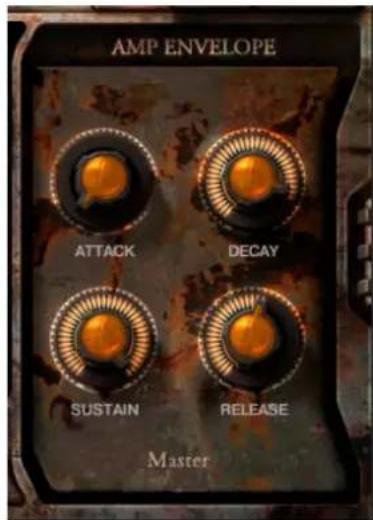
AMP ENVELOPE ATTACK DECAY SUSTAIN RELEASE MasterGlobal Amp Envelope on the Main Page.
On the right side of the Main page there is an ADSR envelope for modulating the instrument volume. This envelope is triggered with every note and can be used to shape the volume of the played note. The four controls for the envelope are as follows:
- ATTACK: Controls the attack time, or fade-in, of the envelope.
- DECAY: Controls the decay time, which is the amount of time it takes to get from the maximum volume to the volume set by the SUSTAIN control. The decay phase occurs after the attack phase is finished.
- SUSTAIN: Sets the level at which the envelope will rest after the decay phase is finished. The sustain phase will last for as long as the key is pressed.
- RELEASE: Sets the fade-out time that occurs after the triggering note is lifted (or released).
For the Damage Hits instrument, you have access to two separate envelopes, one for the main hit, and one for the tail layer. To access the different sets of controls, just click on the HIT or TAIL tabs above and below the four knobs.
Percussive Kit Envelopes
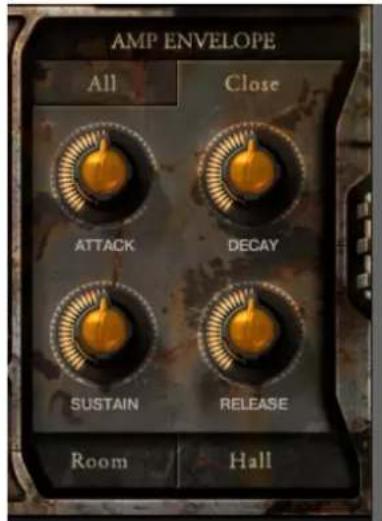
The Percussive Kits that have mixer controls have a unique envelope system. There is the main set of controls, like all of the other instruments, but there are also controls available to scale the envelope values for the different microphone channels.
text_image
AMP ENVELOPE All Close ATTACK DECAY SUSTAIN RELEASE Room HallMicrophone position amp envelope for Percussive Kits.
By clicking the All tab above the envelope knobs, you have access to the master envelope controls, which behave like the normal ADSR controls described above.
▶ Clicking on the Close, Room or Hall tabs will open four controls that add or subtract to the main control value for the selected microphone channel only.
This means you can set the main envelope for the whole instrument very quickly using the All section, then fine tune these values for the separate microphone sources if you wish.
3.1.4 EQ & Filter Page

text_image
LPS Epic Organic Elements 01 Output: st. 1 Midi Ch: [A] 1 Rhythmic Suite EQUALIZER Level Low Mid High 0 1.6 dB 0.00 dB 0.00 dB Freq 46.6Hz 2.2kHz 6.1kHz Width 0.58 cc 0.76 cc 3.0 cc On PUNISH HEAVOCITY FILTERS High Pass FREQ RESO Low Pass FREQ RESO OnEQ/Filter page of the Rhythmic Suite.
As mentioned in the Tabs chapter, all instruments have an EQ and Filter page, containing a 3 band parametric EQ, a 4-pole lowpass filter, a 4-pole highpass filter and a PUNISH control. In all instruments you have access to these master effects, and for all except the Single Loops you also have access to EQs and Filters per sound.
Parametric EQ
DAMAGE offers a 3-band, fully parametric EQ, which can be used to fine-tune the frequency content of the instrument. To activate an EQ, just click on the LED button at the bottom of the EQ controls. For the Single Loops this is labeled On, but for other instruments there will be two LEDs one to turn on the global (Master) EQ that is applied to the whole instrument, and one for the selected drum or loop, which is labeled accordingly.

Master and Drum specific EQ.
▶ If two switches are offered, you can tab between the EQ controls by clicking on the label.
▶ To select a drum or loop for editing, just hit the corresponding MIDI key, and the controls are automatically displayed for that sound.
The controls offered for each band of the EQ are as follows:
- Level: Sets the volume cut or boost applied to the frequency band.
- Freq: Sets the central frequency of the band.
- Width: Sets the width, or size of the band.
Filters
The filters also shape the frequency content of the sound, but they are a lot coarser and are thus mainly used as an effect.
The filter controls are similar to the EQ controls in that certain presets give the option for Global and per Drum/Loop filters.

Global and Drum specific filter.
Activating and selecting the filters is handled in the same way as the EQs.
The two filters on offer are:
- A 4-pole Highpass: used to remove low frequency signals. The signal is reduced at a rate of -24dB per octave below the cutoff frequency.
- A 4-pole Lowpass: used to remove high frequency signals. The signal is reduced at a rate of -24dB per octave above the cutoff frequency.
The cutoff frequency for each is controlled with the CUTOFF knob. The RESONANCE knob can be used to add a gain boost at the cutoff frequency.
Punish
The big knob in the center of the EQ & Filter page is the PUNISH knob. It is a combination of saturation and dynamic effects that are designed to give your drums what is coming to them. You can use this control lightly to add loudness and overtones, or you can turn it up to full to transform the sound. The form of punishment is up to you.
You can turn the effect on or off using the LED below the knob.
3.2 The Amp Sequencer
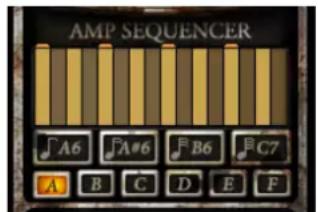
The Loop Menus and the more basic Percussive Kits offer an Amp Sequencer, which is a 16-step sequencer that modulates the output level of the instrument. It is a useful way to add a stutter or glitch style effect.
text_image
AMP SEQUENCER A6 A#6 B6 C7 A B C D E FAmp Sequencer on the Main page.
The rate of the sequencer is always synchronized to the host tempo (or KONTAKT's master tempo).
▶ To trigger the sequencer, you can either click on one of the four rate buttons located below the sequencer table, or press the corresponding key-switch.
▶ To deactivate the sequencer, you can either release the MIDI key, or click on the button again.
▶ To edit a sequence, simply click and drag on the table. It's as easy as that.

The Amp Sequencer works best when the input starts and releases are both quantized.
Pattern Banks
For each instrument you have a selection of six different patterns, which can be recalled by clicking on one of the buttons labeled A to F or can be selected with the MIDI keys D7 – G7. Any editing to the pattern is automatically stored in the selected bank; the banks are then saved with the nki file. If you do not save the nki file, the changes to all patterns within the instrument will be lost.
3.3 The Trigger FX
text_image
LPS Epic Organic Full Output: st. 1 Midi Ch: [A] 1 N: Voices: 0 Max: 32 Purge Memory: 498.67 MB Tune 0.00 Rhythmic Suite MAIN T-FX EQ/FILTER C6 C#6 D6 D#6 E6 F6 F#6 G6 Bright Speed Balance Reduce Pan Amount Center Time Squish Depth Intensity Range Depth Speed Range Feedback Smack Feedback Speed Pattern Pattern Pattern Resonance Width Punch Phaser Rotator Lo-Fi Glitcher Pitch Env. Filter Env. DelayT-FX (Trigger FX) page.
DAMAGE takes the Trigger FX concept that was introduced with Evolve Mutations 2 one step further. For every trigger effect you have three controls for extra tweaking possibilities. DAMAGE's Trigger FX are triggered with the MIDI keys C6-G6, or can be turned on and off by clicking on the corresponding buttons. The eight effects available to you are:
- Punch (C6): Compression/Saturation combination.
- Phaser (C#6): The classic modulated all-pass filter for adding a sweeping sound to the instrument.
- Rotator (D6): A rotary speaker emulation.
- LoFi (D#6): A modulated digital LoFi effect, tempo-synced to your host tempo or KONTAKT's master clock.
- Glitcher (E6): Fast volume and pan modulation.
- Pitch Env. (F6): Tempo-synced pitch modulation.
- Filter Env. (F#6): Applies a modulated lowpass filter to the instrument.
- Delay (G6): Opens a send to an additional delay effect.
3.4 Rhythmic Suites – Loop Menus
The Loop Menus are divided into 2 types of presets, Full and Elements. The 4 Full Menus provide beat-sliced loops stacked together on keys to provide a “one-hit” full loop. The elements provide only one layer per key, allowing you to quickly and intuitively construct percussive beds.

We've taken specific care to create very clean beat-sliced content. Individual loops tend to contain optimal tempo ranges, or sweet spots, spanning 80-160 bpm. However, you can create very interesting textures by pushing the tempo beyond this range. The beat-sliced loops can be synced to either the MasterKontrol or host sequencer tempo.
3.4.1 Mapping
In each of the Loop Elements Menus, the loops are intuitively mapped from low to high timbre. On the lower end of the 88 key-range are the larger, deeper, darker sounds. As you move up the register, the loop-types shift towards higher, wispier types of sounds. This intuitive system allows you to build complex beats with ease.

The very top range of the keyboard (octave 6) is where you will find the key-switches for the Trigger FX and the Amp Sequencer.
3.4.2 Main Page
text_image
LPS Epic Organic Full Output: st.1 Midi Ch: [A] 1 Voices: 0 Max: 32 Purge Memory: 498.67 MB Tune 0.00 Rhythmic Suite MASTER EFFECTS Distortion LoFi TONE DRIVE BASS BRIGHT Reverb Delay Cmp LOOP C#2 AMP SEQUENCER Level Pan Tune AMP ENVELOPE ATTACK DECAY SUSTAIN RELEASE MasterMain page of the Rhythmic Suite's Loop Menus.
The Main page contains the familiar Master Effect and Envelope controls, both of which were described earlier in the manual. The central section of this page holds a waveform display of the last triggered loop, the Amp Sequencer controls, and extra loop controls at the bottom. The loop controls allow you to alter the Level, Pan, and Tune of the selected loop. You can select a loop either by playing the respective MIDI note, or by clicking and dragging on the note display inside the loop waveform display. You can also double-click on this area to enter a MIDI note and navigate directly between loops.

Use the Amp Sequencer and the Trigger FX together to create more radical changes to the loop playback.
3.5 Rhythmic Suites – Single Loops
3.5.1 Mapping
Each of the Single Loop presets contains 1 loop mapped to C1 and the loop's slices mapped chromatically up starting on D1. Below C1 there is just over one octave of controls for re-arranging and re-mixing the loop on C1.
The Single Loop presets are created from the associated Loop Menu, and are named according to the key mapped and timbre of the loop. For example, “04 LP Ep Org (EI 02) D#0 Boom.nki” is found in the preset “LPS Epic Organic Elements 02.nki” on the key D#0.
3.5.2 Main Page
text_image
35 LP Mang Pop F4 Fat n Loud Output: st.1 Midi Ch: [A] 1 Voices: 0 Mon: 32 Purge Memory: 3.22 MB Tune 0.00 Rhythmic Suite DURATION MASTER EFFECTS Distortion LoPi TIME WIDTH FEEDBK GAIN Reverb Delay Cmp LOOP MIDI To HOST D1 Slice AMP ENVELOPE ATTACK DECAY SUSTAIN RELEASE MasterMain page of the Rhythmic Suite's Single Loops.
On the Main page of the Single Loops you have access to per slice, Level, Pan and Tune controls, as well as a MIDI to Host drag and drop option.
MIDI Drag and Drop
Each Single Loop patch comes with a corresponding MIDI file. If you wish to edit this file in your own MIDI editing software, you can easily export the MIDI file by clicking on the area labeled MIDI To HOST, dragging the mouse to wherever you want to place the file, then releasing the mouse to let the file drop into your host or computer folder.
Per Slice Controls
The per slice controls are similar to the controls offered for the loop menus, but they effect the slices of both the main loop played back on MIDI note C1, as well as the individual slices mapped from D1 onwards.
To select a slice for editing you can either press the corresponding MIDI key, or use the MIDI note display located below the MIDI to Host area.

You can apply the same Level, Pan or Tuning changes to all slices at once by holding the Alt key while moving the knob.
3.5.3 Using The Loop Modifier Page

text_image
35 LP Mang Pop F4 Fat n Loud Output: st.1 Midi Ch: [A] 1 Voices: 0 Max: 32 Purge Memory: 3.22 MB Rhythmic Suite DAMSLICE MAIN LOOP BO/FILTER F2 Level Pan Tune A-I A#1 B-1 C0 C#0 D0 D#0 E0 Loop Randomizer Slice Freezer Slice Dropper Trigger Keys effect Full Loop (C1) Reverse Play BO alt/opt + click sets all slicesThe Rhythmic Suite's Loop Modifier page.
The Loop Modifier page is accessed by clicking on the LOOP tab. Here you have a larger waveform display that indicates the slice points and the selected slice. You also have duplicates of the per slice Level, Pan, and Tune knobs.
Below this area are the loop modifier controls. These controls allow you to re-arrange and re-mix the main loop that is played from MIDI note C1. There are four main loop modifier types, three of which have four intensity levels. The modifiers can either be activated by clicking on the buttons on the instrument's interface, or by using one of the key-switches located on MIDI notes A-1 to B0.
- Loop Randomizer (A-1 to CO): Randomizes the loop based on the true position. The amount of randomization increases with each button from left to right, or as the key-switch note increases.
- Slice Freezer (C#O to E0): Freezes the current slice and repeats it at a specified rate. The four intensity levels designate the rate of playback. A quick and easy way to add rolls or glitch effects.
- Slice Dropper (FO to G#O): Skips beats to create odd patterns. The number of beats skipped is controlled by the intensity level of the button or key-switch.
- Reverse Play (B0): Reverses the playback order of the slices, without reversing the audio. Can be used to add interesting variation to the rhythmic loop.
The loop modifiers are designed for real-time use and are always synced to the host tempo.

The Loop Modifiers will work best if the input starts and releases of the input keys are both quantized.

Using the drop slice modifiers can very quickly alter the feel of the beat. This modifier works bets if you retrigger the loop using C1 after hitting the modifier. This will quickly return the beat to its original playback

Trigger C1 to use the modifiers, then add additional beats and impacts with the key-mapped slices starting on D1.
3.6 Single Percussion Instruments
3.6.1 Mapping
Many of the percussive hits sampled for this library have multiple variations on each velocity to avoid what is called the "machine gun" effect of repeating the same sample again and again. To take advantage of this feature, each hit with multiple variations (or round robins) will be mapped to two sequential keys. This makes it easier to play rolls or fast rhythmical patterns on your MIDI keyboard.
If you look at the virtual keyboard provided by KONTAKT's interface, the hits are color-coded alternately blue and yellow to help you see where each hit is mapped. If a hit has no variations, the key is colored green. Usually, these types of hits are mapped above those that do have variations.
3.6.2 Using the Mixer
text_image
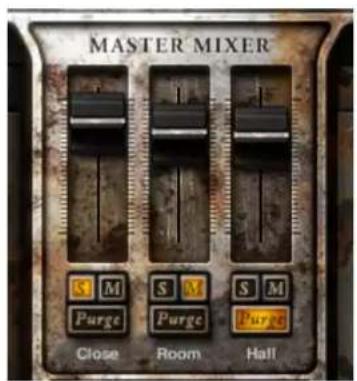
MASTER MIXER S M Purge S M Purge S M Purge Close Room Hall3 microphone position mixer on Main page.
For most of the Percussive Kits you have three different microphone sources available to you on three separate mixer channels. The output levels of each of these channels can be changed using the faders provided on the Main Page. Below the Faders are Mute and Solo buttons (marked with an M and S respectively) for each channel.
If you are sure you will not use one of the three channels for a project, you have a Purge button which, when pressed, will unload the samples of that channel from RAM, saving memory and improving performance. If you change your mind, you can always re-load the samples by clicking on the button again.
3.6.3 Using the Stage (Drum Position)

text_image
DRUM POSITION KEY C3 DRUM Pedal On alt/opt key + click assigns all drums RESETStage providing drum placement in the stereo field.
For the Percussive Kits that have a Mixer, you will also have a Stage page. The Stage page is an easy to use way of placing the drum in the recorded space by altering the gain and pan of the three different channels for that drum.
To place a drum using the Stage all you need to do is...
-
Make sure the Stage is active by checking if the On LED at the bottom of the interface is glowing.
-
If the Stage is not active, you can activate it by clicking on the On LED.
-
Next, select the drum you wish to position, either by hitting the corresponding MIDI key or by clicking and dragging on the area labeled Key.
-
Finally, place the drum by clicking on one of the positions offered on the 7 by 5 matrix of LED buttons.

You can place all of the drums to the same position at once by holding the alt key while you click on the position LED.
If you unhappy with the positioning choices you have made to the kit, you can reset all of the drums to the center position by clicking on the RESET button.
3.6.4 Damage Hits & Damage Kits

text_image
PERC Damage Hits MW Output: st.1 Midi Ch: [A] 1 Voice: 0 Max: 32 Purge Memory: 11.60 MB Tune 0.00 Pur Percussive Kit DAMAGE MASTER EFFECTS Distortion LoFi TONE DRIVE BASS BRIGHT Reverb Delay Cmp WAVEFORM AMP ENVELOPE Hit ATTACK DECAY SUSTAIN RELEASE C2 Tune Key Sens TailMain page of the Percussive Kit's Damage Hits.
The Damage Hits instrument can be found in the folder named "04 Hybrid FX Hits". This is a unique Kit as it has an additional tail layer under the main percussive hits. The volume level of the tail is controlled using the Modulation Wheel.

If you want to deactivate the television static animation, you can click on the LED to the bottom left of the screen.
Because the Damage Hits and Kits do not have multiple microphone sources, the Trigger FX page replaces the Stage page. The Trigger FX work in the same way for these kits as they do for the Loop Menus.
The Damage Kits, in contrast to the signature Damage Hits instrument, offer the Amp Sequencer, which is described in Chapter 3.2 , The Amp Sequencer.
text_image
Pitch Mod ←+3 oct > C3LPS Epic Organic Full: B1 - A#5.

text_image
Pitch Mod +2 oct > C3LPS Epic Organic Elements 01: A0 - G#5.

text_image
Pitch Mod +2 oct > C3LPS Epic Organic Elements 02: CO - E5.

text_image
Pitch Mod +2 oct C3LPS Epic Organic Elements 03: C1 - D#5.

text_image
Pitch Mod ←+3 oct > C3LPS Epic Tech Full: B1 - A#5.

text_image
Pitch Mod 4+2 oct > C3LPS Epic Tech Elements 01: AO - A#5.

text_image
Pitch Mod 4+2 oct > C3LPS Epic Tech Elements 02: A0 - G5.

text_image
Pitch Mod ←+2 oct > C3LPS Epic Tech Elements 03: C1 - G#5.

text_image
Pitch Mod +3 oct > C3LPS Industrial Full: A1 - A5.

text_image
Pitch Mod ←+2 oct > C3LPS Industrial Elements 01: C1 - G#5.

text_image
Pitch Mod 4+2 oct > C3LPS Industrial Elements 02: CO - D5.

text_image
Pitch Mod 4+2 oct > C3LPS Industrial Elements 03: C1 - G5.

text_image
Pitch Mod ←+3 oct > C3LPS Mangled Pop Full: G1 - A5.

text_image
Pitch Mod +2 oct > C3LPS Mangled Pop Elements 01: C1 - E5.

text_image
Pitch Mod ←+2 oct > C3LPS Mangled Pop Elements 02: C1 - A#5.

text_image
Pitch Mod +1 oct > C3LPS Mangled Pop Elements 03: A-1 - A5.
4.2 Percussive Kits
4.2.1 Epic Organic Drums

text_image
Pitch Mod +1 oct > C3PERC Studio Armageddon Ens: C1 - A3.

text_image
Pitch Mod +1 oct > C3PERC Studio Plastics Ens: C1 - F1.

text_image
Pitch Mod +1 oct > C3PERC Studio Concert Bass Drum: C1 - F1.

text_image
Pitch Mod +1 oct > C3PERC Studio Drum Kit: C1 - D#4.

text_image
Pitch Mod +1 oct > C3PERC Studio Epic Drum n Metal Ens: C1 - D#1.

text_image
Pitch Mod +1 oct > C3PERC Studio Kicks: C1 - F1.

text_image
Pitch Mod +1 oct C3PERC Studio Roto Toms: G1 - C#3.

text_image
Pitch Mod +1 oct > C3PERC Studio Snares: G1 - G2.

text_image
Pitch Mod +1 oct > C3PERC Studio Toms Mallet: A2 - A#3.

text_image
Pitch Mod +1 oct > C3PERC Studio Toms Stick: A2 - F4.

text_image
Pitch Mod +1 oct > C3PERC Church Kick Drum Kit: C1 - C#3.

text_image
Pitch Mod +1 oct > C3PERC Church Octobans: C2 - D#4.

text_image
Pitch Mod +1 oct > C3PERC Church Snares: C2 - G#5.

text_image
Pitch Mod +1 oct > C3PERC Church Toms: G1 - E2.
4.2.2 Ethnic Drums

text_image
Pitch Mod +1 oct > C3PERC Ethnic Ens Percussion: C2 - G2.

text_image
Pitch Mod +1 oct > C3PERC Ethnic Woods Menu: C2 - B3.

text_image
Pitch Mod +1 oct > C3PERC Ethnic Drums Menu: C2 - F#4.

text_image
Pitch Mod +1 oct > C3PERC Ethnic Drums Buffalo: E1 - G#2.

text_image
Pitch Mod +1 oct > C3PERC Ethnic Drums Dumbek and Tabla: C3 - A#4.

text_image
Pitch Mod +1 oct > C3PERC Ethnic Drums Frame: C2 - G#2.

text_image
Pitch Mod +1 oct C3PERC Ethnic Drums Udu: C2 - G#2.

text_image
Pitch Mod 4+1 oct > C3PERC Ethnic Guiro and Blocks: C2 - F3.

text_image
Pitch Mod +1 oct > C3PERC Ethnic Small Drums: C3 - A3.

text_image
Pitch Mod ←+1 oct > C3PERC Ethnic Tribal Drums: C2 - A3.
4.2.3 Metals

text_image
Pitch Mod +1 oct C3PERC Dumpster: C3 - G4.

text_image
Pitch Mod +1 oct > C3PERC Metal Menu 1: C2-B4.

text_image
Pitch Mod +1 oct C3PERC Metal Menu 2 small: C2 - G4.

text_image
Pitch Mod +1 oct > C3PERC Metal Menu 3: C2-B4.

text_image
Pitch Mod +1 oct > C3PERC Oil Drum: A2 - G#4.

text_image
Pitch Mod +1 oct > C3PERC Cym-bow FX: C2 - C#3.

text_image
Pitch Mod +1 oct > C3PERC Cymbal Performance FX: C2 - B4.

text_image
Pitch Mod +1 oct > C3PERC Cymbals Menu Studio: C1 - C5.

text_image
Pitch Mod +1 oct > C3PERC Hex Cymbal Fx Menu: C3 - A4.

text_image
Pitch Mod +1 oct C3PERC Hi Hat Studio (no choke): C3 - B3.

text_image
Pitch Mod +1 oct > C3PERC Hi Hat Studio: C3 - B3.

text_image
Pitch Mod 4+1 oct > C3PERC Hi Hats kit Church: C2 - G3.

text_image
Pitch Mod +1 oct > C3PERC Sheet Metal: C3 - G3.

text_image
Pitch Mod 4+1 oct > C3PERC Spring Drum FX: C1 - B5.
4.2.4 Hybrid FX Hits

text_image
Pitch Mod ←+2 oct > C3PERC Damage Hits MW: C1 - D5.

text_image
Pitch Mod ←+2 oct > C3PERC Damage Hit Impacts: C1 - D5.

text_image
Pitch Mod 4+2 oct > C3PERC Damage Hit Tails: C1 - D5.

text_image
Pitch Mod 4+2 oct > C3PERC DaMaGeD Piano: C1 - G5.

text_image
Pitch Mod 4+2 oct > C3PERC Broken Pianos: C2 - A4.

text_image
Pitch Mod +2 oct > C3PERC Dark Impacts: C1 - G#5.

text_image
Pitch Mod 4+2 oct > C3PERC Exploding Cars: C2 - C5.

text_image
Pitch Mod 4+2 oct > C3PERC Junk Yard Metals: C2 - D4.

text_image
Pitch Mod 4+2 oct > C3PERC Low Drum Skin FX: G1 - A2.
4.2.5 Damage Kits

text_image
Pitch Mod ←+2 oct > C3PERC Bad A Krunch Kit: C1 - G4.

PERC Bad A Punch Kit: C1 - G#4.

text_image
Pitch Mod 4+2 oct > C3PERC Big Organo Kit: C1 - F#4.

text_image
Pitch Mod 4+2 oct > C3PERC Captn Crunch n Punch Kit: C1 - D#4.

text_image
Pitch Mod ←+2 oct > C3PERC Crumble Kit: C1 - A4.

text_image
Pitch Mod +2 oct > C3PERC Disruption Bits Kit: C1 - C5.

PERC Electro Blitz Kit: C1 - F5.

text_image
Pitch Mod ←+2 oct > C3PERC Electro Effects Kit: C1 - A#4.

text_image
Pitch Mod +1 oct > C3PERC Electro Smack Kit: A-1 - E5.

text_image
Pitch Mod 4+2 oct > C3PERC Epik Elektro Kit: C1 - E4.

text_image
Pitch Mod +2 oct > C3PERC Hybrid Dirty Sin Kit: AO - G#5.

text_image
Pitch Mod 4+2 oct > C3PERC Industrial Decimator Kit: C1 - C5.

text_image
Pitch Mod 4+2 oct > C3PERC Tweak Skool Kit: C1 - F5.
5 Credits
Product Concept and Design: Heavyocity Media – Dave Fraser, Neil Goldberg, Ari Winters
Content Creation: Heavyocity Media – Neil Goldberg, Dave Fraser, Ari Winters
Additional Content Creation: Robert Dudzic, Otto Cate
KONTAKT Scripting: Adam Hanley
Recording Studios:
- Heavyocity Studios – Engineers Neil Goldberg, Dave Fraser, Ari Winters
- Skyline Studios New York – Engineers Argel Anaya, Neil Goldberg
- Prism Sound Studios “The Church” – Engineer John Ellis
Performers: Heavyocity Media, Mike Mangini
Additional Performances: Robert Dudzic, Justin Wasack, Thomas Bramley
Sample Editing: Heavyocity Media, Justin Wasack, Robert Dudzic, Scott Frieman
Artwork: Shaun Ellwood, Dave Fraser
Strategic Planning: Garrison Street Partners- Evan Goldberg
Heavyocity Interns: Ling-Hsuan (Sophie) Lu, Gisela Fullå-Silvestre, Jon Schwarz, Matt Romagna, George Koltsiou
Special Thanks: Jonathan Mover, PSP Audioware, Collaborate: Ideas and Images – Lauren Anders Brown
Additional Functionality Design: Adam Hanley