95-8239B - Kit voiture Metra - Free user manual and instructions
Find the device manual for free 95-8239B Metra in PDF.


User questions about 95-8239B Metra
0 question about this device. Answer the ones you know or ask your own.
Ask a new question about this device
Download the instructions for your Kit voiture in PDF format for free! Find your manual 95-8239B - Metra and take your electronic device back in hand. On this page are published all the documents necessary for the use of your device. 95-8239B by Metra.
USER MANUAL 95-8239B Metra
Installation instructions for part 95-8239B
Toyota Prius C 2012-2014 95-8239B
KIT FEATURES
• ISO DDIN radio provision
- Painted Matte Black
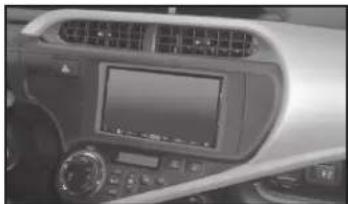
natural_image
Interior view of a car dashboard with air conditioner and control panel (no visible text or symbols)KIT COMPONENTS
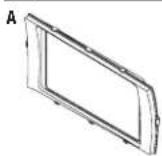
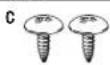
• A) Radio Trim Panel • B) Radio Brackets • C) (2) #8 x 3/8 Phillips Truss Head Screws

WIRING & ANTENNA CONNECTIONS (sold separately)
Wiring Harness: • 70-1761
Antenna Adapter: • 40-LX11
TOOLS REQUIRED
- Panel removal tool - Phillips screwdriver - Socket Wrench
Table of Contents
Dash Disassembly 2
Kit Assembly
- ISO DDIN radio provision .... 3
CAUTION! Metra recommends disconnecting the negative battery terminal before beginning any installation, unless the vehicle manufacturer recommends against so. Please check with your local Dealership for more information. All accessories, switches, climate controls panels, and especially air bag indicator lights must be connected before reconnecting the battery or cycling the ignition. Also, do not remove the factory radio with the key in the on position, or the vehicle running. It would be best to remove the key from the ignition and then wait a few seconds before removing the factory radio.
METRA. The World's best kits.™
metraonline.com
© COPYRIGHT 2004-2015 METRA ELECTRONICS CORPORATION
95-8239B
Dash Disassembly
- Unclip and remove the trim panel from around the radio including the hazard switch. (Figure A)
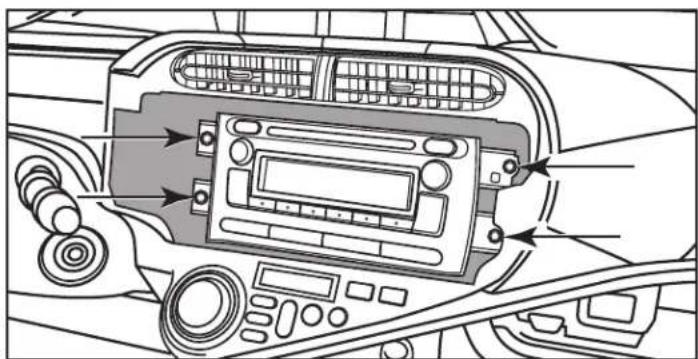
- Remove (4) 8mm bolts securing the factory radio, then unplug and remove the radio. (Figure B)
Continue to kit assembly

natural_image
Interior view of a car dashboard with air vent and control panel (no text or symbols visible)(Figure A)

natural_image
Interior view of a car dashboard with air conditioners and control panel (no text or symbols visible)(Figure B)
95-8239B
Kit Assembly
ISO DDIN radio provision
- Secure the radio brackets to the radio trim panel using (2) #8 x 3/8" Phillips truss head screws supplied. (Figure A)
- Secure the radio to the radio-bracket/trim assembly using screws supplied with the radio. (Figure B)
- Locate the factory wiring harness and antenna connector in the dash, and complete all necessary connections to the radio. Metra recommends using the proper mating adapter from Metra and/or AXXESS. Re-connect the negative battery terminal and test the radio for proper operation.
- Reassemble the dash in reverse order of disassembly.

natural_image
Technical line drawing of a mechanical assembly with two views (front and side), showing internal components and mounting holes (no text or symbols)(Figure A) (Figure B)

natural_image
Technical line drawing of a device casing with mounting brackets and internal components (no text or symbols)
Installation instructions for part 95-8239B

IMPORTANT
If you are having difficulties with the installation of this product, please call our Tech Support line at 1-800-253-TECH. Before doing so, look over the instructions a second time, and make sure the installation was performed exactly as the instructions are stated. Please have the vehicle apart and ready to perform troubleshooting steps before calling.

KNOWLEDGE IS POWER
Enhance your installation and fabrication skills by parrolling in the most recognized and suggested
mobile electronics school in our industry.
Log onto www.installerinstitute.com or call
606-334-6782 for more information and take steps toward a better tomorrow.

Metra recommends MECP
certified technicians
Metra
natural_image
Interior view of a car dashboard with air conditioner and touchscreen (no visible text or symbols)COMPONENTES DEL KIT
natural_image
Interior view of a car dashboard with air vent and control panel (no visible text or symbols)(Figura A)
natural_image
Interior view of a car dashboard with air conditioners and control panel (no text or symbols visible)(Figura B)
95-8239B
Ensamble del kit
natural_image
Technical line drawing of a mechanical bracket assembly (no text or symbols)(Figura A) (Figura B)

natural_image
Technical line drawing of a microwave oven with mounting hardware and internal components (no text or symbols)