Duo - Entraîneur de vélo LifeSpan - Free user manual and instructions
Find the device manual for free Duo LifeSpan in PDF.


User questions about Duo LifeSpan
0 question about this device. Answer the ones you know or ask your own.
Ask a new question about this device
Download the instructions for your Entraîneur de vélo in PDF format for free! Find your manual Duo - LifeSpan and take your electronic device back in hand. On this page are published all the documents necessary for the use of your device. Duo by LifeSpan.
USER MANUAL Duo LifeSpan
Duo/Trio Office Bike Owner's Manual
Congratulations on choosing to enhance your productivity and wellness with LifeSpan. You've made a healthy decision, as the need for increased amounts of daily activity has never been higher. Per the President's Council on Fitness, fewer than 5 percent of adults achieve the suggested 30 minutes of daily exercise, while office-working professionals are inactive for an average of 10 hours per day. Your new Office Bike provides health-inspiring exercise during studying, screen time, or professional work, perfect for improving your mental and physical wellbeing.
Ideal for any atmosphere, each LifeSpan Office Bike has been designed to feature sophisticated aesthetics, modest footprints, and smooth, distraction-free pedaling. To ensure zero additional costs and easy placement anywhere, your bike operates without electricity or batteries. Just sit and pedal!
Before you assemble or operate your product, please read this manual thoroughly. Important information, including safety precautions, assembly instructions, and proper operation information are included. After assembly is complete, review the Final Inspection section to ensure safe, ergonomic use.
Should you need to contact LifeSpan customer service, please visit the customer service section of www.LifeSpanFitness.com. All service requests will be responded to within one business day. Consumers in the United States and Canada can also dial (877) 654-3837, option 4.
Table of Contents
Welcome
Getting Started 4
Warranty
Safety
Children and Pets
Transportation
Storage
Specifications
Office Bike Assembly 10
Assembly Instructions
Office Bike Operations 18
Seat Adjustment
Final Inspection
Troubleshooting
Table Assembly 20
Assembly Instructions
Getting Started
Warranty
Your LifeSpan Office Bike comes with the following limited warranty valid in North America.
| Warranty | Office Bike | Warranty | Table |
| Frame | 3 Years | Frame (Excludes tabletop) | 3 Years |
| Parts | 1 Year |
LifeSpan warrants the equipment it manufactures is free from defects in materials and workmanship under normal use and services. The periods above are based on the date of purchase. During these periods, LifeSpan will replace defective parts. Should your Office Bike need service or assistance during the warranty period, do not return it to the store that it was purchased. Instead, please visit our website at www.LifeSpanFitness.com, click on “Customer Service” and complete the form to request assistance or call 877.654.3837 option 4 for a customer service agent. To get assistance you will need the unique product serial number located on the underside of the frame.
LifeSpan reserves the right to make changes and improvements to our products without incurring any obligations to similarly alter any product purchased. In order to insure our product warranty and to ensure the safe and efficient operation of your LifeSpan product, only authorized parts can be used. The warranty is void if any parts other than those provided by LifeSpan are used.
Exclusions and Limitations:
- This warranty does not apply to any defects caused by negligence, misuse, improper assembly, or maintenance, accident, or "act of God."
- This warranty does not apply to discoloration of paints or plastics.
- LifeSpan shall not be responsible for incidental or consequential damages.
- This warranty is non-transferable form the original owner.
Registration
Should you need to process a warranty claim make sure you retain your purchase receipt to verify the date of purchase and register your LifeSpan product online. To complete the registration go to www.LifeSpanFitness.com and select "Product Registration".
Safety
When using your Office Bike, basic precautions should always be followed, including:
- Never operate this Office Bike if it has been damaged.
- Do not use outdoors or in areas of high humidity or extreme temperature changes.
- Use this product for its intended use as described in this Owner's Manual.
- Do not use attachments that are not recommended by LifeSpan.
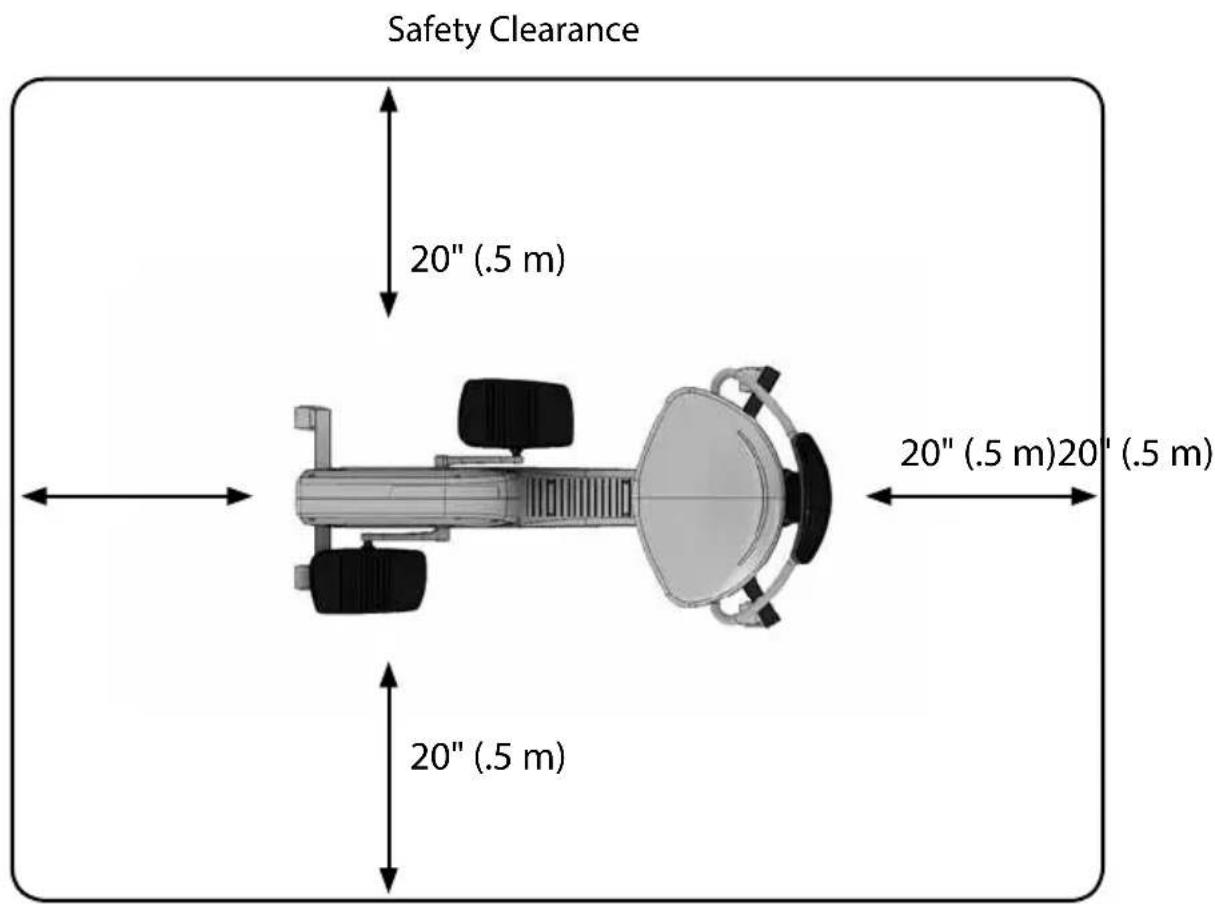
• Always keep a clear path around this product for access to, passage around and emergency dismount. At a minimum there should be a clear path on at least one side and front or back of the product. Minimum clearances are specified below. - Holding the Office Bike as you sit down will help prevent the bike from rolling away from you.
text_image
Safety Clearance 20" (.5 m) 20" (.5 m)20' (.5 m)Getting Started
Children and Pets
- Keep children under 10 years of age away from playing on or using your Office Bike at all times.
- When in use, keep others away from moving parts including the pedals and cranks.
- This Office Bike can be used by children 10 years of age and older and those with reduced physical ability or sensory capacity under supervision and instruction concerning proper use in a safe manner.
- Although the Office Bike is not intended for serious exercise, always consult a physician before beginning an exercise program. If you experience chest pains, nausea, dizziness or shortness of breath, stop exercising immediately and consult your physical before continuing.
- Keep the product on a solid and level surface at all times.
- Wear shoes with high traction rubber sole during use.
Transportation
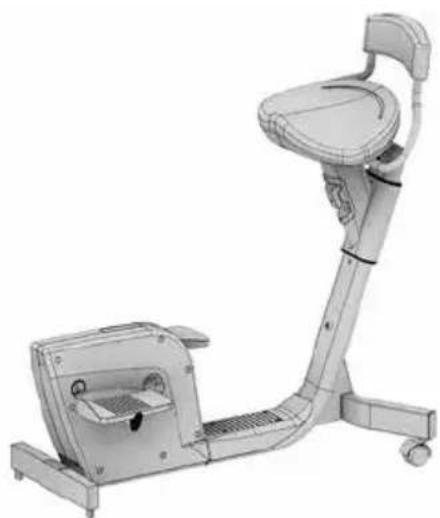
The Office Bike comes with integrated transport wheels, located on the back of the bike's frame. To safely transport the Office Bike, lift the front and roll to desired location.
natural_image
3D rendering of a stationary exercise machine with adjustable arm and seat (no text or symbols visible)Storage
When storing your Office Bike, keep it in a clean, dry environment. To prevent dust and dirt build up, cover the product with a clean, non-abrasive cover.
Specifications
Office Bike
| Seat Adjustable; Polyurethane Foam | |
| Pedaling Bi-Directional; | Forward and Backward |
| Max User Weight 400 lb (181.4 kg) | |
| Net Weight 45.2 lb (20.5 kg) | |
| Power None | |
| Assembled Size 39L x 24W x 39H in / 99L x 61W x 99H cm | |
| Frame Welded Steel Frame Construction | |
Office Bike Assembly Instructions
At LifeSpan we strive to make our equipment easy to assemble and start using. Parts that can be pre-assembled are always assembled and tested on the product line.
Prior to starting the assembly process, take all the parts out of the box, remove plastic bags and lay everything out on the floor to become familiar with the components.
It is recommended that you use two people during assembly and follow these assembly instructions to reduce any problems that may occur.

text_image
9A 3 5 6 5 9B 8 7 1 4 2 Socket 5mm Allen Wrench Multi-Wrench 13, 14, 15, 19 mmOffice Bike Assembly Instructions
Hardware Included
| Item# Part Description Item# Part Description | |||
| 1 Seat Slide Frame 6 Right Pedal | |||
| 2 Rear Base Foot 7 Seat Back | |||
| 3 Drive System 8 Seat | |||
| 4 Seat Slide Frame Base Cover 9A Front Base Pegs | Base Foot with Wheels | ||
| 5 Left Pedal 9B Front Base Foot with Pegs | |||
All Hardware is Pre-Installed
| Step # Item # Qty. Part Description | |||
| 1 | 10 | 2 | M8x45L Bolt, Lock Washers, Flat Washers |
| 2 | 11 | 2 | M8X50L Bolt, Lock Washer, Flat Washer, Nut |
| 2 | 12 | 4 | Phillips Head Screw |
| 3 | 13 | 2 | M8x45L Screw, Lock Washer, Flat Washer |
| 5 | 14 | 6 | M8x15L Screw, Washer |
| 6 | 15 | 4 | M8x15L Screw, Washer |
text_image
M8 x 45L Screw (x2) STEP 1
text_image
M8 x 50L Bolt (x2) STEP 2
text_image
Phillip Head Screws (x4) STEP 2
text_image
M8 x 45L Screw (x2) STEP 3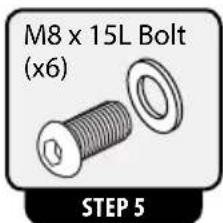
text_image
M8 x 15L Bolt (x6) STEP 5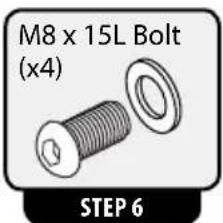
text_image
M8 x 15L Bolt (x4) STEP 6Office Bike Assembly Instructions
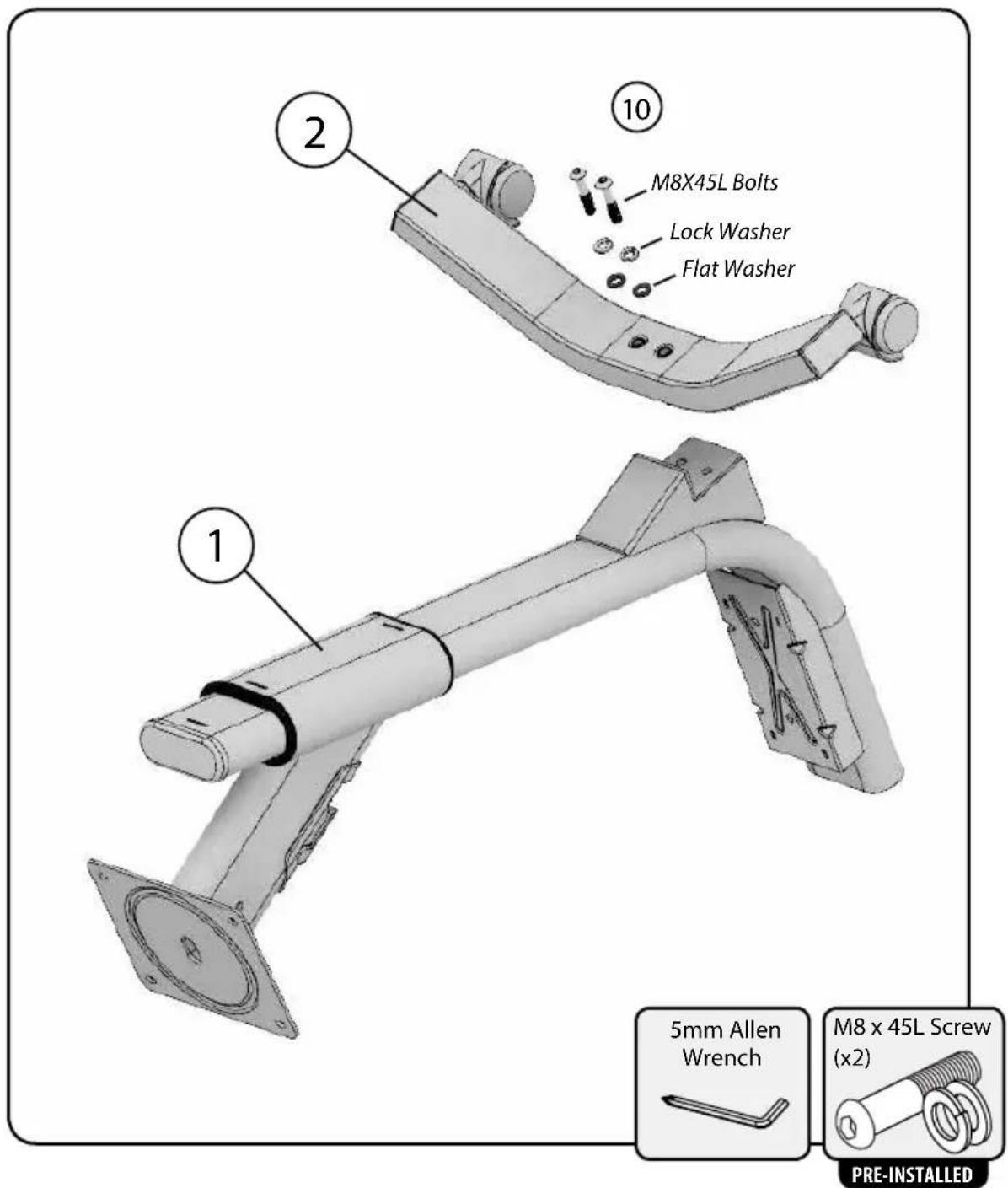
Step 1: Attach Base Foot to Seat Slide Frame
A. Position Seat Slide Frame(1) on floor as shown in figure 1.
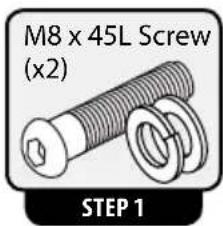
B. Remove the two pre-installed M8X45L Bolts, Lock Washers and Flat Washers(10) from Seat Slide Frame(1).
C. Connect the Rear Base Foot(2) to the Seat Slide Frame(1) with the two M8x15L Bolts, Lock Washers and Flat Washers (10). Fully tighten all hardware.
text_image
1 2 ① ⑩ M8X45L Bolts Lock Washer Flat Washer 5mm Allen Wrench M8 x 45L Screw (x2) PRE-INSTALLEDOffice Bike Assembly Instructions
Step 2: Attach Drive System to Seat Slide Frame
A. Remove the four Phillips Head Screws(12) attaching the Seat Slide Frame Base Cover (4) to the Seat Slide Frame(1) and remove the Cover.
B. Remove the two pre-installed M8x50L Bolts, Lock Washers, Flat Washers and Nuts(11) from the Seat Slide Frame(1).
C. Slide the Drive System (3) and the Seat Slide Frame(1) together and connect with the M8x50L Bolts, Lock Washers, Flat Washers and Nuts(11). Fully tighten all hardware.
D. Re-attach Seat Slide Frame Base Cover(4) with the four Phillips Head Screws(12).

text_image
1 2 3 4 11 12 Use Socket with Allen Wrench 11 Nut Lock Washer Flat Washer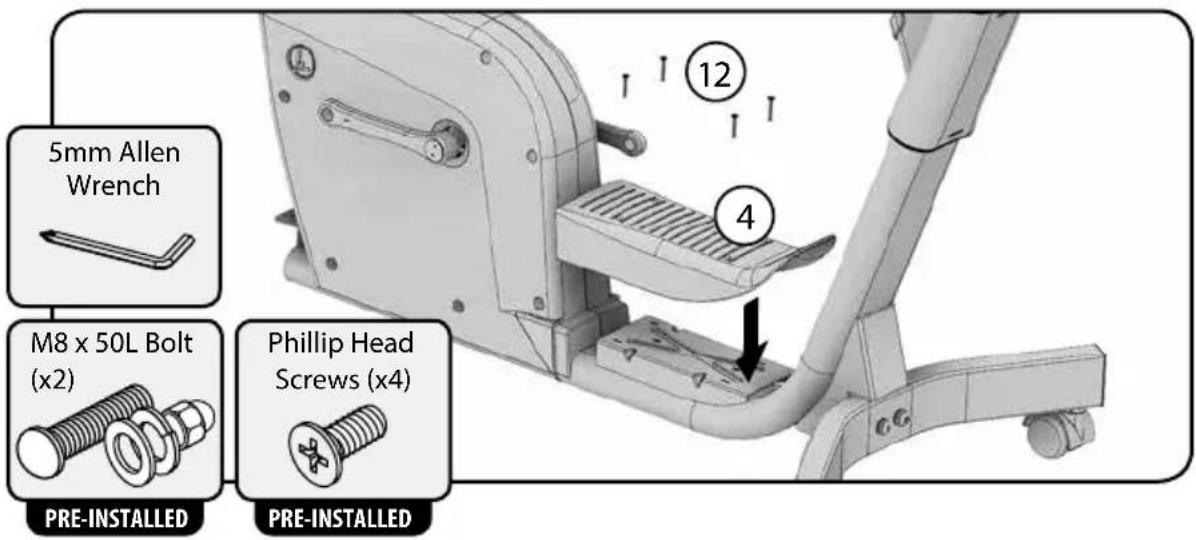
text_image
5mm Allen Wrench M8 x 50L Bolt (x2) PRE-INSTALLED Phillip Head Screws (x4) PRE-INSTALLEDOffice Bike Assembly Instructions
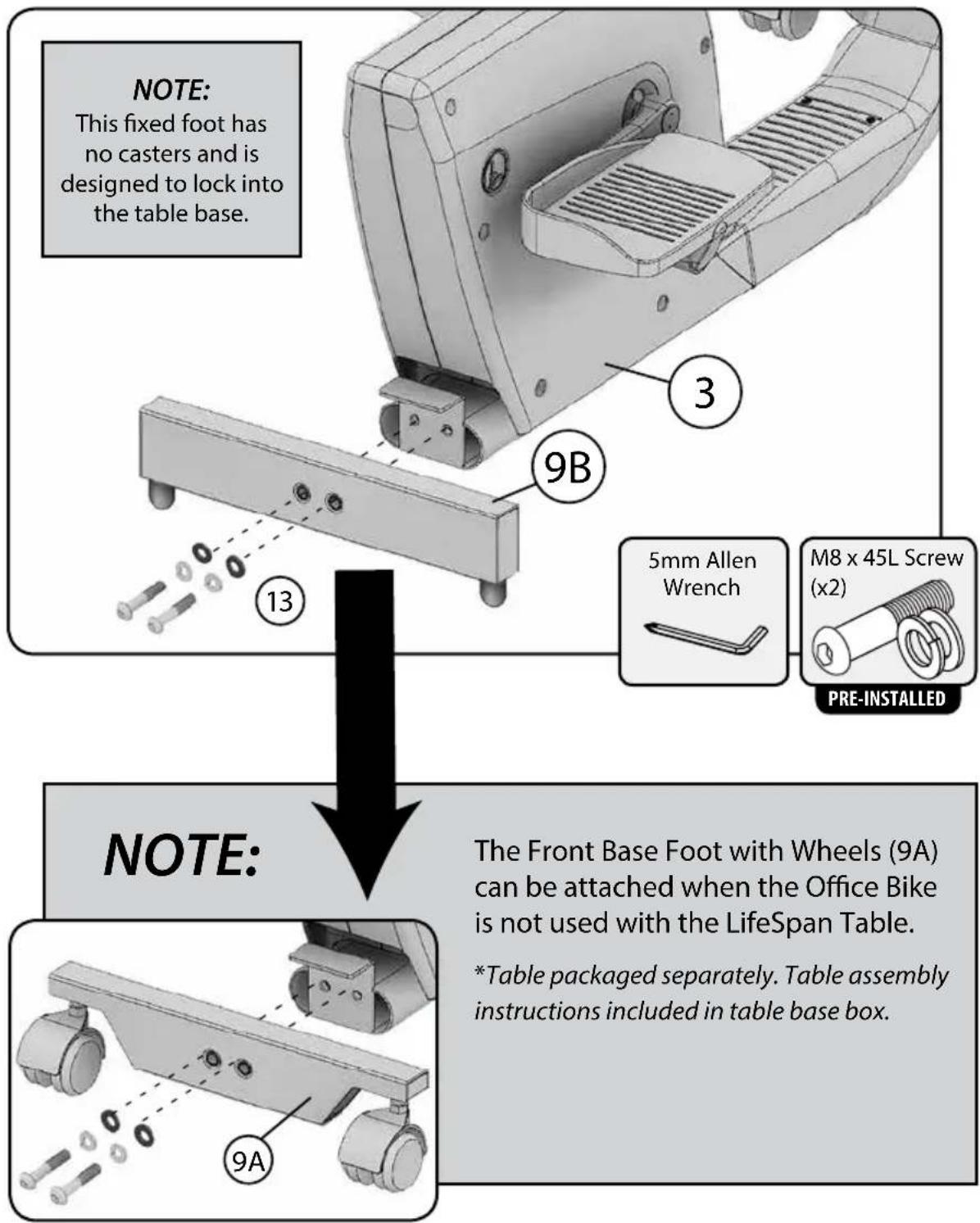
Step 3: Attaching Front Base Foot to Drive System
A. Remove the two pre-installed M8X45L Bolts, Lock Washers and Flat Washers(13) from Drive System(3).
B. Connect the Front Base Foot with Pegs(9B) to the Drive System(3) with the two M8x45L Bolts, Lock Washers and Flat Washers(13). Fully tighten all hardware.
text_image
NOTE: This fixed foot has no casters and is designed to lock into the table base. NOTE: 3 9B 13 5mm Allen Wrench M8 x 45L Screw (x2) PRE-INSTALLED NOTE: The Front Base Foot with Wheels (9A) can be attached when the Office Bike is not used with the LifeSpan Table. *Table packaged separately. Table assembly instructions included in table base box. 9AStep 4: Right and Left Pedal Assembly
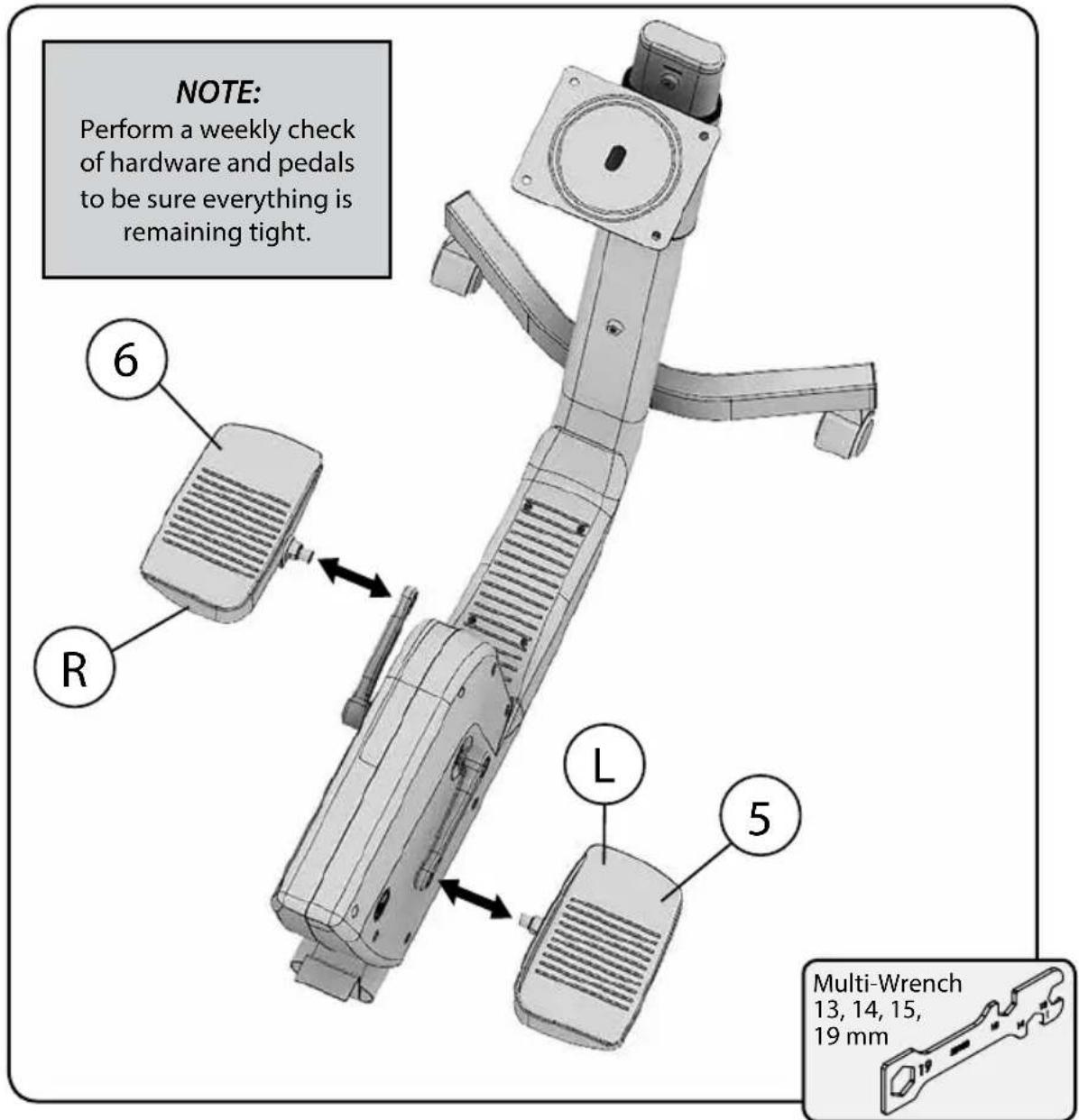
A. Identify which pedal goes on the right side and which goes on the left side by locating the "R" on the back of the Right Pedal(6) and the "L" on the back of the Left Pedal(5).
B. Hand tighten the Right Pedal into the Right Crank Arm (R) by turning clockwise.
C. Hand tighten the Left Pedal into the Left Crank Arm (L) by turning counter clockwise. Be careful not to cross thread the threads.
D. Tighten both pedals with the provided 15mm wrench. Fully tighten the pedals. This will prevent the pedals from getting loose and causing damage to the crank threads.
text_image
NOTE: Perform a weekly check of hardware and pedals to be sure everything is remaining tight. 6 R L 5 Multi-Wrench 13, 14, 15, 19 mmOffice Bike Assembly Instructions
Step 5: Attach Seat Back
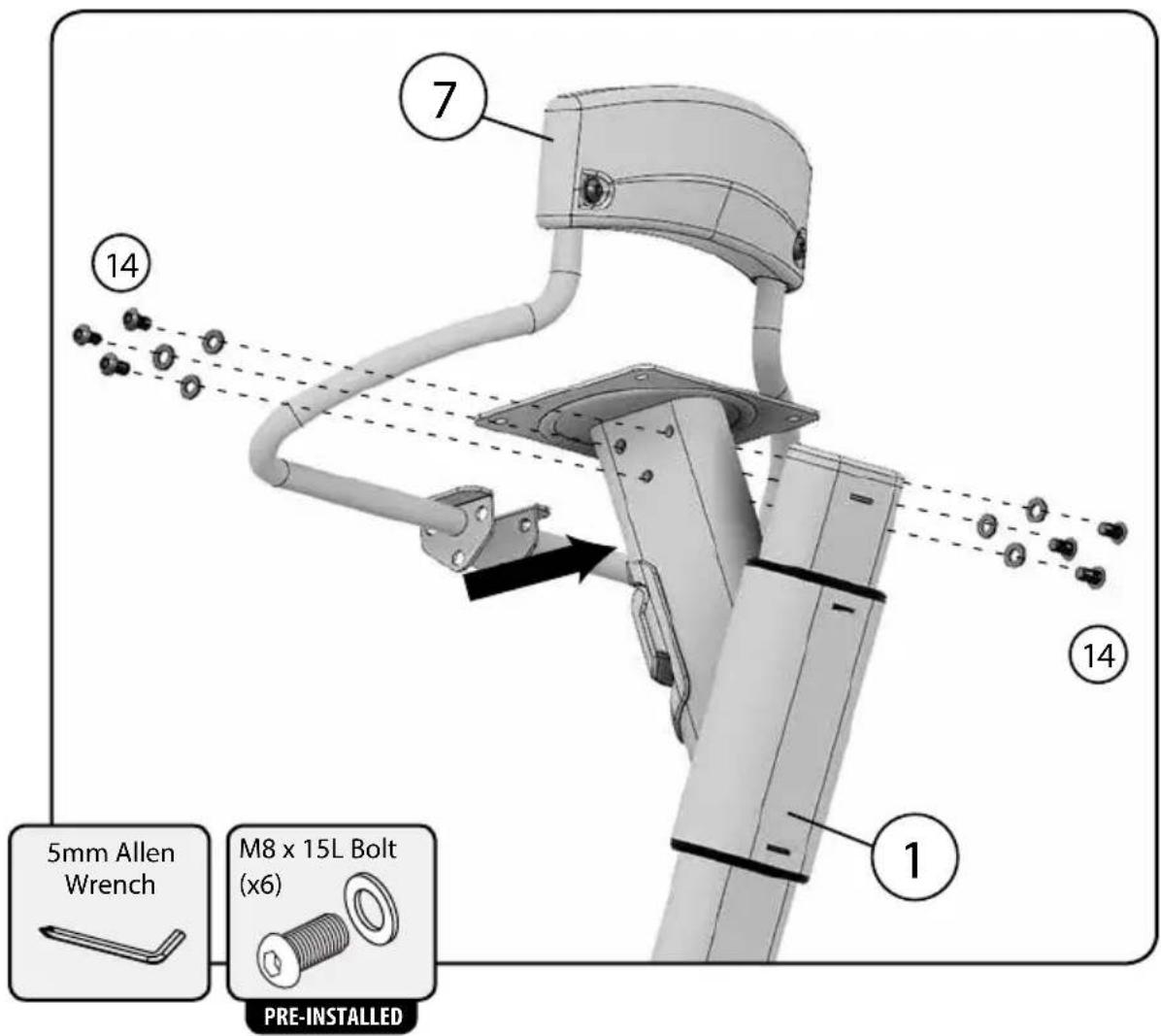
A. Remove the six M8x15L Screws and Washers (14) from the Seat Slide Frame(1) as indicated below.
B. Attach the Seat Back(7) to the Seat Side Frame (1) with the six M8x15L Screws and Washers(14).
text_image
7 ⑦ ⑭ ⑮ 14 5mm Allen Wrench M8 x 15L Bolt (x6) PRE-INSTALLED ⑪Office Bike Assembly Instructions
Step 6: Attach Seat
A. Remove the four M8x15L Screws and Washers(15) from the Seat(8).
B. Attach the Seat(7) to the Seat Side Frame(1) with the four M8x15L Screws and Washers(15).

text_image
8 1 15 5mm Allen Wrench M8 x 15L Bolt (x4) PRE-INSTALLEDOperations
Seat Adjustment
Pull the blue Seat Height Adjustment Lever(A) and move the Seat up or down to desired position. Release and allow the locking pin to click into place.

text_image
the blue Seat Height Adjustment er(A) and move the Seat up or down desired position. Release and allow locking pin to click into place.Final Inspection
After your Office Bike has been assembled, it is necessary to perform a final visual inspection and test of features. Thoroughly look at the bike from all angles. After visually checking your finished product, does anything look out of place? If so, please review assembly instructions for those areas and make needed adjustments. Next, confirm all bolts have been properly tightened. Then test the adjustment of the seat, making sure it fully locks in different selected positions. Check the pedals, inspecting for smooth movement and normal function. If not, review Step 4 and make needed adjustments before use.
Operations
Troubleshooting
The Office Bike is designed and manufactured to be reliable and easy to use. However, if you have a problem, these troubleshooting steps may help you find the cause.
Problem: Pedal feels loose.
Solution: Tighten the pedal with the provided 15mm wrench and recheck. If problem persists contact LifeSpan Customer Service.
Problem: Noise is coming from the Drive System.
Solution: Check all assembly hardware. If all the connections look good and the noise still continues contact LifeSpan Customer Service.
Problem: Seat feels loose, or there is extra movement from Seat Slide.
Solution: Check all seat attachment hardware to be sure it is properly tightened. If problem recurs contact LifeSpan Customer Service.
Table Assembly Instructions
At LifeSpan we strive to make our equipment easy to assemble and start using. Parts that can be pre-assembled are always assembled and tested on the product line.
Prior to starting the assembly process, take all the parts out of the box, remove plastic bags and lay everything out on the floor to become familiar with the components.
It is recommended that you use two people during assembly and follow these assembly instructions to reduce any problems that may occur.
text_image
Tabletop Top Plate M8x30L Countersink Allen Head Screws (x8) PRE-INSTALLED Main Post 5mm Allen Wrench M8x15L Allen Head Screws (x6) M8 Washers (x6) BAG Base PlateStep 1: Attach Top Plate to Main Post
Top Plate
(Countersink holes facing up)
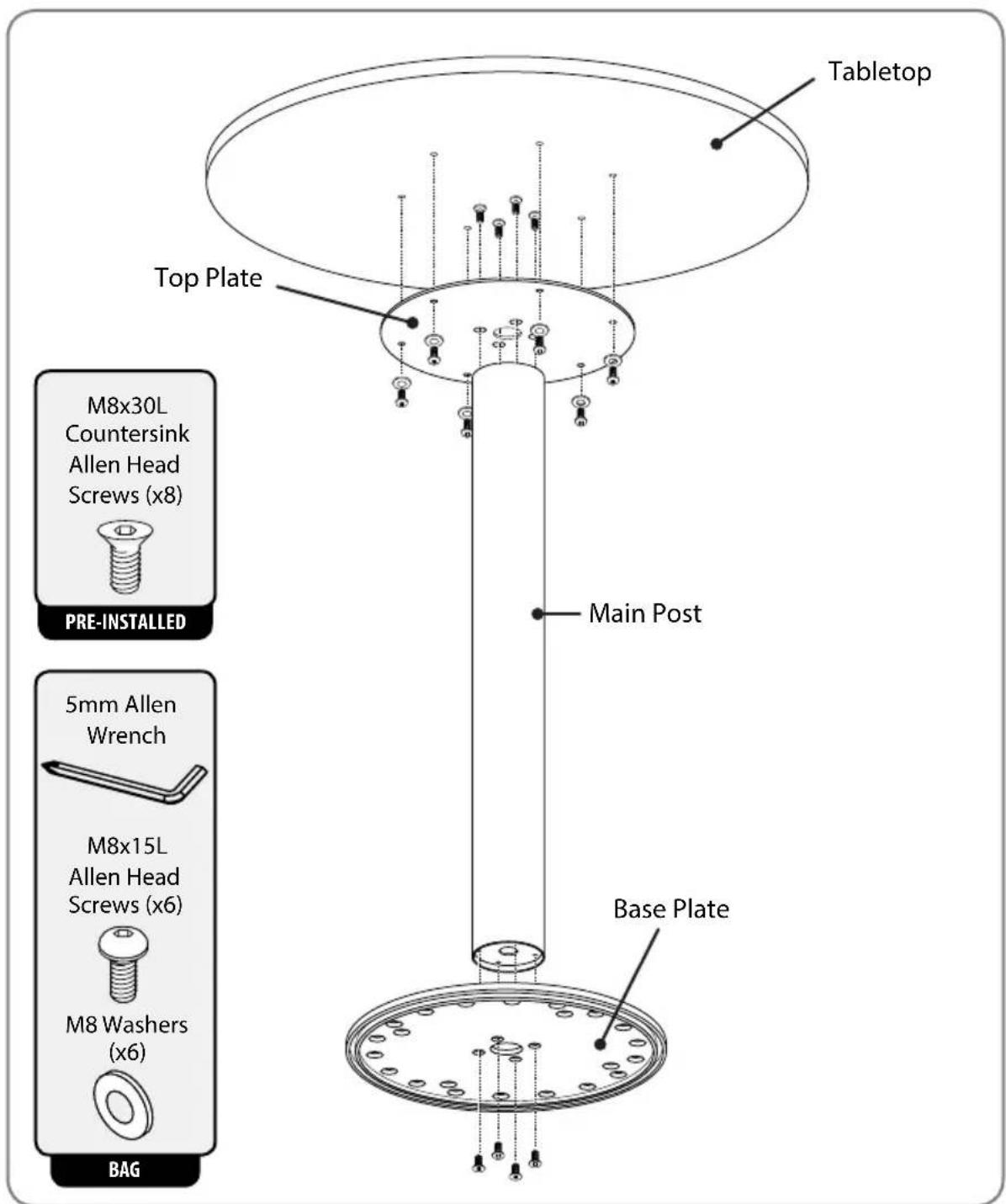
A. Stand the Main Post on one end.
B. Remove the pre-installed screws from the Main Post with the Allen Wrench.
C. Position the Top Plate on the Main Post as shown, aligning the screw holes countersink side up.
D. Attach the Top Plate to the Main Post with the screws removed in Step 1B.
E. Flip over.

natural_image
Diagram of a rotating cylindrical pole with flanged base and two alternative plates, no text or symbols present
natural_image
Circular mechanical component with evenly spaced holes and a central hub, no visible text or symbols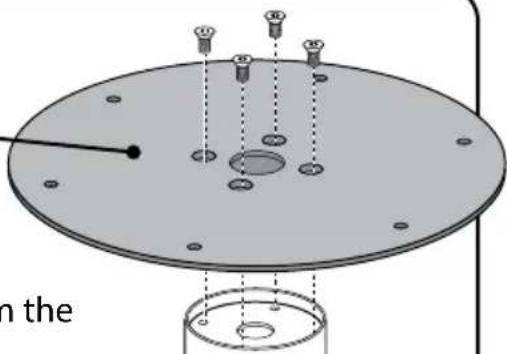
natural_image
Technical diagram of a mechanical assembly with mounting holes and a central circular component (no text or symbols)5mm Allen Wrench
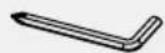
Allen Head Screws (x4)

PRE-INSTALLED
Step 2: Attach Base Kit
A. Remove the pre-installed screws from the Main Post with the Allen Wrench.
B. Position the Base Plate on the Main Post aligning the screw holes countersink side up.
C. Attach the Base Plate to the Main Post with the screws removed in Step 2A.
5mm Allen Wrench
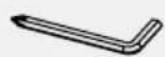
Allen Head Screws (x4)

PRE-INSTALLED
Table Assembly Instructions
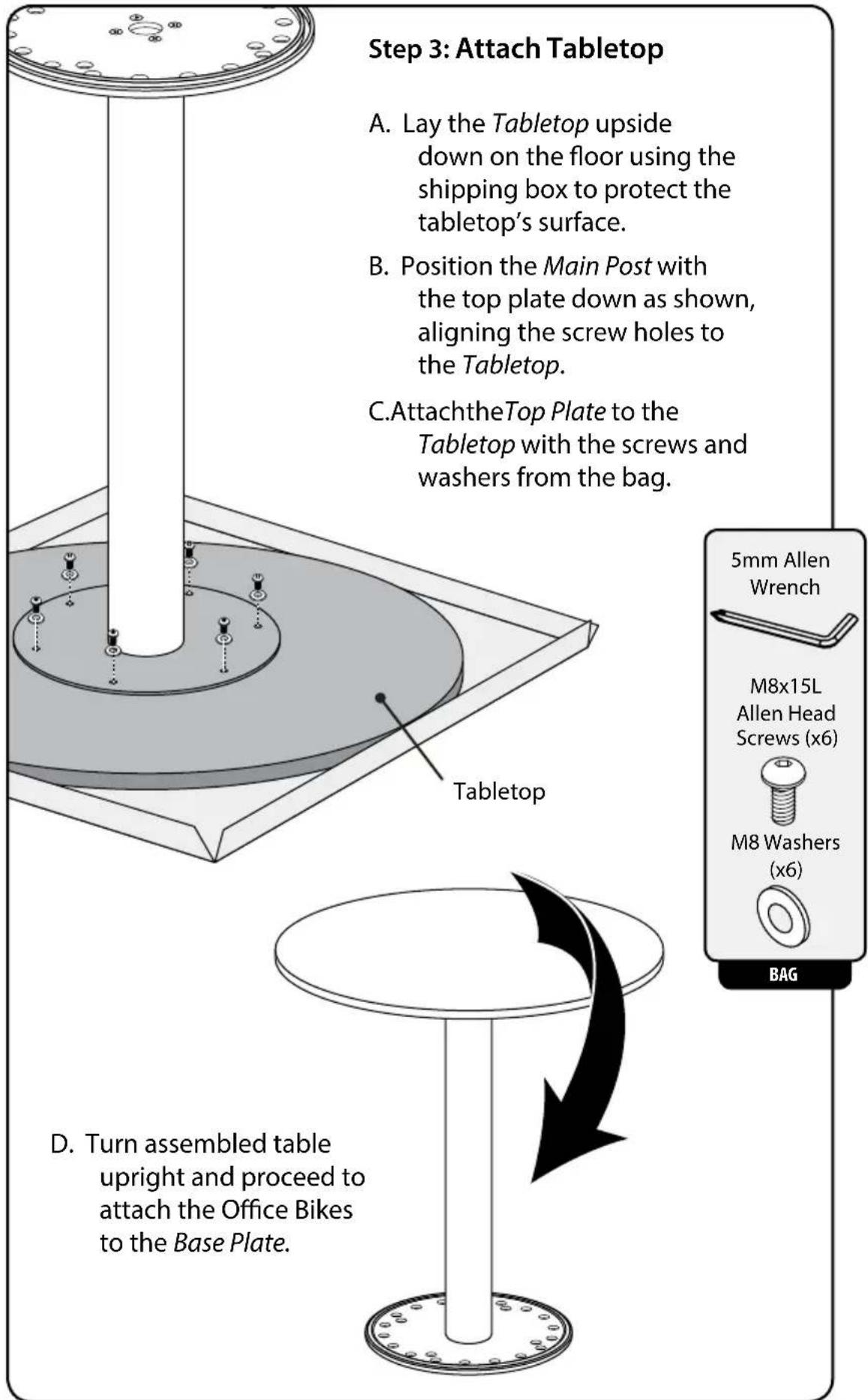
text_image
Step 3: Attach Tabletop A. Lay the Tabletop upside down on the floor using the shipping box to protect the tabletop's surface. B. Position the Main Post with the top plate down as shown, aligning the screw holes to the Tabletop. C. Attach the Top Plate to the Tabletop with the screws and washers from the bag. Tabletop 5mm Allen Wrench M8x15L Allen Head Screws (x6) M8 Washers (x6) BAG D. Turn assembled table upright and proceed to attach the Office Bikes to the Base Plate.Step 4: Interlocking Bikes to the Table
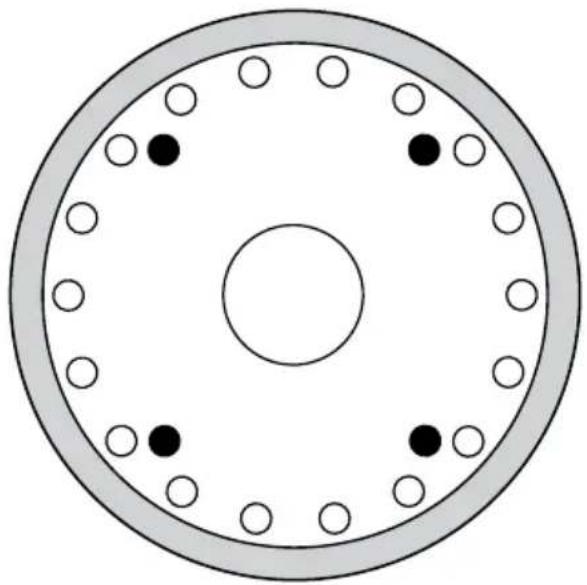
DUO (Two Bike Configuration)
Use either the outer perimeter of holes (shown in white), or the inner set of holes (shown in black) when interlocking two bikes.
TRIO (Three Bike Configuration)
Use the outer perimeter of holes when interlocking three bikes.
natural_image
Circular diagram with concentric rings and scattered black and white dots, no text or symbols present
natural_image
Technical illustration of a mechanical assembly with a circular base and a mounted device (no text or symbols)Lifting the front of the bike, guide the front pegs into the appropriate holes for either the Duo or Trio bike placement.
Manufacture Date: