
DT-6 - Bike Trainer LifeSpan - Free user manual and instructions
Find the device manual for free DT-6 LifeSpan in PDF.


| Product Type | Desk Bike Trainer |
| Model | DT-6 |
| Brand | LifeSpan |
| Console Readouts | Time, Level, Calories, Distance, Speed |
| Resistance Levels | 16 |
| Display Type | LED |
| Bluetooth Connectivity | Yes |
| Charging Port | USB (for mobile devices) |
| Safety Key | Included |
| Power Supply | 120V AC, 60Hz |
| Audible Safety Alert | Yes (can be turned off) |
| Console Dimensions | 12.5" x 3" x 2" (32 x 7.6 x 5.1 cm) |
| Desk Compatibility | DT-3, DT-5, DT-7 |
| Assembly Required | Console connection only |
| Maintenance | Periodic cleaning and inspection |
| Warranty | See product warranty document |
| Customer Support | www.LifeSpanFitness.com or (877) 654-3837 |
Frequently Asked Questions - DT-6 LifeSpan
User questions about DT-6 LifeSpan
0 question about this device. Answer the ones you know or ask your own.
Ask a new question about this device
Download the instructions for your Bike Trainer in PDF format for free! Find your manual DT-6 - LifeSpan and take your electronic device back in hand. On this page are published all the documents necessary for the use of your device. DT-6 by LifeSpan.
USER MANUAL DT-6 LifeSpan
Treadmill/Bike Desks: DT-3/DT-5/DT-7
Table of Contents
Getting Started
4 Welcome
5 Warranty
8 Maintenance & Tips
Desk Assembly
DT-5 Desk
12 Assembly Instructions
17 Desk Leveling and Height Adjustment
DT-7 Desk
18 Assembly Instructions
23 Desk Leveling and Height Adjustment
24 DT-5 Manual Treadmill Desk Assembly
25 DT-7 Electric Treadmill Desk Assembly
26 DT-3 Console Assembly
Treadmill Desk Operations
28 Specifications
30 Console Overview
32 Innovative Features
34 Troubleshooting
36 Personal Settings
Bike Desk Operations
40 Specifications
42 Console Overview
43 Innovative Features
44 Troubleshooting
46 Personal Settings
Version 5.1
Welcome
Congratulations on choosing the LifeSpan Workplace line of products. These products give you the opportunity to remain productive while taking care of yourself as you integrate movement with normally sedentary tasks.
The average American now spends eleven hours, five days a week, sitting, and burns one-hundred fewer calories each day than they did a few decades ago. Sitting for long periods slows your metabolism, reduces calories burned, and increases your risk for heart disease and diabetes.
Whether you plan on placing this product in a TV room, replace your desk at home or are adding another workspace in the office, the LifeSpan Workplace Solutions products are a great way to add movement to an otherwise sedentary activity.
Before you assemble or operate your product, please read this manual thoroughly. Important information, including safety precautions, ongoing product maintenance, assembly instructions, and information on proper operation are included.
If you need to contact LifeSpan customer service, visit our website at www.LifeSpanFitness.com and select customer service. Complete the information requested and we will respond to your inquiry within one business day. In the United States and Canada you can also call (877) 654-3837 and choose option 4.
Remember that some types of services should only be performed by a qualified service technician.
Neither LifeSpan Fitness nor its representatives can accept responsibility for any damages or injury incurred as a result of information presented in this manual except under the terms of the product warranty.
Warranty
The LifeSpan Workplace Solutions products come with the following warranties, valid in the United States and Canada only.
| Warranty Desk DT-3 DT-5 DT-7 | |||
| Frame NA | Lifetime | Lifetime | |
| Parts | 2 Year Replacement | 2 Years | 2 Years |
| Labor | NA | 1 Year | 1 Year |
| Warranty Treadmill TR800B | TR1200B | TR5000B | |
| Treadmill Frame | NA | Lifetime | Lifetime |
| Motor | 3 Years | 3 Years | 3 Years |
| Parts 1 Year | 2 Years 2 Years | ||
| Labor | 1 Year | 1 Year | 1 Year |
LifeSpan Fitness warrants that the equipment it manufactures is free from defects in material workmanship under normal use and service.
The periods above are based on the date of purchase. During these periods, LifeSpan Fitness will repair or replace any defective part. Free labor is included for the first year on all parts that are not normally assembled or replaced by the customer. Customer may be responsible to pay for the service technician's travel time, where travel time exceeds twenty miles (thirty-two kilometers).
If within the time frames specified above, any part fails to operate properly, log on to our web site at www.LifeSpanFitness.com, click on the customer service link and complete the form to request assistance. To speak with a customer service agent, call (877) 654-3837 option 4.
LifeSpan reserves the right to make changes and improvements to our products without incurring any obligations to similarly alter any product purchased. In order to honor our product warranty and to ensure the safe and efficient operation of your LifeSpan product, only authorized parts can be used. The warranty is void if any parts other than those provided by LifeSpan Fitness are used.
Warranty
Exclusions and Limitations:
- This warranty does not apply to any defects caused by negligence, misuse, improper assembly or maintenance, accident, or an "act of god".
- This warranty does not apply to discoloration of paint or plastics.
- LifeSpan shall not be responsible for incidental or consequential damages.
- This warranty is nontransferable from original owner.
Maintenance and Tips Maintenance and Tips
Daily Cleaning
It is recommended to wipe the treadmill down after each use to keep the treadmill clean and dry. A mild detergent may be used at times to help remove all dirt and salt from the belt, painted parts and the display.
Monthly Cleaning
This cleaning includes removing the motor cover and cleaning around the motor and electronics. It is recommended to clean the motor compartment if the treadmill is in an area where there might be plush carpet fibers that could get pulled up into the motor compartment. It is a good idea at this time to tighten all assembly hardware and check power cord for damage, or anything else that would indicate the need for service.
Safety and Integrity
The safety and integrity designed into the machine can only be maintained when the treadmill is regularly examined for damage and repaired. Worn or damaged components shall be replaced immediately or the treadmill be removed from service until the repair is made. Pay special attention to components most susceptible to wear.

WARNING: Keep treadmill stable on flat ground.

WARNING: Unplug the power cord before removing the motor cover.
IMPORTANT: If service is required, turn the power off and remove the power cord to ensure the unit cannot be used. Let all other users know the treadmill needs service.
CAUTION: Acidic cleaning detergents may damage painted or powder coated surfaces and should not be used. Such cleaners may void the LifeSpan warranty.
Belt Lubrication
Use only 100% silicone and avoid using aerosol silicone sprays which include additives and petroleum distillates. One ounce of silicone should be used for each application. LifeSpan offers 100% silicone lubricant that can be ordered at www.LifeSpanFitness.com.
The walking belt comes pre-lubricated from the factory. The TR800B and TR1200B should be lubricated every 50 hours of use. The TR5000B comes with a maintenance free belt and doesn't require lubrication.
To lubricate, unplug your treadmill. Slide your hand under the belt and lift the belt away from the deck. Apply about a dozen sprays toward the center of the belt from each side. Rotate the belt 1/3 and repeat this application. Rotate another 1/3 and repeat once more. Plug the treadmill in and walk for a few minutes to disperse lube evenly.
NOTE: When lubricating the belt, make sure the treadmill is on a surface that can be easily cleaned. After lubricating clean any excess silicone off the walking surface of the belt and side rails.

Maintenance and Tips
Maintenance and Tips
Belt Tensioning
If the belt begins to slip and needs to be tensioned, tension bolts are accessible from the back of the treadmill. Before tensioning the belt, start the treadmill and set the speed to 3 mph (5 kph).
A. Using a 6 mm Allen wrench, included in your hardware bag, turn the right and left tension bolts 1/2 turn clockwise.
B. Test to see if the slipping is eliminated. If the belt slips repeat step A and test again.
Note: Adjusting one side more than the other will cause the belt to drift to the side of the treadmill and will require belt alignment. Check to be sure the running belt is still aligned. If belt alignment is off as shown below, refer to Belt Alignment section.


CAUTION: DO NOT tighten more than 2 full turns on each side. Over tensioning the belt can cause unnecessary friction and wear and tear on the belt, motor and electronics.
Belt Alignment
A. Press Start, then increase the treadmill speed to 3 mph (5 kph).
B. Stand behind the treadmill to see which way the belt is drifting.
C. If the belt drifts to the left, turn the left adjustment bolt 1/4 turn clockwise and the right adjustment bolt 1/4 turn counter-clockwise. (See FIG. 1)
D. If the belt drifts to the right, turn the left adjustment bolt 1/4 turn counter-clockwise and the right adjustment bolt 1/4 turn clockwise. (See FIG. 2)
Belt Alignment (continued)
E. Observe the alignment for two minutes. Repeat steps A-D as needed.


Visit www.LifeSpanFitness.com for a full video demonstration on the aligning your treadmill belt.
Moving the Treadmill Base
- Make sure the ON/OFF switch is turned OFF and the power cord is unplugged from the wall.
- Make sure nothing is on or near your treadmill which might spill, be knocked off, or prevent the treadmill from moving.
- Place both hands under the support bar located under the back of the walking belt to make sure you have a solid lifting point.
- Lift the back of the treadmill and roll to the desired location.

DT-5 Desk: Assembly Instructions

At LifeSpan we strive to make our equipment easy to assemble and start using. Parts that can be pre-assembled are always assembled and tested on the product line.
DT-5 Desk: Assembly Instructions
Prior to starting the assembly process, take all the parts out of the box, remove plastic bags and lay everything out on the floor to become familiar with the components.
Since your desk is a heavy piece of equipment, it is recommended that you use two people during assembly and follow these assembly instructions to reduce any problems that may occur.
| Item Number Description | Included Hardware | |
| 1 | Lift Frame |  Wrench-17mm Wrench-17mm |
| 2 | Desktop | |
| 3 | Left Base Foot | |
| 4 | Right Base Foot | |
| 5 | M10 Washer (Pre-installed) | |
| 6 | M10 Acorn Nut (Pre-installed) | |
| 7 | Height Adjustment Knob | |
| 8 | LifeSpan Placard (Pre-installed) | |
| 9 | M8*45L Bolt (Pre-installed) | |
| 10 | M8 Nuts (Pre-installed) | |
| 11 | Wire Cover | |
| 12 | M10 Washer (Pre-installed) | |
| A | Desk Position Bumpers | |
| B | Extension Tube | |
| C | Desktop Mounting Bracket | |
| D | Stop Bumper | |
| E | Bike Safety Key | |
| F | Treadmill Safety Key | |
Table corresponds to the diagram on the left
DT-5 Desk: Assembly Instructions
DT-5 Desk: Assembly Instructions
Step 1: Lift Frame Assembly
A. Position the lift frame (1), left base foot (3) and right base foot (4) as shown in the figure to the right. Note the position of the Workplace logo as well as the right and left base feet.
B. Place the lift frame onto the left and right base feet mounting bolts and install the M10 washer (5) and M10 acorn nut (6).
C. Tighten the four mounting nuts.

Step 2: Install the Height Adjustment Knobs
A. Locate the height adjustment knobs (7).
B. Screw the height adjustment knobs into the lift frame (1) uprights as shown in the figure to the right.
C. Raise each extension tube (B) to level 15 and tighten the height adjustment knobs (7).

Step 3: Desktop Assembly
A. Make sure the extension tube (B) is at level 15 (done in step 2C).
B. Align the desktop on top of the extension tubes (B) so the wire harness from the desktop frame is on the same side as the wire harness coming from the right extension tube. Gently lower the desktop support frame onto the desktop mounting bracket (C).
NOTE: Make sure the console wire harness or connector does not get caught or pinched between the mounting bracket and desktop frame.

C. Insert four M8*45L carriage bolts (9) through the mounting brackets. Install four M8 washers (5) and nuts (10). Securely tighten the four M8 nuts. D. Connect the two wire harness connectors.
NOTE: If the desktop tilts up and down slightly, re-tighten the four bolts/nuts inserted in step 3C.
DT-5 Desk: Assembly Instructions
DT-5 Desk: Desk Leveling and Height Adjustment
Step 4: Attach the Wire Cover to the Right Extension Tube
A. Simply snap the cover (11) over the right extension tube (B). The bottom of the cover will be resting on top of the stop bumper (D).

Safety Key
When using the DT-5 with a treadmill use safety key (F). When using the DT-5 with a bike please use safety key (E).


Desk Leveling
The desk needs to be leveled prior to use. The desk comes with two adjustable feet that can be used to level the desk and eliminate rocking. If the desk is rocking on two of the feet, adjust the two front feet until all four feet are sitting securely on the floor.

Desk Height Adjustment

CAUTION: Remove all objects from the desktop prior to making height adjustments. We recommend using two people for the height adjustment.
A. Loosen the adjustment knobs (A) on each upright by turning it no more than two turns counterclockwise.
B. While firmly holding each side of the desktop, pull both adjustment knobs out and slowly raise or lower the desktop.
C. Release the adjustment knob as the desired level is reached. The adjustment knob will click into place.
D. Check to make sure the desk height is set at the same level on both sides. Turn the adjustment knobs clockwise to lock in place.

DT-7 Desk: Assembly Instructions

At Lifespan we strive to make our equipment easy to assemble and start using. Parts that can be pre-assembled are always assembled and tested on the product line.
Prior to starting the assembly process, take all the parts out of the box, remove plastic bags and lay everything out on the floor to become familiar with the components.
DT-7 Desk: Assembly Instructions
Since your desk is a heavy piece of equipment, it is recommended that you use two people during assembly and follow these assembly instructions to reduce any problems that may occur.
| Item Number Description | Included Hardware | |
| 1 | Lift Frame | 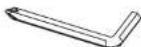 Wrench-5mm Wrench-5mm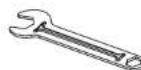 , Wrench-17mm , Wrench-17mm |
| 2 | Desktop | |
| 3 | Left Base Foot | |
| 4 | Right Base Foot | |
| 5 | M8 Washer (Pre-installed) | |
| 6 | M10 Acorn Nut (Pre-installed) | |
| 7 | M8*45L Bolt (Pre-installed) | |
| 8 | M8 Lock Nut (Pre-installed) | |
| 9 | M8*15 Bolt (Pre-installed) | |
| 10 | Accessory Tray | |
| 11 | M10 Washer (Pre-installed) | |
| 12 | LifeSpan Placard | |
| A | Desk Position Bumper | |
| B | Extension Tube | |
| C | Desktop Mounting Bracket | |
| D | Treadmill Safety Key | |
| E | Bike Safety Key | |
Table corresponds to the diagram on the left
DT-7 Desk: Assembly Instructions
DT-7 Desk: Assembly Instructions
Step 1: Lift Frame Assembly
A. Position the lift frame (1), left base foot (3) and right base foot (4) as shown in the figure to the right. Note the position of the Workplace logo as well as the right and left base feet.
B. Place the lift frame onto the left and right base feet mounting bolts and install the M10 washer (11) and M10 acorn nut (6).
C. Tighten the four mounting nuts.

Step 2: Accessory Tray Assembly
A. Remove the four screws (9) pre-installed in the bottom of the upright assembly crossbar.
B. Line the holes in the accessory tray (10) with the holes in the crossbar.
C. Install four M8 washers and M8*15 bolts (9) and tighten.

Step 3: Desktop Assembly
NOTE: It is a good idea to use two people for this portion of the assembly in order to be sure wires are properly routed and do not get pinched while installing the desktop.
A. Remove the bolts (7), washers (5), and nuts (8) pre-installed in the upright assembly posts.
B. Hold the desktop (2) over the lift frame (1) and place the desk height control wire harness (15) and the console wire harness (14) into the center of the lift frame (1). Place the connector ends towards the center of the tray for easy access in the next steps of the assembly.
C. Set the desktop down into the mounting brackets (C) on the extension tubes, align the mounting holes and re-install the hardware removed in step A.
D. Tighten the desktop mounting bolts/nuts.

DT-7 Desk: Assembly Instructions
DT-7 Desk: Desk Leveling and Height Adjustment
Step 4: Height Adjustment/Console Harness Connections
A. Remove the two upper screws (13) attaching the access panel for the height adjustment control unit.
B. Tilt down and pull the access panel out several inches. There are harnesses pre-installed to the height controller, so do not try to fully remove.
C. Attach the round connector (15) (placed in the center tray during desktop assembly) to the height controller port (16).
D. Connect the 7-pin rectangular connectors (14) (one is placed in the center tray during desktop assembly and the other is pre-installed at the factory).
E. Re-attach the access panel to the center tray and tighten the two screws removed in step A.
F. Plug the power cord into the receptacle (19).


NOTE: Check to be sure all wires are carefully tucked into the center tray prior to tightening access panel screws to prevent harness damage.
Desk Leveling
The desk needs to be leveled prior to use. The desk comes with two adjustable feet that can be used to level the desk and eliminate rocking. If the desk is rocking on two of the feet, adjust the two front feet until all four feet are sitting securely on the floor.

Desk Height Adjustment
A. To raise the desk, press the up or down arrow until the desk is at the desired height.
B. To save a height press and hold the memory preset, one or two, button for three seconds. This will save the current height into memory.
C. The next time the desk is used, simply press the memory preset to adjust the desk height to the previously saved setting.
Safety Key
When using the DT-7 with a treadmill use safety key (D). When using the DT-7 with a bike please use safety key (E).


DT-5 Manual Treadmill Desk: Assembly Instructions
Treadmill to DT-5 Desk Assembly
A. Position the pre-assembled treadmill as shown below.
B. Lift the rear of the treadmill and roll it forward under the desk until the positioning bumpers (F) located on the treadmill are centered over the treadmill position bumper (A) at the base of the uprights.

C. Plug the console connector from the desk into the treadmill console port and tighten the thumb screws on the connector.
D. Plug the power cord into the treadmill power receptacle and turn the power switch on. Be sure all connectors are plugged in prior to connecting the power cord.
E. Install the safety key into the front of the console.

DT-7 Electric Treadmill Desk: Assembly Instructions
Treadmill to DT-7 Desk Assembly
A. Position the pre-assembled treadmill as shown below.
B. Lift the rear of the treadmill and roll it forward under the desk until the treadmill positioning bumper (F) located on the treadmill are centered over the desktop positioning bumper (A) at the base of the uprights.

C. Plug the console electronics cable into the desk D-connector and treadmill console port and tighten the thumb screws.
D. Plug the power cord into the desk power receptacle and into a wall outlet.
E. Plug the power cord into the treadmill power receptacle and wall outlet.
NOTE: Be sure all connectors are plugged in prior to connecting the power cord.
F. Turn the treadmill power switch on and install the safety key into the front of the console.


DT-3 Console: Assembly Instructions
After assembling the bike or treadmill, roll it to the desired location. Plug the console connector into the connector coming from the front of the treadmill or the bottom of the bike. Be sure to screw the two connectors together with the attached thumb screws.


NOTE: Do not plug the power cord into the equipment until the console is connected.
NOTE: All desk and DT-3 connectors plug into the bike D-connector the same way.
Safety Key
When using the DT-3 with a treadmill use safety key (D). When using the DT-3 with a bike please use safety key (E).


TREADMILL DESK OPERATIONS

Treadmill Desk Specifications
Treadmill Desk Specifications
| Console | DT-3 | DT-5 | DT-7 |
| Readouts | Time, Steps, Calories, Distance, Speed | Time, Steps, Calories, Distance, Speed | Time, Steps, Calories, Distance, Speed |
| Display | LED | LED | LED |
| Bluetooth | Yes | Yes | Yes |
| Mechanics and Performance | DT-3 | DT-5 | DT-7 |
| Speed Range | 0.4 - 4.0 mph | 0.4 - 4.0 mph | 0.4 - 4.0 mph |
| 0.6 - 6.4 kph | 0.6 - 6.4 kph | 0.6 - 6.4 kph | |
| Dimensions | 12.5" W x 3" D x 2" H | 46.75" W x 36.5" D | 46.75" W x 36.5" D |
| 32 cm W x 7.6 cm D x 5.1 cm H | 116.875 cm W x 91.25 cm D | 116.875 cm W x 91.25 cm D | |
| Height Adjustment | NA | 41" to 55" | 40" to 53" |
| 104 cm to 140 cm | 101.6 cm to 134.6 cm | ||
| User Height Range | NA | 4'10" to 6'8" | 4'10" to 6'8" |
| 147 cm to 203 cm | 147 cm to 203 cm | ||
| Height Adjustment Method | NA | Manual | Electric |
| Desktop Material | NA | 1" (2.54 cm) thick HD | 1" (2.54 cm) thick HD |
| Composite Board | Composite Board | ||
| Desktop Surface | NA | Durable Laminate | Durable Laminate |
| Maximum Load on Desktop | NA | 180 lbs | 180 lbs |
| 82 kg | 82 kg | ||
| Desk Lift Speed | NA | NA | 38 mm/second |
| Desk Height Memory | NA | NA | 2 Pre-Sets |
Treadmill Desk Console Overview
Starting the Treadmill Desk
- Turn the On/Off switch located on the front right corner of the treadmill to the on position.
- Make sure the safety key is installed on the console.
NOTE: The display will show "----" if the safety key is not installed.
- The current user weight will be flashing on the display panel. Adjust your weight to obtain accurate calorie calculations.
- Press the Start button to begin your workout. The console will start counting up from 00:00.
- Press the Up/Down buttons to adjust speed.
NOTE: The steps are counted normally from 1 to 9,999 steps. After 9,999 steps, the display format changes to accommodate more than four digits. Take the number shown in the display and add a zero to the right for the correct number of steps.
Below are examples of what the display will read and what those numbers mean:
1001 = 10,010 steps 1005 = 10,050 steps 1100 = 11,000 steps
Treadmill Desk Console Overview

DT-5 and DT-7

Console Buttons
- Start/On – If the console is in sleep mode, press and hold this button for three seconds to turn the console on. Once the console is turned on, press to start the treadmill.
- Enter/Mode - Press to switch between display readings (time, steps, calories, distance, and speed). Holding the Enter/Mode button will initiate a scan mode that rotates between display readouts every five seconds. Press the button again to exit the scan mode.
- Stop/Pause – Press to pause your workout. This will maintain your current workout data. To reset the console and current workout data, press and hold the Stop/Pause button for three seconds.
- V - Press to adjust your weight during setup mode or to change the treadmill speed during a workout.
- Bluetooth – Press to turn on Bluetooth to pair.
Treadmill Desk Innovative Features
Intelli-Guard™ – This treadmill desk is equipped with our patented Intelli-Guard feature. This feature senses when you stop walking on the treadmill and for safety purposes, it automatically pauses the treadmill to avoid accidental falls which may result in injury. The Intelli-Guard feature is triggered when the treadmill senses you are no longer walking.

CAUTION: The Intelli-Guard feature will automatically be disengaged when the treadmill desk is operated at speeds under 1.0 mph (1.6 kph). If the speed is within these parameters, the step count will flash. When the display for the step count flashes, the treadmill desk will no longer auto-pause.

CAUTION: At twenty seconds, the console will beep once per second for five seconds and then automatically pause the treadmill desk. These beeps are a caution that the treadmill belt is about to stop. If for some reason you are still on the treadmill desk when this occurs, move your feet to the side rails and prepare for the belt to stop. The Intelli-Guard feature does not replace the use of your safety key or taking proper precaution in stopping the treadmill desk when it is not in use.
Intelli-Step™ – This treadmill desk comes with our patented Intelli-Step counting feature. This feature senses the resistance on the walking belt each time your foot strikes. There are several factors that will affect the accuracy of this feature including your walking style, your weight, and your usage characteristics. For example, the Intelli-Step feature will have a difficult time picking up the steps of a light user (under 110 lbs/50 kg) or at speeds lower than 1 mph (1.6 kph).
Treadmill Desk Innovative Features
Audible Safety Alert – This treadmill desk has an audible alert to notify the user when the treadmill desk is starting as well as when the speed is being adjusted.
The alert may be distracting in an office setting and can be turned off. Please see the Personal Settings section (page 36) for instructions on how to do so.

CAUTION: If the audible safety alert is turned off, the alert for the Intelli-Guard feature will also be disabled.
Charging Port (DT-3 Only) – This port can be used to charge your wireless mobile devices.
NOTE: You will not be able to save your workout data to a USB via this port; it is used for charging purposes only.
Treadmill Desk Troubleshooting
Treadmill Desk Troubleshooting
The LifeSpan Treadmill Desk is designed and manufactured to be reliable and easy to use. However, if you have a problem, these troubleshooting steps may help you find the cause.
Problem Only the weight LED is dimly lit. Pressing the start button will make the screen flash. Solution The treadmill desk is in sleep mode. Press and hold the On/Start button for three seconds to power on the unit.
Problem Solution The console is erratic or not lighting up. Check to make sure the treadmill desk is properly plugged in. Turn the power switch off and back on again and make sure the safety key is in place. Make sure the connectors located in the front of the treadmill and under the desktop are fully plugged in. If the problem persists contact LifeSpan customer service.
Problem The treadmill motor seems strained or E1 comes up after several minutes of use.
Solution The silicone lubricant that is applied to the deck and belt is wearing down and the belt needs to be lubricated with 100% silicone spray (non-aerosol).
Problem Solution The treadmill automatically pauses during a workout. The treadmill is not picking up the step count. Go into the Personal Settings section (page 32) to turn the Intelli-Guard feature off.
Problem The treadmill speed doesn't feel right (either too fast or too slow). Solution Go into the Personal Settings section (page 36) and check if you are in Metric or English mode. If you are in the correct mode, contact LifeSpan customer service.
Problem "Uart" appears in the display. Solution Turn the treadmill desk power switch off. For DT5 desks unplug and re-plug the connections made in step 3D during assembly, and on page 24 steps C, D and E. DT7 desks unplug and re-plug the connections made in step 4C and 4D during assembly and on page 25 steps C, D and E. Make sure the thumb screws are properly tightened. Turn the treadmill desk power back on and check to see if it functions properly.
Problem "dc-6" appears in the display. Solution Turn the treadmill desk power switch off. For DT5 desks unplug and re-plug the connections made in step 3D during assembly, and on page 24 steps C, D and E. DT7 desks unplug and re-plug the connections made in step 4C and 4D during assembly and on page 25 steps C, D and E. Make sure the thumb screws are properly tightened. Turn the treadmill desk power Back on and check to see if it functions properly.
Problem The treadmill desk does not go into sleep/energy saving mode. In order for the unit to go into sleep/energy saving mode, press and hold the stop button for three seconds to reset the console. After ten minutes the console will go into sleep/energy saving mode.
Problem The desktop surface is not level. Solution Check to make sure the base feet are on a level surface. For a DT-5, make sure each extension tube is raised to the same height number as shown on the extension tube. For a DT-7, run calibration by pressing and holding the height adjustment buttons simultaneously for three seconds.
Treadmill Desk Personal Settings
Treadmill Desk Personal Settings
To enter Personal Settings mode, press and hold the Stop/Pause button simultaneously with the A button. After three seconds, F001 should show in the display.
- To change between English and Metric mode, press the Vbutton until F014 shows in the display. Press enter and either EN or SI will then appear in the display. To change to EN (miles) press theV button. To change to SI (kilometers) press theA button. Press enter and remove and re-install the safety key.
- To turn the Intelli-Guard feature on or off, press the V button until F012 shows up in the display. Press enter so on/off appears in the display. Press the V button to turn Intelli-Guard off, or press the A button to turn Intelli-Guard on. Press enter and remove and re-install the safety key.
- To turn the Audible Alert on or off, press the V button until F015 shows in the display. Press enter so on/off appears in the display. Press the V button to turn the audible alert off or press the A button to turn the audible alert on. Press enter and remove and re-install the safety key.
WARNING – The audible alert is turned on from the manufacturer to warn the user that the treadmill desk is starting or the speed is changing. Turning this alert off is done at the sole discretion of the user.
-
To change the allowable maximum speed from 4 mph (6.4 kph) to 2 mph (3.2 kph), press the V button until F018 appears in the display. Press enter and 4.00 will show by default. Press the V button and 2.00 will be displayed. Press enter and remove and re-install the safety key.
-
To start the treadmill at the speed it was going prior to pressing the pause button, press the V button until F019 appears in the display. Press enter and by default the display shows "0". Press the button to display a "1" and press enter. Remove and re-install the safety key.
- To find the running total distance you have walked, press the Aor V button until F016 shows in the display. Press enter and the total distance will be displayed.
- To find the total hours the treadmill desk has run, press the Aor V button until F017 shows in the display. Press enter and the total hours will be displayed.
NOTE: Depending on the firmware the console has will determine if all of the options listed above will be available. LifeSpan reserves the right to make changes and improvements to our products without incurring any obligations to similarly alter any product purchased.
BIKE DESK OPERATIONS

Bike Desk Specifications
Bike Desk Specifications
| Console | DT-3 | DT-5 | DT-7 |
| Readouts | Time, Level, Calories, Distance, Speed | Time, Level, Calories, Distance, Speed | Time, Level, Calories, Distance, Speed |
| Display | LED | LED | LED |
| Bluetooth | Yes | Yes | Yes |
| Mechanics and Performance | DT-3 | DT-5 | DT-7 |
| Resistance Level | 16 Levels | 16 Levels | 16 Levels |
| Dimensions | 12.5"W x 3"D x 2"H | 46.75" W x 36.5" D | 46.75" W x 36.5" D |
| 32cm W x 7.6cm D x 5.1cm H | 116.875 cm W x 91.25 cm D | 116.875 cm W x 91.25 cm D | |
| Height Adjustment | NA | 41" to 55" | 40" to 53" |
| 104 cm to 140 cm | 101.6 cm to 134.6 cm | ||
| Height Adjustment Method | NA | Manual | Electric |
| Desktop Material | NA | 1" (2.54 cm) thick HD Composite Board | 1" (2.54 cm) thick HD Composite Board |
| Desktop Surface | NA | Durable Laminate | Durable Laminate |
| Maximum Load on Desktop | NA | 180 lbs | 180 lbs |
| 82 kg | 82 kg | ||
| Desk Lift Speed | NA | NA | 38 mm/second |
| Desk Height Memory | NA | NA | 2 Pre-Sets |
Bike Desk Console Overview
Bike Desk Innovative Features
DT-3 Console shown here. DT-5/DT-7 Desks follow the same button layout.

Console Buttons
- Start/On – If the console is in sleep mode, press and hold this button for three seconds to turn the console on. Once the console is turned on, press to start the console functions.
- Enter/Mode – Press to switch between display readings (time, level, calories, distance, and speed). Holding the Enter/Mode button will initiate a scan mode that rotates between display readouts every five seconds. Press the button again to exit the scan mode.
- Stop/Pause – Press to pause your workout. This will maintain your current workout data. To reset the console and current workout data, press and hold the Stop/Pause button for three seconds.
- V -Press to adjust your weight during setup mode or to change the resistance level during a workout.
- Bluetooth – Press to turn on Bluetooth to pair.
Audible Safety Alert – The bike desk has an audible alert to notify the user when the cycle desk is starting as well as when the resistance level is being adjusted.
The alert may be distracting in an office setting and can be turned off. Please see the Personal Settings section (page 46) for instructions on how to do so.
Bluetooth – The Workplace series consoles include a Bluetooth module.
Charging Port (DT-3 Only)– This port can be used to charge your wireless mobile devices.
NOTE: You will not be able to save your workout data to a USB via this port; it is used for charging purposes only.
Starting the Bike Desk
- If the display window is blank, turn the console on by pressing and holding the On button for three seconds.
- The current user weight will be flashing in the display panel. Adjust your weight to obtain more accurate calorie calculations.
- Press the Start button to begin your workout. The time will start counting up from 00:00.
- Press the Up/Down buttons to adjust the resistance level.
Bike Desk Troubleshooting
Bike Desk Troubleshooting
This bike desk has been designed and manufactured to be reliable and easy to use. However, if you have a problem, these troubleshooting steps may help you find the cause.
Problem Solution The console is erratic or not lighting up. Recheck the power connection to the bike desk. Additionally, check the cable connection from the console to the bike. Contact LifeSpan customer service if this does not solve the problem.
Problem Solution The speed shown in the display feels too fast or too slow. Go into the Personal Settings section (page 46) and check if you are in Metric or English mode. If you are in the correct mode, contact LifeSpan customer service for assistance.
Problem "Uart" shows in the display. Solution Unplug the power from the bike desk. Disconnect and reconnect the console cable going into the bike desk. Plug the power back into the bike desk and retest. Contact LifeSpan customer service if this does not solve the problem.
Problem "dc-6" shows in the display. Solution Unplug the power from the bike desk. Disconnect and reconnect the console cable going into the bike desk. Make sure the thumb screws are properly tightened. Plug the power back into the bike desk and retest. Contact LifeSpan customer service if this does not solve the problem.
Problem Solution The desktop surface is not level. Check to make sure the base feet are on a level surface. For a DT-5, make sure each extension tube is raised to the same height number as shown on the extension tube. For a DT-7, run callibration by pressing and holding the height adjustment V buttons simultaneously for three seconds.
Bike Desk Personal Settings
To enter Personal Settings mode, press and hold the Stop/Pause button simultaneously with the A button. After three seconds, F001 should show in the display.
- To change between English and Metric mode, press the V button until F009 shows in the display. Press enter and either EN or SI will appear in the display. To change to EN (miles) press the V button. To change to SI (kilometers) press the A button. Disconnect and reconnect the power to the bike.
- To turn the Audible Alert on or off, press the V button until F010 shows in the display. Press enter so on/off appears in the display. Press the V button to turn the audible alert off or press the A button to turn the audible alert on. Disconnect and reconnect the power to the bike.
- To find the running total distance you have pedaled, press the Aor V button until F011 shows in the display. Press enter and the total distance will be displayed. Disconnect and reconnect the power to the bike.
- To find the total hours the bike has run, press the Aor Vbutton until F012 shows in the display. Press enter and the total hours will be displayed. Disconnect and reconnect the power to the bike.
- To start at the resistance level set prior to pressing pause, press the V button until F013 appears in the display. Press enter and by default the display shows "0". Press the A button to display a "1" and press enter. Disconnect and reconnect the power to the bike.
NOTE: Depending on the firmware the console has will determine if all of the options listed above will be available. LifeSpan reserves the right to make changes and improvements to our products without incurring any obligations to similarly alter any product purchased.
TREADMILL/BIKE DESK MODEL NUMBER - DT-3/DT-5/DT-7


- TREADMILL/BIKE DESKS: DT-3/DT-5/DT-7
- TABLE OF CONTENTS
- GETTING STARTED
- DESK ASSEMBLY
- TREADMILL DESK OPERATIONS
- BIKE DESK OPERATIONS
- WELCOME
- WARRANTY
- EXCLUSIONS AND LIMITATIONS
- MAINTENANCE AND TIPS MAINTENANCE AND TIPS
- DAILY CLEANING
- MONTHLY CLEANING
- SAFETY AND INTEGRITY
- BELT LUBRICATION
- MAINTENANCE AND TIPS
- BELT TENSIONING
- BELT ALIGNMENT
- BELT ALIGNMENT (CONTINUED)
- MOVING THE TREADMILL BASE
- DT-5 DESK: ASSEMBLY INSTRUCTIONS
- STEP 1: LIFT FRAME ASSEMBLY
- STEP 2: INSTALL THE HEIGHT ADJUSTMENT KNOBS
- STEP 3: DESKTOP ASSEMBLY
- DT-5 DESK: DESK LEVELING AND HEIGHT ADJUSTMENT
- STEP 4: ATTACH THE WIRE COVER TO THE RIGHT EXTENSION TUBE
- SAFETY KEY
- DESK LEVELING
- DESK HEIGHT ADJUSTMENT
- DT-7 DESK: ASSEMBLY INSTRUCTIONS
- STEP 2: ACCESSORY TRAY ASSEMBLY
- DT-7 DESK: DESK LEVELING AND HEIGHT ADJUSTMENT
- STEP 4: HEIGHT ADJUSTMENT/CONSOLE HARNESS CONNECTIONS
- DT-5 MANUAL TREADMILL DESK: ASSEMBLY INSTRUCTIONS
- TREADMILL TO DT-5 DESK ASSEMBLY
- DT-7 ELECTRIC TREADMILL DESK: ASSEMBLY INSTRUCTIONS
- TREADMILL TO DT-7 DESK ASSEMBLY
- DT-3 CONSOLE: ASSEMBLY INSTRUCTIONS
- TREADMILL DESK CONSOLE OVERVIEW
- STARTING THE TREADMILL DESK
- CONSOLE BUTTONS
- TREADMILL DESK INNOVATIVE FEATURES
- TREADMILL DESK TROUBLESHOOTING
- TREADMILL DESK PERSONAL SETTINGS
- BIKE DESK CONSOLE OVERVIEW
- BIKE DESK INNOVATIVE FEATURES
- STARTING THE BIKE DESK
- BIKE DESK TROUBLESHOOTING
- BIKE DESK PERSONAL SETTINGS
Brand : LifeSpan
Model : DT-6
Category : Bike Trainer