
OXCM1U - Mounting bracket Chief - Free user manual and instructions
Find the device manual for free OXCM1U Chief in PDF.


| Product Type | Extra Large Outdoor Floor/Ceiling Mount |
| Brand | Chief |
| Model | OXCM1U |
| Weight Capacity | 250 lbs (113.4 kg) |
| Maximum Moment | 2000 ft-lbs |
| Compatible Columns | ODAC Series (ODAC0203, ODAC0304, ODAC0405, ODAC0506, ODAC0708) |
| Tilt Range | -7.6° to 20° (lockable at -7.6°, -5°, 0°, 5°, 10°, 15°, 20°) |
| Level Adjustment | ±1° roll adjustment |
| Dimensions (Rail) | X-large rail length (estimated ~72 in / 1829 mm) |
| Mounting Hole Pattern | VESA compatible with interface brackets |
| Material | Steel |
| Finish | Black powder coat |
| Weight | Approximately 50 lbs (22.7 kg) without columns |
| Latch Lock | Requires padlock or locking bolt (included) |
| Wind Shield | Included (center and side panels) |
| Installation | Requires two people or mechanical lifting device |
| Safety | UL listed for outdoor use; structural support must handle 5x total weight |
Frequently Asked Questions - OXCM1U Chief
User questions about OXCM1U Chief
0 question about this device. Answer the ones you know or ask your own.
Ask a new question about this device
Download the instructions for your Mounting bracket in PDF format for free! Find your manual OXCM1U - Chief and take your electronic device back in hand. On this page are published all the documents necessary for the use of your device. OXCM1U by Chief.
USER MANUAL OXCM1U Chief
INSTALLATION INSTRUCTIONS

natural_image
Technical line drawing of two structural panel assemblies with vertical posts and internal panels (no text or symbols)Extra Large Outdoor Floor/Ceiling Mount
DISCLAIMER
Milestone AV Technologies and its affiliated corporations and subsidiaries (collectively "Milestone"), intend to make this manual accurate and complete. However, Milestone makes no claim that the information contained herein covers all details, conditions or variations, nor does it provide for every possible contingency in connection with the installation or use of this product. The information contained in this document is subject to change without notice or obligation of any kind. Milestone makes no representation of warranty, expressed or implied, regarding the information contained herein. Milestone assumes no responsibility for accuracy, completeness or sufficiency of the information contained in this document.
Chief® is a registered trademark of Milestone AV Technologies. All rights reserved.
DEFINITIONS
MOUNTING SYSTEM: A MOUNTING SYSTEM is the primary Chief product to which an accessory and/or component is attached.
ACCESSORY: AN ACCESSORY is the secondary Chief product which is attached to a primary Chief product, and may have a component attached or setting on it.
COMPONENT: A COMPONENT is an audiovisual item designed to be attached or resting on an accessory or mounting system such as a video camera, CPU, screen, display, projector, etc.

WARNING: A WARNING alerts you to the possibility of serious injury or death if you do not follow the instructions.

CAUTION: A CAUTION alerts you to the possibility of damage or destruction of equipment if you do not follow the corresponding instructions.

IMPORTANT SAFETY INSTRUCTIONS

WARNING: Failure to read, thoroughly understand, and follow all instructions can result in serious personal injury, damage to equipment, or voiding of factory warranty! It is the installer's responsibility to make sure all mounting systems are properly assembled and installed using the instructions provided.

WARNING: Failure to provide adequate structural strength for this mounting system can result in serious personal injury or damage to equipment! It is the installer's responsibility to make sure the structure to which this mounting system is attached can support five times the combined weight of all equipment. Reinforce the structure as required before installing the mounting system.

WARNING: Exceeding the weight capacity can result in serious personal injury or damage to equipment! It is the installer's responsibility to make sure the combined weight of all components located within the mounting system of the OXCM1U mounts does not exceed 250 lbs (113.4 kg).
NOTE: "Moment" ratings have NOT been evaluated by UL.

WARNING: Exceeding the maximum moment can result in serious personal injury or damage to equipment! It is the installer's responsibility to make sure the mounting system does not exceed a moment of 2000 ft-lbs. See table below for specific column specifications.
| COLUMN MODEL | Weight capacity | Moment Length (IN) (ML) | Max Design Moment (FT-LBS) (MDM) |
| ODAC0203B | 300 lbs (136 kg) 23 | min - 36 max 2000 | |
| ODAC0304B | 300 lbs (136 kg) 33 | min - 48 max 2000 | |
| ODAC0405B | 300 lbs (136 kg) 45 | min - 60 max 2000 | |
| ODAC0506B | 300 lbs (136 kg) 57 | min - 72 max 2000 | |
| ODAC0708B | 300 lbs (136 kg) 81 | min - 96 max 2000 |

WARNING: Never operate this mounting system if it is damaged. Return the mounting system to a service center for examination and repair.

WARNING: Use this mounting system only for its intended use as described in these instructions. Do not use attachments not recommended by the manufacturer.

WARNING: Never operate this mounting system if it is damaged. Return the mounting system to a service center for examination and repair.

WARNING: Use this mounting system with other outdoor products only.

WARNING: Always use two people or a mechanical lifting device to safely lift and position equipment.
NOTE: The OXCM1U flat panel floor/ceiling mounts are intended to be used with UL Listed ODAC Series columns (not included): ODAC0203, ODAC0304, ODAC0405, ODAC0506, ODAC0708.
--SAVE THESE INSTRUCTIONS--
DIMENSIONS
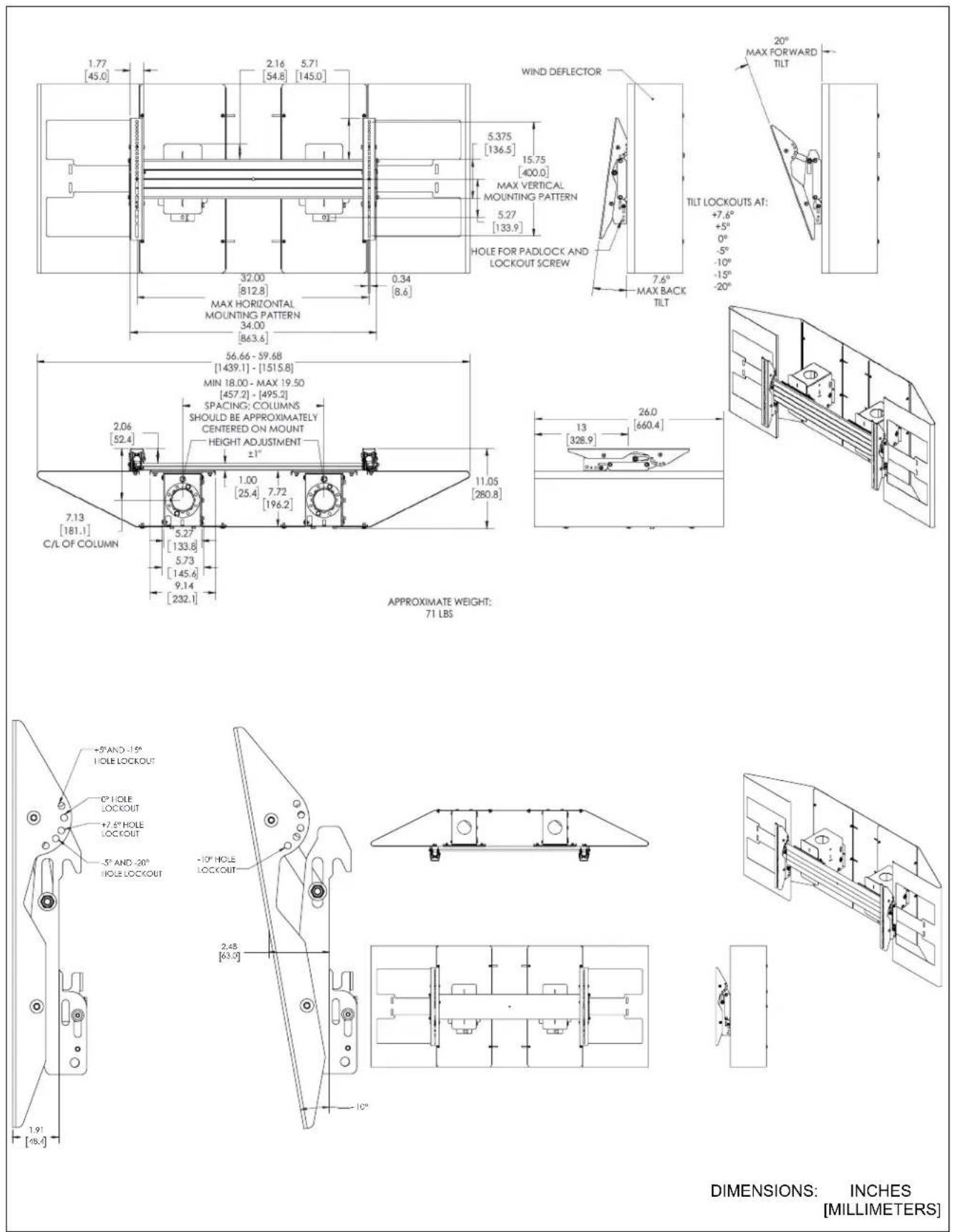
DIMENSIONS: INCHES [MILLIMETERS]
LEGEND
 | Tighten Fastener |  | Pencil Mark |
| Apretar elemento de fijación | Marcar con lápiz | ||
| Befestigungsteil festziehen | Stiftmarkierung | ||
| Apertar fixador | Marcar com lápis | ||
| Serrare il fissaggio | Segno a matita | ||
| Bevestiging vastdraaien | Potloodmerkteken | ||
| Serrez les fixations | Marquage au crayon | ||
 | Loosen Fastener |  | Drill Hole |
| Aflojar elemento de fijación | Perforar | ||
| Befestigungsteil lösen | Bohrloch | ||
| Desapertar fixador | Fazer furo | ||
| Allentare il fissaggio | Praticare un foro | ||
| Bevestiging losdraaien | Gat boren | ||
| Desserrez les fixations | Percez un trou | ||
 | Phillips Screwdriver |  | Adjust |
| Destornillador Phillips | Ajustar | ||
| Kreuzschlitzschraubendreher | Einstellen | ||
| Chave de fendas Phillips | Ajustar | ||
| Cacciavite a stella | Regolare | ||
| Kruiskopschroevendraaier | Afstellen | ||
| Tournevis à pointe cruciforme | Ajuster | ||
 | Open-Ended Wrench |  | Remove |
| Llave de boca | Quitar | ||
| Gabelschlüssel | Entfernen | ||
| Chave de bocas | Remover | ||
| Chiave a punte aperte | Rimuovere | ||
| Steeksleutel | Verwijderen | ||
| Clé à fourche | Retirez | ||
 | By Hand |  | Optional |
| A mano | Opcional | ||
| Von Hand | Optional | ||
| Com a mão | Opcional | ||
| A mano | Opzionale | ||
| Met de hand | Optie | ||
| À la main | En option | ||
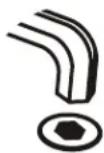 | Hex-Head Wrench | 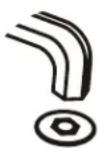 | Security Wrench |
| Llave de cabeza hexagonal | Llave de seguridad | ||
| Sechskantschlüssel | Sicherheitsschlüssel | ||
| Chave de cabeça sextavada | Chave de segurança | ||
| Chiave esagonale | Chiave di sicurezza | ||
| Zeskantsleutel | Veiligheidssleutel | ||
| Clé à tête hexagonale | Clé de sécurité |
TOOLS REQUIRED FOR INSTALLATION

PARTS
![[Interface Bracket Hardware Kit] A (4) M6x16mm B (4) M6x25mm C (4) M8x20mm D (4) M8x30mm E (4) 750x.323x.250 F (4) .750x.344x.500 G (4) 5/16" [Interface Lockout Bag] - (2) - (qty. per bag) M (1) #10-24 x 1/2" N (1) 1/4-20 x 2" P (1) 5/16-18 x 2" Q (1) 1/4-20 R (1) 5/16-18 S (2) 5/16" T (2) 1/4" H (2) [Mount assembly] [Box-column Hardware Kit] - (2) - (qty. per bag) U (2) 3/8-16 x 4" V (2) 3/8-16 W (4) 3/8" J (2) [Side wind shield] K (1) [Center wind shield] X (2) 1/4-20 x 1 1/4" Y (4) 5/16 x 5/8" Z (16) 1/4-20 x 5/8" AA (4) 1/4 x 3/4" BB (4) 5/16-18 CC (8) 5/16" DD (16) 1/4" EE (1) 5/32" L (2) [Interface bracket] FF (1) [X-large adapter] GG (2) [Side cover] HH (4) [Wind shield connector] JJ (1) [X-large rail]](/content/2026/06/1218875/images/c555dc8725b076fdc6fa13ee080b28a3b3004bc1772fd645630ff30273d66519.jpg)
INSTALLATION
IMPORTANT ! : The following procedure assumes that:
- Two UL Listed ODAC Series Floor/Ceiling Columns (not included) has been properly installed following instructions provided with plate and pipe.
Attaching Mount to ODAC Series Column

CAUTION: WATCH FOR PINCH POINTS! Do not place fingers between movable parts.
- Slide mount assemblies (H) onto ODAC Series Floor/Ceiling Columns. (See Figure 1) or (See Figure 2)
- Use two 3/8-16 x 4" hex head tapping bolts (U), four 3/8" washers (W) and two 3/8-16 hex nuts (V) to secure each mount assembly (H) to each column. (See Figure 1) or (See Figure 2)

Figure 1

Figure 2
3. Install 1/4-20 x 1 1/4" button head cap screws (X) into each mount assembly (H) to prevent column from rattling. (See Figure 3)

Figure 3
- Slide X-large rail (JJ) onto one of two assemblies (H) attached to column. (See Figure 4)

Figure 4
- Slide X-large rail (JJ) onto second assembly (J) attached to column. (See Figure 5)
- Slide two wind shield connectors (HH) into back grooves on X-large rail (JJ) on both sides. (See Figure 5)

Figure 5
- Tighten four bolts on back of each assembly to secure extrusion in place.

Figure 6
- Use four 1/4-14 x 3/4" hex flange bolts (AA) to secure two side covers (GG) to ends of X-large rail (JJ). (See Figure 7)

Figure 7
Attach Wind Shield to Mount
- Use two 5/16 x 5/8" hex head bolts (Y) and two 5/16" washers (CC) to secure center wind shield (K) to back of each mount assembly (H). (See Figure 8)

Figure 8
- Use two 1/4-20 x 5/8" cap screws (Z) and two 1/4" washers (DD) to secure center wind shield (K) to sides of each mount assembly (H). (See Figure 9)

Figure 9
- Loosely install two 1/4-20 x 5/8" button head cap screws (Z) and two 1/4" washers (DD) into two outside center holes on center wind shields (K). (See Figure 10)

Figure 10
-
Hang two side wind shields (J) onto screws loosely installed in Step 3 using teardrop holes in center slots. (See Figure 11)
-
Slide wind shields (J) horizontally to desired mounting position. (See Figure 11)
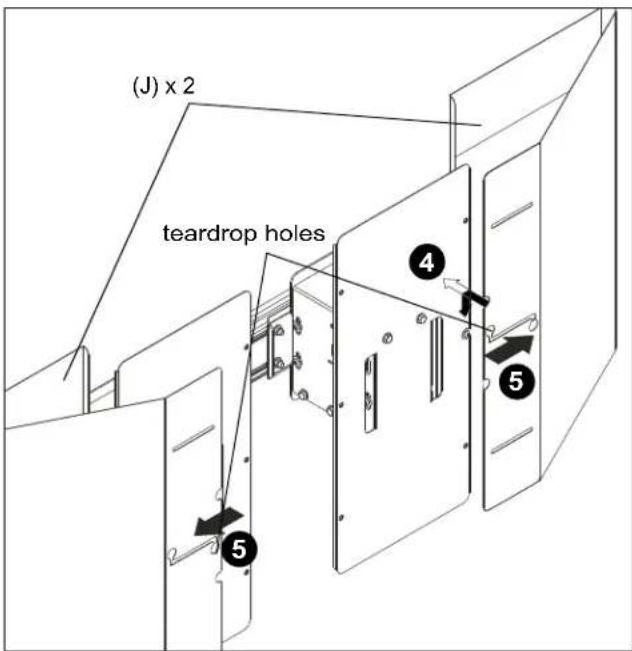
Figure 11
-
Use four 1/4-20 x 5/8" button head cap screws (Z) and four 1/4" washers (DD) to secure two side wind shields (J) to two center wind shields (K). (See Figure 12)
-
Tighten all six screws (Z).
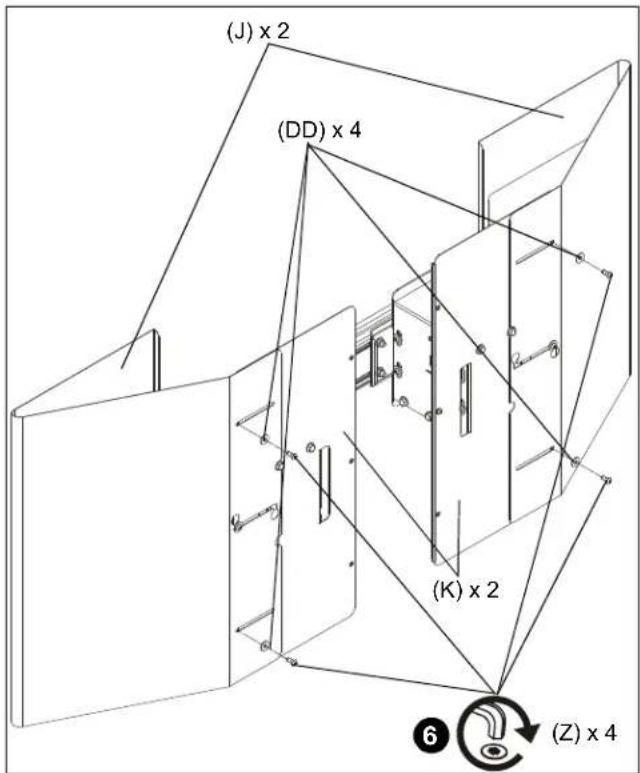
Figure 12
- Use four 5/16-18 hex nuts (BB) and four 5/16" washers (CC) to secure four wind shield connectors (HH) to side wind shields (J). (See Figure 13)
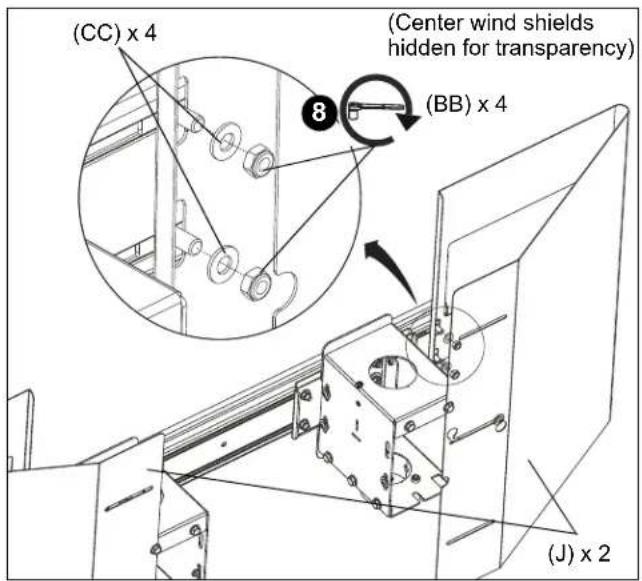
Figure 13
- Loosely install 1/4-20 x 5/8" button head cap screw (Z) and 1/4" washers (DD) into top right hole on left center shield (K). (See Figure 14)

Figure 14
- Hang x-large adapter (FF) onto screw loosely installed in Step 9 teardrop mounting hole in upper left slot. (See Figure 15)
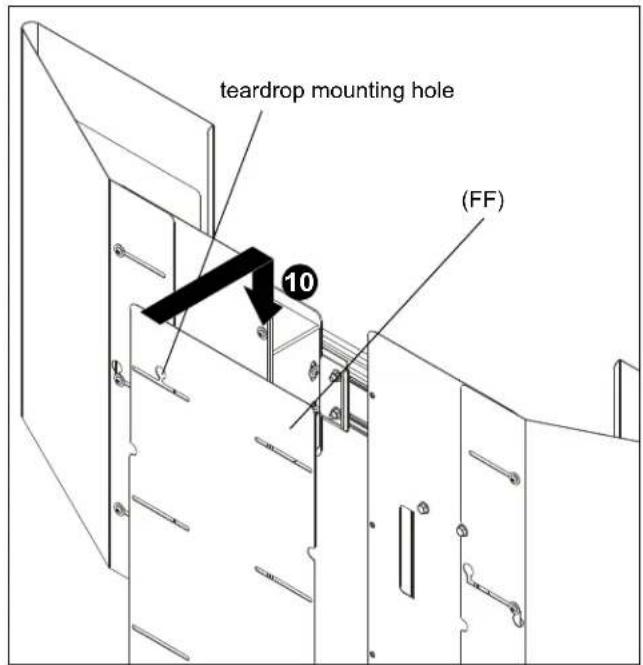
Figure 15
- Use five 1/4-20 x 5/8" button head cap screws (Z) and five 1/4" washers (DD) to secure x-large adapter (FF) to two center wind shields (K). (See Figure 16)
- Tighten all six screws (Z).

Figure 16
Attaching Interface Brackets to Display
- Lower the latch mechanism on each interface bracket (L). (See Figure 17)

Figure 17
- Align the center of the interface bracket (L) with center of screen. (See Figure 18)
NOTE: The diamond-shape hole in the bracket corresponds to the center of the mount.

Figure 18

WARNING: IMPROPER INSTALLATION CAN LEAD TO DISPLAY FALLING CAUSING SERIOUS PERSONAL INJURY OR DAMAGE TO EQUIPMENT! Using screws of improper size may damage your display. Properly sized screws will easily and completely thread into display mounting holes. If spacers are required, be sure to use longer screws of the same diameter.
- Select correct screws, spacers (if necessary) and universal washers from the hardware bag (A-G) and attach brackets (L) to back of screen. (See Figure 18)
Attaching Display to Ceiling Mount

WARNING: Exceeding the weight capacity can result in serious personal injury or damage to equipment! It is the installer's responsibility to make sure the combined weight of all components located within the mounting system of the OXCM1U mounts does not exceed 250 lbs (113.4 kg).
- Ensure that the latch mechanisms on interface brackets (L) are already lowered. (See Figure 17)
- While supporting both sides of display, lower display onto ceiling mount, hooking top of interface brackets onto front of ceiling mount. (See Figure 19)

WARNING: IMPROPER INSTALLATION CAN LEAD TO DISPLAY FALLING CAUSING SERIOUS PERSONAL INJURY OR DAMAGE TO EQUIPMENT! The display MUST be centered on the ceiling mount.
- Raise the latch mechanism on both interface brackets to lock bracket in place. (See Figure 19)
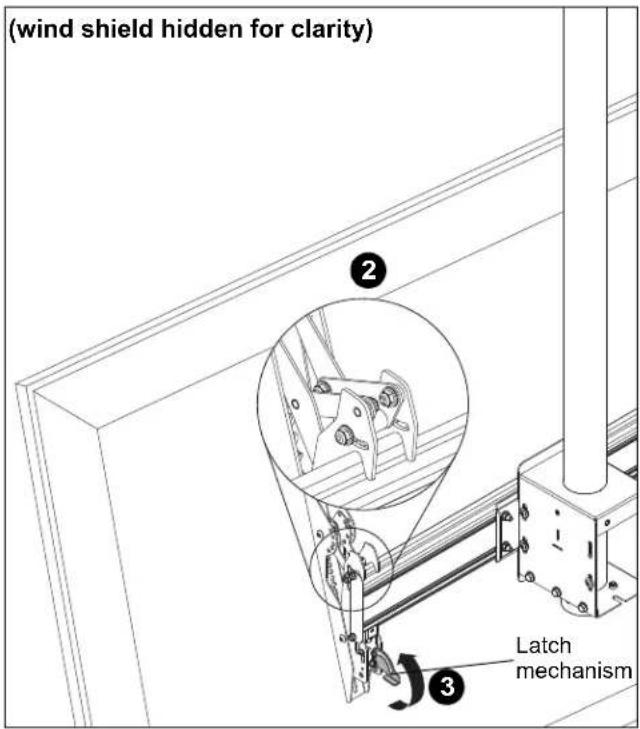
Figure 19
- Fasten brackets against ceiling mount extrusion using two #10-24 x 1/2" socket head cap screws (M). (See Figure 20)
- Repeat for other interface bracket.
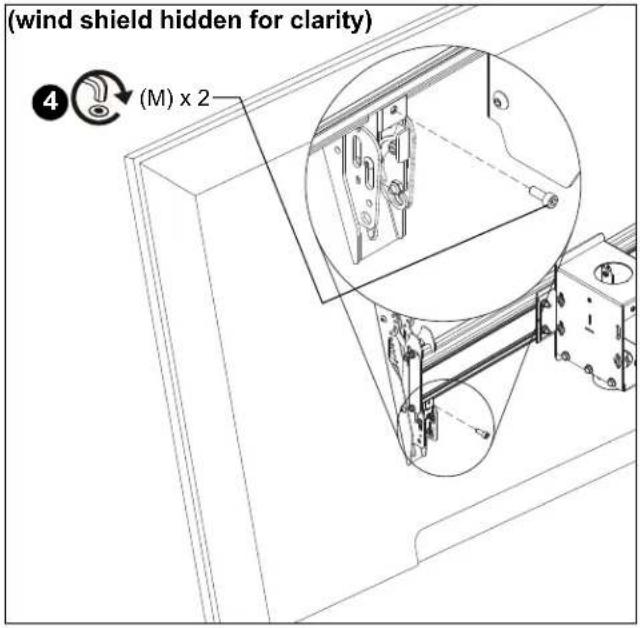
Figure 20
Adjustments

CAUTION: Watch for pinch points! Do not place fingers between movable parts.
Tilt
The interface brackets allow -7.6^ to 20^ tilt, and can be locked at -7.6^ , -5^ , 0^ , 5^ , 10^ , 15^ and 20^ tilt. (See Figure 21)
![15° AND -15° HOLE LOCKOUT 3° HOLE LOCKOUT +7.6° HOLE LOCKOUT -5° AND -20° HOLE LOCKOUT 10° HOLE LOCKOUT 2.48 [43.0] 1.91 [48.4] 10°](/content/2026/06/1218875/images/3670898570b2817b13c701c5e19c04557323891eabcf5f268c35353a1b721841.jpg)
Figure 21
- If necessary, loosen button head tilt friction bolt (located on side of interface bracket). (See Figure 22)
- Adjust tilt as required. (See Figure 22)
- The tilt may be locked at -7.6°, -5°, 0°, 5°, 10°, 15° and 20° using one 1/4-20 x 2" Phillips head screw (N), one 1/4-20 lock nut (Q) and two 1/4" washers (T) per interface bracket. (See Figure 21) and (See Figure 22)
NOTE: Use of washers (T) is optional.
- Tighten button head tilt friction bolt as necessary.

Figure 22
Level Adjustment
- Adjust level adjustment screws to change roll position. The roll may be adjusted 1^ in either direction. (See Figure 23)

Figure 23
Latch Lock/Security
IMPORTANT ! : In order to prevent interface latch from getting loose due to strong winds, the latch MUST be locked either using a padlock or locking bolt (P), 5/16" washers (S) and 5/16-18 hex nuts (R). This is NOT optional!
Using Padlocks (Security)
- Add padlock (not included) to each interface bracket to lock latch and to provide security for displays. (See Figure 24)

Figure 24
Using Bolts/Nuts
NOTE: This will keep latch from opening but does not provide additional security for the displays.
- Use 5/16-18 x 2" hex head carriage bolt (P), 5/16-18 hex nut (R) and two 5/16" washers (S) to lock each interface bracket latch in place. (See Figure 25)

Figure 25

CHIEF®
Our Mounts. Your Vision.
Chief, a products division of Milestone AV Technologies
8800-003024 Rev01
©2018 Milestone AV Technologies
www.milestone.com
12/18
USA/International A 6436 City West Parkway, Eden Prairie, MN 55344
P 800.582.6480 / 952.225.6000
F 877.894.6918 / 952.894.6918
Europe A Franklinstraat 14, 6003 DK Weert, Netherlands
P +31 (0) 495 580 852
F +31 (0) 495 580 845
Asia Pacific A Office No. 918 on 9/F, Shatin Galleria
18-24 Shan Mei Street
Fotan, Shatin, Hong Kong
P 852 2145 4099
F 852 2145 4477



- INSTALLATION INSTRUCTIONS
- DISCLAIMER
- DEFINITIONS
- IMPORTANT SAFETY INSTRUCTIONS
- INSTALLATION
- Attaching Mount to ODAC Series Column
- Attach Wind Shield to Mount
- Attaching Interface Brackets to Display
- Attaching Display to Ceiling Mount
- Adjustments
- Tilt
- Level Adjustment
- Latch Lock/Security
- Using Padlocks (Security)
- Using Bolts/Nuts
- CHIEF®
Brand : Chief
Model : OXCM1U
Category : Mounting bracket