VS815RVGA - Switch StarTech.com - Free user manual and instructions
Find the device manual for free VS815RVGA StarTech.com in PDF.


User questions about VS815RVGA StarTech.com
0 question about this device. Answer the ones you know or ask your own.
Ask a new question about this device
Download the instructions for your Switch in PDF format for free! Find your manual VS815RVGA - StarTech.com and take your electronic device back in hand. On this page are published all the documents necessary for the use of your device. VS815RVGA by StarTech.com.
USER MANUAL VS815RVGA StarTech.com
4 Port VGA Video Selector Switch with IR Remote Control
8 Port VGA Video Selector Switch with IR Remote Control
VS415RVGA
VS815RVGA
Instruction Manual

text_image
VISA/VISA ON LINE REMOTE 3C SELECT*VS815RVGA shown, actual product may vary from photo
StarTech.com

The Professionals' Source for Hard-to-Find Computer Parts
Instruction Manual
Table of Contents
Introduction ....1
Features ....1
Before You Begin....1
System Requirements 1
Contents 1
Installation 2
Using the Video Switch ....3
Technical Support....4
Warranty Information ....4
Instruction Manual
Introduction
Thank you for purchasing a StarTech.com VGA Video Switcher. This device allows you to connect multiple VGA signal sources to a single display, eliminating the need to manually swap out connections to the display. With the added convenience of IR remote control, video sources can be switched at the touch of a button.
Features
- Can be used to connect to displays up to 65M away from video source
- Switch between video sources using front panel push-button control, or included Remote Control
• Supports a maximum resolution of 2048 x 1536 with 450 Mhz bandwidth - Solid construction - metal enclosure provides durability in any environment
Before you Begin
Contents
• VGA Switcher (1)
- Remote Control (1)
- Instruction Manual (1)
- Power adapter (1)
System Requirements
• VGA signal sources (1-4: VS415RVGA), (1-8: VS815RVGA)
- A display with an available VGA input/connection
Instruction Manual
Installation
VS415RVGA
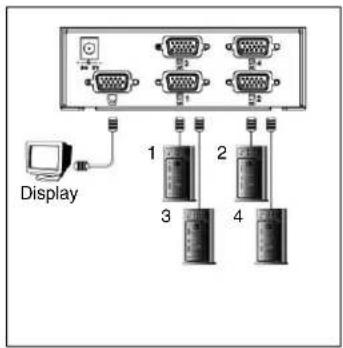
text_image
Display 1 2 3 4VS415RVGA

text_image
Display 1 2 3 4 5 6 7 8- Situate the Video Switcher in a location that is near both the video display, and an available power outlet.
- Insert the power adapter into the nearby power outlet.
- Insert the remaining end of the power adapter cable into the port marked DC 5V on the rear panel of the Video Switcher.
- Connect the cable provided by the video display to the blue input port on the rear panel of the Video Switcher.
- Connect one end of a standard VGA cable to the input port marked 1, on the rear panel of the Video Switcher, ensuring that all attached screws/fasteners are secure.
- Insert the remaining end of the VGA cable used in step 5 into the VGA output port located on the first VGA source computer, ensuring that all attached screws/fasteners are secure.
- Repeat steps 5 & 6 for each video source that will be used, using the input ports available on the rear panel of the Video Switcher.
- Ensure that each video source is powered on. Turn on the power to the Video Switcher, by pressing the orange/red power button located on the front panel.
Instruction Manual
Using the Video Switch
Once all necessary connections have been made, and power has been applied to the video signal sources, the display and the Video Switch, you will be able to switch between sources so that the desired signal can be displayed. To simplify determining the origin of each video signal, you may want to label each source with the number corresponding with the port into which it has been installed on the Video Switcher.
By default, the Video Switch will revert back to input 1, following power up. To change the video signal being used, simply press the front panel button that corresponds with each signal designation.
Specifications
| Maximum connection distance 65M | (213 feet) |
| Maximum Bandwidth 450 Mhz | |
| Operation Temperature 0 – 40 degrees C | |
| Storage Temperature | -50 – 70 degrees C |
| Connectors | 1 x HD-15 Female Output Connector8 x HD-15 Male InputConnector |
| Maximum Resolution | 2048x1536 |
Instruction Manual
Technical Support
StarTech.com's lifetime technical support is an integral part of our commitment to provide industry-leading solutions. If you ever need help with your product, visit www.startech.com/support and access our comprehensive selection of online tools, documentation, and downloads.
Warranty Information
This product is backed by a one-year warranty. In addition, StarTech.com warrants its products against defects in materials and workmanship for the periods noted, following the initial date of purchase. During this period, the products may be returned for repair, or replacement with equivalent products at our discretion. The warranty covers parts and labor costs only. StarTech.com does not warrant its products from defects or damages arising from misuse, abuse, alteration, or normal wear and tear.
Limitation of Liability
In no event shall the liability of StarTech.com Ltd. and StarTech.com USA LLP (or their officers, directors, employees or agents) for any damages (whether direct or indirect, special, punitive, incidental, consequential, or otherwise), loss of profits, loss of business, or any pecuniary loss, arising out of or related to the use of the product exceed the actual price paid for the product.
Some states do not allow the exclusion or limitation of incidental or consequential damages. If such laws apply, the limitations or exclusions contained in this statement may not apply to you.
About StarTech.com
StarTech.com is “The Professionals’ Source for Hard-to-Find Computer Parts”. Since 1985, we have been providing IT professionals with the quality products they need to complete their solutions. We offer an unmatched selection of computer parts, cables, server management solutions and A/V products and serve a worldwide market through our locations in the United States, Canada, the United Kingdom and Taiwan.
Visit www.startech.com for complete information about all our products and to access exclusive interactive tools such as the Parts Finder and the KVM Reference Guide. StarTech.com makes it easy to complete almost any IT solution. Find out for yourself why our products lead the industry in performance, support, and value.
Revised: 12 September 2006 (Rev. A)