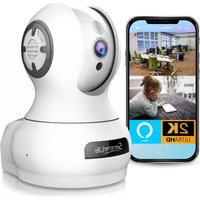
CA-IPCAMHD85 - Camera SereneLife - Free user manual and instructions
Find the device manual for free CA-IPCAMHD85 SereneLife in PDF.


Pick your language and provide your email: we'll send you a specifically translated version.
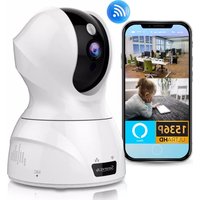
| Product Type | HD IP Camera |
| Brand | SereneLife |
| Model | CA-IPCAMHD85 |
| Resolution | 1920 x 1080 pixels (Full HD) |
| Lens | Fixed focal length, 3.6mm |
| Night Vision | Up to 10 meters with IR LEDs |
| Connectivity | Wi-Fi 802.11 b/g/n (2.4 GHz) |
| Power Supply | DC 5V via USB cable (adapter included) |
| Dimensions | 110 x 70 x 70 mm (4.3 x 2.8 x 2.8 in) |
| Weight | 150 g (5.3 oz) |
| Storage | microSD card (up to 128 GB, not included) |
| Audio | Two-way audio with built-in microphone and speaker |
| Motion Detection | Yes, with push notifications |
| Mobile App | SereneLife Smart Camera (iOS/Android) |
| Operating Temperature | -10°C to 50°C (14°F to 122°F) |
| Maintenance | Clean with a soft, dry cloth. Do not use liquids. |
| Safety | For indoor use only. Keep away from water and extreme temperatures. |
| Spare Parts | Contact SereneLife customer support for replacements. |
| Certifications | CE, FCC compliant |
Frequently Asked Questions - CA-IPCAMHD85 SereneLife
How do I set up the SereneLife CA-IPCAMHD85 camera?
Download the SereneLife Smart Camera app from the App Store or Google Play. Create an account, plug in the camera, and wait for the LED to blink rapidly. Follow the app instructions to connect to your Wi-Fi network.
Can I access the camera remotely?
Yes, you can view live footage and receive alerts from anywhere using the SereneLife Smart Camera app on your smartphone or tablet.
What is the video resolution?
The camera records in Full HD 1920x1080 pixels at up to 30 frames per second.
Does the camera have night vision?
Yes, it features infrared LEDs for clear night vision up to 10 meters (33 feet) in complete darkness.
How do I reset the camera to factory settings?
Press and hold the reset button on the camera for about 10 seconds until the LED flashes. The camera will reboot and be ready for new setup.
Can I record video continuously?
Yes, you can insert a microSD card (up to 128GB) for continuous recording. Alternatively, enable cloud recording through the app (subscription may be required).
Is the camera weatherproof?
No, the SereneLife CA-IPCAMHD85 is designed for indoor use only. Do not expose it to rain or moisture.
How do I connect the camera to Wi-Fi?
Ensure your phone is on the same 2.4 GHz Wi-Fi network. In the app, select 'Add Device' and follow the guided steps to pair via QR code or WPS.
What app do I need to use this camera?
You need the SereneLife Smart Camera app, available for free on iOS and Android devices.
How do I mount the camera?
The camera comes with a wall mount bracket and screws. Choose a stable location, mark the drill holes, mount the bracket, and attach the camera.
User questions about CA-IPCAMHD85 SereneLife
0 question about this device. Answer the ones you know or ask your own.
Ask a new question about this device
No questions yet. Be the first to ask one.
Download the instructions for your Camera in PDF format for free! Find your manual CA-IPCAMHD85 - SereneLife and take your electronic device back in hand. On this page are published all the documents necessary for the use of your device. CA-IPCAMHD85 by SereneLife.
USER MANUAL CA-IPCAMHD85 SereneLife
Manual assistant
Powered by Anthropic
Waiting for your message
Product information
Brand : SereneLife
Model : CA-IPCAMHD85
Category : Camera