SL1015 - Radio AmpliVox - Free user manual and instructions
Find the device manual for free SL1015 AmpliVox in PDF.


User questions about SL1015 AmpliVox
0 question about this device. Answer the ones you know or ask your own.
Ask a new question about this device
Download the instructions for your Radio in PDF format for free! Find your manual SL1015 - AmpliVox and take your electronic device back in hand. On this page are published all the documents necessary for the use of your device. SL1015 by AmpliVox.
USER MANUAL SL1015 AmpliVox
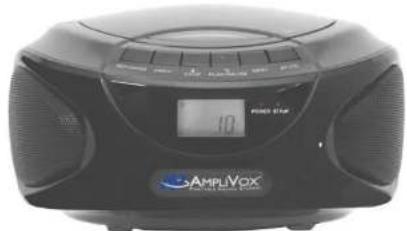
CD Boombox with Bluetooth
text_image
10 AMPUVox AMPUVoxThank you for choosing the SL1015 CD Boombox with Bluetooth from AmpliVox Portable Sound Systems.
We are excited in introducing this truly unique boombox. Please refer to this user guide as you enjoy the unique capabilities of another quality product from AmpliVox Portable Sound Systems.
We encourage you to visit our website www.ampli.com to register your product for its warranty
IMPORTANT SAFETY INSTRUCTIONS
Before using this product, read the instruction manual for important safety information. Please retain this manual for future reference and warranty information.
Troubleshooting & Servicing
Do not attempt to service or repair the device yourself. Refer all servicing to qualified service personnel. Do not attempt to modify the device in anyway. Doing so could invalidate your warranty.
Moisture and heat sources
Do not use this apparatus near water (for example, sinks, baths, pools) or expose it to rain, moisture, dripping or splashing liquids. Do not expose the unit to high temperatures, high humidity or direct sunlight.
Cleaning
When cleaning the device, please use a soft, dry cloth. Never use benzene, paint-thinner, or other chemicals on the device.
Location
Place the device in stable location, so it will not fall causing damage to the device or bodily harm.
Intended use
The product may only be used with the original parts intended for it. The intended use includes adherence to the specified installation instructions. The manufacturer accepts no liability for damage arising due to improper use.
WARNING: Changes or modifications to this unit not expressly approved by the party responsible for compliance could void the user's authority to operate the equipment.
IMPORTANT
This device complies with Part 15 of the FCC Rules. Operation is subject to the following two conditions:
This device may not cause harmful interference, and (2) this device must accept any interference received, including interference that may cause undesired operation.
The unit's circuitry may cause interference to nearby radios. To prevent interference, either switch the unit off or move away from the affected radio.
SPECIFICATIONS
Power Supply: AC: 120V / 60 Hz
Batteries: Requires "C" Size - (6) NOT INCLUDED
Battery Life: Approx. 6 hours
Output Power: 1 W + 1 W
Speakers: 2 - Full Range, cone type, 2" Stereo, 8 ohm
CD Player: CD, CD-R / RW, Programmable Tracks, Repeat
Radio: FM: 88 - 108 MHz AM: 530 - 1710 KHz
Bluetooth: Supports v2.0 Range: 30 feet
Speaker Phone: Built-in Microphone
Antenna: FM: Telescopic AM: Built-in
Inputs: Headphone: 3.5 mm (1/8") Aux In: 3.5mm (1/8")
Dimensions: 8.5" W x 4.5" H x 8" D
Weight: 2.6 lb. (NO BATTERIES)
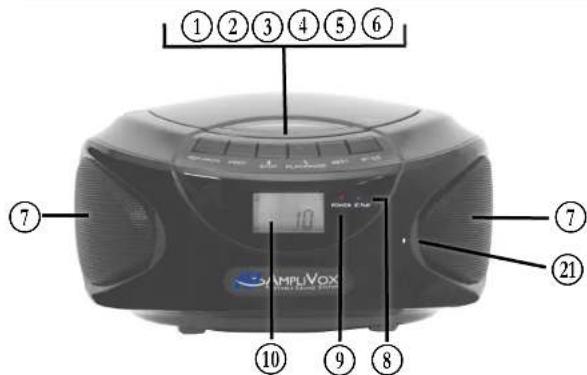
CONTROLS IDENTIFICATION
text_image
①②③④⑤⑥ ⑦ ⑦ ②1 10 SAMPLVIX SAMPLVIX 10 ⑨ ⑧① REPEAT / PROGRAM
② PREVIOUS
③ STOP / BLUETOOTH CANCEL
④ PLAY / PAUSE / HANDSFREE
⑤ NEXT
⑥ BLUETOOTH / CD
⑦ SPEAKER
⑧ BLUETOOTH INDICATOR
⑨ POWER INDICATOR
⑩ LCD DISPLAY
⑪ HANDLE
⑫ CD DOOR - OPEN / CLOSE
⑬ AM / FM SWITCH
⑭ ANTENNA
⑮ FUNCTION SWITCH
⑯ VOLUME KNOB
CD PLAYER
- Slide the function switch ⑮ to the BT / CD / Aux position.
- Press the CD Door ⑫ to open, insert CD disc facing upward and close the CD door. Press Play / Pause button, the player will play the first song and the LCD ⑩ will display the number of the track.
- Adjust the volume with the Volume Knob ⑯.
- Press the Play / Pause button ④ to temporarily pause the playback, press again to resume the playback.
- During playback, press the Prev button ② to play the previous song or press the Next button ⑤ to play the next song.
- Press the Stop button ③ to stop playback.
- While CD is playing, to program Repeat playback, press the Repeat / Program button ① once to repeat current track. Press the button a second time to repeat the whole disc. Press the button a third time to exit Repeat / program function, it will then play tracks at random. Press the button a forth time it will resume normal play.
- To program track sequence playpack, press the Repeat / Program button to enter program status, the LCD display ⑩ will flash. Press Prev ② or Next ⑤ button to program the track you want to play first. Press Repeat / Program button again to accept track and advance to next track you want to listen to. You can program up to 10 tracks. When you are done press the play button. To cancel, press the Stop ③ button twice.
Bluetooth / CONFERENCE PHONE
- Slide the function switch ⑮ to the BT / CD / Aux position.
- Press the BT / CD ⑥ button. The Bluetooth Light ⑧ will start flashing. In your Bluetooth device settings choose Ematic Boombox to pair with the boombox. When your device and the boombox are paired the Bluetooth Light ⑧ will stop flashing.
FUNCTION OPERATIONS
HEADPHONE CONNECTION
- Locate the green color 3.5mm HEADPHONE ^18 connection on back of boombox. Plug in HEADPHONE or AmpliVox HEADHONE JACK BOX (SL1004) here.
- Radio speakers will be automatically turned off.
AUX IN
- You can connect any sound source to the Boombox using the appropriate cord for your device. One end must have a 3.5mm plug on one end that plugs into the AUX IN JACK ⑰.
- Slide the function switch ⑮ to the BT / CD / Aux position.
- Locate the black color 3.5mm AUX IN ⑰ connection on back of boombox. Use this connection to plug-in any device that has an audio output connection like your Cell Phone or a tape player.
WARRANTY
Limited One (1) -Year Warranty
AmpliVox warrants this product to be free from defects in materials and workmanship (subject to the terms set forth below) for a period of one (1) year from the date of purchase ("Warranty Period").
During the Warranty Period, AmpliVox will repair or replace (at AmpliVox's discretion) this product or any defective parts ("Warranty Service").
Repair or replacement under the terms of this warranty does not give right to any extension or a new beginning of the period of warranty.
CLAIMS UNDER THE WARRANTY
To obtain Warranty Service, contact AmpliVox (800-267-5486) to be assigned a Return Authorization number (RA#). After receiving a RA#, the defective unit is to be returned to AmpliVox in either its original packaging or packaging affording an equal degree of protection. You will bear the cost of shipping the product to AmpliVox. If the product is covered by the warranty, AmpliVox will bear the cost of shipping product back to you after the completion of service under this warranty.
Return shipping will be charged to you for products not covered by the warranty or requiring no warranty repair.
The following information must be presented to obtain Warranty Service: (a) the RA# must be clearly and legibility marked on the outside of shipping carton, (b) proof of purchase, which clearly indicates the name and address of the seller, the date of purchase and the product type, which is evidence that this product is within the Warranty Period. Please further include (c) your return address, (d) daytime telephone number, and (e) reason for return.
LIMITATION OF WARRANTY
This warranty is only valid for the original purchaser and will automatically terminate prior to expiration if this product is sold or otherwise transferred to another party. The warranty provided by AmpliVox in this statement applies only to products purchased for use, and not for resale. It does not apply to open box purchases, which are sold "as is" and without any warranty. This Warranty does not cover cosmetic damage or damage due to misuse, abuse, negligence, Acts of Nature, accident, disassembling or modification of, or to any part of, the product. This Warranty does not cover damage due to improper operation, maintenance or installation, or attempted repair by anyone other than AmpliVox. Any unauthorized repairs will void this warranty.
REPAIRS OR REPLACEMENTS AS PROVIDED UNDER THIS WARRANTY ARE THE EXCLUSIVE REMEDY OF THE CONSUMER. AMPLIVOX SHALL NOT BE LIABLE FOR ANY INCIDENTAL OR CONSEQUENTIAL DAMAGES FOR