PD-4A - Video recorder DataVideo - Free user manual and instructions
Find the device manual for free PD-4A DataVideo in PDF.


User questions about PD-4A DataVideo
0 question about this device. Answer the ones you know or ask your own.
Ask a new question about this device
Download the instructions for your Video recorder in PDF format for free! Find your manual PD-4A - DataVideo and take your electronic device back in hand. On this page are published all the documents necessary for the use of your device. PD-4A by DataVideo.
USER MANUAL PD-4A DataVideo
natural_image
Front view diagram of a rack-mounted server unit with ports and connectors (no text or labels)Table of Contents
FCC COMPLIANCE STATEMENT .... 3
WARNINGS AND PRECAUTIONS....3
WARRANTY....4
STANDARD WARRANTY 4
THREE YEAR WARRANTY 4
DISPOSAL 5
INTRODUCTION....6
FEATURES....6
PACKING LIST 6
FRONT PANEL....7
REAR PANEL 9
DATAVIDEO PRODUCT VOLTAGE REQUIREMENTS 10
SPECIFICATIONS 10
DIMENSIONS....11
SERVICE & SUPPORT 12
FCC Compliance Statement
This device complies with part 15 of the FCC rules. Operation is subject to the following two conditions:
- This device may not cause harmful interference, and
- This device must accept any interference received, including interference that may cause undesired operation.
Warnings and Precautions
- Read all of these warnings and save them for later reference.
- Follow all warnings and instructions marked on this unit.
- Unplug this unit from the wall outlet before cleaning. Do not use liquid or aerosol cleaners. Use a damp cloth for cleaning.
- Do not use this unit in or near water.
- Do not place this unit on an unstable cart, stand, or table. The unit may fall, causing serious damage.
- Slots and openings on the cabinet top, back, and bottom are provided for ventilation. To ensure safe and reliable operation of this unit, and to protect it from overheating, do not block or cover these openings. Do not place this unit on a bed, sofa, rug, or similar surface, as the ventilation openings on the bottom of the cabinet will be blocked. This unit should never be placed near or over a heat register or radiator. This unit should not be placed in a built-in installation unless proper ventilation is provided.
- This product should only be operated from the type of power source indicated on the marking label of the AC adapter. If you are not sure of the type of power available, consult your Datavideo dealer or your local power company.
- Do not allow anything to rest on the power cord. Do not locate this unit where the power cord will be walked on, rolled over, or otherwise stressed.
- If an extension cord must be used with this unit, make sure that the total of the ampere ratings on the products plugged into the extension cord do not exceed the extension cord

e. When the product has been dropped or the cabinet has been damaged;
f. When the product exhibits a distinct change in performance, indicating a need for service.
Warranty
Standard Warranty
- Datavideo equipment are guaranteed against any manufacturing defects for one year from the date of purchase.
- The original purchase invoice or other documentary evidence should be supplied at the time of any request for repair under warranty.
- The product warranty period begins on the purchase date. If the purchase date is unknown, the product warranty period begins on the thirtieth day after shipment from a Datavideo office.
- All non-Datavideo manufactured products (product without Datavideo logo) have only one year warranty from the date of purchase.
- Damage caused by accident, misuse, unauthorized repairs, sand, grit or water is not covered under warranty.
• Viruses and malware infections on the computer systems are not covered under warranty. - Any errors that are caused by unauthorized third-party software installations, which are not required by our computer systems, are not covered under warranty.
- All mail or transportation costs including insurance are at the expense of the owner.
- All other claims of any nature are not covered.
• All accessories including headphones, cables, and batteries are not covered under warranty. - Warranty only valid in the country or region of purchase.
- Your statutory rights are not affected.
Three Year Warranty
Disposal

For EU Customers only - WEEE Marking
This symbol on the product or on its packaging indicates that this product must not be disposed of with your other household waste. Instead, it is your responsibility to dispose of your waste equipment by handing it over to a designated collection point for the recycling of waste electrical and electronic equipment. The separate collection and recycling of your waste equipment at the time of disposal will help to conserve natural resources
and ensure that it is recycled in a manner that protects human health and the environment. For more information about where you can drop off your waste equipment for recycling, please contact your local city office, your household waste disposal service or the shop where you purchased the product.

CE Marking is the symbol as shown on the left of this page. The letters "CE" are the abbreviation of French phrase "Conformité Européenne" which literally means "European Conformity". The term initially used was "EC Mark" and it was officially replaced by "CE Marking" in the Directive 93/68/EEC in
- "CE Marking" is now used in all EU official documents.
Introduction
The PD-4A is a 19" Rack Mount Redundant Power Centre with the ability to supply multiple 12V power outputs from a 100-240V AC Input or DC-12V/25A terminal.
The PD-4A redundant power supply unit protects your power system against unforeseen events by supplying power to devices the instant they begin to fail. The PD-4A is an essential accessory for Datavideo Mobile Studio applications, together with the Video switcher, LCD, recorders and etc, the PD-4A makes the integration of a Mobile Studio easier and more professional.
The built-in time delay power on control initiates each DC output terminal in sequence, and each terminal is installed with an auto-recover fuse to safely protect every connected working device.
Features
- Power supply up to 384 Watts for most production requirements
• Power indicator and auto-recovery fuse protection for each output terminal - Sequential Power On for each DC output terminal by 1 second duration
- Switchable AC 110/220V or DC 12V input source (110V and 220V devices are different models)
- Provides safety net AC and DC protections to prevent power loss
• Eco-Friendly by complying with Safety / EMI and RoHS certification - Chassis ground terminal
- Embedded four units of heat sink fan design
• Built-in abnormal warning buzzer
Front Panel
text_image
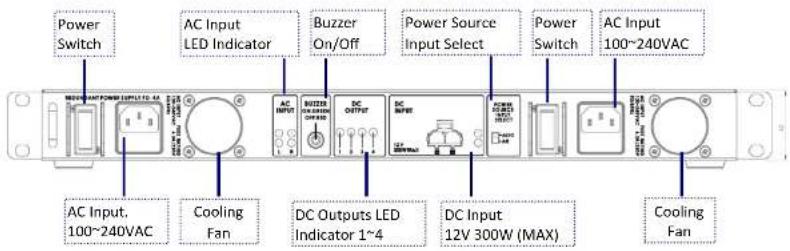
Power Switch AC Input LED Indicator Buzzer On/Off Power Source Input Select Power Switch AC Input 100~240VAC AC Input. 100~240VAC Cooling Fan DC Outputs LED Indicator 1~4 DC Input 12V 300W (MAX) Cooling Fan
On / Off Switch
Powers the PD-4A On / Off when using AC Power.
Note: The On / Off Switch is not functional if the power input is DC.

AC In with built-in fuse
AC Inlet for connecting to suitable mains power outlet - 100-240VAC. The socket contains a fuse holder with a 6.3A/250V fuse.

AC INPUT LED indicator
L (LEFT AC Input) / R (RIGHT AC Input)
• Green: Good AC Input and DC output power
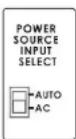
Power Source Input Select (AUTO / AC)
The Input select switch can be set to AC or AUTO depending on the power input that you intend to use.
AUTO: When DC power (12V) converted from AC input drops below 9.5V, the external DC input will start supplying current to DC outputs until its alternative rises above 11.3V.
AC: The DC outputs are supplied by DC power (12V) converted from AC input.
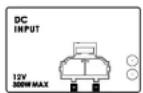
DC Input (Euro Type Terminal)
The PD-4A can be powered from a suitable 12V power source. When working from DC the PD-4A will not regulate the power outlets.
Please ensure that the 12V power source that you use is regulated. If you intend to run the PD-4A from a car or van power outlet make sure that a suitable regulator is used on the power feed.
LED Indicator
Green: DC input LED indicator
Blinking Red: Internal ambient temperature exceeds 70^ C degrees.

ON: Green (Press the push button)
Buzzer sounds when the AC fails or when the internal ambient temperature exceeds approximately 70^ C degrees.
Rear Panel
text_image
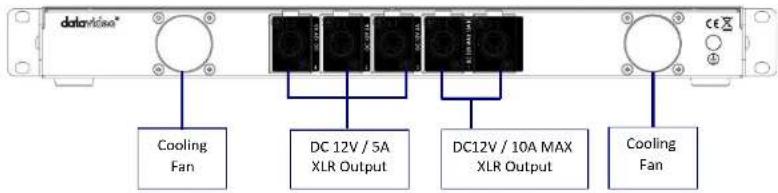
datavisual Cooling Fan DC 12V / 5A XLR Output DC12V / 10A MAX XLR Output Cooling Fan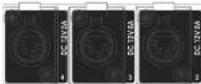
DC Out 12V 5A
3 x 12V 5A DC Output via XLR In-Line Socket

DC Out 12V 10A
2 x MAX 12V 10A DC Output via XLR In-Line Socket

Cooling Fan
The PD-4A has two built-in cooling fans; please ensure that the two fans are not blocked and the airflow is available.
Note: Fan starts when internal ambient temperature reaches 50 °C.
Datavideo Product Voltage Requirements
This table is a guideline for Datavideo products; if you are using products from other manufacturers, please check their voltage requirements carefully before connecting to the PD-4A.
DC 12V 3A BAC-03, VP-332, DAC-15, DAC-10, DAC-6, DAC-5, TLM-70D, TLM-404, TLM-702, TLM-350, SE-500, DVK-100, RMC-140, ITC-100, STC-100, DN-100, CP-100, DAC-30, CKL-100, TLM-700, TLM-433
DC 12V 5A DN-300, TLM-170MD
DC 12V10A SE-1000, SE-2000, SE-3000, SE-900, SE-800, MP-6000
Specifications
| Input | |
| AC input outlet | Two AC input with Power switch |
| AC input current rating | 100 - 240VAC |
| AC input fuse rating | 100 – 240VAC MAX 6.3A |
| AC frequency | 50Hz or 60Hz |
| DC input | One DC 12V, supports non-regulated DC 12V output |
| DC input watt | 300W |
| Output | |
| DC Output | 12V±5%, 5A XLR AC Female Jack x 312V±5%, 10A XLR DC Female Jack x 2(Two of the outputs can combine the rating become one 12V±5%, 10A DC outputs) |
Dimensions

Service & Support
It is our goal to make owning and using Datavideo products a satisfying experience. Our support staff is available to assist you to set up and operate your system. Contact your local office for specific support requests. Plus, please visit www.datavideo.com to access our FAQ section.
Please visit our website for latest manual update. www.datavideo.com/product/PD-4A