Architect KHHC2090SBL - Microwaves KITCHENAID - Free user manual and instructions
Find the device manual for free Architect KHHC2090SBL KITCHENAID in PDF.


User questions about Architect KHHC2090SBL KITCHENAID
0 question about this device. Answer the ones you know or ask your own.
Ask a new question about this device
Download the instructions for your Microwaves in PDF format for free! Find your manual Architect KHHC2090SBL - KITCHENAID and take your electronic device back in hand. On this page are published all the documents necessary for the use of your device. Architect KHHC2090SBL by KITCHENAID.
USER MANUAL Architect KHHC2090SBL KITCHENAID
For questions about features, operation/performance, parts, accessories or service, call: 1-800-422-1230, or visit our website at... www.kitchenaid.com
Table of Contents....2
natural_image
Black and white illustration of a tray filled with sliced citrus fruits and vegetables (no text or symbols)TABLE OF CONTENTS
MICROWAVE HOOD COMBINATION SAFETY ....3 Electrical Requirements ....4
PARTS AND FEATURES....5 Microwave Oven Cavity Coating....5 Microwave System – OPTIMAWAVE™ Technology....5 Grill Element....5 Convection Element and Fan....6 Turntable....6
ACCESSORIES ....7 Browning Pan and Handle ....7 Grill Rack ....7 Convection Rack....7 KITCHENAID™ Steamer Vessel ....7
MICROWAVE OVEN CONTROL....8 Control Panel....8 Interactive Touch Display....8 Main Menu....9 Settings & Info....10 Clock....10 Date....11 Demo Mode....11 Display Backlight....11 Display Contrast....11 Learning Mode....11 Tones....12 Start....12 Off....12 Clear....12 Timer....12 Control Lock....12 TRU CAPTURE® Vent Fan and Cooktop Lights....13 Cooking Animation....13 Progress Bar....13
MICROWAVE OVEN USE ....14 Food Characteristics....14 Cooking Guidelines....14 Cookware and Dinnerware....14 Aluminum Foil and Metal....15 Microwave Cooking Rules....15
MANUAL COOKING ....16 Add a Minute ....16 Micro Time/Power Cooking ....16 Convect Time/Temp Cooking ....16 Manual Method Cooking ....17 Raising (Proofing) Bread ....17 Keep Warm ....18 Cooking in Stages (or steps) ....18
PROGRAMMED COOKING....19 Convection Cooking....19 Combination Cooking....19 Sensor Cooking....19 Preheating....19 Doneness....19 Popcorn....20 Using Food Type....20 Using Cook Method....20 Reheat....20 Defrost....21 Cook....21 Bake....21 Boil & Simmer....22 Browning Pan....22 Grill....23 Melt....23 Roast....23 Soften....23 Steam Cook....24 Most Used Menu....24 Food Type Chart....25 Cook Method Chart....27
MICROWAVE OVEN CARE....31 General Cleaning....31 Replacing Filters....32 Replacing Cooktop Light....33 Replacing Microwave Oven Light....33 TROUBLESHOOTING....34 ASSISTANCE OR SERVICE....35 Replacement Parts....35
Your safety and the safety of others are very important.
We have provided many important safety messages in this manual and on your appliance. Always read and obey all safety messages.

This is the safety alert symbol.
This symbol alerts you to potential hazards that can kill or hurt you and others.
All safety messages will follow the safety alert symbol and either the word "DANGER" or "WARNING."
These words mean:
DANGER
WARNING
You can be killed or seriously injured if you don't immediately follow instructions.
You can be killed or seriously injured if you don't follow instructions.
All safety messages will tell you what the potential hazard is, tell you how to reduce the chance of injury, and tell you what can happen if the instructions are not followed.
IMPORTANT SAFETY INSTRUCTIONS
When using electrical appliances basic safety precautions should be followed, including the following:
WARNING: To reduce the risk of burns, electric shock, fire, injury to persons, or exposure to excessive microwave energy:
- Read all instructions before using the microwave oven.
- Read and follow the specific "PRECAUTIONS TO AVOID POSSIBLE EXPOSURE TO EXCESSIVE MICROWAVE ENERGY" found in this section.
■ The microwave oven must be grounded. Connect only to properly grounded outlet. See "GROUNDING INSTRUCTIONS" found in this section and in the provided Installation Instructions.
■ Install or locate the microwave oven only in accordance with the provided Installation Instructions.
■ To reduce the risk of fire in the oven cavity:
- Do not overcook food. Carefully attend the microwave oven when paper, plastic, or other combustible materials are placed inside the oven to facilitate cooking.
- Remove wire twist-ties from paper or plastic bags before placing bags in oven.
- If materials inside the oven ignite, keep oven door closed, turn oven off, and disconnect the power cord, or shut off power at the fuse or circuit breaker panel.
- Do not use the cavity for storage purposes. Do not leave paper products, cooking utensils, or food in the cavity when not in use.
■ Liquids, such as water, coffee, or tea are able to be overheated
IMPORTANT SAFETY INSTRUCTIONS
■ Suitable for use above both gas and electric cooking equipment.
■ Intended to be used above ranges with maximum width of 36" (91.44 cm).
■ Clean Ventilating Hoods Frequently - Grease should not be allowed to accumulate on hood or filter.
- Do not use paper products when appliance is operated in the "PAN BROWN" mode (on models with this feature).
- Do not store any materials, other than manufacturer's recommended accessories, in this oven when not in use.
■ Do not store anything directly on top of the microwave oven when the microwave oven is in operation.
■ When flambeing foods under the hood, turn the fan on.
■ Use care when cleaning the vent-hood filter. Corrosive cleaning agents, such as lye-based oven cleaners, may damage the filter.
■ Do not cover or block any openings on the microwave oven.
■ Do not store this microwave oven outdoors. Do not use the microwave oven near water - for example, near a kitchen sink, in a wet basement, or near a swimming pool, or similar locations.
■ Do not immerse cord or plug in water.
- Keep cord away from heated surfaces.
■ Do not let cord hang over edge of table or counter.
■ Do not mount over a sink.
■ Do not cover racks or any other part of the oven with metal foil. This will cause overheating of the oven.
SAVE THESE INSTRUCTIONS
PRECAUTIONS TO AVOID POSSIBLE EXPOSURE TO EXCESSIVE MICROWAVE ENERGY
(a) Do not attempt to operate this oven with the door open since open-door operation can result in harmful exposure to microwave energy. It is important not to defeat or tamper with the safety interlocks.
(b) Do not place any object between the oven front face and the door or allow soil or cleaner residue to accumulate on sealing surfaces.
(c) Do not operate the oven if it is damaged. It is particularly important that the oven door close properly and that there is no damage to the:
(1) Door (bent),
(2) Hinges and latches (broken or loosened),
(3) Door seals and sealing surfaces.
(d) The oven should not be adjusted or repaired by anyone except properly qualified service personnel.
Electrical Requirements
WARNING
GROUNDING INSTRUCTIONS
■ For all cord connected appliances:
PARTS AND FEATURES
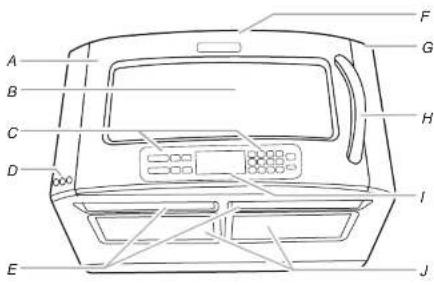
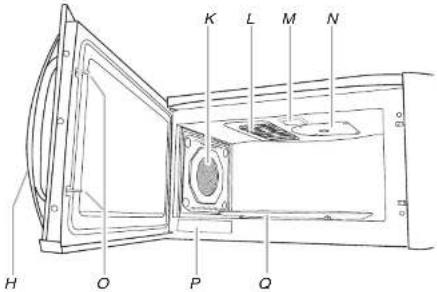
This manual may cover several different models. The model you have purchased may have some or all of the features shown here. The appearance of your particular model may differ slightly from the illustrations in this manual.
text_image
A B C D E F G H I JA. Microwave oven door
B. Metal-shielded window
C. Control panel
D. Lights and Vent Fan buttons
E. Halogen cooktop lights (2)
F. Exhaust vent (for recirculation)
(top surface of microwave
C. (min)
G. Make vent
H. Dampbell
H. Door handle
text_image
K L M N H O P QJ. Grease and charcoal filters
(2 each)
K. Convection element and fan
(Shindo screen)
L. Grill element
VI. Microwave oven light
N. Microwave inlet cover
O. Door lock system
P. Model and serial number
plate
Q. Turntable
Microwave Oven Cavity Coating
The microwave oven has a durable, nonstick coating that resists soil buildup by making cleaning easier than in conventional microwave ovens. See "General Cleaning" section for cleaning instructions.
Microwave System - OPTIMAWAVE™
Technology
The microwave system featuring OPTIMAWAVE™ Technology delivers a constant stream of microwave power – true high, medium and low power – to provide consistent, even results.
Typically, the same price is 100% lower than 50%.
Sensor Cooking
The microwave system features sensor cooking functions. A humidity sensor in the microwave oven cavity detects moisture and humidity emitted from food as it heats. The sensor adjusts cooking times to various types and amounts of food. Sensor cooking takes the guesswork out of microwave cooking.
Grill Element

Convection Element and Fan

text_image
A B CA. Protective screen
B. Convection Ian (behind screen)
C. Convection element (behind fan)
The microwave oven's convection system is composed of a convection element, which heats in conjunction with the convection fan for true convection cooking. The convection system is embedded in the wall of the microwave oven cavity, behind the protective screen. See "Parts and Features." The microwave oven cavity and door will become hot. The use of oven mitts is recommended.
text_image
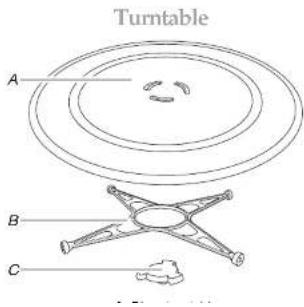
Turntable A B CTo Install:
- Place the support on the microwave oven cavity bottom.
- Place the turntable on the support.
Fit the raised, curved lines in the center of the turntable bottom between the three spokes of the hub. The rollers on the support should fit inside the turntable bottom ridge.
Turning Off the Turntable
The tumtable can be turned off for manual cooking cycles only. This is helpful when cooking with plates that are larger than the tumtable, or when cooking with two plates that are side by side. When the manual cycle is over, the tumtable will automatically default to the "ON" mode.
To Turn On/Off
- Touch TURNTABLE (ON/OFF).
The display shows the Turntable On/Off screen.
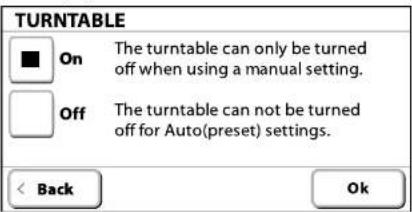
text_image
TURNTABLE ■ On The turntable can only be turned off when using a manual setting. □ Off The turntable can not be turned off for Auto(preset) settings. < Back Ok- Select "Off," then touch "Ok."
The tumtable off indicator will appear on the display.
Repeat to turn the turntable back on.
ACCESSORIES
The following accessories have been provided with your new microwave oven. Any of the parts may be ordered for replacement.
Browning Pan and Handle

The browning pan, with its nonstick surface and detachable handle, has been specially designed for microwave use, and is ideal for pan-frying (pan-browning) foods in the microwave oven. See "Browning Pan" section. The browning pan is also ideal for some baking and roasting functions, and is used as a drip pan under the grill or convection racks during grilling or roasting cycles. See "Bake" and "Roast" sections.
Use the handle to grasp the pan. Place gripping end on the edge of pan, squeeze handle and lift pan. See "Assistance or Service" to order replacement parts. See "General Cleaning" for cleaning instructions.
Grill Rack
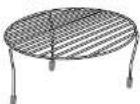
The tall grill rack is designed for grilling in the microwave oven. See "Grill" section. Place the grill rack securely on browning pan, the browning pan on the turntable, and position food on grill rack. See "Assistance or Service" to order replacement parts. See "General Cleaning" for cleaning instructions.
Convection Rack

Roast Feature Bake Feature
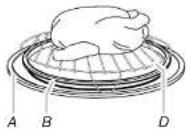
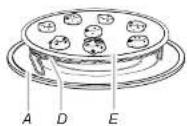
A. Turntable
B. Browning pen
C. Grill rack (tall)
D. Convection rack (short)
E. Cookie sheet (not provided)
KITCHENAID™ Steamer Vessel
Use the KITCHENAI ^TM steamer vessel with the Steam Cook feature or Boil & Simmer feature to steam or simmer foods. See "Steam Cook" and/or "Boil & Simmer" sections.

text_image
A B CThe microwave oven's controls are accessed through its control panel and interactive touch display.
NOTE: Due to the sensitivity of the control panel, we have provided special instructions for cleaning the panel as well as the touch screen display. See "General Cleaning" section for cleaning instructions.

text_image
A SENSOR Popcorn | Meal Reheat | Steam Cook | Add a Minute MANUAL Micro Convect Time/Temp | Keep Warm | Turntable (No Off) MAIN MENU Cook Method | Manual Method | Most Used Food Type | Settings & Info Jan 12, 2007 12:00 AM 1 2 3 Timer 4 5 6 Clear 7 8 9 0 START Cancel OFF Control Lock Hold 5 Sec BA. Control panel
B. Interactive touch display
Control Panel
The control panel houses basic controls and one-touch automatic function controls. The control pads are very sensitive, and require only a light touch to activate.
For more information about the individual controls, see their respective sections in this manual.
Interactive Touch Display
The display area functions as both a display and an interactive, menu-driven touch control. It is designed to be easily navigable, guiding you through the menus, offering multiple selections, accepting your input and executing your commands. It also provides instructions, tips, and graphics.
Dienlay
Touch Screen
The LCD touch screen is used to make menu selections, adjust settings and input commands.
| A |
| B |
| C |
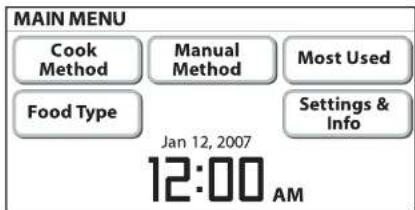
Main Menu
The Main Menu is displayed on the default screen.
text_image
MAIN MENU Cook Method Manual Method Most Used Food Type Settings & Info Jan 12, 2007 12:00 AMFrom the Main Menu, all automatic cooking programs can be activated; all manual cooking can be programmed; settings can be adjusted; and Instructions, preparation and tips can be accessed.
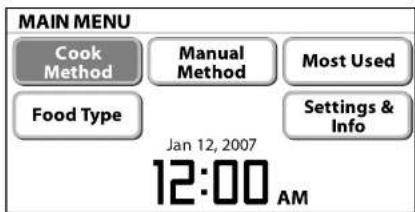
The following demonstrates how to pan brown 2 boneless chicken breasts, using the Cook Method menus, starting from the Main Menu:
- On Main Menu, touch "Cook Method."
text_image
MAIN MENU Cook Method Manual Method Most Used Food Type Settings & Info Jan 12, 2007 12:00 AM- On Cook Method screen, touch "Browning Pan."

text_image
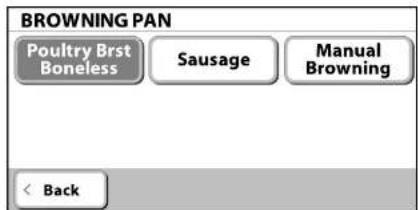
COOK METHOD Reheat Defrost Cook- On next Browning Pan screen, touch "Poultry Brst Boneless."
text_image
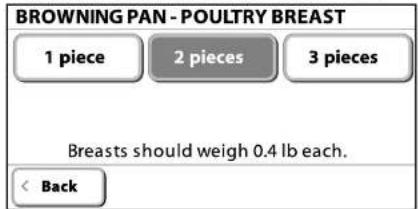
BROWNING PAN Poultry Brst Boneless Sausage Manual Browning < Back- On Browning Pan-Poultry Breast screen, touch "2 pieces." Weight guidelines appear below the quantity selections.
text_image
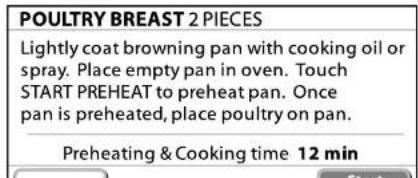
BROWNING PAN - POULTRY BREAST 1 piece 2 pieces 3 pieces Breasts should weigh 0.4 lb each. < Back- On Poultry Breast screen, follow the instructions, then touch "Start Preheat."
text_image
POULTRY BREAST 2 PIECES Lightly coat browning pan with cooking oil or spray. Place empty pan in oven. Touch START PREHEAT to preheat pan. Once pan is preheated, place poultry on pan. Preheating & Cooking time 12 min- When preheating is finished, follow the instructions on the Preheat Finished screen, then touch "Continue." If more or less cook time is desired, adjust doneness before touching "Continue."
PREHEAT FINISHED
| Place poultry breast in browning pan. |
Cooking time 9 min
| Doneness |
| Continue |
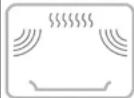
While the poultry breasts are being pan browned, the cooking animation and countdown are active in the display.
BROWNING - POULTRY BREAST
Time Remaining
8:57
MIN SEC
Cancel
About halfway through the cycle, the microwave oven will stop, and the display will direct you to turn over the poultry breasts.
- Touch "Continue" to resume pan browning. When the cycle is over, the Finished screen appears.
FINISHED
If more time is required, touch ADD MORE TIME, or touch KEEP WARM to keep food warm.
Settings & Info
Microwave oven features may be activated and/or changed, and display characteristics may be adjusted using the "Settings & Info" menu. Following is a brief description of each option.
OPTION SETTING
| Clock | ■Adjust time: set or hide clock.See “Clock” section. |
| Contact Info | ■Find contact information: toll-free number and website. |
Date ■Set date: month, day and year.
■Hide date.
See "Date" section
| Demo Mode | ■View sales demonstration. See "Demo Mode" section. |
| Display Backlight | ■Set backlight brightness: reduce after 2 minutes or turn off after 2 minutes.See “Display Backlight” section. |
| Display Contrast | ■Set level of contrast between minimum and maximum using “+” and “-” controls. |
See "Display Contrast" section
| Hints View comprehensive lists of hints for general operation and care of microwave oven:■Cleaning: cavity, control panel, odors and tumtable.■Cookware: covers, depth, materials and shape.■Convection Conversion: baking and roasting.■Food: eggs, moisture, quantity and shape.■Methods: arranging, covering, defrosting, standing and proofing dough.■Power levels: list of microwave power levels and sample foods for each. |
I eaming ■Turn on or off
To Set Clock:
- On Main Menu, touch "Settings & Info."
- On Settings & Info screen, touch "Clock."
- On Clock screen, set the time of day and date, if desired, and select AM or PM.
To Hide Clock: On Clock screen, touch "Hide Clock." The display will immediately return to the Main Menu.
Date
The date may be set and displayed on the Main Menu screen. The default setting is Jan. 1.
To Set Date:
- On Main Menu, touch "Settings & Info."
- On Settings & Info screen, touch "Date."
- On Date screen, use number pads to set the month, day and year.
To Hide Date: On Date screen, touch "Hide Date." The display will immediately return to the Main Menu. Repeat to display the date.
Demo Mode
The Demo Mode highlights the features and capabilities of the microwave oven in a slide show on the display.
To Activate Demo Mode:
- On the Main Menu, touch "Settings & Info."
- On Settings & Info screen, touch "Demo Mode."
The demonstration immediately begins. You can move forward or back in the demonstration by touching "Next Page" or "Back," or wait for the screen to advance. When the demonstration is over, it automatically loops back to the beginning and starts again.
- Touch "Cancel" on the touch screen, or touch OFF control to cancel Demo Mode and return the display to the Main Menu.
Display Backlight
Display backlight may be set to reduce brightness or to turn off during sleep mode.
Sleep mode is an energy-saving feature that darkens the display
Learning Mode
The Learning Mode is ideal for learning how to use the microwave oven. When set, functions can be entered, with real displays and tones, without actually turning on the microwave generator (magnetron), grill element or convection element. While functions are operating in the Learning Mode, the microwave oven light will come on, the fan will run, and the turntable will rotate (if set ON).
While the Learning Mode is active, the Learn indicator is visible in the upper, right title area, or at the bottom command input area. The indicator is visible while the microwave oven is in standby mode, during programming, and during Settings & Info menu navigation. During a "practice" cooking cycle, the Learn indicator is visible in the lower, left command input area.
A

text_image
MAIN MENU Cook Method Manual Method Most Used Food Type Settings & Info Jan 12, 2007 12:00 AM
text_image
COOKING - BROWN RICE Sensing To turn Learning Mode off, go to the Settings & Info menu. CancelA
A. Indicators for Learning Mode
Tones
Tones are audible signals, indicating the following:
One Tone
■Valid entry (short tone)
Two Tones
■Between stages (short tones)
■ Reminder, repeat each minute for 10 minutes after the end-of-cycle tones
■End of Timer countdown
■Hidden feature entered or exited (very short, quick tones)
Three Tones
■Invalid entry (very short, quick tones)
■Retry Error
Four Tones
■End of cycle (2 short tones, followed by 2 longer tones)
■Interruption, tend to food (short tones)
■Attention - door needs to be opened and closed
To Adjust Tone Volume:
- On Main Menu, touch "Settings & Info."
- On Settings & Info screen, touch "More Choices."
- Touch "Volume."
- Using "+" and "-" controls, increase or decrease the volume setting, or turn the tones off.
- Touch "Ok."
Start
The START control will start any function.
If non-sensor cooking is interrupted, touching the START control pad will resume the preset cycle.
If the microwave oven has not been in use and the door has not been opened in the past 5 minutes, the cooking function will not start. Open and close the door, then touch START to start or resume the cooking cycle.
Timer
The Timer can be set in minutes and seconds, up to 99 minutes, and counts down the set time.
NOTE: The Timer does not start or stop the microwave oven.
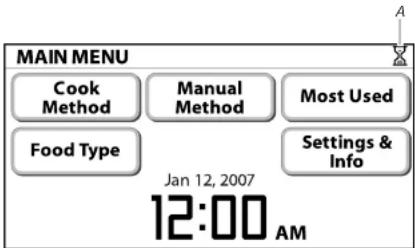
text_image
MAIN MENU Cook Method Manual Method Most Used Food Type Settings & Info Jan 12, 2007 12:00 AMA. Timer indicator
While the Timer is in use, the microwave oven can still operate. During a microwave oven operation, the Timer countdown will be minimized. If the Timer ends while microwave oven is still operating, the end-of-Timer tones will sound, and the set operating mode will remain active on the screen.
To Set Timer:
-
Touch TIMER control.
-
Using the number pads, enter desired time in minutes and seconds, and then touch "Start Timer."
The countdown will be in full screen view.
- Touch "Ok" to minimize the timer.
To see the countdown in full screen view, touch TIMER control. The time can be reset during the countdown by touching TIMER, entering a new time, then touching "Ok," or the START control.
To Cancel: Touch TIMER control, then touch "Cancel Timer."
Control Lock
The Control Look disables all controls to avoid unintended use of
If any controls are touched while the Control Lock is active, the "Control Lock" reminder screen appears for 5 seconds.

CONTROL LOCK
The controls cannot be activated while the Control Lock is set.
Turn the Control Lock off when you are ready to use your oven.
Ok
To Deactivate Control Lock: Touch and hold OFF control for 5 seconds. Two tones will sound, and the padlock icon will be removed from the display.
TRUCAPTURE® Vent Fan and Cooktop Lights
text_image
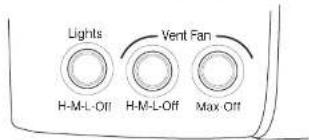
Lights H-M-L-Off H-M-L-Off Max-Off Vent FanThe microwave oven's hood controls, on the lower, left side of the microwave oven (see "Parts and Features") operate the vent fan and cooktop lights.
TRUCAPTURE® Vent Fan
The vent fan has 3 regular speeds: high, medium and low. The vent fan also has a max speed, which is the highest speed. To protect the microwave oven, the vent fan will automatically turn on at high speed if the temperature from the cooking surface below gets too hot. It may stay on for up to 1 hour to cool the microwave oven. When this occurs, the vent fan cannot be turned off. After the microwave oven has cooled, the vent fan will
Cooking Animation

A. Cooking with grill element
B. Cooking with microwaves
C. Cooking with convection
D. turntable icon
The cooking animation appears during any cooking cycle, whether automatic or manual. The animation shows what type of cooking is taking place.
Progress Bar

text_image
POPPING - 1.7-3.5 oz of POPCORN Sensing Cancel A BA. Cooking animation
B. Progress bar
The progress bar is a visual picture of the estimated running time of a sensor cooking cycle. It will appear at the beginning of sensor cooking functions. A horizontal bar appears below the word "Sensing," and shows progress by the darkening of the bar left to right. Some time after the progress bar appears, it may be replaced by "Maximum Time Remaining" indicator and the estimated remaining time, which may fluctuate often. When
MICROWAVE OVEN USE
A magnetron in the oven produces microwaves which reflect off the metal floor, walls and ceiling and pass through the turntable and appropriate cookware to the food. Microwaves are attracted to and absorbed by fat, sugar and water molecules in the food, causing them to move, producing friction and heat which cooks the food.
■To avoid damage to the microwave oven, do not lean on or allow children to swing on the microwave oven door.
■To avoid damage to the microwave oven, do not operate when it is empty.
The turntable must be in place and correct side up when microwave oven is in use. Do not use if turntable is chipped or broken. See "Assistance or Service" section to reorder.
■ Baby bottles and baby food jars should not be heated in microwave oven.
■Clothes, flowers, fruit, herbs, wood, gourds, paper, including brown paper bags and newspaper, should not be dried in microwave oven.
■Do not use the microwave oven for canning, sterilizing or deep frying.
■Paraffin wax will not melt in the microwave oven because it does not absorb microwaves.
■Use oven mitts or pot holders when removing containers from microwave oven.
■Do not overcook potatoes. At the end of the recommended cook time, potatoes should be slightly firm. Let potatoes stand for 5 minutes. They will finish cooking while standing.
■ Do not cook or reheat whole eggs inside the shell. Steam buildup in whole eggs may cause them to burst. Cover poached eggs and allow a standing time.
Food Characteristics
When microwave cooking, the amount, size and shape, starting temperature, composition and density of the food affect cooking results.
Amount of Food
Cooking Guidelines
Covering
Covering food helps retain moisture, shorten cook time and reduce spattering. Use the lid supplied with cookware. If a lid is not available, wax paper, paper towels or plastic wrap approved for microwave ovens may be used. Plastic wrap should be turned back at one corner to provide an opening to vent steam. Condensation on the door and cavity surfaces is normal during heavy cooking.
Stirring and Turning
Stirring and turning redistribute heat evenly to avoid overcooking the outer edges of food. Stir from outside to center. If possible, turn food over from bottom to top.
Arranging
If heating irregularly shaped or different sized foods, arrange the thinner parts and smaller sized items toward the center. If cooking several items of the same size and shape, place them in a ring pattern, leaving the center of the ring empty.
Piercing
Before heating, use a fork or small knife to pierce or prick foods that have a skin or membrane, such as potatoes, egg yolks, chicken livers, hot dogs, and sausage. Prick in several places to allow steam to vent.
Shielding
Use small, flat pieces of aluminum foil to shield the thin pieces of irregularly shaped foods, bones and foods such as chicken wings, leg tips and fish tall. See "Aluminum Foil and Metal" first.
Standing Time
Food will continue to cook by the natural conduction of heat even after the microwave cooking cycle ends. The length of standing time depends on the volume and density of the food.
Cookware and Dinnerware
MATERIAL RECOMMENDATIONS
| Paper: Towels, Dinnerware, Napkins | Use nonrecycled and those approved by the manufacturer for microwave oven use. |
| Plastic: Wraps, Bags, Covers, Dinnerware, Containers | Use those approved by the manufacturer for microwave oven use. |
| Pottery and Clay Follow manufacturer's recommendations. | |
| Silicone Bakeware | Follow manufacturer's recommendations. |
| Straw, Wicker, Wooden Containers | Do not use in microwave oven. |
| Styrofoam ^27 | Do not use in microwave oven. |
Wax Paper Acceptable for use.
To Test Cookware or Dinnerware for Microwave Use:
-
Place cookware or dinnerware in microwave oven with 1 cup (250 mL) of water beside it.
-
Cook at 100% cooking power for 1 minute. Do not use cookware or dinnerware if it becomes hot and the water stays cool.
Aluminum Foil and Metal
Always use oven mitts or pot holders when removing dishes from the microwave oven.
Aluminum foil and some metal can be used in the microwave oven. If not used properly, arcing (a blue flash of light) can occur and cause damage to the microwave oven.
OK for Use
Racks and bakeware supplied with the microwave oven (on some models), aluminum foil for shielding, and approved meat thermometers may be used with the following guidelines:
■Do not allow aluminum foil or metal to touch the inside cavity walls, ceiling or floor.
■Do not use metal bakeware during combination cycles. Some automatic Cook, Bake and Roast programs use combination cooking. Follow instructions on the display during programming. Manual Roast may also be programmed for combination cooking.
■ Use only microwave-safe, ovenproof cookware for all non-Bake convection or combination cycles.
For Use with Grill Element
Use only microwave-safe, ovenproof cookware, such as glass or ceramic glass, for automatic Grill and Manual Grill cycles.
■Do not place cookware on grill rack.
■Place cookware directly on the turntable. Cookware may be used under the grill rack to catch drippings.
Microwave Cooking Power
Many recipes for microwave cooking specify which cooking power to use by percent, name or number. For example, 70%=7=Medium-High.
Use the following chart as a general guide for the suggested cooking power of specific foods.
PERCENT/NAME USE
| 100%, High (default setting) | Quick heating convenience foods and foods with high water content, such as soups, beverages and most vegetables. |
| 90% Cooking small tender pieces of meat, ground meat and poultry pieces.Heating cream soups. | |
| 80% Heating rice, pasta or casseroles.Cooking and heating foods that need a cook power lower than high, such as meat loaf. | |
| 70%, Medium-High | Reheating a single serving of food.Cooking fish fillets. |
60% Cooking sensitive foods such as cheese and egg dishes, pudding and custards. Cooking non-stirrable casseroles, such
MANUAL COOKING
Add a Minute
The ADD A MINUTE control automatically starts the microwave oven at 100% power for 1 minute, and adds 1 minute of cook time, up to 10 minutes, with each additional touch of the control. Time may be added in 1-minute increments by touching ADD A MINUTE, or by minutes and seconds using the interactive touch screen display. Cook power or cook time may be changed after cooking begins by using the "Adjust Settings" control. While settings are being adjusted, the countdown freezes, and then resumes when adjustments are made.
Micro Time/Power Cooking
The MICRO TIME/POWER control is for manual microwave-only cooking.
To Use MICRO TIME/POWER:
-
Place food on the turntable, and close the door.
-
Touch MICRO TIME/POWER control pad.
-
Use number pads to enter the cook time in minutes and seconds. If using 100% cooking power, skip Step 3.
-
Touch "Cook Power: 100%," and then use number pads to adjust the power level, between 10% and 100%.
-
Touch "Start" on the touch screen, or START control. The display will count down the cook time. During the countdown, cook time and/or cooking power may be changed by touching "Adjust Settings" on the touch screen, and following the prompts. When the cycle ends, the end-of-cycle tones will sound, followed by reminder tones.
-
Touch OFF control or open the door to stop reminder tones. The display will return to the Main Menu after OFF control is touched.
Convect Time/Temp Cooking
The CONVECT TIME/TEMP control is for manual convection or combination cooking.
The cook time may be set in hours and minutes. The temperature may be set from 100^ F ( 38^ C) to 450^ F ( 232^ C) in 5-degree increments.
NOTE: The microwave cooking power may be set to 0%, 10%, 20% or 30%. The default power is 0%.
To Use
-
Place food on the turntable, and close the door.
-
Touch CONVECT TIME/TEMP control.
-
Use number pads to enter the cook time in hours and minutes.
-
Touch "Temp: 350°," and then use number pads to enter temperature, if cooking at a temperature other than the default 350°F (177°C).
-
For microwave-assisted convection cooking, enter power level (10%-30%).
-
Touch "Start Preheat" on the touch screen to preheat empty microwave oven. If preheat is not needed, touch "Skip Preheat" after the microwave oven starts. The display will count down the cook time.
During the countdown, cook time, temperature and/or cooking power may be changed by touching "Adjust Settings" on the touch screen, and adjusting the remaining time and/or the cooking power.
When the cycle ends, the end-of-cycle tones will sound, followed by reminder tones.
- Touch OFF control or open the door to stop reminder tones. The display will return to the Main Menu after OFF control is touched.
Manual Method Cooking
The Manual Method control on the Main Menu is for manual cooking by cooking method. There are 12 methods from which to choose. Some of the methods have set power levels that cannot be changed. Use the following chart as a guide.
| METHOD COOK WITH | COOKWARE POWER/TEMP SETTINGS | ||
| Reheat Microwaves only | Microwave-safe 10-100%; 100% default | ||
| Defrost Microwaves only | Microwave-safe 20% only | ||
| Cook Microwaves only | Microwave-safe 10-100%; 100% default | ||
| Bake Convection only | Ovenproof, convection rack | 100°F (38°C)-450°F (232°C); 350°F (177°C) default | |
| Boil & Simmer | Microwaves only | Microwave-safe; KITCHENAIDTM Steamer Vessel | Enter desired time. |
| Browning Pan | Microwaves only | Browning Pan 100% only | |
| Grill Grill and microwaves | Ovenproof, microwave-safe, grill rack, Browning Pan | 0-40%; 0% default | |
| Melt Microwaves only | Microwave-safe 30% only | ||
| Roast Convection, microwaves | Ovenproof, microwave-safe, convection rack, Browning Pan | 225°F (107°C)-450°F (232°C); 350°F (177°C) default 0-30%; 0% default | |
| Soften | Microwaves only | Microwave-safe 20% only | |
- Touch "Start" on the touch screen, or START control.
The display will count down the cook time.
During the countdown, cook time and some cooking powers and/or temperatures may be changed by touching "Adjust Settings" on the touch screen, and adjusting the remaining time, cooking power and/or temperature.
When the cycle ends, the end-of-cycle tones will sound, followed by reminder tones.
- Touch OFF control or open the door to stop reminder tones. The display will return to the Main Menu after OFF control is touched.
Raising (Proofing) Bread
This microwave oven can be used to proof bread using the convection system.
First Proofing:
Place dough in a lightly greased ovenproof bowl, and cover loosely with shortening-coated wax paper.
-
Place a shallow, ovenproof container, such as a pie plate, filled with 2 cups (500 mL) boiling water on the tumtable
-
Place the convection rack on the tumtable, and then place the bowl of dough on the convection rack and close the door.
-
Touch "Manual Method" on the Main Menu, then select "Bake."
-
Follow instructions on the display to program the proofing time (about 45 minutes).
-
Touch "Temp 350°," and then set a temperature of 100°F (38°C) using the number pads.
-
Touch "Start Preheat," and then touch "Skip Preheat."
-
Touch "Start" on the touch screen, or START control. The display will count down the proofing (baking) time. Check dough after 20 to 25 minutes. Let dough rise until nearly doubled in size. Proofing time may vary depending on the type and quantity of dough. Proofing time may be changed during the countdown by touching "Adjust Settings," and then following the instructions on the display.
When the cycle ends, the end-of-cycle tones will sound, followed by reminder tones.
When proofing is done, remove bowl of bread dough and
Keep Warm
WARNING
Food Poisoning Hazard
Do not let food sit in oven more than one hour before or after cooking.
Doing so can result in food poisoning or sickness.
Hot cooked food can be kept warm in the microwave oven. The Keep Warm function uses 10% cook power. Keep Warm can be used by itself, or it can be programmed to follow a cooking cycle. See “Cooking in Stages” section.
■Cover plates of food.
■Cover foods that were covered while being cooked.
■Do not cover baked goods such as pastries, pies, tumovers, etc.
To Use:
- Place hot cooked food on the tumtable, and close the door.
- Touch KEEP WARM control.
- Adjust warm time, if desired.
- Touch "Start" on the touch screen, or START control.
The display will count down the warm time.
During the countdown, warm time may be changed by touching "Adjust Settings" on the touch screen, and adjusting the remaining time.
When the cycle ends, the end-of-cycle tones will sound, followed by reminder tones.
- Touch OFF control or open the door to stop reminder tones and return to the Main Menu.
Cooking in Stages (or steps)
Manual cooking may be done in stages (or steps), up to 4 stages total. The first stage may be programmed using any of the manual controls. The stages may be reviewed at any time during programming and/or cooking by touching "Review Steps" on the touch screen.
Convection cooking cannot be done in stages.
NOTE: Manual Defrost can be programmed only as the 1st stage, and is not available for subsequent stage programming.
To Cook in Stages:
- Follow steps 1-4 in "Micro Time/Power Cooking."
or follow steps 1-4 in "Manual Method Cooking." - Touch "Add A Step" on the touch screen.
- Select cook method, and follow screen prompts to program the next stage.
- Repeat steps 2 and 3 to program each additional stage.
- Touch "Start" on the touch screen, or START control.
The display will show the cycling stage's cook time and
cooking power, and will count down each stage in turn.
During the countdown, cook time and/or cooking power for the cycling stage may be changed by touching "Adjust
Settings on the touch screen, and following the prompts.
Each stage will immediately follow the previous stage, and
between cycle tones will sound when each new stage begins.
When the cycle ends, the end-of-cycle tones will sound,
followed by reminder tones.
- Touch OFF control or open the door to stop reminder tones.
The display will return to the Main Menu after OFF control is touched.
PROGRAMMED COOKING
Convection Cooking
During convection cycles, the convection element heats the air in the microwave oven cavity, and the convection fan circulates the hot air. The constantly moving air surrounds the food to heat the outer portion quickly.
See "Food Type Chart" for automatic convection cycles (Bake or Roast).
Convection cooking may also be done manually. Use convection cooking for items such as pies, breads, cookies, cakes and pizza. See "Manual Cooking" section for instructions.
Manual convection cooking may be used to proof bread. See "Raising (Proofing) Bread" section for instructions.
NOTES:
■Use the provided convection rack.
■ Do not cover the tumtable or convection rack with foil, as it interferes with the circulation of hot air.
■Do not use light plastic containers, plastic wrap or paper products. All ovenproof cookware or metal utensils can be used in convection cooking. (Round pizza pans are excellent cooking utensils for many convection-only items.) Metal utensils cannot be used in microwave or combination cooking.
■No special techniques are needed to adapt standard oven recipes to convection cooking, although some cooking times might need to be shortened, and some temperatures adjusted.
This microwave oven may be preheated in the same way that a standard oven is preheated. (Most recipes for baked goods call for preheating.)
Combination Cooking
Combination cooking uses microwaves in addition to the convection system to cook or roast foods more quickly than with convection alone.
Combination cooking may also be done manually. Use combination cooking for items such as roasts, meat loaf,
Sensor Cooking
Some automatic cycles are sensor cycles. See “Cook Method Chart.” No amounts need to be entered. A sensor in the microwave oven detects humidity released from the food as it heats, and adjusts the cook time accordingly. The progress bar appears during sensing (see “Progress Bar” section).
Many sensor cycles require the covering of foods. The provided steamer vessel has a loose-fitting lid, which allows enough steam to escape to be detected by the sensor. When covering foods with plastic wrap, be sure to leave a large enough vent opening to allow the steam to escape.
NOTES:
■ The microwave oven should be plugged in for at least 2 minutes.
■The microwave oven cavity and the exterior of the cooking container should be dry.
■The room temperature should not exceed 95°F (35°C).
■ If the door is opened during a sensor cycle, sensing will stop and the program will be canceled.
■ For optimal performance, wait at least 30 minutes after convection cooking or grill cooking before sensor cooking.
Preheating
Preheating of the microwave oven is programmed in some automatic convection cycles. After the microwave oven is preheated, it will maintain the set preheat temperature until the door is opened to add food. Preheating may be skipped after it has started by touching "Skip Preheat" on the touch screen, adding food, and then touching "Continue."
Preheating of the browning pan is programmed in many automatic cooking cycles. This preheating phase may also be skipped by touching "Skip Preheat."
For optimal results, we recommend completing the preheating phase of each cycle in which preheating is programmed. However, preheating of the microwave oven would not be necessary when baking consecutive batches, such as cookies, as the microwave oven would clearly be hot.
Popcorn
Popcorn is a sensor function. The sensor determines the appropriate popping time of commercially packaged microwavable popcorn.
The sensor will determine accurate popping times for bag sizes: 3.5 oz (99 g), 3.0 oz (85 g) or 1.75 oz (50 g). For bag sizes not listed in this section, follow directions on the package.
NOTE: During Popcorn function, as with all microwave cooking functions, the microwave oven should be attended at all times. Listen for popping to slow to 1 pop every 1 or 2 seconds, then stop the cycle.
■ For best results, do not place bag on convection rack or grill rack.
■To avoid damage to the microwave oven, do not use regular paper bags or glassware.
■Pop only 1 package of popcorn at a time.
■Follow manufacturer's instructions when using a microwave popcorn popper.
■Do not try to pop unpopped kemels.
■Use fresh bags of popcorn for optimal results.
■ Cooking results may vary by brand and fat content.
To Use Popcorn:
- Place popcorn bag on the turntable and close the door.
- Touch POPCORN control.
The microwave oven will start automatically. The display will show when the microwave oven is sensing, and will start counting down the time when sensing has finished.
When the cycle ends, the end-of-cycle tones will sound, followed by reminder tones.
- Touch OFF control or open the door to stop reminder tones. The display will return to the Main Menu after OFF control is touched.
Using Food Type
The Food Type menu has 12 methods from which to choose.
Breakfast Food Dairy/Dessert Frozen Food
Using Cook Method
The Cook Method menu has 11 methods from which to choose.
| Reheat Defrost | Cook | |
| Bake | Boil & Simmer | Browning Pan |
| Grill | Melt | Roast |
| Soften | Steam Cook |
This menu allows you to start with the type of cooking you want, and then choose your specific food item. All food items are available through this menu.
See each method's respective section in this manual for method details.
See "Cook Method Chart" for all of the programmed cycles.
See "Main Menu" section for an example of how using the Cook Method menu works.
To Use: Place food on the turntable, and close the door. Touch "Cook Method" on Main Menu, select your desired method, and then follow the screen prompts to select your food item and to start the cycle.
Reheat
The Reheat menu has a selection of main food categories, plus a shortcut to Manual Reheat (see "Manual Method Cooking" section).
| Beverage | Casserole Leftover | Meal |
| Muffin | Pizza Leftover | Roll |
| Sauce | Soup | Manual Reheat |
Reheat uses only microwaves to heat the food.
See "Cook Method Chart" for food item details, such as specific food items available, sensor functions and amounts.
To Use: Place food on the turntable, and close the door. Touch "Cook Method" on Main Menu, touch "Reheat," and then follow screen prompts to make your selections, prepare your food and/or microwave oven for reheating, and start the cycle.
Defrost
The Defrost menu has a selection of main food categories, plus a shortcut to Manual Defrost (see "Manual Method Cooking" section.
| Bread Fish/Seafood Meat | |
| Poultry Manual Defrost |
Defrost uses only microwaves to defrost the food.
Defrost should not be used for food left out of the freezer for more than 20 minutes, or for frozen ready-made food.
■ Food should be 0^ F ( -18^ C) or colder at the time the cycle is started for optimal results. How foods are stored can affect results.
■Unwrap foods and remove lids (for example, from fruit juice containers) before defrosting.
■Shallow packages will defrost more quickly than thick blocks.
■Separate food pieces as soon as possible during or at the end of the cycle for more even defrosting.
■Use small pieces of aluminum foil to shield parts of food such as chicken wings, leg tips and fish tails. See "Aluminum Foil and Metal" first.
See "Cook Method Chart" for specific food items and amounts. To Use: Place food on the turntable, and close the door. Touch "Cook Method" on Main Menu, touch "Defrost," and then follow screen prompts to make your selections, and to start the cycle. Defrost programs are set by the weight of the food item in pounds and/or ounces. If the weight is not known, touch "Weight Unknown" on the touch screen, and follow the prompts. Preparation instructions for each food item will be displayed while you are programming the cycle.
Cook
The Cook menu has a selection of main food categories, plus a shortcut to manual Cook (see "Manual Method Cooking" section)
| Casserole Cereal/Oatmeal Couscous | |
| Egg Fish/Seafood Frozen Food | |
| Meat Pasta Poultry |
Bake
The Bake menu has a selection of main food categories, plus a shortcut to Manual Bake (see "Manual Method Cooking" section).
| Angel Food Cake | Biscuit, Refrigerated | Bread |
| Brownies | Cookies Muffin | |
| Pie | Pot Pie | Quiche |
| Roll, Refrigerated | Soufflé | Manual Bake |
Bake may use the convection system with or without microwaves to bake your food.
See "Cook Method Chart" for specific food items and amounts. You will need to use your provided convection rack. Ovenproof, microwave-safe bakeware may be used during any of the Bake cycles. The screen prompts give instruction for each food item, and its appropriate bakeware. See "Cookware and Dinnerware" section.
■The microwave oven cavity and door will become hot during the Bake cycle. The use of oven mitts is recommended.
■ The convection rack and any cookware or bakeware will become very hot. Use oven mitts to remove the hot rack and cookware from the microwave oven to a heat-safe surface.
■While the convection system is in use, the cooling fan turns on and stays on for up to 10 minutes after the cycle is over.
To Use: Place food on the turntable, and close the door. Touch "Cook Method" on Main Menu, touch "Bake," and then follow screen prompts to make your selections, prepare your food and/or microwave oven for baking, and start the cycle.
After Baking
The food, convection rack, microwave oven cavity and door will be very hot. The microwave oven's cooling fan will stay on until the microwave oven cools.
Boil & Simmer
The Boil & Simmer menu has a selection of main food categories, plus a shortcut to Manual Boil & Simmer (see "Manual Method Cooking" section).
| Couscous Dried | Pasta Fresh Pasta | |
| Rice | ManualBoil & Simmer |
Boil & Simmer is a sensor function, and uses only microwaves to simmer your food.
See "Cook Method Chart" for specific food items and amounts.
■ Follow recommended water and food amounts that appear on the display.
■Use the provided steamer vessel base and lid, or a microwave-safe dish with a loose-fitting lid.
■For best results, do not use plastic wrap as a cover during the Boil & Simmer cycle.
■ Do not remove the lid while the dish is still in the microwave oven, as the rush of steam will disrupt the sensor readings.
To Use: Place food on the turntable, and close the door. Touch "Cook Method" on Main Menu, touch "Boil & Simmer," and then follow screen prompts to make your selections, prepare your food for simmering, and start the cycle.
Simmering Pasta
The water will need to boil before adding the pasta. Place the dish of water, covered, in the microwave oven and begin the cycle. When the water boils, the microwave oven will stop and prompt you to add the pasta. If manually simmering, place the covered dish of water in the microwave oven, and set a simmer time of 1 second. The water will start to boil, the 1-second simmer time will end, and the microwave oven will stop.
Using oven mitts, gently remove the covered dish of boiling water, add the pasta, re-cover, place the dish back in the microwave oven and continue the cycle.
Simmering Rice
Place food and water/liquid, covered, in the microwave oven and begin the cycle. The sensor determines when the water starts to boil, and figures the simmer time, which will begin counting down
Browning Pan
The Browning Pan menu has a selection of main food categories, plus a shortcut to Manual Browning Pan (see "Manual Method Cooking" section).
| Baked Goods Egg Fish Steak | ||
| Frozen Food Meat Nuts | ||
| Poultry BreastBoneless | Sausage | ManualBrowning Pan |
Browning Pan function uses microwaves, and sometimes the grill element. Microwaves quickly heat the pan, while the grill element browns (or crisps) the food from above.
Some Browning Pan cycles are programmed to preheat the empty pan for 3 minutes before cooking begins. When the preheating cycle is complete, the microwave oven will stop and prompt you to add the food to the browning pan. The microwave oven may prompt you to turn over the food during the cycle.
See "Cook Method Chart" for specific food items and amounts.
■ Microwave oven cavity and door will become very hot during the Browning Pan cycle. The use of oven mitts is recommended.
■The browning pan will become very hot. Use oven mitts to grasp and remove the pan from the microwave oven. To avoid damage, do not place hot browning pan directly on heat-sensitive surfaces.
■Use detachable handle when handling hot browning pan.
■Do not use plastic utensils on the browning pan, as it becomes very hot quickly and could melt the utensils.
■To avoid scratching the browning pan, do not use metal utensils.
■ To avoid damage to the browning pan, do not use in any other microwave oven or in a standard thermal oven.
■Do not place the browning pan on the grill rack or the convection rack. Always use the turntable as a support for the pan.
■ For best results, coat the browning pan lightly with cooking oil to make removing food and cleaning the pan easier.
■When the grill element is in use, the cooling fan turns on and
Grill
The Grill menu has a selection of main food categories, plus a shortcut to Manual Grill (see "Manual Method Cooking" section).
| Beef Kabobs | Chicken Pieces -Bone-in | Fish Steak |
| Hamburger Patty Lamb Chops Pork Chops | ||
| Shrimp Steak Vegetable | ||
| Manual Grill | ||
Grill uses the grill element and microwaves to grill your food. See "Cook Method Chart" for specific food items and amount
■ Microwave oven cavity and door will become very hot during the Grill cycle. The use of oven mitts is recommended.
■ The grill rack and browning pan will become very hot. Use oven mitts to grasp and remove the pan from the microwave oven. To avoid damage, do not place hot browning pan directly on heat-sensitive surfaces.
■Use the grill rack to place food closer to the grill element for faster grilling.
■ Use the browning pan to catch drippings. Do not place the browning pan on the grill rack.
■Place grill rack securely on browning pan, and place both on the turntable. Then position food directly on rack.
■ The turntable must be turned on when using the grill rack. ■For best results, apply light amount of cooking oil to grill rack
■When the grill element is in use, the cooling fan turns on and stays on for up to 10 minutes after the cycle is over.
To Use: Place food on the turntable, and close the door. Touch "Cook Method" on Main Menu, touch "More Choices," and then "Grill." Follow screen prompts to make your selections, prepare your food for grilling, and start the cycle.
After Grilling
The food, grill rack, browning pan, microwave oven cavity and door will be very hot. Using oven mitts, grasp the browning pan securely with both hands, and remove it with the grill rack and food still in place to a heat-safe surface.
Roast
The Roast menu has a selection of main food categories, plus a shortcut to Manual Roast (see "Manual Method Cooking" section).
| Beef Roast Cornish Hen Lamb Chops | ||
| Pork Chops Pork | Roast Shrimp | |
| Steak | Turkey Breast,Bone-In | Whole Chicken |
| Manual Roast | ||
Roast uses microwaves and the convection system to roast your food.
See "Cook Method Chart" for specific food items and amounts.
■The microwave oven cavity and door will become hot during the Roast cycle. The use of oven mitts is recommended.
■ The convection rack and browning pan will become very hot. Use oven mitts to remove the hot rack and browning pan from the microwave oven. To avoid damage, do not place hot browning pan directly on heat-sensitive surfaces.
■Do not use metal cookware during the Roast cycle.
■Use the provided convection rack and browning pan.
■Place the browning pan under the convection rack to catch the drippings.
■While the convection system is in use, the cooling fan turns on and stays on for up to 10 minutes after the cycle is over.
To Use: Place food on the turntable, and close the door. Touch "Cook Method" on Main Menu, touch "More Choices," and then touch "Roast." Follow screen prompts to make your selections, prepare your food and/or microwave oven for roasting, and start the cycle.
After Roasting
The food, convection rack, browning pan, microwave oven cavity and door will be very hot. Using oven mitts, grasp the browning pan securely with both hands, and remove it with the convection rack and food still in place to a heat-safe surface.
When handling the hot browning pan, use the detachable handle. The microwave oven's cooling fan will stay on until the microwave
Steam Cook
The Steam Cook menu has a selection of main food categories, plus a shortcut to Manual Steam Cook (see "Manual Method Cooking" section).
| Fish Fillet Fresh | Vegetable Frozen Vegetable | |
| Shrimp | Manual Steam Cook | |
Steam Cook is a sensor function, and uses only microwaves to steam your food.
See "Cook Method Chart" for specific food items and amounts.
■ Use the provided steamer vessel and its lid. Place 1½ cups (300 mL) water in the base, place food in the insert, place the insert in the base and cover.
■Do not remove the lid while the vessel is inside the microwave oven, as the rush of steam will disrupt the sensor readings.
■ The steamer vessel will become hot. Always use oven mitts or pot holders when handling.
■To avoid scratching, use plastic utensils.
■Do not overfill. One-half full is recommended.
■Follow directions on the display.
To Use: Place food on the turntable, and close the door. Touch "Cook Method" on Main Menu, touch "More Choices," and then "Steam Cook." Follow screen prompts to make your selections, prepare the food for steaming, and start the cycle.
Most Used Menu
The Most Used menu displays the 6 most used automatic cooking programs. This provides you with your own customized menu, which is easily accessible from the Main Menu.
The programs are shown in order of frequency of use. The food type is shown first on the selection pad, followed on the next line by the cook method. Following is the default Most Used menu screen;

text_image
MOST USED Beverage Reheat Butter/Marg Melt Butter/Marg Soften Brown Sugar Soften Crm Cheese Soften Lftover Pizza Reheat < Back Auto UpdateTo Update Most Used Menu: On the Most Used screen, touch "Auto Update." The microwave oven shows the 6 programs used most frequently since the last time the menu was updated.
Food Type Chart
Use this chart as a reference for menu items available in the "Food Type" menu
| BREAKFAST FOOD | ||
| Bacon Grits OatmealCook or Browning Pan Quick InstantCereal Instant - Cook - CookCook Regular RegularEgg - Cook - CookFried Hash Brown Quiche- Cook or Browning Pan Browning Pan BakeOmelet Hot Wheat - Cook or Browning Pan Cook Cook or Browning PanPoached - Cook Fresh Scrambled - Cook FrozenFrench ToastCook or Browning Pan | SausageMuffin Bake - Bake or Reheat- Defrost or Reheat | Soufflé |
DAIRY/DESSERT
| Angel Food CakeBake Melt | CheeseMelt | Marshmallows |
| Brown SugarSoften | ChocolateMelt | NutsBrowning Pan |
| BrowniesBake or Browning Pan | CookiesBake or Browning Pan | PieFresh |
| Butter/MargarineMelt or Soften | Cream CheeseSoften | - BakeFrozen |
| CaramelMeit | Ice CreamSoften | - BakeSoufflé |
| Caramel DipSoften | Bake |
FROZEN FOOD
| Frozen EntréeRegular (8-20 oz [227-567 g])- CookLarge (40 oz [1.1 kg])- CookFamily Size (60 oz [1.7 kg])- Cook | Garlic BreadBake BakeHash Brown PoultryBrowning Pan Chicken NuggetsPie- Cook or Browning PanBakeChicken TendersPizza- Cook or Browning Pan | Pot Pie |
SNACKS
| Burrito Kids Pizza 5" Pizza RollCook Cook Cook or Browning Pan |
| Cheese Sticks Marshmallow Potato NuggetsCook or Browning Pan Melt Browning Pan |
| Frech Fries Pizza, Leftover Snack PocketBrowning Pan Reheat Cook |
| Instant Macaroni & CheeseCook |
VEGETABLE
| Canned Vegetable Fresh Vegetable (cont'd) Fresh Vegetable (cont'd) Cook Com on the Cob Potato Baked/Sweet | |
| Fresh Vegetable | - Cook or Steam Cook |
| Asparagus | Green Beans |
| - Cook or Steam Cook | - Cook or Steam Cook |
| Broccoli | Mushroom |
| - Cook or Steam Cook | - Cook or Grill |
| Carrots Onion | Tomato |
| - Cook or Steam Cook | - Grill |
| Cauliflower | Pepper |
| - Cook or Steam Cook | - Grill |
BREAD
| BagelSmall- DefrostMedium- DefrostLarge- DefrostBiscuit, RefrigeratedLarge- Bake or Browning PanRegular- Bake or Browning Pan | French ToastCook or Browning Pan FreshLoaf BreadFrozen- DefrostGarlic Bread- BakeQuick- Defrost or BakeYeast- Defrost or Bake | Muffin- Reheat, Bake or Browning PanFrozen- Reheat or DefrostRollFresh/Leftover- ReheatFrozen- Reheat, Defrost or BakeLarge, Refrigerated- Bake or Browning PanRegular, Refrigerated- Bake or Browning Pan |
CASSEROLE
| LasagnaBake | Pasta CasseroleBake | Vegetable CasseroleBake |
GRAINS: PASTA/RICE
| Canned Pasta Pasta RiceCook Dried Pasta (cont'd) Brown Rice InstantCouscous - Penne Cook or Boil & SimmerCook or Boil & Simmer Cook or Boil & Simmer Brown Rice Long GrainGrits - Rotini Cook or Boil & SimmerQuick Cook or Boil & Simmer White Rice Instant- Cook - Spaghetti Cook or Boil & SimmerRegular - Cook Fresh Pasta Instant Macaroni & Cheese Cook Pasta Dried Pasta Cook or Boil & Simmer - Macaroni Cook or Boil & Simmer | Cook or Boil & Simmer White Rice Long GrainCook or Boil & Simmer - Linguine Cook or Boil & Simmer - Ravioli Cook or Boil & Simmer - Fettuocine Cook or Boil & Simmer | White Rice Short Grain Cook or Boil & Simmer Tortellini |
MEAT
| Beef | Hot Dog | Pork (cont'd) |
| Beef Kabobs | Cook Ham Steak | |
| - Grill | Lamb Chops | - Cook or Browning Pan |
| Ground Beef | Defrost or Roast | Pork Chops |
| - Defrost or Cook | Meatballs | - Defrost, Grill or Roast |
| Hamburger Patty | Cook or Browning Pan | Pork Roast |
| - Cook, Browning Pan or Grill | Pork | Roast |
| Meat Loaf | Bacon | Sausage |
| - Roast | - Browning Pan | Cook or Browning Pan |
| Roast Beef | Ham Slice | |
| - Browning Pan or Roast | - Cook or Browning Pan | |
| Steak | ||
| Defrost, Grill or Roast |
POULTRY
| Chicken NuggetsCook or Browning PanChicken Pieces, BonelessDefrost or CookChicken Pieces, Bone-InDefrost, Cook or GrillChicken TendersCook or Browning Pan | Chicken WingsRoastCornish HenRoastGround PoultryDefrost or Cook | Poultry Breast, Boneless Pan BrownBrowning PanPoultry Breast, Boneless PoachedCookTurkey Breast, Bone-InRoastWhole ChickenRoast |
DEFROST
Bread Meat
0.1-2.0 lbs (45-900 g) 0.1-6.5 lbs (45 g-2.9 kg)
Weight Unknown Weight Unknown
- Bagel
small: 2-8 bagels small: 1-6 pieces medium: 1-6 bagels medium: 1-6 pieces large: 1-6 bagels large: 1-4 pieces
- Muffin - Ground: 1, 2, 3 or 4 cups (250, 500, 750 mL or 1 L) small: 4, 6, 8, 10, 12, 14 or 16 muffins - Steak medium: 1-6 muffins small: 1-6 pieces large: 1-6 muffins medium: 1-4 pieces
- Roll large: 1 or 2 pieces small: 2-8 rolls Poultry medium: 1-6 rolls large: 1-6 rolls
Fish/Seafood
0.1-4.5 lbs (45 g-2.0 kg)
Weight Unknown - Pieces
- Fillet: 1-6 pieces
- Shrimp: 1-4 cups (250 mL-1 L)
- Scallops: 1-4 cups (250 mL-1 L)
- Steak: 1-4 pieces
COOK
Casserole
Pasta Casserole: 1.5 or 2.0 qt (1.4 or 1.9 L)
Potato Casserole: 1.5 or 2.0 qt (1.4 or 1.9 L)
Vegetable Casserole: 1.5 or 2.0 qt (1.4 or 1.9 L)
Cereal/Oatmeal
Grits
- Quick: senses 1-4 servings
- Regular: senses 1-4 servings
Hot Wheat: 1-4 servings
Instant Cereal: 1-4 servings
Oatmeal
- Quick: 1-4 servings
- Regular: 1-4 servings
Couscous
senses 1-4 servings Hamburger Patty: 1-4 patties
Egg
Fried: 1-4 eggs
Omelet: 2-4 eggs Meatballs: 0.5 or 1.0 lb (227 or 454 g)
Poached: 1-4 ends
- Chops
0.1-6.5 lbs (45 g-2.9 kg)
Weight Unknown
- Breast: 1-6 pieces
- Ground: 1, 2, 3 or 4 cups (250, 500, 750 mL or 1 L)
small: 1-6 pieces
medium: 1-4 pieces
large: 1-4 pieces
Manual Defrost
Frozen Food (cont'd)
Frozen Pizza
- Kids Pizza 5"
- Pizza Roll: 1-4 servings
- Rising Crust: 6" - 11" (15.2-27.9 cm)
- Thin Crust: 6" - 12" (15.2-30.5 cm)
Frozen Vegetable; senses 2-6 cups (500 mL-1.5 L)
Snack Pocket: 1 or 2 servings
leat
Bacon: 2-4 slices
Beef Roast: 2.0-5.0 lbs (0.9-2.3 kg)
Ground Beef: 0.5, 1.0, 1.5 or 2.0 lbs (227, 454, 680 or 900 g)
Ham Slice: 1-4 slices
Ham Steak: 4-8 oz (113-227 g)
Hot Dog: 1-4 hot dogs
Lamb Chops: 1 or 2 chops
Meat Leaf: 10.15 or 20 lbs (454,680 or 907 oz)
COOK (cont'd)
Rice Fresh Vegetable (cont'd)
Brown Rice Instant: senses 0.5-2.0 cups (125-500 mL) - Cauliflower: senses 1-6 cups (250 mL-1.5 L)
Brown Rice Long Grain: senses 0.5-2.0 cups (125-500 mL) - Corn on the Cob: senses 1-4 ears
White Rice Instant: senses 0.5-2.0 cups (125-500 mL)
White Rice Long Grain: senses 0.5-2.0 cups (125-500 mL)
White Rice Short Grain: senses 0.5-2.0 cups (125-500 mL)
Vegetable - Spinach: senses 2-6 cups (500 mL-1.5 L)
Canned Vegetable: 8-32 oz (237-946 mL)
Fresh Vegetable Frozen Vegetable: senses 2-6 cups (500 mL-1.5 L)
- Asparagus: senses 8-16 oz (227-454 g) Vegetable Casserole: 1.5-2.0 qt (1.4-1.9 L)
- Broccoli: senses 1-6 cups (250 mL-1.5 L) Manual Cook
- Carrots: senses 1-6 cups (250 mL-1.5 L)
Summer Squash/Zucchini: senses 1-6 cups (250 mL-1.5 L)
BAKE
Angel Food Cake
1 cake
Biscuit, Refrigerated
Large: 5 or 8 biscuits
Regular: 5 or 10 biscuits
Bread
Garlic Bread: 8-10 oz (227-283 g) loaf
Quick: 1 or 2 loaves
Yeast: 1 or 2 loaves
Brownies
8" x 8" (20.3 x 20.3 cm) or 9" x 13" (22.9 x 33.0 cm)
Cookies
1 cookie sheet
Muffin
6 or 12 muffins
Pie
Fresh: 9" (22.9 cm)
Frozen: 9" (22.9 cm)
'ot Pie
1 or 2 pies
Quiche
9" (22.9 cm)
oll, Refrigerated
Large: 5 or 6 rolls
Regular: 4 or 8 rolls
Soufflé
1 soufflé (2.0 qt [1.9 L])
Manual Bake
BOIL & SIMMER
Couscous
senses 1-4 servings
Dried Pasta
Fettuccine: senses 2-8 oz (57-227 g)
Macaroni: senses 0.5-2.0 cups (125-500 mL)
Penne: senses 0.5-2.0 cups (125-500 mL)
Rotini: senses 0.5-2.0 cups (125-500 mL)
Spaghetti: senses 2-8 oz (57-227 g)
Fresh Pasta
Linguine: senses 9 or 18 oz (255 or 510 g)
Ravioli: senses 9 or 18 oz (255 or 510 g)
Tortellini: senses 9 or 18 oz (255 or 510 g)
Rice
Brown Rice Instant: senses 0.5-2.0 cups (125-500 mL)
Brown Rice Long Grain: senses 0.5-2.0 cups (125-500 mL)
White Rice Instant: senses 0.5-2.0 cups (125-500 mL)
White Rice Long Grain: senses 0.5-2.0 cups (125-500 mL)
White Rice Short Grain: senses 0.5-2.0 cups (125-500 mL)
Manual Boil & Simmer
GRILL
| Beef Kabobs Shrimp1-4 servings 5-8 oz (142-227 g)Chicken Pieces, Bone-In Steak1 or 2 pieces, 0.8 lb (363 g) each 0.7-1.0 lb (318-454 g), 1/2" (13 mm) thickFish Steak Vegetable1 or 2 steaks, 1" (2.4 cm) thick Mushroom: 5-6 pieces or 10-12 piecesHamburger Patty Onion: 5-6 pieces or 10-12 pieces1-4 patties Pepper: 1 or 2 halvesLamb Chops Summer Squash: 1 or 2 servings1 or 2 chops Tomato: 2 or 4 halvesPork Chops Manual Grill1 or 2 chops |
MELT
| Butter/Margarine Chocolate0.5, 1.0, 1.5 or 2 sticks or 1-8 tbs (15-120 mL)Caramel (125, 250, 375 or 500 mL)7 or 14 oz (199 or 397 g) MarshmallowCheese8 or 16 oz (227 or 454 g) Manual Melt | 1-12 oz (28-340 g) or 0.5, 1.0, 1.5 or 2.0 cups5 or 10 oz (142 or 283 g) |
ROAST
| Beef Roast Shrimp2.0-5.0 lbs (907 g-2.3 kg) | 5-8 oz (142-227 g) |
| Cornish Hen1.0-2.5 lbs (454 g-1.1 kg) | Steak1 steak, 0.7-1.0 lb (318-454 g), 1/2" (13 mm) thick |
| Lamb Chops1 or 2 chops | Turkey Breast3.0-6.0 lbs (1.4-2.7 kg) |
| Pork Chops Whole Chicken1 or 2 chops 2.5-6.0 lbs (1.1-2.7 kg) | |
| Pork Roast2.0-5.0 lbs (907 g-2.3 kg) | Manual Roast |
SOFTEN
| Brown Sugar0.5, 1.0, 1.5 or 2.0 cups (125, 250, 375 or 500 mL) |
| Butter/Margarine Frozen Juice0.5, 1.0, 1.5 or 2 sticks or 1-8 tbs (15-120 mL) |
| Caramel Dip18 oz (510 g) |
Cream Cheese
3 or 8 oz (85 or 227 g)
6, 12 or 16 oz (170, 340 or 454 g)
ce Cream 15, 20 or 24 or (177, 846 ml or 1.0 l)
10, 62, 67, 64, 6 Manual Soften
MICROWAVE OVEN CARE
General Cleaning
IMPORTANT: Before cleaning, make sure all controls are off and the microwave oven is cool. Always follow label instructions on
Soap, water and a soft cloth or sponge are suggested unless otherwise noted.
GREASE FILTERS
Do not use ammonia or corrosive cleaning agents such as lye-based oven cleaners.
■Hot water and mild detergent:
Soak filters, then scrub and swish to remove embedded dirt and grease. Rinse well and shake to dry.
■Dishwasher:
Wash separately, not with dirty dishes, because food can be trapped in the filters.
NOTE: Some discoloration of the filters may occur after cleaning them in the dishwasher. This is normal, and will not affect the performance of the grease filters.
The gray finish inside the microwave oven cavity is a durable, nonstick coating that makes soils easier to remove.
To avoid damage to the microwave oven cavity, do not use metal or sharp utensils or scrapers, soap-filled scouring pads, abrasive cleaners, steel-wool pads, gritty washcloths or some recycled paper towels. If damage occurs, special touch-up paint may be applied. See "Assistance or Service" to order.
The area where the microwave oven door and frame touch when closed should be kept clean.
Average soil
■Mild, nonabrasive soaps and detergents:
Rinse with clean water and dry with soft, lint-free cloth.
Heavy soil
■Mild, nonabrasive soaps and detergents:
CONTROL PANEL/INTERACTIVE TOUCH DISPLAY
Activate the Control Lock to avoid touch screen activation during cleaning. See "Control Lock" section.
To avoid damage to the control panel/touch display, do not use abrasive cleaners, steel-wool pads or gritty washcloths.
Use gentle pressure when wiping the touch screen.
■Glass cleaner and soft cloth:
Apply glass cleaner to soft cloth, not directly on panel.
■Mild soap, water and soft washcloth
MICROWAVE OVEN DOOR AND EXTERIOR
The area where the microwave oven door and frame touch when closed should be kept clean.
■Mild, nonabrasive soaps and detergents:
Rinse with clean water and dry with soft, lint-free cloth.
■Glass cleaner and paper towels or nonabrasive plastic scrubbing pad:
Apply glass cleaner to towel, not directly to surface.
Stainless Steel (on some models)
To avoid damage to the microwave oven door and exterior, do not use soap-filled scouring pads, abrasive cleaners, steel-wool pads, gritty washcloths or some paper towels. Rub in direction of grain.
■KitchenAid * Stainless Steel Cleaner and Polish (not included) KitchenAid® Stainless Steel Wipes (not included):
See "Assistance or Service" section to order.
■Liquid detergent or all-purpose cleaner:
BROWNING PAN
To avoid damage to the browning pan, do not use abrasive cleansers or scrubbers.
■Mild cleanser, water and washcloth
■Dishwasher
CONVECTION and GRILL RACKS
Dishwasher cleaning is not recommended. To avoid damage to the convection and grill racks, do not use abrasive cleansers or scrubbers.
■Mild soap, water and washcloth
Replacing Filters
The grease filters should be removed and cleaned at least once a month. The charcoal filters cannot be washed and should be replaced every 6 to 12 months. Do not operate the microwave oven without the filters in place. See "Replacement Parts" section in "Assistance or Service" to reorder filters. See "General Cleaning" for cleaning instructions.

text_image
A B C DA. Retaining spring
B. Filter frame
C. Grease filter
D. Charcoal filter
To Remove/Replace:
- Squeeze the small tab on the outer edge of the filter frame inward, and pull down until the frame and filters drop out.
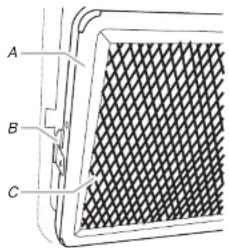
text_image
A B CA. Filter frame
B. Small tab
C. Grease filter
- Replace the filters by inserting the wide tab of the filter frame into the inner portion of the filter housing, then swinging the outside of the frame up until it fits into place.
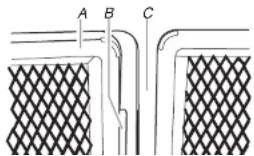
text_image
A B CReplacing Cooktop Light
The cooktop light consists of two 10W low-voltage halogen capsule bulbs. See "Assistance or Service" section to reorder. You will need a TORX® T10 screwdriver to remove the bulb cover mounting screw.
To Replace:
-
Unplug microwave oven or disconnect power.
-
Remove bulb cover mounting screw, and gently open cover.

text_image
Technical diagram of a mechanical component with labeled parts A, B, and CA. Mounting screw
B. Bulb cover lens
C. Halogen bulb
- Remove the burned-out bulb.
- Replace bulb, using a tissue or wearing clean cotton gloves to handle the bulb. Do not touch bulb with bare fingers.
- Close bulb cover and replace mounting screw.
- Plug in microwave oven or reconnect power.
Replacing Microwave Oven Light
The microwave oven light is a 10W low-voltage halogen capsule bulb. It will automatically come on when the door is opened and when the microwave oven is operating. See "Assistance or Service" section to reorder. You will need a TORX® T10 screwdriver to remove the bulb cover.
To Replace:
-
Unplua microwave oven or disconnect power.
-
For wall or roof venting, remove the vent deflector by removing the mounting screws (1 from each end), and lifting out the vent deflector.

text_image
A B CA. Bulb cover
B. Vent deflector
C. Vent deflector mounting screws (2)
- Remove the bulb cover mounting screw, then lift cover.
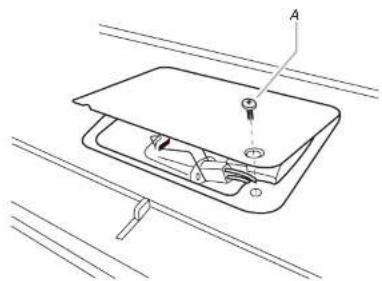
text_image
Technical diagram of a device with labeled component A and internal wiring or wiring connectionsA. Bulb cover mounting screw
- Remove the burned-out bulb by squeezing the wire clip together, pulling to the right and lifting.
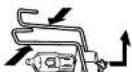
TROUBLESHOOTING
Try the solutions suggested here first in order to avoid the cost of an unnecessary service call.
Nothing will operate
■Has a household fuse blown, or has a circuit breaker tripped?
Replace the fuse or reset the circuit breaker. If the problem continues, call an electrician.
■Is the microwave oven wired properly?
See Installation Instructions provided with your microwave oven.
Microwave oven will not operate
■Is the magnetron working properly?
Try to heat 1 cup (250 mL) of cold water for 2 minutes at 100% cooking power. If water does not heat, try the steps below. If microwave oven still does not operate, call for service. See "Assistance or Service" section.
■Is the door completely closed?
Firmly close door
■Is a spacer (on some models) attached to the inside of the door?
Remove spacer, then firmly close door.
■Is the electronic microwave oven control set correctly? See "Microwave Oven Control" section.
■Is the Control Lock set?
See "Control Lock" section.
■Is the Learning Mode activated?
See "Learning Mode" section.
■Does the display show a message about opening the door?
The door has been closed for an extended period of time (about 5 minutes) after adding food and before starting the microwave oven. Open and close the door, then start the cycle.
Turntable alternates rotation directions
■ This is normal and depends on motor rotation at the beginning of the cycle.
Display shows time countdown, but is not operating
■Is the Timer in use?
See "Timer" section.
■Is the Learning Mode in use?
See "Learning Mode" section.
Steam is coming from the vent screen
■Some steam is normal.
Fan running after cooking is finished
■This is normal for convection and grill use. The fan may run for up to 10 minutes after the cycle ends to cool the microwave oven.
Fan running slower than usual
■Has the microwave oven been stored in a cold area?
The fan will run slower until the microwave oven warms up to normal room temperature.
Fan running during cooktop usage
This is normal. The microwave oven's cooling fan, which is separate from the vent fan, automatically comes on during microwave oven operation to cool the microwave oven. Both the vent fan and the cooling fan may also automatically come on and cycle on and off to cool the microwave oven's controls while the cooktop below is being used.
Odor coming from microwave oven during convection cooking
■This is normal for the first few convection cycles. The odor will dissipate with repeated use.
Quartz bulb does not appear to be on
■This is not unusual. See "Grill Element" section.
■Is the element still working properly?
To check proper operation of elements, place 2 slices of bread on the tall grill rack, place the rack on the turntable and close the door. Program the microwave oven using Manual Grill—without microwaves—for 4 minutes (see "Manual Method Cooking" section). The bread should toast dark brown. If the bread does not toast, call for service. See "Assistance or Service" section.
Radio, TV or cordless phone interference
■Is the microwave oven plugged into the same outlet? Try a different outlet.
■Is the radio or TV receiver near the microwave oven? Move the receiver away from the microwave oven, or adjust the radio or TV antenna.
■ Are the microwave oven door and sealing surfaces clean? Make sure these areas are clean.
■Is the cordless phone frequency 2.4 GHz?
Some 2.4 GHz-based cordless phones and home wireless networks may experience static or noise while the microwave oven is on. Use a corded phone or a different frequency cordless phone, or avoid using these items during microwave oven operation.
ASSISTANCE OR SERVICE
Before calling for assistance or service, please check "Troubleshooting." It may save you the cost of a service call. If you still need help, follow the instructions below.
When calling, please know the purchase date and the complete model and serial number of your appliance. This information will help us to better respond to your request.
If you need replacement parts
If you need to order replacement parts, we recommend that you use only factory specified parts. These factory specified parts will fit right and work right because they are made with the same precision used to build every new KITCHENAd ^® appliance. To locate factory specified parts in your area, call us or your nearest KitchenAid designated service center.
In the U.S.A.
Call the KitchenAid Customer eXperience Center toll free: 1-800-422-1230.
Our consultants provide assistance with:
■Features and specifications on our full line of appliances.
… ” ” ” ”
Replacement Parts
Turntable
Part Number 8205992
Turntable Support and Rollers
Part Number 8206222
Turntable Hub
Part Number 8205994
Grill Rack (tall)
Part Number 8206264
Convection Rack (short)
Part Number 8205995
KITCHENAID™ Steamer
Vessel
Part Number 8206451
Browning Pan
Part Number 8205996
Browning Pan Handle
Part Number 8204652
Grease Filters (2)
Part Number 8205997
Charcoal Filters (2)
Part Number 8205998
Cooktop and Microwave Oven
Light
Part Number 8204670
Cleaning and Maintenance Supplies
Heavy Duty Degreaser
Part Number 31552
All-Purpose Appliance
KITCHENAID ^® Stainless Steel
Cleaner and Polish
Part Number 4396920
KITCHENAID® BUILT-IN OVEN & MICROWAVE WARRANTY
ONE YEAR LIMITED WARRANTY
For one year from the date of purchase, when this major appliance is operated and maintained according to instructions attached to or furnished with the product, KitchenAid or KitchenAid Canada (hereafter "KitchenAid") will pay for factory specified parts and repair labor to correct defects in materials or workmanship. Service must be provided by a KitchenAid designated service company.
SECOND THROUGH FIFTH YEAR LIMITED WARRANTY ON CERTAIN COMPONENT PARTS
In the second through fifth years from the date of purchase, when this appliance is operated and maintained according to instructions attached to or furnished with the product, KitchenAid or KitchenAid Canada will pay for factory specified parts for the following components if defective in materials or workmanship:
■Electric element
■Solid state touch control system parts
SECOND THROUGH TENTH YEAR LIMITED WARRANTY
On microwave ovens only, in the second through tenth years from date of purchase, when this major appliance is operated and maintained according to instructions attached to or furnished with the product, KitchenAid will pay for factory specified parts for the stainless steel oven cavity/inner door if the part rusts through due to defects in materials or workmanship.
ITEMS KITCHENAID WILL NOT PAY FOR
- Service calls to correct the installation of your major appliance, to instruct you how to use your major appliance, to replace or repair house fuses or to correct house wiring or plumbing.
- Service calls to repair or replace appliance light bulbs, air filters or water filters. Those consumable parts are excluded from warranty coverage.
- Repairs when your major appliance is used for other than normal, single-family household use.
- Damage resulting from accident, alteration, misuse, abuse, fire, flood, acts of God, improper installation, installation not in accordance with electrical or plumbing codes, or use of products not approved by KitchenAid.
- Replacement parts or repair labor costs for units operated outside the United States or Canada.
- Pickup and delivery. This major appliance is designed to be repaired in the home.
- Repairs to parts or systems resulting from unauthorized modifications made to the appliance.
- Expenses for travel and transportation for product service in remote locations.
- The removal and reinstallation of your appliance if it is installed in an inaccessible location or is not installed in accordance with published installation instructions.
DISCLAIMER OF IMPLIED WARRANTIES; LIMITATION OF REMEDIES
CUSTOMER'S SOLE AND EXCLUSIVE REMEDY UNDER THIS LIMITED WARRANTY SHALL BE PRODUCT REPAIR AS PROVIDED HEREIN. IMPLIED WARRANTIES, INCLUDING WARRANTIES OF MERCHANTABILITY OR FITNESS FOR A PARTICULAR PURPOSE, ARE LIMITED TO ONE YEAR OR THE SHORTEST PERIOD ALLOWED BY LAW. KITCHENIAID SHALL NOT BE LIABLE FOR INCIDENTAL OR CONSEQUENTIAL DAMAGES. SOME STATES AND PROVINCES DO NOT ALLOW THE EXCLUSION OR LIMITATION OF INCIDENTAL OR CONSEQUENTIAL DAMAGES, OR LIMITATIONS ON THE DURATION OF IMPLIED WARRANTIES OF