
AirPar COB Quad - Effect machine ColorKey - Free user manual and instructions
Find the device manual for free AirPar COB Quad ColorKey in PDF.


| Product Type | Battery-Powered Wireless DMX LED Effect Light |
| Model | AirPar COB QUAD |
| Brand | ColorKey |
| Power Source | AC 100-240V, 50/60Hz or rechargeable lithium-ion battery |
| Power Consumption | 30W |
| Battery Type | Lithium-ion (built-in) |
| Battery Life (Single Color) | Up to 20 hours |
| Battery Life (Full Color) | Up to 6 hours |
| Charging Time | Approximately 5 hours |
| Light Source | 30W 4-in-1 COB RGBW LED |
| Beam Angle | 25° |
| DMX Channel Modes | 3, 4, 6, or 9 channels |
| Control Modes | W-DMX, DMX 512, IR Remote, Master/Slave, Sound Active, Stand Alone |
| Wireless Connectivity | Built-in W-DMX transceiver (2.4GHz) |
| Dimming Range | 0-100% |
| Strobe | Yes, adjustable speed |
| Flicker Free | Yes |
| Lamp Rated Life | >50,000 hours |
| Working Temperature | Up to 40°C (104°F) |
| Dimensions (W x D x H) | 5.5in x 5.5in x 4.5in (14.0cm x 14.0cm x 11.4cm) |
| Net Weight | 4.6 lb (2.1 kg) |
| Package Includes | AirPar COB QUAD, IR Remote, Power Supply, User Manual |
| Use Location | Indoor only |
| Safety Distance | Minimum 5m (16'4") from lighted objects |
Frequently Asked Questions - AirPar COB Quad ColorKey
User questions about AirPar COB Quad ColorKey
0 question about this device. Answer the ones you know or ask your own.
Ask a new question about this device
Download the instructions for your Effect machine in PDF format for free! Find your manual AirPar COB Quad - ColorKey and take your electronic device back in hand. On this page are published all the documents necessary for the use of your device. AirPar COB Quad by ColorKey.
USER MANUAL AirPar COB Quad ColorKey
Table of Contents
CONTENTS OF PACKAGE....3
SAFETY 3
SERVICE & SUPPORT 3
DISPLAY OPERATION....5
MENU GUIDE 7
INFRARED REMOTE (IR) CONTROL....8
DMX VALUES....10
SETUP EXAMPLES 11
POWER & CHARGING 5
TROUBLESHOOTING 13
TECHNICAL INFORMATION....14
Contents of Package
- AirPar COB QUAD
- IR Remote
- Power Supply
- User Manual
Safety
Caution! Opening this unit voids warranty. Contact ColorKey for any service requests.
Warning! To avoid electrical shock, be sure to disconnect power before any service or when moving or setting up the fixture.
Caution! Avoid direct eye exposure with the fixture when on.
• This fixture is for indoor use only.
- This fixture must be installed a minimum distance of 5 meters (16'4") away from any lighted objects.
- Do not install or operate this fixture near flammable materials.
- This device must be installed, operated, and maintained by a qualified professional.
- Please check if the voltage is in accordance with the rated power before installing.
- Do not operate this fixture if the power cord has been damaged. Turn off fixture and replace with a power cord of similar rating.
Introduction
Thank you for purchasing the ColorKey AirPar COB QUAD!
The AirPar is part of the ColorKey Air Series, an ecosystem of battery-powered, wireless DMX lighting fixtures, with a wireless DMX hub for greater control and connectivity options.
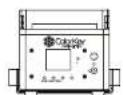
AIRPAR COB
QUAD
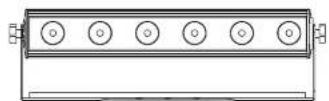
AIRBAR HEX 6
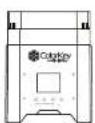
AIRPAR HEX 4


AIRPAD
QUAD


Power & Charging
The AirPar COB QUAD features a rechargeable lithium-ion battery for wire free use. The battery can power the light for up to 20 hours from a full charge. An adaptive power supply with an input voltage range of 100 to 240 VAC 50/60Hz is also included.
The battery charges whenever the included power adapter is connected and plugged into a power source. The light can be used while charging. If the light is plugged in and not in operation, make sure it is turned off. The indicators on the LED Menu Display show how much battery life remains available.
The included power supply features a charging status LED. Red indicates that the battery is charging and green that charging is complete.

Display Operation

ESC: Navigate to the previous higher-level menu item.
Down: Scrolls through the menu items and numbers in descending order.
Up: Scrolls through the menu items and numbers in ascending order
Enter: Is used to select and confirm/store the current menu selection
Menu Guide
| Address | Set DMX Address (001 to 512) |
| Channel | Set DMX Channel Mode (3, 6, 8, 11) |
| Slave | Set light to Slave or Master |
| Auto | Activate Auto mode and adjust speed (1-15) |
| Fade | Activate Fade mode and adjust speed (1-15) |
| Color | Set light to Color mode and scroll through preset colors (1-15) |
| Sound | Set light to Sound Active mode and adjust sensitivity (1-10) |
| Red | Adjust Red dimmer (000-255) |
| Green | Adjust Green dimmer (000-255) |
| Blue | Adjust Blue dimmer (000-255) |
| White | Adjust White dimmer (000-255) |
| Strobe | Turn on Strobe and adjust speed (1-15) |
Infrared Remote (IR) Control
To use the IR remote, simply point the remote at the IR receiver on the lighting fixture. The IR receiver on the AirPar COB QUAD is located to the right of the OLED on the side panel.
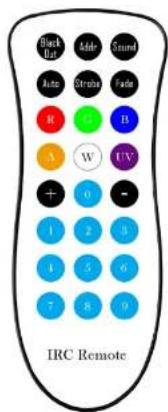
Black Out
Black Out mode instantly turns all LED's off.
Auto
In Auto mode, the light loops through various preprogrammed colors.
To turn on Auto mode, press the Auto button, then press (+) or (-) to increase or decrease the speed of the program.
Strobe
In Strobe mode, the light will flash at the desired rate.
To turn on Strobe mode, press the Strobe button, then press (+) or (-) to increase or decrease the strobing rate. You can change the color using manual color mixing (more below).
Fade
In Fade Mode, the light creates smooth, gradual color transitions.
To turn on Fade mode, press the Fade button, then press (+) or (-) to increase or decrease the speed of the program.
Manual Color Mixing
The AirPad is capable of creating an almost unlimited number of colors by mixing the Red, Green, Blue, and White LEDs.
To begin mixing colors, press the Red (R), Green (G), Blue (B), or White (W) button, then press (+) or (-) to increase or decrease the brightness of each color. Continue with the next color until you achieve your desired color.
DMX Values
3 channel mode
| Channel | Value | Function |
| 1 | 000-255 | Hue |
| 2 | 000-255 | Saturation |
| 3 | 000-255 | Value |
4 channel mode
| Channel | Value | Function |
| 1 | 000-255 | Red |
| 2 | 000-255 | Green |
| 3 | 000-255 | Blue |
| 4 | 000-255 | White |
6 channel mode
| Channel | Value | Function |
| 1 | 000-255 | Master Dimmer |
| 2 | 000-255 | Red |
| 3 | 000-255 | Green |
| 4 | 000-255 | Blue |
| 5 | 000-255 | White |
| 6 | 000-255 | Strobe |
9 channel mode
Setup Examples
Master / Slave

AIRPAR COB QUAD


AIRPAR
COB QUAD


AIRPAR
COB QUAD
The AirPar COB QUAD includes an integrated W-DMX transceiver for instant wireless connectivity. This enables the AirPar to wirelessly control any Air Series fixture in the same wireless group. To achieve this, simply set an AirPar to Master and all other fixtures to Slave. Turn on wireless on all fixtures and set them to the same wireless group ID.
Master/Slave mode allows you to connect multiple units together using one (1) unit to control others in a chain. When a fixture is set to 'Master Mode,' this unit will always act as a controlling unit until it is switched out of 'Master Mode'. The Master unit will send out signal to Slave units which will react in synchronization. When a fixture is set into 'Slave Mode', this fixture will receive the Master signal.
To make a connection, simply set the AirHub and AirPar COB QUAD to the same group ID. Both units are set to ID01 in the example below.

AirHub DMX Menu

100% 42°C ID01 *
AirPar COB QUAD Menu
DMX Controller

DMX CONTROLLER

AIRHUB DMX AIRPAR

COB QUAD
For greater control of your AirPar COB QUAD, connect to any DMX controller via the AirHub
Troubleshooting
| Problem | Solutions |
| No DMX control | Confirm the Wireless Group ID is the same as the transmitterMake sure the fixture is in DMX modeMake sure wireless is enabled on your AirParMake sure a DMX cable is properly connected to your DMX controller |
| Fixture does not respond to sound | Make sure the fixture is in Sound Active mode. |
| IR Remote will not respond | IR Remote will not respond to any inputs when the Black Out mode is enabled. If the remote is not responding when a button is pressed, try pressing (Black Out). It may already be in Black Out Mode thus rendering the light dark. |
Technical Information
• 30W 4-in-1 COB RGBW LEDs
- Chip-on-Board (COB) LED produces bright, even colors
- Beam Angle: 25°
• DMX Channels: 3 / 4 / 6 / 9 channels
• Built-in W-DMX transceiver for 2.4Ghz wireless connectivity
- Lithium-Ion battery (+/-) 20 hours single color; (+/-) 6 hours full color, (+/-) 5 hours charge time
- Control modes: W-DMX, DMX 512, IR Remote, Master /Slave, Sound Active, Stand Alone
- Dimming: 0-100%
• Lamp rated life: >50000 Hours
- Flicker Free
• Working temperature: up to 40°C
• Power consumption: 30W
• Power supply: AC100-240V;50-60Hz
• Product size: 5.5in x 5x5in x 4.5in
- Net Weight: 4.6lb

Brand : ColorKey
Model : AirPar COB Quad
Category : Effect machine