VividPar Hex 12 - Effects machine ColorKey - Free user manual and instructions
Find the device manual for free VividPar Hex 12 ColorKey in PDF.


Pick your language and provide your email: we'll send you a specifically translated version.
| Brand | ColorKey |
| Model | VividPar Hex 12 |
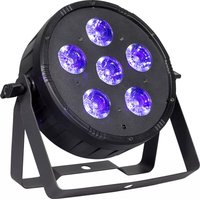
| Product Type | Effects Machine (LED Par Fixture) |
| Light Source | 12 x 6W HEX (RGBA+UV) LEDs |
| Power Consumption | 90W |
| Power Input | AC 100-240V, 50/60Hz |
| DMX Channels | 7/9/10/14 selectable DMX modes |
| Control Protocols | DMX512, Master/Slave, Sound Active, Auto |
| Beam Angle | 30° beam, 50° field angle |
| Strobe Rate | 0-20 Hz |
| Dimming | 0-100% smooth linear dimmer |
| Operating Modes | Standalone, Master/Slave, DMX, Sound Active |
| Display | Digital LED display with 4-button menu |
| Power Linking | Up to 14 units @ 110V, 20 units @ 240V |
| Mounting Options | Hanging bracket with dual locking knobs, floor stand |
| Cooling | Fan cooled with temperature control |
| IP Rating | IP20 (indoor use only) |
| Dimensions (L x W x H) | 9.5 x 8.5 x 10.5 in (24.1 x 21.6 x 26.7 cm) |
| Weight | 6.5 lb (2.95 kg) |
| Housing Material | Die-cast aluminum with tempered glass lens |
| Included Accessories | Power cord, DMX cable, hanging bracket, user manual |
| Certifications | CE, RoHS, ETL (pending) |
| Replacement Parts Availability | LED engine, power supply, mainboard available from ColorKey |
Frequently Asked Questions - VividPar Hex 12 ColorKey
What is the VividPar Hex 12 and what are its main features?
The VividPar Hex 12 is an LED effects machine by ColorKey featuring 12 x 6W RGBA+UV hex LEDs, DMX control, sound activation, auto programs, and a dimmer. It is ideal for stage lighting and events.
How do I set up DMX control for this fixture?
Set the DMX address using the digital display and menu. Use a DMX cable to connect the fixture in a daisy chain. For full control, connect the chain to a DMX controller. Ensure the last fixture is terminated.
Can I use the VividPar Hex 12 outdoors?
No, this fixture has an IP20 rating, meaning it is suitable only for indoor use. Do not expose it to rain or moisture.
How do I clean and maintain the fixture?
Disconnect power before cleaning. Use a dry or slightly damp cloth to wipe the exterior. For lenses, use a soft lens cloth. Do not use harsh chemicals.
What is the power linking capacity?
At 110V, you can power link up to 14 units; at 240V, up to 20 units. Check your local voltage and breaker rating to avoid overloading.
How do I replace a faulty LED or power supply?
Contact ColorKey support or an authorized service center. Replacement parts are available. Do not attempt repair yourself to avoid shock or damage.
What DMX channel modes are available?
The fixture offers 4 modes: 7-channel (basic), 9-channel (standard), 10-channel (extended), and 14-channel (full). Each mode controls different parameters like color, strobe, dimmer, and macros.
How do I use sound activation?
Select 'Sound Active' mode from the menu. The fixture will react to music via its built-in microphone. Adjust the sensitivity if needed from the menu.
Can I mount this fixture on a truss?
Yes, use the included hanging bracket with a C-clamp (not included). Ensure the truss or mount can support the weight (6.5 lb). Secure with a safety cable.
What is the warranty period for the VividPar Hex 12?
ColorKey typically offers a 1-year limited warranty on parts and labor. Check your purchase documentation for specific terms.
User questions about VividPar Hex 12 ColorKey
0 question about this device. Answer the ones you know or ask your own.
Ask a new question about this device
No questions yet. Be the first to ask one.
Download the instructions for your Effects machine in PDF format for free! Find your manual VividPar Hex 12 - ColorKey and take your electronic device back in hand. On this page are published all the documents necessary for the use of your device. VividPar Hex 12 by ColorKey.
USER MANUAL VividPar Hex 12 ColorKey
Manual assistant
Powered by Anthropic
Waiting for your message
Product information
Brand : ColorKey
Model : VividPar Hex 12
Category : Effects machine