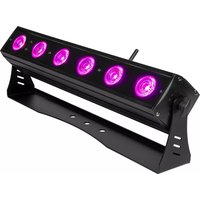
AirPar Hex 6 - Effects machine ColorKey - Free user manual and instructions
Find the device manual for free AirPar Hex 6 ColorKey in PDF.


| Product Type | LED Par Fixture (Battery-Powered) |
| Dimensions | 19″ x 3.5″ x 3.25″ (483 x 89 x 83 mm) |
| Net Weight | 8.5 lbs (3.86 kg) |
| Power Supply | AC 100-240V, 50/60 Hz |
| Power Consumption | 72W |
| Battery | Rechargeable Lithium-Ion; up to 20 hrs single color, up to 6 hrs full color; 5 hrs charge time |
| LEDs | 6 x 12W RGBW 6-in-1 (Red, Green, Blue, Amber, White, UV) |
| Beam Angle | 25° |
| DMX Channels | 3 / 6 / 8 / 11 selectable |
| Wireless | Built-in 2.4 GHz W-DMX transceiver for wireless DMX |
| Control Modes | W-DMX, DMX 512, IR Remote, Master/Slave, Sound Active, Stand Alone |
| Display | Multicolor OLED with menu navigation |
| Dimmer | 0–100% flicker-free with selectable curve (Linear, Curve, Theatre, Studio) |
| Strobe | Adjustable speed (1–15) |
| Connectors | 3-pin DMX In/Out, Speakon power input |
| Lamp Life | >50,000 hours |
| Operating Temperature | Up to 40°C (104°F) |
| Indoor Use Only | Yes |
| Minimum Distance from Lighted Objects | 5 m (16' 4") |
| Included Accessories | IR Remote, Power Supply, User Manual |
| Warranty | 2 years |
Frequently Asked Questions - AirPar Hex 6 ColorKey
User questions about AirPar Hex 6 ColorKey
0 question about this device. Answer the ones you know or ask your own.
Ask a new question about this device
Download the instructions for your Effects machine in PDF format for free! Find your manual AirPar Hex 6 - ColorKey and take your electronic device back in hand. On this page are published all the documents necessary for the use of your device. AirPar Hex 6 by ColorKey.
USER MANUAL AirPar Hex 6 ColorKey
natural_image
Hexagonal pattern composed of seven colored hexagons (red, blue, black, yellow, green, cyan) within a black border (no text or symbols)ColorKey
creative lighting

natural_image
Technical line drawing of a rectangular device with five circular components on top, mounted on a base (no text or symbols)AIRBAR
H E X 6
SKU: CKU-7070
USER MANUAL
Table of Contents
CONTENTS OF PACKAGE....3
SAFETY 3
SERVICE & SUPPORT 3
INTRODUCTION....4
POWER & CHARGING....5
DISPLAY OPERATION....5
MENU GUIDE ...... 6
INFRARED (IR) REMOTE CONTROL....7
DMX VALUES....9
SETUP EXAMPLES 11
TROUBLESHOOTING 13
TECHNICAL INFORMATION 14
Please read these instructions carefully before use. Operating this fixture according to these instructions is important to avoid any possible damage or accidents caused by misuse.
Contents of Package
• ColorKey AirBar HEX 6 fixture
- IR Remote
- Power Supply
- User Manual
Safety
Caution! Opening this unit voids warranty. Contact ColorKey for any service requests.
Warning! To avoid electrical shock, be sure to disconnect power before any service or when moving or setting up the fixture.
Caution! Avoid direct eye exposure with the fixture when on.
- This fixture is for indoor use only.
- This fixture must be installed a minimum distance of 5 meters (16'4") away from any lighted objects.
- Do not install or operate this fixture near flammable materials.
- This device must be installed, operated, and maintained by a qualified professional.
- Please check if the voltage is in accordance with the rated power before installing.
- Do not operate this fixture if the power cord has been damaged. Turn off fixture and replace with a power cord of similar rating.
Service & Support
Your ColorKey product includes a 2-year warranty. For technical support or to register your product, please visit https://www.colorkeyled.com/support/
You can also reach us by phone Monday thru Friday, 8:30am – 5pm PST at (818) 578-4030.

Introduction
Thank you for purchasing the ColorKey AirBar HEX 6!
The AirBar is part of the ColorKey Air Series, an ecosystem of battery-powered, wireless DMX lighting fixtures, with a wireless DMX hub for greater control and connectivity options.
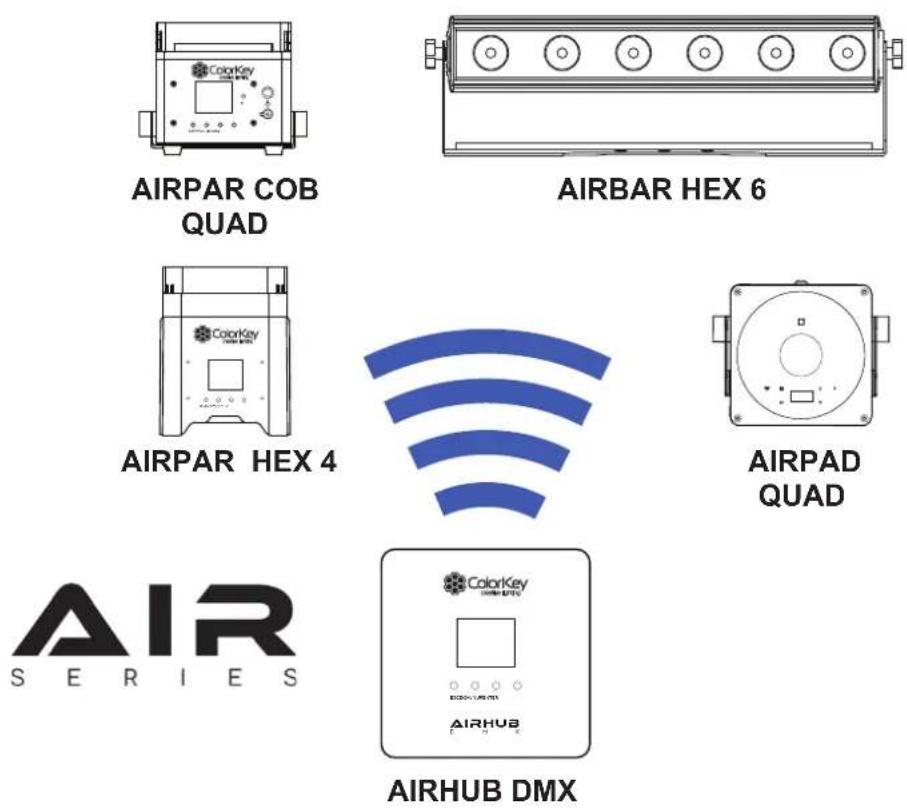
All Air Series fixtures include an integrated W-DMX transceiver for instant wireless connectivity. This enables any Air Series fixture to wirelessly control your entire Air Series rig.
It's now easier than ever to fill a room with color by simply setting all the fixtures to the same wireless group ID and watch them automatically connect and synchronize.
Power & Charging
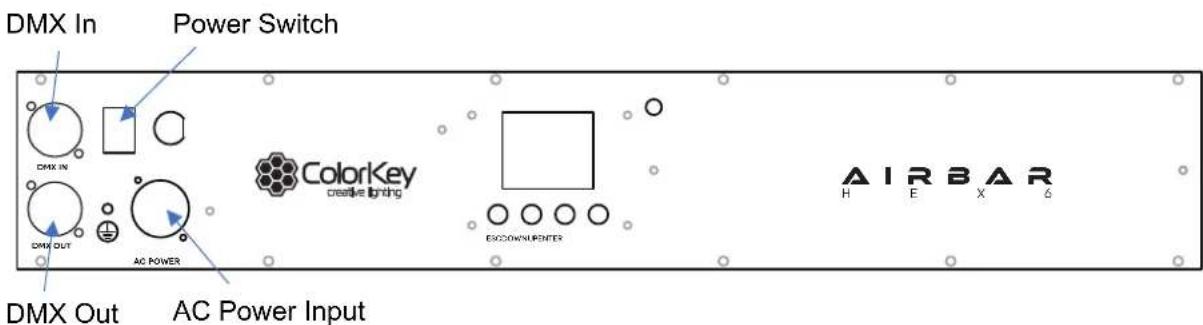
The AirBar HEX 6 features a rechargeable lithium-ion battery for wire free use. The battery can power the light for up to 20 hours from a full charge. The battery charges whenever the fixture is connected to a power source, and the light can also be used while charging. The battery status is shown on the OLED menu display.
Display Operation
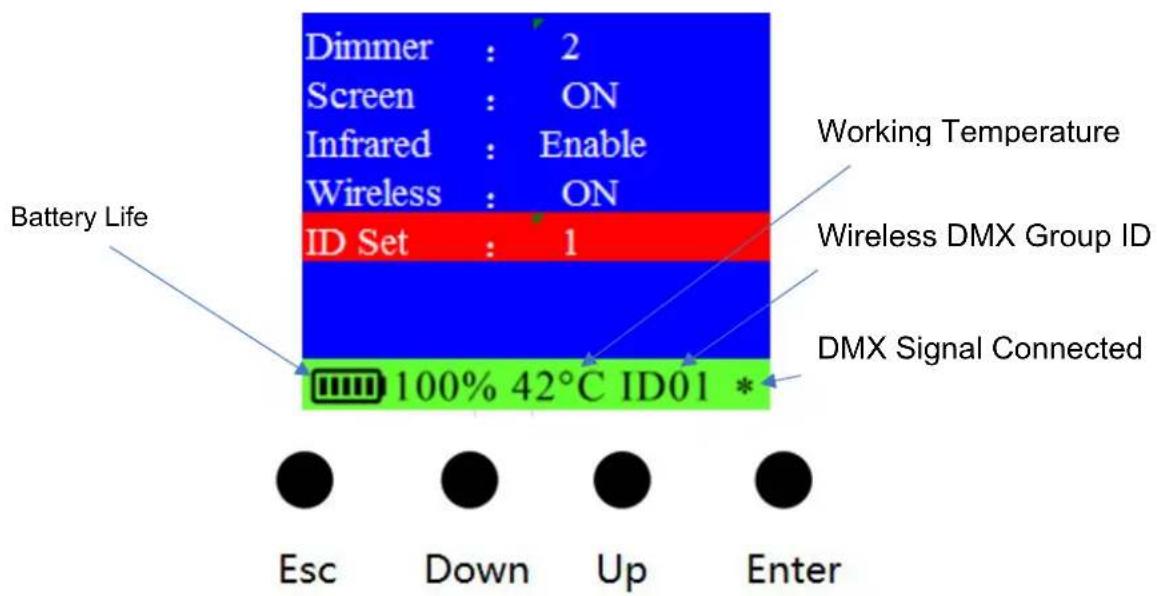
ESC: Navigate to the previous higher-level menu item.
Down: Scrolls through the menu items and numbers in descending order.
Up: Scrolls through the menu items and numbers in ascending order
Enter: Select and confirm the current menu selection
Menu Guide
| Address | Set DMX Address (001 to 512) |
| Channel | Set DMX Channel Mode (3, 6, 8, 11) |
| Slave | Set light to Slave or Master |
| Auto | Activate Auto mode and adjust speed (1-15) |
| Fade | Activate Fade mode and adjust speed (1-15) |
| Color | Set light to Color mode and scroll through preset colors (1-15) |
| Sound | Set light to Sound Active mode and adjust sensitivity (1-10) |
| Red | Adjust Red dimmer (000-255) |
| Green | Adjust Green dimmer (000-255) |
| Blue | Adjust Blue dimmer (000-255) |
| Amber | Adjust Amber dimmer (000-255) |
| White | Adjust White dimmer (000-255) |
| UV | Adjust UV dimmer (000-255) |
| Strobe | Turn on Strobe and adjust speed (1-15) |
| Dimmer | Adjust Dimmer curve (Linear, Curve, Theatre, Studio) |
| Screen | Set OLED display to turn off after 30 seconds. |
| Infrared | Enable / disable infrared receiver |
| Wireless | Enable / disable wireless transceiver |
| ID Set | Set Wireless ID group from ID00 to ID15 |
Infrared (IR) Remote Control
To use the IR remote, simply point the remote at the IR receiver on the lighting fixture. The IR receiver on the AirBar HEX 6 is located to the right of the LED screen on the rear panel.

Black Out
Black Out mode instantly turns all LED's off.
Press the Black Out button to engage or disengage Black Out mode.
Addr
Address mode enables you to set the DMX Address of the fixture.
To set up a new DMX address, Press the Addr button, then press (+) or (-) to increase or decrease the DMX Address Value.
Sound
Sound-Active mode enables the light to respond to ambient sounds in the room using the fixture's built-in microphone.
Press the Sound button to activate Sound-Active mode. Press (+) or (-) to increase or decrease sound sensitivity based on the playback level of the music.
Auto
In Auto mode, the light loops through various preprogrammed colors.
To turn on Auto mode, press the Auto button, then press (+) or (-) to increase or decrease the speed of the program.
Strobe
In Strobe mode, the light will flash at the desired rate.
To turn on Strobe mode, press the Strobe button, then press (+) or (-) to increase or decrease the strobing rate. You can change the color using manual color mixing (more below).
Fade
In Fade Mode, the light creates smooth, gradual color transitions.
To turn on Fade mode, press the Fade button, then press (+) or (-) to increase or decrease the speed of the program.
Manual Color Mixing
The AirBar is capable of creating an almost unlimited number of colors by mixing the Red, Green, Blue, and White LEDs.
To begin mixing colors, press the Red (R), Green (G), Blue (B), Amber (A), White (W), or Ultra-Violet (UV) button, then press (+) or (-) to increase or decrease the brightness of each color. Continue with the next color until you achieve your desired color.
Color Presets
10 preset colors can be accessed from the IR Remote. Press any number between (0) and (9) to set a color.
0 - Red
1 - Green
2 - Blue
3 - Amber
4 - White
5 - UV
6 - Yellow
7 - Magenta
8 - Orange
9 - Pink
DMX Values
3 channel mode
| Channel | Value | Function |
| 1 | 000-255 | Hue |
| 2 | 000-255 | Saturation |
| 3 | 000-255 | Value |
6 channel mode
| Channel | Value | Function |
| 1 | 000-255 | Red |
| 2 | 000-255 | Green |
| 3 | 000-255 | Blue |
| 4 | 000-255 | Amber |
| 5 | 000-255 | White |
| 6 | 000-255 | UV |
8 channel mode
| Channel | Value | Function |
| 1 | 000-255 | Master Dimmer |
| 2 | 000-255 | Red |
| 3 | 000-255 | Green |
| 4 | 000-255 | Blue |
| 5 | 000-255 | Amber |
| 6 | 000-255 | White |
| 7 | 000-255 | UV |
| 8 | 000-255 | Strobe |
11 channel mode
| Channel | Value | Function |
| 1 | 000-255 | Master Dimmer |
| 2 | 000-255 | Red |
| 3 | 000-255 | Green |
| 4 | 000-255 | Blue |
| 5 | 000-255 | Amber |
| 6 | 000-255 | White |
| 7 | 000-255 | UV |
| 8 | 000-255 | Strobe |
| 9 | 000-015 | None |
| 016-095 | Auto Mode | |
| 096-175 | Fade Mode | |
| 176-255 | Sound Active | |
| 10 | 0-255 | Speed for Ch9 |
| 11 | 000-005 | Menu Default |
| 006-065 | Linear Dimmer Mode | |
| 066-125 | Curve Dimmer Mode | |
| 126-185 | Theatre Dimmer Mode | |
| 186-255 | Studio Dimmer Mode |
Setup Examples
Master / Slave

natural_image
Pure electrical circuit lines without any symbols

natural_image
Simple line drawing of a rectangular device with six circular holes, no text or symbols present.AIRBAR HEX 6 AIRBAR HEX 6
The AirBar HEX 6 includes an integrated W-DMX transceiver for instant wireless connectivity. This enables the AirBar to wirelessly control any Air Series fixture in the same wireless group. To achieve this, simply set an AirBar to Master and all other fixtures to Slave, and set all fixtures to the same wireless group ID.
Master/Slave mode allows you to connect multiple units together using one (1) unit to control others in a chain. When a fixture is set to 'Master Mode,' this unit will always act as a controlling unit until it is switched out of 'Master Mode'. The Master unit will send out signal to Slave units which will react in synchronization. When a fixture is set into 'Slave Mode', this fixture will receive the Master signal.
AirHub DMX

AIRHUB DMX


natural_image
Pure electrical circuit lines without any symbols
AIRBAR HEX 6 AIRBAR HEX 6

natural_image
Pure electrical circuit lines without any symbolsThe AirHub DMX (available separately) is the central hub used to remotely control all Air Series fixtures. It is a battery powered wireless DMX transceiver with 16 wireless groups (00-15) and features built-in presets including static colors, auto, fade, and sound active mode.
To make a connection, simply set the AirHub DMX and AirBar HEX 6 to the same group ID. Both units are set to ID01 in the example below.

AirHub DMX Menu

AirBar HEX 6 Menu
DMX Controller
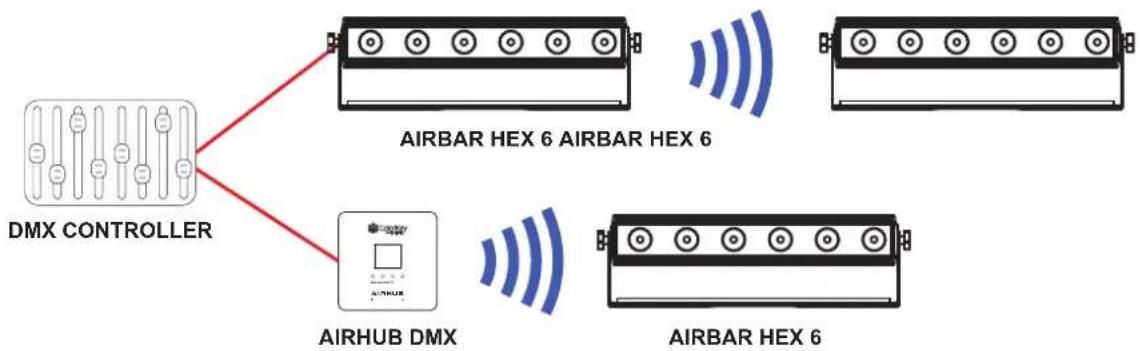
flowchart
graph TD
    A["DMX CONTROLLER"] --> B["AIRBAR HEX 6 AIRBAR HEX 6"]
    A --> C["AIRHUB DMX"]
    C --> D["AIRBAR HEX 6"]
The AirBar HEX 6 can connect to any DMX controller using standard 3-pin DMX cables, or wirelessly using the AirHub DMX. AirBars connected to a DMX controller via the AirHub can still be addressed independently.
The AirBar can also transmit wireless DMX to any 2.4ghz enabled W-DMX lights outside of the Air Series ecosystem through group ID 0-5 (such as the ColorKey MobilePar Mini HEX 4). Simply scroll through the wireless bands on your lights until a signal connection is made with the AirBar.
Troubleshooting
| Problem | Solutions |
| No DMX control | Confirm the Wireless Group ID is the same as the transmitterMake sure the fixture is in DMX modeMake sure wireless is enabled on your AirBar, or that a DMX cable is properly connected to your controller. |
| Fixture does not respond to sound | Make sure the fixture is in Sound Active mode. |
| IR remote will not respond | The IR remote will not respond to any inputs when the Black Out mode is enabled. If the remote is not responding when a button is pressed, try pressing (Black Out). It may already be in Black Out Mode thus rendering the light dark. |
Technical Information
- 6x12W RGBW 6-in-1 LEDs
- 25^ beam angle
• DMX Channels: 3 / 6 / 8 / 11 channels
• Built-in 2.4Ghz W-DMX transceiver for wireless connectivity - Lithium-Ion battery (+/-) 20 hours single color; (+/-) 6 hours full color, (+/-) 5 hours charge time
- Control modes: W-DMX, DMX 512, IR Remote, Master /Slave, Sound Active, Stand Alone
- Multicolor OLED display for easy access to fixture settings
- 0-100% dimmer
• 3-pin DMX In/Out connectors - Speakon power input
- Lamp rated life: >50000 Hours
- Flicker Free
• Working temperature: up to 40°C
• Power consumption: 72W
• Power supply: AC100-240V;50-60Hz
• Product size: 19" x 3.5" x 3.25" - Net Weight: 8.5lbs
Please note: As we continue to work towards improving our products and your experience as a user, we recommend that you check our website periodically for updates to user manuals and specifications at www.ColorKeyLED.com or you may contact us directly at info@colorkeyled.com.
- ColorKey
- Table of Contents
- Contents of Package
- Safety
- Service & Support
- Introduction
- Power & Charging
- Menu Guide
- Infrared (IR) Remote Control
- Black Out
- Addr
- Sound
- Auto
- Strobe
- Fade
- Manual Color Mixing
- Color Presets
- DMX Values
- Setup Examples
- Master / Slave
- AirHub DMX
- DMX Controller
- Troubleshooting
- Technical Information
Brand : ColorKey
Model : AirPar Hex 6
Category : Effects machine