
VP-300R - Intercom DataVideo - Free user manual and instructions
Find the device manual for free VP-300R DataVideo in PDF.


| Product Type | Intercom Repeater |
| Brand | DataVideo |
| Model | VP-300R |
| Category | Intercom System Accessory |
| Max Transmission Distance | 200 meters (660 feet) cascade |
| Transmission Signal Types | Intercom, Tally, Power |
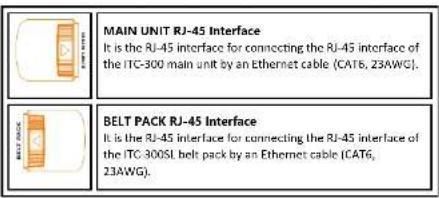
| Connectors | RJ-45 x2 (10/100 Mbps), one for main unit, one for belt pack |
| LED Indicators | 2 x Link Indicator |
| Operating Temperature | 0°C to 40°C (32°F to 104°F) |
| Storage Temperature | -20°C to 60°C (-4°F to 140°F) |
| Humidity | 10% to 80% (non-condensing) |
| Dimensions (W x H x D) | 142 x 79.8 x 40 mm |
| Weight | 300 g |
| Power Supply | Independent power supply (DC 12V recommended, adapter not included) |
| Compatibility | ITC-300 Digital Intercom System and ITC-300SL belt pack |
| Max Units per System | Up to 4 units can be connected to an ITC-300 simultaneously |
| Installation | Plug-and-play, no configuration required |
| Cleaning | Unplug before cleaning; use a damp cloth, no liquid or aerosol cleaners |
| Safety | Do not block ventilation, avoid water and unstable surfaces, use only specified power source |
| Warranty | Standard 1 year; 3 years if registered within 30 days of purchase |
| Disposal | Recycle according to local WEEE regulations |
Frequently Asked Questions - VP-300R DataVideo
User questions about VP-300R DataVideo
0 question about this device. Answer the ones you know or ask your own.
Ask a new question about this device
Download the instructions for your Intercom in PDF format for free! Find your manual VP-300R - DataVideo and take your electronic device back in hand. On this page are published all the documents necessary for the use of your device. VP-300R by DataVideo.
USER MANUAL VP-300R DataVideo
natural_image
Technical line drawing of a mechanical housing component (no text or symbols)INTERCOM REPEATER
VP-300R
Instruction Manual
www.datavideo.com
Table of Contents
FCC COMPLIANCE STATEMENT....3
WARNINGS AND PRECAUTIONS 3
WARRANTY 4
STANDARD WARRANTY 4
THREE YEAR WARRANTY 5
DISPOSAL 5
INTRODUCTION....6
FEATURES 6
SYSTEM DIAGRAM 7
CONNECTION AND CONTROL 8
FRONT PANEL 8
SPECIFICATIONS....9
SERVICE & SUPPORT....12
Disclaimer of Product & Services
The information offered in this instruction manual is intended as a guide only. At all times, Datavia de Technologies will try to give correct, complete and suitable information. However, Datavia de Technologies cannot exclude that same information in this manual, from time to time, may not be correct or may be incomplete. This manual may contain typing errors, omissions or incorrect information. Datavia de Technologies always recommend that you can check the information in this document. The accuracy of the research of this manual is not necessary for the product. Datavia de technologies is not responsible for any omissions or errors, or for any subsequent loss or damage caused by using the information contained within this manual. Further advice on the content of this manual or on the product can be obtained by contacting your local Datavia de Office or dealer.
FCC Compliance Statement
This device complies with part 15 of the FCC rules. Operation is subject to the following two conditions:
(1) This device may not cause harmful interference, and
(2) This device must accept any interference received, including interference that
may cause undesired operation.
Warnings and Precautions
-
Read all of these warnings and save them for later reference.
-
Follow all warnings and instructions marked on this unit.
-
Unplug this unit from the wall outlet before cleaning. Do not use liquid or aerosol cleaners. Use a damp cloth for cleaning.
-
Do not use this unit in or near water.
-
Do not place this unit on an unstable carl, stand, or table. The unit may fall,
causing serious damage.
-
Slots and openings on the cabinet top, back, and bottom are provided for ventilation. To ensure safe and reliable operation of this unit, and to protect it from overheating, do not block or cover these openings. Do not place this unit on a bed, sofa, rug, or similar surface, as the ventilation openings on the bottom of the cabinet will be blocked. This unit should never be placed near or over a heat register or radiator. This unit should not be placed in a built-in installation unless proper ventilation is provided.
-
This product should only be operated from the type of power source indicated on the marking level of the AC adaptor. If you are not sure of the type of power available, consult your Platavideo dealer or your local power company.
-
Do not allow anything to rest on the power cord. Do not locate this unit where
the power cord will be walked on, rolled over, or otherwise greened.
-
If an extension cord must be used with this unit, make sure that the total of the ampere ratings on the products plugged into the extension cord do not exceed the extension cord rating.
-
Make sure that the total amperes of all the units that are plugged into a single wall outlet do not exceed 15 amperes.
-
Never push objects of any kind into this unit through the cabinet ventilation slots, as they may touch dangerous voltage points or short cut parts that could result in risk of tire or electric shock. Never spill liquid of any kind onto or into this unit.
-
Except as specifically explained elsewhere in this manual, do not attempt to service this product yourself. Opening or removing covers that are marked "Do Not Remove" may expose you to dangerous voltage points or other risks, and will void your warranty. Refer all service issues to qualified service personnel.
-
Unplug this product from the wall outlet and refer to qualified service personnel under the following conditions:
a. When the power cord is damaged or frayed:
b. When liquid has spilled into the unit:
c. When the product has been exposed to rain or water:
so to rain of water,
d. When the product does not operate normally under normal operating conditions. Adjust only those controls that are covered by the operating instructions in this manual; improper adjustment of other controls may result in damage to the unit and may often require extensive work by a qualified technician to restore the unit to normal operation;
e. When the product has been dropped or the cabinet has been damaged;
1. When the product exhibits a distinct change in performance, indicating a need for service.
Warranty
Standard Warranty
• Datavideo equipment are guaranteed against any manufacturing defects for
one year from the date of purchase.
- The original purchase invoice or other documentary evidence should be supplied at the time of any request for repair under warranty.
- The product warranty period begins on the purchase date. If the purchase date is unknown, the product warranty period begins on the thirteenth day after shipment from a Datavideo office.
- All non-Datavideo manufactured products (product without Datavideo logo) have only one year warranty from the date of purchase.
- Damage caused by accident, misuse, unauthorized repairs, sand, grill or water is not covered under warranty.
- Viruses and malware infections on the computer systems are not covered under warranty.
- Any errors that are caused by unauthorized third-party software installations, which are not required by our computer systems, are not covered under warranty.
- All mail or transportation costs including insurance are at the expense of the owner.
- All other claims of any nature are not covered.
- All accessories including headphones, cables, and batteries are not covered under warranty.
- Warranty only valid in the country or region of purchase.
- Your statutory rights are not affected.
Three Year Warranty
- All Datavideo products purchased after July 1st, 2017 are qualified for a free two years extension to the standard warranty, providing the product is registered with Datavideo within 30 days of purchase.

- Certain parts with limited lifetime expectancy such as LCD panels, DVD drives, Hard Drive, Solid State Drive, SD Card, USB Thumb Drive, Lighting, Camera module, PCIe Card are covered for 1 year.
- The three-year warranty must be registered on Datavideo's official website or with your local Datavideo office or one of its authorized distributors within 30 days of purchase.
Disposal

For EU Customers only · WEEE Marking
This symbol on the product or on its packaging indicates that this product must not be disposed of with your other household waste. Instead, it is your responsibility to dispose of your waste equipment by handing it over to a designated collection point for the recycling of waste electrical and electronic equipment. The separate collection and recycling of your waste equipment at the time of disposal will help to conserve natural resources and
ensure that it is recycled in a manner that protects human health and the environment. For more information about where you can drop off your waste equipment for recycling, please contact your local city office, your household waste disposal service or the shop where you purchased the product.

CE Marking is the symbol as shown on the left of this page. The letters "CE" are the abbreviation of French phrase "Conformite Européenne" which literally means "European Conformity". The term initially used was "EC Mark" and it was officially replaced by "CE Marking" in the Directive 93/68/EEC in 1993. "CE
Marking" is now used in all EU official documents.
Introduction
The VP-300R intercom repeater is designed to cascade the ITC-300 Digital
Intercom System and the ITC-300SL Digital Intercom belt pack to extend the signal transmission distance to up to 200 meter.
The VP-300R provides rugged and easy-connecting RJ-45 interfaces on its both sides for fast and easy connection. Moreover, the VP-300R can be powered independently.
Note: Please pay attention that there are 4 VP-300R intercom repeaters can be connected to an ITC-300 simultaneously. Those 4 VP-300Rs must be connected to 4 random channels among the total 8 channels of the ITC-300. Those 4 VP-300Rs can not be connected in cascade connection.
Features
- Extend Intercom and Tally signal up to 200M
- Completely adaptive-quick, easy installation and setup, no configuration required.
- With ruggedized and lockable connector for cable protection.
• Rugged appearance design.
System Diagram

flowchart
graph TD
    A["IC-1"] --> B["VR-2004"]
    C["IC-2"] --> D["VR-2004"]
    E["IC-300"] --> F["VR-2004"]
    G["EV"] --> H["IC-100"]
    H --> I["Electric Car"]
    I --> J["Motor System"]
    K["BMW Electric Cars"] --> L["IC-100"]
    M["IC-2004"] --> N["IC-100"]
    O["IC-300"] --> P["IC-100"]
Connection and Control
Front Panel

Specifications
| Max. Transmission Distance | 200 meter/ 660 feet (cascade) |
| Transmission Signal Types | Intercom, Tally and Power. |
| Connectors | RI-45 x 2, {10/100Mbps}. One is for main unit and the other is for bolt pack. |
| LED Indicator | LED Link Indicator x 2 |
| Operating Temperature | 0°C to 40°C (32°F to 104°F) |
| Storage Temperature | -20°C to 60°C (-4°F to 140°F) |
| Humidity | 10% to 80% (non-condensing) |
| Dimensions(mm) | 142 x 79.8 x 40 |
| Weight | 300g |
Note
Note
Service & Support
It is our goal to make your products ownership a satisfying experience. Our supporting staff is available to assist you in setting up and operating your system. Please refer to our web site www.datavideo.com for answers to common questions, support requests or contact your local office below.

Please visit our website for latest manual update. https://www.datavideo.com/product/VP-300R
datavideo
www.datavideo.com

@DatavideoUSA @DatavideoIndia2016 @DatavideoEMEA @DatavideoJapan @DatavideoTaiwan @DatavideoLatam @DatavideoAsia @DatavideoBrazil

@Datavideo @Datavideo_EMEA @Datavideo_Taiwan

@DatavideoUSA @DVTWDVCN

@DatavideoUSA @DatavideoEurope
All the trademarks are the properties of their respective owners. Datavideo Technologies Co., Ltd. All rights reserved 2020
Aug-15 2018 VerE


Brand : DataVideo
Model : VP-300R
Category : Intercom