
FL-1RA-12 - Electronics Electronics International - Free user manual and instructions
Find the device manual for free FL-1RA-12 Electronics International in PDF.


| Product Type | Fuel Level Instrument |
| Model | FL-1RA-12 |
| Brand | Electronics International |
| Case Dimensions | 2.5" x 2.5" x 3.65" depth (2.25" bezel) |
| Weight | 10 oz (unit only) |
| Power Requirements | 7.5 to 35 Volts, 0.1 Amp |
| Display Type | Analog 210° LED arc (17 LEDs) and digital display (gallons, pounds, liters) |
| Sensor Compatibility | Resistive fuel level sensors (90–300 ohms) |
| System Voltage | 12 Volt system |
| Calibration Points | 2 to 9 points (empty, partial, full) |
| Filter Settings | 8, 16, 32, 64, or 128 seconds response |
| Operating Modes | Gallons, pounds (6x factor), liters (3.75x factor) |
| Warning LEDs | Yellow blink at 3/17 tank, red blink at 1/17 tank; open sensor indication |
| Backlight | Digital display backlight; analog LED dimmable via panel rheostat or optional pot |
| External Warning Output | White/yellow wire (grounds when red LED on, max 0.1A) |
| Mounting | Behind panel with 6-32 screws (max 1/2" long) |
| Environmental | Meets TSO-C55 |
| Manual Reference | OI 1106011, Rev A, 11/6/01; 26 pages |
| Intended Use | Aircraft fuel level monitoring (experimental or certified with T.C./S.T.C.) |
Frequently Asked Questions - FL-1RA-12 Electronics International
User questions about FL-1RA-12 Electronics International
0 question about this device. Answer the ones you know or ask your own.
Ask a new question about this device
Download the instructions for your Electronics in PDF format for free! Find your manual FL-1RA-12 - Electronics International and take your electronic device back in hand. On this page are published all the documents necessary for the use of your device. FL-1RA-12 by Electronics International.
USER MANUAL FL-1RA-12 Electronics International
Fuel Level Fuel Level
(FL-1RA-12, FL-1RA-24 and FL-1CA)(FL-1RA-1
(2nd Generation Instruments)(2nd Generation
Operating and Installation Instructions Operating
OI 1106011
11/6/01
You must read this manual before installing or operating the instrument. This manual contains warranty and other information that may affect your decision to install this product and/or the safety of your aircraft.

FL-1FL-1 Important Notice Important Notice
***** Must Read ***** Must Read *
"DO NOT SOLELY RELY ON THE FL-1 TO DETERMINE THE FUEL LEVEL IN THE FUEL TANKTANKe use of the FL-1 does not eliminate or reduce the necessity for the pilot to use good flight planning, preflight and in-flight techniques for managing fuel.
The following requirements must be met with before operating the aircraft with the FL-1:
-
All of the Operating Instructions must be read. There is important information in this manual which the pilot must understand before flying the aircraft.
-
A copy of this operating manual must be in the aircraft at all times.
-
The FL-1 must be calibrated to the aircraft fuel system and its accuracy must be verified before flying the aircraft.verified before flying the aircraft.
If you ever find an inaccuracy issue or any other problem with the FL-1, cover the face of the instrument with a note saying "DEFECTIVE". This will alert anyone flying the aircraft to the condition of the FL-1. of the FL-1.
ContentsContents
Warranty 2
Operating Instructions 3
Instrument: 3
Analog Display: 3
Digital Display: 4
Accuracy Limitations: (MUST READ) (MUST.READ).... 4
Important Considerations: (MUST READ) (MUST.READ).... 5
Installation Instructions 6
Important Information and Initial Check Out: 6
Route The Circular Connector: 7
Route the Power and Ground Wires: 7
Route the Backlight Wires: 7
Route the External Warning Control Line: 8
Route the Fuel Tank Sensor Wire (FL-1RA-12 and -24 Only): 8
Install the Instrument in the Panel: 8
Connect the Circular Connector to the Instrument: 8
Mount the Placard on the Instrument Panel: 8
Selecting the Proper Filter: 9
Selecting the Proper Operating Mode: 9
Selecting the Resolution: 9
Programming the Filter, Operating Mode and Resolution: 10
Calibration Issues: 1
Calibrate the Fuel Tank: 1
Provide the Operating and Installation Manual to the Pilot: 13
FL-1RA-12 and FL-1RA-24 Wirino Diagram 16
Warranty
1209921
Electronics International Inc. warrants this instrument and system components to be free from defects in materials and workmanship for a period of one year from the user invoice date. Electronics International Inc. will repair or replace any item under the terms of this Warranty provided the item is returned to the factory prepaid.
- This Warranty shall not apply to any product that has been repaired or altered by any person other than Electronics International Inc., or that has been subjected to misuse, accident, incorrect wiring, negligence, improper or unprofessional assembly or improper installation by any person. This warranty does not cover This warrant any reimbursement for any person's time for installation, removal, assembly or repair. Electronics International retains the right to determine the reason or cause for warranty repair.
- This warranty does not extend to any machine, vehicle, boat, aircraft or any other device to which the Electronics International Inc. product may be connected, attached, interconnected or used in conjunction with in any way.
- The obligation assumed by Electronics International Inc. under this warranty is limited to repair, replacement or refund of the product, at the sole discretion of Electronics International Inc.
- Electronics International Inc. is not responsible for shipping charges or damages incurred under this Warranty.
- No representative is authorized to assume any other liability for Electronics International Inc. in connection with the sale of Electronics International Inc. products.
- If you do not agree to and accept the terms of this warranty, you may return the product in new condition, with receipt, within thirty (30) days for a refund.
This Warranty is made only to the original user. THIS WARRANTY IS IN LIEU OF ALL OTHER THIS WARRANTY WARRANTIES OR OBLIGATIONS: EXPRESS OR IMPLIED. MANUFACTURER EXPRESSLY DISCHS ARMS ALL IMPLIED WARRANTIES OF MERCHANTABILITY OR FITNESS FOR A BAR
Operating Instructions Operating Instruction FL-1RA & FL-1CAFL-1RA & FL-1CA
Instrument:Instrument:
The FL-1 is a fuel level instrument featuring a 210 degree analog display and a digital display. These two displays provide the primary indication of the fuel level for the tanks and offer many advantages over conventional analog gauges, as described below. The FL-1 must be calibrated in gallons and it can display in pounds or liters. When displaying in pounds the FL-1 uses a "6 x Gal" conversion factor and when displaying liters it uses a "3.75 x Gal" conversion factor. When displaying gallons the FL-1 may be programmed to display in one or 1/2 gallon increments. For fuel levels above 99 gallons the FL-1 will display in one gallon increments only. Since the FL-1 does not incorporate any moving parts (needles, bearings, springs, etc.) there is little to go wrong or wear out.
The FL-1 has a programmed filter that effects how the instrument responds to changes in fuel level. The filter may be set to 8, 16, 32, 64 or 128 seconds response. In the installation section of this manual is a discussion of the advantages and disadvantages of the different filter settings.
The FL-1 connects to a fuel level sensors mounted in the fuel tank. The FL-1RA-12 and FL-1RA-24 was designed to be used with a resistive fuel level sensor that decrease or increases in resistance as fuel is added to the tank. The -12 is for a 12 volt system and the -24 is for a 24 volt system. The FL-1CA was designed to be used with E.I.'s capacitive fuel level sensor and it will operate on a 12 or 24 volt system.
Once the FL-1 is installed in the aircraft it must be calibrated to the aircraft fuel tank and sensor by filling the tanks to predetermined fuel levels. You may use as few as two calibration points or as many as 9 points. This mapping of the tank removes any non-linearity in the tank and sensor.
Analog Display: Analog Display:
Note: Note: Acknowledge a blinking LED (i.e., to stop the blinking), change the position of the Selector Switch. Once a blinking warning is acknowledged it will not occur again until the FL-1's power has been turned off and back on. Although these blinking warnings are valuable, they can be annoying. For this reason we provide a way of shutting them off.
During night operation the analog LED's may be too bright. If so, turn the panel light rheostat up and the analog lights (LED's) will dim. If you wish to control the intensity of the LED's independent of the panel light rheostat, a LED Intensity Control Pot is available from Electronics International. The red LED will always be displayed at full intensity.
Digital Display: Digital Display:
With the Selector Switch in the left position the digital display will show the fuel level in liters. With the Selector Switch in the right position the digital display will show the fuel level in pounds and in the middle position the digital display will show the fuel level in gallons. Fuel levels below 2 gallons will be displayed as "0."
If the digital display backlight has been permanently powered up (as recommended), the digital display will be easier to see during low ambient light conditions and at night.
On power-up the FL-1 performs the following tests in sequence:
- The fuel tank calibration data is check for errors. A table of error codes is provided in the calibration section of this manual. If an error is found, the appropriate error code is displayed and the FL-1 operation is stopped.
- A self test is performed, all the LED's arc sequenced and "8888" is shown on the digital display.
***** MUST READ ***** MUST READ *****:
Accuracy Limitations: Accuracy Limitations:
Check your system by comparing the displayed fuel level on the FL-1 to the fuel level listed in the flight manual at each fill up.the flight manual at each fill up.
-
Low Fuel Readings -3DL-ant Fuel flow (e) 1-1 to determine the fuel in the tank for indicated tank levels below 1/8 levels should always fly the aircraft in such a manner as to at least maintain the FAA minimum fuel requirements in the aircraft at all times. Depending on the mounting location Depending or and type of sensor used, the FL-1 may not be able to accurately measure the last few gallons of fuel in the tank. fuel in the tank.
-
Improper Calibration -4If Improper Calibration properly calibrated, it will not display accurate fuel levels in the tanks. It is important you verify the accuracy of the FL-1. Always cross checkAlways cross c your measured fuel levels in the tanks with the readings on the FL-1 before each flight.
-
Poor Connections -5Pdron connections the wires leading from the FL-1 to the fuel sensor can become intermittent with age. An intermittent connection will most likely show up as wandering or inaccurate readings on the FL-1. Always cross check your measured fuel levels in the tanks with the readings on the FL-1 before each flight, the readings on the FL-1 before each flight.
-
Defective Fuel Level Sensor -6A Defective Fuel level Scintermittent or change resistance with age. It is not uncommon to find intermittent problems even in new sensors. We recommend Stewart Warner F-385-CP05 resistive sensors be used with the FL-1RA. An intermittent problem with a fuel sensor will most likely show up as wandering or inaccurate readings on the FL-1. Al-Al-ways cross check the measured fuel levels in the tank with the readings on the FL-1 at each fill up.
If you ever find an inaccuracy issue or any other problem with the FL-1, cover the face of the instrument with a note saying "DEFECTIVE". This will alert anyone flying the aircraft to the condition of the FL-1.
***** MUST READ ***** MUST READ *****
- Preflight - Do not rely on the FL-1 to determine the fuel level in the fuel tank. The pilot must visually check/measure the fuel level in the tank before every takeoff. Cross-check the measured fuel level with the displayed level on the FL-1. Also, crosscheck these levels with the fuel requirements for the flight listed in your flight plan.
- In Flight -4Mkt-FlightFL-1 part of your normal instrument scan. Cross-check the fuel leves dis-Cross-check th played on FL-1 with your flight plan at each leg of the flight or every 30 minutes (if a leg is longer than 30 minutes). Calculate the fuel flows from the FL-1 displayed fuel level and compare them with your charts of measured and published fuel flows for the aircraft. If there is a discrepancy, land the aircraft at the nearest airport and verify the fuel level. Discrepancies should be taken seriously.
- New Pilot or Owner of the Aircraft -5If More Pilot or Opilot of the aircraft-aircraft, it is the if there is a new previous aircraft pilot/owner's responsibility to insure the new pilot has read this manual and is aware of the accuracy limitations and other important considerations. All limitations and operating characteristics learned from operating the FL-1 must be passed on to the new pilot/owner.
Installation Instructions Installation Instruct FL-1FL-1
Important Information and Initial Check Out: Important Information and Initial Chec
- The installer and aircraft owner must read the Warranty before starting the installation. There is information in the Warranty that may alter your decision to install this instrument. If you do not, if you do not accept the terms of the Warranty, do not install this instrument.
-
If you are not an FAA Certified Aircraft Mechanic familiar with the issues of installing aircraft
-
The FL-1 must be calibrated to the aircraft fuel system and its accuracy must be verified before flying the aircraft.flying the aircraft.
-
The FL-1 should only be installed in experimental aircraft or a certified aircraft by a T.C. or S.T.C. holder.S.T.C. holder.
-
A copy of this manual must be presented to the pilot/owner. Al copy of this manual must be presented to the pi they must read.
Route The Circular Connector: Route The Circular Connector:
Starting from under the instrument panel, route the circular connector wire harness up to the instrument mounting location. (See the wiring diagram at the back of this manual). Place the circular connector about 2 inches back from the panel. Tie wrap the harness in place approximately 1 foot back from the circular connector. This will allow the FL-1 to be connected outside the instrument for calibration. Be sure these Be sure these wires do not obstruct the freedom of travel of any controls, wires do not obstruct the freedom of travel of any control
Route the PBwreetthe Ground Wires:ower and Ground Wires:
In the wire harness are 3 foot red and black wires used for instrument power and ground. Route the 3 foot red wire in the harness to the aircraft's 12 or 24 volt main or emergency bus as applicable via an independent circuit breaker (five amps or less). An alternate method would be to route the red lead to the bus via a one amp in-line fuse. With this method a spare fuse should be kept in the aircraft.
Route the 3 foot black wire in the harness to a good ground. Tie wrap these wires so they do not Tie wrap these w obstruct the freedom of travel of any controls, obstruct the freedom of travel of any controls.
Route the Backlight Wires: Route the Backlight Wires:
Connect the backlight wires as follows:
Route the External Warning (DerErdaldale Wrrning Control Line:
The white/yellow wire can be connected to a relay to control an external light, buzzer, etc. This wire grounds when the red warning light is on. The current in this line must be limited to 1/10 of an amp maximum. Exceeding this limit will damage the unit. If this feature is not used leave this line open. Tie wrapTie wrap this wire so it does not obstruct the freedom of travel of any controls.
Route the FBaSenseFWire(relSensothWpower fuse)(FlayBte12apowet-1Rb)-12 (Only):Only):
In the wire harness is a 6 foot brown wire. Route and connect the brown wire to the fuel tank resistive sensor. These wires may be spliced for extra wire length. Tie wrap these wires so they do not obstruct the Tie wrap the freedom of travel of any controls. Freedom of travel involves only of you sensor must be between 90 and 300 ohms.
Route the Three FBautenth 6thsee Wires (FLenRAS@mp): -WResO(Rly):
Route and connect the group of three wires (red, black and white) to the fuel tank sensor. These wires maybe spliced for extra wire length. Tie wrap these wires so they do not obstruct the freedom of travel of any controls.
Install the Instrument In the Panel:
Install the instrument from behind the instrument panel using 6 x 32 screws. These screws should not be any longer than 1/2".
Note: If you cannot get to the Enter Button on the back of the unit for calibration, you may want to mount the instrument in the panel after you have calibrated the tanks.
Selecting the Proper Filter: Selecting the Proper Filter:
The filter may be programmed for a response time of 8, 16, 32, 64 or 128 seconds (time to 100% respond to a change in the fuel level). The advantage and disadvantage of a fast and slow filter setting is discussed below.
Advantages of a faster filter setting (8 to 16 seconds) - A fast response time may show some fluctuations in the fuel level during sloshing or turns. This can give you a good feeling the instrument is working, and there is fuel in the tank. If you ever fly with low fuel levels, this can be very comforting. Once you reach level flight and the fuel has leveled out, accurate fuel levels will be displayed in 8 to 16 seconds depending on the filter setting.
Disadvantages of a faster filter setting (8 to 16 seconds) - With the fuel sensor mounted in a wing tank, a fast response time could show excessive fluctuation in the fuel level that could be annoying. This is especially true for thin wet long wing tanks with little dihedral. Fluctuation can cause the FL-1 to read from near empty to near full.
Advantages of a slower filter setting (32 to 128 seconds): - A slower filter can stabilize the display and remove all short term fluctuations.
Disadvantages of a slower filter setting (32 to 128 seconds): - With the fuel sensor mounted in a wing tank and if you stay in a turn for a long period of time, aircraft with thin wet long wings tanks and little dihedral can have a significant shift in fuel. Eventually this will effect the fuel level readings. Once you establish level flight and the fuel has leveled out, it will take 32 to 128 seconds for an accurate fuel level reading to be displayed on the FL-1, depending on the filter setting.
How your aircraft will react to different filter settings depends on your tank's shape, size, baffles, baffle hole sizes, and probe placement. You may need to experiment with the filter setting to get the results you like best. The filter setting has no effect on calibration or the response time during calibration.
Selecting the Proper Operating Mode: Selecting the Proper Operating Mode:
Programming the FilterOperatingMode FilterResolution:, Operating Mode and Res
To program the Filter, Operating Mode and Resolution perform the following steps:
Note: You will need access to the back of the FL-1 to program the instrument. This may be difficult with the instrument mounted in the panel. You may want to remove the FL-1 from the panel and reconnect it on the outside of the instrument panel with the wires routed through the instrument mounting hole. Tape a clean rag around the FL-1 case to protect it.
- Turn the power to the FL-1 off.
- Set the tank Selector Switch to the center position ("GAL").
- Push and hold the Enter Button on the back of the unit. Turn on the power, wait 3 seconds and release the Enter Button. The FL-1 will display the current filter setting (F 08, 16, 32, 64 or 128). The programmable numbers will be blinking ("08", "16", "32", "64" or "128").
- Toggling the Selector Switch from the center position to the left or right will change the filter setting (F 08, 16, 32, 64 or 128).
- Once you have selected the filter setting, tap the Enter Button on the back of the FL-1 to display the current operating mode. The programmable letters will be blinking ("C", "r", or "rH").
- Toggling the Selector Switch from the center position to the left or right will change the operating mode ("FL r", "FLrH" or "FL C").


Calibration Issues: Calibration Issues:
The FL-1 must be calibrated in gallons. Liters are calculated from gallons using a x3.75 factor. Pounds are calculated from gallon using a x6.0 factor. The FL-1 can be calibrated for a 4 gallon tank or as large as 999 gallon tank.
The FL-1 can be calibrated with as few as two points (full and empty) or as many as 9 points. The calibration points provide the FL-1 with a fuel sensor output for a specific fuel level. The output of a fuel sensor will be resistance for a resistive fuel probe or a frequency for the Electronics International capacitive probe. In either case, the output of the fuel probe is converted to an arbitrary count we call "Sensor Counts."
As the fuel level in the fuel tank increase, the Sensor Counts displayed on the FL-1 will increase (provided you have programmed the FL-1 with the proper operating mode). Some common problems with fuel tanks are listed below:
- As you add fuel to an empty tank, it will take a certain amount of fuel before the resistive float starts to move off the bottom of the tank or off the bottom end stop. For a capacitive system, it takes a certain amount of fuel to reach the center electrode. Fuel levels below this point cannot be measured.
- As you add fuel and the fuel level nears the top of the tank, the float on a resistive sensor will hit the top of the tank or the top end stop. For a capacitive system, the fuel level will exceed the center electrode. The fuel above this point cannot be measured. Therefore the FL-1 may not read a full tank.
These problems can cause accuracy issues for any system. To improve the accuracy of the FL-1, we recommend you set 5 calibration points, empty, 1/4 , 1/2 , 3/4 , and full. By doing this, any issues at the full or empty fuel levels will not effect the accuracy between the 1/4 and 3/4 fuel levels.
Another common problem with fuel gauges is they may not display a full tank after calibration. If the FL-1 has this problem, slightly reduce the Sensor Counts for the full fuel level calibration point. To calculate how much to reduce the counts, divide the change in the Sensor Counts between two cal points (near 1/
Calibrate the FCellRateBhle: F
-
Use the chart at the back of this section and select the fuel levels for each calibration point. You can use any number of cal points between 2 and 9. If you are not sure what the full fuel level will be for your tank, you can record this level at the last step of this procedure when you have an accurate measurement of the fuel required to fill the tank.
-
Drain the Left Tank with a normal aircraft angle of attack (nose up or down) such that the most amount of fuel is left in the tank. This fuel in the tank is considered unusable and the FL-1 should read "0" (Empty) for this fuel level.
Note: Gasoline is explosive and can be very dangerous. It should be handled in a well ventilated hangar or outdoors. Keep it away from any flames, heat sources or electrical equipment. Always store gasoline in a closed container. If you are not familiar with all of the issues of working with gasoline, contact your local fire department for important safety advice.
-
Set the aircraft angle of attack for cruise flight.
-
Turn the power to the FL-1 off. Set the Tank Selector Switch to the left position.
-
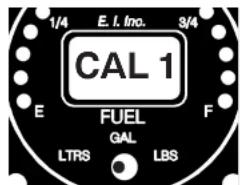
Push and hold the Enter Button on the back of the unit. Turn on the power. Wait 3 seconds and release the Enter Button. Only the Empty LED should be lit and the digital display should read "Cal 1". This is your first calibration point.
Note: If you are recalibrating the FL-1 and wanted to advance to a specific calibration point, push and hold the Enter Button on the back of the FL-1 until you get to the calibration point of interest. The calibration points will advance every 3 seconds. If you accidentally advance past the full fuel calibration point, the FL-1 will check for errors, go through the power-up sequence and then into the normal operating mode. You will have to start over.
c. β1 d, β2 d, β3 d, β4 d, β5 d, β6 d, β7 d, β8 d, β9 d, β10

Note: If you want to manually program the Sensor Counts, push and hold the Enter Button at the back of the FL-1 (with the Sensor Counts displayed and not blinking) until the thousands digits starts to blink.
To increase the count of the blinking digit, move the Selector Switch from the center position to the right.
To decrease the count of the blinking digit, move the Selector Switch from the center position to the left.
To blink the next digit to the right, tap the Enter Button on the back of the FL-1.
To exit the manual programming of the Sensor Counts, lock the Sensor Counts into the display and stop the blinking of a digit, push and hold the Enter Button for 3 seconds.
-
To advance to the next calibration point, move the selector switch to the left position, push and hold the Enter Button on the back of the unit until you see "CAL2" in the display. All of the calibration data for calibration point 1 has been stored to permanent memory.
-
Fill the tank to the fuel level indicated on your calibration chart for the next calibration point.
-
Place the Selector Switch to the center position. The FL-1 will display the last programmed fuel level for this calibration point. The display will show something like "P015" or maybe "F015". A "P" would indicate this is a partial fuel level (not the full fuel level). An "F" would indicate this is the full fuel level for the tank and the last cal point. The "015" is the fuel level for this cal point.
-
To program (change) the fuel level for this calibration point, push and hold the Enter Button on the back of the FL-1 for 3 seconds. The far left letter ("P" or "F") will be blinking. To change this letter, move the selector switch to the left or right.


- Place the Selector Switch into the right position. The FL-1 will display the last programmed Sensor Counts for this call point.
Tap the Enter Button on the back of the FL-1, the display will start blinking and the Sensor Counts for the current fuel level in the tank will be displayed. Wait for the display to stabilize and tap the Enter Button to lock the current sensor counts into the display, and stop the blinking.
-
Record the Sensor Counts for this cal point on the calibration chart at the back of this section.
-
Perform steps 10 trough 14 for each cal point. Once you have calibrated the full fuel level, the FL-1 will evaluate the calibration data for any errors. The error codes are listed on the following table.

| Error Codes | |
| Displayed Code | Comments |
| Err1 | The Sensor Counts for Cal Point 1 (Empty) is too high (>3072). |
| Err2 | The Full Fuel Calibration point is missing. All 9 Cal Points are for partial fuel levels. |
| Err3 The Full Fuel Level is less than 4 gallons. | |
| Err4 | The Sensor Counts between full and empty is |
| FL-1 Calibration Chart | |||
| Cal Point | Fuel Level | Tank Sensor Count | Comments |
| 1 | The Sensor Counts for Cal Point 1 (empty) must not be >3072 (Error Code 1). | ||
| 2 | |||
| 3 | The fuel level must increase for each successive Cal Point (Error Code 5). | ||
| 4 | The Sensor Counts between Full and Empty must be 200 Sensor Counts or more (Error Code 4). | ||
| 5 | |||
| 6 | |||
| 7 | |||
| 8 | |||
| 9 | The full fuel level must be 4 gallons or more (Error Code 3). | ||
| 1107012 | |||
Provide the Operating and Installation Manual to the Pilot: Provide the Operating ar
A copy of this manual must be presented to the pilot/owner. A copy of this manual must be presented to the pilot/must be read. A copy of this manual must be left in the aircraft at all times.
FL-1RA-12 and FL-1RA-20-3RA-40
Wiring Diagram Wiring Diagram

FL-1RA-12 and FL-1RA-24FL-1RA-12 and I
Circular Connector Circular Connector
Connecting Cable Harness, Back View (wire side)

Note: See Wiring Diagram for hook up information.
FL-1CA-1CA
Wiring Diagram Wiring Diagram

FL-1CAFL-1CA
Circular Connector Circular Connector
Connecting Cable Harness, Back View (wire side)

Specifications and Operating FeaturesSpecification
Model:
FL-1RA-12REUERDAVOL Instrument to be used in a 12 Volt System and with resistive sensors.)
FL-1RA-24FEuRn2d Instrument to be used in a 24 Volt System and with resistive sensors.)
FL-1CAREubClevel Instrument for use with E.I.'s capacitive sensors from 125Hz to 5KHz.)
Case Size and Weight:
2.5" x 2.5" x 3.65" depth, 2 1/4" Bezel.
10 Oz. Unit Only.
Environmental:
Meets TSO-C55
Power Requirements:
7.5 to 35 Volts, 1/10 Amp.
Analog Display:
A sets of 17 High Intensity Light Emitting Diodes (LEDs) in 210 degree arc with Intensity Control Line available for dimming. Sequential flash test on power up.
LED Warnings:
- 3/17 Tank Warning -3If TheEafule/Warlolegel reaches 3/17 of a tank, the appropriate yellow LED will blink.
- Low Fuel -LifwhEuleft-or right tank reaches 1/17 of a tank, the red LED will blink.
- "OPEN" - THENwire to the fuel tank sensor becomes open, the analog display will show empty and the digital display will show "OPEN."
Note: NBeacknowledge a blinking LED (i.e., to stop the blinking), change the position of the Selector Switch.
Digital Display

Electronicselectronics
International Inc. International Inc.
By: Ron Roberts
0718971A
Rcv. A: 10/15/01
FL-2 FuelLevel Instrumentuel Level Instrument andand
Fuel Level System Issuesuel Level System Issue
Getting a fuel level system to operate accurately is not always an easy task. The FL-2 solves many of the problems found in standard gauges, but there are still many issues that must be addressed. These notes will cover some of those issues.
Resistive Felserved Sensor Issuesuel Level Sensor Issues
It's a good idea to test the resistance of the fuel sensors before installing the FL-2RA Instrument in the aircraft.
A. For Resistive Fuel Sensors which decrease resistance when fuel is added perform the following tests:
- With the float at the bottom of the tank (as it would be if the tank was empty), measure the resistance of the fuel sensor. The resistance should be between 270 ohms and 90 ohms. If the readings are below 90 ohms or greater than 270 ohms, you

may be using the wrong type of sensor. Use a sensor which decreases resistance when fuel is added and which has a maximum resistance of between 90
Technical Note:nechnical Notes
Page Two
- As you lower the sensor float slightly, slightly the top of the tank, the resistance should start to increase. If it does not, the sensor resistance is probably bottomed out. The FL-2 will read lower than actual fuel levels until the sensor wiper drops onto the resistive element.
With the sensor float held to the top of the tank, adjust the sensor float arm so the wiper is on the resistive element and not on the termination (end stop). You will need an ohmmeter to determine this. As you slightly move the float arm, the resistance should change.
B. For resistive fuel sensors that increase resistance when fuel is added perform the following tests:
-
With the float at the bottom of the tank (as it would be if the tank was empty), measure the resistance of the fuel sensor. The resistance should measure 1/4 or less of the total sensor resistance. If the readings are higher, you may need to adjust the sensor float arm. Prior to doing this, read tests 3 and 4 below.
-
With the float at the top of the tank (as it would be if the tank was full), measure the resistance of the fuel sensor. The resistance should be between 270 ohms and 90 ohms. If the readings are below 90 ohms or greater than 270 ohms, you may be using the wrong type of sensor. Use a sensor that increases resistance when fuel is added and has a maximum resistance of
-
As you raise the sensor float slightly slightly bottom of the tank, the resistance should start to increase. If it does not, the sensor resistance is probably bottomed out. The FL-2 will read lower than actual fuel levels until the sensor wiper drops onto the resistive element.


Technical Note:nechnical Notes
Page Three
As a general rule, resistive sensors can be unreliable. We tested a number of NEW resistive fuel sensors and only found two that passed our tests. That was the Stewart Warner F-385-CP05 and the Rochester 7740-304. We do not know the long-term reliability of these sensor.
Some problems with resistive fuel sensors are listed below:
A. Linearity - This is NOT a problem when used with the FL-2. The FL-2 compensates for sensor and tank non-linearity.
C. Repeatability - If a sensor cannot repeat its resistive output for a given fuel level, your fuel level readings on the FL-2 will be inaccurate. Some factors that affect repeatability are:
-
Side loading of the float arm - Most resistive fuel sensors fail this test. This problem is usually caused by poor design of the float arm linkage and/or wiper.
-
Temperature Changes - Most resistive fuel sensors pass this test.
-
Moisture Changes - Most resistive fuel sensors pass this test.
-
Intermittent opens in the wiper - Many resistive fuel sensors fail this test. This problem can be caused by low wiper force, poor wiper design, height variation of the resistive element or poor linkage design. Also, as the wiper bumps onto the terminator (end stops) the wiper can go open (high resistance).
-
Long term reliability - As the wiper, wire wound resistor and linkage wear, intermittent "opens" and side loading effects can become a problem. Also, varnish and other products in the fuel can deposit on the wiper and wire wound resistor. In addition, if the fuel level in the tank leaves the wiper and wire wound resistor exposed to air for long periods
Technical Note:nechnical Notes
Page Four
Capacitive and Resistive F0placitivSensbResisteeR Level Sensor Is
The dihedral of the wing can affect full fuel level readings. Once the fuel level in the tank goes above the sensor, the fuel level reading on the FL-2 will not read any higher. (For example: if a tank holds 20

gallons of fuel but at 18 gallons the fuel is at the top of the sensor, the maximum the FL-2 will read is 18 gallons.) The FL-2 reading will only be accurate for tank levels of 18 gallons and lower. This is a common problem for most resistive fuel sensor installations. By programming the FL-2 with a slightly lower Sensor Count for the full fuel level calibration point, the FL-2 can be made to read the Full Fuel Level.
To minimize this problem with a resistive sensor some aircraft manufacturers will install two fuel
sensors in a single tank; one at the in-board and one at the out-board portion of the tank. The sensors are wired in series (one sensor must be insulated from ground). They must not have a combined series resistance of over 270 ohms to work with the FL-2RA instrument (a paralleling resistor can be used to fix this problem). Since there are two resistive fuel sensors in a single tank, there is twice as much to go wrong. It is very important to use very reliable and repeatable resistive fuel sensors (if there is such a thing) in this design.

Fuel slosh to the in-board or out-board portion of the tank can also cause inaccurate readings. For example: depending on the fuel sensor placement in the tank, as the fuel sloshes to the out-board portion of the tank during a turn, the fuel level reading on an in-board mounted sensor will lower,

- FUEL LEVEL FUEL LEVEL
- FL-1FL-1 IMPORTANT NOTICE IMPORTANT NOTICE
- CONTENTSCONTENTS
- WARRANTY
- OPERATING INSTRUCTIONS OPERATING INSTRUCTION FL-1RA & FL-1CAFL-1RA & FL-1CA
- INSTRUMENT:INSTRUMENT
- DIGITAL DISPLAY: DIGITAL DISPLAY
- INSTALLATION INSTRUCTIONS INSTALLATION INSTRUCT FL-1FL-1
- IMPORTANT INFORMATION AND INITIAL CHECK OUT: IMPORTANT INFORMATION AND INITIAL CHEC
- ROUTE THE CIRCULAR CONNECTOR: ROUTE THE CIRCULAR CONNECTOR
- ROUTE THE PBWREETTHE GROUND WIRES:OWER AND GROUND WIRES
- ROUTE THE BACKLIGHT WIRES: ROUTE THE BACKLIGHT WIRES
- ROUTE THE EXTERNAL WARNING (DERERDALDALE WRRNING CONTROL LINE
- ROUTE THE FBASENSEFWIRE(RELSENSOTHWPOWER FUSE)(FLAYBTE12APOWET-1RB)-12 (ONLY):ONLY)
- ROUTE THE THREE FBAUTENTH 6THSEE WIRES (FLENRAS@MP): -WRESO(RLY)
- INSTALL THE INSTRUMENT IN THE PANEL
- SELECTING THE PROPER FILTER: SELECTING THE PROPER FILTER
- PROGRAMMING THE FILTEROPERATINGMODE FILTERRESOLUTION:, OPERATING MODE AND RES
- CALIBRATION ISSUES: CALIBRATION ISSUES
- CALIBRATE THE FCELLRATEBHLE: F
- PROVIDE THE OPERATING AND INSTALLATION MANUAL TO THE PILOT: PROVIDE THE OPERATING AR
- FL-1RA-12 AND FL-1RA-20-3RA-40
- WIRING DIAGRAM WIRING DIAGRAM
- FL-1RA-12 AND FL-1RA-24FL-1RA-12 AND I
- CIRCULAR CONNECTOR CIRCULAR CONNECTOR
- FL-1CAFL-1CA
- SPECIFICATIONS AND OPERATING FEATURESSPECIFICATION
- ELECTRONICSELECTRONICS
- INTERNATIONAL INC. INTERNATIONAL INC
- FL-2 FUELLEVEL INSTRUMENTUEL LEVEL INSTRUMENT ANDAND
- FUEL LEVEL SYSTEM ISSUESUEL LEVEL SYSTEM ISSUE
- RESISTIVE FELSERVED SENSOR ISSUESUEL LEVEL SENSOR ISSUES
- TECHNICAL NOTE:NECHNICAL NOTES
- PAGE TWO
- PAGE THREE
- CAPACITIVE AND RESISTIVE F0PLACITIVSENSBRESISTEER LEVEL SENSOR IS
Brand : Electronics International
Model : FL-1RA-12
Category : Electronics