
T2000AV-L - Avionics Microair - Free user manual and instructions
Find the device manual for free T2000AV-L Microair in PDF.


| Product Type | Transponder for Unmanned Aerial Vehicles |
| Model | T2000AV-L |
| Manufacturer | Microair Avionics Pty Ltd |
| Dimensions (W x H x D) | 61 mm x 61 mm x 134 mm |
| Weight | 454 g (16 oz) |
| Power Input | 10-33 V DC |
| Current Consumption | 100-150 mA @ 28V, 150-200 mA @ 14V |
| Operational Modes | Standby, Mode 3A (4096 codes), Mode 3A/C |
| Transmit Frequency | 1090 MHz |
| Receive Frequency | 1030 MHz |
| Transmitter Peak Power | 200 W |
| Altitude Input | Gillham code (10-line parallel) or serial RS232 |
| Antenna Connector | BNC or TNC (rear panel) |
| Interface | RS-232 via DB-25 connector |
| Compliance | RTCA/DO-144A, DO-160D, DO-178B Level C |
| Temperature Range | -20°C to +55°C |
| Warranty (New Units) | 2 years from date of purchase |
| Remote Functions | External standby and ident (via DB-25) |
| Control Software | UAV Terminal Software (Windows 98 to XP) |
| Self-Test | Ping function for RF integrity check |
| Suppression | Suppression IN/OUT for DME and other avionics |
Frequently Asked Questions - T2000AV-L Microair
User questions about T2000AV-L Microair
0 question about this device. Answer the ones you know or ask your own.
Ask a new question about this device
Download the instructions for your Avionics in PDF format for free! Find your manual T2000AV-L - Microair and take your electronic device back in hand. On this page are published all the documents necessary for the use of your device. T2000AV-L by Microair.
USER MANUAL T2000AV-L Microair
natural_image
Two airplanes in flight, one flying and one trailing, with visible exhaust trails (no text or symbols)T2000UAV-L TRANSPONDER INSTALLATION AND USER MANUAL

Microair Avionics Pty Ltd
Airport Drive
Bundaberg
Queensland 4670
Australia
Tel: +61 7 41 553048
Fax: +61 7 41 553049
e-mail: sales@microair.com.au

About This Document
This supplement describes the installation option, and software controls for the T2000UAV-L transponder, operating with software revision T2000UAV-L_01R6.5.
Microair reserves the right to amend this supplement as required, to reflect any enhancements or upgrades to the T2000 transponder series.
© Microair Avionics Pty Ltd

natural_image
Two metallic industrial electronic modules with control knobs and a small inset image showing a logo (no readable text or symbols)REVISION STATUS
| Revision Date Change | |||
| 01R1 | 28/07/09 | Initial | release |
The T2000UAV-L Transponder is not a TSO'd product.
TABLE OF CONTENTS
1.0 INTRODUCTION 4
2.0 T2000UAV-L DESCRIPTION 5
2.1 T2000UAV-L ANTENNA OPTIONS 5
3.0 SOFTWARE CONTROL 6
3.1 THE UAV-L TERMINAL SOFTWARE 6
3.2 THE UAV COMMAND STRUCTURE 7
3.3 DATA SPEED 7
3.4 VALID COMMANDS 8
3.4.1 Standby (s=t) 9
3.4.2 Mode 3A (s=a) 9
3.4.3 Mode C (s=c) 9
3.4.4 Ident (i=s) 9
3.4.5 Altitude (a=?) 9
3.4.6 Altitude Source (d = ?) 9
3.4.7 Encoder Power (e=?) 10
3.4.8 Voltage (v=?) 10
3.4.9 Reply Annunciator (r=y) 10
3.4.10 Ping Function (p = ?) 10
4.0 T2000UAV-L INSTALLATION ERROR! BOOKMA
5.0 T2000UAV-L TIE DOWN STRAP 11
The T2000UAV-L is a special version of the T2000 Transponder, designed for operation in unmanned aircraft. This product is not TSO'd due to the OEM nature of the management software. The system consisting of the T2000UAV-L, and the OEM's management software control should collectively be submitted for compliance to TSO C74c, as part of the OEM's type certificate.
The T2000UAV-L is based upon the certified T2000SFL transponder, and is known to comply with the following:
Environmental: RTCA/DO-160D
Software: RTCA/DO-178B
Transponder Function: RTCA/DO-144A
Transmitter Operation
FCC
Approval

natural_image
3D rendering of a rectangular electronic device with mounting holes and a central display (no visible text or symbols)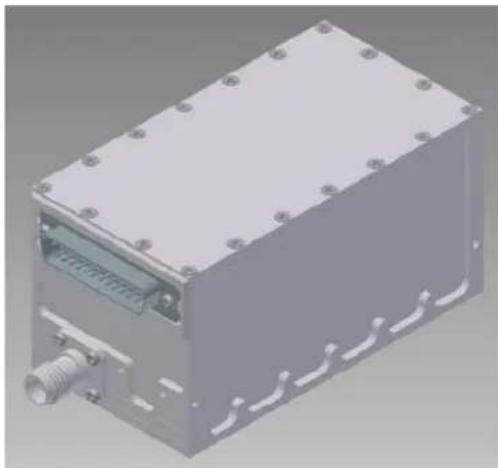
natural_image
3D rendering of a rectangular electronic device with mounting holes and a threaded connector (no text or symbols visible)2.0 T2000UAV-L DESCRIPTION
The UAV-L version of the T2000SFL has no display. The chassis has been truncated by having the display housing milled off. The front face is plated off and sealed.
A command set allows the UAV's flight management system to have full functional control over the transponder. The RS-232 interface is accessed from the DB-25 connector on the rear face of the chassis.
The T2000UAV-L requires a standard Gillham code altitude encoder, to supply altitude data over a 10 line parallel interface.
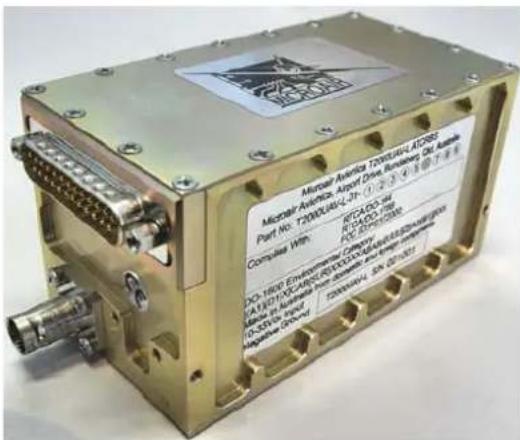
The T2000UAV-L features remote switching options, available from the rear DB-25 connector for remote standby and remote ident functions.
2.1 T2000UAV-L ANTENNA OPTIONS
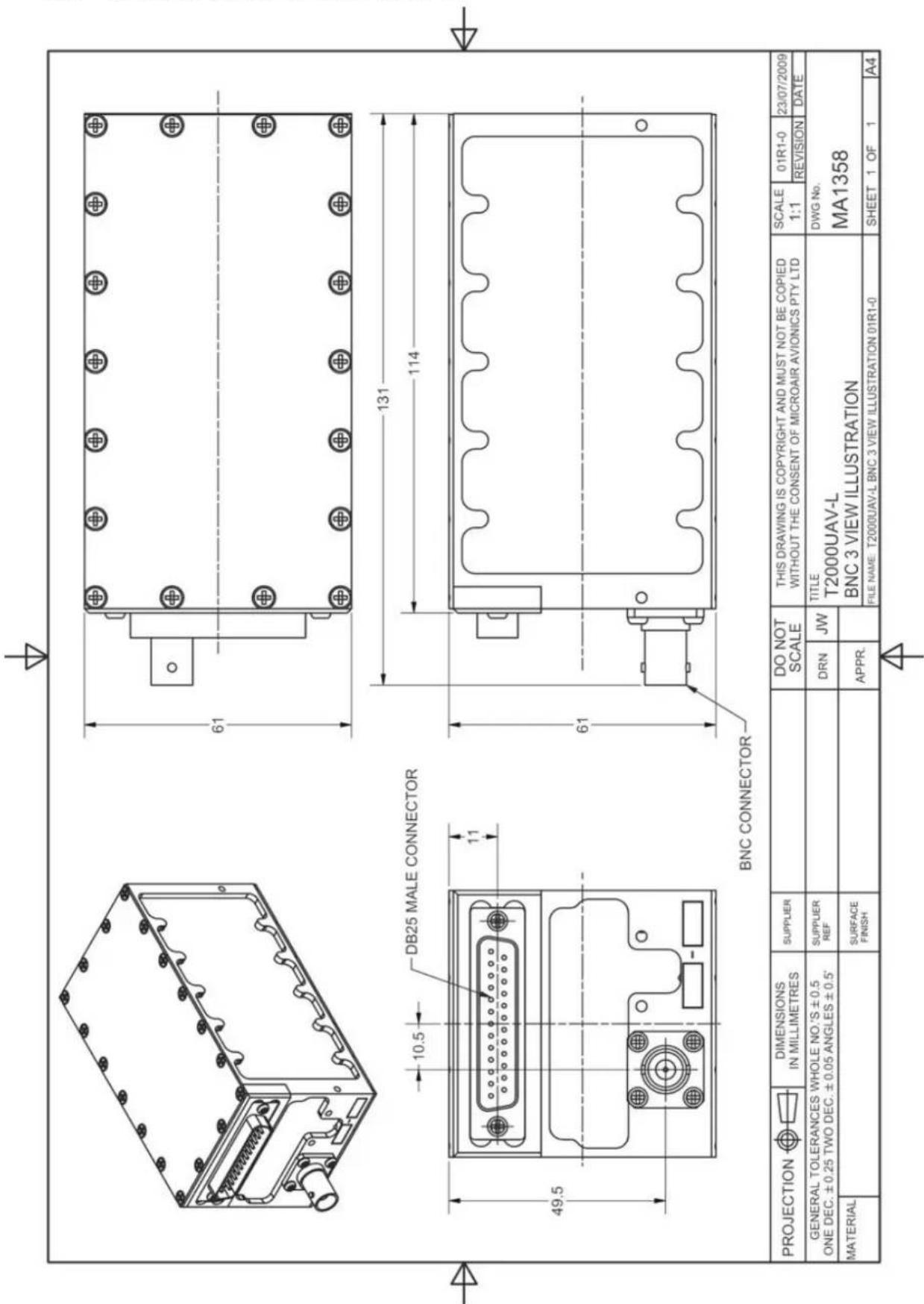
The T2000UAV-L can be supplied with a standard BNC connector located on the rear face of the chassis, adjacent to the DB-25.
Part Number: T2000UAV-L_01R1
Order Number: T2000UAV-L_MA1358_01R1-0

natural_image
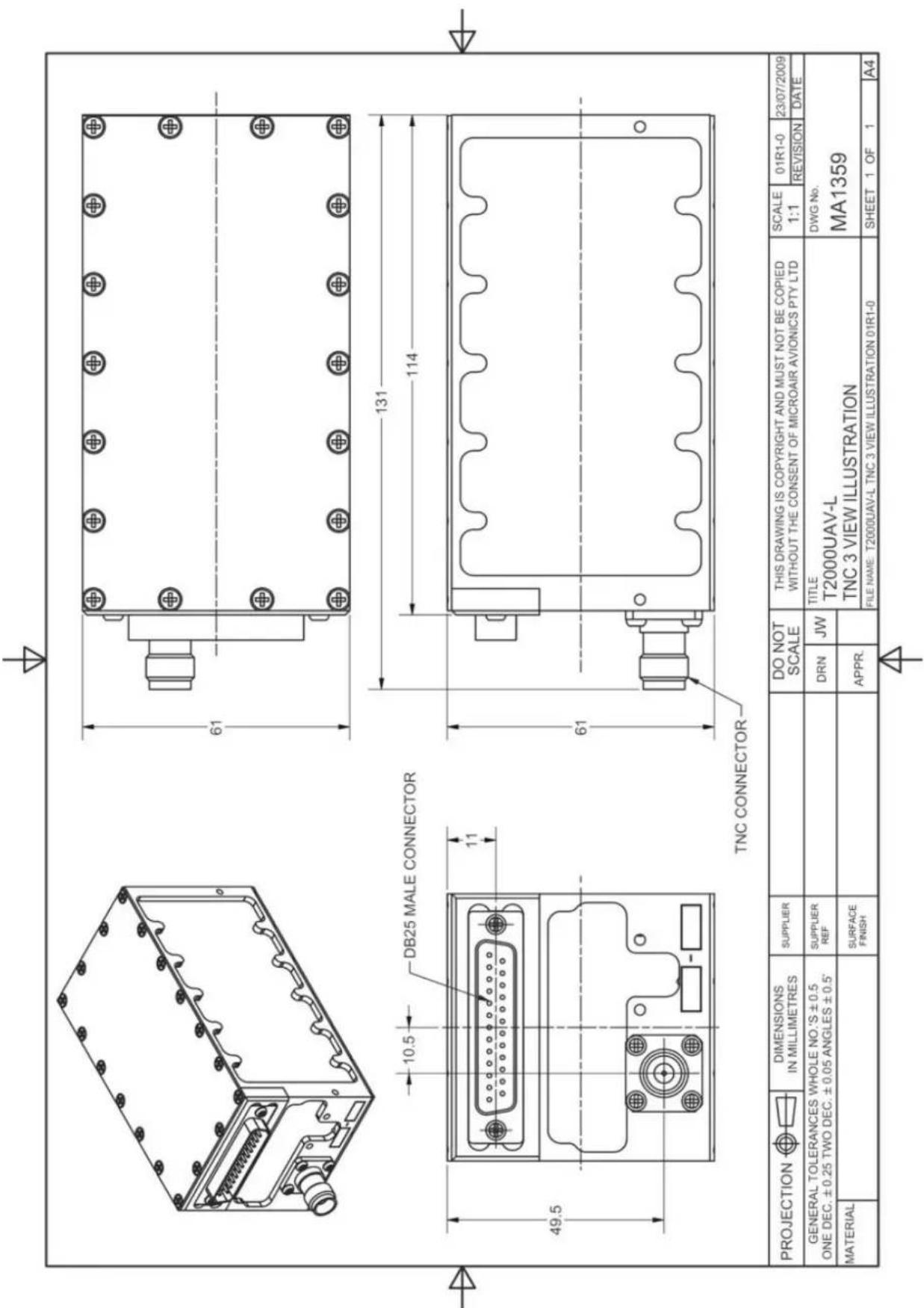
Isometric line drawing of a rectangular electronic device with mounting holes and internal components (no text or symbols)The T2000UAV-L can be supplied with a standard TNC connector located on the rear face of the chassis, adjacent to the DB-25.
Part Number: T2000UAV-L_01R1
Order Number: T2000UAV-L_MA1359_01R1-0

natural_image
Isometric line drawing of a rectangular electronic device with mounting holes and internal components (no text or symbols)3.0 SOFTWARE CONTROL
The T2000UAV-L can be controlled by issuing of commands in the form of ASCII characters, sent and received over an RS232 interface.
The command set can be used to either poll the transponder of the status of a parameter, or to command a function to a particular setting.
3.1 MICROAIR UAV TERMINAL SOFTWARE
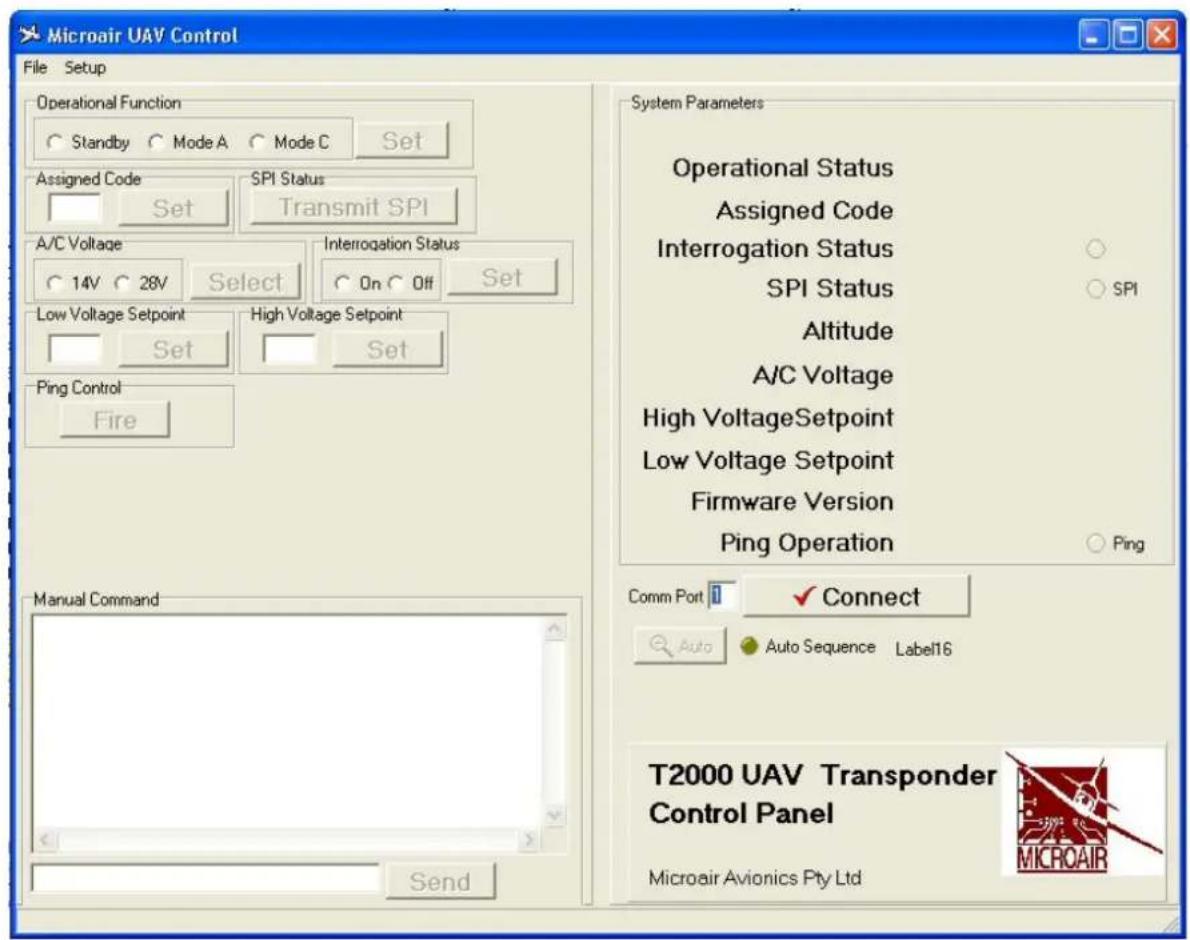
The T2000UAV-L is supplied with UAV Control software to which it is capable of issuing all commands, and polling for all parameters. The terminal software is a simple EXE file, and is compatible with windows 98 through to windows XP operating systems.
T2000UAV Terminal Software.exe
The terminal software is capable of issuing all of the commands, to either poll for any of the parameters, or to set any of the parameters to discrete values.
3.2 THE UAV COMMAND STRUCTURE
The T2000UAV-L is controlled by a series of simple commands. The T2000UAV-L can be commanded to set a code, and to operate in a particular mode. Once the code is set, and the operating mode decided, the T2000UAV-L will operate until another command is received.
The status the T2000UAV-L's various operating parameters can be queried. A query command returns a value for that particular parameter.
The operator can address the T2000UAV with a command from the command set, via an RS232 interface. The command requires the correct syntax, to be valid.
The command string will consist of STXx=
Where STX is the non-printable ASCII character (02)
ETX is the non-printable ASCII character (03)
x is a valid command
3.3 DATA SPEED
The RS232 interface for the T2000UAV-L has a data rate of:
9600,N,8,1,P
where 9600 = baud rate of 9600
8 = 8 data bits
1 = 1 stop bit
P = with XON / XOFF
Refer to section 10.0 for wiring details and pin assignments.
3.4 SERIAL DATA COMMAND SET
| CMD | Action Write String Response | ||
| a | Altitude (Read/Write) | a=?a=xxxx where xxxxx=altitude in feeta=#*& where #*&=altitude in feet | a=eg 1234Fa=xxxx (writes altitude data in feet to T2000UAV)a=? (invalid altitude data) |
| c | Assigned Code (Read/Write) | c=2212 (set code to 2212)c=? (ask for assigned code) | c=2212 (code write successful)c= |
| d | Assign altitude source (Read/Write) | d=g (set altitude source = Gillham)d=s (set altitude source = Serial)d=? | d=g (altitude source = Gillham)d=s (altitude source = Serial)d= |
| e | Encoder power control (Read/Write) | e=o (set encoder power always ON)e=c (set encoder power mode C only)e=? | e=o (Encoder power on in both mode A and Ce=c (Encoder power on in mode C only)e= |
| i | Ident (Read/Write) | i=s (Squawk Ident)i=? (ask for current ident status) | i=1 (1 = Ident active, 0 = Ident inactive)i= |
| p | Ping Function | p=? | p=y (yes - ping cycle was successful)p=n (no - ping was not successful) |
| r | Reply Annunciator | r=yr=nr=? | * is sent if a reply was made in the last 3.6 seconds no annunciation character is sentr= |
| s | Operational Status (Read/Write) | s=t (command standby mode)s=a (command Mode A operation)s=c (command Mode C operation)s=? (ask for current operational mode) | s=t (command successful, mode = standby)s=a (command successful, mode = Mode 3A)s=c (command successful, mode = Mode Cs= |
| v | Bus Voltage (Read/Write) | v=1 (set bus voltage to 14V)v=2 (set bus voltage to 28V) | v=13.6 (write successful, current voltage returned)v=24.8 (write successful, current voltage returned) |
| z | Software Revision | z=? | z=eg T2000U xx-x.x.x |
3.4.1 STANDBY (S=T)
To bring the T2000UAV-L to the standby condition, the "s" parameter is set to value "t". Then the transponder can then be powered down. When the T2000UAV-L is restarted, it will return in standby
The transponder should be commanded to the standby condition, when the vehicle is on the ground. The transponder is typically set to mode 3A or mode 3A/C operation once airborne.
3.4.2 MODE 3A (S=A)
The T2000UAV-L transponder will respond to all mode A interrogations with the identity code set by the "c" parameter. The transponder will also reply to all mode C interrogations with just the framing pulse (no altitude data). This ensures visibility to TCAS operators, while the transponder is operating in mode A.
3.4.3 MODE C (S=C)
The T2000UAV-L will respond to all mode A interrogations with the identity code set by the “c” parameter, and all mode C interrogations with the encoder’s altitude data, as defined by the “a” parameter. The transponder will reply to both SSR and TCAS interrogations.
3.4.4 IDENT (I=S)
The ident function is performed at the request of ATC to “squawk ident”. To initiate the ident function the “i” parameter is set to s. The T2000UAV-L will switch to ident mode, which will add an additional data bit to the outgoing replies. The additional data bit makes the transponder return on the ATC display flash to assist the controller with identification. The transponder will remain in ident mode for 18 seconds, and then return to the previous mode of operation.
3.4.5 ALTITUDE (A=?)
The T2000UAV-L will reply with the current mode C value.
If the T2000UAV-L is configured to operate with an altitude encoder the T2000UAV-L will reply with the current barometric altitude from the encoder.
If the T2000UAV-L is configured to operate with a serial altitude data source, the T2000UAV-L will reply with the last received altitude data value.
3.4.6 ALTITUDE SOURCE (D=?)
The T2000UAV-L can accept altitude data for the mode C response either from a Gillham (d=g for 10 line parallel) source or from a serial (d=s for RS232) source.
When d=g is selected the T2000UAV-L will look to the 10 line Gillham input for data from an altitude encoder.
When d=s is selected the T2000UAV-L will look for altitude data to be passed via the “a” command on the RS232 serial data link. The altitude data source shall send the a=
Where the altitude data cannot be detected from the assigned source or the data cannot be encoded, no altitude data will be outputted. The mode C response will be framing pulses only. The T2000UAV-L will question the altitude data with a=?, via the RS232 serial interface.
3.4.7 ENCODER POWER (E=?)
When using an altitude encoder, it may be desirable to only have it powered up when the transponder is operating in mode C. This may save power, as most encoders will typically draw 125 to 150mA when operating.
The operator should allow up to 7 minutes for the encoder to “warm up” before valid altitude data is outputted from the encoder.
3.4.8 VOLTAGE (V=?)
The T2000UAV-L will report the current vehicle bus voltage by polling the “v” parameter. To use this function operator must first set the reference bus voltage by setting v=1 for 14V operation, or v=2 for 28V operation.
3.4.9 REPLY ANNUNCIATOR (R=Y)
A conventional transponder normally has an annunciator of some type (typically a flashing LED) to indicate the rate of reply to SSR interrogations. This indication represents whether the transponder has made a reply to a “sweep”. The rotational speed of the radar is 100 deg/sec, hence the Annunciator should flash every 3.6 seconds.
The equivalent function for the T2000UAV-L is the "r" command which activates the reply annunciator. When activated (r = y) , the T2000UAV-L will send a single * character, if there was a reply made in the preceding 3.6 seconds. When not activated (r = n) , no character is sent.
The operator can query the status of the reply annunciator function (r=?), and the T2000UAV-L will reply with the current function state.
3.4.10 PING FUNCTION (P=?)
The ping function is a self test of the RF sections of the transponder, without the need for a transponder test set. The T2000UAV-L will respond to the “ping” command (p=?) by emitting a narrow (invalid) pulse from the transmitter, and detecting the same pulse back through the receiver.
If the T2000UAV-L is able to complete the transmission cycle, p=y is returned to the operator.
If the T2000UAV-L is not able to complete the transmission cycle, p=n is returned to the operator.

The ping function will only operate if the transponder is in mode a or c. The ping function will not operate while the transponder is in standby mode.
4.0 T2000UAV-L TIE DOWN STRAP
Microair recommends a simple tie down strap, to hold the transponder in place. Drawing MA1156 shows the layout and use of a simple example.

Never use the case screws as part of the mounting system for the transponder. Always locate the strap over the chassis at a point which remains clear of the filter lock nuts.

Part Number: T2000UAV-L_MA1156_01R1-1
5.0 MODE C ENCODER
Mount the mode C blind encoder as per the manufacturer's installation instructions. All wiring can be run back to the T2000UAV-L for connection (refer wiring diagram). The power for the encoder is supplied from the T2000UAV-L. This power is switched when the T2000UAV-L is turned on.

IMPORTANT NOTE
Most encoder manufacturers advise of a warm up period for their product before altitude data is supplied. The period can typically be up to 10 minutes.
Where the OEM intends to use their own barometric altitude data source, it should comply to TSO C88a standard, to be sure of compatibility with the T2000UAV-L.
Although it is unlikely that the encoder source in a UAV installation will require switched power from the T2000UAV-L, it is recommended that the ground be wired with the data lines in all cases. This will ensure correct signal operation of the Gillham code.
6.0 ANTENNA
Mount the transponder antenna as per the manufacturer's installation instructions. Try and keep the cable runs as short as possible. In a composite airframe a suitable ground plane will be required. Avoid mounting the antenna inside a fuselage that is all metal or carbon fibre.
For fiberglass fuselages the antenna may be mounted internally, but must still point downwards and have an adequate ground plane. Alternatively an approved dipole strip antenna may be used. The dipole strip must be installed in accordance with the manufacturer's instructions.
To avoid possible interference the antenna must be mounted a minimum of 200mm (8 inches) from the T2000UAV-L main unit. The transponder antenna should be mounted 2metres (78 inches) from the DME antenna, 1.5 metres (58 inches) from the ADF sense antenna, and 1metre (39 inches) from TCAS antennas.
7.0 COAXIAL CABLE
The T2000UAV-L allows for 1.5dB cable loss from the unit to the antenna. The installer should consider carefully what type of coaxial cable is to be used, so that this loss limit is not exceeded. The cable should be terminated with silver plated BNC connectors where possible.

Step 2

natural_image
Pure electrical connector diagram without any text, numbers, or symbolsStep 4
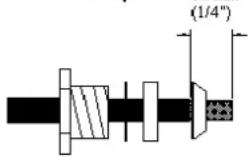
Step 1
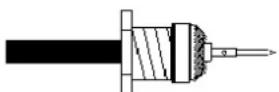
Step 3
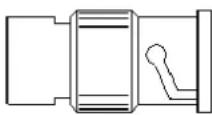
Microair recommends the following:
| Cable Bending Radius | Loss @ 1Ghz dB/m | Max Length TX | Power RX Sensitivity | ||
| RG58/C/U(Mil Spec) | 50mm(2") | 0.76dB/m0.21dB/ft | 2.0m7ft | 142W | -70dBm |
| RG213/A/U(Mil Spec) | 125mm(5") | 0.26dB/m0.08dB/ft | 5.75m19ft | 142W | -70dBm |
| RG223/U(Mil Spec) | 100mm(4") | 0.47dB/m0.14dB/ft | 3.2m10ft | 142W | -70dBm |
| RG400(Mil Spec) | 50mm(2") | 0.60dB/m0.18dB/ft | 2.5m8ft | 142W | -70dBm |
| Belden 8262 50mm(2") | 0.68dB/m0.21dB/ft | 2.2m7ft | 142W | -70dBm | |
| URM-43 | 50mm(2") | 0.47dB/m0.14dB/ft | 3.2m10ft | 142W | -70dBm |
The loss figures in this table are a guideline only. When installed the power output at the antenna shall be greater than 125W and receiver sensitivity shall be better than -68dBm, to be compliant with RTCA/DO-144A.

IMPORTANT NOTE
Do not exceed the minimum bending radius. Tight bends will introduce losses in the cable, which may affect the performance of the transponder. When fixing the coax cable in the airframe, do not “strangle” the cable with tight cable ties. This can distort or damage the coax screen.
8.0 WIRING
The T2000UAV-L Transponder receives primary power (14V or 28V dc) from the aircraft's power source. Power connections, voltage, and circuit breaker requirements are shown on the wiring diagram. The length of the power supply wires to parallel pins should be approximately the same length, so that the best distribution of current can be effected.
Microair recommends that the encoder be installed and wired in accordance with the manufacturer's installation instructions.
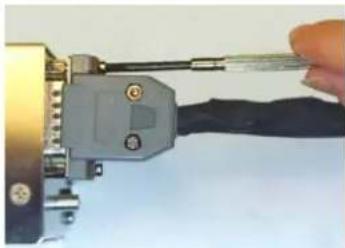
It is very important to secure all D series plugs via their security screws before operation. Aircraft vibration may disconnect a D series plug if it not secured.
Where possible, the antenna coaxial cable should be run separately to all other wiring on the aircraft from the transponder.
8.1 CABLING
Microair recommends that wiring for all of the T2000UAV-L's functions and connections be run at the time of installation, even though they may not be required at this stage. Adding additional wiring to the loom at a later stage may be very difficult.
All wiring should be installed in accordance with FAA AC43.13-1A Chapter 11 or equivalent.
Microair recommends the following cable types for connection of the T2000UAV-L:
Power Input 18 AWG TEFZEL 22759/16-16 Red and Black Wire
External Connections 22 AWG TEFZEL 22759/16-22 22 AWG
Wire or TEFZEL 27500-22TG1T14
Single core shield
Encoder Power 22 AWG TEFZEL 22759/16-22
Red and Black Wire
Encoder Data 22 AWG TEFZEL 22759/16-22
White Wire
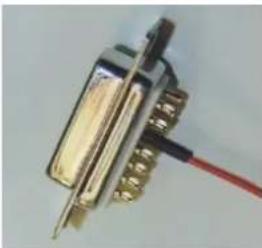
When terminating the DB plugs for connection to the T2000UAV-L, ensure that the wires are securely soldered to the pins, and that each wire is separately insulated with heatshrink tubing.
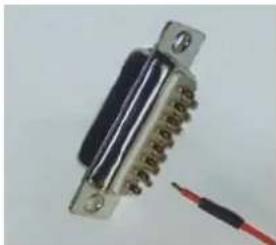
natural_image
Close-up of a metallic electrical connector with a red screwdriver inserted (no visible text or symbols)"Tinned" wire
natural_image
Close-up of a metallic connector with gold contacts and a red wire, no visible text or symbolsSoldered with heatshrink
natural_image
Close-up of a hand using a tool to connect a cable or wire component (no visible text or symbols)Locking bolts tightened
The DB-25 plug is secured to the T2000UAV-L with machine screws or thumb screws. The DB-15 should also be secured to the encoder, either with screws, or mechanical sliding lock (if fitted to some types of encoder).
If your encoder is fitted with a slide locking mechanism, the encoder manufacturer's plug should be used, to ensure correct locking action.
8.2 POWER ON/OFF
The T2000UAV-L has no ON/OFF control function. The unit is on from the moment power is applied to the unit. There is no software OFF command. When power is removed from the T2000UAV-L, it will not respond to any software command.
When the T2000UAV-L is turned on, it is always in standby mode. The mode A code will default to the last mode A code used.

IMPORTANT NOTE
Always bring the T2000UAV-L to standby before turning off the power. If the transponder is powered off while it is in the process of transmitting, damage may occur to the internal power supply and/or the transmitter. Damage of this type is not covered by the warranty.
No mode C code will be outputted until the T2000UAV-L is supplied with altitude data (either serial or Gillham) which can be encoded by the transponder.
8.3 SUPPRESSION IN / OUT
The suppression IN line is wired to other avionics such as DME, to “suppress” the transponder’s transmissions, at times critical to the other equipment’s operation.
The suppression OUT line does the reverse of the IN line. It is wired to other avionic equipment to allow the T2000UAV-L to “suppress” their transmissions at times critical to the T2000UAV-L’s operation.
Seek the advice of a qualified Avionics Technician before attempting to wire out these functions. If certified equipment is modified to operate in conjunction with the T2000UAV-L installation, then the installation of that equipment must be re-inspected and re-approved before operation.
8.4 EXTERNAL STANDBY
The external standby can be wired to a remote switch. When the line is taken to ground the T2000UAV-L will return to standby mode, and stay there regardless of the value for “s” parameter. The “s” parameter cannot be queried while the external standby line is grounded.
Once the external standby line has been “released” from ground, the T2000UAV-L will revert to the last “s” parameter setting.
8.5 EXTERNAL IDENT
Future development.
9.0 TECHNICAL DRAWINGS
10.0 WIRING DIAGRAMS
T2000UAV-L with EC2002 Altitude Encoder
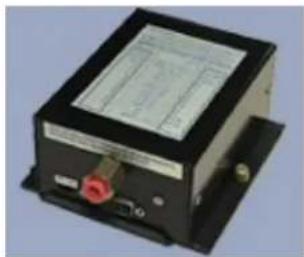
T2000UAV-L with AK-350 Altitude Encoder
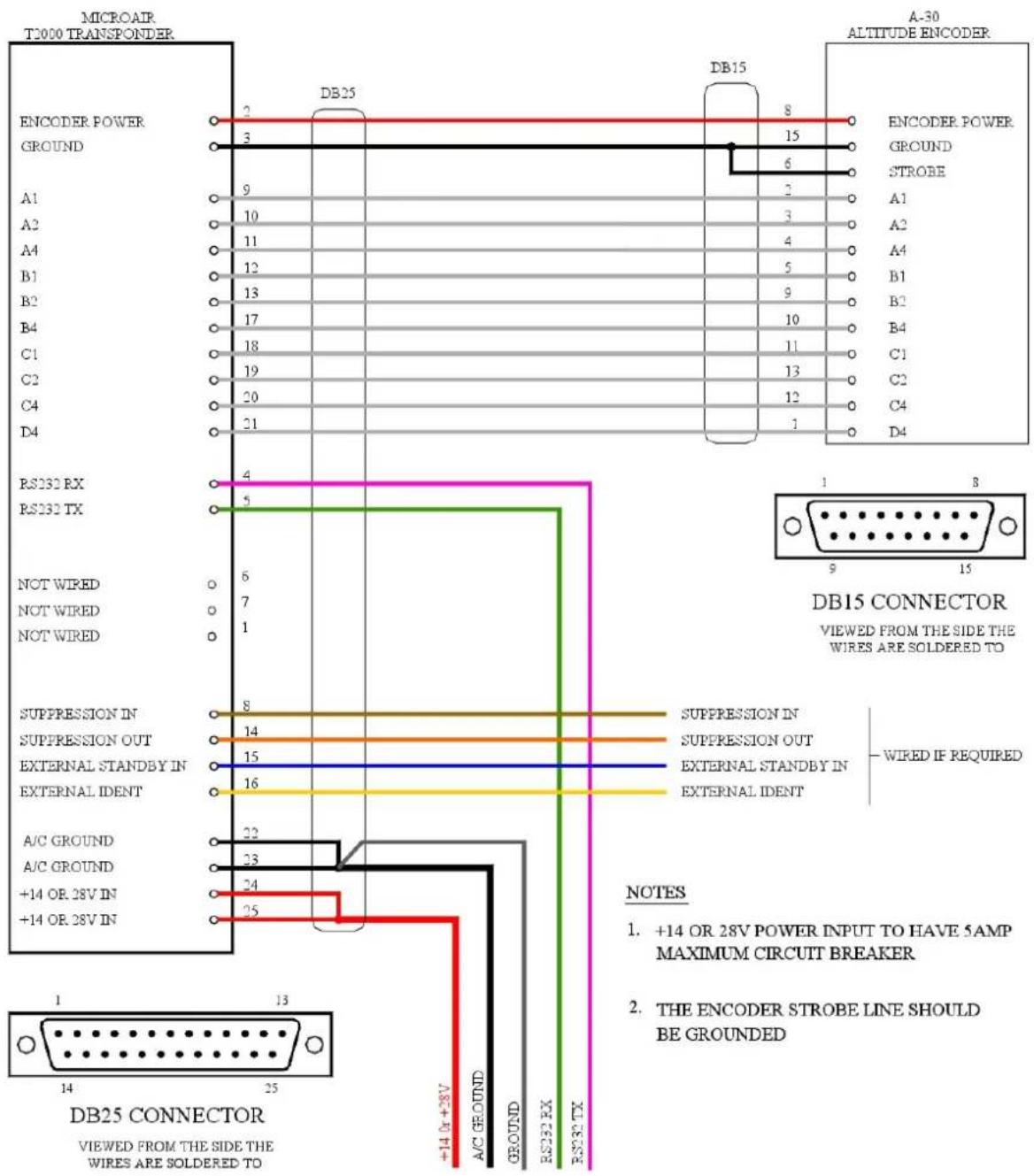
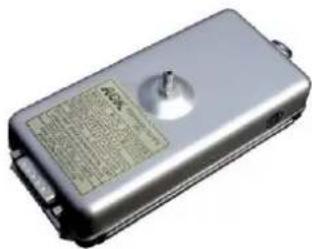
T2000UAV-L with A-30 Altitude Encoder
T2000UAV-L with serial altitude data interface


MICROAIR AVIONICS
T2000UAV-L TRANSPONDER
WIRING DIAGRAM
WITH EC2002 ALTITUDE ENCODER

natural_image
Black electronic device with a 16-pin connector and labeled ports (no visible text or symbols on body)

MICROAIR AVIONICS
T2000UAV-L TRANSPONDER
WIRING DIAGRAM
WITH AK-350 ALTITUDE ENCODER

MICROAIR AVIONICS
T2000UAV-L TRANSPONDER
WIRING DIAGRAM
WITH A-30 ALTITUDE ENCODER
natural_image
Exterior view of a silver rectangular electronic device with a circular button and label (no readable text or symbols)
4
25
DB25 CONNECTOR
VIEW FROM REAR
NOTES
- +14 OR 28V POWER INPUT TO HAVE 5AMP MINIMUM CIRCUIT BREAKER
- EXTERNAL IDENT SWITCH IF FITTED SHOULD BE MOMENTARY-ON ONLY
- EXTERNAL STANDBY SWITCH IS NORMALLY CLOSED TO GROUND TO OPERATE
- SUPPRESSION IN LOW GOING HIGH (>5Vdc <20Vdc) SUPPRESSION OUT LOW GOING HIGH (+5Vdc)
- RS-232 INTERAFCE IS "NULL MODEM" WITH NO HANDSHAKE

MICROAIR AVIONICS T2000UAV-L TRANSPONDER
WIRING DIAGRAM WITH SERIAL ALTITUDE DTA INPUT
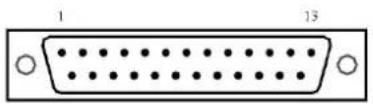
11.0 PIN ASSIGNMENTS
The DB plugs for use with the T2000 series Transponders, require the following pin assignments.
PIN 1 NOT WIRED
PIN 2 SWITCHED MODE C ENCODER POWER OUTPUT
PIN 3 GROUND
PIN 4 RS232 RX
PIN 5 RS232 TX
PIN 6 NOT WIRED
PIN 7 NOT WIRED
PIN 8 SUPPRESSION IN
PIN 9 GILLHAM ALTITUDE A1
PIN 10 GILLHAM ALTITUDE A2
PIN 11 GILLHAM ALTITUDE A4
PIN 12 GILLHAM ALTITUDE B1
PIN 13 GILLHAM ALTITUDE B2
PIN 14 SUPPRESSION OUT
PIN 15 EXTERNAL STANDBY IN
PIN 16 EXTERNAL IDENT
PIN 17 GILLHAM ALTITUDE B4
PIN 18 GILLHAM ALTITUDE C1
PIN 19 GILLHAM ALTITUDE C2
PIN 20 GILLHAM ALTITUDE C4
PIN 21 GILLHAM ALTITUDE D4
PIN 22 POWER GROUND
PIN 23 POWER GROUND
PIN 24 POWER 14 OR 28 VOLTS DC (10-33 VOLTS)
PIN 25 POWER 14 OR 28 VOLTS DC (10-33 VOLTS)

DB25 CONNECTOR VIEW FROM REAR
12.0 SPECIFICATIONS
RTCA Compliance DO-144A
DO-160D
DO-178B Level C
Transmitter
1090MHz
200W
80nS
+/-0.2MHz
Pulse
Rise
120nS Fall Time
Receiver
+10
to
1030MHz Centre Frequency
+/-5MHz Pass band @ -3dB
Input Power 10-33Vdc
100-150mA @ 28V
150-200mA @ 14V
Operational Modes Standby
Mode 3A (4096 codes)
Mode
3A/C
Temperature -20°C to +55°C
Dimensions
Width
61mm
Height 61mm
Length 134mm
Weight
454 g
(16 oz)
Specifications are subject to change without notice.
13.0 LIMITED WARRANTY
Limited Warranty
The warranty period for any Microair Avionics manufactured article is dependant on Condition of the article at time of sale and the Purchase Date.
For New Articles the warranty period commences from Date of Purchase and is valid for 2 years or the minimum period defined by applicable consumer law, whichever is the longer. In the absence of original Proof of Purchase the warranty will be valid for 2 years from Date of Factory Shipment as determined by Microair Avionics.

For Factory Reconditioned Articles offered for sale, the warranty period commences from Date of Purchase and is valid for 12 months.
For Factory Exchanged Articles the warranty period commences from the Date of Purchase of the original article and is valid for the remainder of the original warranty period.
For Repaired Articles the warranty period commences from the date of Factory Shipment and is valid for 6 months for the original defect only.
Microair Avionics will, at its sole discretion, repair or replace any components, which fail in normal use. Such repairs or replacement will be made at no charge to the customer for parts or labour. The customer shall be responsible for any transportation costs for return of this product to Microair Pty Ltd or an approved Microair Service Centre.
This warranty does not cover failures due to abuse, misuse, accident, unauthorised alteration, or repairs carried out by parties other than Microair Avionics or an approved Microair Avionics Service Centre. This warranty does not cover failures where the product has not been installed or operated, in accordance with the provisions of the User and Installation manual(s).
It shall be at Microair Avionics sole discretion to decide if a defect is a result of material or workmanship failure.
THE WARRANTIES AND REMEDIES CONTAINED HEREIN ARE EXCLUSIVE AND IN LIEU OF ALL OTHER WARRANTIES EXPRESSED OR IMPLIED, INCLUDING ANY LIABILITY ARISING UNDER WARRANTY OF MERCHANTABILITY OR FITNESS FOR A PARTICULAR PURPOSE, STATUARY OR OTHERWISE. THIS WARRANTY GIVES YOU SPECIFIC LEGAL RIGHTS, WHICH MAY VARY FROM STATE TO STATE, AND COUNTRY TO COUNTRY.
IN NO EVENT SHALL MICROAIR AVIONICS PTY LTD BE LIABLE FOR ANY INCIDENTAL, SPECIAL, INDIRECT OR CONSEQUENTIAL DAMAGES, WHETHER RESULTING FROM THE USE, MISUSE OR INABILITY TO USE THIS PRODUCT OR FROM DEFECTS IN THE PRODUCT.
Microair Avionics may at it discretion, refer product returns for repair or service, to a service facility closest to you. Microair Avionics reserves the right to repair or replace the product or software or offer a full refund of the purchase price at its sole discretion.
To obtain warranty service, please email or call the Microair Avionics Repair line in Australia.
Domestic or International Return instructions are available on our website. Please follow these instructions carefully.
Phone: ++61 7 4155 3048
Fax: ++61741553049
Email: repain@microsir.com.au
Website: www.microair.com.au
Limited Warranty Statement 01R3


- T2000UAV-L TRANSPONDER INSTALLATION AND USER MANUAL
- Microair Avionics Pty Ltd
- About This Document
- REVISION STATUS
- TABLE OF CONTENTS
- INTRODUCTION 4
- T2000UAV-L DESCRIPTION 5
- SOFTWARE CONTROL 6
- T2000UAV-L INSTALLATION ERROR! BOOKMA
- T2000UAV-L TIE DOWN STRAP 11
- T2000UAV-L DESCRIPTION
- T2000UAV-L ANTENNA OPTIONS
- SOFTWARE CONTROL
- MICROAIR UAV TERMINAL SOFTWARE
- THE UAV COMMAND STRUCTURE
- DATA SPEED
- STANDBY (S=T)
- MODE 3A (S=A)
- MODE C (S=C)
- IDENT (I=S)
- ALTITUDE (A=?)
- ALTITUDE SOURCE (D=?)
- ENCODER POWER (E=?)
- VOLTAGE (V=?)
- REPLY ANNUNCIATOR (R=Y)
- PING FUNCTION (P=?)
- T2000UAV-L TIE DOWN STRAP
- MODE C ENCODER
- IMPORTANT NOTE
- ANTENNA
- COAXIAL CABLE
- WIRING
- CABLING
- POWER ON/OFF
- SUPPRESSION IN / OUT
- EXTERNAL STANDBY
- EXTERNAL IDENT
- WIRING DIAGRAMS
- NOTES
- MICROAIR AVIONICS T2000UAV-L TRANSPONDER
- PIN ASSIGNMENTS
- SPECIFICATIONS
- LIMITED WARRANTY
- Limited Warranty
Brand : Microair
Model : T2000AV-L
Category : Avionics