BT250 - Car stereo JENSEN - Free user manual and instructions
Find the device manual for free BT250 JENSEN in PDF.


User questions about BT250 JENSEN
0 question about this device. Answer the ones you know or ask your own.
Ask a new question about this device
Download the instructions for your Car stereo in PDF format for free! Find your manual BT250 - JENSEN and take your electronic device back in hand. On this page are published all the documents necessary for the use of your device. BT250 by JENSEN.
USER MANUAL BT250 JENSEN
Bluetooth Car Kit User's Manual
Installation and User Manual
Preface
This publication, including all photographs, illustrations and software, is protected under international copyright laws, with all rights reserved. Neither this manual, nor any of the material contained herein, may be reproduced without the express written consent of the manufacturer.
Version 2.0, March 2009
Trademarks
Other product names mentioned herein are used for identification purposes only and may be trademarks and/or registered trademarks of their respective companies.
Limitation of Liability
While reasonable efforts have been made to ensure the accuracy of this manual, the manufacturer and distributor assume no liability resulting from errors or omissions in this manual, or from the use of the information contained herein.
Preface....i
Installation .... 1
Identifying components....1
Installing the junction box....2
Installing the Components....5
Installing the microphone, control, & speaker ....5
Introduction......6
Product overview and features....6
Pairing phones....8
Turning off the BT250 & the Blue LED light....9
Operation with multiple paired phones 9
Resetting the Car Kit....10
Transferring calls ......10
Notes on using voice recognition....10
Updating the Bluetooth Software....11
Troubleshooting 12
Warranty Information 13
Installation
This section demonstrates how to set up and install the Bluetooth Wireless Car Kit into a vehicle.
Identifying components
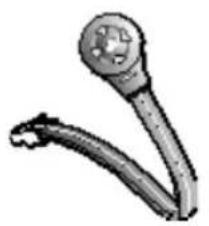
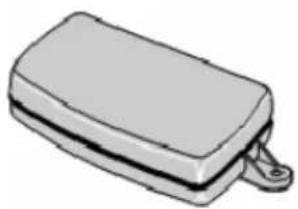
Unpack the Car Kit package and ensure the following items are included.
natural_image
Illustration of a handheld device with a circular head and curved arm (no text or symbols)Wired Remote Part # 31092000

natural_image
Illustration of a computer mouse with cord and accessories (no text or symbols)Microphone Part # 31092440
natural_image
Illustration of a rectangular electronic device with a clip attached (no text or symbols)Junction box Part # 31092100

natural_image
Illustration of a portable electric fan with a black body and attached cable (no text or symbols)Speaker Part # 31092430

Power Cable Part # 31092160

natural_image
Collection of blue and yellow clothing items arranged in a fan-like pattern (no text or symbols visible)Fuse & Hardware Set Part # 31092010
Some items may vary slightly from the picture shown. If any item is missing or damaged, contact your dealer.
Installing the junction box
This Car Kit is designed to work with a 12/24-volt vehicle power supply. Refer to the following to install the junction box in a vehicle.
- Locate a suitable place inside the car to mount the junction box. Select a dry place that avoids excessive heat and mechanical vibration. Ideally, the junction box should be hidden from view, but still easily accessible.
Note: Make sure that the cables are long enough to support the location of the junction box. If the cables are not long enough, do not lengthen the cables; relocate the junction box.
- Use two screws (not included) to fasten the junction box in place.

natural_image
Illustration of a mechanical component with two screws and downward arrows indicating force or movement (no text or symbols)Connecting the power supply
The following illustration demonstrates how to connect the Car Kit's power cable to the vehicle's electrical system.

flowchart
graph LR
    A["Power Cable"] --> B["Yellow Wire to Radio mute"]
    A --> C["Red Wire to Battery"]
    A --> D["Blue Wire to Ignition"]
    A --> E["Black Wire to Ground"]
Important!
The Blue cable must be connected to the 12/24-volt switched ignition to enable the Car Kit to go into standby mode.
Do not connect the Blue cable to the +12/24-volt constant connection. Doing so may discharge the battery of the vehicle and prevent the Car Kit from being reset.
Connecting Components
The following illustration shows where to connect the devices. Do not connect the components until you have followed the next steps and have finalized your installation.
text_image
Junction box Speaker Microphone Remote ControlRemote Control The control module should be located within reach and view of the driver.
Speaker For best reception, the speaker should be mounted at least 80 cm (30 inches) away from the Car Kit's microphone.
Microphone Ideally, the microphone should be located in front of the user and above waist height. We recommend on the Drivers Side Window Pillar.
Installing the Components
Before installing the components, take note of the following:
- Make sure that the cables can reach from the each component to the Junction Box. If the cable is too short, relocate the component. Do not lengthen the cable.
- The supplied microphone is uni-directional. For best results, place the microphone in front of the person talking. It has a reception angle of 60 degrees, and is most effective within a 24 inch radius.
Installing the microphone, control, & speaker
Find a suitable place for the microphone. Remove dust and grease from the surface.
- Remove the protective cover from the Velcro and press it firmly onto the bottom of the microphone.
- Remove the protective cover from the other Velcro pad, and firmly press the pad in place.
- Attach the microphone.
- Repeat the same process for the remote control.
- Mount the speaker using two screws in a location that is not blocked and will allow the voice to be heard clearly.

flowchart
graph TD
    A["Microcontroller"] --> B["Control Layer"]
    B --> C["Lower Control Layer"]
Introduction
The Bluetooth Wireless Car Kit is designed to help make your driving experience more convenient, safe, and provide you with years of trouble free use.
Product overview and features
The Car Kit is designed to make driving your car and talking on the phone safe and easy. It consists of a receiver, a remote control, a uni-directional microphone, and a speaker. When properly installed, the Car Kit enables you to talk freely to somebody on your mobile phone without having to take your hands off the steering wheel.
The Car Kit is equipped with a mute feature, which turns the volume of your car stereo down when you are using your phone. This feature can be enabled by a trained installation professional. See the selling dealer if you would like this feature installed.
The Bluetooth Car Kit is designed to function with many brands of mobile phones. All features depend on your phones capability to use them. For example your phone must have Bluetooth technology to use this car kit. Not all phones have the same features or functions. If you have a question about your phones features refer to the owner's manual of your phone.
This Bluetooth Kit uses the latest Version of Bluetooth Software. Version 2.1. In the case of an upgraded software version for new phones in the future you can obtain the software upgrade instructions and software at WWW.JENSEN.COM.
The BT250 is designed to be on when ever your car is turned on. The feature allows “AUTO PAIRING” which means when you leave the vehicle and return, as soon as you start the vehicle the BT250 will look for your phone, re-pair, and the Handsfree system will be ready to go! You will not need to re-pair your phone each time.
Using the remote control
The Car Kit is operated using the remote control:

text_image
Volume Down Volume Up LED Indicator Answer Calls / Volume Up Disconnect / Voice Dialing / Reject CallsControl Module Functions
| Volume up / down | Press during operation to increase or lower the volume. |
| Answer / redial | Press to answer a call. Call waiting: Press to answer a second call. Press again to return to the first call. Press & hold for 3 seconds to redial the last number you called. Press to transfer a call from the phone to the BT250. |
| Disconnect / voice recognition | Press to disconnect a call. Press and hold for two seconds to activate the Voice Recognition function. After the tone, repeat your pre-recorded voice tag: the number automatically dials. Press to reject an incoming call. *Phone MUST Support voice recognition. |
| LED indicator | Lights after pairing and during calls. Indicates power is on. |
Pairing phones
To use a phone with the BT250 you must first pair the phone and the BT250. Pairing is the process of linking the two products together.
- DO NOT attempt to pair a phone while driving. Park your car and with the ignition on proceed.
- Press and hold the Answer/redial and Volume-Down buttons at the same time until you hear a tone and the LED begins to flash. If the light is already flashing attempt to pair.
- Be sure Bluetooth is enabled on your phone. Follow the documentation provided with your phone to search for new devices.
- Select the BT250 from the list of Bluetooth devices on your phone.
- Enter the passcode: 1234.
- The LED will stop flashing when the phone is paired.
Note: You may follow the above steps to pair a second, third and fourth phone. Pairing a fifth phone will cause the first pairing to be deleted.
Turning off the BT250 & the Blue LED light
When the BT250 is not connected to any phone the Blue LED light will continue to flash. You can turn the unit off by pressing & holding the End button for 3 seconds (Please note that the button backlight will still be on all the time) until you see the Blue LED light shut off. To reactivate the BT250 simply restart the engine to reset the car kit's power.
Operation with multiple paired phones
When the ignition is turned on the BT250 begins to search for paired phones. Priority is given to the most recently paired phone.
Example: Phone A is paired first, phone B is paired second and phone C is paired third. If all three phones are in the car when the ignition is turned on phone C will establish a connection with the BT250.
Note: If phone C is turned off or if the person using it leaves the car and goes out of range the connection will be broken. In order to establish another connection with one of the remaining phones, press the answer/redial button once or restart the ignition. The BT250 performs another search and establishes a connection with the most recently paired phone, in this example phone B.
Resetting the Car Kit
The car kit may only connect to one phone at a time. However, it may be paired with up to 4 phones. Resetting the car kit deletes all pairings. To do so:
Press and hold the Answer/redial and Volume down at the same time. You will hear a tone (pairing mode), continue holding the buttons until you hear the second tone.
Transferring calls
To transfer a call from the BT250 to the phone, do the following.
Change the setting on the phone from BT250 to Handset. Follow the documentation provided with your phone to access this setting.
To transfer a call from the phone to the BT250, press the Answer/redial button.
Notes on using voice recognition
Voice recognition is a feature of your phone which enables you to dial a number by simply saying a pre-recorded “voice tag”. Normally when you set a voice tag, you speak directly into the phone. When accessing this feature with the Car Kit, you may find it necessary to re-record the voice tag while you are in the car. This will set not only
the way you say the voice tag, but also record a familiar background noise.
Since phones are in continual contact with the Car Kit, it is possible to use the included Car Kit's microphone to record the voice tag. Locate the feature on your mobile phone, and when prompted for the voice tag, speak clearly from a comfortable in the driver's seat.
This system accesses the voice recognition system in your phone. It can only work as well as the phone works with this feature, also of course your phone must support this feature.
Updating the Bluetooth Software
The BT250 has the ability to be upgraded to give you many years of use and to be compatible with newer versions of phones. There is a complete manual that explains the upgrade process available at WWW.JENSEN.COM. We do not recommend entering this mode without first downloading the upgrade information and reading it completely. It is possible to render your car kit in-operable if you do not complete this process correctly. This would not be covered under warranty as it would not be considered a defect.

natural_image
Technical line drawing of a mechanical component with two views: top shows a circular housing and side plate, bottom shows a rectangular bracket (no text or symbols)Troubleshooting
| My mobile phone can’t make a connection. | Make sure the bluetooth function on your phone is enabled.Make sure the car ignition is on. If on and no power check the fuses and wiring.Reset the Car Kit and try again.Turn your phone off and on again, and try the procedure for connection once more.If your phone is very new check the support website for an upgraded software version. |
| When my mobile phone is ringing and I adjust the volume, the call is disconnected. | With some phones, adjusting the volume before the call is initiated will disconnect the call. Wait until the call is answered, then adjust the volume. |
| My phone doesn’t recognize my voice tags for voice recognition.(Note: Not available on all phones. Check your phone’s user manual for availability.) | Re-record voice tags using the method described in “Notes on using Voice Recognition” above.Close your windows while using voice recognition.Speak clearly in the same manner in which the voice tag was recorded. |
12 MONTH LIMITED WARRANTY Applies to Jensen Series Mobile Electronics.
AUDIOVOX Electronics Corporation (the Company) warrants to the original retail purchaser of this product that should this product or any part thereof, (other than transmitters) under normal use and conditions, be proven defective in material or workmanship within 12 months from the date of original purchase, such defect(s) will be repaired or replaced with new or reconditioned product, (at the Company's option) without charge for parts or repair labor.
To obtain repair or replacement within the terms of this Warranty, the product is to be delivered with proof of warranty coverage (e.g. dated bill of sale), specification of defect(s), transportation prepaid, to an approved warranty station. This Warranty is not assignable or transferable.
This Warranty does not cover damage to the vehicle's electrical system or costs incurred for removal or reinstallation of the product. This Warranty does not cover batteries nor apply to any product or part thereof which, in the opinion of the Company, has suffered or been damaged through alteration, improper installation, mishandling, misuse, abuse, neglect, accident, or by removal or defacement of the factory serial number/bar code label(s).
This Warranty is in lieu of all other express warranties or liabilities. ANY IMPLIED WARRANTIES, INCLUDING ANY IMPLIED WARRANTY OF MERCHANTABILITY, SHALL BE LIMITED TO THE DURATION OF THIS WRITTEN WARRANTY. ANY ACTION FOR BREACH OF ANY WARRANTY HEREUNDER INCLUDING ANY IMPLIED WARRANTY OF MERCHANTABILITY MUST BE BROUGHT WITHIN A PERIOD OF 24 MONTHS FROM THE DATE OF ORIGINAL PURCHASE. IN NO CASE SHALL THE COMPANY BE LIABLE FOR ANY CONSEQUENTIAL OR INCIDENTAL DAMAGES FOR BREACH OF THIS OR ANY OTHER WARRANTY. No person or representative is authorized to assume for the Company any liability other than expressed herein in connection with the sale of this product.
The company does not warrant that this product cannot be compromised or circumvented. THE EXTENT OF THE COMPANY'S LIABILITY UNDER THIS WARRANTY IS LIMITED TO THE REPAIR OR REPLACEMENT PROVIDED ABOVE AND, IN NO EVENT, SHALL THE COMPANY'S LIABILITY EXCEED THE PURCHASE PRICE PAID BY PURCHASER FOR THE PRODUCT WITHOUT COST OF INSTALLATION.
Some states do not allow limitations on how long an implied warranty lasts or the exclusion or limitation of incidental or consequential damage so the above limitations or exclusions may not apply to you. This Warranty gives you specific legal rights and you may also have other rights which vary from state to state.

natural_image
Simple line drawing of a laptop with a triangular icon on the screen (no text or symbols)For Customer Service
Visit Our Website At
www.audiovox.com
Product Information, Photos,
FAQ's Owner's Manuals
© 2009 Audiovox Electronics Corp., 150 Marcus Blvd., Hauppauge, N.Y. 11788