CM-C12203BK - Security Camera Zmodo - Free user manual and instructions
Find the device manual for free CM-C12203BK Zmodo in PDF.


User questions about CM-C12203BK Zmodo
0 question about this device. Answer the ones you know or ask your own.
Ask a new question about this device
Download the instructions for your Security Camera in PDF format for free! Find your manual CM-C12203BK - Zmodo and take your electronic device back in hand. On this page are published all the documents necessary for the use of your device. CM-C12203BK by Zmodo.
USER MANUAL CM-C12203BK Zmodo
natural_image
Interior view of an office or retail space with a person at a desk, computer, and wall-mounted shelves (no visible text or symbols)
natural_image
Interior view of a modern office or data center with cubicles, monitors, and ceiling lights (no visible text or signage)
natural_image
Interior view of a modern office hallway with desks, chairs, and ceiling lights (no visible text or signage)7modo
Weatherproof Dome Camera
User's Guide
CM-C12203BK
natural_image
Black surveillance camera with a dome-shaped head and central lens (no visible text or symbols)ZMODO TECHNOLOGY CORP. LTD.
Building NO.5, Shaer Bluesky Science and Technology Park, Shajing, Baoan District, Shenzhen
Fax: Tel: 0755-3392-6029 0755-3392-5683
SAFETY PRECAUTIONS
WARNING
- Be sure to use only the standard adapter that is specified in the specification sheet. Using any other adapter could cause fire, electrical shock, or damage to the product
- Incorrectly connecting the power supply or replacing battery may cause explosion, fire, electric shock, or damage to the product.
- Do not connect multiple cameras to a single adapter. Exceeding the capacity may cause abnormal heat generation or fire.
- Securely plug the power cord into the power receptacle. Insecure connection may cause fire.
- When installing the camera, fasten it securely and firmly. A falling camera may cause personal injury
- Do not place conductive objects (e.g. screwdrivers, coins, metal things, etc.) or containers filled with water on top of the camera. Doing so may cause personal injury due to fire, electric shock, or falling objects.
- Do not install the unit in humid, dusty, or sooty locations. Doing so may cause fire or electric shock.
- If any unusual smells or smoke come from the unit, stop using the product. In such case, immediately disconnect the power source and contact the service center. Continued use in such a condition may cause fire or electric shock.
- If this product fails to operate normally, contact the nearest service center. Never attempt to modify this product in any way. (ZMODO is not liable for problems caused by unauthorized modifications or attempted repair.)
- When cleaning, do not spray water directly onto parts of the product. Doing so may cause fire or electric shock.
CAUTION
- Do not drop objects on the product or apply strong shock to it. Keep away from a location subject to excessive vibration or magnetic interference.
- Do not install in a location subject to high temperature (over 120F), low temperature (below 0F), or high humidity. Doing so may cause fire or electric shock.
- If you want to relocate the already installed product, be sure to turn off the power and then move or reinstall it.
- Remove the power plug from the outlet when then there is a lightning. Neglecting to do so may cause fire or damage to the product.
- Keep out of direct sunlight and heat radiation sources. It may cause fire.
- Install it in a place with good ventilation.
- Avoid aiming the camera directly towards extremely bright objects such as sun, as this may damage the CCD image sensor.
- Apparatus shall not be exposed to dripping or splashing and no objects filled with liquids, such as vases, shall be placed on the apparatus.
- The Mains plug is used as a disconnect device and shall stay readily operable at any time.
text_image
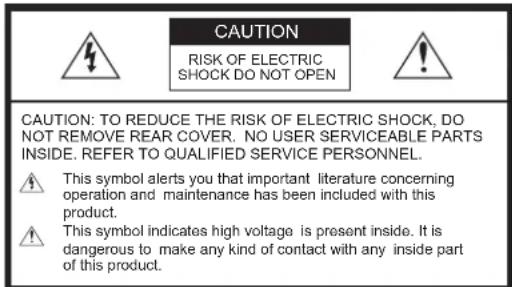
CAUTION RISK OF ELECTRIC SHOCK DO NOT OPEN CAUTION: TO REDUCE THE RISK OF ELECTRIC SHOCK, DO NOT REMOVE REAR COVER. NO USER SERVICEABLE PARTS INSIDE. REFER TO QUALIFIED SERVICE PERSONNEL. This symbol alerts you that important literature concerning operation and maintenance has been included with this product. This symbol indicates high voltage is present inside. It is dangerous to make any kind of contact with any inside part of this product.
ZMODO TECHNOLOGY CORP. LTD.
Building NO.5, Sheer Bluesky Science and Technology Park, Shalling.Baogan District.Shenzhen
Fax: Tel: 0755-3392-6029 0755-3392-6683
PRODUCT OVERVIEW
Product Overview
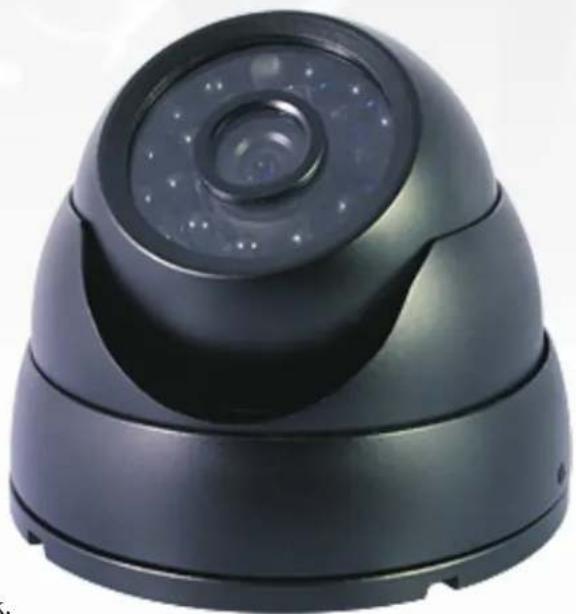
Keep an eye on the people and places you care about most with this vandal-proof & weatherproof color CMOS dome camera. Featuring imaging provided by a 1/4" Color CMOS, it delivers good video quality, reliable operation, a long operating life, and high value. With 24 built in IR LEDs, this camera can capture video in night vision mode up to 80' away. This dome camera is designed for indoor use, and can easily be mounted for the perfect viewing angle. BNC and RCA connections are used for video and power. Installation is easy and hassle free, just plug and play.
Main Features
• 1/4" Color CMOS Image Sensor
- Weatherproof: Yes
• Vandal-proof: Yes
• 420 TV Lines, Horizontal
- 3.6mm Lens
- Signal: NTSC
- Iris: Auto
• Night Vision Min. Light: 0 Lux (IR On)
• IR Irradiation Distance: 80' (25m)
• Operation Temperature: 0F \~ 120F
- Mount: Ceiling or Wall
• Video Connector: BNC
• Power Connector: RCA 12V DC
Package includes
Please check your camera and accessories included in the package. Those components are as shown below:

natural_image
Line drawing of a surveillance camera with two cables (no text or symbols)Camera Card


Screws Package Box
1) CM-C12203BK Color IR Weatherproof Camera
1) A Card
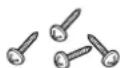
4) Screws
1) Package Box
SCHEMATIC DIAGRAM

text_image
1 Snap Ring 2 Main Body 3 Lens 4 LEDs 5 Mount Bracket 6 LockerAll Dimensions = in (cm)
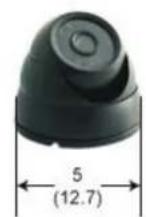

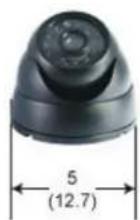
Application Drawing

text_image
12V DC Video Out 12V DC Adapter DVR Monitor Remote Control 1/4" COLOR CMOS 3.6mm LENS 420 TV LINE IR NIGHT VISIONCONNECTING CABLES

flowchart
graph LR
    A["RCA Cable"] --> B["Video Balun"]
    B --> C["DVR"]
    C --> D["Monitor"]
    B --> E["BNC Cable"]
To connect cables
- Connect the BNC cable to the video connector attached on your camera
- Connect the BNC cable to the Video Input on a monitor, DVR or Video Balun.
- Connect the power adapter to the RCA Power connector attached on your camera. When the monitor is turned on, the camera image appears.
Note
It is very important that you identify these ends before installing the cable so that you have the correct ends at the correct location.
HOW TO INSTALL
Before installation
Please read the following instructions before installing your camera:
- You have to check whether the location (ceiling or wall) can bear five times the weight of your camera.
- Do not allow the cable to be caught in a pinched area, otherwise the electric line cover may be damaged. This may cause cable breakdown or fire.
- When installing your camera, don't allow anyone to walk or stand under your installation site, and remove all valuable items. A dropped camera may cause injury to bystanders or harm to valuable items.
Installation procedure
• To install your camera

text_image
Diagram illustrating the step-by-step installation of a device with labeled components and directional arrows indicating process flow.step

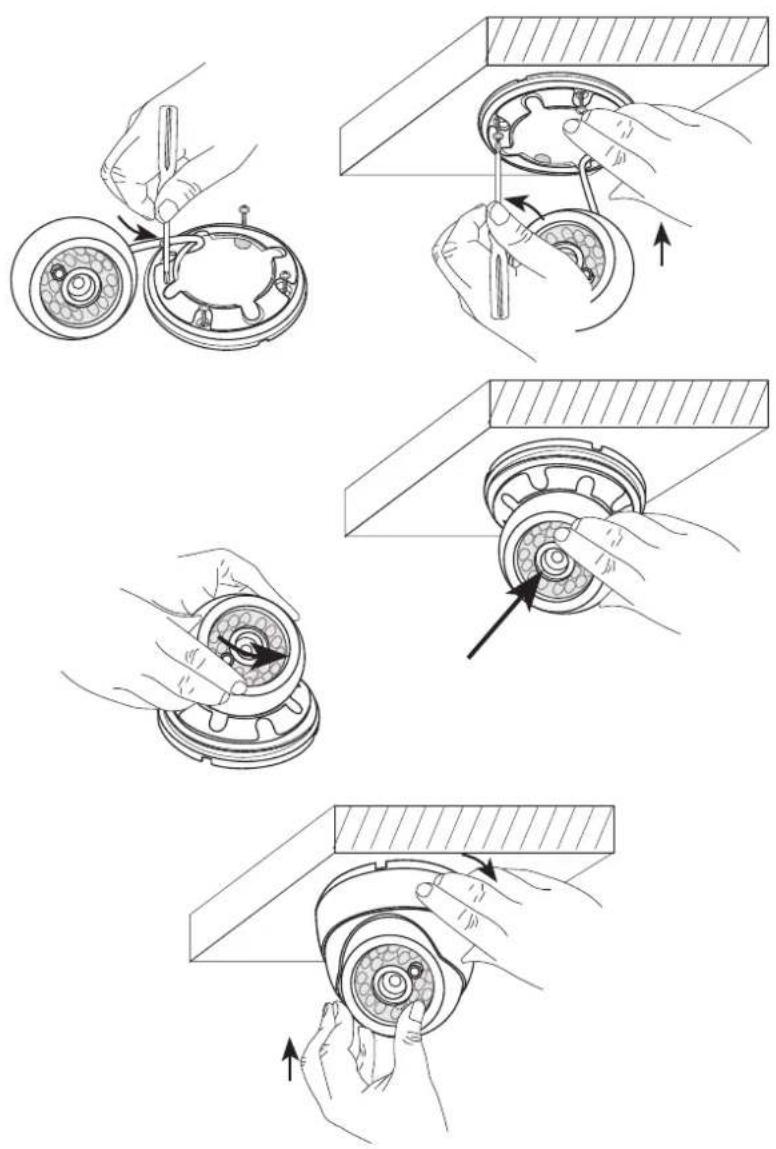
Rotate the Locker counterclockwise until the locker becomes lose. Remove the Snap Ring and the little Dome. All the components of the camera will be exposed to you.
HOW TO INSTALL
step
2 Fix the Mount Bracket to the mounting location using the 4 screws supplied in your package. As shown in the picture, push the four screws into the four holes on the Mount Bracket, then twist the screws into the holes using the screwdriver.
step
3 Attach the Dome to the Mount Bracket. Rotate the Dome to make sure that the lens of the camera is facing the camera's monitoring area. Then attach the Snap Ring to the Dome.
Note
When attach the Snap Ring to the Dome, make sure that the Dome leans toward the groove of the Snap Ring.
step
4 Last, attach the Locker to the Main Body. Hold the Dome and Snap Ring onto the Mount Bracket, and rotate the Locker on clockwise until it is tight. The camera is now installed on the mounting location.
CAMERA SPECIFICATION
Specifications for NTSC & PAL Standard
| Item Details | |||
| Product type | Weatherproof & Vandal-proof IR Dome Camera | ||
| Power input | DC 12V | ||
| Weatherproof | Yes | ||
| Vandal-proof | Yes | ||
| Broadcast type | NTSC Standard color system PAL Standard color system | ||
| (525 Lines, 60 Fields) | (625 Lines, 50 Fields) | ||
| Power Consumption | Approx. 300mA | ||
| Image device | 1/4 inch Color CMOS | ||
| Effective Pixels | 510(H) x 492(V), 250,920 pixels | ||
| Scanning mode | NTSC Standard PAL Standard | ||
| 525 Lines 625 Lines | |||
| Synchronization mode | Internal Synchronization | ||
| Horizontal resolution | 420 TV Lines | ||
| Minimum illumination | 0.0Lux (IR Lamps on) | ||
| IR Lamps | 24 LEDs | ||
| IR Distance | Visible up to 25m(80') | ||
| Signal output | 1.0Vp-p, 75ohms | ||
| Lens | Focal Length | Zone | Limit of Viewing Angle |
| 3.6 mm | Horizontal | 79° | |
| Vertical | 69° | ||
| S/N Ratio | >48dB | ||
| Controls | Auto Iris | ||
| Auto Gain Control | |||
| Auto Back Light Compensation | |||
| Auto Switching between Color and B&W by day and night change(D/N) | |||
| Product color | Black | ||
| Operation temperature | 0F—120F | ||
| Size | 3.5"x3.5"x3.5" | ||
| Weight | 0.93 lbs | ||
| Mounting | Wall or Ceiling | ||
FCC Statement
This device complies with part 15 of the FCC Rules. Operation is subject to the following two conditions:
1) This device may not cause harmful interference.
2) This device must accept any interference received including interference that may cause undesired operation.
Note
This equipment has been tested and found to comply with the limits for a Class A digital device, pursuant to part 15 of FCC Rules. These limits are designed to provide reasonable protection against harmful interference when the equipment is operated in a commercial environment. This equipment generates, uses, and can radiate radio frequency energy and, if not installed and used in accordance with the instruction manual, may cause harmful interference to radio communications. Operation of this equipment in a residential area is likely to cause harmful interference in which case the user will be required to correct the interference at his own expense.
Correct Disposal of This Product

(Waste Electrical & Electronic Equipment) (Applicable in the European Union and other European countries with separate collection systems)
This marking shown on the product
or its literature, indicates that it should not be disposed with other household wastes at the end of its working life. To prevent possible harm to the environment or human health from uncontrolled waste disposal, please separate this from other types of wastes and recycle it responsibly to promote the sustainable reuse of material resources.
Household users should contact either the retailer where they purchased this product, or their local government office, for details of where and how they can take this item for environmentally safe recycling. Business users should contact their supplier and check the terms and conditions of the purchase contract. This product should not be mixed with other commercial wastes for disposal.

SKU: CM-S12203BK
CE FC

text_image
8 44 6 6 5 5 0 0Zmodo
ZMODO TECHNOLOGY CORP. LTD.
Building NO.5, Shaer Bluesky Science and Technology Park, Shaijin Bensin District, Shenzhen
Fax: Tel: 0755-3392-6028 0755-3392-6583