VenVolt 2 - Power bank Ventev - Free user manual and instructions
Find the device manual for free VenVolt 2 Ventev in PDF.


User questions about VenVolt 2 Ventev
0 question about this device. Answer the ones you know or ask your own.
Ask a new question about this device
Download the instructions for your Power bank in PDF format for free! Find your manual VenVolt 2 - Ventev and take your electronic device back in hand. On this page are published all the documents necessary for the use of your device. VenVolt 2 by Ventev.
USER MANUAL VenVolt 2 Ventev
PRODUCT SPECIFICATIONS:
- Ports:
- USB-C (In/ Out)
- USB-A (Out)
• 24V PoE (Out)
• LAN (In)
• PoE++ 802.3af/at/b (Out) LAN (RJ45 Gigabit)
• PoE Output: 802.3af/at/bt 24V Gigabit PoE
• USB-A Output: 5V/3A,9V/2A,12V/1.5A 18W (max.)
• LED: Battery Indicator Light (100%, 75%, 50%, 25%) USB-C (Input/ Output)
• USB-C Input: 5V/3A, 9V/3A, 12V/3A, 15V/3A, 20V/3A - USB-C Output: 5V/3A, 9V/3A, 12V/3A, 15V/3A, 20V/3A, PPS 3.3-21V/3A
- Battery Type: Lithium Polymer Battery
- Battery Capacity: 26400mAh/98Wh Recharging Time: 3Hrs
natural_image
Solid black rectangular object with rounded corners (no text or symbols)
natural_image
Top-down view of a black laptop tray with orange branding and cable cord (no visible text or symbols)
text_image
ventev
text_image
126.8 mm 215 mm ventev 270. 100mm x 247.9mm 200 Type 3 All: FCA, NVA, OVA, TCM, BDA Sed: GPRM, PMA, RGA, UGA, VGA, SGA, PTA, PTA, PTA, PTA 2000 Type 3 Sed: L, M, N, A, C, D, E, F PAS Sed: BZ, W, H, K, L, M, N, O, P Sed: BZ, W, H, K, L, M, N, O, P www.ventev.com © © © © © © © © © © © © © © © © © © © © © © © © © © © © © © © © © © © © © © © © © © © © © © © © © © © © © © © © © © © © © © © © © © © © © © © © © © © © © © © © © © © © © © © © © © © © © © © © © © © © ©© ©©©©©©©©©©©©©©©©©©©©©©©©©©©©©©©©©©©©©©©©©©©©©©©©©©©©©©©©©©©©©©©©©©©©©©©©©©©©©©©©©©©©©©©©©©©©©©©©©©©©©® 215 mm
natural_image
3D rendering of a black and orange device labeled 'ventev' attached to a vertical pole (no other text or symbols visible)VenVolt2 802.3af/at/bt
26400 mAh Power Bank User Manual
APPLICATION
text_image
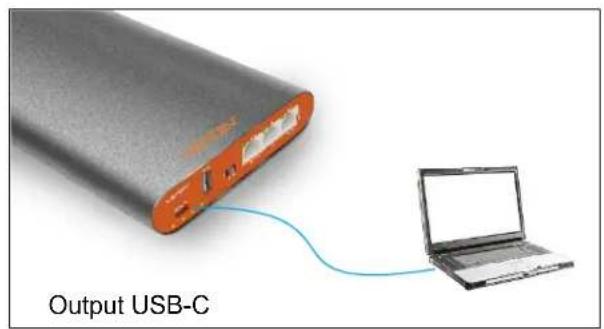
Output USB-C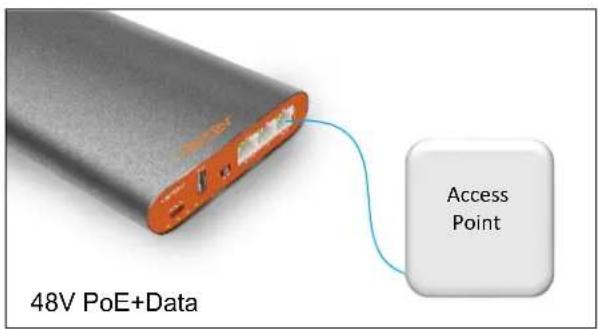
text_image
48V PoE+Data Access Point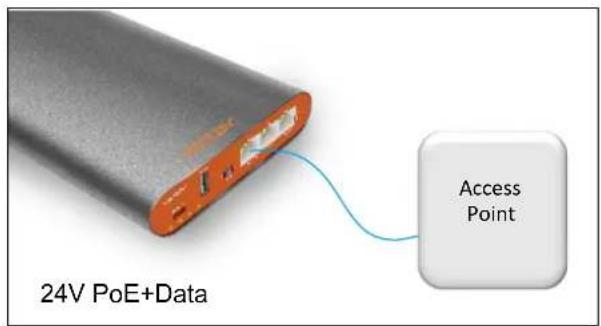
text_image
24V PoE+Data Access PointVenVolt2 802.3af/at/bt
26400 mAh Power Bank User Manual
OVERVIEW
- The RP-98BT Power Bank is the perfect accessory for any WISP technician or wireless engineer. Power your devices with USB-A, USB-C, 24V PoE, and PoE++ (802.3bt).
- Carry 26400 mAh of power with you up a tower to remotely power your devices.
- The RP-98BT Power Bank is temperature resistant and also features protection from various factors such as input overvoltage, output overvoltage, short circuit, and incorrect insertion.
USER INSTRUCTIONS

text_image
Phone OUT Wireless bridge AP POE~48V POE~24V laptop LAN OUT2 Switch 3 4 OFF OUT3 IN OUT4 Globbit 24V POE LAN POE++ IN/OUT1 INVenVolt2 802.3af/at/bt 26400 mAh Power Bank User Manual
USER INSTRUCTIONS
Operating guide
- Use provided USB-C wall charger and USB-C to USB-C cable to connect VenVolt to USB-C charger. Be sure to fully charge your VenVolt before your first use. The battery is shipped between 25 and 50% due to regulation requirements.
- Charging typically takes 3 to 4 hours to fully charge
■ Charging device PoE Device - To power a PoE device use your own ethernet cable to connect from VenVolt to your device.
■ Move select switch from Off to 4 for PoE++ port
■ Move select switch from Off to 3 for 24V PoE port - USB-C port is disabled if switch is set to 3 or 4
- Charging laptop or phone with USB-C port:
- To power a USB device use included cable or your own cable
■ Move select switch to Off - Battery will automatically detect a device has been connected and charging will begin.
- Charging a device via the USB-A port:
- The USB-A port is on when select switch is set to 3 or 4. When the select switch is set to OFF only the USB-C port is active.
Safety Precautions
- Do not expose the product to fire or other high-temperature environments. The recommended usage temperature is between 14 degrees F to 113 degrees F.
- Do not expose the product to water
- Stop using is any of the following conditions occur: electrolytic liquid leakage, overheating, color change, or other unusual conditions.
- Do not short circuit the positive (+) and negative (-).
Maintenance
- Do not expose the VenteVolt2 to direct sunlight for long periods of time, or leave it any place with high temperature or high humidity.
- Discharge and recharge the VenVolt2 periodically if you don't plan to use it for an extended period of time.
VenVolt2 802.3af/at/bt
26400 mAh Power Bank User Manual
USER INSTRUCTIONS
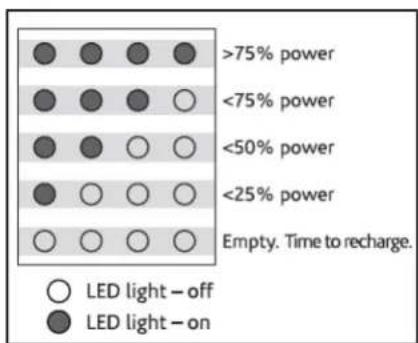
LED Battery Level Indicator
heatmap
| Power Level | Condition | Value | |---|---|---| | >75% power | Light | ● | | >75% power | Off | ● | | >75% power | On | ● | | <75% power | Light | ● | | <75% power | Off | ○ | | <75% power | On | ○ | | <50% power | Light | ● | | <50% power | Off | ○ | | <50% power | On | ○ | | <25% power | Light | ● | | <25% power | Off | ○ | | <25% power | On | ○ | | Empty. Time to recharge. | Off | ○ | | Empty. Time to recharge. | On | ○ |FCC Part 15 Text
This device complies with Part 15 of the FCC Rules. Operation is subject to the following two conditions: (1) this device may not cause harmful interference, and (2) this device must accept any interference received, including interference that may cause undesired operation. This Class B device complies with Canadian ICES-3(B)/NMB-3(B). Note: This equipment has been tested and found to comply with the limits for a Class B digital device, pursuant to part 15 of the FCC Rules. These limits are designed to provide reasonable protection against harmful interference in a residential installation. This equipment generates, uses and can radiate radio frequency energy and, if not installed and used in accordance with the instructions, may cause harmful interference to radio communications. However, there is no guarantee that interference will not occur in a particular installation.
If this equipment does cause harmful interference to radio or television reception, which can be determined by turning the equipment off and on, the user is encouraged to try to correct the interference by one or more of the following measures. Reorient or relocate the receiving antenna. Increase the separation between the equipment and receiver. Connect the equipment into an outlet on a circuit different from that to which the receiver is connected. Consult the dealer or an experienced radio/TV technician for help.
- Third line I would remove number 3 in the middle column. Update number 5 at the end to add to make sure selector switch is set to "USB-C" for USB-C port or switch is set to "3" or "4" for USB-A port. Delete number 3 from corrective actions as well.
- For the last line let's change problem to The LED's on the VenVolt are flashing. Change number 2 in correct actions to: "remove cable if the cable is faulty, switch the selector button to a different setting and then back to setting you want to use"
VenVolt2 802.3af/at/bt
26400 mAh Power Bank User Manual
TROUBLESHOOTING GUIDE
| Problem Possible Causes Corrective Actions | ||
| The VenVolt2 cannot be fully charged. | 1. The charging time is not enough.2. The power source is defective | 1. With no devices attached, charge the VenVolt2 for min. 3 hours.2. Contact Ventev customer service. |
| The remaining power in the VenVolt2 cannot be read. | The capacity is fully depleted. | 1. Recharge the VenVolt2.2. Contact Ventev customer service |
| The VenVolt2 fails to supply power to devices. | 1. The capacity is very low.2. Poor connection between components.3. The VenVolt2 may not charge certain devices.4. Check that the VenVolt2 is turned on.5. Make sure selector switch is set to “USB-C” for USB-C port or switch is set to “3” or “4” for USB-A port. | 1. Recharge the VenVolt22. Reconnect or replace the cable and/or connector.3. Contact Ventev customer service. |
| The VenVolt2 goes into alarm mode, all of the LED lights are flashing. | Electrical protection has been triggered. | 1. Reconnect or replace the cable and/or connector.2. Press the on/off button to reset. |