Profile PVM9179FRDS - Microwaves GE - Free user manual and instructions
Find the device manual for free Profile PVM9179FRDS GE in PDF.


User questions about Profile PVM9179FRDS GE
0 question about this device. Answer the ones you know or ask your own.
Ask a new question about this device
Download the instructions for your Microwaves in PDF format for free! Find your manual Profile PVM9179FRDS - GE and take your electronic device back in hand. On this page are published all the documents necessary for the use of your device. Profile PVM9179FRDS by GE.
USER MANUAL Profile PVM9179FRDS GE
SAFETY INSTRUCTIONS .. 3
Sensor Features ....16
Bake And Roast ..... 19
Fast Cook 20
Air Fry 21
Other Features 22
Microwave Terms 25
CARE AND CLEANING
Inside 26
Stainless Steel 26
Outside 26
Replacing the LED Lamp ..... 27
Optional Kits.... 27
Vent Filters 28
Charcoal Filters 28
TROUBLESHOOTING TIPS 29
CONSUMER SUPPORT
Warranty 31
Consumer Support.... 3 3
Write the model and serial numbers here:
Model # ____
Serial # ____
You can find them on a label when the door is open.
OWNER'S MANUAL
PVM9179
Español
THANK YOU FOR MAKING GE APPLIANCES A PART OF YOUR HOME
Whether you grew up with GE Appliances, or this is your first, we're happy to have you in the family.
We take pride in the craftsmanship, innovation and design that goes into every GE Appliances product, and we think you will too. Among other things, registration of your appliance ensures that we can deliver important product information and warranty details when you need them.
Register your GE appliance now online. Helpful websites and phone numbers are available in the Consumer Support section of this Owner's Manual.

GE APPLIANCES
IMPORTANT SAFETY INFORMATION READ ALL INSTRUCTIONS BEFORE USING THE APPLIANCE
WARNING
To reduce the risk of burns, electric shock, fire, injury to persons, or exposure to
excessive microwave energy:
When using electrical appliances, basic safety precautions should be followed, including the following:
- Read all instructions before using this appliance.
- Read and follow the specific precautions in the PRECAUTIONS TO AVOID POSSIBLE EXPOSURE TO EXCESSIVE MICROWAVE ENERGY section on page 6.
■ Use this appliance only for its intended use as described in this manual. Do not use corrosive chemicals or vapors in this appliance. This oven is specifically designed to heat, dry or cook food, and is not intended for laboratory or industrial use.
■ This microwave must only be serviced by qualified service personnel. Contact nearest authorized service facility for examination, repair or adjustment.
INSTALLATION
■ Install or locate this appliance only in accordance with the provided installation instructions.
This appliance must be grounded. Connect only to properly grounded outlet. See "GROUNDING INSTRUCTIONS" found on page 5.
■ This microwave oven is UL listed for installation over both gas and electric ranges.
This unit is suitable for use above gas or electric cooking equipment, 36" or less wide.
■ Do not operate this appliance if it has a damaged power cord or plug, if it is not working properly, or if it has been damaged or dropped.
- Keep cord away from heated surfaces.
■ Do not let cord hang over the edge of the table or counter
■ Do not immerse cord or plug in water.
■ Do not cover or block any openings on the appliance.
■ Do not store this appliance outdoors. Do not use this product near water—for example, in a wet basement, near a swimming pool, near a sink or in similar locations.
■ Do not mount this appliance over a sink.
TO REDUCE THE RISK OF FIRE IN THE CAVITY:
■ Do not overcook food. Carefully attend appliance when paper, plastic or other combustible materials are placed inside the oven to facilitate cooking.
■ Remove wire twist-ties and metal handles from paper or plastic containers before placing them in the oven.
- Do not store any materials, other than our recommended accessories, in this oven when not in use. Do not leave paper products, cooking utensils or food in the cavity when not in use. Microwave rack should be removed from oven when not in use.
If materials inside the oven ignite, keep the oven door closed, turn the oven off and disconnect the power cord or shut off power at the fuse or circuit breaker panel.
■ Do not operate the microwave feature without food in the oven.
TO REDUCE THE RISK OF BURNS:
■ Be careful when opening containers of hot food. Use pot holders and direct steam away from face and hands.
■ Vent, pierce, or slit containers, pouches, or plastic bags to prevent build-up of pressure.
■ Be careful when touching the turntable, door, racks, or walls of the oven which may become hot during use.
■ HOT CONTENTS CAN CAUSE SEVERE BURNS. DO NOT ALLOW CHILDREN TO USE THE MICROWAVE. Use caution when removing hot items.
READ AND SAVE THESE INSTRUCTIONS
IMPORTANT SAFETY INFORMATION READ ALL INSTRUCTIONS BEFORE USING THE APPLIANCE
WARNING
Continued
OPERATING
- Do not operate the oven without the turntable in place. The turntable must be unrestricted so it can turn.
■ Make sure all cookware used in your microwave oven is suitable for microwaving. Most glass casseroles, cooking dishes, measuring cups, custard cups, pottery, or china dinnerware, which does not have metallic trim or glaze with a metallic sheen can be used in compliance with cookware manufacturers' recommendations.
■ Do not store anything directly on top of the microwave surface when the microwave is in operation.
■ Some products such as whole eggs and sealed containers - for example, closed jars - are able to explode and should not be heated in the microwave oven.
■ Do not overcook potatoes. They could dehydrate and catch fire.
■ Do not cover any other part of the oven with metal foil. This will cause overheating of the oven.
■ Cook meat and poultry thoroughly—meat to at least an INTERNAL temperature of 160^ F and poultry to at least an INTERNAL temperature of 180^ F. Cooking to these temperatures usually protects against foodborne illness.
■ This oven is not approved or tested for marine use.
CLEANING
- Keep the oven free from grease buildup.
■ Do not clean with metal scouring pads. Pieces can burn off the pad and touch electrical parts involving risk of electric shock.
■ When cleaning surfaces of door and oven that come together on closing the door, use only mild, nonabrasive soaps, or detergents applied with a clean sponge or soft cloth. Rinse well.
SUPER HEATED WATER
■ Liquids, such as water, coffee, or tea, are able to be overheated beyond the boiling point without appearing to be boiling. Visible bubbling or boiling when the container is removed from the microwave oven is not always present. THIS COULD RESULT IN VERY HOT LIQUIDS SUDDENLY BOILING OVER WHEN THE CONTAINER IS DISTURBED OR A SPOON OR OTHER UTENSIL IS INSERTED INTO THE LIQUID.
■ To reduce the risk of injury to persons:
- Do not overheat the liquid.
- Stir the liquid both before and halfway through heating it.
- Do not use straight-sided containers with narrow necks.
- After heating, allow the container to stand in the microwave oven for a short time before removing the container.
- Use extreme care when inserting a spoon or other utensil into the container.
READ AND SAVE THESE INSTRUCTIONS
IMPORTANT SAFETY INFORMATION READ ALL INSTRUCTIONS BEFORE USING THE APPLIANCE
GROUNDING INSTRUCTIONS
WARNING
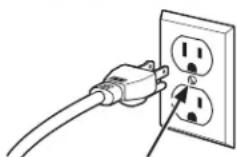
Ensure Proper ground exists before use.
Improper use of the grounding plug can result in a risk of electric shock.
This appliance must be grounded. In the event of an electrical short circuit, grounding reduces the risk of electric shock by providing an escape wire for the electric current.
This appliance is equipped with a power cord having a grounding wire with a grounding plug. The plug must be plugged into an outlet that is properly installed and grounded.
Consult a qualified electrician or service technician if the GROUNDING INSTRUCTIONS are not completely understood, or if doubt exists as to whether the
appliance is properly grounded.
If the outlet is a standard 2-prong wall outlet, it is your personal responsibility and obligation to have it replaced with a properly grounded 3-prong wall outlet.
Do not under any circumstances cut or remove the third (ground) prong from the power cord.
Do not use an extension cord. If the power cord is too short, have a qualified electrician or service technician install an outlet near the appliance.
For best operation, plug this appliance into its own electrical outlet to prevent flickering of lights, blowing of fuse or tripping of circuit breaker.
VENT FAN
The fan will operate automatically under certain conditions. Take care to prevent the starting and spreading of accidental cooking fires while the vent fan is in use.
■ Clean the underside of the microwave often. Do not allow grease to build up on the microwave or the fan filters.
In the event of a grease fire on the surface units below the microwave oven, smother a flaming pan on the surface unit by covering the pan completely with a lid, a cookie sheet or a flat tray.
■ Use care when cleaning the vent fan filters. Corrosive cleaning agents, such as lye-based oven cleaners, may damage the filters.
■ When preparing flaming foods under the microwave, turn the fan on.
■ Never leave surface units beneath your microwave oven unattended at high heat settings. Boilovers cause smoking and greasy spillovers that may ignite and spread if the microwave vent fan is operating. To minimize automatic fan operation, use adequate sized cookware and use high heat on surface units only when necessary.
PACEMAKERS
Most pacemakers are shielded from interference from electronic products, including microwaves. However, patients with pacemakers may wish to consult their physicians if they have concerns.
READ AND SAVE THESE INSTRUCTIONS
IMPORTANT SAFETY INFORMATION READ ALL INSTRUCTIONS BEFORE USING THE APPLIANCE
PRECAUTIONS TO AVOID POSSIBLE EXPOSURE TO EXCESSIVE MICROWAVE ENERGY
(a) Do Not Attempt to operate this oven with the door open since open-door operation can result in harmful exposure to microwave energy. It is important not to defeat or tamper with the safety interlocks.
(b) Do Not Place any object between the oven front face and the door or allow soil or cleaner residue to accumulate on sealing surfaces.
(c) Do Not Operate the oven if it is damaged. It is particularly important that the oven door close properly and that there is no damage to the:
(1) door (bent),
(2) hinges and latches (broken or loosened)
(3) door seals and sealing surfaces.
(d) The Oven Should Not be adjusted or repaired by anyone except properly qualified service personnel.
Dispose of or recycle appliances in accordance with Federal and Local Regulations. Contact your local authorities for the environmentally safe disposal or recycling of your appliances.
Throughout this manual, features and appearance may vary from your model.

text_image
Labeled diagram of a microwave oven showing interior components and exterior view- Door Handle.
- Door Latches.
- Window with Metal Shield. Screen allows cooking to be viewed while keeping microwaves confined in the oven.
- Control Panel and Selector Dial.
-
Removable Turntable. Do not operate the oven in the microwave mode without the turntable and turntable support seated and in place.
-
Removable Turntable Support. Do not operate the oven in the microwave mode without the turntable and turntable support seated and in place.
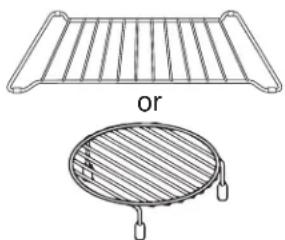
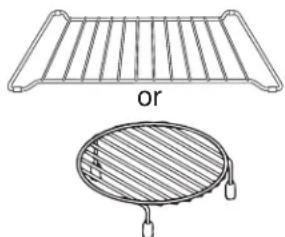
- Shelves. Use with Convection Bake, Convection Roast or Combination Fast Bake. (Do not use when microwave cooking.)
For best results, use one shelf in the lower position and leave at least a 1-inch gap between the cooking dish and the sides of the oven. For two-level Baking or Fast Baking use both shelves.
Microwave Cooking Time and Auto Features
Press Turn and push dial to enter
Cook Time Amount of cooking time
Press once (Cook Time I) to
microwave any time between
15 seconds and 99 minutes.
Press twice (Cook Time II) to
add a 2nd microwave
cooking stage.
Power Level Power level 1–10
Add 30 sec. Starts immediately!
Defrost Weight/Time
Press once (Weight Defrost) Food weight up to six pounds
Press twice (Timed Defrost) Amount of defrosting time
Sensor Features
Press Turn and push dial to enter Option
| Popcorn | Starts | immediately! |
| Beverage | Starts | immediately! |
| Cook | Food | Type |
| Reheat | Food | Type |
Convection Baking, Convection Roasting or Air Fry
Press Turn and push dial to enter
Convection Bake or Oven temperature and cook time
Convection Roast
Air Fry Food type, serving size and cook time
Combination Fast Cooking
Press Turn and push dial to enter
Combination Fast Cook Oven temperature and cook time


| Cook Time | Power Level | Air Fry |
| Convection Bake | Convection Roast | Combination Fast Cook |
Sensor Microwave
| Popcorn | Beverage | |
| Cook | Reheat | Defrost Weight/Time |
Convenience Features
| Timer On/Off | Steam Clean | Turntable On/Off |
| Chef Connect On/Off | Settings | Add 30 Sec — My Cycle — |
| To Pair Hold 3 Sec | Lock Control Hold 3 Sec | |
| Reset Filter | Vent Fan | Surface Light |

text_image
Diagram showing a 3D rectangular prism with internal dashed lines and labeled points, likely illustrating a geometric or physical concept.
Do not use the shelves when microwave cooking.
Microwave Cooking
Your oven uses microwave energy to cook by a set time or weight, or automatically by sensor.
Sensor microwave works by detecting the increasing humidity released during cooking. The oven automatically adjusts the cooking time to various types and amounts of food.
Cooking Method
Microwave energy is distributed evenly throughout the oven for thorough, fast cooking of food.
Heat Source
Microwave energy.
Heat Conduction
Heat produced within food by instant energy penetration.
Benefits
Fast, high efficiency cooking. Oven and surroundings do not get hot. Easy clean-up.
flowchart
graph TD
    A["Top Left"] --> B["Top Right"]
    B --> C["Bottom Left"]
    C --> D["Bottom Right"]
    D --> E["Bottom Left"]
    E --> F["Bottom Right"]
    F --> G["Bottom Left"]
    G --> H["Bottom Right"]
    H --> I["Bottom Left"]
    I --> J["Bottom Right"]
    J --> K["Bottom Left"]
    K --> L["Bottom Right"]
    L --> M["Bottom Left"]
    M --> N["Bottom Right"]
    N --> O["Bottom Left"]
    O --> P["Bottom Right"]
    P --> Q["Bottom Left"]
    Q --> R["Bottom Right"]
    R --> S["Bottom Left"]
    S --> T["Bottom Right"]
    T --> U["Bottom Left"]
    U --> V["Bottom Right"]
    V --> W["Bottom Left"]
    W --> X["Bottom Right"]
    X --> Y["Bottom Left"]
natural_image
Technical line drawing of a grid-like structure with an oval base and a handle, labeled 'or' (no text or symbols on the diagram itself)Always use the shelf when baking. For best results, use one shelf in the lower position.
Convection Baking, Convection Roasting and Air Fry
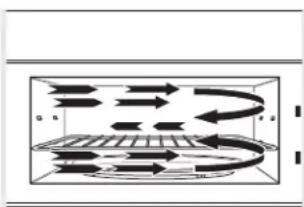
During baking or roasting, a heating element is used to raise the temperature of the air inside the oven. Any oven temperature from 225^ F. to 425^ F. may be programmed. A fan gently circulates this heated air throughout the oven, over and around the food, producing golden brown exteriors and rich moist interiors. This circulation of heated air is called convection.
Because the heated air is kept constantly moving, not permitting a layer of cooler air to develop around the food, some foods cook faster than in regular oven cooking.
Cooking Method
Hot air circulates around food to produce browned exteriors and seal in juices.
Heat Source
Circulating heated air (Convection).
Heat Conduction
Heat conducted from outside of food to inside.
Benefits
Aids in browning and seals in flavor. Cooks some foods faster than regular ovens.

flowchart
graph TD
    A["Input"] --> B{Decision}
    B -->|Yes| C["Process 1"]
    B -->|No| D["Process 2"]
    C --> E["Output"]
    D --> E
    E --> F["Feedback Loop"]
    F --> G["Output"]
    style A fill:#f9f,stroke:#333
    style G fill:#bbf,stroke:#333
natural_image
Technical line drawing of a grid-like structure with an oval base and a label 'or' (no text or symbols on the diagram itself)Always use the shelf with Fast Bake. For best results, use one shelf in the lower position.
Combination Fast Cooking
Your oven also offers the option of Combination Fast Cook, using microwave energy along with convection cooking. You cook with speed and accuracy, while browning and crisping to perfection.
Cooking Method
Microwave energy and convection heat combine to cook foods up to 25% faster than regular ovens, while browning and sealing in juices.
Heat Source
Microwave energy and circulating heated air.
Heat Conduction
Food heats from instant energy from penetration and heat conducted from outside of food.
Benefits
Shortened cooking time from microwave energy, plus browning and crisping from convection heat.
Cookware Tips
Convection Bake or Roast
Metal Pans are recommended for all types of baked products, but especially where browning is important. Dark or dull finish metal pans are best for breads and pies because they absorb heat and produce crisper crust.
Shiny aluminum pans are better for cakes, cookies or muffins because they reflect heat and help produce a light tender crust.
Glass or Glass-Ceramic casserole or baking dishes are best suited for egg and cheese recipes due to the cleanability of glass.
Combination Fast Bake
Glass or Glass-Ceramic baking containers are recommended. Be sure not to use items with metal trim as it may cause arcing (sparking) with oven wall or oven shelf. This can damage the cookware, the shelf or the oven.
Heat-Resistant Plastic microwave cookware (safe to 450°F) may be used, but it is not recommended for foods requiring all-around browning, because the plastic is a poor conductor of heat.
| Cookware Microwave | Convection Bake or Roast | Combination Fast Cook | |
| Heat-Resistant Glass, Glass-Ceramic (Pyrex®, Fire King®, Corning Ware®, etc.) | Yes Yes Yes | ||
| Metal No Yes No | |||
| Non Heat-Resistant Glass No No No | |||
| Microwave-Safe Plastics Yes No Yes* | |||
| Plastic Films and Wraps Yes No No | |||
| Paper Products Yes No No | |||
| Straw, Wicker and Wood Yes No No |
* Use only microwave cookware that is safe to 450°F.
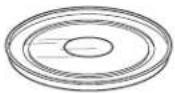
How to use Accessories

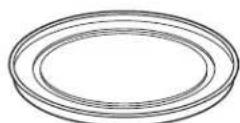

Glass Turntable Metal Tray
○ : Possible to use
◎ : Recommended method
X : Do not use
| Microwave | Convection | Combination | |
 | ◎ | ○ | ○ |
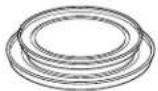 | × | ○ | ○ |
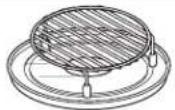 | × | ◎ | ◎ |
 | × | ◎ | × |
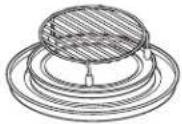 | × | ◎ | ◎ |
Select the Best Method of Cooking
Use the following guide to select the best method of cooking. Recipes can be adapted using the guidelines below to determine the appropriate cooking mode.
| Foods | Microwave | Bake | Roast | Fast | Cook | |
| Appetizers | ||||||
| Dips and Spreads √Pastry Snacks | √ | √ | √ | |||
| Beverages √ | ||||||
| Sauces and Toppings √ | ||||||
| Soups and Stews | √ | |||||
| Meats | ||||||
| Defrosting | √ | |||||
| Roasting | √ | √ | ||||
| Poultry | ||||||
| Defrosting | √ | |||||
| Roasting | √ | √ | √ | |||
| Fish and Seafood | ||||||
| Defrosting | √ | |||||
| Cooking | √ | √ | √ | |||
| Casseroles | √ | √ | √ | |||
| Eggs and Cheese | ||||||
| Scrambled, Omelets | √ | √ | ||||
| Quiche, Souffle | √ | √ | ||||
| Vegetables, (fresh) | √ | |||||
| Breads | ||||||
| Muffins, Coffee Cake | √ | √ | ||||
| Quick | √ | |||||
| Yeast | √ | |||||
| Desserts | ||||||
| Cakes, Layer and Bundt | √ | |||||
| Angel Food and Chiffon | √ | |||||
| Custard and Pudding | √ | |||||
| Bar Cookies | √ | √ | ||||
| Fruit | √ | |||||
| Pies and Pastry | √ | |||||
| Candy | √ | |||||
| Blanching Vegetables | √ | |||||
| Frozen Convenience Foods | √ √ | √ | ||||
Time and Auto Microwave Features
Using the Dial
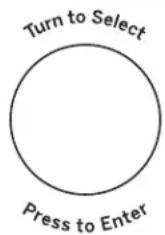
You can make selections on the oven by turning the dial and pressing it to enter the selection.
Pressing the dial can also be used in place of the Start/Pause button for quicker programming of the oven.

text_image
Turn to Select Press to EnterCook Time
(Do not use the shelves when microwave cooking.)

flowchart
graph TD
    A["Cook Time"] --> B["Turn to Select"]
    B --> C["Press to Enter"]
    C --> D["Power Level"]
    D --> E["Start/Pause"]
Cook Time I
Allows you to microwave for any time between 15 seconds and 99 minutes.
Power level 10 (High) is automatically set, but you may change it for more flexibility.
- Press the Cook Time button.
- Turn the dial to set the cook time and press the dial to enter.
- Change power level if you don't want full power. (Press Power Level. Turn the dial to select. Press the dial to enter.)
- Press the dial or the Start/Pause button to start cooking.
You may open the door during Cook Time to check the food. Close the door and press the dial or Start/Pause to resume cooking.
NOTE: You may change the cook time at any time during cooking by turning the dial. You may also change the power level by pressing the Power Level button.
Cook Time II
Lets you change power levels automatically during cooking. Here's how to do it:
- Press the Cook Time button.
- Turn the dial to set the first cook time and press the dial to enter.
- Change the power level if you don't want full power. (Press Power Level. Turn the dial to select. Press the dial to enter.)
- Press the Cook Time button again.
- Turn the dial to set the second cook time and press the dial to enter.
- Change the power level if you don't want full power. (Press Power Level. Turn the dial to select. Press the dial to enter.)
- Press the dial or the Start/Pause button to start cooking.
At the end of Cook Time I, Cook Time II counts down.
NOTE: You may change the cook time at any time during cooking by turning the dial. You may also change the power level by pressing the Power Level button.
Add 30 Sec
This is a quick way to set and start cooking in 30 second blocks each time the Add 30 Second button is pressed. The cook time may be changed by turning the dial at any time during cooking.
The power level will automatically be set at 10 and the oven will start immediately.
The power level can be changed as time is counting down. Press the Power Level button, turn the dial and press to enter.
text_image
Add 30 Sec My Cycle Turn to Select Press to EnterTime and Auto Microwave Features
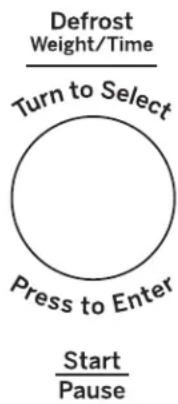
Weight Defrost
(Do not use the shelves when microwave cooking.)
flowchart
graph TD
    A["Start\nPause"] --> B["Press to Enter"]
    B --> C["Turn to Select"]
    C --> D["Defrost\nWeight/Time"]
Weight Defrost automatically sets the defrosting times and power levels to give even defrosting results for meats, poultry and fish weighing up to one pound.
■ Remove meat from package and place on microwave-safe dish.
- Press the Defrost button once.
-
Turn the dial to the food weight, using the Conversion Guide at right. For example, dial .5 for .5 pounds (8 oz.) Press the dial to enter.
-
Press the Start/Pause button to start defrosting.
- Turn the food over if the oven signals TURN FOOD OVER.
■ Remove defrosted meat or shield warm areas with small pieces of foil.
■ After defrosting, most meats need to stand 5 minutes to complete defrosting.
Conversion Guide
If the weight of food is stated in pounds and ounces, the ounces must be converted to tenths (.1) of a pound.
| Weight of Food in Ounces | Enter Food Weight (tenths of a pound) |
| 1–2 .1 | |
| 3 | .2 |
| 4–5 .3 | |
| 6–7 .4 | |
| 8 | .5 |
| 9–10 .6 | |
| 11 .7 | |
| 12–13 .8 | |
| 14–15 .9 |
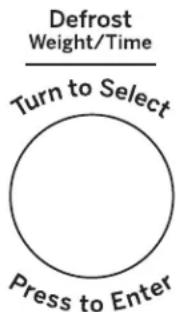
Time Defrost
(Do not use the shelves when microwave cooking.)
flowchart
graph TD
    A["Defrost Weight/Time"] --> B["Turn to Select"]
    B --> C["Press to Enter"]
Start Pause
Use Time Defrost to defrost for a selected length of time.
- Press the Defrost button twice.
- Turn the dial to select the time you want. Press the dial to enter.
- Press the Start/Pause button to start defrosting.
- Turn the food over if the oven signals TURN FOOD OVER.
You may change the defrost time at any time during defrosting by turning the dial.
Power level is automatically set at 3, but can be changed. You can defrost small items quickly by raising the power level after entering the time. Power Level 7 cuts the total defrosting time in about half; Power Level 10 cuts the total time to approximately 1/3. However, food will need more frequent attention than usual.
A dull thumping noise may be heard during defrosting. This is normal when oven is not operating at High power.
Defrosting Tips
■ Foods frozen in paper or plastic can be defrosted in the package. Closed packages should be slit, pierced or vented AFTER food has partially defrosted. Plastic storage containers should be partially uncovered.
■ Family-size, prepackaged frozen dinners can be defrosted and microwaved. If the food is in a foil container, transfer it to a microwave-safe dish.
■ Foods that spoil easily should not be allowed to sit out for more than one hour after defrosting. Room temperature promotes the growth of harmful bacteria.
■ When defrosted, food should be cool but softened in all areas. If still slightly icy, return to the microwave very briefly, or let it stand a few minutes.
Time and Auto Microwave Features
| Defrosting Guide | ||
| Food Time | Comments | |
| Breads, Cakes | ||
| Bread, buns or rolls (1 piece) | 1/4 min. | |
| Sweet rolls (approx. 12 oz.) 2 to 4 min. Rearrange after half of time. | ||
| Fish and Seafood | ||
| Fillets, frozen (1 lb.) 6 to 9 min. | ||
| Fruit | ||
| Plastic pouch—1 or 2 1 to 5 min.(10-oz. package) | ||
| Meat | ||
| Bacon (1 lb.) 2 to 5 min. | Place unopened package in oven. Let stand 5 minutes after defrosting. | |
| Franks (1 lb.) | 2 to 5 min. | Place unopened package in oven. Microwave just until franks can be separated. Let stand 5 minutes, if necessary, to complete defrosting. |
| Ground meat (1 lb.) 4 to 6 min. | Turn meat over after first half of time. | |
| Roast: beef, lamb, veal, pork | 9 to 13 min. per lb. Use power level 10. | |
| Steaks, chops and cutlets 4 to 8 min. per lb. Place unwrapped meat in cooking dish. Turn over after first half of time and shield warm areas with foil. After second half of time, separate pieces with table knife. Let stand to complete defrosting. | ||
| Poultry | ||
| Chicken, broiler-fryer, cut up (2 1/2 to 3 lbs.) | 14 to 20 min. Place wrapped chicken in dish. Unwrap and turn over after first half of time. After second half of time, separate pieces and place in cooking dish. Microwave 2 to 4 minutes more, if necessary. Let stand a few minutes to finish defrosting. | |
| Chicken, whole (2 1/2 to 3 lbs.) | 20 to 25 min. Place wrapped chicken in dish. After first half of time, unwrap and turn chicken over. Shield warm areas with foil. To complete defrosting, run cool water in cavity until giblets can be removed. | |
| Cornish hen 7 to 13 min. per lb. | Place unwrapped hen in oven breast-side-up. Turn over after first half of time. Run cool water in cavity until giblets can be removed. | |
| Turkey breast (4 to 6 lbs.) 3 to 8 min. per lb. | Place unwrapped breast in microwave-safe dish breast-side-down. After first half of time, turn breast-side-up and shield warm areas with foil. Defrost for second half of time. Let stand 1 to 2 hours in refrigerator to complete defrosting. | |
Power Level
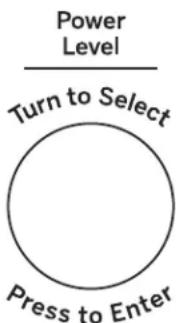
The power level may be entered or changed immediately after entering the time for Cook Time or Time Defrost. The power level may also be changed during time countdown.
- First, follow directions for Cook Time or Time Defrost.
- Press the Power Level button.
- Turn the dial clockwise to increase and counterclockwise to decrease the power level. Press the dial to enter.
- Press the Start/Pause button to start cooking.
Variable power levels add flexibility to microwave cooking. The power levels on the microwave oven can be compared to the surface units on a range. Each power level gives you microwave energy a certain percent of the time. Power Level 7 is microwave energy 70% of the time. Power Level 3 is energy 30% of the time. Most cooking will be done on High (Power Level 10) which gives you 100% power. Power Level 10 will cook faster but food may need more frequent stirring, rotating or turning over.
A lower setting will cook more evenly and need less stirring or rotating of the food. Some foods may have better flavor, texture or appearance if one of the lower settings is used. Use a lower power level when cooking foods that have a tendency to boil over, such as scalloped potatoes.
Rest periods (when the microwave energy cycles off) give time for the food to "equalize" or transfer heat to the inside of the food. An example of this is shown with Power Level 3 - the defrost cycle. If microwave energy did not cycle off, the outside of the food would cook before the inside was defrosted.
Here are some examples of uses for various power levels:
High 10: Fish, bacon, vegetables, heating liquids.
Med-High 7: Gentle cooking of meat and poultry; baking casseroles and reheating.
Medium 5: Slow cooking and tenderizing for stews and less tender cuts of meat.
Low 2 or 3: Defrosting; simmering; delicate sauces.
Warm 1: Keeping food warm; softening butter.
flowchart
graph TD
    A["Power Level"] --> B["Turn to Select"]
    B --> C["Press to Enter"]
Start Pause
Sensor Microwave Features
Humidity Sensor
What happens when using the Sensor Features:
The Sensor Features detect the increasing humidity released during cooking. The oven automatically adjusts the cooking time to various types and amounts of food.
Do not use the Sensor Features twice in succession on the same food portion—it may result in severely overcooked or burnt food. If food is undercooked after the countdown, use Cook Time for additional cooking time.
NOTE: Sensor features will not operate when the oven is hot. If one of the sensor cooking buttons is pressed when the temperature inside the oven is greater than 200^ F, "OVEN TOO HOT FOR SENSOR COOKING - USING ALTERNATE METHOD" will be displayed. The oven will automatically change to cook by time (follow the directions in the display) or once the oven is cool enough, the sensor features will function normally.
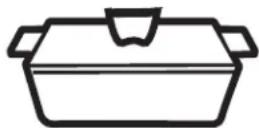
■ The proper containers and covers are essential for best sensor cooking.
■ Always use microwave-safe containers and cover them with lids or vented plastic wrap. Never use tight sealing plastic containers - they can prevent steam from escaping and cause food to overcook.
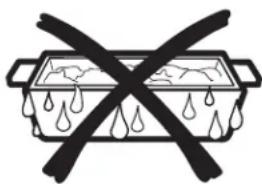
■ Be sure the outside of the cooking containers and the inside of the microwave oven are dry before placing food in the oven. Beads of moisture turning into steam can mislead the sensor.
Covered

Vented
natural_image
Simple line drawing of a cooking pan with diagonal lines crossing through it, no text or symbols present.Dry off dishes so they don't mislead the sensor.
Cook
Because most cooking containers must be covered during Cook, this feature is best with foods that you want to steam or retain moisture.
NOTE: Use of the metal shelf with Cook is not recommended.
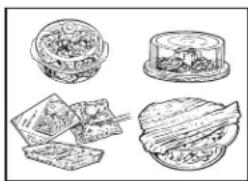
Recommended Foods
A wide variety of foods including meats, fish and vegetables can be cooked using this feature.
natural_image
Illustration of four food items: a bowl, a lid, sliced bread, and a dish (no text or symbols)Foods not recommended
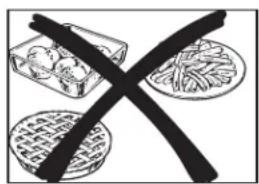
Foods that must be cooked uncovered, foods that require constant attention, foods that require addition of ingredients during cooking and foods calling for a dry look or crisp surface after cooking should not be cooked using this feature. It is best to Cook Time them.
text_image
Illustration showing a crossed-out food item with dumplings, steamed buns, and fried dish, symbolizing food safety or nutrition.Popcorn (Do not use the shelves when microwave cooking.)
To use the Popcorn feature:
- Follow package instructions, using Cook Time if the package is less than 2.0 ounces or larger than 3.5 ounces. Place the package of popcorn in the center of the turntable.
- Press the Popcorn button. The oven starts immediately.
If you open the door while POPCORN SENSOR is displayed, an error message will appear. Close the door, press Cancel/Off and begin again.
If food is undercooked after the countdown, use Cook Time for additional cooking time.
How to Adjust the Automatic Popcorn Setting to Provide a Shorter or Longer Cook Time
If you find that the brand of popcorn you use underpops or overpops consistently, you can add or subtract 20–30 seconds to the automatic popping time.
To subtract or add time for sensor cook, turn the dial when the time appears.

Use only with prepackaged microwave popcorn weighing 2.0 to 3.5 ounces.
NOTE: Do not use this feature twice in succession on the same food portion—it may result in severely overcooked or burnt food.
Beverage (Do not use the shelves when microwave cooking.)
The Beverage feature heats beverages from 6 to 12 ounces.
Press the Beverage button. Then oven start immediately.
Drinks heated with the Beverage feature may be very hot. Remove the container with care.
Reheat (Do not use the shelves when microwave cooking.)
The Reheat feature reheats servings of previously cooked foods or a plate of leftovers.
- Place the cup of liquid or covered food in the oven. Press Reheat and choose food type.
- The oven signals when steam is sensed and the time remaining begins counting down.
Do not open the oven door until time is counting down. If the door is opened, close it and press Start/Pause immediately.
After removing food from the oven, stir, if possible, to even out the temperature. Reheated foods may have wide variations in temperature. Some areas of food may be extremely hot.
If food is not hot enough after the countdown use Cook Time for additional reheating time.
Some Foods Not Recommended for Use With Reheat
It is best to use Cook Time for these foods:
■ Bread products.
■ Foods that must be reheated uncovered.
■ Foods that need to be stirred or rotated.
■ Foods calling for a dry look or crisp surface after reheating.
To subtract or add time for sensor cook, turn the dial when the time is shown.
NOTE: Do not use this feature twice in succession on the same food portion—it may result in severely overcooked or burnt food.
| Selection | Food to Reheat |
| 1 Plate | |
| 2 Soup | |
| 3 Veggies | |
| 4 | P |
a
S
t
a
Sensor Microwave Features
Cook (Do not use the shelves when microwave cooking.)
- Place covered food in the oven and close the door. Press the Cook button. ENTER FOOD TYPE appears in the display.
- Turn the dial to the desired food type. Press to enter.
See the Sensor Food Type Guide below for specific foods and instructions.
The oven starts immediately.
NOTE: If the door was open while the control was being set, close the door and press the Start/Pause button to begin cooking.
If food is undercooked after the countdown, use Cook Time for additional cooking time.
Do not open the oven door before the countdown time is displayed—steam escaping from the oven can affect cooking performance. If the door is opened, close the door and press Start/Pause immediately.

flowchart
graph TD
    A["Turn to Select"] --> B["Press to Enter"]
    B --> C["Cook"]
Start Pause
NOTE: Do not use this feature twice in succession on the same food portion—it may result in severely overcooked or burnt food.
If ground meat was selected, the oven may signal you to drain and stir the meat. Open the door, drain the meat and close the door. Press the Start/Pause button if necessary to resume cooking.
Cooking Tips
■ When oven signals and countdown time is displayed, the door may be opened for stirring, turning or rotating food. To resume cooking, close the door and press Start/Pause.
■ Match the amount of food to the size of container. Fill containers at least 1/2 full.
■ Be sure outside of container and inside of oven are dry.
■ After completion of Cook cycle, if food needs additional cooking, return food to oven and use Cook Time to finish cooking.
To subtract or add time for sensor cook, turn the dial when the time is shown.
| Sensor Food Type Guide | |||
| Food Type Serving | Serving | Size | Comments |
| Chicken Bone-In | Boneless | 2 to 8 pieces | Use oblong, square or round dish. Cover with vented plastic wrap. |
| Fish — 4 to 16 oz. | Use oblong, square or round dish. Cover with vented plastic wrap. | ||
| Ground Meat (Beef, Pork, Turkey) | — 8 to 32 oz. Use round casserole dish. Crumble meat into dish. Cover with vented plastic wrap. | ||
| Potatoes — 8 to 32 oz. | Pierce skin with fork. Arrange in a star pattern in center of turntable. | ||
| Vegetables | Fresh | 4 to 16 oz. | Use microwave-safe casserole or bowl. Add 2 tablespoons water for each serving. Cover with lid or vented plastic wrap. |
| Vegetables Frozen 4 | to 16 oz. Use microwave-safe casserole or bowl. Follow package instructions for adding water. Cover with lid or vented plastic wrap. | ||
| Vegetables | Canned | 4 to 16 oz. | Use microwave-safe casserole or bowl. Cover with lid or vented plastic wrap. |
About the Baking and Roasting Features

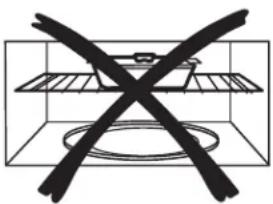
Correct shelf position
natural_image
Simple line drawing of a cage with a cross symbol crossed out, no text or symbols present.Incorrect shelf position
Baking or roasting uses a heating element to raise the temperature of the air inside the oven. Any oven temperature from 225^ F to 425^ F may be set. A fan gently circulates this heated air throughout the oven, over and around the food, producing golden brown exteriors and rich, moist interiors. This circulation of heated air is called convection.
Because the heated air is kept constantly moving, not permitting a layer of cooler air to develop around the food, some foods cook faster than in regular oven cooking.
For Best Results...
Use one shelf in the lower position and leave at least a 1-inch gap between the cooking dish and the sides of the oven. For two-level cooking only, use both shelves. Use the circular rack if possible. If the food is too long to turn (casseroles, lasagnas, etc.) or too tall to fit (roasts, etc.), we recommend using the rectangular rack in the lower position.
The shelf is required for good air circulation and even browning.
See the Cookware Tips section for information on suggested cookware.
Convection Bake OR Convection Roast
Start
Pause
Convection Bake or Convection Roast with Preheat
Press the Convection Bake or Convection Roast button.
2 Turn the dial to set the oven temperature and press dial to enter. Do not enter bake time now. (The cook time will be entered later, after the oven is preheated.) See the Convection Bake Offset section below.
3 Press the dial or the Start/Pause button to start preheating.
4 When the oven is preheated, it will signal. If you do not open the door within 1 hour, the oven will turn off automatically.
5 Open the oven door and, using caution,
place the food in the oven.
6 Close the oven door. Turn the dial to set the cook time and press the dial or Start/Pause to start cooking.
7 When cooking is complete, the oven will signal and turn off.
NOTE: You may change the cook time at any time during cooking by turning the dial.
You may change the oven temperature at any time during cooking by pressing the Power Level button. Turn the dial to set the oven temperature and press the dial to enter.
To view the cook time and oven temperature during cooking, press the Bake button.
Convection Bake OR Convection Roast
Start
Pause
Convection Bake or Convection without Preheating
If your recipe does not require preheating, press the Convection Bake or Convection Roast button. See the Convection Bake Offset section below.
2 Turn the dial to set the oven temperature and press to enter.
3 Turn the dial to set the cook time and press to enter.
4 Press the dial or the Start/Pause button to start the oven.
NOTE: You may change the cook time at any time during cooking by turning the dial.
You may change the oven temperature at any time during cooking by pressing the Power Level button. Turn the dial to set the oven temperature and press the dial to enter.
To view the cook time and oven temperature during cooking, press the Convection Bake button.
Convection Bake Offset
When using Convection Bake, the Convection Bake Offset feature will automatically convert entered regular baking temperatures to convection baking temperatures.
This feature is activated so that the display will show OFFSET ON and the actual converted (reduced) temperature. For example, if you enter a regular recipe temperature of 350^ F and press the Start/Pause button, the display will show the converted temperature of 325^ F.
This feature can be turned off in the Settings menu. See the Convection Bake Offset Selection in the About the other features section.
NOTE: If convection baking and the Convection Bake Offset feature is turned off, reduce the oven temperature 25^ F from the recipe to prevent overbrowning on the top of baked goods.
About the Fast Cook feature

Correct shelf position

natural_image
Simple line drawing of a container with a cross mark symbol (no text or labels)Incorrect shelf position
Fast Cook offers the best features of microwave energy and convection cooking. Microwaves cook food fast and convection circulation of heated air browns foods beautifully. Any oven temperature from 225^ F to 425^ F may be set.
For Best Results...
Use one shelf in the lower position and leave at least a 1-inch gap between th and the sides of the oven.
The shelf is required for good air circulation and even browning.
See the Cookware Tips section for information on suggested cookware.
See the Best Method of Cooking section to determine the which foods are appropriate to cook using Fast Cook.
Combination Fast Cook
text_image
Turn to Select Press to EnterStart Pause
Fast Cook with Preheat
Press the Combination Fast Cook button.
2 Turn the dial to set the oven temperature and press dial to enter. Do not enter Fast Cook cook time now. (The cook
3 time will be entered later, after the oven is preheated.)
Press the dial or the Start/Pause button to start preheating.
4 When the oven is preheated, it will signal. If you do not open the door within 1 hour, the oven will turn off automatically.
5 Open the oven door and, using caution, place the food in the oven.
6 Close the oven door. Turn the dial to set the cook time and press to enter. Press the dial or the Start/Pause button to start cooking.
7 When cooking is complete, the oven will signal and turn off.
NOTE: You may change the cook time
at any time during cooking by turning the dial.
You may change the oven temperature and microwave power level at any time during cooking by pressing the Power Level button. Turn the dial to set the oven temperature and press the dial to enter. Then, turn the dial to set microwave power level 1 through 3 and press the dial to enter. The default power level is 3.
To view the cook time and oven temperature during cooking, press the Fast Cook button.
n Check the Cookware Tips section for correct cookware when using Fast Cook.
n Do not use metal cookware with Fast Cook.
n Reduce the recipe cook time by 25%.
n See the Best Method of Cooking section to determine the which foods are appropriate to cook using Fast Cook
Combination Fast Cook
text_image
Turn to Select Press to EnterStart Pause
Fast Cook without Preheat
If your recipe does not require press the Fast Cook button.
2 Turn the dial to set the oven temperature and press to enter.
3 Turn the dial to set the cook time and press to enter.
4 Press the dial or the Start/Pause button to start the oven.
NOTE: You may change the cook time at any time during cooking by turning the dial.
You may change the oven temperature and microwave power level at any time during cooking by pressing the Power
Level button. Turn the dial to set the oven temperature and press the dial to enter.
prethating turn the dial to set microwave power level 1 through 3 and press the dial to enter. The default power level is 3.
To view the cook time and oven temperature during cooking, press the Fast Cook button.
NOTE:
n Some recipes call for preheating.
n Check the Cookware Tips section for correct cookware when using Fast Cook
n Do not use metal cookware with Fast Cook.
n See the Best Method of Cooking section to determine the which foods are appropriate to cook using Fast Cook.
Air Fry Feature
Air Fry uses a heating element to raise the temperature of the air inside the oven. Any oven temperature from 225°F to 425°F may be set. A fan gently circulates this heated air throughout the oven, over and around the food, producing golden brown exteriors and rich, moist interiors. This circulation of heated air is called convection.
Because the heated air is kept constantly moving, not permitting a layer of cooler air to develop around the food, some foods cook faster than in regular oven cooking.
For Best Results...
Use metal tray, metal rack and glass tray and leave at least a 1-inch gap between the cooking dish and the sides of the oven.
Accessories Tips for Air Fry
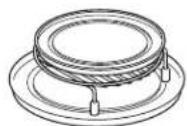
Metal Tray on the circular rack on the glass tray
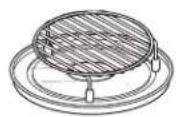
Circular rack on the glass tray
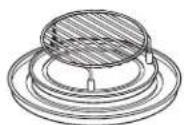
Circular rack on the metal tray on the glass tray
Air Fry with Auto Cook
1 Press the Air Fry button
2 Turn the dial to select Auto and press the dial
3 Turn the dial to select Food type and press the dial
4 Turn the dial to select Serving size and press the dial or Start/Pause button to start cooking
5 When cooking is complete, the oven will signal and turn off
Air Fry
Start
Pause
| Menu Quantity Food | Temp. | Instructions Accessory | ||
| Frozen French Fries | 1 serving: 5oz, 1 41g Frozen | Place Frozen | Fries on the metal tray on the rack.Choose the menu and weight, press Start. | Metal tray on the rack on the glass tray |
| 2 servings: 10oz, 283g | ||||
| Frozen Chicken Nuggets | 1 serving: 5oz, 7 pcs Frozen | Place Frozen | Chicken Nuggets on the rack. Choose the menu and weight, press Start. | Rack on the glass tray |
| 2 servings: 10oz, 14 pcs | ||||
| Wedge Potatoes | 1 serving: 5oz, 15 pcs Room B | Brush Wedge | Potatoes with oil and season as desired.Place Wedge Potatoes on the rack. Choose the menu and weight, press Start. | Rack on the glass tray |
| 2 servings: 10oz, 30 pcs | ||||
| Chicken Wings 1s | 1 serving: 5oz, 6 wings Room B | Brush Chiclen | Wings with oil, salt and pepper. Pickle1 hour. Place Chicken Wings on the rack on the metal tray. Choose the menu and weight, press Start. | Rack on the metal tray on the glass tray |
| 2 servings: 10oz, 12 wings | ||||
| Frozen Chicken Tenders | 1 serving: 5oz, 9 pcs Frozen | Place Frozen | Chicken Tenders on the rack on the metal tray. Choose the menu and weight, press Start. | Rack on the glass tray |
| 2 servings: 10oz, 18 pcs | ||||
Air Fry with Manual Cook
1 Press the Air Fry button
2 Turn the dial to select Manual and press the dial
3 Turn the dial to enter Cooking time and press the dial or Start/Pause to start cooking
4 When cooking is complete, the oven will signal and turn off
Air Fry
Start Pause
Other Features
Cooking Complete Reminder
To remind you that you have food in the oven, the oven will display FOOD IS READY and beep once a minute until you either open the oven door or press the Cancel/Off button.
Start/Pause
In addition to starting many functions, Start/Pause allows you to stop cooking without opening the door or clearing the display.
Start Pause
Cancel/Off
Press the Cancel/Off button to stop and cancel cooking at any time.
Cancel Off
Timer On/Off
The Timer operates as a minute timer and can be used at any time, even when the oven is operating.
- Press the Timer button.
- Turn the dial to select the minutes. Press the dial to enter.
- Turn the dial to select the seconds. Press the dial to enter
- Press the dial or Timer to start.
To cancel, press the Timer button.
When time is up, the oven will signal. To turn off the timer signal, press Timer.
NOTE: The TIMER indicator will be lit while the timer is operating.
Timer On/Off
Steam Clean
- Press the Steam Clean button.
- Put steam bowl with 1/4 cup of water.
- Press the dial or Start/Pause to start.
Once the cycle is terminated, wipe oven cavity with paper towel or cloth.
Steam Clean
Turntable
For best cooking results, leave the turntable on. It can be turned off for large dishes.
- Press the Turntable On/Off button to stop or start rotating the turntable.
Sometimes the turntable can become too hot to touch.
Be careful touching the turntable during and after cooking.
Turntable On/Off
Control Lock-Out
You may lock the control panel to prevent the oven from being accidentally started during cleaning or being used by children.
To lock or unlock the controls, press and hold 3 seconds. When the control panel is locked, CONTROL LOCKED will be displayed briefly anytime a button or dial is pressed.
Chef Connect
Use the Chef Connect feature for connecting your microwave to a GE Appliances range to sync your vent fan, cooktop surface lights and clock via Bluetooth technology.

- You must have a Chef Connect enabled range. To pair your microwave for the first time, initiate the Chef Connect process on the GE Appliances range. Refer to the range owner's manual for instructions
- On the microwave, hold Chef Connect button for 3 seconds. The Bluetooth icon ✗ on the display will start flashing as the microwave starts to search and pair with your GE Appliances range. The icon ✗ will remain ON after pairing successfully.
G5 Appliances range is not found within 2 minutes during search mode the microwave will stop searching and the Bluetooth icon ✗will turn OFF.
On initial setup, the setup protocol will start.
If the Chef Connect feature is enabled the default settings are as follows:
- Display clock sync: ON
- Auto surface light: ON (HIGH setting)
- Auto vent fan: OFF
-
Auto off: 15 minutes
-
Turn the dial to select Surface Light Sync On/Off. Press the dial to confirm. If on, it allows the microwave surface lights to turn on at HIGH level automatically when the paired range's cooktop burner turns ON. If OFF, the microwave surface lights will not automatically turn on when a cooktop burner turns on.
-
Turn the dial to select Vent Fan Sync ON/OFF. Press the dial to confirm. If ON, it allows the microwave vent fan to turn on at LOW speed automatically when the paired range's cooktop burner turns on. If OFF, the vent fan will not turn ON automatically when a cooktop burner is turned on. Pairing is now complete, the Chef Connect feature is now on.
NOTE: If there is no sync option selected during set up, 5 minutes after icon ➤ turns ON, the units will return to stand-by mode and use the default settings.
After completing the setting per above steps, your microwaves vent fan and surface light could be set to turn on automatically when the cooktop burner is turned on. The cooktop and range clock display will be synced to display the same time. The vent fan and cooktop light will be set to automatically turn off 15 minutes after the cooktop burner is turned OFF.
If desired, the light, fan, and auto off settings can now be changed using option in Settings.
Press Chef Connect once to temporarily turn OFF communication between the microwave and range. Press again to turn communication back ON. The icon ✝ will illuminate when ON.
In the case of an unintended disconnect such as lost power to the microwave or range the connection will remain after power resumed. For very short power interruptions, the power may need to be reset in order to reconnect
NOTE: To unpair the microwave from the range, press and hold the Chef Connect button on the microwave for 3 seconds. The Bluetooth icon will start to flash. Press cancel or wait 2 minutes for the flashing to stop. You may need to unpair when the GE Appliances range is replaced or serviced.
Auto Night Light
Auto Night Light can be set for light on during the night. The surface light will be set to the LOW brightness setting at the ON time. At the OFF time the surface light will be turned off.
- Press the Settings button and turn the dial to select Auto Night Light. Press the dial to enter.
- Turn the dial to select Off to turn off Auto Night Light function. Press the dial to enter.
Turn the dial to select New to turn on Auto Night Light function. Press the dial to enter. Enter ON time and OFF time. Press the dial to enter.
Turn the dial to select Review to review the Auto Night Light function setting. Press the dial to enter.
Settings
Display On/Off Hold 3 Sec

text_image
Turn to Select Press to EnterOther Features
Settings
Display On/Off
Hold 3 Sec
Set Clock
- Press the Settings button and turn the dial to select Clock Set. Press the dial to enter..
- Turn the dial to set hours. Press the dial to enter.
- Turn the dial to set minutes. Press the dial to enter.
- Turn the dial to set AM/PM. Press the dial to enter.
Clock Mode
Clock Mode can be set for 12 hours and 24 hours.
- Press the Settings button and turn the dial to select Clock Mode. Press the dial to enter.
- Turn the dial to set 12 hours or 24 hours Clock Mode. Press enter to activate.
Display Speed
Display Speed can be adjusted for Slow, Normal, or Fast
- Press the Settings button and turn the dial to select Display Speed. Press the dial to enter.
- Turn the dial to set Display Speed (Slow, Normal, Fast). Press enter to activate.
Sound Level
Sound Level can be adjusted for Mute, Low, Normal or Loud.
- Press the Settings button and turn the dial to select Sound Level. Press the dial to enter.
- Turn the dial to set Sound Level (Mute, Low, Normal, or Loud). Press enter to activate.
Surface Light Sync
-
Press the Settings button and turn the dial to select Surface Light Sync. Press the dial to enter.
-
Turn the dial to select Sync Mode (Off, Low, High).
- Press the dial to activate.
Vent Fan Sync
- Press the Settings button and turn the dial to select Vent Fan Sync. Press the dial to enter.
- Turn the dial to select Vent Fan Sync Mode (Off, Low, Medium, High or Boost).
- Press the dial to activate.
Sync Auto Off
- Press the Settings button and turn the dial to select Sync Auto Off Press the dial to enter.
- Turn the dial to select Sync Auto Off (up to 15 minutes and manual). Press enter to activate.
My Cycle
The Add 30 Sec button can be adjusted to the My Cycle feature.
- Press Setting button and turn the dial to select MyCycle.Press the dial to enter.
- Turn the dial to select time (from 5 Sec to 60 Sec) and press the dial to complete the setting.
Convect Bake Offset
- Press the settings button and turn the dial to select Convect Bake Offset. Press the dial to enter.
- Turn the dial to select Convect Bake Offset On/Off. Press enter to activate.
Bake Temp Adjust
- Press the settings button and turn the dial to select Bake Temp Adjust. Press the dial to enter.
- Turn the dial to select Bake Temp Adjust range from -25 degrees to 25 degree. Press enter to activate.
Filter Replace Reminder
The charcoal/grease filter should be replaced when it is noticeably dirty / discolored (usually after 6-12 months, depending on hood usage) or filter replacement LED is on.
When the Filter Replace LED turned on, replace filter and press Reset Filter
Surface Light
Press Surface Light once for bright light, twice for the night light or a third time to turn the light off.
Vent Fan
The vent fan removes steam and other vapors from surface cooking.
Press Vent Fan once for high fan speed, twice for medium fan speed, three times for low fan speed or a fourth time to turn the fan off.
Vent fan will turn on automatically when the cooktop burner is turned on with Chef Connection.
Automatic Fan
An automatic fan feature protects the microwave from too much heat rising from the cooktop below it. It automatically turns on if it senses too much heat. If you have turned the fan on you may find that you cannot turn it off. The fan will automatically turn off when the internal parts are cool. It may stay on for 30 minutes or more after the cooktop and microwave controls are turned off.
| Term Definition | |
| Arcing Arcing is | the microwave term for sparks in the oven. Arcing is caused by:■ metal or foil touching the side of the oven.■ foil that is not molded to food (upturned edges act like antennas).■ metal such as twist-ties, poultry pins, gold-rimmed dishes.■ recycled paper towels containing small metal pieces.■ plates or dishes with a metallic trim or glaze with a metallic sheen. |
| Covering Covers | hold in moisture, allow for more even heating and reduce cooking time. Venting plastic wrap or covering with wax paper allows excess steam to escape. |
| Shielding | In a regular oven, you shield chicken breasts or baked foods to prevent over-browning. When microwaving, you use small strips of foil to shield thin parts, such as the tips of wings and legs on poultry, which would cook before larger parts. |
| Standing Time | When you cook with regular ovens, foods such as roasts or cakes are allowed to stand to finish cooking or to set. Standing time is especially important in microwave cooking. Note that a microwaved cake is not placed on a cooling rack. |
| Venting After covering | a dish with plastic wrap, you vent the plastic wrap by turning back one corner so excess steam can escape. |
Care and Cleaning
Helpful Hints
An occasional thorough wiping with a solution of baking soda and water keeps the inside fresh.
Be certain the oven control is turned off before cleaning any part of this oven.

natural_image
Illustration of various food items including baking soda, milk bottle, and rolled cheese (no text or symbols)How to Clean the Inside
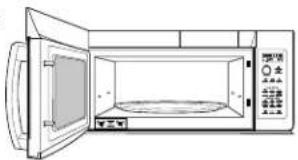
Walls, Floor, Inside Window, Metal and Plastic Parts on the Door
Some spatters can be removed with a paper towel; others may require a damp cloth. Remove greasy spatters with a sudsy cloth, then rinse with a damp cloth. Do not use abrasive cleaners or sharp utensils on oven walls.
Never use a commercial oven cleaner on any part of your microwave.
natural_image
Line drawing of a microwave oven with open door and control panel (no text or symbols)Removable Turntable and Turntable Support
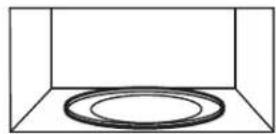
To prevent breakage, do not place the turntable into water just after cooking. Wash it carefully in warm, sudsy water or in the dishwasher. The turntable and support can be broken if dropped. Remember, do not operate the oven in the microwave mode without the turntable and support seated and in place.
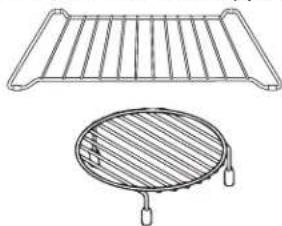
Shelves
Clean with mild soap and water or in the dishwasher.
DO NOT clean in a self-cleaning oven.
natural_image
Technical line drawing of a grid-patterned fan or grille with a circular base and handle (no text or symbols)How to Clean the Outside
We recommend against using cleaners with ammonia or alcohol, as they can damage the appearance of the microwave oven. If you choose to use a common household cleaner, first apply the cleaner directly to a clean cloth, then wipe the soiled area.
Case
Clean the outside of the microwave with a sudsy cloth. Rinse and then dry. Wipe the window clean with a damp cloth.
Control Panel
Wipe with a damp cloth. Dry thoroughly. Do not use cleaning sprays, large amounts of soap and water, abrasives or sharp objects on the panel—they can damage it. Some paper towels can also scratch the control panel.
Door Panel
Before cleaning the front door panel, make sure you know what type of panel you have. Refer to the eighth digit of the model number. "S" is stainless steel, "L" is CleanSteel and "B", "W" or "C" are plastic colors.
Stainless Steel (on some models)
The stainless steel panel can be cleaned with Stainless Steel Magic or a similar product using a clean, soft cloth. Apply stainless cleaner carefully to avoid the surrounding plastic parts. Do not use appliance wax, polish, bleach or products containing chlorine on Stainless Steel finishes.
Plastic Color Panels
Use a clean, soft, lightly dampened cloth, then dry thoroughly.
Door Seal
It's important to keep the area clean where the door seals against the microwave. Use only mild, non-abrasive detergents applied with a clean sponge or soft cloth. Rinse well.
Bottom
Clean off the grease and dust on the bottom often. Use a solution of warm water and detergent.

natural_image
Front view of a microwave oven with control panel and door (no text or symbols visible)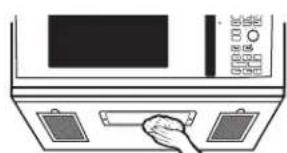
natural_image
Illustration of a hand placing a tray on a control panel (no text or symbols visible)Cooktop Light/Nite Light
Replace with LED lamp. See back cover for ordering online at GEAppliances.com.
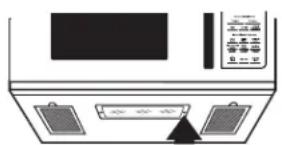
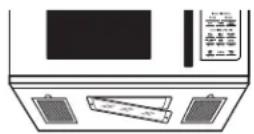
- To replace the cooktop light/nite light, first disconnect the power at the main fuse or circuit breaker panel, or pull the plug.
- Remove the screw from the side of the light compartment cover and lower the cover until it stops.
- Be sure the LED lamp is cool before removing. Remove a screw and connector from LED lamp.
- Connect LED lamp and secure using the screw. Raise the light cover and replace the screw. Connect electrical power to the oven.
natural_image
Diagram of a device front panel with two outlets and a control panel (no text or symbols visible)Remove screw.
Optional Kits
Available at extra cost from your GE supplier.
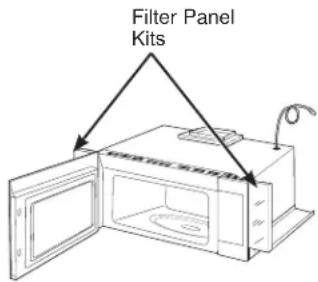
Filler Panel Kits
JX36BWW - White
JX36BBB - Black
JX36BES - Slate
JX36BDS – Dark Slate
JX36BSS - Stainless
JX36BTS – Black Stainless
text_image
Filter Panel KitsWhen replacing a 36" range hood, filler panel kits fill in the additional width to provide a custom built-in appearance.
For installation between cabinets only; not for end-of-cabinet installation. Each kit contains two 3" wide filler panels.
JX15BUMP - Bump Out Kit
When installing a microwave in a kitchen with 15" deep cabinets, the bump out kit is required. The kit allows the microwave to be installed 3 inches further out which prevents the cabinets from blocking the ventilation holes at the top of the microwave grill.
Filter Kits
Filter kits are used when the oven cannot be vented to the outside.
Available at extra cost from your GE supplier. See the back cover for ordering by phone or at GEAppliances.com.
Exhaust Feature
Vent Fan
The vent fan has two metal reusable vent filters.
Models that recirculate air back into the room also use a charcoal filter.
Charcoal filter

natural_image
Line drawing of a microwave oven with control panel and buttons, showing front and rear ports (no text or symbols)Reusable vent filters (on all models).
Reusable Vent Filters
The metal filters trap grease released by foods on the cooktop. They also prevent flames from foods on the cooktop from damaging the inside of the oven.
For this reason, the filters must always be in place when the hood is used. The vent filters should be cleaned once a month, or as needed.
natural_image
Illustration of a kitchen appliance with a hand pressing down on the door (no text or symbols visible)Removing and Cleaning the Filters
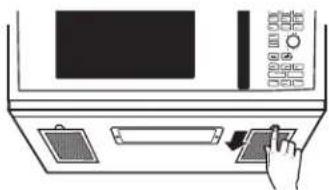
To remove, slide them to the rear using the tabs. Pull down and out.
To clean the vent filters, soak them and then swish around in hot water and detergent. Don't use ammonia or ammonia products because they will darken the metal. Light brushing can be used to remove embedded dirt.
Rinse, shake and let dry before replacing.
To replace, slide the filters into the frame slots on the back of each opening. Press up and to the front to lock into place.
Charcoal Filter
The charcoal filter cannot be cleaned. It must be replaced. See back cover for ordering online at GEAppliances.com
If the model is not vented to the outside, the air will be recirculated through a disposable charcoal filter that helps remove smoke and odors.
The charcoal filter should be replaced when it is noticeably dirty or discolored (usually after 6 to 12 months, depending on usage). See Optional Kits page 30, for more information.
CHARCOAL FILTER REPLACEMENT
- Unplug the microwave oven.
- Remove the vent grille mounting screws.
- Tip the grille forward, then lift out to remove.
- Remove the charcoal filter.
- Slide a new charcoal filter into place.
- Slide the bottom of the vent grille into place. Push the top until is snaps into place. Replace the mounting screws
- Plug in the microwave oven.

natural_image
Line drawing of a microwave oven with an open door and control panel (no text or symbols)Troubleshooting Tips... Before you call for service
Save time and money! Review the charts on the following pages first and you may not need to call for service.
| Problem Possible Cause | What To Do | |
| Oven will not start A fuse in | your home may be blown or the circuit breaker tripped. | Replace fuse or reset circuit breaker. |
| Power surge. Unplug the microwave | oven, then plug it back in. | |
| Plug not fully inserted into wall outlet. | Make sure the 3-prong plug on the oven is fully inserted into wall outlet. | |
| Door not securely closed. Open the door and close securely. | ||
| Control panel lighted, yet oven will not start | Door not securely closed. Open the door and close securely. | |
| Start/Pause button not pressed after entering cooking selection. | Press Start/Pause. | |
| Another selection entered already in oven and Cancel/Off button not pressed to cancel it. | Press Cancel/Off. | |
| Cooking time not entered after pressing Cook Time. | Make sure you have entered cooking time after pressing Cook Time. | |
| Cancel/Off was pressed accidentally. | Reset cooking program and press Start/Pause. | |
| Food weight not entered after selecting Auto Defrost or Fast Defrost. | Make sure you have entered food weight after selecting Auto Defrost or Fast Defrost. | |
| Food type not entered after pressing Auto Cook. | Make sure you have entered a food type. | |
| "CONTROL LOCK IS ON" appears on display | The control has been locked. | Press and hold Mute On/Off for about 3 seconds to unlock the control. |
| OVEN TOO HOT FOR SENSOR COOKING—USING ALTERNATE METHOD appears on display | One of the sensor cooking buttons was pressed when the temperature inside the oven was greater than 200°F. | These features will not operate when the oven is hot. The oven will automatically change to cook by time (follow the directions in the display) or once the oven is cool enough, the sensor features will functions normally. |
| Floor of the oven is warm even when the oven has not been used | Heat from the cooktop light may make the floor get warm. | This is normal. |
| Food browns on top muh faster than on the bottom | Rack has been placed in the "high" position. | Always use the rock in its "low" position. |
| Oven temperature fluctuates during cooking | The cooking element cycles on and off to maintain the oven temperature at the desired setting. | This is normal. |
| Vent fan comes on automatically | The vent fan automatically turns on to protect the microwave if it senses too much heat rising from the cooktop below. | This is normal. |
| During Bake, Roast, or Fast Bake (after preheating), the vent fan will automatically come on to cool the oven components. | This is normal. | |
| SENSOR ERROR appears on the display | Whren using a Sensor feature, the door was opened before steam could be detected. | Do not open door until steam is sensed and time is shown counting down on the display. |
| Steam was not detected in a maximum amount of time. | Use Cook Time to heat for more time. | |
Troubleshooting Tips... Before you call for service
Things That Are Normal With Your Microwave Oven
■ Moisture on the oven door and walls while cooking. Wipe the moisture off with a paper towel or soft cloth.
■ Moisture between the oven door panels when cooking certain foods. Moisture should dissipate shortly after cooking is finished.
■ Steam or vapor escaping from around the door.
■ Light reflection around door or outer case.
■ Dimming oven light and change in the blower sound at power levels other than high.
■ Dull thumping sound while oven is operating.
■ The vent fan operating while the microwave is operating. The vent fan will not go off nor can it be turned off until the microwave is off.
■ Warm, convection bake, convection roast and combination fast bake have a maximum cooking time of 179 minutes (2 hours and 59 minutes). When the maximum cooking time is reached, the oven will automatically indicate that cooking is complete and turn off the cooking element.
■ When using convection bake, convection roast or combination fast bake with a preheat, the oven door must be opened and the cooking time set after preheat or the oven will turn off the cooking element after 1 hour.
FEDERAL COMMUNICATIONS COMMISSION RADIO FREQUENCY INTERFERENCE STATEMENT (U.S.A. ONLY)
This equipment generates and uses ISM frequency energy and if not installed and used properly, that is in strict accordance with the manufacturer's instructions, may cause interference to radio and television reception. It has been type tested and found to comply with limits for ISM Equipment pursuant to part 18 of FCC Rules, which are designed to part 18 of FCC Rules, which are designed to provide residential installation.
However, there is no guarantee that interference will not occur in a particular installation. If this equipment does cause interference to radio or television reception, which can be determined by turning the equipment off and on, the user is encouraged to try to correct the interference by one or more of the following:
■ Reorient the receiving antenna of the radio or television.
■ Relocate the Microwave Oven with respect to the receiver.
■ Move the microwave oven away from the receiver.
- Plug the microwave oven into a different outlet so that the microwave oven and the receiver are on different branch codes.
The manufacturer is not responsible for any radio of TV interference caused by unauthorized modification to this microwave oven. It is the responsibility of the user to correct such interference.
This equipment has been tested and found to comply with the limits for a Class B digital device, pursuant to part 15 of the FCC Rules. These limits are designed to provide reasonable protection against harmful interference in a residential installation. This equipment generates, uses and can radiate radio frequency energy and, if not installed and used in accordance with the instructions, may cause harmful interference to radio communications. However, there is no guarantee that interference will not occur in a particular installation. If this equipment does cause harmful interference to radio or television reception, which can be determined by turning the equipment off and on, the user is encouraged to try to correct the interference by one or more of the following measures:
■ Reorient or relocate the receiving antenna.
■ Increase the separation between the equipment and receiver.
■ Connect the equipment into an outlet on a circuit different from that to which the receiver is connected.
■ Consult the dealer or an experienced radio/TV technician for help.
To satisfy FCC RF exposure requirements, a separation distance of 20 cm or more should be maintained between the antenna of this device and persons during device operation.
To ensure compliance, operations at closer than this distance is not recommended.
WARNING
Any changes or modifications to this unit not expressly approved by the
party responsible for compliance could void the user's authority to operate the equipment.
Microwave Oven Limited Warranty
GEAppliances.com
All warranty service is provided by our Factory Service Centers, or an authorized service technician. To schedule service online, visit us at GEAppliances.com/service.
| For the period of GE Appliances will replace | |
| One yearFrom the dateof the originalpurchase | Any part of the oven which fails due to a defect in materials or workmanship. During this limited one-year warranty, GE Appliances will also provide, free of charge, all labor and related service costs to replace the defective part when the unit is serviced. |
What GE Appliances will not cover:
■ Service trips to your home to teach you how to use the product.
■ Improper installation, delivery or maintenance. If you have an installation problem, contact your dealer or installer. You are responsible for providing adequate electrical, exhausting, and other connecting facilities.
■ Failure of the product or damage to the product if it is abused, misused (for example, cavity arcing from wire rack or metal/foil), or used for other than the intended purpose or used commercially.
■ Replacement of house fuses or resetting of circuit breakers.
■ Damage to the product caused by accident, fire, floods or acts of God.
■ Incidental or consequential damage caused by possible defects with this appliance.
■ Damage caused after delivery.
■ Product not accessible to provide required service.
■ Service to repair or replace light bulbs, except for LED lamps.
■ Damage to the finish, such as surface rust, tarnish, or small blemishes not reported within 48 hrs of delivery.
EXCLUSION OF IMPLIED WARRANTIES
Your sole and exclusive remedy is product repair as provided in this Limited Warranty. Any implied warranties, including the implied warranties of merchantability or fitness for a particular purpose, are limited to one year or the shortest period allowed by law.
This limited warranty is extended to the original purchaser and any succeeding owner for products purchased for home use within the USA. If the product is located in an area where service by a GE Appliances Authorized Servicer is not available, you may be responsible for a trip charge or you may be required to bring the product to an Authorized GE Appliances Service location for service. In Alaska, the limited warranty excludes the cost of shipping or service calls to your home.
Some states do not allow the exclusion or limitation of incidental or consequential damages. This limited warranty gives you specific legal rights, and you may also have other rights which vary from state to state. To know what your legal rights are, consult your local or state consumer affairs office or your state's Attorney General.
Warrantor: GE Appliances, a Haier company
Louisville KY,40225
Consumer Support
GE Appliances Website
Have a question or need assistance with your appliance? Try the GE Appliances Website 24 hours a day, any day of the year! You can also shop for more great GE Appliances products and take advantage of all our on-line support services designed for your convenience. GEAppliances.com
Register Your Appliance
Register your new appliance on-line at your convenience! Timely product registration will allow for enhanced communication and prompt service under the terms of your warranty, should the need arise. You may also mail in the pre-printed registration card included in the packing material. GEAppliances.com/register
Schedule Service
Expert GE Appliances repair service is only one step away from your door. Get on-line and schedule your service at your convenience any day of the year. GEAppliances.com/service
Extended Warranties
Purchase a GE Appliances extended warranty and learn about special discounts that are available while your warranty is still in effect. You can purchase it on-line anytime. GE Appliances Services will still be there after your warranty expires.GEAppliances.com/extended-warranty
Remote Connectivity
For assistance with wireless network connectivity (for models with remote enable), visit our website at GEAppliances.com/connect
Parts and Accessories
Individuals qualified to service their own appliances can have parts or accessories sent directly to their homes (VISA, MasterCard and Discover cards are accepted). Order on-line today 24 hours every day.
GEAppliances.com/parts
Instructions contained in this manual cover procedures to be performed by any user. Other servicing generally should be referred to qualified service personnel. Caution must be exercised, since improper servicing may cause unsafe operation.
Contact Us
If you are not satisfied with the service you receive from GE Appliances, contact us on our Website with all the details including your phone number, or write to: General Manager,
text_image
Diagram of a microwave oven with labeled parts including door, fan, and gratertext_image
Turn to Select Press to Enter Start Pause Cancel Off Cook Time Convection Bake Power Level Convection Roast Air Fry Combination Fast Cook Sensor Microwave aceptar Popcorn Beverage Cook Reheat Defrost Weight/Time Convenience Features Timer On/Off Chef Connect On/Off To Pair Hold 3 Sec Reset Filter Hold 3 Sec Steam Clean Settings Lock Control Hold 3 Sec Vent Fan Turntable On/Off Add 30 Sec My Cycle Surface LightOpciones
text_image
Diagram showing a 3D rectangular region with dashed lines and scattered points, possibly representing a mathematical or physical concept.text_image
Turn to Select Press to EnterStart Pause
flowchart
graph TD
    A["Power Level"] --> B["Turn to Select"]
    B --> C["Press to Enter"]
    C --> D["Start/Pause"]
natural_image
Simple line drawing of a cooking pan with diagonal lines crossing through it, no text or symbols present.natural_image
Illustration of four food items: a bowl with noodles, a lid with dumplings, a cut square, and a side dish (no text or symbols)text_image
Black-and-white illustration showing crossed-out food items: dumplings, fried dish, and steamed buns, with a crossed-out X symbol.| Selection Food to Reheat | |
| 1 Plate | |
| 2 Soup | |
| 3 Veggies | |
| 4 | P |
a
S
t
a
flowchart
graph TD
    A["Turn to Select"] --> B["Press to Enter"]
    B --> C["Cook"]
natural_image
Simple line drawing of a cage with two crossed black lines crossing through the middle (no text or symbols)natural_image
Simple line drawing of a cage with two crossed X marks (no text or symbols)Incorrect shelf position
text_image
Turn to Select Press to EnterStart Pause
Cancel/Off (borrar/apagado)
text_image
Chef Connect On/Off To Pair Hold 3 Sectext_image
Turn to Select Press to EnterAjustar el reloj
natural_image
Illustration of various food items including baking soda, milk bottle, and stacked books (no text or symbols)natural_image
Line drawing of a microwave oven with open door and control panel (no text or symbols)natural_image
Simple line drawing of a microwave oven with control panel and door (no text or symbols)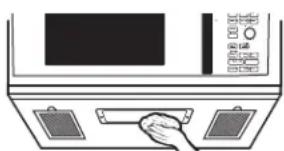
natural_image
Line drawing of a hand inserting a component into a microwave oven (no text or symbols)Luz de encimera/luz nocturna
natural_image
Diagram of a device front panel with two panels and a central indicator (no text or symbols)Quite el tornillo.
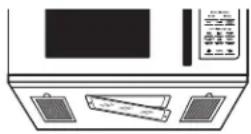
JX36BDS – Dark Slate
JX36BSS - Stainless
JX36BTS – Black Stainless

text_image
Kits de panel de relleno MINT HIX 5.0 GBnatural_image
Illustration of a microwave oven with control panel and door, showing airflow direction arrows (no text or symbols)natural_image
Illustration of a hand inserting a card into a microwave oven (no text or symbols)natural_image
Line drawing of a microwave oven with an open door and side panel (no text or symbols)Louisville KY, 40225