CA-X - Piano KAWAI - Free user manual and instructions
Find the device manual for free CA-X KAWAI in PDF.


User questions about CA-X KAWAI
0 question about this device. Answer the ones you know or ask your own.
Ask a new question about this device
Download the instructions for your Piano in PDF format for free! Find your manual CA-X - KAWAI and take your electronic device back in hand. On this page are published all the documents necessary for the use of your device. CA-X by KAWAI.
USER MANUAL CA-X KAWAI
Important Safety Instructions
SAVE THESE INSTRUCTIONS
INSTRUCTIONS PERTAINING TO A RISK OF FIRE, ELECTRIC SHOCK, OR INJURY TO PERSONS
CAUTION
RISK OF ELECTRIC SHOCK DO NOT OPEN

WARNING
TO REDUCE THE RISK OF FIRE OR ELECTRIC SHOCK, DO NOT EXPOSE THIS PRODUCT TO RAIN OR MOISTURE.
AVIS : RISQUE DE CHOC ELECTRIQUE - NE PAS OUVRIR.
TO REDUCE THE RISK OF ELECTRIC SHOCK, DO NOT REMOVE COVER (OR BACK). NO USER-SERVICEABLE PARTS INSIDE. REFER SERVICING TO QUALIFIED SERVICE PERSONNEL.

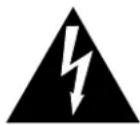
The lighting flash with arrowhead symbol, within an equilateral triangle, is intended to alert the user to the presence of uninsulated "dangerous voltage" within the product's enclosure that may be of sufficient magnitude to constitute a risk of electric shock to persons.

The exclamation point within an equilateral triangle is intended to alert the user to the presence of important operating and maintenance (servicing) instructions in the literature accompanying the product.
Examples of Picture Symbols
 | denotes that care should be taken.The example instructs the user to take care not to allow fingers to be trapped. | |
 | denotes a prohibited operation.The example instructs that disassembly of the product is prohibited. | |
 | denotes an operation that should be carried out.The example instructs the user to remove the power cord plug from the AC outlet. |
Read all the instructions before using the product.
WARNING - When using electric products, basic precautions should always be followed, including the following.

WARNING
Indicates a potential hazard that could result in death or serious injury if the product is handled incorrectly.
The product should be connected to an AC outlet of the specified voltage.


- If you are going to use an AC power cord, make sure that its has the correct plug shape and conforms to the specified power voltage.
●Failure to do so may result in fire.
Do not insert or disconnect the power cord plug with wet hands.

Doing so may cause electric shock.
When using the headphones, do not listen for long periods of time at high volume levels.

Doing so may result in hearing problems.
Do not disassemble, repair or modify the product.


Doing so may result in product breakdown, electric shock or short-circuit.
When disconnecting the AC power cord's plug, always hold the plug and pull it to remove it.


● Pulling the AC power cord itself may damage the cord, causing a fire, electric shock or short-circuit.
The product is not completely disconnected from the power supply even when the power switch is turned off. If the product will not be used for a long time, unplug the AC power cord from the AC outlet.

- Failure to do so may cause fire in case of lightning. - Failure to do so may over-heat the product, resulting in fire.

CAUTION Indicates a potential hazard that could result in injury or damage to the product or other
Do not use the product in the following areas.
● Areas, such as those near windows, where the product is exposed to direct sunlight
● Extremely hot areas, such as near a heater
● Extremely cold areas, such as outside
● Extremely humid areas
● Areas where a large amount of sand or dust is present
● Areas where the product is exposed to excessive vibrations
Using the product in such areas may result in product breakdown. Use the product only in moderate climates (not in tropical climates).
Before connecting cords, make sure that the power to this product and other devices is turned OFF.

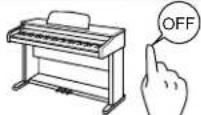
Failure to do so may cause breakdown of this product and other devices.
Take care not to allow any foreign matter to enter the product.


Entry of water, needles or hair pins may result in breakdown or short-circuit. The product shall not be exposed to dripping or splashing. No objects filled with liquids, such as vases, shall be placed on the product.
Do not drag the product on the floor. Take care not to drop the product.

Please lift up the product when moving it. Please note that the product is heavy and must be carried by more than two persons. Dropping the product may result in breakdown.
Do not place the product near electrical appliances such as TVs and radios.


● Doing so may cause the product to generate noise.
- If the product generates noise, move the product sufficiently away from the electrical appliance or connect it to another AC outlet.
When connecting the AC power cord and other cords, take care not to get them tangled.


Failure to do so may damage them, resulting in fire, electric shock or short-circuit.
Do not wipe the product with benzene or thinner.

● Doing so may result in discoloration or deformation of the product.
- When cleaning the product, put a soft cloth in lukewarm water, squeeze it well, then wipe the product.
Do not stand on the product or exert excessive force.

● Doing so may cause the product to become deformed or fall over, resulting in breakdown or injury.
The product should be located so that its location or position does not interfere with its proper ventilation. Ensure a minimum distance of 5cm around the product for sufficient ventilation. Ensure that the ventilation is not impeded by covering the ventilation openings with items, such as newspaper, table-cloths, curtains, etc.
Do not place naked flame sources, such as lighted candles on the product.
The product should be serviced by qualified service personnel when:
● The power supply cord or the plug has been damaged.
- Objects have fallen, or liquid has been spilled into the product.
● The product has been exposed to rain.
● The product does not appear to operate normally or exhibits a marked change in performance.
● The product has been dropped, or the enclosure damaged.
Notes on Repair
Should an abnormality occur in the product, immediately turn the power OFF, disconnect the power cord plug, and then contact the shop from which the product was purchased.
Declaration of Conformity according to FCC Part 15
Responsible Party: Kawai America Corporation
Address: 2055 East University Drive, Rancho Dominguez, CA 90220
Telephone: (310) 631-1771
declares that the product: Digital Piano CA-X
complies with Part 15 of the FCC Rules.
This device complies with Part 15 of the FCC Rules. Operation is subject to the following two conditions: (1) this device may not cause harmful interference, and (2) this device must accept any interference received, including interference that may cause undesired operation.
NOTE: This equipment has been tested and found to comply with the limits for a Class B digital device, pursuant to Part 15 of the FCC Rules. These limits are designed to provide reasonable protection against harmful interference in a residential installation. This equipment generates, uses and can radiate radio frequency energy and, if not installed and used in accordance with the instructions, may cause harmful interference to radio communications.
If this equipment does cause harmful interference to radio or television reception, which can be determined by turning the equipment off and on, the user is encouraged to try to correct the interference by one or more of the following measures:
- Reorient or relocate the receiving antenna.
- Increase the separation between the equipment and receiver.
- Connect the equipment into an outlet on a different electrical circuit from the receiver.
- Consult the dealer or an experienced radio/TV technician for help.
FCC WARNING: Changes or modifications not expressly approved by the party responsible for compliance could void the user's authority to operate the equipment.
Canadian Radio Interference Regulations
This instrument complies with the limits for a class B digital apparatus, pursuant to the Radio Interference Regulations, C.R.C., c. 1374.
THANK YOU FOR PURCHASING A KAWAI DIGITAL PIANO!
The Kawai digital piano is a revolutionary new keyboard instrument that combines the latest in electronic advances with traditional craftsmanship inherited from Kawai's many years of experience in building fine pianos. Its keyboard provides the touch response and full dynamic range required for a superb performance on the piano, harpsichord, organ, and other instruments. In addition, the CA piano is equipped with reverb and a digital effect processor for an even fuller sound. Industry-Standard MIDI (Musical Instrument Digital Interface) jacks are included which allow you to play other electronic instruments at the same time—opening a whole new world of musical possibilities.
This Owner's Manual contains valuable information that will help you make full use of this instrument's many capabilities. Please read all sections carefully and keep this manual handy for further reference.
1. Quick Start p. 4
1.1 SETTING UP THE PIANO 4
1.2 POWER SWITCH 5
1.3 VOLUME SLIDER 5
1.4 DEMO SONGS.... 5
1.5 PLAYING THE PIANO 5
1.6 PLAYING WITH MORE SOUNDS 6
2. Advanced Playing p. 7
2.1 VALUE BUTTONS 7
2.2 DUAL 7
2.3 S_PLIT 8
2.4 DUAL/SPLIT BALANCE SLIDER 8
2.5 EFFECTS/REVERB....8
2.6 METRONOME 10
3. Recorder p. 12
BASICS OF THE RECORDER.... 12
3.1 RECORDING (REC BUTTON) 13
3.2 PLAYING BACK A SONG (PLAY/STOP BUTTON) 15
3.3 ERASING A SONG 16
4. Playing with Concert Magic p. 17
4.1 SELECTING A SONG 17
4.2 LISTENING TO THE SONG 17
4.3 PERFORMING A SONG.... 18
4.4 PART VOLUME BALANCE FOR CONCERT MAGIC 18
4.5 CONCERT MAGIC SONG ARRANGEMENT TYPES 18
4.6 STEADY BEAT 20
4.7 CONCERT MAGIC SONG DEMO 20
4.8 ADJUSTING THE PLAYBACK SPEED FOR THE CONCERT MAGIC SONGS ..... 21
5. Function Buttons p. 22
5.1 SELECTING THE TOUCH SENSITIVITY (TOUCH BUTTON) 22
5.2 TRANSPOSING THE PIANO (TRANSPOSE BUTTON) 23
5.3 OTHER FUNCTIONS (TOUCH & TRANSPOSE BUTTONS) 24
- TUNING 24
- TEMPERAMENT 25
- MIDI CHANNEL 27
- TRANSMIT PROGRAM CHANGE ON/OFF 27
- LOCAL CONTROL ON/OFF.... 28
- MULTI-TIMBRAL ON/OFF 28
- CHANNEL MUTE.... 29
- SENDING PROGRAM CHANGE NUMBERS 29
- LOWER OCTAVE SHIFT 30
- LOWER PEDAL ON/OFF 30
- LAYER OCTAVE SHIFT 30
- LAYER DYNAMICS 31
- DAMPER HOLD 31
6. Using MIDI p. 32
UNDERSTANDING MIDI 32
6.1 USING THE CA PIANO AS CONTROLLER.... 34
6.2 USING THE CA PIANO AS A MULTI-TIMBRAL SOUND MODULE 36
7. Jacks p. 40
MIDI JACKS 40
USB JACK 40
DC IN JACK 40
HEADPHONE JACKS 40
LINE OUTJACKS 40
PEDAL JACK 40
NOTES ABOUT USB 41
8. Appendices
p. 42
PROGRAM CHANGE NUMBER MAPPING 42
CONCERT MAGIC SONG LIST 43
FRONT PANEL 44
SOUND DEMO SONG LIST 44
SPECIFICATIONS.... 45
MIDI EXCLUSIVE DATA FORMAT 46
MIDI IMPLEMENTATION CHART.... 47
1.1 SETTING UP THE PIANO
The first thing you'll need to do before playing the piano is to set up the instrument.
SUPPLYING AC POWER
Connect the enclosed AC adaptor to the piano's DC IN jack and the other end of the AC adaptor to the AC outlet on the wall.
LISTENING TO THE CA-X
You will need to connect a keyboard amplifier or headphones in order to listen.
PEDALS
Connect the enclosed F-1r pedal to the PEDAL jack. An optional F-2r Dual Foot Pedal also can be used. In this case the left pedal works as Soft pedal.
MUSIC RACK
Install the music rack as shown in the illustration.

text_image
THRU OUT MIDI IN USB DC IN 12V PHONES LINE OUT L/MONO R PEDAL1.2 POWER SWITCH

Press this button to turn on the power. Pressing it again will turn off the power.
Pressing this button while holding down the REC and PLAY/STOP buttons will erase all the songs currently stored in the Recorder. (See page 16.)
It is recommended to turn the CA-X on before turning on any amplifiers in order to avoid switching noise.
1.3 VOLUME SLIDER

This slider controls the master volume level of the piano's sound.
Move this slider to the right to increase the volume and move to the left to decrease the volume.
This slider also controls the headphone's volume and the LINE output level of the piano's sound.
1.4 DEMO SONGS

The CA-X has 26 built-in sound demo songs. Each of the demo songs presents a musical piece to introduce the different preset sounds.
Press the DEMO button and the demo song for the Piano 1 category will start. After the Piano 1 demo songs are finished playing, the demo songs for another sound category will be selected at random.
If you would like to listen to the demos for a particular category, just press the desired SOUND SELECT button while the demo is playing. When you press the button, the demo will play the demo songs for the newly selected category. Then the demo songs for another category will be selected at random. See page 44 for the list of sound demo songs.
1.5 PLAYING THE PIANO

Turning on the power.
You will find the POWER SWITCH at the right end of the front panel. Press this button to turn on the power. Pressing it again will turn off the power.
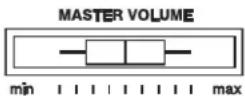
Adjust the volume level.
The VOLUME SLIDER controls the volume level of the piano. Use this slider to set the volume to a comfortable listening level.
Now try playing the keyboard.
You will hear the CA's main piano sound.
The CA piano responds just like a real acoustic piano when you play it. It produces a louder sound when you play hard and a softer sound when you play soft. The volume level changes in relation to how fast the keys are pressed. This system is called “touch sensitivity” on an electronic musical instrument. The initial touch sensitivity setting has been adjusted to the standard of an acoustic piano. You can however, select a different type of touch sensitivity on the CA piano if you are not comfortable with the standard setting. For more detail, please read “5.1 Selecting the Touch Sensitivity (TOUCH Button)” on page 22.
1.6 PLAYING WITH MORE SOUNDS
You have already heard the CA's main piano sound. The CA-X has a total of 40 sounds, not only different types of piano sounds but different instruments as well.
The different instrument sounds built into CA piano are called “preset sounds”.
All of the preset sounds have been created through advanced digital sampling technology achieving as natural and realistic sound as possible. Let's try some of the preset sounds.
SELECTING ANOTHER PRESET SOUND
Press the SOUND SELECT button under the name of the instrument you would like to listen to. When the button is pressed, the LED indicator will be turned on to indicate that this sound is selected.

text_image
PIANO 1 Piano 2 ELECTRIC PIANO DRAWBAR CHURCH ORGAN HARPSI & MALLETS STRINGS VOCAL PAD BASS song 1 2 3 4 5 part 1 2The SOUND SELECT buttons are assigned with four preset sounds to select. To select the other sounds, press the button repeatedly.
Sound variation number 1


When a SOUND SELECT button is pressed, the variation number is briefly shown in the display. Pressing the same SOUND SELECT button again will select the next variation sound assigned to the SOUND SELECT button.
You can also select any preset sounds by using the VALUE buttons.
2.1 VALUE BUTTONS

These two buttons are used to change the value for certain functions.
First select the function or option you would like to change the value for by pressing the appropriate button(s), then use the VALUE buttons to change the value. “▲” button increases the value and “▼” decreases the value.
These buttons can also be used to select the various sounds. You can select all of the preset sounds assigned to the ten SOUND SELECT buttons.
However, Sounds cannot be selected by using the VALUE buttons when you are in DUAL or SPLIT mode.
2.2 DUAL
Sound variation number 1 and 4 are layered.
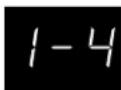
Another feature of the CA piano is the ability to layer two preset sounds together to create a more complex sound. For example, piano layered with strings, electric piano with choir sound, and so on.
To layer two sounds, select the first sound and then, while holding down that SOUND SELECT button, select the second sound by pressing another SOUND SELECT button. The LED indicators for each will be turned on to indicate the two sounds you have chosen. The display briefly shows the combination of the selected sound variation numbers.
If you want to layer two sounds assigned to the same SOUND SELECT button, while pressing the desired SOUND SELECT button use the VALUE buttons to select your desired layered sound.
ABOUT POLYPHONY
The CA piano is capable of playing up to 96 notes simultaneously (96-note polyphony). When playing in dual mode, or when playing the stereo piano sound, the polyphony will be reduced by half since the piano has to produce two sounds for each note.
2.3 SPLIT

Variation 2 for lower and 1 for upper.

SELECTING SPLIT SOUNDS
The split function divides the keyboard into two sections—upper and lower—and lets you play each part with a different sound.
First press the desired SOUND SELECT button to select the upper sound. Then, while holding down the SPLIT button, press the desired SOUND SELECT button to select the lower sound. The LED indicator for the upper sound will be turned on and the LED for the lower sound will start flashing. The display shows the combination of the selected sound variation numbers during the SPLIT button is pressed. The number on the left is for lower sound and the number on the right is for upper sound.
CHANGING THE SPLIT POINT
The default split point is set between B2 and C3. This point can be moved to anywhere on the keyboard.
Press the desired key on the keyboard while holding down the SPLIT button.
The key you pressed becomes the lowermost note for the upper section.
2.4 DUAL/SPLIT BALANCE SLIDER

You can adjust the volume balance between the two sounds in Dual or Split mode. Use the Dual/Split Balance slider to adjust the balance. Move the slider to the right to increase the volume of the rightmost sound (in dual mode) or upper sound (in split mode) and decrease the volume of the leftmost sound (in dual mode) or lower sound (in split mode). The balance changes in the opposite way when the slider is moved to the left.
2.5 EFFECTS/REVERB
You might have noticed that when you select some of the preset sounds, the LED indicator for the EFFECTS or the REVERB is turned on. The reason for this is some of the preset sounds are set up with an effect on as their initial setting.
Adding an effect to the sound enhances tonal quality and improves acoustical realism. The CA piano is provided with two separate groups of effects. The first is reverb and the second contains chorus, delay, tremolo and rotary speaker.


REVERB
Reverb adds reverberation to the sound, simulating the acoustic environment of a recital room, stage, or concert hall. There are five types of reverb available. They are Room 1&2, Stage, and Hall 1&2. (listed in order of reverberation amount).
CHORUS
Chorus is an effect that simulates the rich character of a vocal choir or string ensemble, by layering a slightly detuned version of the sound over the original to enrich it.
DELAY
Delay is an effect that adds echoes to the sound. There are three types of delay available (delay 1 - 3), each of which has a different length of delay between the echoes.
TREMOLO
This is a vibrato type effect.
ROTARY
This effect simulates the sound of the Rotary Speaker cabinet commonly used with electronic organs. Rotary 1 is normal rotary and Rotary 2 is with distortion effect.
The soft pedal is used to change the speed of the rotor between SLOW and FAST.
TO ADD REVERB
Press the REVERB button. The LED indicator will be turned on to indicate that reverb is in use. Press and hold the REVERB button and the currently selected reverb type will be shown in the display.

Room 1
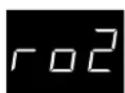
Room 2
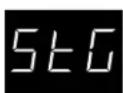
Stage Hall 1 Hall 2


To change the reverb type, use the VALUE buttons while holding down the REVERB button.
TO ADD OTHER EFFECTS
Press the EFFECTS button. The LED indicator will be turned on to indicate that the effect is in use. Press and hold the EFFECTS button and the currently selected effect will be shown in the display.
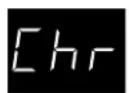
Chorus

Delay 1

Delay 2 Delay 3
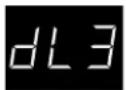

Tremolo
Rotary 1

Rotary 2
To change the effect type, use the VALUE buttons while holding down the EFFECTS button.
To turn off the reverb or effects, press the REVERB or EFFECTS button again.
2.6 METRONOME


Rhythm is one of the most important elements when learning music. It is important to practice playing the piano at the correct tempo and with a steady rhythm. The CA piano's metronome is a tool that helps you to achieve this by providing a steady beat for you play along with.
STARTING THE METRONOME
Press the TEMPO button. You will see the LED indicator turn on and hear the metronome begin counting with a steady beat. The display shows the tempo in beats per minute.
To change the tempo, use the VALUE buttons to increase or decrease the tempo within the range of 30 - 300 beats per minute. (60-600 BPM with eighth note rhythms).
To stop the metronome, press the TEMPO button again.
CHANGING THE TIME SIGNATURE
You probably noticed that there are two types of clicks and the louder one comes every fourth beat. The metronome is capable of giving you a down beat to indicate the beginning of the measure. You are now hearing a 4-beat or 4/4 time signature.
You can select a different time signature, if you want to. There are seven different time signatures available on the CA piano—1/4, 2/4, 3/4, 4/4, 5/4, 3/8 and 6/8.

To change the time signature, use the BEAT button.
Press the BEAT button. You will see the LED indicator turn on and hear the metronome begin counting. The display shows the time signature.
Use the VALUE buttons to select your desired time signature. You will see the time signature currently selected in the display.
To stop the metronome, press the BEAT button again.
You can use either the TEMPO or BEAT button to turn the metronome on and off. Choose the appropriate button depending on whether you're adjusting the tempo or changing the time signature.
ADJUSTING THE METRONOME VOLUME
The volume level of metronome can be adjusted to any level you like independent of the main volume.

Press the TEMPO and BEAT buttons simultaneously. The display shows the volume level of the metronome in numbers from 1 (soft) to 10 (loud). The factory preset is 5.
Use the VALUE buttons to change value.
The CA piano's recorder records your playing much like a tape recorder, and it is just as easy to use. The CA piano records a song as digital data instead of audio data and stores the song inside the instrument. Because the song is stored as digital information you can modify the song when you play it back. You can, for example, adjust the tempo without changing the pitch or use a different effect setting from one you have recorded. Once you understand the recorder, you will find it to be a useful tool for both practicing and playing the piano.
BASICS OF THE RECORDER
Let's take a brief look at the recorders features.
TWO-TRACK FIVE-SONG RECORDER
The CA piano's recorder is a 2-track 5-song recorder. This means you can record up to five different songs, store them in memory, and play them back as you like.
Each song has two separate tracks called “Parts” that can be recorded separately. This lets you record for example, the left hand part first on one track, then record the right hand part next on the other track while listening to the first track.
When you record or play back a song, you can select which part (track) of which song you are going to record or play back. When you are recording, selecting the same part again to record will erase any previous recordings on that part. Because of this it's important to remember; when recording both parts separately, after recording the first part be sure to select the second part to record, otherwise you will end up recording over the first part of the song.
RECORDED INFORMATION
The CA piano records the following:
Note information
Sound selection
Pedal movements
Balance settings Set the dual/split balance as desired before you start recording. Balance settings made before you start recording will be used by the recorder. Any changes made during the recording will be ignored by the recorder.
Transpose..... When you record in a different key using the transpose function, the CA piano will record the actual transposed notes you hear, not the notes as you play with the keyboard.
RECORDING CAPACITY
The total recording capacity is about 15,000 notes. Pressing any buttons or pedals is counted as one note.
When the recorder reaches it's maximum capacity, the CA piano will stop recording at that point.
RECORDER AND METRONOME
When playing back a song with the metronome turned on, the metronome always restarts with the down beat.
3.1 RECORDING (REC BUTTON)

The REC button is used for recording.
Press the REC button when you are ready to record. The LED indicator will start flashing telling you that the piano is ready to record.
Now play some music on the piano. The recorder will automatically start recording with the first note you play.
Press the PLAY/STOP button when you are finished recording. The piano will stop recording and save your song to memory.
Saving to memory may take a few moments and during this time the piano will not perform any other operations.
You can start recording by pressing the PLAY/STOP button instead of pressing a key. In this way, you can insert a blank bar at the beginning of the song.
If you make a mistake, you can record your piece again. Just repeat the same procedure. The second recording will completely erase the first one.
The CA piano is capable of recording and storing up to five different songs. Let's try recording a second song.
If you followed the procedure in the previous section you have already recorded Song 1, so now let's record Song 2.
To select the song number, use the SOUND SELECT buttons with the song numbers printed under them—PIANO 1, PIANO 2, ELECTRIC PIANO, DRAWBAR and CHURCH ORGAN. Press the PIANO 2 button to select Song 2 while holding down the REC button. The LED indicator of PIANO 2 will begin to flash when the REC button is pressed.

text_image
PIANO 1 Piano 2 ELECTRIC PIANO DRAWBAR CHURCH ORGAN song 1 2 3 4 5When you are ready to record, just start playing the keyboard.
The CA piano will start recording automatically with the first note you play.
Press the PLAY/STOP button when you are finished recording.
RECORDING A SECOND PART
You can record a second part in the second track (part) of the same song. After recording the first part, select the other track and record your second part.
While holding down the REC button, press the ELECTRIC PIANO button to select Song 3.
Record the first part just the same as in the previous sections and press the PLAY/STOP button when you're finished recording.
Now press and hold the REC button again and press the BASS button to select Part 2 to record.
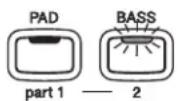
If you want to start recording the second part from the beginning of the song, just play the keyboard. You will hear the first part playing back while you record the second part.
If you would like to play back the first part and then start recording the second part from a certain point later in the song, press the PLAY/STOP button instead of playing the keyboard to start playback of the first part and then begin recording the second part from any point you like.
When you are finished recording, press the PLAY/STOP button again.
STATUS OF SONG AND PART
You have probably noticed that some of the LED indicators are flashing, some are turned on, and some are turned off. The LED indicates the status of recording and play back as shown below.

The LED that is on indicates that the song or part has already been recorded.

The flashing LED indicates that the song or part is selected to record or play back.

The LED that is off indicates that the song or part is empty.
If you have recorded more than one song, you can check the song status, by pressing the REC or PLAY/STOP button.
3.2 PLAYING BACK A SONG (PLAY/STOP BUTTON)

The PLAY/STOP button is used to select a song and part to play, and to start and stop play back of the recorded songs.
Press the PLAY/STOP button and the recorded song will start playing.
Press the PLAY/STOP button again to stop play back.
If you would like to listen to a different song, select your desired song number using the SOUND SELECT buttons while holding down the PLAY/STOP button and then release the buttons to start play back. The LED indicator for the selected song will flash when holding down the PLAY/STOP button.
PLAYING BACK THE PARTS SEPARATELY
When you select a song recorded with two parts, you can play back the parts separately.
Hold down the PLAY/STOP button and look at the Part buttons. The LED indicators for both parts will be on, indicating that you have successfully recorded two tracks. Release the PLAY/STOP button to listen to what you have recorded. You should hear both parts.
To play back an individual part, use the Part buttons while holding down the PLAY/STOP button to turn on/off each part. If the LED indicator is on, that part will play. If the LED indicator is off, that part will not play.
USING THE PLAY/STOP BUTTON TO START RECORDING
The PLAY/STOP button can also be used to start recording. In this way, you can insert a blank bar at the beginning of the song.
Press the REC button to enable the piano to record first, then press the PLAY/STOP button. On pressing the PLAY/STOP button, the CA piano starts recording regardless of whether you press a key or not.
3.3 ERASING A SONG
RECORDER

This function allows you to erase any song you do not want to listen to.
To erase a specific song and part, first hold down both the REC and PLAY/STOP buttons. The LED indicators will display which songs have been recorded.
Select the desired song to erase by pressing the appropriate SOUND SELECT button while continuing to hold down both the REC and the PLAY/STOP buttons. The LED indicator of the selected song will start flashing.
Press the Part button you want to erase and turn the LED indicator off. The part will be erased. When both parts for a song are erased, the song becomes empty.
ERASING ALL THE SONGS
To erase all the songs at once, first turn off the power and then turn it on again while holding down both the REC and PLAY/STOP buttons.

The great German composer Johann Sebastian Bach once said, “Playing the keyboard is simple. Just strike the right keys at the right time.”
Many people wish it were that simple. The reality is very different of course. However, there is a way to make playing the keyboard very simple. You don't even have to strike the right keys thanks to Concert Magic.
With CONCERT MAGIC, absolutely anyone can sit at the CA piano and make real music... even if you've never taken a piano lesson in your life. To enjoy performing by yourself, you have only to select your favorite piece from 88 preprogrammed songs and tap any of the 88 piano keys with a steady rhythm and tempo. CONCERT MAGIC will provide the correct melody and accompaniment notes, regardless of which keys you press. Anybody, young or old, can enjoy CONCERT MAGIC from the moment they sit down at the CA piano.
Now let's see how CONCERT MAGIC works.
4.1 SELECTING A SONG
The 88 Concert Magic songs are assigned to each of the 88 piano keys, classified in eight groups by song category such as Children's Songs, American Classics, Christmas Songs.
All of the song titles are listed on page 43 in the appendices section of this manual.
To select a song, press the key to which your desired song is assigned while holding down the CONCERT MAGIC button. The display briefly shows the song number.
If you have selected a song you are familiar with, you may want to play by yourself right away. However you may want to listen to the song first before playing it.
To listen, press the PLAY/STOP button. The CA piano will start playing back the selected song. You can adjust the speed or tempo of the song by using the VALUE buttons while holding down the TEMPO button. While you are listening you can select a different Concert Magic song by using the VALUE buttons.
When you are finished listening to the song, press the PLAY/STOP button again to stop.
4.3 PERFORMING A SONG
Now you're ready to play yourself.
Tap out the rhythm of the selected song on any one of the 88 black or white keys on the piano's keyboard.
As you tap harder, the notes will get louder; as you tap softer, the notes will get quieter. As you tap faster, the notes speed up; as you tap slower, they will slow down correspondingly, just like regular piano playing.
Isn't it fun? You can sound like you've been playing for years just by pressing one key with one finger.
Concert Magic is a perfect method for small children to learn music, especially to develop a sense of rhythm. For older people who may think it is too late to learn the keyboard, Concert Magic is a good first step for them to begin with. With Concert Magic, your CA piano can be enjoyed by anyone in the family, even those who have never touched a musical instrument in their life.
4.4 PART VOLUME BALANCE FOR CONCERT MAGIC
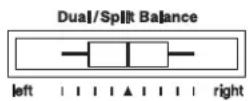
When used with Concert Magic, the balance slider adjusts the volume balance of the melody part and the accompaniment.
As the slider is moved to the right, the sound of the melody becomes louder and the accompaniment becomes softer. The balance changes in the opposite way when the slider is moved to the left.
4.5 CONCERT MAGIC SONG ARRANGEMENT TYPES
After playing for a while with Concert Magic you may think that it's too easy and there is very little to learn.
While it is true that some of the songs are very easy to play, even for beginners, there are also some which will challenge you and require practice to play beautifully. Each of the 88 Concert Magic songs falls into one of three different arrangement types depending on the skill level required to perform them.
EASY BEAT
These are the easiest songs to play. To perform them, simply tap out a constant steady beat on any key on the keyboard.
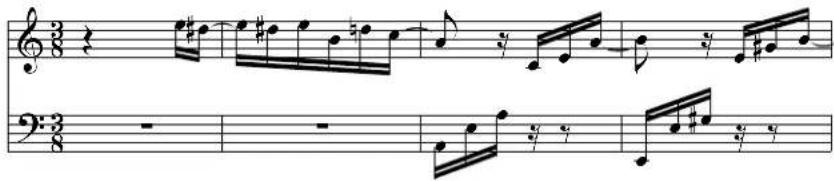
Look at the following example, “Für Elise”. Press the key with a steady sixteenth note rhythm.
Key on xxxxxxxxxxxxxxxxxxxxxxxx
text_image
Musical score snippet with treble and bass clefs, showing notes and rests in 3/8 time signatureMELODY PLAY
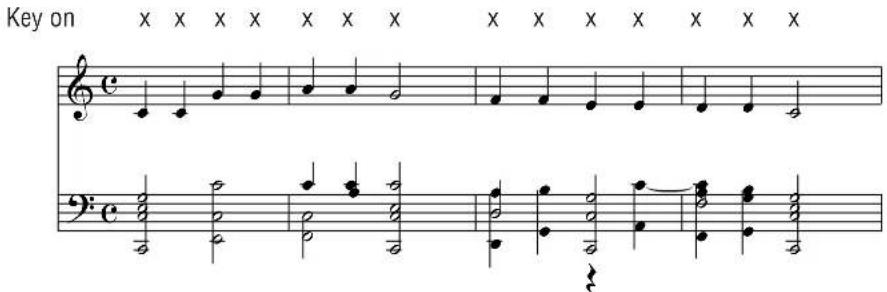
These songs are also quite easy to play, especially if they are familiar to you. To perform them, tap out the rhythm of the melody on any key on the keyboard. Singing along as you tap the rhythm can be helpful. Play “Twinkle, Twinkle, Little Star” for example. Follow the melody’s rhythm as shown.
text_image
Key on x x x x x x x x x x x x x x x x x x x x x x x x x x x x x x x x x x x x x x x x x x x x x x x x x x x x x x x x x x x x x x x x x x x x x x x x x x x x x x c y z: c y z z z z z z z z z z z z z z z z z z z z z z z z z z z z z z z z z z z z z z z z z z z z z z z z zWhen performing fast songs with Concert Magic, it is sometimes easier to tap two different keys with two fingers alternating. This allows you to play twice as fast as you can using only one finger on one key.
SKILLFUL
These songs range in difficulty from moderately difficult to difficult. To perform them, tap out the rhythm of both the melody and the accompaniment notes on any key on the keyboard, like “Waltz of the Flowers” shown below.

text_image
Key on X X X X X X X X X X X X X X X X3
4
# # # # # # # # # # # # # # # # # # # # # # # # # # # # # # # # # # # # # # # # # # # # # # # # # # # # # # # # # # # # # # # # # # # # # # #3
4
It may take some practice to get them just right. A good way to learn these songs is to listen to them first, and then try to tap out the rhythms that you hear.
NOTE
In the song list on page 43, the arrangement type is marked next to each song title as “EB” for Easy Beat, “MP” for Melody Play and “SK” for Skillful.
4.6 STEADY BEAT
Regardless of which arrangement type a Concert Magic song is, with Steady Beat you can play any Concert Magic song by simply tapping any key with a constant steady beat.
Press and hold the CONCERT MAGIC button. The display will show the current Concert Magic mode (C-1).
While still holding the CONCERT MAGIC button, use the VALUE button to change the Concert Magic mode to STEADY BEAT (C-2).
Start by tapping any key with a constant steady beat. Your tapping will set the tempo for the song. Both the accompaniment and melody parts will be played automatically in time with the tempo you tap.
4.7 CONCERT MAGIC SONG DEMO
There are two ways to listen to the Concert Magic songs in the DEMO mode.
- Press the piano key to which the desired song is assigned while holding down the DEMO button.
The CA piano will play back the selected song and, then play the rest of the songs in the same song category one after another.
- Press the CONCERT MAGIC button and then press the DEMO button.
The CA piano will play back all of the Concert Magic songs in random order.
To stop the demo, press the DEMO button again.
To select the songs in different categories, select a song from the desired category.
The TEMPO button is also used to adjust the playback speed for the Concert Magic songs.
After selecting a Concert Magic song to play back, hold down the TEMPO button. The LED display will show the tempo value. While holding down the TEMPO button, use the VALUE buttons to change the tempo.
You can adjust the tempo, either before playing back a song or while the song is playing back.
5.1 SELECTING THE TOUCH SENSITIVITY (TOUCH BUTTON)

Touch lets you select a different touch sensitivity for the keyboard from the standard touch of an acoustic piano. You can change the sensitivity to one of five different settings: LIGHT 1, LIGHT 2, HEAVY 1, HEAVY 2, OFF or User.

text_image
LT1 LT2 HE1 HE2 OFF USrLight 1 For those still developing finger strength. A louder volume is produced even when playing with a soft touch.
Light 2 For players with a delicate touch. Requires less striking force to achieve a forte note.
Heavy 1 Perfect for those with strong fingers. Requires a heavier touch to produce a loud volume.
Heavy 2 Requires more striking force to achieve a loud volume.
Off A constant volume is produced regardless of how hard the keys are struck. This setting is suitable for sounds that have a fixed dynamic range such as Organ and Harpsichord.
User You can create your own custom touch curve to fit your playing style.
To change from the standard touch, press the TOUCH button. The LED indicator above the TOUCH button will be turned on to indicate that the piano is now using a different touch setting.
Use the VALUE buttons to change the type of touch while the TOUCH button is held down.
Press the TOUCH button again to get back to the standard touch setting.
Touch selection is global for all the preset tones. You cannot have an individual setting for each tone.
Once the power is turned off, the setting will be reset to the standard setting.
NOTE
LIGHT and HEAVY do not represent the physical weight of the keys. These are settings that affect the sensitivity of the keys, which determines the volume level in response to the key movement.
USER TOUCH
Let's create your own custom touch curve which will fit your playing style.

Use the VALUE buttons to select "User" while holding down the TOUCH button.

While still holding the TOUCH button, press the REC button. The display will show "Play".

Now start playing the CA piano dynamically from soft to loud in order to let the CA piano analyze your playing style. While you are playing, the display changes to show three dots at the bottom.

Press the STOP button when you finish playing. The CA piano will analyze your playing and create a custom touch curve for you based upon your playing style. The display briefly shows “Done”.
NOTE
The user touch curve data is saved automatically even after the power is turned off.
5.2 TRANSPOSING THE PIANO (TRANSPOSE BUTTON)

The transpose function lets you raise or lower the piano's key in half steps. This is especially useful when you have learned a song in one key and have to play it in another key. The transpose feature allows you to play the song in the original key, but hear it in another key.
Press and hold the TRANSPOSE button. While still holding the TRANSPOSE button, use the VALUE buttons or the keyboard from C2 to C4 to specify the transposition amount.
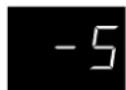
The display shows you a number telling you how many half steps up or down you have transposed the piano. -5, for example, represents a transposition that is 5 half steps lower. "0" indicates no transposition.
The piano can be transposed up to 12 half steps higher or 12 half steps lower.
Pressing TRANSPOSE button again turns the TRANSPOSE function off.
The TRANSPOSE function remembers the current setting as long as the power is on.
5.3 OTHER FUNCTIONS (TOUCH & TRANSPOSE BUTTONS)
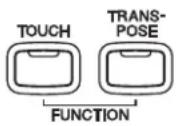
There are 13 other functions that control tuning, system, and MIDI functions. They are Tuning, Temperament, MIDI Transmit and Receive Channel, Transmit Program Change On/Off, Local On/Off, Multi-timbral Mode, Channel Mute, Program Change Number, Lower Octave Shift, Lower Pedal On/Off, Layer Octave Shift, Layer Dynamics and Damper Hold.
These functions are selected by pressing one of the SOUND SELECT buttons or EFFECTS, REVERB, SPLIT buttons while holding down both the TOUCH and the TRANSPOSE buttons. The functions are assigned as listed below.
Tuning PIANO 1 Temperament PIANO 2 MIDI Channel ELECTRIC PIANO Transmit Program Change On/Off DRAWBAR Local Control On/Off CHURCH ORGAN Multi-Timbral Mode On/Off HARPSI&MALLETS Channel Mute STRINGS Program Change Number VOCAL Lower Octave Shift PAD Lower Pedal On/Off BASS Layer Octave Shift EFFECTS Layer Dynamics REVERB Damper Hold SPLIT
The LED indicator of the button will flash to show which function is selected.
To exit the function, press any of the SOUND SELECT buttons or the TOUCH or the TRANSPOSE button.
Once the power is turned off, the settings will be reset to the factory preset value.
1. TUNING
Tuning allows you to adjust the piano's pitch. You may need to adjust the tuning when you play with other instruments.
Press the PIANO 1 button while holding down the TOUCH and the TRANSPOSE buttons.

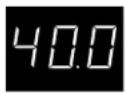
The display alternatively shows “tun” (= Tuning) and a number that represents the pitch for “A” in Hz (Hertz). The range of adjustment is from 427.0 to 453.0 Hz (displayed as 27.0–53.0). The factory preset value is set to the modern standard A = 440.0 Hz (displayed as 40.0).
Use the VALUE buttons to raise or lower the pitch.
2. TEMPERAMENT
The CA piano offers not only equal temperament (the modern standard) but also immediate access to temperaments popular during the Renaissance and Baroque periods. It should be interesting and educational to try some of the different temperaments, although the equal temperament is dominant today.

Press the PIANO 2 button while holding down the TOUCH and the TRANSPOSE buttons.
The display alternatively shows “tMP” (= Temperament) and the symbol that indicates which type of temperament is in use.
Use the VALUE buttons to change the type of temperament.
BRIEF EXPLANATION OF TEMPERAMENTS
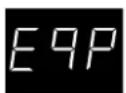
EQUAL TEMPERAMENT (PIANO ONLY)
This is the default temperament. If a piano sound is selected the tuning is stretched like an acoustic piano (EQUAL TEMPERAMENT). If any other type of sound is selected the tuning will be EQUAL (FLAT). An explanation of EQUAL TEMPERAMENT and EQUAL TEMPERAMENT (FLAT) is provided later in this section.
NOTE
If a piano sound is used in a layer with any other sound then both sounds will use the EQUAL TEMPERAMENT (Stretched) tuning.
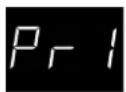
MERSENNE PURE TEMPERAMENT (MAJOR) MERSENNE PURE TEMPERAMENT (MINOR)
This temperament, which eliminates dissonance's for thirds and fifths is still popular for choral music because of its perfect harmony.
You need to be aware what key you are playing in with this temperament. Any key modulation will result in dissonance's. When you play music in a particular key, you need to match the key of the temperament as well. When playing in a major key select Pure (Major) and when playing in a minor key select Pure (minor).

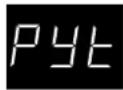
PYTHAGOREAN TEMPERAMENT
This temperament, which uses mathematical ratios to eliminate dissonance for fifths, is very limited for use with chords, but it produces very characteristic melodic lines.
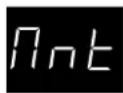
MEANTONE TEMPERAMENT
This temperament, which uses a mean between a major and minor whole tone to eliminate dissonance for thirds, was devised to eliminate the lack of consonance's experienced with certain fifths for the Mersenne pure temperament. It produces chords that are more beautiful than those with the equal temperament.
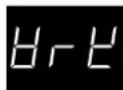
WERCKMEISTER III TEMPERAMENT KIRNBERGER III TEMPERAMENT
These two temperaments are placed in between Meantone and Pythagorean. For music with few accidentals, this temperament produces the beautiful chords of the mean tone, but as accidentals increase, the temperament produces the characteristic melodies of the Pythagorean temperament. It is used primarily for classical music written in the Baroque era to revive the original characteristics.
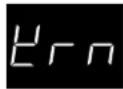
EQUAL TEMPERAMENT (FLAT)
This is “unstretched” equal temperament that divides the scale into twelve equal semitones. This produces the same chordal intervals in all twelve keys, and has the advantage of limitless modulation of the key. However the tonality of each key becomes less characteristic and no chord is in pure consonance.

EQUAL TEMPERAMENT
This is the most popular piano temperament. The hearing ability of a human is uneven and is not as accurate with high frequency and low frequency as it is with the middle range. This temperament's tuning is stretched to compensate for this so the sound will be heard naturally to the ears. This “Stretched” equal temperament is a practical variation of the “unstretched” equal temperament which was invented on a mathematical basis.

NOTE
After you have selected the desired temperament, please read the following section on selecting a key signature for the temperament before continuing.
Key in D
Key in A#

KEY SIGNATURE OF TEMPERAMENT
Limitless modulation of the key became available only after the invention of Equal temperament. When we use a temperament other than Equal temperament, we must carefully choose the key signature to play in.
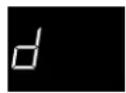
For example, if the song you are going to play is written in D major, choose "D" as the temperament key.
To select the key signature of the temperament, simply press one of the 88 piano keys. The note name of the key you pressed will be shown in the display and it will be chosen as the key of the temperament.
NOTE
Changing the key of the temperament will only change the “balance” of the tuning, the pitch of the keyboard remains unchanged. Use the TUNING or TRANSPOSE functions to change the pitch of the whole keyboard.
3. MIDI CHANNEL
This determines on which MIDI channel the CA piano will exchange MIDI information with an external MIDI instrument or a personal computer.


Press the ELECTRIC PIANO button while holding down the TOUCH and the TRANSPOSE buttons.
The display alternatively shows “Chn” (= Channel) and the channel number. The default channel is 1.
Use the VALUE buttons to change the channel number.
4. TRANSMIT PROGRAM CHANGE ON/OFF
This determines whether or not the CA piano will transmit program change information when pressing the SOUND SELECT buttons. When this is turned on, pressing the SOUND SELECT buttons will send the program change numbers as listed in page 42.


Press the DRAWBAR button while holding down the TOUCH and the TRANSPOSE buttons.
The display alternatively shows “PGM” (= Program) and on/off status. The default is on.
Use the VALUE buttons to toggle on and off.
This determines whether the CA piano's sound will be played from the piano's keyboard ("ON") or only from an external MIDI instrument ("OFF").
Even with local control “off” the piano’s keyboard will still transmit to an external MIDI instrument or personal computer.

Press the CHURCH ORGAN button while holding down the TOUCH and the TRANSPOSE buttons.

The display alternatively shows “LcL” (= Local) and on/off status. The default is on.
Use the VALUE buttons to toggle on and off.
6. MULTI-TIMBRAL MODE ON/OFF
Multi-timbral mode allows the CA piano to receive data on more than one MIDI channel simultaneously. In this mode, the CA piano can play different musical parts with different sounds for each part.
Multi-Timbral On (On1 and On2)
This is a flexible 16 part multi-timbral setup. You can turn individual MIDI channels on and off, and assign any program number to any channel in the way you like. The CA piano's normal program change numbers are assigned in On1 (Please see page 42 for a list of the program change numbers), and General MIDI program change numbers are assigned in On2.
Multi-Timbral Off
This turns off the multi-timbral capability. Only one MIDI channel will be active and only the preset sound currently selected will be heard when a MIDI signal is received.

Press the HARPSI&MALLETS button while holding down the TOUCH and the TRANSPOSE buttons.

The display alternatively shows “MLt” (= Multi) and on/off status. The default is off.
Use the VALUE buttons to toggle on1, on2 and off.
7. CHANNEL MUTE
This determines which MIDI channels are activated to receive MIDI information when the Multi-Timbral mode is set to on. You can activate or deactivate each of the 16 channels individually.
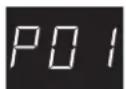
Press the STRINGS button while holding down the TOUCH and the TRANSPOSE buttons.

The display alternatively shows “P01” (= Play 01) and “On”. This means channel 1 is activated.
Use the VALUE buttons to toggle on and off.
To turn on and off the other channels, use the 16 leftmost white keys to select a desired channel. The display will show "P02" through "P16". Then use the VALUE buttons to turn them on and off.
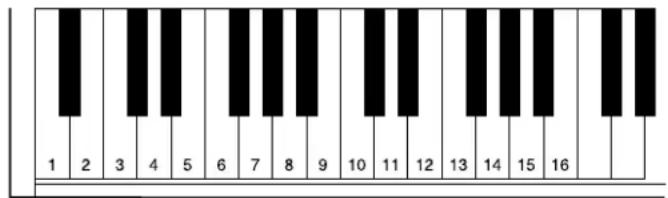
text_image
1 2 3 4 5 6 7 8 9 10 11 12 13 14 15 16NOTE
When the Multi-timbral mode is set to off, the “Channel Mute” function can not be selected.
8. SENDING PROGRAM CHANGE NUMBERS
This function allows the CA piano to transmit program change numbers beyond the 40 pre-defined numbers transmitted by the sound select buttons. Using this function, you can send any number from 1 to 128.

Press the VOCAL button while holding down the TOUCH and the TRANSPOSE buttons.
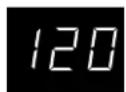
The display alternatively shows "PG#" (= Program #) and a program change number. Use the VALUE buttons to change the number.
To send the program change number, press both VALUE buttons simultaneously.
9. LOWER OCTAVE SHIFT
This allows the octave of the lower part to be be shifted up one, two, or three octaves higher when you use the split function.

Press the PAD button while holding down the TOUCH and the TRANSPOSE buttons.

The display alternatively shows “Lot” (= Lower Octave) and a number which represents how many octaves the lower part is shifted up.
Use the VALUE buttons to set the desired lower octave shift range.
Lower Octave Shift can be set between 0 to 3.
10. LOWER PEDAL ON/OFF
This determines if the pedals will be active for lower sound when in SPLIT mode. The default setting is off which means the pedals are not active for lower sound.

Press the BASS button while holding down the TOUCH and the TRANSPOSE buttons.

The display alternatively shows “LPd” (= Lower Pedal) and on/off status. The default is off.
Use the VALUE buttons to toggle on and off.
11. LAYER OCTAVE SHIFT
This allows the octave of the layered part to be be shifted up or down when you use the dual function.

Press the EFFECT button while holding down the TOUCH and the TRANSPOSE buttons.

The display alternatively shows “LAo” (= Layer Octave) and a number which represents how many octaves the layered part is shifted up or down.
Use the VALUE buttons to set the desired layer octave shift range.
Layer Octave Shift can be set between -2 to 2.
12. LAYER DYNAMICS
In Dual mode sometimes simply adjusting the volume balance between the two layered sounds is not enough to create the desired sound character if both sounds are very dynamic. Two equally dynamic sounds can be difficult to control and play comfortably. The Layer Dynamics function allows you to limit the overall dynamic sensitivity of the layered sound to create a perfect blend between both sounds in a layer. In addition to reducing the volume of the layered sound, limiting the dynamic sensitivity of the layered sound also makes the layered sound easier to control in relation to the main sound as you play. With this function, you can comfortably play as dynamically as you like with the main sound while maintaining control of the layered sound.
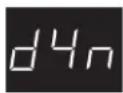
Press the REVERB button while holding down the TOUCH and the TRANSPOSE buttons.

The display alternatively shows “dyn” (= Dynamics) and a number which represents the level of dynamics.
Use the VALUE buttons to set the desired layer dynamics range.
You can select the level of dynamics from 1 to 10. A value of 1 produces the greatest reduction in dynamics and a value of 10 produces no change in the dynamics. The default value is 10.
13. DAMPER HOLD
This determines if the sound such as organ or strings should be held (on) or gradually decayed (off) when the damper pedal is depressed.
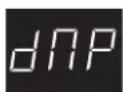
Press the SPLIT button while holding down the TOUCH and the TRANSPOSE buttons.

The display alternatively shows “dMP” (= Damper) and on/off status. The default is off.
Use the VALUE buttons to toggle on and off.
In this chapter you will learn how you can create music by connecting the CA piano to an external MIDI device.
The CA piano is compatible with MIDI devices from Kawai and other manufacturers. It can also be used with sequencing software on a personal computer.
UNDERSTANDING MIDI
WHAT IS MIDI?
The letters MIDI stand for Musical Instrument Digital Interface, an international standard for connecting MIDI equipped synthesizers, drum machines, and other electronic instruments so that they can exchange data. Personal computers can also be equipped for MIDI communication. Electronic instruments equipped with MIDI can transmit and receive performance data such as, notes, what sound to play, pedal information, volume, etc. This data can be recorded with a device like a sequencer or a computer.
MIDI JACKS
Instruments equipped with MIDI usually have three jacks for exchanging data: IN, OUT, and THRU. (Some instruments have only IN and OUT.) These jacks are used to connect MIDI devices to one another using a special cable.
Each terminal has a different function.
IN : For receiving MIDI data from another MIDI instrument.
OUT : For sending MIDI data to another MIDI instrument.
THRU : For passing along MIDI data received to another MIDI instrument without processing.
Depending on how they are connected, instruments are grouped as those which receive data (producing sound when data is received from a connected instrument), those which send data (to instruments to which they are connected), and those which both send and receive data.
MIDI CHANNEL
MIDI uses what are known as “channels” as a means of routing MIDI data intended to play a specified instrument or specified part. By channelizing MIDI data, you can control multiple parts in multiple instruments with a single cable.
There are two aspects of channels, one for receiving and one for sending. The MIDI channel of the receiving instrument must be matched with the MIDI channel of the transmitting instrument. The idea is just like television or radio. If you have a desired station to watch or listen to, you need to tune in to the right channel. When a transmitting instrument uses channel 1, the receiving instrument must be set to use channel 1 also. The CA piano lets you set the same channel number for both Transmit and receive. There are 16 MIDI channels available to choose from on the CA piano.
In addition to channel-to-channel connection, it is possible to receive multiple channels. With MIDI instruments equipped with multi-timbral capabilities, you can receive multiple parts on multiple channels each played with a different sound simultaneously. For example, a MIDI instrument might receive the melody on channel 1, the chords on 2, the bass on 3, and assign a different instrument to each channel. Piano for channel 1, strings for 2, electric bass for 3. In this way, the CA piano can play up to 16 different parts each with a different sound.
Here's a diagram to summarize the MIDI connections we have discussed.
Instrument #1, which is transmitting the piano part on channel 1 (Ch 1), the string part on Ch 2 and the bass part on Ch 3, is connected to Instrument #2. Instrument #3 is connected to MIDI Thru on instrument #2. The receive channel is set to 1 for Instrument #2 and multi-timbral mode is turned off. On instrument #3 multi-timbral mode is on.
MIDI Keyboard #1
Transmitting
Ch 1 Piano
Ch 2 Strings
Ch 3 Bass
MIDI Keyboard #2
Receiving ch 1
Multi-timbral mode off
Sound Module #3
Multi-timbral mode on

flowchart
graph TD
    A["IN"] --> B["THRU"]
    C["OUT"] --> B
    B --> D[" Piano keyboard"]
    style A fill:#f9f,stroke:#333
    style B fill:#ccf,stroke:#333
    style C fill:#cfc,stroke:#333
    style D fill:#fcc,stroke:#333
Receiving only
Ch 1 Piano
Receiving
Ch 1 Piano
Ch 2 Strings
Ch 3 Bass
Instrument #2 recognizes only the piano part received from Instrument #1. Instrument #3 receives all the parts on the three channels being passed through Instrument #2 because Instrument #3's multi-timbral mode capability is activated.
We have provided this brief look at MIDI to help you understand the CA piano's MIDI capabilities.
While it is beyond the scope of this manual to explain the entire world of MIDI we do encourage you to visit your local music store or contact a music publisher for a listing of available books on MIDI applications to learn more.
Let's explore some MIDI applications using an external MIDI device connected to the CA piano.
6.1 USING THE CA PIANO AS CONTROLLER
First let's play sounds from an external MIDI device using the CA piano's keyboard.
MIDI CONNECTION
First, connect the CA piano's MIDI OUT jack to your external MIDI device's MIDI IN jack with a MIDI cable.

text_image
MIDI OUT MIDI INNext you must match the MIDI channel. The transmitting channel of the CA piano and receiving channel of your external MIDI device must be the same.
CHANGING TRANSMITTING CHANNEL
To change the transmit channel on the CA piano, press the ELECTRIC PIANO button while holding down the TOUCH and the TRANSPOSE buttons. The display alternatively shows "Chn" (= Channel) and the channel number. The default channel is 1. Use the VALUE buttons to change the channel number.
PROGRAM CHANGE
Press a SOUND SELECT button on the CA. You will hear the sound on your external MIDI device also changes. Pressing a SOUND SELECT button lets the CA piano transmit a “program change” number. A program change is the type of MIDI command that tells the receiving instrument what sound or instrument to play your notes with.
Actual program change information is just a number, from 1 to 128, not an instrument name. You select the desired instrument with a specific number. Not all MIDI instruments assign the same sound to the same program change number. MIDI instruments that conform to the General MIDI (GM) standard however “DO” assign the same sound to the same program change number. For example program change #1 will always be an acoustic piano sound on a “GM” compatible synth, and program change #33 will always be an acoustic bass sound. Because of this, when connecting two “GM” instruments together, selecting the right sound is not a problem. The CA piano is not a General MIDI instrument and its internal sounds do not conform to the General MIDI standard. This means when you select a sound on the CA piano such as Classic E. Piano you will probably hear a different sound playing from your external MIDI device. What sound you hear will depend on the sound assignments on your external MIDI device. Below is a chart of the Program Change number/sound assignment mapping for the first twelve CA piano sounds and the first twelve “GM” sounds. Please see page 44 for more detail. The CA piano can have different mappings depending on the setting for multi-timbral mode (explained later in this chapter).
Program # CA-X General MIDI
| 1 Concert Grand Grand Piano | ||
| 2 Studio Grand Bright Piano | ||
| 3 Mellow Grand Electric Grand | ||
| 4 Jazz Grand Honky Tonk Piano | ||
| 5 Modern Piano Electric Piano 1 | ||
| 6 Honky Tonk Electric Piano 2 | ||
| 7 New Age Piano Harpsichord | ||
| 8 New Age Piano 2 Clavi | ||
| 9 Classic E. Piano Celesta | ||
| 10 | Modern E.P. | Glockenspiel |
| 11 | 60's E.P. | Music Box |
| 12 | Modern E.P. 2 | Vibraphone |
In order for your external MIDI device to play the sound you want, you need to know what program change number to transmit to it. Please read your external MIDI device's manual for a list of its program change number/sound assignments. Then read "Sending Program Change Numbers" on page 29 for the procedure to send a desired program change number from the CA piano.
That is how to layer the CA piano's sound with a desired sound from an external MIDI device.
LOCAL CONTROL
You may want to play and only hear your external MIDI device's sound, without the CA piano's sound. You can turn off the CA piano's sound using a function called "local control".
Local control determines whether or not the CA piano will produce a sound when you play it's own keyboard. When local control is on, the CA piano produces sound as you play the keys. When off, the piano will not produce a sound when you play the keys. The CA piano's keyboard will however, continue to transmit MIDI information to an external MIDI device.
Press the CHURCH ORGAN button while holding down the TOUCH and the TRANSPOSE buttons, and the piano will show "on" or "off" in the display. The initial value is on. Toggle on and off using the VALUE buttons.
Play the keyboard and you will hear only the sound from your external MIDI device.
To change the sound from the CA piano, select the desired number as explained on page 29 and send it from the CA piano to your external MIDI device.
It may be possible to change preset sounds directly on your external MIDI device. In this case you may want to set the CA piano so that it does not transmit program changes. Read “4. Transmit Program Change On/Off” on page 27 to learn how to prevent the CA piano from transmitting program changes.
6.2 USING THE CA PIANO AS A MULTI-TIMBRAL SOUND MODULE
The CA piano can also be used as a 16-part multi-timbral sound module. Your CA piano is capable of playing back for example, a four part song with two piano parts, a string part, and a choir part all sent from an external MIDI sequencer or a personal computer. You can also play the CA piano along with a recorded song.
To set the CA piano to receive MIDI as a multi-timbral instrument it must be connected with an external MIDI device or personal computer with appropriate software.
Connect the CA piano's MIDI IN jack and your external MIDI device's MIDI OUT jack with a MIDI cable. Please note that the MIDI information is now being transmitted the opposite of our earlier setup. The CA piano is now receiving MIDI data from your external MIDI device.
MIDI CHANNEL
The next step is to match your MIDI channels. When receiving MIDI data on the CA piano with multi-timbral mode ON, it is not necessary to specify a MIDI channel to use because the CA piano can receive data on multiple MIDI channels at once. You do have to be careful to match MIDI channels between each part. A MIDI channel can only have one sound assigned to it at a time. You must set the MIDI channel for each part on both the transmitting (external MIDI device) and the receiving (CA piano) MIDI devices. For example, channel 1 for piano, ch 2 for strings, ch 3 for choir, etc.

text_image
MIDI IN MIDI OUTMULTI-TIMBRAL MODE
Multi-timbral On is a setup for 16-channel multi-timbral operation. You can mute the channels separately. Each channel recognizes the program change numbers as listed on page 42. There are two kinds of Multi-timbral On. On1 and On2 have different program change numbers assigned.
Multi-timbral Off turns off the multi-timbral capability. If you would like to have the CA piano receive MIDI data on a single channel and ignore all data on the other channels set multi-timbral to "Off". Remember, if you want the CA piano to receive MIDI information from an external device, in this setup you must match the receiving channel with the transmitting channel. Program change numbers are recognized as listed on page 42.
To demonstrate the multi-timbral capability of the CA piano, let's choose Multi-timbral On.
Press the HARPSI&MALLETS button while holding down the TOUCH and the TRANSPOSE buttons.
Use the VALUE buttons to select Multi-timbral On. The display will read "On1" or "On2".
Let's see how this works using an external MIDI device. If you have a keyboard connected to the CA piano try playing some notes. You should hear the CA piano as you play. If you have a MIDI song player or personal computer with MIDI software connected try sending some MIDI song data with one or more different musical parts to the CA. Again you should hear the CA piano playing all the parts. In multi-timbral mode, if you want to hear a particular sound for each part you transmit to the CA you must send the correct Program/sound number from the transmitting MIDI device to the CA piano. Please see page 42 for a list of the Program/ sound number assignments for the CA piano.
If you own a “GM” sound module you’ll probably want to use it as your multi-timbral module instead of the CA piano. If you have a hardware sequencer or personal computer but do not own another sound module, you can enjoy sixteen-part multi-timbral capability with only the CA piano.
MIDI may seem a little difficult to work with at first, but once mastered it offers many new and exciting ways to enjoy music.
While this manual avoids going into too much detail regarding the technical aspects of MIDI such as “system exclusive data”, for those who are more familiar with MIDI or want to be, this manual provides technical MIDI information and a MIDI Implementation Chart, on page 46 and 47.

7. JACKS
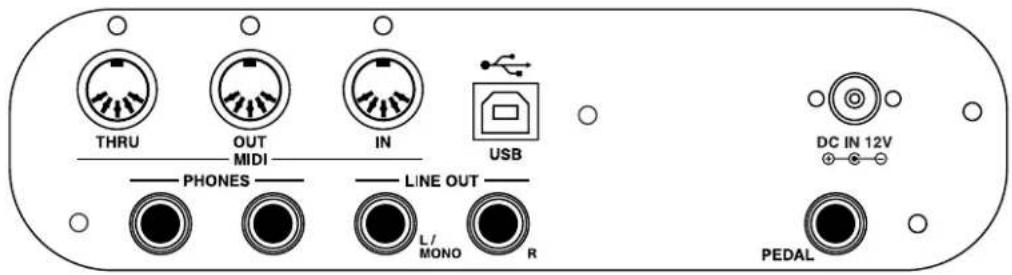
text_image
THRU OUT MIDI IN USB PHONES LINE OUT L/ MONO R DC IN 12V PEDALMIDI JACKS
These jacks are used to connect external MIDI devices with the CA piano. There are three terminals: MIDI IN, MIDI OUT, and MIDI THRU.
USB JACK
This jack is used to connect with a personal computer and exchange MIDI data.
DC IN JACK
Connect the enclosed AC adaptor to this jack.
HEADPHONE JACKS
Used to connect up to two headphones to the CA-X.
LINE OUT JACKS
The L/MONO, R outputs are used to connect the CA-X to a musical instrument amplifier using standard 1/4 inch phone jacks. The L/MONO, R outputs can also be used to connect the CA-X to a PA system or recording console.
PEDAL JACK
Connect the enclosed F-1r pedal to this jack. An optional F-2r Dual Foot Pedal also can be used. In this case the left pedal works as Soft pedal.
NOTES ABOUT USB
The CA piano can be connected with a personal computer with a USB cable for exchanging MIDI data. You need a USB driver installed in your computer.
[For Windows XP/Me users]
A standard USB driver is already installed in your computer. You don't need to install a new driver.
[For Windows 2000/98SE users]
You need to install the designated driver in your computer. Visit the KAWAI web site at http://www.kawai.co.jp/english/Download1.html and download the program.
[For Macintosh users]
Currently we don't have a USB driver available for Macintosh computers. Please use an appropriate MIDI interface and MIDI cables when connecting the CA piano to a Macintosh computer.
NOTE:
When both MIDI jacks and USB jack are connected, USB has priority.
When connecting USB cable to the CA piano, first connect the USB cable and then turn the power of the CA piano on.
It may take some time to start communication when the CA piano is connected to the computer via USB.
When USB communication is unstable with connection via hub, connect the USB cable directly to the USB port of the computer.
Turning the power of CA piano on/off or disconnecting the USB cable while the following actions may cause unstable communication.
while installing USB driver
while booting up the computer
while MIDI application is working
while communicating with the computer
while the computer is in energy saver mode
* If you have any problem with USB communication, consult the instruction manual of your computer and check your computer set up.
* The USB-MIDI conversion board TID10000934 used in the CA piano is approved to show the USB logo. The USB logo can be used only for the product which is approved by USB-IF (USB Implements Forum Inc.) test.
* Windows is registered trademark of Microsoft Corporation.
* Macintosh is registered trademark of Apple Computer, Inc.
PROGRAM CHANGE NUMBER MAPPING
| Sound Button Sound Name Off, On 1 On 2 | Multi-Timbral mode | ||||
| Prog # Bank | MSB Bank | LSB Prog # | |||
| PIANO 1 1 Concert Grand 1 | 121 0 1 | ||||
| 2 Studio Grand 2 | 121 1 1 | ||||
| 3 Mellow Grand | 3 121 2 1 | ||||
| 4 Jazz Grand | 4 95 8 1 | ||||
| PIANO 2 1 Modern Piano | 5 121 0 2 | ||||
| 2 Honky Tonk | 6 121 0 4 | ||||
| 3 New Age Piano | 7 95 9 1 | ||||
| 4 New Age Piano 2 | 8 95 | 10 | 1 | ||
| ELECTRIC PIANO | 1 Classic E.Piano | 9 121 0 5 | |||
| 2 Modern E.P. | 10 121 0 6 | ||||
| 3 60's E.P. | 11 121 3 5 | ||||
| 4 Moden E.P. 2 | 12 121 1 6 | ||||
| DRAWBAR | 1 Jazz Organ | 13 121 0 | 18 | ||
| 2 Drawbar Organ | 14 121 0 | 17 | |||
| 3 Drawbar Organ 2 | 15 121 1 | 17 | |||
| 4 Be 3 | 16 95 2 | 17 | |||
| CHURCH ORGAN | 1 Church Organ | 17 121 0 | 20 | ||
| 2 Diapason | 18 95 7 | 20 | |||
| 3 Full Ensemble | 19 | 95 1 | 21 | ||
| 4 Diapason Oct. | 20 95 6 | 20 | |||
| HARPSI&MALLETS | 1 Harpsichord | 21 121 0 7 | |||
| 2 Harpsichord 2 | 22 121 3 7 | ||||
| 3 Vibraphone | 23 121 0 | 12 | |||
| 4 Clavi | 24 121 0 8 | ||||
| STRINGS | 1 Slow Strings | 25 95 1 | 45 | ||
| 2 String Pad | 26 95 8 | 49 | |||
| 3 Warm String | 27 95 1 | 49 | |||
| 4 String Ensemble | 28 121 0 | 49 | |||
| VOCAL | 1 Choir | 29 121 0 | 53 | ||
| 2 Pop Ooh | 30 95 39 | 54 | |||
| 3 Pop Aah | 31 95 40 | 54 | |||
| 4 Synth Vocal | 32 121 0 | 55 | |||
| PAD | 1 New Age Pad | 33 121 0 | 89 | ||
| 2 Atmosphere | 34 121 0 | 100 | |||
| 3 Itopia | 35 121 1 | 92 | |||
| 4 Brightness | 36 95 1 | 101 | |||
| BASS | 1 Wood Bass | 37 121 0 | 33 | ||
| 2 Electric Bass | 38 121 0 | 34 | |||
| 3 Fretless Bass | 39 121 0 | 36 | |||
| 4 W. Bass & Ride | 40 95 1 | 33 | |||
Good Morning To You F1 MP
Hickory Dickory Dock D#1 EB
I'm A Little Teapot A#0 MP
Itsy, Bitsy Spider A1 MP
London Bridges C#1 MP
Mary Had A Little Lamb C1 MP
Pop Goes The Weasel E1 MP
Row, Row, Row Your Boat D1 MP
The Farmer In The Dell G1 MP
This Old Man B0 MP
Twinkle, Twinkle, Little Star A0 MP
CHRISTMAS SONGS
Deck The Halls C2 MP
Hark The Herald Angels Sing A#1 MP
Jingle Bells B1 MP
Joy To The World D2 MP
O Come All Ye Faithful C#2 MP
Silent Night E2 MP
The First Noel D#2 MP
We Wish You A Merry Christmas F2 MP
What Child Is This? (Greensleeves) F#2 MP
PATRIOTIC SONGS
America The Beautiful A2 MP
Battle Hymn Of The Republic G#2 MP
Hail To The Chief B2 MP
My Country 'Tis Of Thee G2 MP
Yankee Doodle A#2 MP
AMERICAN CLASSICS
Auld Lang Syne C#4 MP
Beautiful Dreamer A#4 EB
Bicycle Built For Two F4 EB
Bill Bailey Won't You Please Come Home G3 EB
Camptown Races F#4 MP
Clementine A3 MP
Danny Boy C3 EB
Down In The Valley C#3 EB
Fascination A#3 SK
For He's A Jolly Good Fellow F#3 EB
Give My Regards To Broadway G#3 SK
Home On The Range B3 MP
Home Sweet Home D#3 EB
In The Good Old Summertime F3 EB
Let Me Call You Sweetheart D3 EB
Michael Row The Boat Ashore D4 MP
My Bonnie Lies Over The Ocean E3 EB
Oh Susanna D#4 SK
On Top Of Old Smokey E4 EB
Take Me Out To The Ballgame C4 EB
The Band Played On G4 EB
When Johnny Comes Marching Home G#4 MP
When The Saints Go Marching In A4 EB
FAVORITE HYMNS
A Mighty Fortress D6 MP
Amazing Grace C5 MP
Doxology C#5 MP
Fairest Lord Jesus B4 MP
For The Beauty Of The Earth D5 MP
Great Is Thy Faithfulness C#6 MP
Holy, Holy, Holy F5 MP
How Great Thou Art C6 MP
Jesus Loves The Little Children B5 MP
Just As I Am A#5 MP
O Worship The King D#5 MP
Rock Of Ages G5 MP
Sweet Hour Of Prayer A5 MP
The Old Rugged Cross E5 MP
Trust And Obey G#5 MP
What A Friend We Have In Jesus F#5 MP
CLASSICAL SELECTIONS
An Die Freude (Ode To Joy) F6 MP
Andante (Haydn) D#6 MP
Blue Danube Waltz B6 SK
Clair De Lune F#6 SK
Fledermaus E7 EB
Für Elise E6 EB
Gavotte (Gossec) C#7 SK
Menuet In G (Bach) A6 SK
Peter And The Wolf G#6 SK
Romeo And Juliet A#6 SK
Skater's Waltz G6 SK
Sleeping Beauty Waltz C7 EB
Toreador Song ("Carmen") D#7 SK
Waltz Of The Flowers D7 SK
SPECIAL OCCASIONS
Bridal Chorus F7 MP
Wedding March F#7 SK
INTERNATIONAL SONGS
Chiapenacas C8 SK
Hatikvah G#7 MP
Hava Nagilah A#7 EB
My Wild Irish Rose A7 EB
When Irish Eyes Are Smiling G7 EB
FRONT PANEL
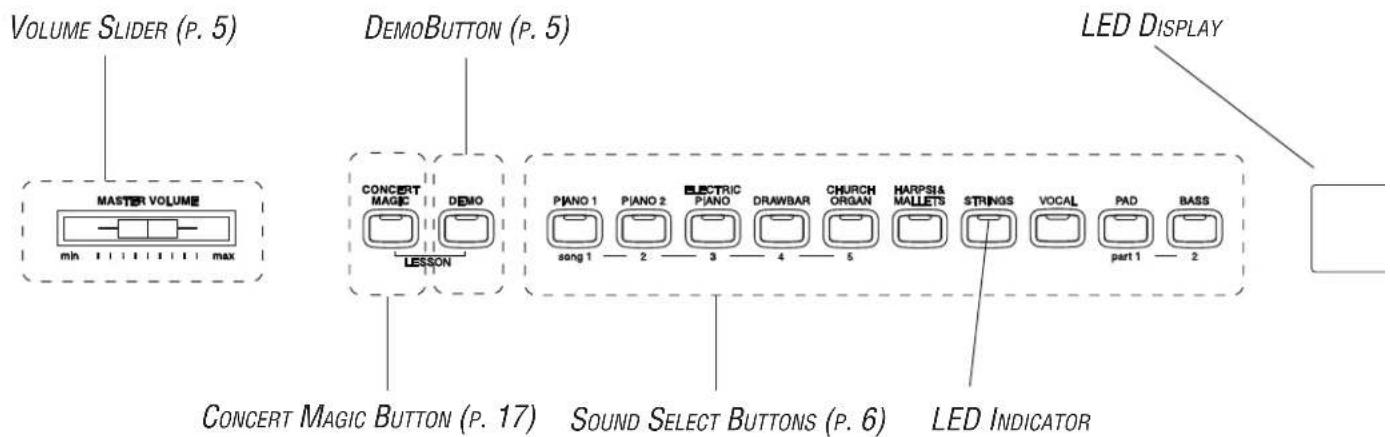
text_image
VOLUME SLIDER (P. 5) DEMO BUTTON (P. 5) LED DISPLAY MASTER VOLUME MIN MAX CONCERT MAGIC DEMO LESSON Piano 1 PIANO 2 ELECTRIC PIANO DRAWBAR CHURCH ORGAN HARPSIA MALLETS STRINGS VOCAL PAD BASS song 1 2 3 4 5 part 1 2 CONCERT MAGIC BUTTON (P. 17) SOUND SELECT BUTTONS (P. 6) LED INDICATORSOUND DEMO SONG LIST
| PIANO 1 Concert Grand Valse, op.64-1 / ChopinStudio Grand OriginalMellow Grand La Fille aux Cheveux de Lin / Debussy | ||
| PIANO 2 Modern Piano OriginalNew Age Piano Original | ||
| ELECTRIC PIANO Classic E.Piano OriginalModern E.P. OriginalModern E.P. 2 Original | ||
| DRAWBARS Jazz Organ OriginalDrawbar Organ OriginalDrawbar Organ 2 Original | ||
| CHURCH ORGAN | Church Organ Toccata DiapasonFull Ensemble | /Eugene GigoutWohl mir, daß ich Jesum habe / BachOriginal |
| HARPSI&MALLETS | HarpsichordVibraphoneClavi | French Suite No. 6 / BachOriginalOriginal |
| STRINGS | Slow StringsString PadString Ensemble | OriginalOriginalLe quattro stagioni La primavera / Vivaldi |
| VOCAL | Choir | Original |
| PAD | New Age PadAtmosphere | OriginalOriginal |
| BASS | Wood BassElectric BassW. Bass & Ride | OriginalOriginalOriginal |
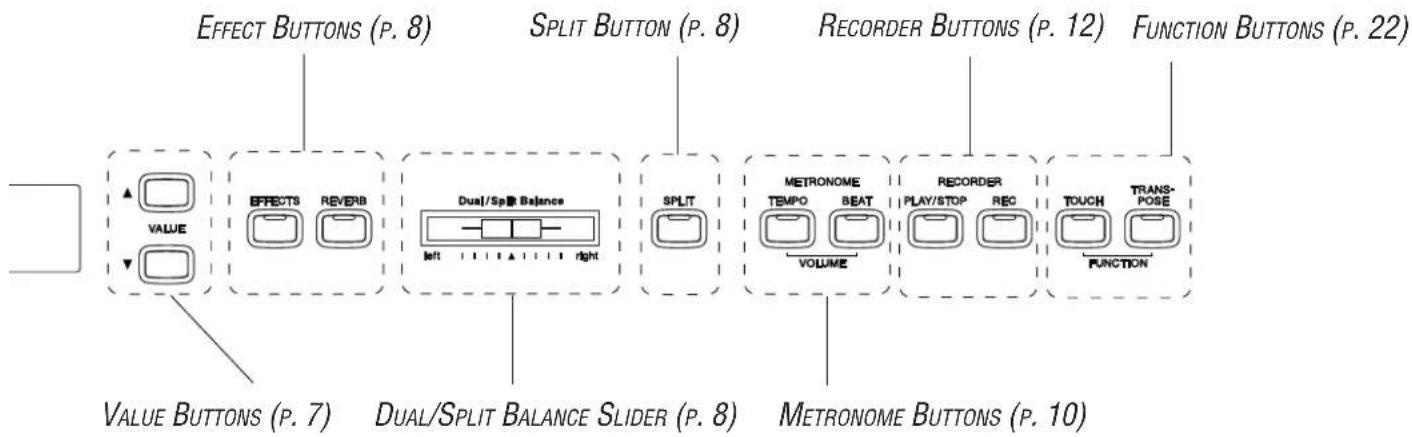
text_image
EFFECT BUTTONS (P. 8) SPLIT BUTTON (P. 8) RECORDER BUTTONS (P. 12) FUNCTION BUTTONS (P. 22) VALUE BUTTONS (P. 7) DUAL/SPLIT BALANCE SLIDER (P. 8) METRONOME BUTTONS (P. 10)SPECIFICATIONS
| CA-X | |
| Keyboard 88 Wooden Keyboard | |
| Polyphony Maximum 96 | |
| Number of Sound 40 | |
| Sound Catrgories Piano 1, Piano 2, Electric Piano, Drawbar, Church Organ, Harpsi & Mallets, Strings, Vocal, Pad, Bass | |
| Effects Reverb (5), Chorus, Tremolo, Delay (3), Rotary (2) | |
| Temperaments Equal (Piano Only), Mersenne pure (Major), Mersenne pure (minor), Pythagorea, Meantone, Werckmeister III, Kirnberger III, Equal (flat), Equal | |
| Recorder 2 Tracks, 5 SongsThe total memory capacity of the recorder is approximately 15,000 notes. | |
| Other Features Concert Magic (88 Preset Songs), Volume, Dual, Split, Dual/Split Balance, Metronome, Transpose, Tune, Layer Dynamics, Lower Octave Shift, Layer Octave Shift, Touch Curve (Light 1 Light 2, Normal, Heavy 1, Heavy 2, Off, User), MIDI (16 part multi-timbral capability) | |
| Jacks Headphone (2), LINE OUT (L/MONO, R), MIDI (IN, OUT, THRU), USB, PEDAL, DC IN | |
| Power Consumption 15 W | |
| Dimensions (WxDxH) 1361 x 434 x 177 mm(without Music Rack) | 54" x 17" x 7" |
| Weight | 30 kg, 66 LB's |
| 1st byte | 2nd byte | 3rd byte | 4th byte | 5th byte | 6th byte | 7th byte | 8th byte | 9th byte | 10th byte |
| 1 | 2 | 3 | 4 | 5 | 6 | 7 | 8 | 9 | 10 |
1 F0 .... Start code
2 40. . . . . . . . Kawai's ID number
3 00 - 0F ..... MIDI channel
4 10, 30. . . . . . Function code (30 when setting MULTI TIMBRE ON/OFF)
5 04. . . . . . . Indicates that the instrument is Electronic Piano
6 02. . . . . . . Indicates that the piano is one of "CA" series
7 data 1
8 data 2 ..... (See the table below.)
9 data 3
10 F7 .... End code
| data 1 | data 2 data 3 Function | ||
| 00 | 00 | — | Multi Timbre Off |
| 00 | 01 | — | Multi Timbre On 1 |
| 00 | 02 | — | Multi Timbre On 2 |
| 0D | 00–07 | — | 00: Effect Off, 01: Chorus, 02: Delay 1, 03: Delay 2, 04: Delay 3, 05: Tremolo, 06: Rotary 1, 07: Rotary 2 |
| 0E | 00–03, 06, 07 | — | 00: Reverb Off, 01: Room 2, 02: Stage, 03: Hall 1, 06: Room 1, 07: Hall 2 |
| 14 | 00–7F | — | Dual/Split balance |
| 16 | 1F–60 | — | Tune, 40: 440 Hz |
| 17 | 00, 7F | — | 00: Program Change Off, 7F: Program Change On |
| 18 | 00–07 | — | 00: Light 1, 01: Normal, 02: Heavy 1, 03: Off, 04: Light 2, 05: Heavy 2, 06: User |
| 19 | 00–03 | — | Lower Octave Shift |
| 20 | 00–27 | 00–27 | Dual, data 2: Right sound, data 3: Left sound |
| 21 | 00–27 | 00–27 | Split, data 2: Upper sound, data 3: Lower sound |
| 25 | 00–08 | 00–0B | data 2: Temperament, data 3: Key |
| 26 | 00, 7F | 00–0F | Multi Timbre, data 2: 00 (On), 7F (Off), data 3: channel |
| Function Transmit Receive Remarks | ||||
| Basic Channel Changes | 1-16 | 1-16 | ||
| Mode | Default 3 3MessagesAltered | ×***** | 1,3* | * The default for the OMNI mode is ON. Specifying MIDI channels automatically turns it OFF. |
| NoteNumber | True voice | 9-120******* | 0-1270-127 | |
| Velocity | Note ONNote OFF | ○9nH v=1-127×9nH v=0 | ○× | |
| AfterTouch | Key'sCh's | ×× | ×× | |
| Pitch Bend | × | × | ||
| ControlChange | 0,327116467 | ○××○(Right pedal)○(Left pedal) | ○○○○○ | Bank SelectVolumeExpression pedalSustain pedalSoft pedal(with F-2r pedal) |
| ProgramChange :True # | ○0-127***** | ○*** | *** See the Program Change Number Mapping in page 44. | |
| System Exclusive | ○ | ○ | On/Off Selectable | |
| Common | : Song Position: Song Select: Tune × | ××× | ×× | |
| SystemReal Time | : Clock ×: Commands | ×× | × | |
| Aux | : Local On/Off ×: All Notes Off: Active Sense: Reset × | ×× | ○○(123-127)○ | |
| Notes | ** The value depends on the Transpose setting. | |||
Mode 1: OMNI ON, POLY Mode 2: OMNI ON, MONO ○: Yes
Mode 3: OMNI OFF, POLY Mode 4: OMNI OFF, MONO X: No
KAWAI
CA-X Owner's Manual
OW986E-C0508
815121
Printed in Indonesia