Concert Artist Hymn Player - Piano KAWAI - Free user manual and instructions
Find the device manual for free Concert Artist Hymn Player KAWAI in PDF.


User questions about Concert Artist Hymn Player KAWAI
0 question about this device. Answer the ones you know or ask your own.
Ask a new question about this device
Download the instructions for your Piano in PDF format for free! Find your manual Concert Artist Hymn Player - KAWAI and take your electronic device back in hand. On this page are published all the documents necessary for the use of your device. Concert Artist Hymn Player by KAWAI.
USER MANUAL Concert Artist Hymn Player KAWAI
Hymn Player Song Lists
■Introduction
This booklet contains instructions for using the Hymn Player feature of the Concert Artist digital piano.
The Hymn Player adapts the instrument's Concert Magic function to offer an additional 88 classical hymns of the faith. These hymns can be played automatically or 'conducted' by rhythmically tapping on the keyboard.
To enjoy performing using the Hymn Player, simply select the desired hymn, then tap any of the 88 piano keys with a steady rhythm and tempo. The Hymn Player will provide the correct melody and accompaniment notes, regardless of which keys are played. With the Hymn Player, anybody, young or old can enjoy performing classic hymns from the moment they sit down at the Concert Artist digital piano.
■Hymn Player Song List
The Hymn Player Song List section lists the 88 hymns available in Hymn Player mode and 32 hymns available in Prelude mode. Both lists show the song name, selection key, and arrangement type as an abbreviation.
Abbreviation Arrangement type Playing method
EB Easy Beat Tap a constant steady beat on any key on the keyboard.
MP Melody Play Tap the rhythm of the melody on any key of the keyboard.
SK Skillful Tap the rhythm of the melody and the accompaniment on any key of the keyboard.
* For more information about the different Concert Magic/Hymn Player arrangement types, please refer to the Concert Magic instructions on page in the main Concert Artist owner's manual.
Table of Contents
Using Hymn Player....4
- Turning Hymn Player On/Off ....4
- Prelude Mode ....5
- Playing (Listening to) a Hymn ......6
- Performing a Hymn ....7
- Hymn Player settings ....8
Hymn Player Song Lists 9
Prelude Mode Song List 9
Hymn Player Song List ....10
1 Turning Hymn Player On/Off
The Hymn Player function must first be enabled in the 'Basic Settings' menu before the additional features can be accessed from the Music Menu.
1. Entering the Basic Settings menu
While the normal playing mode screen is shown in the LCD display:
Press the 2 FUNCTION button (EDIT).
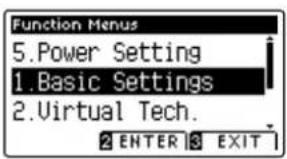
The LED indicator for the 2 FUNCTION button will turn on, and the Function menus will be shown in the LCD display.
text_image
Function Menus 5.Power Setting 1.Basic Settings 2.Virtual Tech. 2 ENTER 3 EXITPress the 2FUNCTION button (ENTER) again to enter the Basic Settings menu.

text_image
Diagram showing two hand gestures pointing at a screen, each labeled with numbered positions 1 and 2.2. Enabling the Hymn Player functions
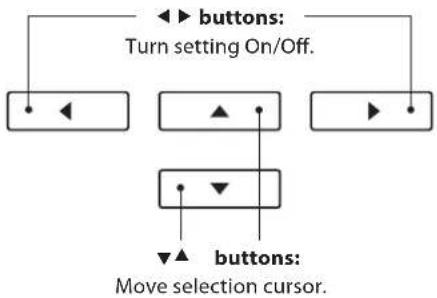
Press the ▼ or ▲ buttons to select the Hymn Player setting.
Press the ◀ or ▶ buttons to turn the Hymn Player On or Off.

text_image
Basic Settings 14 Factory Reset 15 Hymn Player On 1 Key Transpose 1 RESET BACKWhen set to 'On', the Hymn Player function replaces the standard Concert Magic songs with 88 hymns of the faith.
In addition, the standard Demo mode will be replaced by a special 'Prelude' mode in which a selection of the 88 hymns will play repeatedly for use as prelude music.
To return to using the standard Demo and Concert Magic functions/songs, set the Hymn Player setting to 'Off'.
flowchart
graph TD
    A["button: Turn setting On/Off."] --> B["button 1"]
    A --> C["button 2"]
    A --> D["button 3"]
    E["button: Move selection cursor."] --> F["button 4"]
    E --> G["button 5"]
* The 'User Memory' function can be used to store the preferred Hymn Player on/off setting, allowing the Hymn Player to be enabled automatically every time the Concert Artist digital piano is turned on. Please refer to the main owner's manual for more information.
3. Exiting the Hymn Player setting
Press the FUNCTION button (BACK) to exit the Hymn Player setting and return to the Function Menus screen.

text_image
1 2 32 Prelude Mode
With the Hymn Player setting enabled in the 'Basic Settings' menu, a special Prelude feature will replace the standard Demo mode, playing a selection of hymns repeatedly for use as prelude or postlude music. For a complete listing of available hymns, please refer to the 'Prelude Mode Song List' on page 8 of this booklet.
1. Entering Prelude mode
While the normal playing mode screen is shown in the LCD display:
Press the Ⓐ FUNCTION button (MUSIC), then press the ▼ or ▲ buttons to select Prelude mode.

text_image
Music Menus 4.Hymn Player 1.Prelude 2.Piano Music 2 ENTER 3 EXITPress the 2 FUNCTION button (ENTER) to enter Prelude mode.
One of the 32 prelude hymns will be selected at random and will start to play, with the name of the hymn shown in the LCD display.

text_image
Prelude Break Thou Bread BACK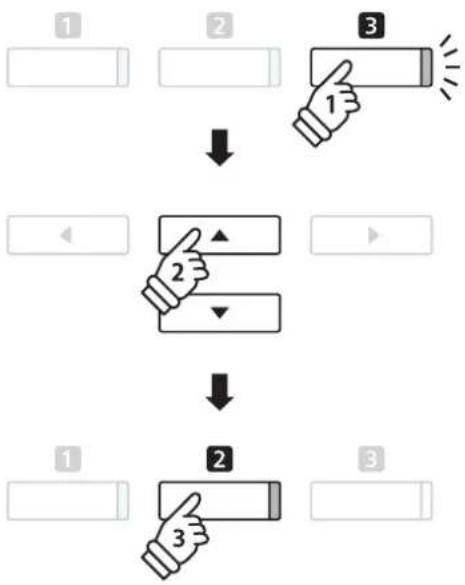
flowchart
graph TD
    A["1"] --> B["2"]
    B --> C["3"]
    C --> D["2"]
    D --> E["2"]
    E --> F["3"]
* Each hymn will be played for two verses.
* At the end of the second verse, there will be a brief pause before the next hymn starts. Playback will then continue in list order.
2. Controlling hymn playback
Press the PLAY/STOP button to stop/start hymn playback.
Press the SOUND buttons to select the desired sound to be used for hymn playback.

text_image
METRONOME PLAY/STOP REC3. Exiting Prelude mode
Press the FUNCTION button (BACK) to exit Prelude mode and return to the Music Menu screen.

text_image
1 2 33 Playing (Listening to) a Hymn
The Hymn Player features 88 classic hymns, with each hymn assigned to one of the 88 piano keys. The are classified into six different categories: Classic, Christmas, Thanksgiving, Easter, Patriotic, and Wedding. For a complete listing of available hymns, please refer to the 'Hymn Player Song List' on page 9 of this booklet.
1. Entering Hymn Player mode
While the normal playing mode screen is shown in the LCD display:
Press the Ⓐ FUNCTION button (MUSIC), then press the ▼ or ▲ buttons to select Hymn Player mode.

text_image
Music Menus 3.Lesson Mode 4.Hymn Player 1.Prelude 2 ENTER 3 EXITPress the 2 FUNCTION button (ENTER) to enter Hymn Player mode.
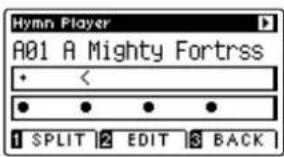
The name of the first hymn will be shown in the LCD display.
text_image
Hymn Player A01 A Mighty Fortrss • < • • • • 1 SPLIT 2 EDIT 3 BACK
flowchart
graph TD
    A["1"] --> B["2"]
    B --> C["3"]
    C --> D["2"]
    D --> E["2"]
    E --> F["3"]
2. Selecting a hymn
Press and hold the 2-FUNCTION button (EDIT), then press the key to which the desired hymn is assigned (page 9).
The number and name of the selected hymn will be shown in the LCD display.

text_image
2 1 hold → 2 4 6 8 10 1 3 5 7 9 80 82 84 86 88 79 81 83 85 873. Playing the selected hymn
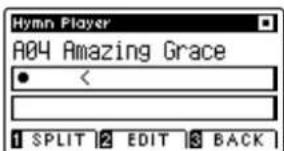
Press the PLAY/STOP button.
The LED indicator for the PLAY/STOP button will turn on and the selected hymn will start to play.
text_image
Hymn Player A04 Amazing Grace < 1 SPLIT 2 EDIT 3 BACKEach hymn will play for one verse, before the next hymn in the same category is selected automatically and starts to play.
text_image
METRONOME PLAY/STOP REC* Press the SOUND buttons to select the desired sound to be used for hymn playback.
* The playback tempo and volume of the melody/accompaniment parts of the hymn can be adjusted using the Hymn Player settings menu. Please refer to page 8 of this booklet for more information.
4 Performing a Hymn
The Hymn Player allows complete beginners to 'conduct' hymns by simply tapping the keyboard with a steady rhythm and tempo.
1. Entering Hymn Player mode
While the normal playing mode screen is shown in the LCD display:
Press the Ⓐ FUNCTION button (MUSIC), then press the ▼ or ▲ buttons to select Hymn Player mode.

text_image
Music Menus 3.Lesson Mode 4.Hymn Player 1.Prelude 2 ENTER 3 EXITPress the 2 FUNCTION button (ENTER) to enter Hymn Player mode.
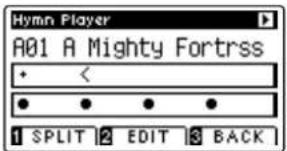
The name of the first hymn will be shown in the LCD display.
text_image
Hymn Player A01 A Mighty Fortrss + < ● ● ● ● 1 SPLIT 2 EDIT 3 BACK
flowchart
graph TD
    A["Input"] --> B["Step 1: Hand press"]
    B --> C["Step 2: Click button, ↓"]
    C --> D["Step 3: Touch hand, ↓"]
    D --> E["Output"]
2. Selecting a hymn
Press and hold the 2-FUNCTION button (EDIT), then press the key to which the desired hymn is assigned (page 9).
The number and name of the selected hymn will be shown in the LCD display.

text_image
2 hold 2 4 6 8 10 1 3 5 7 9 80 82 84 86 88 79 81 83 85 873. Performing the selected hymn
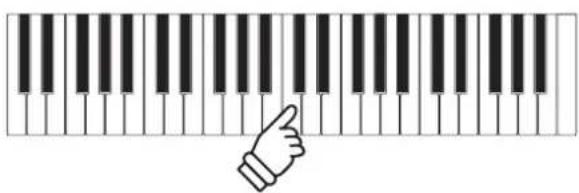
Press a key on the keyboard with a constant steady beat.
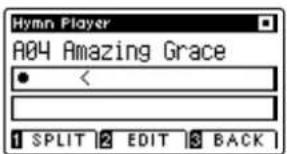
The hymn will advance with every key that is pressed. Pressing the keys gently will produce a soft sound, while pressing heavily will produce a loud sound.
text_image
Hymn Player A04 Amazing Grace < 1 SPLIT 2 EDIT 3 BACKThe hymn will repeat continuously from the beginning.
natural_image
Illustration of a hand pressing down on a piano keyboard (no text or symbols)* Press the SOUND buttons to select the desired sound to be used for hymn playback.
* The volume of the melody/accompaniment of the hymn can be adjusted using the Hymn Player settings menu. Please refer to page 8 of this booklet for more information.
5 Hymn Player settings
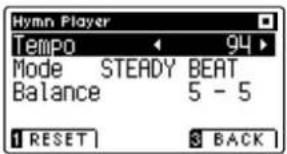
The Hymn Player settings menu allows the playback tempo, playing mode, and volume balance to be adjusted.
■Hymn Player settings
Hymn Player setting Description Default setting
| Tempo Adjust the playback tempo of the Hymn Player hymn in beats per minute (BPM). Song specific |
| Mode Change the Hymn Player playing mode (see below). Normal |
| Balance Adjust the volume balance between the melody and accompaniment parts. 10 |
■Entering the Hymn Player settings menu
While Hymn Player mode is in use:
Press the 2 FUNCTION button (EDIT).
The LED indicator for the 2 FUNCTION button will turn on, and the Hymn Player settings menu will be shown in the LCD display.
text_image
Hymn Player Tempo 94 Mode STEADY BEAT Balance 5 - 5 1 RESET 3 BACK
text_image
1 2 3■Adjusting Hymn Player settings
After entering the Hymn Player settings menu:
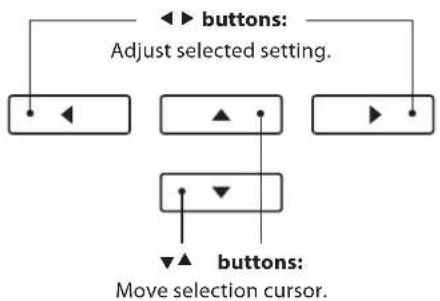
Press the ▼ or ▲ buttons to move the selection cursor over the desired setting.
Press the ◀ or ▶ buttons to adjust the selected setting.
* To reset the current setting to the default value, press the FUNCTION button (RESET).
flowchart
graph TD
    A["▲ buttons"] --> B["Adjust selected setting"]
    B --> C["▼ buttons: Move selection cursor"]
    C --> D["▲ + ●"]
    D --> E["▼ + ▼"]
    E --> F["▲ + ▼"]
    F --> G["▼ + ▼"]
Steady Beat mode
Steady Beat mode allows all Hymn Player songs to be played by simply tapping any key with a constant steady beat, regardless of the song arrangement type.
■ Prelude Mode Song List
Hymn Name Key Mode
Classic
| A Mighty Fortress A0 SK | ||
| Abide With Me A#0 SK | ||
| Be Still, My Soul D1 MP | ||
| Amazing Grace C1 MP | ||
| Be Thou My Vision D#1 SK | ||
| Blessed Assurance, Jesus is Mine E1 MP | ||
| Break Thou the Bread of Life G1 SK | ||
| Fairest Lord Jesus | C#2 | MP |
| For the Beauty of the Earth D#2 | SK | |
| Faith of Our Fathers D2 MP | ||
| Great is Thy Faithfulness | F#2 | MP |
| Holy, Holy, Holy A2 SK | ||
| Have Thine Own Way, Lord | G2 MP | |
| I Surrender All | D3 | MP |
| I Need Thee Every Hour | C#3 | MP |
| How Great Thou Art | B2 MP | |
| Spirit of the Living God | B4 | SK |
| Sweet Hour of Prayer | D5 | MP |
| It is Well With My Soul | D#3 | MP |
| Just As I Am, Without One Plea | G3 | MP |
| My Jesus, I Love Thee | B3 MP | |
| Rock of Ages | A4 MP | |
| Take My Life and Let It Be Consecrated | D#5 | SK |
| Take Time to Be Holy | E5 MP | |
| Savior, Like a Shepherd Lead Us | A#4 | MP |
| The Church's One Foundation | F5 MP | |
| Trust and Obey B5 MP | ||
| The Old Rugged Cross | G5 | MP |
| Turn Your Eyes Upon Jesus | C6 SK | |
| This is My Father's World | A5 MP | |
| What A Friend We Have in Jesus D6 | MP | |
| When I Survey the Wondrous Cross | D#6 | SK |
■ Hymn Player Song List
| Hymn Name Key Mode | ||
| Classic | ||
| A Mighty Fortress A0 SK | ||
| Abide With Me A#0 SK | ||
| All Hail the Power of Jesus Name B0 MP | ||
| Amazing Grace C1 MP | ||
| Ave Maria (Schubert) C#1 SK | ||
| Be Still, My Soul D1 MP | ||
| Be Thou My Vision D#1 SK | ||
| Blessed Assurance, Jesus is Mine | E1 | MP |
| Blessed Be the Name | F1 | MP |
| Blest Be the Tie That Binds | F#1 | MP |
| Break Thou the Bread of Life | G1 SK | |
| Come Thou Fount of Every Blessing. | G#1 | MP |
| Come, Holy Ghost A1 SK | ||
| Come, Thou Almighty King | A#1 | MP |
| Crown Him with Many Crowns | B1 | SK |
| Doxology | C2 SK | |
| Fairest Lord Jesus | C#2 | MP |
| Faith of Our Fathers D2 MP | ||
| For the Beauty of the Earth | D#2 | SK |
| Gloria Patri | E2 MP | |
| God Be with You 'Til We Meet Again | F2 MP | |
| Great is Thy Faithfulness | F#2 | MP |
| Have Thine Own Way, Lord | G2 MP | |
| Holy God, We Praise Thy Name | G#2 SK | |
| Holy, Holy, Holy A2 SK | ||
| How Firm a Foundation | A#2 | MP |
| How Great Thou Art | B2 MP | |
| I Heard the Voice of Jesus Say | C3 | SK |
| I Need Thee Every Hour | C#3 | MP |
| I Surrender All | D3 MP | |
| It is Well With My Soul | D#3 | MP |
| Jesus Loves Me, This I Know | E3 | MP |
| Jesus Loves the Little Children | F3 MP | |
| Joyful, Joyful, We Adore Thee | F#3 | MP |
| Just As I Am, Without One Plea | G3 MP | |
| Lead On, O King Eternal | G#3 | MP |
| Leaning on the Everlasting Arms | A3 SK | |
| Love Divine All Loves Excelling | A#3 | MP |
| My Jesus, I Love Thee | B3 MP | |
| My Savior's Love (I Stand Amazed) | C4 MP | |
| Nothing But the Blood | C#4 | MP |
| O God Our Help in Ages Past | D4 SK | |
| O How I Love Jesus | D#4 | MP |
| O Worship the King | E4 | SK |
| Onward, Christian Soldiers | F4 MP | |
| Praise to the Lord, the Almighty... | F#4 SK | |
| Rejoice, the Lord is King | G4 SK | |
| Rejoice, Ye Pure in Heart | G#4 | SK |
| Rock of Ages | A4 MP | |
Hymn Name Key Mode
| Classic | ||
| Savior, Like a Shepherd Lead Us | A#4 | MP |
| Spirit of the Living God | B4 | SK |
| Stand Up, Stand Up for Jesus | C5 MP | |
| Standing on the Promises | C#5 | MP |
| Sweet Hour of Prayer | D5 MP | |
| Take My Life and Let It Be Consecrated | D#5 | SK |
| Take Time to Be Holy | E5 | MP |
| The Church's One Foundation | F5 MP | |
| The King of Love My Shepherd | F#5 SK | |
| The Old Rugged Cross | G5 MP | |
| The Solid Rock G#5 MP | ||
| This is My Father's World | A5 MP | |
| To God be the Glory | A#5 SK | |
| Trust and Obey B5 MP | ||
| Turn Your Eyes Upon Jesus | C6 SK | |
| Victory In Jesus | C#6 | MP |
| What A Friend We Have in Jesus | D6 MP | |
| When I Survey the Wondrous Cross | D#6 | SK |
| When We All Get To Heaven | E6 MP | |
| Wonderful Grace of Jesus | F6 | SK |
| Christmas | ||
| Angels We Have Heard On High | F#6 SK | |
| Away in a Manger | G6 MP | |
| Hark the Herald Angels Sing | G#6 SK | |
| It Came Upon the Midnight Clear | A6 MP | |
| Joy to the World | A#6 SK | |
| O Come, All Ye Faithful | B6 SK | |
| O Little Town of Bethlehem | C7 SK | |
| Silent Night | C#7 MP | |
| The First Noel | D7 SK | |
| We Three Kings | D#7 MP | |
| Easter | ||
| Christ the Lord is Risen Today | E7 | SK |
| He Lives | F7 | SK |
| Thanksgiving | |
| Come Ye Thankful People, Come | F#7 SK |
| Let All Things Now Living | G7 SK |
| We Gather Together | G#7 SK |
| Patriotic | ||
| America the Beautiful | A7 SK | |
| Battle Hymn of the Republic | A#7 | MP |
| Wedding | ||
| Bridal Chorus | B7 MP | |
| Wedding March | C8 SK | |
KAWAI
THE FUTURE OF THE PIANO
Concert Artist Hymn Player
KPSZ-0536:817511
OW1062US-J1203
Version 1
Printed in Indonesia