Profile TFK28PFDAA - Fridge GE - Free user manual and instructions
Find the device manual for free Profile TFK28PFDAA GE in PDF.


User questions about Profile TFK28PFDAA GE
0 question about this device. Answer the ones you know or ask your own.
Ask a new question about this device
Download the instructions for your Fridge in PDF format for free! Find your manual Profile TFK28PFDAA - GE and take your electronic device back in hand. On this page are published all the documents necessary for the use of your device. Profile TFK28PFDAA by GE.
USER MANUAL Profile TFK28PFDAA GE
Safety Instructions 2

Operating Instructions, Tips
Automatic Icemaker 7
Electronic Monitor 5,6
Ice and Water Dispenser 8
Refreshment Center.... 4
Refrigerator Doors.... 3
Shelves 9–10
Storage Drawers....9
Temperature Controls 3

Care and Cleaning
Behind Refrigerator 13
Cleaning—Inside and Outside 12
Cleaning the Decorator Door Panels ..... 12
Drawer and Cover Removal 13
Light Bulb Replacement.... 13
Under Refrigerator.... 12

Problem Solver.... 22-25
Normal Operating Sounds 22

Preparation
Clearances 14
Dimensions.... 14
Dimensions and Specifications for Built-In Style Models....15
Leveling Rollers/Door Alignment..... 15
Location.... 14
Moving and Vacation.... 14
Trim Kits.... 16–18
Water Supply to Icemaker.... 14

Installation 19-21
Earthing 19
Electrical Requirements 19
How to Install Features.... 20
Additional Features 21
Mains Lead Replacement.... 2

Model and Serial Numbers 2
K-Line Large Side by Side and Built-In Style

HELP US HELP YOU...
Read this guide carefully.
It is intended to help you operate and maintain your new refrigerator properly.
Keep it handy for answers to your questions.
If you received a damaged refrigerator...
Immediately contact the dealer (or builder) that sold you the refrigerator.
Save time and money. Before you request service...
Check the Problem Solver in the back of this guide. It lists minor operating problems that you can correct yourself.
Products are continuously being improved...
Therefore product features and specifications may change or vary slightly.
Write down the model and serial numbers.
You'll see them on a label inside the fresh food compartment on the top.
Please write these numbers here:
Model Number
Serial Number
Use these numbers in any correspondence or service calls concerning your refrigerator.

IMPORTANT SAFETY INSTRUCTIONS
Read all instructions before using this appliance.

WARNING—When using this appliance, always exercise basic safety precautions, including the following:
- Use this appliance only for its intended purpose as described in this Use and Care Guide.
- This refrigerator must be properly installed and located in accordance with the Installation Instructions before it is used.

WARNING—Connect to potable water supply only.
- Never unplug your refrigerator by pulling on the power cord. Always grip plug firmly and pull straight out from the outlet.
- Repair or replace immediately all electric service cords that have become frayed or otherwise damaged. Do not use a cord that shows cracks or abrasion damage along its length or at either the plug or appliance end.
- When moving your appliance away from the wall, be careful not to roll over or damage the power cord.
- Do not allow children to climb, stand or hang on the shelves in the refrigerator. They could damage the refrigerator and seriously injure themselves.

- If your old refrigerator is still around the house but not in use, be sure to remove the doors. This will reduce the possibility of danger to children.
- After your refrigerator is in operation, do not touch the cold surfaces in the freezer compartment, particularly when hands are damp or wet. Skin may adhere to these extremely cold surfaces.
- Do not place fingers or hands on the automatic ice-making mechanism while the refrigerator is plugged in. This will prevent contact with the moving parts of the ejector mechanism, or with the heating element that releases the cubes.
- Do not allow anyone to climb, sit, stand or hang on the Refreshment Center Compartment door. They could damage the refrigerator and maybe even tip it over, causing severe personal injury.
- Unplug your refrigerator before cleaning and making repairs. NOTE: We strongly recommend that any servicing be performed by a qualified individual.
- Before replacing a burned-out light bulb, unplug the refrigerator or turn off power at the circuit breaker or fuse box in order to avoid contact with a live wire filament. (A burned-out light bulb may break when being replaced.) NOTE: Turning control to “O” position does not remove power to the light circuit.
- Do not store or use gasoline or other flammable vapors and liquids in the vicinity of this or any other appliance.
Mains lead replacement
If the mains lead on your refrigerator needs replacing at any time, it must be replaced by a special lead which is obtainable from your local dealer. A charge will be made for the replacement of the mains lead if you have damaged the lead.
SAVE THESE INSTRUCTIONS
Set the Temperature Controls (appearance may vary)
Two controls let you regulate the temperature in the fresh food and freezer compartments.
At first, set both the fresh food control and the freezer control to "5."
Allow 24 hours for the temperature to stabilize, whether you are setting the controls for the first time or adjusting them later. Then, if you want colder or warmer temperatures in either compartment, adjust the controls one step at a time.
NOTE: Moving the freezer control to the “O” position turns off cooling in both compartments—fresh food and freezer—but does not shut off power to the refrigerator.

text_image
1 3 5 7 9 Refrigerator control Freezer controlAmbient Room Temperature Limits How to Test Temperatures
This refrigerator is designed to operate in ambient temperatures specified by its Temperature Class which is marked on the rating plate.
| Temperature Symbol Ambient Class | Temperature Maximum Minimum | ||
| Extended-Temperate SN 32°C 10°C | |||
| Temperate | N | 32°C | 16°C |
| Subtropical | ST | 38°C | 18°C |
| Tropical | T | 43°C | 18°C |
NOTE: Internal temperature may be affected by such factors as the location of the refrigerator, ambient temperature and frequency of door openings. Adjust temperature controls as required to compensate for these factors.
Use the milk test for the fresh food compartment. Place a container of milk on the top shelf in the fresh food compartment. Check it a day later. If the milk is too warm or too cold, adjust the temperature controls.
Use the ice cream test for the freezer compartment. Place a container of ice cream in the center of the freezer compartment. Check it after a day. If it's too hard or too soft, adjust the temperature controls.
Always allow 24 hours for the refrigerator to reach the temperature you set.
Refrigerator Doors
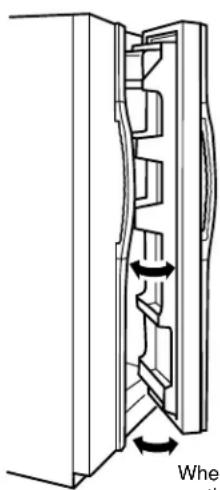
The refrigerator doors may feel different than the ones you are used to. The special door opening/closing feature makes sure the doors close all the way and are securely sealed.
When opening and closing the door you will notice a "stop" position. If the door is opened past this "stop" point, the door will remain open to allow you to load and unload food more easily. When the door is only partially open it will automatically close.
The resistance you feel at the "stop" position will be reduced as the door is loaded with food.
natural_image
Technical line drawing of a mechanical component with directional arrows indicating rotation (no text or symbols)When the door is only partially open it will automatically close.
Beyond this "stop" the door will stay open.

REFRESHMENT CENTER
(on some models)
Refreshment Center Compartment
The Refreshment Center Compartment stores frequently used items.
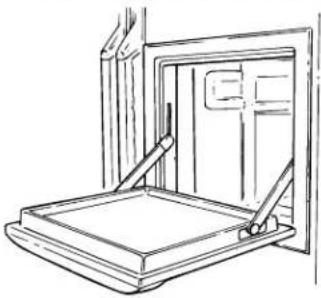
When open, the Refreshment Center door provides a convenient work surface. Although durable, the work surface should not be used as a cutting board. Close the door when finished. The upper fresh food compartment light will come on when the Refreshment Center door is opened.
natural_image
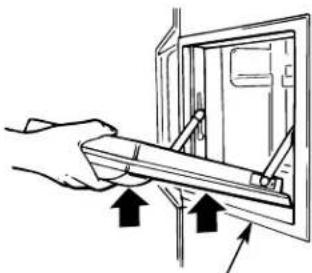
Line drawing of a door frame with handle and seat, no text or symbols presentThe special design of the door allows you to tilt and lift up the entire door in order to clean the bottom of the frame.
NOTE: Use caution in closing or using the clean-out feature in the presence of small children.
natural_image
Hand holding a tool interacting with an open electrical panel (no text or symbols visible)Bottom of Frame
Cold air entering from the freezer compartment keeps the temperature in the Refreshment Center Compartment at proper food-keeping levels.
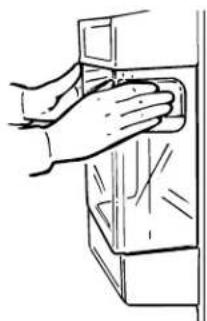
The bin panel limits the amount of cold air that escapes when the Refreshment Center door is opened. To reach food from the inside, lift the panel up.

natural_image
Line drawing of hands installing or adjusting a door panel inside a cabinet (no text or symbols)To remove the Refreshment Center bin, first remove the panel using the hand holds.
natural_image
Line drawing of a hand cleaning a cabinet (no text or symbols)Then remove the bin by lifting it up and out.

natural_image
Illustration of hands holding a small rectangular container with an arrow indicating force or movement (no text or symbols)ELECTRONIC MONITOR
(on some models)

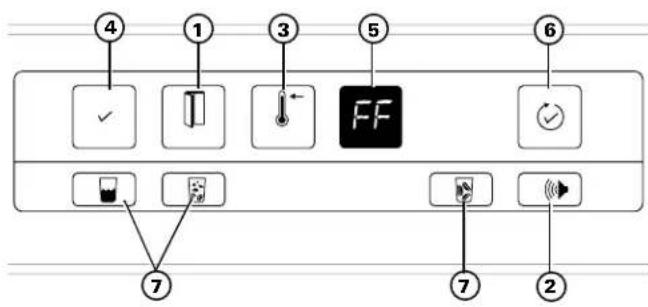
text_image
④ ① ③ ⑤ ⑥ ✓ ← FF ✓ ⑦ ⑦ ②① Flashes when either door is open.
② When lit, the Door Alarm beeper is set to sound after either door has been open 30 seconds.
③ Lights up when freezer food-keeping temperature is above normal.
④ Lights up to indicate that no failure has been detected by the diagnostic system.
⑤ Flashing diagnostic codes.

Check your frozen food. Has any of it started to thaw? A package may be holding the freezer compartment door open. Don't open the door more often than absolutely necessary while this code is displayed. Touching the pad after the freezer compartment temperature has returned to normal will erase the code.

Power to the refrigerator has been interrupted for more than two seconds. Check the condition of food in both the fresh food and freezer compartments. Touch the pad to erase code.

There is no fault with the refrigerator when the PF code flashes.

Check the icemaker. Ice clumps in the storage bin may have stalled the icemaker. Follow corrective measures described in the Problem Solver section. If water supply to the icemaker is not connected or not turned on, make sure manual icemaker switch is in the ①p) position. This code stops flashing when problem is corrected or the pad is touched.
⑥ Reviews the four coded functions and allows you to erase codes from the display.


chilled water.

ubes or
crushe

When Your Refrigerator Is First Plugged In
All panel lights come on for five seconds, a beep sounds, and lights go off except as follows:

- PF flashes in the display. Touch this pad to erase it.

• This pad glows.

- The Warm Temperature light glows if the freezer compartment temperature is higher than normal. It goes off when proper food-keeping temperature is reached.

- The Door Alarm beeper is activated and the Door Alarm pad glows.

- The Crushed Ice pad glows.

- This pad flashes if either door is open, goes out when doors are shut.
• The night light in the ice and water dispenser is off.
ELECTRONIC MONITOR
How to Set the Door Alarm Why the Warm Temperature Light Glows
You don't have to set the visual alarm.
As long as either door is open, this pad flashes.
When the Door Alarm pad is glowing, the beeper alarm is set. Touch the pad to turn it on or off.
If either door is open for more than 30 seconds, the control beeps.
The light goes out and the beeping stops when you close the door.

At first, it's probably because your newly installed refrigerator hasn't completely cooled down yet. Wait a few hours for it to cool, and then the light will go out.
From then on, the pad will glow whenever temperatures inside get too high for proper food storage. If this happens, open the doors only when absolutely necessary, and close them as quickly as possible.

As soon as inside temperatures return to normal, the light goes out. If the Warm Temperature light reappears and stays on for longer than 4 hours, call for service.
How the System Works
The system alerts you when something starts to go wrong.
If a diagnostic code appears on the display, something needs special attention. The display code flashes until you erase it. The first 6 flashes are accompanied by beeps.
If more than one coded function requires attention at the same time, the most important one will be displayed first.
This pad evaluates all other coded functions. If the √ display is lit during the displaying of a code, that function is operating properly. This pad is lighted except when a failure has been detected.
This pad has two functions:
-
It reviews the diagnostic codes.
-
It erases two codes—PF and CI. The dE and FF codes can only be erased after the condition that caused the code to flash has been corrected.
AUTOMATIC ICEMAKER

A newly-installed refrigerator may take up to 24 hours to begin making ice.
How The Icemaker Works
Your icemaker will produce 8 cubes per cycle—approximately 120 cubes in a 24-hour period—depending on freezer compartment temperature, room temperature, number of door openings and other use conditions.
If you use your refrigerator before the water connection is made, make sure the icemaker feeler arm is in the ①p) position. When the water supply has been connected to the icemaker, move the feeler arm to (down) position.

text_image
Feeler arm in ○ (up) position stops icemaking
text_image
Feeler arm in 1 (down) position begins icemakingThe icemaker will fill with water when it cools to freezing. NOTE: With a newly-installed refrigerator, allow about 24 hours for the freezer compartment to get cold enough to make ice.
Throw away the first few batches of ice cubes (16 or 24 cubes). This will flush away any impurities in the water line. Do the same thing after vacations or extended periods when ice isn't used.
To make sure the bin fills with ice, level the cubes occasionally. When cubes fall into the bin they may pile up close to the icemaker and push the feeler arm to the position before the bin gets full. Keeping the cubes level allows the icemaker to fill the bin.
The icemaker ejects cubes in groups of 8, and it is normal for several cubes to be joined together.
Move Feeler Arm to (up) Position When...
• Home water supply is to be turned off for several hours.
- Ice storage bin is to be removed for a period of time.
- Going away on vacation, at which time you should also turn off the valve in the water supply line to your refrigerator.
- Moving the freezer control to the "O" position.
If This Is Your First Icemaker...
You'll hear occasional sounds that may be unfamiliar. These are normal icemaking sounds and are not cause for concern.
If Ice Is Not Used Often...
"Old" ice cubes will become cloudy and taste stale. Empty ice storage bin periodically and wash it in lukewarm water. Be sure to allow storage bin to cool before replacing it—otherwise ice cubes may stick to other parts of the icemaker.

ICE AND WATER DISPENSER
To Dispense Ice and Water
- Select:

water (on some models),

ice cubes,

or crushed ice (on some models).
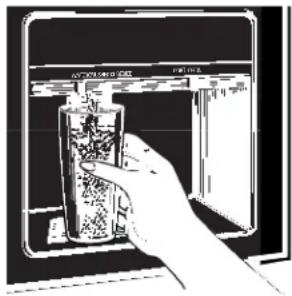
natural_image
Hand inserting a container into a device (no visible text or symbols)- Grip the glass or other container near the rim and press the rim against the center of the pad.
- After crushed ice is dispensed, some water may drip from the chute. The spill shelf is not self-draining. The shelf and its grille should be cleaned regularly according to the Care and Cleaning instructions.
To Remove Ice Storage Bin To Replace Ice Storage Bin
Lift the left corner to free the bin from the shelf. Pull the bin straight out while supporting it at front and back.

natural_image
Illustration of a hand pressing down on a computer monitor with an arrow indicating press direction (no text or symbols present)Slide the bin back until the tab on the bin locks into the slot in the shelf.
If the bin does not go all the way back, remove it and turn the drive mechanism 1/4 turn. Then push the bin back again until the tab on the bin locks into the slot in the shelf.

text_image
Rotate Drive MechanismCrushed Ice Water
- Some crushed ice may be dispensed even though you selected 📋. This happens occasionally when a few cubes get channeled to the crusher.
- Sometimes a mound of snow will form on the door in the ice chute. This condition is normal, and usually occurs when you have dispensed crushed ice repeatedly. The snow will eventually evaporate.
- Sometimes crushed ice will spray beyond the glass. To avoid this, hold the glass up close to the chute.

- On models with a water dispenser, if no water is dispensed when the refrigerator is first installed, there may be air in the water line system. Press the dispenser pad for at least two minutes to remove trapped air from the water line and to fill the water system.
- The first glass of water dispensed may be warmer than the following ones. This is normal.
- Dispensed water is cool, not iced. For colder water, simply add crushed ice or cubes before dispensing water.
CAUTION: Never put fingers or other objects into the dispenser opening.
Important Facts About Your Dispenser
- If this is your first icemaker you'll hear occasional sounds that may be unfamiliar. These are normal icemaking sounds and are not cause for concern.
- Your icemaker will produce 8 cubes per cycle—approximately 120 cubes in a 24-hour period—depending on freezer compartment temperature, room temperature, number of door openings and other use conditions.
- Intermittent dispensing of ice is normal. If ice flow interruption is more than brief, ice clump(s) may be the cause and should be removed following instructions in this section.
-
Avoid over-filling glasses with ice and using narrow or extra-tall glasses. This can jam the chute or cause the door in the chute to freeze shut. Periodically open the freezer compartment door and look down into the chute. If ice is blocking the chute, poke it through with a wooden spoon.
-
To help keep bits of ice from being sprayed beyond the glass, place the glass close to the ice chute—but not so close that it blocks out-coming ice.
- Add ice before adding beverage to prevent splashing.
- Beverages and foods should not be quick-chilled in the ice storage bin. Cans, bottles or food packages in the storage bin may cause the icemaker or auger to jam.
- Do not add ice from trays or bags to the storage bin. It may not crush or dispense well.
CAUTION: Some products such as water ices should not be consumed too cold.
STORAGE DRAWERS

text_image
Diagram showing a three-tier food storage unit with icons for ingredients like vegetables, meat, and fish.(on some models)
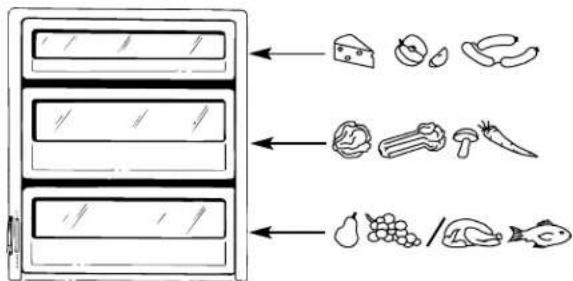
Storage time will depend upon the type of food and its condition when placed in the drawer. Excess water which may accumulate in the bottom of the drawer should be poured out and the drawer wiped dry. The drawer is partially sealed by gaskets. Always push the drawer all the way in. As in any refrigerated storage area, it is recommended that odorous foods be stored wrapped.
Convertible Drawer (on some models)
Refrigerator foods can be stored at colder temperatures by using the convertible drawer.
The convertible drawer has its own cold air duct to allow a stream of cold air from the freezer compartment to flow around the drawer.
The variable temperature
control regulates the air flow from the freezer compartment.
Set the control lever up to convert the drawer to normal refrigerator temperature and provide extra vegetable storage space. The cold air duct is closed.
Push the control lever down to open the cold air duct and make the convertible drawer colder. The amount of freezer air allowed in can be varied by adjusting the control lever between the normal and coldest setting.

text_image
Normal setting Coldest settingAdjustable Humidity Drawers (on some models)

These drawers have individual, adjustable humidity controls that let you regulate the amount of moisture retained in foods.
Slide the control all the way to the setting and the drawer provides high humidity recommended for most vegetables.
Slide the control all the way to the setting to provide lower humidity levels recommended for most fruits.
Sealed Snack Pack (on some models)

The Sealed Snack Pack—and shelf to which it is attached—can be relocated within the Fresh Food compartment. The sealed drawer retains sufficient humidity for convenient storage of lunch meats, cheese, hors d'oeuvres, spreads and snacks.
SHELVES
Spillproof Shelves
Spillproof shelves have special edges to help prevent spills from dripping to lower shelves.

natural_image
Diagram of hands holding a rectangular object with arrows indicating motion or force direction (no text or symbols)SHELVES
Quick Space Shelf Slide-Out Spillproof Shelf (on some models)
This shelf splits in half and slides under itself for storage of tall items on the shelf below.

natural_image
Illustration of hands holding a rectangular object with a curved handle, no text or symbols presentThe slide-out shelf allows you to reach items stored behind others. The special edges are designed to help prevent spills from dripping to lower shelves. Make sure you push the shelves all the way back in before you close the door.

natural_image
Illustration of hands holding a tray with a black arrow pointing downward (no text or symbols)How to Rearrange Your Shelves and Freezer Baskets
Glass and wire shelves are adjustable. This allows you to move the shelves around to fit your family's food storage needs.
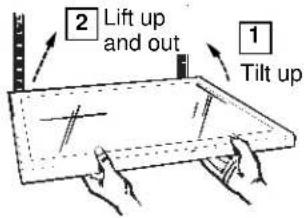
To remove shelves: Tilt the shelf up at front, then lift it up and out of the tracks on the rear wall.
text_image
2 Lift up and out 1 Tilt upTo relocate shelves: Select desired shelf height. With shelf front raised slightly, engage the top hooks in the tracks at the rear of the cabinet. Then lower the front of the shelf until it locks into position.
Wire slide-out freezer baskets can be relocated in the same way.

text_image
1 Engage top hook 2 Lower to lock into place
natural_image
Illustration of hands holding a coiled spring inside a container (no text or symbols)Bins on Fresh Food Compartment Door
(on some models)
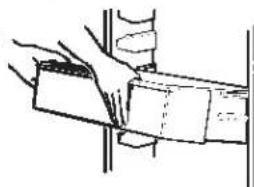
Adjustable bins can easily be carried from refrigerator to work area.
To remove:
Tilt the bin up and pull out on the molded supports until it comes completely out of the door.
natural_image
Illustration of hands holding a rectangular object with a dashed line indicating a measurement or alignment (no text or symbols present)To replace or relocate:
Select desired shelf height, engage the bin in the molded supports of the door and slide the bin in. The bin will hook in place.
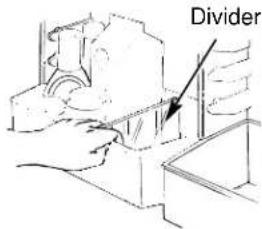
The divider (on some models) helps prevent tipping, spilling or sliding of small items stored on the door shelf. Place index finger and middle finger on either side of the divider near the front and simply move it back and forth to fit your needs.
text_image
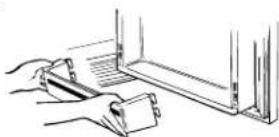
DividerTo remove fixed bins, first remove the food in the bins. Then, grasping the bin at each end, push in at the bottom as you lift and pull out at the top.
Loading the Freezer Compartment
Load so that at least 15 mm of space remains clear between stacks of packages and 15 mm to 25 mm of space between the top of any stack and any shelf or basket above it. Packages may hang over the front of shelves but must remain 15 mm from doors.
- Food to be frozen must not be placed in direct contact with food in storage. If food is to be frozen every day, it may be necessary to reduce the quantity to be frozen.
- If a quantity of food needs to be frozen set the freezer control to its coldest setting. After the food is frozen reset the freezer control to its initial position.
- Food is most quickly frozen on the middle three shelves of the freezer compartment and most slowly in the freezer door shelves.
Freezer Baskets (on some models)
Wire slide-out freezer baskets can be pulled out for easy access to frozen foods.
WARNING: Poor performance may occur if freezer baskets are not used. Storage of items in the freezer without using baskets may result in poor temperature performance due to restrictions of air flow within the freezer compartment.
natural_image
Technical line drawing of a structural joint or bracket (no text or symbols)- Do not store commercially quick-frozen food longer than the time recommended by the food manufacturers.
- If the power to the appliance is shut off for an extended time or if the refrigerating system fails, do not open the doors unless absolutely necessary. When it is necessary, close them as quickly as possible so the frozen food will stay frozen as long as possible.
- The freezer door storage shelves marked with a two-star label are only appropriate for the storage of previously frozen food.
Effervescent drinks should not be stored in the freezer compartment.
Quick-Serve System™ (on some models)
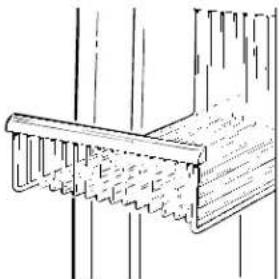
Cooking-serving-storage dishes with durable lids fit into a space saving under-the-shelf rack.

Dishes can be removed from and returned to the rack as needed, and the rack (and shelf to which it is attached) can be relocated anywhere in the fresh food compartment.

Dishes and lids are safe for use in microwave ovens, refrigerators, freezers, and are dishwasher-safe. The dishes should not be used for cooking high-fat foods, such as bacon, and high-sugar foods, such as candy and syrup. The high temperatures of the fat and sugar can cause bubbles to form on the inside of the dish.
CAUTION: Dishes and lids are not designed for use on the range top, broiler or in the regular oven. Such use can be hazardous.
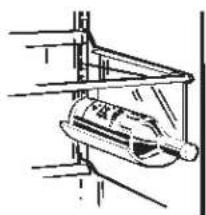
Removable Wine Rack
The wine rack is designed to hold a bottle on its side. A good location for the wine rack is the Quick Space Shelf.
natural_image
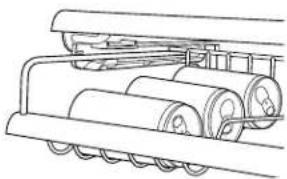
Simple line drawing of a mechanical component or device mounted on a vertical structure (no text or symbols)Beverage Can Rack
Use this rack to store beverage cans for easy access. It can also hold a 23cm x 33cm baking dish.
natural_image
Technical line drawing of a mechanical roller system with rollers and a flat roller (no text or symbols)CARE AND CLEANING
Cleaning—Outside
Refreshment Center Compartment door—outside. It's important that you use only window cleaner without ammonia or a damp cloth to clean the glass and trim. Avoid using wax on the Refreshment Center door.
The dispenser well, beneath the grille, should be wiped dry. Water left in the well may leave deposits. Remove the deposits by adding undiluted vinegar to the well. Soak until the deposits disappear or become loose enough to rinse away.
The dispenser pad can be cleaned by using a warm water and baking soda solution—about 15 ml of baking soda to one liter of water. Rinse thoroughly with water and wipe dry.
The door handles and trim can be cleaned with a cloth dampened with a solution of mild liquid dishwashing detergent and water. Dry with a soft cloth. Don't use wax on the door handles and trim.
Keep the finish clean. Wipe with a clean cloth lightly dampened with kitchen appliance wax or mild liquid dishwashing detergent. Dry and polish with a clean, soft cloth. Do not wipe the refrigerator with a soiled dishwashing cloth or wet towel. These may leave a residue that can erode the paint. Do not use scouring pads, powdered cleaners, bleach or cleaners containing bleach because these products can scratch and weaken the paint finish.
Protect the paint finish. The finish on the outside of the refrigerator is a high quality, baked-on paint finish. With proper care, it will stay new-looking and rust-free for years. Apply a coat of kitchen/appliance wax when the refrigerator is new and then at least twice a year.
Cleaning the Decorator Door Panels
Clean these panels using an anti-static cleaner or a mild detergent and water. (Look for anti-static cleaner in electronic or computer departments.) Rinse thoroughly and blot dry with a clean, damp cloth or chamois. Do not use paper towels to wash or dry the panels. Do not use cleaners that contain solvents, such as ammonia, because they can damage the panels.
Shallow scratches and abrasions can be corrected with a good grade of hard automobile paste wax. The wax will fill in any minor surface scratches and will help to maintain the luster of the panels. Apply the wax sparingly and buff lightly with a clean, soft cloth using a circular motion. Do not use a cleanser/wax combination.
Cleaning—Inside Under Refrigerator
Refreshment Center Compartment door—inside. Wipe up spills right away. Use 15 ml of baking soda in one liter of water to clean the inside door surface, Refreshment Center bin and inside access door. Rinse, wipe dry.
Inside the fresh food and freezer compartments should be cleaned at least once a year. Unplug the refrigerator before cleaning. If this is not practical, wring excess moisture out of sponge or cloth when cleaning around switches, lights or controls.
Use warm water and baking soda solution—about 15 ml of baking soda to one liter of water. This both cleans and neutralizes odors. Rinse thoroughly with water and wipe dry.
Other parts of the refrigerator—including door magnets, meat and vegetable drawers, ice storage bin and all plastic parts—can be cleaned the same way.
Avoid cleaning cold glass shelves with hot water because the extreme temperature difference may cause them to break.
To help prevent odors, leave an open box of baking soda in the rear of the refrigerator, on the top shelf. Change the box every 3 months. An open box of baking soda in the freezer will absorb stale freezer odors.
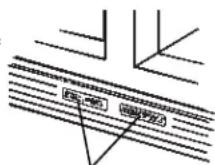
Door magnets
Do not wash any plastic parts from your refrigerator in your automatic dishwasher.
Quick-Serve™ dishes and lids can be cleaned in an automatic dishwasher or by hand with liquid dishwashing detergent and water. You can remove stains by soaking them in a bleach and water solution using one part chlorine bleach to three parts water. (Stubborn stains may require soaking.) Use a plastic scouring pad to remove burned-on soil. Do not use cleansing powders or other abrasive cleaners.
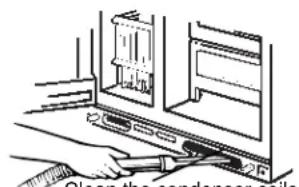
For most efficient operation, you need to keep the area under the refrigerator clean. Remove the base grille and either sweep away or vacuum up dust that is readily accessible on the condenser coils.
To remove the base grille, open both doors, grasp the bottom of the grille and pull it out.
To replace the base grille, line up the clips on the back of the grille with the openings in the baseplate and push the grille forward until it snaps into place.
text_image
Clean the condenser coilsclean the condenser coils at least once a year.

natural_image
Diagram of hands operating a mechanical device with no visible text or symbolsBehind Refrigerator
Care should be taken in moving your refrigerator away from the wall. All types of floor coverings can be damaged, particularly cushioned coverings and those with embossed surfaces. Pull the refrigerator straight out and return it to position by pushing it straight in. Moving your refrigerator in a side direction may result in damage to your floor covering or refrigerator.
When pushing the refrigerator back, make sure you don't roll over the power cord or icemaker supply line.
Drawer and Cover Removal
Drawers will stop before coming all the way out of the refrigerator to help prevent contents from spilling onto the floor. Drawers can easily be removed by tilting up slightly and pulling past the "stop" location.
Remove the door bins from the fresh food door before removing the drawer.
To remove the shelf above the top drawer, first remove the top drawer and any food on the shelf. Then tilt the shelf up at the front and lift it up and out of the tracks.
To replace the shelf, raise the shelf front slightly and place the top hooks in the lowest large track slots. Then lower the front of the shelf until it is level.

natural_image
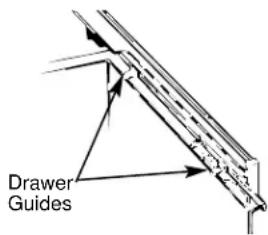
Illustration of hands interacting with a device, showing upward arrows indicating motion (no text or symbols)When replacing the drawers, make sure you slide them through both drawer guides on the right side.
To remove the drawers when the fresh food compartment door cannot be opened fully you need to roll the refrigerator forward until the door can be fully opened. In some cases this will require moving the refrigerator to the left as you ro
text_image
Drawer GuidesLight Bulb Replacement
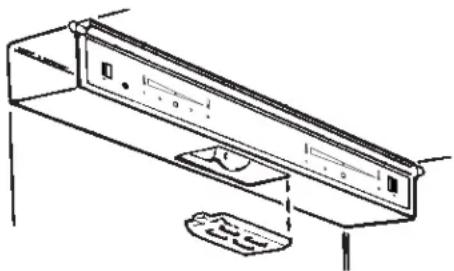
Fresh Food Compartment—Upper Light
- Unplug refrigerator.
- Remove the snap-in light shield.
natural_image
Line drawing of a front panel with control buttons and a tray, no text or symbols present- Replace with same size bulb and reinstall the light shield. If you cannot locate the correct bulb, see your dealer.
Fresh Food Compartment—Lower Light (on some models)
This light is located behind a shield at the rear of the fresh food compartment.
- Unplug the refrigerator.
- Grasp the top edge of the shield and lift it up and forward to free its top edge.
- After replacing with the same size bulb, hook the top of the shield back in place. If you cannot locate the correct bulb, see your dealer.
- Plug the refrigerator back in.
Freezer Compartment—Non-Dispenser Models
- Unplug the refrigerator.
- Remove the shelf just below the light shield. (The shelf will be easier to remove if it is emptied first.)
- Pull the light shield toward you to reach the bulb.
After replacing with same size bulb, reinstall shelf and shield and plug the refrigerator back in.
Freezer Compartment—Dispenser Models
- Unplug the refrigerator.
- Remove the ice storage bin.
- Remove the screw at top of light shield.
After replacing with same size bulb, reinstall the shield and ice storage bin and plug the refrigerator back in.

text_image
ScrewPREPARATION
Preparing for Vacation Preparing to Move
For extended vacations or absences, shut off the power to the refrigerator, move the control to the "O" position, and clean the interior with a baking soda solution of 15 ml of baking soda to 1 liter of water. Wipe dry. To prevent odors, leave an open box of baking soda in the refrigerator. Leave doors open.
Move icemaker feeler arm to ①p) position, which stops icemaking, and be sure to shut off water supply to the refrigerator.
For shorter vacations, remove perishable foods and leave controls at regular settings. However, if room temperature is expected to drop below 16^ C, follow the same instructions as for extended vacations.
Disconnect power cord from wall outlet, remove all food, and clean and dry the interior.
Secure all loose items such as grille, shelves and storage pans by taping them securely in place to prevent damage.
Be sure refrigerator stays in upright position during actual moving and in van. Refrigerator must be secured in van to prevent movement.
Protect outside of refrigerator with blanket.
Refrigerator Location Water Supply to Icemaker
Install it on a floor strong enough to support a fully loaded refrigerator.
Clearances
Allow the following clearances for ease of installation, proper air circulation, plumbing and electrical connections.
24 Model 28 Model 30 Model
Sides 3 mm 3 mm 3 mm
Top 25 mm 3 mm 3 mm
Back 13 mm 13 mm 13 mm
[If built-in, allow 22 mm for hinge covers.]
If the refrigerator is against a wall on either side, allow 19 mm for freezer door clearance and 19 mm for fresh food door clearance.
If your refrigerator has an icemaker, or if you plan to add an icemaker later, the icemaker will have to be connected to a cold drinking (potable) water line.
A water supply kit containing copper tubing, shutoff valve, fittings and instructions is available at extra cost from your dealer. There should be sufficient tubing from the cold water supply to the icemaker inlet to allow moving the refrigerator out from the wall several feet (approximately 2.5 m of 1/4" copper tubing in three 25 cm diameter coils).
Do not use kits with plastic tubing since there is water pressure in the supply line at all times.
Maximum permissible inlet water pressure—8.3 bars.
Minimum permissible inlet water pressure—1.4 bars.
Installation of icemaker must be made by a qualified service technician.
Dimensions
| 24 Model | 28 Model | 30 Model | |||
| A* | 1746 mm | A* | 1746 mm | A* | 1746 mm |
| B | 908 mm | B | 908 mm | B | 908 mm |
| C | 719 mm | C | 833 mm | C† | 876 mm |
| D | 1153 mm | D | 1251 mm | D | 1251 mm |
* Height does not include hinge.
† Add 14 mm for water hook-up.

text_image
A B C DLeveling Rollers Door Alignment
The rollers have two purposes:
- The rollers can be adjusted so the refrigerator is firmly positioned on the floor and does not rock back and forth.
- The rollers allow you to move the refrigerator away from the wall for cleaning.
To adjust the rollers:
- Remove the base grille by grasping it at the bottom and pulling it out.
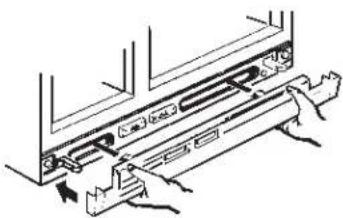
natural_image
Technical line drawing of a mechanical assembly with hands operating a component (no text or symbols present)- Turn the two front roller adjusting screws clockwise to raise the refrigerator, counterclockwise to lower it. Use a 3/8" socket wrench, adjustable wrench or pliers.

text_image
Front Roller Adjusting Screw Bear Roller AdjustingRear Roller Adjusting Screw (on Built-In Style models only) Use this screw if the refrigerator has one.

text_image
Front Roller Adjusting Screw Front Roller Adjusting ScrewRear Roller Adjusting Screw (on Built-In Style models only) Use this screw if the refrigerator does not have the screw pictured to the left.
- Built-In Style models also have rear adjustable rollers so you can align the refrigerator with your kitchen cabinets. Use a 5/16" socket wrench to turn the screws for the rear rollers—clockwise to raise it, counterclockwise to lower it.
After leveling, make sure that the doors are even at the top.
Make sure doors are even at the top.
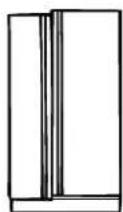
Uneven Doors
To make the doors even, adjust the fresh food door. Using a 3/16" Allen wrench or a 5/16" socket wrench (depending on model), turn the door adjusting screw to the right to raise the door, to the left to lower it. (A nylon plug, imbedded in the threads of the pin, prevents the pin from turning unless a wrench is used.) After one or two turns of the wrench, open and close the fresh food door and check the alignment at the top of the doors.

text_image
Hinge Pin Raise 3/16" Allen Wrench OR Hinge Pin Raise5/16" Socket Wrench
Dimensions and Specifications (for Built-In Style models)

text_image
1784 mm 914 mm 619 mm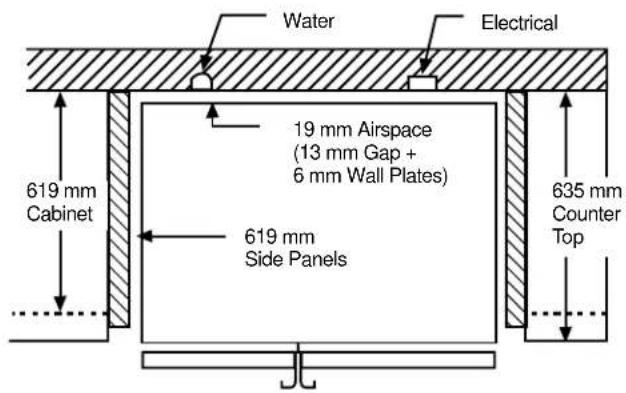
text_image
Water Electrical 19 mm Airspace (13 mm Gap + 6 mm Wall Plates) 619 mm Cabinet 619 mm Side Panels 635 mm Counter TopSome models are equipped with trim kits that allow you to install door panels. You can order pre-cut black or white decorator panels from your dealer, or you can add wood panels to match your kitchen cabinets.
Panels Less Than 6 mm Thick
When installing wood panels less than 6 mm thick, you need to create a filler panel, such as 1/8" cardboard, that will fit between the face of the door and the wood panel. If you are installing the pre-cut decorator panels, pre-cut filler panels are included in the kit. The combined thickness of the decorator or wood panel and the filler panel should be 6 mm.
19 mm or Raised Panel
A raised panel design screwed or glued to a 6 mm thick backing, or a 19 mm routed board can be used. The raised portion of the panel must be fabricated to permit clearances of at least 51 mm from the handle side for fingertip clearance.
Weight limitations for custom panels:
Fresh Food 16 kg max. Freezer Door 11 kg max.

text_image
6 mm Thick Backing 51 mm Clearance Handle Side Appearance Panel 19 mm Refrigerator DoorDimensions
Wood panels need to be cut to the following specifications.
Freezer Panel
Without Dispenser
Freezer Panels With Dispenser
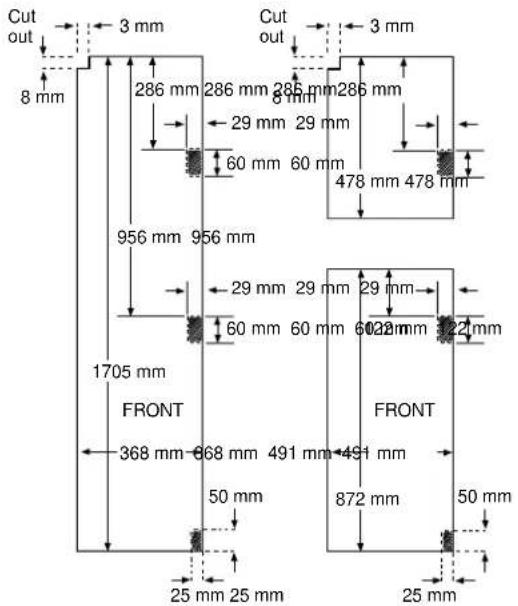
text_image
Cut out 8 mm 3 mm 286 mm 286 mm 286 mm 286 mm 29 mm 29 mm 60 mm 60 mm 478 mm 478 mm 956 mm 956 mm 1705 mm FRONT 368 mm 668 mm 491 mm 491 mm 50 mm 25 mm 25 mm Cut out 3 mm 29 mm 29 mm 60 mm 60 mm 60 mm 60 mm 478 mm 478 mm FRONT 50 mm 872 mm 50 mm 25 mm 25 mmFresh Food Panel

text_image
3 mm Cut out 8 mm 29 mm 60 mm 1705 mm FRONT 50 mm 25 mm 3 mm Cut out 8 mm FRONT 50 mm 872 mmFresh Food Panel with Refreshment Center
The areas at the top of the panels need to be cut out of the panels. The shaded areas indicate areas that must be routed out about 5 mm on the back side of panels 6 mm thick or more. For panels less than 6 mm thick, these areas can be cut out of the filler panels.
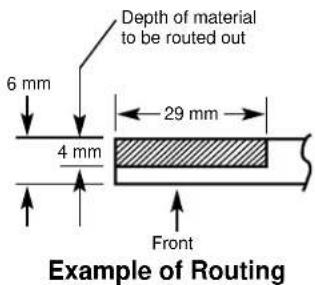
text_image
Depth of material to be routed out 6 mm 4 mm 29 mm Front Example of RoutingInserting the Door Panels
- Loosen the Top Trim on the freezer and fresh food doors.
- Using a T-20 Torx driver, loosen the two screws attaching the Top Trim about 6 mm.
- Insert the panels.
Freezer panel and fresh food panel
- Lift the Top Trim up 6 mm and carefully push the top freezer panel in until it slides into the slot behind the door handle. Push the filler panel (required with some door panels) in behind the decorator panel. Repeat for fresh food panel. If your model has a dispenser and/or a Refreshment Center, this step only applies to the top panels.
Bottom freezer panel (for models with a dispenser and/or a Refreshment Center)
- Carefully push the panel in until it slides into the slot behind the door handle. Push the filler panel (required with some door panels) in behind the decorator panel.
-
Tighten the two screws on the Top Trim to 30 in-lbs torque.
-
Install the Side Trim. These pieces are tucked inside the fresh food door handle.
Do not remove the protective film on the outside of the Side Trim until the Side Trim is installed.
- Fit the bottom of the Side Trim under the Bottom Trim as illustrated.
- Hold the Side Trim against the front face of the decorator panels and fit the Side Trim under the Top Trim. Make sure the Side Trim is fitted correctly and that you are satisfied with the appearance of all the parts before pulling the tape liner.
- Secure the Side Trim.
- Place one hand between the two pieces of tape liner and hold the Side Trim firmly against the panels and the side of the door.
- Pull the top tape liner up about 80 mm, pressing the trim with your hand as the adhesive is exposed to the door. Then pull the bottom tape liner down about 80 mm. Follow the tape with your hand, pressing the trim adhesive against the door.
- Continue pulling the tape liner loose, alternating between the top and bottom and pressing the Side Trim against the door.
- Remove the protective film from the outside of the Side Trim.

text_image
Top Trim Screws Cut-out Top Freezer Panel Tape Liner Bottom Freezer Panel Side Trim Cut-out Fresh Food Panel Side Trim
text_image
Top Trim Side Trim Tape Liner Tape Liner Side Trim Bottom TrimINSTALLING AND REMOVING PREVIOUSLY INSTALLED DECORATOR PANELS
In order to remove the decorator panels and replace with new panels you need to remove the handles. A T-20 Torx driver is needed.
Removing the Handles:
- Loosen and remove the 2 screws in the Top Trim.
- Loosen and remove the 2 screws in the bracket that attaches the Handle to the top of the Door.
- Grip the Handle firmly and slide upwards. The keyhole slots on the Handle slide off the buttons on the door.
- Open the door and slide out the decorator panels.
Inserting the Door Panels:
Before installing the decorator panels, make sure they have been routed out in the proper areas as shown in the beginning of this section. Slide in the panels to perform a trial fit before fastening down the Handle and Top Trim.
Installing the Handles:
Once the panels are fitted properly, install the Handle and Top Trim.
- Slide the keyhole slots on the Handle down onto the buttons mounted to the face of the door. Slide the Handle downward until the bracket at the top of the Handle fits flush on the top of the door.
- Replace the two screws in the bracket that attach the Handle to the top of the Door and tighten the screws to 45 in-lbs torque.
- Replace the Top Trim making sure it fits over the Side Trim and that the locating tabs fit the inside of the Handle profile.
- Replace the Top Trim screws and tighten to 30 in-lbs torque.

text_image
Top Trim Screws Bracket Screws Bracket Buttons Slots Button SlotINSTALLATION REQUIREMENTS
IMPORTANT...Please read carefully

Electrical Requirements
WARNING: HOW TO AVOID ACCIDENTS TO CHILDREN. WHEN DISCARDING AN OLD REFRIGERATOR OR FREEZER BE CERTAIN TO MAKE THE LOCK UNUSABLE. IF POSSIBLE, REMOVE THE DOORS AND DISCARD SEPARATELY. DO NOT ATTEMPT TO STAND ON TOP OF YOUR APPLIANCE. IT IS NOT DESIGNED FOR SUCH USE AND YOU COULD INJURE YOURSELF OR DAMAGE THE APPLIANCE BY SUCH ABUSE. CHILDREN SHOULD NOT BE ALLOWED TO PLAY WITH THE APPLIANCE OR TAMPER WITH THE CONTROLS.
The refrigerator should always be plugged into its own individual electrical outlet—Please refer to the rating plate on the refrigerator for the correct voltage and frequency. This is recommended for best performance and to prevent overloading house wiring circuits, which could cause a fire hazard from overheated wires.
How to Connect Electricity
For personal safety, this appliance must be properly earthed.
The power cord of this appliance is equipped with an earthing plug which mates with a standard grounding wall outlet to minimize the possibility of electric shock hazard from appliance.
Have the wall outlet checked by a qualified electrician to make sure the outlet is properly earthed.

text_image
Insure proper earthing exists before using. Earthing plugWhere an unearthed wall outlet is encountered, it is your personal responsibility and obligation to have it replaced with a properly earthed wall outlet.
If the power supply cord becomes damaged, it must be replaced by a qualified service agent in order to avoid a safety hazard.
If the plug does not fit your outlet a new plug can be fitted. IMPORTANT: In some countries the refitting of electric plugs and cables is only permitted when the work is completed by a qualified technician.
NOT ALL FEATURES ARE ON ALL MODELS. (REFER TO THE CONTENTS LIST ON THE BOX.)

text_image
Technical diagram of a multi-level storage cabinet with numbered components and directional arrows indicating assembly or movement.3 ADJUSTABLE DOOR BINS
Hook bins into holes in the ladder support at desired locations.
CAUTION: Do not place a door bin where door shelf fronts should be.

natural_image
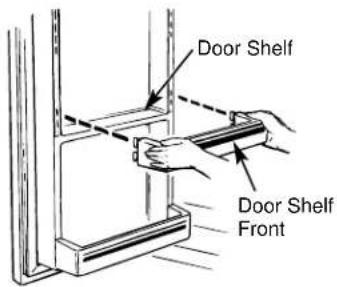
Illustration of hands using a tool to cut or spread a piece of paper (no text or symbols visible)4 DOOR SHELF FRONTS
Hook shelf fronts at locations where there are shelves in the door. Make sure they are locked securely into place.
NOTE: Shelf fronts must be used in the lowest ladder position on the refrigerator door.
text_image
Door Shelf Door Shelf Front1 DAIRY COVER
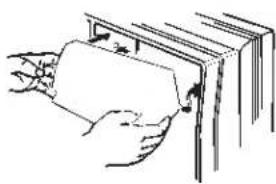
Depress pins on the cover and insert into holes in the door.
natural_image
Illustration of hands inserting a card into a book (no text or symbols visible)2 DOOR BIN SNUGGERS
Roll the snugger on the door bin lip. Slide to the desired location.

ADDITIONAL FEATURES
(Available on some models)

NOT ALL FEATURES ARE ON ALL MODELS.
(REFER TO THE CONTENTS LIST ON THE BOX.)

text_image
1 2 3 4 51 FREEZER BASKETS
Place the rear edges of the basket on open section of supports. Push in until the basket stops. Tilt up and push all the way in. Make sure the baskets are securely engaged in the supports.

natural_image
Diagram of a mechanical component with directional arrows indicating movement (no text or symbols)2 WINE RACK
Slide lip of the rack along the edge of the shelf.

natural_image
Pure technical line drawing of a mechanical component or bracket (no text or symbols)3 REFRESHMENT CENTER, INSIDE COVER

text_image
Install deepest shelf front here. Install an adjustable bin here.4 ADJUSTABLE DOOR BINS

natural_image
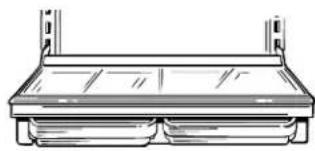
Line drawing of hands holding a rectangular tray with an arrow indicating direction (no text or symbols)5 QUICK-SERVE™ DISHES UNDER SHELF
Slide dishes in the dish rack.
natural_image
Line drawing of a cabinet or rack unit with two plates and a shelf (no text or symbols)QUESTIONS? USE THIS PROBLEM SOLVER
| PROBLEM POSSIBLE CAUSE | |
| REFRIGERATOR • May be in DOES NOT OPERATE | defrost cycle when motor does not operate for about 30 minutes.Temperature control in “O” position.If interior light is not on, refrigerator may not be plugged in at wall outlet.If plug is secure and the refrigerator still fails to operate, plug a lamp or a small appliance into the same outlet to determine if there is a tripped circuit breaker or burned-out fuse. |
| MOTOR OPERATES • Modern refrigerators with more storage space and a larger freezer FOR LONG PERIODS compartment require more operating time.Normal when refrigerator is first delivered to your home—usually requires 24 hours to completely cool down.Large amounts of food placed in refrigerator to be cooled or frozen.Hot weather—frequent door openings.Door left open.Temperature controls are set too cold. Refer to instructions for use of Temperature Controls.Grille and condenser need cleaning. Refer to the Care and Cleaning section. | |
| MOTOR STARTS & • Temperature control starts and stops motor to maintain even temperatures.STOPS FREQUENTLY | |
These sounds are normal and do not indicate a need for ser vice.
The new high efficiency compressor runs faster and will have a higher pitch hum or pulsating sound while operating.
Defrost timer and refrigerator control click on and off.
The fan circulating air inside the freezer which keeps the temperatures throughout.
Water dropping on the defrost heater causing a sizzling, hissing or popping sound during the defrost cycle.
The flow of refrigerant through the freezer cooling coils sounds like boiling water or a gurgling noise.
Cracking or popping of cooling coils caused by expansion and contraction during defrost and refrigeration following defrost.
Water dripping as it melts from the evaporator and flows to the drain pan during the defrost cycle.
Icemaker
The icemaker water valve will buzz when the icemaker fills with water. If the feeler arm is in the (down) position it will buzz even if it has not yet been hooked up to water. Keeping the feeler arm in the (down) position before it is hooked up to water can damage the icemaker. To prevent this, raise the feeler arm to the (up) position. This will stop the buzzing.
The sound of cubes dropping into the bin and water running in pipes as icemaker refills.

natural_image
Technical line drawing of a mechanical device with internal components and mounting bracket (no text or symbols)| PROBLEM POSSIBLE CAUSE | |
| VIBRATION OR • If refrigerator vibrates, more than likely it is not resting solidly on the floor and RATTLING fron | vibrates, more than likely it is not resting solidly on the floor and t roller screws or front leveling legs need adjusting, or floor is weak or uneven. Refer to Leveling Rollers in the Preparation section.• If dishes vibrate on shelves, try moving them. Slight vibration is normal. |
| HOT AIR FROM • Normal air flow cooling motor. In the refrigeration process, it is normal that heat BOTTOM OF be expelled in the area under the refrigerator. Some floor coverings will discolor REFRIGERATOR at these normal and safe operating temperatures. Your floor covering supplier should be consulted if you object to this discoloration. | |
| DOOR NOT CLOSING • Door PROPERLY OR ONLY amount of petroleum jelly on face of gasket.• The doors are designed to stay open partway for ease of loading food. | |
| FRESH FOOD OR • Temperature control not set cold enough. Refer to Temperature Controls section.FREEZER COMPARTMENT• Warm weather—frequent door openings.• Package may be holding door open, door may be overloaded, or the magnets are not making good contact with the doors. You may need to clean the magnets. | |
| FOODS DRY OUT • Foods not covered, wrapped or sealed properly. | |
| FROST OR ICE • Door may have been left ajar or package holding door open.CRYSTALS ON FROZEN FOOD | • Too frequent or too long door openings.• Frost within package is normal. |
| SLOW ICE CUBE • Door may have been left open.FREEZING | • Turn temperature of freezer compartment colder. |
| ICE CUBES HAVE ODOR/TASTE | • Old cubes need to be discarded.• Ice storage bin needs to be emptied and washed.• Unsealed packages in refrigerator and/or freezer compartments may be transmitting odor/taste to ice cubes.• Interior of refrigerator needs cleaning—refer to Care and Cleaning section.• Poor-tasting incoming water. Install a water filter. |
| AUTOMATIC ICEMAKER DOES NOT WORK | • Icemaker feeler arm in the (up) position.• Water supply turned off or not connected.• Freezer compartment too warm.• Cubes too small—water shutoff valve connecting refrigerator to home water line may be clogged.• Sometimes cubes fuse to the side of the ice mold and hold the feeler arm in the (up) position. Remove this ice to restart the icemaker.• When reaching for cubes by hand, you may have pushed the feeler arm into the (up) position by mistake.• Piled up cubes in storage bin may cause icemaker to shut off too soon. With icemaker feeler arm in the (up) position, level cubes in bin. |
| INTERIOR LIGHT DOES NOT WORK | • No power at outlet.• Light bulb needs replacing. See Care and Cleaning section. |
PROBLEM SOLVER
| PROBLEM POSSIBLE CAUSE | |
| CUBE DISPENSER • No ice cubes. Remove storage container. If cubes are frozen to wire arm, DOES NOT WORK remove cubes.(on dispenser models) | • No ice cubes. Icemaker turned off or water supply turned off.• Irregular ice clumps in storage container. Break up as many as you can with fingertip pressure and discard the remaining clumps. |
| CUBES TOO SMALL • Water shutoff valve connecting refrigerator to home water line may be clogged.(on dispenser models) | |
| WATER HAS POOR • If the water dispenser has not been used for an extended period, dispense water TASTE/ODOR in regular manner until all water in the system is replenished with fresh water.(on dispenser models) | • Poor-tasting incoming water. Install a water filter. |
| WATER IN FIRST • Allow about 24 hours for water to cool to proper temperature after GLASS IS WARM refrigerator is first installed.(on dispenser models) | |
| WATER DISPENSER • Water supply line turned off or not connected.DOES NOT WORK (on dispenser models) | • Supply line may be clogged with sediment.• If no water is dispensed when the refrigerator is first installed, there may be air in the water system. Press the dispenser pad for at least two minutes to remove trapped air from the water line and to fill the water system. |
| DIVIDER BETWEEN • Normal warmth is created by automatic energy saver system circulating warm FRESH FOOD AND liquid around front edge of freezer compartment to help prevent condensation FREEZER COMPARTMENTS on outside of refrigerator in hot, humid weather.FEELS WARM | |
| MOISTURE FORMS • Not unusual during periods of high humidity.ON OUTSIDE OF REFRIGERATOR | |
| MOISTURE • Too frequent or too long door openings.COLLECTS INSIDE | • In humid weather, air carries moisture into refrigerator when doors are opened. |
| MOISTURE COLLECTS ON GLASS SHELF ABOVE STORAGE DRAWERS | • This is normal. The drawers are designed to retain moisture to keep foods fresh. |
| WATER ON KITCHEN FLOOR OR ON BOTTOM OF FREEZER | • The drain in the freezer may be clogged. Remove any ice on the freezer bottom and clean the drain. Refer to Care and Cleaning section.• If you use a glass over 15 cm tall, you may be jamming cubes in the funnel chute. They can fuse inside the chute and drop out later, leaving water or ice on the floor. |
| REFRIGERATOR • Foods with HAS ODOR | strong odors should be tightly covered.• Check for spoiled food.• Interior needs cleaning. Refer to Care and Cleaning section.• Defrost water system needs cleaning.• Keep open box of baking soda in refrigerator; replace every 3 months. |
| NO PANEL TOUCH • If interior PAD RESPONSE (on some models) | light is not on, refrigerator may not be plugged in at wall outlet.• If plug is secure and the refrigerator still fails to operate, plug a lamp or a small appliance into the same outlet to determine if there is a tripped circuit breaker or burned-out fuse. |
| ORANGE GLOW IN THE • An FREEZER COMPARTMENT | orange glow is sometimes seen in the freezer compartment when the defrost heater is on. This is normal. |
NOTES
내자실-내도실

안전 수칙 2

냉장고 작동에 관한 사항,요령
자동 제빙기 7
전자 모니터 5,6
얼음 및 물 디스펜서8
리프레시먼트 센터 4
냉장고 도어 3
선반 9,10
저장 서랍....9
온도 조절 다이얼....3

냉장고 관리와 청소
냉장고 후면 청소....13
내부와 외부 청소12
natural_image
Technical line drawing of a mechanical component with internal gear and directional arrows (no text or symbols)natural_image
Line drawing of a mechanical device with a rectangular base and vertical supports (no text or symbols)natural_image
Line drawing of hands installing or adjusting a door panel (no text or symbols)natural_image
Line drawing of a hand cleaning a cabinet (no text or symbols)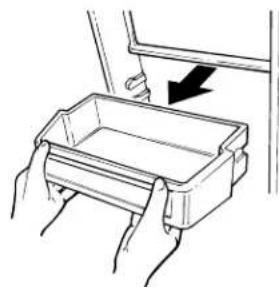
natural_image
Illustration of hands holding a rectangular tray with an arrow indicating downward motion (no text or symbols)전자 모니터
(일부 모델에 해당)


text_image
④ ① ③ ⑤ ⑥ ✓ FF ✓ ⑦natural_image
Technical line drawing of a mechanical device with gears and housing (no text or symbols)natural_image
Technical line drawing of a mechanical device with gears and housing (no text or symbols)natural_image
Illustration of a hand pressing down on a computer monitor with an arrow indicating press direction (no text or symbols present)얼음 저장통을 다시 넣으려면;
text_image
Diagram showing a food storage unit with labeled items including vegetables, meat, fish, and grains.(일부 모델에 해당)
natural_image
Three simple icons: a water meter, a black triangular shape, and a digital thermometer (no text or symbols)natural_image
Diagram of a mechanical or electrical component with arrows indicating motion, no text or symbols present
선반의 위치조정
간편조정 선반(Quick Space Shelf)
natural_image
Illustration of hands holding a rectangular object with a ruler, no text or symbols presentnatural_image
Illustration of hands holding a tray with a black arrow pointing downward (no text or symbols)선반과 냉동실 와이어 바스켓의
위치를 조정하는 방법
natural_image
Illustration of hands holding a coiled spring or rack structure with directional arrows indicating movement (no text or symbols)natural_image
Illustration of hands holding a rectangular object with a dashed line indicating a measurement or alignment (no text or symbols present)교환하거나 위치를 바꾸려면:
natural_image
Technical line drawing of a structural joint or bracket (no text or symbols)natural_image
Simple line drawing of a mechanical assembly or lifting device (no text or symbols)음료수 병 걸이
음료수 병 걸이용으로 쉬게
사용하실 수 있습니다.
natural_image
Line drawing of a mechanical roller system with rollers and rollers (no text or symbols)
관리 및 청소
냉장고 외부청소
natural_image
Diagram of hands operating a mechanical device with a scroll wheel (no text or symbols visible)냉장고 후면청소
natural_image
Illustration of hands interacting with a device, showing upward arrows indicating motion (no text or symbols)natural_image
Line drawing of a cabinet with an open door and a remote control unit (no text or symbols)natural_image
Diagram of hands installing or adjusting a mechanical component with no visible text or symbols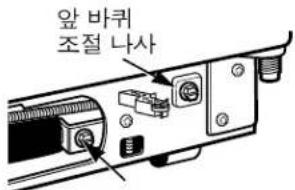
text_image
Technical diagram of a multi-level refrigerator with numbered components and directional arrows indicating assembly or storage layout.1 유제품 커버
natural_image
Illustration of hands inserting a card into a book (no text or symbols visible)② 냉장고문 저장그릇 분리대
natural_image
Illustration of hands using a tool to cut or spread a rectangular object, no text or symbols present4 도어 선반 앞커버
natural_image
Diagram of a mechanical component with directional arrows indicating movement (no text or symbols)② 착탈식 와인 걸이
natural_image
Pure technical line drawing of a mechanical assembly without any text, numbers, or symbols3 리프레시먼트 센터,안 커버
natural_image
Illustration of hands holding a rectangular tray with an arrow indicating direction (no text or symbols)natural_image
Line drawing of a cabinet or rack with two compartments and a top shelf (no text or symbols)