Dosimeter ER-200DW8 - Dosimeter Etymotic - Free user manual and instructions
Find the device manual for free Dosimeter ER-200DW8 Etymotic in PDF.


User questions about Dosimeter ER-200DW8 Etymotic
0 question about this device. Answer the ones you know or ask your own.
Ask a new question about this device
Download the instructions for your Dosimeter in PDF format for free! Find your manual Dosimeter ER-200DW8 - Etymotic and take your electronic device back in hand. On this page are published all the documents necessary for the use of your device. Dosimeter ER-200DW8 by Etymotic.
USER MANUAL Dosimeter ER-200DW8 Etymotic
Note: This manual can be downloaded from etymotic.com.
Operating Instructions
Introduction 4
Getting Started
Package Contents ....5
Identification of Parts 6
Using the Windscreen....7-8
Operating Instructions
Battery Insertion....9
Power Button Functions 9
Status Check 10
Normal Mode....11
Interpreting Results....12
QuickCheck Mode 13
Interpreting Results....14
Reading the Display: LEDs 15
What Dose % Means 16
NIOSH vs. OSHA Criteria....17
Data Logging 18
Memory Capacity 18-19
Clearing the Memory 19
Calibration....19
Specifications....20
Care and Maintenance....21
Warranty 21
FCC/Industry Canada Statements ..... 21
Risk Factors for Hearing Loss 22
Utility Suite Installation
About the Utility Suite 23
Installation....23-26
Connecting to the PC....27-28
Using the Utility Suite
Utility Suite Screens 29
Menus 30-31
Setup Screen 32
Measurement Mode....33
Run Length 34
Power Button Functions 35
Writing Settings to the Dosimeter . . . . . . . . . . . . 36
Restore Default Settings....37
Data Screen 38
Downloading Stored Data 38
Data Table 39
Data Graphs. 40
Normal Runs....40
QuickCheck Runs 41
Predictive Data Feature ..... 41-42
Clearing the Memory 42
Saving Data 43
Printing Reports 44
Previously Saved Reports 44
Reports and Data Files 45-46
Introduction
Hearing loss from loud sound affects millions of people. Noise-induced hearing loss is preventable, but most people don't know how long they can listen to loud sound without risking hearing damage. A single noise exposure may not result in hearing loss, but permanent damage to the inner ear from noise adds up over time. The accumulation of too much noise day by day, year after year, is the determining factor in hearing loss risk. A sound level meter is a device that measures noise at a particular point in time, while a dosimeter measures sound levels for many hours and calculates the cumulative noise dose in percent.
Daily noise dose is determined by both the intensity of the sound and the amount of exposure time. A 100% dose means that a person has reached the maximum noise exposure for the day, and continued exposure to loud sound could lead to hearing loss. Ideally, hearing protection should be used before the dose reaches 100% since dose limits are based on averages, and some ears are more susceptible to noise damage than others. When the noise dose exceeds 50% a person has reached half the maximum noise exposure for the day and it's a good idea to use hearing protection to prevent over-exposure, particularly if a 50% dose reading is reached early in the day. Noise dose limits are based on a 5-day work week, and assume quiet during non-work time. So the noise dose limit per week is 500% (100% x 5 days). Using hearing protection when dose exceeds 50% reduces the likelihood of exceeding the limit of 500% dose per week.
Getting Started
The ER-200DW8 Personal Noise Dosimeter is an inexpensive, easy-to-use device that provides a good estimate of noise dose and alerts the user to the risk of over exposure.
In cases of gunfire and other impulse noise, no conventional dosimeter measures the risk accurately. More specialized equipment is required to measure impulse noise.
The ER-200DW8 has three modes of operation:
- Status: displays the previously measured results, indicates when batteries need to be replaced, and indicates when the device memory is full.
- Normal: measures and displays noise dose continuously for up to 7 days; provides an early warning for over-exposure and the need for hearing protection.
- QuickCheck: measures noise for two minutes then calculates and displays the estimated dose per hour. QuickCheck provides a quick way to measure a specific noise source to determine if permissible exposure levels will be exceeded and hearing protection is needed (e.g., loud equipment, vehicles, power tools, concerts or sporting events).
Package Contents
•ER-200DW8 Personal Noise Dosimeter
- USB Cable
•PC Interface Software CD
•Windscreen
•Batteries: Three AAAA Alkaline*
-User Guide
*AAAA batteries are available at electronics retailers and at etymotic.com
Identification of Parts
A Microphone
B Windscreen Socket
C LEDs
D Power Button
E Clip
F Battery Compartment
G USB Socket
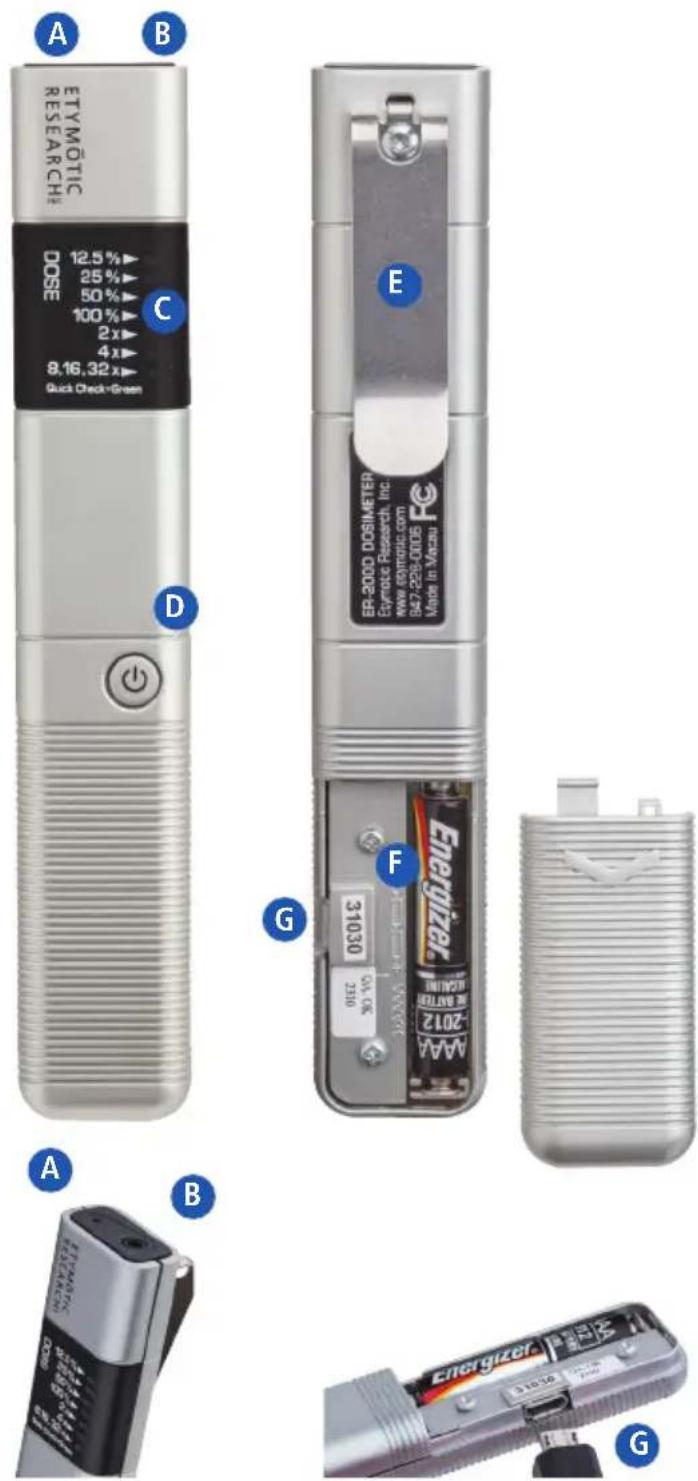
Using the Windscreen
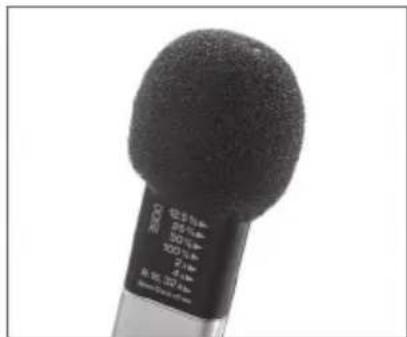
For accurate measurements, the 35 mm (1.4") windscreen included with the ER-200DW8 should be used when noise is measured outdoors or near any turbulence, e.g., from a fan. The foam windscreen allows accurate measurement in winds up to 15 to 20 mph.
Note: Blowing across the microphone opening on the dosimeter can cause the same turbulence as a 50 mph wind.
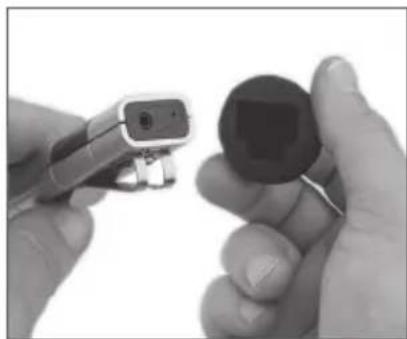
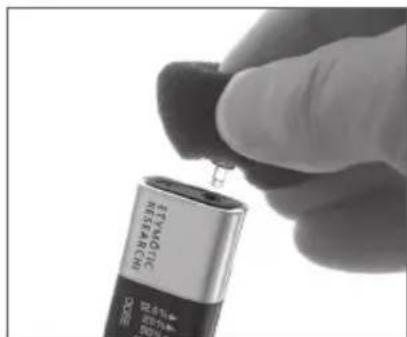
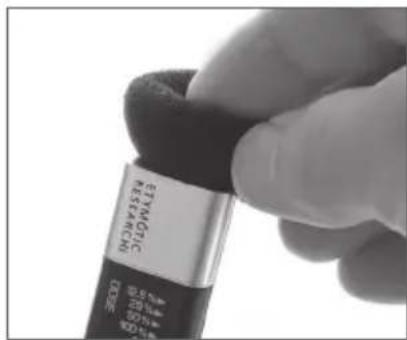
The windscreen contains a plastic pin on the interior to anchor it to the ER-200DW8. To attach the windscreen, carefully pull the foam back to visualize the pin. Place the pin in the windscreen socket at the top of the ER-200DW8. Gently pull the foam down over the top of the dosimeter case. To remove the windscreen, grasp the windscreen and pin and pull straight out.
Windscreen

natural_image
Close-up of a black textured circular object with a central square and a small metallic sphere (no text or symbols visible)Windscreen fits on top of the dosimeter
natural_image
Close-up of hands holding a small electronic device and a black circular component (no visible text or symbols)Pull up the foam and line up the windscreen pin with the windscreen socket on top of the dosimeter
natural_image
Close-up of a hand holding a small battery labeled 'ETTAMOTIC R-16' (no additional text or symbols visible)Push firmly into the opening until you hear it snap in
text_image
STRYMPIC CDEGently pull foam down over top of dosimeter case. Dosimeter is ready to operate
natural_image
Close-up of a black microphone with textured body and label (no readable text or symbols)Operating Instructions
Battery Insertion
On the back side of the dosimeter, locate the arrow on the battery compartment.
- Press down and slide the cover off.
- Insert three AAAA batteries (supplied) positive side down as shown.
-Replace cover.

natural_image
Two electronic devices with visible internal components, one open and one closed (no text or symbols)Power Button Functions
The Power button is used to select the type of run. This sequence cannot be changed.
•One press: Displays Status
- Two presses: Starts a Normal run
•Three presses: Starts a QuickCheck run

text_image
ETMÔTIC RESEARCH DOBE 12.5% 25% 50% 100% 20% 40% 80% 32% Back-Deck-Open PowerStatus Check
Power ON
- Press and release the power button one time. The 12.5% green LED illuminates briefly.
•The previously measured noise dose is displayed (flashing LED).
Device Status is Displayed
- Two Green LEDs Battery is good; memory capacity is acceptable
-
Two Green and one Yellow LED Battery is low or memory capacity is low
• Two Red LEDs — 3 Possibilities -
Battery is dead
- Device memory is full
- Hardware failure
Good
2 Green

Run Length: Programmable (16 hours; 3 days; 5 days; 7 days)
Power ON
- Press and release the power button two times.
- The 12.5% (green) LED illuminates on the first press
- The 25% (green) LED illuminates on the second press
- Three LEDs (green, yellow and red) flash twice. Then the 12.5% LED flashes, indicating the dosimeter is now measuring and integrating sound levels.
Measurement Window
In Normal mode, dose values are obtained every 220 msec, summed over a 3.75 minute interval and saved in non-volatile memory every 3.75 minutes (16 times per hour).
Measurement Period
The default measurement period is 16 hours. The current dose is continually displayed by a flashing LED. At the end of the measurement period three LEDs (green, yellow and red) flash twice, indicating the measurement is complete. The dosimeter automatically shuts off.
Dose is stored in the device memory and will be displayed when the device is powered on in Status mode. Stored data can also be downloaded to a PC.
Power OFF
- To shut off prior to automatic shutdown: press and hold the power button for two seconds.
- Three LEDs (green, yellow and red) flash twice and the device shuts off.
Interpreting Results
Normal Mode (Based on NIOSH Criteria)
| LED Dose% Risk Factor | Hearing Protection Needed | ||
| green 12.5% (slow flash) | <12.5% | No risk of hearing loss | No |
| green 12.5% (regular flash) | 12.5 - 24% | No risk of hearing loss | No |
| green 25% 25 - 49% | No risk of hearing loss | No | |
| yellow 50% 50 - 99% | 1/2 or more of daily dose | Yes (conservatively) | |
| red 100% 100 - 199% | Exposure limit exceeded | Yes | |
| red 2x 200 - 399% | >2x allowable daily dose | Yes | |
| red 4x | 400 - 799% | >4x allowable daily dose | Yes |
| red 8, 16, 32x (regular flash) | 8x | >8x allowable daily dose | Yes |
| red 8, 16, 32x (double flash) | 16x | >16x allowable daily dose | Yes |
| red 8, 16, 32x (fast flash) | 32x | >32x allowable daily dose | Yes |
QuickCheck Mode
(Estimated Dose per Hour) Test Time: 2 minutes
Power ON
- Press and release the power button three times.
- The 12.5% (green) LED illuminates on the first press.
- The 25% (green) LED illuminates on the second press
- The 50% (yellow) LED illuminates on the third press.
•The LEDs sweep twice from bottom to top.
- The bottom LED flashes green throughout the measurement, indicating QuickCheck mode.
•The solid LED indicates the predicted dose per hour.
After 2 minutes the LEDs sweep twice from bottom to top, indicating the measurement is complete.
•The solid LED (predicted dose per hour) displays for 7 seconds while the bottom LED flashes green (indicating QuickCheck). The dosimeter then shuts off.
- Result is stored in the device memory and is displayed when the device is turned on again in Status mode. Stored data can also be downloaded to a PC.
Power OFF
To power off prior to QuickCheck's automatic shutdown you must wait at least 15 seconds into the measurement.
- Press and hold the power button for 2 seconds. The LEDs will sweep twice, bottom to top.
- The estimated dose per hour (solid LED) is displayed for 7 seconds while the bottom LED flashes green (indicating QuickCheck). The dosimeter shuts off.
NOTE: If the dosimeter is shut off prior to its automatic shutdown, it will still calculate the predicted hourly dose based on the sound level and duration of the measurement.
Interpreting Results
QuickCheck Mode (Based on NIOSH Criteria)
| Solid LED is | Est. Dose per hour | Est. Dose per 8 hours |
| No LED lit < 12.5% <100% | ||
| green 12.5% 12.5 - 24% 100-192% | ||
| green 25% 25 - 49% 200 - 392% | ||
| yellow 50% 50 - 99% 400 – 792% | ||
| red 100% 100 - 199% 800 – 1592% | ||
| red 2x 200 - 399% 1600 -3192% | ||
| red 4x 400 - 799% 3200 – 6392% | ||
| >8x alternating flash red/green | >800% >6400% | |
Reading the Display: What the LEDs Mean
LED Color
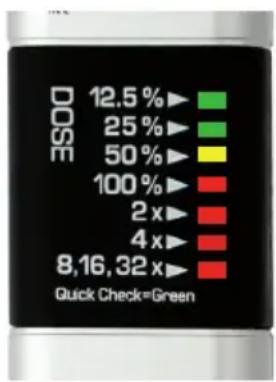
The dosimeter uses color-coded LEDs to display noise dose in percent.
text_image
DOSE 12,5 % 25 % 50 % 100 % 2 x > 4 x > 8,16,32 x > Quick Check=GreenGreen (Safe): Noise dose is below 50%
Yellow (Borderline): Noise dose is greater than 50% and less than 100%
Red (High Risk): Noise dose is greater than 100%
LED Flash Rate In Normal mode:
- A slow flashing LED at 12.5% means that the noise dose is at or below 12.5% (i.e., between 0% and 12.5% ). A fast flash at 12.5% indicates the dose exceeds 12.5% (i.e., dose is between 12.5 and 25% )
- LEDs 25% to 4x flash rapidly when that dose level is exceeded
-
For the bottom LED (8, 16, 32x):
-
Regular flash: dose exceeds 8x
- Double flash: dose exceeds 16x
- Fast continuous flash: dose exceeds 32x
In QuickCheck mode:
- All LEDs are solid except the bottom LED, which flashes green to indicate QuickCheck mode.
- If dose per hour exceeds 8x the bottom LED flashes alternately red and green.
What Dose % Means
Noise dose is a measurement of noise exposure. It is the combination of the amount of sound and the amount of exposure time. While sound levels may fluctuate over time, noise dose never decreases over time; it either remains stable or increases. Think of 100% dose as the exposure limit for an entire day. Note, however, that dose limits are based on a 5-day work week and assume quiet the rest of the time; therefore 500% is the exposure limit for an entire week. The risk of hearing impairment grows with increasing noise dose.
The limits of safe exposure to high sound levels are not absolute, since people differ in their degree of susceptibility to noise-induced hearing loss. Dose limits are based on average susceptibility. A small fraction of the population is more susceptible than average, and for these people a 100% dose per day (or 500% per week) may be enough noise exposure to cause hearing loss over time. Likewise, a small fraction of the population is less susceptible than average, and these people may be able to tolerate noise exposures exceeding 500% in a week without developing significant hearing problems. Most people will fall somewhere between the two extremes.
Since noise-induced hearing loss is irreversible and there is no way to determine individual susceptibility beforehand, a conservative approach would be to monitor the noise dose and use hearing protection whenever the noise dose exceeds 50%. By doing this, the risk of over-exposure is minimized.
NIOSH vs. OSHA Criteria for Estimating Allowable Noise Dose
In the United States two standards are used to define how noise dose is calculated: National Institute for Occupational Safety and Health (NIOSH) Criteria for a Recommended Standard (NIOSH, 1998) and Occupational Safety and Health Administration (OSHA) Occupational Noise Standard (OSHA, 1983).
When deciding which standard to use it is important to note that the differences in these standards have a significant impact on hearing loss risk. The more conservative NIOSH criteria are based on scientific data relating noise levels to risk of hearing damage, and are more protective of hearing than the OSHA criteria. OSHA criteria allow for higher exposure levels and/or longer exposure times as compared to the NIOSH criteria, and are therefore less protective of hearing.
EXAMPLE:
NIOSH 100% dose = 85 dB for 8 hrs or 88 dB for 4 hrs OSHA 100% dose = 90 dB for 8 hrs or 95 dB for 4 hrs
Allowable Daily Exposures (Hours per Day) Based on OSHA and NIOSH
| Noise | level | dBA | 85 | 88 | 90 | 92 | 94 | 95 | 97 | 100 | ||
| OSHA | 16 | 8 | 6 | 4 | 3 | 2 | ||||||
| NIOSH | 8 | 4 | 1 | 34 | 12 | 14 |
Data Logging
Normal and QuickCheck results are stored in the dosimeter and can be downloaded, saved and printed using the ER-200DW8 Utility Suite. See Utility Suite User Guide for instructions and information.
Memory Capacity
The ER-200DW8 has a non-volatile memory. Data stored in the device are retained even if the batteries are removed after a completed run. Data can be downloaded and saved to a PC after each run or after multiple runs. The ER-200DW8 can be set to overwrite data when its memory is full; in this case, the oldest run is the first to be overwritten. If the ER-200DW8 is set so that data is not overwritten, when the device memory is full, data must be downloaded and/or removed from the device to clear the memory for further data runs.
There are 48 blocks of data storage available in the instrument. The number of “runs” the device can store depends on the type and length of each run.
QuickCheck: 2 blocks
Normal (1 hr): 2 blocks
Normal (16 hr): 5 blocks
Normal (3 days): 19 blocks
Normal (5 days): 31 blocks
Normal (7 days): 43 blocks
Any combination of runs can be used up to the memory capacity of the device.
Examples:
a. 24 QuickCheck runs
[24 * 2 blocks each = 48 total]
b. Nine 16-hour runs + One QuickCheck run
[9 * 5 blocks each + 2 = 47 total]
c. Two 3-day runs + Two 16-hour runs
[2 * 19 blocks each + 2 * 5 blocks each = 48 total]
d. One 5-day run + Three 16-hour runs + 1 QuickCheck run
[31 blocks + 3 * 5 blocks each + 2 = 48 total]
e. One 7-day run + One 16-hour run
[43 blocks + 5 blocks = 48 total]
When the memory is full the Status indicator (accessed with one press of the power button) shows two red LEDs:

text_image
DOSE 12.5 % 25 % 50 % 100 % 2 x > 4 x > 8,16,32 x > Quick Check=GreenClearing the Memory
When the ER-200DW8 memory is full and the dosimeter is set not to overwrite the data, then data must be removed from the device before additional data runs can be obtained.
Calibration
The ER-200DW8 dosimeter is factory calibrated. Advanced users can verify calibration using the ER-200DW8 Utility Suite. See www.etymotic.com for more information.
Specifications
The default settings used by the ER-200DW8 for calculation of noise dose are consistent with ANSI S1.25–1991 (R2002)
Specification for Personal Noise Dosimeters and NIOSH
Criteria for a Recommended Standard (NIOSH, 1998).
Default settings are:
- Exchange rate: 3 dB
•Criterion level: 85 dB
•Threshold level: 75 dB
Run Length: 16 hours*
Calibration Accuracy: ± 2.5 dB
Frequency Weighting: A
Response: Slow
Temperature Range of Operation:
-10°C to 45°C (14°F to 113°F)
Omni-directional Microphone:
Flat from 100 Hz to 15 kHz
Power Supply: Three AAAA batteries
RMS Detector: Dynamic range 60 dB (70 to 130 dB)
Battery Life: > 200 hours continuous use
*Note: to make an 8-hour measurement, the dosimeter should be set to measure for 16 hours. This timeframe allows for an adequate time window around the measurement and accommodates overtime and swing-shift scheduling.
Flexibility in the dosimeter design allows programmable control of dosimeter settings using the PC interface.
Choices include:
-Exchange rate: 3,4 or 5 dB
• Criterion level: 70 to 95 dB, in 1-dB steps
• Threshold level: 70 to 90 dB, in 1-dB steps
• Measurement time (Run Length) in Normal Mode:
16 hours; 3 days; 5 days; 7 days
Care and Maintenance
- Do not expose to extreme temperatures
- Do not immerse in any liquids
- Clean with a soft dry cloth
- Avoid dropping and hard knocks to the unit
Warranty
Etymotic Research, Inc. warrants this product against defects in material or workmanship for a period of one year from the date of original purchase. Etymotic will repair or replace the defective product at its option if returned within the warranty period to our service facility. This warranty is in lieu of all other warranties, expressed or implied, including, but not limited to, any implied warranty of merchantability or fitness for a particular purpose.
FCC / Industry Canada Statements
This device complies with Part 15 of the FCC Rules.
Operation is subject to the following two conditions:
(1) this device may not cause harmful interference, and
(2) this device must accept any interference received, including interference that may cause undesired operation.
This class B digital apparatus complies with Canadian ICES-003.
Risk Factors for Hearing Loss
Health risks from excessive noise exposure include permanent hearing loss and tinnitus (ringing in the ears). Other factors such as genetics, exposure to smoke, pesticides, chemical solvents and certain medications increase the risk of hearing loss. Some of these factors make noise exposure more damaging to hearing than noise exposure alone. The dosimeter predicts average risk, not individual risk.
About the Utility Suite
The ER-200DW8 Utility Suite allows you to:
- Download, view, save, and print data from the ER-200DW8 Personal Noise Dosimeter
- Change measurement settings on the ER-200DW8 Personal Noise Dosimeter
System Requirements
Windows 8 or later*
One of the following PDF readers:
- Adobe Acrobat Reader (X or later)
- Adobe Acrobat (X or later)
- Adobe Acrobat Pro (X or later)
1G RAM (32-bit OS) or 2G RAM (64-bit OS)
USB Port
A screen resolution of 1024 x 768 (or better) is recommended. The size of the Utility Suite window cannot be adjusted. Lower resolution values will result in an inability to view the full screen.
* Version 4.04 is backward compatible with:
- Windows XP (SP2 or later)
- Windows Vista (SP2 or later)
- Windows 7 (SP1 or later)
Installation
Important: Do not connect the dosimeter to your PC until the Utility Suite software has been installed.
•The ER-200DW8 Utility Suite must be installed on each PC on which data will be downloaded and stored.
Insert the Utility Suite installation CD into the PC.
Using AutoPlay, Click "Run setup.exe" to begin installation.
If AutoPlay is disabled, navigate to the CD using
Windows Explorer and Double-Click setup.exe

text_image
DVD RW Drive (F:) ER-200... Choose what to do with this disc Install or run program from your media Run setup.exe Publisher not specified Other choices Open folder to view files File Explorer Take no action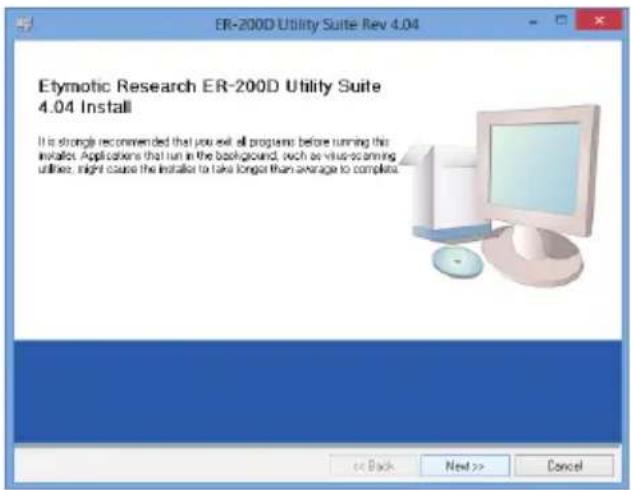
text_image
ER-200D Utility Suite Rev 4.04 Etymotic Research ER-200D Utility Suite 4.04 Install It is strong recommended that you exit all programs before running this install. Applications that run in the background, such as virus-scaming ultrae, might cause the install to take longer than average to complete.Two locations will appear for the Destination Directory. Important: Do not change the installation directories from the default locations.

text_image
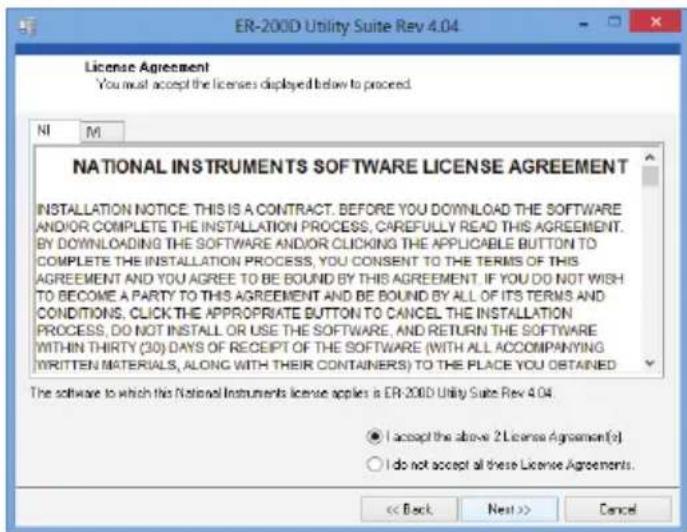
ER-2000 Utility Suite Rev 4.04 Destination Directory Select the primary installation directory. All software will be installed in the following locations. To install software into a different location, click the Browse button and select another directory. Display for: ER-2000 Utility Suite Rev 4.04 C:\Program Files\ER-2000 Utility Suite v4.04. Browse... Display for: National Instruments products C:\Program Files\National Instruments\ Browse... << Back Next >> CancelAccept all licensing agreements.
text_image
ER-200D Utility Suite Rev 4.04 License Agreement You must accept the licenses displayed below to proceed. NI MI NATIONAL INSTRUMENTS SOFTWARE LICENSE AGREEMENT INSTALLATION NOTICE: THIS IS A CONTRACT. BEFORE YOU DOWNLOAD THE SOFTWARE AND/OR COMPLETE THE INSTALLATION PROCESS, CAREFULLY READ THIS AGREEMENT. BY DOWNLOADING THE SOFTWARE AND/OR CLICKING THE APPLICABLE BUTTON TO COMPLETE THE INSTALLATION PROCESS, YOU CONSENT TO THE TERMS OF THIS AGREEMENT AND YOU AGREE TO BE BOUND BY THIS AGREEMENT. IF YOU DO NOT WISH TO BECOME A PARTY TO THIS AGREEMENT AND BE BOUND BY ALL OF ITS TERMS AND CONDITIONS. CLICK THE APPROPRIATE BUTTON TO CANCEL THE INSTALLATION PROCESS, DO NOT INSTALL OR USE THE SOFTWARE, AND RETURN THE SOFTWARE WITHIN THIRTY (30) DAYS OF RECEIPT OF THE SOFTWARE (WITH ALL ACCOMPANYING WRITTEN MATERIALS, ALONG WITH THEIR CONTAINERS) TO THE PLACE YOU OBTAINED The software to which the National Instruments license applies a ER-200D Utility Suite Rev 4.04. ● I accept the above 2 License Agreement(×) ○ I do not accept all these License Agreements. << Back Next >> CancelClick Next >>
text_image
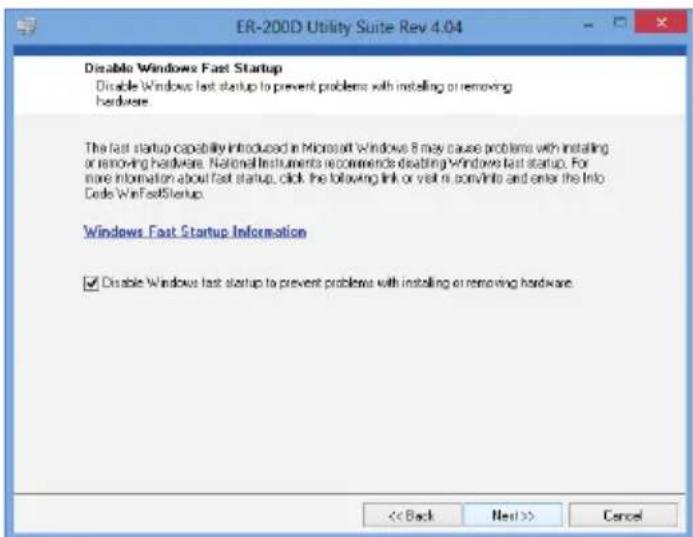
ER-200D Utility Suite Rev 4.04 Disable Windows Fast Startup Disable Windows fast startup to prevent problems with installing or removing hardware. The last startup capability introduced in Microsoft Windows 8 may cause problems with installing or removing hardware. National Instruments recommends disabling Windows fast startup. For more information about fast startup, click the following link or visit it: convInfo and enter the Info Code WinFastStartup. Windows Fast Startup Information ✓ Disable Windows fast startup to prevent problems with installing or removing hardware.Click Next >>
text_image
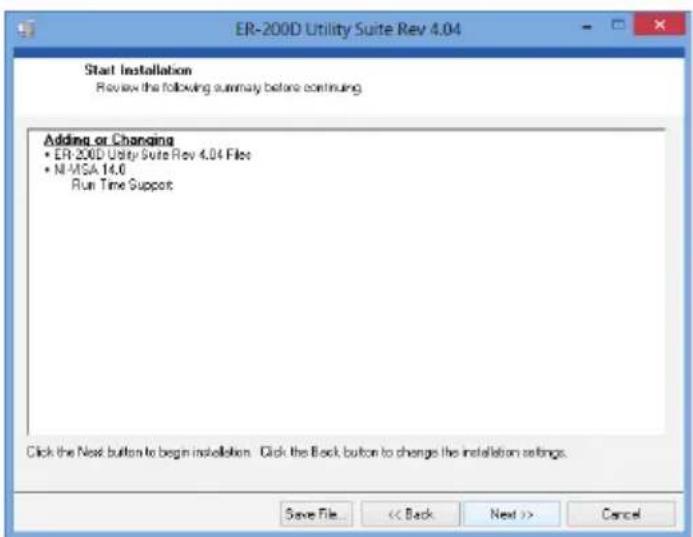
ER-200D Utility Suite Rev 4.04 Start Installation Review the following summary before continuing Adding or Changing • ER-200D Utility Suite Rev 4.04 Files • N-MSA 14.0 Run Time Support Click the Next button to begin installation. Click the Back button to change the installation settings. Save File << Back Next >> CancelClick Next >>
text_image
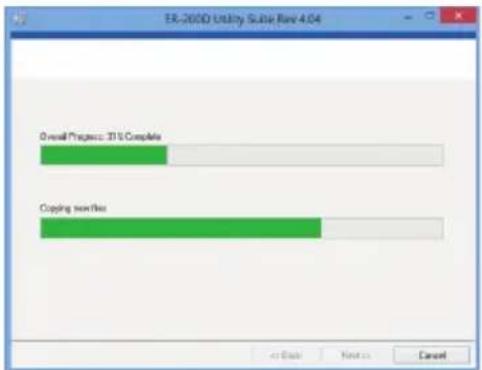
ER-200D Utility Suite Rev 4.04 Overall Progress: 31% Complete Copying successfulWait for the installer to finish copying all necessary files.
text_image
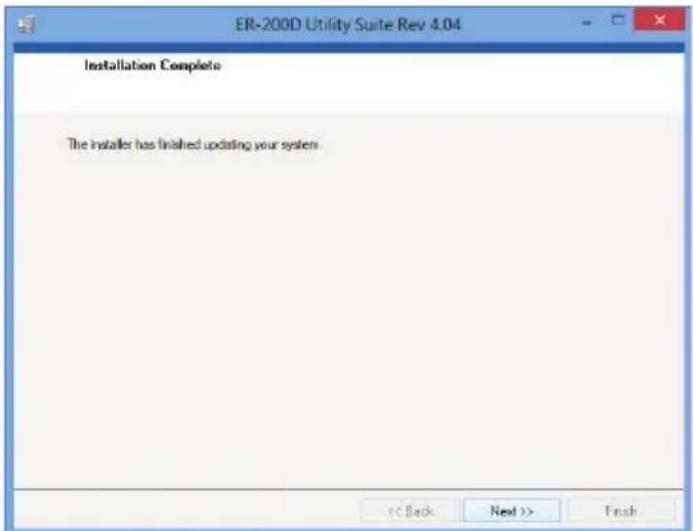
ER-200D Utility Suite Rev 4.04 Installation Complete The installer has finished updating your system.Click Next >>

text_image
ER-200D Utility Suite Rev 4.04 You must restart your computer to complete this operation. If you need to install hardware now, shut down the computer. If you choose to restart later, restart your computer before running any of this software. Restart Shut Down Fiestart LaterAfter installation is complete you will be prompted to restart the PC. After restarting your PC, you can connect the dosimeter to the PC with the cable provided.
An ETYMOTIC RESEARCH Logo for the Utility Suite will be on your computer desktop.


ER200-D Utility Suite Rev 4.04
Connecting to the PC
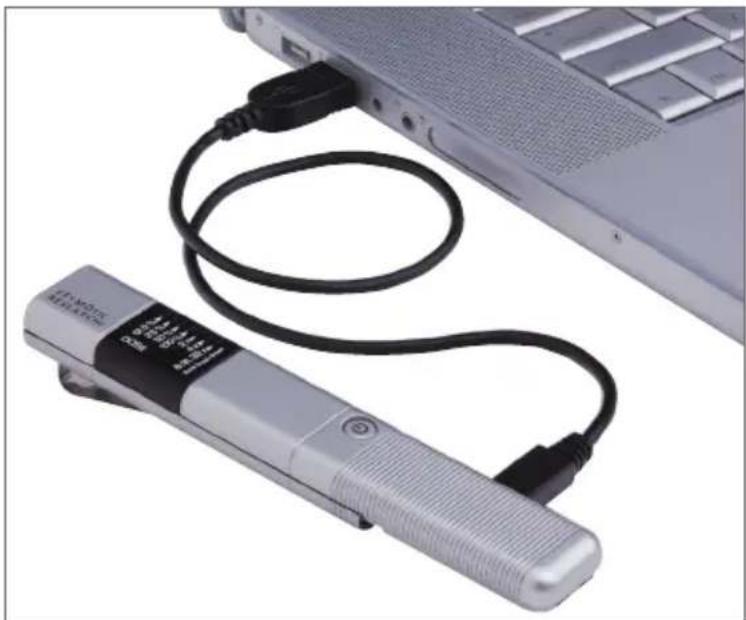
Important: Plug the cable directly into a PC USB port. Do not plug it into a USB hub.
Note:
Each dosimeter has a unique serial number. Multiple dosimeters can be interfaced with a single PC; however, only one dosimeter at a time can be connected to the PC.
- Removethe
battery cover of the ER-200DW8

text_image
ER-2000 DOSIMETER Etastric Research, Inc. www.arynix.com 847-228-0006 PC Made in Macau 31030 2012 MAKINIC 2012 MAKINIC 219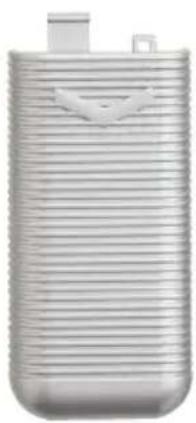
natural_image
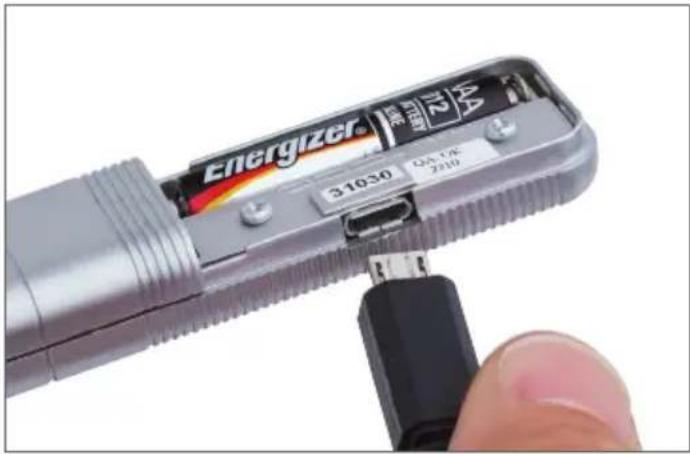
Exterior view of a cylindrical metallic heating element with ribbed insulation and a small vent (no text or symbols visible)- Connect the USB cable to the ER-200DW8.
natural_image
Close-up of a handheld energyizer device with a black connector inserted, showing internal components and a finger pointing to it (no readable text or symbols)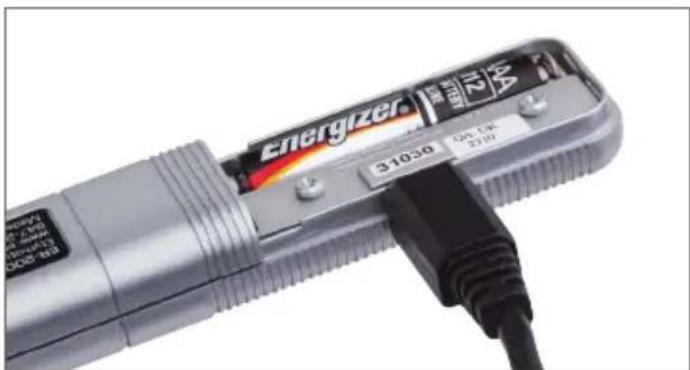
text_image
energizer 31030 524.136 524.137- Connect the USB cable to the computer.
natural_image
Close-up of a handheld electronic device connected to a laptop keyboard, showing its cable and connector (no visible text or symbols)Utility Suite Screens
Open the ER-200DW8 Utility Suite by double-clicking the icon.

ER200-D Utility Suite Rev 4.04
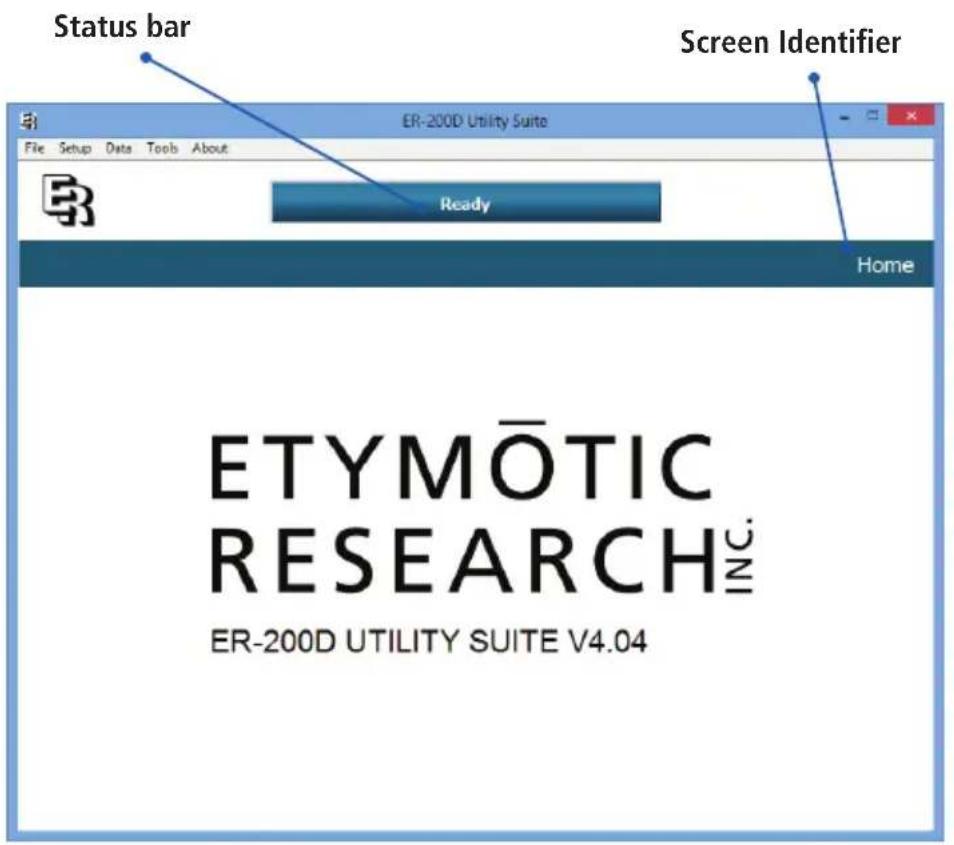
There are 3 main screens in the Utility Suite:
Home, Setup, and Data.
Home Screen
text_image
Status bar Screen Identifier ER-200D Utility Suite File Setup Data Tools About Ready Home ETYMÔTIC RESEARCH INC. ER-200D UTILITY SUITE V4.04Menus

File Setup Data Tools About
File
- Open: Opens saved reports
- Save: Creates and saves a report for the currently selected data run
- Save All: Creates and saves reports for all displayed data runs
• Print: Prints a report for the currently selected data run - Print Preview: Generates a print preview for the currently selected data run
- Exit: Closes the software
Setup
• View Setup Window: Displays Setup information for the connected ER-200DW8
- Read ER-200D Setup: Reads setup information stored on the connected ER-200DW8
- Write From Setup Panel: Writes the displayed setup information to the connected ER-200DW8
- Restore Factory Defaults: Restores Setup to factory default settings
Data
- View Data Window: Displays data screen
- Read ER-200D Data: Reads data from the connected ER-200DW8
-
Delete ER-200D Data: Deletes data from the connected ER-200DW8
-
Describe Highlighted Run: Opens a text box for the user to enter details for the highlighted data run
- Describe All Runs: Opens a text box for each displayed run
- Clear Screen: Clears the data screen. Data remain on the ER-200DW8 until removed (see Data – Delete above).
Tools
Check Calibration
- Microphone: Allows user to check microphone calibration
- Direct Input (special uses only): Allows user to check calibration of direct input
The ER-200DW8 is factory calibrated. Calibration values affect the calculated noise dose. Only expert users should change calibration settings. Users who wish to check microphone calibration need a signal source that generates a 94 dB SPL, 1-kHz signal at the microphone. Calibration of the direct input feature (special use only) can be checked with a 10mV, 1-kHz signal. Contact customer service at Etymotic Research for additional information on Advanced Features.
Log In For Advanced Features
Access to Advanced Features lets expert users change calibration settings, update firmware and save and upload setup images. If performed incorrectly, changing these settings can result in serious measurement errors. Access to Advanced Features requires a user name and password.
About
- About: Displays the software version.

text_image
Etymotic Research ER-200D Utility Suite V4.04 [LabView 2013] © 2013, 2014 Metrionix, Inc. OKSetup Screen
The Setup Screen is used to customize the dosimeter.
Changes made on the setup screen must be written to the dosimeter (see "Writing settings to the Dosimeter").
Any changes not written to the dosimeter will be lost and the device will revert to its default or previously stored settings.
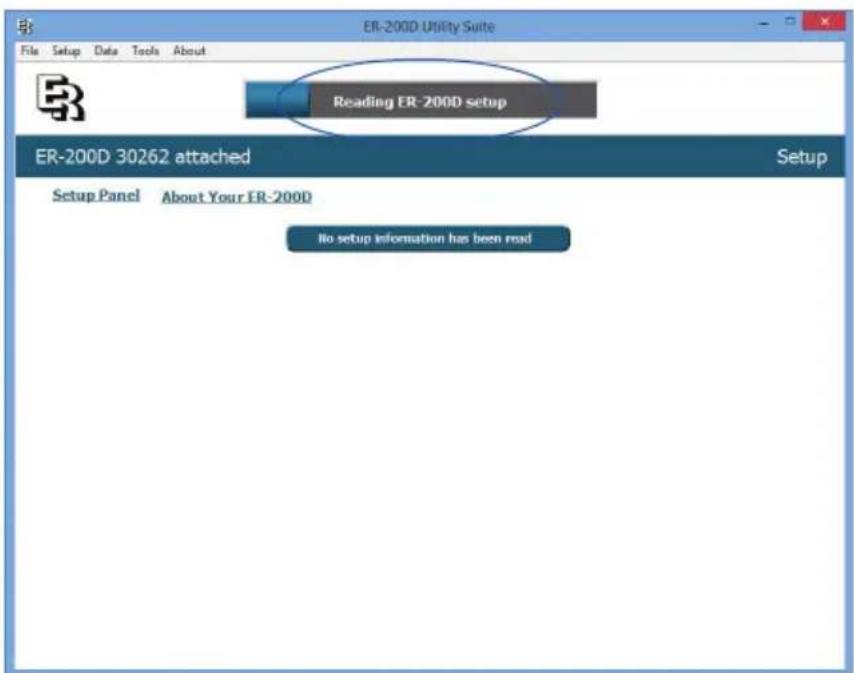
From the menu bar click "Setup." Click "Read ER-200D Setup."

text_image
Setup Data Tools About View Setup Window Ctrl+I Read ER-200D Setup Ctrl+U Write From Setup Panel Restore Factory DefaultsThe Status Bar will display "Reading ER-200D Setup" followed by "Ready."
text_image
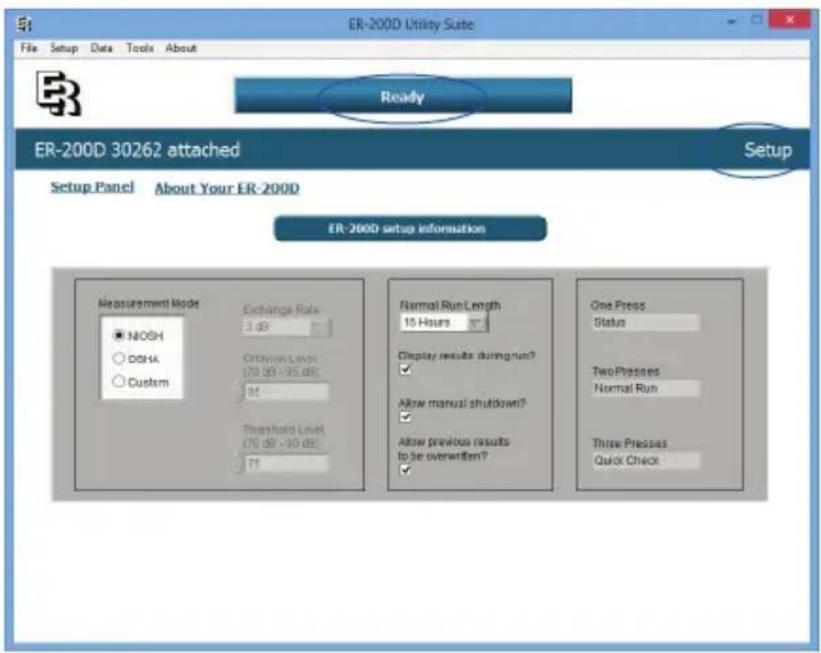
ER-200D Utility Suite File Setup Data Tools About ER Reading ER-200D setup ER-200D 30262 attached Setup Setup Panel About Your ER-200D No setup information has been readThe Setup Screen displays the factory default settings the first time the dosimeter is used. Thereafter, stored settings are displayed.
text_image
ER-200D Utility Suite File Setup Data Tools About Ready ER-200D 30262 attached Setup Setup Panel About Your ER-200D ER-200D setup information Measurement Mode NOSH DSHA Custom Exchange Rate 3 dB Operation Level (70 dB - 95 dB) 80 Threshold Level (70 dB - 90 dB) 70 Normal RunLength 15 Hours Display results during run? Allow manual shutdown? Allow previous results to be overwritten? One Press Status Two Presses Normal Run Three Presses Quick CheckMeasurement Mode
NOTE: Exchange rate, criterion level and threshold level determine how noise dose is defined and computed, and will impact the dose results. The default settings correspond to NIOSH (1998) recommendations, which are more conservative (more protective) than the OSHA criteria.
NIOSH (default)
Exchange rate: 3 dB
Criterion level: 85 dB
Threshold level: 75 dB
OSHA
Exchange rate: 5 dB
Criterion level: 90 dB
Threshold level: 80 dB

text_image
Measurement Mode NIOSH OSHA Custom Exchange Rate 3 dB Criterion Level (70 dB - 95 dB) 85 Threshold Level (70 dB - 90 dB) 75Custom
Exchange rate: 3, 4 or 5 dB
Criterion level: 70 to 95 dB, in 1-dB increments
Threshold level: 70 to 90 dB, in 1-dB increments
Run Length
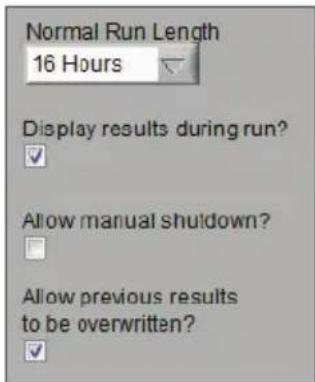
Normal Run Length 16 Hours (default)
Allows for adequate run time before and after a typical 8-hour work shift, as well as any overtime that may occur.
text_image
Normal Run Length 16 Hours Display results during run? ✓ Allow manual shutdown? □ Allow previous results to be overwritten? ✓Alternate Options
3 Days, 5 Days and 7 Days
Run-Time Clock
The ER-200DW8 has a run-time clock, but not a real-time clock. For run lengths over 16 hours, the dose continues to accumulate the entire measurement time. Dose does not "auto-zero" every 24 hours. Users requiring the average dose per day will need to download and view the data in the saved text file to calculate the average dose per day.
NOTE: For extended run lengths (3, 5 or 7 days) it is recommended you disable the "Allow Manual Shutdown" feature and install new batteries prior to starting.
Display Results During Run
This ensures the LEDs are lit during all measurements.
Unchecked: The top (12.5%) LED flashes to indicate the dosimeter is functioning, but the dose value is not displayed.
Allow Manual Shutdown
Allows user to manually power OFF before the end of a Normal or QuickCheck run.
Unchecked: Dosimeter remains ON until the end of the Normal or QuickCheck run, after which it automatically powers OFF. This prevents intentional or unintentional shutdown of the device.
Allow Previous Results to Be Overwritten
The dosimeter automatically overwrites the oldest data when the device memory is full without signaling the user. For more information on memory capacity and the number of data runs that can be stored, see pages 18-19.
Unchecked: Ensures that new data do not overwrite older saved data in the device. LEDs indicate when the device memory is full. Data must be downloaded and/or removed from the device to clear the memory for more runs.
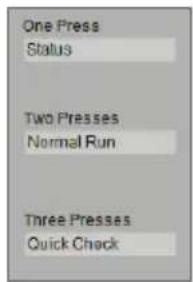
Power Button Functions
The Power Button is used to select the type of run. This sequence cannot be changed.
text_image
One Press Status Two Presses Normal Run Three Presses Quick CheckAbout Your ER-200DW8
Displays identifying information about the connected dosimeter, which is useful to the factory if troubleshooting a specific device is necessary.
From the Setup screen, click "About Your ER-200D"
Information on the "About Your ER-200D" screen cannot be changed by the user.

text_image
ER-200D Utility Sets File Setup Data Tools About Ready ER-200D 30262 attached Setup Panel About Your ER-2000 Serial Number 33262 Firmware Version 4.04 Manufacture Date 13.07 PM 14/09/2015 Firmware Update Date 13.07 PM 14/09/2015 Macropetre Gain (MB) 2.0345 Direct Input Gain (MB) -0.10254 Warnings No warnings. Errors No errors.Writing Settings to the Dosimeter
When settings are changed on the Setup screen, "Unsaved setup information" flashes until the setting are written to the dosimeter.
Unsaved setup information
To Save Settings
- Click "Setup" on the menu bar
- Click "Write from Setup Panel" from the dropdown menu

text_image
Setup Data Tools About View Setup Window Ctrl+I Read ER-200D Setup Ctrl+U Write From Setup Panel Restore Factory Defaults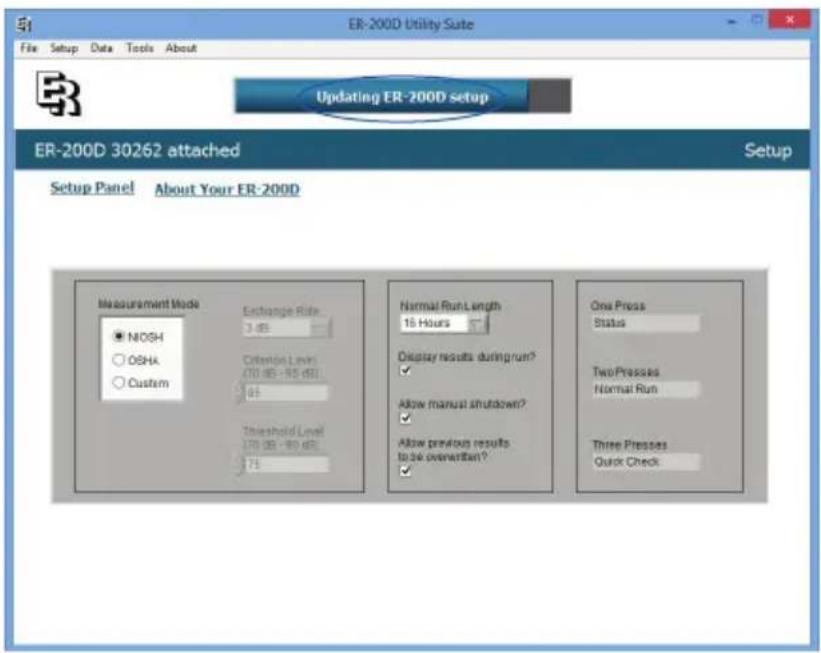
text_image
ER-200D Utility Suite File Setup Data Tools About Updating ER-200D setup ER-200D 30262 attached Setup Setup Panel About Your ER-200D Measurement Mode Exchange Rate Normal Run Length NOSH Exchange Rate 3.45 18 Hours OSHA Criterion Level: 070 dB - 95 dB Custom 65 Threshold Level: 170 dB - 95 dB 75 Display results during run? Allow manual shutdown? Allow previous results to be overwritten? One Press Status Two Presses Normal Run Three Presses Quick Check- Status bar indicates "Updating ER-200D Setup"
- After changes are programmed, status bar displays "Ready"
text_image
Setup Data Tools About View Setup Window Ctrl+I Read ER-200D Setup Ctrl+U Write From Setup Panel Restore Factory Defaults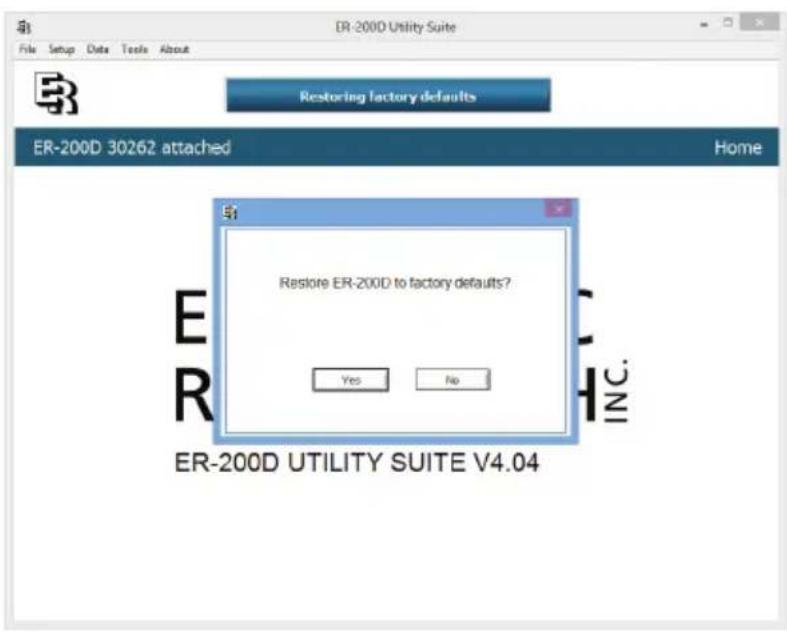
text_image
ER-200D Utility Suite File Setup Date Tools About Restoring factory defaults ER-200D 30262 attached Home Restore ER-200D to factory defaults? Yes No ER- INC. ER-200D UTILITY SUITE V4.04- Click "Yes"
- Status bar indicates "Restoring Factory Defaults"
- After changes are programmed, status bar displays "Ready"
Data Screen
Downloading Stored Data
- From either the Home screen or Setup screen, click "Data" on the menu bar.
- Click "Read ER-200D Data."

text_image
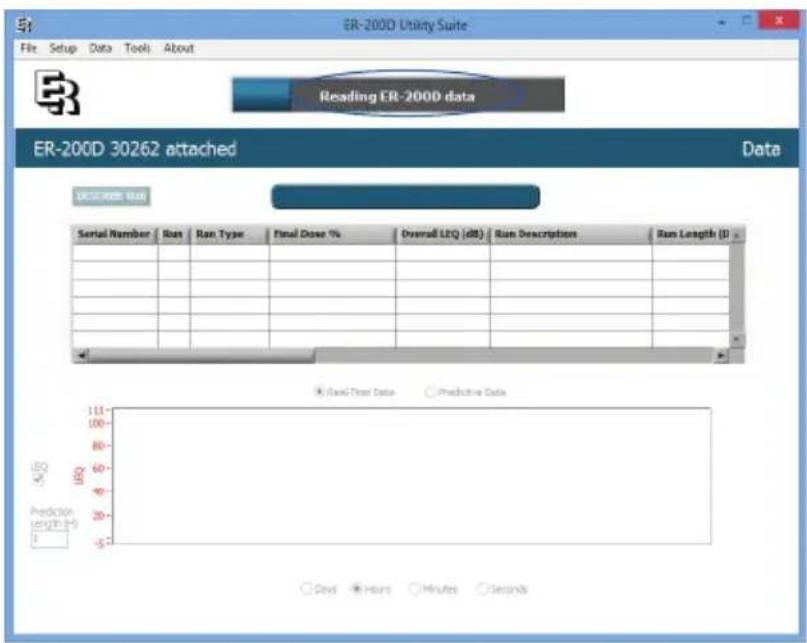
Data Tools About View Data Window Ctrl+D Delete ER-200D Data Read ER-200D Data Ctrl+R Describe Highlighted Run Clear Screen Describe All RunsThe blue status bar indicates "Reading ER-200D data"
text_image
ER-200D Utility Suite File Setup Data Tools About Reading ER-200D data ER-200D 30262 attached Data Serial Number Run Run Type Final Dose % Overall LEQ (dB) Run Descriptions Run Length (U) Raw Data Data Predictive Data LIQ Prediction length (L) Days Hours Minutes SecondsData Table
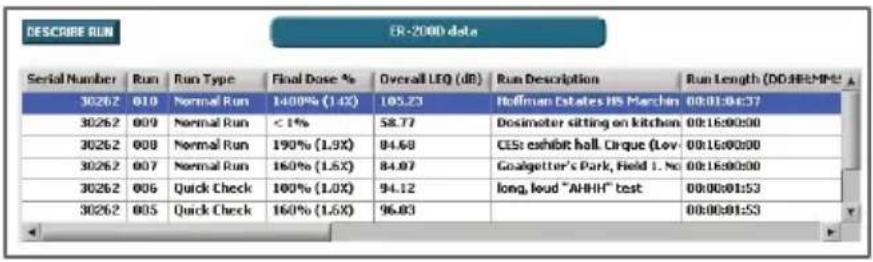
All data runs are displayed in the Data Table, with the most recent run at the top of the list.
text_image
DESCRIBE RUN ER-2000 data Serial Number Run Run Type Final Dose % Overall LEQ (dB) Run Description Run Length (DD:HHH*MP) 30262 010 Normal Run 1400% (1.4%) 105.23 Hoffman Estates HS Marchin 00:01:04:37 30262 009 Normal Run < 1% 58.77 Dosimeter sitting on kitchen 00:16:00:00 30262 008 Normal Run 190% (1.9%) 94.68 CES exhibit hall. Cirque (Lov: 00:16:00:00 30262 007 Normal Run 160% (1.6%) 84.97 Goalgetter's Park, Field 1. No: 00:16:00:00 30262 006 Quick Check 100% (1.0%) 94.12 long, loud "AHHH" test 00:00:01:53 30262 005 Quick Check 160% (1.6%) 96.83 00:00:01:53- Serial Number: Device serial number
-Run: Sequential, beginning with 001
-Run Type: Normal or QuickCheck
·Final Dose %: Dose at end of run
• Overall Leq: A-weighted continuous equivalent sound level
- Run Description: This is a textbox in which the user can enter data describing the run
EXAMPLE:
"Jane Smith, Packing Line 1, Full Capacity, First Shift, 5-18-2009."
To Enter A Run Description
- Double-click on the desired run or click the blue "Describe Run" box on the screen.
- Type information into dialogue box and click OK.
- Run description will be immediately updated.
Note: Once a report is created, the Run Description cannot be altered in the report. A new report can be made, but it must be saved using a different file name.
- Run Length: Actual run time, displayed as Days-Hours-Minutes-Seconds
• Max Run Length: Maximum time the dosimeter could run
•Exchange Rate, Criterion and Threshold:
As selected from the Setup Screen
• Signal Source: internal microphone (default) or direct input
• Calibration: Calibration value used at the time of the run
- Run Termination: Completed normally; manual shutdown; or sudden power loss
- Warnings: Any warnings that occurred during the run
- Software Version: software version at the time of the run
Data Graphs
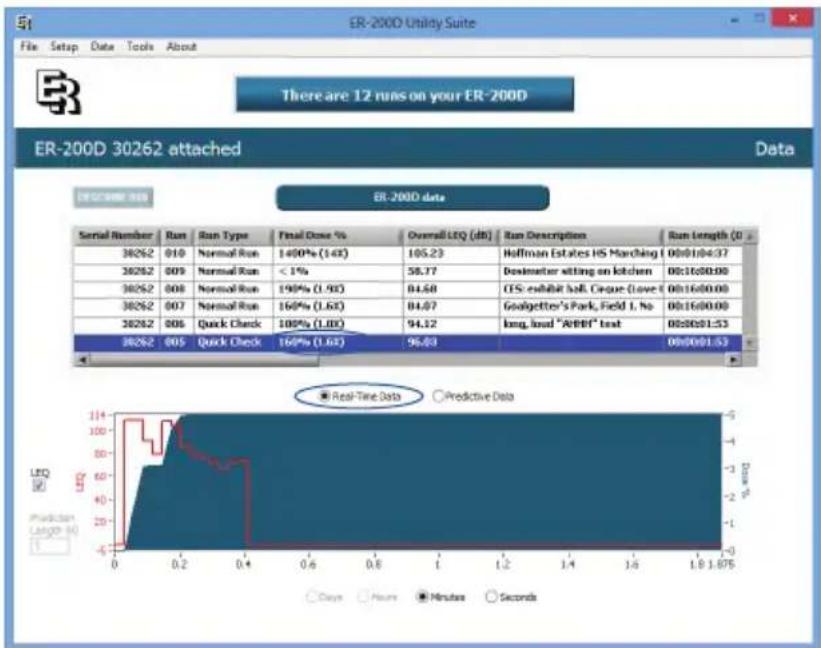
•The data graph displays dose data from the run highlighted in the Data Table.
•To display graphs for other runs, select the run by clicking on the line in the Data Table that contains the run data.
- Dose is displayed by blue fill on the graph and indicated numerically on the right side of the graph.
Normal Runs

line
| Time | Real-Time Data | Predictive Data | |------|----------------|-----------------| | 0 | 80 | 0 | | 10 | 90 | 0 | | 20 | 100 | 0 | | 30 | 80 | 0 | | 40 | 100 | 0 | | 50 | 100 | -200 | | 60 | 100 | -200 | | 64.6106 | 100 | -200 |Leq (red)
Dose % (blue)
- Leq (Equivalent Continuous Level) is displayed on the left side of the graph and indicated with a red line on the graph when the Leq box is checked. Leq is only available for Real-Time Data.
- For Normal runs, only Real-Time Data are available.
• In Normal Mode, dose values are obtained every 220 msec and summed over a 3.75 minute interval.
QuickCheck Runs
- QuickCheck run time is approximately 2 minutes.
• Estimated dose per hour is displayed in the data table.
line
| LEQ | Final Dose (%) | | --- | --- | | 38262 | 010 | | 38262 | 009 | | 38262 | 008 | | 38262 | 007 | | 38262 | 006 | | Quick Check | 160% (1.64) | | Quick Check | 160% (1.64) | | Overall LEQ (db) | 105.23 | | Overall LEQ (db) | 58.77 | | Overall LEQ (db) | 84.68 | | Overall LEQ (db) | 84.67 | | Overall LEQ (db) | 94.12 | | Overall LEQ (db) | 95.63 | | Real-Time Data | Predictive DataReal-time data are displayed
Predictive Data Feature
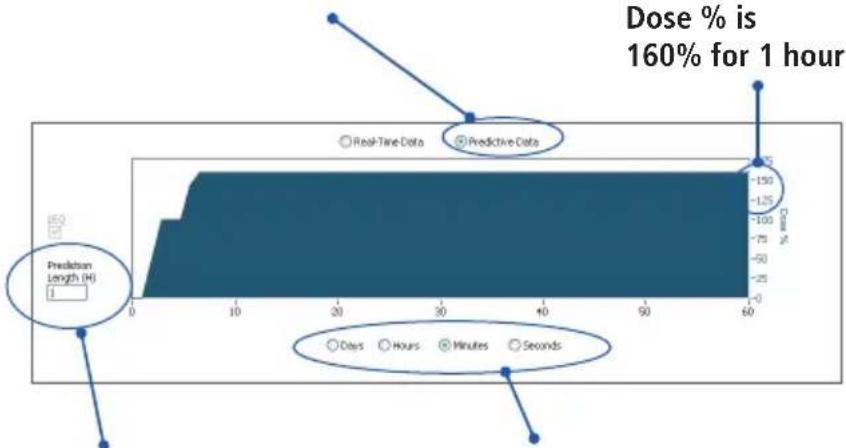
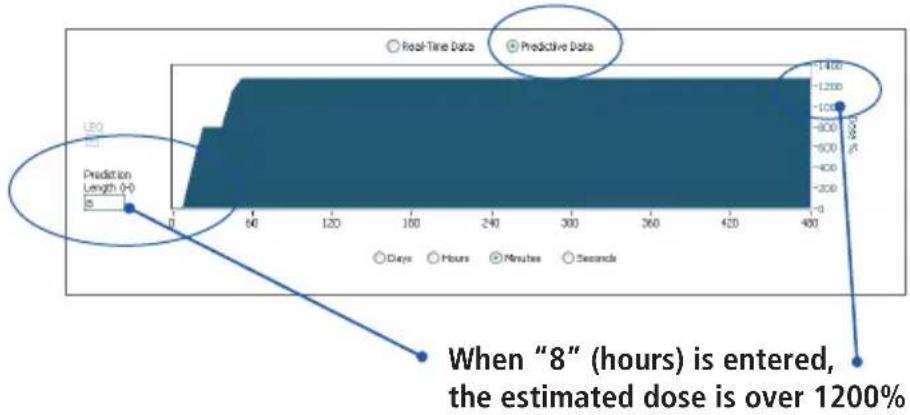
Runs can be viewed as Real-Time Data or Predictive Data.
Selecting Predictive Data allows the user to see estimated dose for various time periods.
area
| Time (hours) | Dose (%) | | ------------ | -------- | | 0 | -150 | | 10 | -150 | | 20 | -150 | | 30 | -150 | | 40 | -150 | | 50 | -150 | | 60 | -150 |Prediction Length (in Hours) is adjustable by the user. Here, "1" was entered.
Predictive Data can be displayed in Days, Hours, Minutes or Seconds.
area
| Time (s) | Predicted Data (Hours) | Predicted Data (Minutes) | Predicted Data (Seconds) | |---|---|---|---| | 0 | 0 | 0 | 0 | | 60 | 1200 | 0 | 0 | | 400 | 1200 | 0 | 0 | When "8" (hours) is entered, the estimated dose is over 1200%Note Only dose per hour data are displayed on the printed report.
Clearing the Memory
Important: Download and save data from the dosimeter prior to clearing the memory.
- Click "Data" on the menu bar
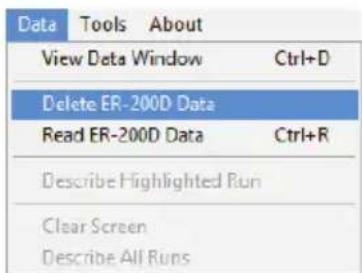
- Click "Delete ER-200D Data"
• A dialog box appears to confirm data deletion - Click "Yes"
When the ER-200DW8 memory is full and the dosimeter is set not to overwrite the data, then data must be removed from
the device before additional data runs can be obtained.
text_image
Data Tools About View Data Window Ctrl+D Delete ER-200D Data Read ER-200D Data Ctrl+R Describe Highlighted Run Clear Screen Describe All RunsSaving Data
Reports are created and saved in pdf format. Data are also saved in a text file when a report is created.
- Prior to saving a report enter a run description.
- Reports are write-protected and can't be changed after they are saved.
Disconnect Without Saving
- If user reads and displays data and then disconnects
- Data are not saved to the PC.
- Data will disappear from the Data screen but are still present in the dosimeter.
To Save a Highlighted Run
- Click "File" on the menu bar.
- Click "Save" on the dropdown menu.
- A default name is assigned using the dosimeter serial number and run number (e.g., SN20056 Run 010).
- The file can be renamed using any combination of letters and numbers.
•A dialog box appears asking if you want to print the report.
To Save All Runs
- Click "File" on the menu bar.
- Click "Save All" on the dropdown menu.
Printing Reports
To Save and Print
- Save the selected report as described above. A dialog box appears asking if you would like to print.
To Print Without Saving
- From the menu bar Click "File." Click "Print." The file will print but it will not be saved.
Previously Saved Reports
Previously saved reports can be uploaded, viewed and printed from within the Utility Suite or your PDF viewer. The dosimeter does not have to be connected to the PC. To view reports from within the Utility Suite:
- Click "File" on the menu bar.
- Click "Open."
- Select a previously saved file.
To Enter a Run Description for a Previously Saved File
- Open the desired file.
- Enter a run description.
- Save the file using a different file name than the original.
Reports and Data Files
The default location for reports is C:\Etymotic Research\ER-200D Utility Suite\Reports. The user can save reports to a different location if desired.
PDF Report:

line
| Metric | Value | | -------------------- | --------- | | Report Date | 100.00 | | Report Time | 1:28 PM | | Serial Number | 30263 | | Run | 000 | | Run Type | Normal Run | | Final Dose % | 3790% (37.8%) | | Overall LEG (dB) | 88.88 | | Run Description | 7/20 Tisky Park Mayhens 2014 | | Run Length (DD:HH:MM:SS) | 00:06:42:40 | | Max. Run Length (DD:HH:MM:SS) | 00:18:00:00 | | Exchange Rate (dB) | 3 | | Orlanon (dB) | 66 | | Threshold (dB) | 76 | | Signal Source | Microphone | | Calibration (dB) | -1.3 | | Run Termination | Run ended due to manual shutdown | | Warnings | none | | Software Version | 4.04 |Text File:
The text file contains a data table documenting: Time; Dose%; Leq; and Predicted Time and Predicted Dose% (QuickCheck only). Values are shown for each 3.75 minute time block. The Data Table can be used to create graphs if desired, using a program such as Excel.
Data are recorded as fractions of an hour; data at 3.75 minutes is written as 0.062 (3.75 minutes ÷ 60 minutes = 0.062).
| Report Date | Thu, Aug 14, 2014 | |
| Report Time | 1:26 PM | |
| Serial Number | 30262 | |
| Run | 009 | |
| Run Type | Normal Run | |
| Final Dose % | 3790% (37.9X) | |
| Overall LEQ, dB | 99.89 | |
| Run Description | 7/20 Tinley Partk Mayhem 2014 | |
| Run Length (DHMS) | 00:09:42:45 | |
| Max Run Length (DHMS) | 00:16:00:00 | |
| Exchange Rate, dB | 3 | |
| Criterion, dB | 85 | |
| Threshold, dB | 75 | |
| Signal Source | Microphone | |
| Calibration, dB | -1.3 | |
| Run Termination | Run ended due to manual shutdown. | |
| Warnings | none | |
| Software Version | 4.04 | |
| Data Length | 157 | |
| Data Table | ||
| Time H | Dose % | LEQ dB |
| 0.0000 | 0.000 | 83.761 |
| 0.0625 | 0.587 | 83.761 |
| 0.1250 | 96.556 | 105.822 |
| 0.1875 | 532.446 | 112.372 |
| 0.2500 | 1057.935 | 113.181 |
| 0.3125 | 1497.925 | 112.412 |
| 0.3750 | 1803.418 | 110.833 |
| 0.4375 | 1842.480 | 101.932 |
| 0.5000 | 1946.533 | 106.172 |
| 0.5625 | 2109.033 | 108.101 |
| 0.6250 | 2234.473 | 106.981 |
| 0.6875 | 2366.699 | 107.209 |
| 0.7500 | 2373.291 | 94.230 |
| 0.8125 | 2407.422 | 101.347 |
| 0.8750 | 2533.350 | 106.998 |
The Raw Data are used by the PC Interface program for calculations.

natural_image
Abstract wave pattern with gradient blue-to-green transition, no text or symbols presentETYMÔTIC RESEARCH
61 Martin Lane • Elk Grove Village, IL 60007 www.etymotic.com • 1-888-389-6684 • 1-847-228-0006
©2014 ER078122-A