Sono Abitus - Synthesizer Noise Engineering - Free user manual and instructions
Find the device manual for free Sono Abitus Noise Engineering in PDF.


User questions about Sono Abitus Noise Engineering
0 question about this device. Answer the ones you know or ask your own.
Ask a new question about this device
Download the instructions for your Synthesizer in PDF format for free! Find your manual Sono Abitus - Noise Engineering and take your electronic device back in hand. On this page are published all the documents necessary for the use of your device. Sono Abitus by Noise Engineering.
USER MANUAL Sono Abitus Noise Engineering
Stereo balanced 14 " TRS output and 14 " headphone output with separate level controls in 4 HP.
Overview
| Type Headphone amplifier and balanced line output | |
| Size 4 HP | |
| Depth 1.5 inches | |
| Power 2x5 Eurorack | |
| +12 mA 50 | |
| -12 mA 50 | |
| +5 mA 0 | |

text_image
Noise EngineeringSono Abitus is a high-quality output module. It has a stereo pair of Eurorack-level 18 " inputs that feed a pair of 14 " TRS jacks for line output and a 14 " headphone output. The headphone output and line outputs have separate level controls, making it easy to monitor while performing or recording.
Etymology
Sono -- from Latin: "to make a noise"
Abitus -- from latin: "way out, exit"
"Make noises exit"
WARNING
The headphone output can be EXTREMELY loud. In a normal, quiet environment, the first 25% of the knob will probably cover all the volume range you'll need. Use caution when listening on headphones (or in general!) as high audio levels can cause permanent hearing damage. Protect those earholes.
Power
To power your Noise Engineering module, turn off your case one end of your ribbon cable into your power board so that stripe on the ribbon cable is aligned to the side that says - each pin on the power header is plugged into the connector ribbon. Make sure no pins are overhanging the connector! If are, unplug it and realign.
Line up the red stripe on the ribbon cable so that it matches white stripe and/or -12v indication on the board and plug in connector.
Screw your module into your case BEFORE powering on the module. You risk bumping the module's PCB against something metallic and damaging it if it's not properly secured when po on.
You should be good to go if you followed these instructions go make some noise!
A final note. Some modules have other headers -- they may a different number of pins or may say NOT POWER. In get unless a manual tells you otherwise, DO NOT CONNECT TO POWER.
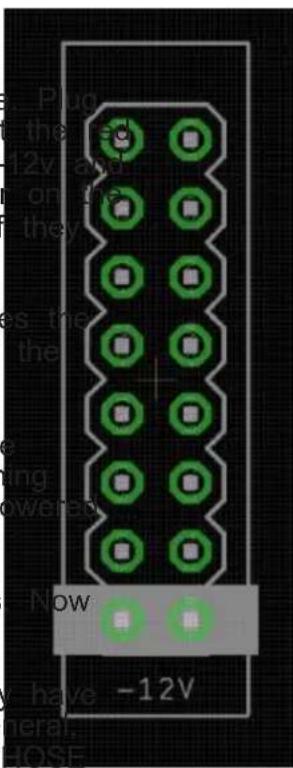
text_image
Plug the 12V and on the they es the the ing powered NOW -12VWarranty
Noise Engineering backs all our products with a product warranty: we guarantee our products to be free from manufacturing defects (materials or workmanship) for one year from the date of the original retail purchase (receipt or invoice required). The cost of shipping to Noise Engineering is paid by the user. Modules requiring warranty repair will either be repaired or replaced at Noise Engineering's discretion. If you believe you have a product that has a defect that is out of warranty, please contact us.
This warranty does not cover damage due to improper handling, storage, use, or abuse, modifications, or improper power or other voltage application.
Interface
Phones: Volume control for the headphone output.
Master: Volume control for the line outputs.
L/R ( ^1/_8 ): Eurorack input; sent to both the headphone output and the line output. The L input is normalized to the R input if nothing is patched to R. Input levels are displayed on corresponding LEDs.
Phones ( 14 ): TRS headphone output. Level is controlled by Phones knob.
L/R ( 14 ): Stereo pair of balanced TRS outputs. Level is controlled by Master knob.
Patch Tutorial
Patch a mix to the L/R input jacks. Connect your headphones to the Phones output. Connect your speakers, PA, audio interface, or mixer to the Master outputs with 14 " TRS cables.
Patching caution

text_image
Sono Abitus Phones Master L R Phones L R Noise EngineeringWhile difficult to do without the use of adapters, please take care not to patch signals into the headphone and TRS outputs. We take care to protect all our modules from any voltages that may be encountered in normal patching, but the drivers required in the 14 " outputs are more delicate than the circuits we usually use and may be damaged from incoming voltages. Noise Engineering is not responsible for damage caused by incorrect patching.
Design Notes
When using our cases, both at home and at shows, we struggled to find an output module that suited our needs. While there are many options on the market, we needed one that was small and had level controls for separate headphone and balanced line outputs. After some searching, we decided to make our own, and Sono Abitus was born. SA is designed to be a compact and straightforward output solution that will fit most connectivity needs.