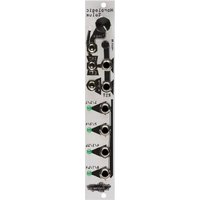
Horologic Solum - Synthesizer Noise Engineering - Free user manual and instructions
Find the device manual for free Horologic Solum Noise Engineering in PDF.


| Product Type | Eurorack Master Clock Generator |
| Brand | Noise Engineering |
| Model | Horologic Solum |
| Module Size | 4 HP |
| Depth | 0.8 inches (2.03 cm) |
| Power Consumption (+12V) | 50 mA |
| Power Consumption (-12V) | 5 mA |
| Power Connector | 2x5 pin Eurorack |
| Clock Modes | Internal or External (INT/EXT) |
| Tempo Control | Knob with coarse switch (3 speed ranges) |
| Divisor Modes | Powers of 2 (2,4,8), Odd (3,5,7), Powers of 4 (4,16,64) |
| Clock Outputs | 4 (numbered by divisor) |
| Reset Input | Yes, with button |
| CV Input | Yes (for tempo when in INT mode) |
| Optional Expander | Horologic Uter (7 additional fixed-divisor outputs) |
| Weight | Approx. 30 g (typical for 4HP module) |
| Material | PCB with aluminum front panel |
| Usage | Eurorack modular synthesizer system |
| Maintenance | Clean with dry cloth; avoid moisture |
| Safety | Low voltage module; handle with care |
| Repairability | Not user-serviceable; contact manufacturer |
Frequently Asked Questions - Horologic Solum Noise Engineering
User questions about Horologic Solum Noise Engineering
0 question about this device. Answer the ones you know or ask your own.
Ask a new question about this device
Download the instructions for your Synthesizer in PDF format for free! Find your manual Horologic Solum - Noise Engineering and take your electronic device back in hand. On this page are published all the documents necessary for the use of your device. Horologic Solum by Noise Engineering.
USER MANUAL Horologic Solum Noise Engineering
Noise Engineering Horologic Solum
Master clock with multi-mode divider and expander
Overview
| Type | Clock |
| Size | 4HP Eurorack |
| Depth | .8 Inches |
| Power | 2x5 Eurorack |
| +12 mA | 50 mA |
| -12 mA | 5 mA |
Horologic Solum is a 4HP voltage-controlled clock generator. Three speed modes allow a wide range of rates. Horologic Solum also includes three divisor modes for offsetting up to four outputs. Use the internal clock or chain to an external clock to sync multiple HS.
Horologic Uter is an optional expander that offers an extra seven outputs at fixed, musically useful, divisors.



Noise Engineering Horologic Solum
Master clock with multi-mode divider and expander
Interface
TEMPO
The Tempo knob allows for control of the speed of clock outs while the switch gives coarse control over three different speed modes. The Tempo switch adds in three different tempo speed ranges for coarse control.
INT/EXT
Choose the internal clock or chain multiple clocks together for added clock options. When in INT mode, the input jack acts as a CV control to the tempo, and the TEMPO knob acts as an offset. EXT mode expects an external clock, but this mode can also be used to stop the INT clock if no external clock is applied.
RST
Button and input jack: resets the clock to the beginning of the measure. The button also pauses the clock while it is held down.
204 (Divisor Mode)
Horologic Solum has three divisor modes. It can be set to divide by powers of 2 (2, 4, 8), odd numbers (3, 5, 7), or powers of 4 (4, 16, 64). Each yields different rhythmic patterns.
CLOCK OUTS
Horologic Solum offers four clock outputs. The numbers next to the jacks correspond to the divisor used in each different mode.
Horologic Uter (optional expander)
Horologic Uter offers seven fixed-divisor clock outputs.

![graph TD A["Horologic Solum"] --> B["RST"] B --> C["Tempo"] C --> D["INT"] D --> E["EXT"] E --> F["204"] F --> G["RST"] G --> H["1/1/1"] H --> I["2/3/4"] I --> J["4/5/16"] J --> K["8/7/64"] K --> L["Roise Engineering"]](/content/2026/06/1205685/images/96edab9796697a96dc5a36862ebf3bf3cf44fe5ca0782bd9683171ddf70e84c7.jpg)

Noise Engineering Horologic Solum
Master clock with multi-mode divider and expander
Patch Tutorial
Horologic Solum and Horologic Uter are easy to use. Simply plug any output into any trigger input. Experiment with the Tempo dial and switch and Mode switch to get interesting, diverse, and useful patterns.
Special Thanks
Shawn Jimmerson
Skyler "kittyspit" King
William Mathewson
Mickey Bakas
Tyler Thompson
Alex Anderson

![graph TD A["Horologic Solum"] --> B["RST"] B --> C["Tempo"] C --> D["EXT"] D --> E["RST"] E --> F["204"] F --> G["1/1/1"] G --> H["2/3/4"] H --> I["4/5/16"] I --> J["8/7/64"] J --> K["Noise Engineering"]](/content/2026/06/1205685/images/996d5a6874ef7b5042e326a6418fa9b9056677842e800df71853b713f90baa1f.jpg)


Brand : Noise Engineering
Model : Horologic Solum
Category : Synthesizer