TC-HDMI12 - Hi-Fi System VISION - Free user manual and instructions
Find the device manual for free TC-HDMI12 VISION in PDF.


User questions about TC-HDMI12 VISION
0 question about this device. Answer the ones you know or ask your own.
Ask a new question about this device
Download the instructions for your Hi-Fi System in PDF format for free! Find your manual TC-HDMI12 - VISION and take your electronic device back in hand. On this page are published all the documents necessary for the use of your device. TC-HDMI12 by VISION.
USER MANUAL TC-HDMI12 VISION
DECLARATION OF CONFORMITY
Where applicable Vision products are certified and comply with all known local regulations to a 'CB Certification' standard. Vision commits to ensure all products are fully compliant with all applicable certification standards for sale in the EU and other participating countries.
The product described in this owner manual is in compliance with RoHS (EU directive 2002/95/EC), and WEEE (EU directive 2002/96/EC) standards. This product should be returned to the place of purchase at the end of its useful life for recycling.
WARNINGS

natural_image
Black triangular warning symbol with a lightning bolt inside, no text or numbers present.
text_image
CAUTION RISK OF ELECTRIC SHOCK DO NOT OPEN
natural_image
Black triangular warning symbol with exclamation mark (no text or numbers)CAUTION: TO REDUCE THE RISK OF ELECTRIC SHOCK DO NOT REMOVE COVER (OR BACK). NO USER-SERVICEABLE PARTS INSIDE. REFER SERVICING TO QUALIFIED SERVICE PERSONNEL.

The lightning flash with arrowhead symbol, within an equilateral triangle, is intended to alert the user to the presence of uninsulated “dangerous voltage” within the product's enclosure that may be of sufficient magnitude to constitute a risk of electric shock to persons.

The exclamation point within an equilateral triangle, is intended to alert the user to the presence of important operating and maintenance (servicing) instructions in the literature accompanying the appliance.
WARNING: TO REDUCE THE RISK OF FIRE OR ELECTRIC SHOCK, DO NOT EXPOSE THIS APPLIANCE TO RAIN OR MOISTURE.
All products are designed and imported into the EU by 'Vision' who is wholly owned by 'Azlan Logistics Ltd.', Registered in England Nr. 04625566 at Lion House, 4 Pioneer Business Park, Clifton Moor, York, YO30 4GH. WEEE Registration: GD0046SY

text_image
RoHS 2002/95/EC TÜV SUD CEDECLARATION OF ORIGIN
All Vision products are made in the People's Republic of China (PRC).
USE ONLY DOMESTIC AC OUTLETS
Connecting the unit to an outlet supplying a higher voltage may create a fire hazard.
HANDLE THE POWER CORD WITH CARE
Do not disconnect the plug from the AC outlet by pulling the cord; always pull the plug itself. Pulling the cord may damage it. If you do not intend to use your unit for any considerable length of time, unplug the unit. Do not place furniture or other heavy objects on the cord, and try to avoid dropping heavy objects on it. Do not tie a knot in the power cord. Not only could the cord be damaged, but a short circuit could also be caused with a consequent fire hazard.
PLACE OF INSTALLATION
Avoid installing this product under the following conditions:
- Moist or humid places
- Places exposed to direct sunlight or close to heating equipment
• Extremely cold locations - Places subject to excessive vibration or dust
- Poorly ventilated places
Do not expose this product to dripping or splashing. DO NOT PLACE OBJECTS FILLED WITH LIQUIDS ON OR NEAR THIS PRODUCT!
MOVING THE UNIT
Before moving the unit, be sure to pull out the power cord from the AC outlet and disconnect the interconnection cords with other units.
WARNING SIGNS
If you detect an abnormal smell or smoke, turn this product off immediately and unplug the power cord. Contact your reseller or Vision.
PACKAGING
Save all packing material. It is essential for shipping in the event the unit ever needs repair.
IF ORIGINAL PACKAGING IS NOT USED TO RETURN THE UNIT TO THE SERVICE CENTRE, DAMAGE IN TRANSIT WILL NOT BE COVERED BY WARRANTY.
FRONT AND REAR PANELS
text_image
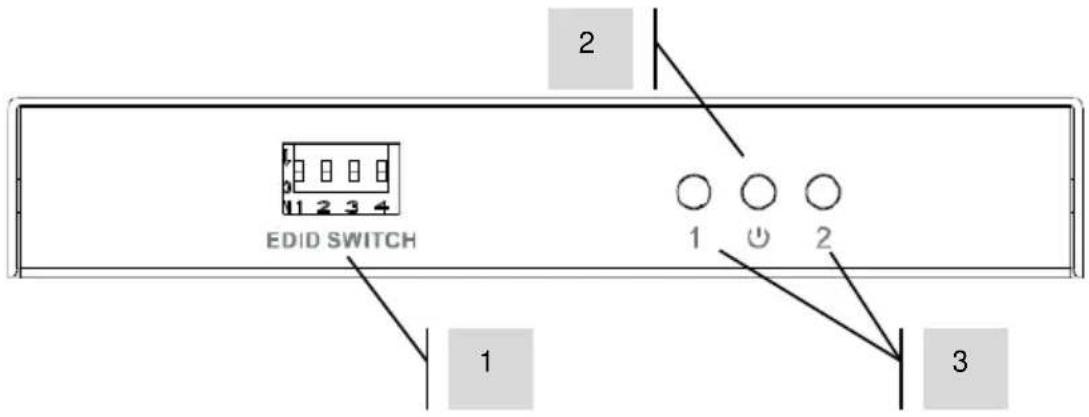
2 1 2 3 4 EDID SWITCH 1 2 3- EDID Dip Switches
- Power Indicator LED
- Output Status LED
ON display is connected and powered on OFF display is not connected or it is powered off FLASHING problem with EDID handshake
text_image
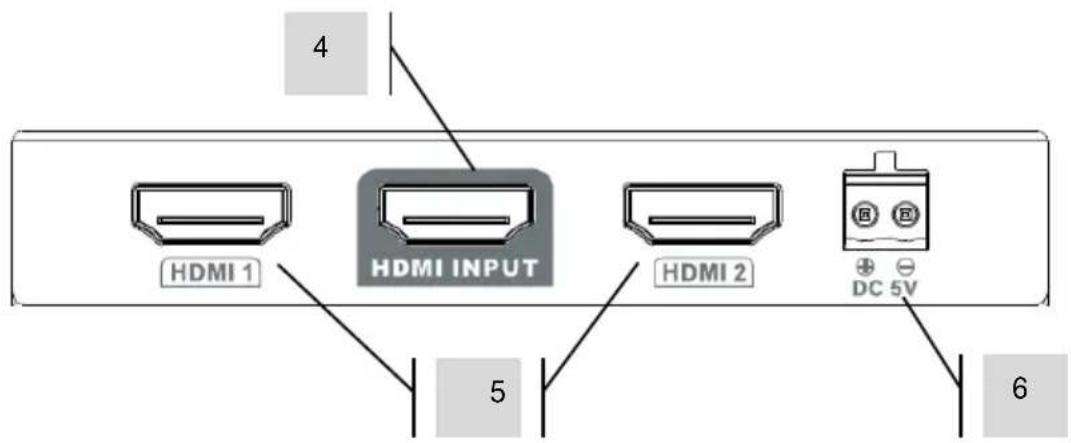
4 HDMI 1 HDMI INPUT HDMI 2 DC 5V 5 6- HDMI Inputs. Connect PC or BlueRay.
- HDMI Outputs. Connect display or projector.
- 5V 2A Power input
INSTALLATION
1. CONNECT INPUT
Plug HDMI cable into input.
Input and output cables are not included with this product.
2. CONNECT OUTPUTS
This product features pre-emphasis and equalization to overcome cable deficiencies. This may not always be successful if poor quality cable is used.
3. TURN POWER ON
With the switch off at the wall, connect power adaptor then turn on. Source and display devices can be turned on before they are connected.
It is not essential to do the steps in this order but it helps EDID handshake. If it is still not working check the status lights to see if they are connected, and try cycling power.
NOTE: This product can be cascaded
EDID
EDID is when the source “asks” the display what resolution it is, and outputs that resolution. If the resolutions of the two displays vary it can cause EDID handshake issues.
This can be overcome with fixing the resolution; the splitter tells the source to output a resolution that might not match the displays, but most displays can accept and scale a resolution the same or less than their native resolution.
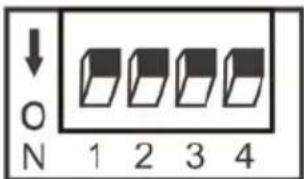
Switch Position
Up = 1
Down = 0
text_image
↓ ON 1 2 3 4| Switch | ||||
| 1 | 2 | 3 | 4 | EDID fixed at... |
| 0 | 0 | 0 | 0 | 4k@60Hz 2.0 |
| 1 | 0 | 0 | 0 | 4k@60Hz 7.1 |
| 0 | 1 | 0 | 0 | 4k@30Hz 2 |
| 1 | 1 | 0 | 0 | 4k@30Hz 7.1 |
| 0 | 0 | 1 | 0 | 1080p@60Hz 2.0 |
| 1 | 0 | 1 | 0 | 1080p@60Hz 7.1 |
| 0 | 1 | 1 | 0 | 1080i@60Hz 2 |
| 1 | 1 | 1 | 0 | 1080i@60Hz 7.1 |
| 0 | 0 | 0 | 1 | 720p@60Hz 2.0 |
| 1 | 0 | 0 | 1 | 720P@60Hz 7.1 |
| 0 | 1 | 0 | 1 | 480P@60Hz 2.0 |
| 1 | 1 | 0 | 1 | 480p@60Hz 7.1 |
| 0 | 0 | 1 | 1 | Copy once - reads EDID of the first display connected only |
| 1 | 0 | 1 | 1 | Highest audio format, lowest video format |
| 0 | 1 | 1 | 1 | Highest video format |
| 1 | 1 | 1 | 1 | Lowest video format |
TROUBLESHOOTING
If your system is not operating properly, please refer to the following information. If the problem persists, disconnect from power and contact your AV reseller immediately.
| Problem | Correction |
| No status lights | Check input and output cablesCheck source and displays are turned on |
| No picture on display/s | Check everything is powered onCheck cables are connected properlyTry shorter cablesCheck that the corresponding LED is lighting on the splitterEnsure display device supports HDCP (copy protection)Check that display has correct input selected |
| No power light | Try alternative power supply |
| Display shows snow or mosaic | Check cables are connected properlyTry shorter cablesReduce resolution of source or try another source |
SPECIFICATIONS
PRODUCT DIMENSIONS: 101 x 59.5 x 17 mm / 3.98" x 2.34" x 0.67" (length x width x height)
PACKAGED DIMENSIONS: 120 x 84 x 77 mm / 4.72" x 3.31" x 3.03"
PRODUCT WEIGHT: 0.11 kg / 0.24 lb
PACKAGED WEIGHT: 0.34 kg / 0.75 lb
CONSTRUCTION MATERIAL: Metal
COLOUR: White
TECHNICAL DETAILS
Video Amplifier Bandwidth: 18 Gbps
Input Video Signal: 0.5-1.2 volts p-p (TMDS)
Input DDC Signal: 5 volts p-p (TTL)
Maximum Video Format Supported: 4K @ 60Hz, Deep Colour, Lip Sync
Output Video: HDMI 2.0
Maximum Audio Format Support: Direct Stream Digital and HD (HBR)
ESD Protection: ± 4kV (contact discharge through human body)
Operating Temperature Range: -0 to +35°C (-41 to +95°F)
Operating Humidity Range: 10 to 90 % RH (no condensation)
Power Consumption: 5 Watts (max.)
INPUTS: 1 x HDMI (type A)
OUTPUTS: 2x HDMI (type A)
POWER SUPPLY: 100-240v 50/60Hz AC 5 volt / 1 amp
Transformer integrated into plug. Includes interchangeable plugs: UK/EU/US/AU. DC tail length:
1.8m. Transformer dimensions: 66 x 43 x 32mm / 2.6" x 1.69" x 1.26"
ACCESSORIES INCLUDED: -
WARRANTY: Lifetime return-to-base
2 years onsite (UK only)
COMPLIANCE: RoHS, WEEE, CE/EMC, FCC, RCM, TVC
LIFETIME RETURN-TO-BASE WARRANTY
This product comes with a lifetime return to base warranty. If you have a problem you are required to provide a DETAILED DESCRIPTION of the fault.
Some Vision products are very technical and require troubleshooting all elements of the installation as it may not be the Vision product at fault. Because of this the manufacturer may refuse to replace the item if an adequate description is not provided.
• This warranty applies only to the original purchaser and is not transferable.
• This warranty protects you against the following:
o Failure of any components, including the power supply.
o Damage when the product is first removed from its packaging if reported within 24 hours of purchase.
- If the product is DOA (dead on arrival), you have 21 days from purchase date to notify the national distributor via your AV reseller.
- The original purchaser is responsible for shipment of the product to the Vision's appointed service centre.
- The liability of Vision is limited to the cost of replacement of the faulty unit under warranty except for death or injury (EU85/374/EEC).
• If the product is end of line (EOL) the Vision will provide a credit instead of replacement.
- This warranty does not protect this product against faults caused by abuse, misuse, incorrect installation, unstable or faulty power input, or modification.
Vision aims to send a replacement item within 5 working days however this may not always be possible, in which case it will be sent as soon as practicably possible. UK End users and resellers can request support at http://www.visionaudiovisual.com/support
LEGAL DISCLAIMER: Because we are committed to improving our products, the details above may change without prior warning. This User Manual is published without warranty and any improvements or changes to the User Manual necessitated by typographical errors, inaccuracies of current information, or improvements to programs and/or equipment, may be made at any time and without notice. Such changes will be incorporated into new editions of the User Manual.