TC3 USBTP - Wi-Fi repeater VISION - Free user manual and instructions
Find the device manual for free TC3 USBTP VISION in PDF.


| Product Type | Wi-Fi Repeater |
| Brand | Vision |
| Model | TC3 USBTP |
| Dimensions (approx.) | 6.0 x 3.0 x 2.0 cm |
| Weight | 50 g |
| Power Supply | USB 5V / 1A (via micro-USB) |
| Wi-Fi Standard | IEEE 802.11 b/g/n |
| Frequency Band | 2.4 GHz |
| Wireless Speed | Up to 300 Mbps |
| Range Extension | Up to 100 m indoors (depending on environment) |
| Interface | 1 x 10/100 Mbps Ethernet port (optional) |
| Antenna | Internal |
| Security | WEP, WPA, WPA2 |
| Setup | WPS button or web interface |
| LED Indicators | Power, WPS, Signal strength |
| Operating Temperature | 0°C to 40°C |
| Humidity | 10% to 90% non-condensing |
| Maintenance | Clean with a soft, dry cloth. Avoid liquids. |
| Safety Precautions | Do not expose to water or excessive heat. Unplug during storms. |
| Spare Parts | None user-serviceable. Contact support for replacement. |
| Repairability | Not intended for repair by user. Dispose of according to local regulations. |
Frequently Asked Questions - TC3 USBTP VISION
User questions about TC3 USBTP VISION
0 question about this device. Answer the ones you know or ask your own.
Ask a new question about this device
Download the instructions for your Wi-Fi repeater in PDF format for free! Find your manual TC3 USBTP - VISION and take your electronic device back in hand. On this page are published all the documents necessary for the use of your device. TC3 USBTP by VISION.
USER MANUAL TC3 USBTP VISION
TECHCONNECT TC3 USBTP OWNERS MANUAL
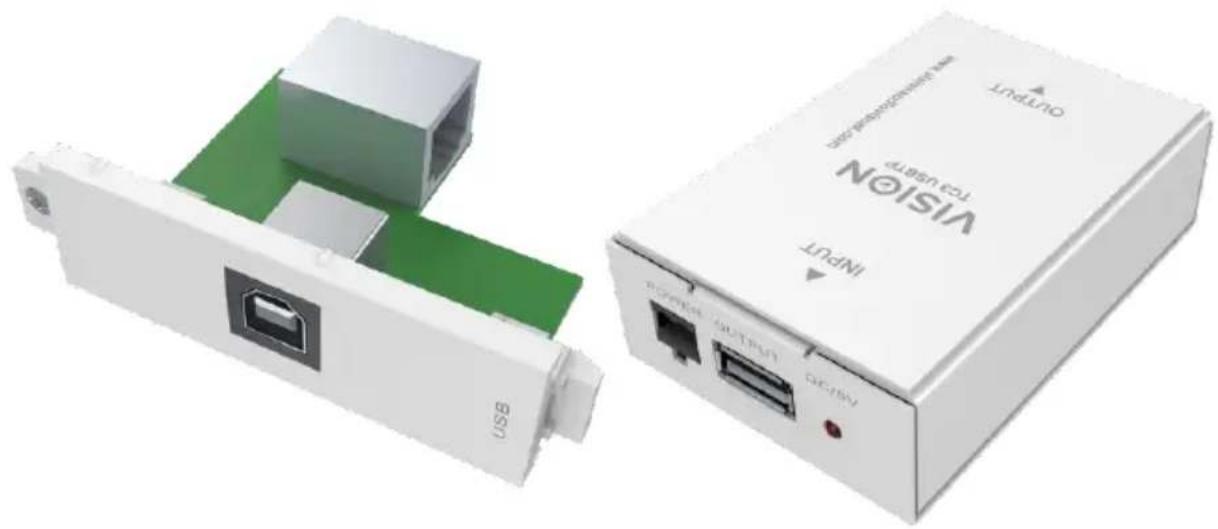
natural_image
Two white electronic devices: a USB connector with green internal structure and a white TCA USB port labeled 'VISIGN INPUT' (no text beyond labels)www.visionaudiovisual.com/techconnect/tc3_usbtp
DECLARATION OF CONFORMITY
Where applicable Vision products are certified and comply with all known local regulations to a 'CB Certification' standard. Vision commits to ensure all products are fully compliant with all applicable certification standards for sale in the EU and other participating countries.
The product described in this owner manual is in compliance with RoHS (EU directive 2002/95/EC), and WEEE (EU directive 2002/96/EC) standards. This product should be returned to the place of purchase at the end of its useful life for recycling.
WARNINGS

natural_image
Black triangular warning symbol with a lightning bolt inside, indicating electrical hazard (no text or numbers present)
text_image
CAUTION RISK OF ELECTRIC SHOCK DO NOT OPEN
natural_image
Black triangular warning symbol with exclamation mark (no text or numbers)CAUTION: TO REDUCE THE RISK OF ELECTRIC SHOCK DO NOT REMOVE COVER (OR BACK). NO USER-SERVICEABLE PARTS INSIDE. REFER SERVICING TO QUALIFIED SERVICE PERSONNEL.

The lightning flash with arrowhead symbol, within an equilateral triangle, is intended to alert the user to the presence of uninsulated "dangerous voltage" within the product's enclosure that may be of sufficient magnitude to constitute a risk of electric shock to persons.

The exclamation point within an equilateral triangle, is intended to alert the user to the presence of important operating and maintenance (servicing) instructions in the literature accompanying the appliance.
WARNING: TO REDUCE THE RISK OF FIRE OR ELECTRIC SHOCK, DO NOT EXPOSE THIS APPLIANCE TO RAIN OR MOISTURE.
All products are designed and imported into the EU by 'Vision' who is wholly owned by 'Azlan Logistics Ltd.', Registered in England Nr. 04625566 at Lion House, 4 Pioneer Business Park, Clifton Moor, York, YO30 4GH. WEEE Registration: GD0046SY

text_image
RoHS 2002/95/EC TÜV SÜD CEDECLARATION OF ORIGIN
All Vision products are made in the People's Republic of China (PRC).
PLACE OF INSTALLATION
Avoid installing this product under the following conditions:
- Moist or humid places
- Places exposed to direct sunlight or close to heating equipment
• Extremely cold locations - Places subject to excessive vibration or dust
- Poorly ventilated places
Do not expose this product to dripping or splashing. DO NOT PLACE OBJECTS FILLED WITH LIQUIDS ON OR NEAR THIS PRODUCT!
WARNING SIGNS
If you detect an abnormal smell or smoke, turn this product off immediately and unplug the power cord. Contact your reseller or Vision.
PACKAGING
Save all packing material. It is essential for shipping in the event the unit ever needs repair.
NOTE: If original packaging is not used to return the unit to the service centre, damage in transit will not be covered by warranty.
FRONT AND REAR PANELS
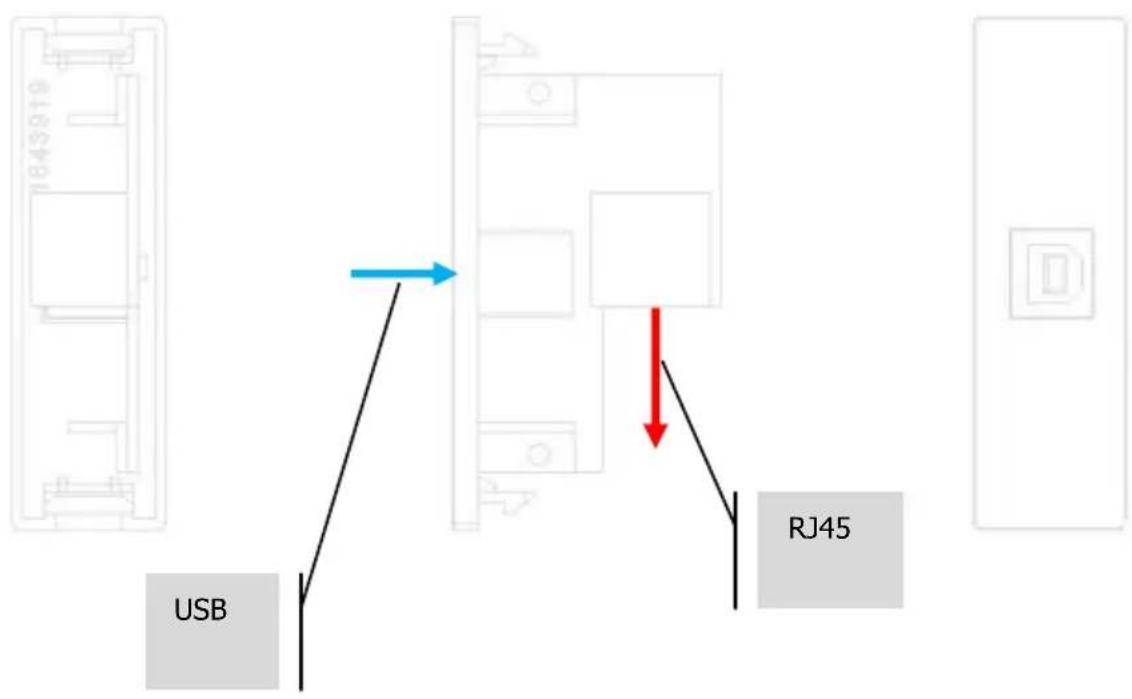
Transmitter – clips into Techconnect faceplate
text_image
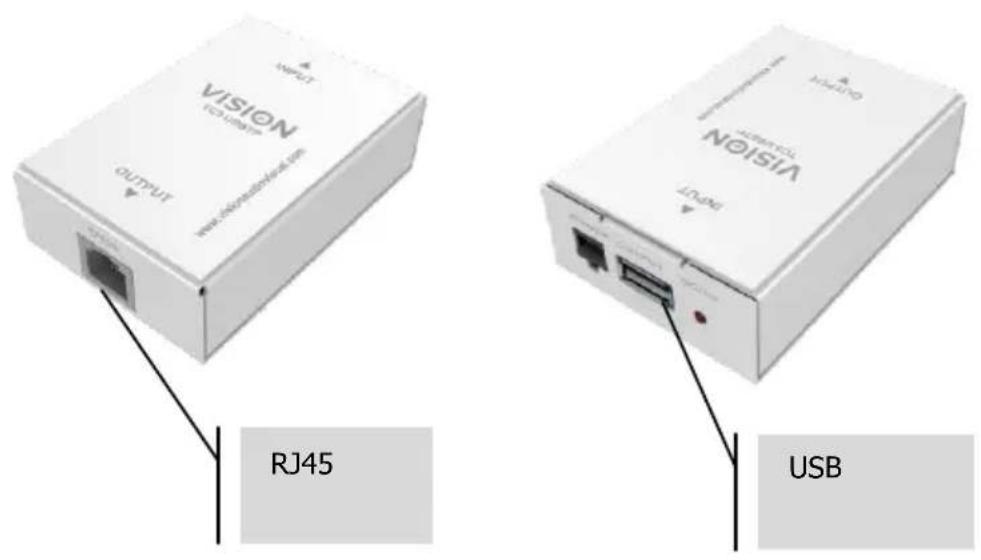
USB RJ45Receiver – positioned behind or near USB device
text_image
VISION 12.3.2024/7 OUTPUT WWW.VISION@vision.com RJ45 USBSTATUS LIGHTS
text_image
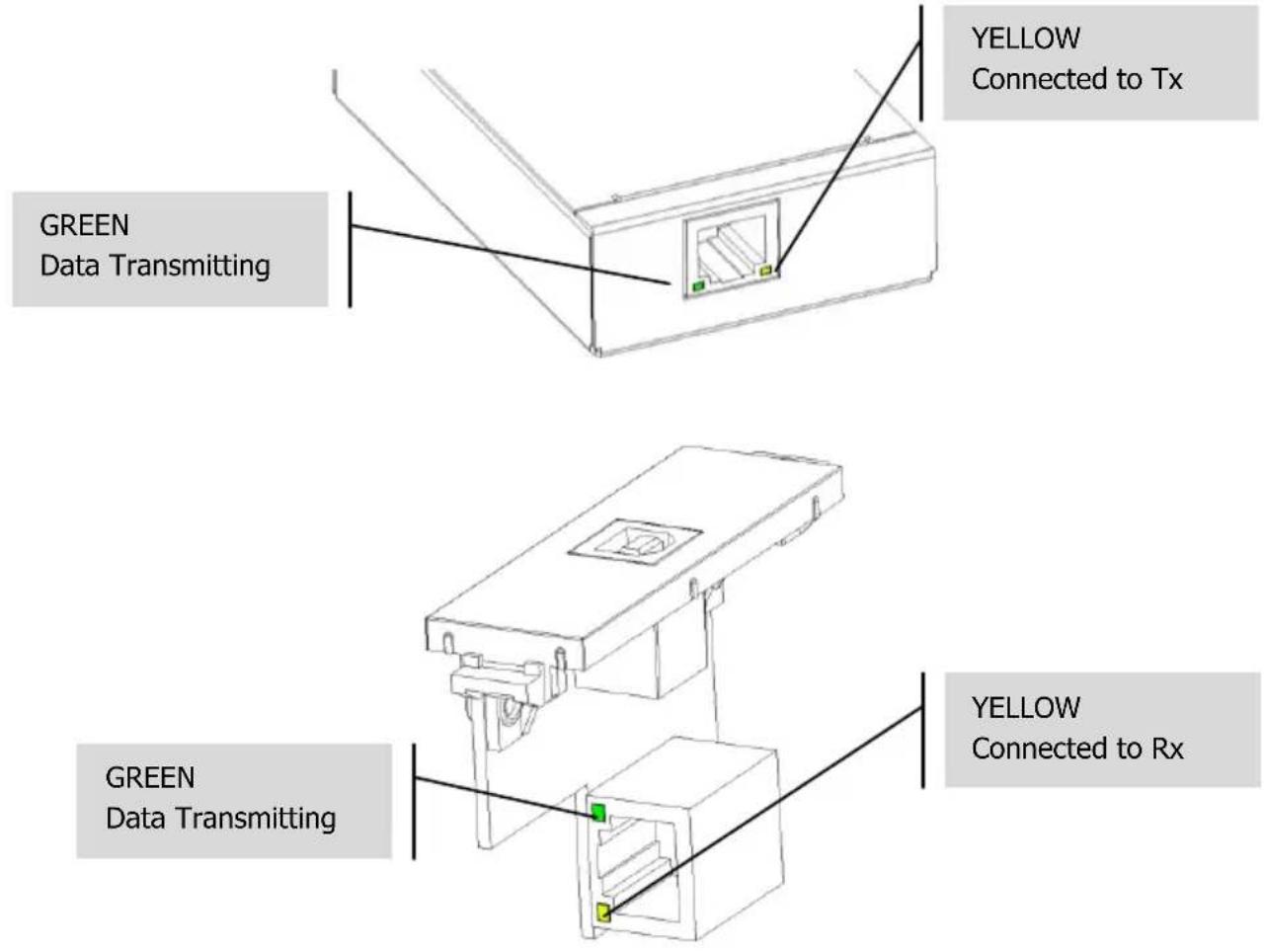
YELLOW Connected to Tx GREEN Data Transmitting GREEN Data Transmitting YELLOW Connected to RxTROUBLESHOOTING
USB bus assignment is complex and works on a priority system.
- If yellow LED not lighting try another CAT6 cable.
- If data is not transmitting:
a. Try another USB port on PC.
b. Unplug other USB devices to reduce load on PC.
c. Insert powered USB hub between PC and TC2 USBTP transmitter. Hubs force reassignment of priorities with host controller and will ensure enough power is provided to TC3 USBTP.
SPECIFICATIONS
RECEIVER DIMENSIONS: 92 x 55 x 23.5 mm / 3.62" x 2.17" x 0.93" (length x width x height)
PACKAGED DIMENSIONS: 90 x 60 x 62mm / 3.54" x 3.62" x 2.44"
PRODUCT WEIGHT: 0.2kg per set / 0.44 lb
PACKAGED WEIGHT: 0.3kg per set / 0.66 lb
USB SPECIFICATION: 2.0
TRANSMISSION DISTANCE:
CAT6: 150m (492 ft)
CAT5e: 100m (328 ft)
BANDWIDTH: 200 Mb/s
CONSTRUCTION MATERIAL: Plastic/Metal
COLOUR: White
POWER SUPPLY: 100-240v 50/60Hz AC 5 volt / 2 amp
Transformer integrated into plug. Includes interchangeable plugs: UK/EU/US/AU. DC tail length:
4m. Transformer dimensions: 66 x 43 x 32mm / 2.6" x 1.7" x 1.26"
ACCESSORIES INCLUDED: N/A
WARRANTY: Lifetime return-to-base
2 years onsite (UK only)
COMPLIANCES: RoHS, WEEE, CE/EMC, C-TICK, FCC.
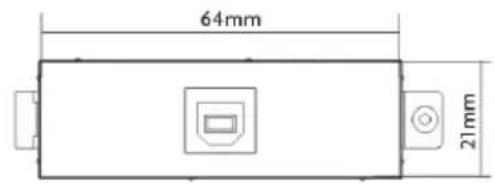
text_image
64mm 21mm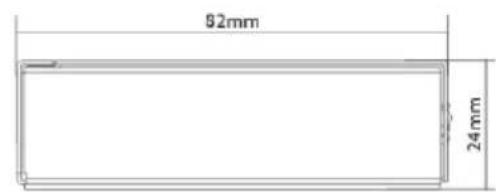
text_image
92mm 24mm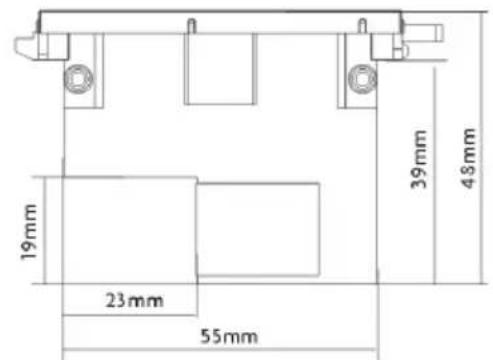
text_image
19mm 23mm 55mm 39mm 48mm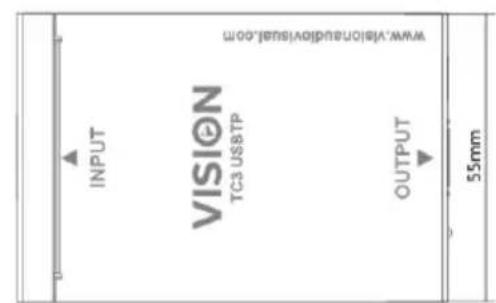
text_image
VIEW.Visionaudiovisual,00m INPUT VISION TC3 USB TTP OUTPUT 55mmLIFETIME RETURN-TO-BASE WARRANTY
This product comes with a lifetime return to base warranty. If you have a problem you are required to provide a DETAILED DESCRIPTION of the fault.
Some Vision products are very technical and require troubleshooting all elements of the installation as it may not be the Vision product at fault. Because of this the manufacturer may refuse to replace the item if an adequate description is not provided.
• This warranty applies only to the original purchaser and is not transferable.
- This warranty protects you against the following:
o Failure of any components, including the power supply.
○ Damage when the product is first removed from its packaging if reported within 24 hours of purchase.
- If the product is DOA (dead on arrival), you have 21 days from purchase date to notify the national distributor via your AV reseller.
- The original purchaser is responsible for shipment of the product to the Vision's appointed service centre.
- The liability of Vision is limited to the cost of replacement of the faulty unit under warranty except for death or injury (EU85/374/EEC).
• If the product is end of line (EOL) the Vision will provide a credit instead of replacement.
- This warranty does not protect this product against faults caused by abuse, misuse, incorrect installation, unstable or faulty power input, or modification.
Vision aims to send a replacement item within 5 working days however this may not always be possible, in which case it will be sent as soon as practicably possible. UK End users and resellers can request support at http://www.visionaudiovisual.com/support
2-YEAR ONSITE WARRANTY (UK ONLY)
The manufacturer provides an onsite warranty for the first two years taken from date of sale. This service can be requested at the url above and is provided at the manufacturer's discretion.
- This service is only provided for products which are difficult for an end user to get at and replace.
- The manufacturer will not provide the onsite service if
- The reseller or end user has been abusive
- The user has is taking unfair advantage of this service
- The manufacturer will pre-qualify the visit to ensure the fault relates to the Vision product.
The engineer visits are timed to ensure you are onsite and the room is accessible. A revisit WILL NOT be provided if access to the room is not provided at the arranged time. Engineers will wait 15 minutes only.
LEGAL DISCLAIMER: Because we are committed to improving our products, the details above may change without prior warning. This User Manual is published without warranty and any improvements or changes to the User Manual necessitated by typographical errors, inaccuracies of current information, or improvements to programs and/or equipment, may be made at any time and without notice. Such changes will be incorporated into new editions of the User Manual.