Discovery C - Drone SereneLife - Free user manual and instructions
Find the device manual for free Discovery C SereneLife in PDF.


User questions about Discovery C SereneLife
0 question about this device. Answer the ones you know or ask your own.
Ask a new question about this device
Download the instructions for your Drone in PDF format for free! Find your manual Discovery C - SereneLife and take your electronic device back in hand. On this page are published all the documents necessary for the use of your device. Discovery C by SereneLife.
USER MANUAL Discovery C SereneLife
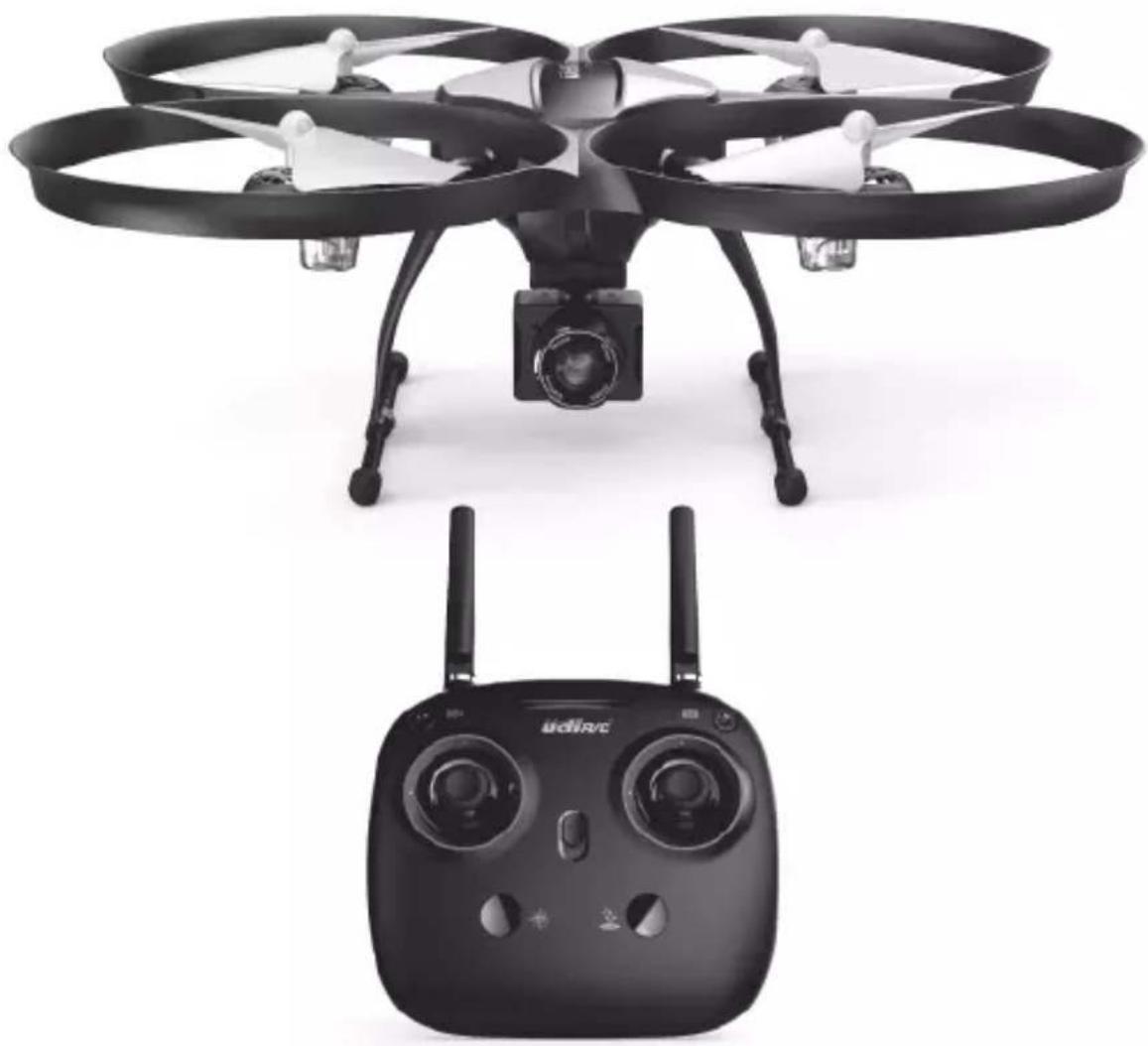
Equipped with 120° wide-angle 720P HD Camera
natural_image
Two black drone models: a four-rotor with camera and a digital control unit (no visible text or symbols)SLRD40
Operations Guide
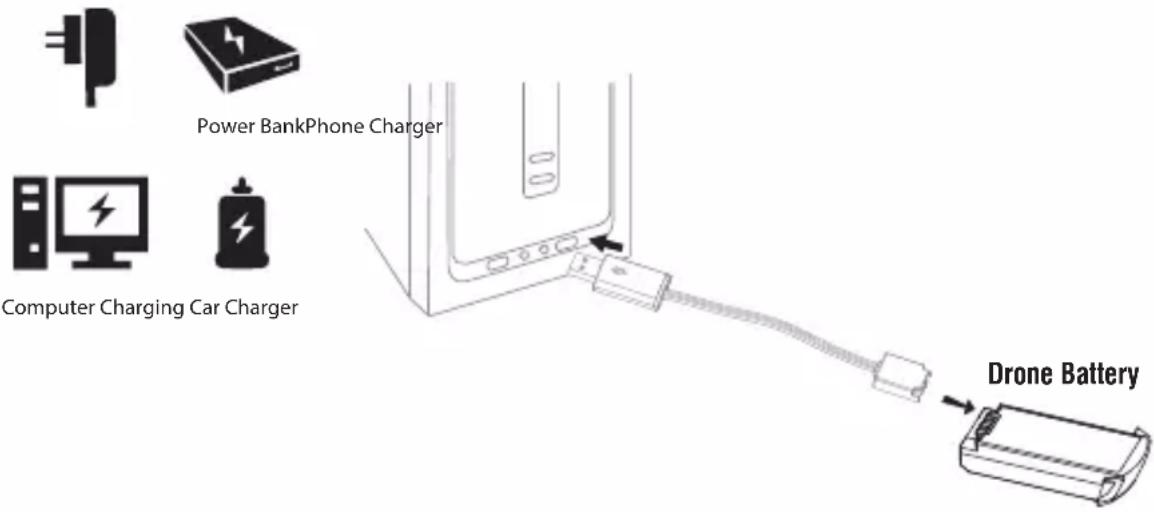
Charging Instruction for Drone Battery
- Connect the drone battery with USB cable first and then choose one of the method as below picture shown to connect with USB plug.
- The red USB indicator light keeps bright when charging and the light turns green when fully charged.
* For faster charging, it is recommended to use an adapter with 5V 2A output current (not included) to charge the battery.
text_image
Power BankPhone Charger Computer Charging Car Charger Drone Battery
Li-Po Battery Disposal & Recycling
Wasted Lithium-Polymer batteries must not be placed with household trash. Please contact local environmental or waste agency or the supplier of your model or your nearest Li-Po battery recycling center.

Check List Before Flight
- Make sure the drone battery and transmitter battery are fully charged.
- Make sure the Left Stick of the transmitter in the middle position.
- Please strictly obey the order of turn on and turn off before operation. Turn on the transmitter power first and then turn on the drone power before flying; turn off the drone power first and then turn off the transmitter power when finish flying. Improper turn on and turn off order may cause the drone out of control and threaten people's safety. Please cultivate a correct habit of turn on and turn off.
- Make sure the connection is solid between battery and motor etc. The ongoing vibration may cause bad connection of power terminal and make the drone out of control.
- Improper operation may cause drone crash, which may arouse motor or propeller defective and noise, and then effect the flying status or even stop flying. Please go to the local distributor to buy new parts for replacement so that the drone will return to its best status.
Instruction for Drone and Transmitter
Drone
text_image
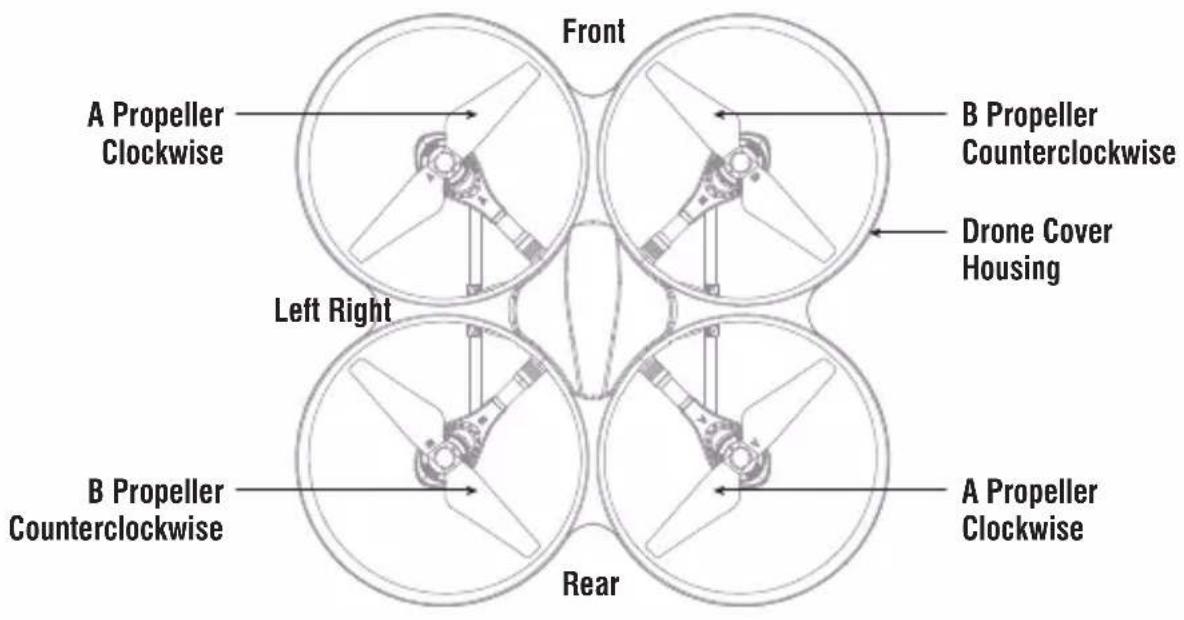
Front A Propeller Clockwise B Propeller Counterclockwise Drone Cover Housing Left Right B Propeller Counterclockwise A Propeller Clockwise Rear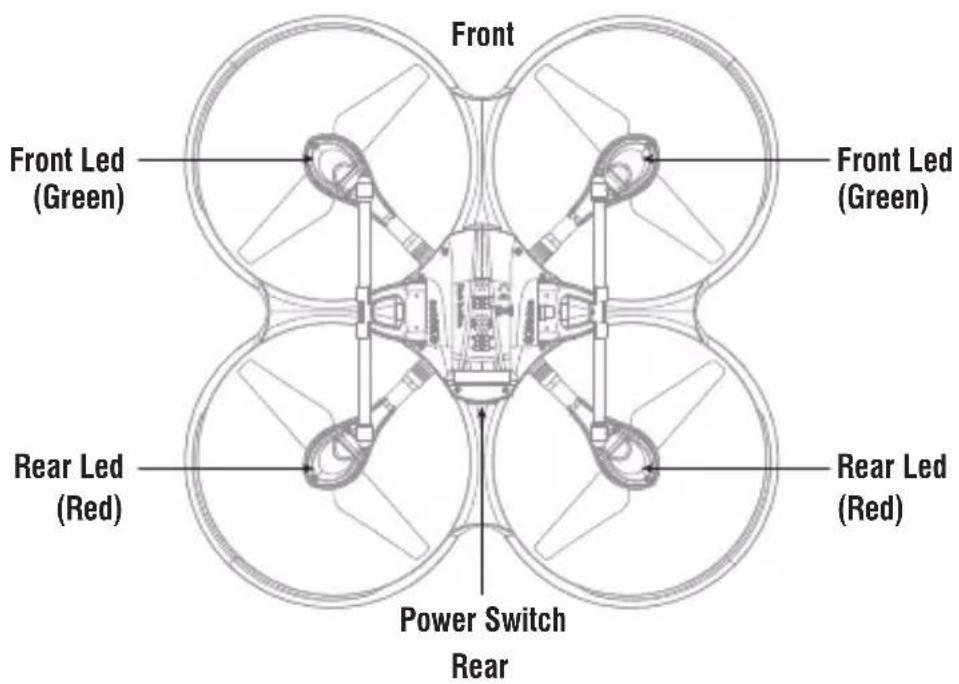
text_image
Front Front Led (Green) Front Led (Green) Rear Led (Red) Rear Led (Red) Power Switch RearSpecification
| Drone Size | 335x335x127mm | Charging Time for Drone Battery | 180mins |
| Drone Weight | 248g | Max Flying Distance/RadiusA | 150m |
| Propeller Diameter | 147mm | Max Image TransmissionDistance/Radius | 50m |
| Flying Time 13~15mins | |||
| Drone Battery 3.7Vx2 1000mAh | Camera Resolution 1280x720P | ||
| Main Motor 1020x4 | Remote ControlTechnology | 2.4Ghz | |
Exploded View

text_image
Exploded view diagram of a drone's internal components with numbered labels for identification.| No. | Name No. Name | No. | Name | ||
| 1 | Drone Cover Housing | 10 | LED Cover | 19 | Switch |
| 2 | A Propeller | 11 | B Propeller | 20 | Receiver Board Holder |
| 3 | Upper Motor Cover A | 12 | Upper Motor Cover B | 21 | Power Switch Board |
| 4. | Transmission Gear | 13 | Front Led Board(Green) | 22 | Camera Adapter Board |
| 5 | AL Main Shaft | 14 | Motor Holder | 23 | Battery Box |
| 6 | Bearing | 15 | C-Pb Square Tube | 24 | Battery Adapter Board |
| 7 | Rear LED Board(Red ) | 16 | Landing Gear | 25 | Lower Drone Cover |
| 8 | A Propeller Motor(Black and White wire,White connector) | 17 | B Propeller Motor(Red and Blue wire,Red connector) | 26 | Camera Box |
| 9 | Lower Motor Cover | 18 | Receiver Board |
Transmitter
text_image
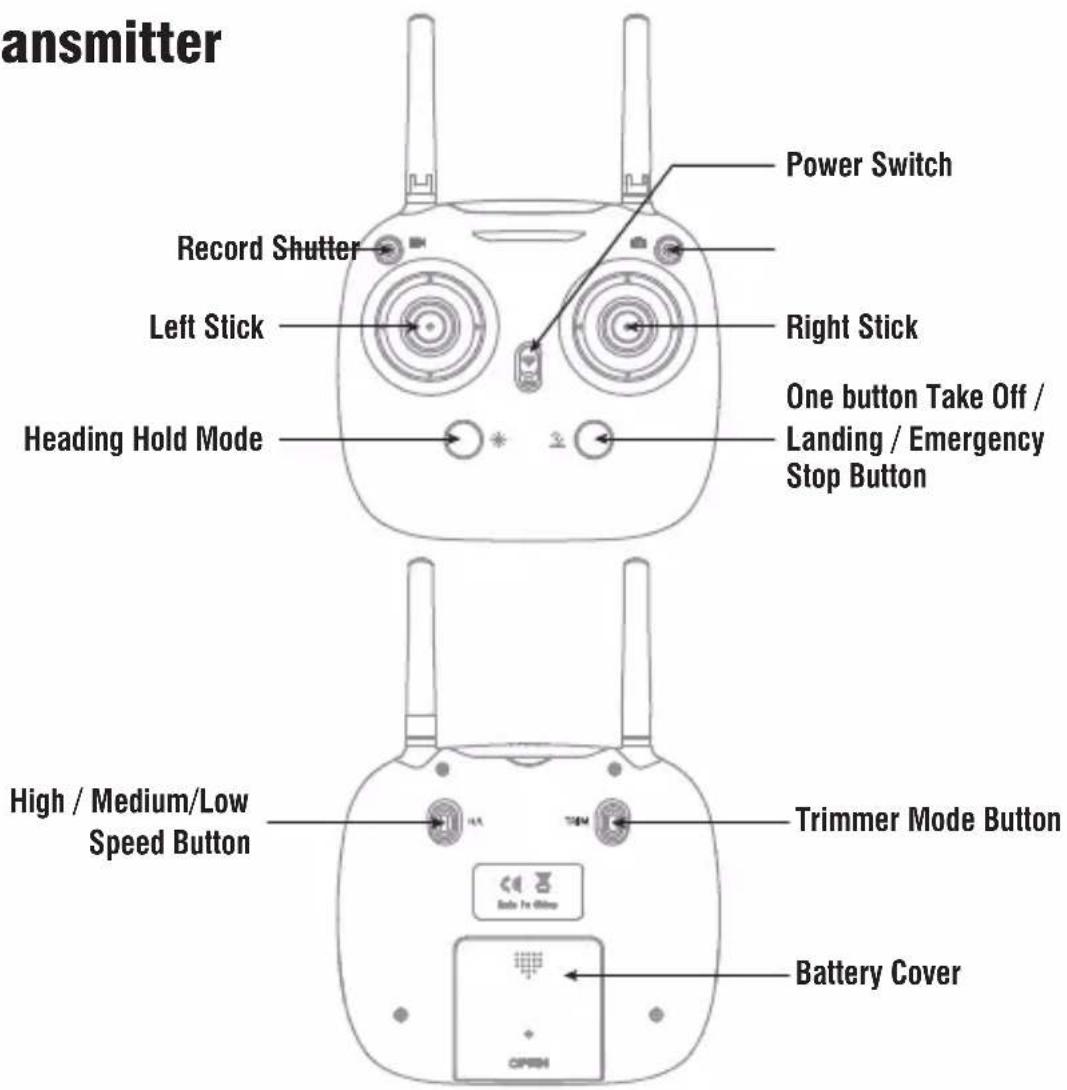
transmitter Record Shutter Left Stick Heading Hold Mode Power Switch Right Stick One button Take Off / Landing / Emergency Stop Button High / Medium/Low Speed Button Trimmer Mode Button Battery CoverBrief Introduction for Button Functions
| Left Stick | Move the Stick to forward / backward / left / right to fly the drone to up / down / turn left / turn right. |
| Right Stick | Move the Stick to forward / backward / left / right to fly the drone to forward / backward / left / right. |
| Power Switch Push up the power switch to turn on the transmitter, and pull down to turn off. | |
| Record Pressdown the button, start to record video. | |
| Shutter Pressdown the button, start to photograph. | |
| Heading Hold Mode | Press the button to enter heading hold mode, and press again to exit from heading hold mode. |
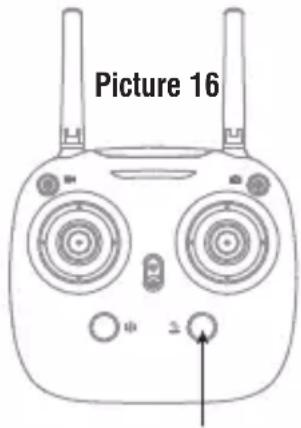
| Take Off / Landing / Emergency Stop Button | Press the button and the drone will fly up automatically. Press the button again and the drone will land on the ground automatically. Press and hold the button more than 1s, the drone propellers will stop and fall down immediately. |
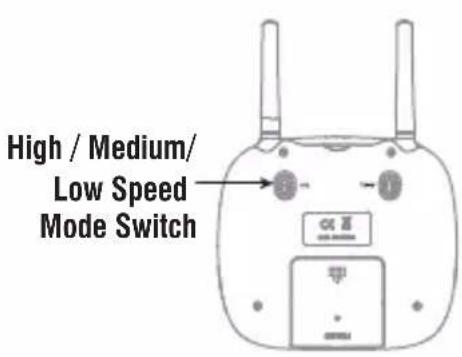
| High / Medium/Low Speed button | Press down this button to switch to High /Medium/ Low Speed. |
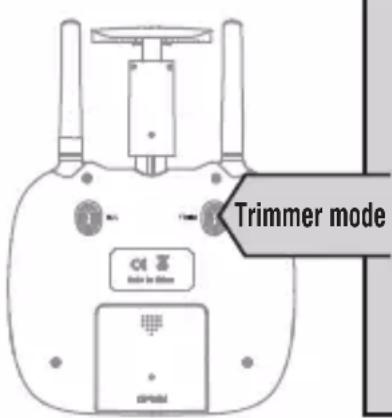
| Trimmer Mode Button | Turn left / Turn right Trimmer: Press and hold this button, move the left stick to the required trimmer direction, then it will adjust the direction accordingly, when loose the button, then exit from the trimmer mode.Forward / Backward / Left / Right Trimmer: Press and hold this button, move the right stick to the required trimmer direction, then it will adjust the direction accordingly, when loose the button, then exit from the trimmer mode. |
Battery installation:
Open the battery cover on the back side of the transmitter and put 4 alkaline batteries (AA, not included) into the box in accordance with electrode instructions as Picture 1(battery not included), close the battery cover(Picture 2).

text_image
4*1.5V Battery Cover Battery Cover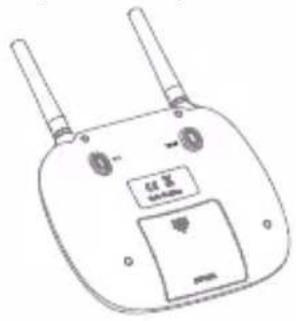
text_image
Technical diagram of a dual-chip wireless device with labeled ports and buttonsPicture 2Picture 1
Notice:
-
Make sure the electrodes are correct.
-
Do not mix different type of batteries.
-
Do not mix new with old batteries.
-
Do not charge the non rechargeable battery.
Pre-flight Operation Instruction Frequency Pairing
- Turn on the transmitter switch (Picture 7) and the power indicator light flashes rapidly. Push the Left Stick all the way down to the lowest position and then release. (Picture 8/9). The power indicator light flashes slowly, which indicates the transmitter is ready for frequency pairing.

natural_image
Diagram of a dual-camera device with two circular fans and a small car icon, no text or symbols present
natural_image
Diagram of a car front view showing two circular gauges with a black arrow pointing to one (no text or symbols)
natural_image
Front view of a stylized electronic device with two circular fans and a small display (no text or symbols)Picture 7 Picture 8 Picture 9
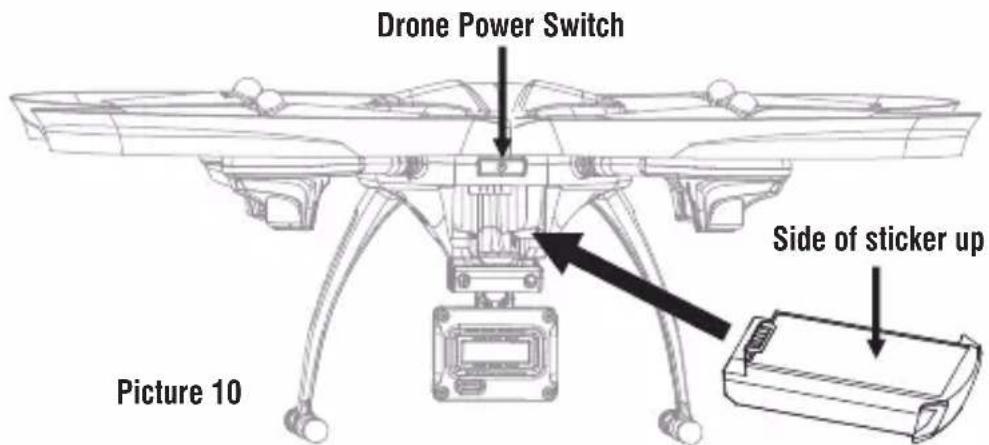
- Install the Li-po battery into the drone in accordance with the direction of arrow (Picture 10), you need to squeeze down the battery buckle, push the battery until it is secured in its position (Picture 11).
text_image
Drone Power Switch Picture 10 Side of sticker upPicture 11
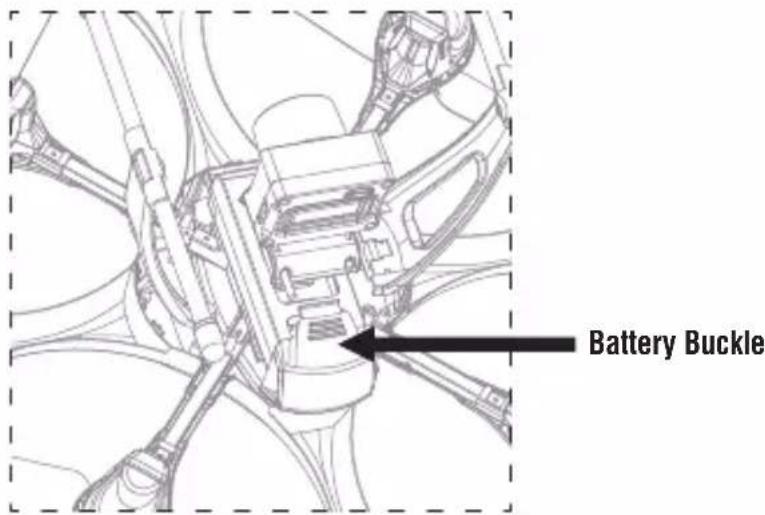
text_image
Battery Buckle- Long press the power switch of the drone for 2s(Picture 10), put the drone on the flat surface, the drone body lights turn from flashing to solid bright, which indicates frequency pairing is successful.
Important Notice: Please make sure the drone is placed on the horizontal position after powering on the drone, so that the drone can work well.
Checklist before Flight
- The camera is in front of the drone. Keep the drone front away from you.
- Power on the drone and check the direction of the rotating propellers. The left front and right rear A propellers rotating clockwise while the right front and left rear B propellers rotating counterclockwise.
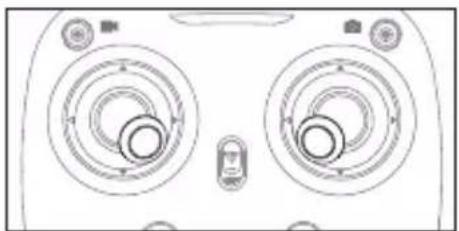
- Activate(unlock) motors: Move the Left Stick and Right Stick at the same time as Picture 12 shown(45 degree inward) to start the motors and repeat previous step again to lock the motors.
natural_image
Top-down schematic of a device casing with two circular gauges and control knobs (no text or symbols)Picture 12
- After activate the motors, push up the Left Stick slowly to fly up the drone, and pull down the Left Stick slowly to the lowest end, then the drone will land on the ground slowly.
- It's recommended to repeat above Step 4 to practice.
- Adjust relative transmitter Trimmer button to adjust the rudder if the drone tilts to one side when flying.
Calibration Instruction
Please follow below steps to calibrate the drone if the drone becomes imbalance after crashing during the flight, and can not be adjusted by trimmer button and cause difficult operation.
- Power off the drone, then turn off the transmitter switch.
- Turn on the transmitter switch, push the Left Stick all the way down to the lowest position (Picture 13) and then release. The Left Stick will back to the middle position automatically (Picture 14). The transmitter is ready for frequency pairing mode.

natural_image
Diagram of a car front view showing two circular gauges with a directional arrow, no text or symbols present.
natural_image
Front view of a device with two circular fans and control buttons (no text or symbols)Picture 13 Picture 14
- Power on the drone and put it on a flat surface in a horizontal position. The drone body lights change from flashing to solid bright, which indicates successful frequency pairing.
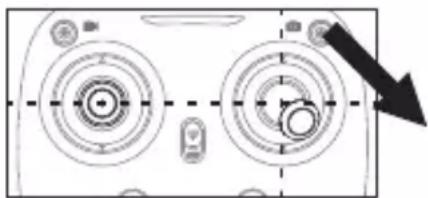
- Do not move the Left Stick before successful calibration. Push the Right Stick as Picture 15 shown and then release. The drone body lights flash, which indicates that the drone is calibrating. When the drone body lights become solid, which indicates successful calibration.
natural_image
Pure mechanical component diagram with concentric circles and arrows, no text or symbols presentPicture 15
Notice: When the drone is fiercely impacted or crashed, it may cause the gyro can not recover and cause difficult control, if so, then you need to power off and power on again to calibrate.
Flying Control
Notice: Every time before the drone take off, move the Left Stick and Right Stick at the same time as Picture 12 shown(45 degree inward) to start the motors. Push up the Left Stick slowly to fly up the drone or press down the one button to take off.
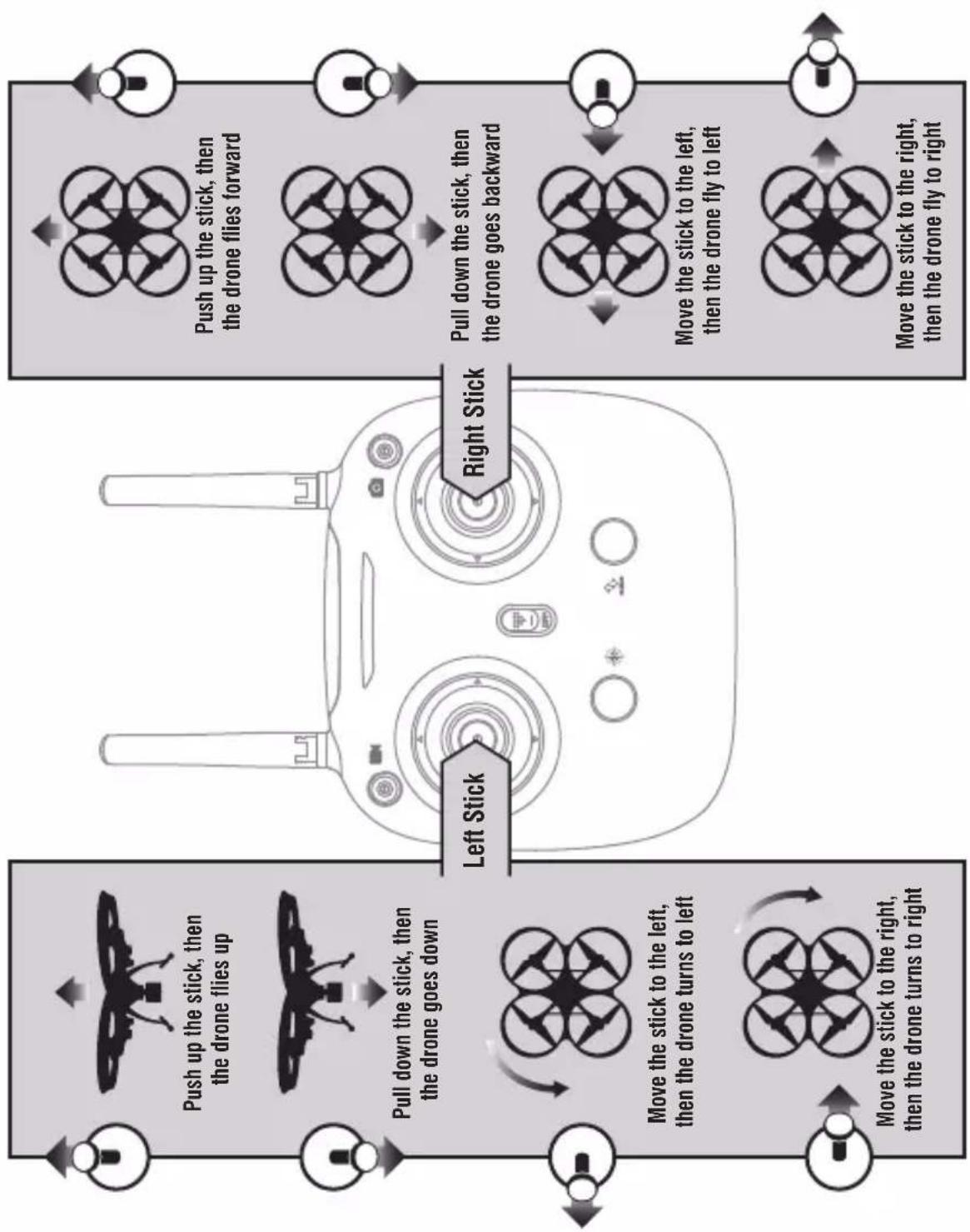
flowchart
graph TD
    A["Left Stick"] --> B["Push up the stick, then the drone flies up"]
    B --> C["Pull down the stick, then the drone goes down"]
    C --> D["Move the stick to the right, then the drone turns to right"]
    D --> E["Move the stick to the right, then the drone fly to right"]
    E --> F["Move the stick to the left, then the drone goes backward"]
    F --> G["Pull down the stick, then the drone flies forward"]
    G --> H["Move the stick to the right, then the drone flies forward"]
text_image
Trimmer mode Control Control to 100%Forward and backward trimmer
When take off, if the drone tilts forward, press down the trimmer button, and push the right stick backwards. Otherwise push forwards.
Left and right side flying trimmer
When take off, if the drone tilts to left, then press and hold the trimmer button and push the right stick to right. Otherwise push to left.
Left and right turning trimmer
When take off, if the drone head rotates to left, then press down the trimmer button and push the left stick to right. Otherwise push to left.
Functions Introduction
Take off/ One button take off/Landing modes
- Take off: After frequency pairing successful, push the Left Stick and Right Stick as Picture 12 shown (45 degree inward) to start the motors and then release.
Then push up the Left Stick to fly up the drone to certain altitude and then release the stick.
-
One Button Take Off: After frequency pairing successful or motors activated, press the Take Off / Landing / Emergency Stop Button (Picture 13), the drone will fly up automatically and keep flying at the altitude of 1.2 meters approximately.
-
Landing: When flying, push the Left Stick all the way down to the lowest position (Picture 16) and hold it till the motors stop and the drone will land on the ground slowly.
-
One Button Landing: When flying, press the Take Off / Landing / Emergency Stop Button once shortly (picture 16), and the drone will land on the ground automatically. (When using this function, you can not touch the left stick, otherwise, then the function will fail)
text_image
Picture 16 2Take Off / Landing / Emergency Stop Button
▲Emergency Stop: When the drone in emergency situation and going to hit the walking people or obstacle etc., press the Take Off / Landing / Emergency Stop Button immediately and hold it for more than 1s( picture 16). The propellers will stop immediately and land on the ground directly.
Altitude Hold Mode
Altitude hold mode indicates that the drone maintains a consistent altitude while allowing roll, pitch, and yaw to be controlled normally. It makes it easier to control the drone for beginner and more stable for aerial photography.
Push the Left Stick up (down) to fly the drone up (down) at certain altitude and then release the Stick. The Stick will back to the center position (Altitude Hold Center) as Picture17 shown. And the drone will keep flying at current altitude. Repeat above steps if you want to change the drone altitude.(It is the default setting)
Notice: When the propeller distorts or the motor damages, the altitude hold function is invalid.

text_image
Altitude Hold CenterPicture 17
High / Medium/Low Speed Mode Switch
Press down this button, then it will sound “di”, it means low speed mode “L”; when it sounds “di.di”, means medium speed “M”; and sounds “di.di.di” means high speed mode “H”. (The default setting is medium speed mode)
text_image
High / Medium/ Low Speed Mode SwitchLow Speed Mode "L"
- Low Speed Mode is suitable for beginner.
Medium speed Mode "M"
- Medium Speed Mode is suitable for skillful pilots to play in the gentle breeze.
High Speed Mode "H"
- High Speed Mode is suitable for expert to experience aerial stunt in outdoor.
Recording Mode
Press down the button, start record video. Press down the button again, finish record video.

text_image
RecordShutter Mode
Press down the button, start to photograph. Press down the button again, finish to photograph.
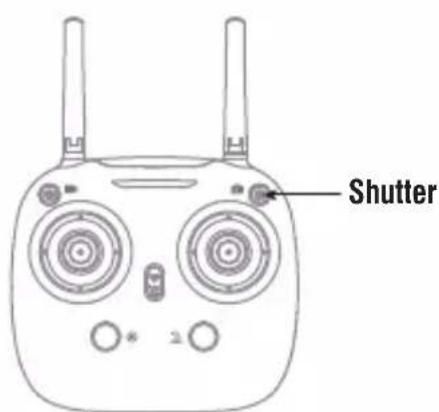
text_image
ShutterHeading Hold Mode
Drones generally have a front and rear indicated by LED lights or colored propellers. By default, the users are required to tell the front and the rear of the drone when flying. Under heading hold mode, the users can operate the drone without worrying about the orientation (left is left and right is right all the time, regardless of where your drone is pointing at). Heading Hold Mode is designed for beginners and the users who fly the drone in daylight or at a far distance or difficult to identify the drone orientation.
The default setting is NOT Heading hold Mode.
You are allowed to activate the heading hold mode function before taking off or in flight. Fly under heading hold mode, you're required to ensure the drone front direction aligned with your front direction, DO NOT change your direction of your transmitter and keep it fly in front of you all the time.(See below picture)
Warning: Do not use heading hold mode before you are sure that the drone's front is your front. Otherwise, it might be out of control or fly away.
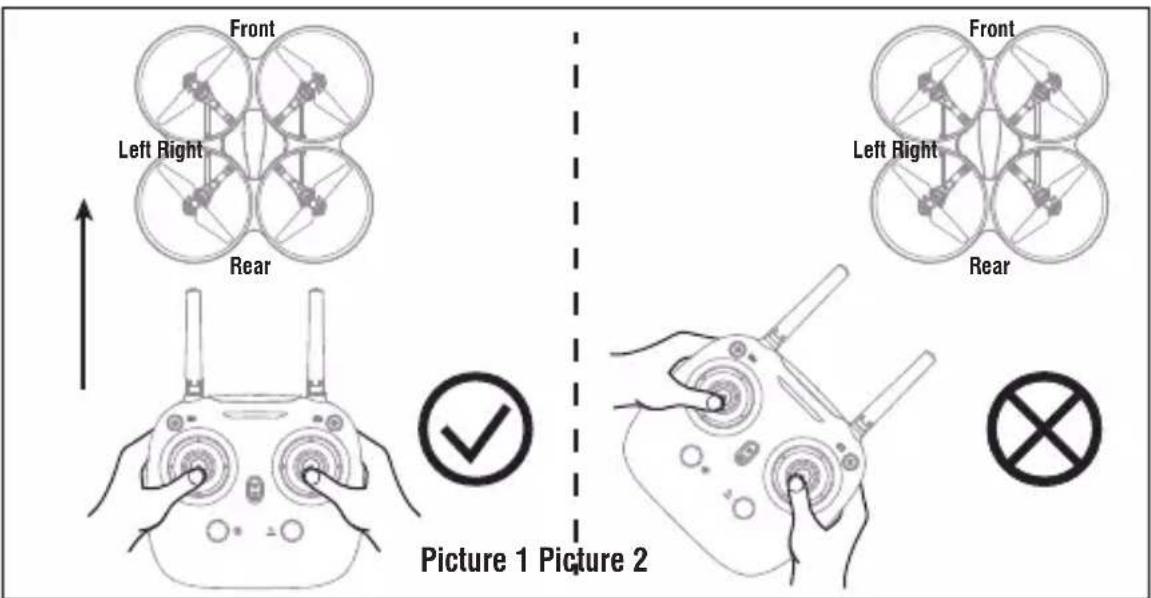
text_image
Front Left Right Rear Picture 1 Picture 2 Front Left Right Rear* Press down Heading hold mode button, the drone's left and right LED will start flashing alternately, it shows the drone enters Heading hold mode, press the button again, then the LED gets solid and the drone ESC from heading hold mode.
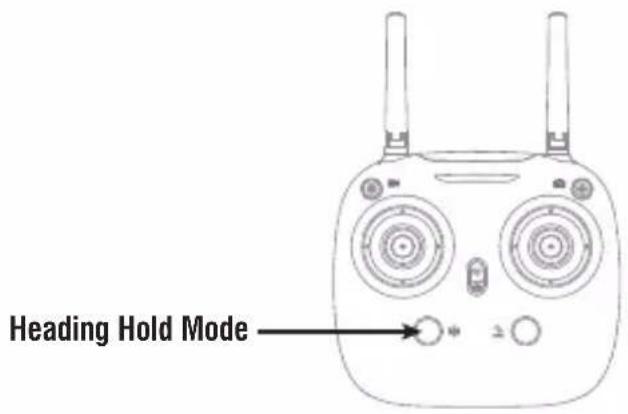
text_image
Heading Hold ModeLow Battery Alarm
When the transmitter in low battery, the transmitter will beep “di-di” to remind the user to land the drone to replace the battery as soon as possible. Or the drone may be out of control.
When the drone in low battery, the transmitter will beep" di.di..." constantly to remind the user to land the drone as soon as possible. The flip function will turn off automatically when the drone in low battery.
Out of Range Alarm
When the drone is going to fly out of the max remote control distance, the transmitter will beep “didi...didi...didi...” to alarm the user to fly back the drone immediately. Or the drone may be out of control and fly away.
Motors Stuck Protection
- When the propellers get stuck, then the drone LED will flash quickly and activate stuck protection function and the motors stop running.
- Pull down the left stick to the lowest position, the drone LED will get a solid light and stuck protection will be released and the drone can fly again.
To take photo and record video
- Insert the TF card to the slot in accordance with Picture 18.
- When take photo and record video, photos and video files will be saved in the TF card.
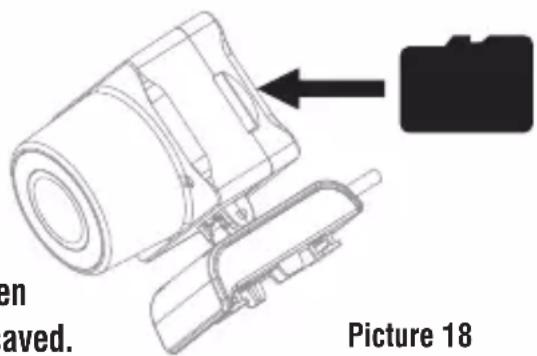
text_image
en aved. Picture 18Tip: Click on the video icon to save a video when ending recording, or the video cannot be saved.
- Power off the drone first when finish aerial photography. Take out TF card and insert the card to a card reader. Connect the card reader with computer USB port. After a while, view the aerial photography data from "my computer" - "mobile disk".
Tip: Please play the video or photo after copying all aerial photography data to computer and make sure the play software can support AVI format.
Basic parameter for aerial camera: Video DPI 1280*720P Image Size 1280*720P
Spare Parts Assemble and Disassemble Landing Gear Installation Diagram
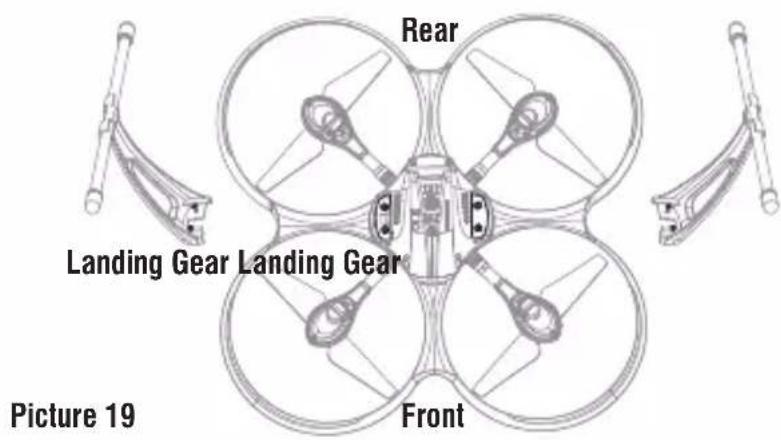
Install the landing gear into bottom housing, as picture 19 shown, then use the screwdriver to fix attached 4 screws in clockwise direction.
text_image
Rear Landing Gear Landing Gear Front Picture 19Camera Box Installation Diagram
Insert the camera box into bottom housing buckle (Picture 20), push it until it is secured in its position (Picture 21).

natural_image
Technical line drawing of a mechanical assembly with no visible text or symbols
natural_image
Technical line drawing of a mechanical assembly with no visible text or symbolsPicture 20 The direction to install the camera box Picture 21
Camera Wire Connection Instruction
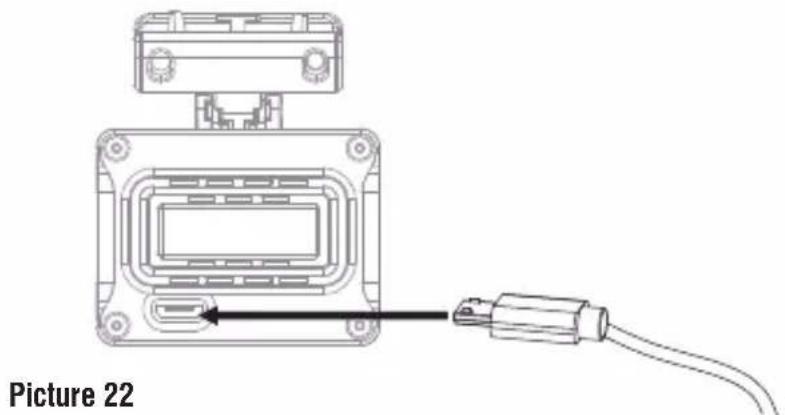
- Connect Micro cable to camera box (Picture 22).
natural_image
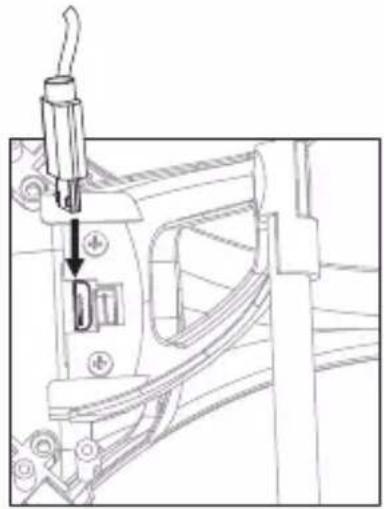
Diagram of a device with an attached cable and connector, labeled 'Picture 22' (no text or symbols on the diagram itself)- Then the another end of this Micro cable connect to drone bottom housing (Picture 23).
natural_image
Technical line drawing of a mechanical assembly with a tool inserted, showing no text or symbolsPicture 23
Propeller Installation Diagram
- Use the screwdriver to remove the screw in counterclockwise direction, pull up the damaged propeller and take it out (picture 24).
- Replace with the same new rotating direction propeller, aim at the screw hole to install it(Picture 25), then tighten the screw in clockwise.

natural_image
Technical line drawing of a propeller or fan assembly with directional arrows indicating motion (no text or symbols)Picture 24

natural_image
Technical line drawing of a boat hull with directional arrows indicating components (no text or symbols)Picture 25
Motor Installation Diagram
- Rotate the screw driver in counter clockwise to loose the screw, and take out 3pcs of screws in the lampshade, disconnect the wire and then take out the defective motor(Picture 26).
- Replace with the same new motor, connect the motor wire(Picture 27), put on the lampshade, then tighten 3pcs of screw in clockwise(Picture 28).

natural_image
Diagram showing a shoe being inserted into a base, with an upward arrow indicating the insertion direction (no text or symbols present)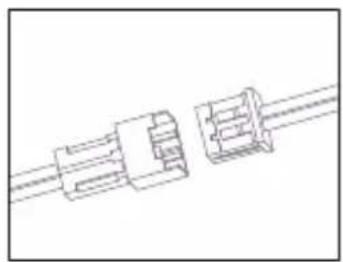
natural_image
Pure technical line drawing of three connected mechanical components (no text or symbols)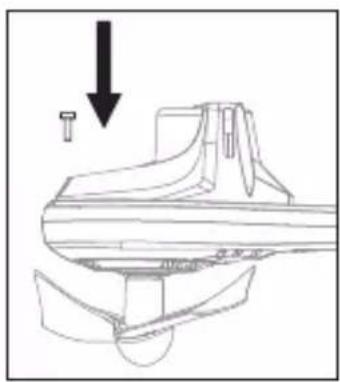
natural_image
Technical line drawing of a mechanical component with an arrow indicating downward motion (no text or symbols)Picture 26 Picture 27 Picture 28
Battery installation diagram
When install, you need to squeeze up and down of the battery buckle(Picture 29) and then put the Lipo battery aim at the drone battery slot.

natural_image
Technical line drawing of a mechanical assembly with no visible text or symbolsPicture 29
Receiver Board Bonding Wire
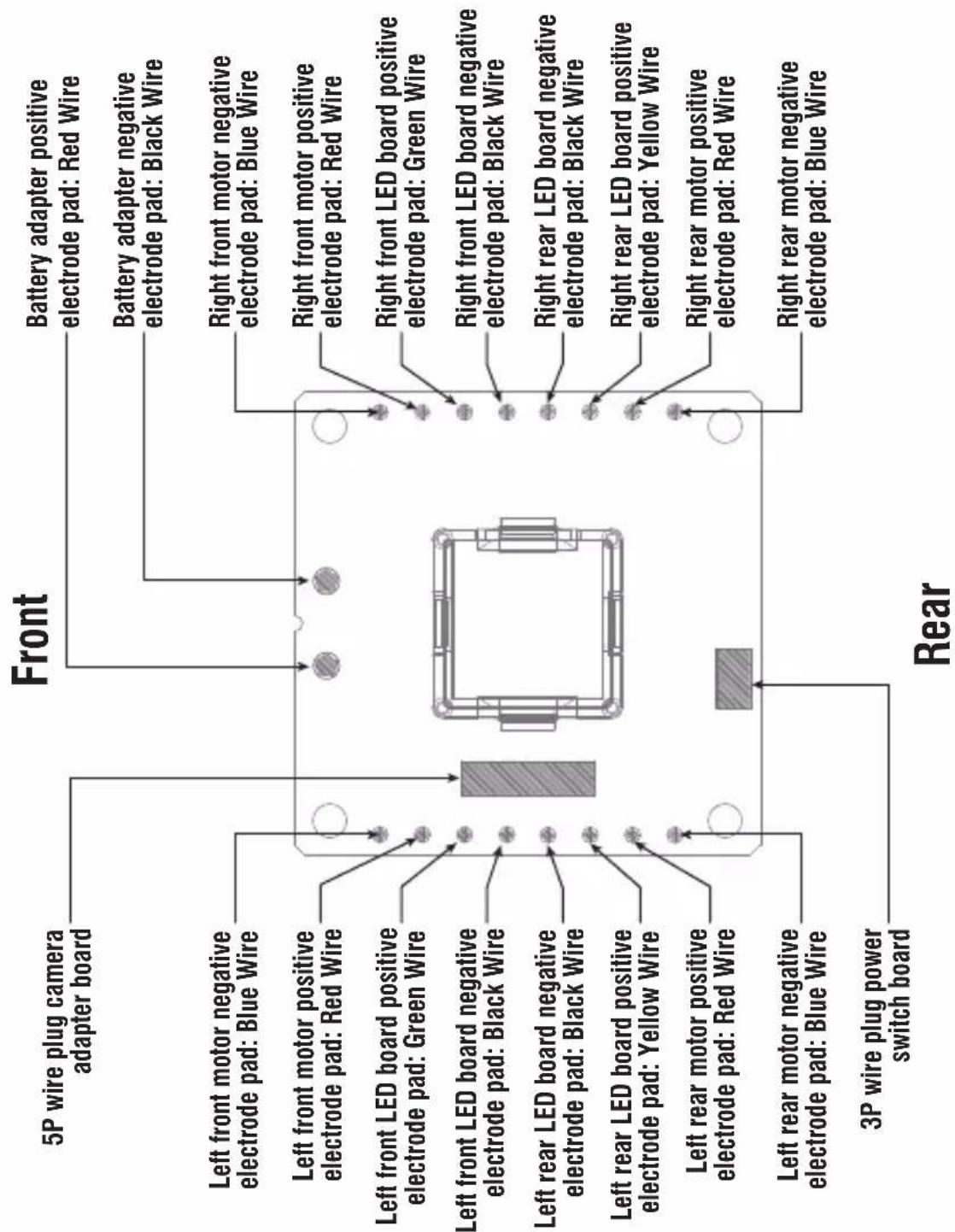
flowchart
graph TD
    A["Front"] --> B["5P wire plug camera adapter board"]
    A --> C["Left front motor negative electrode pad: Blue Wire"]
    A --> D["Left front motor positive electrode pad: Red Wire"]
    A --> E["Left front LED board positive electrode pad: Green Wire"]
    A --> F["Left front LED board negative electrode pad: Black Wire"]
    A --> G["Left rear LED board negative electrode pad: Black Wire"]
    A --> H["Left rear LED board positive electrode pad: Yellow Wire"]
    A --> I["Left rear motor positive electrode pad: Red Wire"]
    A --> J["Left rear motor negative electrode pad: Blue Wire"]
    A --> K["3P wire plug power switch board"]

    L["Rear"] --> M["Battery adapter positive electrode pad: Red Wire"]
    L --> N["Battery adapter negative electrode pad: Black Wire"]
    L --> O["Right front motor negative electrode pad: Blue Wire"]
    L --> P["Right front motor positive electrode pad: Red Wire"]
    L --> Q["Right front LED board positive electrode pad: Green Wire"]
    L --> R["Right front LED board negative electrode pad: Black Wire"]
    L --> S["Right rear LED board positive electrode pad: Yellow Wire"]
    L --> T["Right rear motor positive electrode pad: Red Wire"]
    L --> U["Right rear motor negative electrode pad: Blue Wire"]
Spare Parts
For convenience, the spare parts are listed for you to choose, which can be purchased from the local seller.

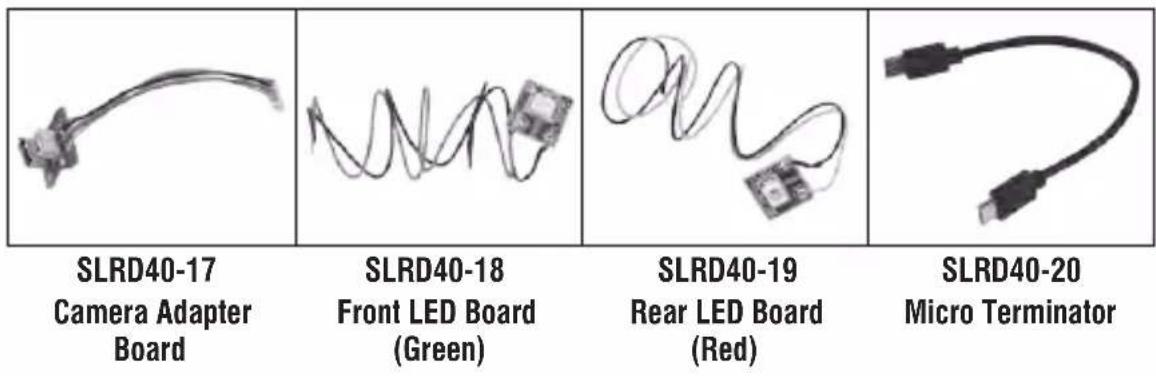
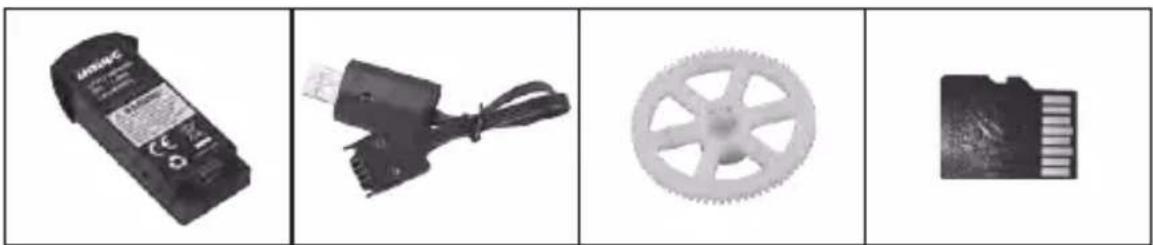
natural_image
Four-panel image showing electronic components: a battery, a motor, a gear, and a memory card (no text or symbols visible)SLRD40-21 Drone Battery

natural_image
Close-up of a black electrical connector with wires, no visible text or symbolsSLRD40-22 USB Cable

natural_image
Mechanical gear with six spokes, no text or symbols visibleSLRD40-23 Gear
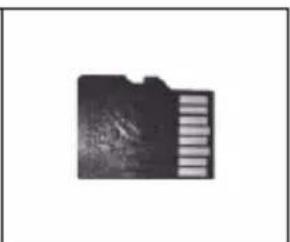
natural_image
Black folder icon with a striped pattern on the right side (no text or symbols)SLRD40-24 TF Card

natural_image
Two black rectangular devices side by side: a rectangular remote and a digital drone with two control knobs (no text or symbols visible)SLRD40-25 Card Reader
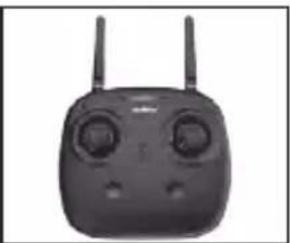
natural_image
Front view of a black remote control device with dual motors and two antennas (no visible text or symbols)SLRD4026 Transmitter
Important Statement
Our company's products are improving all the time, design and specifications are subject to change without notice.
All the information in this manual has been carefully checked to ensure accuracy, if any printing errors, our company reserve the final interpretation right.
Troubleshooting Guide
| Problem | Problem Cause SolutionNo. | ||
| 1 | The transmitter indicator light is off | 1. Low battery. 1. Replace the transmitter battery. | |
| 2. The battery positive pole and negative pole are in reverse order. | 2. Install the battery in accordance with the user manual. | ||
| 3. Poor Contact. | 3. Clean the dirt between the battery and the battery slice. | ||
| 2 | Fail to pair the drone with transmitter | 1. Indicator light is off. 1. The same as above 1.2.3. | |
| 2. There is interfering signal nearby. | 2. Restart the drone and power on the transmitter. | ||
| 3. Mis-operation. | 3. Operate the drone step by step in accordance with the user manual. | ||
| 4. The electronic component is damaged for frequent crash. | 4. To buy spare parts from local seller and replace damaged parts. | ||
| 3 | The drone is under-powered or can not fly. | 1. The propeller deformed seriously. 1. Replace the propeller. | |
| 2. Low battery. 2. Recharge the drone battery. | |||
| 3. Incorrect installation of propeller. | 3. Install the propeller in accordance with the user manual. | ||
| 4 | The drone could not hover and tilts to one side | 1. Poor Calibration. 1. Refer to the instruction of calibration. | |
| 2. The propeller deformed seriously. 2. Replace propeller. | |||
| 3. The aluminum main shaft deformed. 3. Replace the aluminum main shaft. | |||
| 4. The gyro did not reset after violent crash. | 4. Put the drone on the flat ground for about 10s or restart the drone to calibrate again. | ||
| 5. The motor is damaged. 5. Replace motor. | |||
| 5 | The drone indicator light is off | 1. Low battery. 1. Recharge the drone battery. | |
| 2. The battery is expired or over discharge protection. | 2. Buy a new battery from local seller to replace the battery or charge the battery in accordance with the use manual. | ||
| 3. Poor contact. | 3. Refer to the user manual, push the battery box into position is fine, turn on the power If the wire of power board is poor contact, please go to local seller to repair. | ||
| 6 | Could not see the picture | 1. There is interfering signal nearby. 1. Cut off the wire and re-connect. | |
| 2. Damaged camera. | 2. Buy a new camera box from local seller to replace. | ||

natural_image
Illustration of a laptop with a red checkmark on screen (no text or symbols)VISIT US ONLINE:
Have a question?
Need service or repair?
Want to leave a comment?
PyleUSA.com/ContactUs

FCC Note
This equipment has been tested and found to comply with the limits for a Class B digital device, pursuant to Part 15 of the FCC Rules. These limits are designed to provide reasonable protection against harmful interference in a residential installation. This equipment generates uses and can radiate radio frequency energy and, if not installed and used in accordance with the instructions, may cause harmful interference to radio communications. However, there is no guarantee that interference will not occur in a particular installation. If this equipment does cause harmful interference to radio or television reception, which can be determined by turning the equipment off and on, the user is encouraged to try to correct the interference by one or more of the following measures:
● Reorient or relocate the receiving a ntenna.
- Increase the separation between the equipment and receiver.
- Connect the equipment into an outlet on a circuit different from that to which the receiver is connected.
WARNING: Changes or modifications not expressly approved by the party responsible for compliance could void the user's authority to operate the equipment.
FCC Notice
The equipment may generate or use radio frequency energy. Changes or modifications to this equipment may cause harmful interference unless the modifications are expressly approved in the instruction manual. Modifications not authorized by the manufacturer may void user's authority to operate this device.
This device complies with Part 15 of the FCC Rules. Operation is subject to the following two conditions:
(1) This device may not cause harmful interference.
(2) This device must accept any interference received, including interference that may cause undesired operation.



MADE IN CHINA
SereneLife
by PYLE
Catalog
Important Statement 3
Safety Precautions 3
Safe Notice for Drone Battery 4
Charging Instruction for Drone Battery 5
Check List Before Flight 5
Instruction for Drone and Transmitter 6
Pre-flight Operation Instruction 9
Functions Introduction ...... 13
Spare Parts Assemble and Disassemble 17
Spare Parts 20
Troubleshooting Guide 22
Important Statement
Thank you for buying UDIRC's product. The drone is different from other ordinary toy. People who are under 14 years old must not use the product. To better use this product and ensure your safety and other people's security, please read this brochure carefully before using it. You are regarded as accepting all content in this user manual when using this drone.
This product is a piece of complicated equipment which is integrated with professional knowledge by mechanic, electronic, air mechanics, high-frequency emission etc. User should fly legally in safe range of outdoors or indoors. The users promise to be responsible for their behavior when using this product. The users promise to use the drone for legal purpose, and agree to obey above rules and local laws and regulations.
We undertake no liability for those accidents caused by environment, illegal behavior, improper operation, refitting of the drone and personal reason after sale of the product.
We have entrusted the distributor to provide technology support and after-sale service. If you have any questions about use, operation, repair etc., please contact the local distributor.
* Please only use UDIRC's attached spare parts or purchase the original version of UDIRC's spare parts to replace the damaged parts. Or we undertake no liability for those accidents caused by replacement.
* Keep the packing and user manual so as to refer to the important information whenever.
Safety Precautions
This drone is suitable for experienced RC drone user aged 14 years or above. This product contains small parts, please put it out of child's reach.
(1) Flying Area
The flying field must be legally approved by your local government. Do not fly the drone near in the airport. Keep far away from the airport more than 5km when flying a RC drone. Flying field must spacious enough and we suggest at least 8M (length)*8M (width)*5M (height).
(2) Use correctly
Improper assembly, broken main frame, defective electronic equipment or unskilled operation all may cause unpredictable accidents such as drone damage or human injury. For beginner, we suggest learning the operation skill from experienced RC drone user in the first flight. Please pay special attention to safety operation and have good knowledge of accident responsibility that the user may cause.
(3) Keep away from obstacles and crowd
The speed and status of a flying RC drone is uncertain and it may cause potential danger. So the user must keep away from crowd, tall building, power lines etc. when operating a flying RC drone. Do not fly a RC drone in rainy, storm, thunder and lighting weather for the safety of user, around people and their property.
(4) Keep away from humid environment
The drone inside is consisted of precise electronic components and mechanic components. Humidity or water vapor may damage electronic components and cause accident.
(5) Safe operation
Please operate the RC drone in accordance with your physical status and flying skill. Fatigue, listlessness and improper operation may increase the rate of accident.
(6) Keep away from high-speed rotating parts
Please keep the drone in your sight when flying. Keep rotating parts away from people and ground. Otherwise, may cause serious injury and damage.
(7) Keep away from heat
The RC drone and transmitter are made of metal, fiber, plastic, electronic components etc. Keep away from heat and sunshine to avoid distortion and damage.
(8) Operation Area
The drone should be controlled within max control distance. Do not fly the drone near tall building, high voltage cable or other place with signal interference. Otherwise, it may affect the flight distance and streaming video range, even may cause signal interruption and the drone will be out of control, which may result in accident.
(9) Do not touch the hot motor to avoid being burnt.
(10) Please use the recommended charger only. Power off the drone before cleaning the RC drone. Check the USB cable, charging plug etc. regularly to ensure they can work well. If there is any damage, stop using it immediately till it's fixed well.
Safe Notice for Drone Battery
* Keep the battery away from child and animal.
* Discontinue charging when you notice the battery is swollen.
* Do not charge the battery once it crash or damage.
* After the crash, check the battery to ensure it can work well.
* Do not overcharge the battery.
* Do not charge the battery near the flammable materials or liquids.
* Do not put the battery on high temperature place, store it in a proper container to avoid damage or explode.
* Do not put the battery in the pocket or bag to avoid short circuit and not be scratched by sharp or metallic objects.
* Do not disassemble, refit and repair the battery.
* Do not use the battery to crash or hit hard surface.
* Do not put the battery in water and keep it in dry place.
* Do not leave the battery without supervision when charging.
* Make sure that there is no short circuit of the power wire.
* Please use the recommended charger only.
* Check the charger's wire, plug, surface regularly. Do not use any broken charger.
* If the battery is not used more than one week, maintain the drone battery with about 50% power to keep its performance and working life.
