Imperial - Scale American Weigh Scales - Free user manual and instructions
Find the device manual for free Imperial American Weigh Scales in PDF.


User questions about Imperial American Weigh Scales
0 question about this device. Answer the ones you know or ask your own.
Ask a new question about this device
Download the instructions for your Scale in PDF format for free! Find your manual Imperial - American Weigh Scales and take your electronic device back in hand. On this page are published all the documents necessary for the use of your device. Imperial by American Weigh Scales.
USER MANUAL Imperial American Weigh Scales
natural_image
Black digital display of a AWS 250mm water level calculator with a digital display showing maximum weight and price (no text or symbols on the device itself)IMPERIAL-550 (550lb x 0.2lb)
Thank you for purchasing the American Weigh IMPERIAL bathroom scale. Please read all operating instructions carefully before use. Scales are precision measuring devices and should always be handled with proper care. To ensure years of reliable service, keep these simple tips in mind:
Weighing Tips
- Do not weigh on carpet. Hard floors provide the best weighing surface. Slanted or uneven surfaces should also be avoided.
- For best results, weigh yourself after waking up in the morning. This will give you a more accurate picture of your weight trend. Your weight can fluctuate by several pounds throughout the day.
- For repeatable results, stand as still as possible when weighing, with your weight centered on the platform.
- Keep the area under and around the scale clear. Inaccuracy can arise from items lodged under the platform.
Care Tips
- Clean the scale with a slightly damp cloth. Do not use harsh solvents.
• To avoid leakage, remove the batteries when storing the scale for extended periods of time. - Avoid dropping your scale. The warranty does not cover damage due to rough treatment.
- Check the batteries first if you are having any trouble with your scale. This simple step can remedy most scale issues.
- Store your scale in a clean, dry location. Dust, dirt, and moisture can accumulate on the weighing sensors and electronics causing inaccuracy of malfunction.
I. Part List
- Scale
- AAA Batteries (x2)
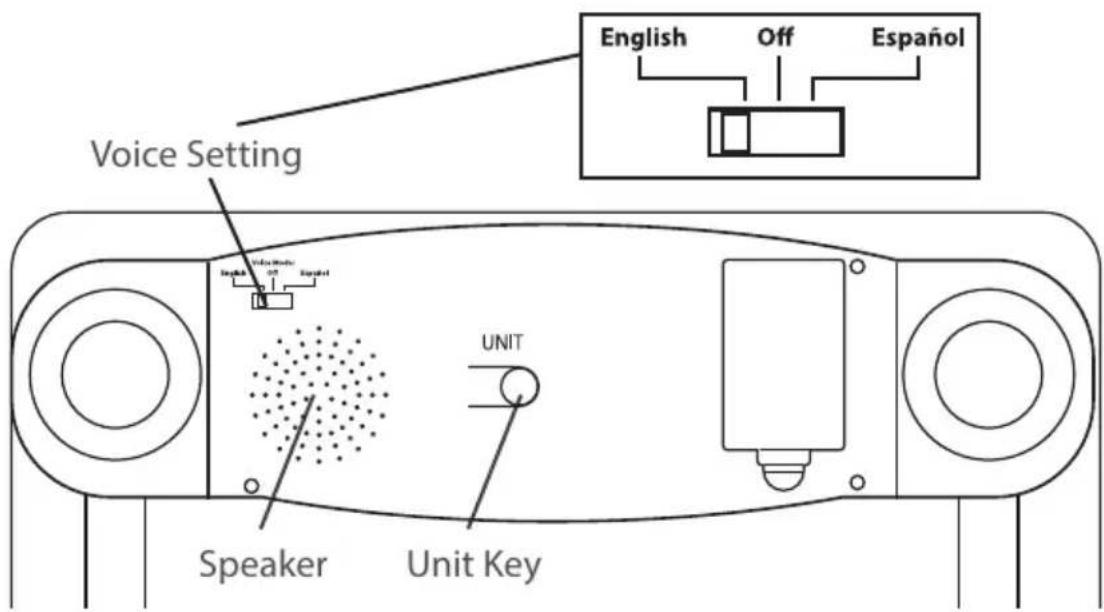
II. Key Description
Bottom of Scale
III. Battery Installation
- Before using the scale for the first time, check the battery compartment and remove any plastic insulation strips or packaging that may be in place to prevent battery drainage during shipping/storage.
- If you are replacing the batteries, make sure the positive and negative contacts are properly aligned.
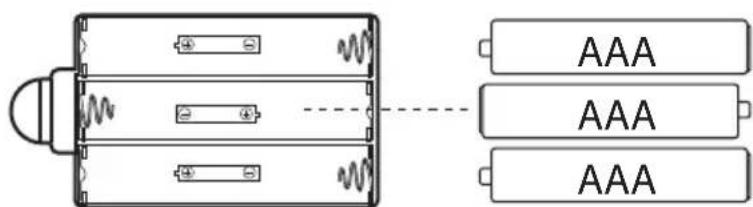
Proper Battery Installation
IV. Scale Operation
- Place the scale on a flat, level surface. Do not weigh on carpet as it may affect the accuracy.
- Step onto the platform. Once the weight has stabilized, it will be locked on the display for a few seconds. If the voice feature is enabled, the weight will be announced.
- The scale will turn off automatically after 10 seconds of non-use.
NOTES: Do not leave items on the scale when not in use. This scale has an Auto-On feature that allows you to step on the scale immediately without having to tap the scale first to zero it. When moving the scale from one place to another, allow the scale to turn on then off once before weighing. This will allow the zero-point to be re-established. Otherwise, the weight result may be inaccurate (because it includes the weight of the platform).
V. Changing the Unit of Measure
- Press the UNIT key on the bottom of the scale to change the scale's displayed unit of measure.
- If the scale is turned off then back on, it will default to the last unit used.
• IMPERIAL Units: kg (Kilogram) lb (Pound)
VI. Specifications
| IMPERIAL-550 | |
| Max. Capacity | b / 250kg |
| Readability | 0.1kg |
| Power | (included) |
| Dimensions | < 13.0 x 1.1" |
| Display Dimensions | 1 x 3.6" |
| Warranty | r Limited Warranty |
American Weigh Scales, Inc.
Norcross, GA 30092, U.S.A
Made in China to our exact specifications and quality control.