AXI-RGB1 - Unspecified Axxess - Free user manual and instructions
Find the device manual for free AXI-RGB1 Axxess in PDF.


User questions about AXI-RGB1 Axxess
0 question about this device. Answer the ones you know or ask your own.
Ask a new question about this device
Download the instructions for your Unspecified in PDF format for free! Find your manual AXI-RGB1 - Axxess and take your electronic device back in hand. On this page are published all the documents necessary for the use of your device. AXI-RGB1 by Axxess.
USER MANUAL AXI-RGB1 Axxess
natural_image
Exterior view of a black FXESSS motor control box with yellow and black connectors (no text or symbols visible)
PROUDLY MADE IN USA
Rev. 4.0 081915
COMPATIBLE PLUG & PLAY WIRING HARNESSES
AXi-BMW18-R AXi-CRVT-R AXi-FL24-R
AXi-GM1-R AXi-GM2-R AXi-GMTOUCH-R
AXi-HA12-R AXi-HA20-R AXi-HA32-R
AXi-HON1-R AXi-NI24-R AXi-NI1-R
AXi-NI2-R AXi-TL10-R AXi-UNIHAR-R
Tech Support: 844-AXX-ESSI WWW.AXXESSINTERFACES.COM
AXXESS.I™
Table Of Contents
PRECAUTIONS....3
WIRING LEGEND AND DESCRIPTION......4
ASSIGNMENT OF SWITCHES......5
FAQ....6
QUICK START GUIDE ......7
IMPORTANT WARNING
This product includes instructions for installation which must be carefully followed. The instructions are worded in such a manner to assume that the installer is capable of completing these type of electronic installations. If you are unclear as to what you are instructed to do or believe that you do not understand the instructions so as to properly and safely complete the installation you should consult a technician who does have this knowledge and understanding.
Failure to follow these instructions carefully and to install the interface as described could cause harm to the vehicle or to safety systems on the vehicle. Interference with certain safety systems could cause harm to persons as well. If you have any questions in this regard please call the Metra Help line at 1-844-299-3774 and for ordering questions call Metra at 1-800-221-0932.
AXXESS.i™
PRECAUTIONS: Please read before you start the installation
- Please study these instructions carefully before installing AXXESS.i interface.
- Many new vehicles use low-voltage or data-bus systems that can be damaged by test lights and logic probes. Test all circuits with a digital multi-meter before making connections.
- Do not disconnect the battery if the vehicle has an anti-theft-coded radio, unless you have the radio code.
- If installing an external push button switch, check with the customer about where to install the switch.
- To avoid accidental battery drainage turn off the interior lights or remove the dome light fuse.
- Roll down a window to avoid being locked out of the car.
- Use of this product in a manner different to its intended way of operation may result in property damage, personal injury, or death.
- Set Parking brake.
- Remove the negative battery cable.
- Protect fenders before starting.
- Using protective blankets to cover front seats, interior of the vehicle and center console.
- Always install a fuse 6-12 inches away from AXXESS.i interface, 5 amp fuse should be used.
- Always secure AXXESS.i interface with Velcro or double side tape to prevent rattling of the interface.
- When securing AXXESS.i interface make sure that panels can be closed back easily.
- Use electrical tape on all you connections and splices, do not leave any exposed connections.
- Route all wires along factory harnesses, try not to drill or make any unnecessary holes.
- Make sure you are not connecting to any data wires; always check your connections with a multi-meter.
- Always use help of a professional installer to prevent any damage to the vehicle or AXXESS.i interface.
AXXESS.i™
Wiring Legend & Description
Video 1: Component video input for any external video source.
(if installing front camera, make sure the camera doesn't have reverse image enabled, otherwise left and right view will be reversed)
Video 2: Component video input for the back-up camera or any other external video source.
(we recommend asking your customer if they plan to use the rear view camera while driving, in this event you will need to connect rear view camera to a +12V Accessory power instead of +12V reverse trigger, wiring of AXi-RGB1 orange reverse trigger wire doesn't change and should be still connected to +12V reverse trigger wire.)
Red Wire: +12V Accessory power input, do not connect to +12V constant power.
Always use a fuse within 6-12 inches of the point you obtain a +12V accessory power.
Black Wire: Chassis ground connection.
We recommend that you connect AXi-RGB1 ground wire to the same ground location where you are installing AXi-RGB1. ex. If installing behind the screen or at the navigation brain, use ground wire of that component.
Gray Wire: Emergency brake input also known as foot brake or handbrake; gray wire must rest at ground in order for Video 1 to activate, reverse camera will activate automatically on Video 2 when vehicle is shifted in reverse, no matter if gray wire connected to emergency brake or not.
(do not connect gray wire to ground, unless installing front view camera or an aftermarket navigation system)
Orange Wire: Reverse trigger input, reverse light trigger wire will show +12V when vehicle is shifted in reverse gear, if an aftermarket back-up camera is not going to be installed or vehicle is already equipped with a factory rear view camera DO NOT connect Orange wire.
Yellow Wire: Push button input trigger, supplied push button switch is used to cycle between Video 1, Video 2 and back to factory display.
Connecting supplied push button switch: Connect one side of push button switch to +12V Accessory power and connect other side of the push button switch to yellow wire of AXi-RGB1 interface.
AXXESS.i™
natural_image
Close-up of an electronic device showing internal circuit board and two close-up views of a green PCB with labeled components (no readable text or symbols)Assignment Of Switches
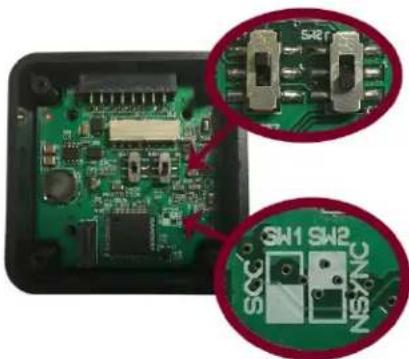
Switches are preset for most installation cases, in some cases you may need to adjust switch position if an image is not displayed correctly.
For most installations fig.1 shows correct switch position.
To access switches remove cover, by removing four screws in each corner of AXi-RGB1
Fig.1
MOST INSTALLATIONS
SOG SWITCH: OFF
NSYNC SWITCH: OFF
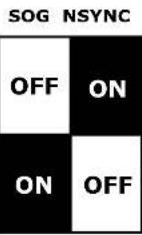
SOG Switch: default setting is OFF
For example: BMW/MINI/RANGE ROVER/INFINITI M35 06-07
(AXi-BMW18-R, Axi-NI2-R, PLUG & PLAY HARNESS) vehicle
installations will require the SOG switch to be set to ON position.
NSYNC Switch: default setting is OFF
For Example: FORD/VOLVO vehicle installations will require the
NSYNC switch to be set to ON position.
AXXESS.i™
FAQ
Q: Image of factory information/navigation screen is shown perfectly, when switching to video input of AXi-RGB1 video image is distorted?
A: Please check switch position and setting to make sure all are set correctly, see page 5 for details.
Q: When pressing the push button switch nothing happens on the screen?
A: Make sure other end of the push button switch is connected to +12V accessory power.
Q: When I try to use the camera while driving, the screen goes blank and no camera image is shown?
A: Make sure camera is connected to Video Input 2.
Q: When I try to use camera while driving screen goes blank but no camera is showing?
A: Make sure camera is connected to +12V Accessory power source and not to reverse lights.
Q: When I try using push button or reverse gear nothing happens on the screen?
A: Before starting any work check installation location of wiring harness, when using plug and play harness be careful as many connectors in the vehicle may repeats through-out the vehicle. Connecting plug and play harness in the wrong location will result in damage to vehicle and the AXXESS.i interface.
Q: Customer came back complaining that the battery has drained overnight?
A: AXi-RGB1 specifically must be connected to +12V accessory power source and never to the constant power source.
AXXESS.I™
QUICK START GUIDE
Thank you for purchasing AXXESS.i AXi-RGB1
Push button operation: When you first start your vehicle the color/navigation screen will be set to display factory image.
First press of the push button will activate Video 1, second press of the push button switch will activate Video 2, every push of the button after that will cycle between Video 1 and Video 2 inputs.
Press and hold the push button for 2 second or longer to return back to factory display image.
Video Input 1: if you have installed front view camera or an aftermarket navigation system, you can activate video 1 input by pressing and releasing the push button until the front camera image or navigation is displayed on the screen.
Video Input 2/Camera Input: if you have installed an aftermarket back-up camera, your aftermarket back-up camera will turn on automatically in reverse (some vehicles you must be on navigation map screen for camera to work ex. Toyota/Lexus).
You can use your rear view camera while in driving forward. To do that press and release the push button until rear view camera is displayed on the vehicles screen.
(AXXESS.i interface and rear-view camera in-drive must be configured by your installer for this feature to operate as described above)
DISCLAIMER: WARNING!!! WARNING!!!
AXXESS.i is designed to be used only when the vehicle is immobilized. The driver is responsible for maintaining full attention while operating a motor vehicle. The removal or bypassing of safety features in AXXESS.i products will result in termination of warranty. Using AXXESS.i unit improperly may result in injury, citation or arrest by authorities. Therefore Metra Electronics owners and employees are not responsible for unauthorized use.
AXXESS.i Video Integration Solutions
WWW.AXXESSINTERFACES.COM
AXXESS.i
FOR INFORMATION ON THIS AND OTHER AXXESS.i SOLUTIONS PLEASE VISIT
WWW.AXXESSINTERFACES.COM
AXXESS.i Video Integration Solutions
WWW.AXXESSINTERFACES.COM