EA330S - Hi-Fi System LG - Free user manual and instructions
Find the device manual for free EA330S LG in PDF.


User questions about EA330S LG
0 question about this device. Answer the ones you know or ask your own.
Ask a new question about this device
Download the instructions for your Hi-Fi System in PDF format for free! Find your manual EA330S - LG and take your electronic device back in hand. On this page are published all the documents necessary for the use of your device. EA330S by LG.
USER MANUAL EA330S LG
OPERATING INSTRUCTIONS
BUILT IN OVEN
Please read this instruction manual carefully before using the oven.
This will ensure that you know the important safety information and the correct operation of the oven.
Please keep this manual in a easily accessible place and refer to it anytime.
Please ensure this manual is available to all users.
EA430S
EZ430S
EA330S
EZ330S
Important safety instructions ....4\~5
Safety 6\~18
Appliance description ....19
Control panel....20\~23
■For model : EA430S/EZ430S....20\~21
■For model : EA330S/EZ330S....22\~23
Accessories....24\~25
Side runners ....26
Setting the clock 27
Setting the time of day (For model:EA430S/EZ430S)......27
Before using for the first time....28
Using the oven 29
Oven functions....30\~31
Operation 32\~42
Switching the oven on 32
Switching the oven off ....33
Indicator (For model:EA330S/EZ330S)....34
Clock functions and symbols
(For model:EA430S/EZ430S) 35
Setting the timers (For model:EA430S/EZ430S) ......36
Programming the overall cooking / baking time
(For model:EA430S/EZ430S) 37
Programming the end of cooking / baking time
(For model:EA430S/EZ430S) 38
Combining overall cooking / baking time and end
of cooking / baking time (For model:EA430S/EZ430S).....39\~40
Setting the time of day (For model:EA430S/EZ430S)......41
Childproof safety device (For model:EA430S/EZ430S) .....42
Baking 43\~44
Baking Tables....45\~48
Roasting....49\~50
Roasting tables ....51
Grilling 52\~53
Defrosting 54
Cleaning and care ....55\~56
Oven light 57
Oven door 58\~62
Troubleshooting....63\~64
Technical specifications....65
Installation instructions ....66
Customer service & spare parts....67
Read and follow all instructions before using your oven to prevent the risk of fire, electric shock, personal injury, or damage when using the appliance. This guide does not cover all possible conditions that may occur. Always contact your service agent or manufacturer about problems that you do not understand.

This is the safety alert symbol. This symbol alerts you to potential hazards that can cause death or serious injury. All safety messages will follow the safety alert symbol and either the word “WARNING” or “CAUTION”. These words mean:

WARNING
This symbol will alert you to hazards or unsafe practices which could cause serious bodily harm or death.

CAUTION
This symbol will alert you to hazards or unsafe practices which could cause bodily injury or property damage.
- This oven must only be installed by a licensed electrician.
- The installer is responsible for the correct electrical connection of the appliances and the observance of the relative safety codes and recommendations.
- Rating plate is located on the left side of the door or on the back cover.
Electrical Safety
- This appliance must be connected to the mains power supply by a specially licensed electrician only.
- Electrical leads and cables should not be allowed to touch the oven.

WARNING
- The oven should be connected to the electricity supply by means of a proper circuit breaker or fuse. Never use multiple plug adapters or extension leads.
- This connection may be achieved by having the plug accessible or by incorporation a switch in the fixed wiring in accordance with the wiring rules.
- Failure to do so can result in a fire.
Damage
WARNING
- If the oven has been damaged in transport, do not connect it.
• In the event of a fault or damage to the appliance, do not attempt to operate it. - Repairs of the appliance should be carried out by a licensed technician only. Wrong repairs may result in considerable danger. If you need repairs, contact an LG Service Center or your dealer.
- If the supply cord is damaged, it must be replaced by the manufacturer, its service agent or similarly qualified persons in order to avoid a hazard.
- Never remove the outer casing from the oven. If the oven is faulty and needs servicing or you are in doubt about its condition, unplug it from the wall socket and contact the nearest after-sales service centre.
- Failure to do so can result in malfunctioning and death or electrical shock when using.
Maintenance
WARNING
- The power supply of the appliance should be turned off when it is being repaired or cleaned.
- Be careful in connecting electrical appliances to sockets near to this appliance.
- Do not use high-pressure water cleaners or steam jet cleaners for electrical safety reasons.
- Do not use harsh abrasive cleaners or sharp metal scrapers to clean the oven door glass since they can scratch the surface, which may result in shattering of the glass.
- The appliance should be powered down before replacing the lamp to avoid the possibility of electric shock.
- Failure to do so can result in malfunctioning and death or electrical shock when using.
Safety during Operation
WARNING
- Do not touch interior parts until it has cooled down sufficiently.
- When the oven operates, the interior parts will be very hot and burns may occur.
WARNING
- Accessible parts may become hot during use. Young children should be kept away.
- Accessible parts may become hot when the grill is in use, children should be kept away.
- The appliance is not intended for use by young children or infirm persons without supervision.
- Young children should be supervised to ensure that they do not play with the appliance.
• Children should be kept at a safe distance when the oven operates.
WARNING
• Children should be kept at a safe distance until the oven has cooled down after cooking.
- This appliance is not intended for use by persons (including children) with reduced physical, sensory or mental capabilities, or lack of experience and knowledge, unless they have been given supervision or instruction concerning use of the appliance by a person responsible for their safety.
- The appliance and its accessible parts become hot during use. Care should be taken to avoid touching heating elements. Children less than 8 years of age shall be kept away unless continuously supervised.
Safety during Operation
WARNING
- This appliance can be used by children aged from 8 years and above and persons with reduced physical, sensory or mental capabilities or lack of experience and knowledge if they have been given supervision or instruction concerning use of the appliance in a safe way and understand the hazards involved. Children shall not play with the appliance. Cleaning and user maintenance shall not be made by children without supervision.
- Never block the air vents
- The oven may overheat and automatically switch itself off. It will remain inoperable until it has cooled sufficiently.
- Do not cover or obstruct the ventilation with cloths or paper.
- The cloths or paper may catch fire as hot air is emmited from the oven.
- Do not spill or pour water in the vents.
WARNING
- When in use, the oven interior surfaces become very hot! Care should be taken to avoid touching heating elements inside the oven.
- These walls may be hot enough to burn skin even after cooking is finished, though they do not appear to be so, avoid placing hands and arms inside the oven.
- The oven surfaces will become hot when the appliance is operated at a high temperature for a long period of time.
- The oven door must be closed when cooking is performing.
- When cooking, take care when opening the oven door as hot air and steam will escape rapidly.
- The hot air or steam released may cause scalding.
Safety during Operation
WARNING
- When cooking dishes that contain alcohol, the alcohol can evaporate due to the high temperatures. The vapor cancatch fire if it comes into contact with a hot oven part.
- Never store flammable or easily deformable materials in the oven to reduce the risk of fire in the oven cavity.
- Should an oven fire occur, leave the oven door closed and turn the oven off. If the fire continues, throw baking soda on the fire or use a fire extinguisher. Do not put water or flour on the fire.
- Flour may be explosive and water can cause a grease fire to spread and cause personal injury.
- Use oven gloves when removing a dish from the oven.
- The trays and racks are hot.
- The oven must be secured by screwing a minimum of 2 thin general purpose self tapping screws into the 2 upper mounting holes located on the outer side facias, into the cabinetry. Check if the oven is installed properly.
WARNING
- Do not store or operate this equipment outdoors. Do not use this product near water (for example, near a kitchen sink, in a wet basement, or near a swimming pool, and the like)
- Be sure all packing materials are removed from the appliance before operating it.
- Do not use this oven for commercial purposes.
- This oven has been designed only for the cooking of household foods and for Domestic use.
- Do not use the oven door as a rest table for hot items or cookware.
- Never use your appliance for warming or heating the room.
- Do not step, lean, or sit on the door of the oven.
- These can cause the oven to tip resulting in burns or serious injuries.
Safety during Operation
WARNING
- Do not touch an electric cord with a wet hand.
- It is very dangerous. You can get an electric shock.
- Be careful not to damage the power cable.
- Do not operate this appliance if it has a damaged power cable or plug.
- Do not immerse power cable or plug in water and keep power cable away from heated surfaces.
- Do not let cord hang over edge of table or counter.
WARNING
- Don’t spread aluminium foil on the bottom of the oven and do not place any baking trays or tins on it.
- The aluminium foil blocks the heat, which may result in damage to the enamel surfaces and cause poor cooking results and this will result in poor baking by lack of heat circulation.
WARNING
- Please ensure cooking times are correctly set.
- Over cooking may result in the food catching fire and subsequent damage to your oven.
Safety during Operation
WARNING
- Don’t pour water into the oven bottom when it is hot.
- This could cause damage to the enamel surface and deform the base.
- When cooking very moist cakes, use the deep pan.
- Dripping fruit juices from the baking tray will leave stains, which become indelible.
- Frozen foods such as pizzas should be cooked on the wire grill.
- If the Baking tray is used, it may become deformed due to the great difference in temperature.
- Do not heat unopened food containers.
- Build-up of pressure may cause the container to burst and result in injury.
Disposal
CAUTION
- Your new oven has been correctly packaged for transportation. Remove all of the packaging material before putting the appliance into use.
- The packaging material can be completely recycled. You can obtain addresses for environmentally-friendly disposal operations from your local City Council.
- If you wish to store your oven away temporarily, choose a dry, dust-free place. Dust and damp may adversely affect the working parts in the oven.
Used appliances
WARNING
Used appliances must be rendered unusable prior to disposal so that they no longer present a risk. To achieve this, disconnect from the mains supply and remove the power supply cable.
For the protection of the environment, used appliances must be Disposed of property.
- The appliance must not be disposed of along with normal domestic waste.
- Your local City Council will inform you of times for uplifting special waste or identify public disposal facilities for you.
Overview
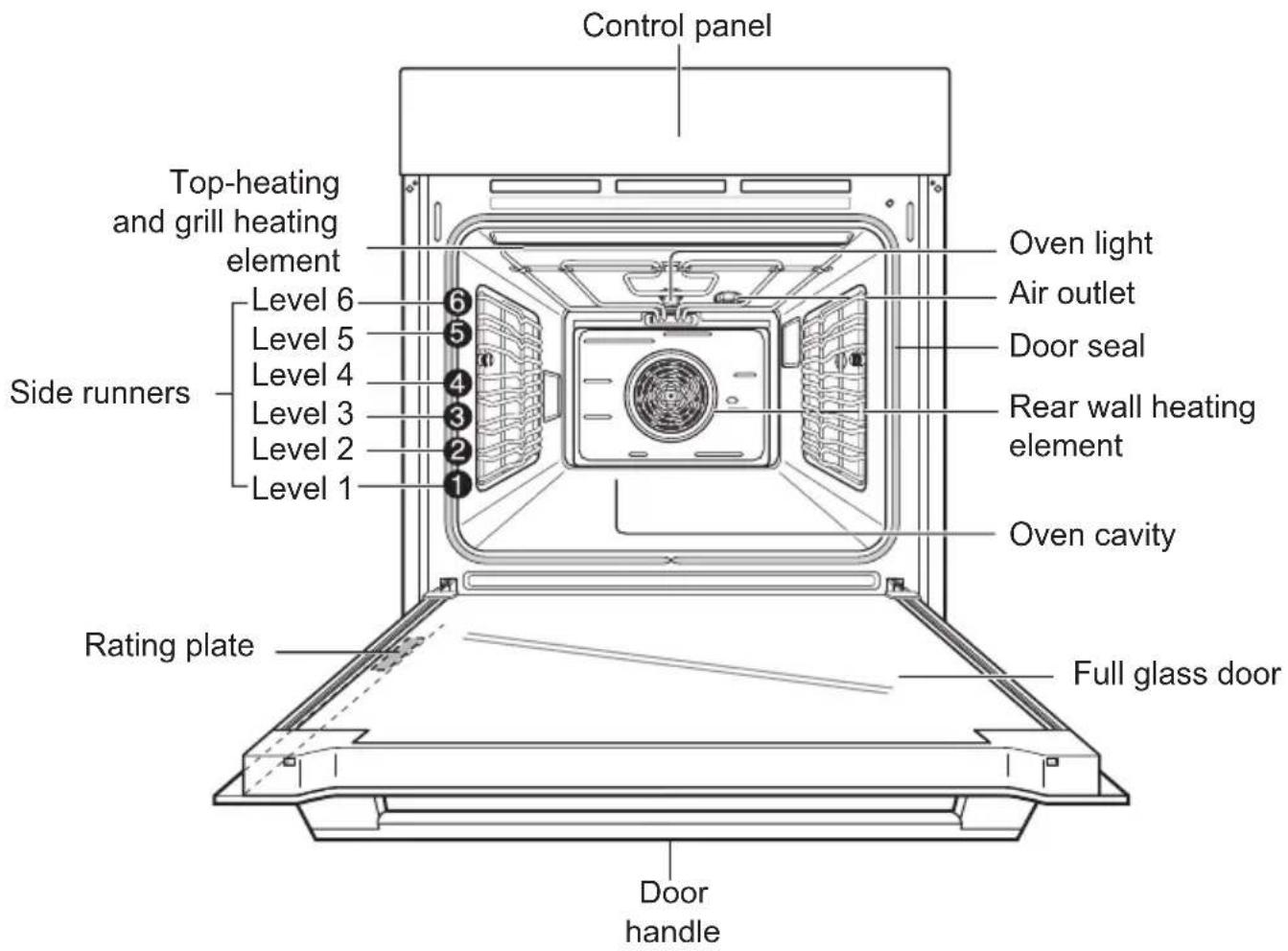
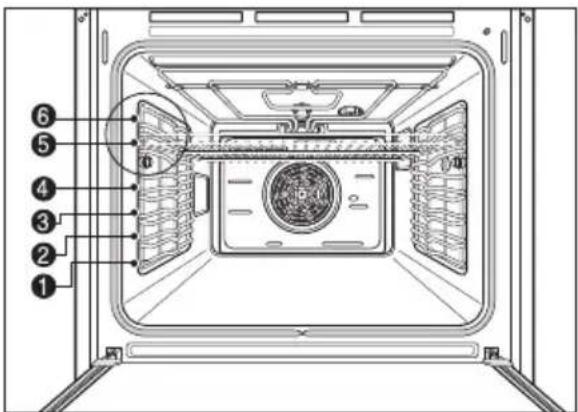
Oven levels are numbered from the bottom up.
The 5 and 6 levels are mainly used for grill functions.
Always grill with the door closed.
The cooking tables throughout this operating instructions give you suggested oven level, however you can change these to suit yourself.
Note : Rating plate can be located at left-hand inner edge of the door or front-side of the oven.
■ For model : EA430S/EZ430S
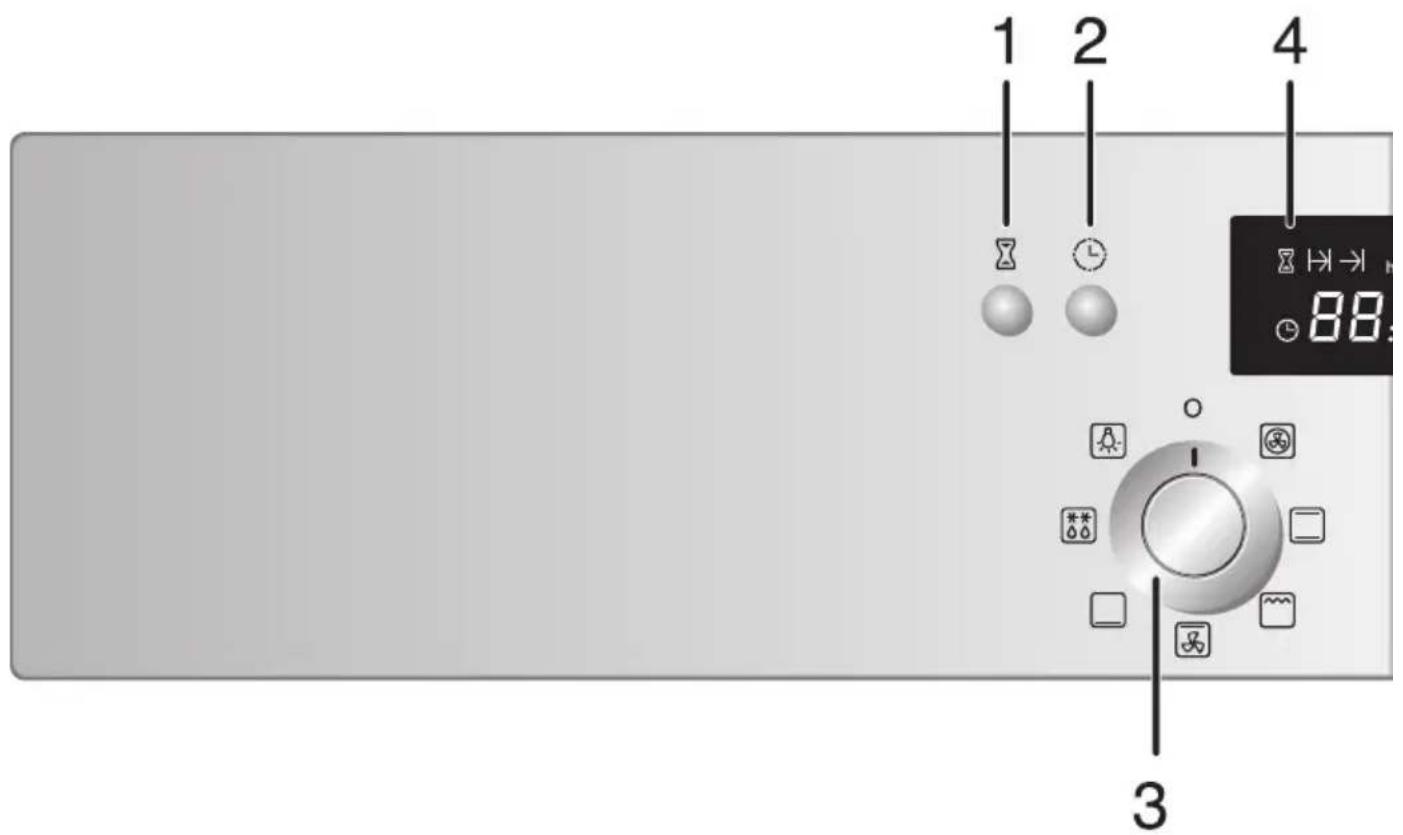
- Timer button
- Clock button
- Operating mode knob
- Time display
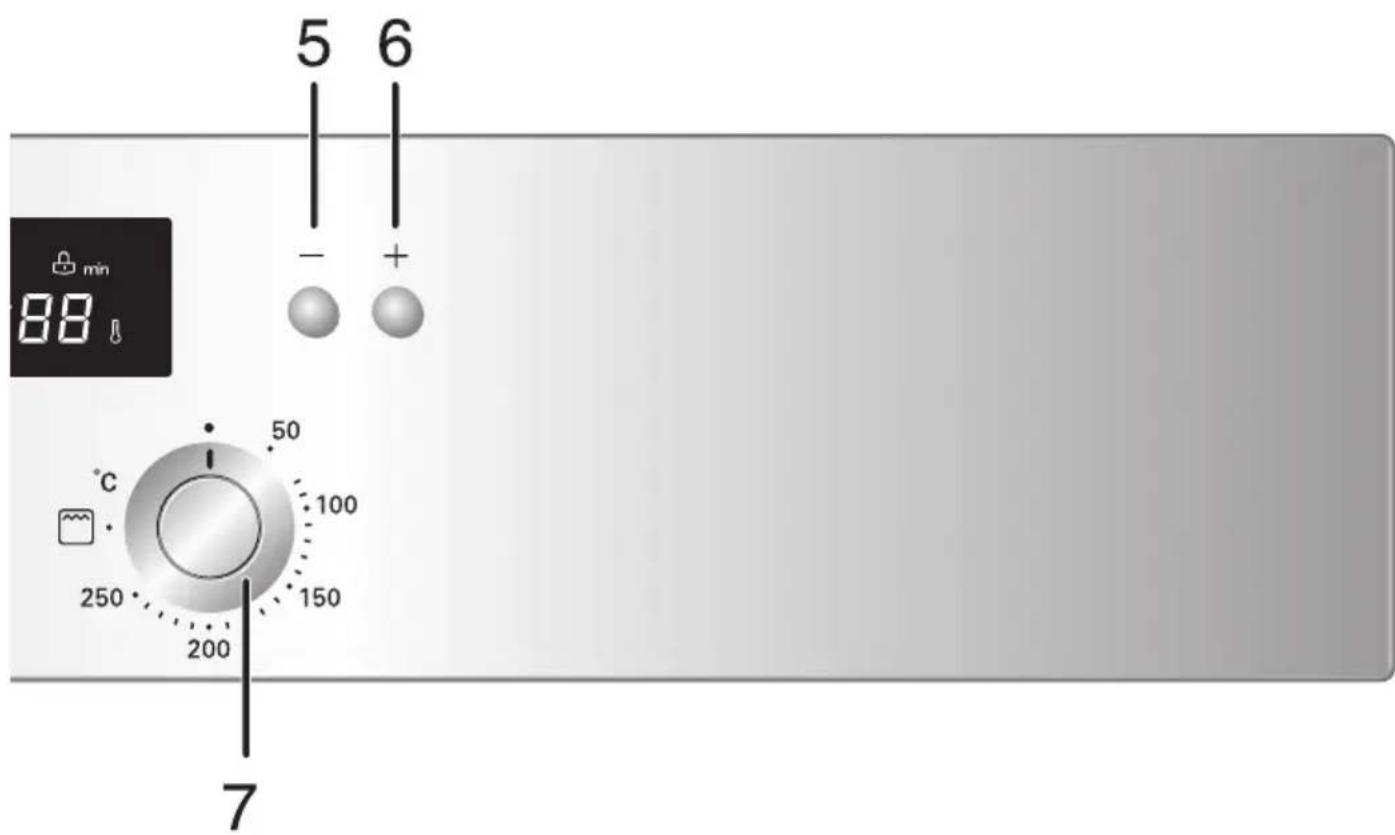
- Less button
- More button
- Temperature knob
■ For model : EA330S/EZ330S
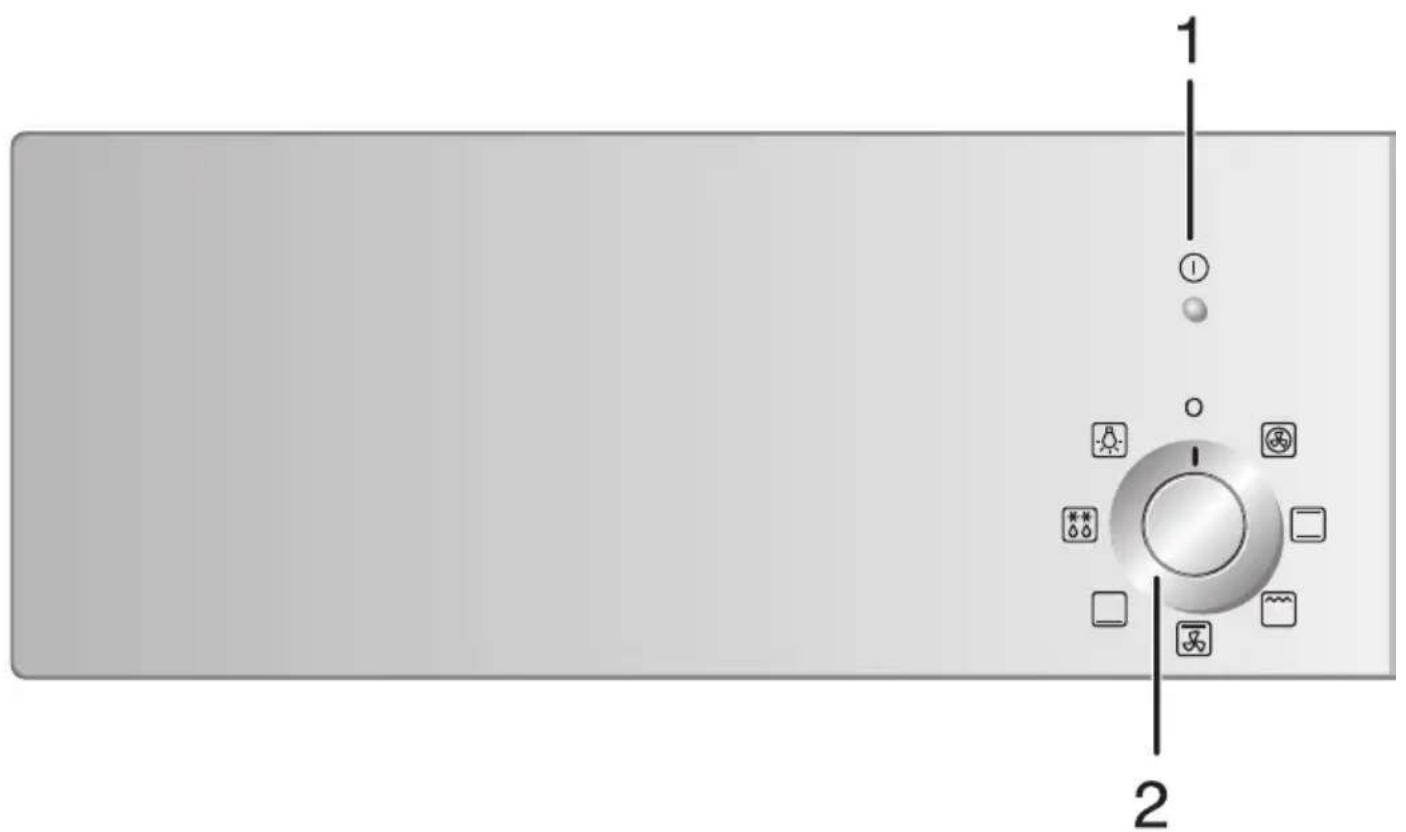
- Function indicator
- Operating mode knob
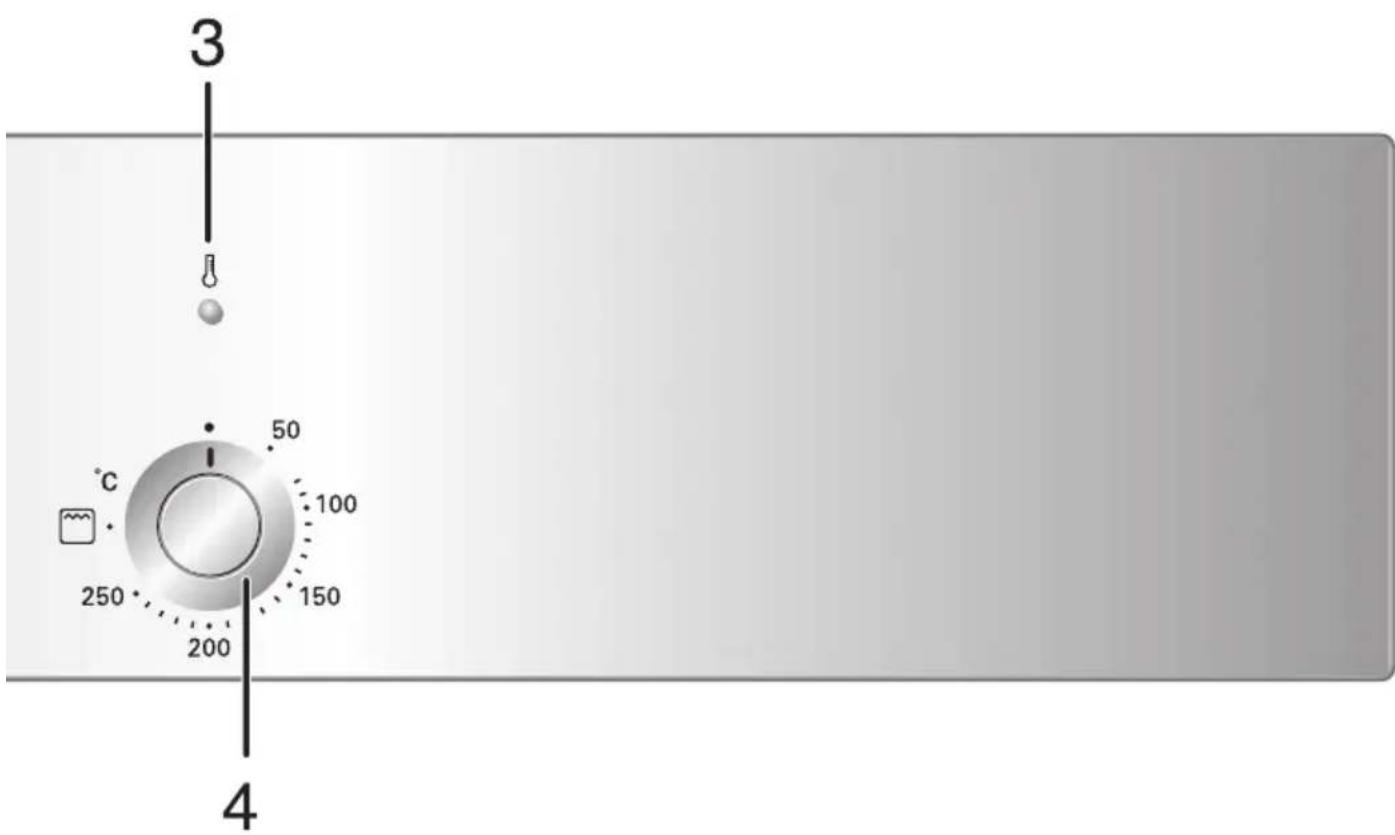
- Heating Indicator
- Temperature knob
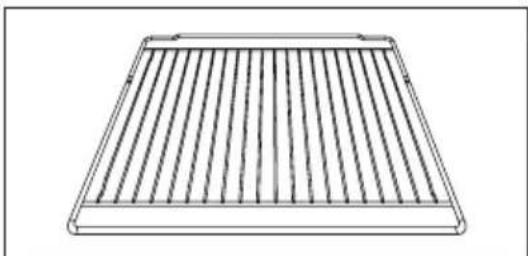
Wire grill
For dishes, baking tins, grilling and roasting tins.
For grilling meat, place the wire grill on the upper level above the deep pan.
Baking tray(on some models)
For cakes, sponges and biscuits.
Deep pan
For moist cakes, for roasting and for catching roasting juices or fat.
Grill tray(on some models)
To be placed on top of the deep pan when grilling meat. Dripping fat is caught in the deep pan.
natural_image
Line drawing of a rectangular metal grate with vertical slats (no text or symbols)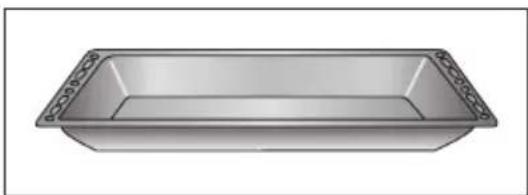
natural_image
3D rendering of a rectangular metal tray with rivets on top (no text or symbols)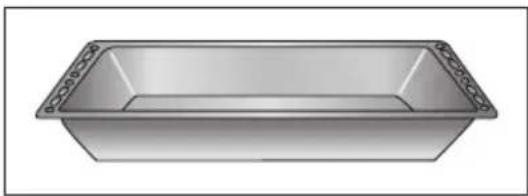
natural_image
Illustration of a rectangular basin with decorative trim (no text or symbols)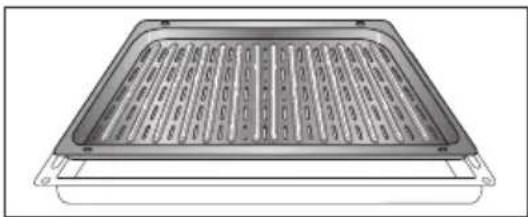
natural_image
Technical illustration of a rectangular electronic component with internal slots and mounting feet (no text or symbols)Tips on using the trays and wire grills
Ensure that the trays and wire grills are properly fitted onto the two side oven levels.
Take particular care when removing finished dishes and meals from the oven!
Use a suitable cloth pot holder or oven gloves.
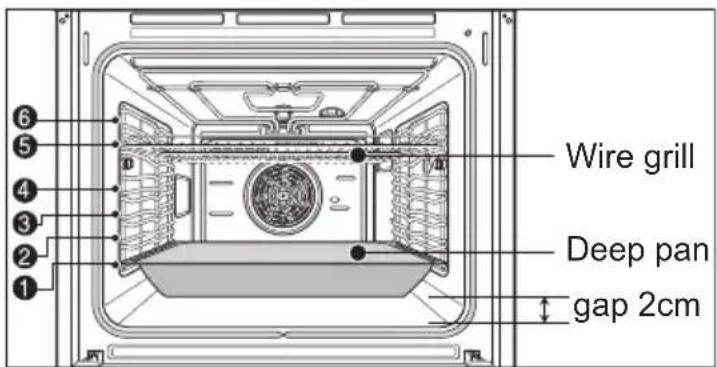
If you are using the wire grill in combination with the deep pan or the baking tray to catch dripping liquids or fat, then do not put the trays down on the bottom of the oven, slide them into the lower levels.
If you place trays on the oven floor, the resulting build-up of heat can damage the surface of the oven. For this reason, there must always be a minimum gap of 2 cm between the accessories and the oven floor.
Fitting the wire grill, baking tray and deep pan
Slide the tray or wire grill in at the desired level.
The oven levels are numbered from the bottom up to the top.
Using the rack
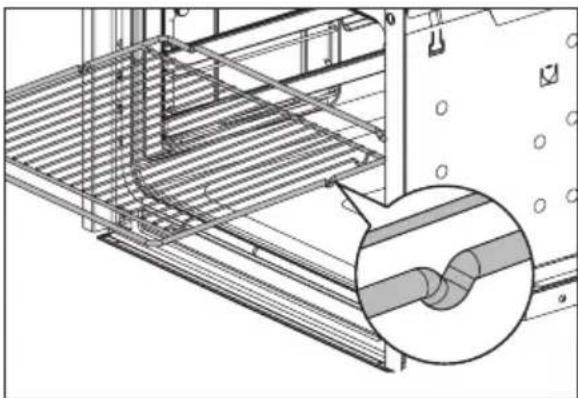
The racks are equipped with a mechanical safety lock which prevents them from being taken out accidentally.
To insert the rack correctly, check that the lock is facing downwards (as shown in the illustration on the right).
natural_image
Technical line drawing of a structural panel with an inset magnified detail showing a pipe fitting (no text or symbols)To take it out, lift the front edge of the rack slightly while sliding it out on the side runners.
The mechanical lock must always face the back of the oven.
TIP: Insert racks and trays fully into the oven until they come to a stop.
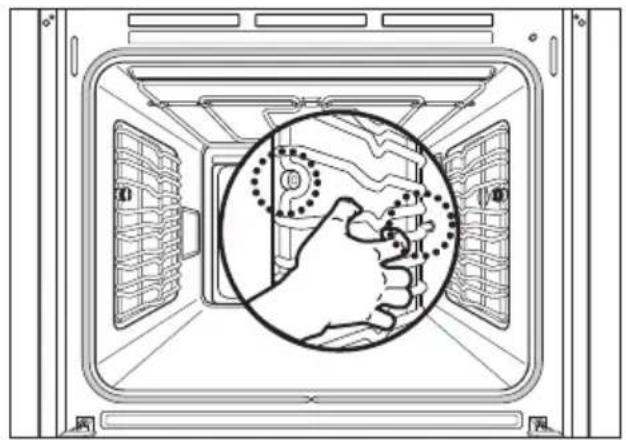
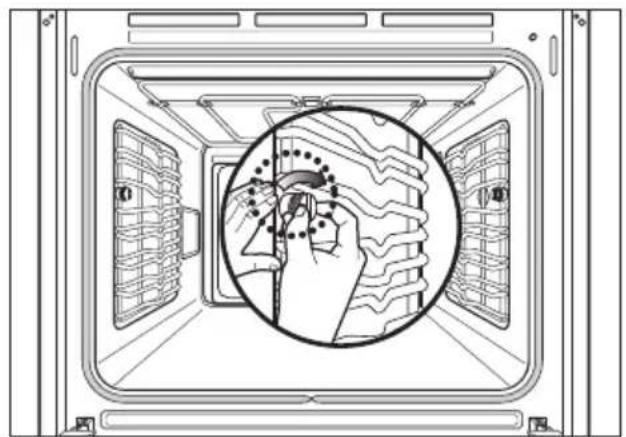
Attaching the side runners
When using the oven for the first time, attach the side runners as following procedures.
You can find the side runners in the accessory box.
- Put the inserting bar of the side runner into the hole
natural_image
Diagram of a hand gesture inside a server room, showing no text or symbols- Align the front recess with the front screw hole. Insert and fasten the screw in holder clockwise.
natural_image
Diagram of a hand holding a tool inside a server room, showing wiring patterns and control panel (no text or symbols)- Attach the opposite side in the same way.
Setting the time of day (For model:EA430S/EZ430S)
The oven cannot be used until the time of day is set.
When the appliance is connected for the first time or after a power failure, the time display flashes at "12:00".
Example: to set the current time of day to 13:30.
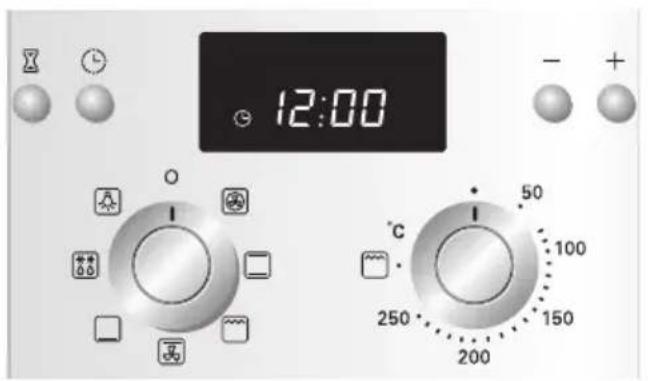
1 The time display flashes at "12:00" and the egg timer symbol will blink.
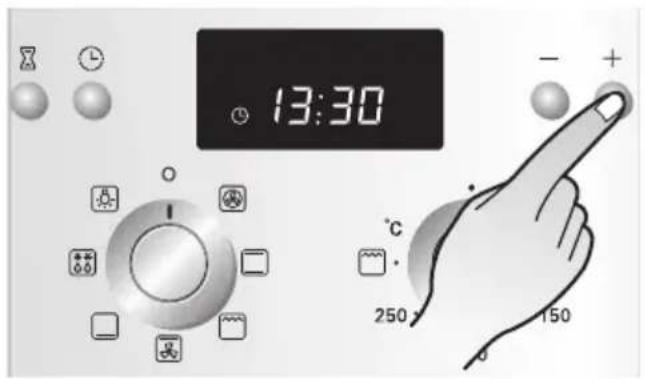
2 Press the button(−/+) to change the clock time (13:30, in the example). The time will be set after 4 seconds after the last press.
Initial cleaning
Clean the oven carefully before using it for the first time.
Important: Do not use any caustic or abrasive cleaners. These can damage the oven surfaces.
Appliance front
The models with a Stainless Steel finish on the front must be cleaned with standard detergents only. Wipe the front of the appliance with a slightly damp cloth.
Oven interior
- Take all accessories out of the oven and wash them with warm water and dishwashing liquid.
- Clean the oven interior in the same way, using warm water and dishwashing liquid.
- Allow the oven to dry.
Heating up
Before baking or roasting for the first time, the oven should be turned on and allowed to heat up (200\~250°C) with nothing in it. Then allow the oven to cool down thoroughly. New ovens have a unpleasant odours. Open the window and ensure there is adequate ventilation during this period.
- Ensure that the time of day is set correctly.
- Remove all accessories from the oven.
- Use Convection heat( ☐ ), or Fan grill( ☐ ) functions to heat the oven up.
- Leave the oven on for at least one hour.
Operating modes
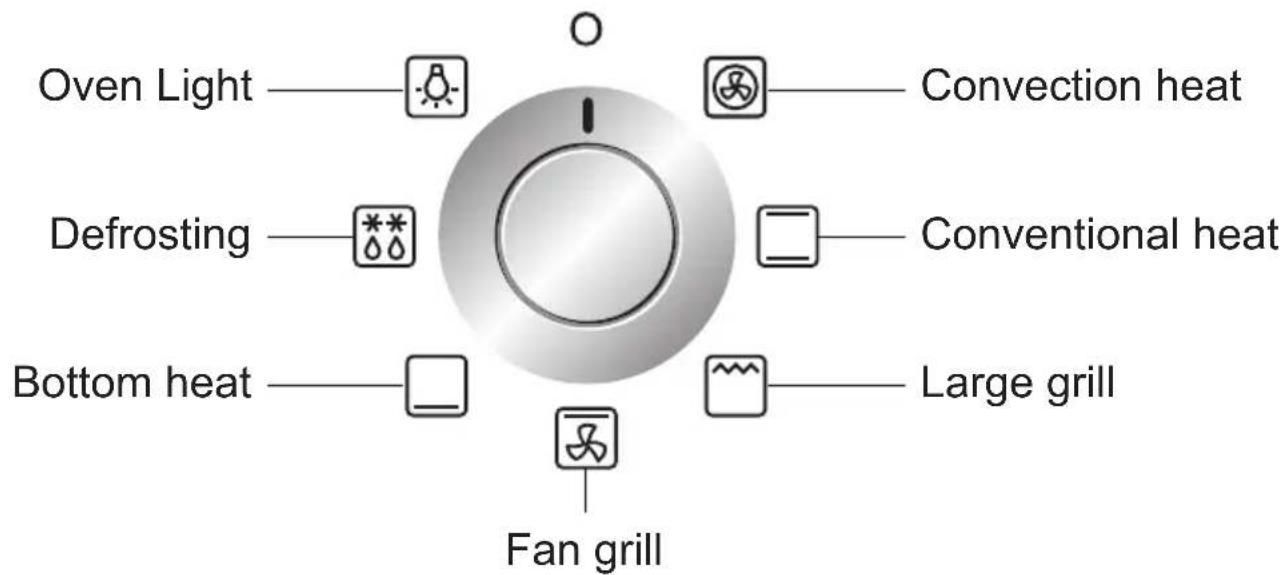
Description of operating modes
The individual operating modes differ in that they involve a combination of different heating elements. The various combinations are suitable for producing a variety of heated areas and Convection circulation paths in the oven, as required for the optimum preparation of various dishes.
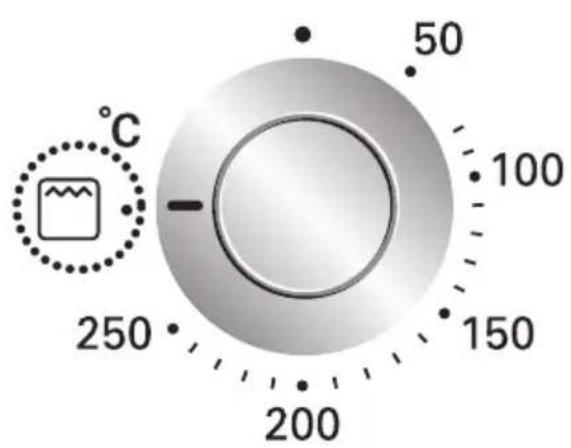
When using the grill function( ), turn the temperature dial to the grill mark. When using the defrost( ), there are no other settings available.
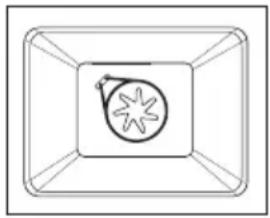
Convection heat
Convection heat mode uses only the heating element in the back wall and the convection fan. The recommended temperature is 150^ C.
It is also possible to bake on more than one level in Convection heat( ☐ ) mode. This means that it is suitable for fruit cakes and stirred cake or yeast-dough, for example a bread plait.
natural_image
Simple line drawing of a rectangular frame with a central circular emblem and a starburst symbol (no text or labels)Conventional heat
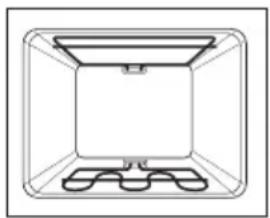
For Conventional heat, the heating elements above and below the oven cavity are used. This operating mode is suitable for baking cakes, baking with a short baking time, sensitive doughs and for roast beef and fillet of beef on the one level. The recommended temperature is 190^ C.
natural_image
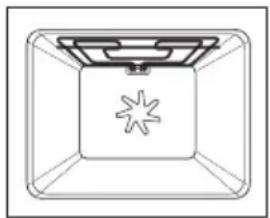
Simple line drawing of a 3D rectangular enclosure with a central tray and matching base (no text or symbols)Fan grill
In this mode, the grill element and the fan are on. The recommended temperature is 190^ C. This function is suitable for pizzas, quiche lorraine or cheesecakes.
natural_image
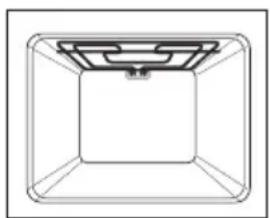
Simple line drawing of a rectangular container with a starburst pattern on the side (no text or symbols)Large grill
The large grill(☐) uses the entire heating element. When using this function, turn the temperature dial to the grill mark(☐). The large grill(☐) is suitable for cooking steaks, cutlets, fish or making toast, and when cooking larger quantities for browning or with a gratin topping.
natural_image
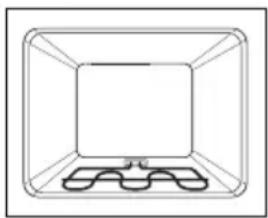
Simple line drawing of a rectangular frame with a central square and a top recess (no text or symbols)Bottom heat □
In bottom mode, only the heating element in the oven floor is used. The recommended temperature is 170^ C. This function is particularly suitable for finishing off cakes or pizzas on one of the lower oven levels.
natural_image
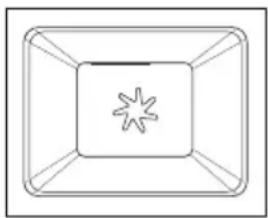
Simple line drawing of a rectangular container with internal compartments and a small inset showing a labeled section (no text or symbols)Defrost
In defrost mode, the fan is used without heating. The circulating air speeds up the defrosting process. Place the frozen food in a suitable container to trap the liquid produced during defrosting. Where
natural_image
Simple line drawing of a rectangular frame with a central star-like pattern (no text or symbols)appropriate, you can use the wire grill and the deep pan to avoid soiling the oven. If water is allowed to run out into the oven, the door seals will be contaminated and an unpleasant odour may result.
Switching the oven on
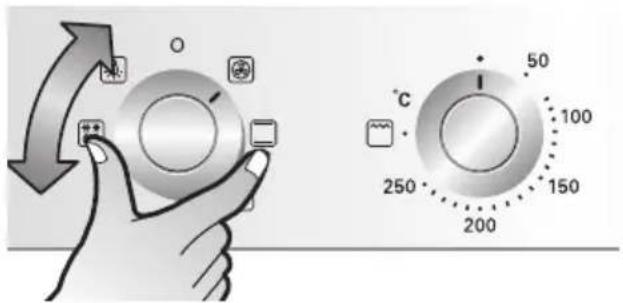
1 Select the desired mode with the Operating mode knob.
3 After setting the oven temperature, the oven will start immediately.
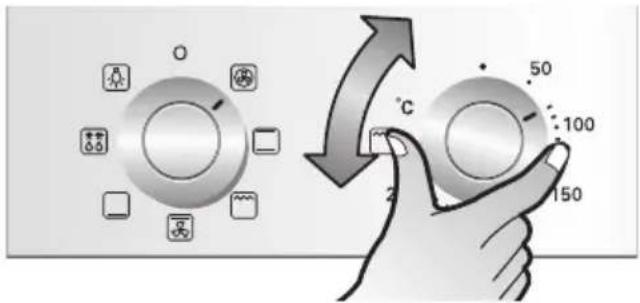
2 Select the desired oven temperature.
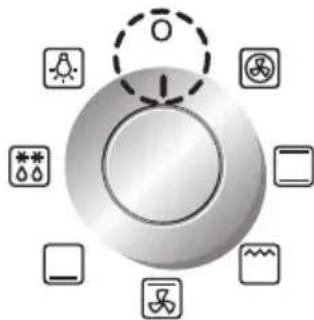
Switching the oven off
Set the Operating mode knob to "O" to switch the oven off.
Oven fan
When the oven is switched on, the fan is automatically activated to cool the oven surfaces. When the oven is switched off, the fan is also switched off.
Thermal cut-out
If the oven should overheat, the power supply to the heating elements is switched off so as to avoid any damage to the appliance, as the air circulation around the oven may be inadequate. As a safety precaution, it can only be reset by an authorised repairer. Should this occur, call the manufacturer.
Baking dishes
When using baking dishes, always ensure that the dish is suitable for use at the temperature inside the oven. The oven can operate at up to 250^ . Refer to the instructions provided by the manufacturer of the dish.
Indicator (For model:EA330S/EZ330S)
▶ Function Indicator Heating Indicator
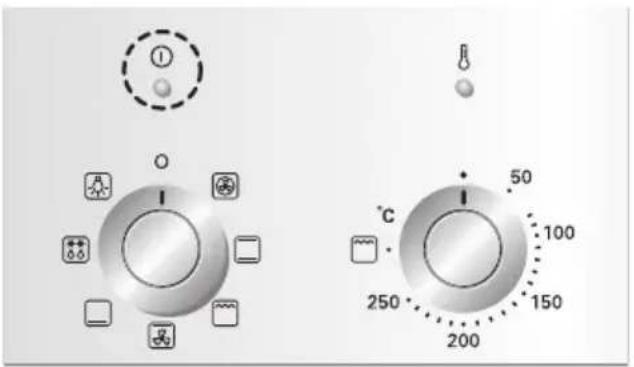
1 This indicator is turned on when a function is set.
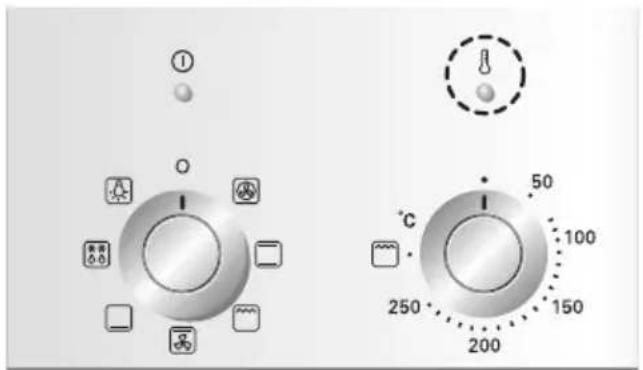
2 This indicator is turned on only if one or more heating elements are in operation.
Clock functions and symbols (For model:EA430S/EZ430S)
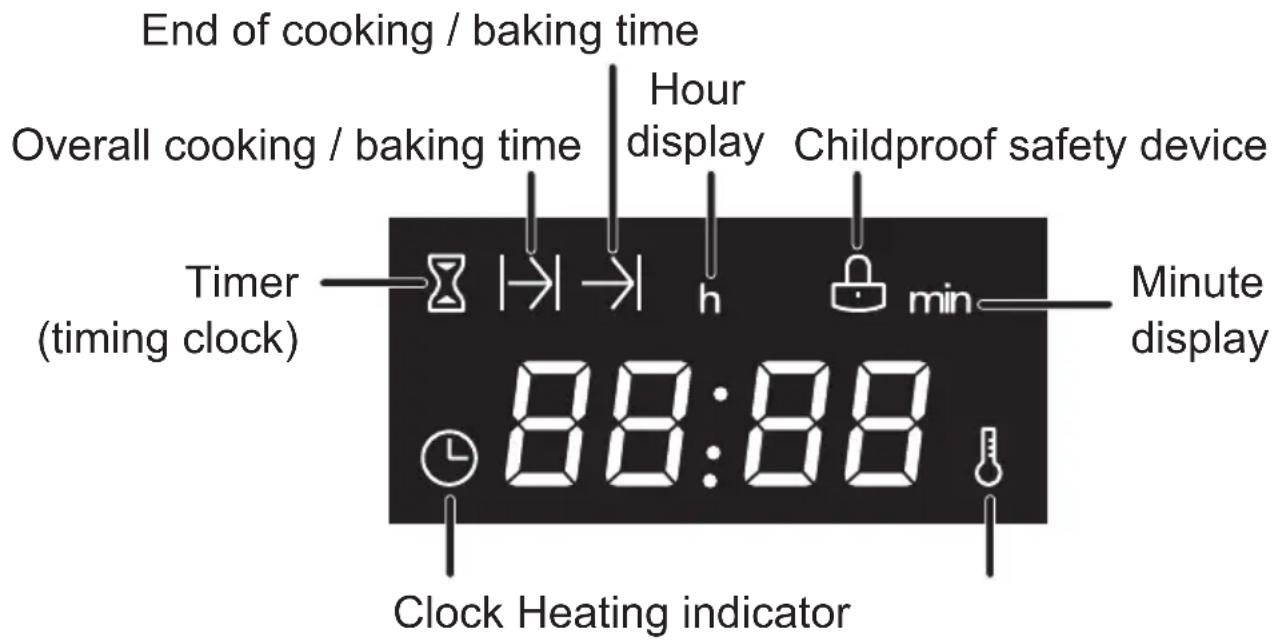

Timer
Lights up when the function timer is activated (e.g. like a minute minder when boiling eggs).

Overall cooking time
Lights up when the overall cooking time is being set or displayed. The oven switches off automatically after the cooking time set has expired.

End of cooking time
Lights up when the point in time set for the end of the cooking / baking time is set or displayed. The oven switches off automatically at the stipulated time.

Heating indicator
This indicator is turned on only if one or more heating elements are in operation.

Clock
Lights up when the time is being set, changed or displayed.
Setting the timers (For model:EA430S/EZ430S)
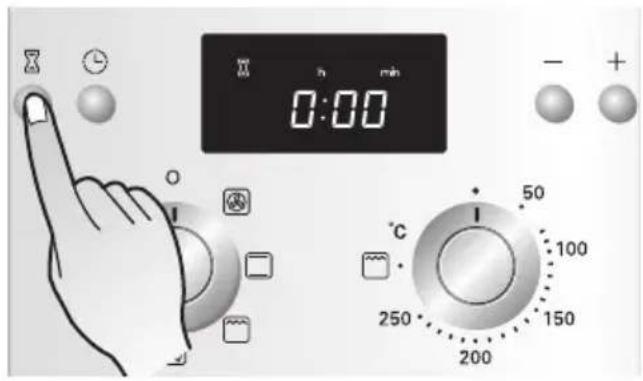
1 Press the timer( ☒ ) button.
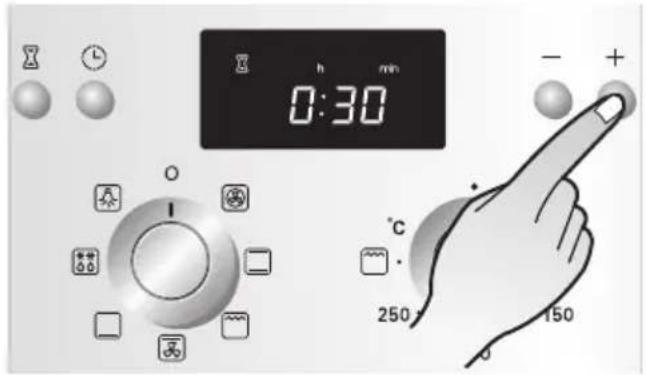
2 Set the desired time with the More/Less(−/+) buttons. (30min. in the example)
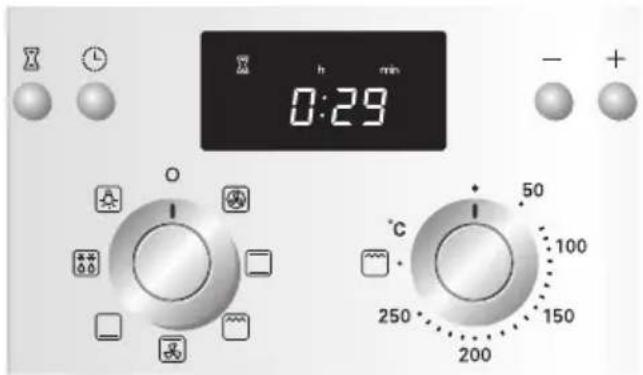
3 After 4 seconds, the time will be set. And you will hear a signal tone.
\* Switching off the signal tone
When the timer has expired, the signal tone will sound for a short period or until it is turned off. Press any button once to cancel the signal tone.
Programming the overall cooking / baking time (For model:EA430S/EZ430S)
The oven switches off automatically at the end of the period of time entered.
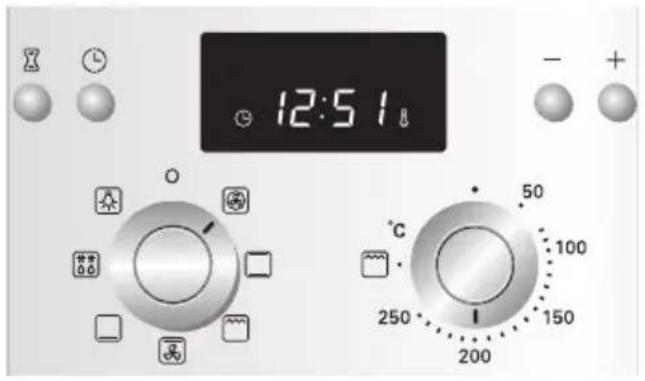
1 Select the desired operating mode and temperature.
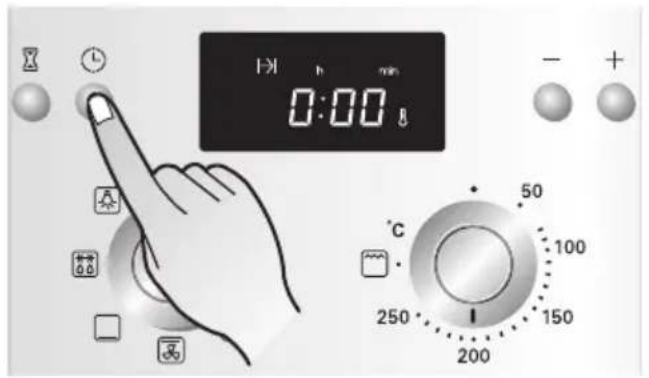
2 Press the Clock button( ⏻ ) once.
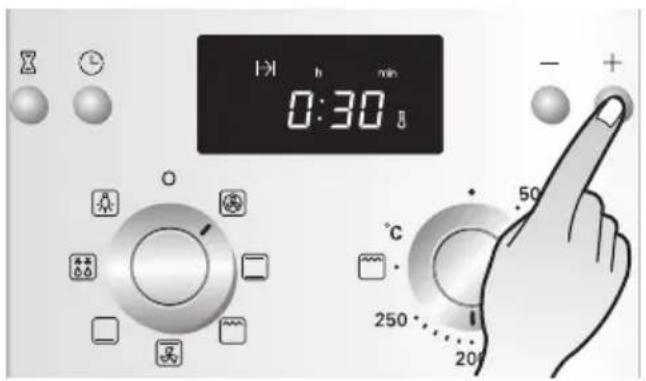
3 Set the desired overall cooking/baking time with the More/Less(-/+) buttons. (30min. in the example)
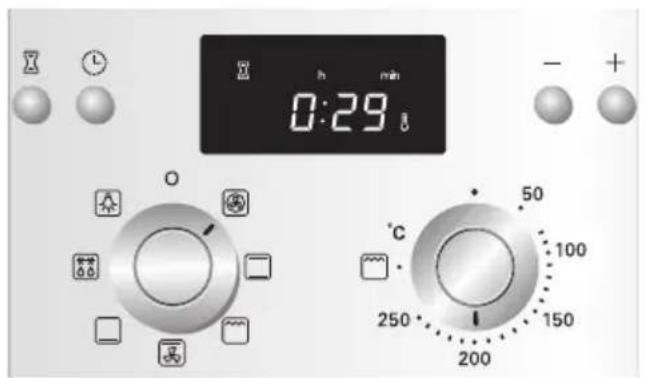
4 4 seconds after the last button press, the time will be set.
And you will hear a signal tone. Once this time has expired you will hear a beep sound, and the oven will switch off automatically.
Press any button once to cancel the audible sound.
Programming the end of cooking / baking time (For model:EA430S/EZ430S)
The oven switches off automatically at the time entered.
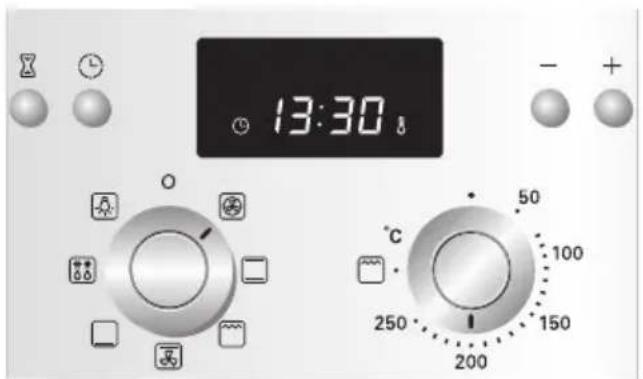
1 Select the desired operating mode and temperature.
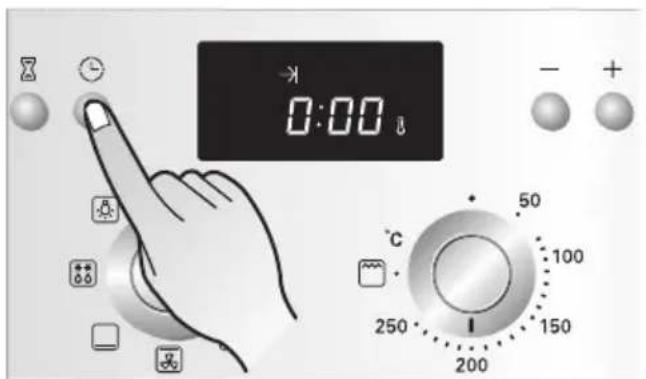
2 Press the Clock button( ⏱ ) twice.
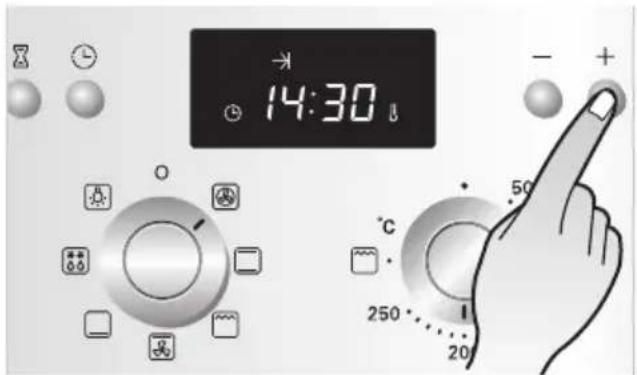
3 Set the desired end of cooking/baking time with the More/Less buttons.
(In the example, the current time is 13:30 and the dish is to be finished at 14:30)
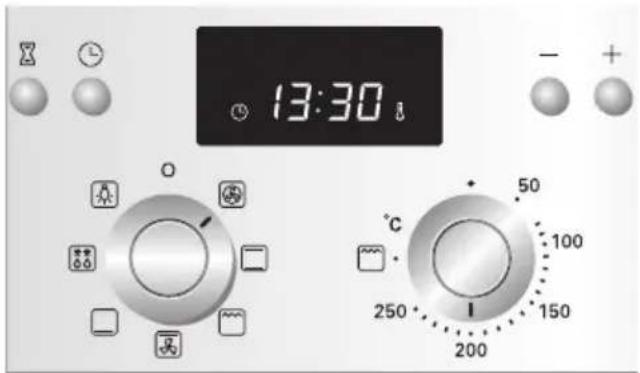
4 4 seconds after the last button press, the time will be set.
And you will hear a signal tone.
Once this time has expired you will hear a beep sound, and the oven will switch off automatically.
Press any button once to cancel the audible sound.
Combining overall cooking / baking time and end of cooking / baking time (For model:EA430S/EZ430S)
The overall and end of cooking time programmes can be combined to permit the oven to be switched on and off automatically.
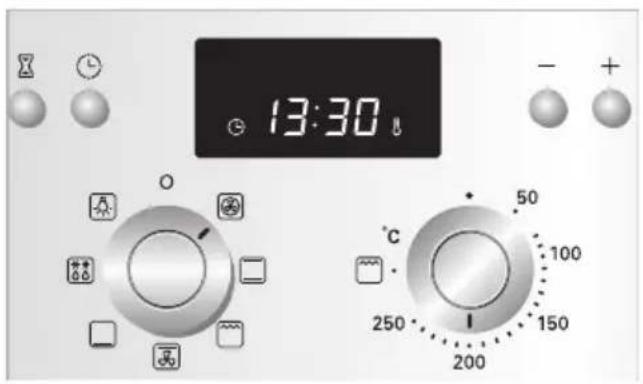
1 Select the desired operating mode and temperature.
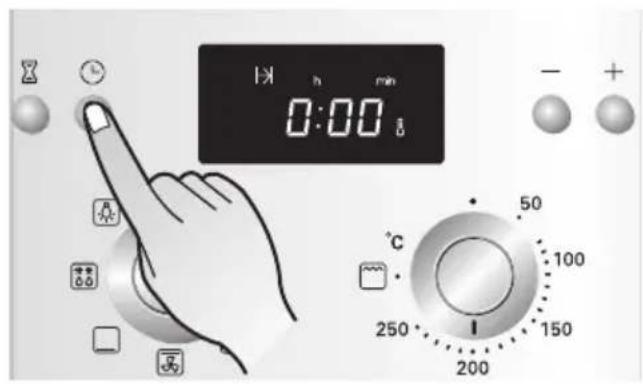
2 Press the Clock button( ⏻ ) once.
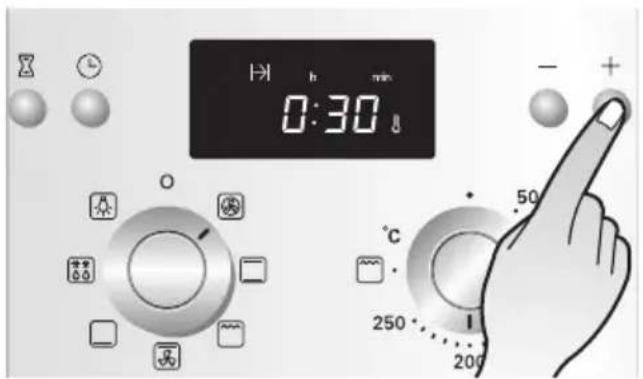
3 Set the desired overall cooking/baking time with the More/Less(-/+) buttons. (30min. in the example)
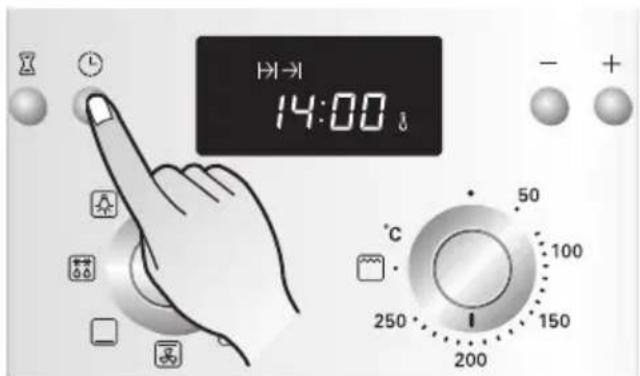
4 Now press the Clock button once to set the end of cooking before starting.
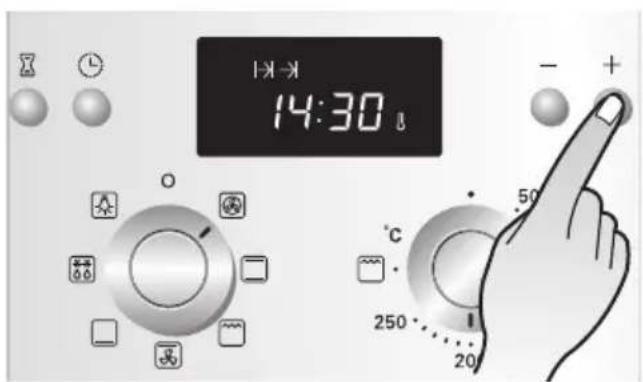
5 Set the desired end of cooking/baking time with the More/Less(-/+) buttons. (14:30, in the example)
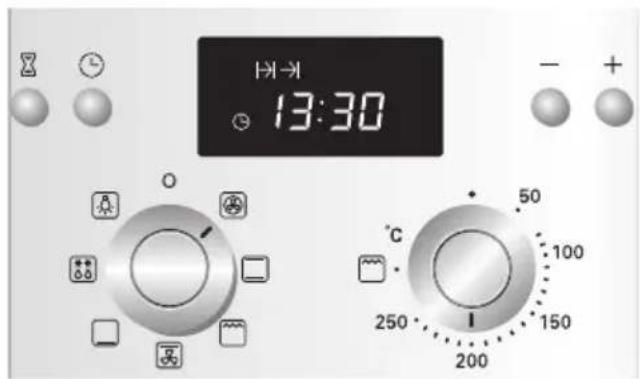
6 4 seconds after the last button press, the time will be set.
And you will hear a signal tone. 30 minutes before the end of cooking/baking time, the oven switches on automatically, at 14:00 in the example shown.
Once this time has expired you will hear a beep sound, and the oven will switch off automatically.
Press any button once to cancel the audible sound.
Setting the time of day (For model:EA430S/EZ430S)
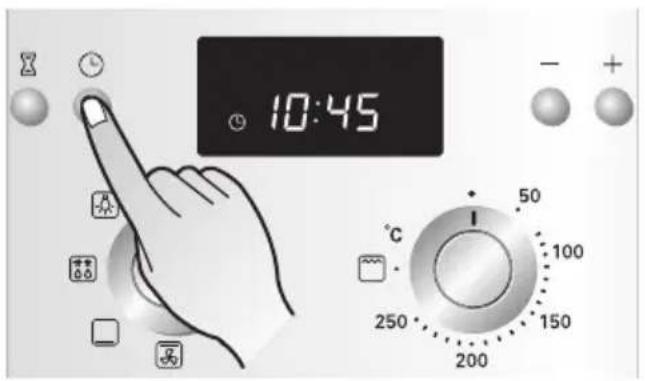
1 Press the Clock button( ⏱ ) 3 times.
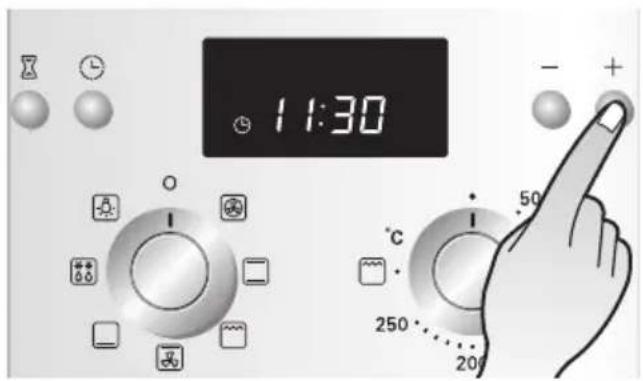
2 Set the current time with the More/Less(-/+) buttons. (11:30, in the example)
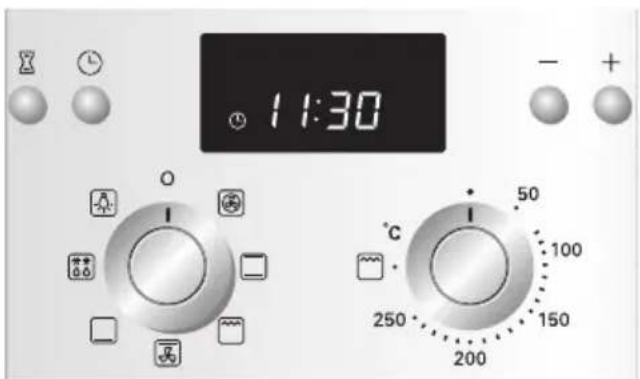
3 4 seconds after the last button press, the time will be set. And you will hear a signal tone.
Childproof safety device (For model:EA430S/EZ430S)
The childproof safety device prevents the oven from being switched on unintentionally.
- Press the Clock button ( ⏻ ). Hold it down for 4 seconds until the lock symbol( ⏱ ) appears in the display. The childproof safety device is now activated.
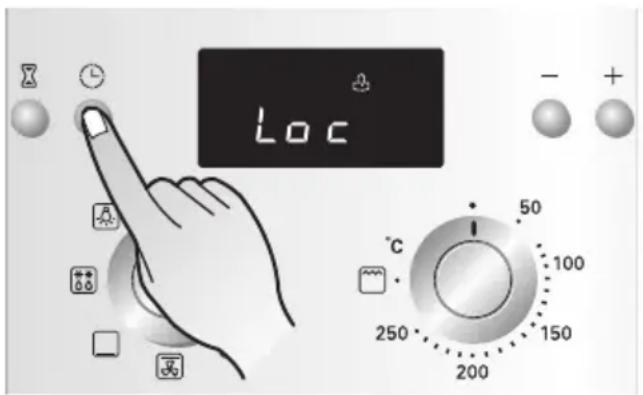
- To switch off the childproof safety device, press the Clock button ( ⏻ ) until the lock symbol( ⏱ ) is no longer displayed. The childproof safety device is now deactivated and the oven is ready for use.
General information
When baking, use the Convection heat( 🔒 ) or Conventional heat ( □ ) modes.
Baking tins
- When baking in Conventional heat(☐) modes, use baking tins with a dark metal or coated surface.
- When baking with Convection heat( ), you can also use baking tins with a bright metal surface.
• Always place cake tins in the middle of the tray or Wire grill. - When baking with Conventional heat(☐), you can place two
baking tins side by side in the oven. This means that the baking time is only slightly longer.
Oven levels
The oven levels are numbered from the bottom up.
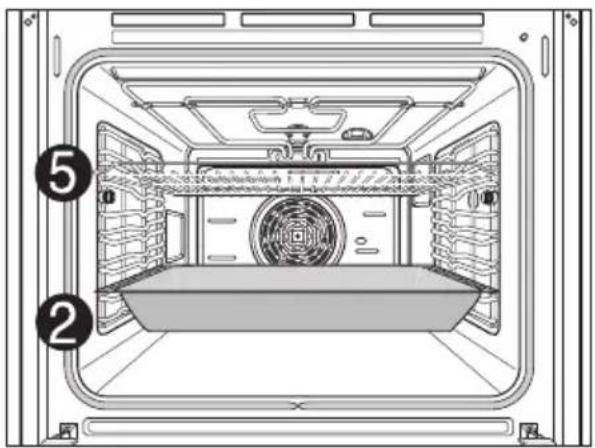
When cooking on multi-levels at the same time, accessories are properly fitted in the correct levels as below
Level 2 : Deep pan
Level 5 : Wire grill
(If you have a similar-sized tray)
Level 2 : Similar-sized tray
Level 5 : Deep pan
natural_image
Interior view of a vehicle cabin with numbered annotations (2 and 5) showing structural components and ventilation ducts (no text or symbols beyond labels)Using baking tables
The tables contain the temperature settings, baking times and Oven levels for a selection of typical dishes.
- Temperatures and baking times should be regarded as reference figures only. The actual values depend on the type of preparation, quality of ingredients and the baking tin in use.
- We recommend first selecting a lower temperature and then increasing it if necessary, for example if you want a higher degree of browning or the baking time is too long.
- If you cannot work out the settings for a specific recipe, simply use the settings for the most similar recipe.
- When baking cakes on baking trays or in tins on more than one level, the baking time may be extended by 10–15 minutes.
- Baking foods with a high moisture content (e.g. pizza, fruit cakes, etc.) should be baked on a single level only.
- With cakes and when baking with different layers of dough, uneven browning may take place initially. In this case, do not alter the temperature setting. The degree of browning will even itself out over the baking process.
- For energy saving, turn the oven off and use the residual heat for 8 minutes before cooking times finish.
Baking on a single oven level
| Operating mode | Convection heat | Conventional heat | Baking time | ||
| Recipe | Oven level | Temp. Oven Temp. in °C level in °C | For both types of baking, in hrs, mins. | ||
| Cakes in baking tins | |||||
| Ring-shaped pound cake | 2 | 150–160 | 2 | 160–180 | 0:50–1:10 |
| Biscuits / pancakes | 2 | 140–160 | 2 | 150–170 | 1:10–1:30 |
| Sponge finger | 2 | 150–160 | 2 | 160–180 | 0:25–0:40 |
| Flan base – shortcrust pastry | 3 | 170–180 | 2 | 190-210^1) | 0:10–0:25 |
| Flan base – cake mixture | 3 | 150–170 | 2 | 170–190 | 0:20–0:25 |
| Apple pie | 2 | 150–170 | 2 | 170–190 | 0:50–1:00 |
| Spicy cakes and flan base (e.g.quiche lorraine) | 2 | 160–180 | 2 | 190–210 | 0:30–1:10 |
| Cheesecake ^2) | 2 | 140–160 | 2 | 170–190 | 1:00–1:30 |
| Cakes on baking tray | |||||
| Bread plaits / larger cakes | 3 | 160–170 | 4 | 170–190 | 0:30–0:40 |
| Christmas stolen | 3 | 150-170^1) | 4 | 160-180^1) | 0:40–1:00 |
| Bread (rye bread) initially, then later | 2 | 180-200^1) 140–160 | 2 | 230^1) 160–180 | 0:200:30–1:00 |
| Pie / eclair | 3 | 160-170^1) | 4 | 190–210 | 0:15–0:30 |
| Swiss roll | 3 | 150-170^1) | 4 | 180-200^1) | 0:10–0:20 |
| Fruit cake with shortcrust pastry | 3 | 160-170^1) | 4 | 170-190^1) | 0:40–1:20 |
| Slices with topping / filling, e.g. quark, cream, sugar, almonds | - | - | 4 | 160-180^1) | 0:40-1:20 |
| Pizza (thick base) ^2) | 1 | 180-200 | 1 | 190-210^1) | 0:30-1:00 |
| Pizza (thin base) | 1 | 200-220 | 1 | 230^1) | 0:10-0:25 |
| Unleavened bread | 1 | 200-220 | 1 | 230^1) | 0:08-0:15 |
| Wähe (Swiss flan) | 1 | 180-200 | 1 | 210-230 | 0:35-0:50 |
| Biscuits | |||||
| Shortcrust biscuits | 3 | 150-160 | 4 | 170-190^1) | 0:06-0:20 |
| Iced biscuits | 3 | 140-150 | 4 | 160-180 | 0:10-0:40 |
| Cake mixture biscuits | 3 | 150-160 | 4 | 170-190 | 0:15-0:20 |
| Cakes and pastries with egg white,meringues | 3 | 80-100 | 4 | 100-120 | 2:00-2:30 |
| Macaroons | 3 | 100-120 | 4 | 120-140 | 0:30-0:60 |
| Yeast dough biscuits | 3 | 160-170 | 4 | 170-190 | 0:20-0:40 |
| Puff pastry cakes and pastries | 3 | 160-180^1) | 4 | 190-210^1) | 0:20-0:30 |
| Bread rolls | 3 | 180-200^1) | 4 | 180-220^1) | 0:20-0:35 |
1) Preheat the oven.
2) Use deep pan.
Always count Oven levels from the bottom up.
Table for strudel and baked dishes
| Conventional heat | Baking time in hrs,mins. | ||
| Oven level | Temp.in °C | ||
| Baked pasta | 1 | 180–200 | 0:45–1:00 |
| Lasagne | 1 | 180–200 | 0:25–0:40 |
| Baked vegetables | 1 | 200–2201) | 0:15–0:30 |
| Pizza baguette | 1 | 200–2201) | 0:15–0:30 |
| Soufflé | 1 | 180–200 | 0:15–0:30 |
| Fish pie | 1 | 180–200 | 0:30–1:00 |
| Stuffed vegetables | 1 | 180–200 | 0:30–1:00 |
1) Preheat the oven.
Always count Oven levels from the bottom up.
Baking tables for frozen ready –made dishes
| Dish | Oven level | Oven function | Temperature Time | |
| Frozen pizza | 3 | Conventional Heat | Follow instructions on pack. | Follow instructions on pack. |
| Baguettes | 3 | Conventional Heat | Follow instructions on pack. | Follow instructions on pack. |
| Fruit cake base | 3 | Conventional Heat | Follow instructions on pack. | Follow instructions on pack. |
| Chips | 3 | Convection Heat | 200 –220 °C | 15 –25 mins. |
Always count Oven levels from the bottom up.
Note: Turn chips 2 or 3 times during heating.
When heating frozen dishes, the baking tray may bend out of shape because of the great difference in the temperature of the frozen food and the oven.
Trays normally return to their original shape once they have cooled down.
Baking tips
| Results of baking | Possible cause Solution | |
| The cake base is too light | Wrong Oven level | Use a dark baking tin or put the cake one level lower down. |
| Cake collapses (turns lumpy, soggy) | Oven temperature too high | Set the temperature slightly lower. |
| Baking time too short | Set a longer baking time.The baking time cannot be reduced by setting a higher temperature. | |
| Mixture contains too much liquid | Use less liquid. Follow instructions for dough mixing times, especially when using kitchen appliances. | |
| Cakes are too dry | Oven temperature too low | Next time set a slightly higher temperature. |
| Baking time too long | Set a slightly shorter baking time. | |
| Cakes are browned unevenly | Baking temperature too high and baking time too short | Set a slightly lower baking temperature and a slightly higher baking time. |
| Mixture unevenly distributed | Distribute the mixture evenly over the baking tray/tin. | |
| Baking time too long | Temperature too low | Next time set a slightly higher temperature. |
You can use the Fan grill(图标) or Conventional heat(□) functions for roasting.
TIP:
- Use heat resistant dishes when roasting (follow manufacturer's instructions).
- Stainless steel roasting pans are only of limited use, as they reflect the heat to a very large extent.
- When using dishes with plastic handles, ensure that the handles are heat resistant (follow manufacturer's instructions).
- Large items for roasting or a number of items can be placed directly on the deep pan or on the wire grill above the deep pan (e.g. turkey, goose, 3\~4 chickens, 3\~4 knuckles of veal).
- Lean meat should be roasted in a roasting tray with a lid (e.g. veal, braised beef, deep frozen meat). This keeps the juices in the meat.
- For cooking crispy crusts or bacon, a casserole cooking pot that is oven safe with no lid should be used (e.g. minced meat, lamb, mutton, duck, knuckle of veal, chicken, poultry meat, roast beef, fillet of beef, game birds).
TIP:
- Clean the oven as soon as possible after use if you are roasting in an open-topped tin. It is easier to remove fat splashes when the oven is still warm.

CAUTION
- Allow the oven to cool down enough to ensure there is no risk of burning yourself.
The table contains the required temperatures, roasting times and Oven levels for various kinds of meat. The figures stated are approximate figures only.
- We recommend cooking meat and fish weighing over 1 kg in the oven.
- For lean meat and fish, use Conventional heat. For all other kinds of meat we recommend Fan grill(图标) mode.
- Add a little liquid to prevent roasting juices or fat from getting burned into the pan.
- Turn the food over after about half or two thirds of the cooking time.
TIP: For better roasting results, baste joints and poultry with their own juices a number of times during the roasting process.
Roasting Table
| Food | Oven level | Fan grill | Conventional heat | ||
| Temp. (°C)– (1) | Time (mins.) | Temp. (°C)– (1) | Time (mins.) | ||
| Beef (approx. 1kg) | 2^2) | 190 | 50~70 | 200 | 70~90 |
| Venison (approx. 1kg) | 2^2) | 180 | 75~100 | 200~240 | 100~120 |
| Leg of lamb (approx. 2kg) | 2 | 180 | 110~130 | 200 | 150 |
| Poultry (approx. 1kg) | 2^2) | 210 | 50~60 | 200~220 | 70~90 |
| Poultry (approx. 2kg) | 2 | 200 | 60~80 | 200~220 | 110~120 |
| Stuffed | 2 | 180~190 | 100~120 | 200~220 | 110~140 |
| Poultry (approx.4kg) | 2 | 180~190 | 120~140 | 190~210 | 130~150 |
| Whole fish (approx.1.5kg) | 2^2) | 160~180 | 35~55 | 200~220 | 35~55 |
This table is intended as a guide only, individual tastes and cuts of meat will vary.
1) If pot roasting set the temperature 20^ C higher.
2) Use the 4th level from the bottom when using Conventional heat.
For grilling, you have a choice of 2 different operating modes.
Large grill
For larger quantities of flat food for grilling, for top-baking in large tins.
Fan grill
For grilling larges pieces of meat or poultry, such as rolled roast or turkey.
Note: When grilling, the oven door must be kept closed at all times. As a basic principle, the oven should be preheated for 3 minutes!
Grilling dishes
Use the deep pan for grilling. Use the wire grill for making toast. To catch dripping liquids, slide the deep pan in at Level 1 or 2.
Oven levels
Use levels 5 or 6 for grilling flat pieces of meat.

CAUTION
- Exposed parts of the oven can become hot during grilling. Keep children at a distance.
Using the grilling table
The grilling times are intended as approximate values only. The actual times may vary depending on the quality of the actual meat or fish.
Grilling is particularly suitable for cooking flat pieces of meat and fish.
Turn the grilled food over about halfway through the cooking time.
Grilling table
| Food for grilling Oven level | Grilling time | |
| 1st side 2nd side | ||
| Rissoles | 5 | 8–10 mins. |
| Grilling sausages | 5 | 8–10 mins. |
| Beef or veal steaks | 5 | 6–7 mins. |
| Fillet of beef(1 kg approx.) | 4 | 10–12 mins. |
| Toast ^1) | 4 | 2–3 mins. |
| Toast with topping | 4 | 6–8 mins. |
1) Wire grill or deep pan Always count the Oven levels from the bottom up.
Use the “Defrost( ^** )” operating mode to defrost food.
Defrosting dishes
- Remove the dish from its packaging, put it on a plate and place the plate on the wire grill.
- Do not cover the dish with a plate or bowl, as this can considerably extend the defrosting time.
- Do not use the liquid produced during defrosting for cooking the dish as there may be a risk of salmonella. Ensure that the liquid produced during defrosting is free to run off the food onto the plate or a baking pan if using the wire grill.
Oven levels
- For defrosting, use the wire grill on Level 1, or Level 2 for larger dishes.
Defrosting table
The following table contains reference values for defrosting.
| Dish Defrosting time Comments (mins.) | ||
| Chicken, 1000 g | 100–140 | Use the wire grill with the deep pan. Turn the chicken over when it has reached half of the cooking time. |
| Meat, 1000 g | 100–140 | Turn the meat over when it has reached half of the cooking time. |
| Meat, 500 g | 90–120 | Turn the meat over when it has reached half of the cooking time. |
| Trout, 150 g | 23–35 | Do not cover. |
| Strawberries, 300 g | 20–30 | Do not cover. |

CAUTION
- Switch the oven off before cleaning and allow to cool.
Outside
Wipe the front of the appliance with a soft cloth using a mild non abrasive detergent.
- Do not use any caustic or abrasive cleaning materials.
- For aluminium front panels use a mild window cleaner and for stainless steel front panels use the corresponding cleaner for stainless steel.
Oven interior
Note!
Clean the appliance after use, as soon as it has cooled down. This makes it easier to remove any deposits reducing the chance of them being burnt in.
- Switch the oven light on.
- Wipe down the oven with water and dishwashing liquid. Allow to dry. Do not use any abrasive cleaners.
- Remove persistent deposits with a special oven cleaning product.
Important: When using a spray-on cleaner, it is essential to follow the manufacturer's instructions!
Do not clean the door seal by hand.
Accessories
Clean the accessories (wire grill, deep pan, etc.) after use and allow to fully dry. If necessary, treat in advance to soften deposits.
Cleaning by hand
Note: Allow the oven to cool down before cleaning. Danger of burning!
The oven and accessories should be cleaned after each use. Otherwise cleaning the next time will become more difficult and in extreme cases impossible!
Cleaning at high temperatures: (this may only remove minor fatty deposits):
- Remove all accessories (deep pan, wire grill) from the cavity.
- Turn the oven selector to CONVECTION.
- Turn the temperature selector to the highest setting.
Run the oven for approx. 1 hour. The length of time will depend on the level of soiling. Most remaining soiling will gradually disappear with each subsequent use of the oven at high temperatures, provided they are not locked-in stains.
It is a good idea to set the finish time for the process using the timer. This way you will not forget to switch the oven off at the end.
Risk of electric shock!
- Switch the oven off before replacing bulbs.
- Disconnect the appliance from the electricity supply by unplugging the power lead, or remove the fuse or turn off the circuit breaker from the house fuse box.
Note: To protect the bulbs and glass cover, a soft cloth should be placed on the oven floor.
Replacing the oven light / cleaning the glass cover
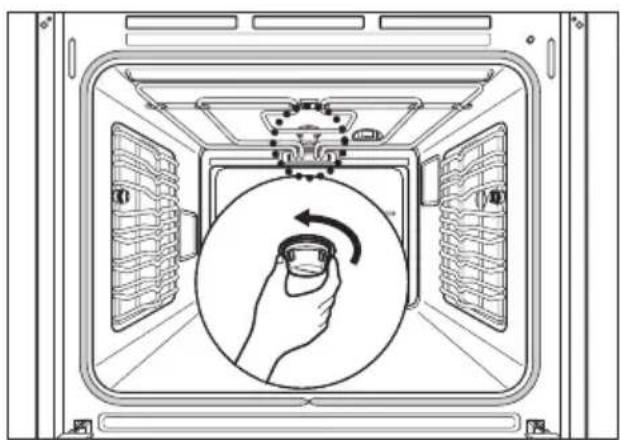
Step. 1
Unscrew the lamp cover by turning anti-clockwise.
natural_image
Diagram of a washing machine interior showing hand placement inside the chamber with no text or symbolsStep. 2
Replace the oven lamp.
(Type E14, 230V, 25W, heatproof to 300°C)
Note: Always use a cloth to take hold of the lamp and lamp cover to avoid it burning in fatty deposits.
Step. 3
Refit the glass cover.
Note: Make sure that all parts are correctly in place.
Removing the oven door
Step. 1
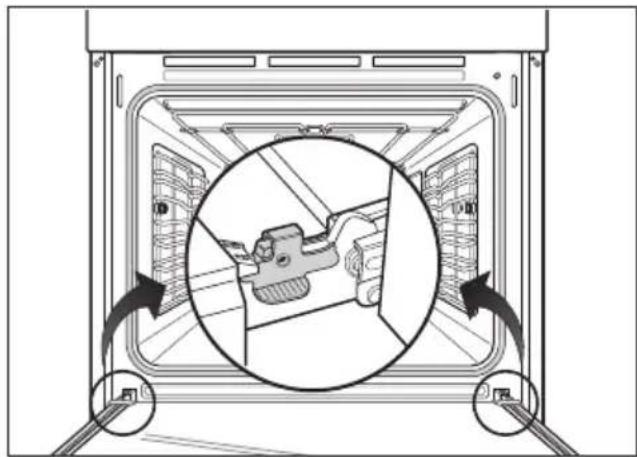
To remove the oven door for easier cleaning, open the door fully.
natural_image
Diagram of a refrigerator interior showing internal components and directional arrows (no text or symbols)Step. 2
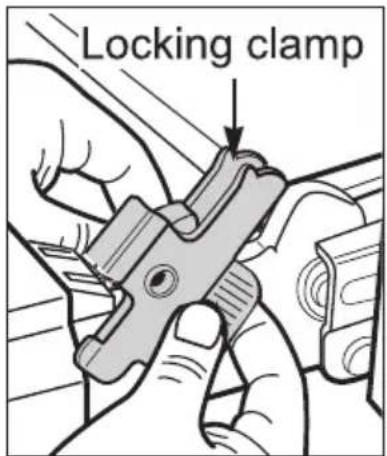
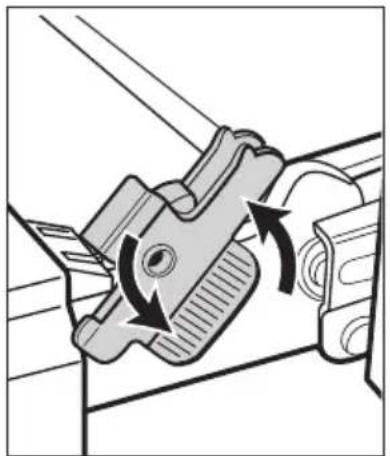
To release the locking clamps on the hinges turn inner area of clamps upwards and outer area of them downwards as illustrated.
natural_image
Mechanical component diagram showing a clamping mechanism with rotational arrows (no text or symbols)Step. 3
Then lift the door upwards as far as it will go.
Note : Do not attempt to take the door off the hinge guides when it is in a horizontal position. The guides will close, and damage the appliance.
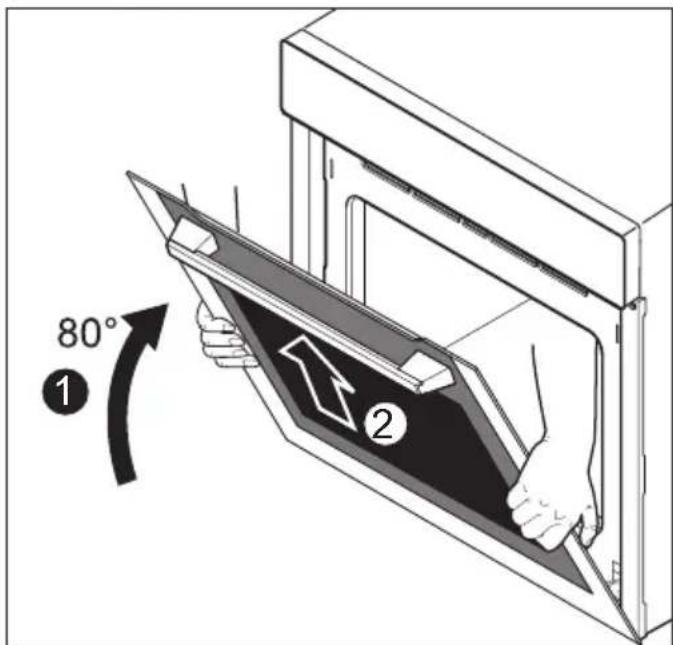
Step. 4
Hold the door securely at both sides and lift upwards off the hinge guides.
Rehanging the oven door
Step.1
Hold the door securely at both sides and carefully fit it back onto the hinge guides.
Note : Make sure that the door goes back on straight.
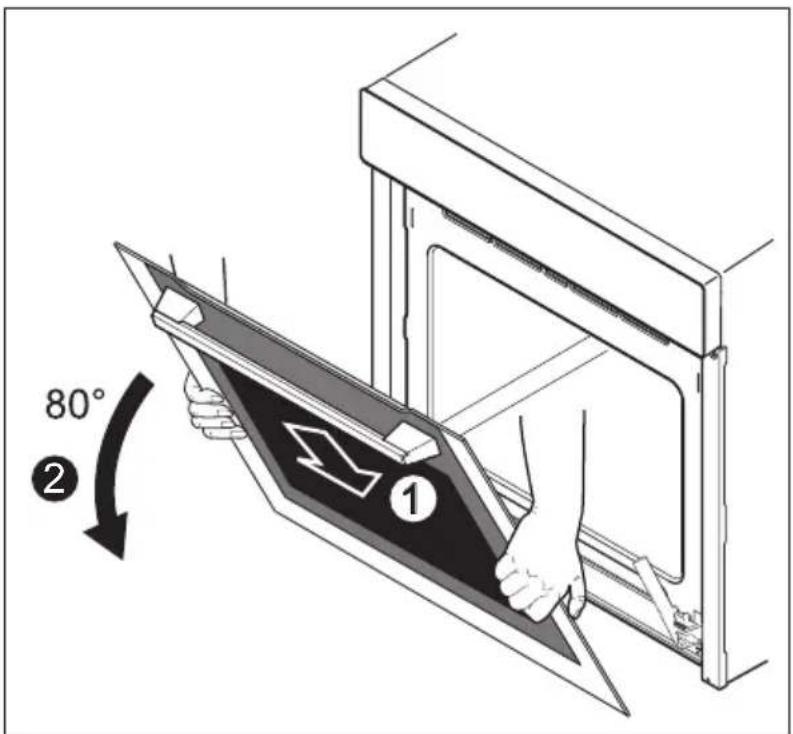
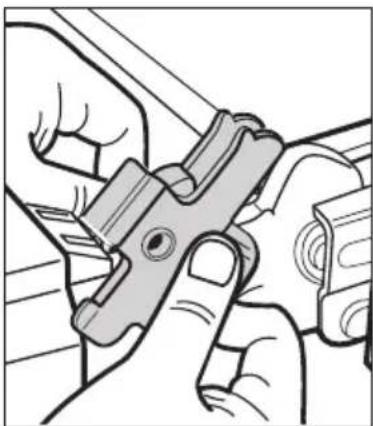
Step.2
Turn inner area of clamps downwards and outer area of them upwards as far as they will go into a horizontal position. Make sure that the notches on the locking clamps hook into the slots on the door as illustrated.
natural_image
Illustration of hands using a tool to adjust or clamp a metal clamp (no text or symbols visible)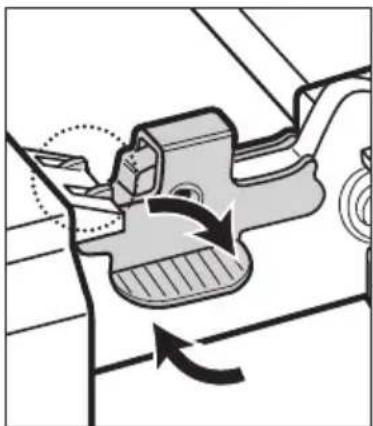
natural_image
Mechanical component diagram showing a rotating mechanism with arrows indicating motion (no text or symbols)Dismantling the oven door
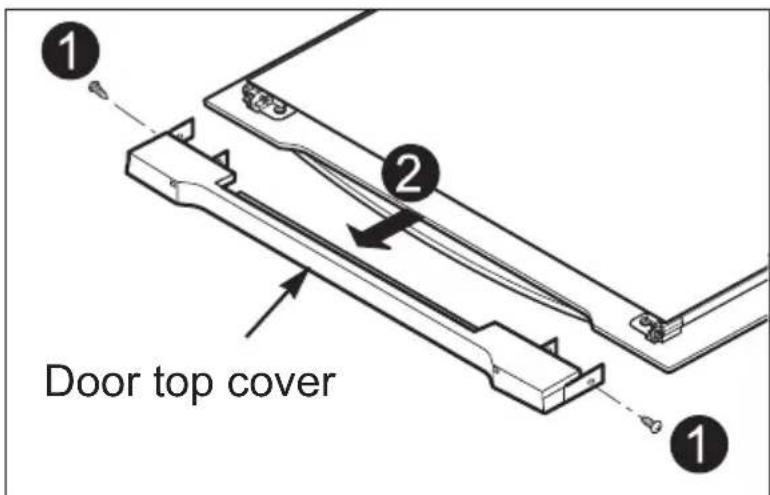
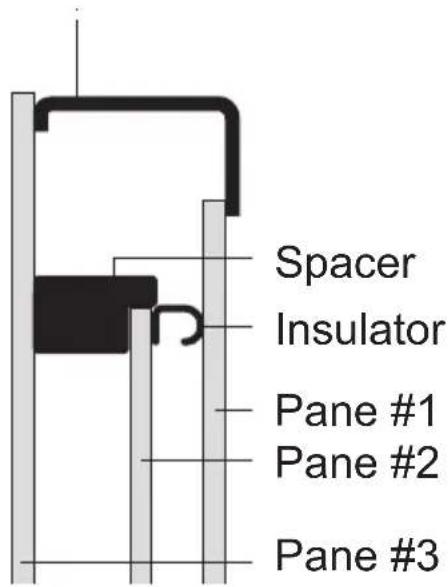
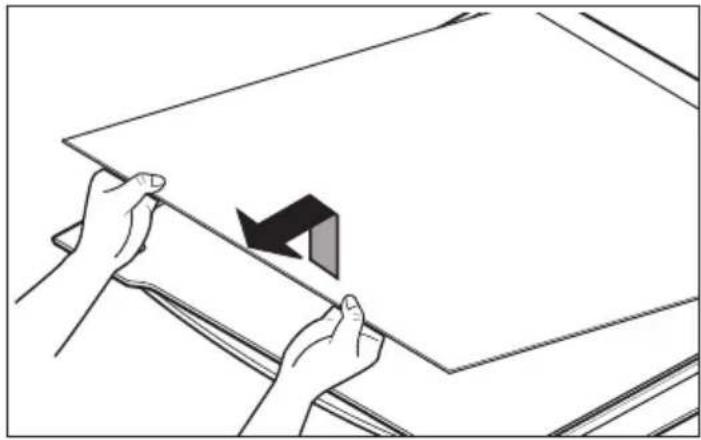
The oven door is fitted with three glass panels, mounted one behind the other. The inner glass panels can be removed for cleaning.
Note : The following steps must be performed only after the oven door has been removed after it has cooled down. Place the door on a soft and even surface with the handle facing down to protect it from breakage and to prevent it getting scratched.
Step. 1
Remove the two screws at the right and left-hand side of the door and pull the top cover above the glass panels forward.
Step. 2
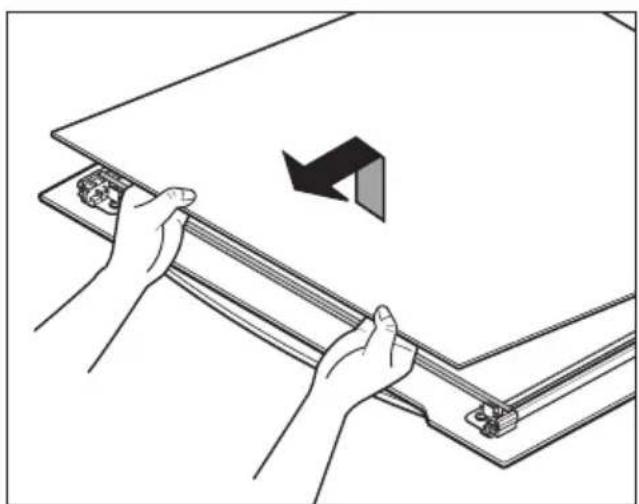
Lift the innermost pane up and out from the door carefully. Then remove the insulator.
natural_image
Illustration of hands installing or adjusting a metal frame with a directional arrow (no text or symbols)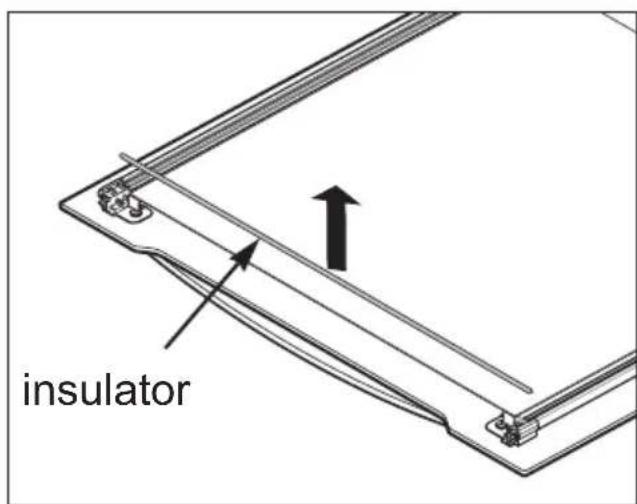
Step. 3
Lift the second pane up and out. Then remove the spacer from the Door.
Note : Spacers are located next to the mount bracket to keep the Individual door panels in position.
Handle them very carefully to avoid the risk of breakage.
Door top cover
natural_image
Illustration of hands holding a blank sheet with a black arrow indicating a folding or movement (no text or symbols)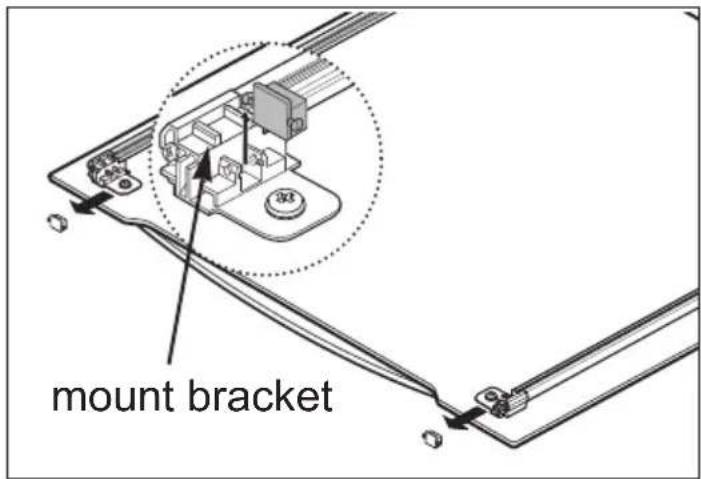
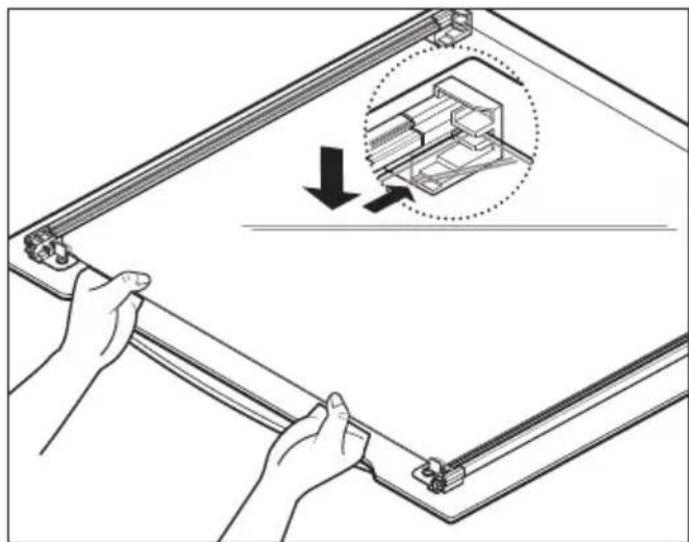
Refitting the glass panels
Step. 1
Refit the spacer and the second pane carefully.
Step. 2
Refit the insulator and the black printed pane. The print should face in towards the middle pane.
Note : Individual panes must be located correctly in their retainers.
Step. 3
Finally replace the top cover and secure it by screwing onto the door.
natural_image
Illustration of hands holding a metal frame with an inset showing a mechanical component (no text or symbols)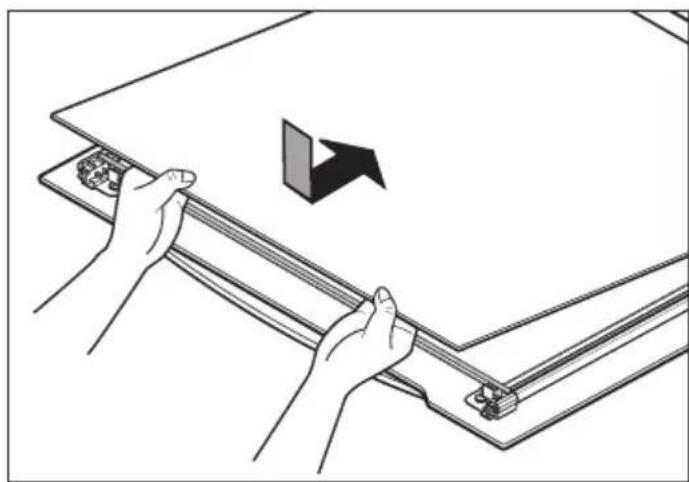
natural_image
Illustration of hands holding a mechanical component with an arrow indicating direction (no text or symbols)Note : Clean the glass panels with a mild detergent. Do not use harsh abrasive cleaners or sharp metal scrapers to clean the oven door glass since they can scratch the surface, which may result in shattering of the glass.
Troubleshooting
| Fault Possible cause Solution | ||
| The oven does not heat up. | The oven is not switched on. | Switch the oven on. |
| The clock is not set. | Set the clock. | |
| The required settings have not been set. | Check the settings. | |
| Fault in the mains power supply. The protective circuit breaker or the fuses have been tripped. | Check the fuse and the circuit breaker If the fault reoccurs, consult a qualified electrician. | |
| The oven does not heat up even after function and temperature are set. | Overall & End of cooking time were set to start cooking at a later time. | Cancel the settings or set them again. |
| Time display in the Electronic clock flashes. | There has been a power failure. | Set the current time on the clock display. |
| The oven lighting is not operating. | The oven bulb is faulty. | Change the oven bulb. See “Oven light” for details. |
If the fault cannot be rectified by the above measures, contact the LG service center
Note! If faulty, the appliance must not be used. If a fault occurs, the appliance must be isolated by removing the mains plug or switched off by removing the fuse or turning off the circuit breaker in the house fuse box.
The appliance must only be repaired by a specially trained and qualified electrical professional. Repairs carried out improperly may result in considerable damage.

CAUTION
- Repairs to the appliance must be carried out by a specially licensed technician only! Considerable danger may result from incorrect repairs.
- Do not use the appliance if damaged. In the event of a fault or failure, switch off at the mains. In the event of a fault, visits by technicians from Customer Service or dealers may not be covered by the warranty, if the cause of failure is the result of abnormal customer use.
Mains connection 220-240 V\~50 Hz
MAX power consumption 3000 watt
Oven installation dimensions
Height min. 600
Width min. 560
Depth min. 556
Oven interior dimensions (mm)
- Usable capacity
Height x width x depth 335 x 484 x 420
Volume (usable capacity) 69L
- Overall capacity
Height x width x depth 351 x 484 x 451
Volume 80L
Important: installation should be undertaken by a qualified professional electrician only.
The oven must be installed in compliance with the manufacturer's instructions.
Safety instructions for the installer
- During installation, ensure that no persons can come into contact with live components.
- The housing in which the oven is installed must comply with the stability requirements of the DIN 68930 standard.
- The oven must be installed by a qualified professional electrician, in accordance with the corresponding regulations and standards.
- The oven is a heavy appliance and must be transported with great care.
- Before initial use, remove all packaging, both external and from inside the appliance.
- No modification may be made to the oven's technical characteristics.
- The integrated cooking area or hotplates is/are provided with special connections. These may only be attached to the appropriate corresponding connections of the same type.
Customer service & spare parts
If you require spare parts or a technician, contact your local LG Customer Service Centre.
Your call will be automatically passed on to the Customer Service Centre responsible for your post code area. You can find the address of your local Customer Service Centre and other information for customers on the Internet at www.lge.com Please ensure you have the following details to hand:
- Your name and address, including your post code.
- Your telephone number.
- Exact details of the nature of the problem.
- The model, series and serial number. These details are found on the rating plate located at the left-hand inner edge of the oven door.
- Your dated receipt of purchase. Please note that proof of purchase is required for any warranty claim. Before requesting a warranty claim, please ensure that you have read through the section on “Troubleshooting”. There will be a charge for any inspection carried out by a technician if it should transpire that there is no mechanical or electrical fault present in the appliance.
Customer Service
For general queries on LG appliances or further details of LG products, please contact our Customer Service Centre in writing or by telephone or visit our website at www.lgservice.com

LG
Life's Good
FOR CUSTOMER SERVICE PLEASE CONTACT LG Service on
1300 LG CARE (1300 54 2273) AUSTRALIA or
0800 LG CARE (0800 54 2273) NEW ZEALAND
www.lg.com
LG Electronics Australia 2 Wonderland Drive Eastern Creek NSW 2766 (ABN: 98 064 531 264)